

Page 1
P1 P2 Fault
IPS-1080A
3
4
10/100TX
1
2
7
8
5
6
Practical Operation
QIG
Quick InstallationGuide
IPS-1080A
IPS-1080A
Version 1.0
Quick Installation Guide
ORing Industrial Networking Corp.
Features
IPS-1080A
IPS-1080A
IPS-1080A
is slim type unmanagedPoE Ethernet switch with P.S.E.function.
supports Power over Ethernet, a systemto transmit electricalpower,
along withdata, to remotedevices over standardtwisted-pair cable in an Ethernet
network. switch has 8X10/100Base-T(X) P.S.E. (Power Sourcing
Equipment) ports. P.S.E. is a device (switch or hub for instance) that will provide
power in a PoE setup. The wide operating temperature range from -40 C to 70 C
can satisfymost of operatingenvironment. Therefore, theswitch is oneof the most
reliable choicesfor PoE Ethernetapplication.
oo
Introduction Specifications
IPS-1080A can be usedin connecting severalEthernet devices like Ethernet I/O, IP-
Camera or other Ethernet switches. In addition, there are two r power
inputs at terminal block to avoid interruption caused by power down. When the
primary DC power input fails, the backup power input willtake over immediatelyto
guarantee anon-stop operation.
edundant
Industrial Unmanaged PoE Switch
Provide 8x10/100Base-T(X)PoE (P.S.E.)ports
Supports IEEE802.3at compliant PoEand total powerbudget is 120Wattswith
maximum 30Wattsper port
Support auto-negotiationand auto-MDI/MDI-X
Support storeand forward transmission
Support flowcontrol
Support surgeprotection technology
Warningsystem by relay output
Slim typerigid IP-30 housingdesign
DIN-Rail andwall mounting enabled
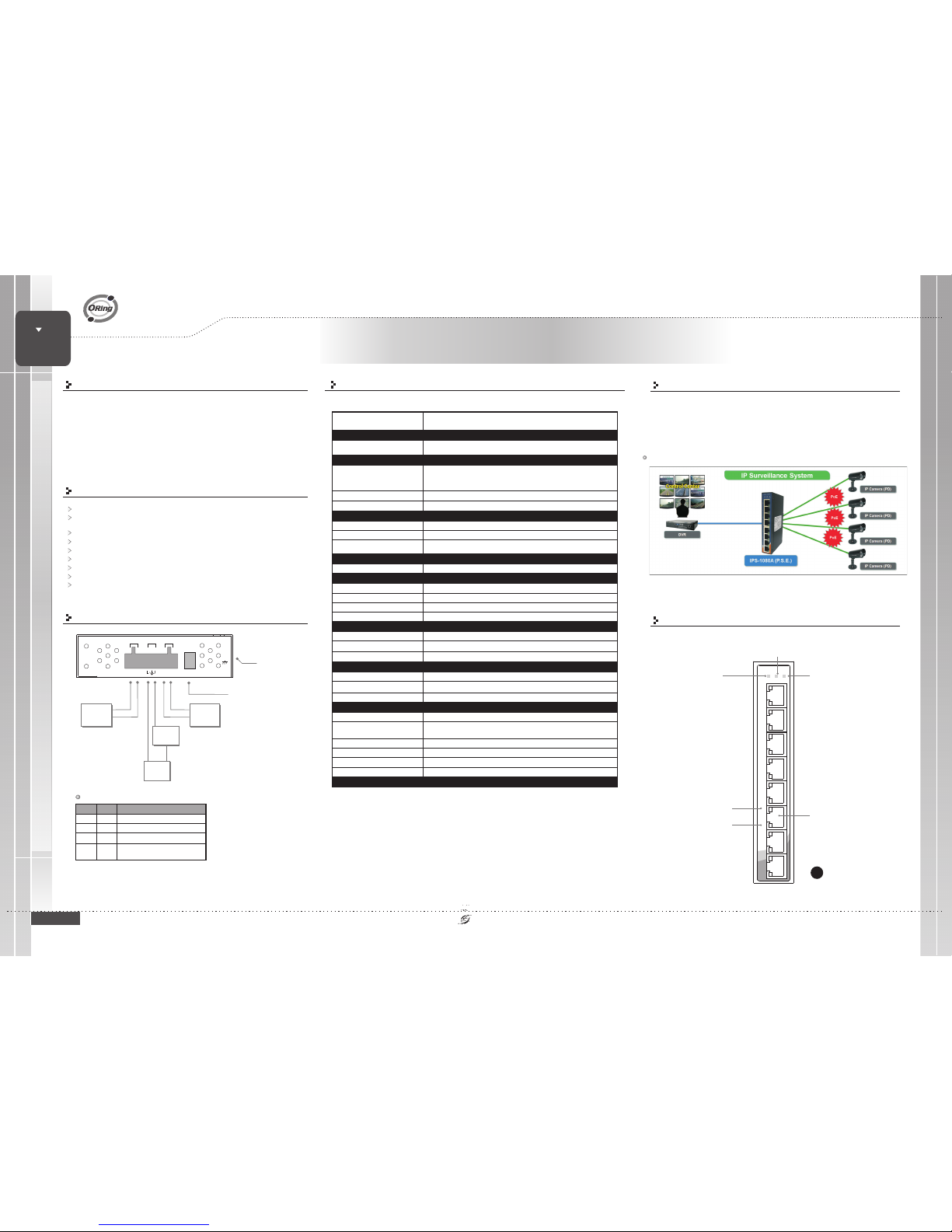
Power Connection Guide
Frame Ground
PWR-1PWR-2
V2-V2+ V1-V1+
G
1A@24V DC 50-57V
Power
Supply
50 VDC
V+
V-
Warning
Device
GND+24V
V+
V-
DIP Switch Select for
PowerAlarm Relay Output
Power
Supply
50 VDC
Power
Supply
DIP-2
OFF
OFF
ON
DIP-1
Power failurerelay alarm disabled
PWR-1 failure, alarm enabledrelay
PWR-2 failure, alarm enabledrelay
DIP Switch Function
OFF
ON
OFF
Description
Front Panel
A
ON
PWR-1 orPWR-2 failure,
alarm enabledrelay
ON
1907-2-29-IPS1080A-0
Connections ofEthernet devices
PRINTED ON RECYCLED PAPER
ORing SwitchModel
Physical Ports
Technology
EthernetStandards
LED Indicators
Green:Power LED x2Powerindicator
10/100 Base-T(X)Ports inRJ45
Auto MDI/MDIXwith P.S.E.
8
IEEE 802.3for 10Base-T
IEEE 802.3ufor 100Base-TX
IEEE 802.3xfor Flow control
IEEE 802.3atPoE specification(up to 30Watts per portfor P.S.E.)
MACTable
2048MAC addresses
Environmental
-40to85C(-40to185F)
oo
StorageTemperature
OperatingTemperature
5%to 95% Non-condensingOperatingHumidity
Regulatory Approvals
-40to70C(-40to158F)
oo
Amber:IndicatePWR1orPWR2failure
Faultindicator
Fault Contact
Relay
Relayoutput to carrycapacity of 1Aat 24 VDC
Power
RedundantInput power
Powerconsumption(Typ.)
4.5Watts (power consumptionof P.S.E.is not included)
Overloadcurrent protection
Reversepolarity protection
Present
NotPresent
Physical Characteristic
Enclosure
IP-30
Dimension(WxDxH)
Weight(g)
395g
DualDC inputs 50-57VDC on6-pin terminal block
26.1(W)x94.9(D)x144.3(H)mm(1.03x3.74x5.68inches)
10/100Base-T(X)RJ45Port
Indicator
Greenfor port Link/Act.
Greenfor PoE powerinjected.
Processing
Store-and-Forward
Green: PoEpower injected
Green: Link/Act
LAN Port
Power 1LED
Power Fault LED
SWITCH
INDUSTRIAL
PoE
Power 2LED
IPS-1080A
FCCPart 15, CISPR(EN55022) class AEMI
EN61000-4-2(ESD), EN61000-4-3 (RS),EN61000-4-4 (EFT), EN61000-4-5 (Surge),
EN61000-4-6(CS), EN61000-4-8, EN61000-4-11
EMS
IEC60068-2-27Shock
IEC60068-2-32
IEC60068-2-6Vibration
FreeFall
Warranty
5years
EN60950-1Safety
Page 2
QIG
Quick InstallationGuide
PRINTED ON RECYCLED PAPER
Accessory
Communication Connections
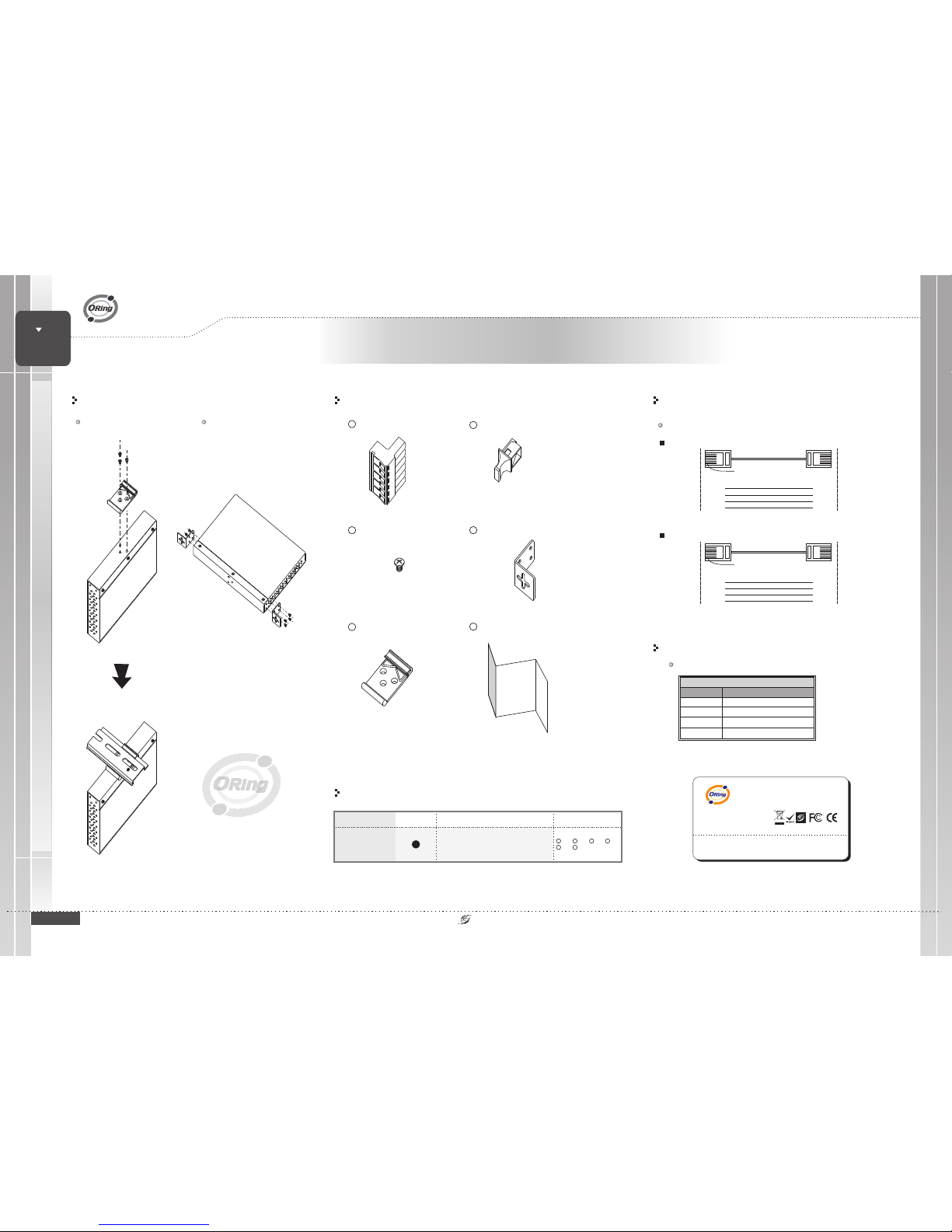
RJ45 (8-pin) to RJ45 (8-Pin)Straight-Through Cable Wiring
RJ45 PlugPin1
Straight-Through Cable
Switch Port
RJ-45
Connector
Tx+
TxRx+
Rx-
3
6
1
2
NIC Port
RJ-45
Connector
Rx+
RxTx+
Tx-
3
6
1
2
RJ45 (8-pin) to RJ45 (8-Pin)Cross-Over Cable Wiring
RJ45 PlugPin1
Cross-Over Cable
Switch Port
(NIC Port)
RJ-45
Connector
Tx+
TxRx+
Rx-
3
6
1
2
RJ-45
Connector
Rx+
RxTx+
Tx-
1
2
3
6
Switch Port
(NIC Port)
(Rx+)
(Rx-)
(Tx+)
(Tx-)
(Tx+)
(Tx-)
(Rx+)
(Rx-)
Version 1.0
Quick Installation Guide
ORing Industrial Networking Corp.
Installation
DIN-Rail Install Step Wall-mounted Install Step
10/100Base-T(X) Ethernet Connection
Dust Cover(RJ-45)
2
QIG
6
Round Screw(M3 X3)
3
Wall-mounted kit(for Slim Type)
4
25mm DIN-Railkit
5
6-Pin Terminal block
1
I
1
X1,2X8,3X8,X1X2,
A
IPS-1080A
Model name Model Description Accessory
Front Panel
Industrial 8-portslim type unmanagedPoE
Ethernet switchwith 8x10/100Base-T(X)
P.S.E.
6
4
5
X1,
Packing list
Pin Definition
10/100Base-T(X) PoE P.S.E. Port
RJ45 Pin Definition
Pin No.
TD+ withPoE Power input+
#1
Description
#2
#3
#6
TD-withPoEPowerinput+
RD+ withPoE Power input-
RD- withPoE Power input-
Industrial Unmanaged PoE Switch
SWITCH
INDUSTRIAL
PoE
IPS-1080A
IPS-1080A
ORing IndustrialNetworking Corp.
Copyright© 2013 ORing
Allrights reserved.
TEL:+886-2-2218-1066
FAX:+886-2-2218-1014
Website:www.oring-networking.com
E-mail:[email protected]
 Loading...