

Page 1
IPMC-111PB
Version 1.0
Industrial PoE Media Converter
Quick Installation Guide
ORing Industrial Networking Corp.
Media
Converter
Media
Converter
Features
Supports 1port 10/100Base-T(X) auto-negotiationand auto-MDI/MDI-X
Supports Ethernetto fiber withSFP socket
Supports LFP(Link Fault Pass-through) function
Supports full/halfduplex operation mode
P.S.E. fully compliantwith IEEE802.3at standard,provide up to30 Watts
Supports storeand forward transmission
Provided DIP-Switch to setoperation mode
High reliabilityand rigid IP-30housing
DIN-Rail andwall-mount enabled
IPMC-111PB
IPMC-111PB
IPMC-111PB
IPMC-111PB
IPMC-111PB
IPMC-111PB LFP (LinkFault Pass through)
IPMC-111PB
IPMC-111PB
-
( ) 100 - ,
'
,,
, .
)
,.
-.
,
,
is acost effective solution forthe conversion interfacebetween
10/100Base-T X and Base FX withSFP socket it allowsyou to extend
communication distanceby optical fiber. supports MDI/MDIXauto
detection, soyou don tneed to usecrossover wires. also support
Power overEthernet a systemto transmit electricalpower up to30 watts along with
data toremote devices overstandard twisted-pair cablein an Ethernetnetwork
Each has1x10/100Base-T(X) P.S.E.(Power Sourcing Equipment port
to providepower in aPoE setup. with wide operatingtemperature range
from -40~ 70 and acceptsa wide voltagerange from dualredundant 50~57 VDC
power inputs so it issuitable for harshoperating environments
also supportsthe feature When one
side ofthe link fails,the other sidecontinues transmitting packets,and waiting fora
response thatnever arrives fromthe disconnected side. Use theDIP-Switch to
enable theLFP function then willforce thelink to shutdownas soon as
noticed thatthe other linkhas failed tonotice the administratorto react tothe
situation. Therefore, the isreliable media converterwith PoE capability
and cansatisfy most demandof operating environment.
℃
Introduction
Quick InstallationGuide
QIG
IPMC-111PB
PRINTED ON RECYCLED PAPER
Specifications
ORing PoEMedia Converter
Model
10/100Base-T(X)withP.S.E.Portin
RJ45 AutoMDI/MDIX
Physical Ports
Technology
Ethernet standards
IEEE 802.3for 10Base-T
IEEE 802.3ufor 100Base-TXand 100Base-FX
IEEE 802.3xfor Flow control
IEEE 802.3atPoE specification (upto 30Watts per portfor P.S.E.)
LED Indicators
Green:PowerLEDx2
Power indicator
GreenforfiberportLink/Act-(ON)Linkup/(Blinking)Acting/(OFF)Linkdown
Green forfiber port duplexindicator- (ON) Full-Duplex/(OFF) Half-Duplex
100Base-FX fiberport indicator
Power
Input power
Power consumption(Typ.)
Dual 50VDC voltage powerinput at 4pin terminal block
31.2 Watts(P.S.E.output included)
Overload currentprotection
Reverse polarityprotection
Present
Present
Physical Characteristic
Enclosure
IP-30
Dimension(WxDxH)
26.1(W)x70(D)x95(H)mm(1.03x2.76x3.74inch)
Weight(g)
210 g
Environmental
-40to85C(-40to185F)
oo
Storage Temperature
Operating Temperature
5% to95% Non-condensing
Operating Humidity
Regulatory Approvals
FCC Part15, CISPR (EN55022)class A
EMI
EN61000-4-2 (ESD),EN61000-4-3 (RS), EN61000-4-4(EFT), EN61000-4-5 (Surge),
EN61000-4-6 (CS),EN61000-4-8, EN61000-4-11
EMS
IEC60068-2-27
Shock
IEC60068-2-6
IEC60068-2-32
Vibration
EN60950-1
Safety
Free Fall
Warranty
5 years
-40to70C(-40to158F)
oo
INDUSTRIAL
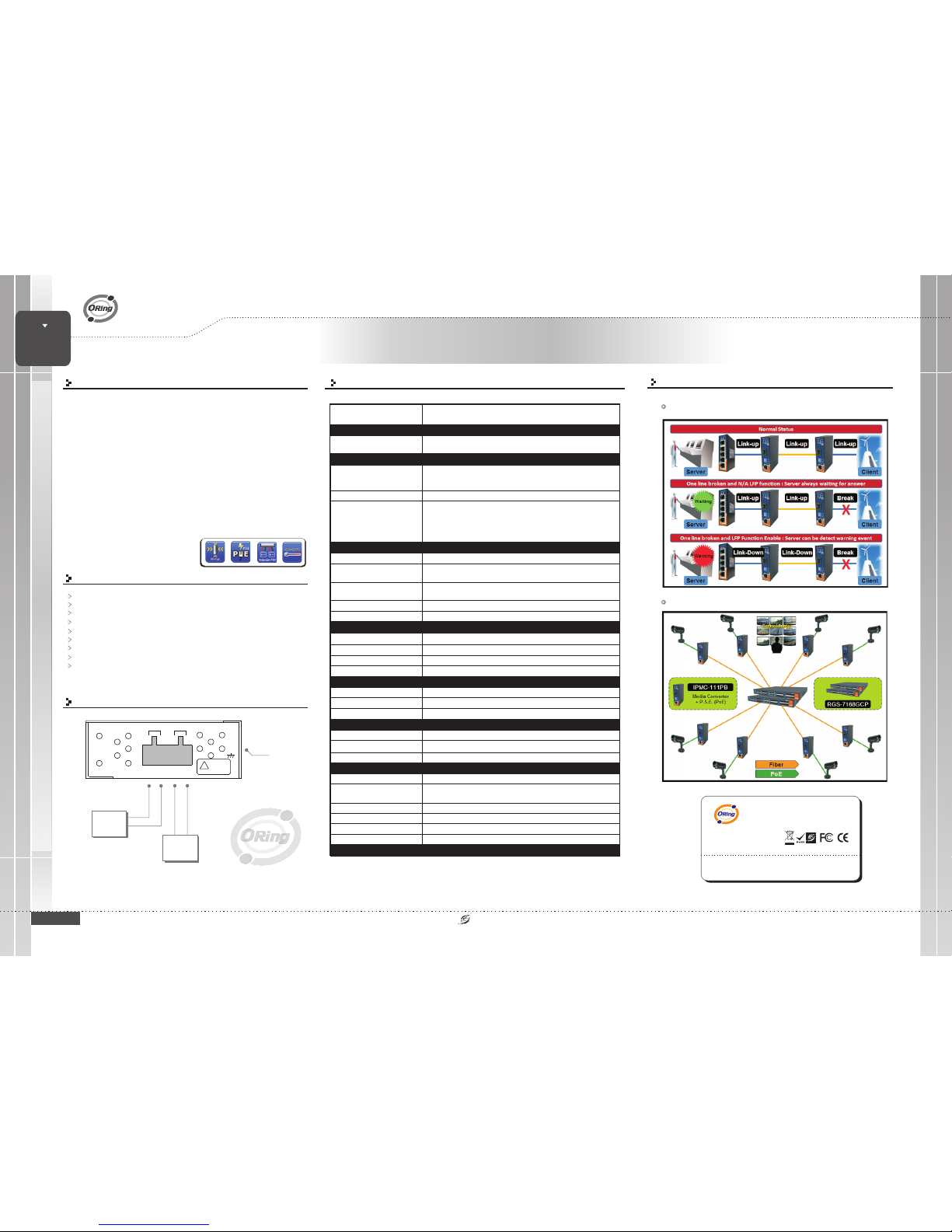
Connections of Media converter and LFP
function
IPMC-111PB
1
Green onRJ45 for portLink/Act -(ON) Linkup / (Blinking)Acting / (OFF)Link down
Green forport duplex indicator-(ON) Full-Duplex /(OFF) Half-Duplex
10/100Base-T(X)RJ 45 portindicator
ORing IndustrialNetworking Corp.
Copyright© 2011 ORing
Allrights reserved.
TEL:+886-2-2918-3036
FAX:+886-2-2918-3084
Website:www.oring-networking.com
E-mail:[email protected]
Processing
Store-and-Forward
DIP-Switch setting
DIP-Switch1forLFPmodeselection:(ON) /(OFF)
DIP-Switch2forEthernetspeedselection:
(ON)10Mbps /(OFF) 10/100Mbps Auto-negotiate
DIP-Switch 3for Ethernet full/halfduplex selection :
(ON) Half-duplex/ (OFF)Full/Half-Duplex Auto-negotiate
DIP-Switch4forfiberfull/halfduplexselection:(ON)Half-Duplex/(OFF)Full-Duplex
enable disable
Amber LED- (ON) LFPfunction fail /(OFF) LFP functiondisable
LFP statueindicator
1907-2-29-IPMC111XB0
PoE
Green forP.S.E. indicator
PoE indicator
Power Connection Guide
Frame Ground
V-
V+
Power
Supply
50-57 VDC
PWR2
V2+ V2-
G
PWR1
V1+ V1-
Power
Supply
50-57 VDC
V-
V+
Connections with LFP function
Connections of Media Converter
CheckPolarity First.
!
Warning!!!
50VdcInput
Page 2
Version 1.0
Quick Installation Guide
ORing Industrial Networking Corp.
Accessory
Dust Cover(RJ-45)
2
QIG
8
Screw (M3X3)
4
Wall-mounted kit
5
25mm DIN-Railkit
6
4-Pin Terminal block
1
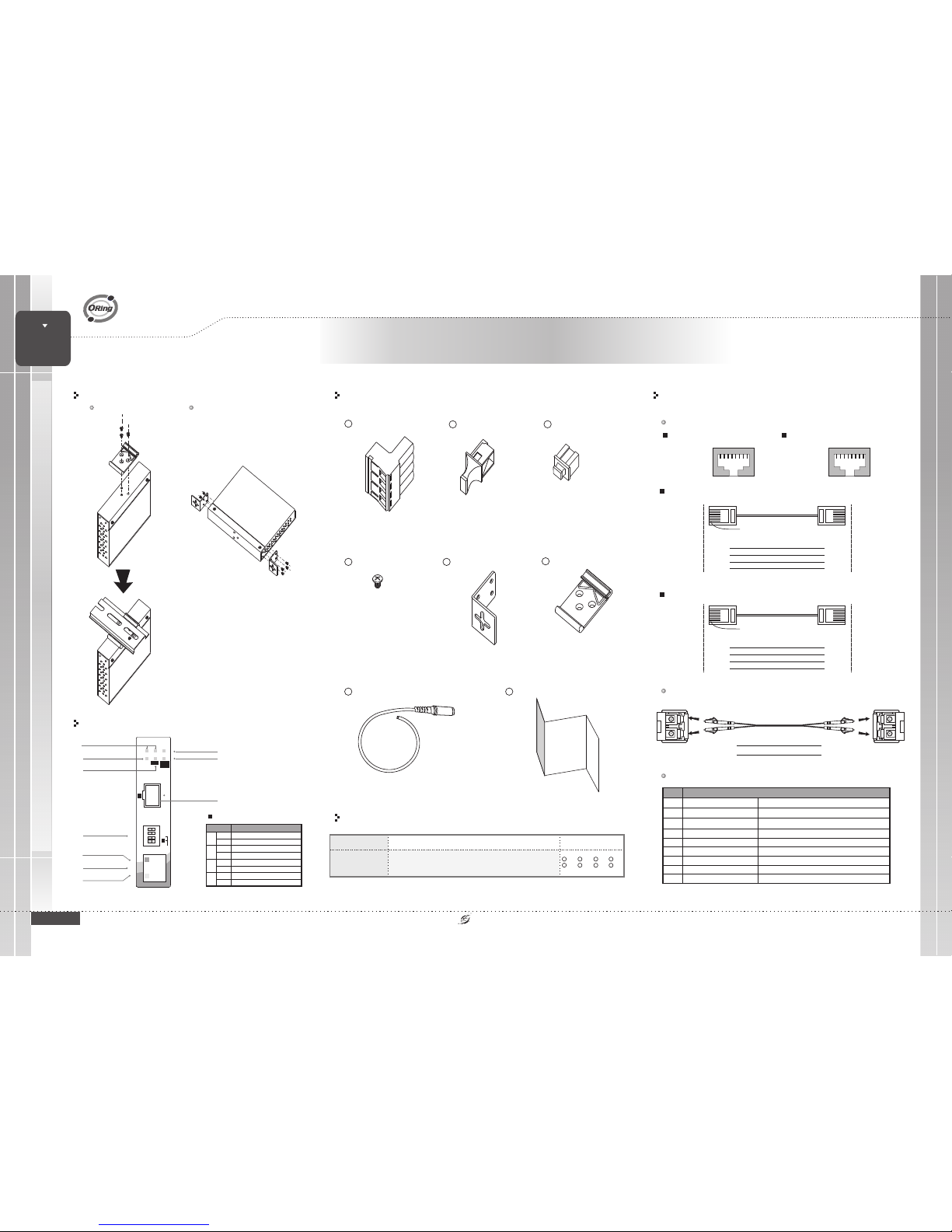
Front Panel
Model name Model Description Accessory
Packing list
Communication Connections
RJ45 (8-pin) to RJ45 (8-Pin)Straight-Through Cable Wiring
RJ45 PlugPin1
Straight-Through Cable
Switch Port
RJ-45
Connector
Tx+
TxRx+
Rx-
3
6
1
2
NIC Port
RJ-45
Connector
Rx+
RxTx+
Tx-
3
6
1
2
RJ45 (8-pin) to RJ45 (8-Pin)Cross-Over Cable Wiring
RJ45 PlugPin1
Cross-Over Cable
Switch Port
(NIC Port)
RJ-45
Connector
Tx+
TxRx+
Rx-
3
6
1
2
RJ-45
Connector
Rx+
RxTx+
Tx-
1
2
3
6
Switch Port
(NIC Port)
(Rx+)
(Rx-)
(Tx+)
(Tx-)
(Tx+)
(Tx-)
(Rx+)
(Rx-)
10/100Base-T(X) Ethernet Port Connection
RJ45 (8-pin, MDI) Port Pinouts
18
Pin Single
1
2
3
6
Tx+
TxRx+
Rx-
RJ45 (8-pin, MDI-X) Port Pinouts
18
Pin Single
1
2
3
6
Rx+
RxTx+
Tx-
Pin
Power Cablewith power jack
7
Quick InstallationGuide
PRINTED ON RECYCLED PAPER
LANPort Duplex LED
DPX
P.S.E.10/100M
1
2
P1 P2 Fault
DPX
LNK/
ACT
IPMC- 111PB
10M
LFP
HalfDuplex
2
1
FiberPort
LNK/ACTLED
FaultLED (LFP)
SFP100Base-FX
FiberPort
LNK/ACTLED
(Green)
10/100Base-T(X)LAN
Port
PoEIndicator
(Green)
DIPSwitch for Mode
Select
PowerLED
Full/Half-duplexAuto-negotiate
DIP-Switch
LFPmode disable
Ethernetspeed 10Mbps
DIP Switch Function
2
ON
OFF
3
ON
OFF
LFPmode enable
Ethernetspeed 100Mbps
EthernetFull-duplex
FiberFull-duplex
FiberHalf-duplex
4
ON
OFF
Description
1
X1,2X1,3X1,
X1,
X8,
IPMC-111PB
Industrial minitype Ethernet tofiber media converterwith
1x10/100Base-T(X) P.S.E. and 1x100Base-FX,SFP socket
6
4
5
X2,
7
X1,
Dust Cover(SFP)
3
FiberPort Duplex LED
X1
8
LC-Port Pinouts
Tx
Rx
LC-Port to LC-Port Cable Wiring
Rx
Tx
Cable Wiring
Tx Rx
LC-Port Pinouts
100Base-FX SFP Port Connection
Rx
Tx
QIG
IPMC-111PB
Industrial PoE Media Converter
Media
Converter
Media
Converter
INDUSTRIAL
PoE
IPMC-111PB
Installation
Din-Rail Install Step Wall-mounted Install Step
10/100Base-T(X) Pin Definition
Data Receiveand Feeding power(+)
1
2
3
4
5
6
7
8
Not Connected
RJ-45 Output(Data and Power)
NC
Rx+ (Vdc+)
Tx+ Vdc
(-)
Rx- (Vdc+)
NC
Tx- Vdc
(-)
NC
NC
Description
Pin
Symbol
Data Receiveand Feeding power(+)
Data Receiveand Feeding power(-)
Not Connected
Not Connected
Not Connected
Data Receiveand Feeding power(-)
Note
:(-)pins 3and 6 Vdc should not beshorted to ground
1
ON
OFF
 Loading...