

Page 1
ORing M2MModel
IMG-111
10/100 Base-T(X)Ports inRJ45
Auto MDI/MDIX
1
Physical Ports
Cellular Interface
Cellular Standard
GSM/GPRS/EGPRS/EDGE/WCDMA/HSDPA/HSUPA
LED Indicators
Green on:Power isonPowerIndicator
10/100Base-T(X)RJ45 Port
Indicator
Power
Input Power
PowerConsumption
12-48VDC powerinput on terminalblock
4.5 Watts
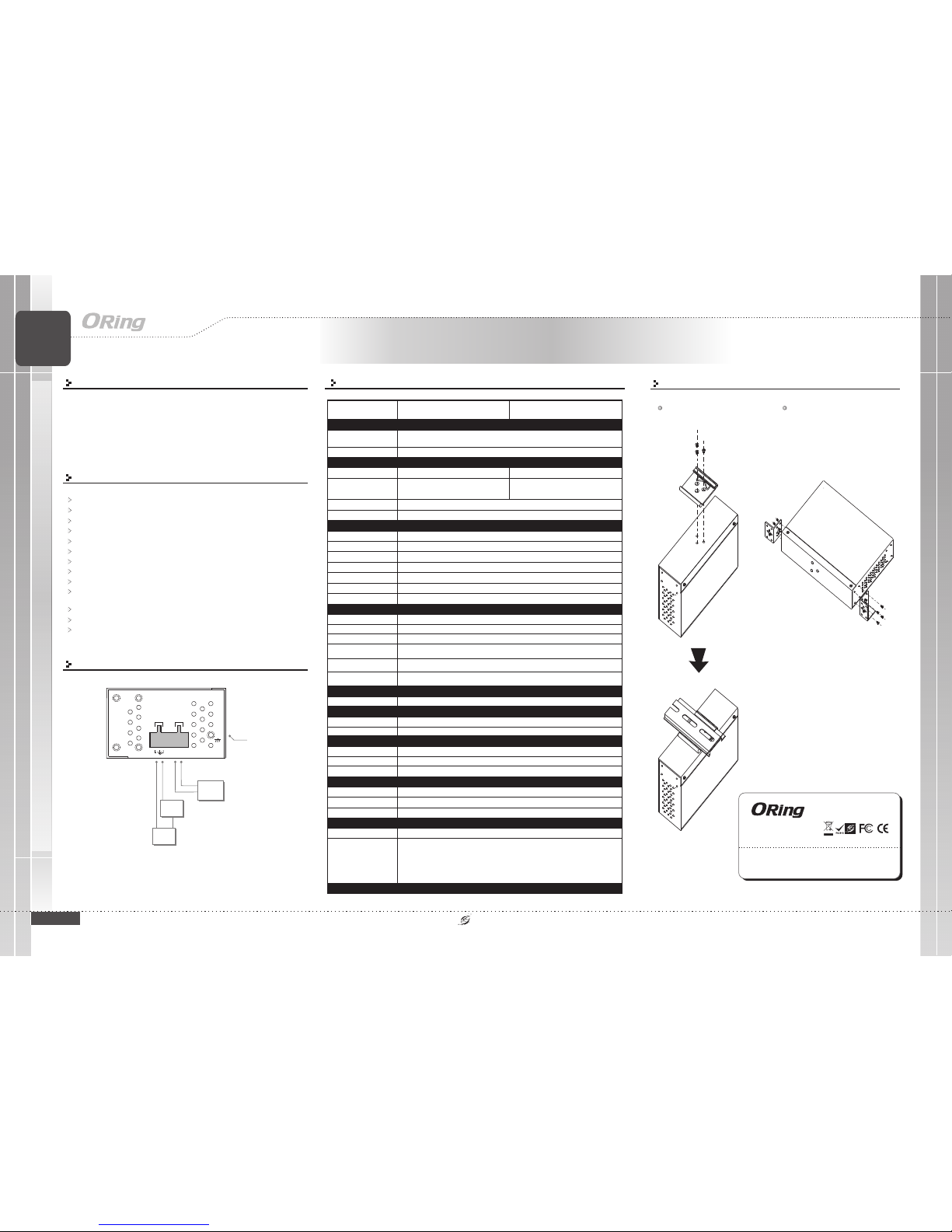
Physical Characteristic
Enclosure
IP-30
Dimension(WxDxH)
41(W) x70(D) x 95(H)mm(1.61x 2.76 x3.74nch.)
Weight (g)
Environmental
-40to85C(-40to185F)
oo
StorageTemperature
OperatingTemperature
5% to95% Non-condensingOperatingHumidity
Regulatory Approvals
FCC Part15, CISPR(EN55022) class AEMI
EN61000-4-2 (ESD),
EN61000-4-3 (RS),
EN61000-4-4 (EFT),
EN61000-4-5 (Surge),
EN61000-4-6 (CS),
EN61000-4-8,
EN61000-4-11
EMS
Warranty
3years
Green forport Link /Act. Amber for100Mbps indicator
388g
Installation
QIG
Quick InstallationGuide
IMG-111 Series
IMG-111 Series
Version 1.1
Quick Installation Guide
Features
Provide 1port 10/100Base-T(X) portand 1 SIMcard slot
2G GSM/GPRSor 3.5G HSUPA Modem included
Support OpenVPN, PPTP VPN
Support DHCP forwardingthrough PPTP function.
Support IPsecVPN
Update DNSHostname: DDNS
Versatile modes& event alarmby e-mail.
Event warning by Syslog,Email, SNMP Trap,Relay output
Redundant multiplehost devices:
5 host devices:Virtual COM, TCP Server, TCP Client mode;UDP:
12~48VDC power inputon terminal block
Rigid IP-30housing design
DIN-Rail andpanel mounting enabled
4IP
Ranges
is aninnovative portRS Gateway with1
port Base-T X port. It couldbe configured toconnect to the
internet bydialing up cellular modemto fulfill demandsof various
applications rapidly In addition can alsotransfer data
into host PCssimultaneously for backuppurposes Therefore,
is oneof the bestsolutions for applicationsof wireless andserial
communication.
IMG-111Series
IMG-111Series
IMG-111
Series
232
10/100 ( )
-
.,
5.
1 - M2M
built in
Introduction
Din-Rail Install Step
PRINTED ON RECYCLED PAPER
Specifications
Power Connection Guide
Wall-mounted Install Step
INDUSTRIAL
-10to60C(14to140F)
oo
SIM CardSlot
Green: Systemstatus indicationStatus Indicator
Amber on:WAN connectionlink downFaultIndicator
Greenon:Cellularmodemispresent
Green blinking:Cellular modem istransmitting data
WAN
Fault Contact
Relay
Relayoutput to carrycapacity of 1Aat 24VDC
1907-2-29-IMG111-1.1
1
Band Option
Dual-band: HSUPA1900/2100 MHZ
Quad-band: GSM /GPRS / EDGE850/900/1800/1900 MHZ
WCDMA/ HSDPA850/900/1900/2100 MHZ
M2M
Gateway
M2M
Gateway
Industrial M2M Gateway
FrameGround
G
DC12-48V
PWR1A@24V
V+ V-
Relay
Power
Supply
12-48VDC
V-
V+
Warning
Device
GND
+24V
Power
Supply
Power
Supply
12-48VDC
Antenna Connector
ReverseSMA
Antenna
GSM/DCS/UMTantenna x 1
Serial Ports
Connector
DB9Malex1
OperationMode
RS-232
Serial BaudRate
110bps to115.2 Kbps
Data Bits
5,6, 7, 8
Parity
odd,even, none, mark,space
Stop Bits
1,1.5, 2
Serial signals
RS-232:TxD, RxD, GND
Red: Receiving data
Green :Transmitting data
Serial TX/RXLED
IMG-111-2G
GSM/GPRS
Dual-band(Qual-band) GSM/GPRS 900/1800MHzor
900MHz/1800MHz/850MHz/1900MHz
ORing IndustrialNetworking Corp.
Copyright© 2012 ORing
Allrights reserved.
TEL:+886-2-2218-1066
FAX:+886-2-2218-1014
Website:www.oring-networking.com
E-mail:[email protected]
Page 2
Serial
RS-232
IMG-111
PWRStatus Fault
ETH 10/100M
Reset
ANT.
SIMCard Slot
WAN
DoNot Remove
Quick InstallationGuide
PRINTED ON RECYCLED PAPER
LNK/ACT LED
(Green)
10/100 LANPort
100Mbps Indicator
(Amber)
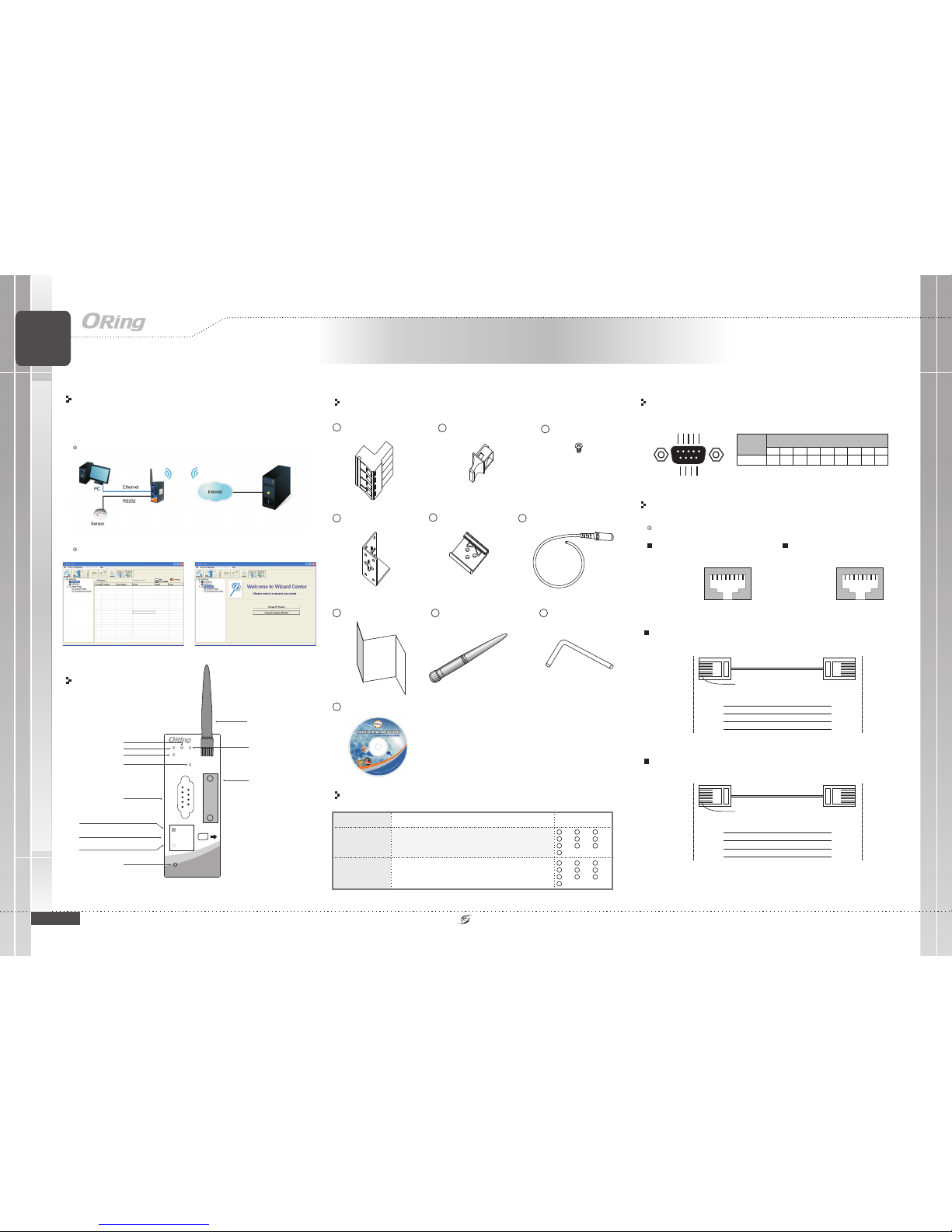
Accessory
Dust Cover(RJ-45)
2
QIG
7
Screw (M3X3)
3
Wall-mounted kit
4
40mm DIN-Railkit
5
4-Pin Terminal block
1
Front Panel
1
X1,2X1,3X8,
X1,
IMG-111
Model name Model Description Accessory
Industrial Cellular3.5G VPN Routerwith
1 x10/100Base-T(X)1xRS-232 M2M Gateway
5
4
X2,
Packing list
Communication Connections
RJ45 (8-pin) to RJ45 (8-Pin) Straight-ThroughCable Wiring
RJ45 PlugPin1
Straight-Through Cable
Ethernet Port
RJ-45
Connector
Tx+
TxRx+
Rx-
3
6
1
2
NIC Port
RJ-45
Connector
Rx+
RxTx+
Tx-
3
6
1
2
RJ45 (8-pin) to RJ45 (8-Pin) Cross-OverCable Wiring
RJ45 PlugPin1
Cross-Over Cable
Ethernet Port
(NIC Port)
RJ-45
Connector
Tx+
TxRx+
Rx-
3
6
1
2
RJ-45
Connector
Rx+
RxTx+
Tx-
1
2
3
6
Ethernet Port
(NIC Port)
(Rx+)
(Rx-)
(Tx+)
(Tx-)
(Tx+)
(Tx-)
(Rx+)
(Rx-)
10/100Base-T(X) Ethernet Port Connection
RJ45 (8-pin, MDI) Port Pinouts
18
Pin Signal
1
2
3
6
Tx+
TxRx+
Rx-
RJ45 (8-pin, MDI-X) Port Pinouts
18
Pin Signal
1
2
3
6
Rx+
RxTx+
Tx-
Pin
Power LED
Power Cablewith power jack
6
6
X1,
Quick Installation Guide
Status LED
WAN LED
WANport cellular
Antenna
Reset Button
SIMCardSlot
QIG
Fault LED
Cellular Antenna
8
X1,
8
7
X1,
Serial
Serial PortLED
Serial Port
Application
M2M GatewayConnection
IMG-111Series it support3.5G Modem dial up The utility-M2M
Toolwhich is usedto manage andmonitor all ofthe serial portson IMG-
,/2 . -G
Monitoring andConfiguration
Serial Port Assignment
RS 232-
123456789
RXD TXD GND
Serial PortPin# Description
Serial
Interface
12345
6789
Version 1.1
INDUSTRIAL
M2M
Gateway
M2M
Gateway
Allen Key(For SIM card
Slot)
9
CD
10
X1,
9
10
X1
Industrial M2M Gateway
1
X1,2X1,3X8,
X1,
IMG-111-2G
Industrial Cellular2G VPN Routerwith
1 x10/100Base-T(X)1xRS-232 M2M Gateway
5
4
X2,
6
X1,
X1,
8
7
X1,
X1,
9
10
X1
IMG-111 Series
IMG-111 Series
 Loading...