

Page 1
Installation Manual
SUBA500
Subwoofer Amplifier
Page 2
1
844·674·4461
WWW.ORIGINACOUSTICS.COM
SUBA 500 INSTALLATION MANUAL
Table of Contents
Important Safety Information 1
Introduction 3
Installing Rack Mount Ears 4
Subwoofer Amplifier Controls and Setup 5
FRONT PANEL 5
REAR PANEL 6
Connections 8
Using line level inputs: 8
LCD Display Screens / Functions 9
Control Flow Chart–SUB Mode 13
Control Flow Chart–LFE Mode 14
Remote Control 15
Troubleshooting 16
Technical Assistance 17
Specifications 18
Warranty 20
2-Year Warranty 20
Requirements and Warranty Coverage 21
Return Process 21
Important Safety Information
The lightning flash with the
arrowhead symbol within an
equilateral triangle is intended to
alert the user to the presence of
uninsulated “dangerous voltage”
within the product enclosure that
may be of suicient magnitude to
constitute a risk of shock to persons.
The exclamation point within an equilateral triangle is intended to
alert the user to the presence of important operating and maintenance
(servicing) instructions in the literature accompanying the product.
CAUTION! DO NOT open the amplifier, attempt any modifications or
repairs. There are extremely high voltages present and any servicing
must be referred to or an authorized qualified technician.
ATTENTION! Opening the amplifier will void warranty.
WARNING! To prevent shock or fire hazard, never permit moisture or
any liquid to get into the amplifier. If an accidental spill occurs, immediately shut o the power, unplug its A/C power cord and seek a
qualified technician for repair.
CAUTION! To reduce the risk of electric shock, do not remove the
cover (or back). No user serviceable parts inside: refer servicing to
qualified technician.
All safety instructions should be read before this subwoofer amplifier
is operated. Please retain these safety instructions for future reference.
Adhere to all warnings on the amplifier and in this manual.
CAUTION
CAUTION: TO REDUCE THE RISK OF
ELECTRI CAL SHOCK.
DO NOT REMOVE COVER. NO USER
SERVICEABLE PARTS INSIDE.
REFER SERVICING TO QUALIFIED
SERVICE PERSONNEL.
Page 3

2 3
844·674·4461
WWW.ORIGINACOUSTICS.COM
SUBA 500 INSTALLATION MANUAL
Ventilation: The amplifier should be situated so that its location or
position does not interfere with its proper ventilation. The amplifier
should not be situated on a bed, sofa, rug or similar surface that may
block the ventilation openings, nor should it be placed in a built-in
installation such as a bookcase or cabinet that may impede the flow of
air through the ventilation openings.
Power Source: The amplifier should only be connected to a power
supply of the type described in this instruction manual or as marked
on the amplifier. Precautions should be taken so that the grounding or
polarization means of the amplifier are not defeated.
Power Cords: Power supply cords should be routed so that they are
not likely to be walked on or pinched by items placed upon or against
them, paying particular attention to wall receptacles and the point
where they exit from the amplifier.
Object and Liquid Entry: The amplifier should not be exposed to
dripping or splashing and objects filled with liquids, such as vases or
plants, should not be placed on top of or next to the amplifier. Care
should be taken so that objects do not fall and liquids are not spilled
into the enclosure through its ventilation openings.
Damage Requiring Service: This amplifier should be serviced by a
qualified technician when:
• The power supply cord has been damaged; or
• Objects have fallen or liquid has been spilled into the amplifier; or
• The amplifier does not appear to function normally or exhibits a
marked change in performance; or
• The amplifier has been dropped or the enclosure is damaged.
Introduction
Congratulations on your purchase of the Subwoofer Amplifier! Your
subwoofer amplifier is the result of many years of research and development dedicated to producing powerful, accurate bass in home
audio systems. This manual contains operating procedures and specifications. We recommend you thoroughly read through the material
contained in this manual before connecting your amplifier. This will
ensure you have an understanding of how to setup and operate your
amplifier for optimum performance.
The SUBA500 subwoofer amplifier is a high performance, class D subwoofer amplifier capable of delivering a minimum of 250W/500W of
clean power at 4 ohms. It uses sound processing technology which
allows you to tailor the performance of the subwoofer to better match
the environment in which it is installed. Both amplifiers feature a large
LCD display as well as a turn-and-push controller for DSP configuration. On the front panel there are indicators for power and standby,
clipping and signal presence.
Your subwoofer amplifier is the result of many years of research and
development dedicated to producing powerful, accurate bass in home
audio systems. This manual contains operating procedures and specifications. We recommend you thoroughly read through the material
contained in this manual before connecting your amplifier. This will
ensure you have an understanding of how to setup and operate your
amplifier for optimum performance.
Page 4
4 5
844·674·4461
WWW.ORIGINACOUSTICS.COM
SUBA 500 INSTALLATION MANUAL
Installing Rack Mount Ears
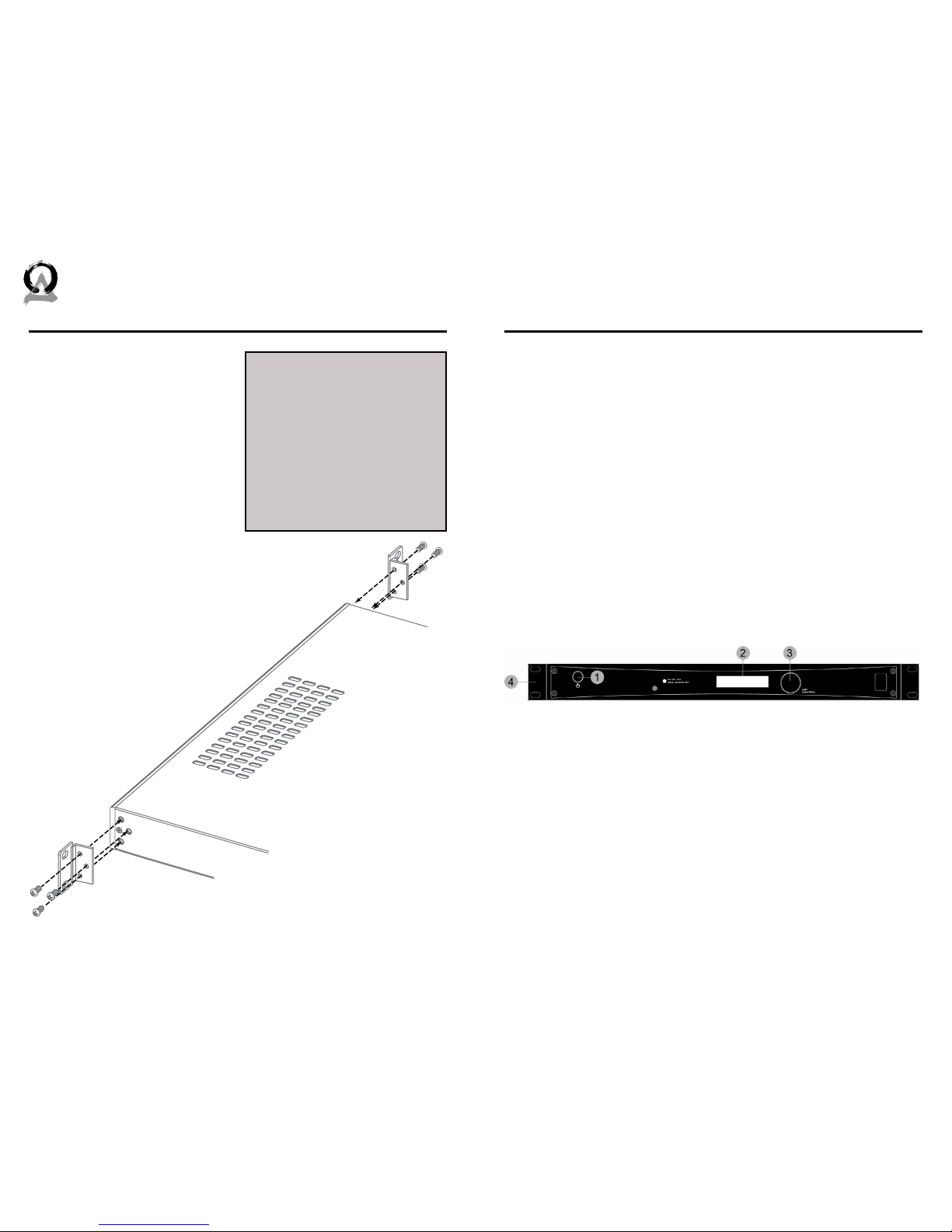
If you plan to install your subwoofer amplifier into a standard
19-inch rack, you must install the
supplied rack ears.
Using the three screws, attach
the supplied rack ears to the subwoofer amplifier. If required, the 4
feet on the bottom of the amplifier can also be removed at this
time by unscrewing the mounting
screws located in the center of each foot.
Due to the weight of the subwoofer amplifier, it is
recommended that rear supports be secured
to the rear rack rails. Hardware to do this
is not supplied with the amplifier and is
specific to the type and depth of rack
you are using.
Subwoofer Amplifier Controls and Setup
FRONT PANEL
1. Power Switch: Turns the amplifier on or o. Amplifier must be on
for the trigger or auto sense modes to operate.
2. 16 Character x 2-row Liquid Crystal Display: Shows the amplifier’s status, menus and settings and works in conjunction with the
turn and push navigation controls and the remote control.
3. Programming Navigation Control: Used to scroll through the
display menus, change settings and program the DSP controller.
4. Optional Rack Ears: Two rack mount ears are provided for a 19inch rack mounting.
CAUTION! The subwoofer amplifier
is convection cooled and does not
use a fan. For this reason, ensure
there is adequate ventilation above
and below the subwoofer amplifier
when rack mounted. Avoid placing
heat generating equipment below
it in the rack. If the subwoofer
amplifier does not receive enough
ventilation, it may overheat and
switch to standby mode.
Page 5
6 7
844·674·4461
WWW.ORIGINACOUSTICS.COM
SUBA 500 INSTALLATION MANUAL
REAR PANEL
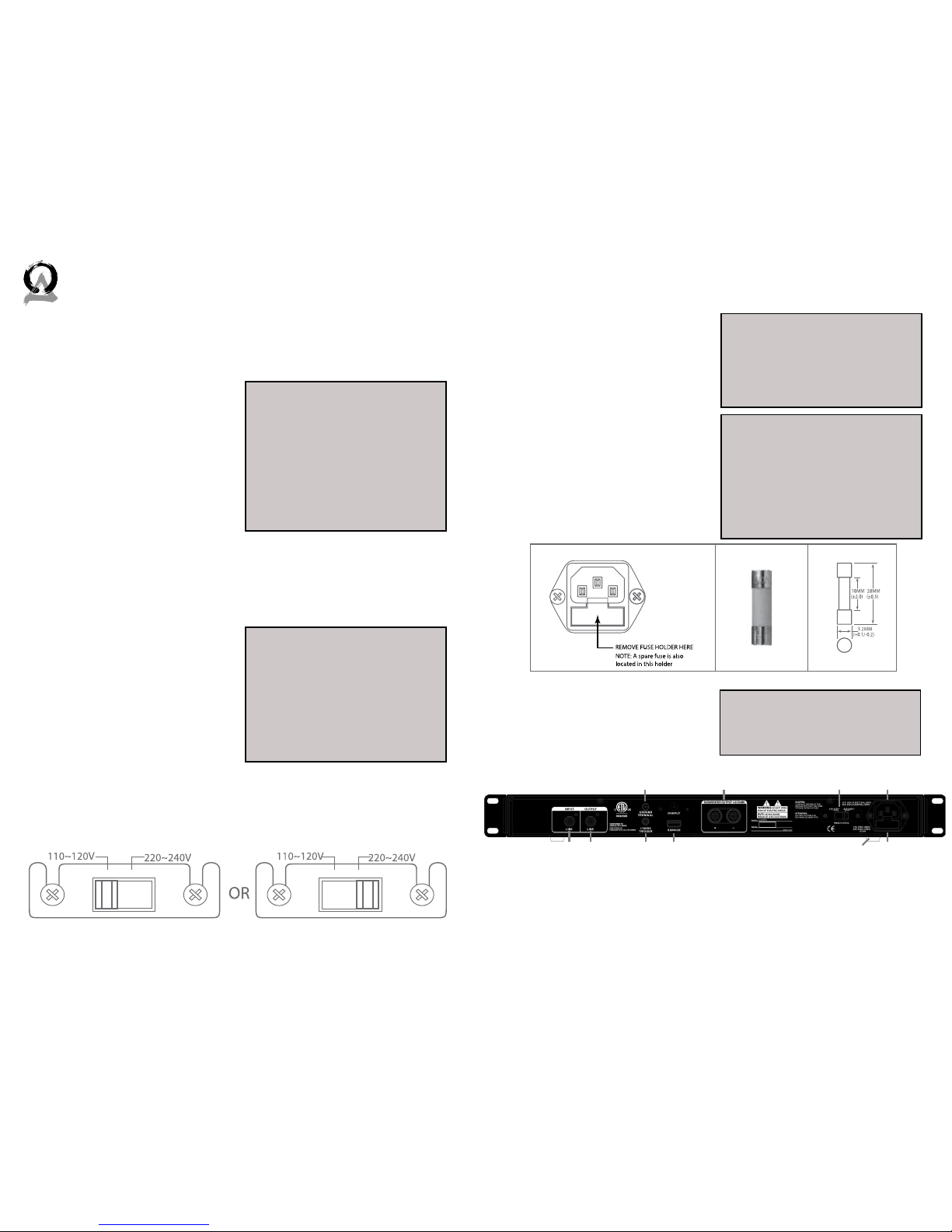
1. A/B. Inputs: For receiving line-level signal of right channel, or LFE
signal, from a source.
2. Ground post
3. 12V Trigger Input: For trigger-
ing the power on/o from other devices such as processors
or receivers that have a 12V
trigger output. 6V minimum
required for triggering.
4. Service: For uploading new firmware or updates.
5. 5-way Binding Posts: Connect your subwoofer here. Minimum
impedance of the load is 4 Ohms.
6. Voltage Selector Switch: The
subwoofer amplifier can be
used on 110~120V (60Hz) or
220~240V (50 Hz) line voltage.
To change the operating line
voltage, turn the power o
using the power switch and
unplug the power cord. Remove the plastic cover screws
and the plastic cover over the voltage selector located on the rear
of the subwoofer amplifier. Set the switch to the correct position
for the line voltage in your country. Replace the plastic cover and
screws over the voltage selector switch.
7. Power Cord Receptacle: The
supplied power cord needs to
be connected to this receptacle in order for the Subwoofer
Amplifier to work properly.
8. Fuse Holder: This is the power fuse access. Use a GDA type,
5A 120V or 2.5A 240V fuse.
9. Removable Feet: The amplifier feet can be removed
as required for rack mount
installation.
NOTE: Once in trigger mode, the
amplifier cannot be turned on
without a 12V trigger signal. To
disable the 12V trigger, press and
hold the navigation control knob.
The power switch must be in the
ON position. The trigger mode will
be turned o and the amplifier will
power on.
NOTE: If required, remove the IEC
line cord and replace with an IEC
AC cable that matches the AC wall
socket, this should be a 10A rated
cable. When the voltage selector
switch is changed, the fuse must
also be changed to continue to
provide protection to the amplifier.
WARNING! Make certain that you
are using the proper power cord
and voltage selection for the type
of AC power supplied in your country.
WARNING! In the event the fuse
must be replaced, the replacement
fuse must match exactly the original fuse value. If the replacement
fuse is not of the same value, damage to the Subwoofer Amplifier
may result.
CAUTION! Before replacing the
fuse, disconnect the power cord
from the power receptacle.
1A 1B
2
3 4
5 6 7
9 8
Page 6
8 9
844·674·4461
WWW.ORIGINACOUSTICS.COM
SUBA 500 INSTALLATION MANUAL
Connections
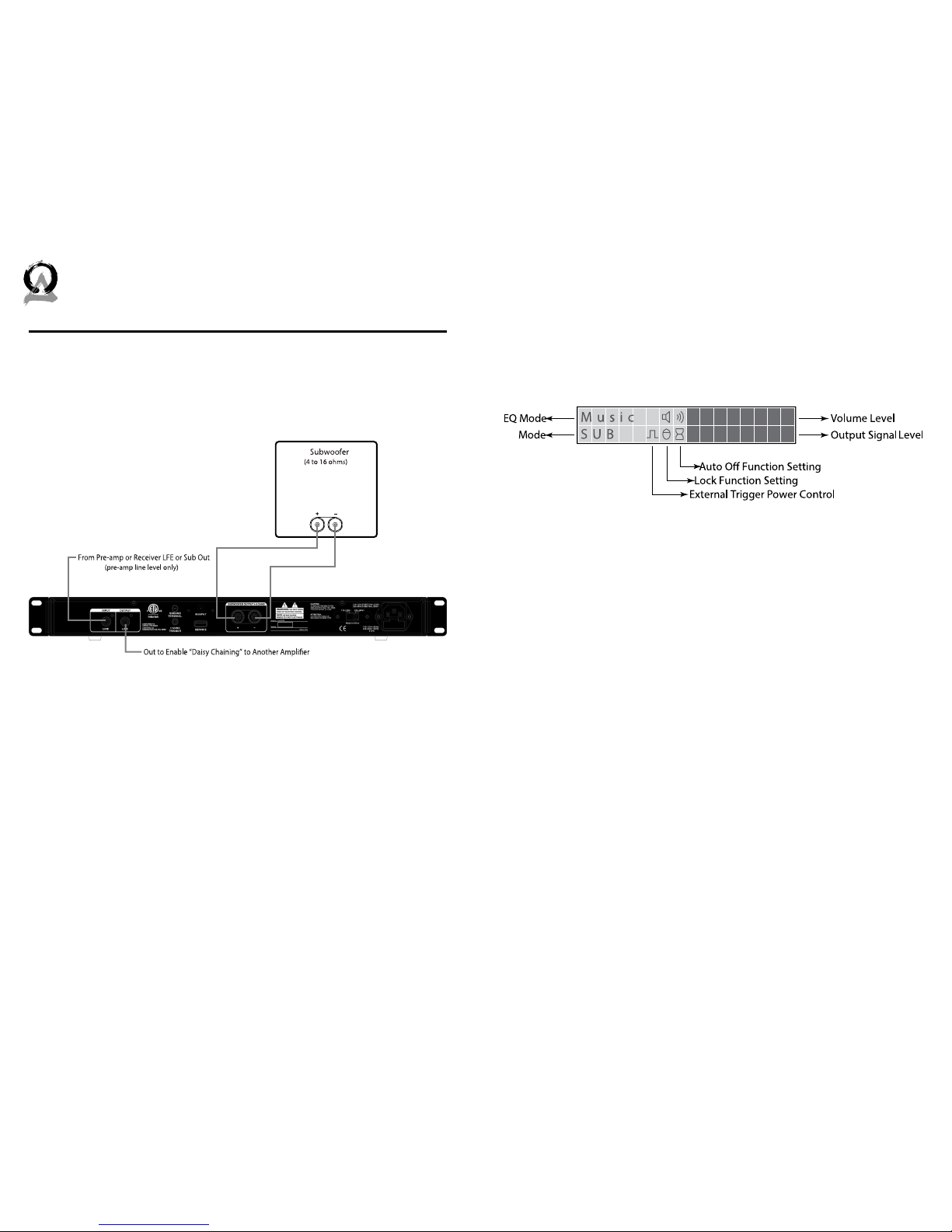
Using line level inputs:
NOTE: Speaker-level inputs are not used in this system.
LCD Display Screens / Functions
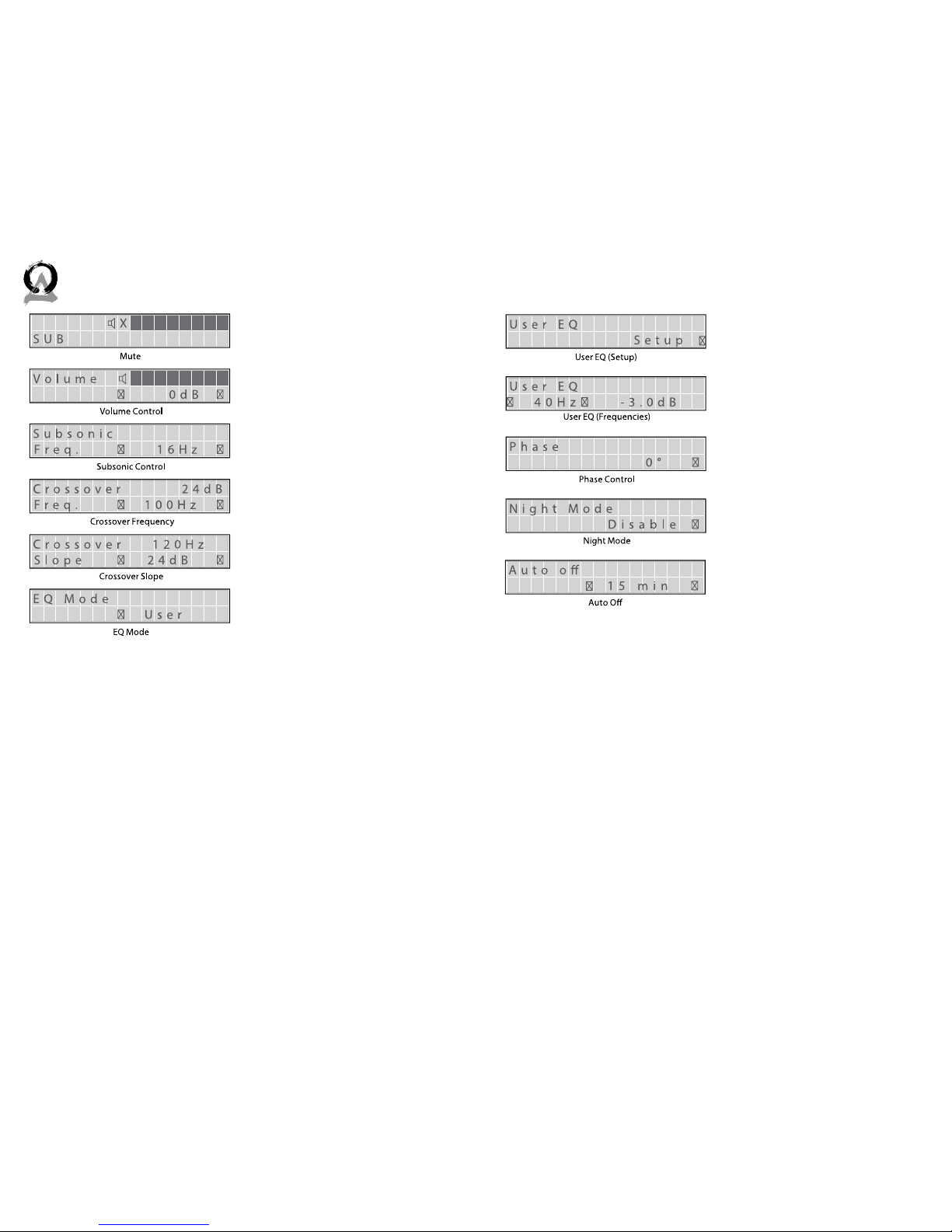
Normally, the LCD display will show the status for a number of settings
as well as the volume level and a flashing output level bar display. The
“normal” display is shown below.
Navigation through the function menus and settings are done via the
programing navigation knob on the front of the subwoofer amplifier. By pressing the programming navigation knob, the amplifier will
switch to the setting mode, and the first screen to appear will be the
“Subsonic Frequency” display, by pressing this knob again it will run
through the dierent function screens. To select a new option for a
setting, turn the knob le. The active option will have an asterisk next
to it.
Once you have configured all the settings for your amplifier, you can
save them by using the “Memory Store” screen. This way, if the settings
are accidently changed, you can always recall your saved settings. You
can also revert to the factory default settings by recalling “Default” in
the “Memory Recall” function.
Page 7
10 11
844·674·4461
WWW.ORIGINACOUSTICS.COM
SUBA 500 INSTALLATION MANUAL
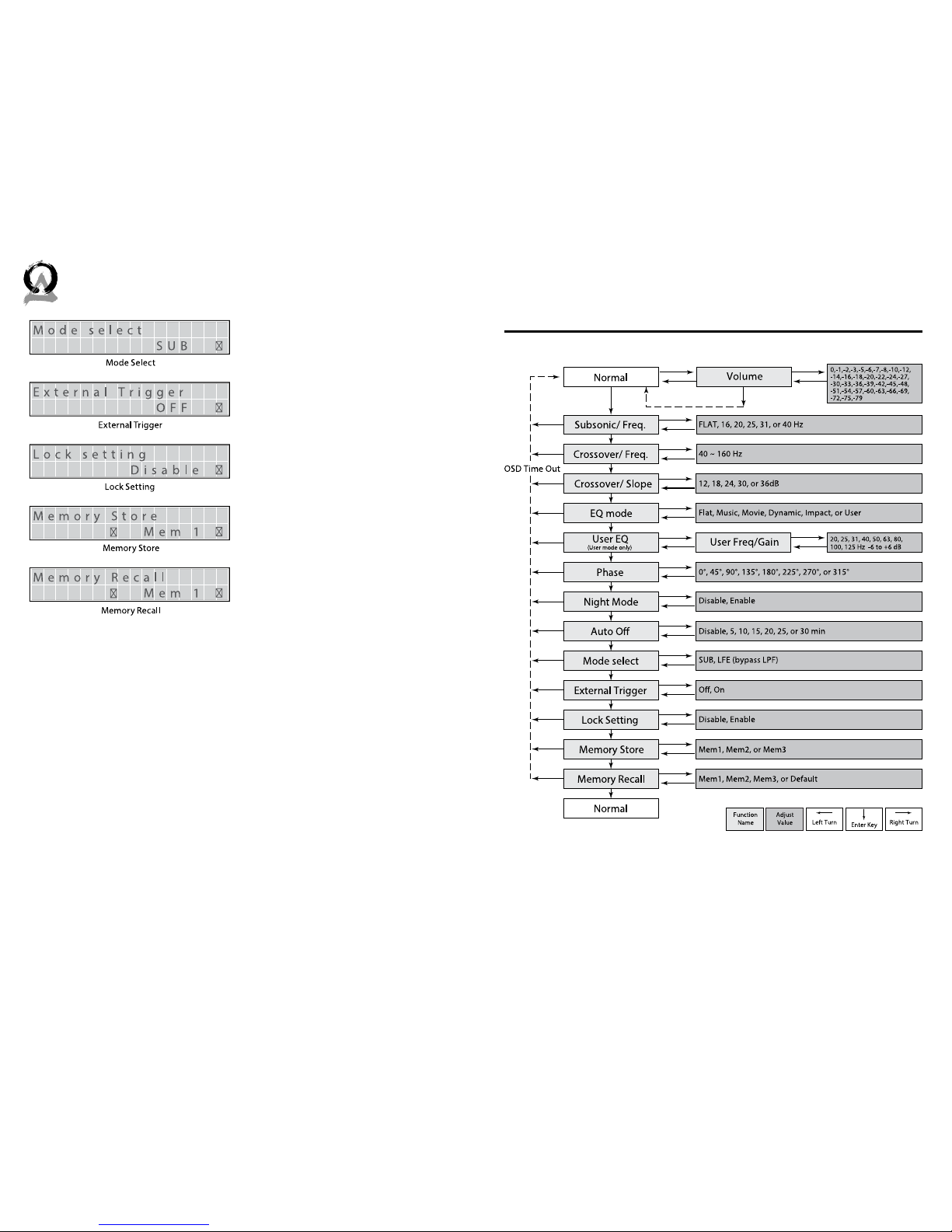
Mute: This feature allows you to
mute and un-mute.
Volume Control: To adjust the
output in your system. The volume control should be set to
achieve similar volume level from
both the main speakers and subwoofer.
Subsonic Control: This feature
allows you to select the frequency at which you wish to cut o the
low-pass audio signal. Values are:
FLAT, 16, 20, 25, 31 or 40 Hz.
Crossover / Frequency: This
feature allows you to select the
frequency at which you wish to
cut o the high-pass audio signal.
Values are: 40, 50, 63, 80, 100, 125
or 160 Hz. This feature only available in Sub Mode.
Crossover / Slope: This feature
allows you to select the slope for
the crossover. Values are: -12, -18,
-24, -30, -36 dB/oct. This feature
only available in Sub Mode.
EQ Mode: There are six preset
modes; Defeat, Music, Movie, Impact, Dynamic and User.
User EQ: This feature allows you
to setup equalizer frequency and
gain. Turn to the le to set the
frequency, turn to the right to set
gain . Frequencies are: 20, 25, 31,
40, 50, 63, 80, 100 or 125Hz, the
gain range is -6dB to +6dB.
Phase Control: This feature is
used to adjust the subwoofer’s
acoustic phase to match that of
your main speakers. Values are:
0°, 45°, 90°, 135°, 180°, 225°, 270°
or 315°.
Night Mode: Limits the dynamic
range of the amplifier so the louder context of the source signal is
reduced. The feature allows you
to select night mode. Choose enable or disable.
Auto O: This feature allows the
amplifier to turn itself o when
not in use. With the function set
to active, the amplifier will monitor its input signal, and if there
is no signal present it will shut
down and go into standby mode.
As soon as a signal is present, the
amplifier will turn itself back on.
Values are: Disable, 5, 10, 15, 20,
25 or 30 minutes.
Page 8
12 13
844·674·4461
WWW.ORIGINACOUSTICS.COM
SUBA 500 INSTALLATION MANUAL
Control Flow Chart–SUB Mode
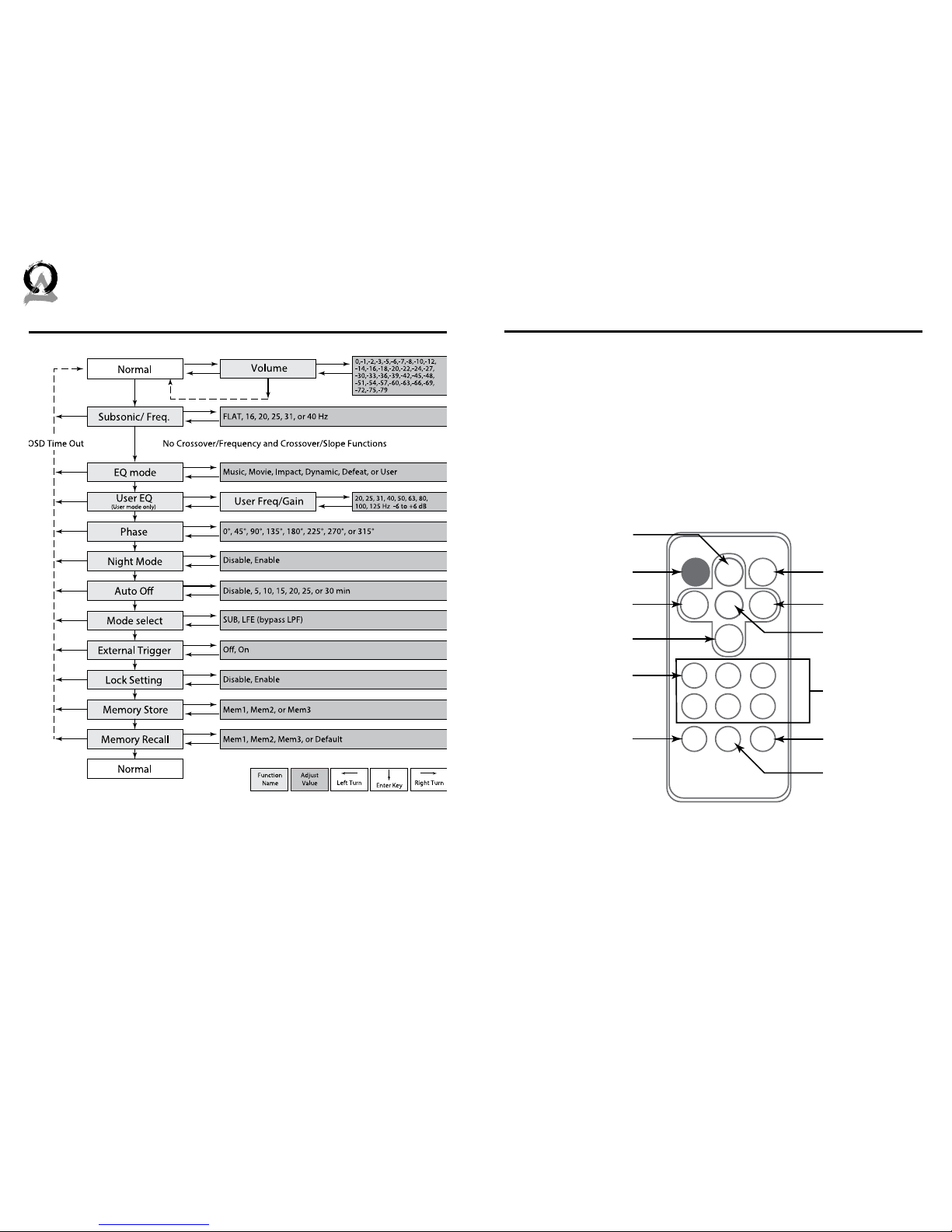
Mode Select: This feature allows
you to select a mode. Set values
contain: SUB or LFE (refer to flow
charts on pages 8-9).
External Trigger: This feature
allows you to select the enable
external trigger function. Press
and hold the Navigation control
knob with the power switch in the
ON position to change.
Lock Setting: When this function
is active, all settings will be protected until disabled.
Values are: Disable or Enable.
Memory Store: This feature al-
lows you to select the memory
bank. There are three memory
banks, consisting of Mem1, Mem2
and Mem3.
Memory Recall: The feature
allows you to recall settings
saved using the “Memory Store”
function. There are four memory
banks total, consisting of Mem1,
Mem2, Mem3 and Default. Default
resets to factory default settings.
Page 9
14 15
844·674·4461
WWW.ORIGINACOUSTICS.COM
SUBA 500 INSTALLATION MANUAL
Remote Control
The remote control duplicates the functions of the programming navigation control knob on the front of the subwoofer amplifier, plus adds
some additional functions such as power on/o, mute on/o, and one
button selection of the six EQs. In a typical home theater installation
however, the remote will most likely NOT be used, as the subwoofer
amplifier will be configured to a specific subwoofer and room placement, and controlled by the main processor or receiver.
USER
DEFEAT
MUTEPOWER
DOWN
ENTER
MENU
UP
LEFT
VOL -
RIGHT
VOL +
EXIT
MUSIC
STORE
IMPACT
RECALL
MOVIE DYNAMIC
Power on/off button
Scroll up button
Volume down button
(DSP left-right when
Menu button pressed)
Scroll down button
Select “User” EQ setting button
(sub mode only)
Exit navigation mode button
Mute button
Menu button
Volume up button
(DSP left-right when
Menu button pressed)
Six Preset EQ Modes
Memory recall button
Memory store button
Control Flow Chart–LFE Mode
Page 10
16 17
844·674·4461
TECHSUPPORTORIGINACOUSTICS.COM
WWW.ORIGINACOUSTICS.COM
SUBA 500 INSTALLATION MANUAL
If you have any questions or concerns about installing or using this
product, you can reach us through one of the following methods:
Phone: (844) 674-4461
Hours of operation: 8:00am - 5:00pm (Pacific Time), Mon - Fri
Email: [email protected]
If you are having technical trouble, please include the model number
and briefly explain what steps you took to resolve the problem in your
email, or be prepared to answer these questions over the phone. If you
are considering returning the product, it’s required that you contact
Origin Acoustics prior to any return attempts. This way we can determine if the issue can be resolved without returning the product, or if
needed we can provide instructions and support for the return process.
Symptom Possible cause Remedy
Sound is out
Amplifier(s) is not
connected to AC
Check out amplifier’s power
cord is well connected to live AC
outlet
The subwoofer
speaker(s) is not
connected to amplifier(s) correctly
Check all the speaker wires are
connected to amplifier’s speaker
terminals
Amplifier’s fuse may
blow out
Turn the amplifier’s power o
first, and check the fuse is still in
good condition; If fuse is broken
and you have no spare one, find
your dealer for the replacement)
Amplifier does not
receive audio signal
from source
Make sure the audio cable(s) is
connected and the cable is good
Bad sound performance
Bad audio cable Check out all the audio cables to
make sure the cables are good
and connecting are good as well
The subwoofer
speaker is bad
Replace the bad subwoofer with
a good one, to verify if speaker
itself is the cause
The polarity of
speaker wire is
reversed
Check the polarity (+ / -) are
right, and correct them if they
are wrongly connected
Improper setting
of crossover, or has
chosen the wrong
mode
Try dierent crossover mode or
setting for the best result
Technical AssistanceTroubleshooting
Page 11

18 19
844·674·4461
WWW.ORIGINACOUSTICS.COM
SUBA 500 INSTALLATION MANUAL
Specifications
Model name SUBA500
Part number AMPSUB1X500
Type of amplifier High eicient class D;
Type of power supply High dynamic toroidal transformer
Maximum output power 500w (RMS @ 4Ω)
Total harmonic distortion (THD) < 1%
Customized presets of mode up to 4 modes
Equalization 10 bands / adjustable (-6 to +6 dB)
Adjustable crossover 40 to 160 Hz; increment of 1 Hz
Slope of crossover 12 to 36 dB / Octave
Line-in sensitivity 190 mV
Phase control 0 to 315° / 45° per increment
Audio-trigger sensitivity 3 mV at 50 Hz
Auto-o delay time 5 to 30 minutes (adjustable)
External trigger DC 12V
Thermal protection function yes
Night mode (auto-level-compress) yes
Remote control IR; handset provided
Firmware upgrade USB / type B
Weight 16 Lb / 7.3 Kg
Rack-mount hole Horizontal line : 18.3” / 465mm
Vertical line : 1.18” / 30mm
Dimension (w/o rack-mount) Width: 17.12” / 435mm
Height: 1.75” / 45mm
Depth: 10.38” / 264mm
Dimension (with rack-mount) Width: 19.00” / 483mm
Height: 1.75” / 45mm
Depth: 10.38” / 264mm
Fuse AC 120V: 5A
AC 240V: 2.5A
Page 12

20 21
844·674·4461
WWW.ORIGINACOUSTICS.COM
SUBA 500 INSTALLATION MANUAL
This warranty may not be valid if the product was purchased through
an unauthorized dealer. This warranty only applies to the individual
that made the original purchase, and it cannot be applied to other purchases. The purchaser must be prepared to provide proof of purchase
(receipt). This warranty will not be valid if the identifying number or
serial number has been removed, defaced, or altered.
This warranty does not cover the following:
• Accidental damage
• Damage caused by abuse or misuse
• Damage caused by attempted repairs/modifications by anyone
other than Origin Acoustics or an authorized dealer
• Damage caused by improper installation
• Normal wear, maintenance, and environmental issues
• Damage caused by voltage inputs in excess of the rated maximum
of the unit
• Damage inflicted during the return shipment
Origin Acoustics warrants to the original retail purchaser only that this
Origin Acoustics product will be free from defects in materials and
workmanship, provided the speaker was purchased from an Origin
Acoustics authorized dealer.
If the product is determined to be defective, it will be repaired or replaced at Origin Acoustics’ discretion. If the product must be replaced
yet it is no longer manufactured, it will be replaced with a model of
equal to or greater value that is the most similar to the original. If this
is the case, installing the replacement model may require mounting
modifications; Origin Acoustics will not be responsible for any such
related costs.
Before making any return attempts, it is required that you first contact
Origin Acoustics. Return product to Origin Acoustics or your dealer, either in person or by mail. It’s preferable if the product is returned in the
original packaging. If this isn’t possible, the customer is responsible
for insuring the shipment for the full value of the product.
This warranty is in lieu of all other expressed or implied warranties.
Some states do not allow limitations on implied warranties, so this may
not apply depending on the customer’s location. (For more information,
see Magnuson-Moss Warranty Act.)
Return Process
Requirements and Warranty Coverage
2-Year Warranty
Warranty
Page 13

©2014 Origin Acoustics. All copyrighted, trademarked and
patented elements mentioned herein are the sole property of
Origin Acoustics.
 Loading...