

Page 1

Page
1. Inventory of contents································································································2
2. Feature.······················································································································2
3. Set up guide···············································································································2
3.1 Battery install··································································································· 2
3.2 Mounting ··········································································································3
4. LCD overview ············································································································ 4
4.1 LCD overview·································································································· 4
4.2 Weather forecasting ·······················································································5
4.3 Weather tendency indicator ···········································································5
4.4 Examples of changing weather icons··························································· 5
4.5 Storm warning indicator ················································································ 5
5. Program modes········································································································· 5
5.1 Quick display mode························································································ 6
5.2 Setting mode··································································································· 6
5.3 Alarm mode····································································································· 6
5.4 Min/Max mode································································································· 7
6. Problems and interference with operation ·····························································8
7. Specification·············································································································· 8
This Operation Manual is part of this product and should be kept in a safe place for
future reference. It contains important notes on setup and operation.
- 1 -
WIRELESS WEATHER STATION
INSTRUCTION MANUAL
WS-1400 DRAFT
Page 2

- 2 -
1. Inventory of contents
1) Base station
2) One remote sensor with mounting bracket
3) Instruction manual
2. Feature
1) Wireless outdoor and indoor humidity (%RH)
2) Wireless outdoor and indoor temperature (°F or °C)
3) Records min. and max. humidity
4) Records min. and max. temperature
5) Barometric pressure 24-hour history graph (inHg or hPa)
6) Weather forecast tendency arrow
7) Forecast icons based on changing barometric pressure
8) Time and date by manual setting
9) DCF radio controlled time and date with manual setting (WH1170 )
10) Automatically updates for daylight saving time based onGermany DST system (WH1170)
11) 12 or 24-hour time display
12) Perpetual calendar
13) Time alarm with snooze
14) Can receive one sensor
15) LED backlight
16) Wall hanging or free standing
17) Included transmitter
18) Low battery indicator
19) Synchronized instant reception
3. Set up Guide
3.1 Battery install
Note: To avoid operating problems, please take note of battery polarity before/when inserting any
Alkaline Batteries (permanent damaged could be introduced by inserting the battery in wrong
direction). Use good quality Alkaline Batteries and avoid rechargeable batteries.
1) Insert two AAA batteries into the remote sensor
2) Insert three AA batteries into the weather station.
3) Wait 3 minutes or until the outdoor temperature is displayed in the weather station. Do not press any
keys before outdoor sensor data received .
4) Mount the units, ensuring that the receiver can still pick up the signal from the transmitter. To
measure outdoor temperature, place the transmitter outdoors. It will transmit the temperature from its
location.
Every time the remote sensor is powered up (for example after a change of batteries), a random security
code is transmitted and this code must be synchronized with the base station to receive weather data.
Thus if battery change happened on transmitter side, then the receiver must be power up again to
re-learn the transmitter.
After the remote sensor is powered up, the sensor will transmit weather data every 8s for 16 times. After
this learning period is over, then the transmitter will transmit every 48s.
Page 3
When the base station is powered up, a short beep will sound and all LCD segments will light up for about
3 seconds before it enters into learning mode to learn the sensors security code. After the learning mode,
the base station will start the DCF radio controlled time reception. The receiver will start RCC time
reception period (maximum 10 minutes), and no weather data will be received during this period of time.
If RCC signal can’t be found within1 minutes, the signal search will be cancelled and will automatically
resume every two hours until the signal is successfully captured. Regular RF link will be established once
RCC reception routine is finished.
Note: DO NOT PRESS ANY KEY during the first 3 minutes learning period. After both indoor and
outdoor data are displayed you can place your remote sensor outdoors and set your time (if no RCC
reception is possible). If there is no temperature reading in the indoor station, make sure the units are
within range of each other or repeat the battery installation procedure. If a key is pressed before the
weather station receives the temperature signal, you will need to follow the battery installation procedure
again.
Please wait 10seconds before re-insert the battery again to make a proper reset for both
transmitter and receiver.
Note for Radio Controlled Time:
The time and date display is based on the signal provided by the highly accurate government operated
atomic clock. The base station will continue to scan for the radio controlled time signal each day despite it
being manually set. If reception has been unsuccessful, then the radio controlled time icon will not appear
but reception will still be attempted continually. If reception has been successful, the received time and
date will overwrite the manually set time and date.
Note:
When batteries require replacement for the base station, the low battery indicator will light up on the LCD.
Please participate in the preservation of the environment by properly disposing of all used-up
batteries and accumulators at designated disposal points. Neve r d i s po s e of b a t t e r i e s i n a f i r e as this
may cause explosion, risk of fire or leakage of dangerous chemicals and fumes
3.2 Mounting
1) Base station
With one foldable legs at the back of the unit, the base station can be placed onto any flat surface or wall
mounted at the desired location by the hanging holes also at the back of the unit. It is important to check
that the radio signal can be received before permanently mounting any of the units
2) Remote sensor
Note: To achieve a true temperature reading, avoid mounting remote sensor
in direct sunlight. We recommend that you mount the remote sensor on an
outside North-facing wall; obstacles such as walls, concrete, and large metal
objects will reduce the range.
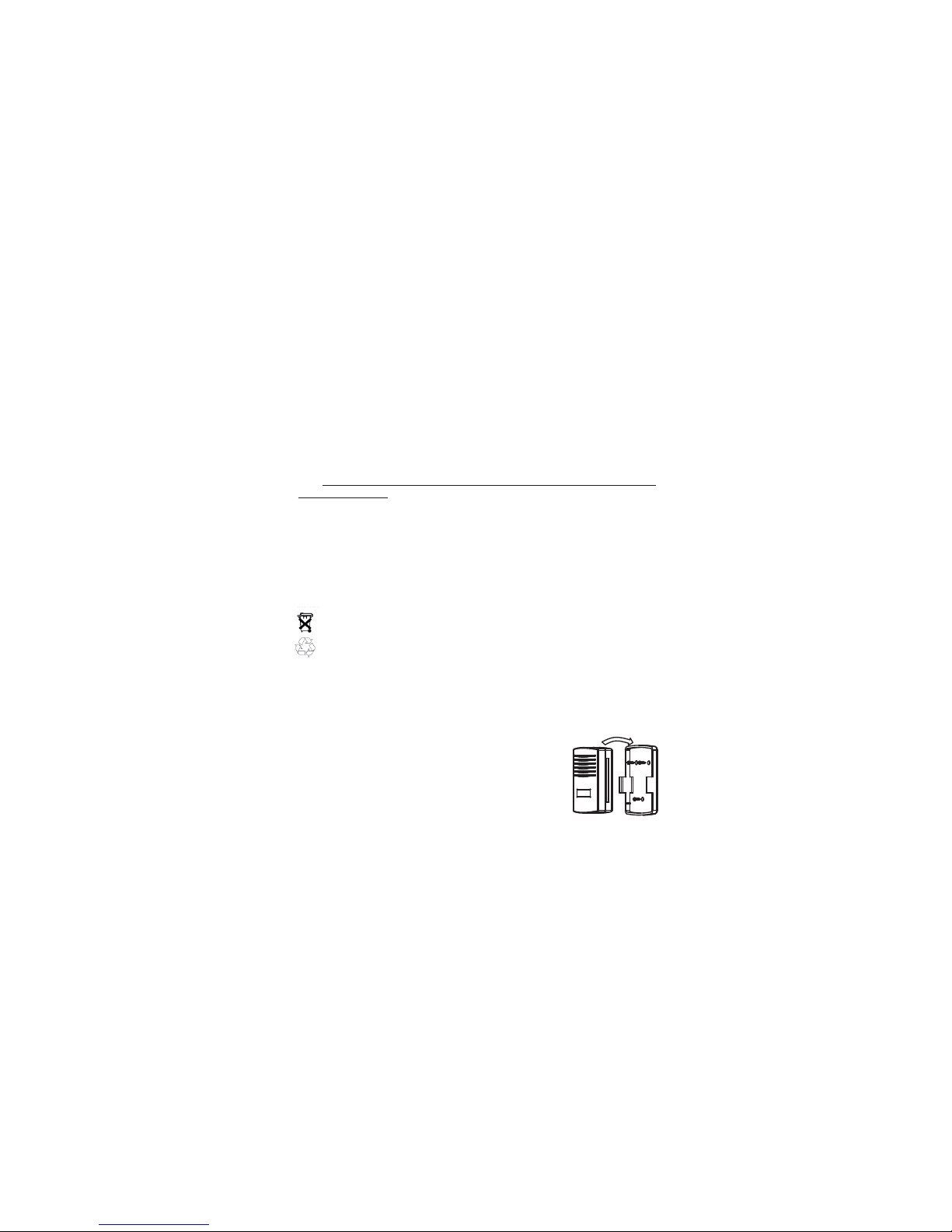
To wall mount, use 3 screws to affix the wall bracket to the desired wall, plug
in the remote sensor to the bracket.
- 3 -
Remote Sensor
Wall Bracket
Page 4
4.LCD overview
4.1 LCD overview
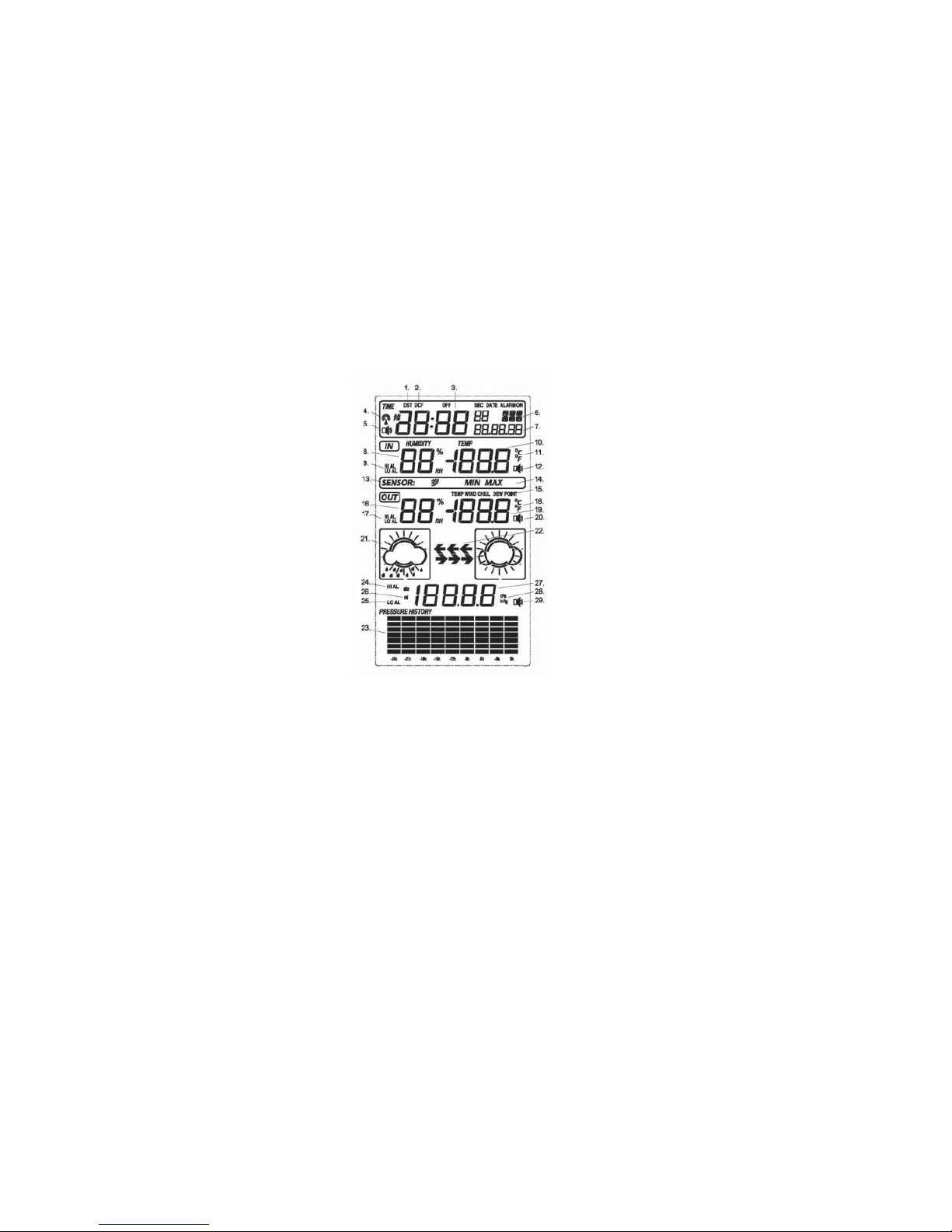
The following illustration shows the full segments of the LCD for description purposes only and will not
appear like this during normal operation.
1. DST
2. DCF Radio Controlled Time
3. Time
4. Radio Controlled Time icon
5. Alarm on indicator
6. Day of week/ time zone
7. Date
8. Indoor humidity display
9. Indoor temperature and humidity low / high alarm
10. Indoor temperature display
11. Temperature display unit
12.
Indoor temperature and humidity alarm on
indicator
13. Remote sensor transmit signal indicator
14. MIN/MAX information
15. Dew point temperature display
16. Outdoor humidity display
17. Outdoor temperature and humidity low/high
alarm
18. Temperature display unit
19. Outdoor temperature display
20. General outdoor alarm icon
21. Weather forecast icon
22. Weather tendency indicator
23. Pressure with 24 hour history graph
24. Pressure high alarm
25. Pressure low alarm
26. Absolute or relative air pressure selection
27. Barometer air pressure
28. Pressure display unit (inHg or hPa)
29. Pressure alarm on indicator
- 4 -
Page 5
4.2 Weather forecasting
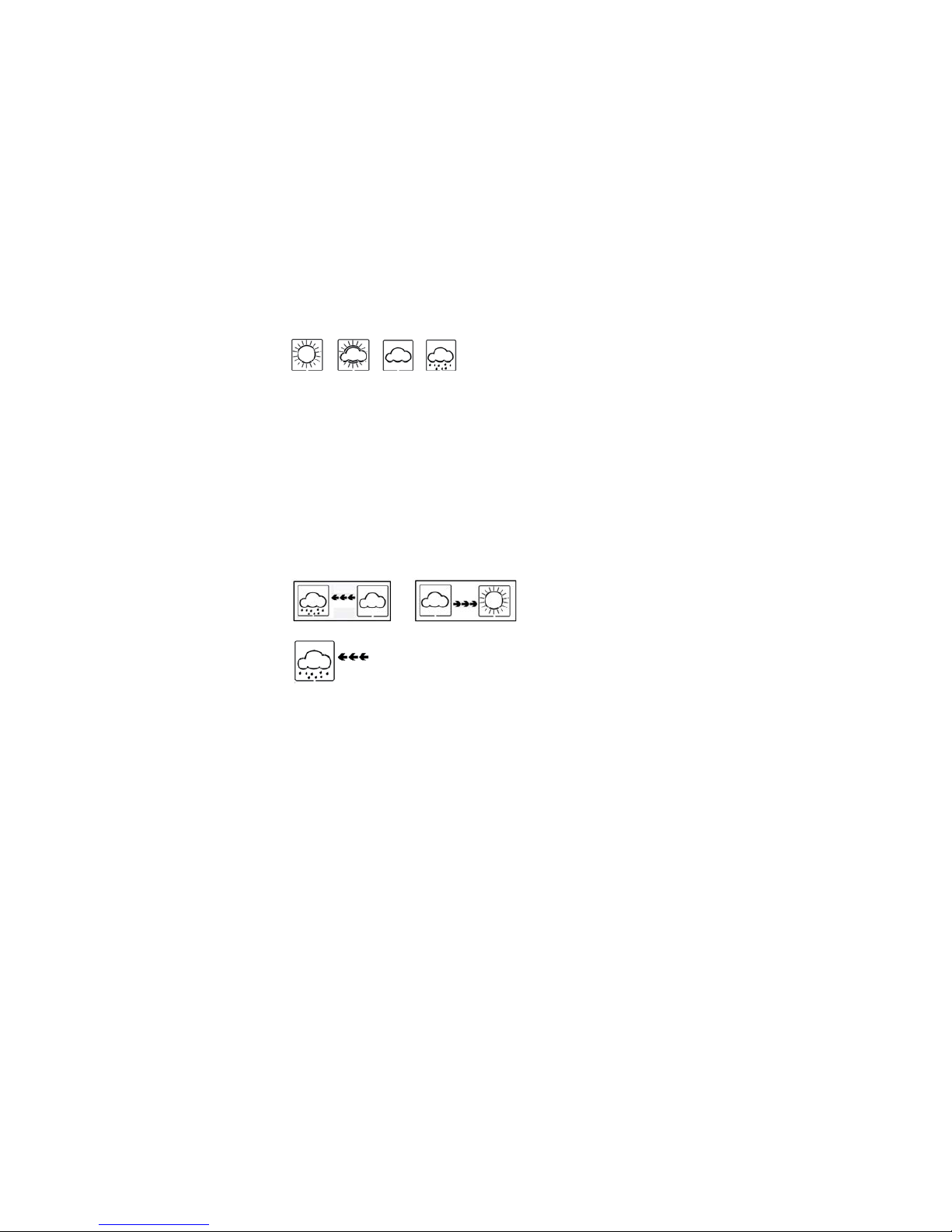
Sunny Partly Cloudy Cloudy Rain
y
The four weather icons Sunny, partly Cloudy, Cloudy and Rainy represent the weather forecasting. There
are also two weather tendency indicators to show the air pressure tendency between the weather icons.
The weather forecasting is based upon the change of air pressure.
4.3 Weather tendency indicator
The weather tendency indicators arrow is located between the weather icons to show the air pressure
tendency and provide a forecast of the weather to be expected by the decreasing or increasing air pressure.
The rightward arrow means that the air pressure is increasing and the weather is expected to become
better. The leftward arrow means that the air pressure is decreasing and the weather is expected to
become worse.
The change of weather forecast icon is in accord to the relationship between current relative pressure and
the pressure change since last six hours. If the weather is changing, weather tendency indicator (animated
arrows) will be flashing for three hours indicating a weather change is happening. After that, if weather
conditions have become stable and no new weather change condition met,then the arrows will be fixed.
4.4 Examples of changing weather icons:
4.5 Storm warning indicator
The storm threshold can be set to suit the user’s requirement for storm forecasting from 3-9hPa (default
4hPa). When there is a fall over pressure threshold within 3 hours, the storm forecasting will be activated,
the clouds with rain icon and tendency arrows will flash for 3 hours indicating the storm warning feature has
been activated.
Notes to pressure sensitivity setting for weather forecasting:
The pressure threshold can be set to suit the user’s requirement for weather forecasting from 2-4hPa
(default 2hPa). For areas that experience frequent changes in air pressure requires a higher setting
compared to an area where the air pressure is stagnant. For example if 4hPa is selected, then there must
be a fall or rise in air pressure of at least 4hPa before the weather station will register this as a change in
weather.
5. Program Mode
The base station has five keys for easy operation: SET key, ALARM key, MIN/MAX key + key and
SNOOZE/LIGHT key. And there are four program modes available: Quick Display Mode, Setting Mode,
Alarm Mode and Min/Max Mode.
The program mode can be exited at any time by either pressing the SNOOZE/LIGHT key, or waiting for
the 10-second time-out to take effect.
- 5 -
Page 6

- 6 -
5.1 Quick Display Mode
- While in Normal Mode, press the SET key to enter the Quick Display Mode as follow:
1. Outdoor Temperature / Dew point (press the MIN/MAX key or + key shifts the display between
outdoor temperature and dew point)
2. Absolute pressure / Relative pressure (press the MIN/MAX key or + key shifts the display between
the absolute pressure and relative pressure)
- press the SET key to accept the change and advance to the next display mode. Continues to press the
SET key to toggle through the display mode until return to the normal Mode
5.2 Setting Modes
-
Press the SET key for 3 second while in normal mode to enter the normal Setting mode
- Press the SET key to select the following setting in sequence :
1.
Time Zone Setting
12/24 hour format
Manual time setting (hours/minutes)
Calendar setting (year /month /date)
Temperature display unit degree Celsius or Fahrenheit
Air pressure display units in hPa or inHg
Relative pressure setting from 919.0hPa – 1080.0hPa (default 1013.5hPa)
Pressure threshold setting (default 2hPa)
Storm threshold setting (default 4hPa)
- In the setting modes, press + key or MIN/MAX key change or scrolls the value. Hold the +key or
MIN/MAX key for 3 second will increase/decrease digits in great steps.
- Press SNOOZE/LIGHT key or key idle 10 second, the setting mode will return to Normal Mode
Note: Please set the units firstly before change units’ value. During change of units setting, units’ value
will change according to new units but it might cause resolution loss due to its internal calculation
algorithm.
5.3 Alarm Modes
- While in Normal Mode press the ALARM key to enter the High Alarm Mode
- Press the ALARM key again to enter Low Alarm mode
Remark: after the initial pressing of ALARM key, the display will be refreshed to show current high,
low alarm value. Normal alarm value will be displayed only for those already activated, all other not
activated values will be displayed with “---“or”--“instead.
- Press the ALARM key again to return the Normal Mode
- In the High Alarm Mode press the SET key to select the following alarm modes:
1. Time alarm (hour/minute)
2. Indoor humidity high alarm
3. Indoor temperature high alarm
4. Outdoor humidity high alarm
5. Outdoor temperature and dew point high alarm
6. Pressure high alarm
- In the Low Alarm Mode press the SET key to select the following alarm modes:
1. Time alarm (hour/minute)
2. Indoor humidity low alarm
3. Indoor temperature low alarm
4. Outdoor humidity low alarm
5. Outdoor temperature and dew point low alarm
6. Pressure low alarm
Page 7
- In the alarm modes, Press + key or MIN/MAX key change or scrolls the alarm value. Hold the + key or
MIN/MAX key for 3 second to change the number in great step. Press the ALARM key to choose the
alarm on or off (if alarm is enabled, the speaker icon on the LCD will be turned on indicating the alarm
function has been enabled). Press the SET key to confirm the setting and continue pressing the SET
key to toggle through each alarm mode until it returns to the normal display mode.
- Press SNOOZE/LIGHT key or key idle 10 second at any time, the alarm mode will return to Normal
Mode
Canceling the Temperature Alarm While Sounding
a. When a set weather alarm condition has been activated, that particular alarm will sound and flash for 120
second. Press any key to mute the alarm. When weather alarm condition was activated again within 10
minutes, alarm will not sound but will continue to flash until weather conditions have become more steady.
This feature is useful to avoid repeated triggering for the same alarm value.
b. The alarm will reactivate automatically once the value has fallen below the set value, or if a new value is
entered.
The outdoor weather alarm
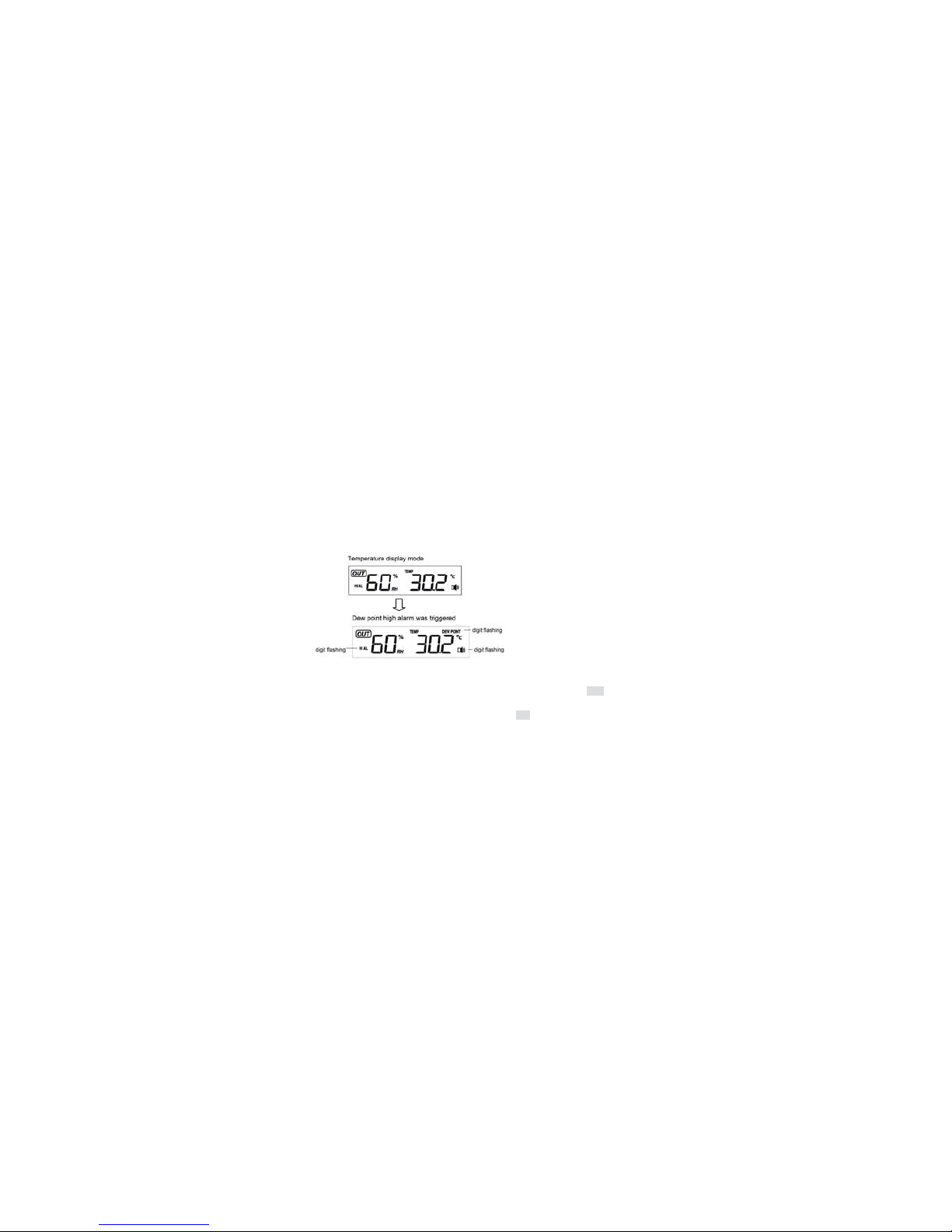
When a set outdoor weather alarm has been triggered, it will flash on the LCD display and the general
outdoor alarm icon and high/low alarm icon will flash accordingly. For example in outdoor temperature
display mode, when dew point high alarm is triggered, DEW POINT icon will flash along with general
outdoor alarm icon and high alarm icon flashing, telling that the current alarm source is from dew point.
5.4 Min/Max Mode
- While in Normal Mode, press the MIN/MAX key to enter the maximum mode, MAX logo and the
general Max record will be displayed.
- Press MIN/MAX key again to enter the minimum mode, MIN icon and minimum record will be
displayed
- Press MIN/MAX key again to return the Normal Mode
- In the maximum reading Mode, press the + key to display the following maximum values together
with the time and date time stamp at which these values were recorded:
1. Indoor humidity maximum
2. Indoor temperature maximum
3. Outdoor humidity maximum
4. Outdoor temperature maximum
5. Pressure maximum
- In the minimum reading Mode, press the + key to display the following minimum values together
with the time and date at which these values were recorded:
1. Indoor humidity minimum
2. Indoor temperature minimum
- 7 -
Page 8
remote sensor
for
- 8 -
3. Outdoor humidity minimum
4. Outdoor temperature minimum
5. Pressure minimum
- While in the minimum or maximum mode, press SET key for 2 seconds individual minimum or
maximum record will be reset to current reading together with the current time and date.
- Press the SNOOZE/LIGHT key or key idle 10 second, the Min/Max mode will return to Normal Mode
6. Problems and interference with operation
Problem & cause Remedy
Distance between transmitters and
receiver too long
Reduce distance between transmitters and receiver to receive
signal
High shielding materials between the
units (thick walls, steel, concrete,
isolating aluminum foil and etc.)
Find a different location for sensors and/or receiver. See also
item ‘transmission range’ below
Interference from other sources (e.g.
wireless radio, headset, speaker, etc.
operating on the same frequency)
Find a different location for the sensors and/or base station.
Neighbors using electrical devices operation on the same signal
frequency can also cause interference with reception
No reception after adding extension
cables
Find a new location for the sensors and/or base station.
Poor contrast LCD or no reception or
low batteries in sensors or receiver
Change batteries ( check low battery indicator on the LCD)
Temperature, humidity, or air pressure
is incorrect.
Check/replace batteries. If multiple remote sensors are in use,
check location with corresponding “boxed numbers”. Or move
away from sources of heat/cold. Adjust relative air pressure to a
value from a reliable source (TV radio, etc.).
7. Specifications
Outdoor data
Transmission distance in open field : 100meter max.
Frequency : 433MHz
Temperature range : -40ć to +65ć (show OFL if outside range)
Resolution : 0.1ć
Measuring range rel. humidity : 20%95%
Humidity accuracy : +/-5% under 0-45ć
Measuring interval thermo-hygro sensor : 48 sec
Water proof level : IPX3
Indoor data
Pressure / temperature : 48 sec
Indoor temperature range : 0ć to +60ć
Resolution : 0.1ć
Measuring range rel. humidity : 1%99%
Resolution : 1%
Measuring range air pressure : 919hPa – 1080hPa
Resolution/Accuracy : 0.1hPa/1.5hPa
Alarm duration : 120 sec
Power consumption
Base station : 3XAA 1.5V LR6 Alkaline batteries
Remote sensor : 2xAAA 1.5V LR03 Alkaline batteries
Battery life : Minimum 12 months for base station
Minimum 24months
 Loading...