

Page 1
EN
with Thermometer and Freeze Alert
CONTENTS
About the National Weather Radio
S
ystem
............
2
eatures
.............................................................
Front
Back
.......................................................................
Top
Left / right
...............................................................
4
7.5V AC / DC adapter
Carrying holder
.......................................................
Cradle
LCD
........................................................................
S
tarted
..........................................................
Different display modes
..........................................
S
ystem
.........................
Finding local NWR channels and county codes
About radio channels
.............................................
Description of specifi c area message
....................................................
Temperature and Ice Alert
...............................
How to set the alarms
Disabling an alarm
...............................................
Enabling an alarm
How to stop an alarm
...........................................
Snooze
.................................................................
Same
essages
......................................................
9
Specifi cations
.........................................................
About Oregon Scientifi c
20
20
WR113_EN_M REV10.indd 1 3/30/07 10:14:56 AM
Page 2
EN
INTRODUCTION
Thank you for selecting the compact Portable Weather
to weather and other environmental dangers. Ideal
for back-packers or individuals who spend extended
The WR113 is designed for individuals and organizations
that require dependable early warnings of environmental
dangers. This is the fi rst portable take anywhere weather
The 2-line liquid crystal display (LCD) is easy to read.
ABOUT THE NATIONAL WEATHER RADIO
SYSTEM
The National Weather Service (NWS) is an agency within
the National Oceanic & Atmospheric Administration
stations known as the NOAA Weather Radio (NWR).
The NWR radio system broadcasts warning information
for all types of hazards both natural and technological.
Working in conjunction with the Emergency Alert
A nationwide network, the NWR consists of more than
Virgin Islands and U.S. Pacifi c Territories. Broadcasts
are designed to meet local needs. Routine programming
forecast, regional conditions and marine forecasts.
Additional information, including river stages and
these routine broadcasts are interrupted to report
specifi c warnings, watches or other critical information.
WR113_EN_M REV10.indd 2 3/30/07 10:14:56 AM
Page 3
EN
KEY FEATURES
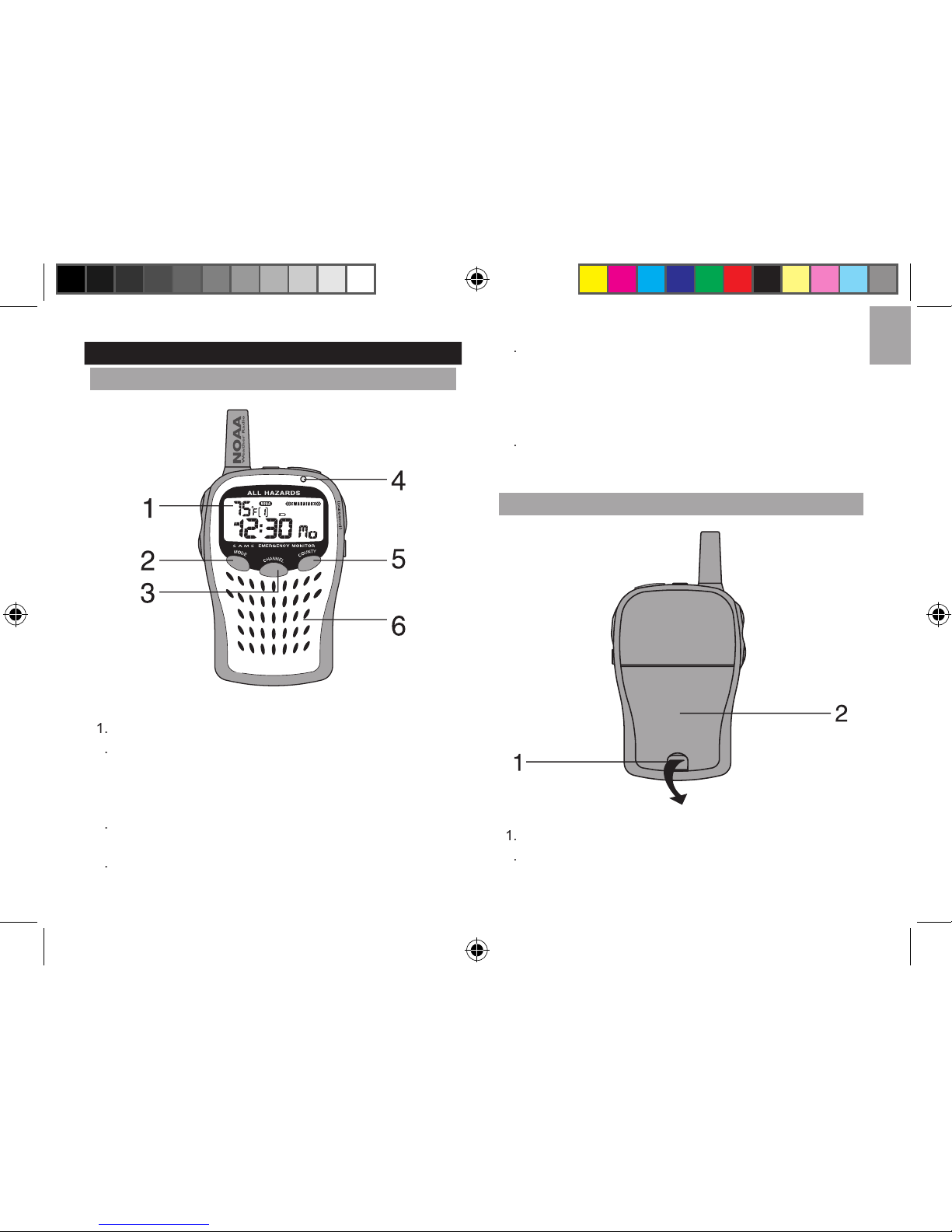
FRONT
LCD
MODE BUTTON
• Switch between clock, calendar, and alarms (1
and 2).
• Enables clock, calendar, and alarm setting.
CHANNEL BUTTON
Enable / Exit channel-setting mode.
INDICATOR
Red / Green LED indicates radio (on / off) and alert status.
COUNTY BUTTON
• Enables county mode.
• Change county settings (0-6).
• Enter / Change the setting of a displayed county
code.
RADIO SPEAKER
Adjustable voice-speaker volume.
BACK
BATTERY COMPARTMENT LATCH
BATTERY COMPARTMENT
Houses 3 UM-3 or “AA” size 1.5V alkaline batteries.
WR113_EN_M REV10.indd 3 3/30/07 10:14:58 AM
Page 4
EN
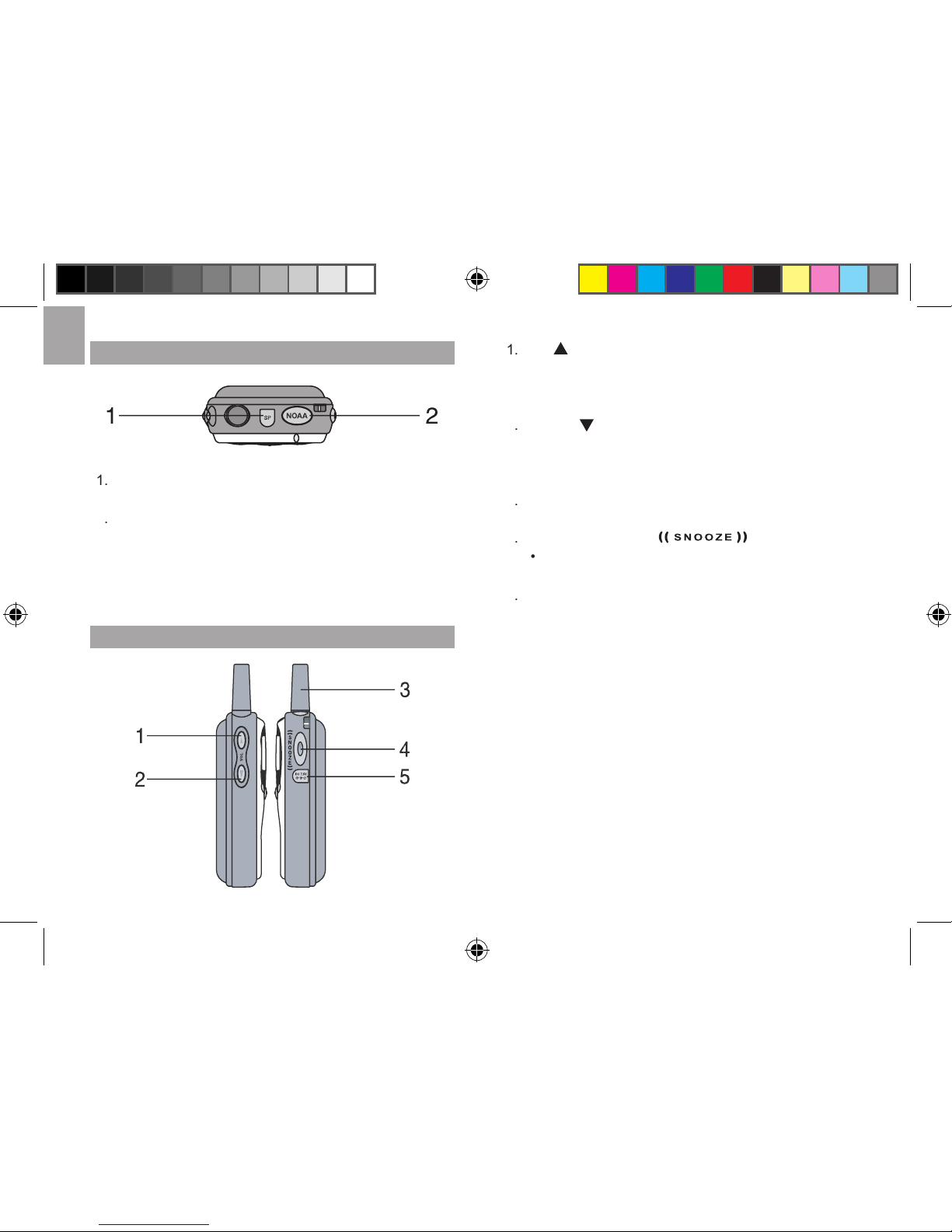
TOP
SP JACK
Line out jack for optional external speakers.
NOAA BUTTON
• Switches between NOAA (on / standby / mute
and off) modes.
• Direct access to NOAA-on mode from NOAA-
mute mode during SAME message alerts.
LEFT / RIGHT
UP
VOLUME BUTTON
• Increase settings in any setting mode.
• Increases volume.
• Turns selected daily alarm (1 or 2) on / off.
2
VOLUME BUTTON
• Decrease settings in any setting mode.
• Decreases volume.
• Turns selected daily alarm (1 or 2) on / off.
ANTENNA
Receives radio signals.
4
SNOOZE BUTTON
• Momentarily activates backlight.
AC / DC POWER PORT
AC / DC power jack for connecting unit to external
WR113_EN_M REV10.indd 4 3/30/07 10:15:02 AM
Page 5
EN
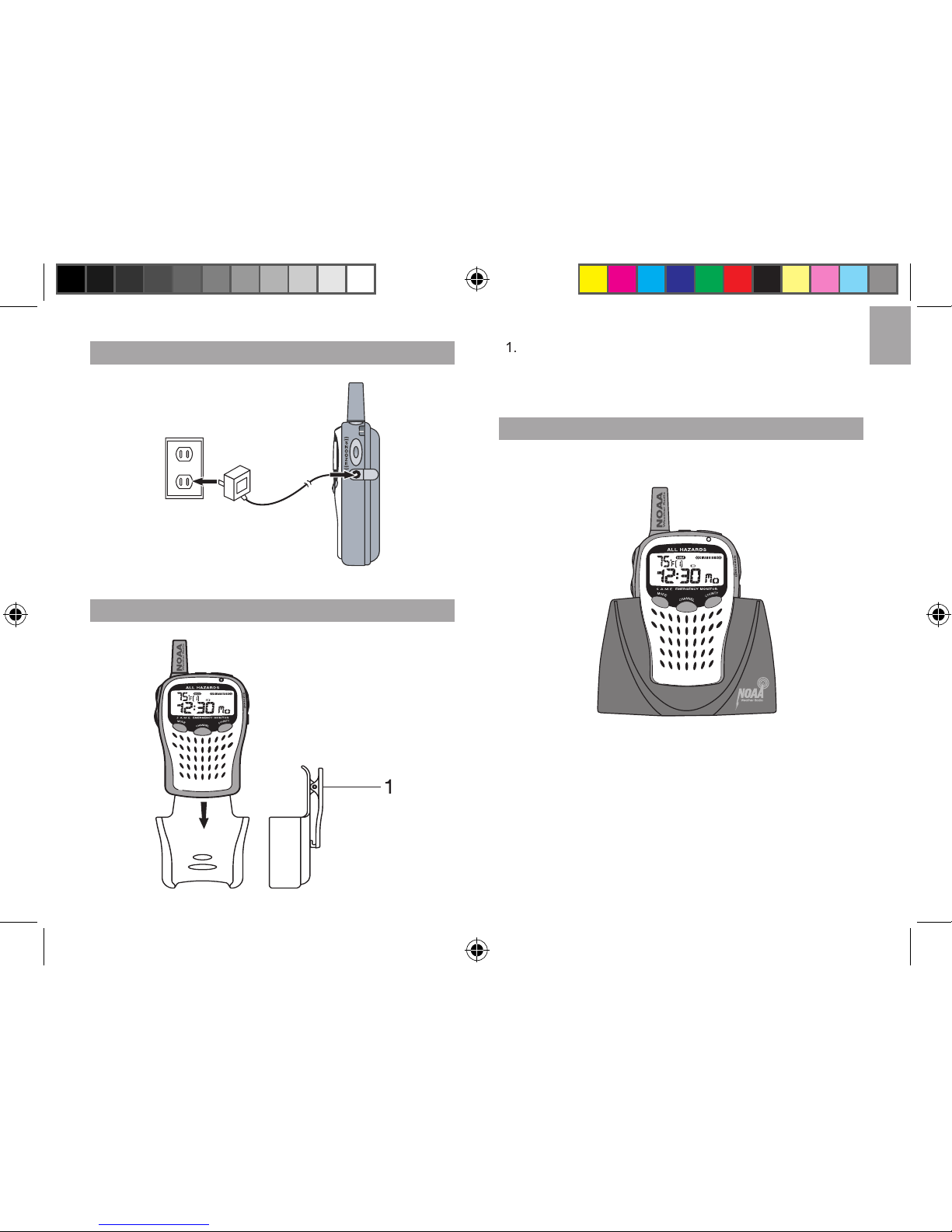
7.5V AC / DC ADAPTER
CARRYING HOLDER
CARRYING HOLDER
Mount on a wall or attach to a belt for easy
CRADLE
WR113_EN_M REV10.indd 5 3/30/07 10:15:06 AM
Page 6
EN
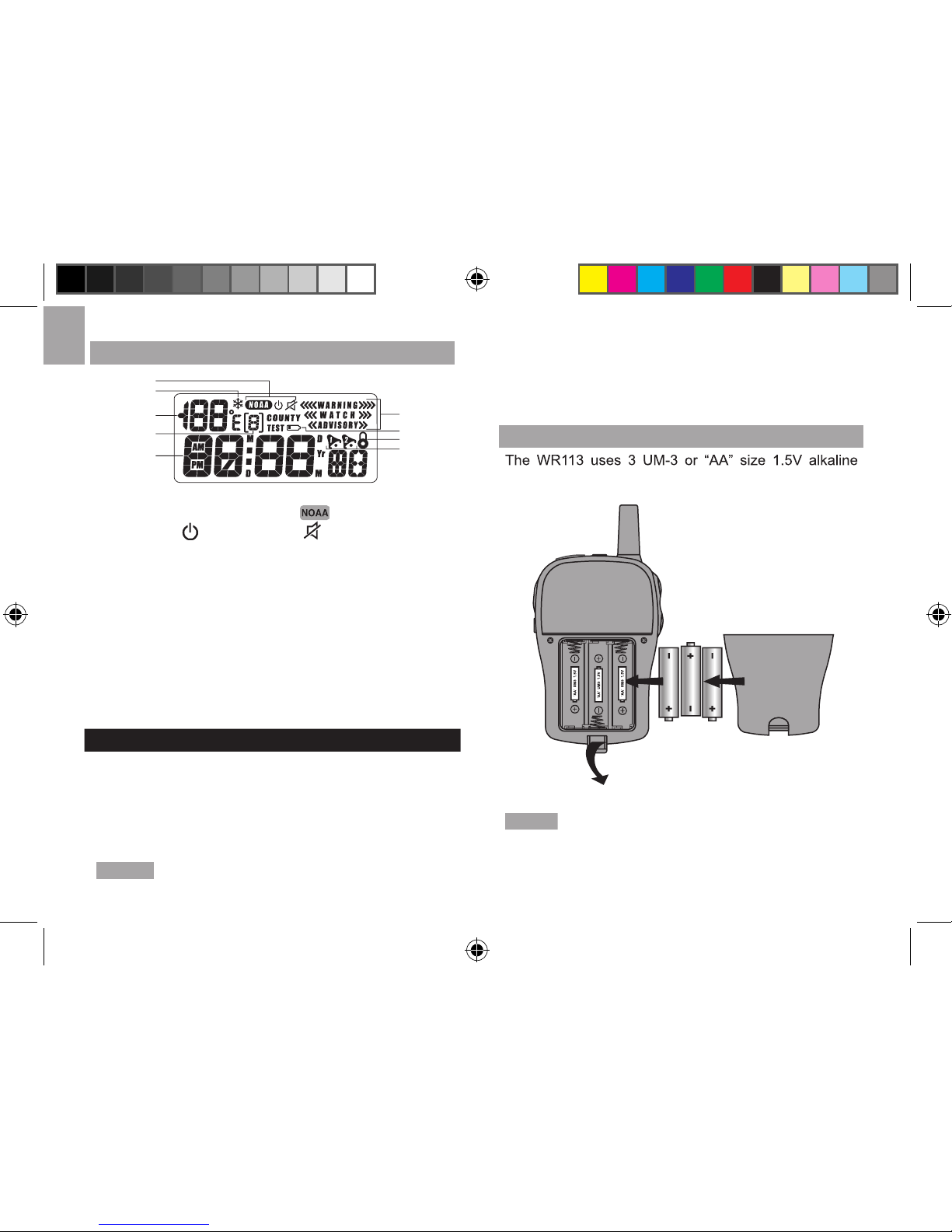
LCD
] position (NOAA
standby [
], NOAA mute [
], and NOAA off).
2. Freeze alert.
4. Radio frequency channel.
ADVISORY and TEST).
GETTING STARTED
Please note that the WR113 does not have an on / off
switch, and that the LCD will light up once the batteries
are inserted. To conserve power, the radio can be set
to NOAA standby, NOAA mute, or NOAA off modes
instead of NOAA on.
NOTE
Leaving the radio in NOAA on mode will
consume substantially more power. To save power, it
is recommended that the WR113 be on NOAA standby
when the user is not listening to radio broadcasts.
INSTALLING THE BATTERIES
The WR113 uses 3 UM-3 or “AA” size 1.5V alkaline
NOTE
Please dispose of used batteries properly to
prevent harm to the environment.
1
2
3
4
5
6
7
8
9
WR113_EN_M REV10.indd 6 3/30/07 10:15:10 AM
Page 7
EN
DIFFERENT DISPLAY MODES
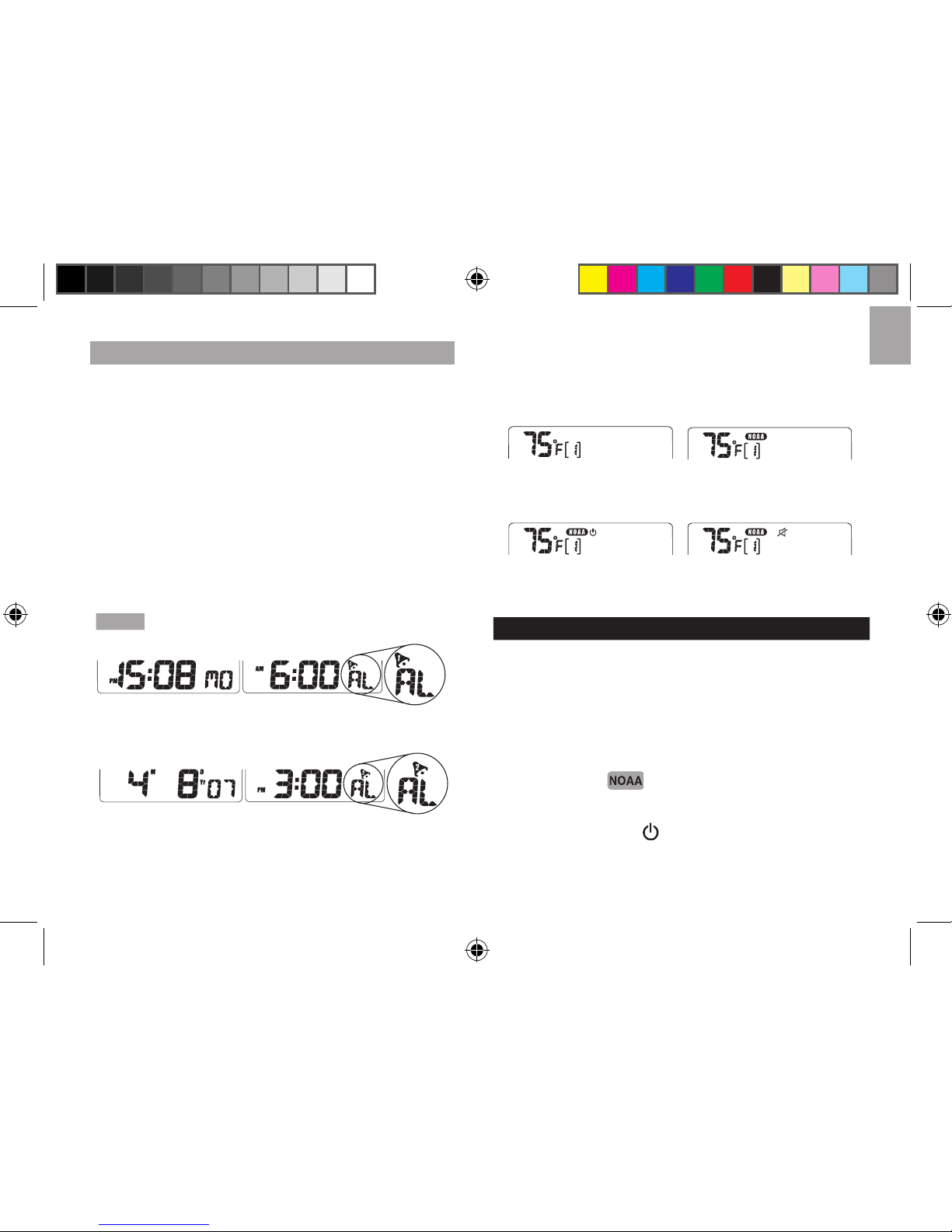
The LCD displays different types of information
depending upon the display mode. Display modes can
status for either alarm.
2. Radio-Status Mode: Displays information specifi c to
the early-warning functions of the radio.
To alternate between various time / date displays:
to advance the second line through the
time, date and alarm displays.
Each press will advance the display sequentially.
Current time
Alarm 1
Current
Alarm 2
To alternate between various radio-status displays:
button to scroll through the NOAA mode
options (on, standby, mute, or off). The NOAA mode is
displayed on the top line of the LCD.
EARLY WARNING ALERT SYSTEM
The early warning system uses radio signals to alert the
will respond to 7 specifi ed signal channels. To use the
the activity status of the radio receiver.
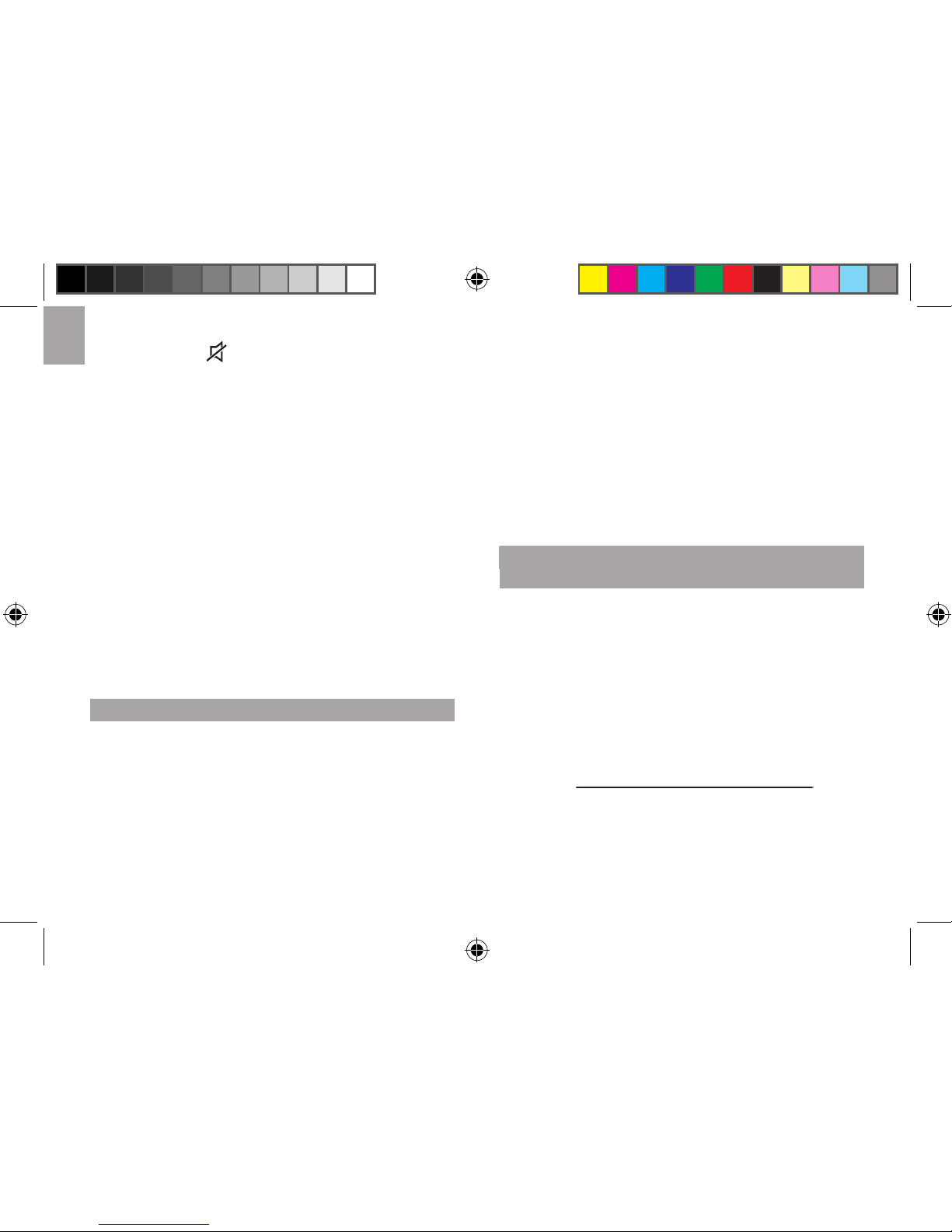
• Radio ON [
]
The radio is ON and voice messages can be heard
• Radio Standby [
]
The radio is in Standby and will switch to the ON
WR113_EN_M REV10.indd 7 3/30/07 10:15:15 AM
Page 8
EN
• Radio Mute [
]
The radio is in Standby and the LED will fl ash red
to indicate that the unit has received an alert signal.
Voice messages cannot be heard until the unit is
switched to the ON position.
• Radio OFF
The radio is turned OFF and the unit will not respond
to alert signals.
To select radio settings:
to alternate between various radio status
settings. Each press will advance the setting by 1 unit.
To listen to an alert signal from the radio mute
until the unit enters the radio ON position
MESSAGE CODES USED BY THE NWR
When the NWR airs urgent warnings, a digital code
geographical area affected and the expiration time of the
for a specifi c region have been entered into the unit, the
the specifi ed region. Once alerted, a voice broadcast
from a specifi c location and then the voice radio will
automatically activate so that voice message can be
the unit will automatically deactivate the voice radio and
FINDING LOCAL NWR CHANNELS AND COUNTY
CODES
To contact the NWS by telephone:
2. Follow prompts through a simple voice menu.
To obtain NWS radio channels and SAME codes on
the internet:
www.nws.noaa.gov/nwr/indexnw.htm
www.nws.noaa.gov/nwr/indexnw.htm
2. Click the State for which information is needed.
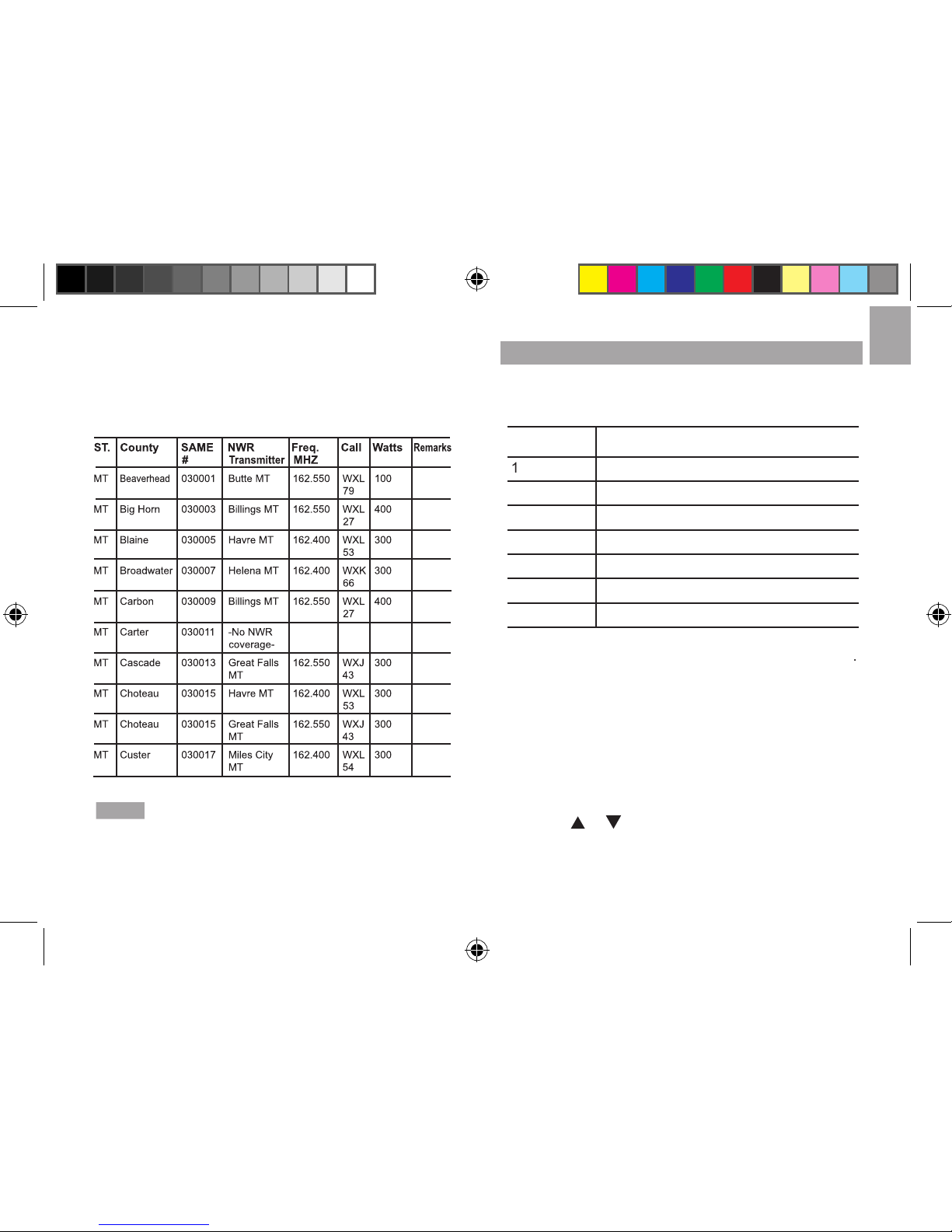
the names of counties, SAME codes, NWR transmitter
WR113_EN_M REV10.indd 8 3/30/07 10:15:16 AM
Page 9
EN
the signal in WATTS, and any remarks as applicable
SAME
NOTE
Many counties have been subdivided into as many
as 9 smaller subsections. The numbers 1 to 9 in the far left
column of the SAME code identifi es specifi c subsections
of a county. If a county has not been subdivided, the fi rst
digit of the county code will be zero.
ABOUT RADIO CHANNELS
The NWR radio channels work in the same way as
a regular radio channel. All of the NWR transmission
stations operate on 1 of 7 frequencies.
The
WR113
labels each frequency as a channel
the WR113 will receive voice and code information from
that station. The radio channel information is located on
the upper left hand corner of the LCD.
To change to radio channel:
for 2 seconds.
2. Press
or
to switch between various channels.
to confi rm and return to the Clock-
Channel Corresponding Radio Frequency
162.400 MHz
162.425 MHz
162.450 MHz
162.475 MHz
162.500 MHz
162.525 MHz
162.550 MHz
WR113_EN_M REV10.indd 9 3/30/07 10:15:17 AM
Page 10
EN
PROGRAMMING “SAME” COUNTY
NOTE
The system can only alert the user to weather
or
warning information after SAME county-code
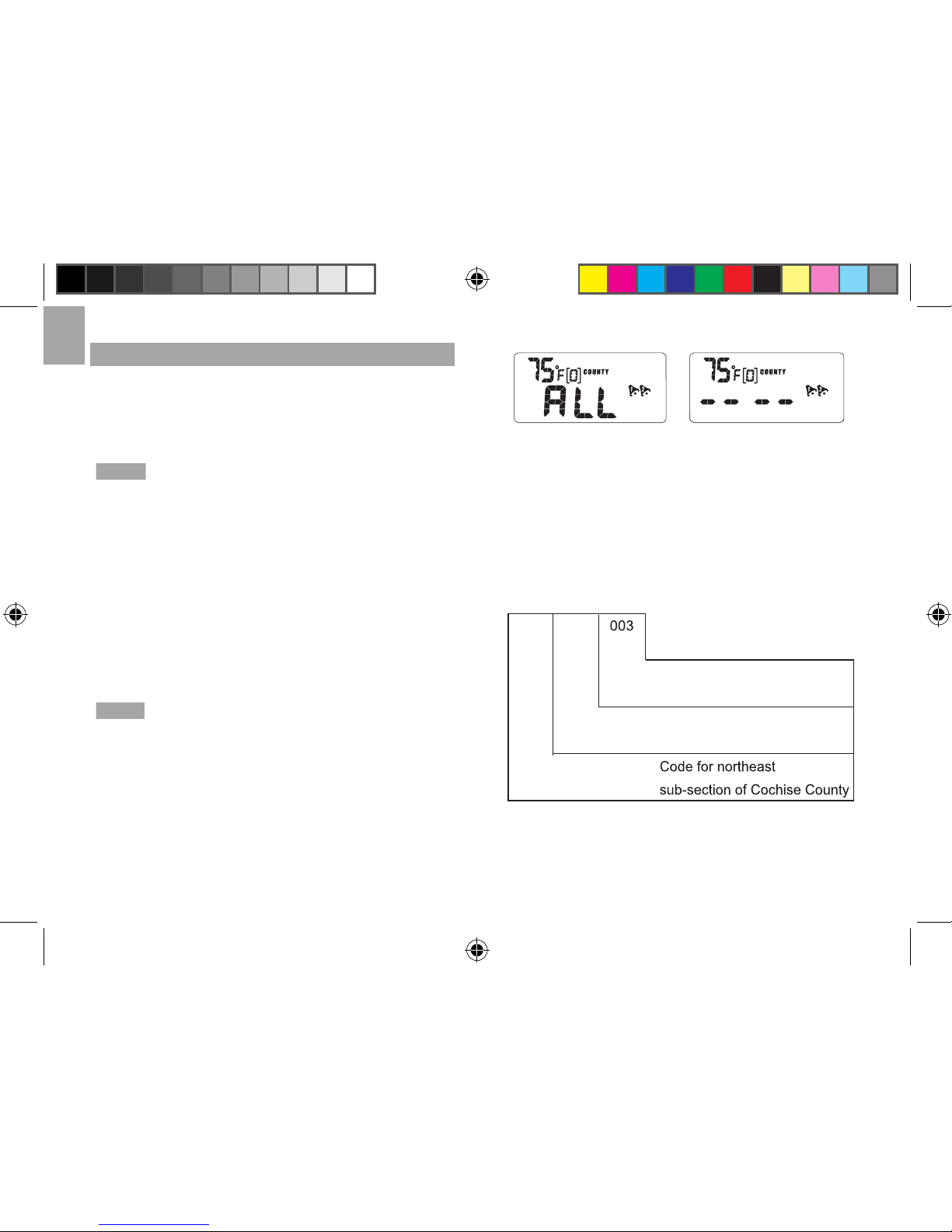
When the county code display is fi rst entered, the user
will
see a display fi eld providing the option of selecting
ALL will set the unit so all of the warnings and weather
weather information only from the specifi c regions that
NOTE
It is recommended to select a SAME code fi eld
fi eld. Selecting ALL will result in the unit giving warnings
for regions that are not relevant to the user. These
square miles
As mentioned in the section “Finding local NWR
or Internet website are available to locate county code
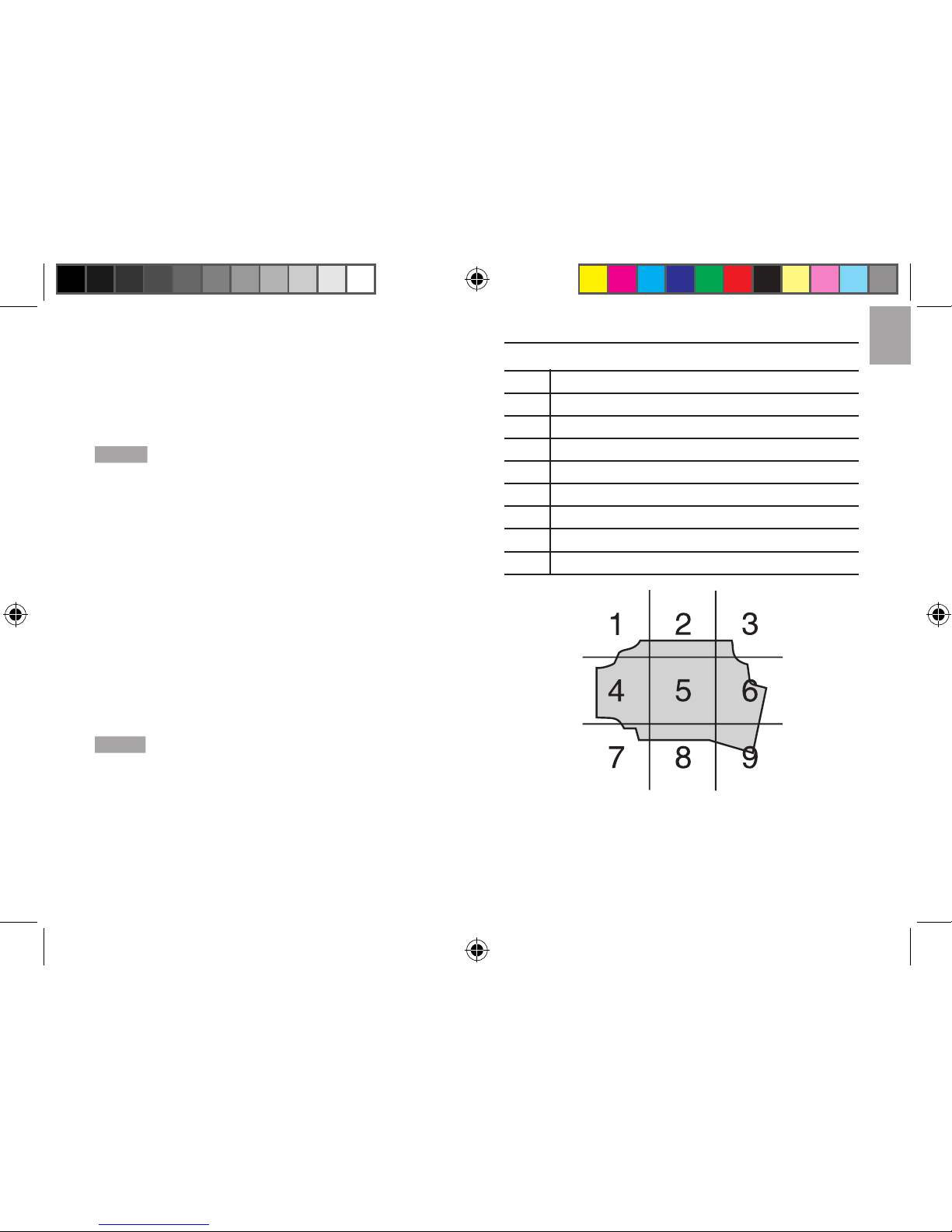
A SAME code is broken into 6 fi elds of numbers.
WR113_EN_M REV10.indd 10 3/30/07 10:15:19 AM
Page 11
EN
State-county coding:
The 3 digits on the far right refer to the state county
NOTE
To receive all of the alerts for a given state,
State codes:
The last digit on the extreme left is the county sub-
section. A county may be subdivided into nine sub-
sections; each number between (1-9) represents a
specifi c county sub-section.
NOTE
If the county sub-section code is stated as 0,
then that county is not sub-divided and all alerts for that
given county, insert 0 into the county sub-section.
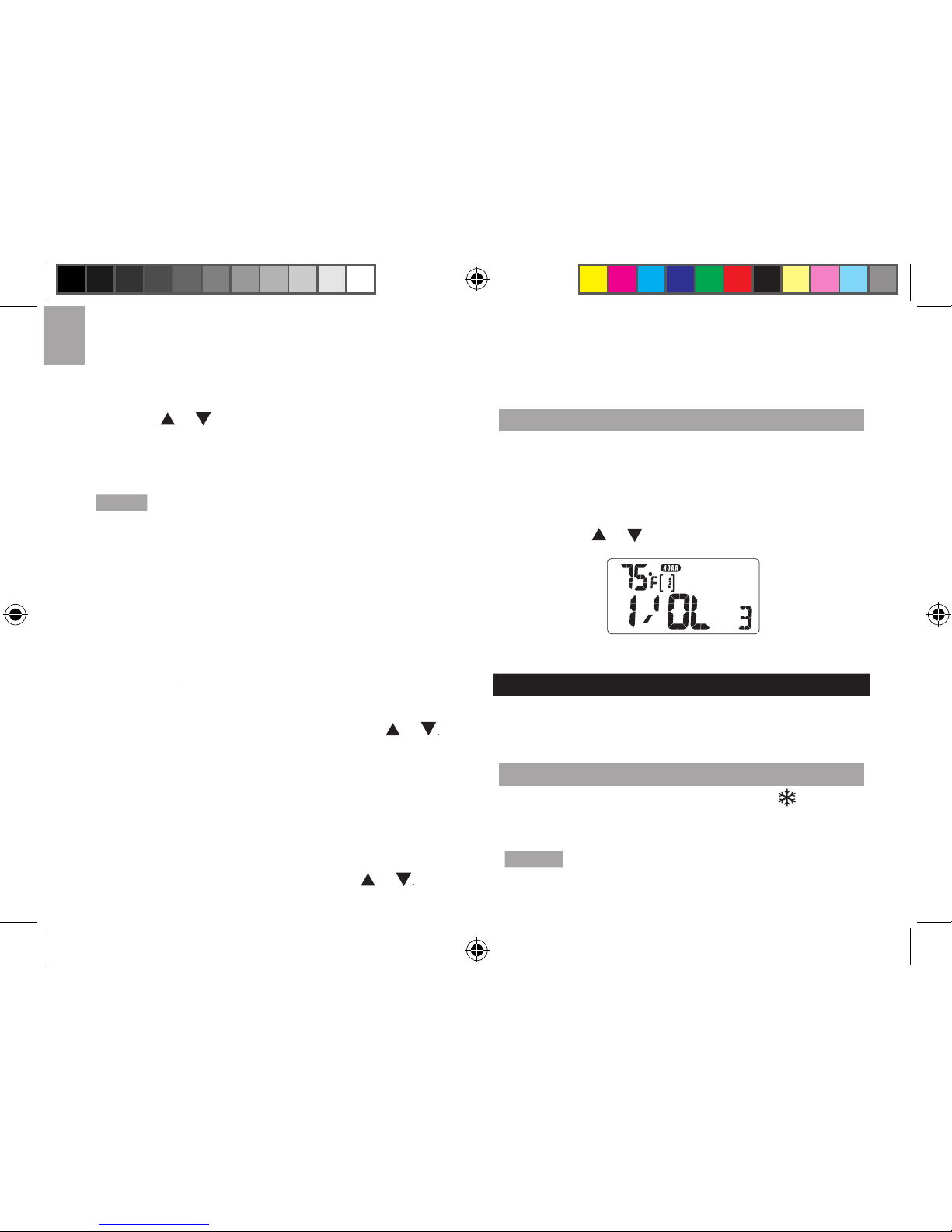
A county can be subdivided as follows:
1 Northwest
2 North Central
3 Northeast
4 West Central
5 Central
6 East Central
7 Southwest
8 South Central
9 Southeast
WR113_EN_M REV10.indd 11 3/30/07 10:15:20 AM
Page 12
EN
To select to receive all warnings or only warnings
from specifi ed localities:
to enter the county-code display
from any clock display mode.
2. Press
or
to switch between receiving all (ALL)
warnings or only warnings from specifi ed local
NOTE
If (1-6) [----] (specifi ed local area) is selected,
To enter the appropriate county code:
to enter the county-code display
from clock-display mode.
2. Press
to bypass the county-code fi eld 0
for 2 seconds. The extreme left county-
4. To enter the fi rst county-code digit, press
or
This part of the code subdivides a county
the far left column.
followed by
or
to advance to the
automatically return to clock-display mode.
RADIO VOLUME
To set the radio volume:
on, press
or
to adjust the volume.
TEMPERATURE AND ICE ALERT
WR113 displays the temperature in degrees Fahrenheit
FREEZE ALERT
fl ashes to
warn you that the temperature is approaching freezing.
NOTE
The warning will automatically stop if the
temperature goes outside the ice-alert range.
WR113_EN_M REV10.indd 12 3/30/07 10:15:21 AM
Page 13
EN
CLOCK AND CALENDAR
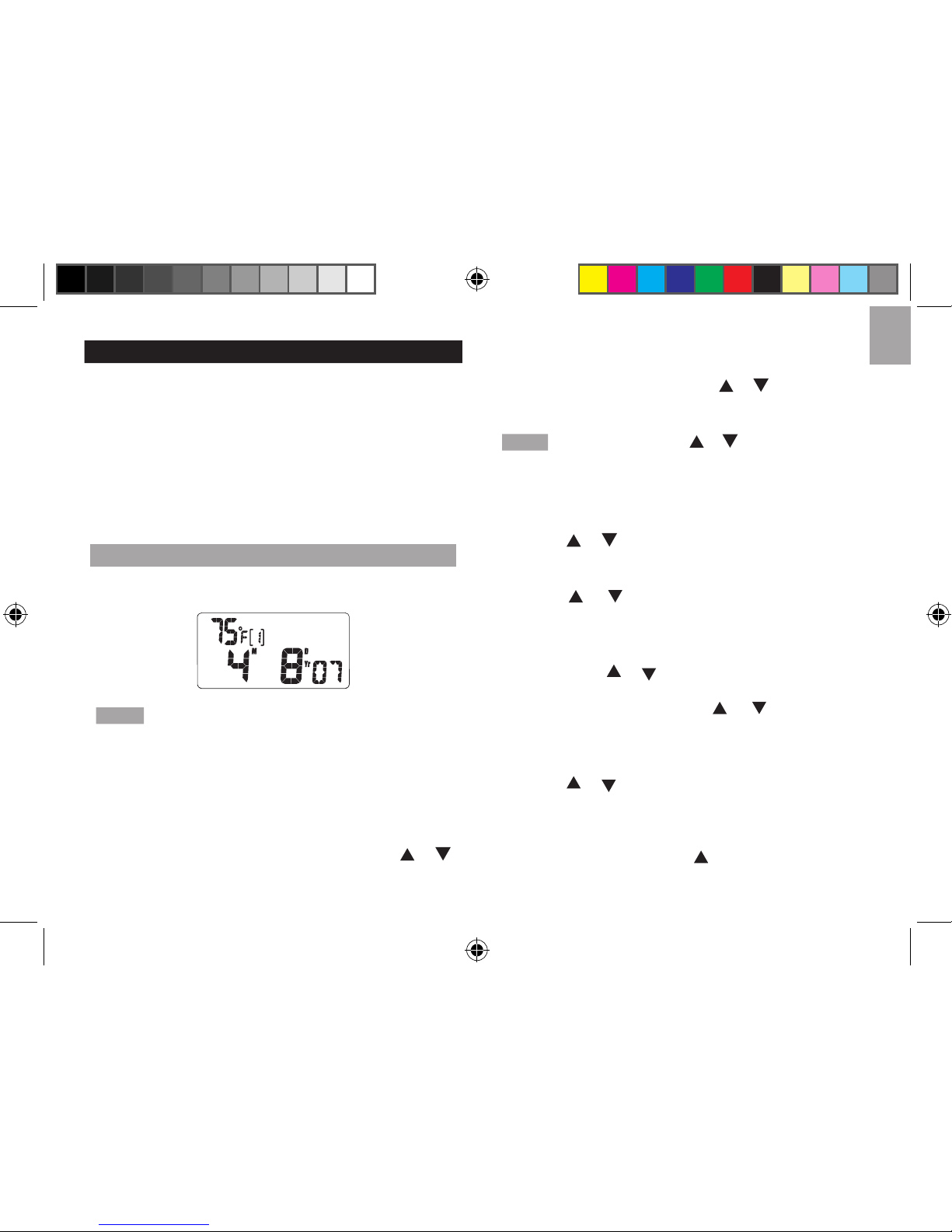
The Clock-Display mode is the unit’s default display
of the setting sequence can be bypassed by pressing
HOW TO SET THE TIME AND DATE
You can choose between 12 / 24-hour clock or month /
day, day / month display format.
At any stage of the setting sequence, if no entry
To set the time:
for
2 seconds.
2. Select either the 12 / 24-hour format. Press
or
to switch between the 2 formats.
to save and
advance to the next step.
4. To enter the hour digits, press
or
until the hour
digits have been selected.
NOTE
Pressing and holding or will advance digits
in rapid sequence.
to
save and to advance to the minute setting mode.
or
to make the minutes selection.
to save the minutes selection and
advance to setting the day-of-the-week language.
or
to make the language selection in
to save and advance to setting the
year. Press
or
to select the year.
MODE
to save the selected year and advance
to setting the month. Press
or
to select the
to
save and to advance to select the day of the month.
or
to select the day of the month.
When the day of the month has been selected,
to save and to advance to select the
display option of day-month (D/M) format or month-
day (M/D) format. Press
or to switch between
these 2 display options.
WR113_EN_M REV10.indd 13 3/30/07 10:15:22 AM
Page 14
EN
or wait 9 seconds to exit the Clock-
HOW TO SET THE ALARMS
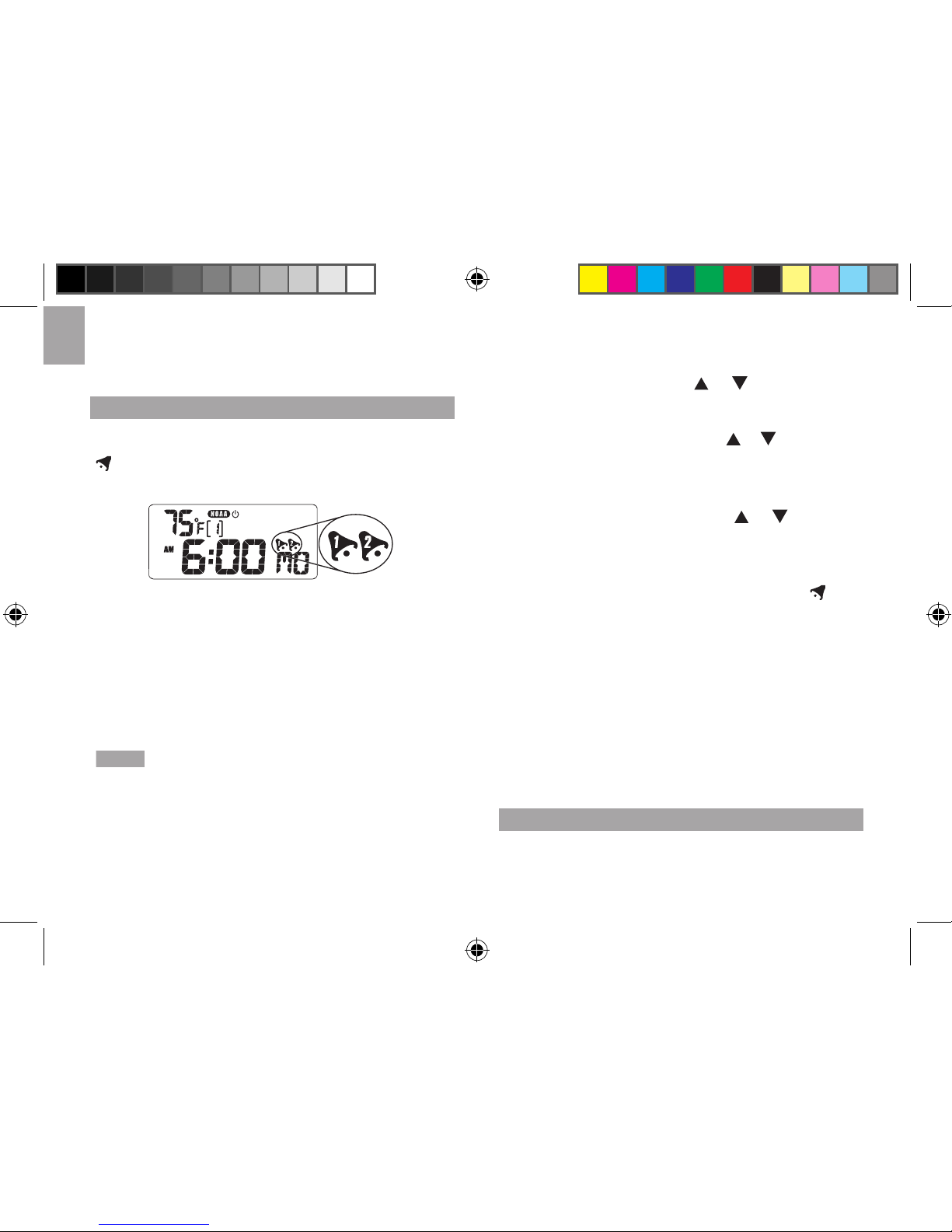
The
WR113
has 2 alarms (
Alarm
1 and
Alarm
2). They
are only displayed when
Alarm
1 or
Alarm
2 are active.
Remember: From the Clock-Display mode, press MODE
to enter Calendar-Display and then again to set Alarm 1.
Press MODE once more to set Alarm 2.
Setting the Alarm:
1. With the clock displayed, press
MODE until alarm
(1 or 2) display is entered.
NOTE
The last set time of the alarm will be displayed.
If you have not set the alarm before, or if the alarm has
been disabled, the time will be displayed as [----].
2.
for 2 seconds.
At any stage of the setting sequence, if no
To enter the hour, press
or
until the desired
or
will advance
digits in rapid sequence.
4. When the desired hour is reached, press
to
or
to change
values.
or wait
the chosen alarm, will be shown to indicate that the
When an alarm goes off, it will sound for 1 minute, the
followed by a pause which then repeats. Alarm 2 has 4
short bursts of sound followed by a pause, which then
total of 1 minute before automatically turning off.
DISABLING AN ALARM
When disabled, the respective alarm icon will not be
displayed. A disabled alarm display is indicated by
WR113_EN_M REV10.indd 14 3/30/07 10:15:23 AM
Page 15
EN
To disable alarm (1 or 2):
to enter alarm-1 or alarm-2 display
followed by
or
NOTE
When an alarm is activated, the alarm time
will be displayed in the alarm display. In the Clock-
ENABLING AN ALARM
When disabled, the respective alarm icon will not be
displayed. The display will show blanks [----].
To enable alarm (1 or 2):
to enter alarm 1 or alarm 2 display followed
or
The respective alarm-on icon will appear
] alarm time will be replaced with the alarm
time set.
HOW TO STOP AN ALARM
An alarm can be disabled but remain set so that it will
To stop an alarm:
When
the
Alarm
sound
is activating, press any button
). The alarm will be stopped and
will activate again at the same time the next day.
SNOOZE
When either alarm 1 or 2 sounds, pressing
will stop the alarm for 8 minutes before it sounds again.
BACKLIGHT
The EL back light casts a blue light evenly across
the LCD making information easy to read in low light
KEY LOCK
To activate / deactivate key lock:
then press
EMERGENCY ALERT SYSTEM (EAS)
The Emergency Alert System (EAS) uses the latest
technology to allow local authorities to broadcast
The Emergency Alert system was originally designed
as a communications link between the President and
the general public during times of emergency. The
deliver emergency alert information to those who need
WR113_EN_M REV10.indd 15 3/30/07 10:15:23 AM
Page 16
EN
NOTE
This product is equipped to receive all required
NOAA and newly added EAS events.
To receive EAS events, make sure your WR113 radio is
working properly. Please refer to the “SAME Messages”
section for information about how to receive “Test”
your radio: “WARNING”, “WATCH”, or “ADVISORY.”
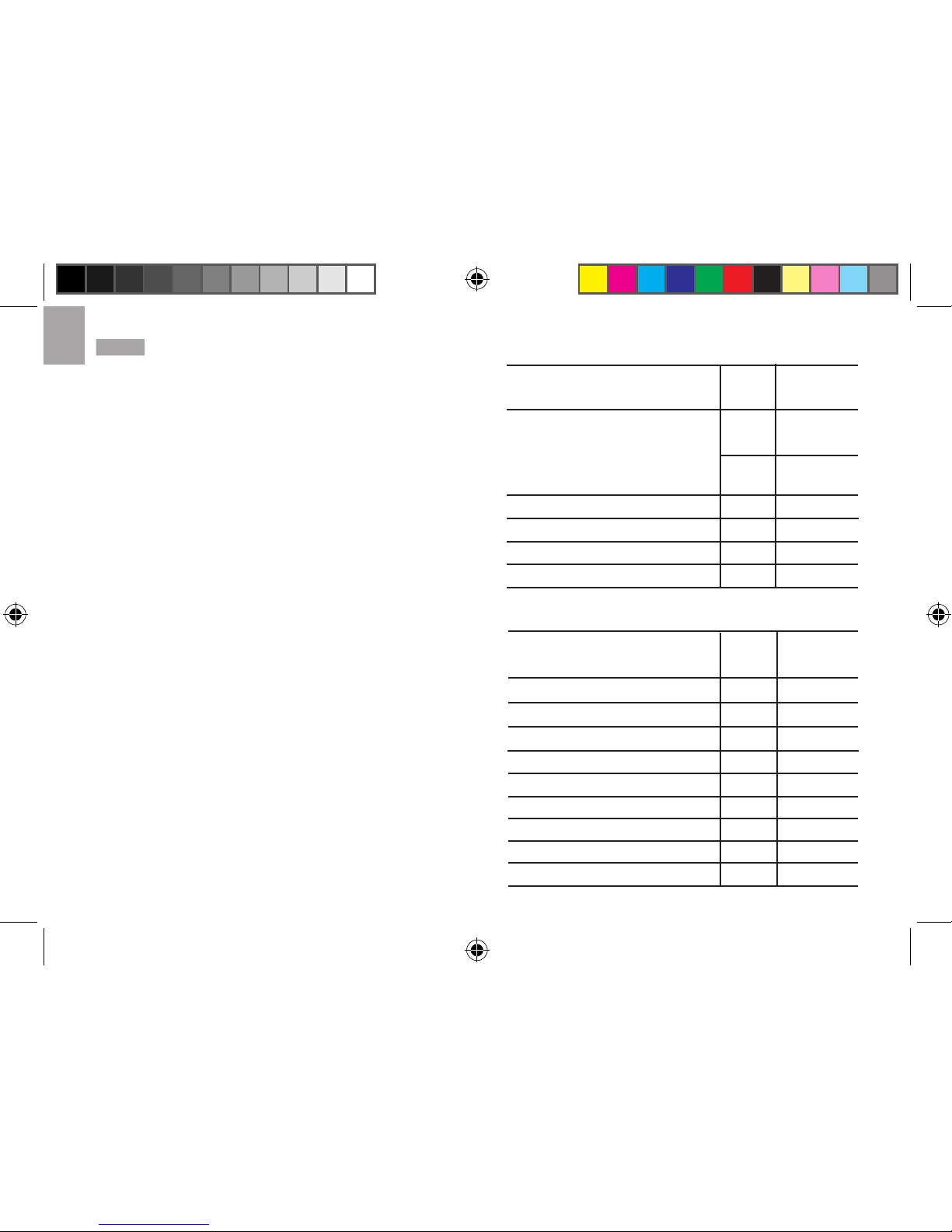
National Codes:
Nature of Activatio
n Event
Codes
Message
Emergency Action Notifi cation
(National only)
National Information Center
EAN WARNING
NIC
National Periodic Test
NPT TEST
Required Monthly Test
RMT TEST
Required Weekly Test RWT
TEST
EAT
State and Local Codes:
Nature of Activation
Event
Codes
Message
Avalanche Warning
Avalanche Watch
Blizzard Warning
AVW WARNING
AVA WATCH
BZW WARNING
Child Abduction Emergency
CAE WARNING
Civil Danger Warning
CDW WARNING
Civil Emergency Message CEM WARNING
Coastal Flood Warning
CFW WARNING
Coastal Flood Watch CFA WATCH
Dust Storm Warning
DSW WARNING
ADVISORY
ADVISORY
WR113_EN_M REV10.indd 16 3/30/07 10:15:24 AM
Page 17
EN
Earthquake Warning
Evacuation Immediate
Fire Warning
EQW WARNING
EVI WARNING
FRW WARNING
Flash Flood Warning FFW WARNING
Flash Flood Watch FFA WATCH
Flash Flood Statement FFS
Flood Warning FLW WARNING
Flood Watch
FLA WATCH
Flood Statement FLS
Hazardous Materials Warning
High Wind Warning
High Wind Watch
HMW WARNING
HWW WARNING
HWA WATCH
Hurricane Warning
HUW WARNING
Hurricane Watch
HUA WATCH
Hurricane Statement HLS
ADVISORY
Law Enforcement Warning LEW WARNING
Local Area Emergency
LAE WARNING
TOE WARNING
Nuclear Power Plant Warning NUW WARNING
Nature of Activation
Event
Codes
Message
ADVISORY
ADVISORY
Radiological Hazard Warning
Severe Thunderstorm Warning
WARNING
WARNING
RHW
SVR
Nature of Activation Event
Codes
Message
WATCH
ADVISORY
WARNING
WARNING
ADVISORY
WARNING
WATCH
WARNING
WATCH
WARNING
WATCH
WARNING
WARNING
WATCH
Severe Thunderstorm Watch
Severe Weather Statement
Shelter in Place Warning
Special Marine Warning
Special Weather Statement
Tornado Warning
Tornado Watch
Tropical Storm Warning
Tropical Storm Watch
Tsunami Warning
Tsunami Watch
Volcano Warning
Winter Storm Warning
Winter Storm Watch
SVA
SVS
SPW
SMW
SPS
TOR
TOA
TRW
TRA
TSW
TSA
VOW
WSW
WSA
WR113_EN_M REV10.indd 17 3/30/07 10:15:25 AM
Page 18
EN
SAME MESSAGES
The WR113 receives SAME warning messages in 3
Warning, Watch
and
Advisory
Test
your WR113 NOAA weather radio is set-up and working
will broadcast a test message in SAME format. To receive
the Test message, your WR113 needs to be in NOAA-
on, NOAA-standby, or NOAA-mute mode with a county
the radio. If your WR113 is properly set, a fl ashing “Test”
Test
message is
icon will continue to fl ash for over an
Test
message is received.
other days and times when there is a threat of severe
weather in the listening area or for other reasons).
icon, the following
will be made immediately after sounding the Test alarm:
to warn of the impending hazard. Tests of this signal
and receivers’ performance are normally conducted
Wednesday. If there is a threat of severe weather, the
test will be postponed to the next good-weather day.
alarm, will vary at any given location. This variability,
the transmitter, can occur even though you are using
a good quality receiver in good working order. To
service possible, the warning alarm will be activated
for hazardous watches and warnings for the following
When more than 1 state is involved, the names of the
states
will always preceed the names of the counties in that state.
Test
weather, the Test broadcast schedule will resume with
the next available good-weather day.
verify if a test was conducted, contact the programming
offi ce of your local NOAA Weather Radio station.
PRECAUTIONS
dust, temperature or humidity.
WR113_EN_M REV10.indd 18 3/30/07 10:15:25 AM
Page 19
EN
such as newspapers, curtains etc.
over it, dry it immediately with a soft, lint-free cloth.
This invalidates the warranty.
separately for special treatment.
without the permission of the manufacturer.
waste. Collection of such waste separately for
special treatment is necessary.
NOTE
The technical specifi cations for this product and
the contents of the user manual are subject to change
without notice.
SPECIFICATIONS
RADIO FUNCTIONS
s:
channels
setting options: or ALL counties
Volume: 7 adjustment levels
TIME FUNCTIONS
in English, French or Spanish
month format
Accuracy: + / - 0.5 seconds / day
GENERAL SPECIFICATIONS
alkaline
AC / DC Adapter:
2 (L) x 0.9 (W) inches (50 x 22
5.4 (L) x 3 (W) x 1.4 (D)
(137 x 74 x 35 mm)
4.5 oz (131 g) without batteries
Temperatureg measuring
-4
˚F
-20
˚C to
WR113_EN_M REV10.indd 19 3/30/07 10:15:25 AM
Page 20
EN
20
CAUTION
without notice.
without the permission of the manufacturer.
ABOUT OREGON SCIENTIFIC
Visit our website (
www.oregonscientifi c.com
www.oregonscientifi c.com
www2.oregonscientifi c.com/service/support.asp
www2.oregonscientifi c.com/service/support.asp
www2.oregonscientifi c.com/about/international.asp.
www2.oregonscientifi c.com/about/international.asp.
INDUSTRY CANADA STATEMENT
operation of the d evice.
FCC STATEMENT
This device complies with Part 15 of the FCC Rules.
operation.
WARNING
Changes or modifi cations not expressly
approved by the party responsible for compliance could
void the user’s authority to operate the equipment.
NOTE
This equipment has been tested and found
to comply with the limits for a Class B digital device,
are designed to provide reasonable protection against
This equipment generates, uses and can radiate radio
frequency energy and, if not installed and used in
accordance with the instructions, may cause harmful
which can be determined by turning the equipment
off and on, the user is encouraged to try to correct the
measures:
WR113_EN_M REV10.indd 20 3/30/07 10:15:26 AM
Page 21
EN
Reorient or relocate the receiving antenna.
Increase the separation between the equipment and
technician for help.
DECLARATION OF CONFORMITY
The following information is not to be used as contact
for
support or sales. Please call our cu stomer service
www.oregonscientifi c.
www.oregonscientifi c.
We
Name: Oregon Scientifi c, Inc.
Address: 19861 SW 95
th
Ave.,Tualatin,
Oregon 97062 USA
Telephone No.: 1-800-853-8883
declare that the product
Product No.: WR113
Product Name: Weather Radio
Manufacturer: IDT Technology Limited
Address: Block C, 9/F, Kaiser Estate,
Phase 1, 41 Man Yue St.,
Hung Hom, Kowloon,
Hong Kong
1) This device may not cause harmful interference.
2) This device must accept any interference
WR113_EN_M REV10.indd 21 3/30/07 10:15:26 AM
 Loading...