

Page 1

PS R01 English Cover R4 7/23/03, 1:56 AM1
EN
Wireless Outdoor Temperature and Humidity Sensor
(Model #: PS-R01)
User Manual
Page 2

TABLE OF CONTENTS
Additional resources .................................................. 1
About this guide ........................................................ 2
Product overview ....................................................... 3
Getting started .......................................................... 4
Set up ................................................................. 4
Change channel .................................................. 5
Comfort zone ...................................................... 6
Trends ................................................................. 6
Low battery warning ............................................ 7
Reset system ............................................................. 7
Safety and care ......................................................... 7
Warnings ................................................................... 7
Troubleshooting ......................................................... 8
Specifications ............................................................ 9
PS R01 English R15 7/23/03, 4:53 AM1
EN
ADDITIONAL RESOURCES
Visit our website (www.oregonscientific.com) to learn
more about your new product and other Oregon
Scientific products such as digital cameras, hand-held
organizers, health and fitness gear, and weather
stations. The website also includes contact information
for our customer service department, in case you need
to reach us.
1
Page 3

EN
ABOUT THIS GUIDE
Congratulations on your selection of the Philippe Starck
with Oregon Scientific Wireless Outdoor Temperature
and Humidity Sensor (PS-R01).
This sensor is compatible with a wide variety of weather
monitoring tools, and can be used with any STARCK /
Oregon Scientific Weather Stations.
Keep this manual handy as you use your new product. It
contains practical step-by-step instructions, as well as
technical specifications and warnings you should know.
PS R01 English R15 7/23/03, 4:53 AM2
In this box, you will find:
• Remote unit
• Batteries
2
Page 4

PRODUCT OVERVIEW
EN
DESCRIPTIONS
1
2
3
PS R01 English R15 7/23/03, 4:53 AM3
4
5
6
7
1. Temperature / Trend display
2. Low battery icon
3. Humidity / Trend / Comfort Level display
4. °C/°F switch
5. Channel switch
6. Reset button
7. Battery compartment
8. Wall mount hole
8
9
9. Battery compartment lid
3
Page 5
EN
GETTING STARTED
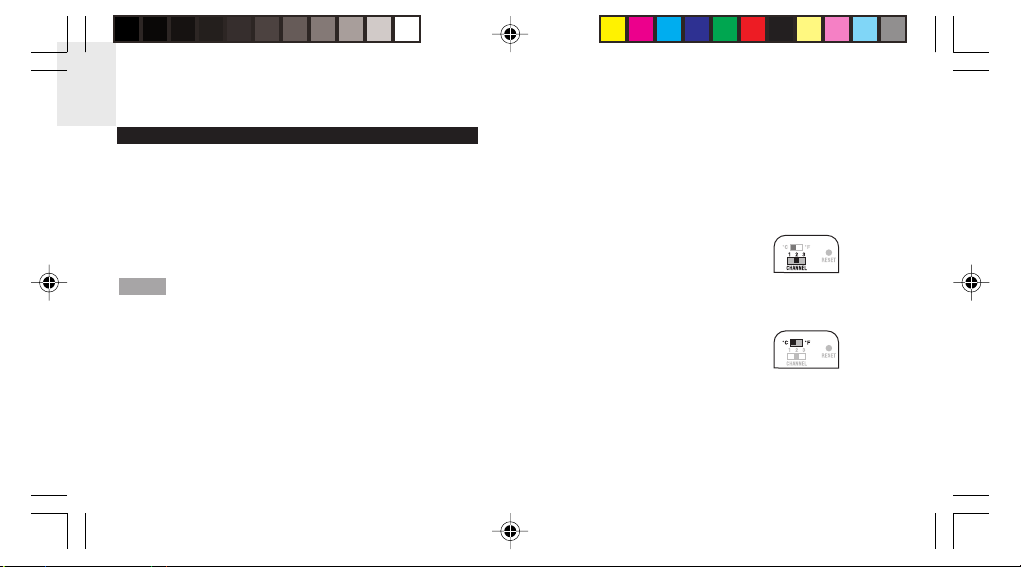
This product can be used with up to 2 remote units to
transmit outdoor temperature and humidity data to a
main (indoor) unit. The measurement unit(°C or °F) and
channel number (1, 2, or 3) switches are located in the
battery compartment, and should be set prior to
installation.
Additional remote units sold separately.
NOTE
PS R01 English R15 7/23/03, 4:53 AM4
SET UP
1. Place remote unit as close as possible to the
main unit.
2. Remove the battery compartment lid.
(You will need a small Phillips screwdriver.)
3. Assign a Channel Number.
If you are using more than
one remote unit, select a
different channel number
for each unit.
4. Set the measurement unit.
5. Insert the batteries. Match
the polarity, as shown in
the battery compartment.
6. Press RESET with the point of a blunt object
(such as a ball point pen).
4
Page 6
7. Replace the battery compartment lid. Secure.
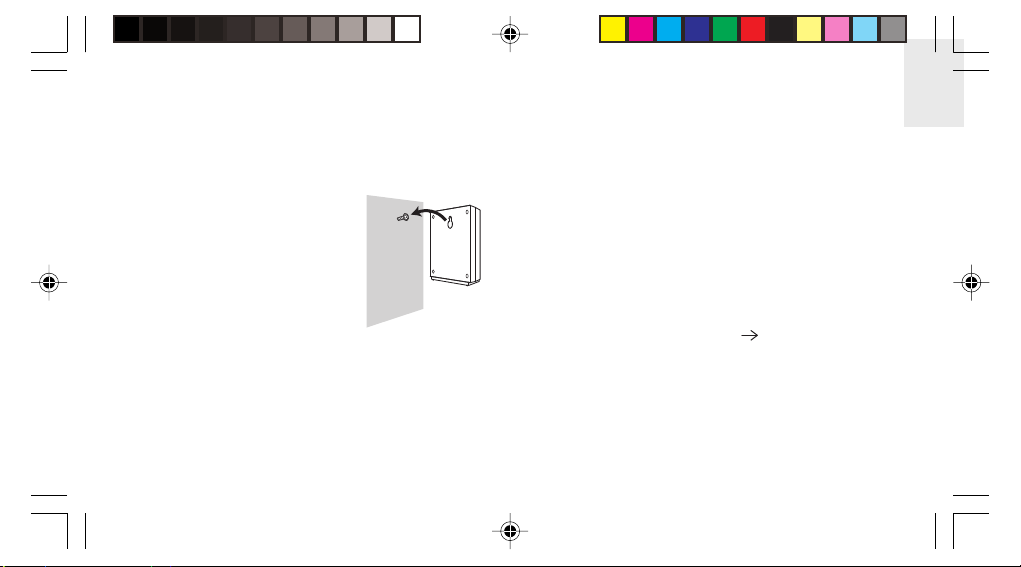
8. Mount the remote unit on a flat surface using
the recess hole on the back of the unit. For
best results:
• Place the unit out of
direct sunlight and
moisture.
• Do not place the
remote unit more
than 20 - 30 meters
(60 - 90 feet) from
the main (indoor) unit.
• Position the unit so that it faces the main
(indoor) unit. Minimize obstructions such
as doors, walls, and furniture.
PS R01 English R15 7/23/03, 4:53 AM5
You may need to experiment with various
locations to get the best reception.
9. Once the batteries are in place, the sensor will
transmit signals approximately every 40 seconds.
The readings shown on the main unit depend on
which remote sensor (1, 2, or 3) is selected.
Refer to the main unit User Manual for more
information.
CHANGE CHANNEL
Repeat the Set Up procedure (
4). In Step 3,
select a different Channel Number.
5
EN
Page 7
EN
COMFORT ZONE
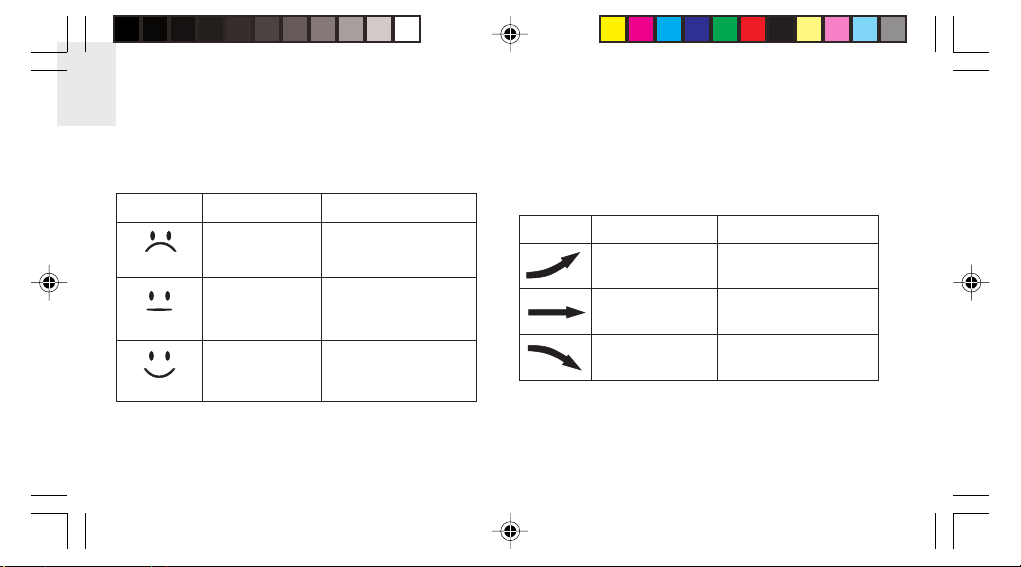
The outdoor comfort zones are shown under the
following conditions.
Zone Temperature Relative Humidity
Any >70%
Wet
TRENDS
The trend arrow for the last 30 minutes always displays.
Outdoor temperature and humidity trends are shown
separately.
Trend
Temperature Relative Humidity
+
0.5 °C
> +3%
Any
Dry
20 - 25 °C
Comfort
PS R01 English R15 7/23/03, 4:53 AM6
(68 - 77 °F)
<40%
40 - 70%
Steady
-0.5 °C
Steady
< -3%
6
Page 8
LOW BATTERY WARNING
Replace the batteries whenever the low battery signal
(
) shows on the remote unit, or on the remote unit
area of the main unit.
NOTE
Do not use rechargeable batteries. Properly
dispose used batteries by taking them to an authorized
disposal station.
EN
radio frequency link with main unit). Refer to the
User Manual for the main unit for more information.
SAFETY AND CARE
Wash the unit with a slightly damp cloth and mild
detergent. Avoid dropping the unit or placing it in
direct sunlight or in damp or high-traffic locations.
RESET SYSTEM
The RESET button is located in the battery
compartment. Press it with the point of a blunt
object (such as a ball point pen) whenever you
change the batteries, or whenever performance is
not behaving as expected (e.g., unable to establish
PS R01 English R15 7/23/03, 4:53 AM7
WARNINGS
This product is designed to give you years of service
if handled properly. Observe the following guidelines:
• Never immerse the unit in water. This can
cause electrical shock and damage the unit.
7
Page 9
EN
• Do not subject the main unit to extreme force,
shock, or fluctuations in temperature or humidity.
• Do not tamper with the internal components.
• Do not mix new and old batteries or batteries of
different types. Do not use rechargeable
batteries with this product.
• Remove the batteries if storing this product for
a long period of time.
• Do not scratch the LCD display.
• Do not make any changes or modifications to
this product. Unauthorized changes may void
your right to use the product.
• The contents of this user manual are subject to
change without notice.
• Images not drawn to scale.
PS R01 English R15 7/23/03, 4:53 AM8
TROUBLESHOOTING
Check here before contacting our customer service
department.
Problem
Temp
Remote
unit
Main unit shows
“LLL” or “HHH”
Cannot locate
main unit
RemedySymptom
Temperature is
out-of-range.
Check batteries
(
Check location
(
8
4, 7)
5)
Page 10
SPECIFICATIONS
Dimensions
L x W x H 75 x 35 x 78.3 mm
(3 x 1.4 x 3.1 in)
Weight 136 grams with battery
Temperature
Unit °C or °F
Range -20 °C to 60 °C (-4 °F to 140 °F)
Resolution 0.1 °C (0.2 °F)
Relative humidity
Range 25% to 95%
Resolution 1%
PS R01 English R15 7/23/03, 4:53 AM9
EN
Frequency
RF frequency 433 MHz
Range 30 meters (98 feet) with no
obstructions
Transmission approximately every 40 seconds
Channel No. 1, 2, or 3
Unit °C or °F
Power 2 x UM-4 (AAA) 1.5V alkaline
batteries
9
Page 11
EN
EC-DECLARATION OF CONFORMITY
This product contains the approved transmitter module
TX 07 and complies with the essential requirements of
Article 3 of the R&TTE 1999/5/EC Directives, if used for
its intended use and that the following standard(s)
has/have been applied:
Radio frequency spectrum
(Article 3.2 of the R&TTE Directive)
applied standard(s)
Electromagnetic compatibility
(Article 3.1.b of the R&TTE Directive)
applied standard(s)
Safety of information technology equipment
(Article 3.1.a of the R&TTE directive)
applied standard(s)
PS R01 English R15 7/23/03, 4:53 AM10
ETSI EN 300 220-3 (Ver.1.1.1):2000-09
ETSI EN 301 489-1-3 (Ver.1.4.1):2002-08
EN 60950:2000
Additional information:
The product is therefore conform with the Low Voltage Directive
73/23/EC, the EMC Directive 89/336/EC and R&TTE Directive
1999/5/EC (appendix II) and carries the respective CE marking.
VS-Villingen / Germany August 2003
Gerhard Preis
R&TTE Representative of manufacturer
RTT&E Compliant Countries:
All EC Countries, Switzerland ,
©2003 Oregon Scientific. All rights reserved.
and Norway
10
CH
N
 Loading...