

Page 1
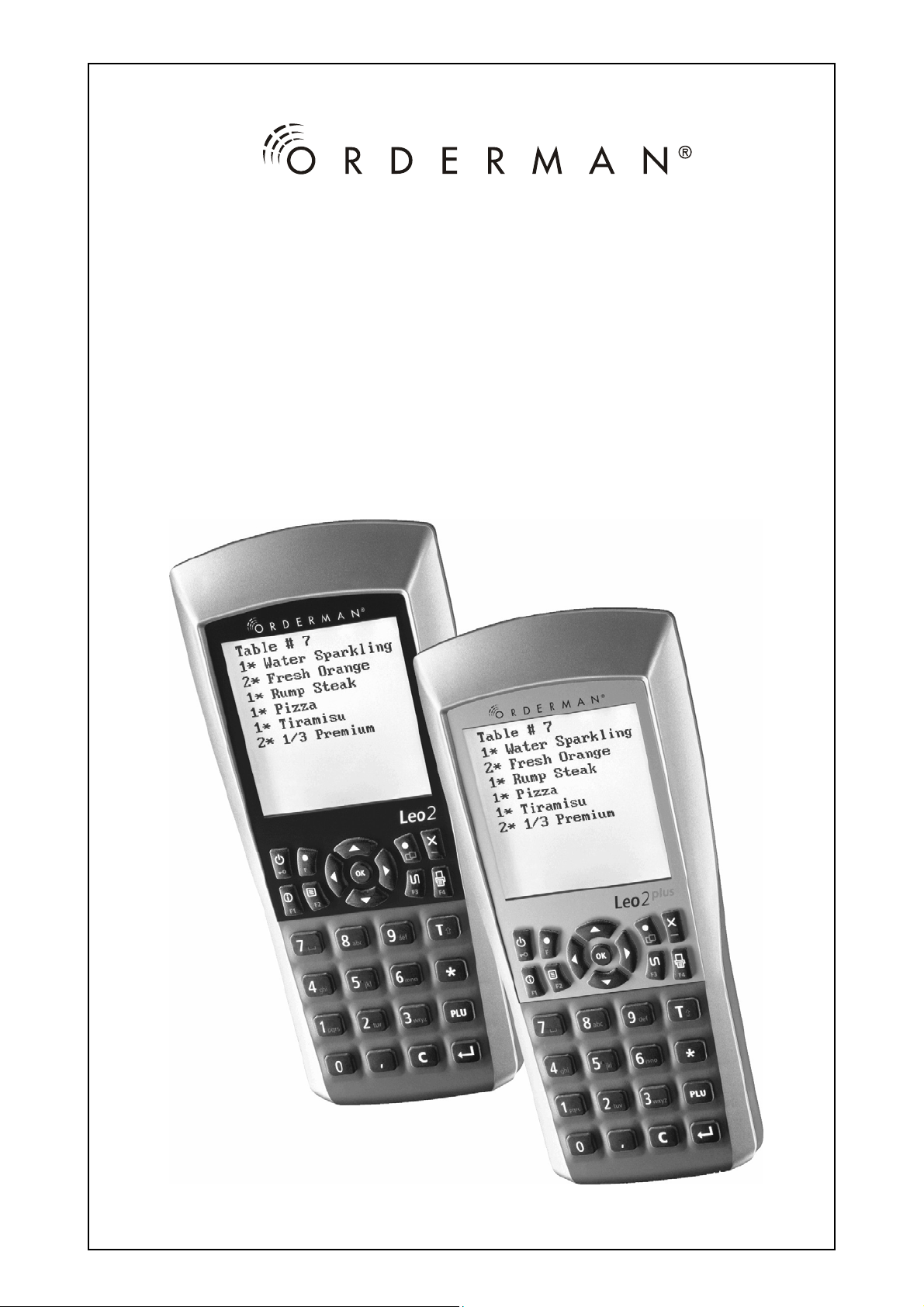
Leo2, Leo2plus
Bedienungsanleitung
Operating Instructions
Istruzioni per l’uso
Page 2
Bedienungsanleitung Leo2 und Leo2plus
Deutsch
© 2008 by
Bachstraße 59,
5023 Salzburg – Österreich
www.orderman.com
Irrtümer und Druckfehler vorbe h alten.
Kopieren - auch auszugsweise - ist ohne schriftliche Genehmigung durch
Orderman GmbH nicht gestattet.
P3.88-188.V2.2
• Orderman GmbH übernimmt keine Verantwortung für Schäden oder
Verluste, die durch Anwendung dieser Anleitung entstehen.
• Orderman GmbH übernimmt keine Verantwortung für Verluste oder
Ansprüche von dritten Personen, die durch die Benützung des
Orderman Leo2 und Leo2plus entstehen.
• Änderungen des Inhalts dieser Anleitung sind vorbehalten, und
können ohne Vorankündigung durchgeführt werden.
• Diese Bedienungsanleitung kann nicht Bestandteil eines Vertrages sein.
• Warenzeichen: Alle Marken- und Produktnamen sind Warenzeichen
oder eingetragene Warenzeichen ihrer entsprechenden Firmen.
- 2 -
Page 3

Leo2 und Leo2plus Bedienungsanleitung
Inhaltsverzeichnis:
1 Allgemeines........................................................................4
1.1 Willkommen in der Welt des Orderman Leo2.......................4
1.2 Lieferumfang Orderman Leo2 ..............................................4
2 Sicherheitshinweise...........................................................4
3 Orderman Leo2 und Leo2plus stellen sich vor................5
3.1 Bezeichnung und Funktion der Teile....................................5
3.2 Technische Daten ................................................................6
4 Inbetriebnahme – Der richtige Umgang............................7
4.1 Laden des Akkus..................................................................7
4.2 Einstellungen im Orderman Setup........................................7
5 Konformitätserklärungen...................................................9
Deutsch
- 3 -
Page 4
Bedienungsanleitung Leo2 und Leo2plus
1 Allgemeines
Diese Beschreibung gilt für die Orderman Handgeräte Leo2 und Leo2plus.
Die Funktionen der beiden Produkte sind grundlegend identisch und werden
nachfolgend nur anhand des Handgerätes Leo2 beschrieben.
Deutsch
Das Handgerät Leo2plus hat folgende zusätzliche Funktionen:
• Bluetooth
• Integrierter Vibra Call
1.1 Willkommen in der Welt des Orderman Leo2
Herzlichen Glückwunsch zum Kauf des Orderman Leo2. Dieses Dokument
hilft Ihnen, Ihren Orderman Leo2 kennen zu lernen und sich mit seiner
Funktionsweise vertraut zu ma ch en.
1.2 Lieferumfang Orderman Leo2
Zu ihrem Orderman Leo2 erhalten Sie als Zubehör ein Akkupack Leo2, ein
Orderman Steckern etzgerät 7,5V sowie diese Bedienungsanleitung.
Weitere Informationen zu Ihrer Software lesen Sie im Handbuch ihres
Kassensystems nach.
®
-Schnittstelle zur Gürteldruckersynchronisation
2 Sicherheitshinweise
Allgemeine Sicherheitshinweise
• Der Orderman Leo2 enthält keine vom Anwender zu wartenden Teile
und darf daher nicht geöffnet werden. Durch ein Öffnen erlischt der
Garantieanspruch.
• Schließen Sie keinesfalls die Ladekontakte des Handgerätes kurz.
• Eine starke mechanische Beanspruchung, wie zum Beispiel verdrehen
oder fallen lassen aus übermäßiger Höhe auf spitze Geg enstän de, ka nn
zur Beschädigung des Gerätes führen.
• Der Orderman Leo2plus ist mit einer Bluetooth
drahtlose Kommunikation ausgerüstet. Verwenden Sie das Handgerät
®
nie in Umgebungen, in denen Bluetooth
(Flugzeuge, Krankenhäuser usw.).
zu Störungen führen kann
®
Schnittstelle für die
- 4 -
Page 5

Leo2 und Leo2plus Bedienungsanleitung
Sicherheitshinweise Akku
• Verwenden Sie ausschließlich das mitgelieferte Akkumodell.
• Setzen Sie den Akku keiner extremen Hitze aus. Schließen Sie die
Kontakte niemals kurz - es besteht Explosionsgefahr.
Deutsch
3 Orderman Leo2 und Leo2plus stellen sich vor
3.1 Bezeichnung und Funktion der Teile
On/Off Schalter
Anschluss für
Steckernetzgerät
Steg für
Safety cord
Nur bei Leo2plus:
Transponderleser für Gürteldrucker-
Synchronisation
(im Gehäuse integriert)
Enter Taste
Kontakte zur
Ladestation
- 5 -
Akkupack
Akkuverriegelung
Page 6

Bedienungsanleitung Leo2 und Leo2plus
3.2 Technische Daten
Display: hoch-transflektive und sonnenlichttaugliche
Grafiktechnologi e mit 160 x 160 Bildpunkten mit
einstellbarer LED-Hinterleuchtung
Deutsch
Funk (integriert): ISM-Frequenzband: 433.150 MHz – 434.650 MHz
(Option USA, Canada: 902.200 MHz – 905.200 MHz);
Funkleistung kleiner 10mW;
bidirektionale Datenübertragung;
Reichweite in Gebäuden bis zu 50 Meter bei einer
Flächenabdeckung bis zu 7800 m
Reichweite im Freifeld bis zu 300 Meter.
®
Bluetooth
V1.1 - Klasse 2 (nur Leo2plus)
Energieversorgung: Lithium-Ion Akku: 1200mAh;
Ladezeit:
ca. 4 Stunden im Handgerät oder
ca. 60 Minuten in der Orderman Leo2
Ladestation (Option)
Netzgerät:
Ausgangswerte: 7,5V / 900mA;
Eingangswerte: 100V-240V / 50Hz-60Hz / 200mA;
Betriebsdauer:
bis zu 18 Stunden Dauer-Online
(abhängig von der Einstellung der Hinterleuchtung)
Umgebung: Sturzschutz: 1,2 Meter auf Beton
Wasserschutz:
Betriebstemperatur:
Lagertemperatur:
IPX4
-5° bis +50°
-10° bis + 60°
Abmessungen: L x H x B: 190mm x 85mm x 28mm
Gewicht: Handgerät Leo2: 220g
Handgerät Leo2plus: 230g
Akku: 70g
Optionen: Orderman Card swipe
(nur Leo2plus) Orderman Ordercard
Orderman Ordercard und Orderman
Card swipe
Weiterführende Informationen zu den Optionen erhalten Sie bei Ihrem
Fachhändler.
2
;
- 6 -
Page 7

Leo2 und Leo2plus Bedienungsanleitung
4 Inbetriebnahme – Der richtige Umgang
4.1 Laden des Akkus
Legen Sie den Akku in das Handgerät ein und stecken Sie das Netzgerät an
der Unterseite des Orderman Leo2 und ans Stromnetz an. Der Akku wird nun
geladen.
Bei eingeschaltetem Handgerät zeigt das blinkende Ladesymbol den
Ladevorgang des Akkus an. Ein kompletter Ladevorgang dauert ca.
4 Stunden. Während des Ladevorganges kann das Handgerät
benutzt werden.
Ein vollständig aufgeladener Akku ermöglicht eine Betriebszeit von bis zu 18
Stunden (abhängig von der Einstellung der automatischen Abschaltzeit und
der Hinterleuchtung – siehe Seite 8).
Die Anzahl der Ladezyklen des Orderman Leo2 Akku ist auf ca. 1000
Ladezyklen ausgelegt. Der Akku unterliegt dabei einer natürlichen Abnützung
wodurch die Betriebszeit verkürzt werden kann.
Laden Sie den Akku vor Erstgebrauch mindestens 4 Stunden im
Handgerät auf. Für Schnellladungen können Sie auch die
Hinweis
Orderman Leo2 Ladestation verwenden (Option). Folgen Sie dazu
den Anweisungen in der Bedienungsanleitung der
Orderman Leo2 Ladestation.
Deutsch
4.2 Einstellungen im Orderman Setup
Um in das Orderman Setup zu gelangen halten Sie bei ausgeschaltetem Gerät
die Enter-Taste gedrückt und betätigen Sie die On/Off Taste. Nach dem
Loslassen der Enter-Taste öffnet sich das Orderman
Setup.
- 7 -
Page 8
Bedienungsanleitung Leo2 und Leo2plus
Es stehen folgende Menüpunkte zur Auswahl, die durch die Tasten „t“ bzw.
„u“ oder direkt mit den Tasten „F1“ bis „F4“ angesteuert werden können.
1. Info (F1)
2. Auto Off (F2)
3. Contrast (F3)
Deutsch
4. Brightness (F4)
5. Exit (F)
Info(F1)
Durch Drücken der Taste „OK“ oder der Taste „F1“ gelangen Sie in
das Infomenü. Hier werden Systeminformationen zu ihrem
Handgerät angezeigt. Um das Menü zu verlassen drücken Sie die
Taste „F“.
AutoOff (F2)
Durch Drücken der Tasten „3“ bzw. „4“ können Sie die
automatische Ausschaltzeit (Abschaltzeit nach letzter
Tastenbetätigung) des Handge räte s ein stellen.
Contrast (F3)
Durch Drücken der Tasten „3“ bzw. „4“ können Sie den
Kontrast des Displays einstellen.
Brightness (F4)
Durch Drücken der Tasten „3“ bzw. „4“ können Sie die
Helligkeit des Displays einstellen.
Exit (F)
Der Ausstieg aus dem Setup Menü erfolgt durch Drücken der
Taste „OK“.
- 8 -
Page 9

Leo2 und Leo2plus Bedienungsanleitung
5 Konformitätserklärungen
Wir erklären hiermit, dass Leo2 und Leo2plu s den grundlegenden
Anforderungen und Vorgaben gemäß Richtlinie 1999/5/EC entspricht.
Konformitätserklärung – CE-Kennzeichen
Dieses Gerät entspricht den Anforderungen der nachfolgend aufgeführten
Richtlinie der Europäischen Gemeinschaft: R&TTE-Richtlinie 1999/5/EC
Diese Erklärung basiert auf der Konformität des Produkte s m it folgenden
Standards:
Radio: EN300 220-3 V1.1.1(09/2000) ; EN 300 328 V1.6.1( 11/2004)
EMC : EN 301 489-17 V1.2.1 (08/2002) ; EN 301 489-03 V1.4.1 (08/2002)
Safety: EN 60950-1 :2001+ A11 :2004
Deutsch
- 9 -
Page 10
Operating Instructions Leo2 and Leo2plus
© 2008 by
Bachstraße 59,
5023 Salzburg – Austria
English
www.orderman.com
Duplication, reproduction or distribution, even i n part, is prohibited
without the written consent of Orderman GmbH.
P3.88-188.V2.2
• Orderman GmbH accepts no liability for injuries or losses resulting from
the use of these instru ctions.
• Orderman GmbH accepts no liability for losses or claims by third parties
resulting from the use of the Orderman Leo2 and Leo2plus.
• The contents of these instructions are subject to changes, which can be
carried out without prior notice.
• These operating instructions do not constitute part of a contract.
• Trademark: All trade names and product names are trademarks or
registered trademarks of the accordant companies.
- 10 -
Page 11

Leo2 and Leo2plus Operating Instructions
Contents:
1 General..............................................................................12
1.1 Welcome to the World of the Orderman Leo2....................12
1.2 Items Included on Delivery.................................................12
2 Safety Instructions...........................................................12
3 Introduction to the Orderman Leo2 and Leo2plus ........13
3.1 Features and Functions......................................................13
3.2 Technical Data ...................................................................14
4 Setting Up .........................................................................15
4.1 Charging the Battery ..........................................................15
4.2 Orderman Leo2 Settings .......... ..........................................15
5 Declaration of conformity................................................17
English
- 11 -
Page 12
Operating Instructions Leo2 and Leo2plus
1 General
This description is applicable to the Orderman Leo2 and Leo2plus handheld.
The functions of both products are fundamentally identical and are described
below using the Leo2plus as an example.
The Leo2plus handheld has the following additional functions:
• Bluetooth
• Integrated Vibra Call
1.1 Welcome to the World of the Orderman Leo2
Congratulations on having purchased the Orderman Leo2. This document will
help you to become familiar with your Orderman Leo2 and learn how to
operate it.
1.2 Items Included on Delivery
Your Orderman Leo2 includes:
®
interface for belt printer synchronisation
• the Leo2 battery
• an Orderman 7.5V power supply unit
• operating instructions
For further information on your software please consult your till system
manual.
English
2 Safety Instructions
General safety instructions
• The Orderman Leo2 does not contain any parts to be serviced by the
user and therefore must not be opened. If opened, the guarantee claim
becomes void.
• Do not, under any circumstances, short-circuit the charge contact of the
handheld device.
• The device could suffer damage from a heavy mechanical load such as
twisting or falling from an excessive height onto sharp objects.
• The Orderman Leo2plus is equipped with a Bluetooth
wireless communication. Never use the handheld device in
environments where Bluetooth
hospitals etc.).
®
could cause interference (aeroplanes,
®
interface for
- 12 -
Page 13
Leo2 and Leo2plus Operating Instructions
Battery safety instructions
• Only use the batt ery model included with the delivery.
• Do not subject the battery to extreme heat. Never short-circuit the
contacts as this is an explosion hazard.
3 Introduction to the Orderman Leo2 and
Leo2plus
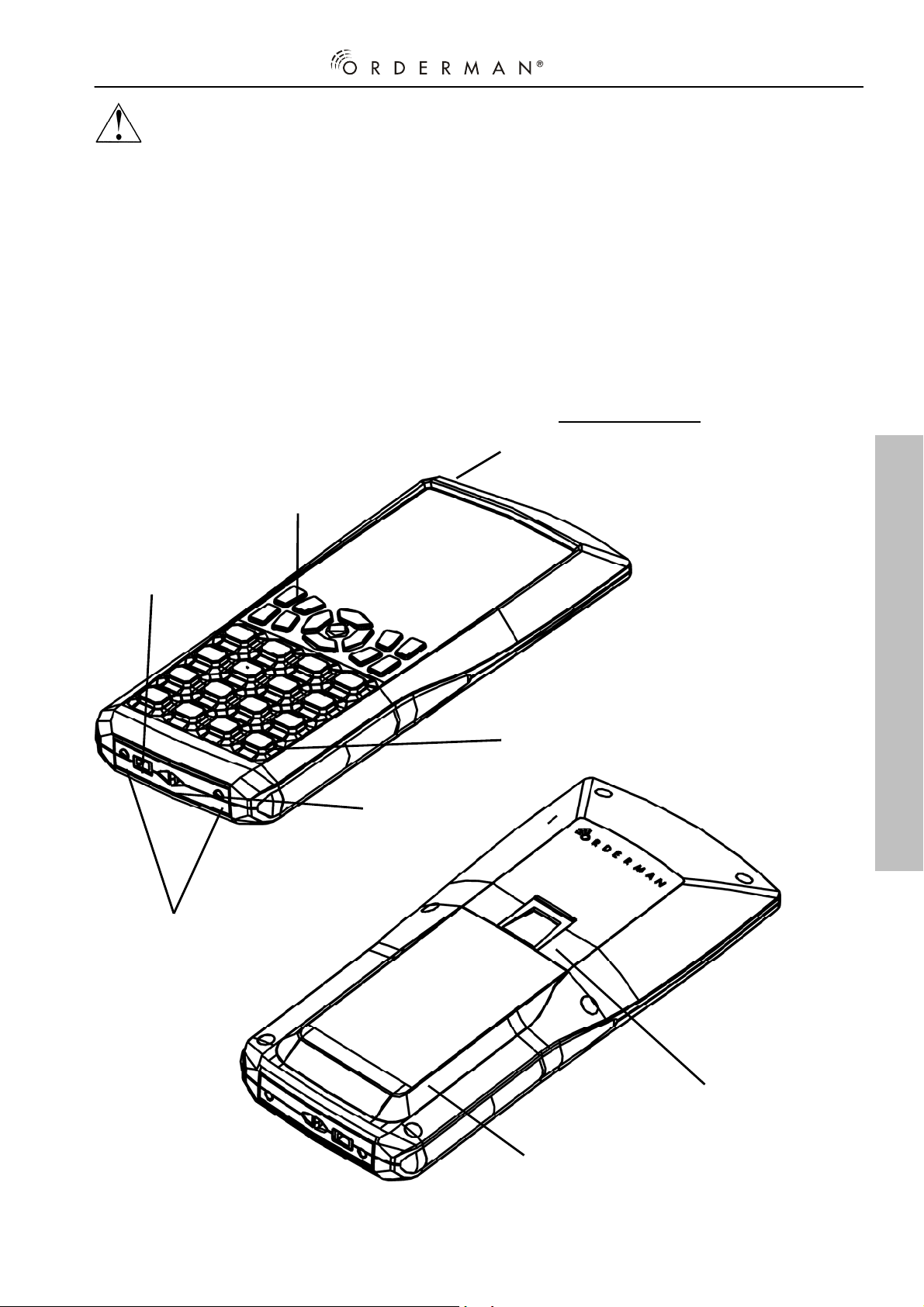
3.1 Features and Functions
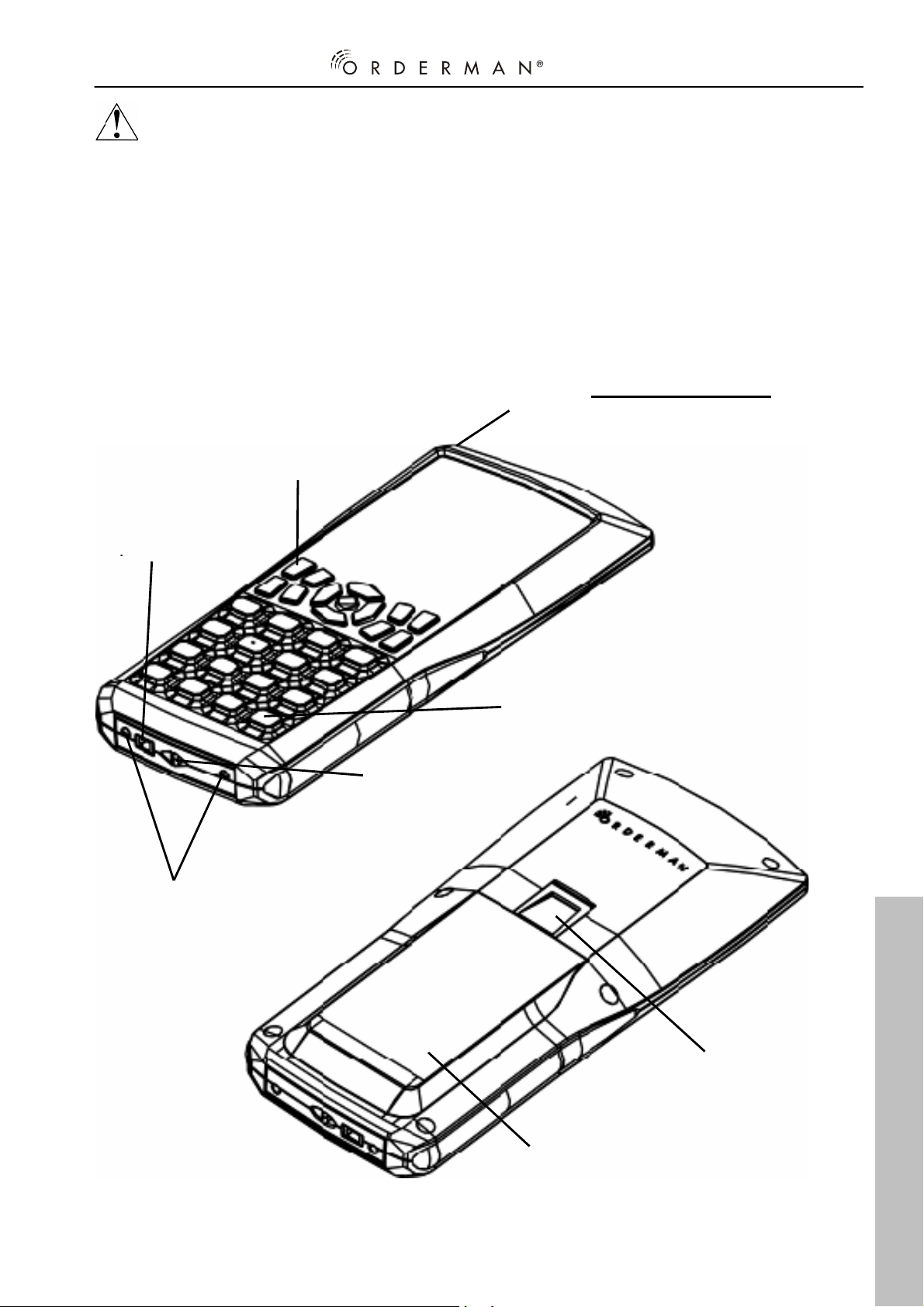
On/Off switch
Transponder reader for belt printer
Leo2plus only:
synchronisation
(built into the casing)
Connection for
power supply unit
Contacts to the
charging station
English
Enter key
Bar for
safety cord
Battery lock
Battery
compartment
- 13 -
Page 14
Operating Instructions Leo2 and Leo2plus
3.2 Technical Data
Display: highly transflective and suitab le for sunlight
graphics technology with 160 x 160 pixels and
adjustable LED background lighting
Radio (built-in): ISM frequency band: 433.150 MHz – 434.650 MHz
(Option USA, Canada: 902.200 MHz – 905.200 MHz);
Radio capacity less than 10mW;
bidirectional data transmission;
Range of up to 50 metres in buildings covering up to
7800 m
Range of up to 300 metres in free-fie ld.
Bluetooth
Power supply: Lithium Ion rechargeable battery: 1200mAh;
Charging time:
using the charger provided or
approx. 60 minutes in the Orderman Leo2
charging station (option)
Power supply unit:
Input values: 100V-240V / 50Hz-60Hz / 200mA;
Operating lifetime:
English
(depending on the background lighting setting)
Environment: Fall resistant: 1.2 metres on concrete
Water protection:
Operating temperature:
Storage temperature:
Dimensions: L x H x W: 190mm x 85mm x 28mm
Weight: Leo2 Handheld: 220g
Leo2plus Handheld: 230g
Battery: 70g
Options: Orderman Card swipe
(Leo2plus only) Orderman Ordercard
Orderman Ordercard and Orderman
Card swipe
Please consult your specialist dealer for further information on options.
2
;
®
V1.1 - class 2 (Leo2plus only)
approx. 4 hours in the handheld device
Outlet values: 7.5V / 900mA;
up to 18 hours online
IPX4
-5° to +50°
-10° to+ 60°
- 14 -
Page 15
Leo2 and Leo2plus Operating Instructions
4 Setting Up
4.1 Charging the Battery
Insert the battery in the handheld device and connect the power supply unit to
the bottom connector of the Orderma n Leo2 and to th e mains. The battery will
now be charging.
When the handheld device is switched on, the flashing charging
A fully charged battery can be used for up to 18 hours (depending on the
setting of the automatic shutdown time and the background lighting – see page
16).
The number of charging cycles for the Orderman Leo2 battery is approx. 1000.
This subjects the battery to natural wear, as a result of this the operating time
may be shortened.
Tip
symbol indicates the battery charging. A complete charging
procedure requires approx. 4 hours. The handheld device can be
used during the charging procedure.
Before using for the first time, charge the battery for at least 4 hours
in the handheld device. To charge quickly you can also use the
Orderman Leo2 charging station (option). To do so, follow the
instructions in the operating manual for the Orderman Leo2 charging
station.
English
4.2 Orderman Leo2 Settings
In order to acc ess the Orderman Setup, when the device is switched off keep
the enter key pressed and press the On/Off key. Release the Enter button and
the Orderman
- 15 -
Setup opens.
Page 16
Operating Instructions Leo2 and Leo2plus
The following menu items can be selected using the „t“ or „u“ buttons or
directly with the „F1“ to „F4“ buttons.
1. Info (F1)
2. Auto Off (F2)
3. Contrast (F3)
4. Brightness (F4)
5. Exit (F)
Info (F1)
The info menu is accessed by pressing the „OK“ or „F1“ button.
This is where system information regarding the handheld device is
displayed. In order to exit the menu, press the „F“ button.
AutoOff (F2)
English
By pressing the „3“ or „4“ buttons you can set the automatic
switch-off time (shutdown time after the last key selection) of the
handheld device.
Contrast (F3)
By pressing the „3“ or „4“ buttons you can set the display
contrast.
Brightness (F4)
By pressing the „3“ or „4“ buttons you can set the display
brightness.
Exit (F)
Exit the setup menu by pressing the „OK“ button.
- 16 -
Page 17

Leo2 and Leo2plus Operating Instructions
5 Declaration of conformity
We herewith declare that the Leo2 and Leo2plus satisfy the basic
requirements and guidelines in accordance with Directive 1999/5/EC.
Conformance Statement – CE Marking
This device satisfies the requirements of the following European Community
Directive: R&TTE Directive 1999/5/EC
This statement is based on conf or mity of the product with the following
standards:
Radio: EN300 220-3 V1.1.1(09/2000) ; EN 300 328 V1.6.1(11/ 200 4)
EMC : EN 301 489-17 V1.2.1 (08/2002) ; EN 301 489-03 V1.4.1 (08/2002)
Safety: EN 60950-1 :2001+ A11 :2004
English
- 17 -
Page 18
Istruzioni per l’uso Leo2 e Leo2plus
© 2008 by
Bachstrasse 59,
5023 Salisburgo – Austria
www.orderman.com
.
Non è consentita la cop i a - anche di piccole parti- senza l'autorizzazione
scritta della
Orderman GmbH.
P3.88-188.V2.2
• Orderman GmbH non assume alcuna responsabilità per i danni o le
perdite riconducibili all'utilizzo del presente manuale.
• Orderman GmbH non si assume alcuna responsabilità per le perd ite o
le pretese di terzi riconducibili all'utilizzo dell'Orderman Leo2 e
Leo2plus.
• Orderman GmbH si riserva il diritto di modificare senza preavviso il
presente manuale.
• Il seguente manuale non può essere considerato oggetto di contratto.
• Marchi di fabbrica: tutti i marchi e i nomi dei prodotti sono marchi
registrati delle rispettive aziende.
Italiano
- 18 -
Page 19

Leo2 e Leo2plus Istruzioni per l’uso
Indice
1 Indicazioni generali..........................................................20
1.1 Benvenuti nel mondo di Orderman Leo2............................20
1.2 La confezione Orderman Leo2...........................................20
2 Indicazioni sulla sicurezza...............................................20
3 Presentazione di Orderman Leo2 e Leo2plus................21
3.1 Denominazione e funzione dei componenti........................21
3.2 Dati tecnici..........................................................................22
4 Messa in servizio – uso corretto.....................................23
4.1 Carica della batteria ...........................................................23
4.2 Impostazioni della configurazione Orderman .....................23
5 Dichiarazioni di conformità .............................................25
- 19 -
Italiano
Page 20

Istruzioni per l’uso Leo2 e Leo2plus
1 Indicazioni generali
La presente descrizione si applica ai dispositivi portatili Orderman Leo2 e
Leo2plus.
Le funzioni dei due prodotti sono essenzialmente identiche e la descrizione
che segue si riferisce solo all'ap parecchio portatile
Leo2. L'apparecchio portatile Leo2plus presenta le seguenti funzioni
aggiuntive:
• Interfaccia Bluetooth
cintura
• Vibra Call integrato
1.1 Benvenuti nel mondo di Orderman Leo2
Congratulazioni per l'acquisto dell'Orderman Leo2. Questo documento Vi
aiuterà a conoscere l'Orderman Leo2 e ad acquisire pratica con il
funzionamento del dispositivo.
®
per la sincronizzazione della stampante da
1.2 La confezione Orderman Leo2
Con l'Orderman Leo2 vengono forniti quali accessori una batteria Leo2, un
alimentatore di rete Orderman da 7,5 V e il presente manuale. Per ulteriori
informazioni sul software, consultare il manuale del proprio sistema di cassa.
2 Indicazioni sulla sicurezza
Indicazioni generali sulla sicurezza
• L'Orderman Leo2 non contiene parti che l'utente debba sottoporre a
manutenzione, pertanto non deve essere mai aperto. L'apertura
dell'apparecchio comporta la perdita della garanzia.
• Evitare nel modo più assoluto di cortocircuitare i contatti di carica
dell'apparecchio portatile.
• L'apparecchio portatile può subire danni in presenza di forti
sollecitazioni meccaniche quali la torsione o caduta da un'altezza
eccessiva su corpi duri ed appuntiti.
• L'Orderman Leo2plus è dotato di un'interfaccia Bluetooth
comunicazione senza fili. Non utilizzare mai l'apparecchio portatile in
®
ambienti nei quali il Bluetooth
ospedali ecc.).
Italiano
possa causare interferenze (aerei,
- 20 -
®
per la
Page 21
Leo2 e Leo2plus Istruzioni per l’uso
f
Indicazioni sulla sicurezza relative alla batteria
• Utilizzare esclusivame nte il modello di batteria fornit o.
• Non esporre la batteria a calore eccessivo. Cortocircuitare i contatti
comporta il rischio di esplosione.
3 Presentazione di Orderman Leo2 e Leo2plus
3.1 Denominazione e funzione dei componenti
Interruttor e On / O f
Collegamento per
l'alimentatore di
Attacco del
cordoncino di
sicurezza
Solo nel Leo2plus:
Lettore transponder per la
sincronizzazione con la stampante
da cintura
Tasto Invio
Contatti per la
stazione di carica
- 21 -
Batteria
Blocco batteria
Italiano
Page 22

Istruzioni per l’uso Leo2 e Leo2plus
3.2 Dati tecnici
Display: basato su tecnologia Transf lective e idoneo alla luce
solare tecnologia grafica con 160 x 160 pixel e
retroilluminazione LED regolabile
Radiotrasmissione (integrata): banda di frequenza ISM: 433.150 MHz
– 434.650 MHz (opzione USA, Canada: 902.200 MHz –
905.200 MHz);
potenza di radiotrasmissione inferiore a 10 mW;
trasmissione bidirezionale dei dati;
portata all'inte rno di edifici: 50 metr i, con copertura fino
a 7800 m
Bluetooth
Alimentazione: batteria a ioni di litio: 1200 mAh;
Tempo di carica:
circa 60 minuti nella stazione di carica dell'Orderman
Leo2 (opzione)
Alimentazione di rete:
In ingresso: 100 V-240 V / 50 Hz-60 Hz / 200 mA;
Durata in servizio:
(a seconda della regolazione della retroilluminzione)
Ambiente: protezione anticaduta: 1,2 metri su cemento
Protezione dall'acqua:
Temperatura di esercizio:
Temperatura di immagazzinamento:
Dimensioni: L x A x P: 190 mm x 85 mm x 28 mm
Peso: apparecchio portatile Leo2: 220 g
apparecchio portatile Leo2plus: 230 g
batteria: 70 g
Opzioni: Orderman Card swipe
(solo Leo2plus) Orderman Ordercard
Orderman Ordercar d e O rd erman Card swipe
Per ulteriori informazioni sulle opzioni, rivolgersi al rivenditore specializzato.
2
; portata all'aperto: fino a 300 metri.
®
V1.1 - categoria 2 (solo Leo2plus)
circa 4 ore nell'apparecchio portatile o
in uscita: 7,5 V/900 mA;
fino a 18 ore di durata on-line
IPX4
da -5° a +50°
da -10° a 60°
Italiano
- 22 -
Page 23
Leo2 e Leo2plus Istruzioni per l’uso
A
4 Messa in servizio – uso corretto
4.1 Carica della batteria
Inserire la batteria nell'apparecchio portatile e collegare l'alimentatore di rete al
lato inferiore dell'Order man Leo2 e alla rete elettrica. A quest o p unto la
batteria inizia a caricarsi.
Se l'apparecchio po rt atil e è acce so, il simbolo di carica l ampeg giant e
Una batteria comple tamente carica consente un tempo di utilizzo di massimo
18 ore (dipende anche dall'impostazione del tempo di spegnimento automatico
e della retroilluminazione – vedere pagina 24).
Il numero di cicli di carica della batteria dell'Orderman Leo2 è di circa 1000. La
batteria è soggetta ad un logoramento naturale, per cui è possibile che il
tempo di funzionamento diminuisca nel tempo.
NOT
indica che la carica della batteria è in corso. Un processo di carica
completo dura circa 4 ore. Durante il processo di carica è possibile
usare l'apparecchio po rtatile.
Prima di usare l'apparecchio per la prima volta, caricare la batteria
per almeno 4 ore nell'apparecchio portatile. Per caricare
velocemente la batteria è anche possibile utilizzare la stazione di
carica Orderman Leo2 (opzionale). A tale proposito, seguire le
istruzioni riportate nel manuale della stazione di carica Orderman
Leo2.
4.2 Impostazioni della configurazione Orderman
Per accedere alla config urazione Orderman, mantenere premuto il tasto Invio
ad apparecchio spento e azionare il tasto On/Off. Dopo aver rilasciato il tasto
Invio, viene visualizzata la configur azione Orderman.
Italiano
- 23 -
Page 24
Istruzioni per l’uso Leo2 e Leo2plus
Sono disponibili le seguenti voci di menu, sele zionabili con i tasti „t“ o „u“,
oppure direttamente con i tasti da „F1“ a „F4“.
1. Info (F1)
2. Auto Off (F2)
3. Contrast (F3)
4. Brightness (F4)
5. Exit (F)
Info(F1)
Premendo il tasto „OK“ o il tasto „F1“, si passa al menu Info, dove è
possibile visualizzare informazioni sull'apparecchio portatile. Per
uscire dal menu, premere il tast o „ F“.
AutoOff (F2)
Premendo i tasti „3“ o „4“ è possibile impostare il tempo di
spegnimento automatico dell'apparecchio portatile. (che è il tempo
che intercorre dall'ultima volta che si è premuto un tasto e lo
spegnimento automatico)
Contrast (F3)
Premendo i tasti „3“ o „4“ è possibile regolare il contrasto del
display.
Brightness (F4)
Premendo i tasti „3“ o „4“ è possibile regolare la luminosità del
display.
Exit (F)
Per uscire dal menu Setup, premere il tasto „OK“.
Italiano
- 24 -
Page 25

Leo2 e Leo2plus Istruzioni per l’uso
5 Dichiarazioni di conformità
Con la presente dichia r i am o ch e Leo2 e Leo2plus soddisfano i requisiti e le
norme fondamentali ai sensi della Direttiva 1999/5/CE.
Dichiarazione di conformità – marchio CE
Il presente apparecchio è conforme ai requisiti della Direttiva della Comunità
Europea citata di seguito: Direttiva R&TTE 1999/5/CE
La presente dichiarazione si basa sulla conformità del prodotto alle seguenti
norme:
Radio: EN300 220-3 V1.1.1(09/2000) ; EN 300 328 V1.6.1( 11/2004)
CEM : EN 301 489-17 V1.2.1 (08/2002) ; EN 301 489-03 V1.4.1 ( 08/2002)
Sicurezza: EN 60950-1 :2001+A11 :2004
- 25 -
Italiano
 Loading...