

Page 1
Page 1 of 2 Netcom NB6 - ORCON
HOW TO INSTALL YOUR NEW BROADBAND ROUTER
Thank you for choosing Orcon as your broadband service provider.
Please find enclosed your new Netcomm modem. By following the instructions enclosed you will
soon be up and running with high speed Internet.
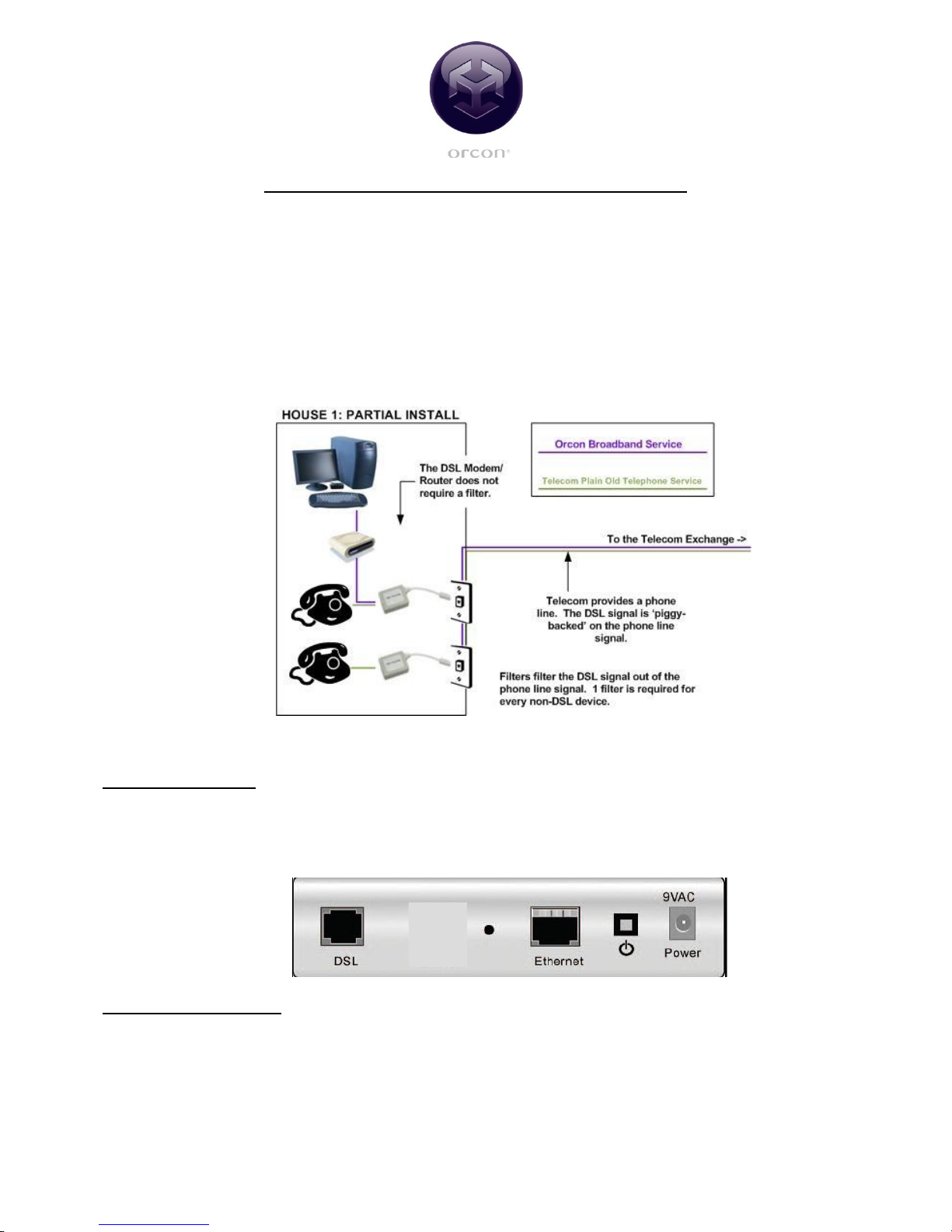
If you selected the ‘Self Installation’ option you will need to plug in a line filter at every jackpoint
that is using an analogue device (As shown in Diagram 1). One line filter is included with your
modem. Analogue devices include any phones, faxes, and dial-up modems on the same phone line.
If you require additional filters please contact us for assistance or alternatively these can be
purchased from your local computer retailer.
Diagram 1
If your computer has both an Ethernet and USB port, we recommend you setup using Ethernet.
Router installation
The setting up and installation of the modem is relatively simple and you can follow the guidelines
below or refer to the ‘Quick Start Guide’ on the Netcom CD ROM for further clarification.
Diagram 2
Included in your pack
o 1 Netcom modem
o 2 Grey cables (DSL Cable)
o 1 White cable (Ethernet LAN Cable)
o 1 Black cable (USB Cable)
o 1 Line Filter
o 1 power adapter
Page 2

Page 2 of 2 Netcom NB6 - ORCON
o Netcomm CD ROM (Manual and Install Guide)
Ethernet Setup
1. Plug the Ethernet cable (Light Grey) into the ‘Ethernet’ port which is coloured yellow on your
router (as shown in Diagram 2) and the Ethernet port on the back of your computer.
2. Plug the DSL cable (Black) into the ‘DSL’ port on your router (as shown in Diagram 2) and
the ‘ADSL’ port on the filter. Now plug the filter into your phone jackpoint.
3. Plug the power adapter into the ‘Power’ socket on the router and then into your plug point.
4. Turn the computer on and open up a web browser (For example Internet Explorer)
5. In the ‘Address’ field type in 192.168.1.1
6. When prompted for a username and password type admin as the username and admin as
password. (This username allows you to access the routers interface).
7. This will take you to the ‘Quick Start’ page where you need to enter your Orcon username
and password. The Orcon username needs to be in the format <username>@orcon.net.nz
8. Click Connect.
9. Once connected close the window and open up a new window to start browsing
If you have trouble with the setup process please call us on 0800 13 14 15
 Loading...