

Page 1
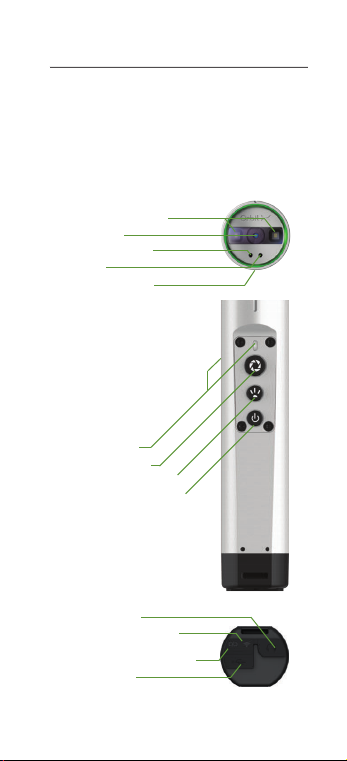
Introduction
Congratulations on your new Orbit X c amera.
All you ne ed to get started can be found in
this quick guide
LED Video Light
Camera
Microphone 1
Laser
Microphone 2
Status LED
Action Button
Light/Laser Button
Power/Standby Button
Audio Jack
Wi-Fi S tatus Light
Battery Status L ight
Micro USB
Page 2
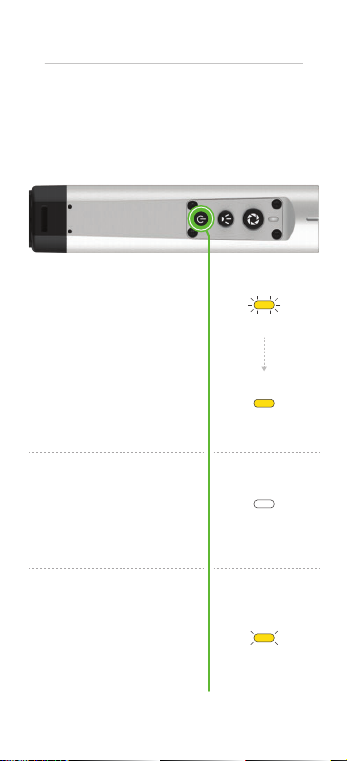
The Basics
Let’s get starte d!
Starting
Power On - Long Press
Press and hold for 3 sec
to start the device
Power Of f - Long Press
Press and hold for 3 sec
Standby - Short Press
To save battery, the device
goes into standby automatically af ter 1 min or after
short-pressing
Pulsating
Ready For Use
Constant
Shutting Down
Constant
Standby
4 Sec Interval
Page 3
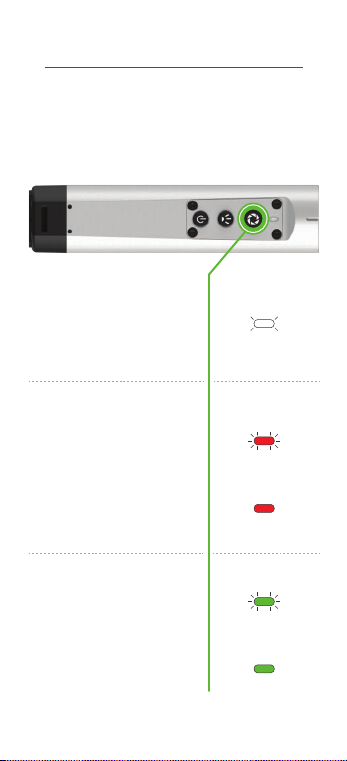
Photo, Video and Video Conferencing
Capture and sh are your image s
Take Photo - Short Press
Press once. Keep camera
steady
Record Video - Long Press
Press and hold for 1 sec. to
star t and stop reco rding
Video Call - Extra Long Press
Press and hold for 5 sec.
Setup is required be fore
using this functio n. See
“configure yo ur OrbitX ”
section
Snapshot
One Blink
Ready to Record
Pulsating
Recording
Constant
Calling
Pulsating
In Call
Constant
Page 4
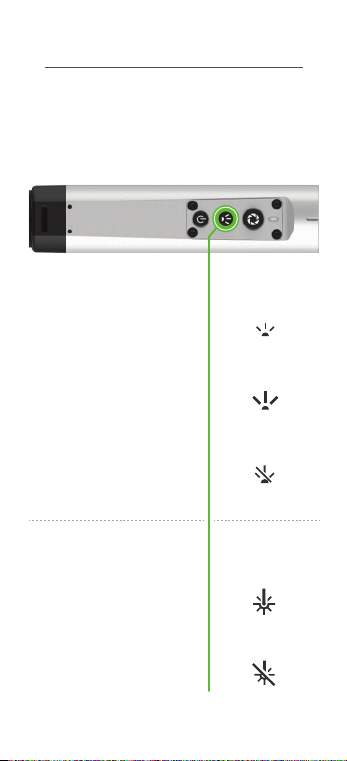
Lights and Laser
Night o r day? Dosen’t matter
Light O n
Video Light - Short Press
Cycle light intensity
Laser O n/Of f - Long Press
Press and hold for 1 sec
Light M AX
Light O ff
Laser On
Laser Off
Page 5
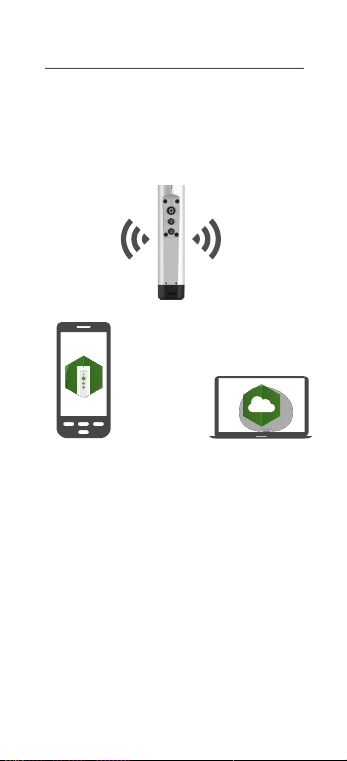
Congure your Orbit X
Connect it to th e internet and get the job done!
OR
Orbit X a pp Collaboration X
Download the O rbit X
app on your android
phone or tablet.
The app is already
pre-installed if you
are using an Impact
X or Gravi ty X device.
Follow the instructions
and enjoy powerfull
features like remote
control and live video
preview.
Our Cloud Manageme nt
web page.
1) Login to
www.collaboration-x.net
or sign up for a 30 days
free Collaboration X
trial account.
2) Go to “Dev ices” and
select “Orbit X Qui ck
Setup”.
Page 6
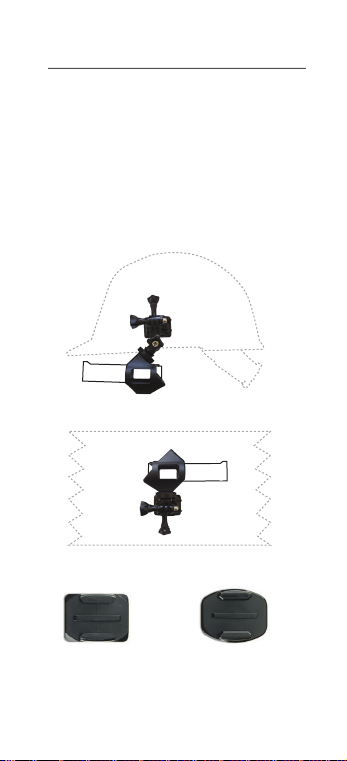
Mounting Your Camera
Attach it to everythi ng!
Mount your Orbit X to helmets, walls and
other e quipment with the included Cu rved
and Flat Adhesive mounts and hardware
OR
Mounting plate for
curved sur faces
(e.g. helmet)
Mounting plate for
flat su rfaces
(e.g. walls)
Page 7
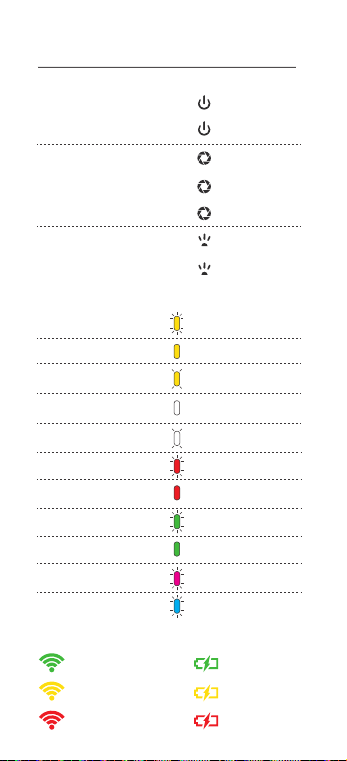
Overview
Standby/Wake up
Power On/Off
Take a Photo
Star t/Stop Video Rec.
Call/ Hang Up Video Call
Video Light On/Max/Off
Laser On/Of f
Starting
Ready For Use
Standby
Shutting Down
Taking Photo
Ready To Record
Recording
Calling
In Call
Updating Software
Pairing Mode
Strong Signal
Fair Signal
Not Connected
Short Press
Long Press
Short Press
Long Press
5 sec. Press
Short Press
Long Press
Pulsate
Constant
4 Sec Interval
Constant
One Blink
Pulsate
Constant
Pulsate
Constant
Pulsate
Pulsate
Full Battery
Ok Bat tery
Low Battery
Page 8

Charging
The Orbit X has a h igh quality, high capacity
batte ry an d shall only be charged using the
charger supplied with th e unit . Charging the
Orbit X from 0% to 80% bat tery capacity
takes approximately 2 hours. Chargin g the
remaining 80% to 100% takes 1 ½ hours.
The Orbit X should not be used/operated
during the charging process.
Factory Reset
1. Turn device off
2. Press and hol d Power and Camera button
at the same time. The Status L ED will turn
constant Pink.
3. Press and hold the Light button until the
LEDs on the back blink red.
4. Press and hol d the Ca mera button to
confirm. The status LED will blink Pink.
5. The device will re-star t when fi nished.
Software Update
The Orbit X will update to the latest
software automatically when it’s connected
to the internet. The status LED will pulsate
“Pink ” when it is updating. See the
“configure yo ur OrbitX ” section to set it up.
Support
FAQs and technical sup por t can be found
here: www.bartec-pixavi.com/support
Marking
Page 9
Special Conditions For Safe Use
Ex ib parameter
U
o
I
o
P
o
C
o
L
o
USB Interface
8.4 V
0.445 A
0.933 W
1.35 µF
3.06 µH
Headset
11.6 V
0.399 A
1.565 W
1.39 µF
20.6 µH
Audio Levels
The device is compliant with the EN9650-1
standard. However, third party music
players can exc eed th e recommended
audio levels , and as such should be used
with caution as prolonged listening to
sound at high vo lumes can cause
permanent damage.
Recycling (WEEE)
If you wish to discard the O rbit X ,
please contact your deale r or
supplier. Do not throw the devi ce
in your domestic rubbish/trash.
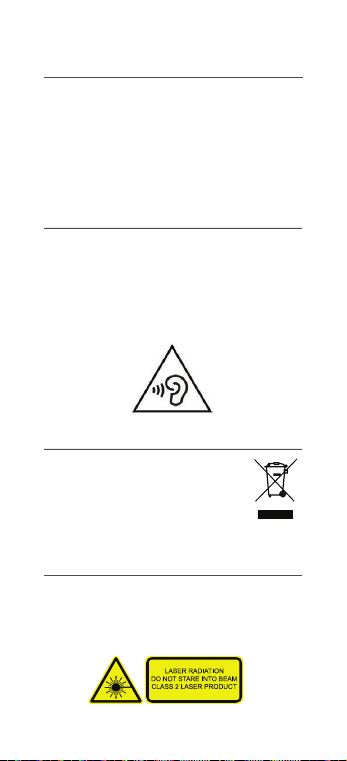
Integrated Laser
The Orbit X has b uilt-i n Laser functionality
for realtime collaboration and highlighting.
The laser can be controlled with the
“light-but ton” It uses a class 2 laser
Page 10

Conditions For Use (CSA)
The ambient tem perature range of the Orbit X is
-20°C to + 45°C
The Orbit X shall be protecte d from contamin-
ation by liquid and dust; thi s is normally
achie ved by the operator carry ing the devic e on
their person.
The USB p ort may be use d for chargin g the
equipment when in the non-hazardous area
only, using one of the following chargers
specifically supplied for use with the unit:
Delta co part number USB-AC35M
(ambie nt for charging is 0ºC to 45ºC)
Ansma nn part number 1001-00 07
(ambie nt for charging is 0ºC to 45ºC)
GlobTek model number GT-41078-0505-USB
(ambie nt for charging is 0ºC to 45ºC)
GlobTek model num ber GT-41078-0506-0.4-USB
(ambie nt for charging is 0ºC to 45ºC)
Glob Tek model number GT*-46101-*05*-USB
(ambie nt for charging is 0ºC to 40ºC)
Glob Tek model number GT*-46101-*06*-USB
(ambie nt for charging is 0ºC to 35ºC).
The maximum input voltage (Um) fro m the
charger between the lines is 5.8 V. The charger
shall b e approved for u se in USA/Cananda
against CSA/UL 60950-1 or equivalent.
The USB p ort is also us ed for data down load.
The por t has been assessed with a Um of 5.8 V.
The eq uipment connected to the USB por t shall
be approved for use in USA/Ca nada against
CSA/UL 60950-1 or equivalent.
Page 11

Conditions For Use (ATEX & IECEx)
The ambient tem perature range of the Orbit X is
-20°C to + 45°C
The Orbit X shall be protected from contamin-
ation by liquid and dust; thi s is normally
achie ved by the operator carry ing the devic e on
their person.
The USB p ort may be use d for chargin g the
equipment when in the non-hazardous area
only, using one of the following chargers
specifically supplied for use with the unit:
Delta co part number USB-AC35M
(ambie nt for charging is 0ºC to 45ºC)
Ansma nn part number 1001-00 07
(ambie nt for charging is 0ºC to 45ºC)
GlobTek model number GT-41078-0505-USB
(ambie nt for charging is 0ºC to 45ºC)
GlobTek model num ber
GT-41078-0506-0.4-USB
(ambie nt for charging is 0ºC to 45ºC)
Glob Tek model number GT*-46101-*05*-USB
(ambie nt for charging is 0ºC to 40ºC)
Glob Tek model number GT*-46101-*06*-USB
(ambie nt for charging is 0ºC to 35ºC).
The maximum input voltage (Um) fro m the
charger between the lines is 5.8 V.
The USB p ort is also used for data down load.
The port has b een assessed with a Um of 5.8
V and shall be installed in accordance with
clause 12.2.1 of IEC 60079 -14:2007/EN
60079-14:2008
Page 12

FCC/IC
This device complies with Part 15 of the
FCC Rules. Operation is subject to the
following two conditions: (1) this device
may not cause harmful interference, and (2)
this device must accept any interference
received, including interference that may
cause undesired operation.
Ce produit répo nd aux exigences de la section
15 de la régle mentation F CC. Son fonctionn e-
ment est soumis aux deux conditio ns
suivantes: (1) cet appar eil ne doit pas c auser
d'interférences nuisibles et (2) cet appareil
doit ac cepter toute i nterfére nce reçue, y
compris les i nterférences qu i peuvent
provoquer un fonctionnement indésirable.
Page 13

Specic Absorption Rate Data
The Orbit X Camera is a radio transmitter
and receiver. It is designed and manufac-
tured not to exce ed the emission lim its for
exposure to radio frequency (RF ) energy set
by the Federal Communications
Commission (FCC) of the U.S. Government,
Industry Canada of the Canadian
Govern ment (IC), and recom mended by Th e
Council of the Europ ean Union.
The exposure standard for wireless devices
employs a unit of measurement known as
the Specific Absorption Rate, o r SAR. The
SAR limit set by the FCC/IC is 1.6W/kg. T he
SAR limit recommended by T he Council of
the European Union is 2.0W/kg. Tests for
SAR are conducted using standard
operating positions specified by the FCC/IC
with the device transmitting at its highest
certified power level in all tested frequency
bands.
For bod y worn operation, the Orbit X dev ice
has bee n tested and meets the FCC/IC
exposure guideli nes when used with an
accessory that co ntains no metal and that
positions the device a minimum of 10 mm
from the body. Su ch a device can i.e. be
BARTEC PIXAVI camera cradle.
Page 14

Orbit X
Quick Guide
 Loading...