

Page 1

HANDBOOK
Page 2
Thank you for purchasing the Orbitsound A70 airSOUND BAR. With
proper use the airSOUND BAR delivers superb sound fidelity, engaging
spatial sound, and will provide you with a fantastic listening experience
for TV, films, media and music.
• A70 Soundbar
• S3 Subwoofer
• Remote control inc battery
• Soundbar power supply + power cord (country specific)
• Subwoofer power cord (country specific)
• Digital optical (TOSLINK) connection cable
• Analogue (AUX) connection cable
• Wall mounting kit
• Quick start guide
• Safety and warranty guide
The Orbitsound A70 is a high fidelity soundbar featuring airSOUND to
deliver a natural listening experience. The soundbar houses 5 speakers
in total. On the front there are 2 midrange loudspeakers, and a high
frequency tweeter. On the sides are compact airSOUND speakers
that work with the front speakers to create a fully immersive sonic
experience. The subwoofer is a tuned reflex system that connects
wirelessly to the soundbar through an ultra high speed wireless link. The
subwoofer produces powerful and controllable bass.
Page 3
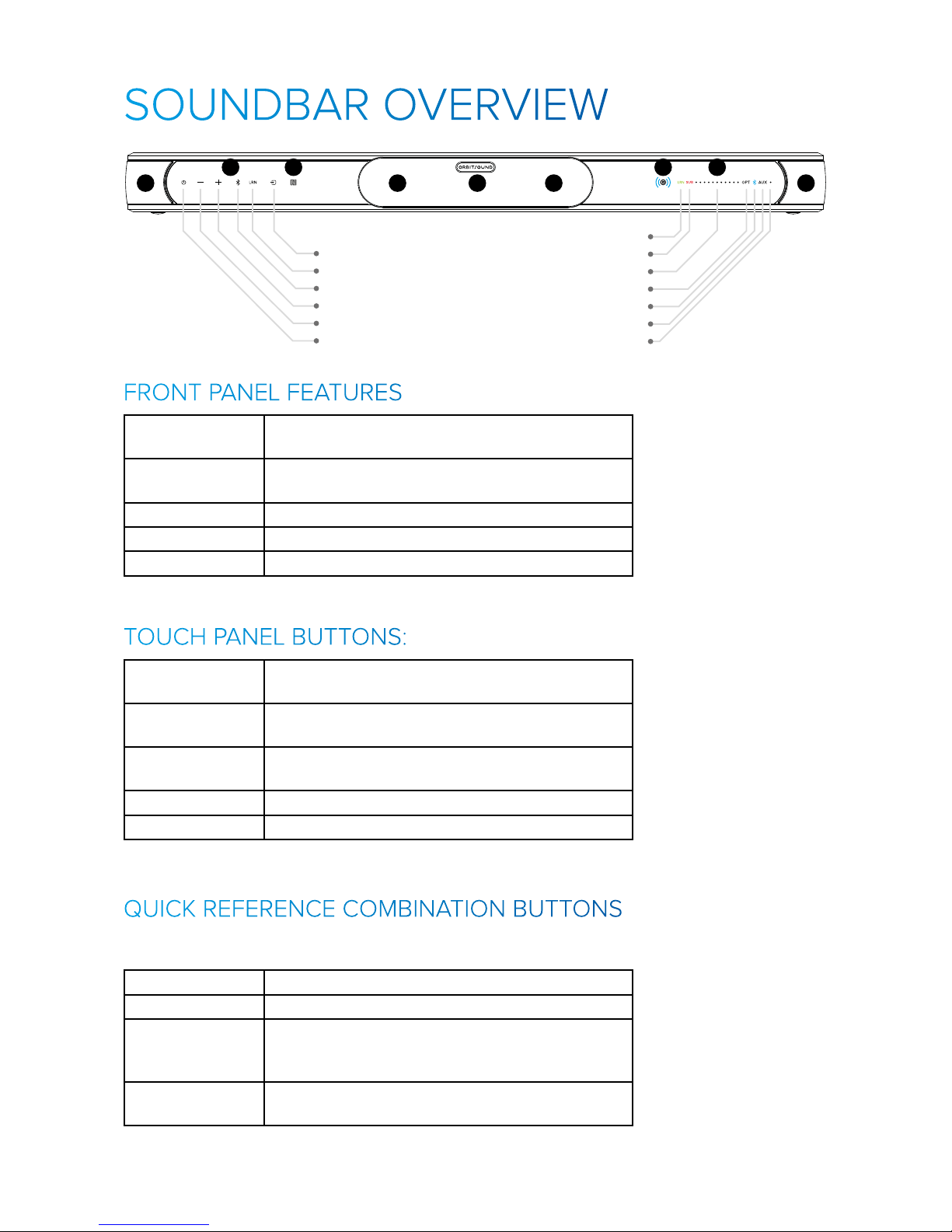
Bluetooth (Hold to pair)
Volume +
Volume -
Input Source
Remote Control Learning
Power / Standby
Remote Learning
Optical Source
Bluetooth Source
AUX Source
Wireless Subwoofer Error/Pairing
Volume/Bass/Treble
Power/Mute
Touch Panel Buttons
1 12
3 445
22
1 Side firing airSOUND loudspeakers that deliver
the spatial sound experience.
2 Front speaker array, midrange and high frequency
loudspeakers.
3 Infra red (remote control) receiver
4 Display panel
5 Touch panel buttons
Input Source Chooses the soundbar sound source from Optical,
Bluetooth & AUX.
Remote Control
Learning
Starts the remote control learning process (see:
Remote Control Learning)
Bluetooth Controls Bluetooth connection & pairing (see:
Bluetooth)
Volume Controls the volume of the soundbar system
Power / Standby Switches on / o the soundbar
These button combinations can be pressed to access special functions.
Press and hold for 3 seconds:
Vol+ & Vol- Subwoofer pairing mode
Power & Source System reset (keeps subwoofer pairing)
Bluetooth &
Source
Clear Bluetooth pairings (including subwoofer) note you will need to re-pair the subwoofer if you
use this feature.
Learn & Source Enter DFU mode (USB software upgrade) (unplug
soundbar to exit this mode)
Page 4
The wireless subwoofer receives low frequency sound
from the soundbar via an ultra low latency Bluetooth
signal. To operate, the subwoofer must be paired with
the soundbar. At the factory, the subwoofer is paired with
the soundbar. You can re-pair a subwoofer if needed, see
‘SUBWOOFER PAIRING’ section.
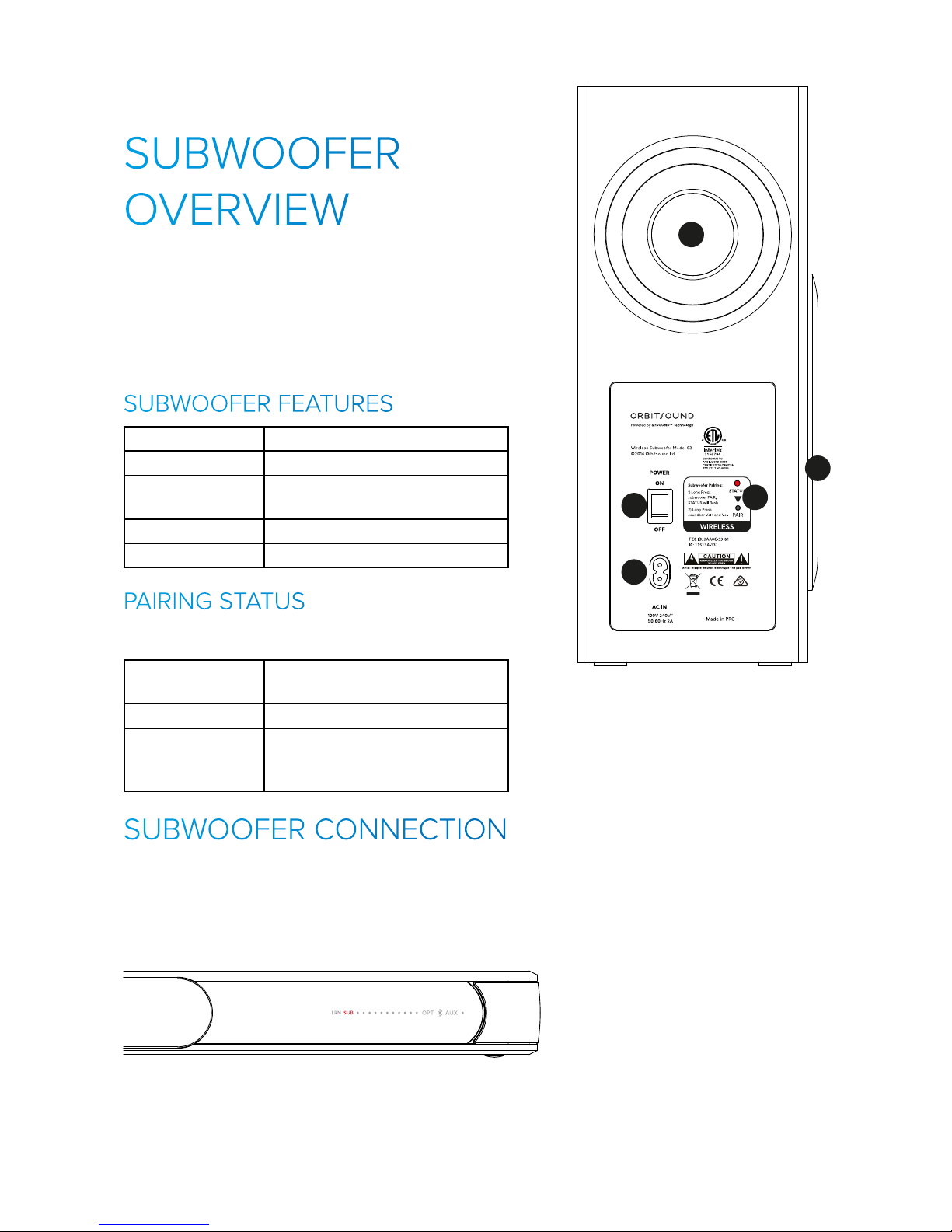
1 Side firing subwoofer speaker
2 Rear facing tuned port
3 Subwoofer pairing button &
pairing status light
4 AC power inlet
5 Power swtich
The subwoofer STATUS indicator lights as follows:
ON Subwoofer is connected to the
soundbar and working
FLASHING Subwoofer is in pairing mode
OFF Suboofer is o, or in low power
state, or disconnected from
soundbar
The subwoofer should not need to be re-paired. Only do the pairing
procedure if you have been instructed to do so by Customer Support,
or if the power is connected to the subwoofer, and the soundbar is
showing you that there is no subwoofer connected:
3 445
Note: The soundbar shows the red SUB light when there is no
subwoofer connected wirelessly. If the subwoofer is on, then it
needs to be paired to the soundbar. See ‘SUBWOOFER PAIRING’.
1
2
3
4
5
Note: the volume of
the subwoofer can be
controlled with the Bass
+/- button on the remote
control.
Resetting (factory reset)
on the the soundbar
also resets the bass
level to default.
Page 5
©2014 Orbitsound ltd.
1 12
3 445
22
Subwoofer Pairing:
1) Long Press
subwoofer PAIR;
STATUS will flash
2) Long Press
soundbar Vol+ and Vol-
1
2
2
Subwoofer Pairing:
1) Long Press
subwoofer PAIR;
STATUS will flash
2) Long Press
soundbar Vol+ and Vol-
TV OPTICAL
AUDIO OUT
1
1
1
2
3
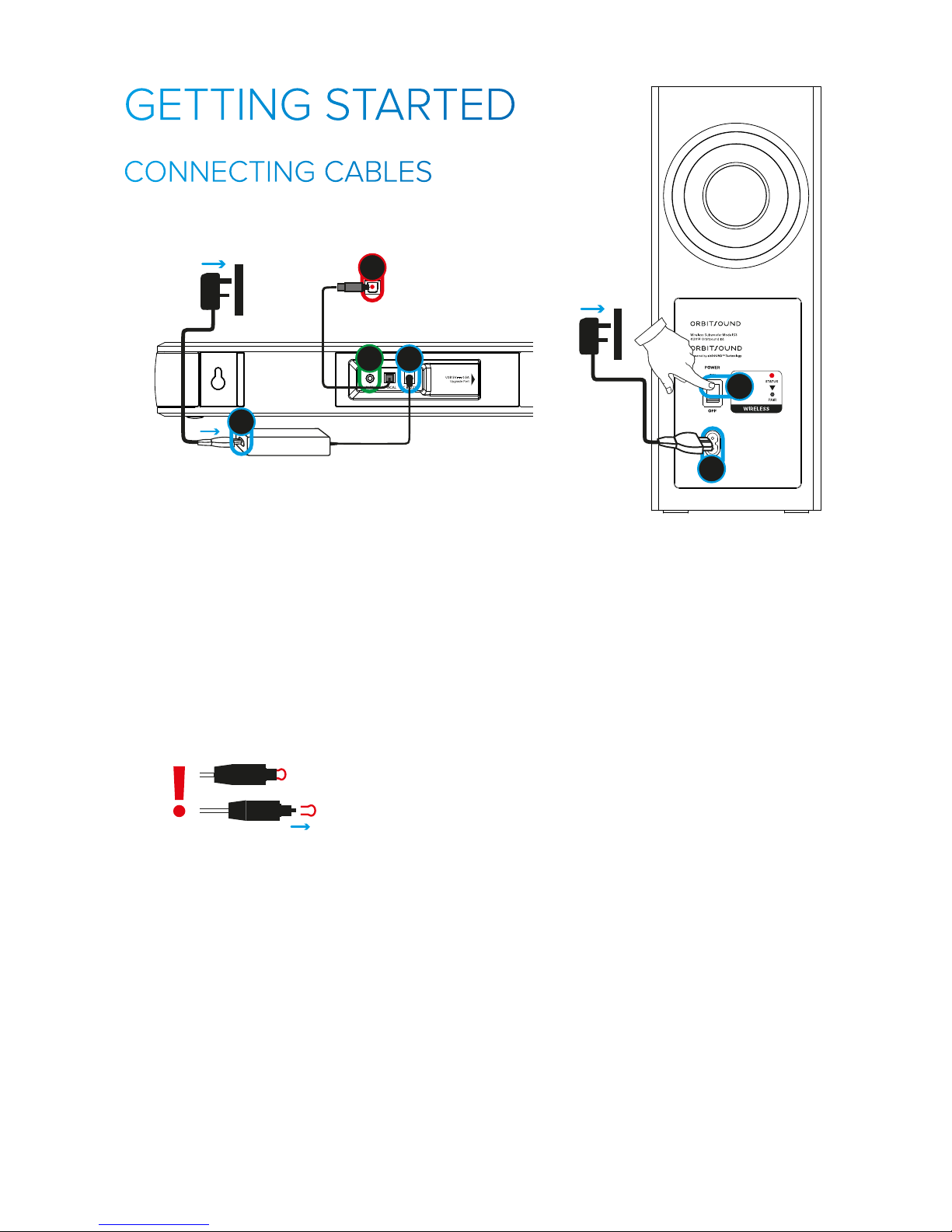
1) CONNECT POWER:
Connect the subwoofer and soundbar to mains power sources as shown
above. Note, the soundbar power supply and subwoofer can accept
mains voltage from 110V to 250V AC. Note: be sure to switch on the
power switch on the rear of the subwoofer.
2) CONNECT TV AUDIO (OPTICAL):
Connect your TV OPTICAL AUDIO OUTPUT to the soundbar with the
provided optical cable. Make sure that the protective plastic covers
have been removed from the ends of the optical cable before use.
Please ensure that the optical output of your TV is enabled.
1 12
3 445
22
Subwoofer Pairing:
1) Long Press
subwoofer PAIR;
STATUS will flash
2) Long Press
soundbar Vol+ and Vol-
1
2
2
Important: Ensure that the chosen optical output mode is either
STEREO, PCM or NORMAL.
Note: make sure that the cable ‘CLICKS’ when plugging in to
make sure it is fully connected/inserted.
3) (OPTIONAL) - CONNECT AUX INPUT
The soundbar also accepts analoge audio from a standard 3.5mm
strereo jack plug. The included cable allows you to connect this to an
analogue output such as AUDIO OUT on a TV, or a CD player. Use this
input if your TV does not have an optical output.
©2014 Orbitsound ltd.
3 445
Subwoofer Pairing:
1) Long Press
subwoofer PAIR;
STATUS will flash
2) Long Press
soundbar Vol+ and Vol-
1
2
Subwoofer Pairing:
1) Long Press
subwoofer PAIR;
STATUS will flash
2) Long Press
soundbar Vol+ and Vol-
1
1
Page 6
©2014 Orbitsound ltd.
1 12
3 445
22
Subwoofer Pairing:
1) Long Press
subwoofer PAIR;
STATUS will flash
2) Long Press
soundbar Vol+ and Vol-
1
2
2
Subwoofer Pairing:
1) Long Press
subwoofer PAIR;
STATUS will flash
2) Long Press
soundbar Vol+ and Vol-
TV OPTICAL
AUDIO OUT
1
1
1
1
2
3
1
2
3
4
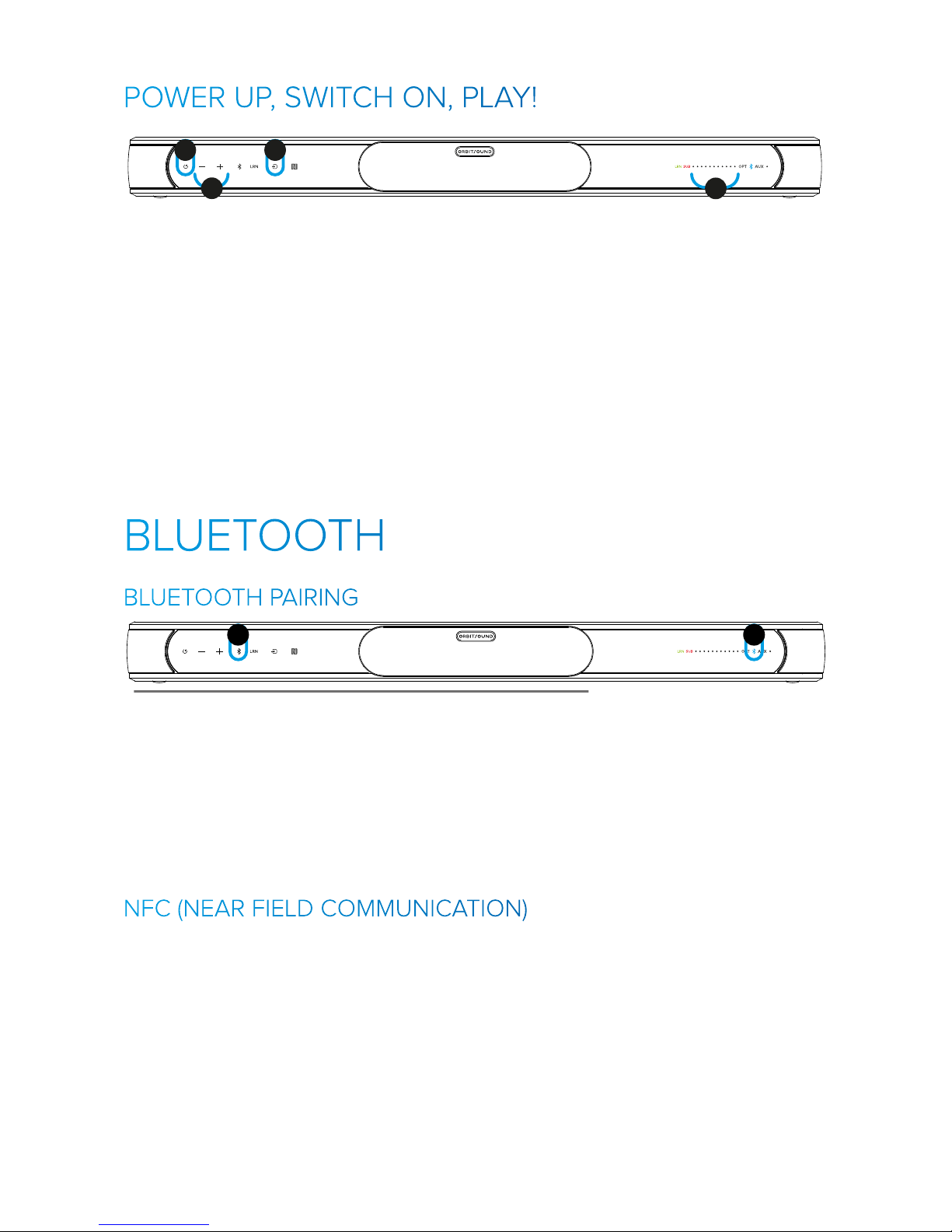
1) Touch the POWER button on the soundbar. The controls will light, and
the soundbar will switch on.
2) Press the SOURCE button to cycle between the soundbar inputs. The
inputs are:
• OPT - Digital optical input (best for TV connection)
• Bluetooth - Digital APTx Bluetooth connection
• AUX - Auxiliary analogue input
3) Adjust volume with VOL+ and VOL- buttons
4) The display panel will show the volume level as you change it.
1
2
Note: If your device has NFC, it’s easier to pair with it. See NFC
section below.
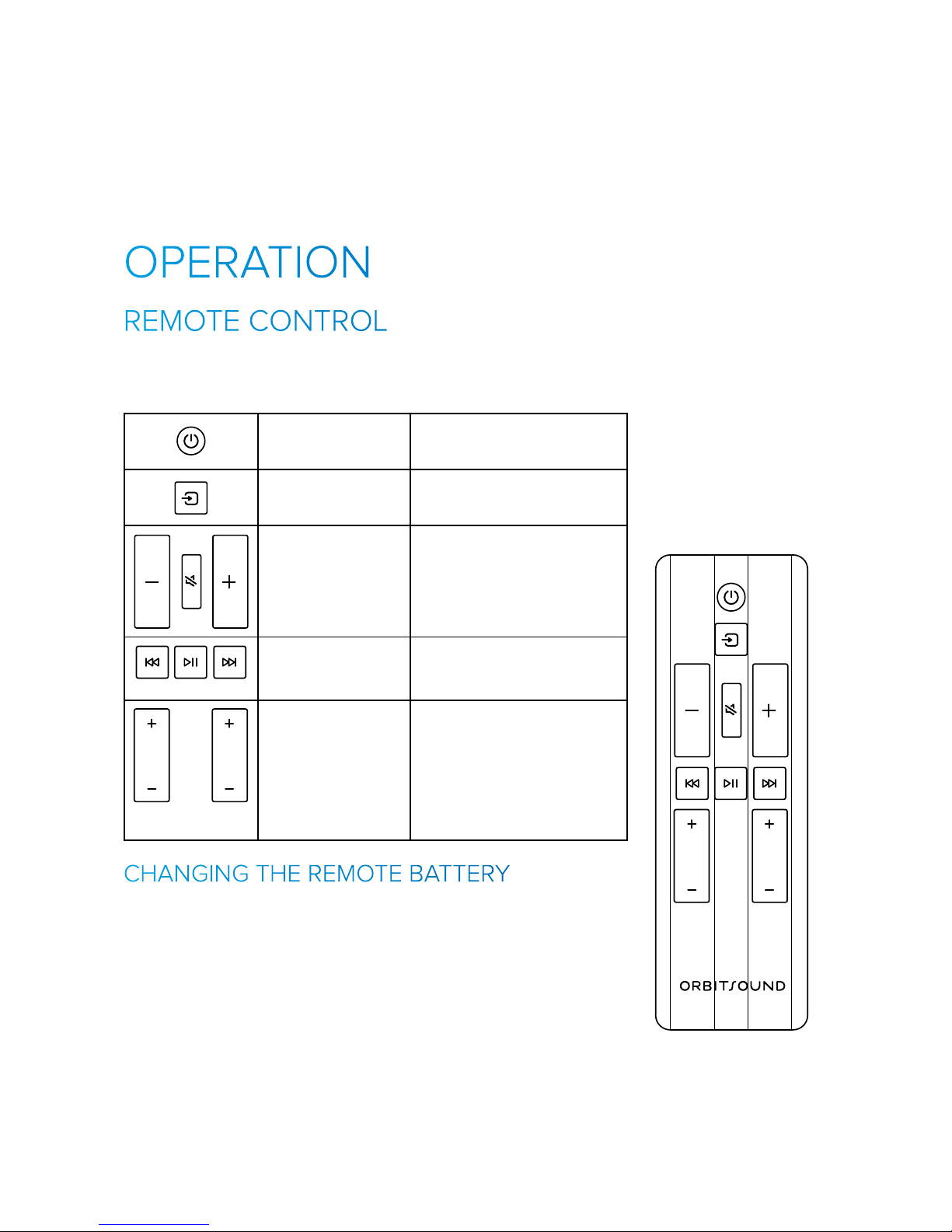
To pair a Bluetooth device with the soundbar, follow this process:
1) Press and hold (3 seconds) the Bluetooth button (1)
2) The Bluetooth light will fast flash (2)
3) Search for ‘Orbitsound A70’ in your Bluetooth device list
A really easy way to pair your device, or to re-connect to the soundbar
is NFC. The soundbar is equipped with ‘active’ NFC. This means that
using NFC will cause the soundbar to automatically switch on, turn to
Bluetooth, and get ready for Bluetooth playback.
To use NFC:
1) Ensure Bluetooth and NFC are enabled on your device and that
the screen is unlocked.
2) Present your device to the NFC logo on the front of the
soundbar
Bluetooth Light (2):
Slow Flash
- Ready to connect
Fast Flash
- Pairing mode
Solid On
- Connected to
device
Page 7
3) When prompted, tap to confirm pairing with the soundbar.
Note: The first time you connect with NFC, you may not be
connected to the device. This first pairing allows your device
to add the soundbar to your device list. After this initial pairing,
connecting with NFC is quick and easy, just follow steps 1 & 2
above.
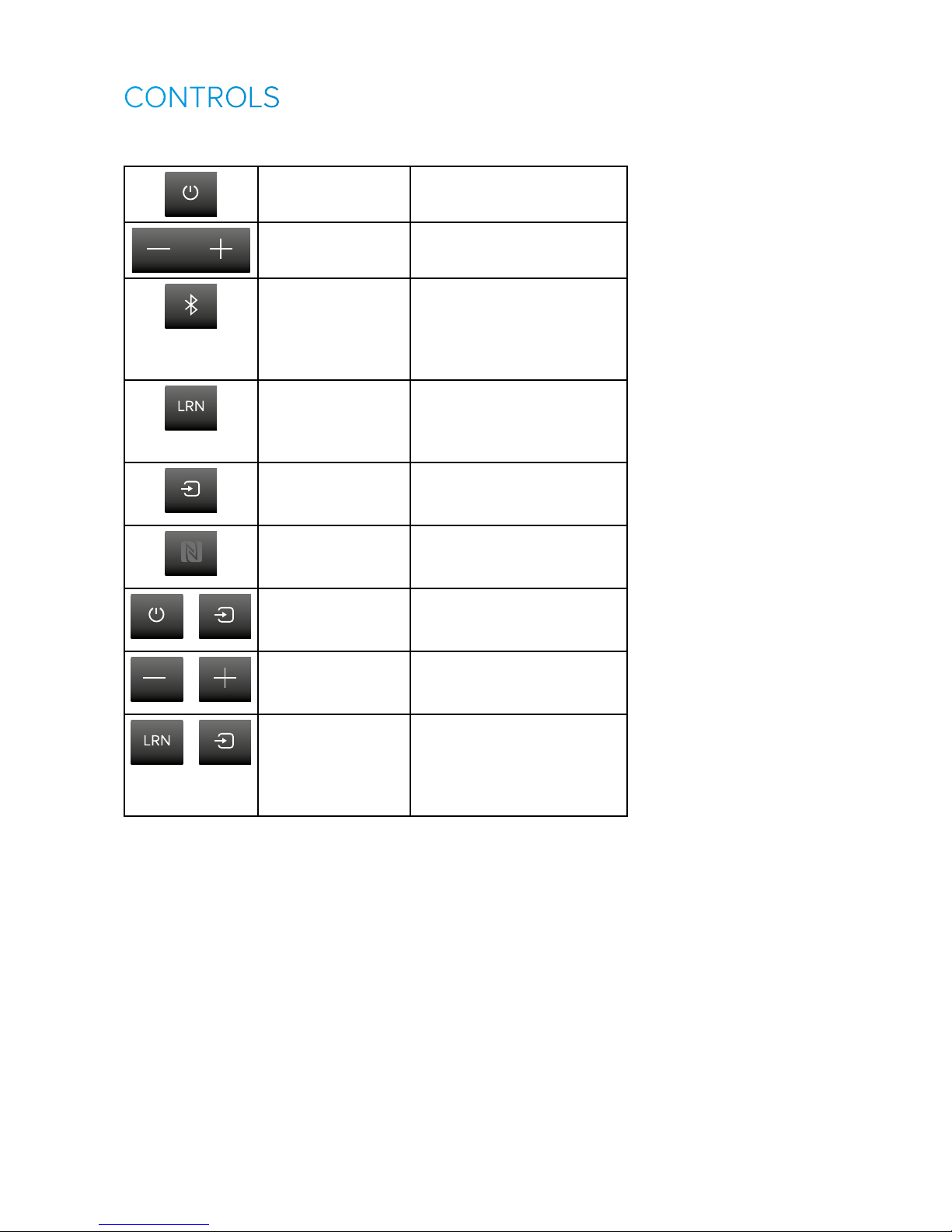
The included remote control allows access to most of the functions on
the soundbar:
POWER Switches the soundbar into
standby mode or resumes.
SOURCE Cycles the source:
OPT -> BT -> AUX
VOL -, MUTE, VOL+ Volume and Mute buttons.
Mute: Press mute to silence
the soundbar. Press either
volume key or mute to exit
mute.
Play control buttons Use these buttons to
remote control a connected
Bluetooth device.
BASS TREB
Bass and Treble
control
Bass + / - adjusts the volume
of the subwoofer remotely.
Treble + / - adjusts the high
frequency response of the
soundbar. Note: the display
will show the staus of each
control.
Replace remote battery with anode up (+) from back-side. Use a high
quality CR2032 battery.
BASS TREB
BASS TREB
Page 8
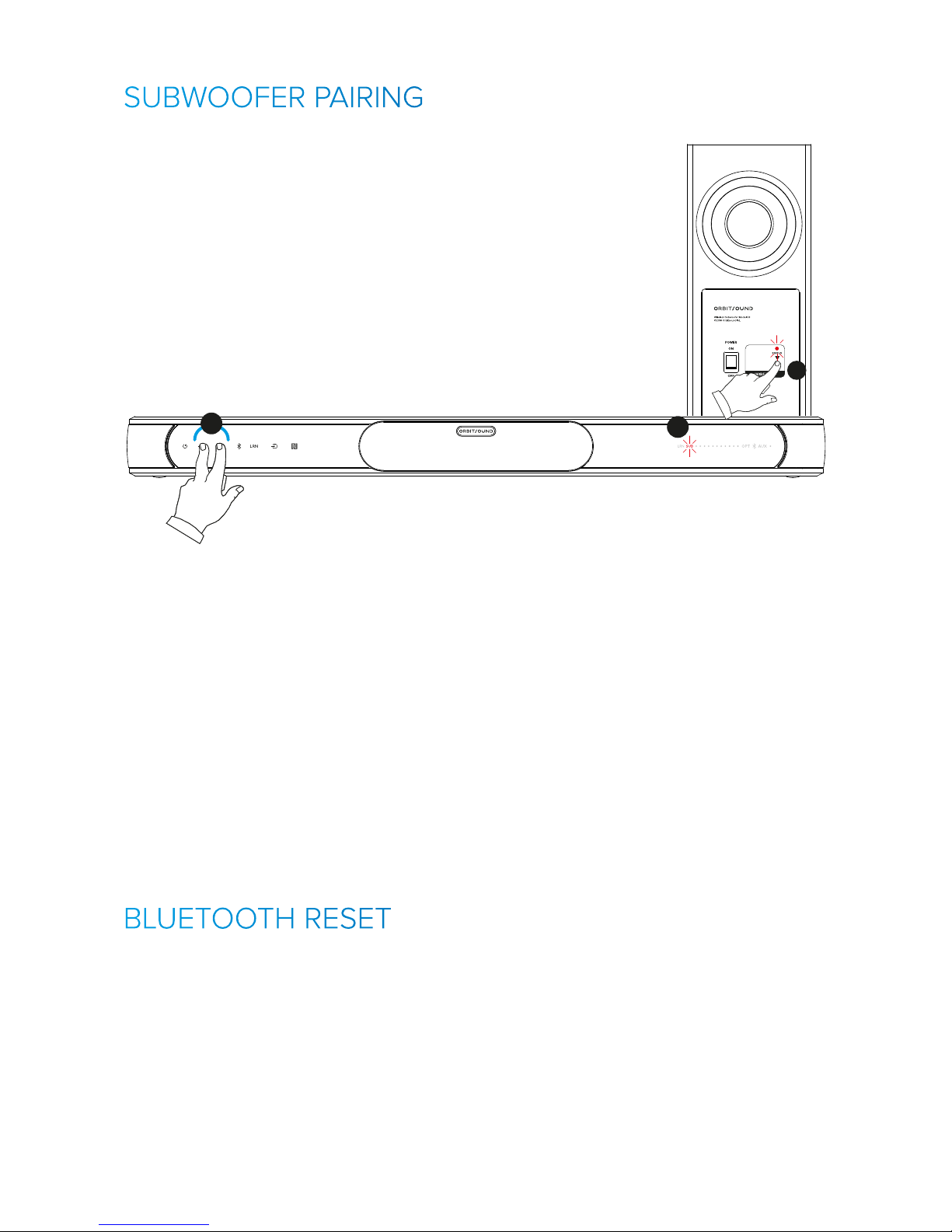
The following chart shows all the controls on the soundbar:
1
2
Power Switches the soundbar into
standby mode or resumes.
1
2
Volume Press to change the
soundbar volume (22 steps)
2
Bluetooth Press to switch to Bluetooth
input, and to connect or
disconnect from a Bluetooth
device. Press and hold to
enter pairing mode.
2
Remote Learning Press and hold to start
remote learning process.
See ‘REMOTE CONTROL
LEARNING’ section.
2
Input Selection
(Source)
Press to cycle between the
inputs, OPT -> Bluetooth ->
AUX.
2
NFC target This is not a button, but
is where the NFC tag is
located.
1
2
+
2
System reset Press and hold to do a
system reset. See ‘SYSTEM
RESET’ section.
1
2
+
2
Start subwoofer
pairing mode
Pairs a subwoofer - see
‘SUBWOOFER PAIRING’
section.
2
+
2
Enter DFU mode Allows programming
through USB update port.
Disconnect power to exit
DFU mode. Do not use
unless advised to do so.
Page 9
1 12
3 445
22
Subwoofer Pairing:
1) Long Press
subwoofer PAIR;
STATUS will flash
2) Long Press
soundbar Vol+ and Vol-
1
2
2
HOW TO PAIR THE SUBWOOFER:
1) Press and hold for 3 seconds the PAIR button on the back of the
subwoofer. The STATUS light will start to flash slowly when the
subwoofer has entered pairing mode.
2) Press and hold for 3 seconds the Vol - and Vol + buttons on the front
of the soundbar. The SUB light will flash slowly on the control panel
when the soundbar enters pairing mode.
3) The soundbar will now search for the subwoofer. When the pairing is
successful, the soundbar SUB light will go dark, and the subwoofer will
operate.
Note: If the pairing is unsuccessful, perform a BLUETOOTH RESET
on the soundbar.
You can clear all previous Bluetooth pairings (previously paired
devices) by resetting the Bluetooth system. Note, this will also clear
the subwoofer pairing information. After doing this, please follow the
procedure ‘SUBWOOFER PAIRING’ to reconnect the subwoofer.
To reset the Bluetooth memory: Press and hold the BLUETOOTH and
SRC buttons on the soundbar front panel for 3 seconds. The soundbar
will flash all lights to show that the operation is complete. The Bluetooth
memory is now cleared from all devices, including the subwoofer.
Page 10
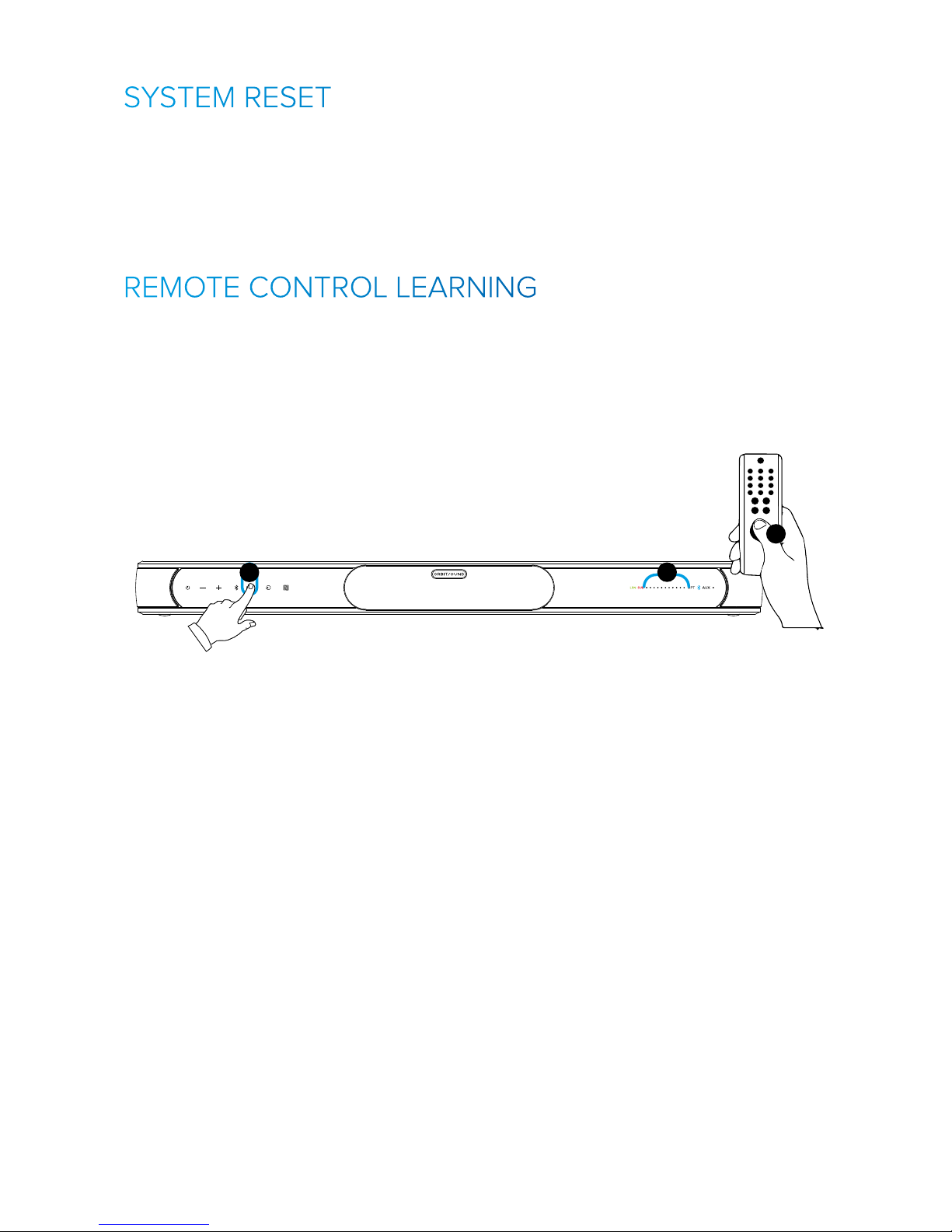
Normally the soundbar remembers all your settings. These include
treble, bass, volume etc. You can reset these quickly and simply. Press
and hold POWER and SRC on the front panel to perform a system reset.
The system will flash all LEDs to confirm this is done, and it has returned
to default settings. Please note that the subwoofer pairing information is
NOT lost, so the subwoofer will continue to work after a reset.
The A70 can learn volume control instructions from many other remote
control types. The soundbar has the ability to go into a learning mode
and to ‘scan’ a new remote control button, and to use this as a volume
control function. This means that when using your A70, you will not
need to reach for the Orbitsound remote in order to adjust the soundbar
volume.
2
1
2
1
2
To learn a remote:
1. Press and hold (3 seconds) LRN (1) to learn from a new remote. The
control panel will show a green ‘LRN’ logo, and lights will show on the
display to request volume up or down buttons to be pressed on a new
remote.
2. Press Vol+ on new remote when prompted (2),
3. Wait, then repeat when prompted by the soundbar. Repeat for Volwhen prompted. The system will confirm successful remote learning (2)
and flash all lights.
If it did not work no lights will flash, try again and use short
presses on the new remote, and wait to be prompted for a press.
Note: the A70 can learn from many popular remotes. It is not
compatible with all remote control types.
Supported Remote Control types: Samsung, LG, Sony
Not Supported: Panasonic
Other remote control types vary in compatability.
Page 11
At night, when the house is quieter, you may find that the bass
(subwoofer) is too loud. The soundbar features a ‘night mode’ that
minimises the subwoofer boominess. To access this feature, simply
press ‘BASS -’ on the remote several times, and use either minimum
or the next level up for bass; whichever is preferred. In this mode, the
subwoofer output is very much lower than normal.
Orbitsound is all about sound. airSOUND is a system that works to
fill your living environment with incredible quality and spatious sound.
Whilst the setup of the soundbar is not critical, there are some basic
things to bear in mind to make sure you enjoy the best sonic experience
possible:
The airSOUND (spatial) sound field is produced by the speakers in the
sides of the soundbar. These special signals interact with the main
signal to produce spatial sound in your listening environment. Make
sure that the side grilles are free from obstacles. The airSOUND
speakers work best when close to a surface (table top or wall when wall
mounting), and there are no obstacles in the near viscinity.
The subwoofer is side firing and produces powerful bass. Make sure
that loose objects are not able to rattle near the subwoofer. You can
turn the Bass down with the remote control to reduce the bass level if
needed.
To get the best bass performance, ensure that the bass port (rear) is free
from obstruction, and it is at least 5cm away from the nearest wall.
Use a soft, clean cloth moistened with plain, luke-warm water to
clean the exterior of the unit. Glass cleaner is a good way to remove
finger marks, but use it sparingly, and avoid contact with the actual
loudspeaker driver units.
IMPORTANT: Never use solvents such as benzene or other strong
chemical cleaners since these could damage the unit’s finish. It is VERY
important that no liquid reaches the inside of the unit.
Page 12
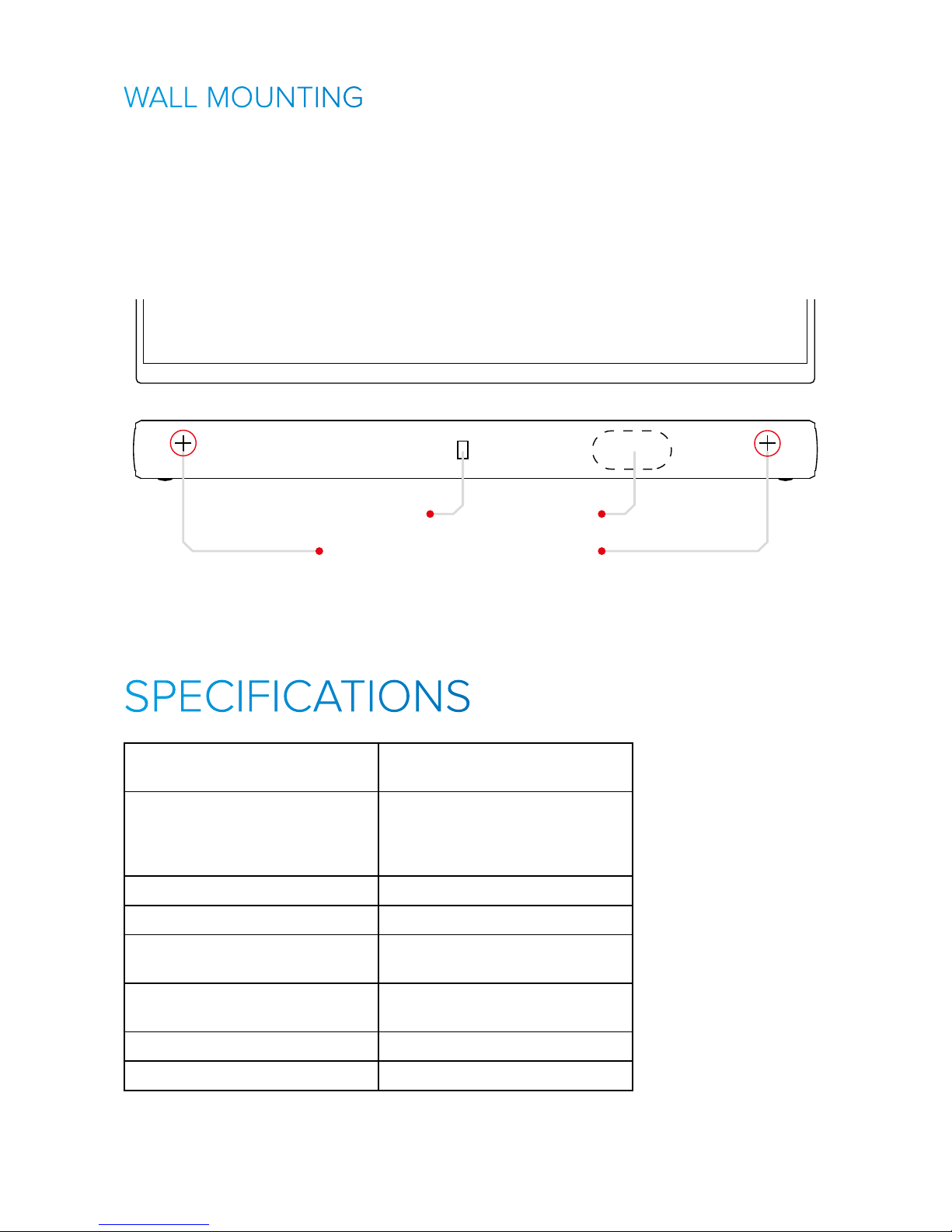
In the package you will find a wall mounting kit. In order to wall
mount the soundbar. Wall mounting should only be done by qualified
professionals, and the surface for mounting should be sound and
strong enough to support the soundbar. If in doubt, install a shelf for the
soundbar to sit on.
Note: Damaged casued by poor wall mount installation cannot be
covered by warranty.
Drill 2x6mm holes in wall, 644mm apart
Cable access
TV
Recommended Soundbar Placement
Cable clip
Frequency response
+/- 3 dB [Hz]
+/- 3dB 44Hz - 13.2KHz
Response ontrols LF: (Subwoofer) +8dB (max)
-20dB Night mode, (min)
HF: 10KHz +/- 8dB EQ
Maximum SPL [dB] 97dBA @ 1m
Amp. power 300W total
Crossover frequencies [Hz] LF: 220Hz (digital)
HF: 4KHz (analogue)
Front (main) drivers 2x2” Orbitsound mk3
1” soft dome tweeter
Spatial drivers 2x45mm neodymium drvers
Sub-Bass driver 1 x 6.25”
Page 13

Enclosure types Front – sealed sound treated
Sides – sealed chambers
Subwoofer - Tuned Reflex
Input(s) AUX -10dBu 3.5mm jack.
TOSLINK optical (Stereo).
Bluetooth aptX
Recommended placement Table or Wall Mounted
Dimensions (H x W x D) [cm] Soundbar: 75 x 6.5 x 6.5
Subwoofer: 34 x 34 x 14cm
Cabinet finish Soundbar:
Engineered wood, high gloss
Subwoofer: PVC finished wood
Weight 12.4Kg (gross, packaged weight)
1.9Kg (soundbar)
6Kg (subwoofer)
Power consumption Standby /
Idle
0.4W / 3W
Voltage / Power 110-250V AC 50-60Hz
Soundbar Power Supply 22V DC 2500mA
Remote Control IR lead code 6122/01FE
Page 14

There is no sound froom the subwoofer
Check that power to subwoofer is ON.
Restart soundbar. If the wireless subwoofer
error light on the sound bar is solid red,
please follow “SUBWOOFER PAIRING”
instructions.
No Sound from optical (TV) source,
No Sound from optical Set-Top-Box (STB) source,
Loud noise when watching HD channels on optical
Please check your TV or STB settings. Make
sure that the optical output format is set to
‘STEREO’ or ‘PCM’ format. This is the correct
format for the sound bar.
Check that the input selected is optical
(OPT)
(Factory reset) I need to reset my settings
Press and hold SRC and POWER on the
soundbar for 3 seconds. All lights will flash
to show a reset has happened.
I cannot make my soundbar learn from my remote.
When I complete learning process, no lights flash.
Please note: Not all remotes are supported
with our learning process. Check the website
for compatability information. If your remote
should work but is not, make sure you are
aiming the remote at the IR receiver (near
the light panel). Make sure you tap the key
on the remote to be learned once when
shown to by the sound bar, and repeat when
shown. Also, you may need to darken the
room for the learning process to complete
successfully - draw curtains or turn lights /
TV o.
Switching from TV to Bluetooth, there is a big
volume dierence - the TV is quiet.
Some TVs reduce the volume of sound that
comes out of the optical port. You will need
higher volume settings on the soundbar
to compensate. You can also use the AUX
(Headphones) otput from the TV which may
give more volume on some TV models.
How do I position my soundbar to get the best
sound?
Simply make sure that the side speakers
are clear from obstacles. The subwoofer
is wireless, but the best sound is achieved
when the subwoofer is within 5m of the
soundbar, and in the same general area.
My remote control is not working
Please ensure the battery protection film has
been removed. Pull the tab and remove.
If the remote has had a lot of use, replace
the battery. CR2032 type.
The optical cable does not work
Please check the optical cable and remove
any protective covers from connectors.
Check the optical output format is PCM or
STEREO. You should see a solid red light
in the centre of the optical cable when it is
unplugged from the soundbar.
I’m using Bluetooth and sometimes the sound is
interrupted
Bluetooth is a short range wireless
technology. We recommend you keep your
bluetooth device in the same room as the
sound bar and not obstructed by walls
or metallic objects as they can block the
signal. Please do not place other wireless
devices such as wireless routers, cordless
telephones and microwave ovens close to
your sound bar as they can interfere with the
Bluetooth connection.
No sound:
Check power connections and that the
button control panel is visible.
Check that the TV or other sound source is
playing and that it is connected properly to
the soundbar.
Ensure the correct source is selected (Press
the ‘source’ button on control panel to
change input sound source, shown on the
display panel)
Adjust the volume of the soundbar until
sound is heard.
The sound is out of sync with the TV
Make sure all video sources are connected
to the TV and that the soundbar is
connected to the TV optical output or RCA
(AUX) output. This connection method
should re-align the sound. If it is still out of
sync, look for a sound/time alignment menu
in the TV menus.
Page 15

Orbitsound Ltd.
33 Greycot St,
London,
SW1P 2QF
tel: +44 (0)8456 521 219
www.orbitsound.com/support
[email protected]
Orbitsound Ltd is regstered in the UK, company
number 09339931. E&oe - exceptions and
omissions excluded
 Loading...