

Page 1
Français
Manuel d’utilisateur
1. Connectez le dongle au projecteur
2. Allumez le projecteur et sélectionnez une source USB
3. Télécharger et installez l’application adéquate pour votre projecteur
Note: Rendez-vous sur notre site internet pour connaître l’application
adéquate et la liste des fonctionnalités prises en charge
4. Connectez le SSID sans fil. “NetworkDisplay”, “Optoma Display”,
“HDCastPro_xxxxxxxx”
5. Ouvrez l’application
6. Commencez à présenter
Deutsche
Bedienungsanleitung:
1. Stecken Sie den USB Dongle in einen freien USB-Port Ihres Projektors
2. Schalten Sie Ihren Projektor an und wählen Sie den entsprechenden
USB Eingang
3. Laden Sie die entsprechende APP für Ihren Projektor herunter und
installieren Sie die APP
Achtung: Eine Liste mit unterstützenden Features und welche APP genau
Ihren Projektor unterstützt, finden Sie über unsere Webseite!
4. Stellen Sie die Verbindung mit Ihrem Netzwerk her Netzwerk-Display,
Optoma-Display, HDCastPro_ xxxxxxxx
5. Öffnen Sie die APP
6. Starten Sie die Präsentation
Copyright
© Copyright 2015. This publication, including all photographs, illustrations
and software, is protected under international copyright laws, with all
rights reserved. Neither this manual, nor any of the material contained
herein, may be reproduced without written consent of the author.
Disclaimer
The information in this document is subject to change without notice.
The manufacturer makes no representations or warranties with respect
to the contents hereof and specifically disclaims any implied warranties
of merchantability or fitness for any particular purpose. The manufacturer
reserves the right to revise this publication and to make changes from
time to time in the content hereof without obligation of the manufacturer
to notify any person of such revision or changes.
Trademarks
Optoma and its logo is a registered trademark of Optoma Corporation.
Optoma Europe Ltd is the licensee of the registered trademark. Android is
a registered trademark of Google Inc. Windows is a registered trademark
of Microsoft Corporation in the United States and/or other countries. OS
X is registered trademarks of Apple Inc. iOS is a trademark or registered
trademark of Cisco in the U.S. and other countries and is used under license.
Declaration of conformity
EMC Directive 2004/108/EC (including amendments).
Low Voltage Directive 2006/95/EC.
R & TTE Directive 1999/5/EC (if product has RF function)
WUSB
Basic user manual
Español
Manual de usuario básico
1. Conecte el dongle al proyector
2. Encienda el proyector y seleccionar la fuente USB
3. Descargue e instale la aplicación pertinente para el proyector
Nota: Por favor, visite nuestro sitio web para la aplicación correcta y una
lista de las funciones compatibles
4. Conectar a SSID inalámbrico. “ NetworkDisplay “ “Pantalla Optoma “ , “
HDCastPro_xxxxxxxx “
5. Abre la aplicación
6. Inicie la presentación
Italiano
Manuale base
1. Collegare il dongle al proiettore
2. Accendere il proiettore e selezionare la sorgente USB
3. Scaricare e installare l’applicazione per il proiettore
Nota: Si prega di visitare il nostro sito web per l’applicazione corretta e
l’elenco delle funzioni supportate
4. Connessione a wireless SSID “NetworkDisplay“, “Optoma Display”,
“HDCastPro_xxxxxxxx”
5. Aprire l’applicazione
6. Avviare la presentazione
Disposal instructions
Do not throw this electronic device into the trash when
discarding. To minimize pollution and ensure utmost protection
of the global environment, please recycle it
www.optoma.com
www.optoma.com
Page 2
Freeze
Power Switch
L
R
HDMI VGA Video
7
User18User29User3
Source0Resync
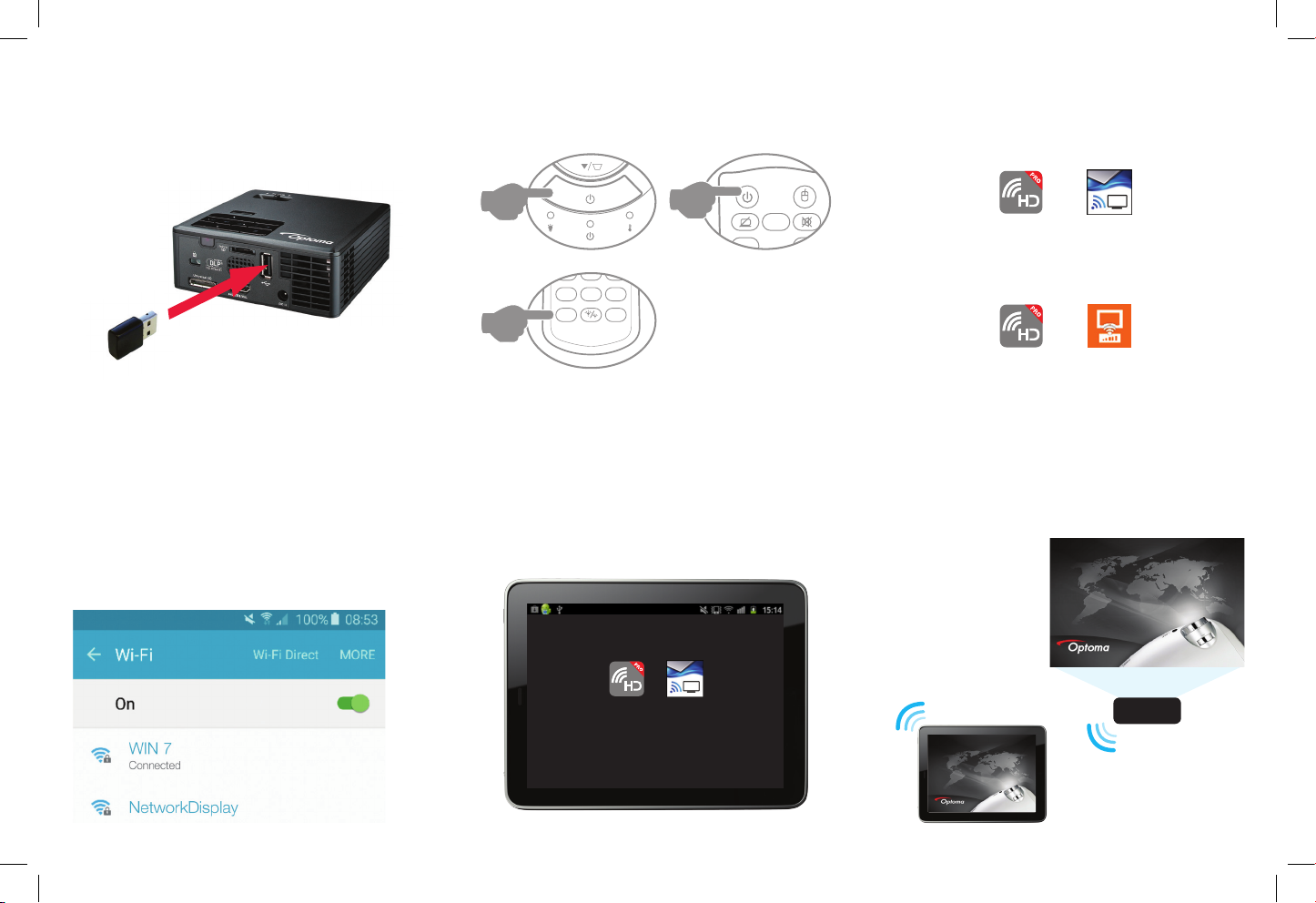
Connect dongle to projector
1
Turn on projector and select USB source
2 3
A
Download and install the relevant app for
your projector
iOS/Android devices
B
Mac/PC devices
Note: Please visit our website for the correct
app and a list of supported features
Connect to wireless SSID Open the app Start presenting
4 5 6
“NetworkDisplay”
“Optoma Display”
“HDCastPro_xxxxxxxx”
HDCast Pro
EZ View
HDCast Pro
HDCast Pro
EZ View
EZ View
Optoma
F5 – slide show
Optoma
F5 – slide show
 Loading...