

Page 1
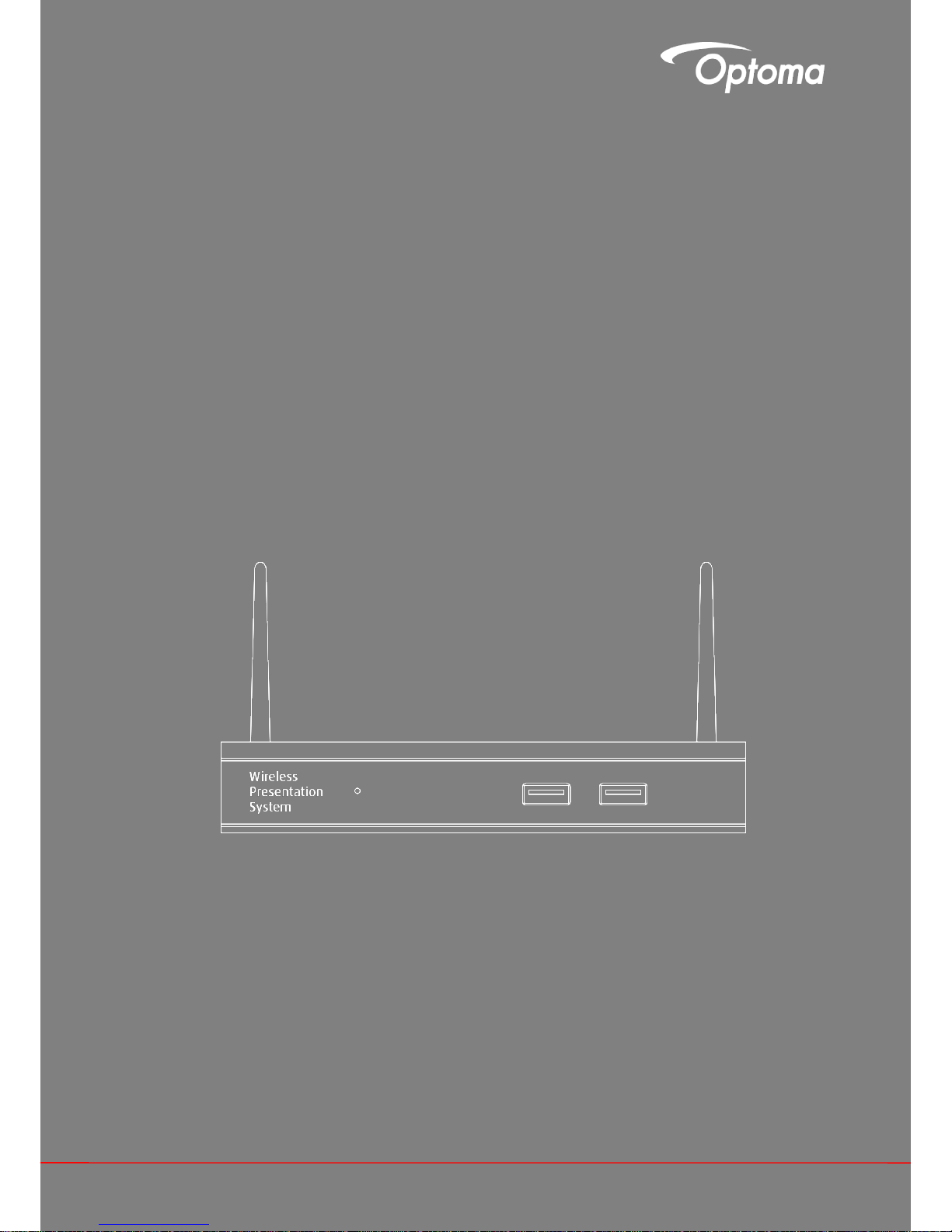
WPS Pro
User manual
Page 2

2
Table of Contents
1 Overview ............................................................................................................................................................. 4
2 Package Contents ............................................................................................................................................... 5
3 USB Token Contents ........................................................................................................................................... 5
4 Physical Details ................................................................................................................................................... 5
5 What You Might Need .......................................................................................................................................... 6
6 Quick Installation ................................................................................................................................................. 7
7 WPS Start/Standby Page.................................................................................................................................... 8
7.1 Quick Guide / User-List ...................................................................................................................................... 8
7.2 Screen Saver ...................................................................................................................................................... 8
8 DoWiFi for Windows ............................................................................................................................................ 9
8.1 Install the application .......................................................................................................................................... 9
8.2 Start the application .......................................................................................................................................... 10
8.3 Quick Connect .................................................................................................................................................. 10
8.4 Connect to WiFi Network.................................................................................................................................. 11
8.5 Connect to Receiver Device ............................................................................................................................. 12
8.6 Login ................................................................................................................................................................. 13
8.7 Main User Interface .......................................................................................................................................... 13
8.8 Screen Projection ............................................................................................................................................. 13
8.9 Login code ........................................................................................................................................................ 14
8.10 Menu ............................................................................................................................................................. 14
8.10.1 Show Receiver Information ......................................................................................................................... 15
8.10.2 Web Admin .................................................................................................................................................. 15
8.10.3 Search Receiver Device .............................................................................................................................. 15
8.10.4 Launch SidePad .......................................................................................................................................... 16
8.10.5 Launch WebSlides ...................................................................................................................................... 17
8.10.6 Select Projection Desktop ........................................................................................................................... 18
8.10.7 Projection Quality ........................................................................................................................................ 18
8.10.8 Projection Mode .......................................................................................................................................... 19
8.10.9 Resolution Settings ..................................................................................................................................... 19
8.10.10 Projection Aspect Ratio ............................................................................................................................... 19
8.10.11 Enable USB IWB Bridge .............................................................................................................................. 19
8.10.12 Advanced Screen Capture .......................................................................................................................... 19
8.10.13 Send Audio to Display ................................................................................................................................. 20
8.10.14 Auto Power Manager .................................................................................................................................. 20
8.10.15 Auto WiFi Connect ...................................................................................................................................... 20
8.10.16 Make WPS Token ........................................................................................................................................ 21
8.10.17 Copy Application to desktop ........................................................................................................................ 21
8.10.18 Hot Key .................................................................................................................................................... 21
8.10.19 About ..................................................................................................................................................... 21
8.10.20 Exit ................................................................................................................................................... 213
9 DoWiFi for Mac .................................................................................................................................................. 23
9.1 Install the application ....................................................................................................................................... 23
9.2 Start the application .......................................................................................................................................... 23
9.3 Quick Connect .................................................................................................................................................. 24
9.4 Connect to WiFi Network.................................................................................................................................. 24
9.5 Connect to Receiver Device ............................................................................................................................. 26
9.6 Login ................................................................................................................................................................. 26
9.7 Main User Interface .......................................................................................................................................... 27
9.8 Screen Projection ............................................................................................................................................. 27
9.9 Login code ........................................................................................................................................................ 28
Page 3

3
9.10 Menu ............................................................................................................................................................. 28
9.10.1 Show Receiver Information ......................................................................................................................... 29
9.10.2 Web Admin .................................................................................................................................................. 29
9.10.3 Search Receiver Device .............................................................................................................................. 29
9.10.4 Launch SidePad .......................................................................................................................................... 29
9.10.5 Launch WebSlides ...................................................................................................................................... 31
9.10.6 Select Projection Desktop ........................................................................................................................... 32
9.10.7 Projection Quality ........................................................................................................................................ 32
9.10.8 Select Projection Mode ............................................................................................................................... 32
9.10.9 Resolution setting ........................................................................................................................................ 32
9.10.10 Projection Aspect Ratio ............................................................................................................................... 33
9.10.11 Send Audio to Display ................................................................................................................................. 33
9.10.12 Auto WiFi Connect ...................................................................................................................................... 33
9.10.13 Hot Key ....................................................................................................................................................... 33
9.10.14 About ........................................................................................................................................................... 33
9.10.15 Exit .............................................................................................................................................................. 33
10 Web Management ............................................................................................................................................... 34
10.1 Home Page .................................................................................................................................................... 34
10.2 Download ................................................................................................................................................... 34
10.3 Conference Control ........................................................................................................................................ 35
10.4 Admin ......................................................................................................................................................... 36
10.4.1 System Status ............................................................................................................................................ 37
10.4.2 Device Setup .............................................................................................................................................. 37
10.4.3 Network Setup ............................................................................................................................................ 38
10.4.4 OSD Setup ................................................................................................................................................. 40
10.4.5 Change Passwords .................................................................................................................................... 41
10.4.6 Reset to Default ......................................................................................................................................... 42
10.4.7 Firmware Upgrade ..................................................................................................................................... 42
10.4.8 WebSlides Setup ........................................................................................................................................ 43
10.4.9 Reboot System ........................................................................................................................................... 44
10.4.10 Logout .................................................................................................................................................... 44
10.5 WebSlides ........................................................................................................................................................ 45
11 Appendices .......................................................................................................................................................... 46
11.1 Optoma Global Offices ..................................................................................................................................... 47
Page 4
4
1 Overview
WPS Pro is professional wireless presentation gateway. By enabling the Revolutionary “interactive” and “wireless”
functions, you can throw your presentations wirelessly from a PC, Mac, iPad, iPhone, or Android devices to a
projector! And use your pad, tab or phone to control your PC/Mac, or view the presenting slides!
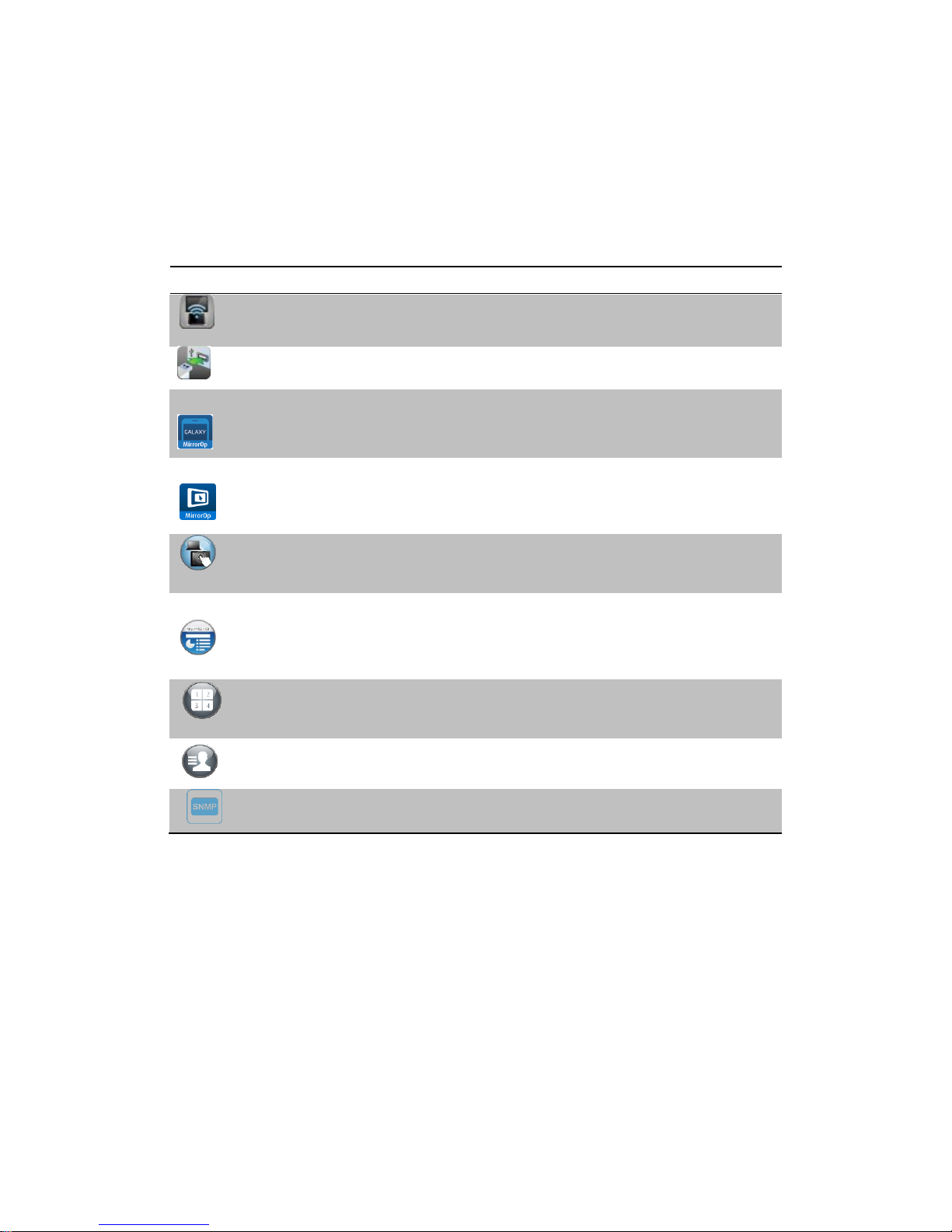
WPS Pro Features Highlight:
Icon
Feature
Description
DoWiFi
Wireless presentation for Windows and Mac
Win: XP/Vista/7/8,
Mac: 10.6/10.7/10.8/10.9
Plug&Show
No software installation required. Just plug in the
USB drive to your PC.
MirrorOP Sender for
Galaxy
MirrorOp sender for Samsung Galaxy series
devices Support. Users can project any contents
from their Samsung Galaxy devices.
MirrorOp Presenter
High quality presentation and annotation via
iPhone/iPad or Android devices (Word, Excel,
PPT, PDF , Photo , Browser, Live Camera,
Screenshot)
SidePad
Control the projecting screen on PC or Mac via
iPhone/iPad or Android devices through MirrorOp
Receiver APP.
WebSlides
Broadcast slides to your devices with WiFi and
web browser.
Audience can save the projecting slides for
taking notes.
Webslides can be secured by password.
Quadrant Projection
Project four PC/Mac screens or MirrorOp
Presenter content to one projector/display at
once.
OSD User-List
Control projection from WPS Pro web page, or
use mouse to select a User from the standby
screen.
SNMP Manager
Manage WPS devices across the corporate
network through enhanced SNMP V2 protocol
Basic Features
Wireless screen and audio projection
Remote desktop control feature
Support Windows Win 8, Win7, Vista, XP
Support Mac version 10.7 and above
Plug and Show! No installation required … just plug in the accompanied token to a USB port, and
hassle free presentation can be started in seconds. (Windows)
MirrorOp Presenter Supportive for iOS/Android mobile devices
Up to 30FPS high speed 4-to-1 Split Screen Projection. Turn one projector into four, increase meeting
productivity right away.
Conference control! Allows moderators to streamline grand meetings.
Provide session security login, wireless WEP/WPA/WPA2 key and Gatekeeper function to protect
presentation contents and keep good security to office networks.
Web management including software download and device settings
Support WiFi AP-Client Mode
Page 5
5
2 Package Contents
WPS Pro Box
WPS Pro USB Token
Power Adapter (DC +5V, 2.6A)
WiFi Antenna x 2
Wall-mount kit
Basic user manual
3 USB Token Contents
Windows Installer (WPS Windows Installer)
Mac Installer (WPS Mac Installer)
VAC Driver (For Windows XP Audio Projection)
VDD Driver (For Windows XP/Vista Virtual Extended Screen)
USBoIP Driver (For IWB feature)
User Manual
WPS Execution File
SVS Driver (For Mac Virtual Extended Screen)
Utility
PtG Converter (For MobiShow PtG function)
SNMP Manager (For SNMP Management)
4 Physical Details
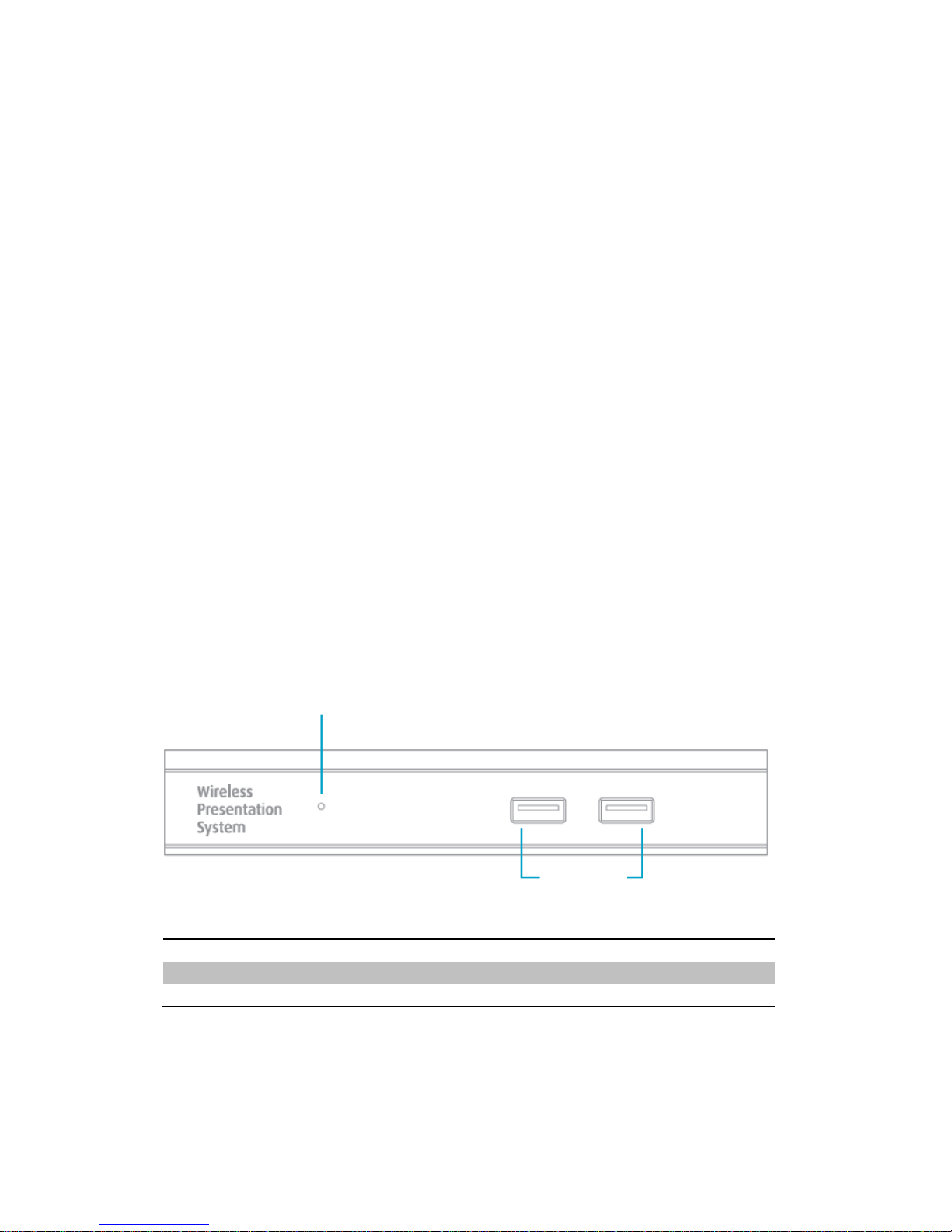
Front Panel
Description
Power LED
LED Indicator: System Loading(Red), Ready(Green)
USB Port (Front)
USB port for USB mouse and keyboard
Power LED
USB Port
Page 6
6
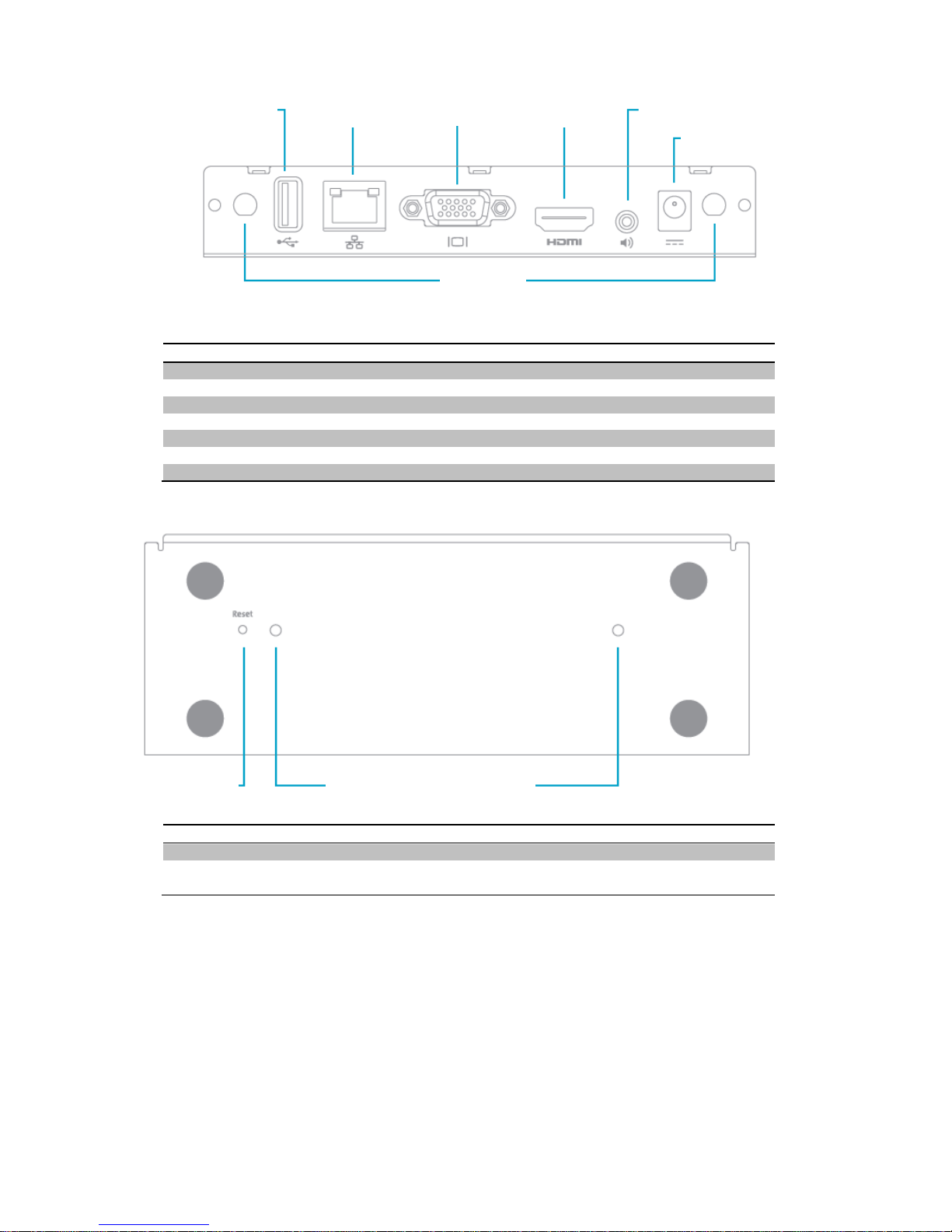
Rear Panel
Description
Antenna
WiFi Antenna
USB Port (Rear)
USB port for USB IWB device (HID type)
RJ-45
10/100M RJ-45 port
VGA Connector
VGA connector
HDMI
HDMI Connector
Audio Jack
Audio Jack (3.5mm)
Power Jack
Power Jack (5V/2.6A)
Bottom Side
Description
Screw Hole
Screw Hole for Wall Mount Kit
Reset Button
Press reset button and power on the device to execute
Hardware Reset.
5 What You Might Need
Projector or HDTV with VGA/HDMI interface
Windows or Mac PC/Laptop
Apple iPhone, iPad or iPod-touch device
Android Phone or Tablet device
Speaker (Optional, for audio projection feature)
USB Mouse and Keyboard (Optional, for remote desktop feature)
USB HID IWB Device (Optional, for IWB over IP feature)
Reset Button
Screw hole
(Optional kit for Wall Mount)
Power Jack
VGA Connector
RJ-45
Antenna
HDMI
Audio Jack
USB Port
Page 7

7
6 Quick Installation
1) Connect WPS device to Projector/display through VGA/HDMI port and turn on projector/display power.
2) Connect the power adaptor to WPS device and press the power button to turn on WPS device. System will be
ready when the LED light turns to green.
It will show the default standby screen as below when system is ready.
3) Insert the speaker cable to WPS Pro audio jack for audio output if needed.
4) Insert the USB mouse or keyboard to WPS Pro front/rear USB port for On-Screen Display (OSD) control.
(Optional)
5) Insert the USB IWB/Touch Screen cable to WPS Pro rear USB port for IWB remote touch control if needed.
(Please noted that the front 2 USB ports do not support UoIP function).
Page 8

8
7 WPS Start/Standby Page
7.1 Quick Guide / User-List
1) Connect WPS Pro device to Projector/Display through VGA/HDMI port and turn on Projector/Display power.
2) It will show the Quick Guide Information, WiFi Network Name, IP Address and Code on standby screen.
3) If there is sender connected to WPS Pro device, it will show the User-List on standby screen, conference
moderator can use the USB mouse to select the User and control it remotely.
7.2 Screen Saver
4) System will enter the Screen Saver mode if none is connected, it will restore to standby status immediately
when there is any sender connected.
1 Alan’s PC
2 Chris android Pad
3 Dave’s iPhone
4 Edison Macbool
5 Kishan’s Tablet
Page 9
9
8 DoWiFi for Windows
(Do Not Support Windows Phone, Windows RT)
8.1 Install the application
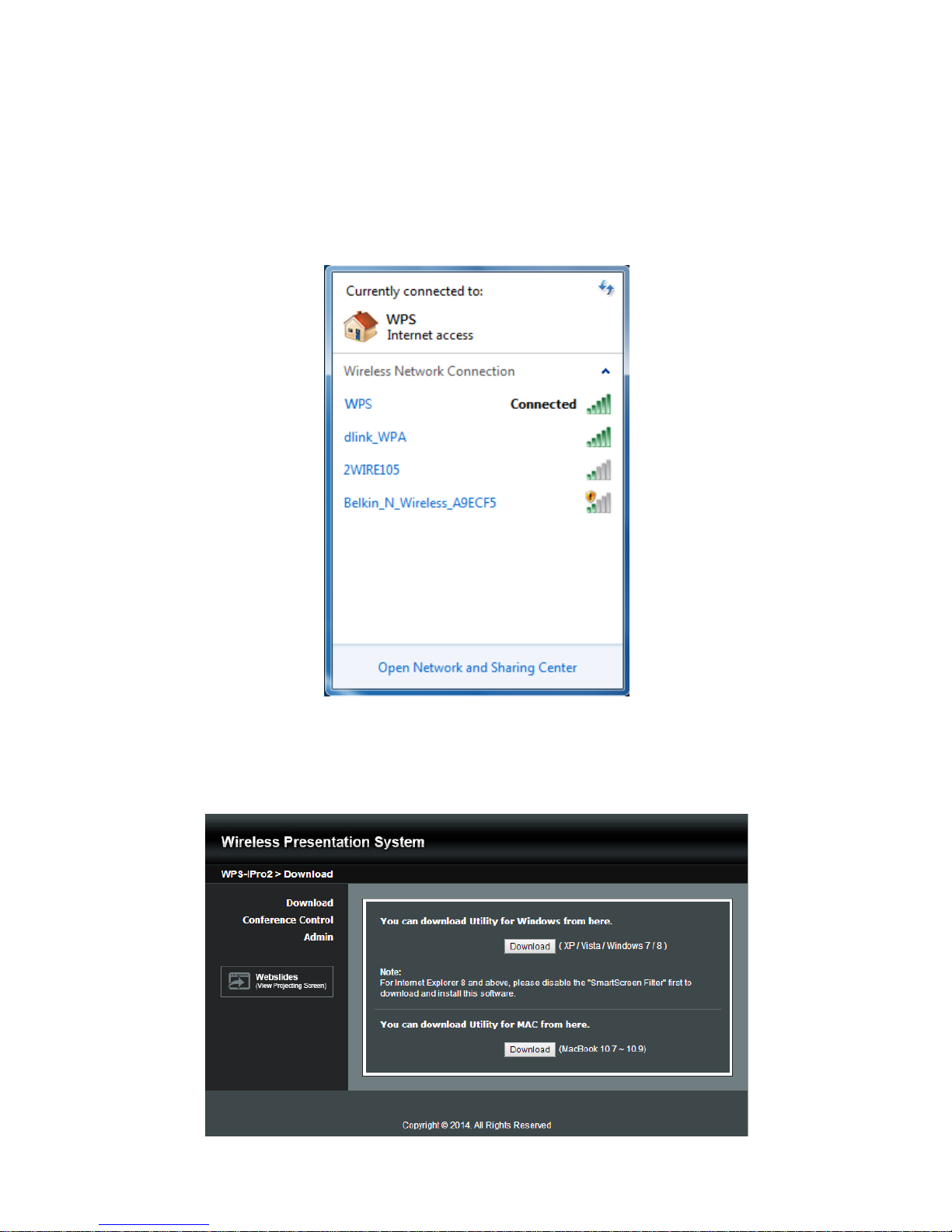
1) Make sure your PC WiFi is enabled already, and connect your PC to WPS box through WiFi. You can find the
WiFi name of your WPS box information on the start/standby page.
2) Launch your browser and enter the Device Host Name (SSID) or IP address in the browser. You can find the IP
address and Host Name (SSID) on the projector/display screen. (Default Host Name (SSID) is WPS, Default
IP is 192.168.100.10)
3) Download the WPS software for “XP/Vista/Windows 7 / 8” and install on your PC. (Ps. You can also launch
the application from USB token directly.)
Page 10

10
4) When the download is completed, follow the WPS Setup wizard to execute the software.
(Make sure your Wifi have connected to WPS and your PC’s personal firewall allows WPS software to
pass through.)
8.2 Start the application
1) Click WPS icon on desktop to execute the application, or launch the application from USB token
directly. (You can find the WPS-IPro2.exe under WPS-IPro2 folder).
2) It will start to search WPS receiver automatically.
8.3 Quick Connect
1) WPS will memorize the last successful connection profile and open the quick connect dialog, you can enter the
code (you can find the information on the standby screen or start screen) and press the “Connect” button to
connect this WPS directly.
Page 11

11
2) If you want to connect to another WPS receiver, please press the “Rescan” button.
8.4 Connect to WiFi Network
1) WPS application will search the available WiFi Network and list the WPS WiFi Device. You can select a network
and press the “Connect” button to connect the selected WiFi Device.
2) You can press the “Refresh” button to search again or press the “All” button to list all available WiFi Network
name.
192.168.100.10
Page 12

12
3) If you don’t like to change the WiFi Network and want to keep the connection to current network, you can press
the “Skip” button.
8.5 Connect to Receiver Device
1) WPS application will search and list the WPS receiver Device. You can select the target receiver device and
press “OK” button to connect the selected receiver device.
2) You can press the “Refresh” button to search again.
3) If you can’t find the target receiver device from the list, you can press the “Manual” button to enter the receiver IP
address manually and connect.
Page 13
13
8.6 Login
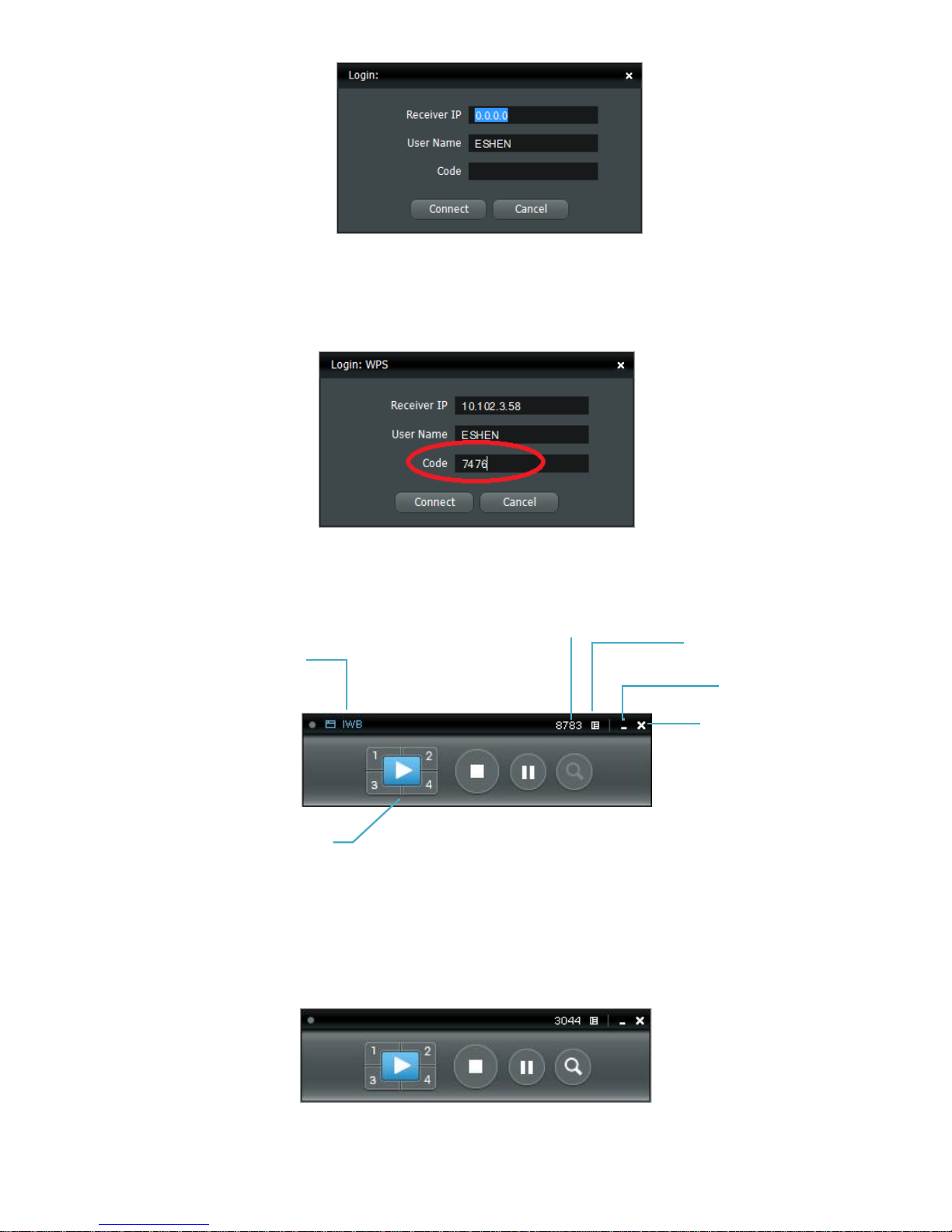
1) When connecting to a “Code” protection enabled WPS receiver, you have to enter the “Code” and press the
“Connect” button to login the receiver.
(You can find the CODE from the OSD standby screen or right-upper corner of start screen)
(Enter the code into the circled area)
2) If you want to connect to another receiver or cancel the login, please press the “Cancel” button.
8.7 Main User Interface
8.8 Screen Projection
1) Click the “Play” button for full or “1,2,3,4” for split screen projection, you can project the main screen on to the
display immediately. Click the “Pause” button, you can freeze you projection screen, and click the “Stop” button
to stop projecting your screen.
Control Area for Screen
Projection Feature
Menu
Status Indicator
Login Code
Minimize the
window
Close the window
Page 14
14
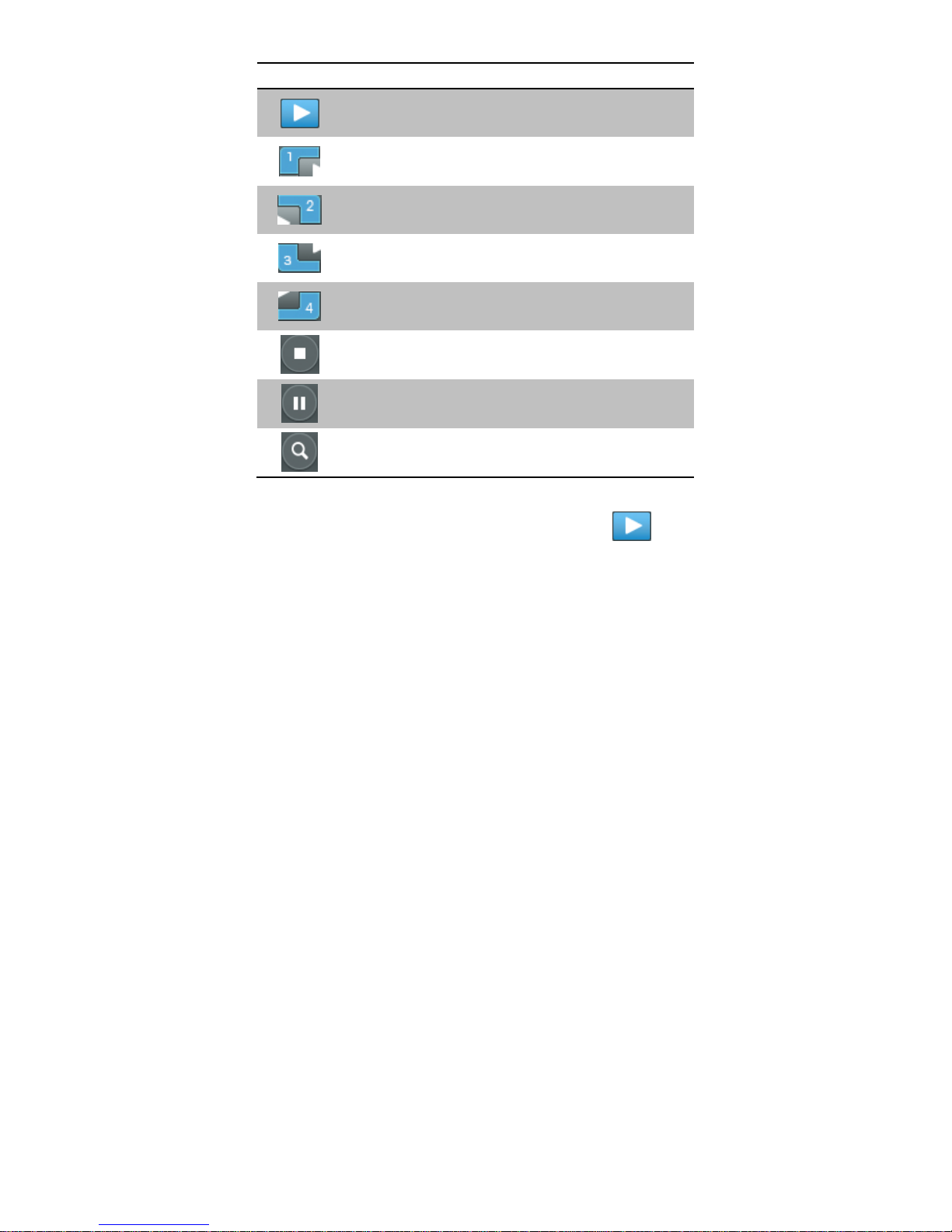
Button
Description
Full Screen projection (Support audio projection)
Project to Split #1 (Support audio projection)
Project to Split #2 (No audio projection)
Project to Split #3(No audio projection)
Project to Split #4(No audio projection)
Stop projecting
Pause projecting
Enable the Magnifier function
Note:
When projecting in full screen projection, if another user is clicking on the play button, the new user’s screen
will replace the previous user’s screen for projection.
When projecting in Quad view mode, if another user is clicking on the selected screen button(#1, #2 , #3, #4 ), the
new user’s screen will replace the previous user’s screen for projection.
8.9 Login code
Press on the login code, you can find the device IP address, SSID name and login code on the right of sidebar. The
information will disappear after 30 seconds. When there are other users trying to login to the device, the information
will pop up automatically for seconds and disappear again as well.
8.10 Menu
1) Press “Menu” button from the main UI, you will find the menu to enable the additional feature or to change the
application options.
Page 15

15
2) You can click on the below function for extending menu to choose one to suit your needs.
Function
Select Projection Desktop
Projection Quality
Projection Mode
Resolution Setting
Projection Aspect Ratio
3) The below items are checked as default setting. You can uncheck them to suit your needs.
Item
Advanced Screen Capture
Send Audio to Display
Auto Power Management
Auto WiFi Connect
8.10.1 Show Receiver Information
1) Click on “Show Receiver Information”, it will display the Receiver Information, such as WiFi Name, IP Address
and code on the upper corners of the projecting screen, and it will close automatically after 30 seconds.
8.10.2 Web Admin
1) Click on “Web Admin”, it will open the browser and connect to the receiver web admin page automatically.
(You can find more details of web admin page in Chapter 10-Web Management.)
8.10.3 Search Receiver Device
1) Click on “Search Receiver Device”, it will disconnect from current receiver and search the receiver again.
Page 16
16
8.10.4 Launch SidePad
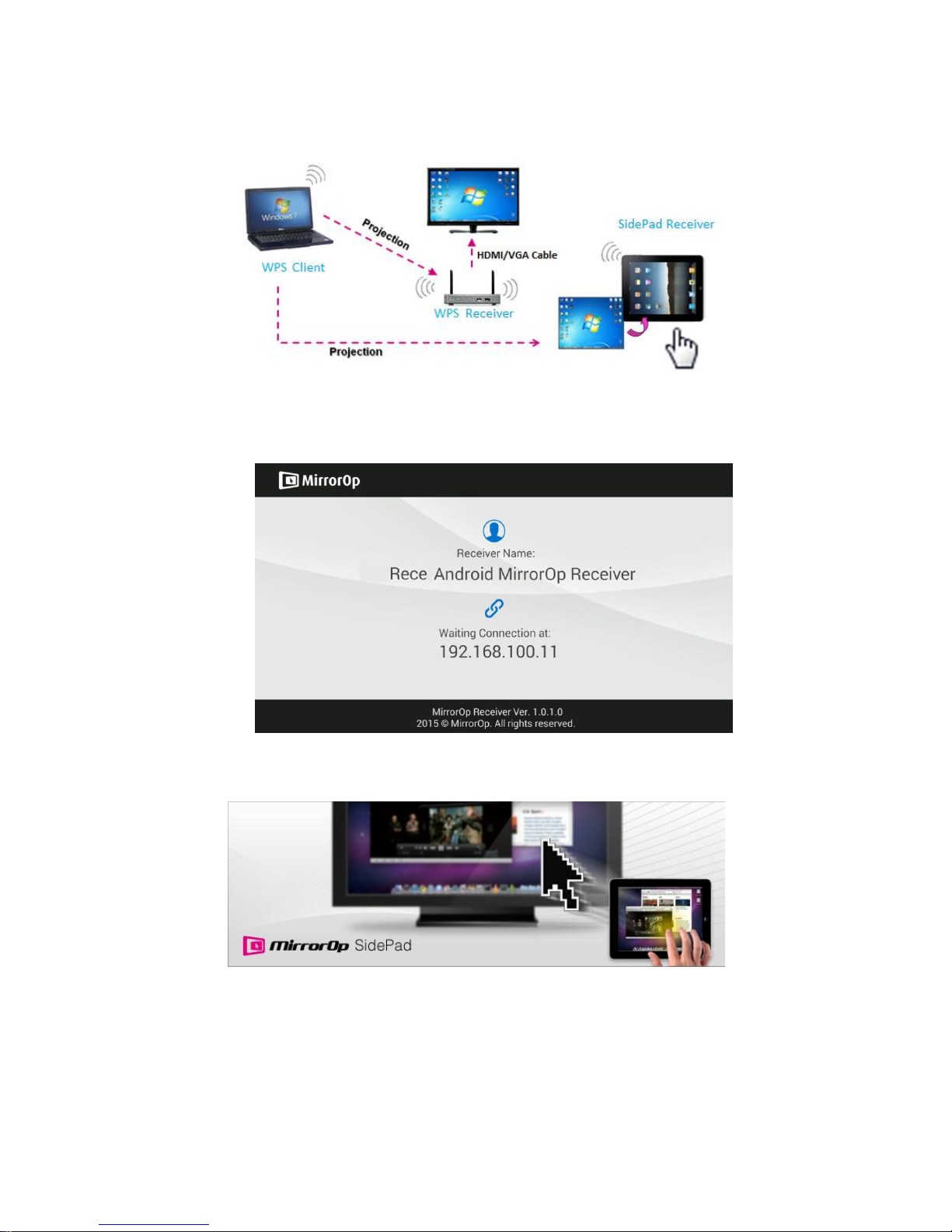
1) Introduction: MirrorOp Receiver is an application to allow the user to connect Pad/Smartphone (Android and
iOS), PC, and display/projector via WPS device. User can then control the projecting PC via Pad/Smartphone.
Please refer to the below image for more information.
2) MirrorOp Receiver Control for Android/iOS device.
Android: Download “MirrorOp Receiver” from Google Play Store
iOS: Download “MirrorOp Receiver” from Apple Store.
Connect your Android/iOS device to WPS device through WiFi and Launch “MirrorOp Receiver”
Click on “Launch SidePad” from the menu. In seconds, you shall see the PC desktop shown on the
iOS/Andriod Device. Now you can control the projecting PC from your iOS/Android device.
Page 17
17
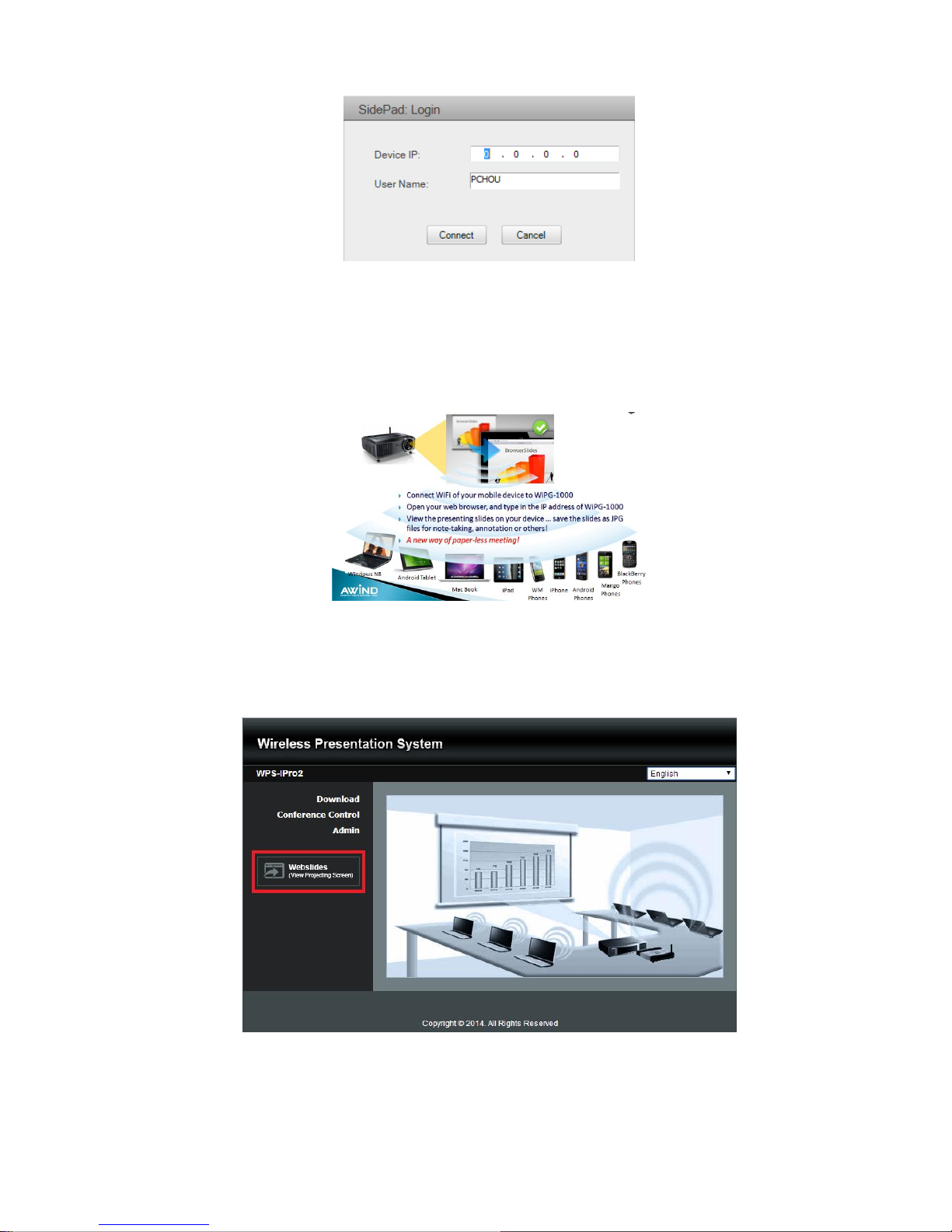
3) If there is no Smartphone/Pad device detected after clicking on “Launch SidePad” the below image will
show up.
8.10.5 Launch WebSlides
Introduction: Webslides is an application to allow the user/presenter to broadcast the projecting screen/slides
to allow multiple login users to receive the slides during a presentation and save the slides for note taking later.
Note: Webslides is not available when Quad view is in use.
1) Presenter: Make sure your PC/Mac is connected to WPS box and click on “Launch Webslides”, when the
function is on, the item will be checked on the main menu.
2) Audience: Users need to connect to WPS WiFi Network as the presenter and then launch their browser and
enter WPS IP address (The information can be found on the projecting screen) on the URL of browser. Once the
users are connected, they will see the below image on their devices. Click on “Websildes” button. See below:
3) Start to receive the presenter’s slides. The below image can be seen on the audience’s browser.
Page 18

18
Users can put the mouse/finger on each button to get the “tip window” for the function of each button.
Note:
The WPS logged-in user is not identical to WebSlides user, and they both consume the wireless bandwidth for
device connection. If there are more than 10 users logged into WPS, it is recommended to connect WPS to
company network through Ethernet or bridge WPS to a router due to wireless bandwidth concern. User should
connect WPS via company network or router in order to secure the projection performance. The WebSlides user
number should not exceed the recommended number on the web management page to prevent the connection
failure or low projection performance.
PS. Wireless Projection function and Conference Control function can support up to 64 users.
8.10.6 Select Projection Desktop
1) Click on “Select Projection Desktop”, you can select to project the main screen or the extended screen.
Note: 1. For Windows XP system, you need to install “VDD.exe” driver first, you can find it from USB token.
2. For Windows 7/Vista Starter edition, it can’t support extended screen.
3. For some Win7/Win8 laptop/tablet, the extended screen feature is not supported if the display card
can’t support the extended screen function. This typically can be verified by checking whether it can
enable the extended screen through physical VGA cable, if yes, then it should work with WPS
software.
8.10.7 Projection Quality
1) Click on “Projection Quality”, choose “Normal” for faster projection speed with lower screen image quality, and
“Best” for clear screen image quality but slower projection speed.
Page 19

19
8.10.8 Projection Mode
1) Click on “Select Projection Mode”, choose the Presentation mode for shortest latency or the Video mode for
auto-latency control to have better video performance.
8.10.9 Resolution Settings
1) Click on “Resolution Setting”, choose “Never Change” to keep original desktop resolution, “Always Change” to
change resolution automatically according to application’s recommendation, or “Always ask me” to prompt a
resolution change message to user.
8.10.10 Projection Aspect Ratio
1) Click on “Projection Aspect Ratio”, choose “Keep aspect ratio” to keep the original aspect ratio if the desktop
resolution is different from WPS output resolution, or choose “Fit full screen” to project the screen to full screen.
8.10.11 Enable USB IWB Bridge
1) Click on “Enable USB IWB Bridge”, it will enable the USB IWB Bridge feature.
2) When you start the full screen projection, it will bridge the IWB device to your PC wirelessly.
Note: You have to install the USBoIP driver first. You can find the driver from USB token.
8.10.12 Advanced Screen Capture
1) Click the “Advanced Screen Capture”, you will be able to see tip windows and other layered windows (include
the main UI) on the connected display.
However, the mouse cursor may blink from time to time when you are projecting your PC screen!
Disable “Advanced Screen Capture”.
Page 20

20
Enable “Advanced Screen Capture”.
8.10.13 Send Audio to Display
1) Click on “Send Audio to Display” to start the audio projection feature. It will mute your local speaker during the
projection and restore it when it closes the application. The audio will be bridged to your display device.
Note: For Windows XP system, if you can’t hear the audio, please installs the Audio driver (“VAC.exe”, Virtual
Audio Control Driver) on your computer first, you can find the software from USB Token.
(Windows Vista, Win7 and Win8 is not necessary to install VAC driver)
8.10.14 Auto Power Manager
1) To make the highest projection performance, application will turn the PC’s windows power scheme from current
settings to “highest performance”, however, you can click on “Auto Power Manage” to enable or disable this
function and restore you power scheme immediately.
2)
8.10.15 Auto WiFi Connect
1) Click on “Auto WiFi Connect” to enable the WPS WiFi connection automatically.
Tip windows is shown in
projector
Tip windows is not
shown in projector
Page 21

21
8.10.16 Make WPS Token
1) Click “Make USB PnS Token” to make a USB WPS Token, you can insert a USB and follows the wizard to make
the Token. After completion, you can plug the USB to any PC to do the projection without installing the WPS
software onto every PC.
8.10.17 Copy Application to desktop
1) Click on “Copy Application to desktop”, it will copy the application to your desktop immediately.
8.10.18 Hot Key
1) Click on “Hot Key” to display the available Hot Key definition.
Page 22
22
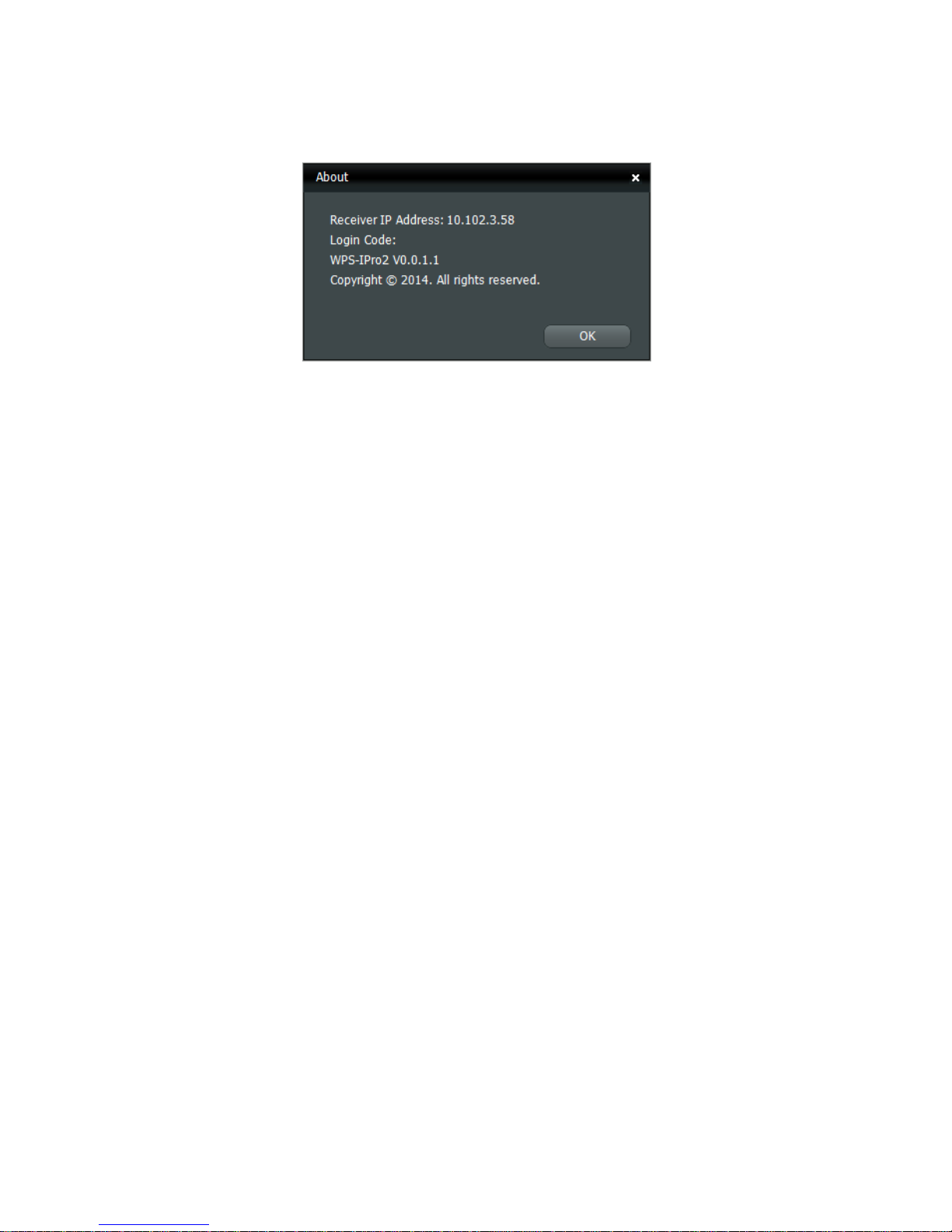
8.10.19 About
1) Click on “About” to show system information. It includes product model name, Application version, IP address
and other information.
8.10.20 Exit
1) Click on “Exit” to exit this application. It will stop current playing status and shut down the application
immediately.
Page 23

23
9 DoWiFi for Mac
9.1 Install the application
1) Make sure your PC WiFi is enabled and connect your PC to WPS box through WiFi.
2) Launch your browser and enter the IP address on browser. You can find the IP address and Host Name (SSID)
on the projector/display screen. (Default IP is 192.168.100.10)
3) Download the WPS software for “Mac” and install on your MAC.
4) When the download is completed, follow the WPS Setup wizard to execute the software.
9.2 Start the application
1) Click on WPS icon from Application folder to execute the application.
Page 24

24
2) It will start to search WPS receiver automatically.
9.3 Quick Connect
1) WPS will memorize the last successful connection profile and open the quick connect dialog, you can enter the
code (you can find the information on the standby screen) and press the “Connect” button to connect this WPS
directly.
1) If you want to connect to another WPS receiver, please press the “Rescan” button.
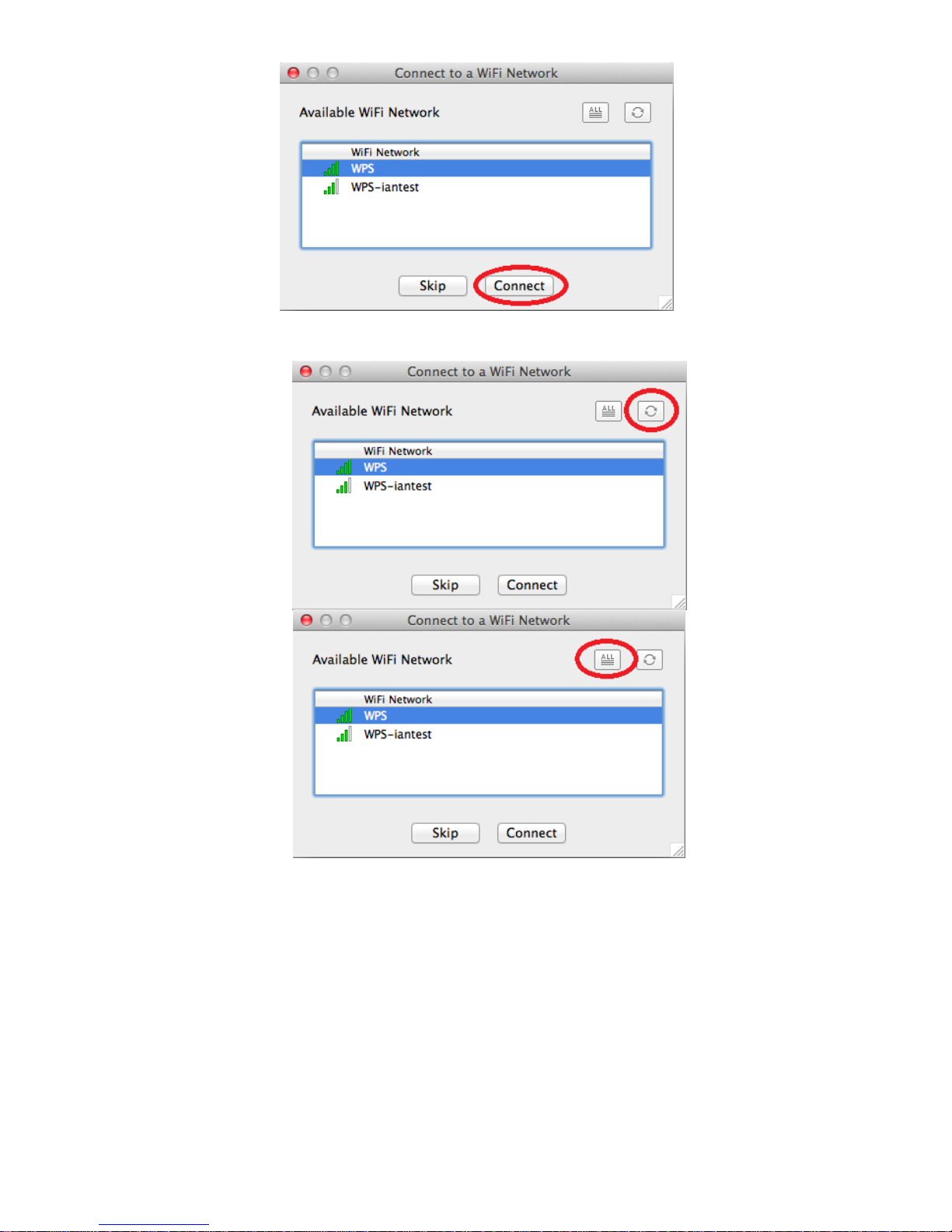
9.4 Connect to WiFi Network
1) WPS application will search the available WiFi Network and list the WPS WiFi Device. You can select a network
and press the “Connect” button to connect the selected WiFi Device.
Page 25
25
2) You can press the “Refresh” button to search again or press the “All” button to list all available WiFi Network
name.
3) If you don’t like to change the WiFi Network and want to keep the connection to current network, you can press
the “Skip” button.
Page 26
26
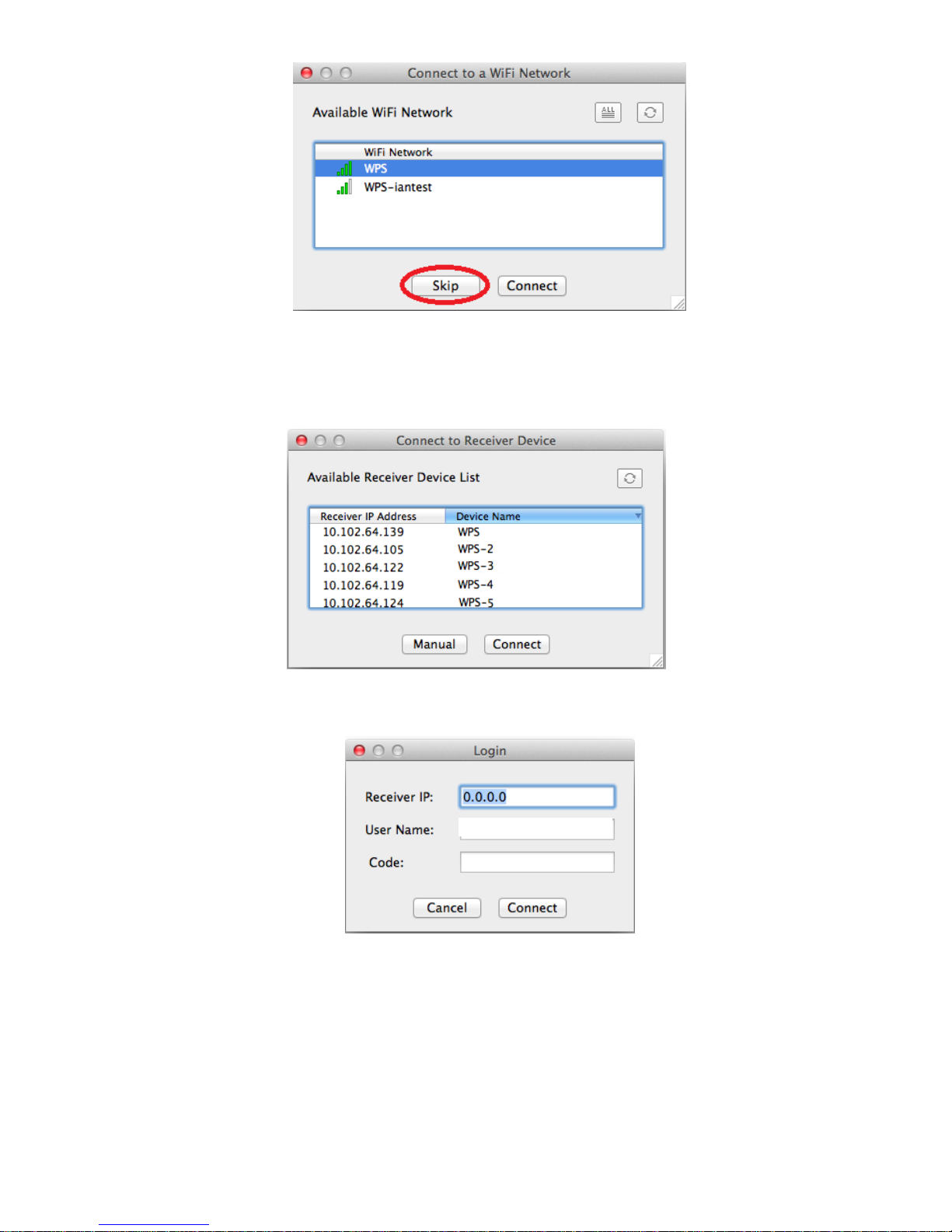
9.5 Connect to Receiver Device
1) WPS application will search and list the WPS receiver Device. You can select the target receiver device and
press the “Connect” button to connect the selected receiver device.
2) You can press the “Refresh” button to search again.
3) If you can’t find the target receiver device from the list, you can press the “Manual” button to enter the receiver IP
address manually and connect.
9.6 Login
1) When connecting to a “Code” protection enabled WPS receiver, you have to enter the “Code” and press the
“Connect” button to login the receiver.
(You can find the CODE from the OSD standby screen.)
Page 27

27
1) If you want to connect to another receiver or cancel the login, please press the “Cancel” button.
9.7 Main User Interface
9.8 Screen Projection
1) Click the “Play” button for full or “1,2,3,4” for split screen projection, you can project the main screen on to the
display immediately. Click the “Pause” button, you can freeze you projection screen, and click the “Stop” button
to stop projecting your screen.
Button
Description
Full Screen projection (Support audio projection)
Project to Split #1 (Support audio projection)
Project to Split #2 (No audio projection)
Project to Split #3(No audio projection)
Project to Split #4(No audio projection)
Control Area for Screen
Projection Feature
Menu
Status Indicator
Login Code
Minimize the
window
Close the window
Page 28

28
Stop projecting
Pause projecting
Enable the Magnifier function
Note:
When projecting in full screen projection, if another user is clicking on the play button, the new user’s screen
will replace the previous user’s screen for projection.
When projecting in Quad view mode, if another user is clicking on the selected screen button(#1, #2 , #3, #4 ), the
new user’s screen will replace the previous user’s screen for projection.
9.9 Login code
Press on the login code, you can find the device IP address, SSID name and login code on the right of sidepad. The
information will disappear after 30 seconds. When there are other users trying to login to the device, the information
will pop up automatically for seconds and disappear again as well.
9.10 Menu
1) Press “Menu” button from the main UI, you will find the menu to enable the additional feature or to change the
application options.
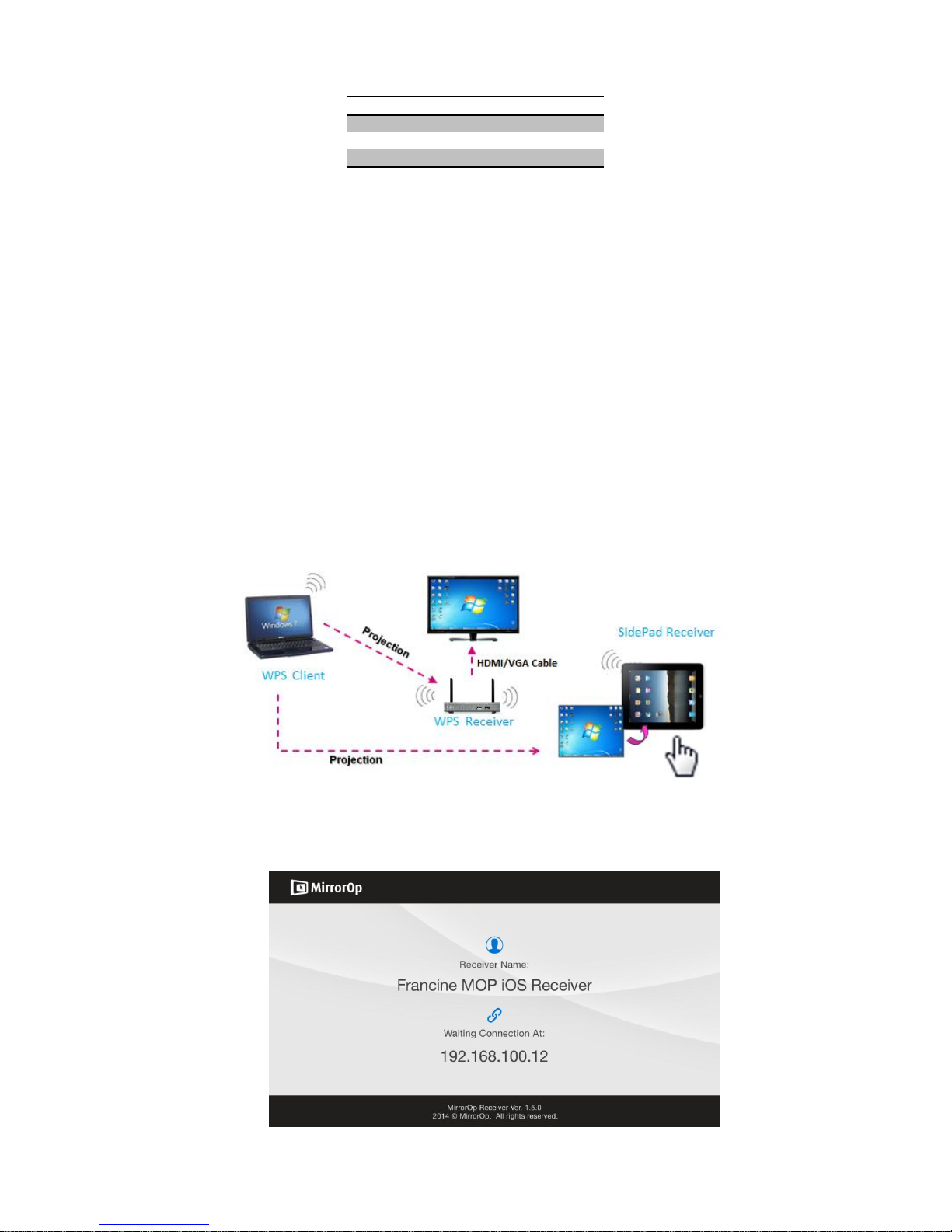
2) You can click on the below function for extending menu to choose one to suit your needs.
Function
Select Projection Desktop
Projection Quality
Projection Mode
Resolution Setting
Projection Aspect Ratio
Page 29
29
3) The below items are checked as default setting. You can uncheck them to suit your needs.
Item
Send Audio to Display
Auto Power Management
Auto WiFi Connect
9.10.1 Show Receiver Information
1) Click on “Show Receiver Information”, it will display the Receiver Information, such as WiFi Name, IP Address
and code on the upper corners of the projecting screen, and it will close automatically after 30 seconds.
9.10.2 Web Admin
1) Click on “Web Admin”, it will open the browser and connect to the receiver web admin page automatically.
(You can find more details of web admin page in Chapter 10-web Management.)
9.10.3 Search Receiver Device
1) Click on “Search Receiver Device”, it will disconnect from current receiver and search the receiver again.
9.10.4 Launch SidePad
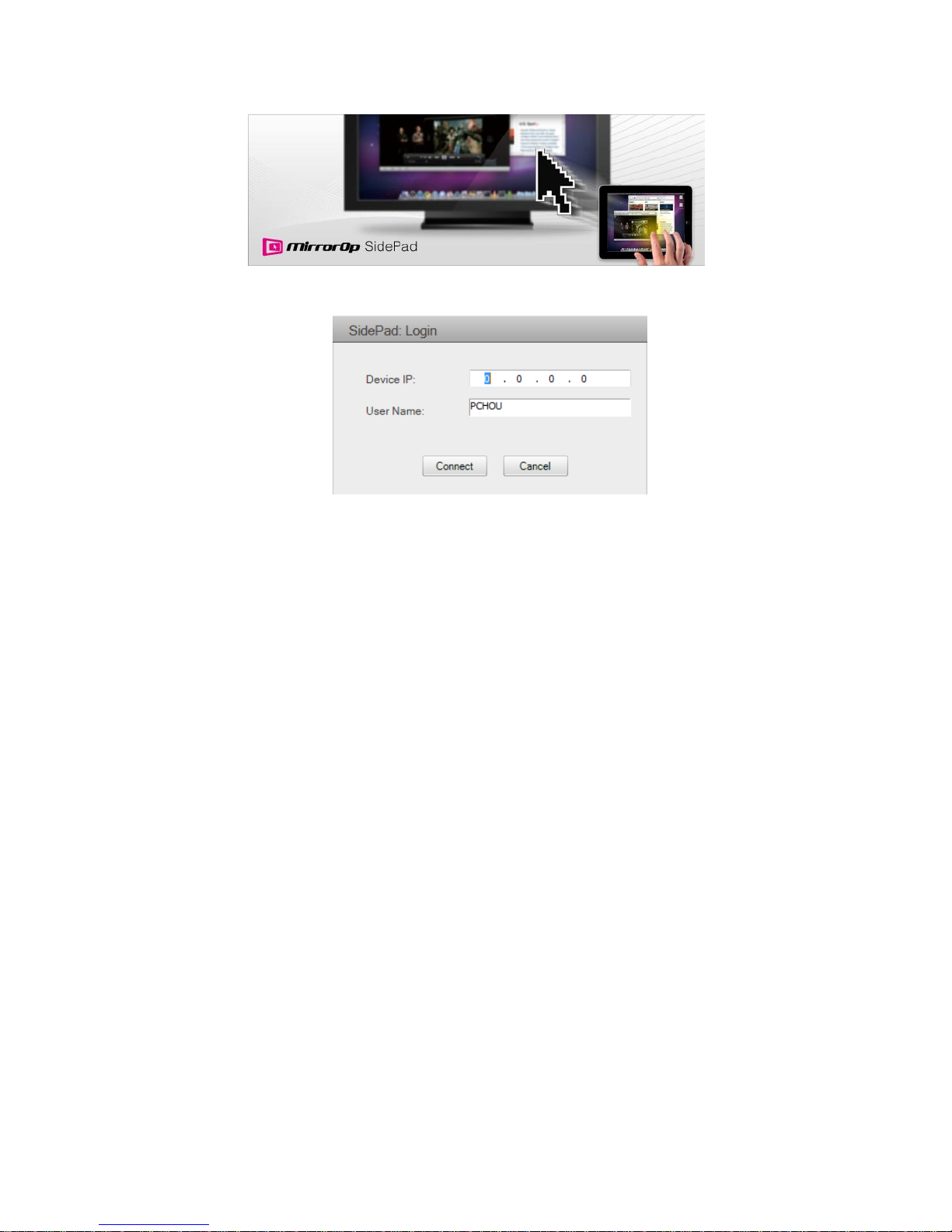
1) Introduction: MirrorOp Receiver is an application to allow the user to connect Pad/Smartphone (Android and
iOS), PC, and display/projector via WPS Pro device. User can then control the projecting PC via
Pad/Smartphone. Please refer to the below image for more information.
2) MirrorOp Receiver Control for Android/iOS device.
Android: Download “‘MirrorOp Receiver” from Google Play Store
iOS: Download “‘MirrorOp Receiver” from Apple Store.
Connect your Android/iOS device to WPS device through WiFi and Launch “MirrorOp Receiver”
Page 30
30
Click on “Launch SidePad” from the menu. In seconds, you shall see the PC desktop shown on the
iOS/Andriod Device. Now you can control the projecting PC from your iOS/Android device.
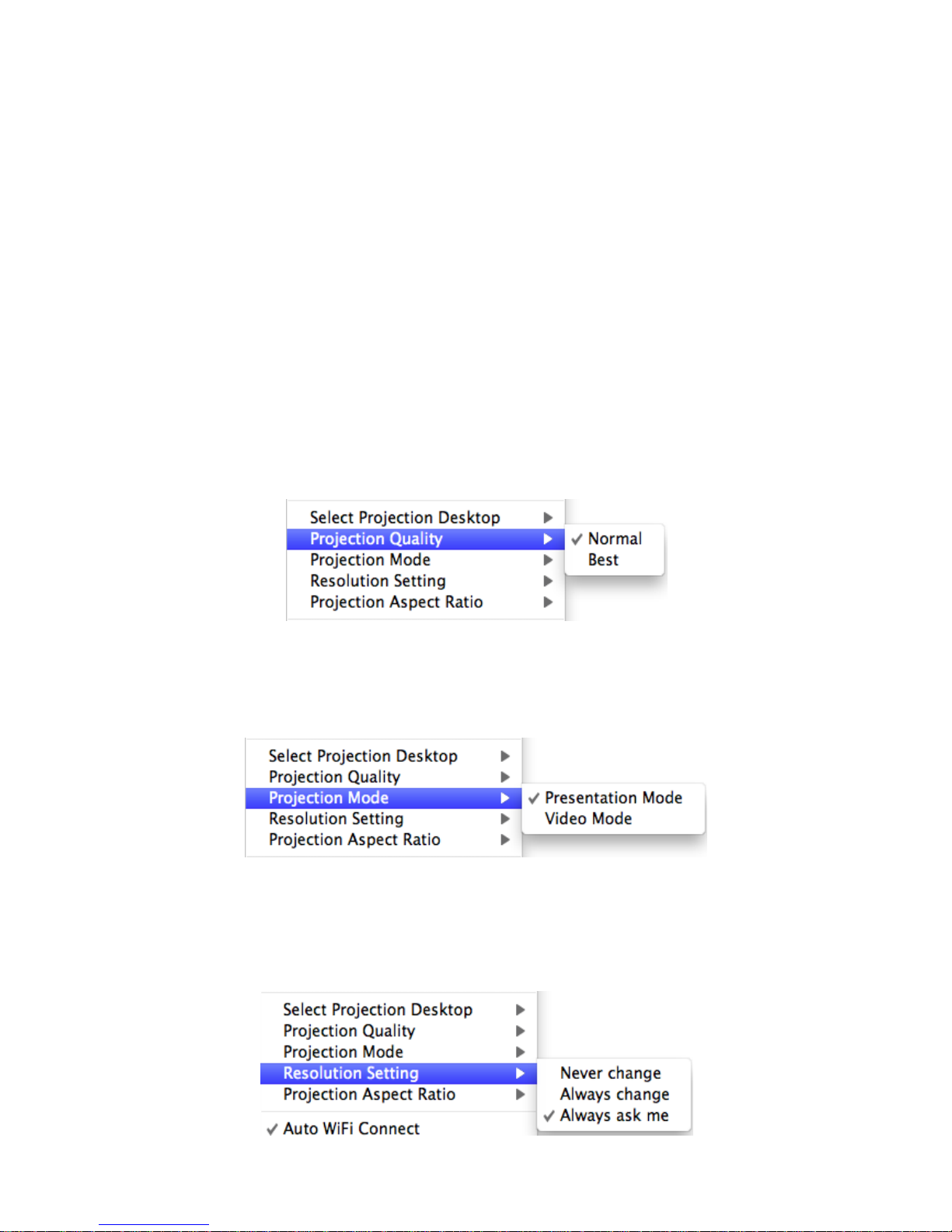
3) If there is no Smartphone/Pad device detected after clicking on “Launch SidePad” the below image will show up.
Page 31

31
9.10.5 Launch WebSlides
Introduction: Webslides is an application to allow the user/presenter to broadcast the projecting screen/slides
to allow multiple login users to receive the slides during a presentation and save the slides for note taking later.
Note: Webslides is not available when Quad view is in use.
1) Presenter: Make sure your PC/Mac is connected to WPS box and click on “Launch Webslides”, when the
function is on, the item will be checked on the main menu.
2) Audience: Users need to connect to WPS WiFi Network as the presenter and then launch their browser and
enter WPS IP address (The information can be found on the projecting screen) on the URL of browser. Once the
users are connected, they will see the below image on their devices. Click on “Websildes” button. See below:
3) Start to receive the presenter’s slides. The below image can be seen on the audience’s browser.
Users can put the mouse/finger on each button to get the “tip window” for the function of each button.
Page 32
32
Note:
The WPS logged-in user is not identical to WebSlides user, and they both consume the wireless bandwidth for
device connection. If there are more than 10 users logged into WPS, it is recommended to connect WPS to
company network through Ethernet or bridge WPS to a router due to wireless bandwidth concern. User should
connect WPS via company network or router in order to secure the projection performance. The WebSlides user
number should not exceed the recommended number on the web management page to prevent the connection
failure or low projection performance.
PS. Wireless Projection function and Conference Control function can support up to 64 users.
9.10.6 Select Projection Desktop
1) Click on the “Select Projection Desktop”, you can select to project the main screen or the extended screen.
Note: It can only support Mac 10.7 and 10.8. To use the extended screen, you have to install the SVS
extended screen driver which can be found from the USB Token.
9.10.7 Projection Quality
1) Click on the “Projection Quality”, choose “Normal” for faster projection speed with lower screen image quality,
and “Best” for clear screen image quality but slower projection speed.
9.10.8 Select Projection Mode
1) Click on the “Select Projection Mode”, choose the Presentation mode for shortest latency or the Video mode for
auto-latency control to have better video performance.
9.10.9 Resolution setting
Click on the “Resolution Setting”, choose “Never Change” to keep original desktop resolution, “Always Change” to
change resolution automatically according to application’s recommendation, or “Always ask me” to prompt a
resolution change message to user.
Page 33

33
9.10.10 Projection Aspect Ratio
1) Click on the “Projection Aspect Ratio”, choose “Keep aspect ratio” to keep the original aspect ratio if the
desktop resolution is different from WPS output resolution, or choose “Fit full screen” to project the screen to
full screen.
9.10.11 Send Audio to Display
1) Click on “Send Audio to Display” to start the audio projection feature. It will mute your local speaker during the
projection and restore it when it closes the application.
Note: You have to install the SoundFlower Audio driver. You can find the driver from USB token.
9.10.12 Auto WiFi Connect
1) Click on “Auto WiFi Connect” to enable the WiFi connection automatically.
9.10.13 Hot Key
1) Click on “Hot Key” to display the available Hot Key definition.
9.10.14 About
1) Click on “About” to show system information. It includes product model name, Application version, IP address
and other information.
9.10.15 Exit
1) Click on “Exit” to exit this application. It will stop current playing status and shut down the application
immediate.
Page 34
34
10 Web Management
10.1 Home Page
1) Make sure your PC connect to WPS Pro box successfully.
2) Enter the receiver IP address on your browser; you can find the IP address on the projector/display screen.
(Default IP is 192.168.100.10).
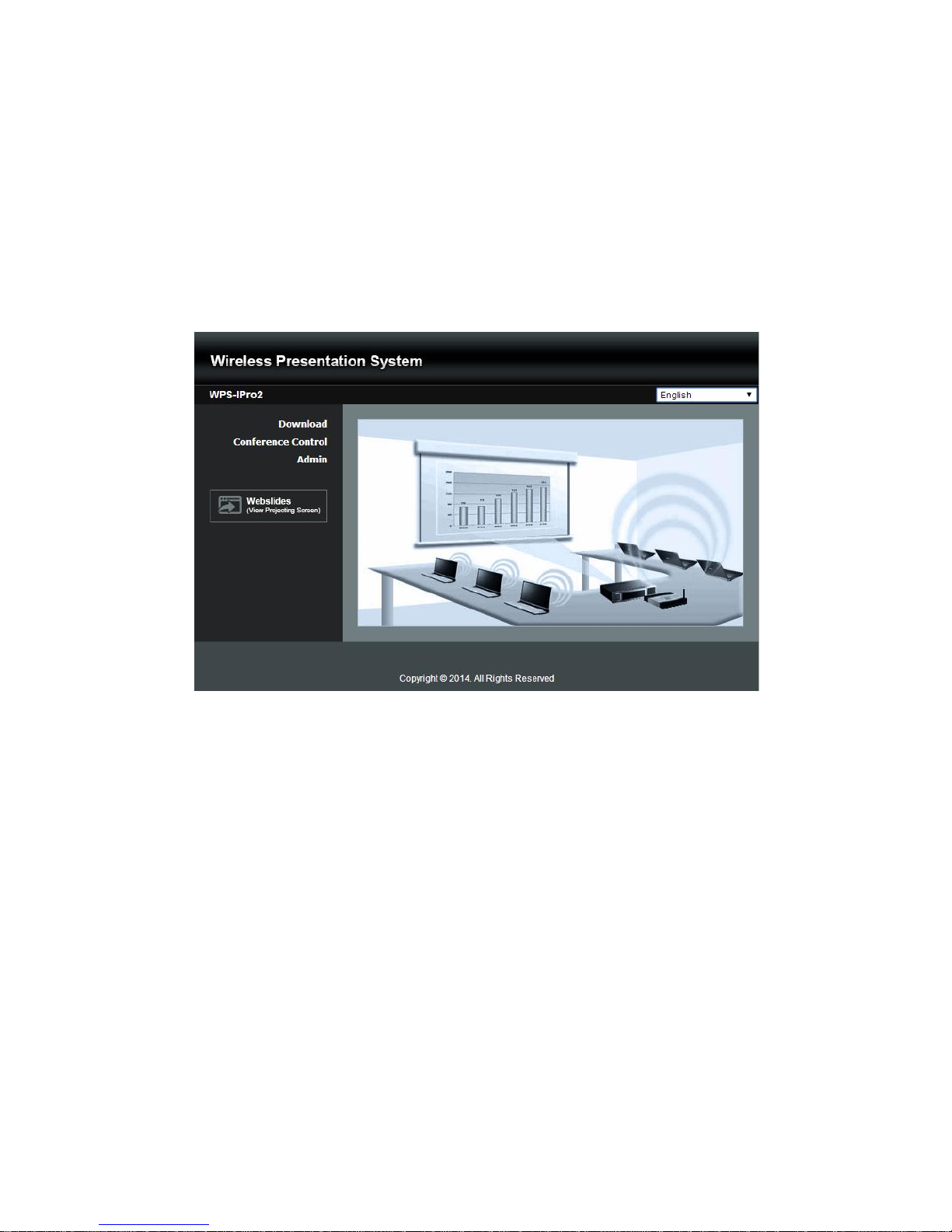
3) Your browser will lead you to the below page.
10.2 Download
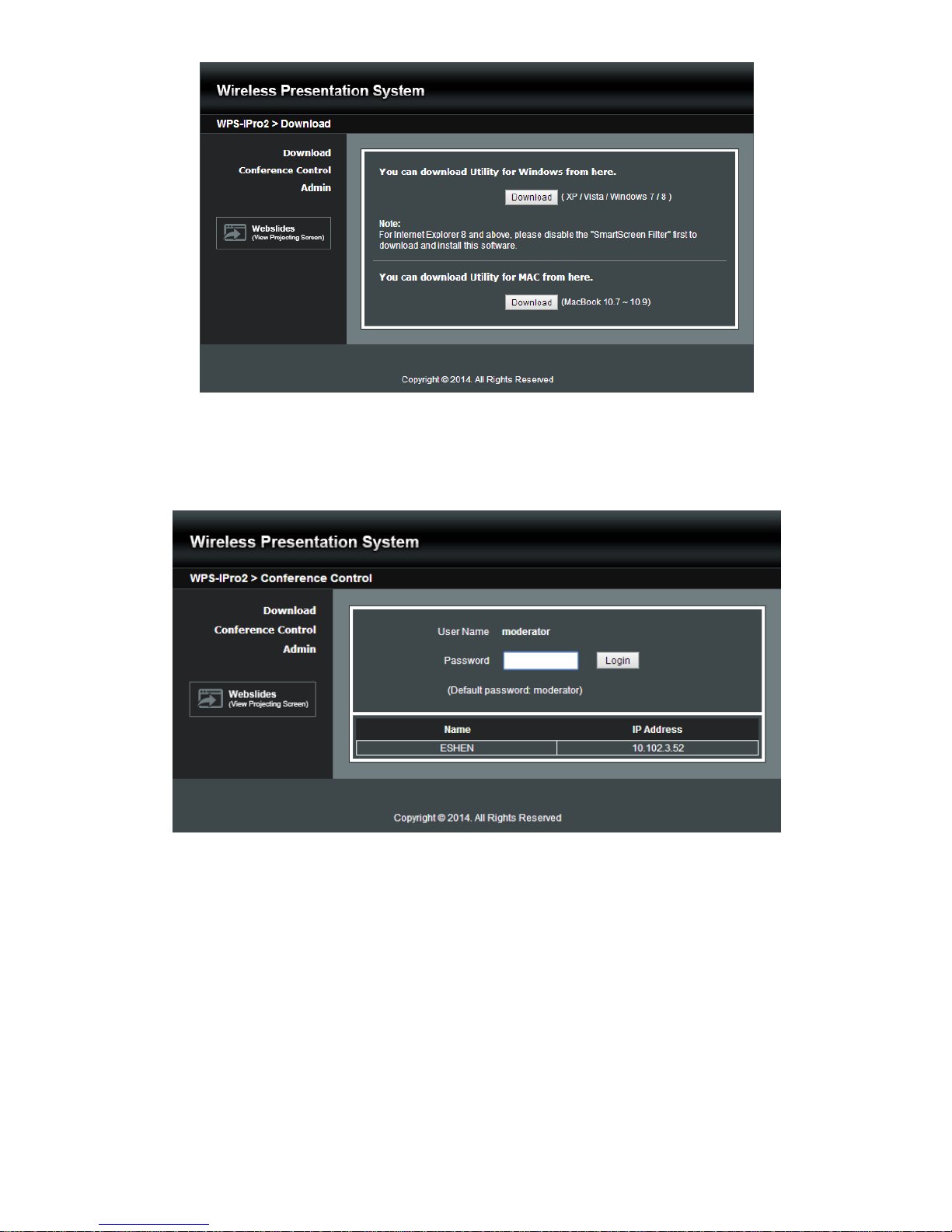
1) Select “Download” function.
2) Please select the “Win 8/ Win 7 / Windows Vista / XP” or “Mac Utility” and execute the installation program.
Note: Please disable the “Smart Screen Filter” on IE browser; otherwise you might not able to download
the file.
Page 35
35
10.3 Conference Control
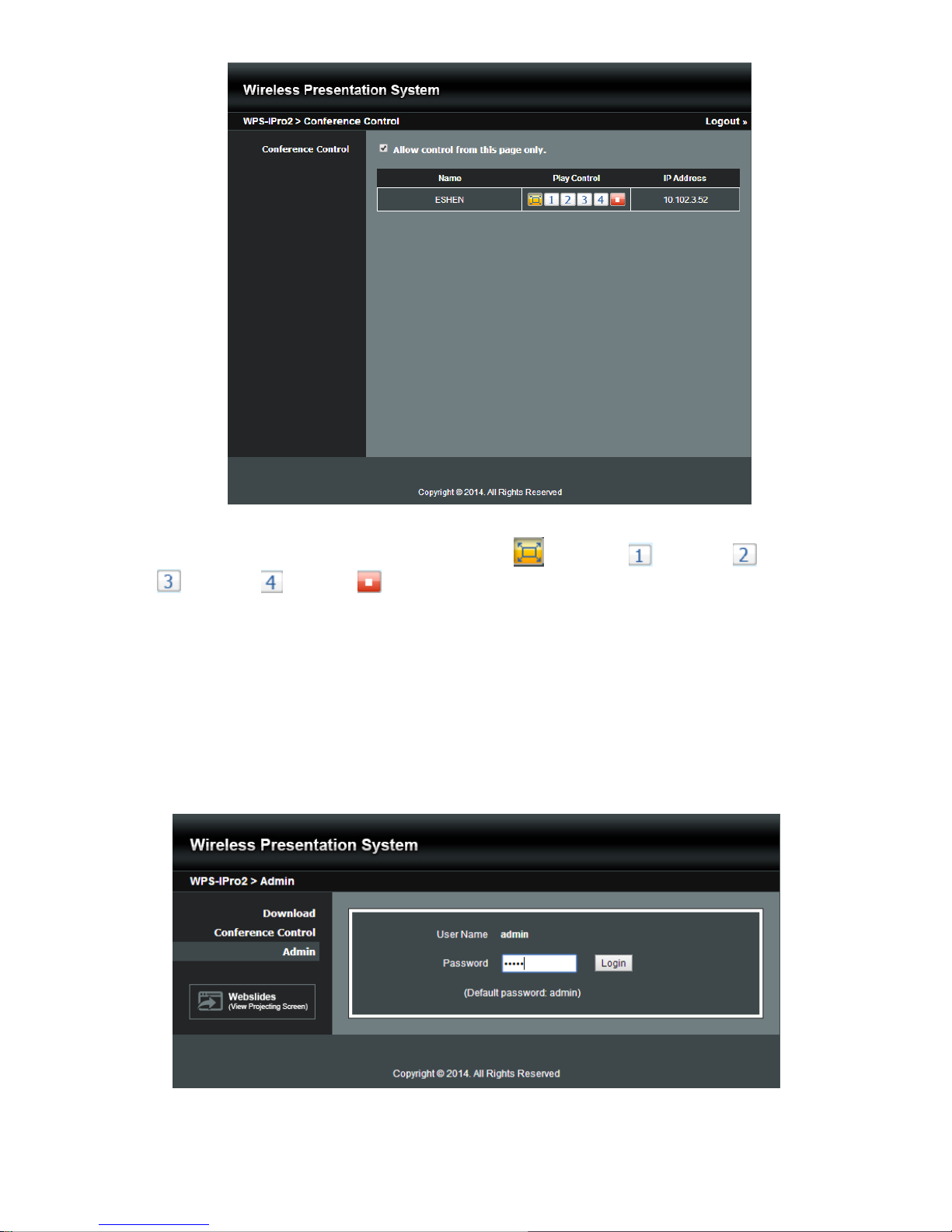
1) Select “Conference Control” function, you can find the current connected user list on this page.
2) Enter password and then press [Login]. (default password: moderator)
3) After login, you can see a User List on the screen which indicates all of users connected to WPS box.
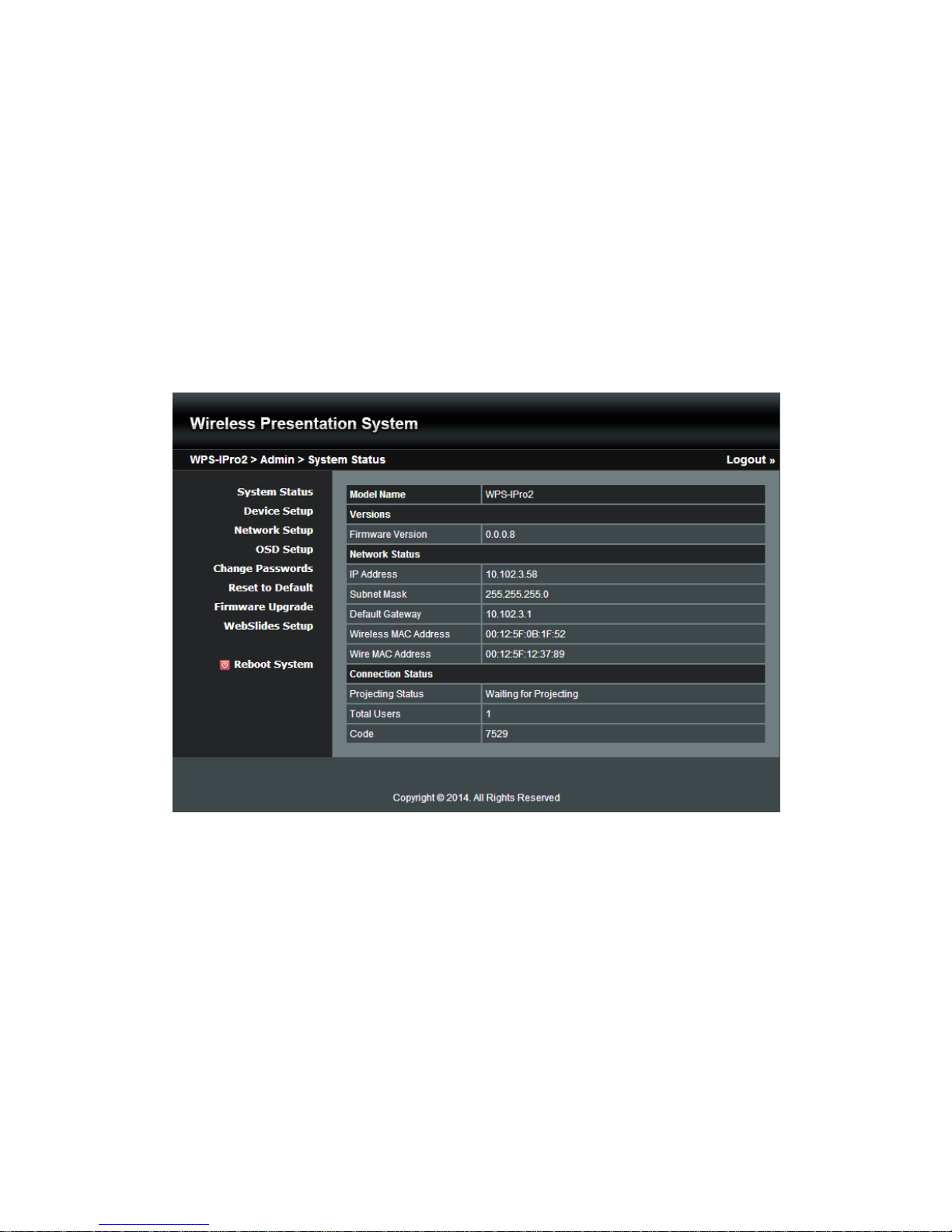
4) The default setting is “allow control from this page only”. When this function is checked, the moderator can
control all the login users’ projection.
Page 36
36
5) There are three columns, “User Name”, “Play Control” and “IP Address”.
a. Play Control: There are six buttons, including Play(Full) , Screen #1 , Screen#2 ,Screen #3
, Screen#4 and Stop .
b. Moderator can click on the “play” button to allow the projecting.
c. Moderator can assign which user to project on which screen by clicking on the screen numbers.
d. Moderator can “stop” the projecting anytime.
6) Uncheck the “Allow Control from this page only”, it will disable the centralized control and user can project the
screen to WPS freely.
7) Moderator can log out from the conference control mode by clicking on the” log out” on the upper right corner.
10.4 Admin
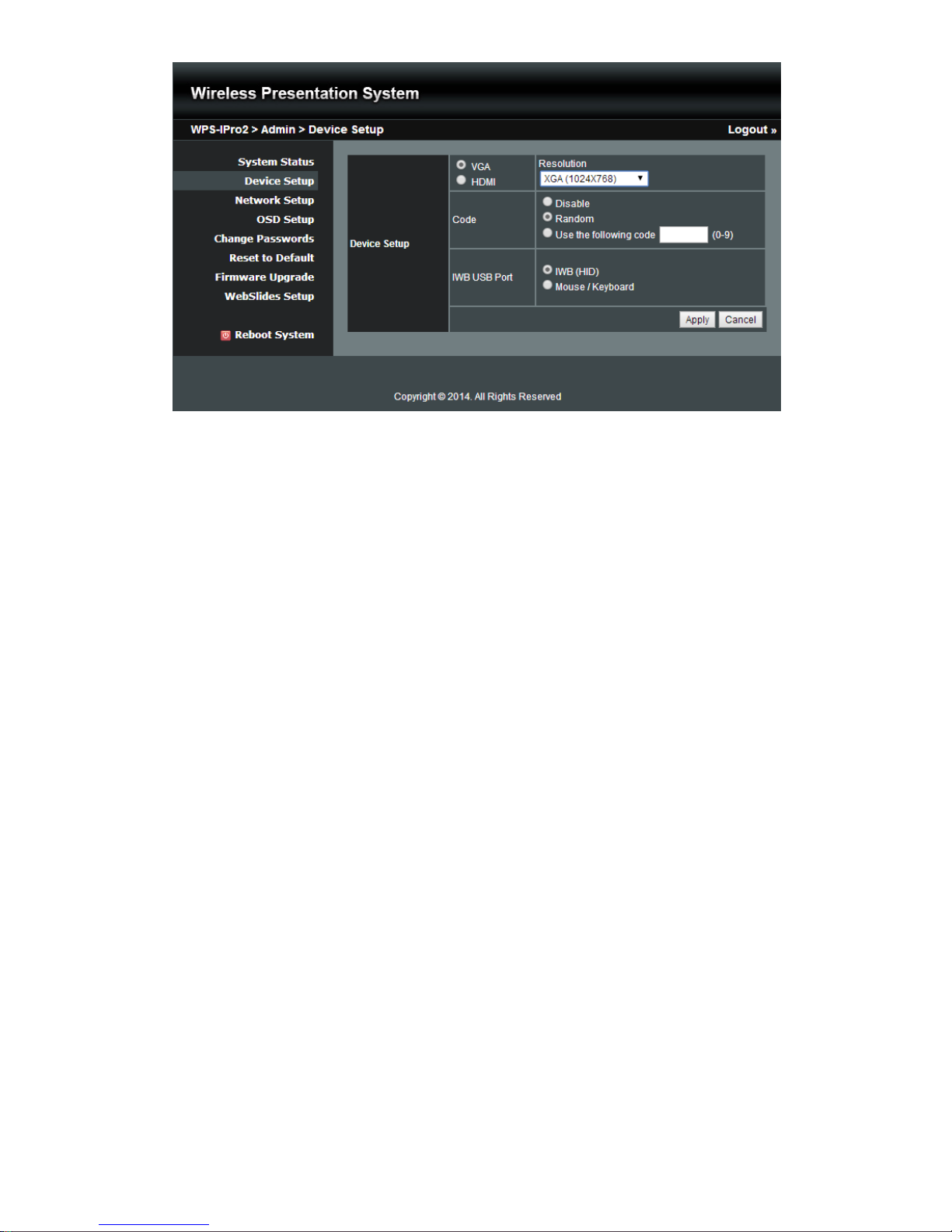
1) Click on “Admin” and then enter the password to login web admin page. (Default Password: admin)
Page 37
37
10.4.1 System Status
1) Click on “System Status” option, it will show current system status.
Model Name: Product model name
Versions:
Firmware version no.: Product firmware version number.
Network Status:
IP address:IP address of WPS device.
Subnet Mask:subnet mask
Default Gateway:default gateway
Wireless MAC address:wireless MAC address
Wire MAC address:wire MAC address
Connection Status:
Projecting status: “Waiting for projecting” or “Projecting”
Total Users: It shows how many users login to WPS.
Code: It will show current Code
10.4.2 Device Setup
1) Click on “Device Setup” option, it will show the device setting items,
Choose <VGA> or <HDMI> output option
<Resolution>:
VGA: UXGA(1600*1500), WXGA+(1440*900), WXGA(1360*768, 1280x768, 1280x800),
XGA(1024*768), and SVGA(800*600). The default value is XGA(1024*768).
HDMI: 720p, 1080i, 1080p
<Code>: You can select “Disable”, “Random”, or “Use the following code” to set a specified
4-characters Number.
<IWB USB Port>: You can configure the IWB USB port to support “IWB (HID)” device or
“Mouse/Keyboard” device.
After choose all the favorable configuration, click on <Apply> to confirm and save the modifications or
<Cancel> to cancel all the modifications.
Page 38
38
10.4.3 Network Setup
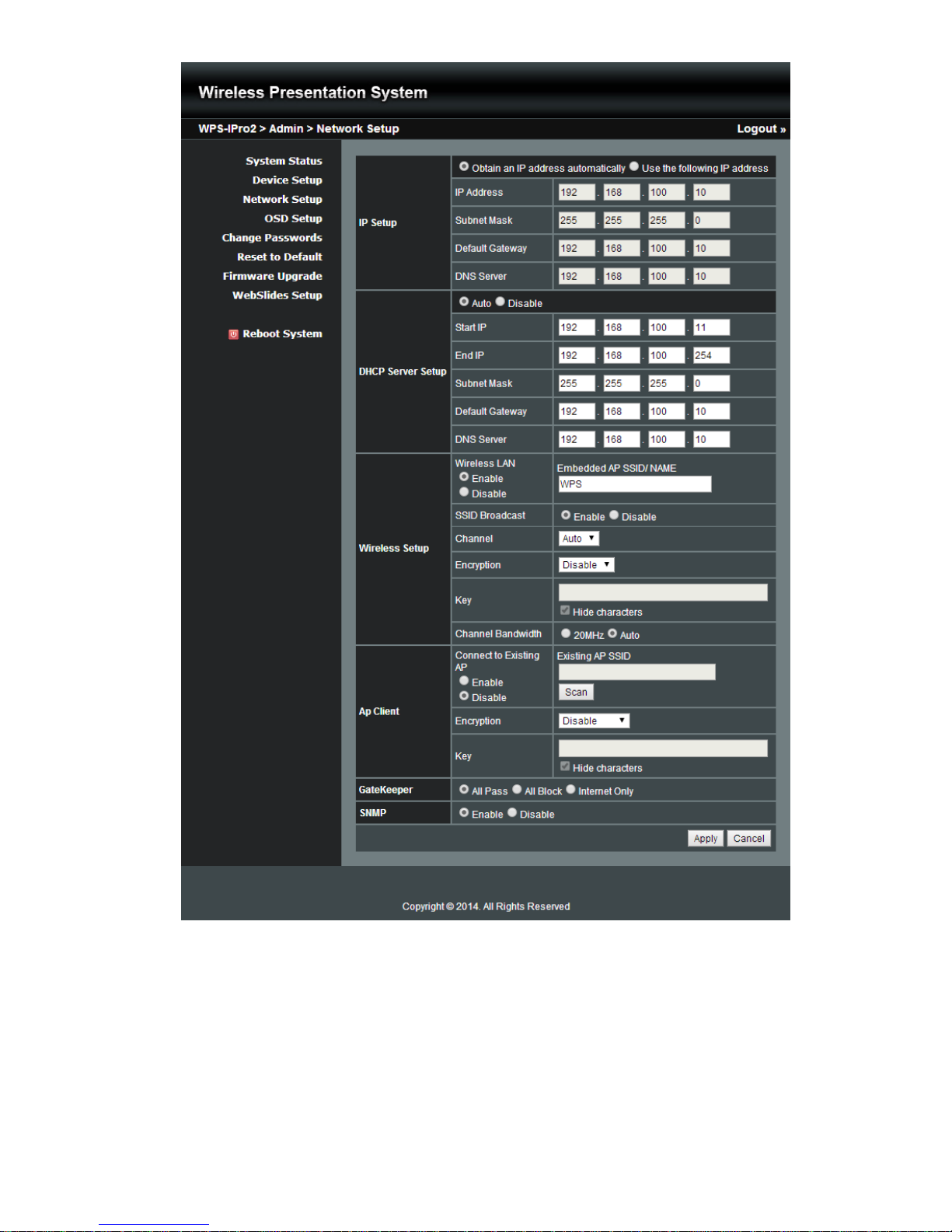
1) Click on “Network Setup” option, it will show the network setting items,
< IP Setup>
You can select “obtain IP address automatically” or “Use the following IP address” to enter the IP
address.
The default setting is as following:
IP Address: 192.168.100.10.
Subnet Mask: 255.255.255.0
Default Gateway: 192.168.100.10
DNS Server: 192.168.100.10
<DHCP Server Setup>
<Note: Auto-Configuration Network Setup on WPS>
The default setting of the WPS box as DHCP server. When the WPS box is connected to a LAN that
already has a DHCP server, the WPS box uses an IP address assigned by the server. When the WPS box
is connected to a LAN that does not have a DHCP server, the WPS box becomes the DHCP server in the
network.
You can select “auto” option. WPS will auto disable the DHCP server setup when the existing DHCP
server is detected. Or you can simply select “Disable” option. When you choose “Auto” option, you can
enter the below information or keep it as default setting.
Start IP: 192.168.100.11
End IP: 192.168.100.254
Subnet Mask: 255.255.255.0
Default Gateway: 192.168.100.10
DNS Server: 192.168.100.10
< Wireless Setup>
Wireless LAN: The default setting is “Enable”
SSID: You can change the default SSID and the maximum Length is 32 bytes.
SSID Broadcast: The default value is “Enable”
Channel: You can set a fixed channel or allow auto selection. The “Auto” selection means after power on
WPS, it will scan all of wireless channels and select one clear channel automatically.
Encryption: you can select “Disable” or one of WEP/WPA PSK/WPA2 PSK.
Key: If Encryption is enabled, you have to enter a key according to the encryption mode you selected. (If
the length of the key entered is not sufficient or too long, a warning message will pop up.)
Channel Bandwidth: select from 20M or Auto (20M/40M)
Page 39

39
< AP Client>
Connect to Existing AP: The default setting is “Disable”. If you choose “Enable” you need to enter the
existing AP SSID that you want to connect. When you select “Enable” option, the following information
needs to be entered accordingly to the existing AP setting:
Encryption: Select “Disable” or one of WEP/WPA PSK/WPA2 PSK.
Key: If Encryption is enabled, you have to enter a key according to the encryption mode you selected. (If
the length of the key entered is not sufficient or too long, a warning message will pop up.)
Note: The Encryption and Key information must be consistent to the exiting AP configuration.
< Gatekeeper>
Gatekeeper is designed for ensuring the enterprise network security within WPS box
“All Block” can block Guest Users(through wireless) to access all office network(LAN),
“All Pass” can allow Guest Users(through wireless) to access all office network
“Internet Only” can block Guest Users (through wireless) from office network (LAN) but still reserve
internet connection capability.
<SNMP>
You can select “Enable” or ”Disable” option to set up the SNMP function. And the SNMP community password is the
same as the web Admin password.
<Apply >: Press “Apply” button after configuration, and follow the reboot instruction when applicable.
<Cancel>: Press button to abort action.
Page 40
40
10.4.4 OSD Setup
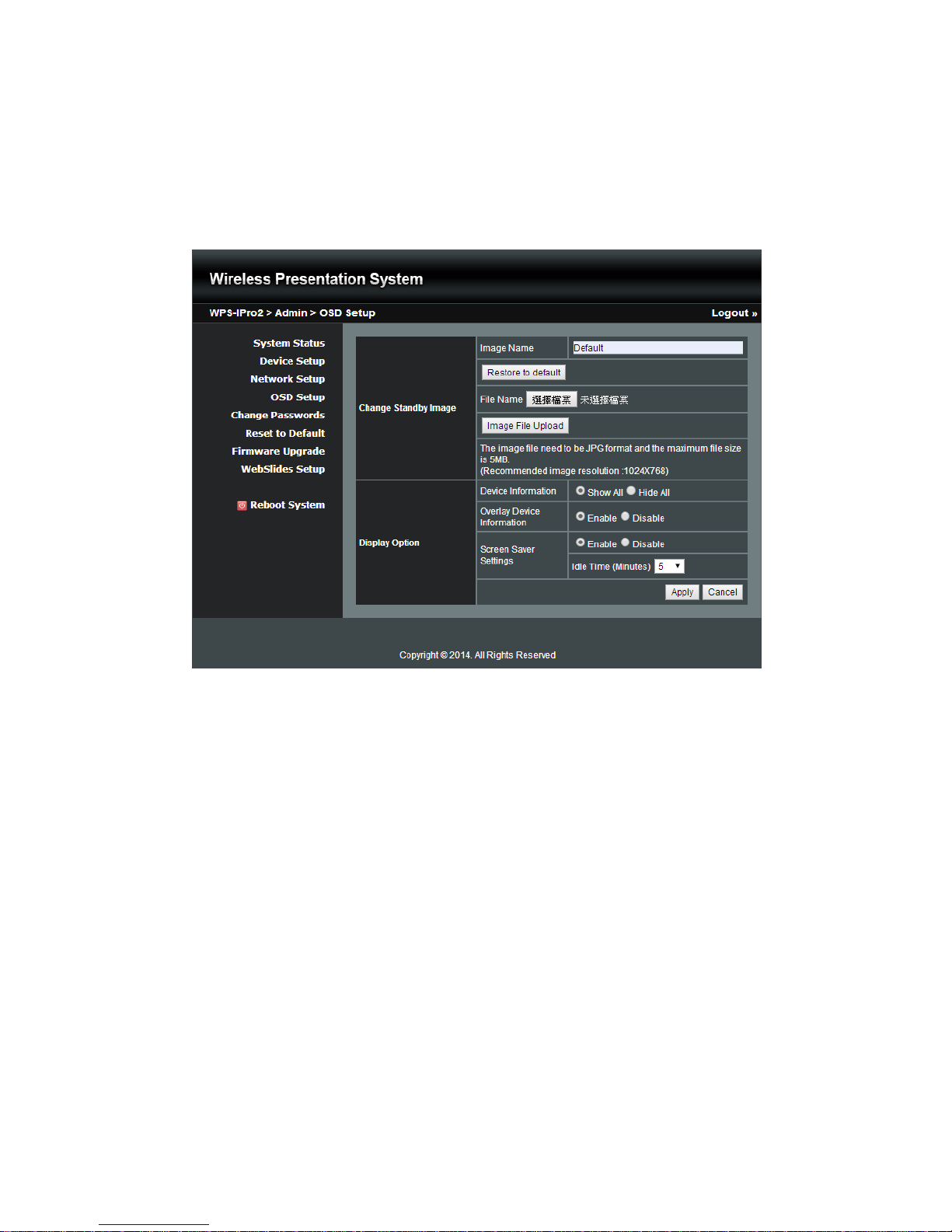
1) Click on “OSD Setup” option, you can:
Change Standby Image
Change Standby Image: Replace the whole standby image
<Reset to default>: Restore to default Logo image.
<Image File Upload>: Enter or browse the file name and upload the customized Logo Image. Please
refer to remark on screen when select the file.
You can also adjust the following “Display Option”
Page 41
41
Device Information: Show all or Hide all the device information on standby screen.
(Note:When Device Information set Hide option, the ”Overlay Device Information” & “Screen Saver
Setting” will be disabled)
Overlay Device Information: Enable or disable the device information will be show on top of projection
screen when doing projection.
Screen Saver Settings: Enable or disable the screen saver and also configure the idle time(Minutes).
(default is 5 mins)
<Apply >: Press “Apply” button after configuration, and follow the reboot instruction when applicable.
<Cancel>: Press button to abort action.
10.4.5 Change Passwords
1) Click on “Change Password” option, you can change the password setting for “conference control” and “Admin”.
(Length: up to 8 characters)
<Enter New Password>
<Confirm New Password>
<Apply>: Confirm and Save modifications.
Page 42

42
10.4.6 Reset to Default
1) Click on “Reset to Default” option to restore factory default settings.
<Apply>: Confirm and take action.
*** You can also restore factory default setting from WPS box reset button. You can find the reset button
underneath the box. Please follow below procedures.
1. Press [Reset] button and Hold.
2. Turn on WPS box.
3. Press more than 10 seconds and relief [Reset] button.
4. It will take effect to restore factory default settings.
10.4.7 Firmware Upgrade
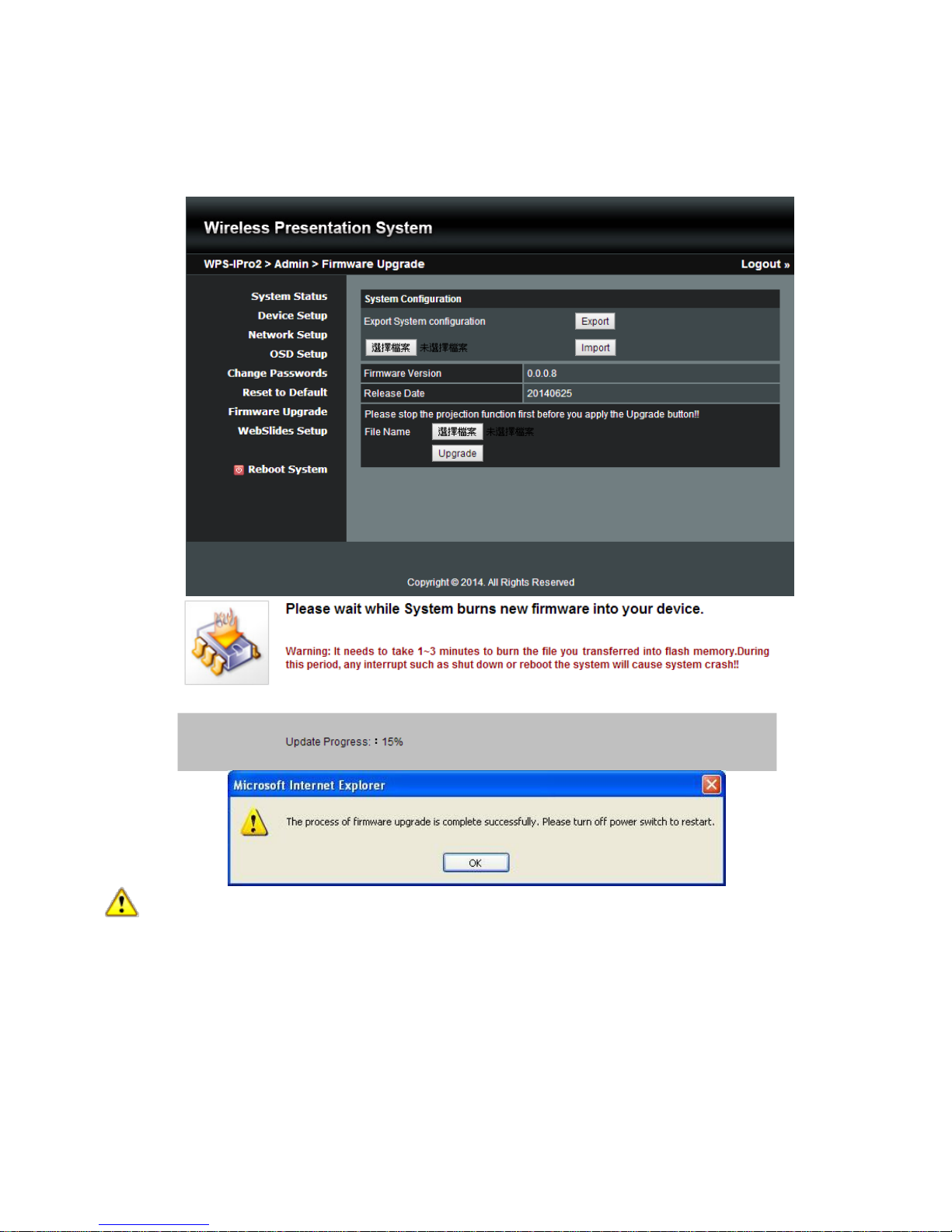
1) Click on” Firmware Upgrade” option to “import/export” system configuration and upgrade firmware.
2) System Configuration Import and Export
Export: Export the system configuration to a configuration file
Import: Import the system configuration file to WPS
3) You can find the firmware version and release date here.
Page 43
43
4) Firmware Upgrade
A. Firstly, you have to get latest firmware image file from your vendor.
B. Click <Browse> to specify file name you want to upgrade.
C. Click <Upgrade> to start.
D. A warning message shown and countdown counter on the screen.
E. After a few minutes, a complete message shown on the screen.
F. Restart WPS box to take effect.
Warning: Don’t power off WPS while firmware upgrade in progress, otherwise you will damage your box
and have to return device to your vendor for fixing.
10.4.8 WebSlides Setup
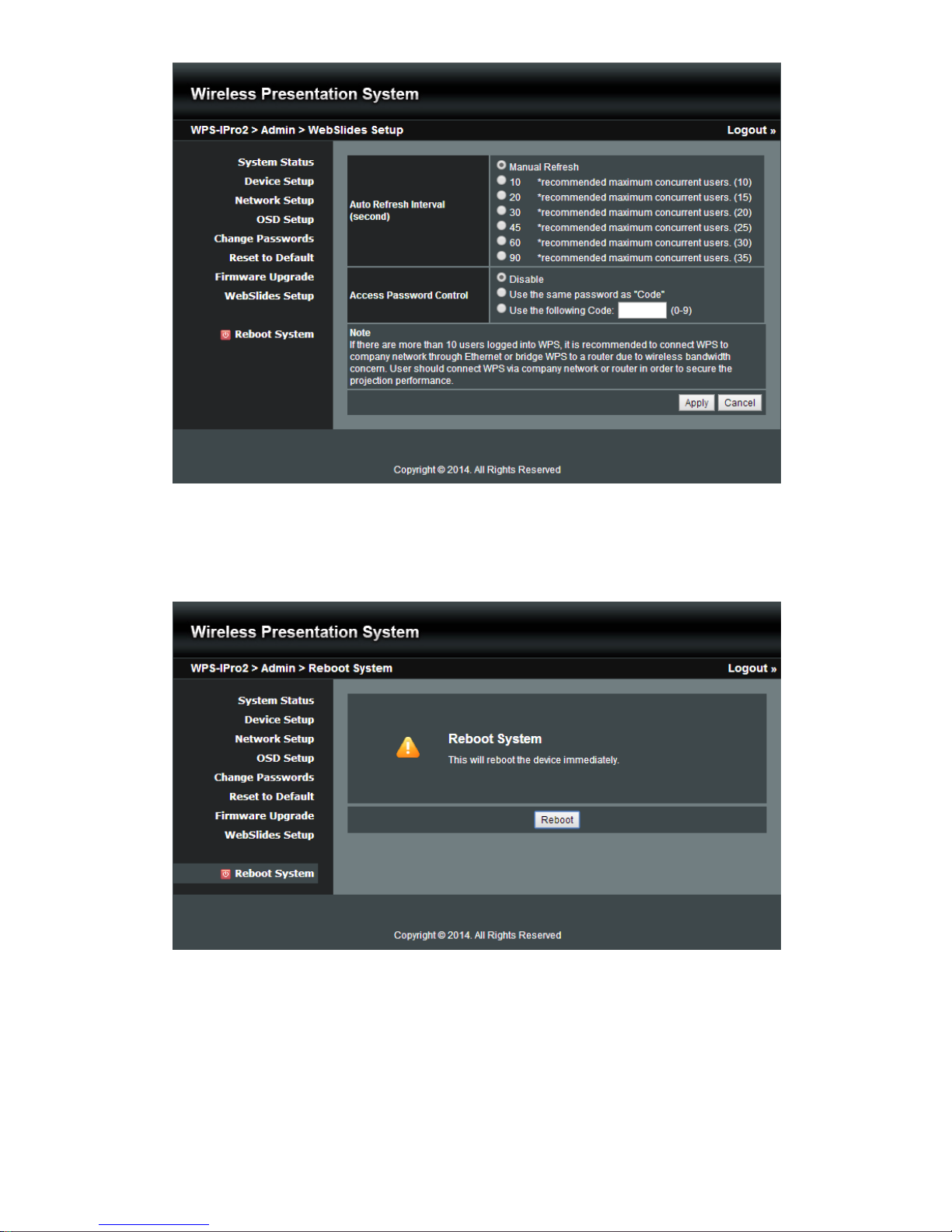
1) Click on “WebSlides Setup” option, you can:
Adjust Auto Refresh Interval, or activate “Access Password Control”
Please pay attention on the note for information.
<Apply >: Press “Apply” button after configuration, and follow the reboot instruction when applicable.
<Cancel>: Press button to abort action.
Page 44
44
10.4.9 Reboot System
1) Click on “Reboot System” option, you can restart the system
Click on <Reboot >button: reboot system automatically.
10.4.10 Logout
1) Click on “logout” on the up right corner, you can logout the administration webpage and return back to the web
management front page.
Page 45

45
10.5 WebSlides
1) Press the “WebSlides” button to enter the WebSlides page.
2) Please refer to 8.10.5 Launch Webslides for more information.
Page 46

46
11 Appendices
Copyright
© Copyright 2015. This publication, including all photographs, illustrations and software, is protected under
international copyright laws, with all rights reserved. Neither this manual, nor any of the material contained herein,
may be reproduced without written consent of the author.
Disclaimer
The information in this document is subject to change without notice. The manufacturer makes no representations or
warranties with respect to the contents hereof and specifically disclaims any implied warranties of merchantability or
fitness for any particular purpose. The manufacturer reserves the right to revise this publication and to make
changes from time to time in the content hereof without obligation of the manufacturer to notify any person of such
revision or changes.
Trademarks
Optoma and its logo is a registered trademark of Optoma Corporation. Optoma Europe Ltd is the licensee of the
registered trademark. Android is a registered trademark of Google Inc. Windows is a registered trademark of
Microsoft Corporation in the United States and/or other countries. OS X is registered trademarks of Apple Inc. iOS is
a trademark or registered trademark of Cisco in the U.S. and other countries and is used under license. HDMI, the
HDMI Logo, and High-Definition Multimedia Interface are trademarks or registered trademarks of HDMI Licensing
LLC in the United States and other countries.
FCC
This device has been tested and found to comply with the limits for a Class B digital device pursuant to Part 15 of the
FCC rules. These limits are designed to provide reasonable protection against harmful interference in a residential
installation. This device generates, uses and can radiate radio frequency energy and, if not installed and used in
accordance with the instructions, may cause harmful interference to radio communications.
However, there is no guarantee that interference will not occur in a particular installation. If this device does cause
harmful interference to radio or television reception, which can be determined by turning the device off and on is
encouraged to try to correct the interference by one or more of the following measures:
• Reorient or relocate the receiving antenna...
• Increase the separation between the device and receiver...
• Connect the device into an outlet on a circuit different from that to which the receiver is connected...
• Consult the dealer or an experienced radio/television technician for help...
Notice: Shielded cables
All connections to other computing devices must be made using shielded cables to maintain compliance with FCC
regulations.
Caution
Changes or modifications not expressly approved by the manufacturer could void the user's authority, which is
granted by the Federal Communications Commission, to operate this equipment.
Operation Conditions
This device complies with Part 15 of the FCC Rules. Operation is subject to the following two conditions:
1. This device may not cause harmful interference and
2. This device must accept any interference received, including interference that may cause undesired operation.
Notice: Canadian users
This Class B digital apparatus complies with Canadian ICES-003.
Remarque l'intention des utilisateurs canadiens
Cet appareil numérique de la classe B est conforme a la norme NMB-003 du Canada.
Declaration of conformity
• EMC Directive 2004/108/EC
• Low Voltage Directive 2006/95/EC.
• R & TTE Directive 1999/5/EC
Page 47

47
11.1 Optoma Global Offices
For service or support please contact your local office
USA
3178 Laurelview Ct., Tel : 888-289-6786
Fremont, CA 94538, USA Fax : 510-897-8601
www.optomausa.com Service : [email protected]
Canada
3178 Laurelview Ct., Tel : 888-289-6786
Fremont, CA 94538, USA Fax : 510-897-8601
www.optoma.ca Service : [email protected]
Latin America
3178 Laurelview Ct. Tel : 888-289-6786
Fremont, CA 94538, USA Fax: 510-897-8601
www.optoma.com.br www.optoma.com.mx
Europe
42 Caxton Way, The Watford Business Park
Watford, Hertfordshire,
WD18 8QZ, UK Tel : +44 (0) 1923 691 800
www.optom a.eu Fax : +44 (0) 1923 691 888
Service Tel : +44 (0)1923 691865 Service : [email protected]
Benelux BV
Randstad 22-123 Tel : +31 (0) 36 820 0252
1316 BW Almere Fax : +31 (0) 36 548 9052
The Netherlands
www.optoma.nl
France
Bâtiment E Tel : +33 1 41 46 12 20
81-83 avenue Edouard Vaillant Fax : +33 1 41 46 94 35
92100 Boulogne Billancourt, France Service : [email protected]
Spain
C/ José Hierro,36 Of. 1C Tel : +34 91 499 06 06
28522 Rivas VaciaMadrid, Spain Fax : +34 91 670 08 32
Deutschland
Wiesenstrasse 21 W Tel:+49 (0) 211 506 6670
D40549 Düsseldorf, Fax:+49 (0) 211 506 66799
Germany [email protected]
Scandinavia
Lerpeveien 25 Tel : +47 32 98 89 90
3040 Drammen FAX : +47 32 98 89 99
Norway Service : [email protected]
PO.BOX 9515
3038 DrammenNorway
Taiwan
12F., No.213, Sec. 3, Beixin Rd., Tel:+886-2-8911-8600
Xindian Dist., New Taipei City 231, Fax: +886-2-8911-6550
Taiwan, R.O.C. Service :[email protected]
www.optoma.com.tw asia.optoma.com
Hong Kong
Unit A, 27/F Dragon Centre, Tel : +852-2396-8968
79 Wing Hong Street, Fax: +852-2370-1222
Cheung Sha Wan Kowloon, Hong Kong www.optoma.com.hk
Page 48

48
www.optoma.com
 Loading...