

Page 1

WXGA 5200 Lumens
Lens shift
Interchangeable Lenses
W505
Full 3D Support
Spectacular image quality, outstanding
brightness and ultimate reliability
Page 2
Features
W505 features
5200 Lumens, WXGA Resolution
Installation flexibility – Lens shift, interchangeable lenses, off-axis short throw option
Ultimate Control - Full support for Crestron, Extron, AMX, PJ-Link and Telnet LAN commands
Powerful Image Blending tools - 3-axis colour matching system and 10x lamp-power steps
Advanced features – Wired Remote, Full 3D Support and DICOM simulation
Page 3
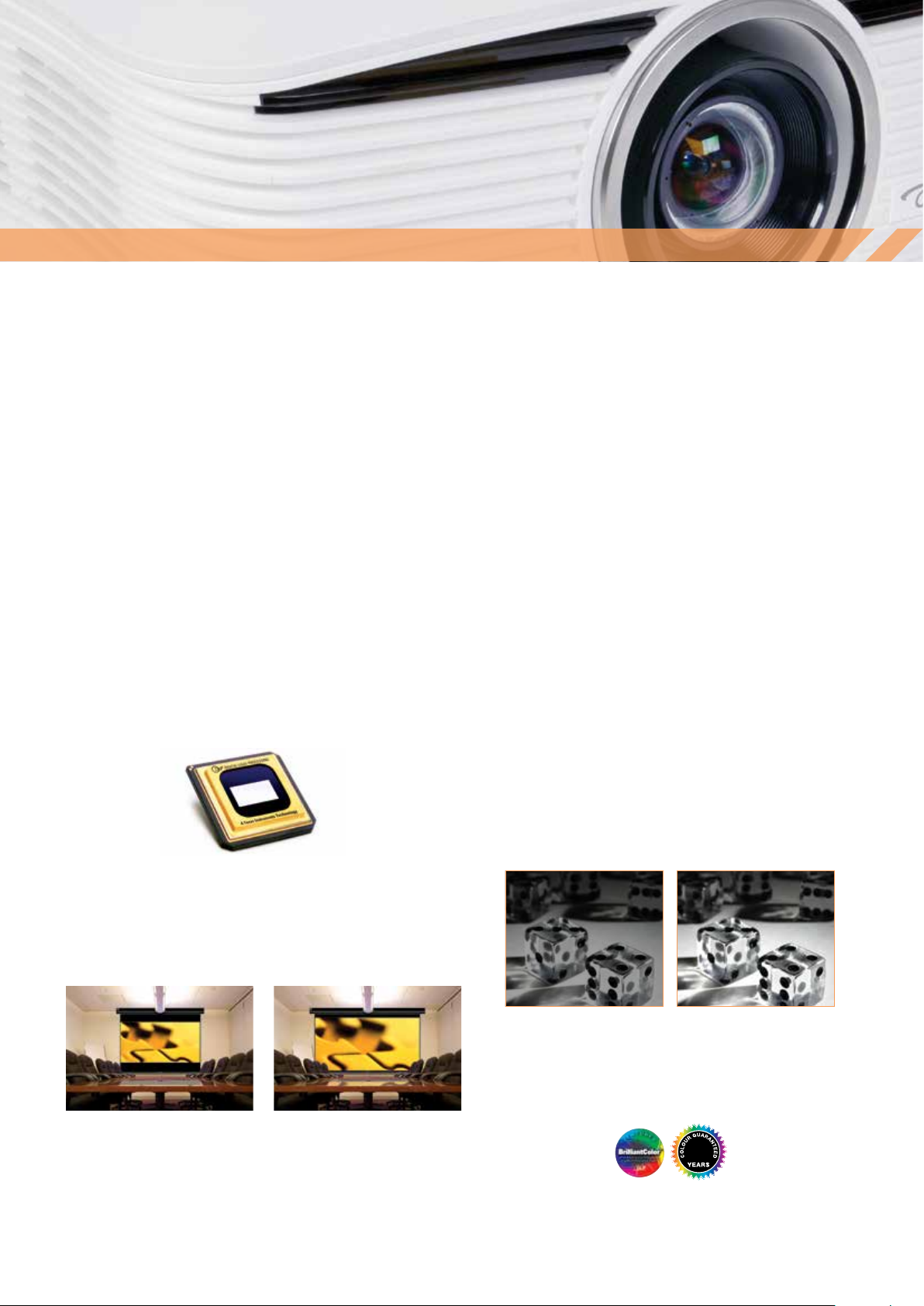
Image Quality
Superb image quality is at the heart of every ProScene product design. At every step, commencing with the incredibly reliable,
®
high resolution WXGA DLP
colour to exacting standards, through to the precision optics to focus the image on a screen, accuracy and integrity of the image
are paramount.
ProScene chose DLP
technology provides highly efficient bright images with great contrast whilst maintaining precise colour accuracy and natural,
real-world colour reproduction. For demanding professional applications, the proven reliability of DLP
obvious choice.
chip where the image is initially created, via the UHP lamp pulsing technology that fine tunes the
®
technology for its image quality and unmatched reliability. The reflective nature of DLP® micro-mirror
®
technology makes it the
DLP® Technology
DLP® technology from Texas Instruments® is widely recognised
and acclaimed for its unmatched reliability and long lasting image
performance. When combined with high brightness and native
contrast ratios, it becomes the obvious choice for demanding
applications. Independent testing has proven DLP® to be the most
reliable of projector technologies. Whilst other technologies may
show image quality decline after only a few thousand hours, DLP®
technology can remain unchanged over hundreds of thousands
of hours.
True WXGA Resolution
Documents and presentations will appear as sharp and detailed as they
do on your widescreen laptop in WXGA (1280 x 800) resolution, which
also gives you 30% more pixels than an equivalent XGA projector.
UHP lamps
The 370W UHP lamp provides the highest possible luminance, the
essential prerequisite of all highly efficient projectors.
These lamps have outstanding brightness, stay brighter for longer, and
provide an optimal colour spectrum. In addition, the lamp drivers are
specifically tuned for the lamps, ensuring not only optimum operating
conditions for every situation, but also provide sophisticated lamp
pulsing modes and the assurance that colour can be fine-tuned
according to the application.
Clear, Focused Images
DarkChip3™ technology from Texas Instruments produces a stunning
2000:1 contrast ratio for pin sharp graphics and crystal clear text.
Crisper whites, ultra-rich blacks makes images come alive and text
easier to read.
XGA WXGA
2000:1 Contrast Ratio
Amazing Colours
The W505 incorporates BrilliantColor™ technology to produce
stunningly bright images with perfectly balanced life-like colours.
5
Page 4
Flexibility
Installation Flexibility
Flexibility
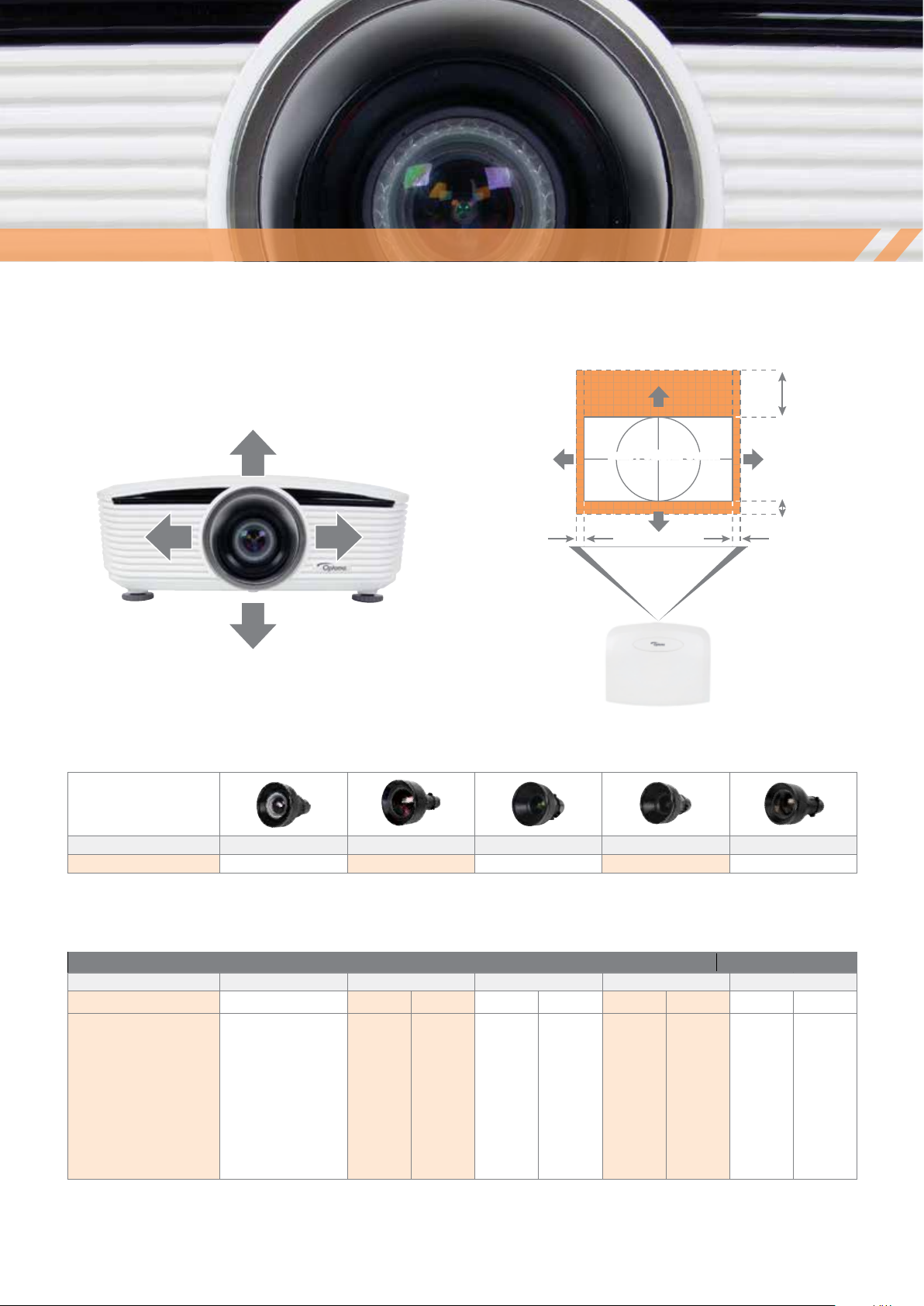
To help meet the seemingly limitless challenges of ProAV installations,
the W505 provides multiple lens options with zoom and focus
adjustment to ensure you can get the image size you require, while a
wide lens shift range helps you get the image exactly where you want it.
All 5 optional lenses, including the 0.81:1 short throw lens can use the
full lens shift range.
Full Lens Shift
WXGA
+55%
Lens Position: Center
Shift Range
-15%
5% 5%
Projector
Lens Options
Lens Type Short Semi Short Standard Long Extra Long
Throw Ratio 0.81:1 1.16 - 1.37:1 1.62 - 2.03:1 2.03 - 3.05:1 3.15 - 5.25:1
Throw Distance Chart
W505 Throw Distance
Diagonal Image Size (16:10) Short
Fixed (m) Min (m) Max (m) Min (m) Max (m) Min (m) Max (m) Min (m) Max (m)
50”
60”
70”
80”
100”
120”
150”
200”
250”
300”
For guide purposes only
0.87
1.05
1.22
1.4
1.74
2.09
2.62
-
-
-
Semi short
1.24
1.49
1.74
1.99
2.49
2.99
3.73
4.98
6.22
7.46
1.47
1.76
2.06
2.35
2.94
3.53
4.41
5.88
7.35
8.82
Standard Long
1.74
2.09
2.44
2.79
3.49
4.19
5.23
6.98
-
-
2.19
2.62
3.06
3.5
4.37
5.25
6.56
7
-
-
2.19
2.62
3.06
3.5
4.37
5.25
6.56
8.74
10.93
13.12
3.28
3.94
4.6
5.26
6.57
7.88
9.85
13.14
16.42
19.71
Extra long
3.39
4.07
4.75
5.43
6.78
8.14
10.18
13.57
16.96
-
5.65
6.78
7.92
9.05
11.31
13.57
16.96
20
20
-
Page 5
Features
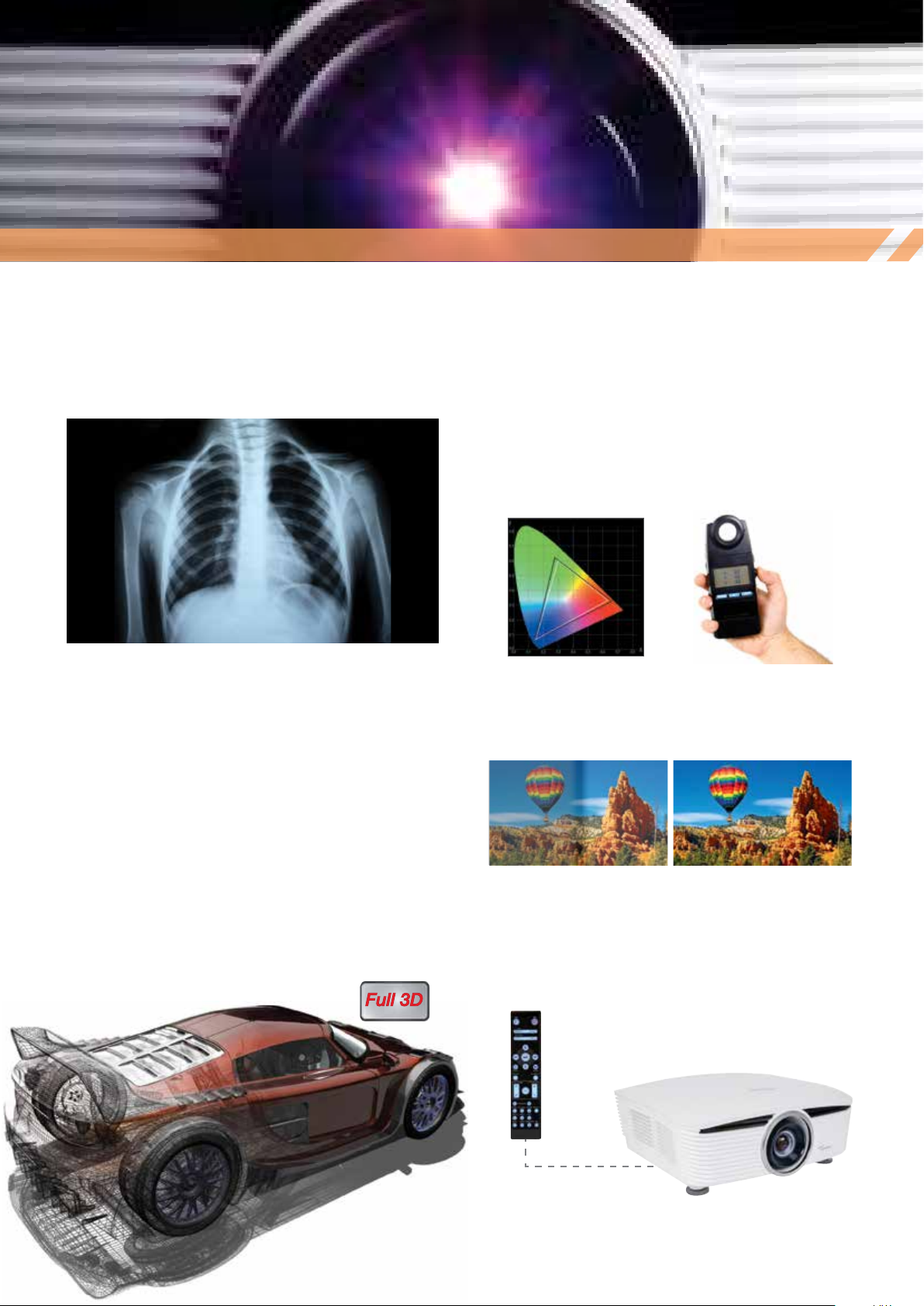
DICOM simulation mode
Flexibility
Designed specifically for larger meeting rooms and lecture theatres, the
W505 includes a special DICOMsim mode that has been specifically
tuned for viewing greyscale images, perfect for viewing X-rays and
scans during medical training.*
*The W505 is not suitable for use in medical diagnosis.
3D Technology
Using the inherent speed of DLP® technology, Optoma Full 3D
projectors can output video and images at an astonishing rate of
120Hz, allowing you to show full screen, full colour, stereoscopic 3D.
The 3D effect is generated by splitting this signal into two standard
video streams, one for each eye. Using DLP® Link™ technology, the
3D glasses synchronise with the image on screen to filter each stream
to the correct eye. Your brain then combines the two streams to make
them jump into life.
Edge Blending Tools
No two projectors are completely identical. When performing complex,
or even simple edge-blend projects using multiple projectors, it can
be difficult to achieve good results if the images do not match. The
W505 incorporates the following features to ensure high quality and
consistent results.
Colour matching
The W505 has a full 3-axis colour matching system, which combined
with accurate measurements can create seamless blends every time.
Brightness matching
The brightness of a projector will vary throughout its life. To correctly
match multiple units, the W505 has 10x lamp power steps between
80~100% full brightness.
The W505 supports multiple 3D formats from various devices such
as PC, Blu-ray 3D™, Sony® PS3, Microsoft® Xbox 360 or 3D TV
broadcast system.
Without With
Wired Remote
The wired remote connection allows all aspects of the projector to be
individually controlled without requiring a line-of-sight to the projector;
invaluable when using multiple units during live events.
Page 6

Control
PC
CERTIFIED
System Integration Control
Multiple W505 can be monitored over LAN and can also provide the user with an email message alert in case an error occurs or a lamp fails
or needs to be replaced using Crestron Roomview. The web browser interface and full support for Telnet, Extron’s IP Link, AMX dynamic device
discovery and PJ-Link protocols, allow almost all aspects of the W505 to be controlled across a network, keeping you in control, wherever you are.
PC
e-mail
e-mail
INTERNET
Global monitoring of
all AV devices
Track projector
lamp life
Email alerts and
instant notificationshelp desk requests,
service reminders,
device failure or theft
Event Scheduling
PC
LAN LAN
PC
Ultimate control
Cut up to 30% from your energy bills using 24-hour automated power scheduling to ensure that projectors power off when not in use.
Download Crestron RoomView® Express for free at
www.crestron.com/getroomview
Selected View by Rooms, Attributes or Contacts
RoomView Express gives you the ability to simultaneously view
more than 250 connected devices from a single screen. Customise
RoomView to view by room name, locations and group.
Display Power
Check on/off status of any projector.
Display Usage
View a bar graph to monitor the percentage of available projector
lamp life and set an alert to notify the services department when a
replacement lamp should be ordered, before the lamp fails.
Schedule Events
RoomView Express makes scheduling of recurring or one-time events
easy. Setting RoomView to automatically power down at midnight
throughout the week can save valuable lamp life and ensure security
inside the facility.
Event Log
Automatically generates log files, reports and charts to analyze
ROI and budget allocation. Track device usage, call statistics
and user history.
remote
control
PC
Page 7

z
Green
Eco Friendly
Cut up to 30% from your engergy bills using 24-hour automated
power scheduling to ensure that projectors power off when
not in use.
We know that improving our products is the best
way to reduce our impact on the environment.
That’s why at Optoma, we design our products
to have a long usable life, use fewer materials,
ship with the minimum packaging and be free
of all possible toxic substances. Naturally, energy
efficiency and being recyclable are built in at the
design stage. With each new product, we strive
towards minimising our environmental impact. For
full details of Optoma Project Green please visit our
website.
Direct Power On
The projector will start up instantly when power is supplied
to the Unit. This eliminates the need to manually turn on the
projector via the remote control or the keypad, ideal for use in
rooms with a “master” power switch.
Signal Power On
The projector will power on when it receives a signal through
one of the PC/video inputs. This ensures that the projector is
only switched on when it is needed.
Auto Power Off
If after a pre-determined time the projector does not receive a
signal, it will turn itself off automatically, conserving power and
extending the life of the lamp.
Eco Standby Mode
Reduces energy consumption to less than 0.5W
when the projector is not in use.
Eco AV Mute & Eco Sleep
z
z
Direct your audience’s attention away from the screen
by blanking the image when no longer needed. When Eco
AV-mute is enabled, or if no source is found after 60 seconds,
the projector will automatically put the lamp into Eco mode,
both saving power and further prolonging the life of your lamp.
Page 8

Dimensions
431 164 19
340.71
34114
164
Dimensions in mm
Page 9

Labelling
Easy to use remote control
1. Power Off
2. Mouse
3. Function 2 (assignable)
4. AV Mute / right mouse button
5. Laser
6. Re-Sync
7. V Keystone +/-
8. Menu
9. Remote code All
10. Remote code 01~99
11. HDMI 2
12. HDMI 1
13. DVI
14. 3D Mode
15. DisplayPort
16. Component Video
17. BNC
18. Composite video
19. VGA 2
20. S-Video
21. VGA 1
22. Zoom
23. Format (aspect ratio)
24. Volume Up/Down
25. Source
26. Information Panel
27. Four Directional Select Keys
28. Display mode / left mouse button
29. Function 1 (assignable)
30. Test Pattern
31. Power On
Input/Output Connections
32. Power On/Off
33. VGA 1
34. HDMI
35. VGA 2
36. DVI
37. DisplayPort
38. RJ45 LAN
39. USB Power
40. 3D Sync
41. VGA Out
42. 5BNC
43. RS-232C
44. Wired Remote
45. +12V Trigger (3.5mm)
46. Composite Video
47. S-Video
48. Component Video
49. Master Switch
49
31
30
29
28
27
26
25
24
23
22
21
20
19
18
151617
32 34 36 37 38
33 35
48
47
43444546
1
2
3
4
5
6
7
8
9
10
11
12
13
14
39
40
41
42
Page 10

Technical Specifications
Projector
Optics
Connectivity
General
Supplied Accessories
DLP™ Technology by Texas Instruments
Technology 0.65” WXGA,Type A chip
Resolution Native WXGA (1280 x 800)
1
Brightness
Aspect Ratio 16:10 native, 4:3 & 16:9 compatible
Refresh Rate 15kHz to 91kHz / 24Hz to 85Hz (120/144Hz for 3D playback)
Contrast 2000:1
2D Video Compatibility PAL (625/576i/p), SECAM, NTSC (525/480i/p), HDTV (720p, 1080i, 1080p)
3D Video Compatibilty Mandatory HDMI 1.4 3D formats, 120Hz frame sequential (up to 720p)
Lamp Type 370W UHP
2
Lamp Life
Lens Shift Manual +55%, -15%V, +/-5% H
Lenses (no lens supplied as standard)
Short 0.81:1
Semi short 1.16 - 1.37:1
Standard 1.62 - 2.03:1
Long 2.03 - 3.05:1
Extra long 3.15 - 5.25:1
Keystone Correction Vertical ±40°
Uniformity 85% (centre)
Inputs HDMI (with locking Screw)
Output PC (monitor loop-through) VGA Out
Control and Communication RS232 9 pin D-SUB
Noise Level 37dB
Weight 8.6Kg (without lens)
Dimensions (W x D x H) 431 x 341 x 183mm
Power Requirements 100 – 240V AC @ 50 – 60Hz
Power Consumption 460W (max) bright mode, <0.5w standby mode
Operating Conditions 5 ~ 40˚C, max. humidity 85%, max. altitude 3000m
Portrait mode Not supported
360˚ Operation Not supported
Operating Temperature 0 ~ 750m, 5 ~ 45˚C
Environmental RoHS and WEEE
Conformances CE, TUV-GS, CB
Security 4-digit PIN code
Warranties 3 Years
Cables VGA cable
Other Infra-red remote control (selectable IR code sets for controlling multiple units)
5200 ANSI Lumens
1500 hr Bright Mode / 3500 hr Eco Mode
DVI-D (HDCP supported)
DisplayPort
BNC (RGBHV)
PC RGB 2 x 15 pin D-Sub VGA
Component 3RCA
S-Video/Composite 4 pin Mini DIN / RCA
+12V trigger (3.5mm jack)
3D-Sync Out (3-Pin VESA)
RJ45 (Crestron/Extron/PJ-Link/Telnet)
Wired Remote (3.5mm jack)
750m ~ 1500m, 5 ~ 35˚C
1500 ~ 3000m, 5 ~ 30’C
Kensington Lock port
Security Bar
AC power cord
Batteries x 2
Quick start card
Warranty card
WEEE card
Page 11

Accessories
Universal Ceiling Mounts
Flush Mount
White P/N: OCM818W-RU
Black P/N: OCM818B-RU
The Universal Flush Mount is easy to set up with its unique low-profile
design to give you everything you need for quick adjustment and the
flexibility to install almost any projector hassle-free.
Pole Mount
White P/N: OCM815W
Black P/N: OCM815B
The Universal Pole Mount is height adjustable from 290mm~810mm.
Suitable for virtually any projector under 15Kg. The mount comes preassembled with a quick projector disconnect/reconnect for rapid installation, while the 360° rotation and more than +/- 20° tilt/roll provide the
flexibility to install almost anywhere. (including vaulted ceilings) Lastly, an
integrated cable routing channel ensures a clean, professional finish.
Page 12

Accessories Continued
Optimised edge blending
(Available direct from Optoma)
Optoma have worked in partnership with Calibre to produce
special versions of Calibre’s ultra low-latency edge blending
and warping products optimised for use with our ProScene
projectors. This unique collaboration significantly reduces
the complexity and configuration time required to edge blend
multiple ProScene projectors and is covered by the industry
leading ProScene technical support services should you require
assistance with your edge blending project.
HQView320 HQV™ Scaler with Warp and Edge Blend
Best in class professional image processing in a compact
affordable module.
HQView325 HQV™ Scaler with Warp Mapping Edge Blend &
HDMI/DVI In/Out
HQView325 features 4-sided soft edge blend with multi-region
black level correction for seamless blending of multiple projectors.
HQView520 Universal HQV™ Scaler–Switcher-Scan Converter
with Warp, Edge Blend & 3G-SDI In/Out
Use as a routing switcher and universal interface for 3G-SDI,
HD-SDI, DVI or HDMI
HQView530 LCD Screen HQV™Scaler-Switcher with 3G-SDI
HQView530 is a highly flexible video screen image scaler which
provides stunning image quality for professional, broadcast, sports,
digital signage & corporate AV.
Page 13

Offices
Worldwide technical and commercial support
Optoma Europe
Optoma Europe Ltd.
42 Caxton Way
The Watford Business Park
Watford
Hertfordshire
WD18 8QZ
UK
Tel: +44 (0) 1923 691 800
Fax: +44 (0) 1923 691 888
Optoma Deutschland GmbH
WIESENSTRASSE 21
D40549 Düsseldorf
Germany
Tel: +49 (0) 211 506 6670
Fax: +49 (0) 211 506 66799
Optoma France
Batiment E
81-83 avenue Edouard Vaillant
92100 Boulogne Billancourt
France
Tel. : +33 (0) 1 41 46 12 20
Fax: +33 (0) 1 41 46 94 35
Optoma Spain
C/ José Hierro,36 Of. 1C
28529 Rivas VaciaMadrid
Madrid
Spain
Tel: +34 91 499 06 06
Fax: + 34 91 670 08 32
Optoma Benelux
Optoma Benelux BV
Randstad 22-123
1316 BW Almere
The Netherlands
T: +31 (0) 36 820 0252
F: + 31 (0)36 548 9052
Local Representatives
Turkey
UAE
Poland
Russia
Italy
Optoma Scandinavia
Optoma Scandinavia
Lerpeveien 25
Postboks 9515 Åskollen
3038 Drammen
Norway
Tel: +47 32 98 89 90
Fax: +47 32 98 89 99
Optoma USA
Optoma USA Headquarters
3178 Laurelview Ct.
Fremont, CA 94538
Tel: (510) 897-8600
Fax: (510) 897-8601
Atlanta Sales Office
7000 Central Park NE, Suite 570,
Atlanta, GA 30328
Tel: (678) 281-2228
Fax: (770) 399-3035
Canadian Sales Office
2420 Meadowpine Blvd, Suite 105,
Mississauga, ON L5N 6S2, CANADA
Tel: (905) 285-0685
Optoma Asia
Taiwan
Optoma Corporation
Taipei Office
5F., No. 108, Minchiuan Rd. , Shindian City,
Taipei Taiwan 231, R.O.C.
Tel::+886-2-2218-2360
Fax::+886-2-2218-2313
http://www.optoma.com.tw
Taichung Office
7F-5, No.3, Lane 2, 1st Rd, Taichung Industrial
Park, Xitun Dist., Taichung City, 40767, Taiwan,
R.O.C.
Tel::+886-4-3505-0336
Fax::+886-4-3505-0338
Kaohsiung Office
Rm. D, 7F, No.108, Zhonghua 3rd Rd., Qianjin
Dist., Kaohsiung City 80145, Taiwan, R.O.C.
Tel::+886-7-952-5689
Fax::+886-7-241-2197
China
Shanghai Office
5F, No. 1205 Kaixuan Road, Changning
District , Shanghai
Tel: +86-21-6294-7376
Fax: +86-21-6294-7375
http://www.optoma.com.cn
Beijing Office
20D apartment 3, Build No.3, Yindu Tower, No
48 ZhiChun road, HaiDian district, Beijing
Tel: +86-10-5873-1919
Fax: +86-10-5873-1919 *8018
ShenYang Office
Room1201, building C3, Wulihe Tower, No 4-1
WenTi road, HePing district, ShenYang
Tel::+86-024-3188-7018
Fax::+86-024-3188-7018-808
Xi’an Office
Room 1310, building B, ShiMao tower,
GuanDongZheng street, Xi’an
Tel: +86-029-8228-2428
Fax: +86-029-8228-2428
GungZhou Office
Room 602, NanTie Tower, No.57
No.1ZhongShan road, YueXiu district,
GungZhou
Tel: +86-20-6128-0990 / 6128-1025
Fax: +86-20-6128-1027
ChongQing Office
Room 9-2, building 19 HuaYuMingDu,
ShiQiaoPu, ChongQing
Tel: +86-23-6879-7626
Fax: +86-23-6879-7725
ChengDu Office
Room A3 floor 20, building A Time digital
square, No.1 South RenMin road, ChengDu
Tel: +86-28-8523-1553 / 8631-7092
Hong Kong Office
Unit A, 27/F., Dragon Centre, 79 Wing Hong
Street, Cheung Sha Wan, Kowloon, Hong Kong
Tel::+852-2396-8968
Fax::+852-2370-1222
http://www.optoma.com.hk
Page 14

Optoma Europe Ltd.
42 Caxton Way, Watford Business Park, Watford, Hertfordshire, UK. WD18 8QZ
www.optoma.com
1
Brightness and lamp lifetime will vary depending on selected projector mode, environmental conditions and usage. As is common with all lamp based projectors, brightness will decrease over the lamp lifetime. 2Typical lamp life achieved
through testing. Will vary according to operational use and environmental conditions. Optoma guarantees that in normal use, Optoma DLP® colour quality will be indistinguishable from when new. Exclusions: (a) Guarantee is voided if the
projector is subject to damage through misuse. (b) Guarantee may be void in industrial or commercial entertainment environments where dust or smoke is excessive (c) Guarantee will not apply if lamp brightness is below 50% due to wear
or if the projector is not working due to other faults. (d) Over time worn lamps within all projector types will show a slight colour variance. Copyright © 2013, Optoma Europe Ltd. All other product names and company names used herein are
for identification purposes only and may be trademarks or registered trademarks of their respective owners. Crestron®, the Crestron and RoomView® logo are registered trademarks of Crestron Electronics, Inc. Errors and omissions excepted,
all specifications are subject to change without notice. DLP®, BrilliantColor™ and the DLP logo are registered trademarks of Texas Instruments. All images of products are for representation purposes only. Whilst every care is taken to provide
accurate images of our products, actual products may differ slightly. Some product images may have been digitally altered by us to add an Optoma logo to the front panel. Optoma reserves the right to amend or alter actual product or product
images without notice. Some images may be simulated.
V9 - 24/06/15
 Loading...