

Page 1

User Manual for the Optogate Model PB-06
No time for manuals? No problem, this will take on ly 3 minutes of your time
to read it and you will have more fun and success with your new Optogate
device. The Optogates were designed for professional applications and to be
used by experienced sound engineers and technicians only.
The PB-06 comes in an abs plastic housing that can be fixed with Velcro tape
under a Table, Podium or Lectern. The PB-06 works with 48V phantom
power. Just switch on the 48V on the console and the Optogate is active. The
phantom power passes through the Optogate to the microphone. If you use
dynamic mics you can "remote control" the unit with the phantom power
switch. When you turn off the phantom power the PB-06 passes the audio
signal uninterrupted. Before turning on or off the phantom power please
mute the channel in order to prevent switching noise.
There are three led’s on the front, the middle led is a red status LED. It
indicates if somebody is in front of the unit and that the microphone is
switched on. If that red led is not on, the unit is gating the audio. The outer
LED’s are the infrared transmitter and the receiver. The transmitter will sen d
16 pulses per second if the phantom power is switched on. The Optogate will
switch the mic on if there is any signal reflected from a surface back to the
receiver.
The distance from the mic to the performer in which the unit opens and
closes is adjustable with the help of a potentiometer inside. The distance will
increase by turning the pot to the right for a distance of about 2 inches to 4
feet. Decrease the distance by turning the pot to the left. Please be awar e
that some black materials are not able to reflect infrared signals back
very well, which in turn decreas es the distance. Please experiment with
the potentiometer to fine-tune the distance together with the performer or
speaker before using live. It also would be helpful to have your performance
lighting active while adjusting.
The width of the sen sor is about 15 de grees wide from the unit. The m ic will
be switched off if the artist moves out of this angle. If you turn the
potentiometer clockwis e (right) out of the useable area, the mic will
be switched on completely. If this happens, just turn the pot slightly
to the left until the Optogate works again.
We suggest that the engineer works with each performer to explain the
operation of the unit and then set the range of the Optogate to fit his or her
mic technique and stage set-up. As a rule the closer the perfor mer is to the
mic, the better the results will be due to eliminating the ambient lighting
variables.
Page 2
The Optogates work with dynamic mics and condenser mics up to 10 m A.
You may discover that the switch “off” time of the indicator led can be a
fraction off from the real audio switch time, depending of the mic type being
used. This is to prevent any switching noise of the unit.
The distance range of the Optogate can change slightly when the ambient
light changes just like every other infrared device on the market. The
Optogate units will not work correctly if direct sun light or other very high
power infrared signals hits the sensor. That is the "nature" of the infrared
technology due to the random high power infrared spectrum in the sunlight.
You can try it at home with any IR remote control. No infrared sensor of C Dplayers, TV’s etc. will work in direct sunlight . So if direct sunlight hits the
sensor of the Optogate it will be trigg ered on, therefore the Mic will be “on”.
The unit will work again when somebody moves between the sun and the
sensor. Normally y ou can use the Optogates on almost every open-air stage
without any problems. It is always a go od idea to check the range of your
Optogates when changing venues, especially outdoors with direct sunlight.
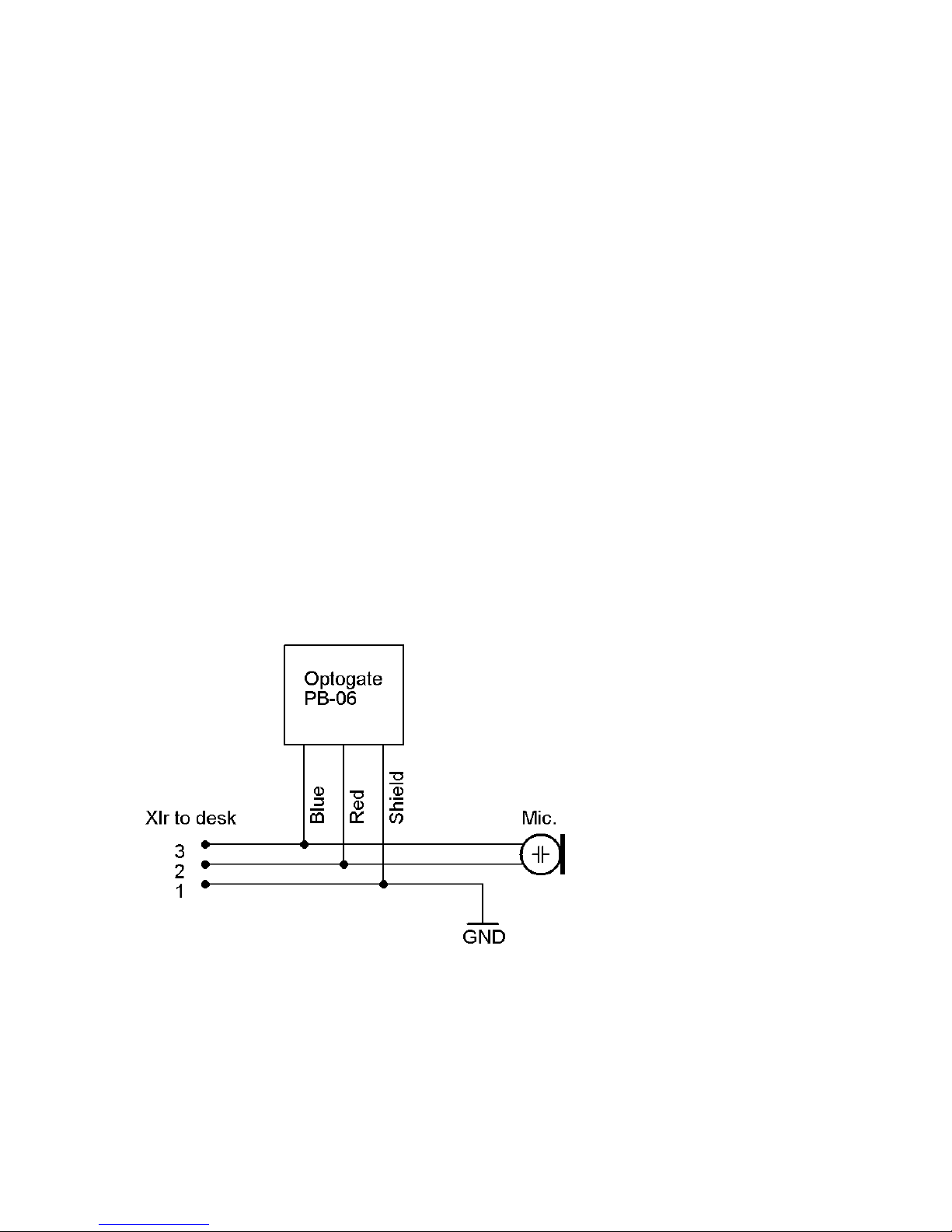
Installation: Wire t he PB-06 as in the schematic below. You can use an XLR
mic cable by splicing it say in the middle, and soldering the PB- 06 in parallel
with both male and female XLR connector wires. Install the PB-06 under or
on top of a Table, Podium or Lectern with the sensor front plate about 1 inch
or less away from the outside border with the supplied Velcro tape. Switch on
the phantom power and adjust the distance with a small screwdriver and you
have a semi permanent install!
Please note that it is always a good idea to check the function of the
PB-06 together with the artist or spokesperson before the
presentation. Some black clothing reflects the infrared signal poorly,
which in turn will decrease the adjusted distance. (You can prevent
distance problems by installing an additional 2-way switch between the PB-
Page 3

06 and the microphone line, which opens the red and blue wire keeping the
unit always on) or just switch off the phantom power to that channel.
The Optogate devices were developed for use in connection with professional
equipment and should be used by professional system engineers and
operators only. Please be aware that we are not responsible for any hazards,
damages or disadvantages due to the using of the Optogate devices. The
Optogate devices are registered under the number DE54933725 WEEE as
B2B devices. We also declare that they conform to the CE and ROHS for the
European market.
If you have further questions please don’t hesitate to contact us:
Phone: 805.766.0069
Email: [email protected]
 Loading...