

Page 1

Master Specification
Handy Terminal
Product name
Specification No.
Edition
Date of publication
Original Doc. No.
H-1311-BTH
SS08xxx
Initial release
T.B.D
SS08062
Optoelectronics Co., Ltd.
4-12-17 Tsukagoshi
Warabi-shi, Saitama
335-0002 Japan
TEL: +81 (0) 48-446-1183
FAX: +81 (0) 48-446-1184
Page 2

H-1311-BTH SS08xxx
Revision History
Specification No.: SS08xxx
Product Name: H-1311-BTH
Revision Date Section Description of Changes
Initial T.B.D - -
Page 3

H-1311-BTH SS08xxx
Table of Contents
1. Abstract .............................................................................................................................1
2. Overview ...........................................................................................................................1
3. Basic Specifications...........................................................................................................2
4. Detailed View ....................................................................................................................5
5. Optical Specifications ........................................................................................................ 6
6. Technical Specifications ....................................................................................................7
7. Application Development Environment ............................................................................ 11
8. Symbology ......................................................................................................................14
9. Bluetooth Specifications .................................................................................................. 15
10. Serial Label....................................................................................................................16
11. Packaging Specifications............................................................................................... 16
12. Environmental Specifications......................................................................................... 17
13. Reliability.......................................................................................................................18
14. Repair and Maintenance ...............................................................................................18
15. Regulatory Compliance .................................................................................................19
16. RoHS............................................................................................................................. 20
17. Precautions ................................................................................................................... 21
Appendix. Mechanical Drawings ......................................................................................... 23
Page 4

H-1311-BTH SS08xxx
1. Abstract
This document provides specifications for the H-1311-BTH, a handy terminal with built-in laser
scanner (hereinafter “the handy terminal”) .
2. Overview
• The H-1311-BTH is a barcode handy terminal which contains a compact laser scanner.
• Collected data by each key operation, various setting data and add location data such as clock
information can be stored in a built-in memory.
• The dedicate optical communication unit is able to send the stored data to devices such as host
computer through IrDA
• AA alkaline batteries and the dedicated lithium-ion battery are useable for main power supply.
2.1. Model Name, Type
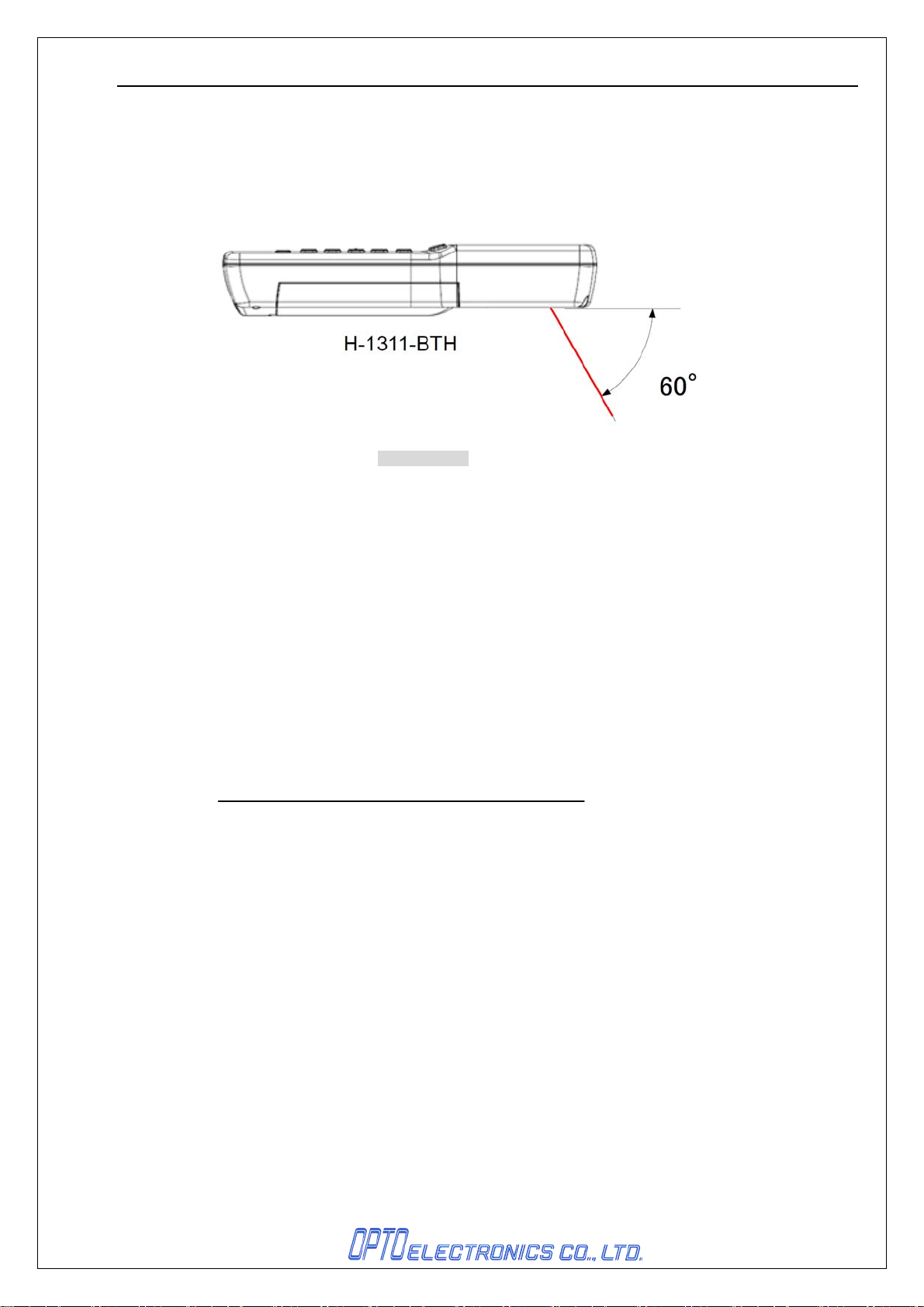
Model Name: H-1311-BTH (Body: light grey, laser emitting angle: 60°)
2.2. Features
• Light weight and compact design
• Large-capacity memory (RAM: 16MB) can hold vast amount of master data and collected
• IrDA FiR(max.4Mbps) provides high-speed update and download.
• The used Bluetooth is compliant with ver.1.2 and SPP profile is installed.
• Easy use with one hand
• Shock resistant up to 1.5 m with enhanced dust- and drip-proofing that satisfies IP54
• This product is compliant with RoHS.
data.
requirements.
(However, this document does not have any legal weight in the European Union)
1
Page 5
H-1311-BTH SS08xxx
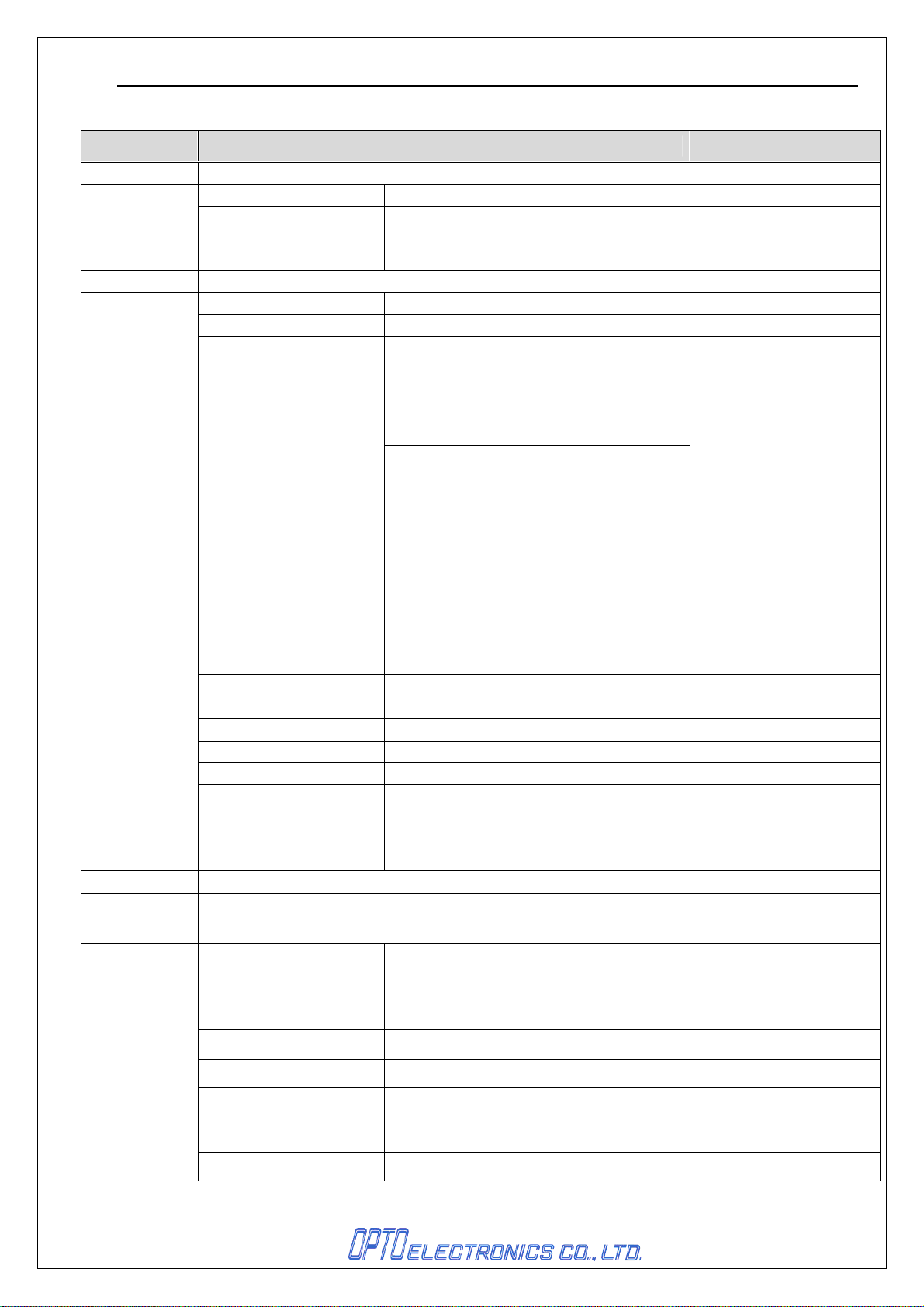
3. Basic Specifications
Items Specifications Remarks
CPU 32bits RISC CPU
FROM 4Mbyte For OS/AP
Memory
OS μITRON
Display section
RAM 16Mbyte(user area: 14Mbyte)
Display element FSTN semi-transmissive LCD
Font size 12/16/24 dot Font
When in 12 dot Font mode
(digit × row)
Reduced-size ANK: 21×21
Half-size character: 21×10
Kanji character: 10×10
When in 16 dot Font mode
(digit × row)
Structure of Characters
Reduced-size ANK: 16×16
Half-size character: 16×8
Kanji character: 8×8
When in 24dot Font mode
(digit × row)
Reduced-size ANK: 10×10
Half-size character: 10×5
Kanji character: 5×5
For:
• Work area for OS/AP
• User’s data
Number of dots (W)128× (L)128 dots
Size of dots (W)0.24mm ×(L)0.24mm
Pitch angle of Dots (W)0.02mm ×(L)0.02mm
Type of characters JIS Standard No.1 and 2, ANK
Back light White LED
Contrast adjustment Possible
Operating
section
Indication LED One dual color LED(red×green)
Vibration Vibrating motor *Vibration time may vary.
Buzzer Adjustable volume/tone
Bluetooth
Key type
(Operation keys)
Specification Compliant with ver.1.2
Installed profile SPP
Frequency 2402MHz to 2480 MHz
Output level Class 2
Communication range 10m
Baud rate 115.2kbps
22keys : 10keys, Trigger, BS,
Shift, CLR, ENT, PW, Q1, Q2,
Function×3
HCI module, produced by
Kyocera
Stack, produced by
iAnywhere
It may be shorter than 10m
depending on the use
environment.
2
Page 6
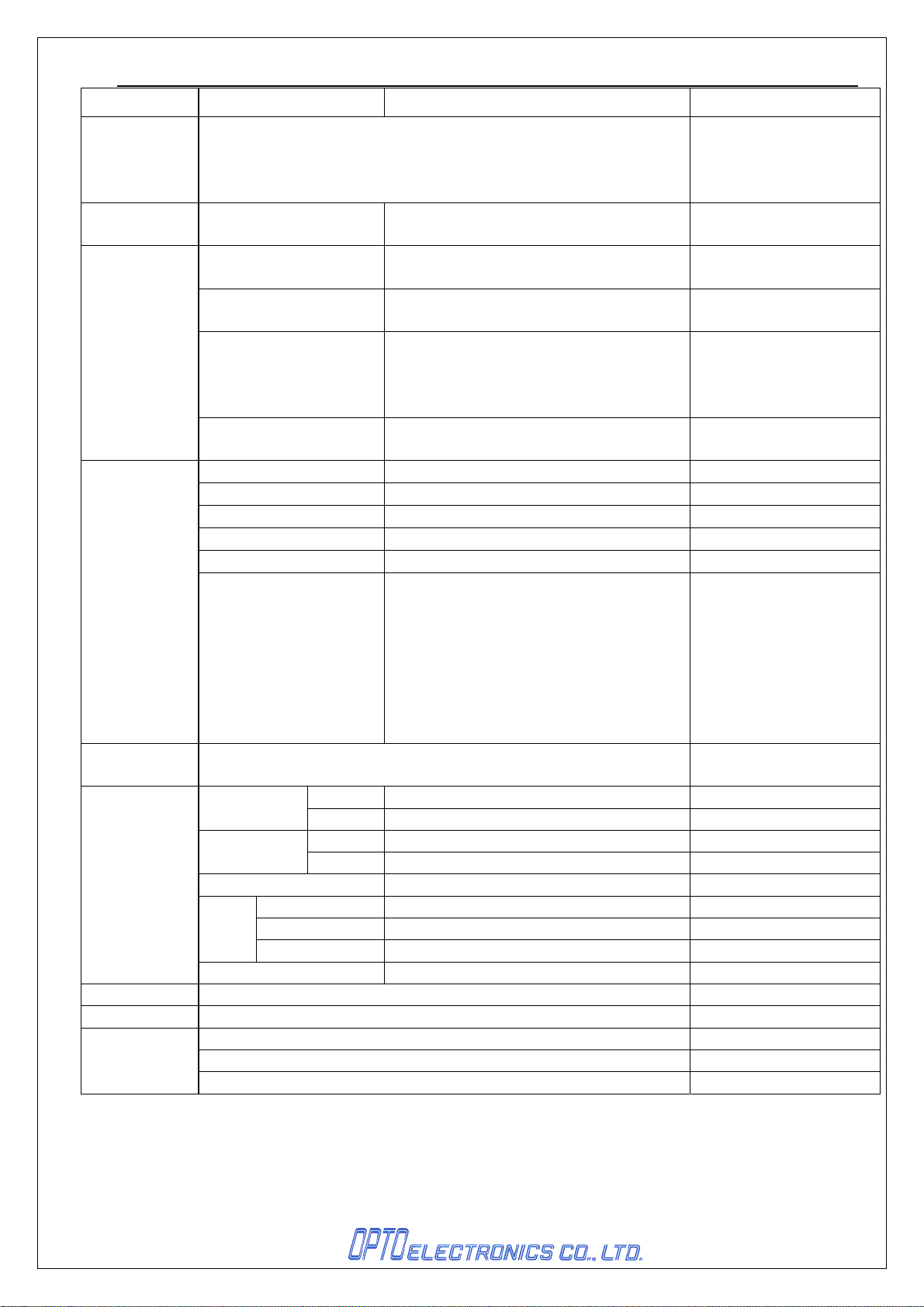
H-1311-BTH SS08xxx
Antenna 1/4λ (surface mounted)
Infrared
communication
RTC(clock) Available
Power Supply
Section
Scanner section
Developmental
environment
Environmental
condition
Dimensions 159.0 × 52.8 × 30.5mm
Weight Approximately 180g (including AA alkaline battery)
Accessory
Compliant with IrDA 1.2
*Speed (SiR): 9600~115.2k(BPS)
(FiR): 4Mbps
YY/MM/DD/HH/MM/SS
(Accurate Within 90 Seconds per Month)
Main Battery
Backup Battery
Up-time
(*1)
Data holding time
(*2)
Light-emitting element Red-visible light semiconductor laser
Laser wave length / output 650±10nm, lower than 1mW, 25°C
Scanning frequency 100±20scan/sec
Minimum resolution 0.127mm
Scanning distance 55 to 520mm Resolution:1.0mm PCS: 0.9
Symbologies
C language
Temperature
Humidity
Charging temperature 0 to 40°C
Drop
test
(*3)
Water and drip proof Compliant with JIS IP-54
Hand strap×1
AA alkaline battery×2
Users manual×1
Frequency 3 cycles (6 sides considered as one cycle)
Height 150cm
Floor Concrete
Operation -10°C to 50°C
Storage -20°C to 60°C
Operation 20%RH to 85%RH No condensation, no frost
Storage 20%RH to 85%RH No condensation, no frost
Lithium-ion Battery (3.7V 1100mAh)
AA alkaline battery×2
Coin-type lithium-ion secondary battery
(18mAh)
Lithium-ion Battery: rs
AA alkaline battery: hrs
7days or longer Back up for RAM / clock
JAN, EAN, UPC-A, UPC-E, NW-7(Codabar),
Industrial 2of5, Interleaved 2of5,
Code 11, Code 39, Code 93, Code 128,
MSI/Plessey, UK/Plessey, IATA, Telepen,
Matrix 2of5, S Code, Tri-Optic,
Chinese Post Matrix 2of5, EAN 128,
RSS-14, RSS Limited, RSS Expanded,
PDF417, MicroPDF417
Note:
These are theoretical
figures and were not
actually measured.
For RAM / RTC back up
Bar Code Scanning:
Twice in 10 seconds
(Electrical cooperation
mode B)
*Please refer to the section 8
for further information.
Application development
environment
3
Page 7

H-1311-BTH SS08xxx
*1 Operation time
- When main battery is new and fully charged at room temperature.
*2 Data holding time
- Time for holding RAM ad clock data when main battery is not supplied and backup battery is new and fully
charged.
*3 Shock resistance
- Conditions of the shock resistance test are:
• Does not count scratches or whitening on a surface as a malfunction.
• Shock resistance is approved when no malfunction occurs after the test.
• Shock resistance is approved if the battery cover is not unhooked after the test
4
Page 8
H-1311-BTH SS08xxx
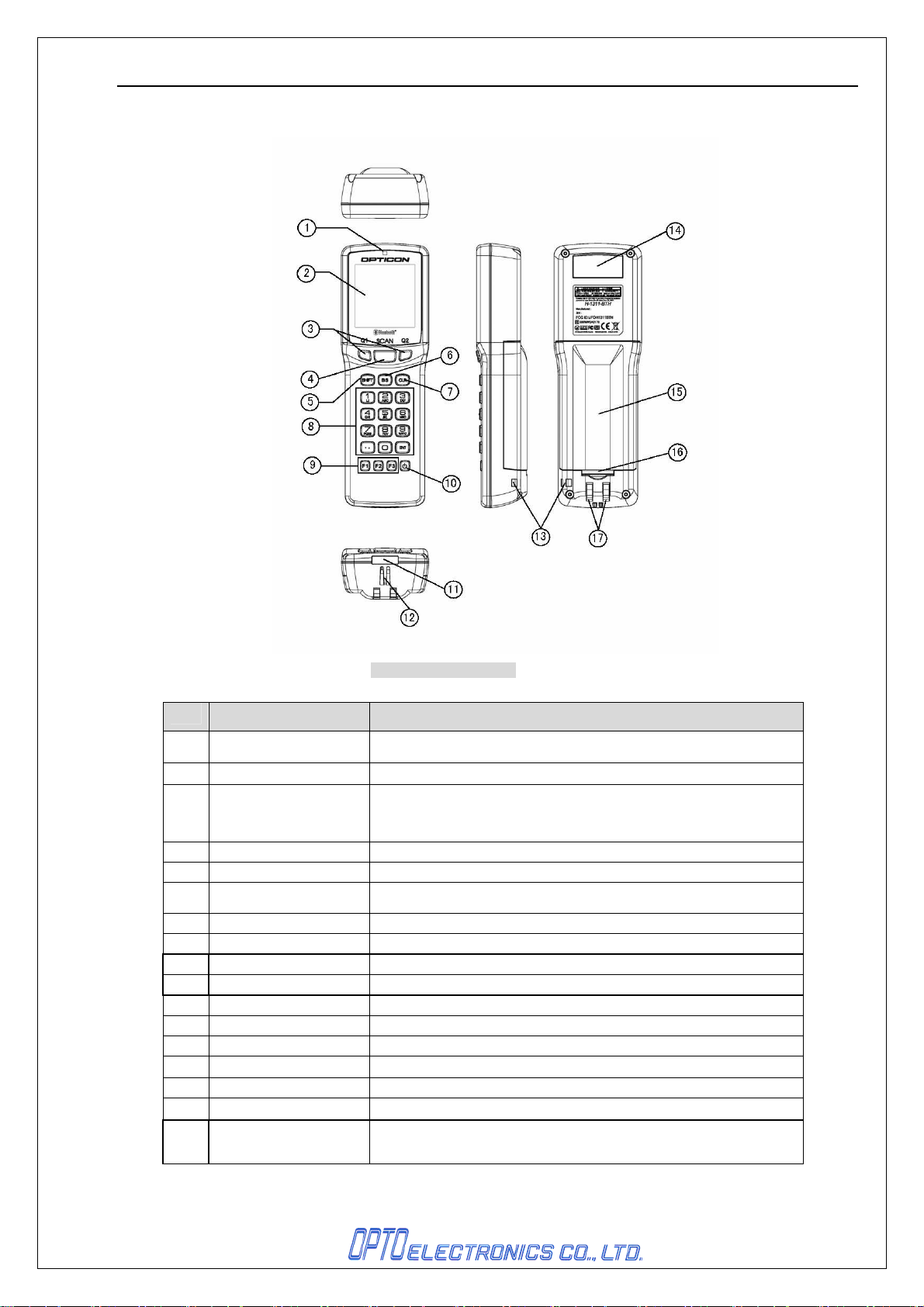
4. Detailed View
Figure1: Detailed view
No.
1 LED
2 LCD
3 Up / Down keys
4 Trigger key Press when scanning barcodes
5 SHIFT Used to switch between numerical and letter entry modes
6 BS
7 CLR Cancels input
8 Operational keys(10) Used for numerical, “ENTER”, decimal point input.
9 F1, F2, F3 Keys that can be programmed by users
10 Power key Used to put the product ON/OFF
11 IrDA For infrared communication
12 Speaker
13 Hand strap hole Hole for attaching a hand strap
14 Scanning window
15 Battery cover Remove when replacing the rechargeable battery
16 Battery cover lock
17 Electrical contacts
Items Specifications
Indicates operational status such as scanning and communication.
It is able to be controlled by user’s programs.
Indicates scanned barcodes and operational items
Used when selecting items from a menu.
Can be programmed by users to set certain functions.
Deletes the previous character
Laser that reads barcodes is emitted from this opening.
Used to lock / open the battery cover
Used to charge the terminal’s battery, when the terminal is placed in
the dedicated cradle.
5
Page 9
H-1311-BTH SS08xxx
5. Optical Specifications
5.1. Laser Scanning Specifications
Item Characteristics Unit
Light-emitting Element Red laser diode
Emission Wavelength 650 ± 10 (25°C) nm
Light Output < 1.0 mW
Scanning Method Bi-directional scanning
Scanning Speed 100±20 Scan/Sec
Scan angle
Scan angle 54±5 °
Read angle 44(min) °
5.2. Laser Scanning Standard
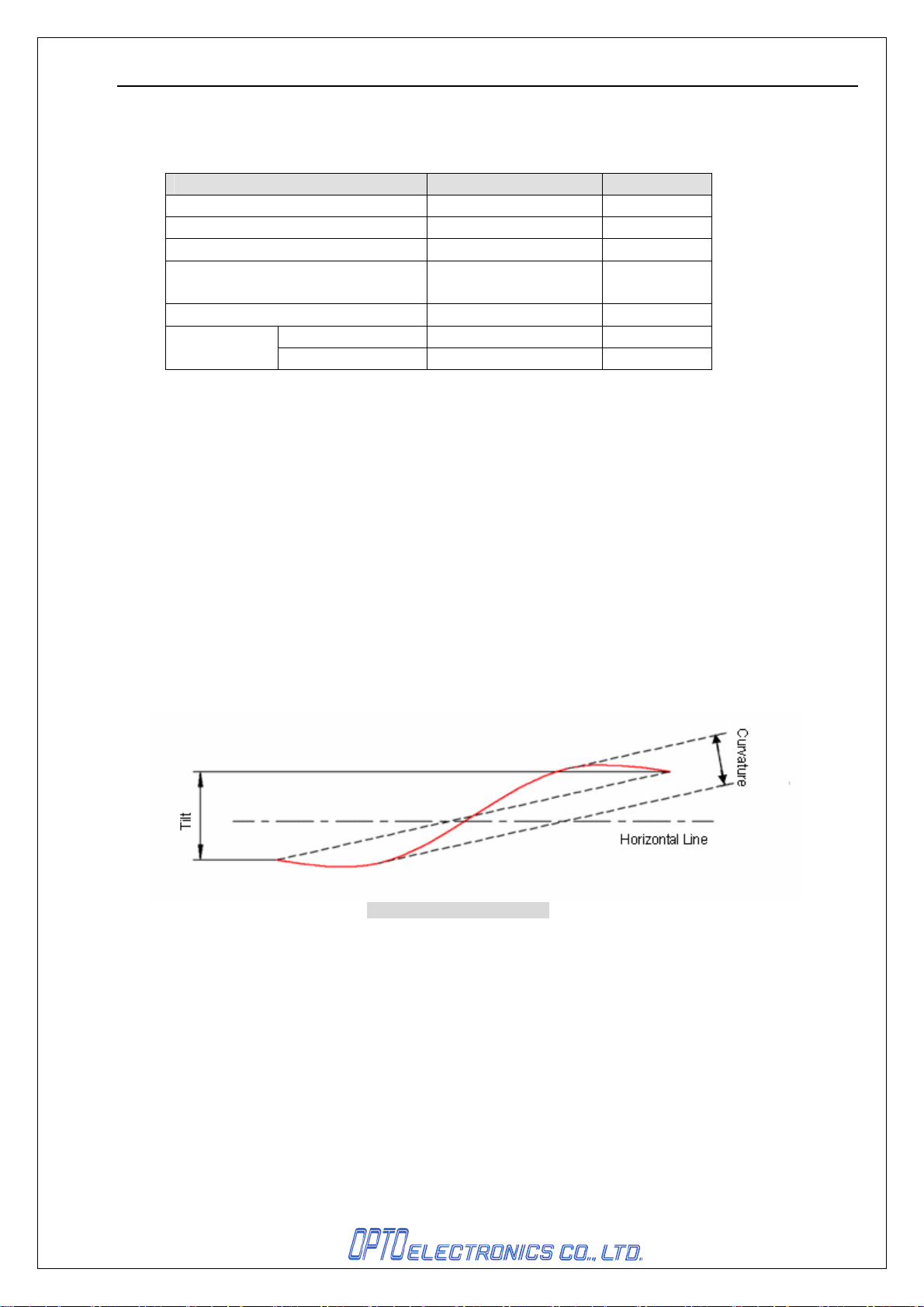
5.2.1. Laser Scanning Tilt
Vertical differences between both ends of a laser scan line
*Up to 1.2
*Up to 3.1 mm at 150 mm from the scan origin.
5.2.2. Scanning Curvature
The maximum differences between the laser scan line and the line between both ends
of the laser scan line.
*Up to 1.27 degrees in vertical direction from the scan origin (mm mirror).
*Up to 3.3 mm at 150 mm from the scan origin.
Measure it in the middle of the laser scan line.
° in vertical direction from the scan origin (MM mirror).
method
Figure2: Scanning curvature
6
Page 10
H-1311-BTH SS08xxx
6. Technical Specifications
6.1. Depth of Field
Figure3: PCS
Except as otherwise noted in each section, technical specification conditions are as follows:
Conditions:
Ambient temperature and humidity
Ambient immunity
Background of barcode
Decoding test
:
room temperature, room humidity
:
500 to 900 lx
:
black
:
Approve the performance when decoding is successful in all
ten tests.
(Decoding is deemed successful when completed in 0.5
seconds or less.)
6.2. Print Contrast Signal
0.45 or higher (over 70% of reflectivity of space and quiet zone).
Reflectance of white bar-Reflectance of black bar
PCS=
Scanning performance may decline if dirt or scratches mar the optical window. Keep the optical
window clean.
Reflectance of white bar
7
Page 11
H-1311-BTH SS08xxx
6.3. Scan Area and Resolution
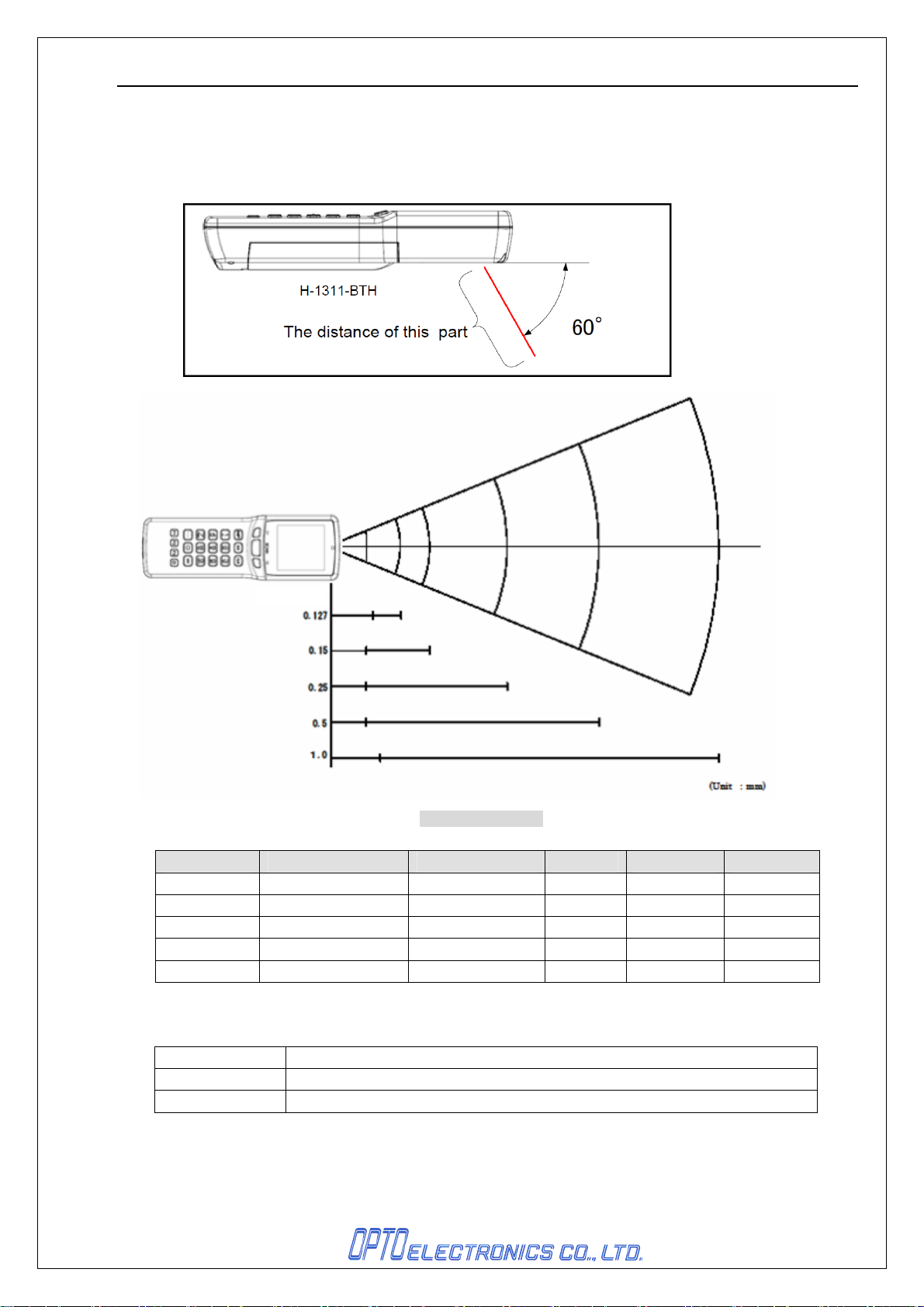
The depth of field is measured from the edge of the scanner. The scanning range is within
the circular arc centered on the scan origin.
Resolution
Figure4: Scan field
Resolution Depth of Field Symbology PCS Quiet Zone Digit
1.0mm 55 to 520 Code 39 0.9 25mm 1
0.5mm 35 to 350 Code 39 0.9 18mm 3
0.25mm 35 to 200 Code 39 0.9 10mm 8
0.15mm 35 to 100 Code 39 0.9 7mm 10
0.127mm 45 to 80 Code 39 0.9 5mm 4
Conditions:
Barcode OPTOELECTRONICS Test Sample, NW ratio = 1:2.5
Angle Pitch: α = 0° Skew: β = +15° Tilt: γ = 0°
Curvature R = ∞
8
In millimeters
Page 12
H-1311-BTH SS08xxx
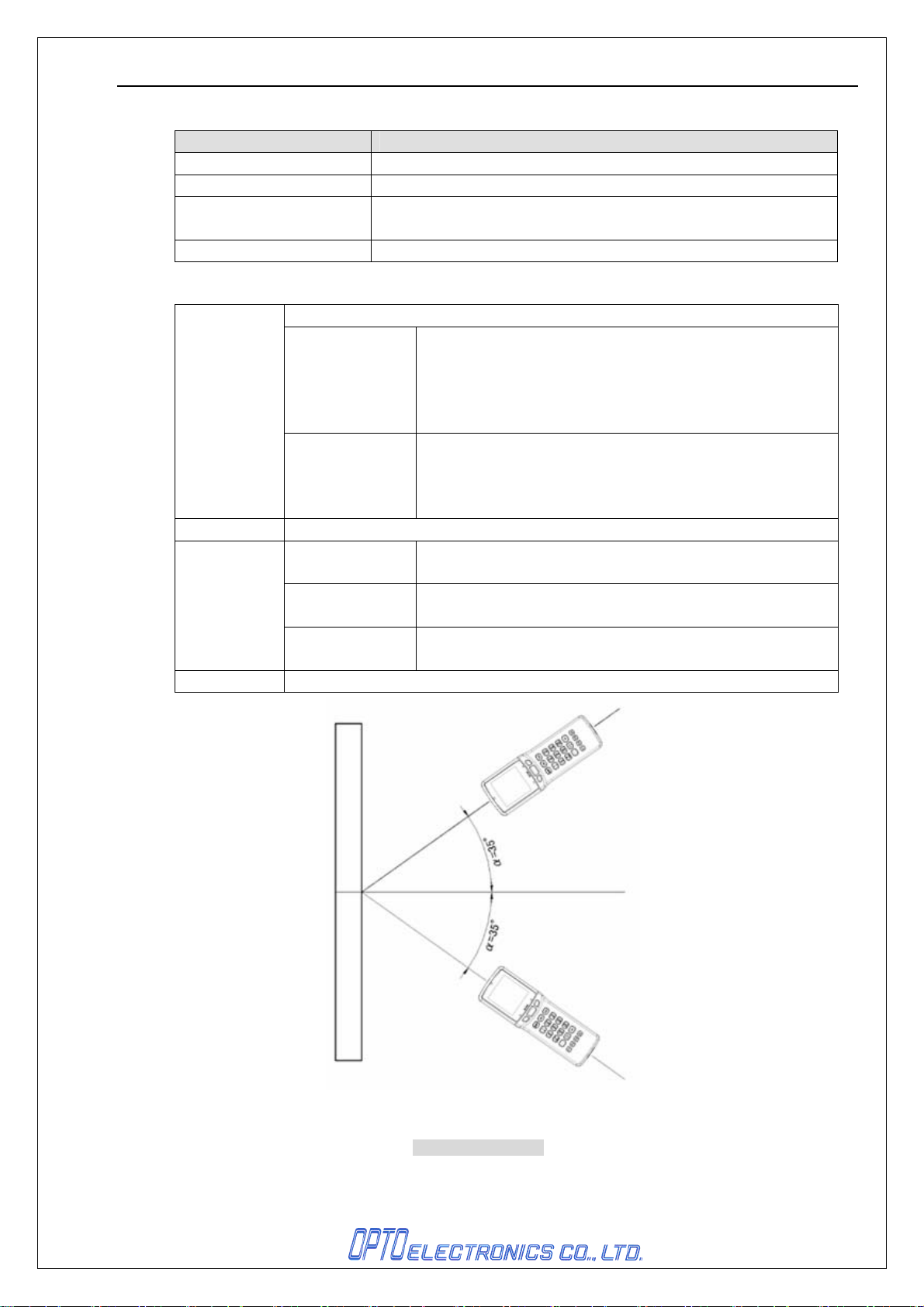
6.4. Pitch, Skew and Tilt
Items Specifications
Pitch α = ±35°
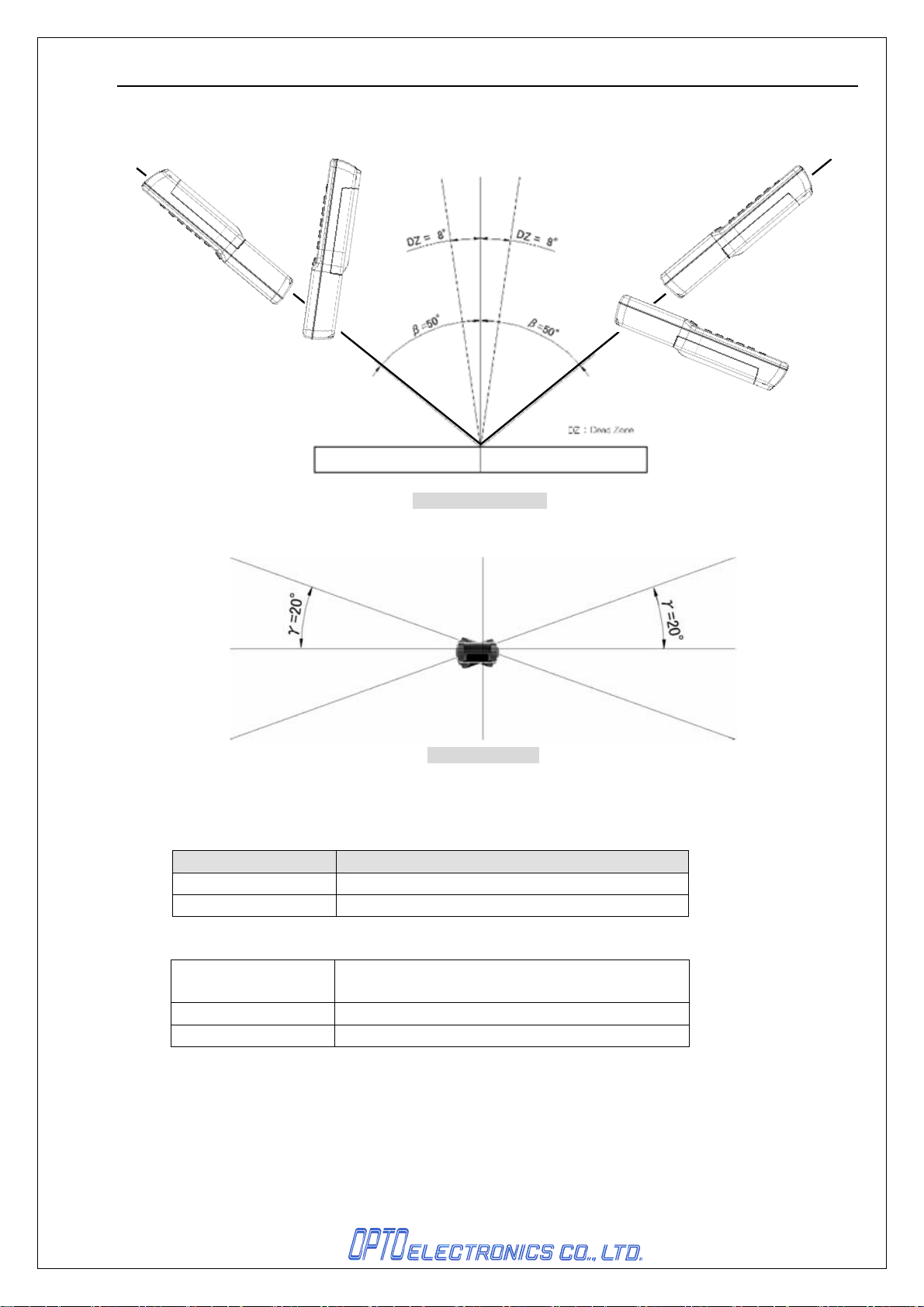
Skew β = ±50°(excluding dead zone)
Dead Zone(DZ) β = ± 8°
(there are some areas in which decoding fails due to specular reflection)
Tilt γ = ±20°
Conditions:
Barcode
Distance 90mm from the edge of the data collector
Angle
Curvature R = ∞
OPTOELECTRONICS Test Sample
Pitch
Skew
Dead zone
Tilt PCS = 0.9
Pitch Skew: β = +15°
Tilt Pitch: α = 0°
Skew
Dead zone
PCS = 0.9
Resolution = 0.25mm
9-digit Code 39
Quiet zone = 10mm
NW ratio 1:2.5
Resolution = 0.26mm
13-digit JAN
Quiet zone = 10mm
Tilt: γ = 0°
Skew: β = +15°
Pitch: α = 0°
Tilt: γ = 0°
Figure5: Pitch angle
9
Page 13
H-1311-BTH SS08xxx
H-13
H-1311
H-13
H-1311
Figure6: Skew angle
6.5.Curvature
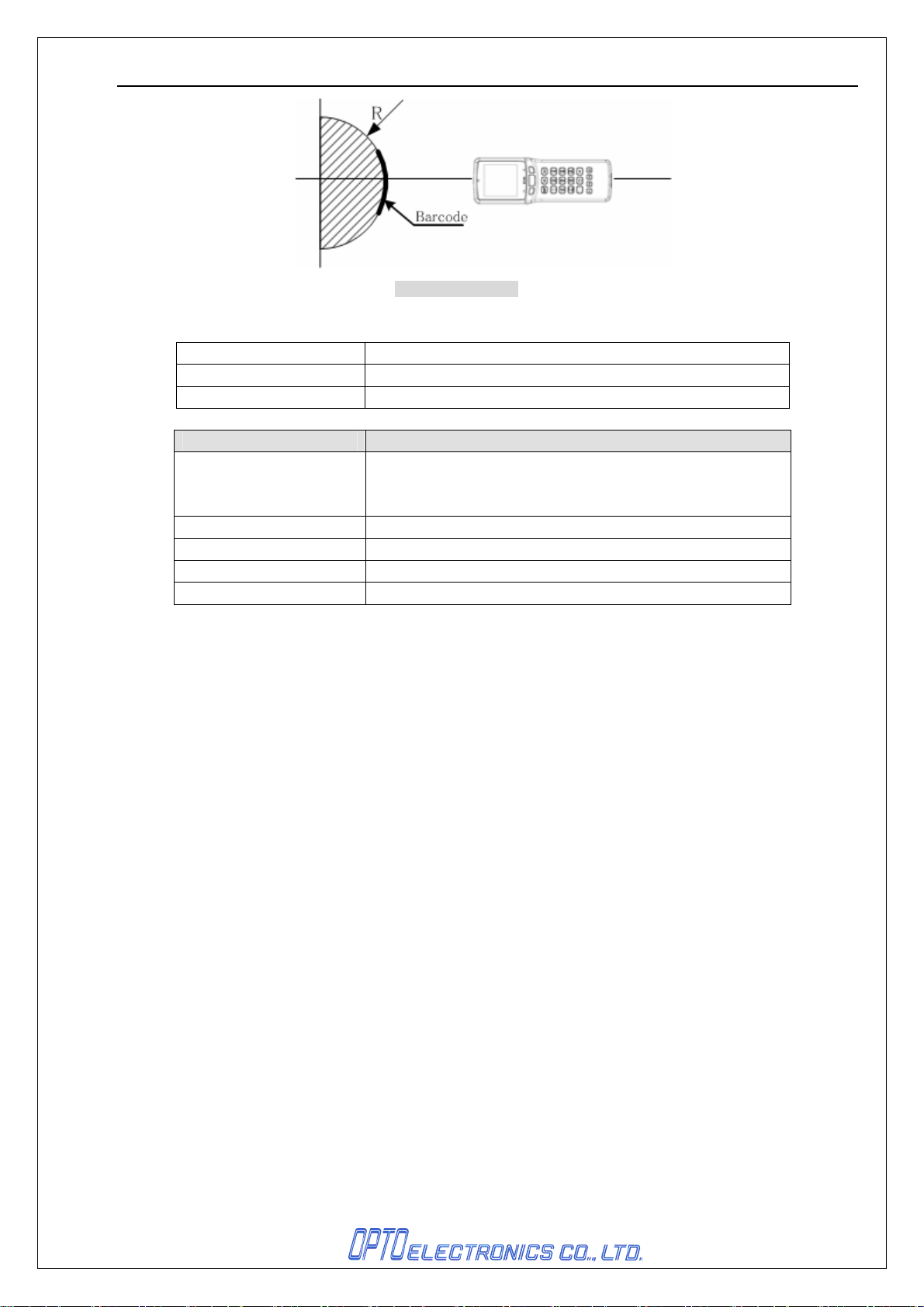
8-digit JAN decoding performance is guaranteed when R≥15 mm.
13-digit JAN decoding performance is guaranteed when R≥20 mm.
Conditions:
Barcode OPTOELECTRONICS Test Sample
Distance 90mm from the edge of the data collector
Angle Skew β = +15°
Figure7: Tilt angle
Items Specifications
PCS = 0.9 Resolution = 0.26mm Quiet zone = 10mm
10
Page 14
H-1311-BTH SS08xxx
Figure8: Curvature
6.6. Ambient Light Immunity
Incandescent light 4000 lx
Fluorescent light 4000 lx (except high frequency fluorescent light)
Sunlight 80000 lx
Items Conditions
Barcode OPTOELECTRONICS Test Sample
PCS = 0.9 Resolution = 0.25mm 9-digit Code 39
Quiet zone = 10mm NW ratio 1:2.5
Distance 130mm from the edge of the data collector
Angle α = 0° β = 15° γ = 0°
Curvature R = ∞
Measurement location Specular reflection should be avoided.
7. Application Development Environment
This chapter will explain the optional development environment to develop business-orientated
applications.
The language for the development is C language.
<Contents of the development>
• Application development guide
• Application development environment
• System menu specification manual
• Library specification manual
• Compiler(*)
*Produced by IAR
Part name: Embedded Workbench (abbr.: EWARM)
11
Page 15
H-1311-BTH SS08xxx
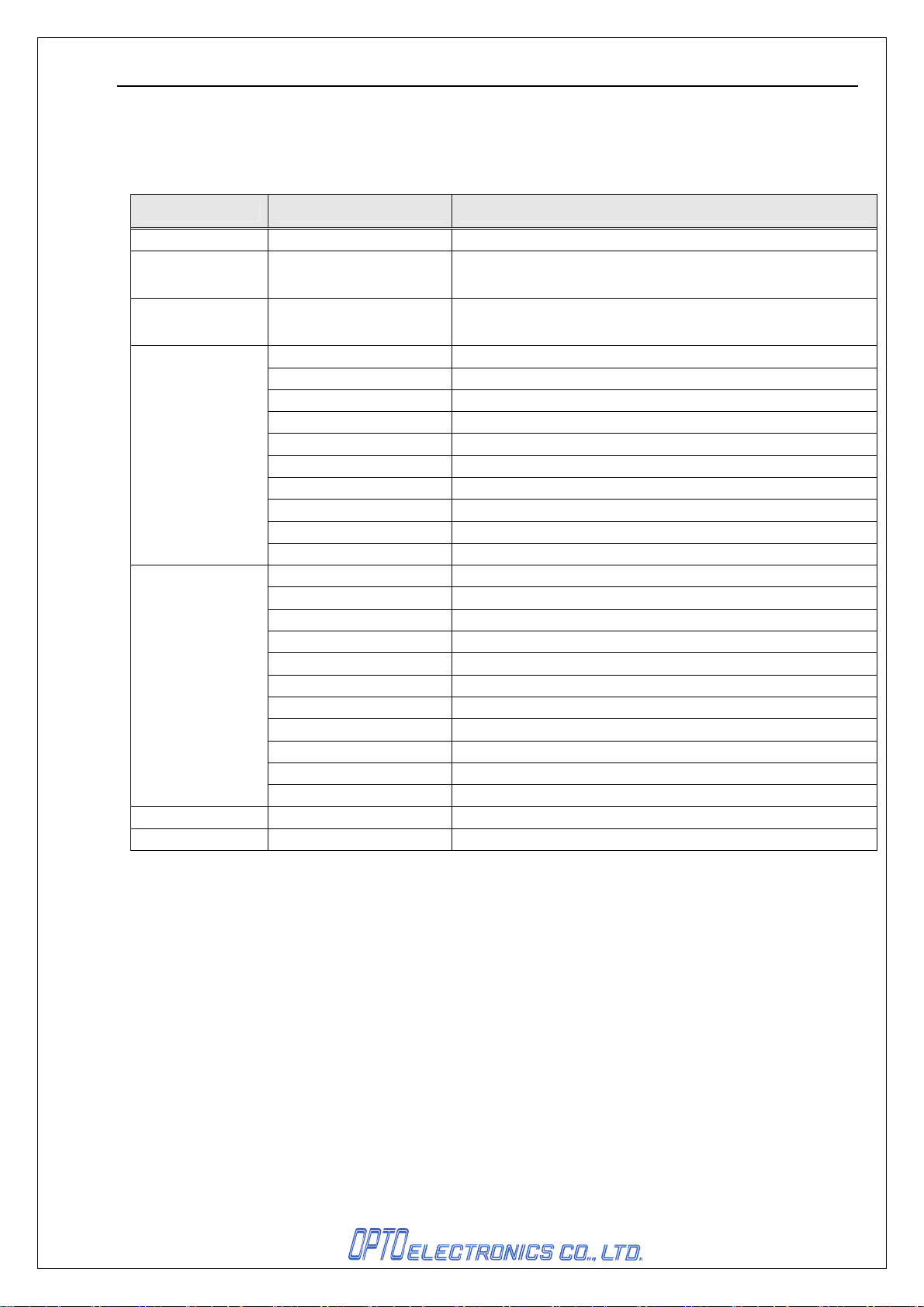
7.1. System Menu
This is the system menu for user application download and the settings for the handy terminal.
To start the system menu, hold down the “Q1” and ”Q2” keys when turn the power ON. (*1)
Main menu Sub menu Function
Restart Closes the system menu
Download
Upload
Used for the application download.
When it is completed successfully, application is started.
Used for the application download.
Terminal settings
Terminal test
File list Disk A: Indicates the file lists in the RAM disk.
Version info. Indicates version information of OS, BOOT, etc.
Contrast setting Adjusts the contrast of LCD
Date setting Sets the system date
Click tone setting Sets click tone
Terminal ID setting Used for the terminal ID setting and confirmation
Resume setting Sets enable / disable resume
Auto-power down setting Sets the duration for auto-power down
Back light setting Sets to put on/off the back light of display
Battery power indication Indicates the battery power status
Cradle protocol setting Sets availability of protocol when communicating with the cradle
Initialization setting Initializes all settings to the factory mode
Display Tests the display
Key Tests the keyboard
Memory Memory check
Buzzer Tests the buzzer tone
LED Tests the LED
Back light Tests the back light
Vibrator Tests the vibrator
RTC Tests the system date
Battery Checks the voltage of main/sub batteries
Scanner Tests the scanner
Bluetooth Tests if data transmission/reception is successfully done.
*1 When user application is not available, system menu is activated by power ON.
12
Page 16
H-1311-BTH SS08xxx
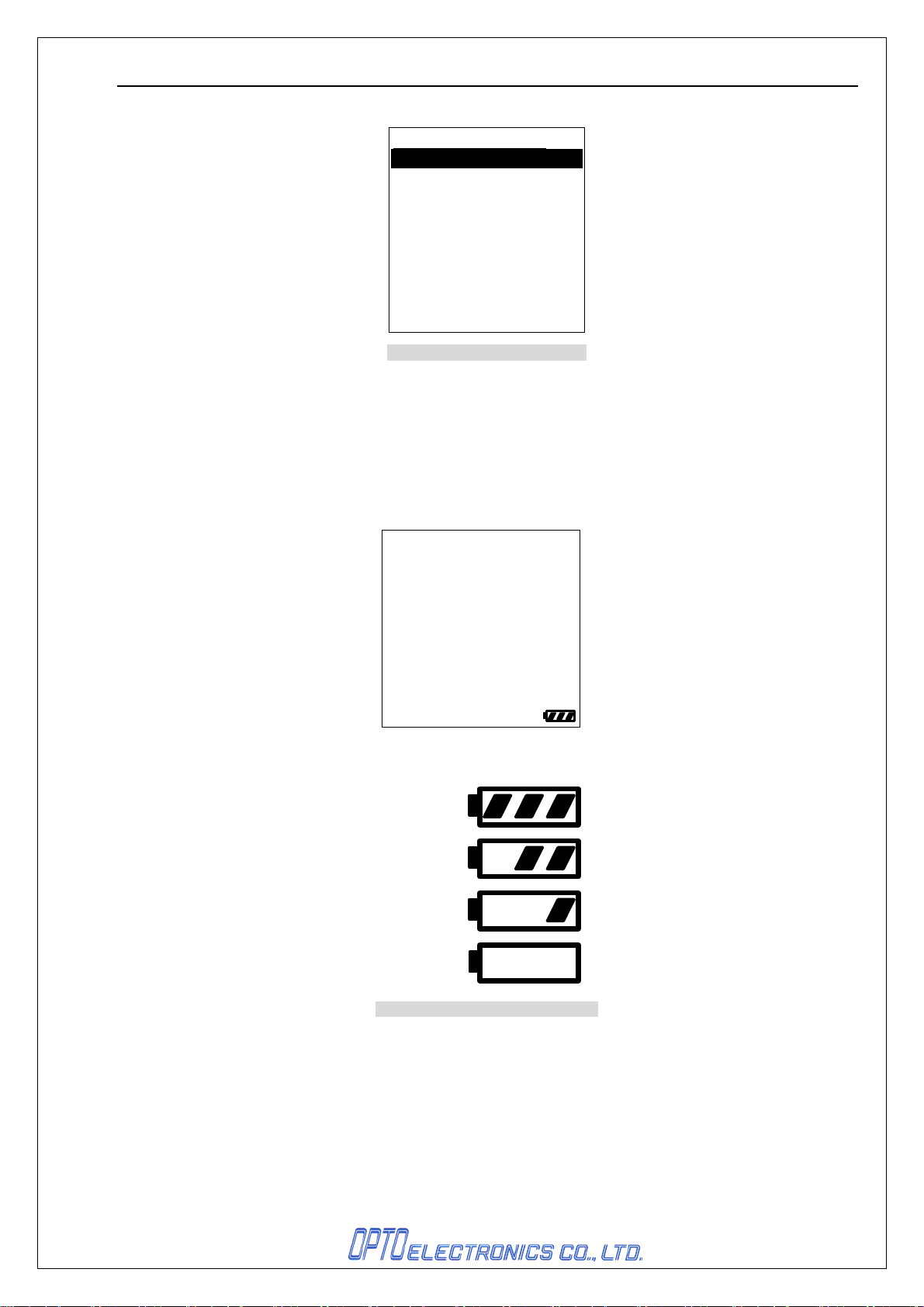
System Menu
> Restart
Download
Upload
Terminal setting
Terminal test
File list
Version information
Figure 9: System menu display
*Please refer to the library specification manual for your further information.
7.2. Battery power indication
The power of battery will be indicated the bottom right of the display as shown in the figure below.
Battery power is indicated with either of the steps shown below.
*Whether the battery power indication is set or not, the “Step 4” mark will appear on the display when the
battery power has ran out. In that case, please replace a new battery immediately.
Step1:
Step2:
Step3:
Step4:
Figure 10: Battery power indication
13
Page 17
H-1311-BTH SS08xxx
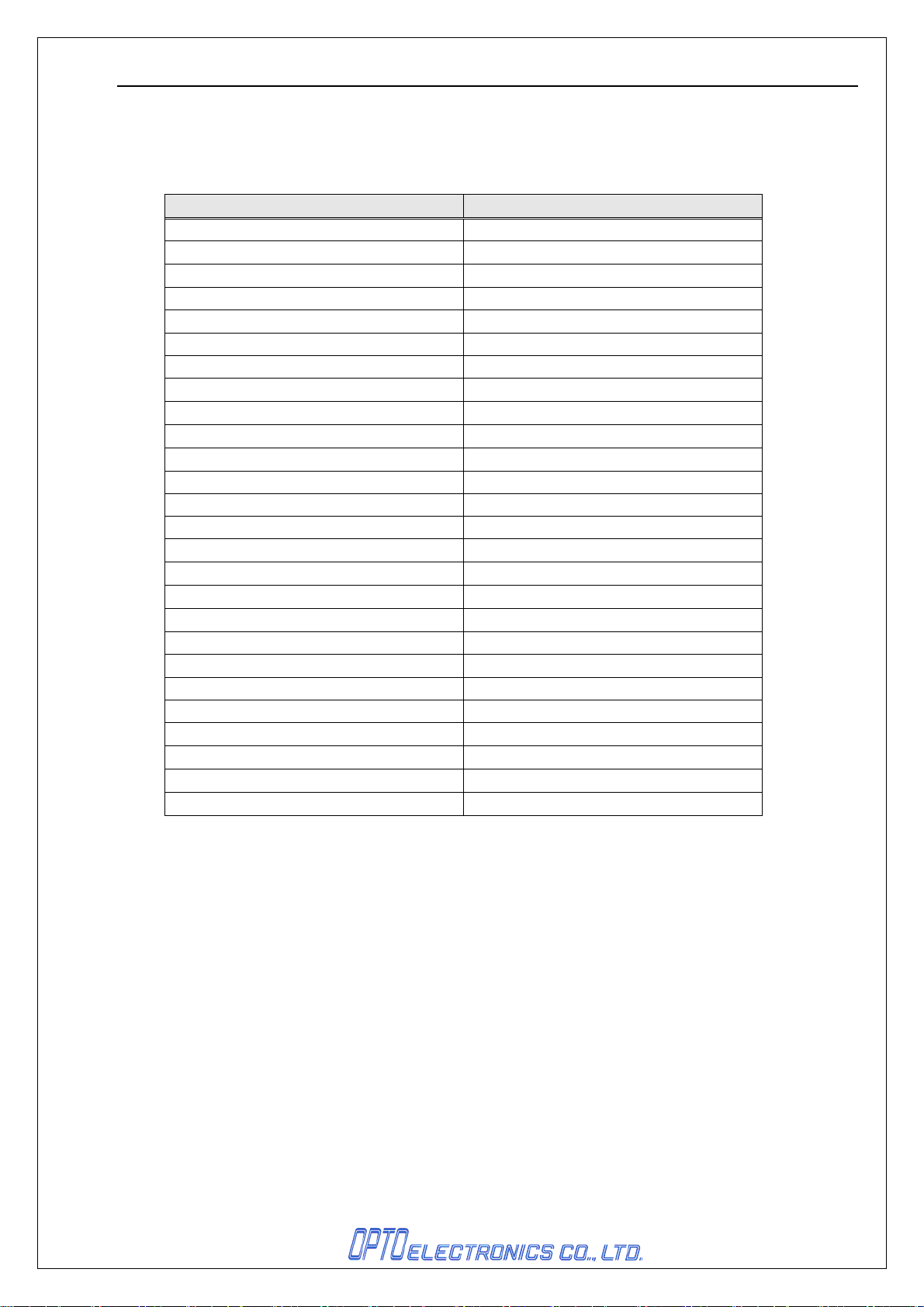
8. Symbology
For various business use, symbologies can be set by each application.
Symbologies shown below are available for scanning.
13-digits JAN Interleaved 2of5
13-digit JAN + 2-digit ADDON Code 93
13-digit JAN + 5-digit ADDON Code 128
8-digit JAN MSI/Plessey
8-digit JAN + 2-digit ADDON IATA
8-digit JAN + 5-digit ADDON UK/Plessey
13-digit EAN Telepen
13-digit EAN + 2-digit ADDON Matrix2of5
13-digit EAN + 5-digit ADDON ChinesePostMatrix 2of5
8-digit EAN NW-7 ABC Code
8-digit EAN + 2-digit ADDON NW-7 CX Code
8-digit EAN + 5-digit ADDON S-Code
13-digit Instore Code Tri/Optic
8-digit Instore Code Code 39 Full Ascii
UPC-A Code 39 It.Pharmaceutical
UPC-A + 2-digit ADDON EAN 128
UPC-A + 5-digit ADDON RSS-14
UPC-E RSS Limited
UPC-E + 2-digit ADDON RSS Expanded
UPC-E + 5-digit ADDON PDF417
UPC-E1 MicroPDF417
UPC-E1 + 2-digit ADDON Code 11
UPC-E1 + 5-digit ADDON Korean Post
Code 39
NW-7(Codabar)
Industrial 2of5
*Please refer to the library specification manual for your further information.
Symbologies Symbologies
14
Page 18

H-1311-BTH SS08xxx
9. Bluetooth Specifications
Bluetooth is used as an interface for the H-1311-BTH.
It is compliant with ver1.2 and has SPP (Serial Port Profile).
9.1. Profile Installed
• SPP (Serial Port Profile)
9.2. Supported Communication Type
1 to 1 (One data collector to one host system)
9.3. Operation Mode (When connected)
Master mode
9.4. Security Mode
Available (authentication)
9.5. Encryption
Available
15
Page 19
H-1311-BTH SS08xxx
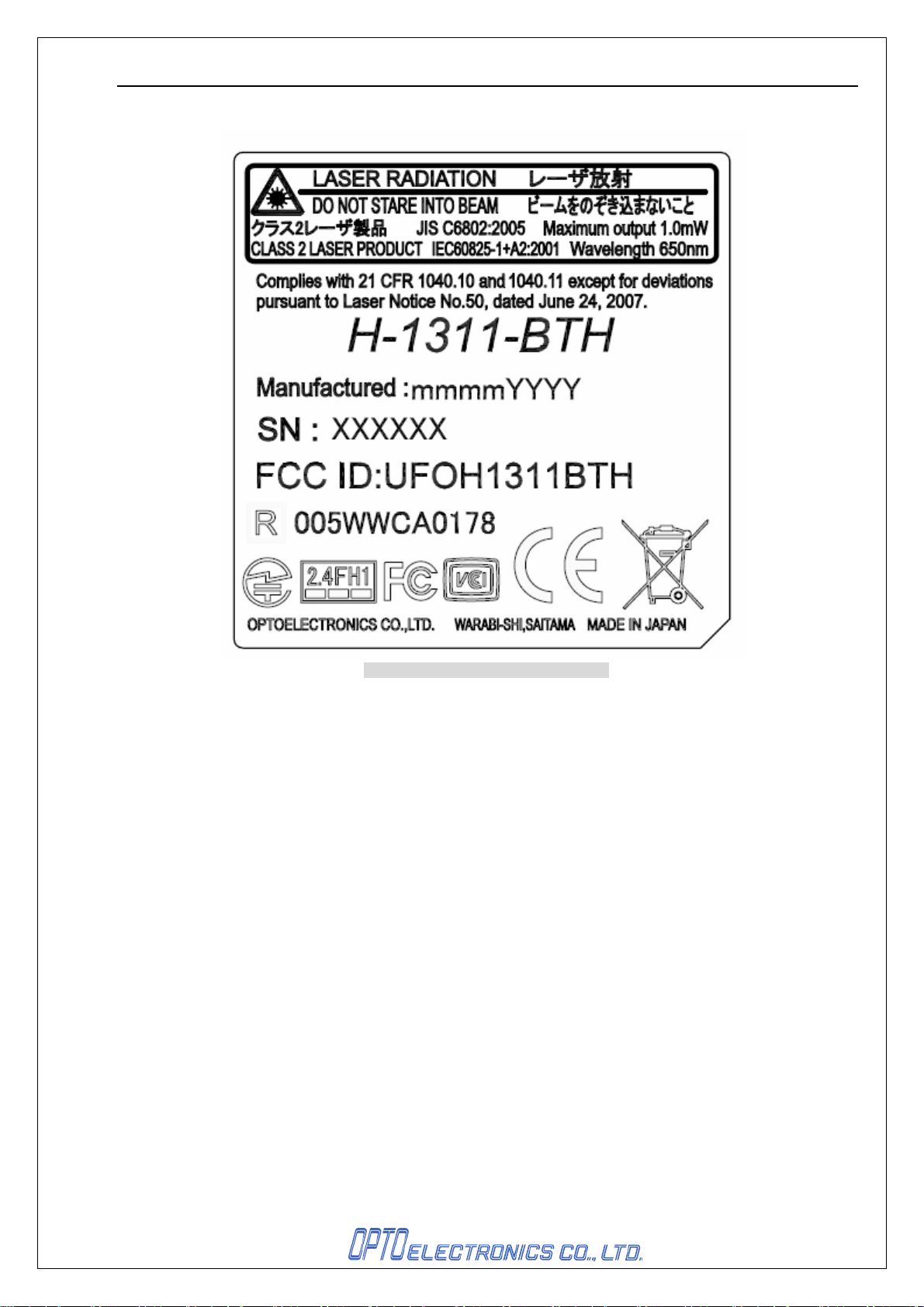
10. Serial Label
Figure 11: Serial label for H-1311-BTH
11. Packaging Specifications
11.1. Individual Packaging Specifications
T.B.D
11.2. Collective Packaging Specifications
T.B.D
16
Page 20
H-1311-BTH SS08xxx
12. Environmental Specifications
12.1. Operation Temperature and Humidity
-10°C to 50°C (except when charging)
20 to 85% RH (No condensation, no frost)
12.2 Storage Temperature and Humidity
-20°C to 60°C
20 to 85% RH (No condensation, no frost)
12.3. Ambient Light Immunity
Decoding performance is guaranteed when the range of illumination on a barcode
surface is between zero and the following values:
Incandescent light 4000 lx
Fluorescent light 4000 lx (except high frequency fluorescent light)
Sunlight 80000 lx
12.4. Dust and Drip Proof
IEC: IP54
12.5. Vibration Strength
No malfunction occurred after the following vibration test.
Vibration test: Increase the frequency of the vibration from 10 Hz to 100 Hz with
accelerated velocity 19.6 m/s
routine in each X, Y, Z direction once for 60 minutes each
2
(2.0G) for 60 minutes in non-operating state. Repeat this
.
12.6. Vibration Strength (with individual packaging)
No malfunction occurred after the following vibration test.
Vibration test: Increase the frequency of the vibration from 10 Hz to 100 Hz with
accelerated velocity 19.6 m/s
Repeat this routine in each X, Y, Z direction once for 60 minutes each.
2
(2.0 G) for 60 minutes in individually packaged state.
12.7. Drop Test
No malfunction occurred after the following test.
Drop Test: Drop the scanner from 150cm above the concrete floor.
(6 sides, 3 times each)
12.8. Drop Test (with individual packaging)
No malfunction occurred after the following test.
Drop Test: Drop an individually packaged scanner from a height of 150 cm onto a
concrete floor once on its 1 corner, 3 edges and 6 sides. (10 drop tests in total.)
17
Page 21

H-1311-BTH SS08xxx
12.9. Electrical Characteristics
• Withstand Voltage: AC 1500 V/ per 60 seconds, 10mA or less
• Insulation Resistance: DC 500 V, 2 MΩ or higher
• Current Leakage: 250 μA or less / AC 250 V 60 Hz
• Static Electricity Noise Immunity:
No destruction found: ± 15kV (air or direct discharge)
No malfunction found: ± 10kV (air or direct discharge),
± 6kV (contact, direct or indirect discharge)
Note: Testing method complies with IEC-61000-4-2. (150pF/330Ω)
13. Reliability
MTBF 10,000 hours
14. Repair and Maintenance
14.1. Waranty Period
Optoelectronics Co., Ltd. (hereinafter referred to as “Optoelectronics”) warrants that this
product is free of defects or malfunctions for a period of twelve (12) months from the end of
the month it is shipped. In the case where defects or malfunctions of this product occur
during foregoing warranty period, Optoelectronics provides repairs free of charge. Any
repair or replacement of this product after the foregoing warranty period will be billable. If
defects or malfunctions were caused by mishandlings of customers, the repair or
replacement of this product will be billable even during the foregoing warranty period.
14.2. Delivery
Maintenance and repair after the shipment of the product shall be done using send-back
system (transport costs paid by the sender).
14.3. Time Frame of Repairing Products
Repaired product will be shipped back to the customer within 20 days after its acceptance
by Optoelectronics. However, the time needed for the repair of products with early failures
need to be separately discussed with Optoelectronics. Also, if quicker repair is needed, it
must be discussed with Optoelectronics in advance.
14.4. Maintenance Period
The maintenance period of this product is 5 years after its shipment.However, if deemed
difficult to continue the maintenance of the product before the end of the foregoing
maintenance period, products for its replacement or means of its maintenance shall be
discussed separately.
14.5. Others
Any problems other than those described above shall be discussed separately.
18
Page 22
H-1311-BTH SS08xxx
.FCC Radiation Exposure Statement
This device complies with Part 15 of FCC RF Rules. Operation is subject
to the following two conditions: 1) this device may not cause interference
and 2) this device must accept any interference, including interference
that may cause undesired operation of the device. Please avoid direct
contact to the transmitting antenna during transmitting.
This equipment complies with FCC RF radiation exposure limits set forth
for an uncontrolled environment.
15. Regulatory Compliance
15.1. Laser Safety
・JIS C 6802:2005 Class 2
・IEC60825-1+A2:2001 Class 2
・CDRH Class 2
15.2. Product Safety
・IEC60950-1
・EN60950-1
15.3. EMC
・EN55024
・VCCI Class B
This is a Class B product, to be used in a domestic environment, based on the Technical
Requirement of the Voluntary Control Council for Interference from Information
Technology Equipment (VCCI). If this is used near a radio or television receiver in a
domestic environment, it may cause radio interference.
・FCC Part15 SubpartB Class B
This device complies with part 15 of the FCC Rules. Operation is subject
to the following two conditions : ( 1 ) this device may not cause harmful
interference, and ( 2 ) this device must accept any interference received,
including interference that may cause undesired operation.
19
Page 23

H-1311-BTH SS08xxx
・FCC Part15 SubpartC
Federal Communications Commission Notices
This product complies with Part 15 of the FCC Rules. Operation is subject to the following two
conditions:
(1) this device may not cause harmful interference, and
(2) this device must accept any interference received, including interference that may cause undesired
operation.
Harmful Interference Notice
This product has been tested and complies with the specifications for a Class B digital device, pursuant
to Part 15 of the FCC Rules. These limits are designed to provide reasonable protection against
harmful interference in a residential installation. This equipment generates, uses, and can radiate radio
frequency energy and, if not installed and used according to the instructions, may cause harmful
interference to radio communications. However, there is no guarantee that interference will not occur in
a particular installation. If this equipment does cause harmful interference to radio or television
reception, which is found by turning the equipment off and on, the user is encouraged to try to correct
the interference by one or more of the following measures:
• Reorient or relocate the receiving antenna
• Increase the separation between the equipment or devices
• Connect the equipment to an outlet other than the receiver's
• Consult a dealer or an experienced radio/TV technician for assistance
Changes or modifications to this equipment that have not been approved by Ruckus Wireless may void
the user's authority to operate this equipment.
15.4. R&TTE
・EN300 328
・EN301
・EN301
489-1
489-17
15.5. Others
・Certification for Construction Design of Specified Radio Equipment
・Bluetooth logo certification
16. RoHS
RoHS: The restriction of the use of certain hazardous substances in electrical and electronic
equipment, 2002/95/EC.
20
Page 24

H-1311-BTH SS08xxx
17. Precautions
17.1. Precautions about the laser light
Caution – Use of controls or adjustments or performance of procedures other than those
specified herein may result in hazardous radiation exposure.
・Do not stare into the laser light from a scanning window. It may harm your eyes.
・Do not point the laser directly at others’ eyes. It may harm your eyes.
・Do not stare into the beam with optical instruments. It may harm your eyes.
17.2. Radio Low
The data collector has obtained the Certification for Construction Design of Specified Radio
Equipment.
Therefore it does not need to have a radio station license in Japan.
The following activities are prohibited under the Radio Law:
• Remodeling and disassembly
• Peeling off the certificate label
Do NOT use the data collector under the following environment:
*Otherwise radio interference may affect other device and end up with causing physical or
material damage.
• Safety apparatus and medical device for human body protection
• Environment where is concerned to cause serious damage
17.3. Handling
Do not deliberately cause this product any stress listed below
(1) Shock:
・Do not drop from the non-standard height
(2) Heat:
・Use outside specification temperature range.
・Do not pour boiling water on the data collector.
・Do not throw data collector into the fire.
(3) Foreign material:
・Do not put into water.
・Do not put into chemicals.
(4) Data Communication
IrDA communication may not be done under an strong inverter fluorescent. Please be
aware of the operational enviroment.
(5) Others:
・Do not plug/unplug the connectors before diconnecting the power.
・Do not diassemble this product
・Do not use this product near a radio or a TV receiver, it may cause reception disorder.
・Do not use of this product in the environment with excessive static electricity, it may
cause product malfunction.
・Scanning performance of this product under an inverter fluorescent lamp or CRT light is
not guaranteed.
21
Page 25

H-1311-BTH SS08xxx
17.4. Export Administration Regulations
This product is subject to the strategically controlled exports regulated under “Foreign
Exchange and Foreign Trade Laws”. Therefore, export of this product may require an export
permission of Japanese government.
17.5. Radio Communication
• To start IrDA communication through the H-1311-BTH, the device used as a receiver is
required followings;
- to be compliant with the same version as H-1311-BTH
- to have the same profile as H-1311-BTH
• The connection with a recipient without preliminary test is not guaranteed.
• Since the communication uses the 2.4 GHz, it may be interrupted by various devices
using the same frequency bands.
• This product (with national specification) should only be used in Japan. The use of the
product outside Japan may be fined.
• Baud rate and communication distance vary depending on obstructions between the
devices, radio wave condition, and the receiver.
17.6. Frequency Band
The frequency band 2.4 GHz is utilized by this scanner. Read carefully the followings before
using this product.
In the frequency band of this scanner, scientific, medical and industrial devices including
microwaves are used. Also other radio stations including local private radio station for mobile
object identification requiring license for such as manufacturing lines at factories, specific
power-saving radio station requiring no license and amateur radio station are managed.
Please make sure that “other radio stations” are not managed in the frequency band 2.4 GHz
before using this scanner.
In case that radio interference occurs between this scanner and “other radio stations,”
change the service space immediately, or stop transmitting radiowave to avoid the
interference.
If you have any questions or troubles, please contact our marketing group.
22
Page 26
H-1311-BTH SS08xxx
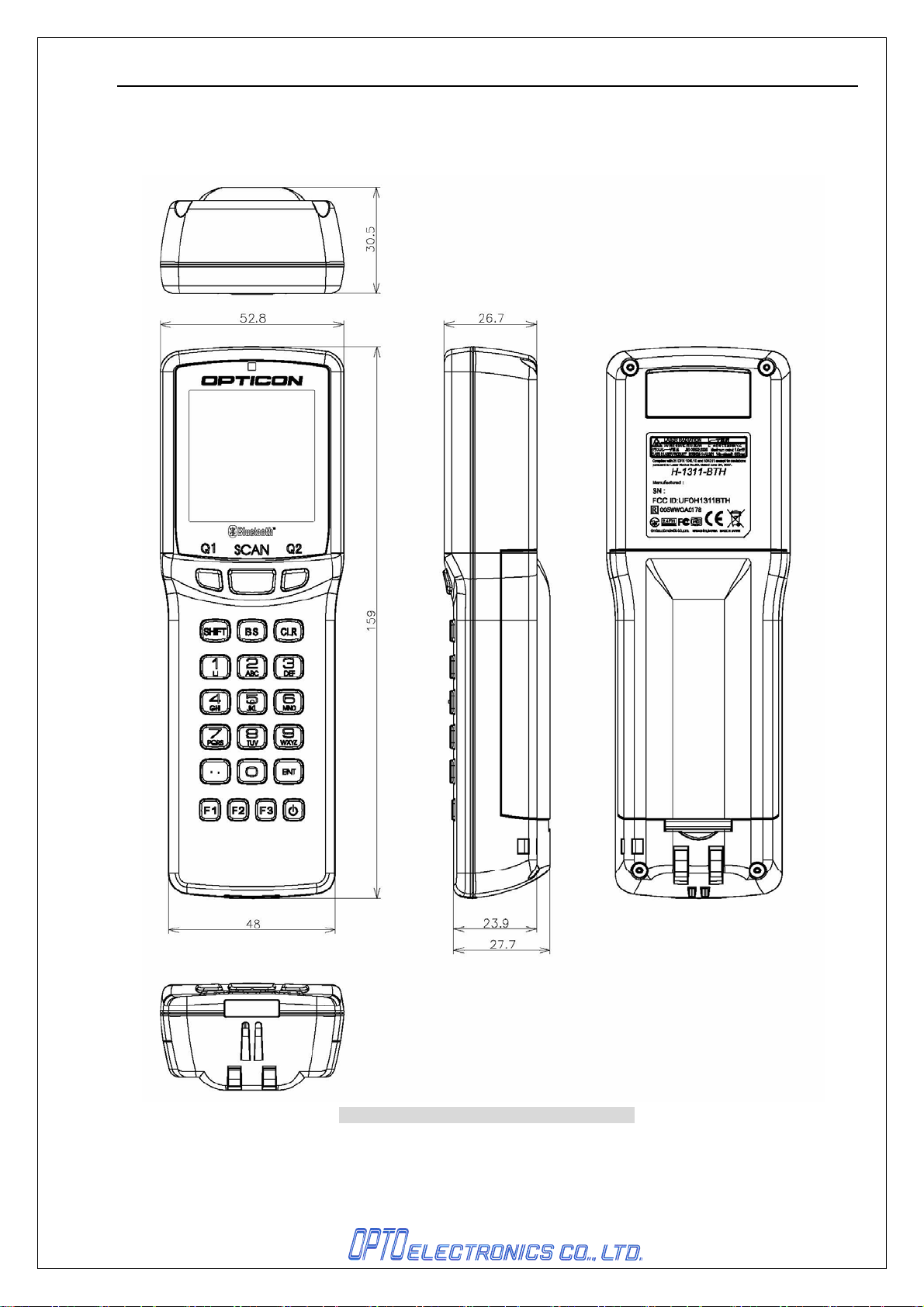
Appendix. Mechanical Drawings
H-1311-BTH
Figure 14: Mechanical drawing of H-1311-BTH
23
 Loading...