

Page 1
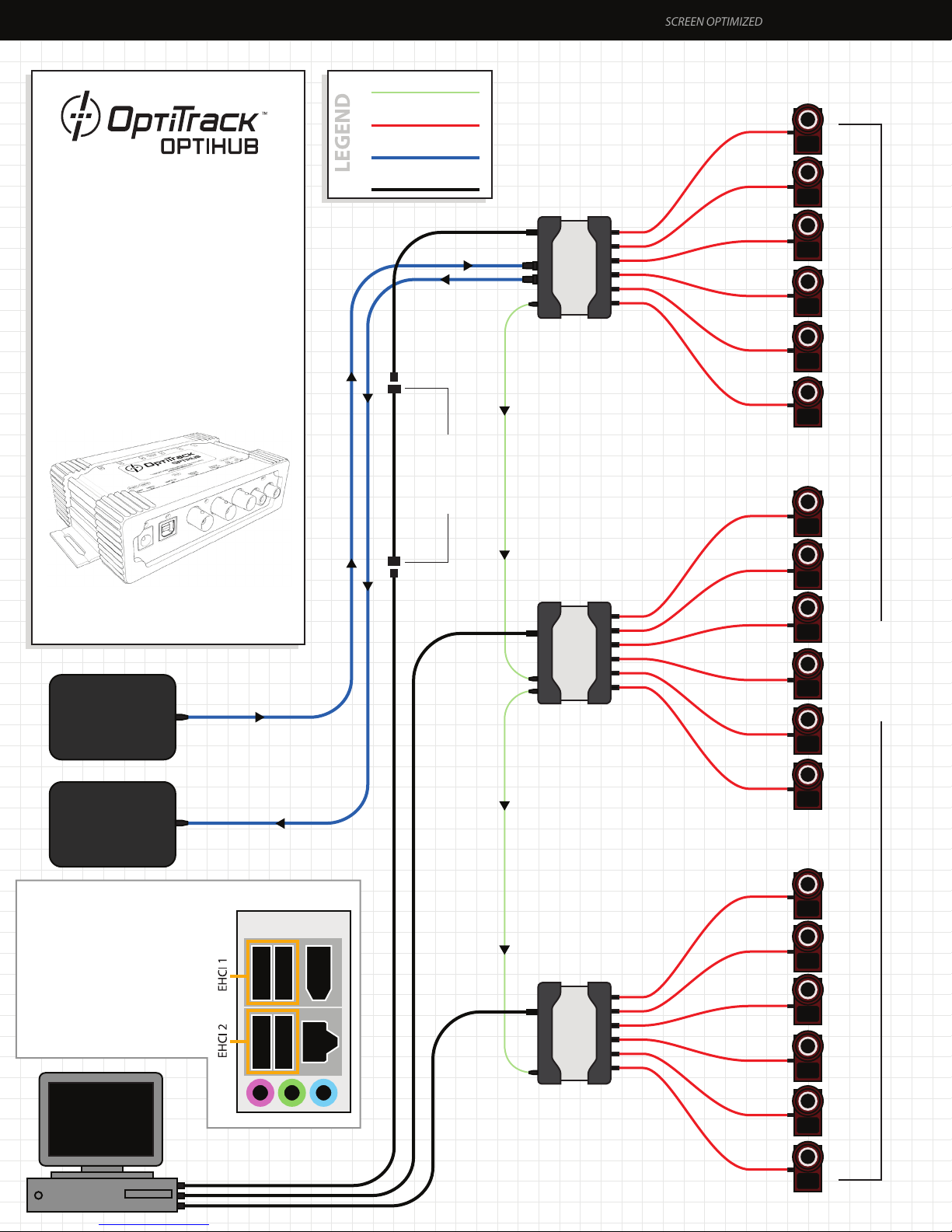
OptiHub Setup with 18 V100:R2 or Flex 13 Cameras OPTISYNC
SCREEN OPTIMIZED
•
OptiSync Mode. No RCA Sync Cables
Required
(Wired Sync is Optionally Available)
•
All Optional Features Shown
- External Sync IN/OUT
- Active USB Extension
•
OptiSync Not Valid with Mixed
Camera or Hub Congurations. Wired
Sync Only.
•
Flex 13 cameras require an OptiHub
v2 and may not be mixed with
V100:R2 cameras in the same system.
Hub to Hub Sync
Hi Speed USB
External Sync
USB Uplink
Up to 2 Active
USB Extensions
5m
(optional)
OptiHub
(Master Hub)
Hi Speed
USB 5m
6 × Cameras
1
2
3
4
5
6
6 × Cameras
7
Copryright © 2012 NaturalPoint Inc. Patents Pending.
www.optitrack.com
External
Trigger
(optional)
Acquisition
System
(optional)
*Note: Hub USB Uplinks should
be divided among both
Enhanced Host Controller
Interfaces (EHCI) in your PC. Its
best to use the USB ports on the
back of your system. There
should be two separate groups of
USB ports, which could identify
each EHCI. Plug two hubs into
one EHCI and one hub into the
other. See diagram to the right.
PC Back Panel
OptiHub
Hub to Hub
Sync
OptiHub
Hi Speed
USB 5m
8
9
10
11
12
6 × Cameras
13
14
15
OptiSync Mode
(No RCA Cables
Required)
USB Uplink*
16
17
Hi Speed
USB 5m
18
Page 2
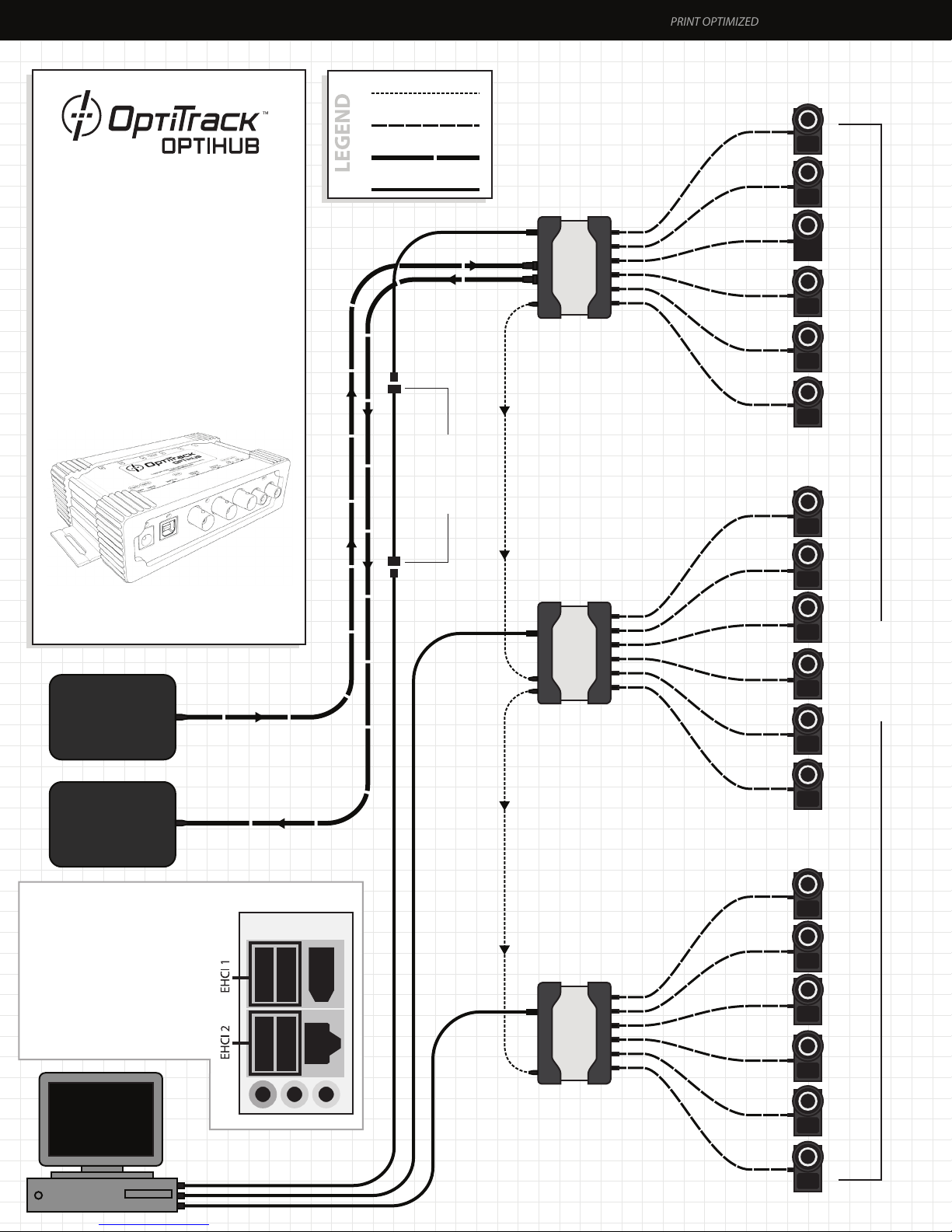
OptiHub Setup with 18 V100:R2 or Flex 13 Cameras OPTISYNC
PRINT OPTIMIZED
•
OptiSync Mode. No RCA Sync Cables
Required
(Wired Sync is Optionally Available)
•
All Optional Features Shown
- External Sync IN/OUT
- Active USB Extension
•
OptiSync Not Valid with Mixed
Camera or Hub Congurations. Wired
Sync Only.
•
Flex 13 cameras require an OptiHub
v2 and may not be mixed with
V100:R2 cameras in the same system.
Hub to Hub Sync
Hi Speed USB
External Sync
USB Uplink
Up to 2 Active
USB Extensions
5m
(optional)
OptiHub
(Master Hub)
Hi Speed
USB 5m
6 × Cameras
1
2
3
4
5
6
6 × Cameras
7
Copryright © 2012 NaturalPoint Inc. Patents Pending.
www.optitrack.com
External
Trigger
(optional)
Acquisition
System
(optional)
*Note: Hub USB Uplinks should
be divided among both
Enhanced Host Controller
Interfaces (EHCI) in your PC. Its
best to use the USB ports on the
back of your system. There
should be two separate groups of
USB ports, which could identify
each EHCI. Plug two hubs into
one EHCI and one hub into the
other. See diagram to the right.
PC Back Panel
OptiHub
Hub to Hub
Sync
OptiHub
Hi Speed
USB 5m
8
9
10
11
12
6 × Cameras
13
14
15
16
OptiSync Mode
(No RCA Cables
Required)
USB Uplink*
17
Hi Speed
USB 5m
18
Page 3
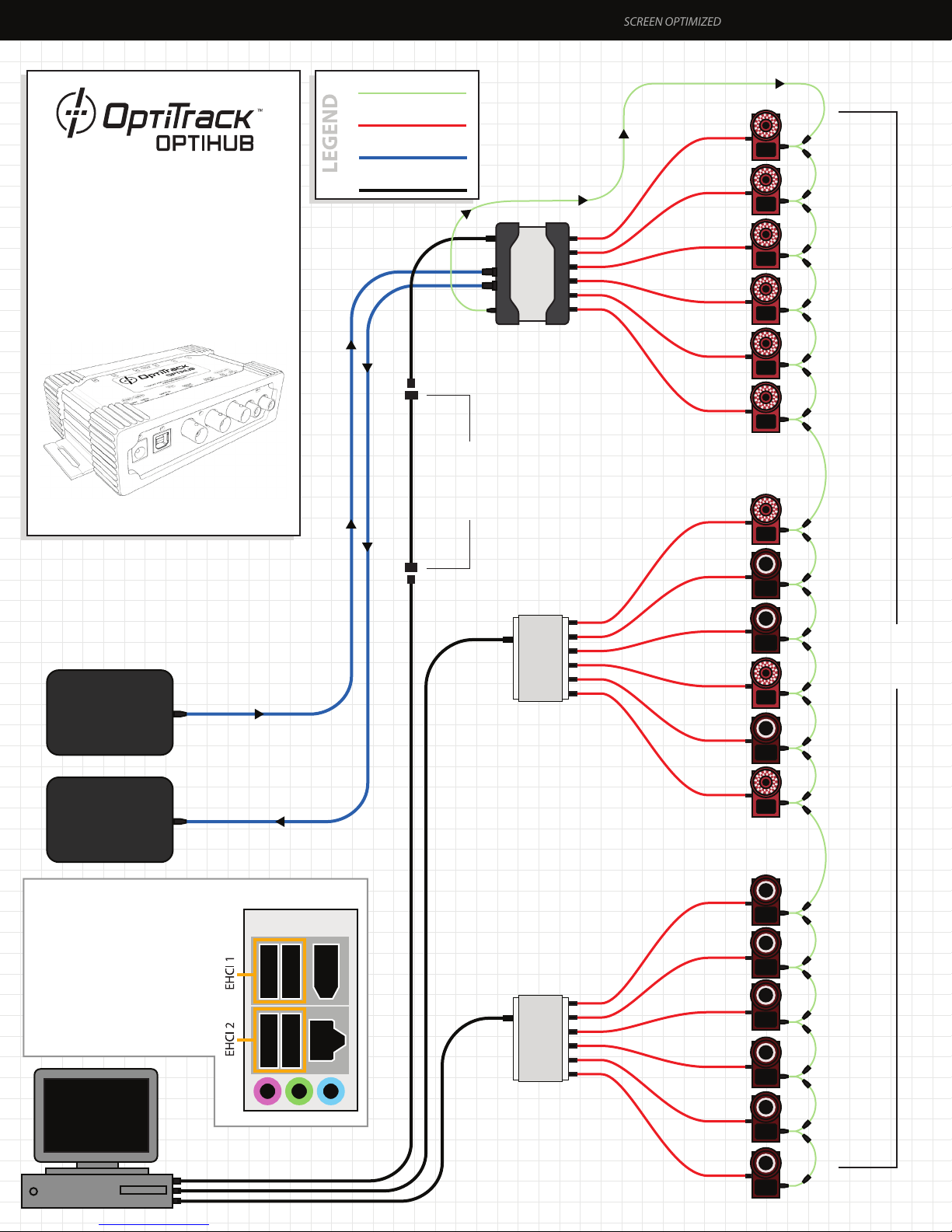
OptiHub Setup with Mixed 18 V100 R1/R2 Cameras RCA WIRED SYNC
SCREEN OPTIMIZED
•
RCA Wired Sync Mode
•
All Optional Features Shown
- External Sync IN/OUT
- Active USB Extension
•
OptiSync Not Valid with Mixed Camera
Comguration. Wired Sync Only.
Copryright © 2012 NaturalPoint Inc. Patents Pending.
www.optitrack.com
RCA Sync Cable
Hi Speed USB
External Sync
USB Uplink
Up to 2 Active
USB Extensions
(optional)
OptiHub
Master Sync
Output for Chain
5m
Hi Speed
USB 5m
Master Sync Line
6 V100 R1
1
2
3
4
5
6
6 V100 R1/R2
(mixed)
7
External
Trigger
(optional)
Acquisition
System
(optional)
*Note: Hub USB Uplinks should
be divided among both
Enhanced Host Controller
Interfaces (EHCI) in your PC. Its
best to use the USB ports on the
back of your system. There
should be two separate groups of
USB ports, which could identify
each EHCI. Plug two hubs into
one EHCI and one hub into the
other. See diagram to the right.
PC Back Panel
Generic USB Hub
or OptiHub
Generic USB Hub
or OptiHub
Hi Speed
USB 5m
8
9
10
11
12
6 V100:R2
13
14
15
RCA
Wired Sync
Mode
USB Uplink*
16
17
Hi Speed
USB 5m
18
Page 4
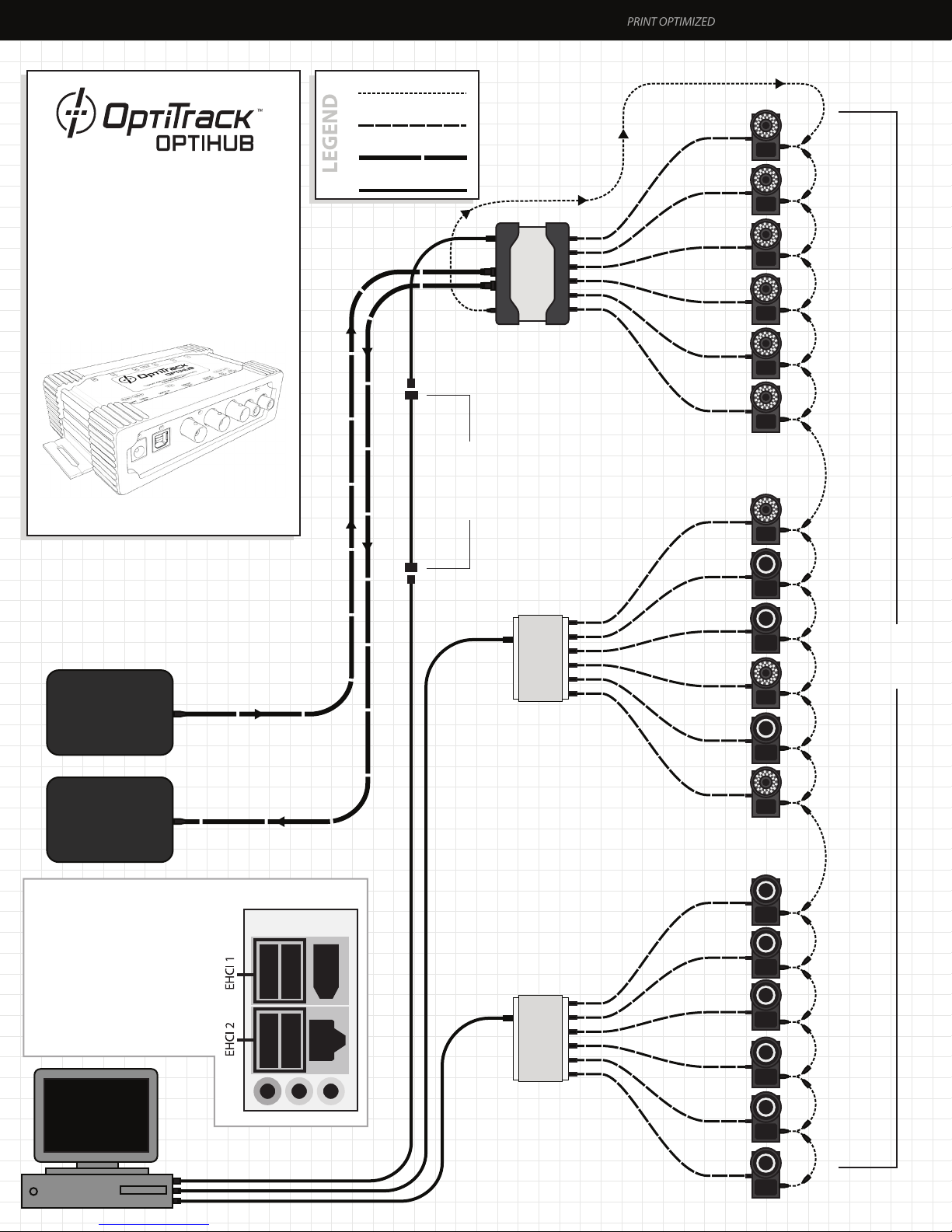
OptiHub Setup with Mixed 18 V100 R1/R2 Cameras RCA WIRED SYNC
PRINT OPTIMIZED
•
RCA Wired Sync Mode
•
All Optional Features Shown
- External Sync IN/OUT
- Active USB Extension
•
OptiSync Not Valid with Mixed Camera
Comguration. Wired Sync Only.
Copryright © 2012 NaturalPoint Inc. Patents Pending.
www.optitrack.com
RCA Sync Cable
Hi Speed USB
External Sync
USB Uplink
Up to 2 Active
USB Extensions
(optional)
OptiHub
Master Sync
Output for Chain
5m
Hi Speed
USB 5m
Master Sync Line
6 V100 R1
1
2
3
4
5
6
6 V100 R1/R2
(mixed)
7
External
Trigger
(optional)
Acquisition
System
(optional)
*Note: Hub USB Uplinks should
be divided among both
Enhanced Host Controller
Interfaces (EHCI) in your PC. Its
best to use the USB ports on the
back of your system. There
should be two separate groups of
USB ports, which could identify
each EHCI. Plug two hubs into
one EHCI and one hub into the
other. See diagram to the right.
PC Back Panel
Generic USB Hub
or OptiHub
Generic USB Hub
or OptiHub
Hi Speed
USB 5m
8
9
10
11
12
6 V100:R2
13
14
15
RCA
Wired Sync
Mode
USB Uplink*
16
17
Hi Speed
USB 5m
18
 Loading...