

Page 1
16-178 .fm Page 1 Tuesda y, July 20, 1999 10:28 AM
Color Pocket LCD TV
UHF
VHF
OFF
Features
Features
Your Optimus Color Pocket LCD TV fits in
the palm of your hand! And, even though the
TV is sm all, it ha s great features l ike these:
2.2-Inch Su per-Twisted N ematic Displa y
— makes the TV more compact and uses
less power than a standar d picture tube.
Automatic Electronic Tuning S ystem
scans the VHF or UHF band and locks on to
active channels.
—
Cat. No. 16-178
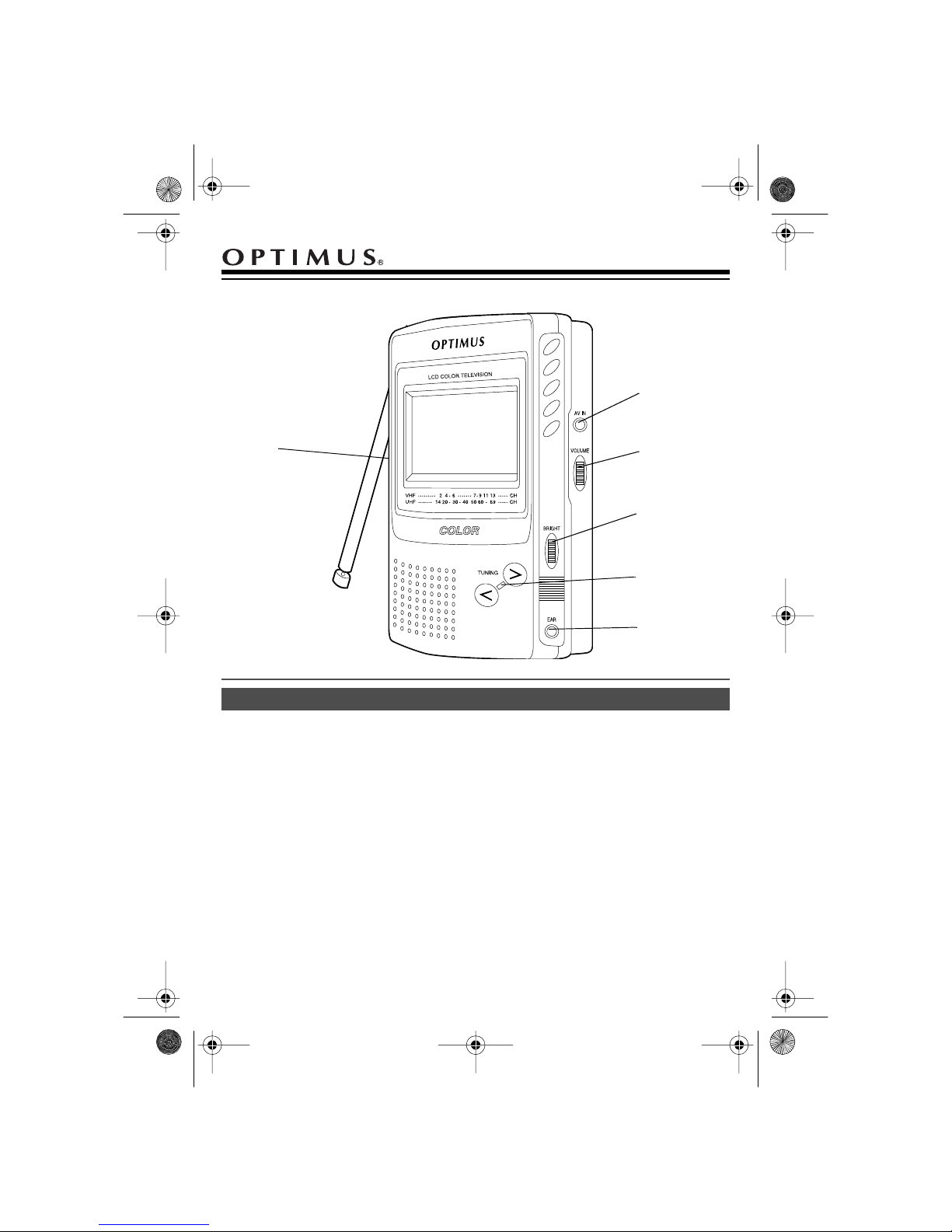
AV IN
VOLUME
BRIGHT
TUNING
EAR
Earphone Jack
tening with an optional earphone.
Audio/Video Jack
camcorder, VCR, laser disc player, or any
other device that has A/V outputs.
Fluorescent Backlight
LCD screen so you can watch the TV in the
dark or in low-light conditions.
Built-In T el esco pin g Antenna
adequate reception in most metr opolitan areas.
— lets you en joy pr ivat e li s-
—lets you connect a
— illuminates the
— prov ides
Optimus and RadioShack are registered trademarks used by Tandy Corporation.
© 1998 Tandy Corporation.
All Rights Reserved.
1995 Tandy Corporation.
©
Pocketvision and Radio Shack are registered trademarks used by Tandy Corporation.
All Rights Reserved.
Page 2
16-178 .fm Page 2 Tuesda y, July 20, 1999 10:28 AM
Power
USING BATTERIES
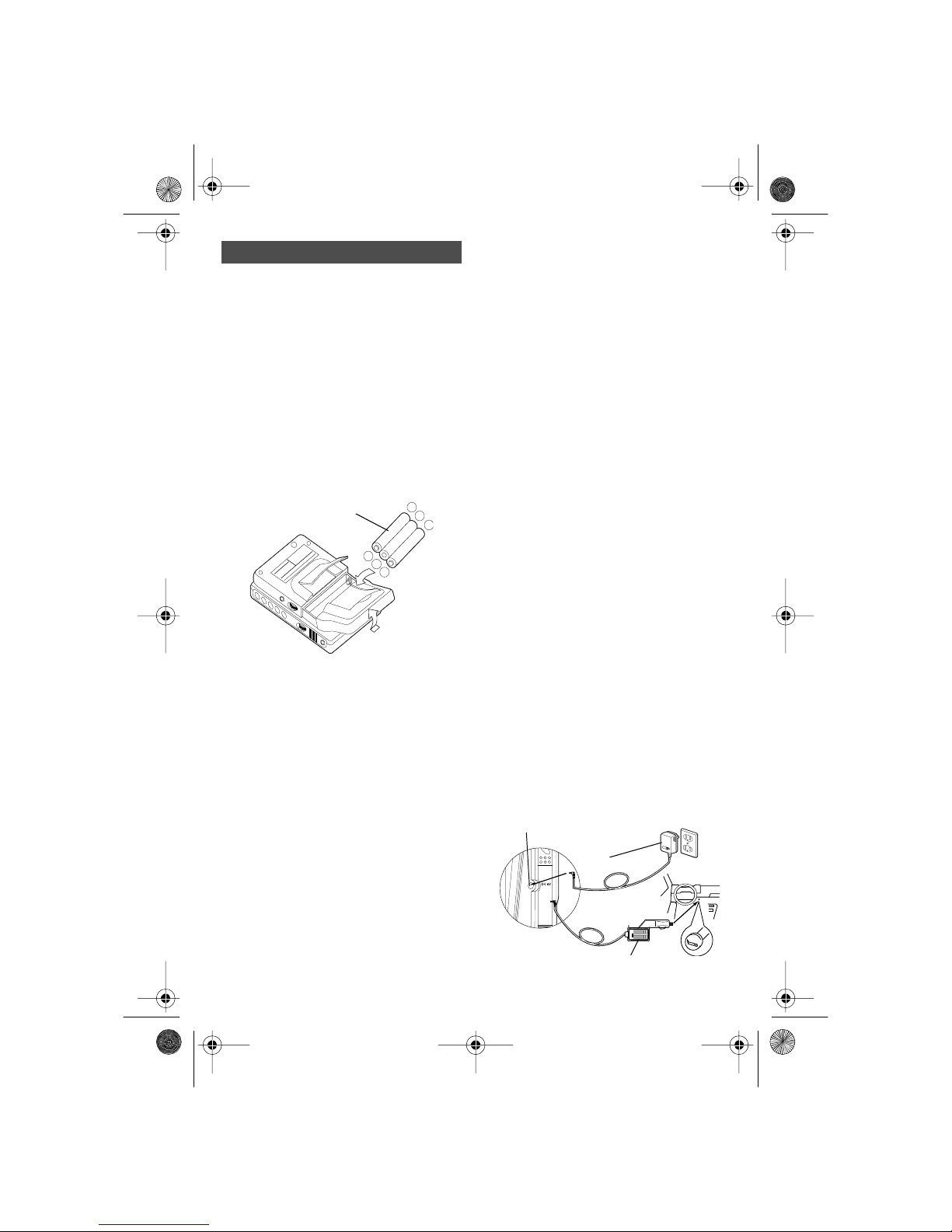
Your TV uses three AA batteries (not supplied) for power. For the best results, we recommend alkaline batteries (RadioShack
Cat. No. 23-552).
Cautions:
• Use only fresh batteries of the required
size and recomm ended type.
• Do not mix old and new batte ries, different types of batteries (standard, alkaline, or r echargeable ), or recharg eable
batteries of different capacities..
Three AA
Batteries
TO PREVENT DE-
CAUTION:
FORMATION. DISCOLORATION OR
MALFUNCTIONS. AVOID LEAVING
THE UNIT UNDER DIRECT SUN-
®
LIGHT. IN A CLOSED CAR IN
SUMMER. NEAR A HEATER OR
IN A BATHROOM.
OPTIMUS
LCD COLOR TV
CAT. NO. 16-178
6V DC, 490mA.
OR 3 “AA” ALKALINE
BATTERIES
CUSTOM MANUFACTURED IN CHINA FOR RADIOSHACK.
A DIV. OF TANDY CORP. FORT WORTH TEXAS 76102
SERIAL NO. 4A8-000001
1. Lift up th e stand, the n press
the bottom of the battery compartment’s cover, on the back of the TV,
and remove the cover.
2. Insert three fresh batteries, aligning the
positive (+) poles with the positive
polarity symbols (+) marked inside.
:
Caution
Installing batteries incorrectly can
damage the TV.
3. Replace the cove r.
–
+
–
+
–
+
at
OPEN
• Dispose of old batteries promptly and
proper ly.
AC POWER
You ca n po wer the T V fro m a stan da rd A C
outlet usin g an optio nal AC ad apt er (such as
Cat. No. 273-166 4 ).
Caution:
adapter that supplies 6 volts and delivers at
least 490 mA. Its center tip must be set to
positive, and its plug must correctly fit the
TV’s
meets these specifications. Using an adapter that does not meet these specifications
could da mage the TV or the adapter.
1. Set the adapter’s voltage s witch to 6V.
2. Attach the adapter’s 3.4 mm outer
3. P lug the ot h er end of t he ad apter in to a
Internal batteries automatically disconnect
when you plug an adapter into the
jack.
Cautions
• Do no t leave the adapter pl ugged into
• Alw ay s un pl ug t he ad ap t e r f ro m the AC
• It is normal for the adapter to become
You must use an optional AC
jack. Th e re com men de d a da pter
DC 6V
diameter/1.3 mm inner diameter barrel
plug, aligni ng + with TIP, and plug it into
the TV ’s
DC 6V
jack.
standard AC outlet.
DC 6V
:
the AC outlet or conn ected to t he TV
when you are not using the TV.
outlet first.
warm after extended periods of use.
DC 6V
With alkaline batteries, the TV can operate
for abou t 4 hour s at mini mum volu me. When
the sound level lowers or the picture becomes unstable, replace the batter ies.
Cautions:
• Always remove old or weak batteries.
Batteries can leak chemicals that can
destroy electronic parts.
273-1664
273-1 8 15 or
270-1562
2
Page 3
16-178 .fm Page 3 Tuesda y, July 20, 1999 10:28 AM
VEHICLE BATTERY POWER
You can us e an opt ional D C adapt er (suc h
as Cat. N o. 270-1562 or 273-1815) to power
the TV from you r vehic le’s ciga rette- lighter
socke t.
Caution:
supplies 6 volts and delivers at least 490
mA. Its center ti p must be set to positive,
and its plug must correctly fit the TV’s
jack. The recommended adapter meets
these specif ication s. Us ing an adapt er tha t
does not meet these specifications could
damage the TV or the adapter.
1. Set the adapter’s voltage switch to 6V.
2. Attach the adapter’s 3.4 mm outer
3. Unplug your vehicle’s cigarette lighter
Internal batteries automatically disconnect
when yo u plug an adapter in to the
jack.
You must use a DC adapter that
DC 6V
diameter/1.3 mm inner diameter barrel
plug, aligning + with TIP, and plug it into
the TV’s
and plug the large end of the DC
adapter cord into the cigarette-lighter
socket.
DC 6V
jack.
DC 6V
or
3. Press
4. Adjust
5. Adjust
Notes
• You can fold out the stand on the back
• If reception is poor, adjust the length,
TUNING
ent channel. The tuning line (red for
VHF, green for UHF) on the screen
aligns with the channel number shown
below the screen.
VOLUME
BRIGHT
ness. The brightness also changes with
the scre en ’s angle.
:
of the TV and lean the TV on a flat surface.
angle, and direction of the telescoping
antenna. If you are using the TV inside
a metal or concrete building, moving
closer to a window might improve
reception.
to tune to a differ-
<
>
.
to the desired bright-
USING AN EARPHONE
For pr iv at e li st en i ng, you c an co nn ec t an o ptional earphone with a
to the TV’s
mutes the built-in speaker.
EAR
1
/8-inch ( 2.5 mm) plu g
jack. This automatically
Cautions:
• Do not leave the adapter plugged into
the cigarette-lighter socket or connected to the TV when you are not
using the TV.
• Always unplug the adapter from the cigarette-lighter socket first.
: If the TV does not opera te properl y
Note
when yo u use DC po we r, be sure th e cig arette-lighter socket is clean and that the
adapter’s plug is pushed all the way into the
socket.
Using Your TV
1. Extend the telescopin g rod antenna.
2. Set
OFF/VHF/UHF
starts scanning and stops at the first
active channel in the selected band.
to
VHF
or
UHF
. The TV
Listening Safely
To protect your h ea r in g, follow th es e guidelines when you use an earphone.
• Set the volume to the lowest setting
before you begin listening. After you
begin listening, adjust the volume to a
comfortable level.
• Do not listen at extremely high volume
levels. Extended high-volume listening
can lead to permanent hearing loss.
• Once you set the volume, do not
increase it. Over time, your ears adapt
to the volume level, so a volume level
that does not cause discomfort might
still damage your hearing.
3
Page 4
16-178 .fm Page 4 Tuesda y, July 20, 1999 10:28 AM
Traffic Safety
Do not wear an earphone while operating a
motor vehicle or riding a bicycle. This can
create a traffic hazard and could be illegal in
some areas.
Even t hough s om e ‘earph on es l et you hear
some ou ts id e s ou nds when lis te ning at n ormal volum e levels, they st ill can present a
traffic hazard.
USING THE TV AS A MONITOR
You can play bac k the signal from an audio/
video component on your TV using a Yadapter cable (not supplied). We recommend RadioShack Cat. No. 42-2475.
Connect the cable’s white plug to the componen t’s vi deo out put j ack an d its re d plug to
the component’s audio output jack. Then
plug the cable’s sub-mini plug into the TV’s
jack. Set
AV IN
to view the signal from the component.
UHF
Note:
nent disables the TV’s antenna.
OFF/VHF/UH F
Connecting an audio/video compo-
to either
VHF
or
Troubleshooting
Color too light or no color
• Extend the antenna and adjust its angle
and direc tion.
•Adjust
BRIGHT
.
No picture and no sound.
• Be sure the batteries are fresh and
inserted correctly.
• Be sure the adapter is correctly connected.
No picture and fuzzy sound.
• Adjus t the antenna.
Picture, but no sound.
•Adjust
• Be sure you disconnected the ear-
VOLUME
phone.
.
.
Sound, b ut the picture is a ll white , dark ,
or blurred.
•Adjust
• Be sure the batteries are fresh.
BRIGHT
.
Picture is not clea r (moves up or down,
disappea rs periodically, becomes fuzzy
or blurred, is doubled, etc.), but the TV
has sound.
• Be su re the antenn a is fully exten ded.
Adjust the antenna’s angle and direction for the best rec eption.
• Be sure the batteries are fresh.
• Be sure the TV is away from appliances
that mi ght cause interf erence.
• In locations with poor reception, it might
be impossible to get a clear picture or
any picture at all. Move the TV to a different location.
In low temperatures, the TV screen takes
a few seconds to light, or it is slightly red
in color.
If you are unable to identify the problem,
take the TV to your local RadioShack store
for assistance.
• Thi s is not a m alfun ct ion. Norm al ope ration resumes after a short w hile.
4
Page 5
16-178 .fm Page 5 Tuesda y, July 20, 1999 10:28 AM
Care and Maintenance
Your Optimus Color Pocket LCD TV is an example of superior design and craftsmanship.
These suggestions will help you care for it so you can enjoy it for years.
• Keep the TV dry. If it gets wet, wipe it dry immediatel y.
• Use only fresh batteries of the required size and recomm ended type. Always remove old
or weak batteries. The y can leak chemicals that des troy elec tronic circuits.
• Handle the TV gently and carefu lly. Dropping it can damage c ircuit boards and cases and
can cau s e th e TV to wor k im p roperly. Be par ti cu la r ly ca r ef ul of th e d is play scree n. Avoid
putting the TV in your pocket or purse together with hard objects (coins, keys, etc.).
• Use and store the TV only in normal temperature environments.
• Keep the TV away from dust and dirt.
• Wipe the TV with a damp cloth occasionally to keep it looking new. Do not use harsh
chemicals, cleaning solvents, or strong detergents to clean the TV.
Modifying or tampering with the TV’s internal components can cause a malfunction and might
invalida te t he TV’ s wa rra nty. If th e TV is no t pe rfo rm ing as it sh ou ld , ta k e it to yo ur lo c al R adioShac k st or e f or as si stance .
Specifications
Channel Coverage ................................................................................. UHF: CH 14–CH 69
VHF: CH 2–CH 13
Display Element .......................................................................... High Resolution Color LCD
(Super Twisted Nematic Type)
1
Screen Size ......... .... ... .... ............... ................ ............... ......... 2
/4 Inches (57 mm) Diagonally
Backlight ..................................................................... High-Luminance Fluorescent Material
Antenna ............... ............... ............... ................ ............... ........................... Telescoping Rod
1
/
Speaker ... ................... ................... .................... ................... ..... 1
Inch (28 mm) Diagonally
8
Terminals ................................................................................................... DC 6V/EAR/AV IN
Power Supply ........................................................................................... Three AA Batteries
AC Adapter (Cat. No. 273-1664)
DC Adapter (270-1562 or 273-1815)
Power Consumption .................................................................. Approx. 3.0 Watts Maximum
Ambient Temperature .............................................................................. 41–104°F (5–40°C)
13
Dimensions (HWD) ......................................... 4
/16 × 31/8 × 13/16 Inches (122 × 79 × 30 mm)
Weight (w/o Batteries) .................................................................... Approx. 7.4 oz. (209 gm)
Specifications are typical; individual units might vary. Specifications are subject to change
and improvement without notice.
5
Page 6
16-178 .fm Page 6 Tuesda y, July 20, 1999 10:28 AM
Limited Ninety- Day Warranty
This product is warr anted by RadioSh ack agains t manufacturi ng defects in mat erial and workm anship under nor mal use for ninety (90) days from the date of p urchase from RadioShack companyowned stores and authorized RadioShack franchisees and dealers. EXCEPT AS PROVIDED
HEREIN, RadioShack MAKES NO E XPRESS WARRANTIES AND ANY IMPLIED WARRANTIES,
INCLUDING THOSE OF MERCHANTABILITY AND FITNESS FOR A PARTICULAR PURPOSE,
ARE LIMITED IN DURATION TO THE DURATION OF THE WRITTEN LIMITED WARRANTIES
CONTAINED HEREIN. EXCEPT AS PROVIDED HEREIN, RadioShack SHALL HAVE NO LIABILITY OR RESPONSIBILITY TO CUSTOMER OR ANY OTHER PERSON OR ENTITY WITH RESPECT TO ANY LIABILITY, LOSS OR DAMAGE CAUSED DIRECTLY OR INDIRECTLY BY USE
OR PERFORMANCE OF THE PRODUCT OR ARISING OUT OF ANY BREACH OF THIS WARRANTY, INCLUDING, BUT NOT LIMITED TO, ANY DAMAGES RES ULTING FROM INCONVENIENCE, LOSS OF TIME, DATA, PROPERTY, REVENUE, OR PROFIT OR ANY INDIRECT,
SPECIAL, INCIDENTAL, OR CONSEQUENTIAL DAMAGES, EVEN IF RadioShack HAS BEEN ADVISED OF THE POSSIBILITY OF SUCH DAMAGES.
Some states do not allow the limitations on how long an implied warranty lasts or the exclusion of incidental or consequential damages, so the above limitations or exclusions may not apply to you.
In the event of a product defect during the warr anty period, take the product and the Radi oShack
sales receipt as proof of pur chas e date to an y RadioSh ack sto re. RadioS hack wi ll, at its optio n, unless otherwise provided by law: (a) correct the defect by product repair without charge for parts and
labor; (b) replace the product with one of the same or similar design; or (c) refund the purchase
price. All replaced par ts and products, and pr oducts on which a ref und is made, becom e the property of RadioShack. New or reconditioned parts and pr oducts may be used in the perform ance of
warranty service. R epaired or replaced parts and pr oducts are warranted for the remain der of the
original warranty period. You will be charged for repair or replacement of the product made after the
expiration of the warranty period.
This warranty does not cover: (a) damage or failure caused by or attributable to acts of God, abuse,
accident, misuse, imp roper or abnormal us age, failure to foll ow instr uctions, im pro per install ation or
maintenance, altera tion, lightning or other incidence of excess volta ge or current; (b) any repairs
other than those prov ided by a RadioShac k Authorized Service Faci lity; (c) consumables such as
fuses or batteries; (d) cosme tic damag e; (e ) transpor tation, s hip ping or insurance costs ; or (f) costs
of product removal, installation, set-up service adjustment or reinstallation.
This warranty gives y ou specific legal rights, and y ou may also have other rights w hich vary from
state to state.
RadioShack Customer Relations, Dept. W, 100 Throckmorton St., Suite 600, Fort Worth, TX 76102
We Service What We Sell
3/97
5A8 Printed in China
#A5 Printed in (Site)
RadioShack
A Division of Tandy Corporation
Fort Worth, Texas 76102
RADIO SHACK
A Division of Tandy Corporation
Fort Worth, Texas 76102
 Loading...