

Page 1
User’s Manual
M4-200 & 201
Doc No. : OEB-D150102-M4 / Rev1.2
Stretch FireWireTM
®
www.opticis.com
Manual Contents
__________________________________________
Manual Contents 1-0
Welcome!, Product Description 1-1
System Requirements for Setup 1-2
Installation 1-3
Troubleshooting, Maintenance, Technical Support 1-6
Product Specifications 1-7
Warranty Information 1-8
Certifications 1-9
Pictorials
Figure 1 – Firewire repeater system
with optional fiber cables 1-1
Figure 2 – End View of M4-200 Repeater 1-3
Figure 3 – Side View of M4-200 Repeater 1-3
Figure 4 – End View of M4-201 Repeater 1-4
Figure 5 – Side View of M4-201 Repeater 1-5
1- 0 Manual Contents
Page 2
Welcome!
Congratulations on your purchase of the Stretch Firewire M4-200/201
Optical FireWire Repeater System. This manual contains information that will
assist you in installing and operating the product.
Product Description
Shipping Group
M4-200
M4-200 Optical Firewire Repeater : Two (2) units
0.7 meter 1394b copper cables : Two (2) units
2pcs x Bilingual port(9pin) to DS port(6pin) for S400 or
2pcs x Bilingual port(9pin) to Bilingual port(9pin) for S800
AC/DC power adapter: One (1) unit
User’s Manual
Duplex LC Multi-Mode Optical Fiber Cable: Optional, can be
provided by the user or by the reseller.
M4-201
M4-201 Optical Firewire Repeater : One (1) unit
0.7 meter 1394b copper cable : One (1) unit
1pcs x Bilingual port(9pin) to DS port(6pin) for S400 or
1pcs x Bilingual port(9pin) to Bilingual port(9pin) for S800
AC/DC power adaptor : One (1) unit
User’s Manual
Duplex LC Multi-Mode Optical Fiber Cable: Optional, can be
provided by the user or by the reseller
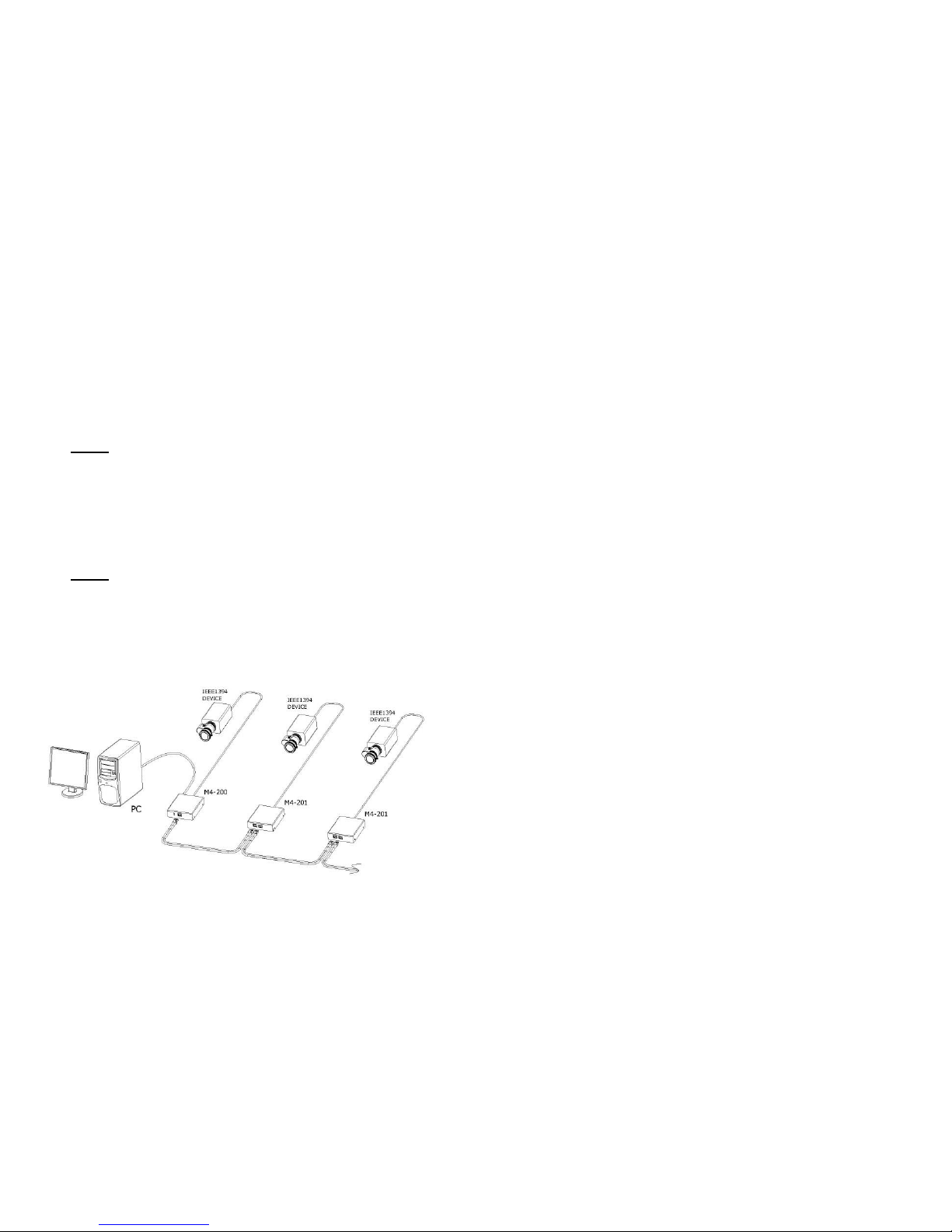
Figure 1 – Firewire repeater system with optional fiber cables
1-1 Welcome, Product Description
System Requirements for Setup
Hardware requirements
You have to have a 1394(a/b) controller having a DS / bilingual
port in your PC or Mac systems.
No special requirements memory size, CPU speed and
chipsets, if you’ve already properly installed your 1394
controllers.
Step by step connection of Multiple M4-201s is strongly
recommended prior to install all M4-201 boxes in a time.
Software requirements
No special restrictions, if you’ve already properly installed your
1394 controller in your OS.
Precaution: Before using Opticis M4-200/201, you have to
confirm to install proper device drivers, which the device
manufacture supplies, designed for your operating system. If
not, Opticis M4-200/201 might not work.
AC/DC Power Adapter Technical Advisory
When IEEE 1394 (Firewire) devices or controllers are self-powered,
the Power LED is illuminated and the shipping group’s external DC
power adapter is not required. Use only if the Power LED is off
when the entire system is powered up. The power adaptor in the
shipping group can supply to 1394 device up to 12V 1A (12W)
through M4-200/201.
Tip: This installation advisory is highlighted to avoid power conflicts
between self-powered devices and controllers, and unnecessarily applied
external power.
1-2 System Requirements for Setup
Page 3

Installation
Important: Please use the installation procedure below. Improper, or no
operation may result if the start-up sequence is not correctly followed.
Step 1
Carefully unpack the contents of the shipping group and Ensure no host or
peripheral equipment is powered up.
Step 2
The M4-200 Firewire repeater boxes are identical. Identify one as upstream
(or host) and downstream (or peripheral).
Step 3
Prepare a duplex LC patch cord fiber-optic cable (Multi-Mode Glass Optical
Fiber with 62.5/125 µm or 50.0/125 µm core). Attach the two LC connector
fiber cables first with no power applied to any system component as follows:
Tx (Upstream) to Rx (Downstream)
Rx (Upstream) to Tx (Downstream)
Figure 2 – End View of M4-200 Repeater
Step 4
Connect the upstream box to the host computer using a copper Firewire cable
by plugging into the host computer Firewire card and the upstream box
Firewire port (either one).
Connect the downstream box to the peripheral equipment in a similar manner.
Step 5
If there are non-Opticis external power supplies to be attached, do so now.
e.g. block power supplies for laptop Firewire PC cards, downstream
appliances, etc. Do NOT attach the Opticis power supplies until instructed to
do so.
Figure 3 – Side View of M4-200 Repeater
1-3 Installation
Step 6
Power on the host and peripheral equipment. At this point, there must be no
external power supplies plugged into the M4-200 upstream or downstream
boxes.
Step 7
Observe the Power Light Emitting Diode on the side of the boxes.
If the upstream box LED is illuminated, no external power supply is
required.
Likewise if the downstream box LED is illuminated, no external power
supply is required.
Step 8
If both Power LEDs are illuminated, then the Firewire link is active. Proceed
with the software bring-up on the host system. Ignore further steps
Step 9
If one or both of the upstream/downstream Power LEDs are dark, then power
down all equipment and plug in one or two Opticis power supplies.
Step 10
Power on complete system. Both upstream/downstream LEDs should be
illuminated. Proceed with host software bring-up.
M4-201 installation (Daisy-Chain)
Step 1
Power off M4-200, host and peripheral equipment first. Prepare two duplex
LC patch cord fiber-optic cable (Multi-Mode Glass Optical Fiber with 62.5/125
µm or 50.0/125 µm core). Attach the four LC connector fiber cables with no
power applied to any system component as follows:
Tx (M4-200) to Rx (M4-201)
Rx (M4-200) to Tx (M4-201)
Figure 4 – End View of M4-201 Repeater
Step 2
Connect the M4-200 box to the host computer and M4-201 to the peripheral
equipment using a copper Firewire cable and attach two LC connector fiber
cables in between M4-200 and M4-201 boxes.
1-4 Installation (continued)
Page 4

Step 3
If there are non-Opticis external power supplies to be attached, do so now.
e.g. block power supplies for laptop Firewire PC cards, downstream
appliances, etc. Do NOT attach the Opticis power supplies until instructed to
do so.
Figure 5 – Side View of M4-201 Repeater
Step 4
Power up the host and peripheral equipment. At this point, there must be no
external power supplies plugged into the M4-200 or M4-201 boxes.
Step 5
Observe the Power Light Emitting Diode on the side of the boxes.
If the M4-200 box LED is illuminated, no external power supply is required.
Likewise if the M4-201 box LED is illuminated, no external power supply is
required.
Step 6
If both Power LEDs are illuminated, then the Firewire link is active. Proceed
with the software bring-up on the host system. Ignore further steps
Step 7
If one or both of the M4-200/M4-201 Power LEDs are dark, then power down
all equipment and plug in one or two Opticis power supplies.
Step 8
Power up complete system. Both M4-200/M4-201 LEDs should be
illuminated. Proceed with host software bring-up.
Step 9
If you have another M4-201, follow as Step 11 and connect the duplex LC
multimode fiber cables to the next M4-201 as Step 12. The fiber connection is
accomplished between the OUT of the prior M4-201 and the IN of the next
one. You have to repeat Step 13 to 18 as many as you have.
The M4-201, giving connection of a 1394 device is capable of two-way fiber
connection in forward and backward directions, which eventually makes a
daisy chain with each repeater of M4-200 at both ends.
Do NOT plug in external power to the box if the PWR LED is on
after the M4-200/201 repeater is connected to a live host or powered peripheral.
1-5 Installation (continued)
Troubleshooting
The Power LEDs are not illuminated.
Ensure that all AC and DC plugs and jacks used by external power supplies
(both Opticis and others) are firmly connected. Ensure that power bars are
live.
No controller or driver for the peripheral device exists in the Operating
System (OS) device manager.
Reset the system. Disconnect and reconnect 1394(b) copper cables or DC
power adapters.
Check if the two fibers are properly connected. The Tx in one repeater goes
to the Rx in the other and vice-versa.
Remove the fiber cables and use a Firewire copper cable to connect the
upstream and downstream boxes by plugging in to the unused bilingual ports.
The OS device manager shows the Firewire connection, but the Firewire
peripheral does not work properly.
Ensure that the correct software device driver is loaded on the processor
platform. Direct connect the peripheral to the processor’s Firewire port to
confirm operation. Software drivers are usually available from the Internet.
Maintenance
No special maintenance is required for the optical repeater boxes and power
supplies. If not in use, insert the factory provided plug into the Tx/Rx fiber
port. Ensure that the repeaters and power modules are stored or used in a
benign environment free from liquid or dirt contamination.
There are no user serviceable parts. Refer all service and repair issues to
Opticis.
Technical Support and Service
For commercial or general product support, contact your reseller. For
technical service, contact Opticis by email [email protected] or visit
our website at www.opticis.com
1-6 Troubleshooting, Maintenance, Technical Support
Page 5

Product Specifications
M4-200/201 Optical Firewire Repeater
Electrical Specifications
Fully supports provisions of IEEE1394b-2002
M4-200: 2 bilingual ports, M4-201: 1 bilingual port
Power supply: DC12~16V (max.500mA)
Data rates: S100 (98.304 Mbps), S200 (196.608 Mbps),
S400 (393.216 Mbps) and S800 (983.04 Mbps)
Optical Specifications
IEEE1394b-2002 compliant
Duplex LC type optical port supporting 62.5 µm, 50.0 µm
Multi-mode Glass of Fiber
Laser Class 1 Eye Safety compliant: 850nm VCSEL
Data rates: S100 (122.44 Mbps), S200 (245.76 Mbps),
S400 (491.52 Mbps), S800 (983.04 Mbps)
Mechanical Specifications
M4-200/201 Box dimensions: 101mm / 91mm / 24mm (W/D/H)
M4-200 Weight: 0.252 Kg
M4-201 Weight: 0.290 Kg
Environmental Specifications
Operating temperature: 0°C to 50°C
Storage temperature: - 30°C to 70°C
Humidity: 10% to 85%
AC/DC Power Adapter
Power Input: AC 100-240V, 50/60Hz 0.1A
Power Output: +12 V, 1.0A SMPS DC-power Adapter
Cord DC Jack: Core is 12 V and outer is GND.
1-7 Product Specifications
Warranty Information
1 (One) Year Warranty
Opticis warrants this optical Firewire repeater to be free from defects in
workmanship and materials, under normal use and service, for a period of
one (1) year from the date of purchase from Opticis or its authorized resellers.
If a product does not work as warranted during the applicable warranty period,
Opticis shall, at its option and expense, repair the defective product or part,
deliver to customer an equivalent product or part to replace the defective item,
or refund to customer the purchase price paid for the defective product.
All products that are replaced will become the property of Opticis.
Replacement products may be new or reconditioned.
Any replaced or repaired product or part has a ninety (90) day warranty or the
reminder of the initial warranty period, whichever is longer.
Opticis shall not be responsible for any software, firmware, information, or
memory data of customer contained in, stored on, or integrated with any
products returned to Opticis for repair under warranty or not.
Warranty Limitation and Exclusion
Opticis shall have no further obligation under the foregoing limited warranty if
the product has been damaged due to abuse, misuse, neglect, accident,
unusual physical or electrical stress, unauthorized modifications, tampering,
alterations, or service other than by Opticis or its authorized agents, causes
other than from ordinary use or failure to properly use the Product in the
application for which said Product is intended.
1-8 Warranty Information
Page 6

© 2015 Opticis Co., Ltd. All Rights Reserved
Revision 1.2. 2, Jan, 2015
Opticis Locations
Headquarters
Opticis Co., Ltd.
# 16Fl, Kins Tower
8 Sungnam-daero, 331 beon-gil,
Bundang-gu,
Seongnam-si, Gyunggi-do, 463-844
South Korea
Te l: +82 (31) 719-8033
Fax: +82 (31) 719-8032
www.opticis.com
For order support, please contact your Distributor or Reseller.
For technical support, check with the Opticis web site www.opticis.com or
contact [email protected]
Certifications
CE / FCC, Class 1 Laser Eye Safety
Certification of Eye Safety
This laser product is inside implemented by using 1310, 1550nm LD
Transceivers, manufactured by Opticis Co., Ltd., which are all certified by
CDRH/FDA referred as classified in Laser Class 1 (IEC60825-1).
Caution – Use of controls or adjustments or performances of procedures
other than those specified herein may result in hazardous radiation exposure.
1-9 Certifications
 Loading...