

Page 1
Page 2

Page 3

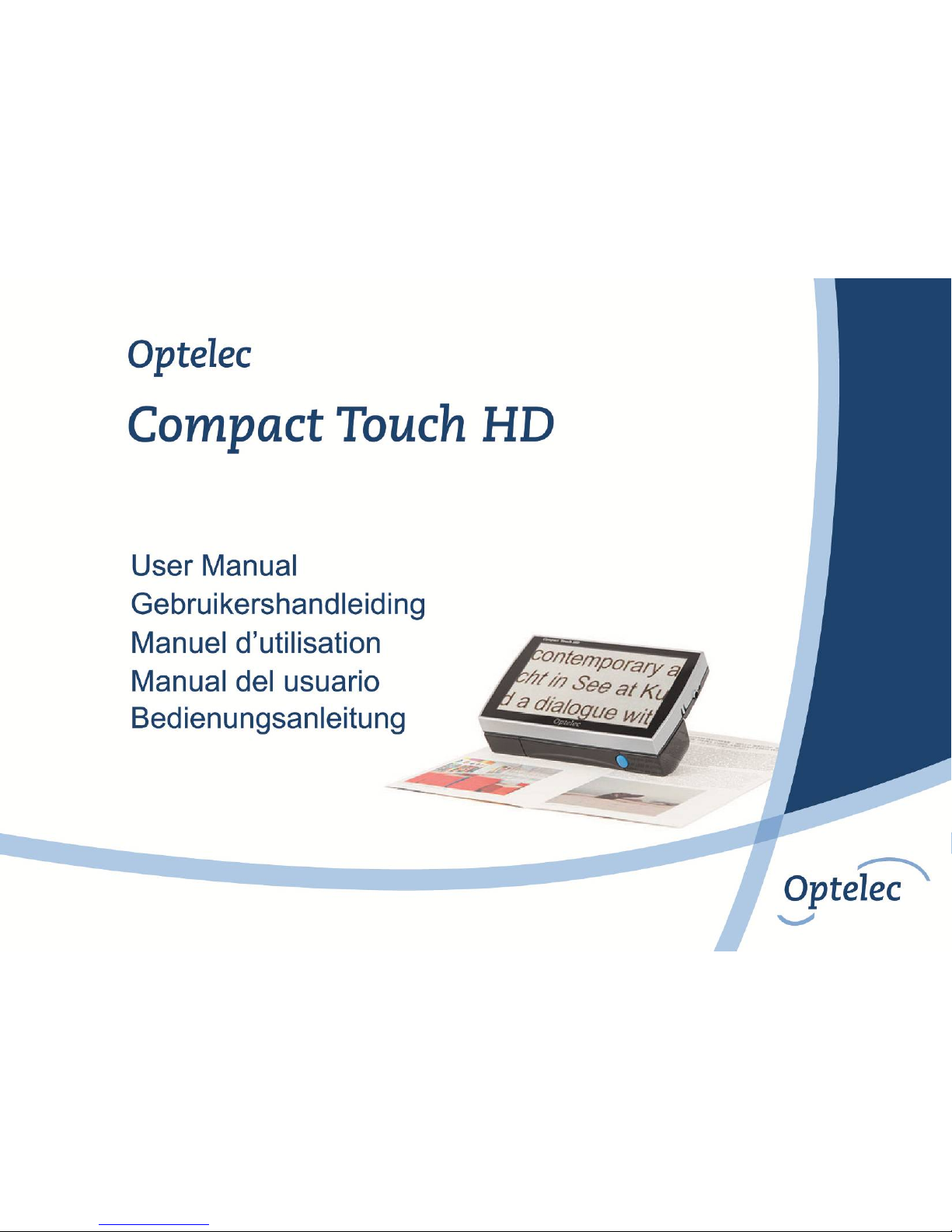
Optelec Compact Touch HD
The Compact Touch HD will be helpful for low vision and blind people in reading.
WEEE Notice
The directive on Waste Electrical and Electronic Equipment (WEEE), which entered into force as European law on 13
th
February 2003, resulted
in a major change in the treatment of electrical equipment at end-of-life.
The purpose of this Directive is, as a first priority, the prevention of WEEE, and in addition, to promote the reuse, recycling and other forms of
recovery of such wastes so as to reduce disposal.
The WEEE logo (shown at the left) on the product or its box indicates that this product must not be disposed of or dumped with
your other household waste. You are liable to dispose of all your electronic or electrical waste equipment by relocating over to
the specified collection point for recycling of such hazardous waste. Isolated collection and proper recovery of your electronic
and electrical waste equipment at the time of disposal will allow us to help conserve natural resources. Moreover, proper
recycling of the electronic and electrical waste equipment will ensure safety of human health and the environment. For more
information about electronic and electrical waste equipment disposal, recovery, and collection points, please contact your local
city centre, household waste disposal service, shop from where you purchased the equipment, or manufacturer of the
equipment.
RoHS Compliance
This product is in compliance with Directive 2002/95/EC of the European Parliament and of the Council of 27 January 2003, on the restriction of
the use of certain hazardous substances in electrical and electronic equipment (RoHS) and its amendments.
European Union Notice
Products with CE marking comply with the R&TTE Directive (99/5/EC), the EMC Directive (89/336/EEC), and the Low Voltage Directive
(73/23/EEC) issued by the Commission of the European Community.
Compliance with these directives implies conformity to the following international standards:
IEC 60950-1 2004;
IEC 55022
IEC 55024 (IEC61000-4-2 excluded)
FCC
FCC part 15 Class B
Page 4

Page 5
Optelec Compact Touch HD
English Page 3
User Manual
Version 1.2
© 2013 Optelec, the Netherlands
All rights reserved
Optelec
P.O. Box 399
2990 AJ Barendrecht
The Netherlands
Phone: +31 (0)88 678 34 44
E-mail: [email protected]
Internet: www.optelec.com
Page 6

Optelec Compact Touch HD
English Page 4
Contents
1. Introduction ........................................................................................................................ 6
2. General description Compact Touch HD ......................................................................... 6
3. Intended use ...................................................................................................................... 7
4. Safety and Maintenance .................................................................................................... 8
5. Installing the Compact Touch HD .................................................................................... 9
6. Instructions for charging ................................................................................................ 10
7. Battery handle maintenance ........................................................................................... 11
8. Folding handle ................................................................................................................. 12
9. Focusing the Compact Touch HD .................................................................................. 12
10. Far View function ............................................................................................................. 13
11. Switching the Compact Touch HD on or off .................................................................. 13
12. Switching the LED on/off ................................................................................................ 13
13. Display modes ................................................................................................................. 14
14. Zooming ........................................................................................................................... 15
15. Freeze function ................................................................................................................ 16
16. Magnetic lines .................................................................................................................. 17
17. Compact Touch HD menu ............................................................................................... 18
Sound, brightness and reading lines .............................................................................. 18
Sound icon ..................................................................................................................... 19
Brightness icon ............................................................................................................... 19
Page 7

Optelec Compact Touch HD
English Page 5
Reading lines ................................................................................................................. 20
18. Display modes and battery ............................................................................................. 21
Battery icon .................................................................................................................... 22
Display mode icon .......................................................................................................... 23
19. Picture output .................................................................................................................. 24
20. Writing with the Compact Touch HD .............................................................................. 25
21. Troubleshooting .............................................................................................................. 26
22. Warnings .......................................................................................................................... 28
23. Discarding the Compact Touch HD or battery .............................................................. 28
24. Warranty regulations ....................................................................................................... 28
25. Regulations ...................................................................................................................... 29
Appendix A: Safety .................................................................................................................. 30
Appendix B: Specifications ..................................................................................................... 31
Optelec offices worldwide ..................................................................................................... 153
Page 8
Optelec Compact Touch HD
English Page 6
1. Introduction
Congratulations with the purchase of your Compact Touch HD! In this manual you will find a
detailed description of all the functions of the Compact Touch HD. Read this manual carefully
before you start using the Compact Touch HD. If you still have any questions after reading this
manual, please contact your supplier.
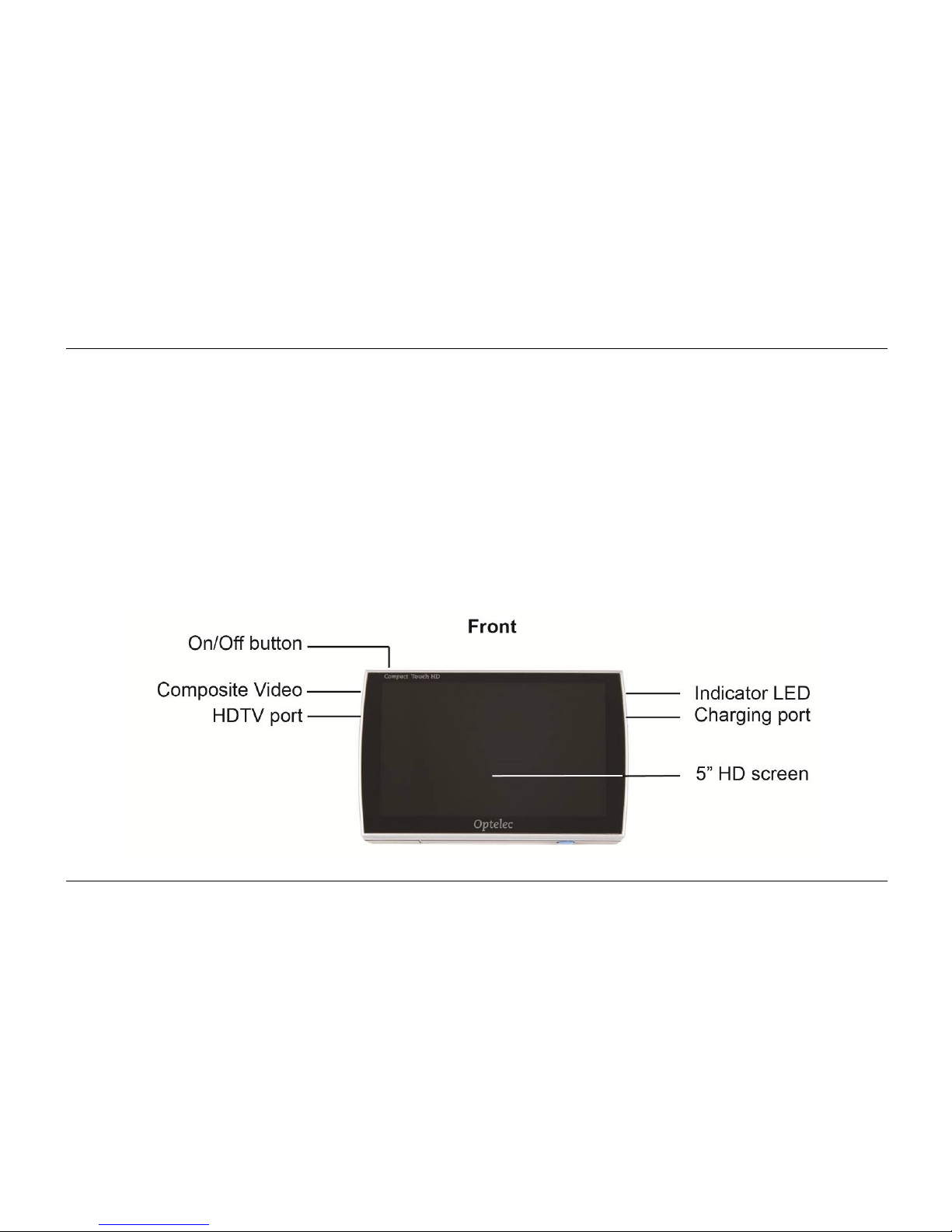
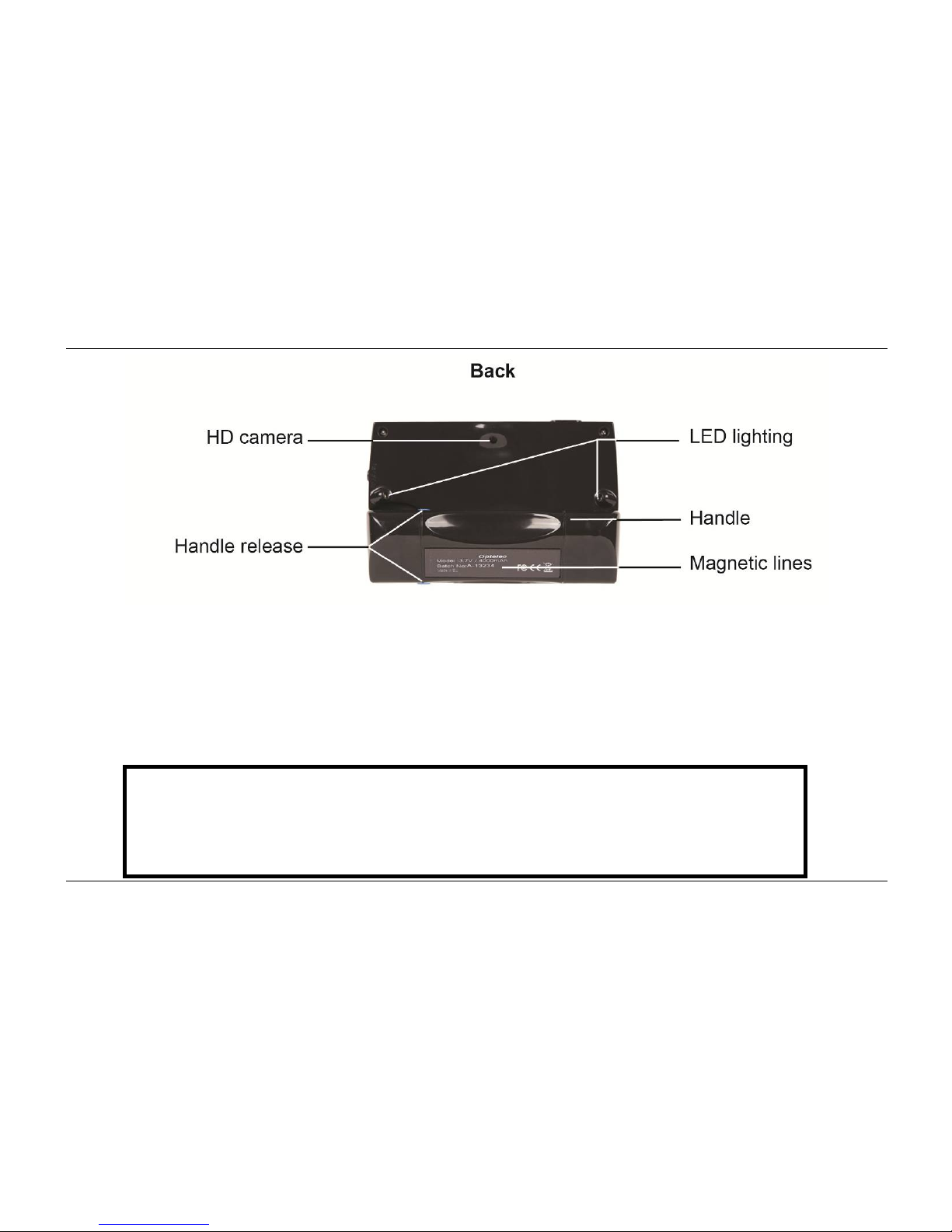
2. General description Compact Touch HD
Page 9
Optelec Compact Touch HD
English Page 7
3. Intended use
This device is solely used for displaying enlarged representations of text, photographic material
and objects. When the Compact Touch HD is used for any purpose other than the intended use,
the CE regulation will not apply.
Caution: do not, under any circumstances, perform maintenance or repairs
on the device; always ask a manufacturer approved technician to do this.
Warranty will be voided if the Compact Touch HD is attempted to be
repaired by anyone other than a technician approved by the manufacturer.
Page 10

Optelec Compact Touch HD
English Page 8
4. Safety and Maintenance
Before use, be sure to comply to with the following safety and maintenance instructions:
Protect the device and its batteries from moisture, rain, sand or extreme temperatures like
radiators or direct sunlight.
Do not use cleaning products that contain alcohol, methylated spirits, ammonia or abrasives.
These can damage the device or its touch screen.
Only use accessories that the manufacturer supplies you with, or approves of.
Never throw batteries into a fire. Batteries and chargers that are defect are considered
chemical waste. They therefore need to be disposed of at a refuse/recycling centre of your
choice.
Note that the use of a screen protector might influence the functioning of the touch screen.
Page 11
Optelec Compact Touch HD
English Page 9
5. Installing the Compact Touch HD
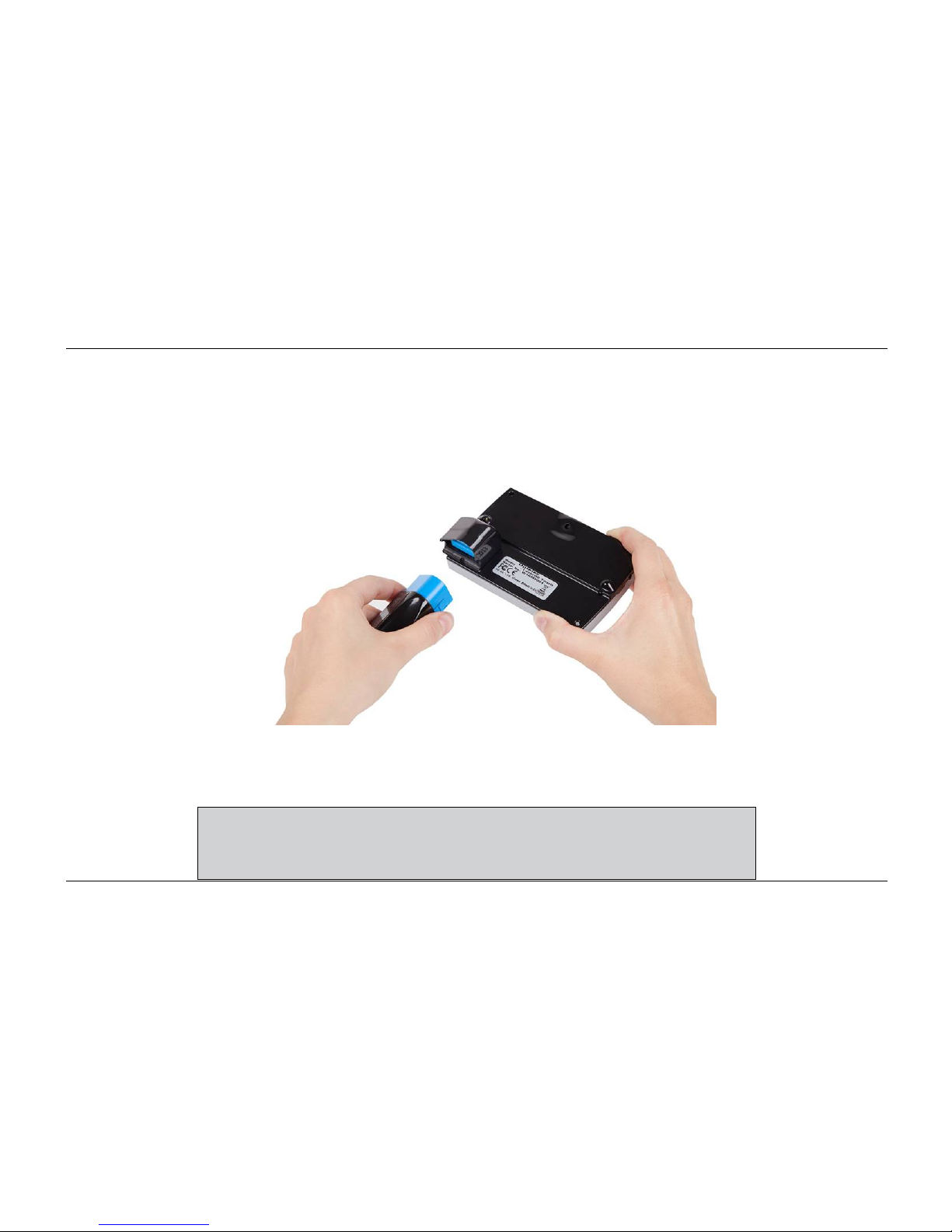
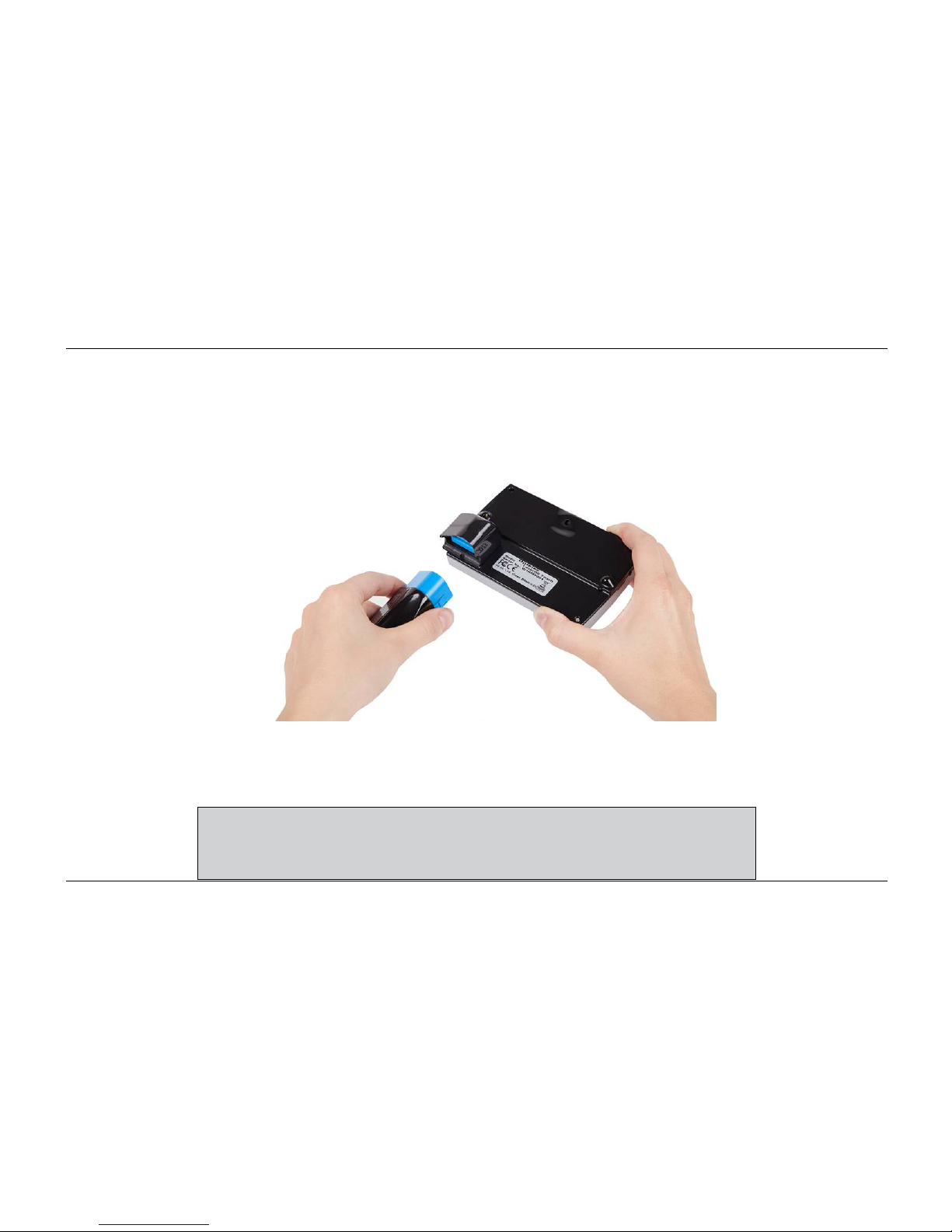
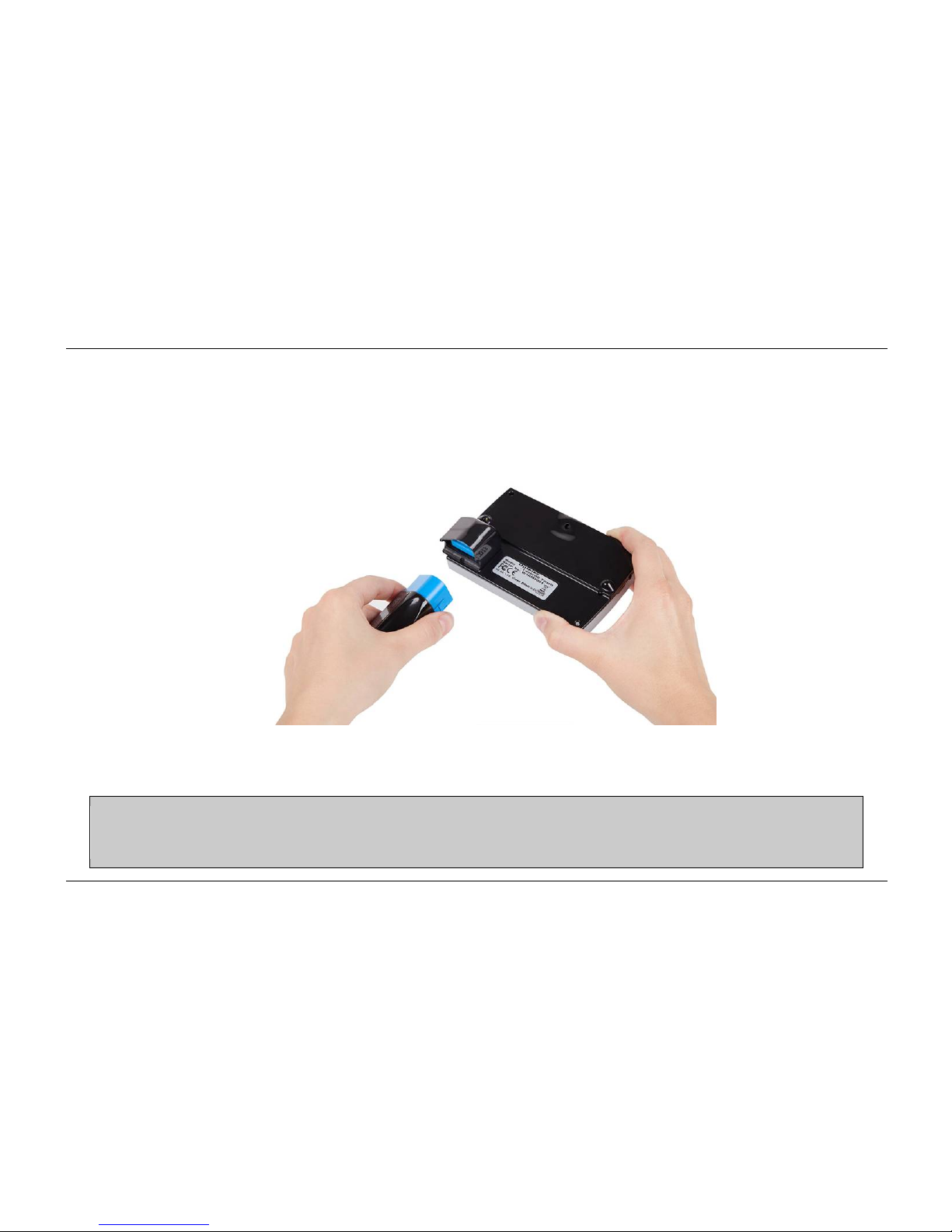
Connect the battery handle of the Compact Touch HD by sliding it onto the connector until you
hear it clicking into place. This battery handle also functions as the Compact Touch HD’s
handle.
To replace the battery handle push the 2 blue battery release buttons on the side of the battery
handle, and slide on the replacement battery handle.
Charge the battery handle completely before using the Compact
Touch HD. Please read the charging instructions carefully.
Page 12

Optelec Compact Touch HD
English Page 10
6. Instructions for charging
Put the adaptor in the wall socket and connect its plug to the charging adaptor port of the
Compact Touch HD.
LED burning constantly batteries are being charged
LED off batteries are fully charged
LED blinking error / batteries are defect
Charge the batteries in a well ventilated environment. Remove the Compact Touch HD from its
carrying case when charging. Don’t place it in direct sunlight or near a radiator whilst charging.
When the battery is empty, the Compact Touch HD will switch itself off. You will hear a high
pitched tone that fades away.
Page 13

Optelec Compact Touch HD
English Page 11
7. Battery handle maintenance
Remove the battery handle from the Compact Touch HD if you do not intend to use it for
an extended period of time. This will improve the longevity of the battery handle.
Batteries are sensitive to overcharging. It is recommended to only charge the battery
handle when it is completely drained.
Chargeable Lithium-Ion batteries have an auto discharge that strongly depends on the
temperature of the environment (e.g. never leave the battery handle in a car that is
parked in direct sunlight).
New Lithium-Ion batteries must be charged several times before reaching their nominal
capacity.
Charge Lithium-Ion batteries at least once every 6 months.
The average lifespan of the battery handle is usually 300 charging cycles, but this
depends on the use. Total capacity will slowly decrease after multiple charging cycles.
Page 14

Optelec Compact Touch HD
English Page 12
8. Folding handle
The Compact Touch HD comes with a replaceable foldable handle with a built-in battery. This
handle can be used in several positions.
When the handle is extended, you can use the Compact Touch HD as a magnifier. The closer
you get to the object, the bigger the magnification will be. You can also hold the Compact Touch
HD up to see distant objects as the Compact Touch HD can focus from 5cm to infinity.
It is also possible to use the Compact Touch HD with the handle folded in. You can easily set
the device on the table and it will automatically stand at an angle. The magnification will then be
about 8x. This is easier when you want some stability during the reading of texts.
9. Focusing the Compact Touch HD
The Compact Touch HD uses a push-to-focus method to focus the image on the screen. Simply
touch the screen on the section where you want the Compact Touch HD to focus; the camera
will focus on that area.
Page 15

Optelec Compact Touch HD
English Page 13
10. Far View function
The camera of the Compact Touch HD can focus on objects from 5 cm. distance to infinity. Just
hold the device up to view the object. Remember to touch the screen in order to focus the
camera on the object you are viewing.
11. Switching the Compact Touch HD on or off
To switch the Compact Touch HD on, press the ON/OFF button once. You will hear a scaled
sound increasing in pitch.
To switch the Compact Touch HD off, press the ON/OFF button for 3 seconds. You will hear a
scaled sound decreasing in pitch.
When you have the Compact Touch HD switched on, and it doesn’t detect any movement on
the screen, it will switch itself off after 3 minutes. A two-pitched signal will be heard.
12. Switching the LED on/off
By touching the centre of the screen for 1 second you can switch off the LED at the back of the
Compact Touch HD. You will hear a beeping sound indicating that the LED is switched off.
Touch the centre of the screen again for 1 second to turn the LED back on. Another beeping
sound will be heard.
Page 16
Optelec Compact Touch HD
English Page 14
13. Display modes
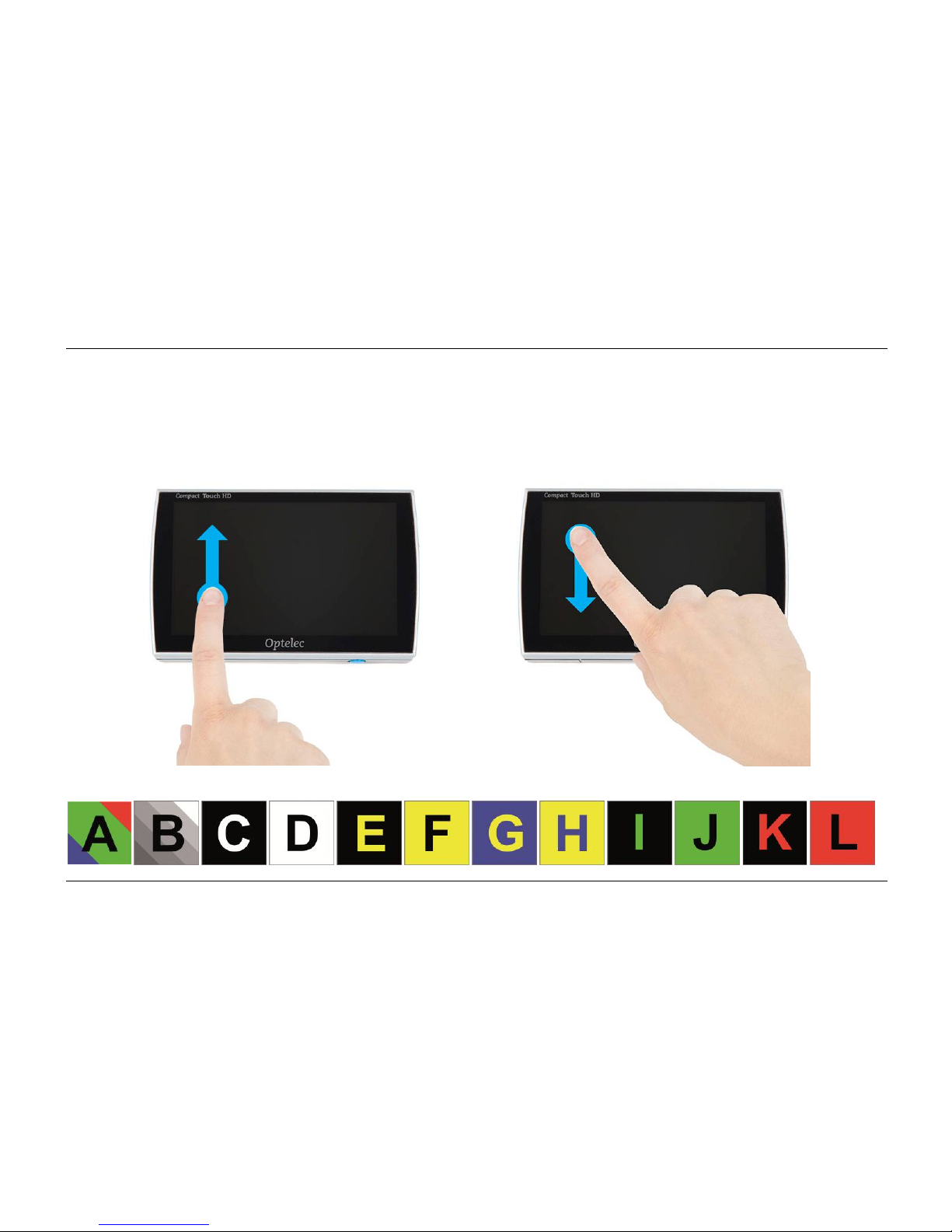
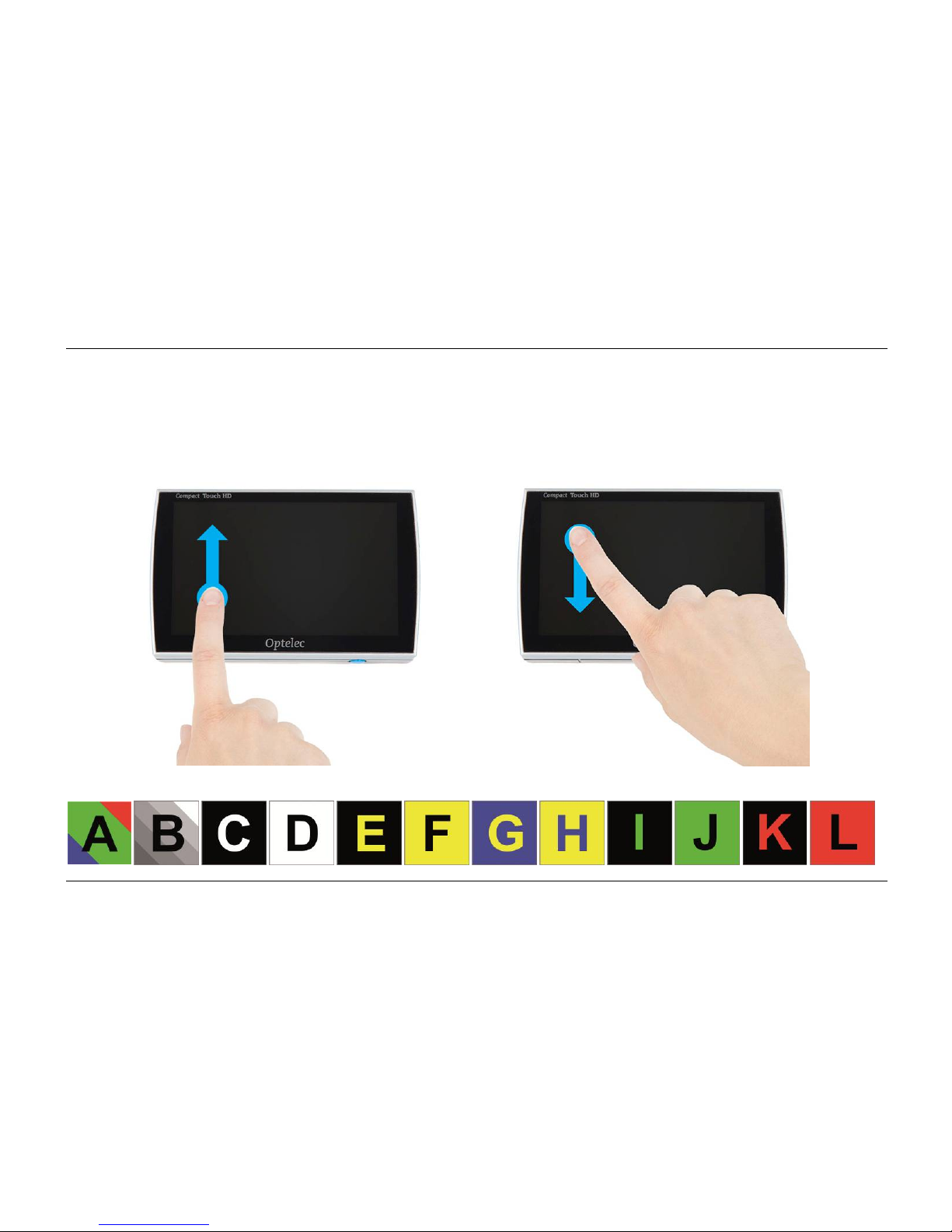
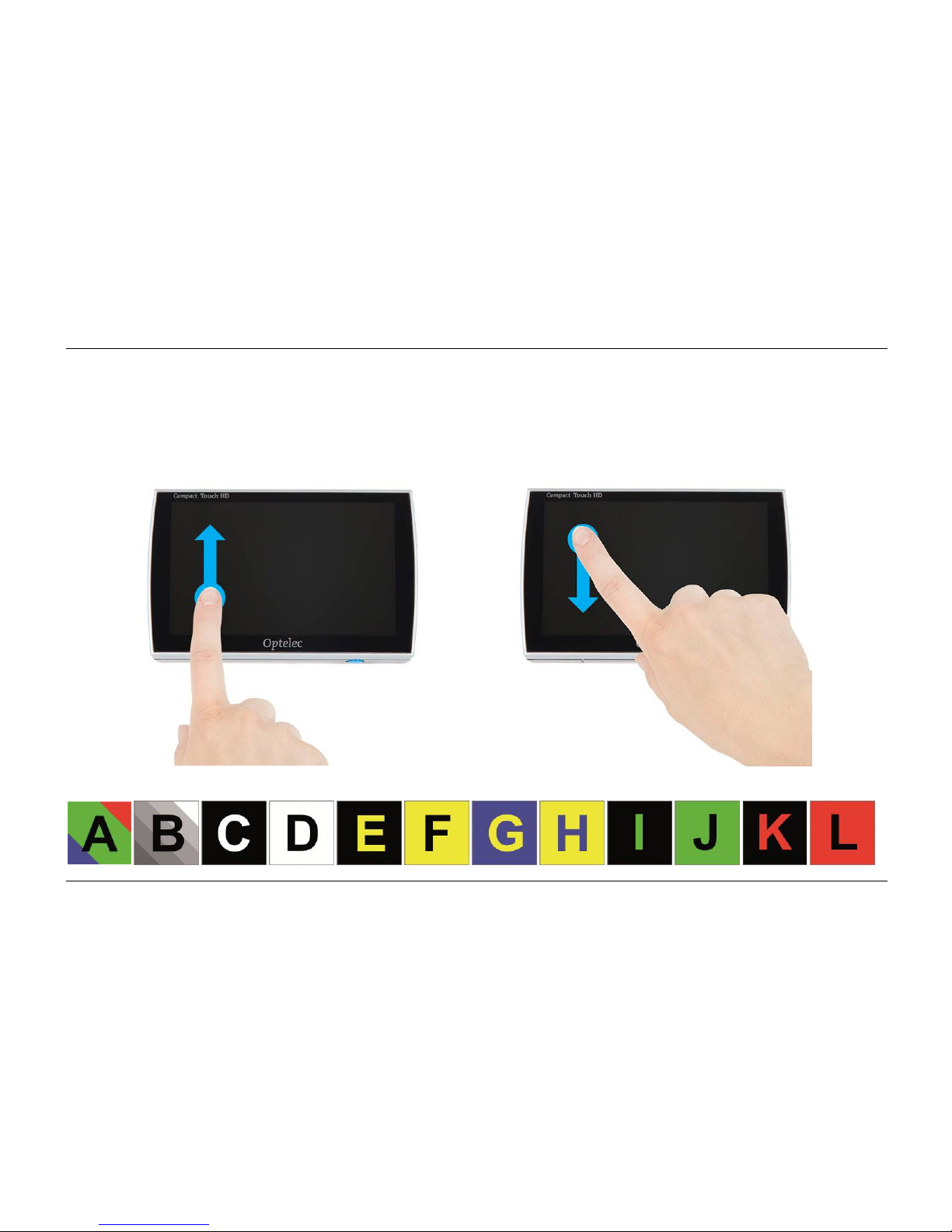
By swiping from the top to the bottom of the screen, or vice versa you can cycle through
multiple colour modes.
or
Page 17
Optelec Compact Touch HD
English Page 15
14. Zooming
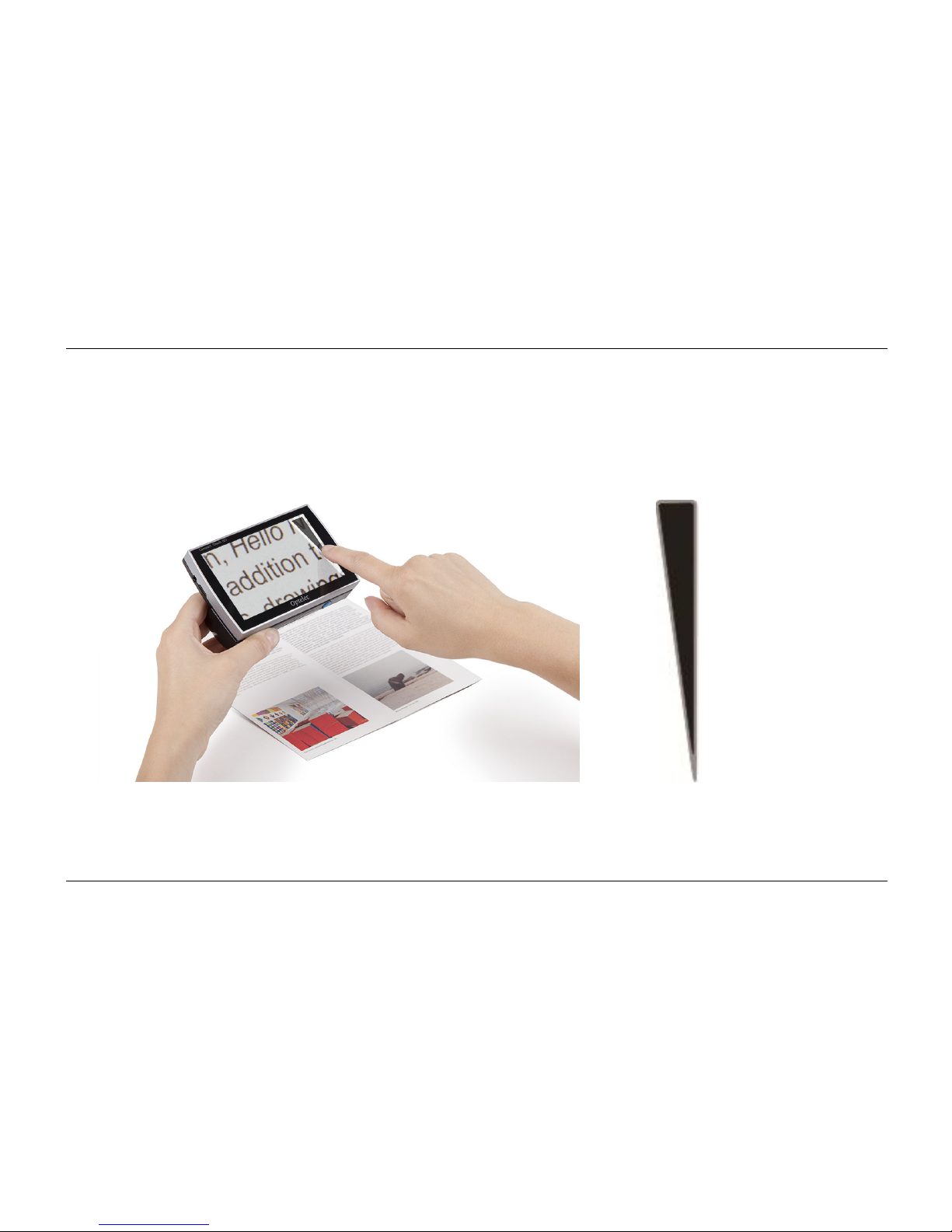
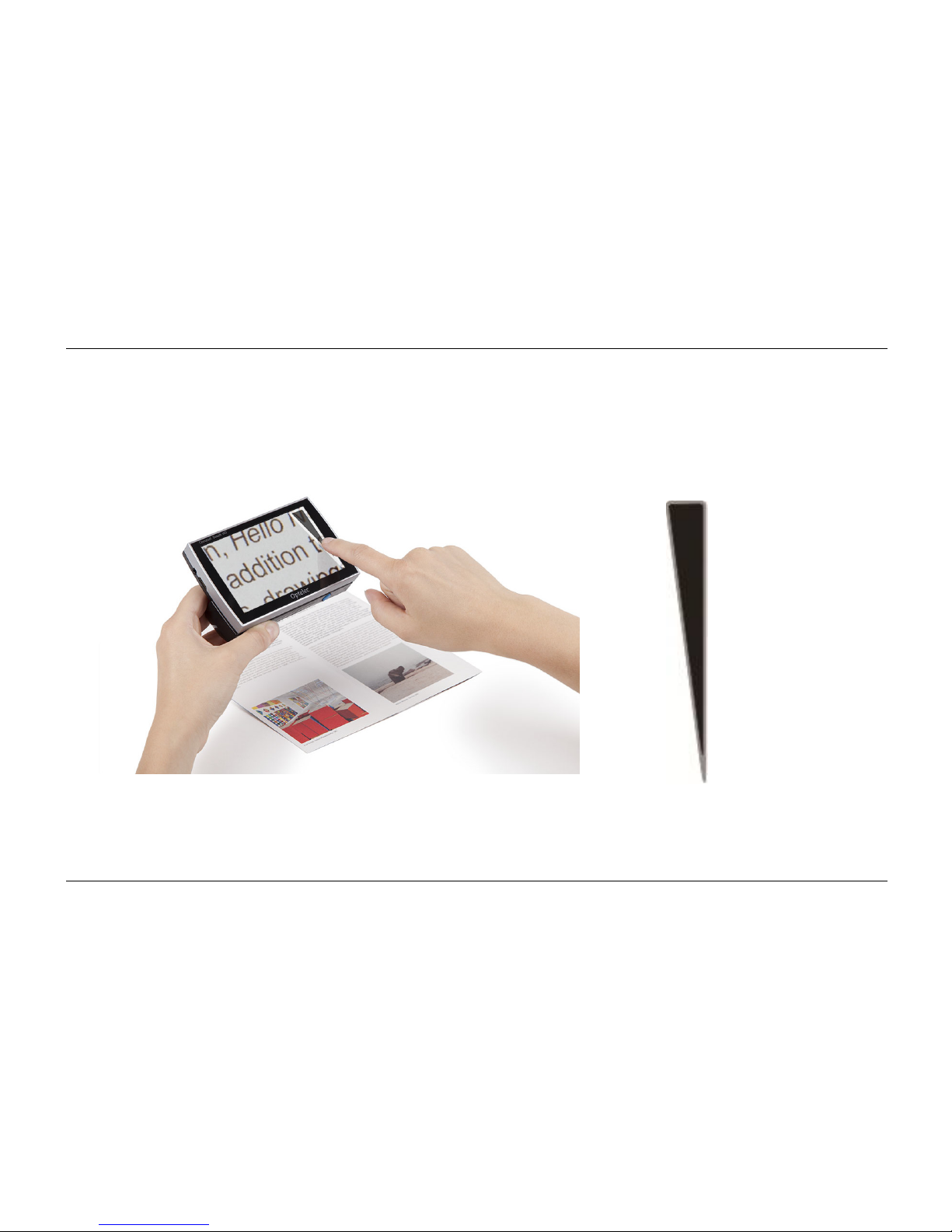
To alter the magnification you slide your finger up/down on the left or right hand side of the
touch screen.
Zooming icon
To zoom in slide your finger upwards on the zooming icon, to zoom out, slide downwards on the
zooming icon. The magnification range of the Compact Touch HD ranges from 2x to a 20x
magnification.
Page 18
Optelec Compact Touch HD
English Page 16
15. Freeze function
By shortly pressing the ON/OFF button you can freeze the image on the Compact Touch HD’s
display. Press the button again to revert to the regular viewing mode.
When the image is frozen, the lighting will be dimmed to save battery capacity.
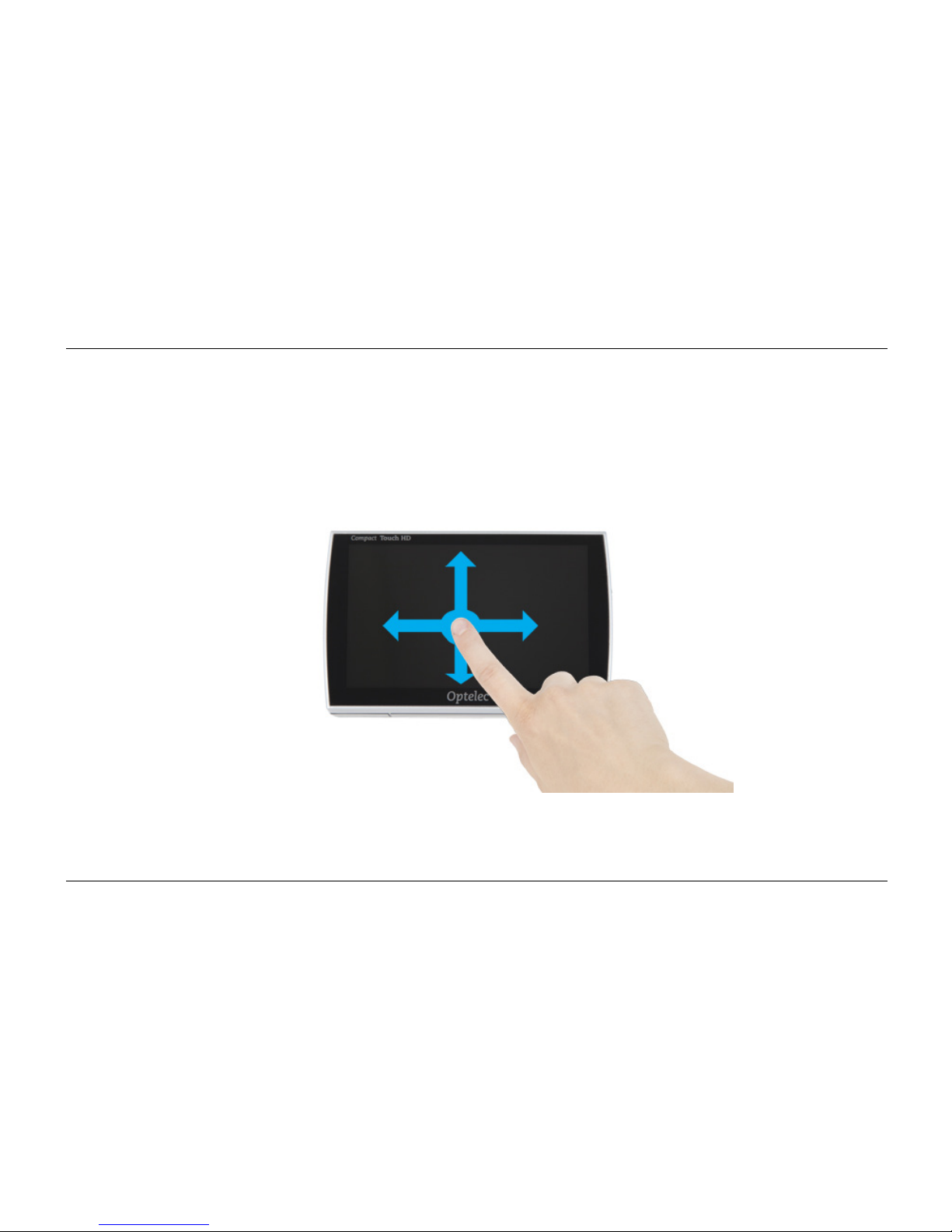
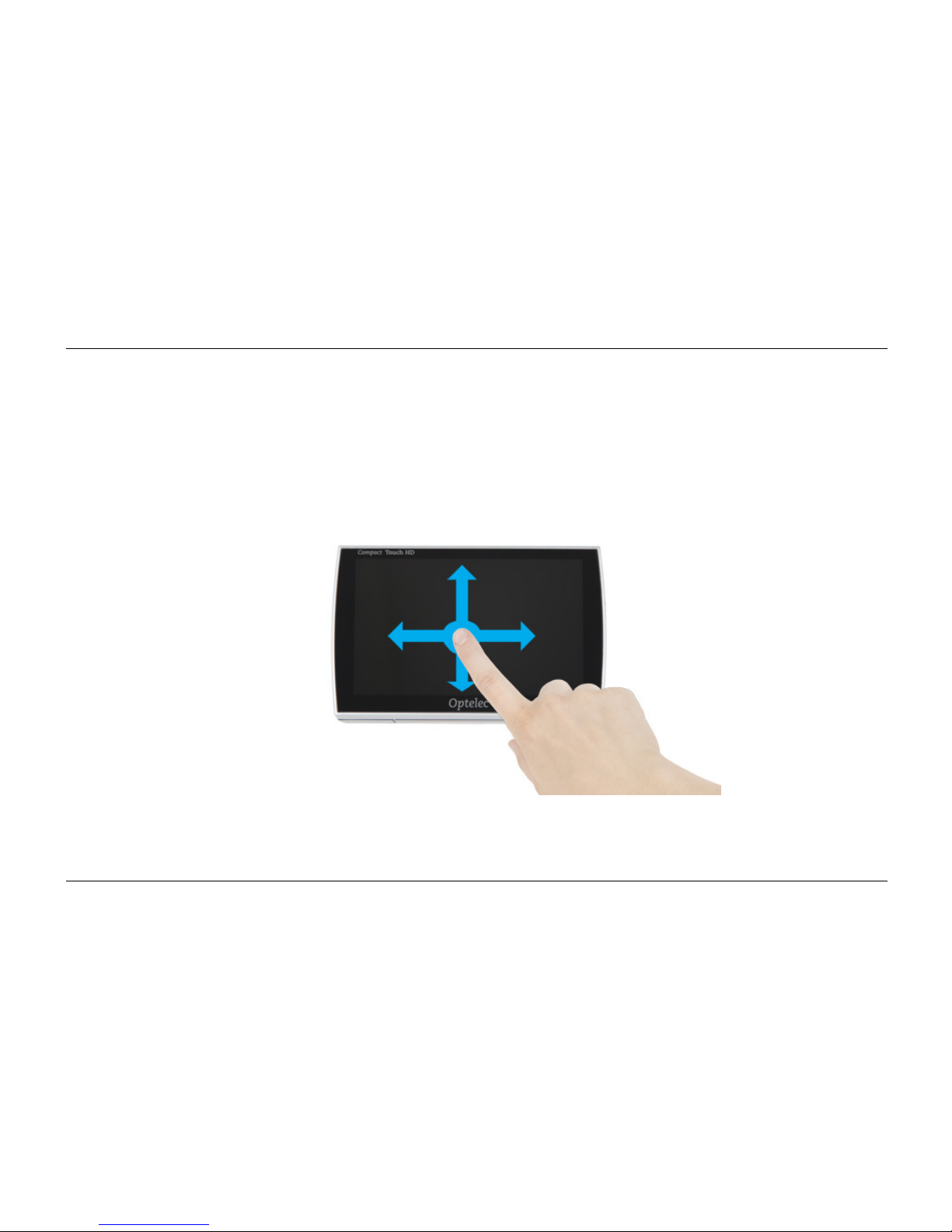
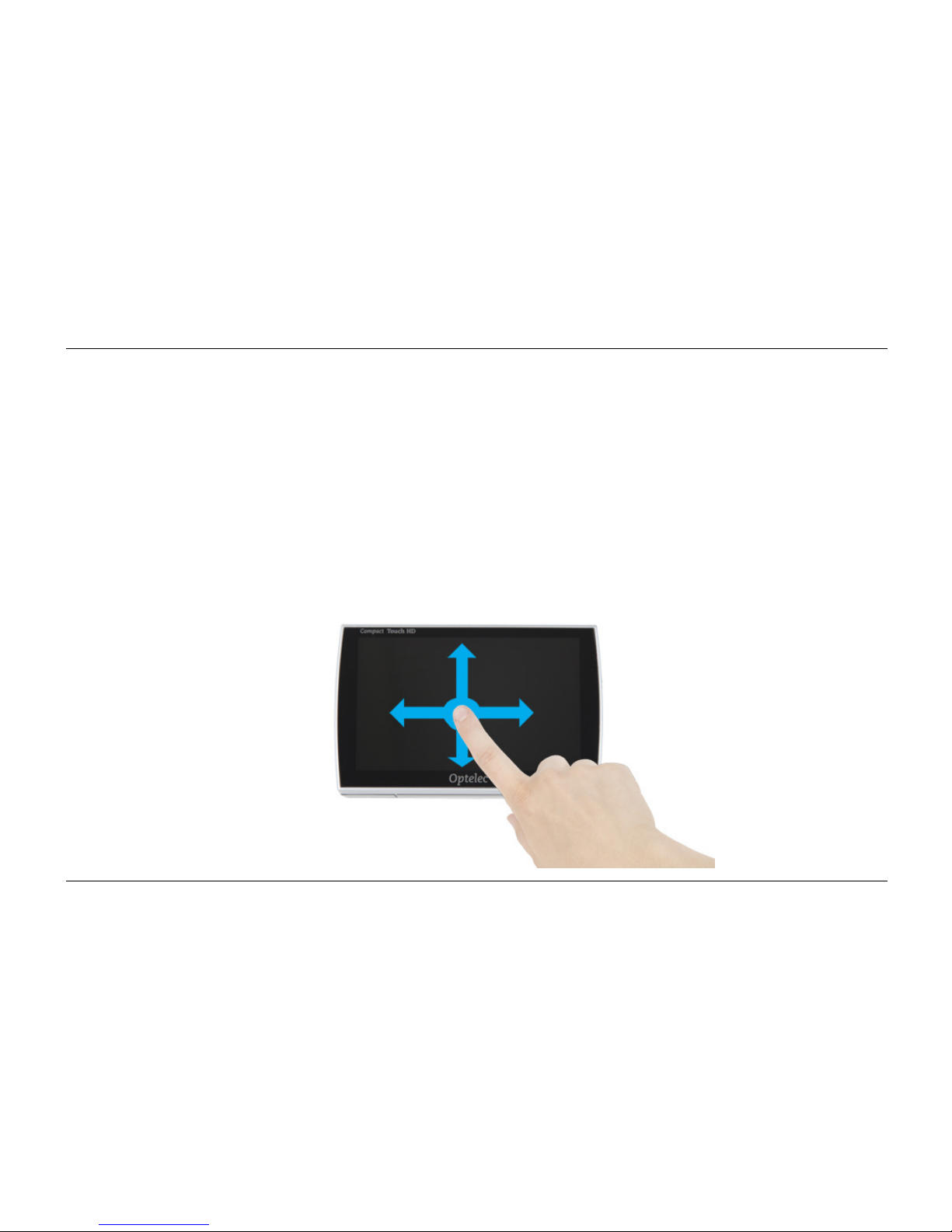
When the image is frozen, you can use 1 finger to pan through the frozen image. All functions of
the Compact Touch HD can still be used while the image is frozen.
Page 19
Optelec Compact Touch HD
English Page 17
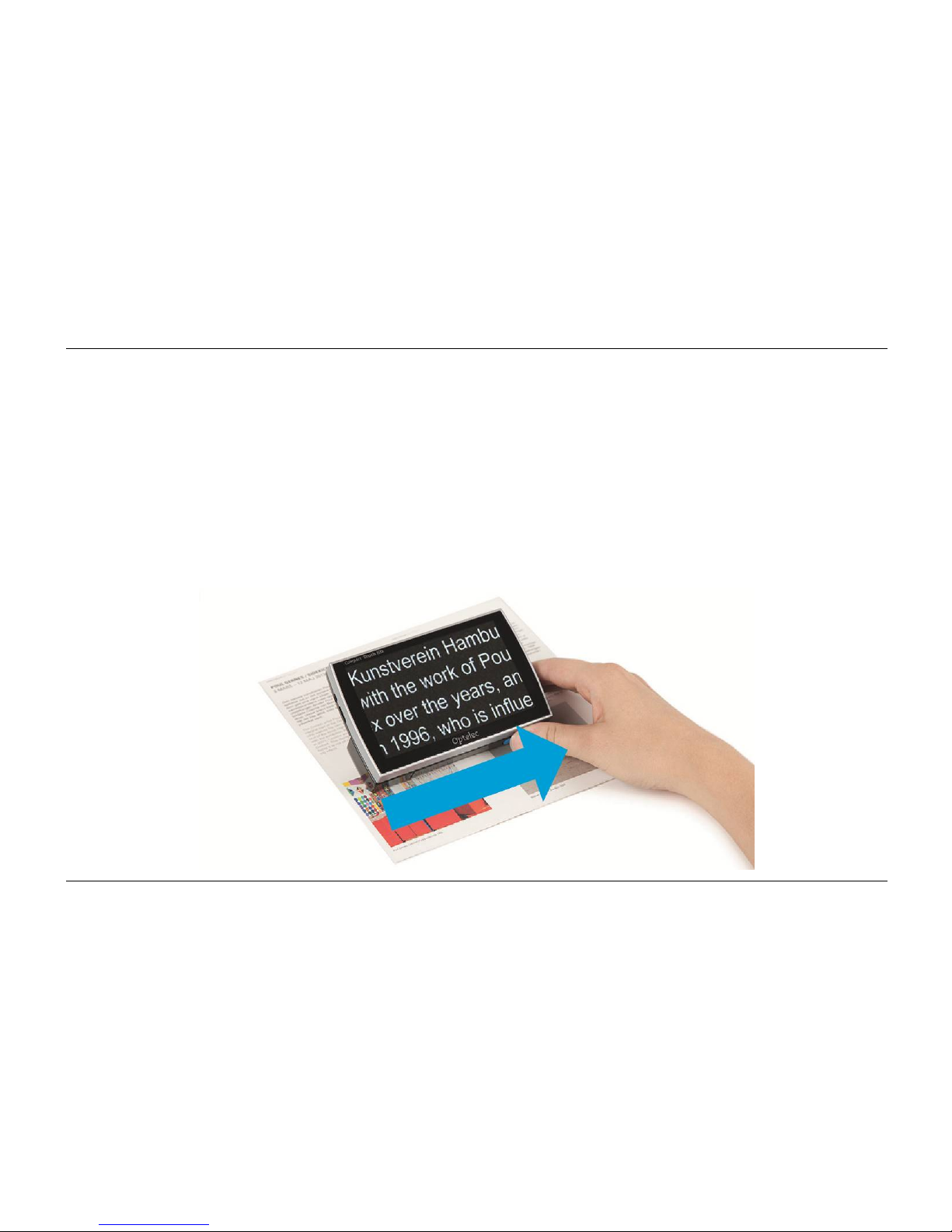
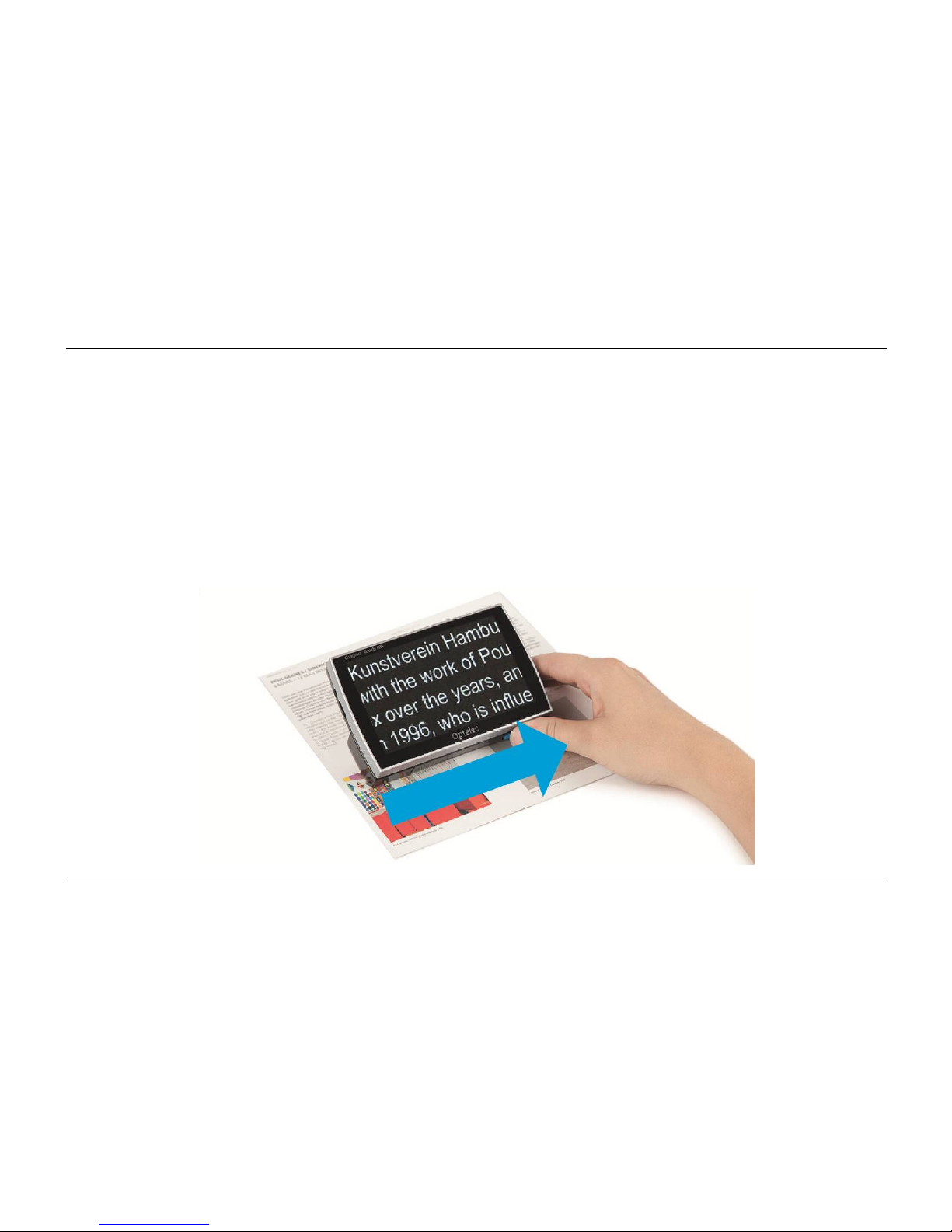
16. Magnetic lines
On the bottom side of the handle, there is a magnetic area that can be used with the magnetic
sheet.
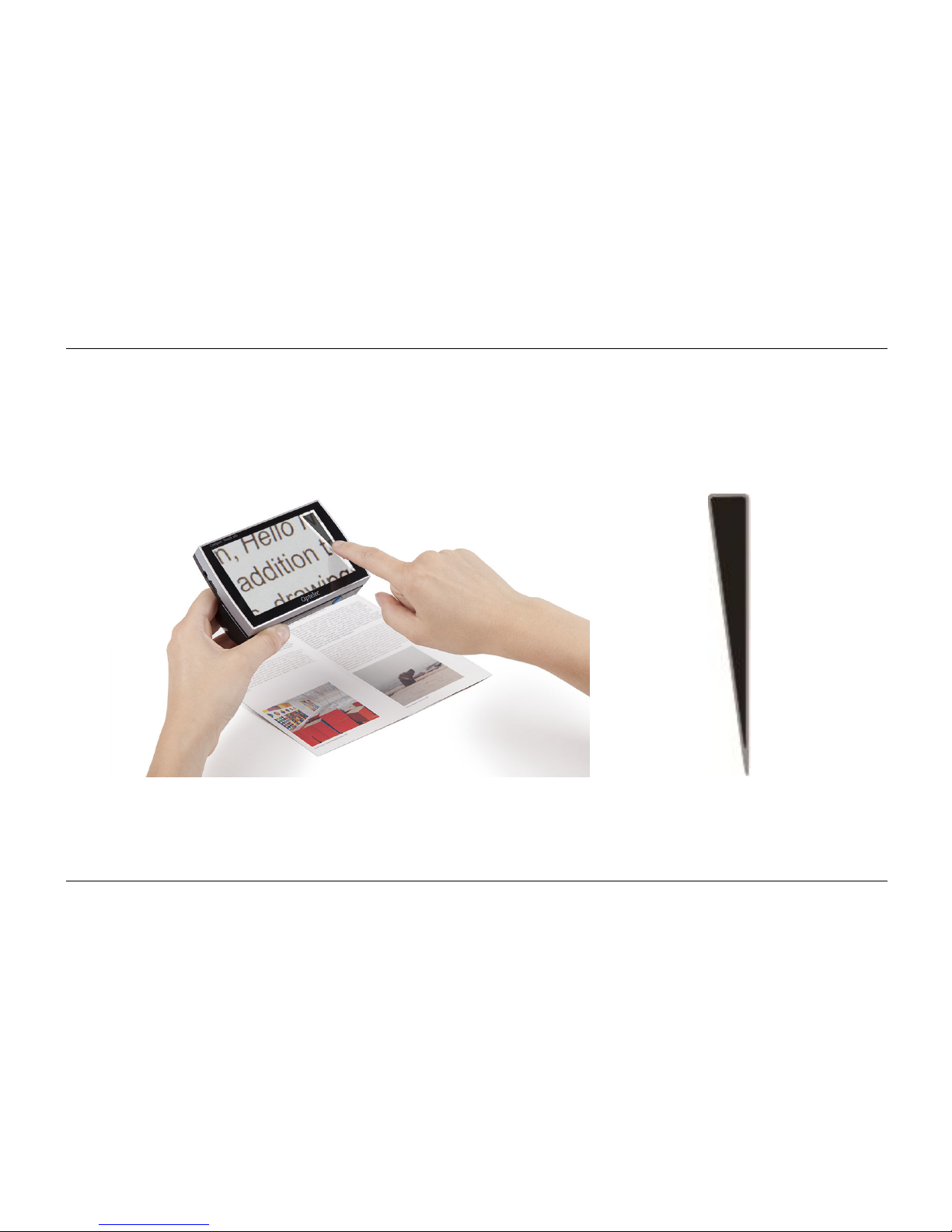
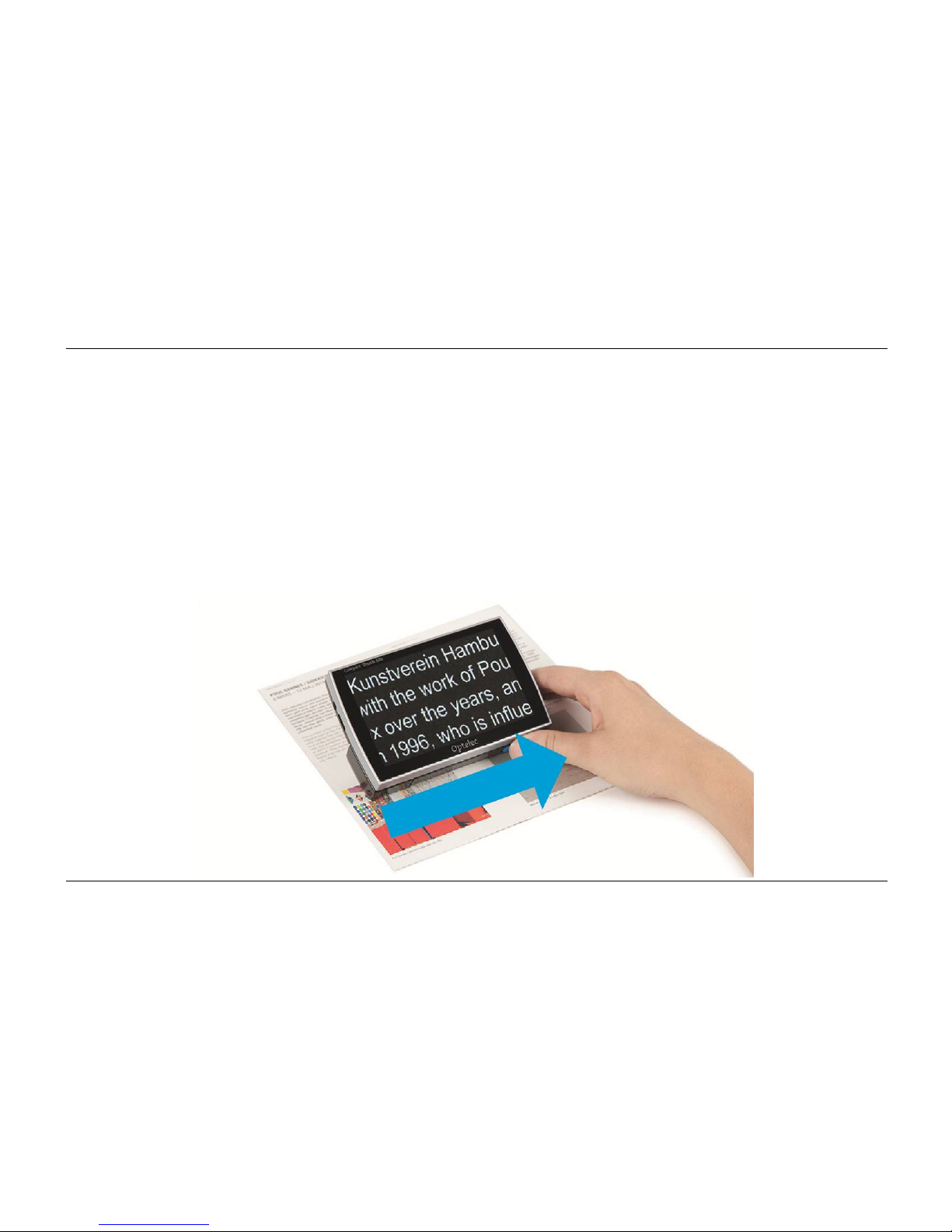
Slide the sheet underneath the text you want to read. Now place the Compact Touch HD on the
text and slide it across the magnetic sheet. The ridges in the magnetic sheet will guide the
Compact Touch HD along the lines; making it easier to keep the Compact Touch HD straight
while reading.
Page 20
Optelec Compact Touch HD
English Page 18
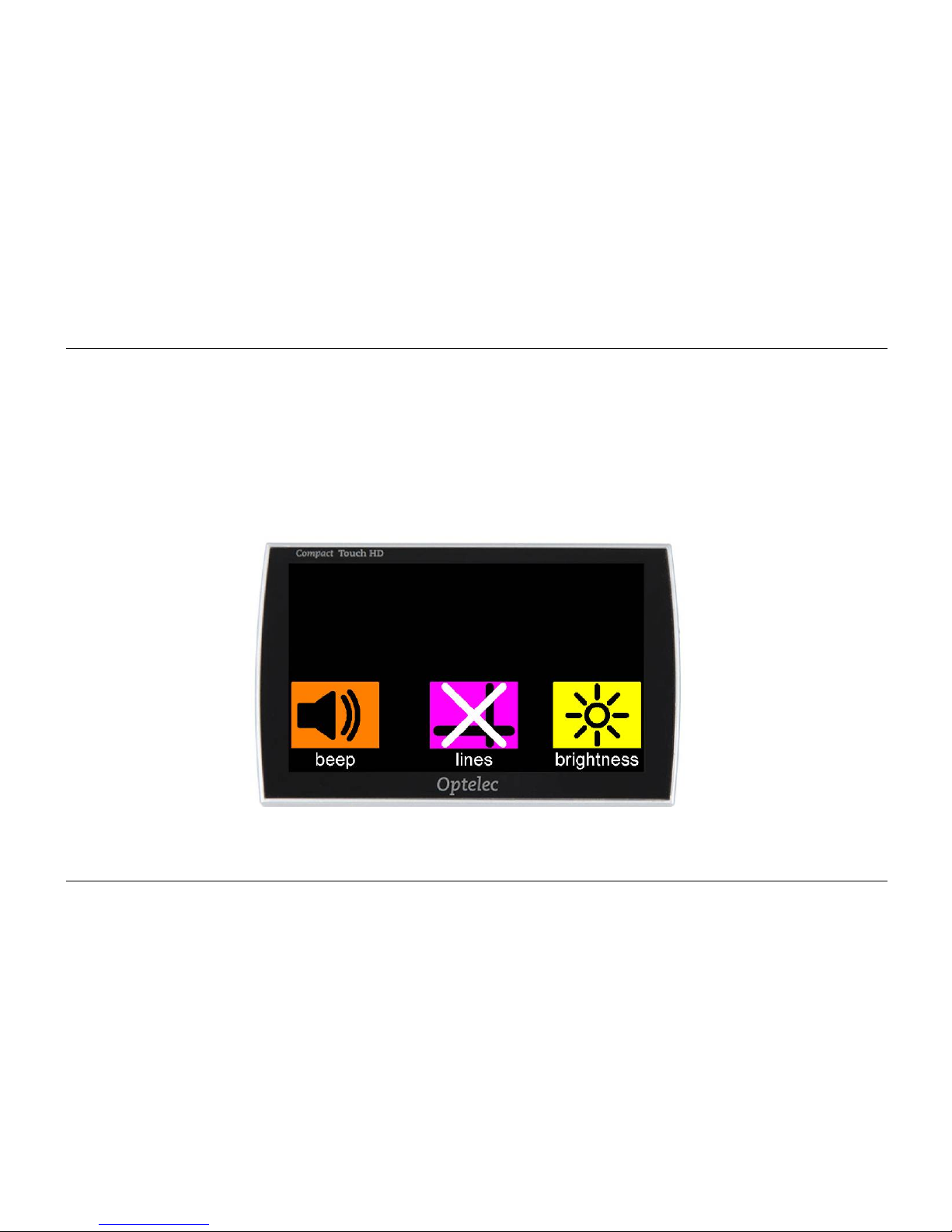
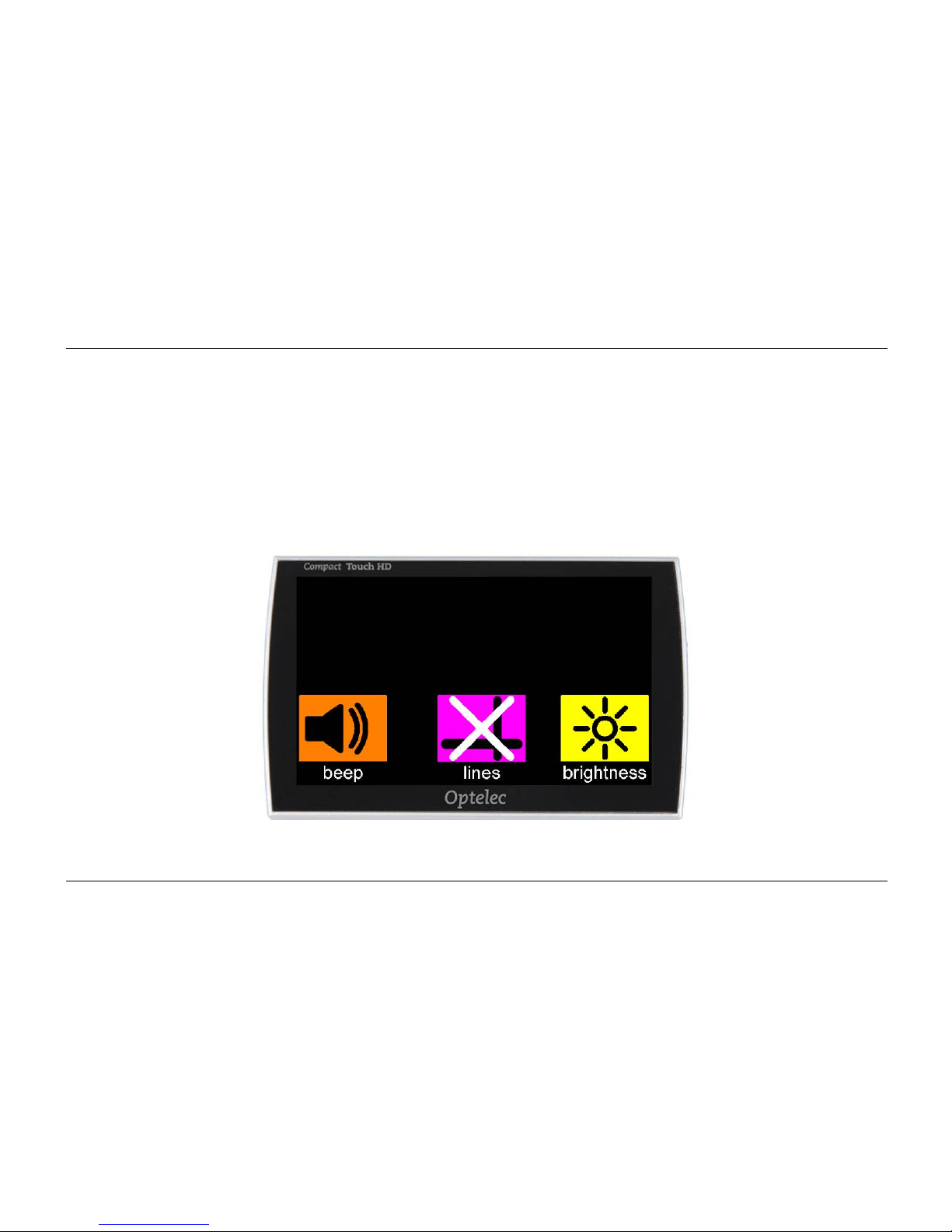
17. Compact Touch HD menu
Sound, brightness and reading lines
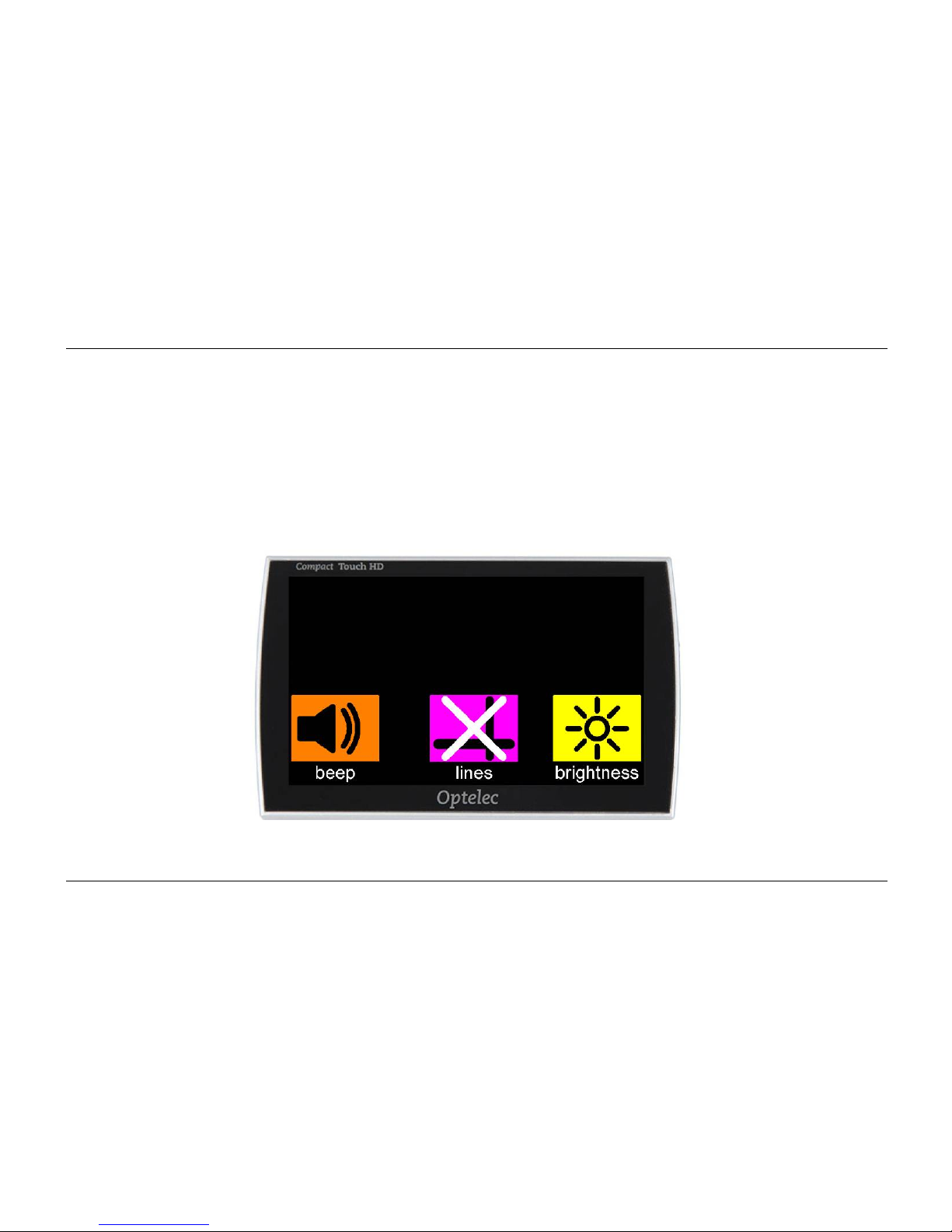
Use 1 finger to touch the bottom section of the screen for 2 seconds to generate the sound
menu, brightness menu and the reading line option in the bottom half of the screen. These
settings will be saved when the Compact Touch HD is switched off.
Page 21
Optelec Compact Touch HD
English Page 19
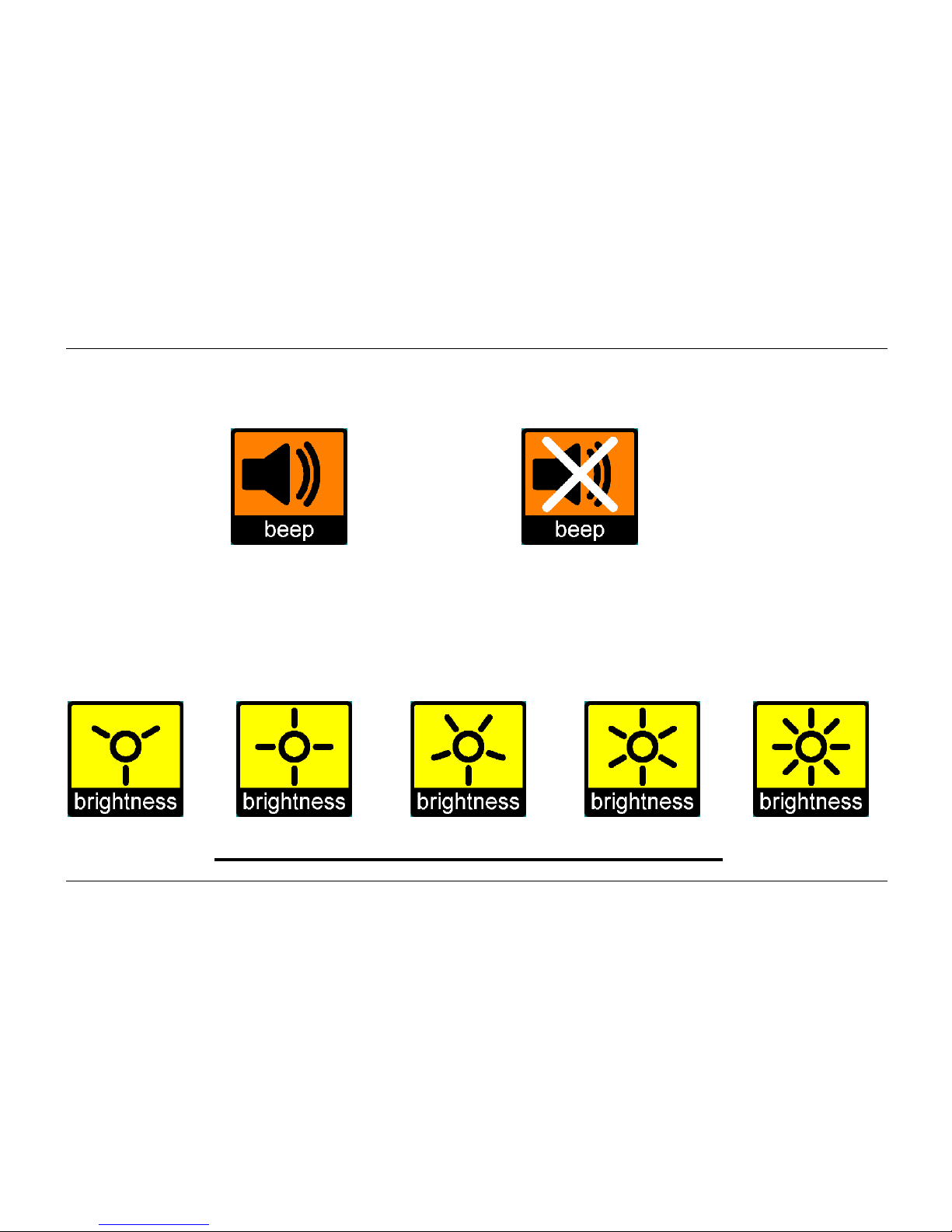
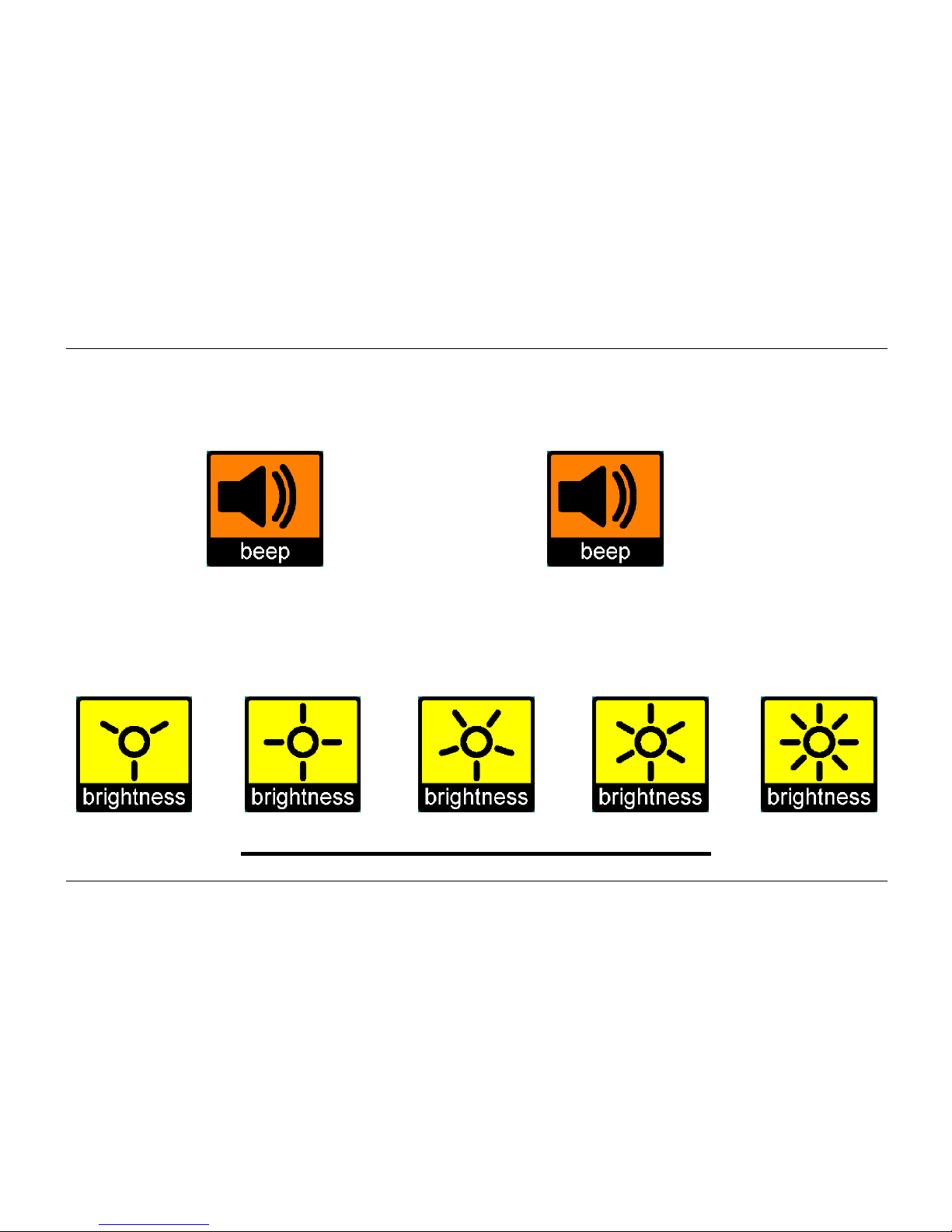
Sound icon
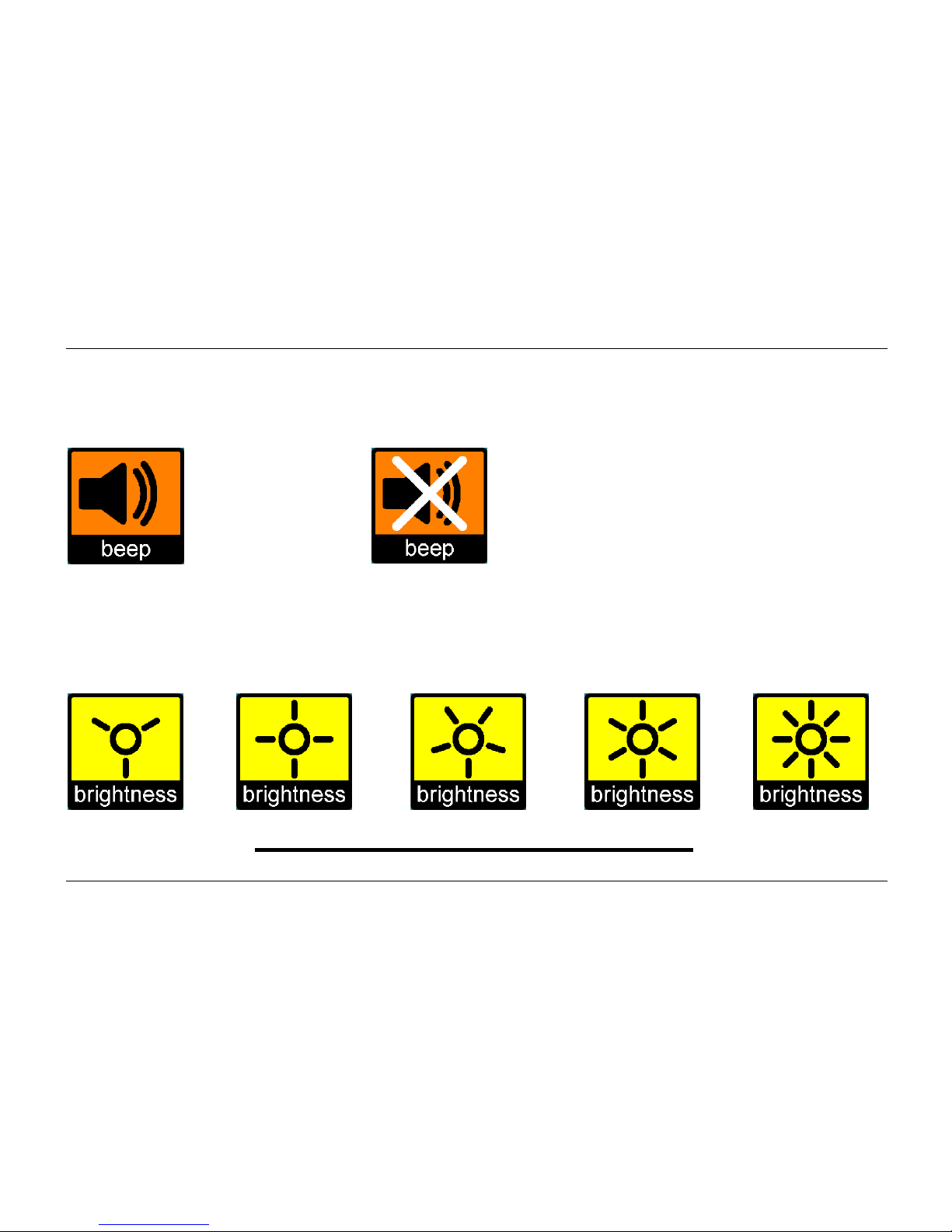
With this icon you can switch the sound on or off.
sound on sound off
Brightness icon
With this icon you can set the brightness of the screen. There are 5 different intensity settings.
least brightness most brightness
Page 22
Optelec Compact Touch HD
English Page 20
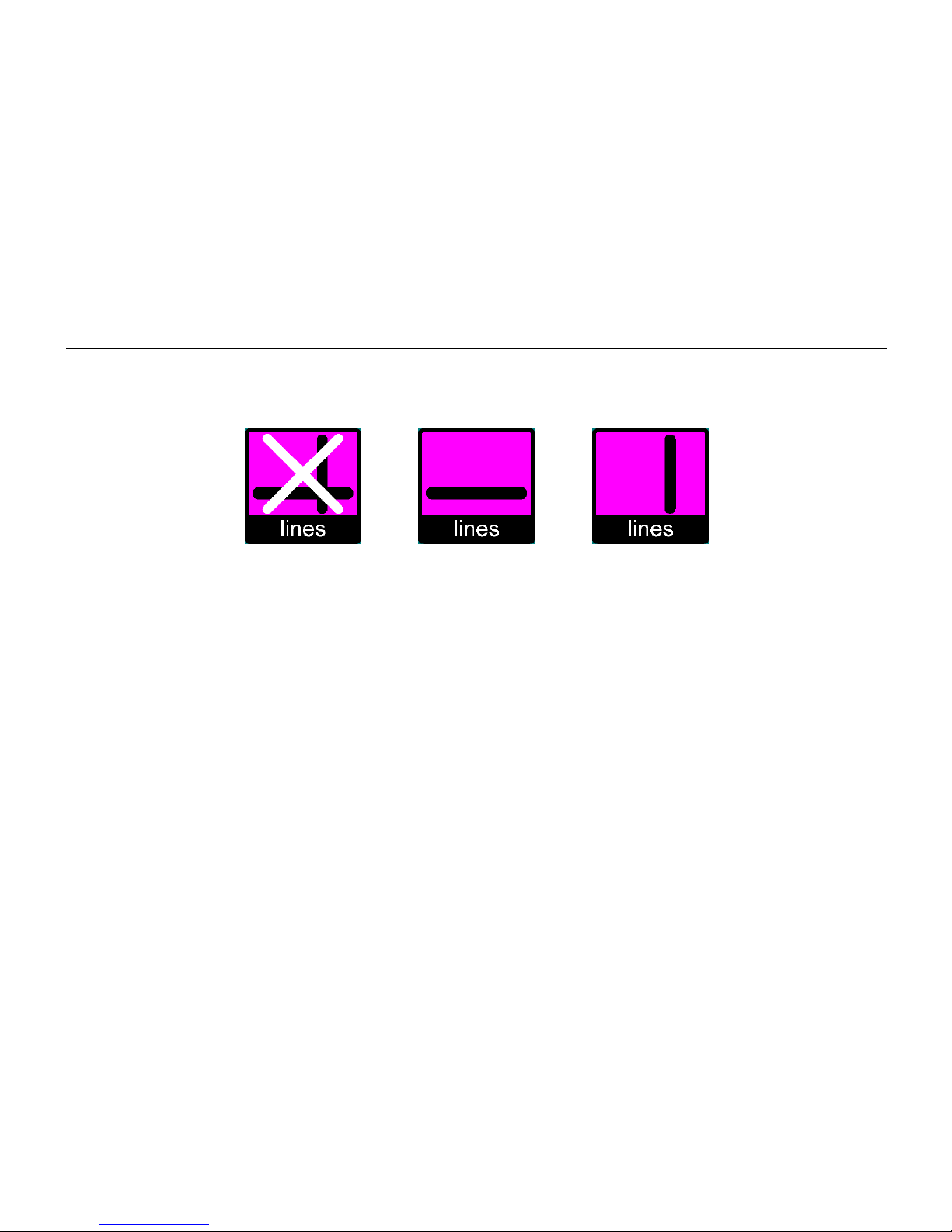
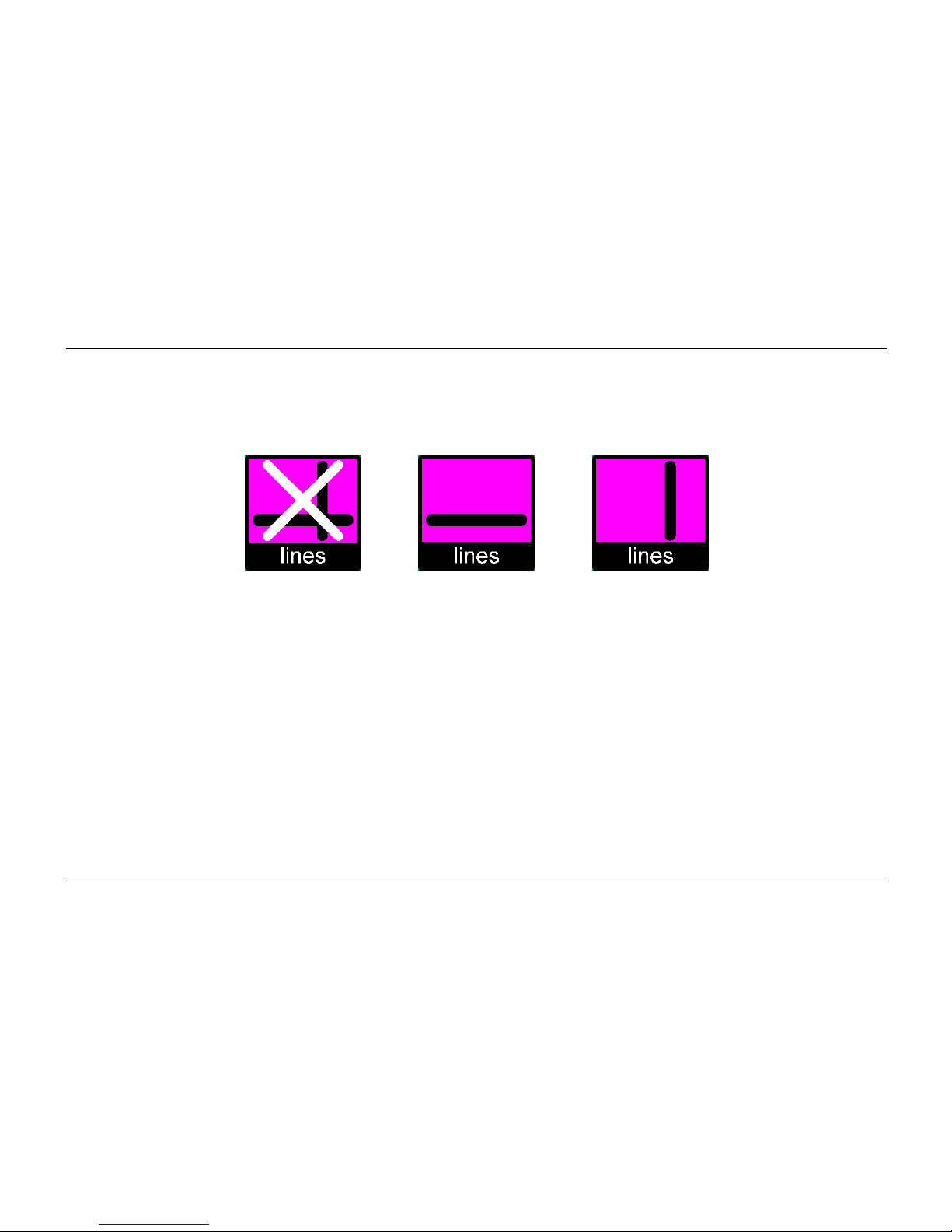
Reading lines
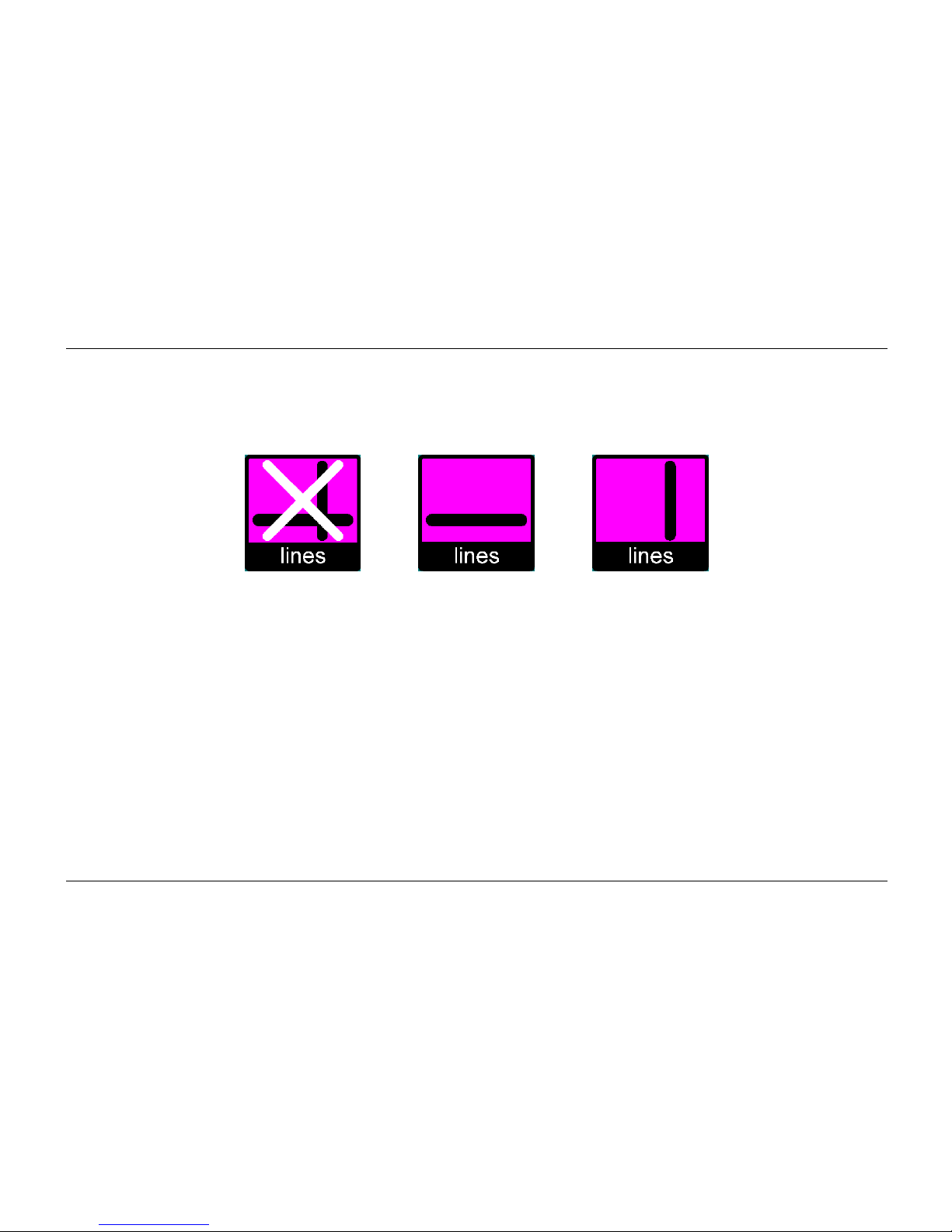
By tapping this icon you can generate a horizontal or vertical reading line on the screen.
Page 23
Optelec Compact Touch HD
English Page 21
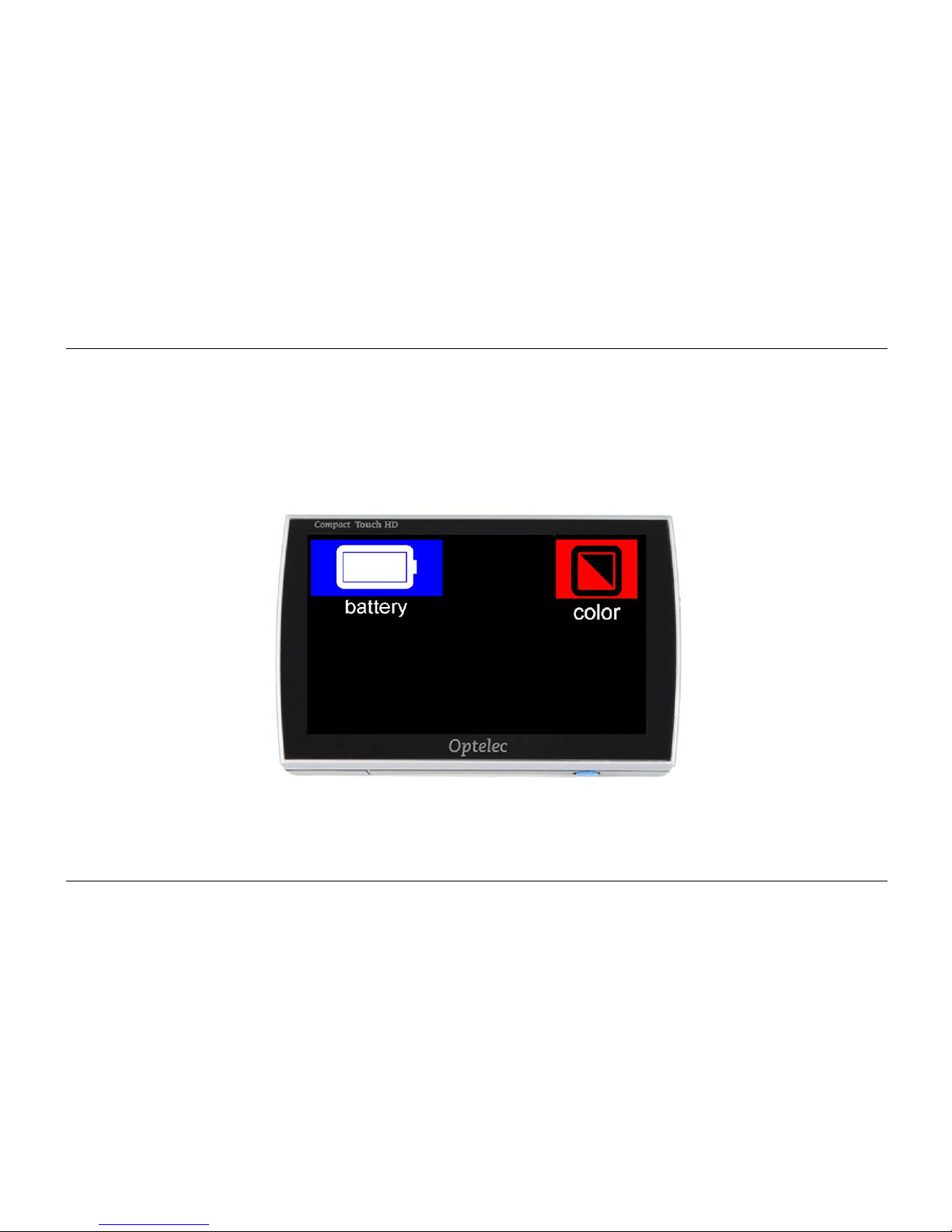
18. Display modes and battery
Use 1 finger to touch the top section of the screen for 2 seconds to generate the battery and
display mode menu in the top half of the screen.
Page 24
Optelec Compact Touch HD
English Page 22
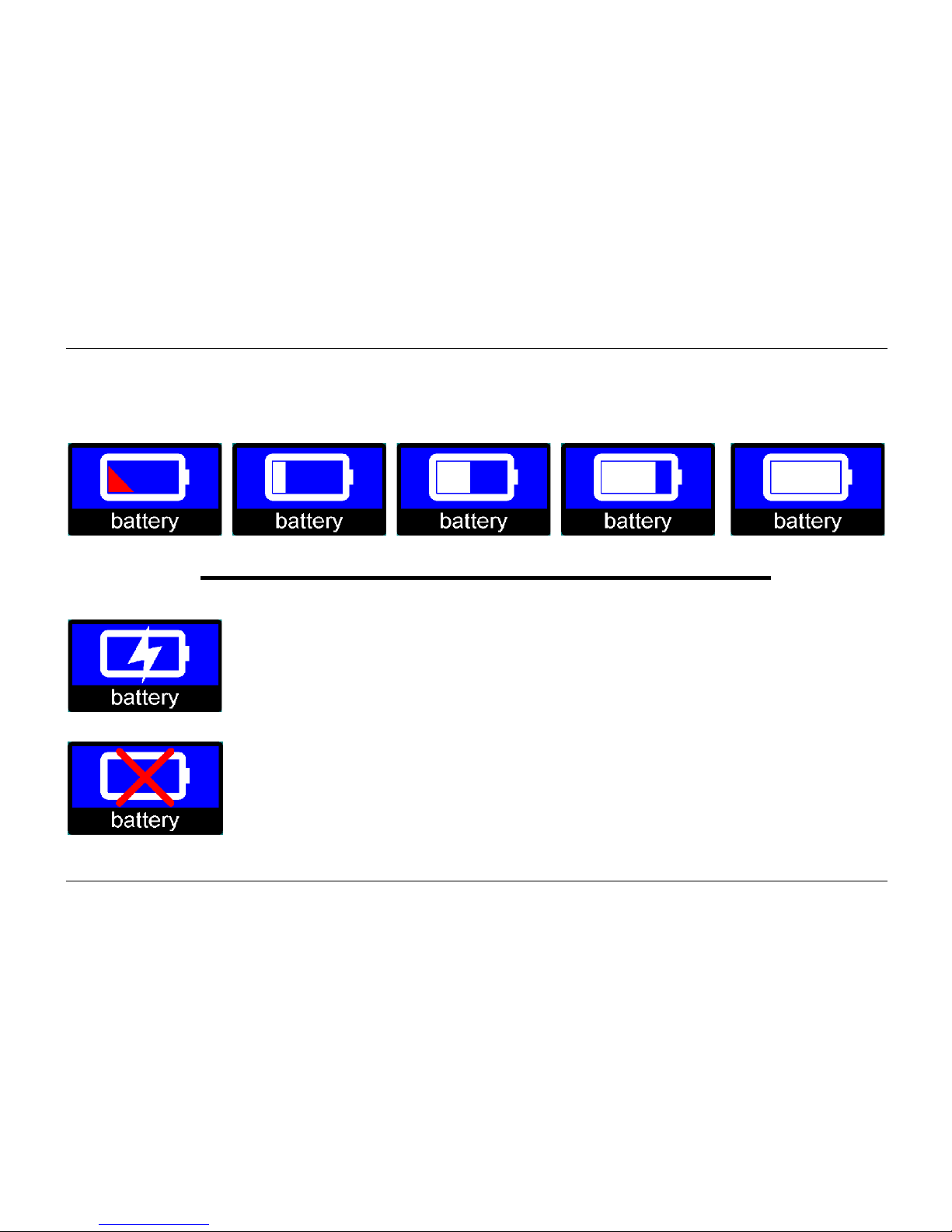
Battery icon
This icon indicates the remaining battery life. There are 5 different icons to indicate this.
battery empty battery full
When the battery is charging, the menu will display the charging icon.
When the adaptor is connected, but the battery is not connected, this icon
will appear.
Page 25
Optelec Compact Touch HD
English Page 23
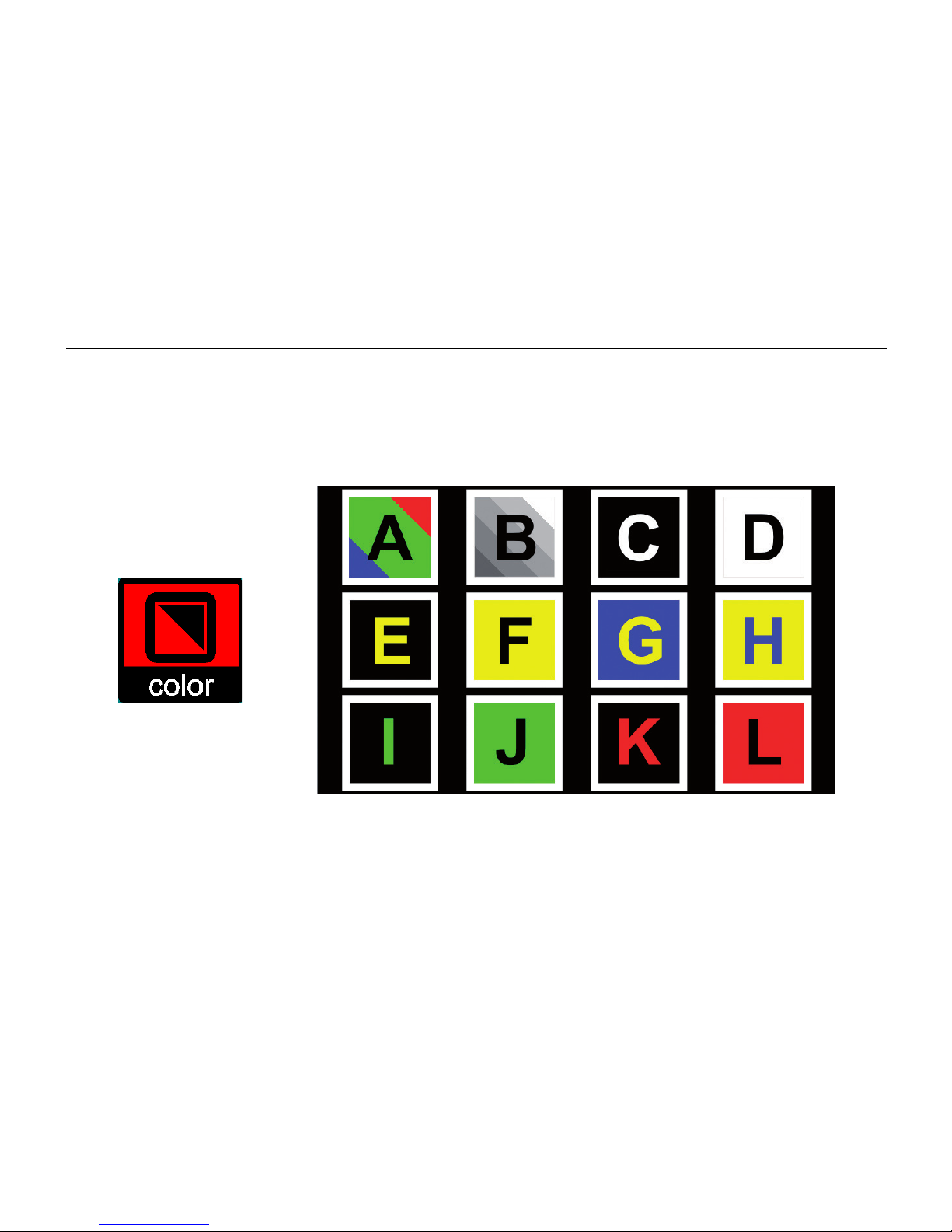
Display mode icon
By touching the display mode icon, an overview of all available display modes will appear. You
can easily select which display mode you want to use.
Page 26
Optelec Compact Touch HD
English Page 24
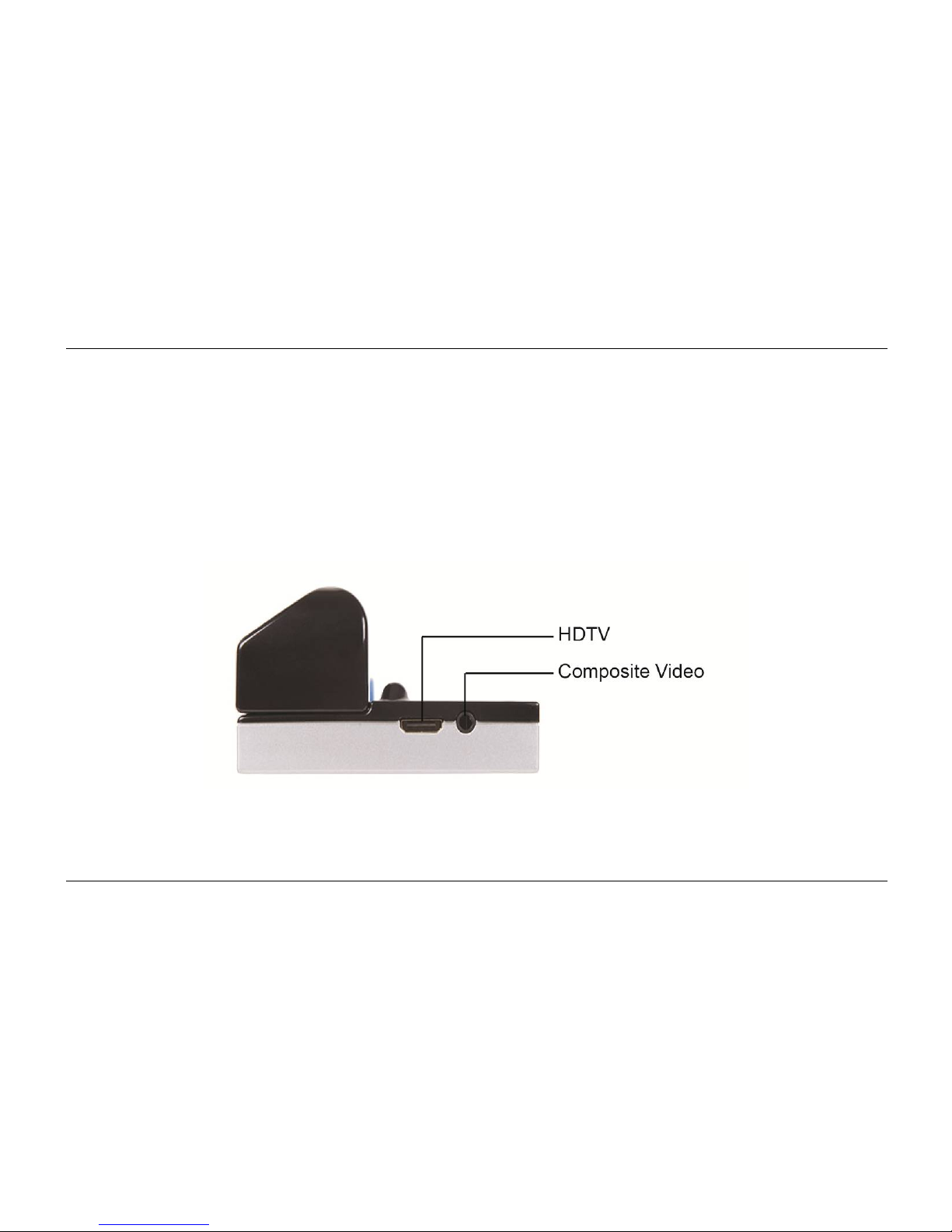
19. Picture output
The Compact Touch HD can output the picture to an external display. Do this simply by
connecting the appropriate cable to the HDTV port or the Composite Video port. Be sure to
connect the Compact Touch HD to an earthed TV for the best results.
Page 27
Optelec Compact Touch HD
English Page 25
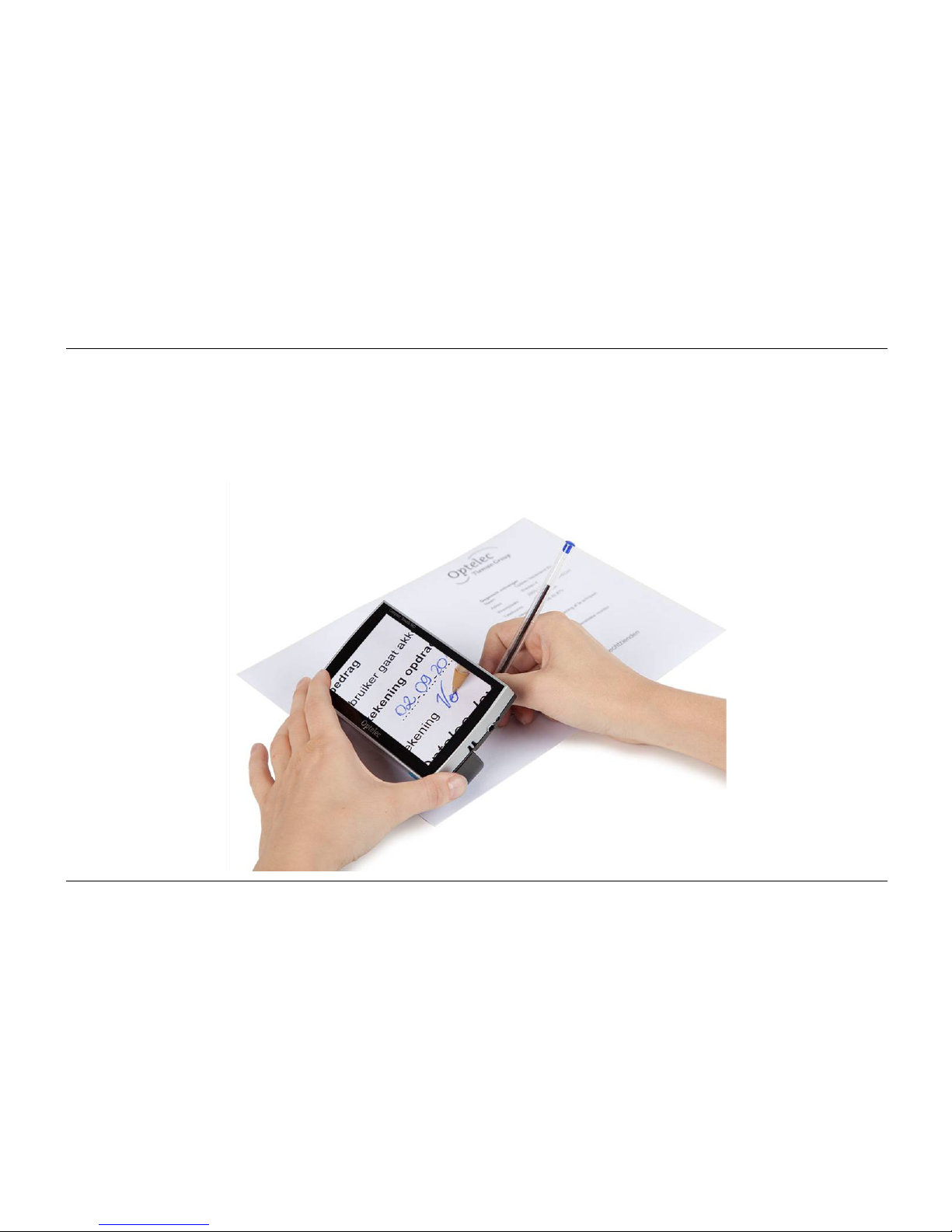
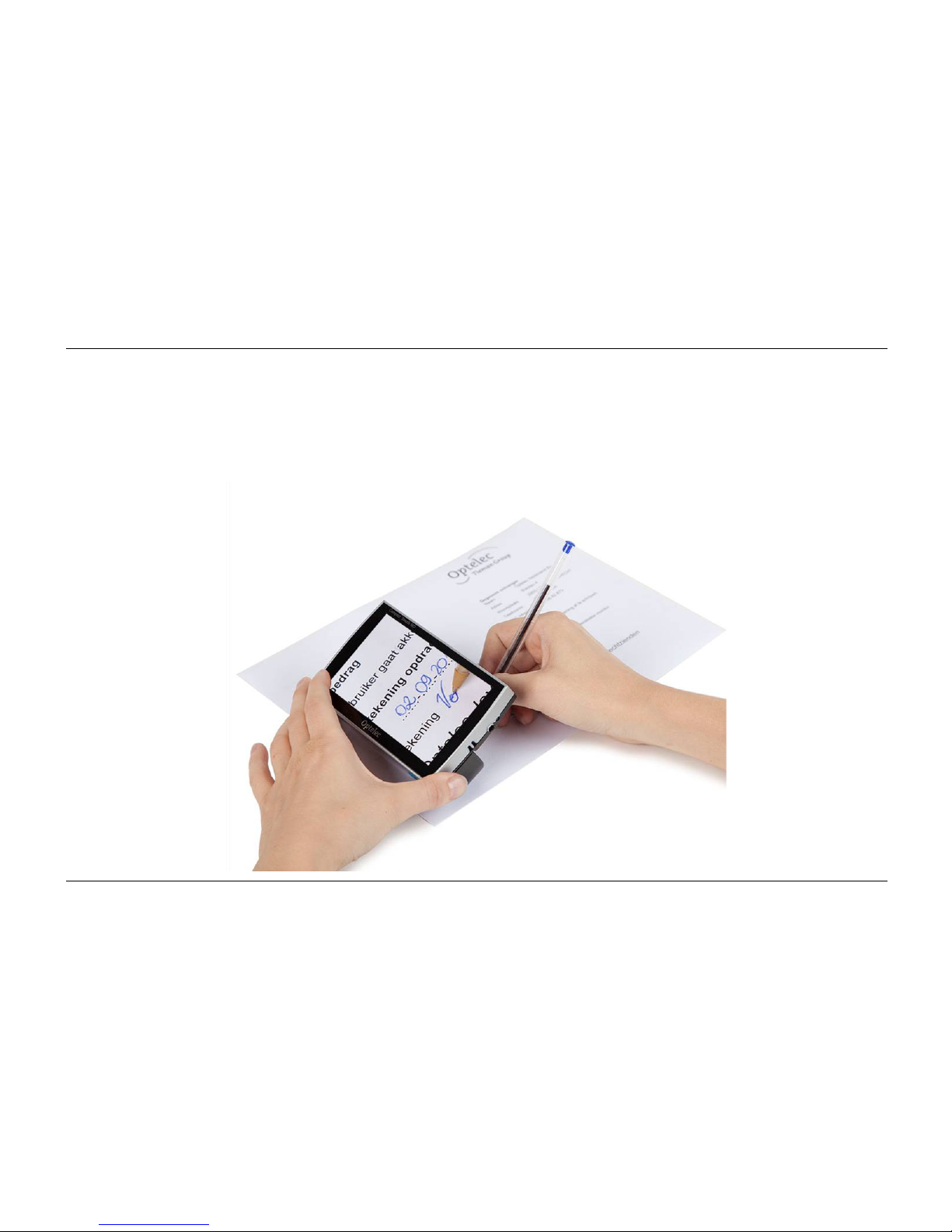
20. Writing with the Compact Touch HD
Fold the handle inwards and place it on the paper you want to sign.
Page 28

Optelec Compact Touch HD
English Page 26
21. Troubleshooting
If the following table does not offer a solution to your problem, please contact your distributor.
If there is no picture or a dark or blurry image:
Switch the Compact Touch HD on.
Image is frozen, shortly press the ON/OFF button once.
Switch the viewing mode to colour.
If the Compact Touch HD cannot be switched on:
Press the ON/OFF button to switch the Compact Touch HD on.
Charge the battery handle.
Reinsert or replace the battery handle.
If the Compact Touch HD switches itself off within minutes, sounding a dual-pitched tone:
The Compact Touch HD switches itself off if it does not detect movement on the screen
for 3 minutes.
Page 29

Optelec Compact Touch HD
English Page 27
If the Compact Touch HD switches itself off within minutes with a single high pitched tone that
fades away:
Charge the battery handle
Replace the battery handle with a new battery handle
Page 30

Optelec Compact Touch HD
English Page 28
22. Warnings
This icon indicates that users with pacemakers should take care with the
magnetic area of the handle on the Compact Touch HD as this might,
depending on your pacemaker, interfere with the pacemaker. Please contact
your surgeon to inform yourself on the effects of magnets with your
pacemaker.
23. Discarding the Compact Touch HD or battery
This symbol of the crossed out wheelie bin indicates that the product must not be disposed of
with your other household waste. Check local regulations for proper disposal of electronic
products.
24. Warranty regulations
This device is subject to the warranty regulations of your supplier. For futher information
regarding these regulations, please contact your supplier.
Page 31

Optelec Compact Touch HD
English Page 29
25. Regulations
Products with CE marking comply with EMC Directive (2004/108/EC), and the Low Voltage
Directive (2006/95/EC) issued by the Commission of the European Community.
Compliance with these directives implies conformity to the following standards:
EMC: EN 55022; EN 55024
FCC: part 15 Class B
Safety: EN 60950
Page 32

Optelec Compact Touch HD
English Page 30
Appendix A: Safety
Handle the Compact Touch HD with care. Rough handling will damage internal
components.
Contact your Optelec distributor to service this equipment if necessary.
Do not open or remove any parts of the Compact Touch HD as it will void the warranty.
Do not try to remove the battery.
Do not expose the Compact Touch HD to excessive heat or direct sunlight to avoid the
risk of fire.
Do not use the Compact Touch HD near inadequately shielded medical devices.
To avoid risk of electrical damage, keep your Compact Touch HD away from fluids and
chemicals.
Always unplug the Compact Touch HD before cleaning. Use a soft cloth to clean the
exterior. Do not use cleaning agents or abrasive materials as they will damage your unit.
Use of the Compact Touch HD other than described in this manual will exclude it from warranty
conditions.
Page 33

Optelec Compact Touch HD
English Page 31
Appendix B: Specifications
Main specification
Measurements 131 × 75 × 32 mm (l × w × h)
Weight 300 grams (including battery)
Display
TFT diagonal 5.0”
Other specifications High Brightness
Touch technology
Camera
Minimum magnification 2×
Maximum magnification 20×
Focus 5cm - infinity
Power supply
Battery system Interchangeable (inside battery handle)
Lithium-Ion 4000mAh
Adaptor 5VDC/1.8A
Page 34

Optelec Compact Touch HD
English Page 32
Conditions of use
Temperature +5°C till +35°C / 50°F till 95°F
Air humidity <70% (no condensation)
Time of use and charging time
Time of use Up to 3 hours
Charging time approx. 5 hours
Package contents
Compact Touch HD
Battery handle (4000mAh)
Charging adapter
Travel pouch
Magnetic sheet
User manual
HDTV cable
SDTV cable
Cleaning cloth
This device bears the CE and FCC approval mark.
Page 35
Optelec Compact Touch HD
Nederlands Pagina 33
Gebruikershandleiding
Versie 1.2
© 2013 Optelec, Nederland
Alle rechten voorbehouden
Optelec
Postbus 399
2990 AJ Barendrecht
Nederland
Tel: +31 (0)88 678 35 55
E-mail: [email protected]
Internet: www.optelec.nl
Page 36

Optelec Compact Touch HD
Nederlands Pagina 34
Inhoud
1. Introductie ........................................................................................................................ 36
2. Algemene beschrijving Compact Touch HD ................................................................. 36
3. Bedoeld gebruik ............................................................................................................... 37
4. Veiligheid en onderhoud ................................................................................................. 38
5. Installeren van de Compact Touch HD .......................................................................... 39
6. Laadinstructies ................................................................................................................ 40
7. Onderhoud batterijhandvat ............................................................................................. 41
8. Handvat ............................................................................................................................ 42
9. De Compact Touch HD focussen ................................................................................... 42
10. Far View-functie ............................................................................................................... 43
11. De Compact Touch HD in- of uitschakelen ................................................................... 43
12. LED verlichting aan- of uitschakelen ............................................................................. 43
13. Beeldweergave................................................................................................................. 44
14. Vergroten en verkleinen .................................................................................................. 45
15. Freeze functie .................................................................................................................. 46
16. Magnetic lines .................................................................................................................. 47
17. Compact Touch HD menu ............................................................................................... 48
Geluid, helderheid en leeslijnen ..................................................................................... 48
Geluidsicoon .................................................................................................................. 49
Helderheidsicoon ........................................................................................................... 49
Page 37

Optelec Compact Touch HD
Nederlands Pagina 35
Leeslijnen ....................................................................................................................... 50
18. Beeldweergave en batterij .............................................................................................. 51
Batterij icoon .................................................................................................................. 52
Beeldweergave-icoon ..................................................................................................... 53
19. TV-uitgang ........................................................................................................................ 54
20. Schrijven met de Compact Touch HD ............................................................................ 55
21. Problemen oplossen ....................................................................................................... 56
22. Waarschuwingen ............................................................................................................. 58
23. De Compact Touch HD of batterij weggooien ............................................................... 58
24. Garantiebepalingen ......................................................................................................... 58
25. Richtlijnen ........................................................................................................................ 59
Bijlage A: Veiligheid................................................................................................................. 60
Bijlage B: Specificaties ............................................................................................................ 61
Optelec kantoren wereldwijd ................................................................................................ 153
Page 38
Optelec Compact Touch HD
Nederlands Pagina 36
1. Introductie
Gefeliciteerd met de aankoop van uw Compact Touch HD! In deze handleiding vindt u een
uitgebreide beschrijving van de functionaliteiten van de Compact Touch HD. Indien u nog
vragen heeft na het lezen van deze handleiding, neem gerust contact op met uw leverancier.
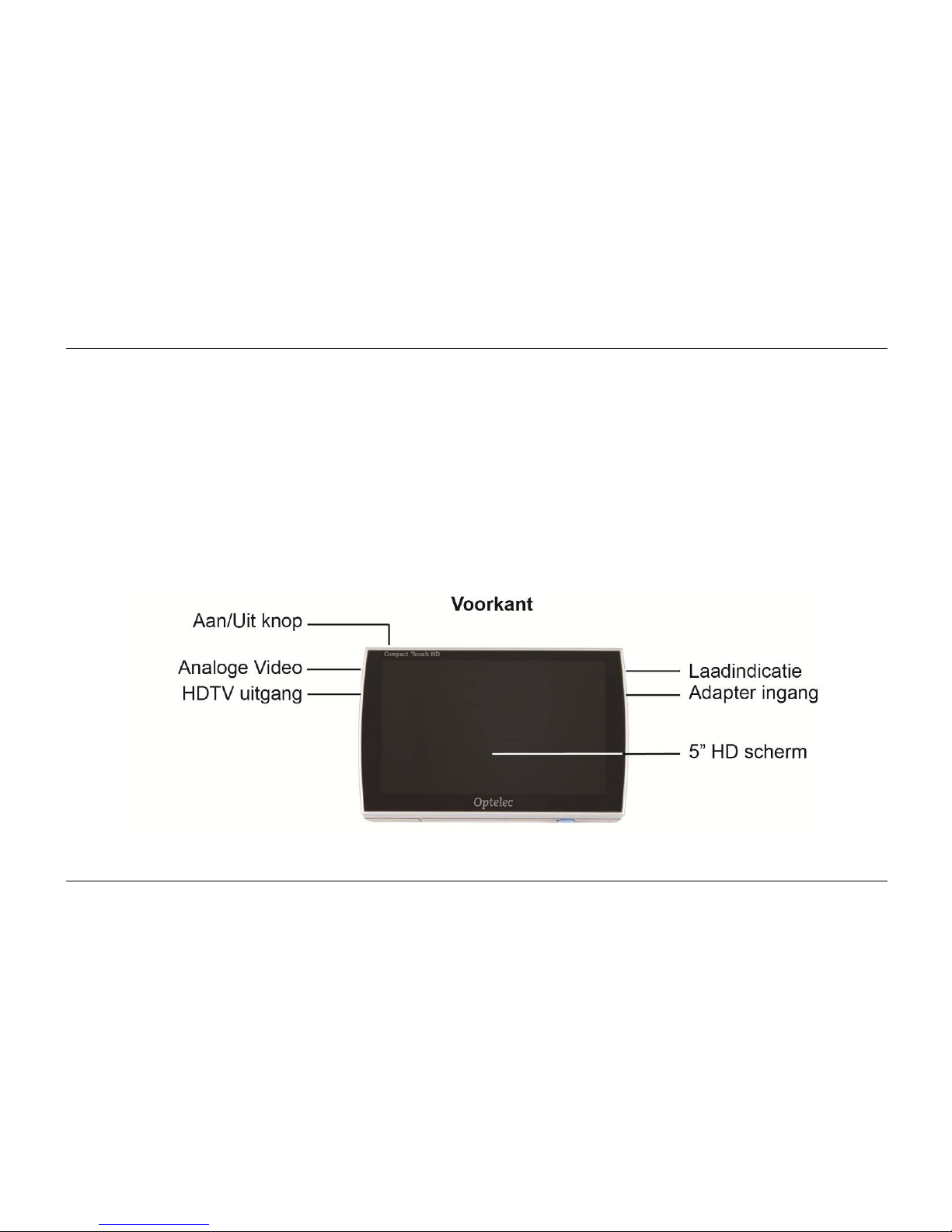
2. Algemene beschrijving Compact Touch HD
Page 39
Optelec Compact Touch HD
Nederlands Pagina 37
3. Bedoeld gebruik
Dit apparaat is uitsluitend bestemd voor het vergrotend weergeven van tekst, fotomateriaal en
objecten. Bij wijziging van het gebruiksdoel vervalt de geldigheid van de CE-markering.
Let op: maak in geen geval het apparaat zelf open. Laat dit altijd doen
door de fabrikant of door een door de fabrikant goedgekeurde
reparateur. Indien u het apparaat zelf tracht te repareren, vervalt de
garantie.
Page 40

Optelec Compact Touch HD
Nederlands Pagina 38
4. Veiligheid en onderhoud
Neem voor gebruik de volgende veiligheids- en onderhouds-instructies in acht:
Stel het apparaat en de batterijen niet bloot aan vocht, regen, zand of extreme
temperaturen zoals verwarmingen of direct zonlicht.
Gebruik geen schoonmaakproducten die alcohol, aceton, ammoniak of schuurmiddelen
bevatten. Deze kunnen het apparaat of het touch scherm beschadigen.
Gebruik alleen accessoires die de fabrikant aanlevert of goedkeurt.
Gooi de batterij nooit in het vuur. Defecte batterijen en laders worden als chemisch afval
beschouwd en moeten met het klein chemisch afval worden weggegooid.
Let op dat het gebruik van een screen protector het functioneren van het touch scherm
kan beïnvloeden.
Page 41
Optelec Compact Touch HD
Nederlands Pagina 39
5. Installeren van de Compact Touch HD
Sluit het batterijhandvat van de Compact Touch HD door het in de aansluiting te schuiven totdat
het handvat vastklikt. Het batterijhandvat kan vervolgens als normaal handvat gebruikt worden.
Om het batterijhandvat te vervangen, druk de 2 blauwe ontgrendel-knoppen in op de zijkanten
van het batterijhandvat, en schuif het handvat van het apparaat af.
Laad het batterijhandvat volledig op voordat u de Compact Touch
HD in gebruik neemt. Lees de laadinstructies goed door.
Page 42

Optelec Compact Touch HD
Nederlands Pagina 40
6. Laadinstructies
Sluit de adapter aan op het stopcontact en sluit de plug aan op de adapteringang op de
Compact Touch HD.
LED brandt constant batterij wordt opgeladen
LED uit batterij is vol
LED knippert fout / batterij is defect
Laad de batterij op in een geventileerde ruimte. Haal de Compact Touch HD uit het draagtasje
tijdens het laadproces. Plaats het apparaat niet in direct zonlicht of bij een verwarming tijdens
het laden.
Wanneer de batterij leeg is zal de Compact Touch HD zichzelf uitschakelen. U hoort dan een
hoge toon die wegzakt.
Page 43

Optelec Compact Touch HD
Nederlands Pagina 41
7. Onderhoud batterijhandvat
Koppel het batterijhandvat los van de Compact Touch HD wanneer u het apparaat
geruime tijd niet gaat gebruiken. Dit zal de levensduur van het batterijhandvat
bevorderen.
Batterijen zijn gevoelig voor overladen. Het is aan te raden om het batterijhandvat alleen
op te laden wanneer deze volledig leeg is.
Oplaadbare Litium-Ion batterijen hebben een zelfontlading die sterk afhankelijk is van de
omgevingstemperatuur (bijv. laat uw batterijhandvat niet liggen in een auto die
geparkeerd staat in de zon).
Nieuwe Litium-Ion batterijen moeten meerdere keren opgeladen worden voordat ze hun
nominale capaciteit bereiken.
Laad Lithium-Ion batterijen minstens 1 keer per 6 maanden op.
De gemiddelde levensduur van een batterijhandvat is gemiddeld 300 laadcyclussen,
maar dit hangt af van het gebruik. De totale capaciteit zal langzaam afnemen na
meerdere laadcyclussen.
Page 44

Optelec Compact Touch HD
Nederlands Pagina 42
8. Handvat
De Compact Touch HD wordt geleverd met een vervangbaar handvat inclusief een ingebouwde
batterij. Dit handvat kan in meerdere posities gebruikt worden.
Wanneer het handvat uitgeklapt is kunt u de Compact Touch HD als vergrootglas gebruiken.
Houd het apparaat dichter bij het object om een grotere vergroting te krijgen. U kunt de
Compact Touch HD ook omhoog houden om objecten ver weg te bekijken. De Compact Touch
HD kan namelijk van 5 cm tot oneindigheid scherpstellen.
Het is ook mogelijk om de Compact Touch HD te gebruiken met het handvat ingeklapt. U kunt
het apparaat dan eenvoudig op tafel plaatsen waarbij hij automatisch in een hoek staat. De
vergroting zal dan ongeveer 8x zijn.
Dit is handig wanneer u meer stabiliteit wenst tijdens het lezen.
9. De Compact Touch HD focussen
De Compact Touch HD gebruikt een push-to-focus methode om het beeld scherp te stellen.
Raak het scherm aan op de plek die u scherpgesteld wilt hebben; de camera zal op dat
gedeelte scherpstellen.
Page 45

Optelec Compact Touch HD
Nederlands Pagina 43
10. Far View-functie
De camera van de Compact Touch HD kan focussen op objecten vanaf 5 cm
afstand tot oneindigheid. Houd het apparaat omhoog om het object te bekijken. Denk er aan het
scherm aan te raken om de camera te focussen op het object dat u aan het bekijken bent.
11. De Compact Touch HD in- of uitschakelen
Om de Compact Touch HD aan te zetten, drukt u éénmalig op de AAN/UIT-knop. U hoort een
geluid dat in hoogte toeneemt.
Om de Compact Touch HD uit te zetten, houdt u de AAN/UIT-knop ingedrukt gedurende 3
seconden. U hoort een hoge toon die wegvaagt.
Wanneer de Compact Touch HD aanstaat en het geen beweging detecteert op het scherm, zal
het zichzelf uitschakelen na 3 minuten. U hoort dan een tweetonig geluid.
12. LED verlichting aan- of uitschakelen
Door het midden van het scherm 1 seconde aan te raken kunt u de LED op de achterkant van
de Compact Touch HD uitschakelen; u hoort een piepje dat aangeeft wanneer de LED uitstaat.
Raak het midden van het scherm nogmaals 1 seconde aan om de LED weer aan te zetten. U
hoort wederom een piepje.
Page 46
Optelec Compact Touch HD
Nederlands Pagina 44
13. Beeldweergave
Door van boven naar beneden op het scherm te vegen, of vice versa, kunt u verschillende
leesstanden en fotostanden gebruiken.
of
Page 47
Optelec Compact Touch HD
Nederlands Pagina 45
14. Vergroten en verkleinen
Om de vergroting te veranderen, veeg met uw vinger naar boven of beneden op de linker of
rechter uiteinden van het scherm.
Zoom-icoon
Voor het vergroten van het beeld, veeg met uw vinger naar boven op het zoom-icoon, en om te
verkleinen veegt u naar beneden op het icoontje. De Compact Touch HD kan van 2x tot 20x
vergroten.
Page 48
Optelec Compact Touch HD
Nederlands Pagina 46
15. Freeze functie
Door kortstondig op de AAN/UIT-knop te drukken, kunt u het beeld bevriezen. Druk nogmaals
op de knop om naar de normale gebruiksstand terug te keren.
Gedurende dat het beeld bevroren is zal de verlichting gedimd worden om stroom te besparen.
Wanneer het beeld bevroren is kunt u 1 vinger gebruiken om het bevroren beeld te bewegen.
Alle functies van de Compact Touch HD kunnen nog steeds gebruikt worden bij het bevroren
beeld.
Page 49
Optelec Compact Touch HD
Nederlands Pagina 47
16. Magnetic lines
Op de onderkant van het handvat zit een magnetisch gedeelte dat gebruikt kan worden met het
bijgeleverde magnetische vel.
Plaats het vel onder de tekst die u wilt lezen. Plaats nu de Compact Touch HD op de tekst en
beweeg het apparaat over het magnetische vel. De ribbels in het magnetische vel zullen de
Compact Touch HD langs de regels laten glijden waardoor het makkelijker wordt om de
Compact Touch HD recht te houden tijdens het lezen.
Page 50
Optelec Compact Touch HD
Nederlands Pagina 48
17. Compact Touch HD menu
Geluid, helderheid en leeslijnen
Door met 1 vinger het onderste gedeelte van het scherm 2 seconden aan te raken krijgt u het
menu voor geluid, helderheid en leeslijnen te zien onder in het scherm. De instellingen in dit
menu worden opgeslagen wanneer u de Compact Tuch HD uitschakelt.
Page 51
Optelec Compact Touch HD
Nederlands Pagina 49
Geluidsicoon
Met dit icoon kunt u het geluid in- of uitschakelen.
geluid aan geluid uit
Helderheidsicoon
Met dit icoon kunt u de helderheid van het scherm instellen. Er zijn 5 verschillende
helderheidsinstellingen:
minste helderheid meeste helderheid
Page 52
Optelec Compact Touch HD
Nederlands Pagina 50
Leeslijnen
Met dit icoon kunt u een horizontale of verticale leeslijn genereren op het scherm of deze
uitzetten.
Page 53
Optelec Compact Touch HD
Nederlands Pagina 51
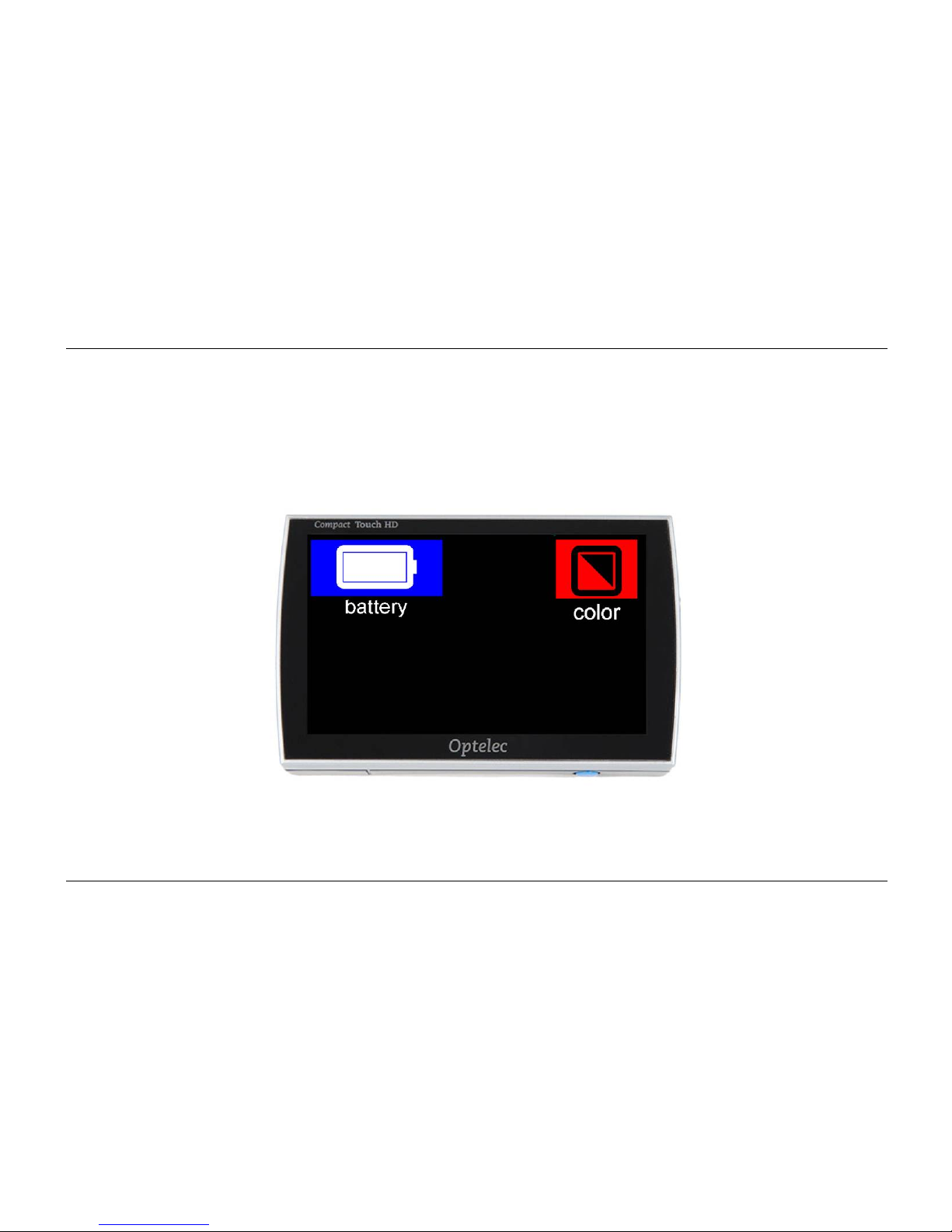
18. Beeldweergave en batterij
Door met 1 vinger het bovenste gedeelte van het scherm 2 seconden aan te raken krijgt u het
menu voor beeldweergave en de batterij te zien boven in het scherm.
Page 54
Optelec Compact Touch HD
Nederlands Pagina 52
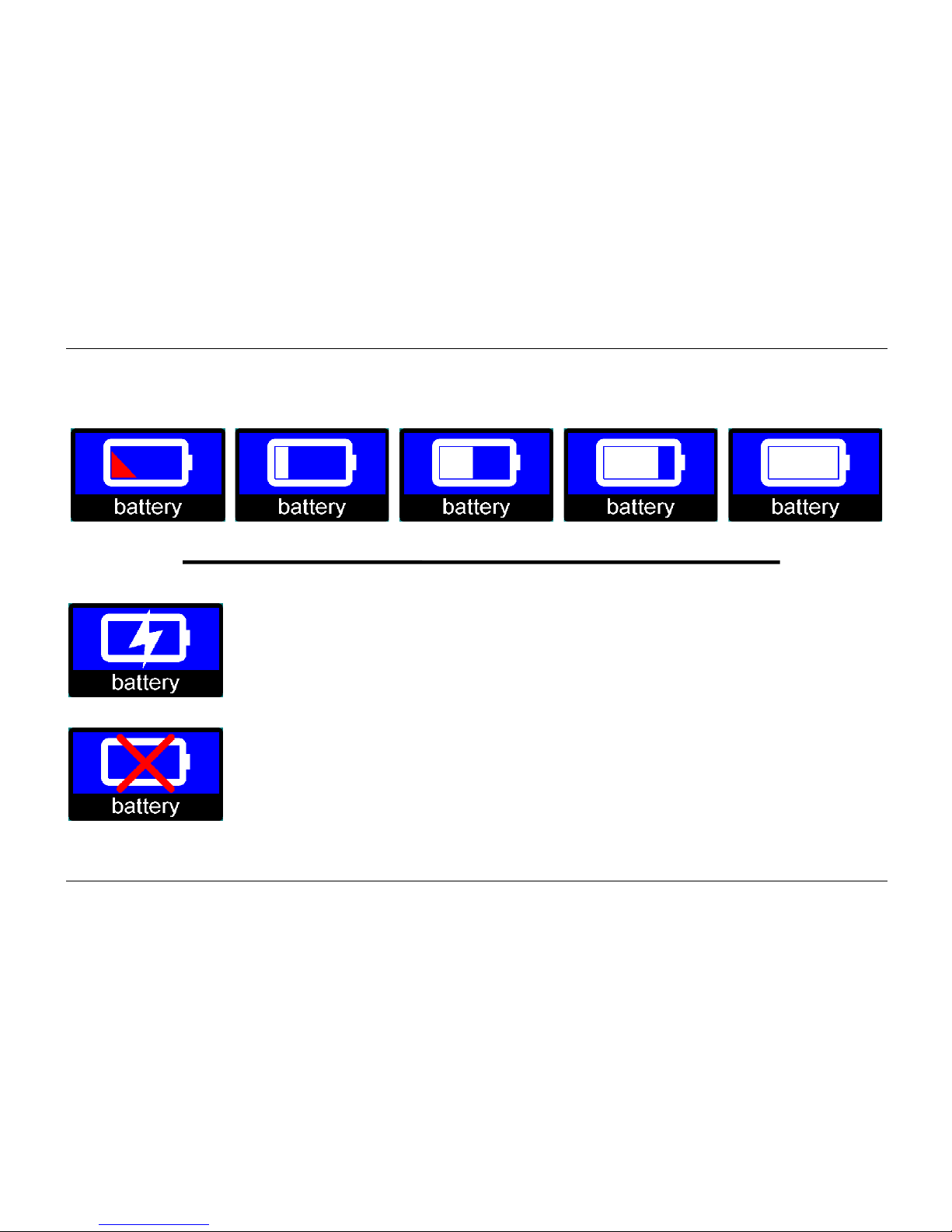
Batterij icoon
Dit icoon laat de resterende batterijcapaciteit zien. Er zijn 5 verschillende standen hiervoor.
batterij leeg batterij vol
Wanneer de batterij aan het laden is, zal het laadicoon van de batterij
zichtbaar zijn.
Wanneer de adapter is aangesloten, maar de batterij is niet aangesloten zal
dit icoon worden weergegeven.
Page 55
Optelec Compact Touch HD
Nederlands Pagina 53
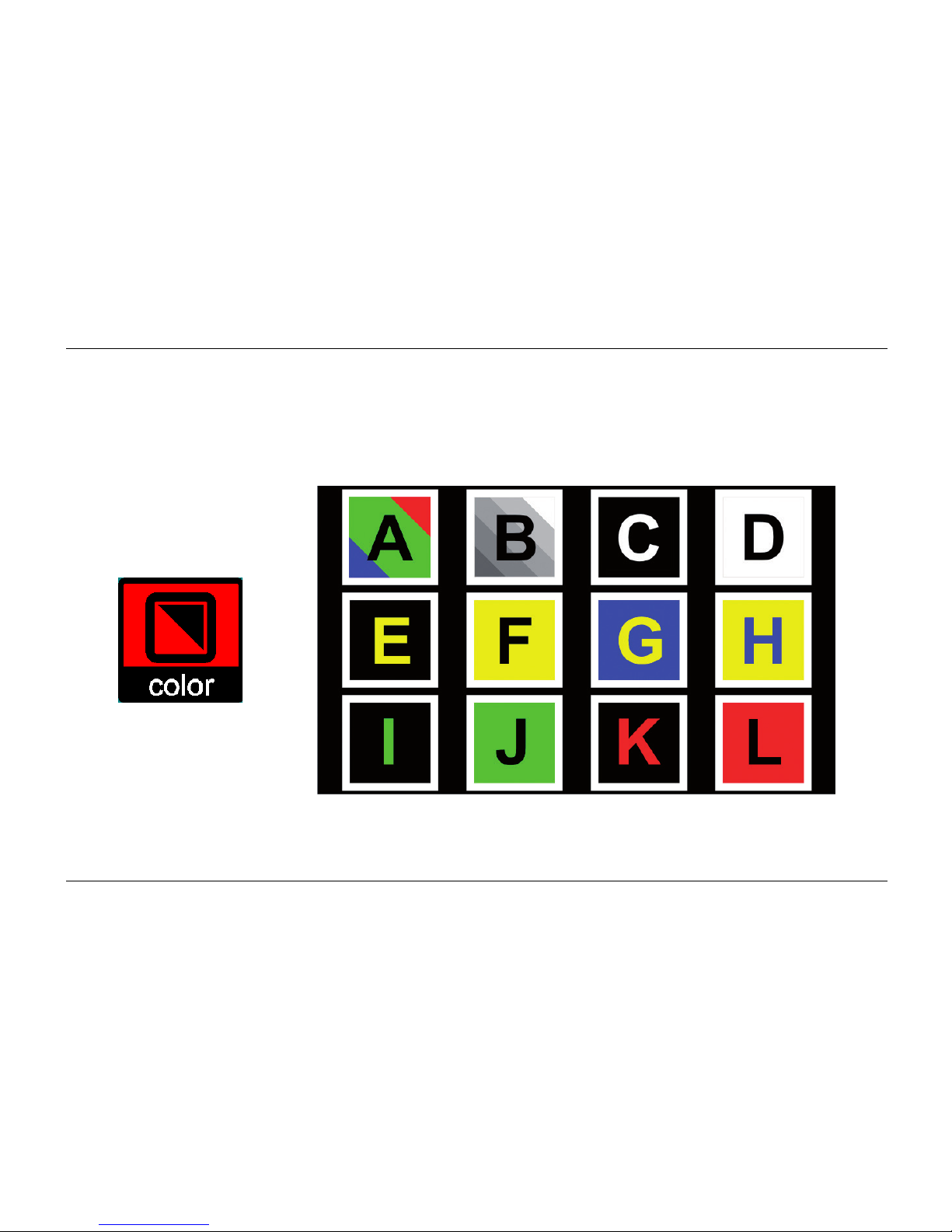
Beeldweergave-icoon
Door het beeldweergave-icoon aan te raken zult u een overzicht zien van alle beschikbare
beeldweergaves. U kunt eenvoudig selecteren welke weergave u wilt gebruiken.
Page 56
Optelec Compact Touch HD
Nederlands Pagina 54
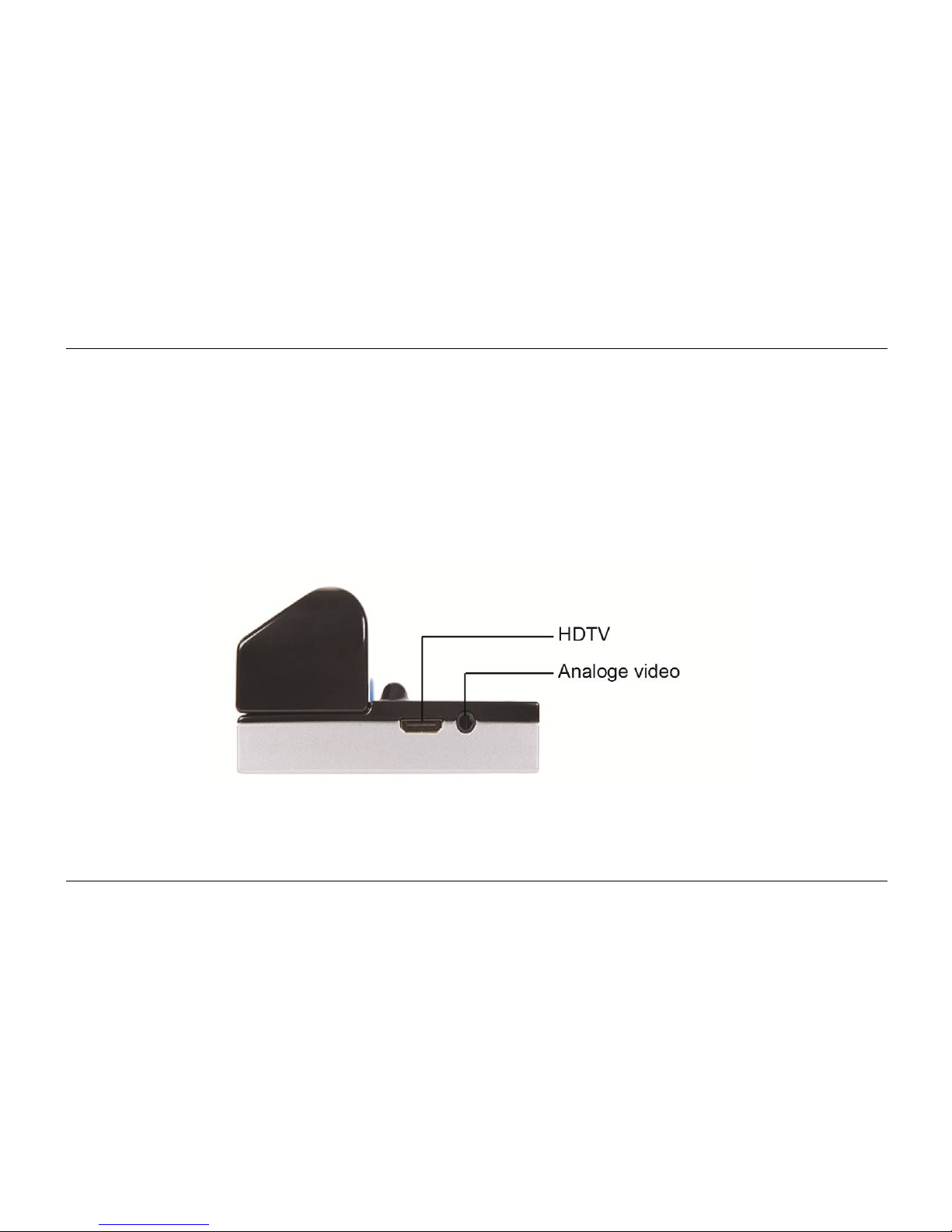
19. TV-uitgang
De Compact Touch HD kan het beeld weergeven op een externe monitor. Sluit hiervoor de
geschikte kabel aan op de HDTV- of analoge video connecter. Zorg ervoor dat de Compact
Touch HD op een geaarde monitor is aangesloten voor het beste resultaat.
Page 57
Optelec Compact Touch HD
Nederlands Pagina 55
20. Schrijven met de Compact Touch HD
Klap het handvat in en plaats de Compact Touch HD op het document dat u wilt ondertekenen.
Page 58

Optelec Compact Touch HD
Nederlands Pagina 56
21. Problemen oplossen
Mocht de volgende tabel geen oplossing bieden voor uw probleem, neem contact op met uw
leverancier.
De Compact Touch HD heeft geen, donker of wazig beeld:
Zet de Compact Touch HD aan.
Beeld is bevoren, druk kortstondig op de AAN/UIT-knop.
Gebruik een kleurenstand.
De Compact Touch HD kan niet aangezet worden:
Druk op de AAN/UIT-knop om de Compact Touch HD aan te zetten.
Laad het batterijhandvat op.
Vervang het batterijhandvat of sluit deze opnieuw aan.
Page 59

Optelec Compact Touch HD
Nederlands Pagina 57
De Compact Touch HD schakelt zichzelf uit binnen enkele minuten. Er klinkt een tweetonig
geluid.
De Compact Touch HD schakelt zichzelf uit indien deze geen beweging op het scherm
detecteert gedurende 3 minuten.
De Compact Touch HD schakelt zichzelf uit binnen enkele minuten. Er klinkt een hoge toon die
wegvaagt.
Laad het batterijhandvat op.
Vervang het batterijhandvat met een nieuw batterijhandvat
Page 60

Optelec Compact Touch HD
Nederlands Pagina 58
22. Waarschuwingen
Dit icoon geeft aan dat gebruikers met pacemakers op moeten letten met het
magnetische gedeelte op het handvat van de Compact Touch HD aangezien
dit wellicht, afhankelijk van uw pacemaker, de werking van de pacemaker kan
beïnvloeden. Neem contact op met uw chirurg om uzelf te informeren over
het effect van magneten op uw pacemaker.
23. De Compact Touch HD of batterij weggooien
Dit symbool van de gekruiste afvalbak geeft aan dat het product niet weggegooid mag worden
met het huisvuil. Vraag bij uw gemeente na voor de regels omtrent het weggooien van
elektronische producten.
24. Garantiebepalingen
Dit product valt onder de garantiebepalingen van uw leverancier. Voor meer informatie over
deze bepalingen, neem contact op met uw leverancier.
Page 61

Optelec Compact Touch HD
Nederlands Pagina 59
25. Richtlijnen
Producten met CE-markering voldoen aan de EMC Directive (2004/108/EC) en de Low Voltage
Directive (2006/95/EC) afgegeven door de Commissie van de Europese Community
Nakoming van deze richtlijnen impliceert overeenstemming met de volgende richtlijnen:
EMC: EN 55022; EN 55024
FCC: part 15 Class B
Safety: EN 60950
Page 62

Optelec Compact Touch HD
Nederlands Pagina 60
Bijlage A: Veiligheid
Behandel de Compact Touch HD met zorg. Onzorgvuldige behandeling leidt tot
beschadiging van onderdelen.
Neem contact op met uw leverancier indien serviceonderhoud nodig is.
De Compact Touch HD niet openen of onderdelen verwijderen, hiermee vervalt de
garantie.
Probeer de batterij niet te verwijderen.
Stel de Compact Touch HD niet bloot aan overmatige hitte of direct zonlicht om het risico
van brand te voorkomen.
Gebruik de Compact Touch HD niet in de buurt van onvoldoende afgeschermde
medische hulpmiddelen.
Om elektrische schade te voorkomen, houd de Compact Touch HD uit de buurt van
vloeistoffen en chemicaliën.
Haal altijd de stekker uit de Compact Touch HD voor het schoonmaken. Gebruik een
zachte, vochtige doek om de buitenkant te reinigen. Gebruik geen schoonmaakmiddelen
of schurende materialen. Dit kan leiden tot schade aan het apparaat.
Gebruik van de Compact Touch HD anders dan beschreven in deze handleiding, valt buiten de
garantievoorwaarden.
Page 63

Optelec Compact Touch HD
Nederlands Pagina 61
Bijlage B: Specificaties
Hoofdspecificatie
Afmetingen 131 × 75 × 32 mm (l × b × h)
Gewicht 300 gram (inclusief batterij)
Display
TFT diagonaal 5.0”
Overige specificaties Hoge helderheid
Touch technologie
Camera
Minimum vergroting 2×
Maximum vergroting 20×
Focus 5cm - oneindigheid
Stroomtoevoer
Batterijsysteem Verwisselbaar (in het batterijhandvat)
Lithium-Ion 4000mAh
Adapter 5VDC/1.8A
Page 64

Optelec Compact Touch HD
Nederlands Pagina 62
Gebruiksomstandigheden
Temperatuur +5°C tot +35°C / 50°F tot 95°F
Luchtvochtigheid <70% (geen condensatie)
Gebruikstijd en laadtijd
Gebruikstijd Tot 3 uur
Laadtijd Gemiddeld 5 uur
Inhoud verpakking
Compact Touch HD
Batterijhandvat (4000mAh)
Laadadapter
Reistasje
Magnetisch vel
Gebruiksaanwijzing
HDTV kabel
SDTV kabel
Schoonmaakdoekje
Dit apparaat voldoet aan de richtlijnen en standaarden van CE en FCC.
Page 65
Optelec Compact Touch HD
Français Page 63
Manuel d’utilisation
Version 1.2
© 2013 - Optelec, les Pays-Bas
Tous droits réservés
Optelec
C.P. 399
2990 AJ Barendrecht
Les Pays-Bas
Tél.: +31 (0)88 678 34 44
Courriel: [email protected]
Internet: www.optelec.com
Page 66

Optelec Compact Touch HD
Français Page 64
Table des matières
1. Introduction ...................................................................................................................... 66
2. Description générale du Compact Touch HD ................................................................ 66
3. Utilisation prévue ............................................................................................................. 67
4. Sécurité et entretien ........................................................................................................ 68
5. Installation du Compact Touch HD ................................................................................ 69
6. Instructions de mise en charge ...................................................................................... 70
7. Entretien de la poignée d'alimentation .......................................................................... 71
8. Poignée repliable ............................................................................................................. 72
9. Mise au point du Compact Touch HD ............................................................................ 72
10. Fonction de Vue éloignée ............................................................................................... 73
11. Allumer ou éteindre le Compact Touch HD ................................................................... 73
12. LED ................................................................................................................................... 73
13. Modes d'affichage ........................................................................................................... 74
14. Zoom ................................................................................................................................. 75
15. Fonction d'arrêt sur image .............................................................................................. 76
16. Lignes magnétiques ........................................................................................................ 77
17. Menu du Compact Touch HD .......................................................................................... 78
Son, luminosité et lignes de lecture ................................................................................ 78
Icône de son ................................................................................................................... 79
Icône de luminosité ........................................................................................................ 79
Page 67

Optelec Compact Touch HD
Français Page 65
Lignes de lecture ............................................................................................................ 80
18. Vue d'ensemble des modes d'affichage ........................................................................ 81
Icône de batterie ............................................................................................................ 82
Icône de mode d'affichage ............................................................................................. 83
19. Sortie vidéo ...................................................................................................................... 84
20. Écrire avec le Compact Touch HD ................................................................................. 85
21. Dépannage ....................................................................................................................... 86
22. Avertissements ................................................................................................................ 88
23. Mise au rebut du Compact Touch HD ou de la batterie ................................................ 88
24. Conditions de la garantie ................................................................................................ 88
25. Réglementation ................................................................................................................ 89
Annexe A: Mesures de sécurité et d’entretien ...................................................................... 90
Annexe B: Caractéristiques .................................................................................................... 91
Optelec dans le monde .......................................................................................................... 153
Page 68
Optelec Compact Touch HD
Français Page 66
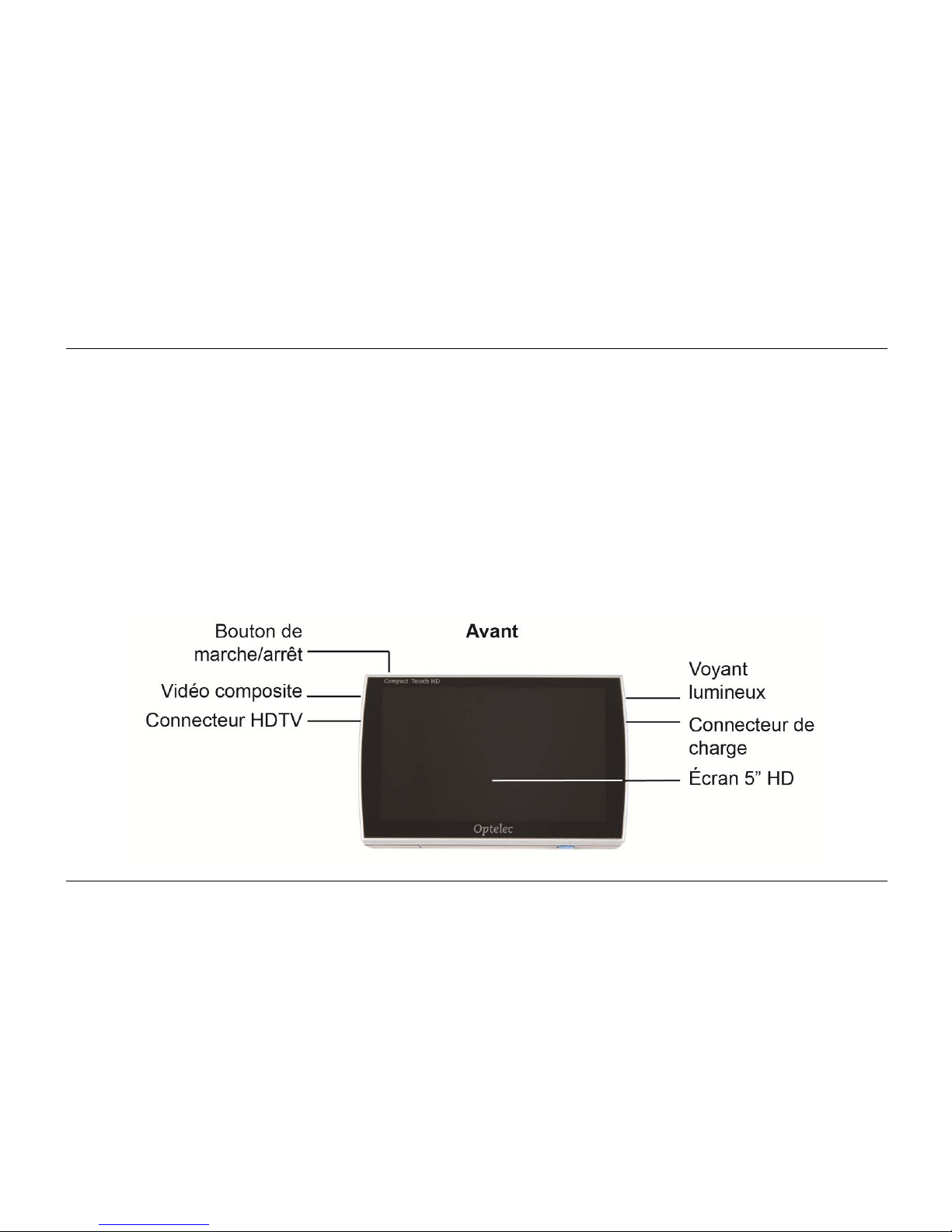
1. Introduction
Félicitations pour l'achat de votre Compact Touch HD! Vous trouverez dans ce mode d'emploi
une description détaillée de toutes les fonctions du Compact Touch HD. Veuillez lire
attentivement ce mode d'emploi avant de commencer à utiliser le Compact Touch HD. Si des
questions subsistent après la lecture de ce mode d’emploi, veuillez prendre contact avec votre
fournisseur.
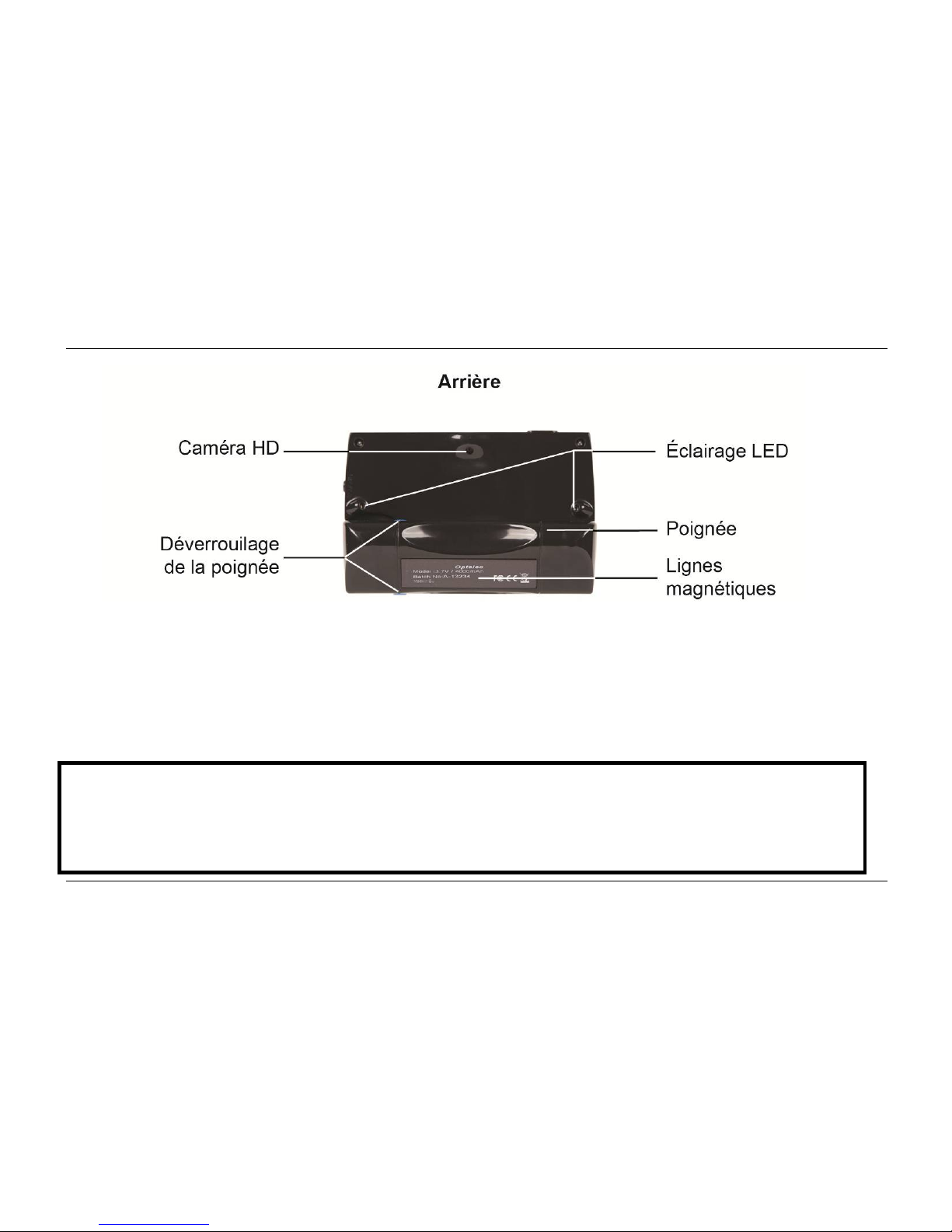
2. Description générale du Compact Touch HD
Page 69
Optelec Compact Touch HD
Français Page 67
3. Utilisation prévue
Cet appareil peut uniquement être utilisé pour afficher des reproductions agrandies de textes,
de photos ou d'objets. Si le Compact Touch HD est employé à d'autres fins que les utilisations
prévues, les réglementations CE ne seront pas applicables.
Attention : vous ne pouvez, en aucun cas, réaliser la maintenance ou tenter de réparer
l'appareil vous-même ; pour ce faire, adressez-vous toujours à un technicien agréé par
le fabricant. Toute tentative de réparation du Compact Touch HD par une personne
autre qu'un technicien agréé par le fabricant entraînera l'annulation de la garantie.
Page 70

Optelec Compact Touch HD
Français Page 68
4. Sécurité et entretien
Avant d'utiliser l'appareil, assurez-vous de suivre les consignes de sécurité et d'entretien cidessous :
N'exposez pas l'appareil et ses batteries à l'humidité, la pluie, le sable ou les
températures extrêmes, comme les radiateurs ou la lumière directe du soleil.
N'utilisez pas de produits nettoyants qui contiennent de l'alcool, de l'ammoniac, de
l'alcool dénaturé ou des agents abrasifs. Ces produits risquent d'endommager l'appareil
ou son écran tactile.
Utilisez uniquement des accessoires fournis ou approuvés par le fabricant.
Ne jetez jamais de batteries au feu. Les batteries et les chargeurs défectueux sont
considérés comme des déchets chimiques. Par conséquent, ils doivent être déposés
dans un centre de collecte/recyclage de votre choix.
Veuillez noter que l'utilisation d'une protection pour écran peut influer sur le
fonctionnement de l’écran tactile.
Page 71
Optelec Compact Touch HD
Français Page 69
5. Installation du Compact Touch HD
Raccordez la poignée d'alimentation du Compact Touch HD en la glissant sur le connecteur
jusqu'à ce qu'elle se verrouille avec un déclic. Cette poignée d'alimentation sert aussi de
poignée pour manipuler le Compact Touch HD.
Pour remplacer la poignée d'alimentation, appuyez sur les 2 boutons de déverrouillage bleus,
de part et d'autre de la poignée, puis connectez la poignée d'alimentation de rechange.
Chargez entièrement la poignée d'alimentation avant d'utiliser le Compact Touch HD.
Veuillez lire attentivement les instructions de mise en charge.
Page 72

Optelec Compact Touch HD
Français Page 70
6. Instructions de mise en charge
Branchez le chargeur sur une prise murale et sur le connecteur de charge du Compact Touch
HD.
Voyant lumineux fixe batterie en cours de charge
Voyant lumineux éteint batterie entièrement chargée
Voyant lumineux clignotant erreur / batterie défectueuse
Chargez la batterie dans un endroit bien ventilé. Sortez le Compact Touch HD de son étui de
transport avant de charger la batterie. Ne laissez pas l'appareil exposé au soleil ou près d'un
radiateur pendant la charge.
Le Compact Touch HD s'éteint automatiquement lorsque la batterie est déchargée. Il émet alors
une tonalité aiguë qui s'affaiblit.
Page 73

Optelec Compact Touch HD
Français Page 71
7. Entretien de la poignée d'alimentation
Retirez la poignée d'alimentation du Compact Touch HD si vous ne comptez pas l'utiliser
pendant une période prolongée. Cela permettra d'augmenter la durée de vie de la poignée
d'alimentation.
Évitez de surcharger la batterie. Il est recommandé de charger la poignée d'alimentation
uniquement lorsqu'elle est complètement déchargée.
Les batteries lithium-ion rechargeables ont une autodécharge qui dépend fortement de la
température ambiante (par exemple, ne laissez jamais la poignée d'alimentation dans une
voiture garée en plein soleil).
Les batteries lithium-ion neuves doivent être chargées plusieurs fois avant d'atteindre leur
capacité nominale.
Chargez les batteries lithium-ion au moins une fois toues les 6 mois.
La poignée d'alimentation a une durée de vie moyenne de 300 cycles de charge/décharge,
mais cela peut varier en fonction de son utilisation. La capacité totale diminuera
progressivement après plusieurs cycles de charge/décharge.
Page 74

Optelec Compact Touch HD
Français Page 72
8. Poignée repliable
Le Compact Touch HD est fourni avec une poignée repliable et remplaçable avec batterie
intégrée. Vous pouvez utiliser cette poignée dans différentes positions.
La poignée peut se déplier pour utiliser le Compact Touch HD comme une loupe. Le
grossissement augmente à mesure que vous vous approchez de l'objet. Vous pouvez aussi
tenir le Compact Touch HD en l'air pour regarder des objets éloignés, puisque le Compact
Touch HD peut réaliser une mise au point à une distance de 5 cm jusqu'à l'infini.
Le Compact Touch HD peut aussi s'employer avec la poignée repliée. Vous pouvez facilement
installer l'appareil sur une table et il se positionnera automatiquement en biais. L'appareil
propose alors un grossissement de 8x environ. Cette position offre une meilleure stabilité pour
lire les textes plus facilement.
9. Mise au point du Compact Touch HD
Le Compact Touch HD propose une fonction de mise au point par pression sur l'écran tactile.
Appuyez simplement sur la partie de l'écran où vous souhaitez une mise au point de l'image ; la
caméra du Compact Touch HD
réalise alors la mise au point sur cette zone.
Page 75

Optelec Compact Touch HD
Français Page 73
10. Fonction de Vue éloignée
La caméra du Compact Touch HD peut faire la mise au point sur des objets à une distance de 5
cm jusqu'à l'infini. Tenez simplement l'appareil en l'air pour regarder l'objet. N'oubliez pas
d'appuyer sur l'écran pour faire la mise au point sur l'objet que vous regardez.
11. Allumer ou éteindre le Compact Touch HD
Pour allumer le Compact Touch HD, appuyez une fois sur le bouton de marche/arrêt. L'appareil
émet une tonalité de plus en plus aiguë.
Pour éteindre le Compact Touch HD, appuyez sur le bouton de marche/arrêt pendant 3
secondes. L'appareil émet une tonalité de plus en plus grave.
Lorsque le Compact Touch HD est allumé, il s'éteint automatiquement après 3 minutes si aucun
mouvement n'est détecté à l'écran. L'appareil émet alors une double tonalité.
12. LED
En touchant le centre de l’écran pendant 1 seconde, les LED au dos du Compact Touch HD
s’éteignent. Vous entendez un Bip. Touchez le centre de l’écran de nouveau 1 seconde, les
LED se rallument et l’appareil émet un Bip.
Page 76
Optelec Compact Touch HD
Français Page 74
13. Modes d'affichage
En faisant glisser trois doigts sur l'écran de haut en bas ou inversement, vous pouvez choisir
parmi différents modes de couleur.
ou
Page 77
Optelec Compact Touch HD
Français Page 75
14. Zoom
Pour modifier le grossissement, faites glisser votre doigt vers le haut/bas sur le côté gauche ou
droit de l'écran tactile.
Icône de
zoom
Pour effectuer un zoom avant, glissez votre doigt vers le haut sur l'icône de zoom ; pour faire un
zoom arrière, glissez votre doigt vers le bas sur l'icône de zoom. Le Compact Touch HD
propose une échelle de grossissement de 2x à 20x.
Page 78
Optelec Compact Touch HD
Français Page 76
15. Fonction d'arrêt sur image
Appuyez brièvement sur le bouton de marche/arrêt pour figer l'image qui est affichée sur l'écran
du Compact Touch HD. Appuyez à nouveau sur ce bouton pour revenir à l'affichage normal.
Lorsque l'image est figée, la luminosité est réduite afin d'économiser l'énergie de la batterie.
Pendant l'arrêt sur image, vous pouvez utiliser 1 doigt pour vous déplacer dans l'image figée.
Toutes les fonctions du Compact Touch HD continuent d'être disponibles pendant l'arrêt sur
image.
Page 79
Optelec Compact Touch HD
Français Page 77
16. Lignes magnétiques
Le dessous de la poignée comporte une zone aimantée qui peut être utilisée avec la feuille
magnétique.
Faites glisser la feuille en dessous du texte que vous souhaitez lire. Ensuite, placez le Compact
Touch HD sur le texte et faites-le glisser sur la feuille magnétique. La feuille magnétique
guidera le Compact Touch HD le long des lignes, ce qui permettra de le maintenir droit plus
facilement pendant la lecture.
Page 80
Optelec Compact Touch HD
Français Page 78
17. Menu du Compact Touch HD
Son, luminosité et lignes de lecture
Pour afficher les menus de son, de luminosité et de lignes de lecture, laisser appuyer
simplement votre doigt sur la moitié inférieure de l’écran pendant 2 secondes. Le Compact
Touch HD conservera ces réglages en mémoire même si vous l'éteignez.
Page 81
Optelec Compact Touch HD
Français Page 79
Icône de son
Appuyez sur cette icône pour activer ou désactiver les sons.
son active son désactivé
Icône de luminosité
Appuyez sur cette icône pour régler la luminosité de l'écran. L'appareil propose 5 réglages
d'intensité.
luminosité minimale luminosité maximale
Page 82
Optelec Compact Touch HD
Français Page 80
Lignes de lecture
Appuyez sur cette icône pour faire apparaître à l'écran une ligne de lecture horizontale ou
verticale.
Page 83
Optelec Compact Touch HD
Français Page 81
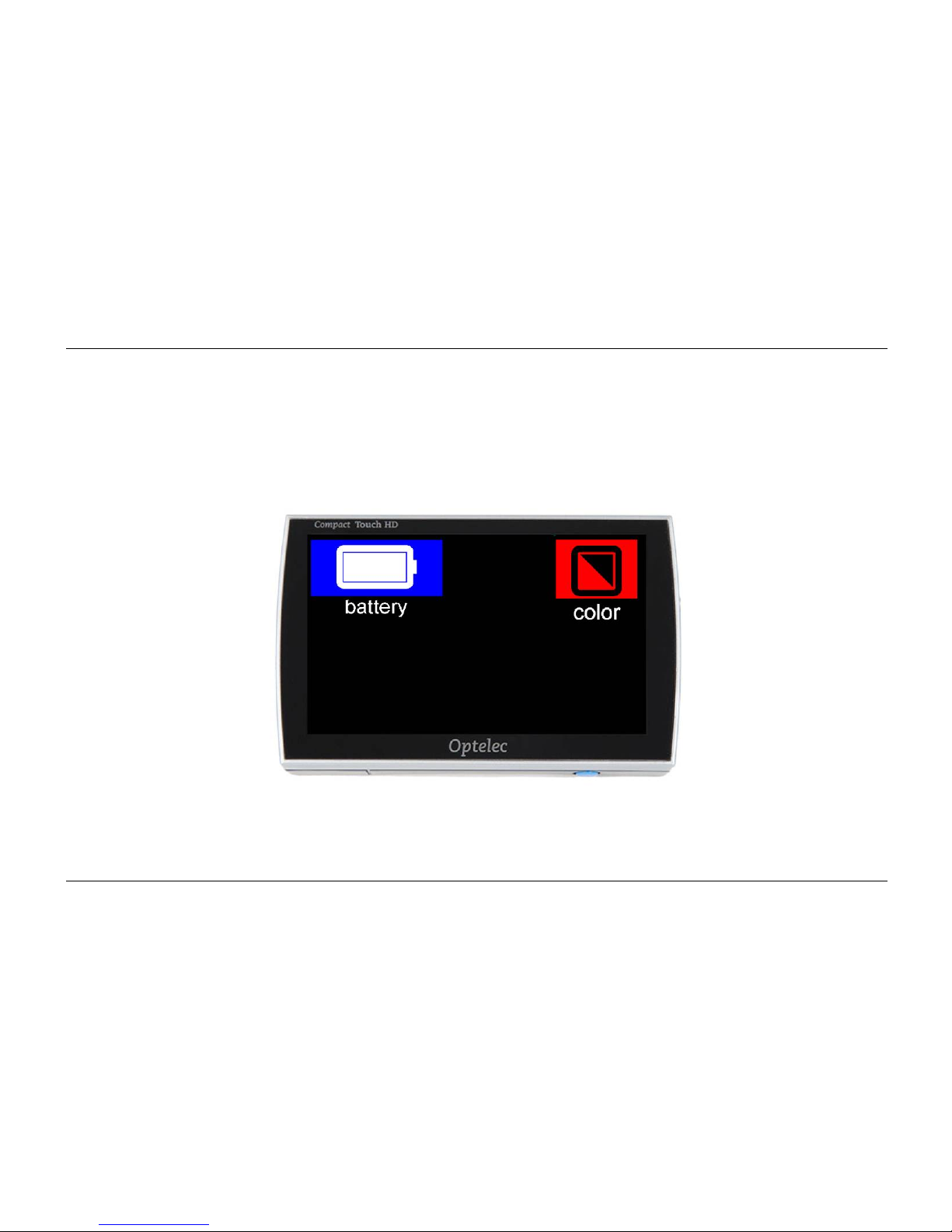
18. Vue d'ensemble des modes d'affichage
Pour afficher les menus de la batterie et le menu des modes d’affichage, laisser appuyer
simplement votre doigt sur la moitié supérieure de l’écran pendant 2 secondes.
Page 84
Optelec Compact Touch HD
Français Page 82
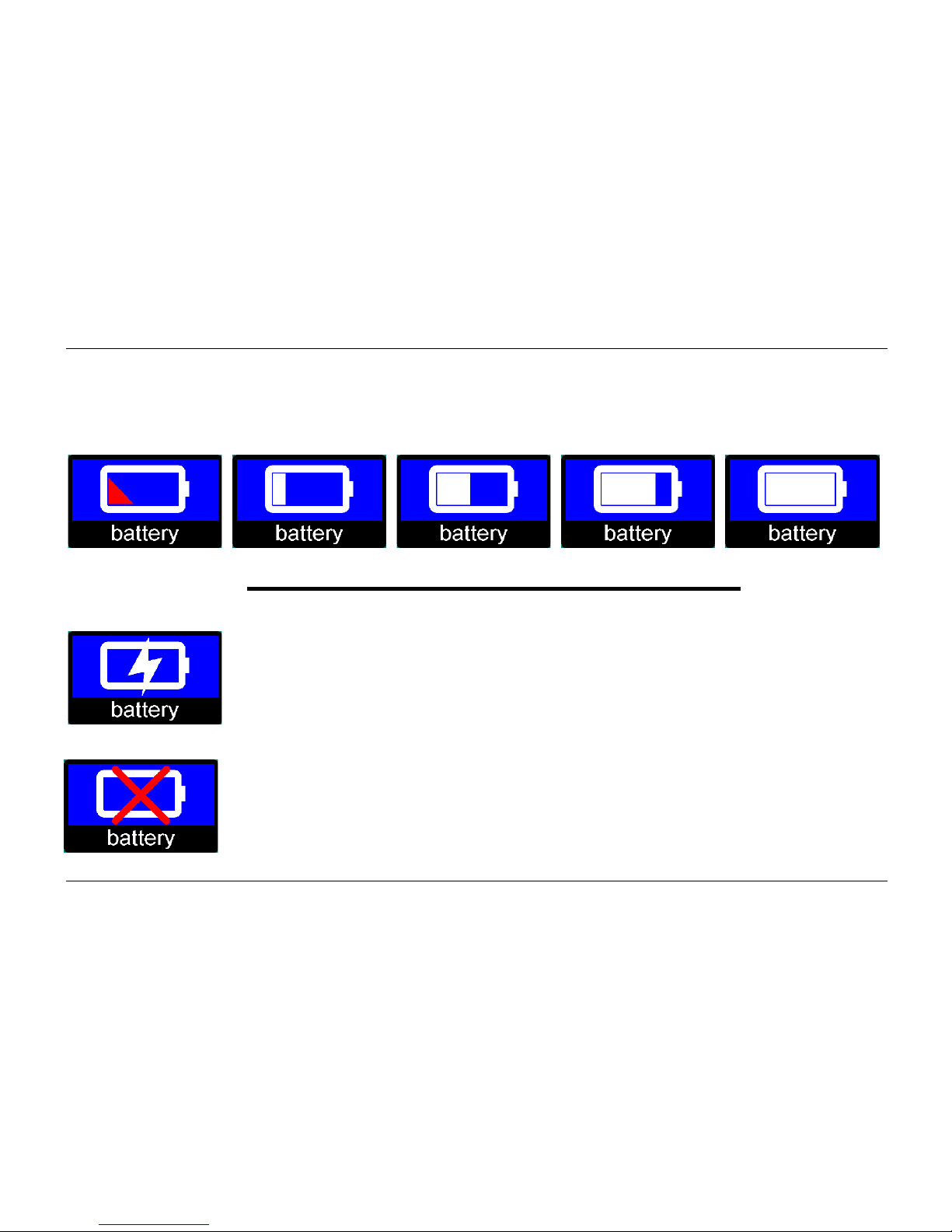
Icône de batterie
Cette icône indique le niveau de charge de la batterie. Le niveau peut être représenté par 5
icônes différentes.
batterie déchargée batterie pleine
Pendant la mise en charge de la batterie, le menu affiche l'icône de charge.
Cette icône s'affiche si le chargeur est branché mais que la batterie n'est
pas connectée.
Page 85
Optelec Compact Touch HD
Français Page 83
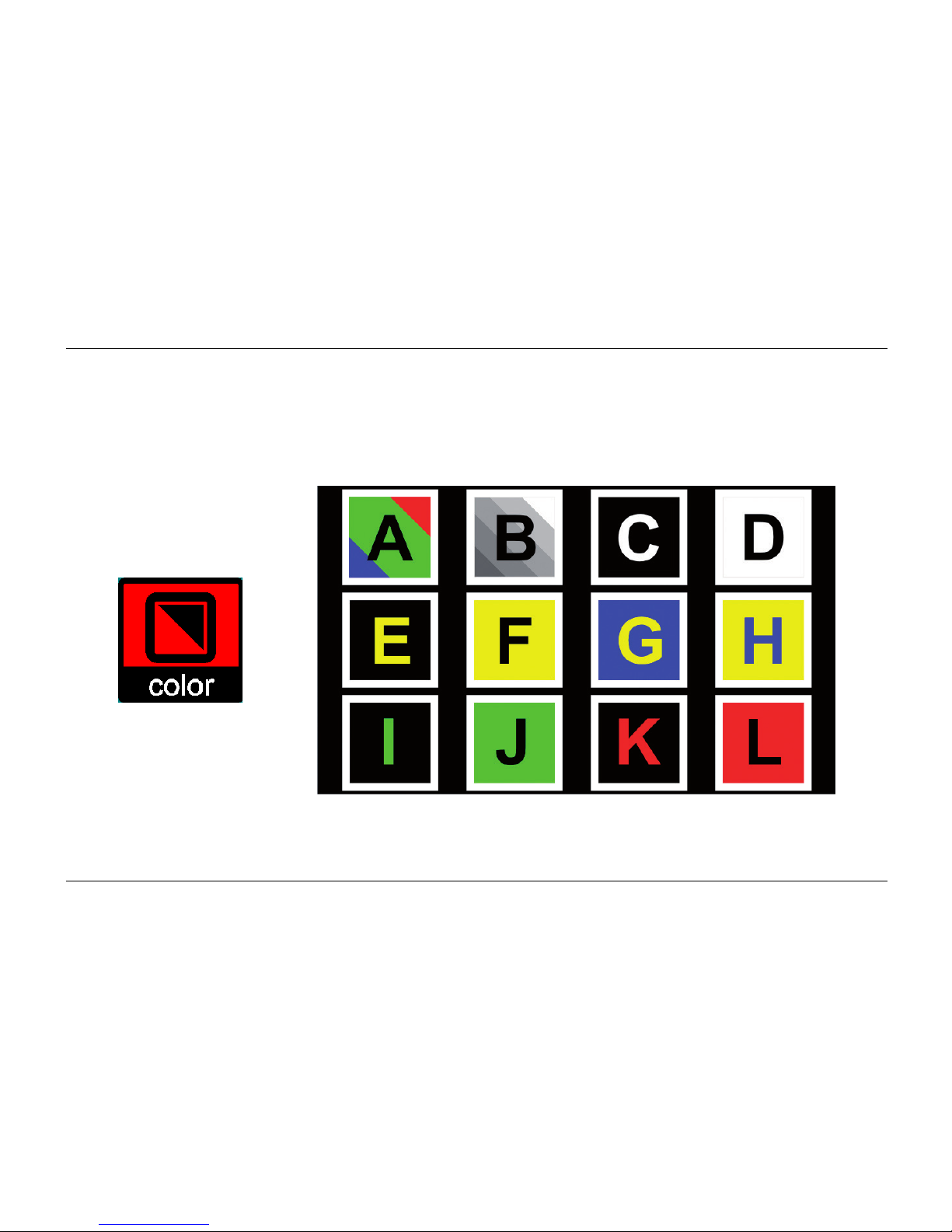
Icône de mode d'affichage
Appuyez sur l'icône de mode d'affichage pour obtenir une vue d'ensemble de tous les modes
d'affichage disponibles. Sélectionnez simplement le mode d'affichage que vous souhaitez
utiliser.
Page 86
Optelec Compact Touch HD
Français Page 84
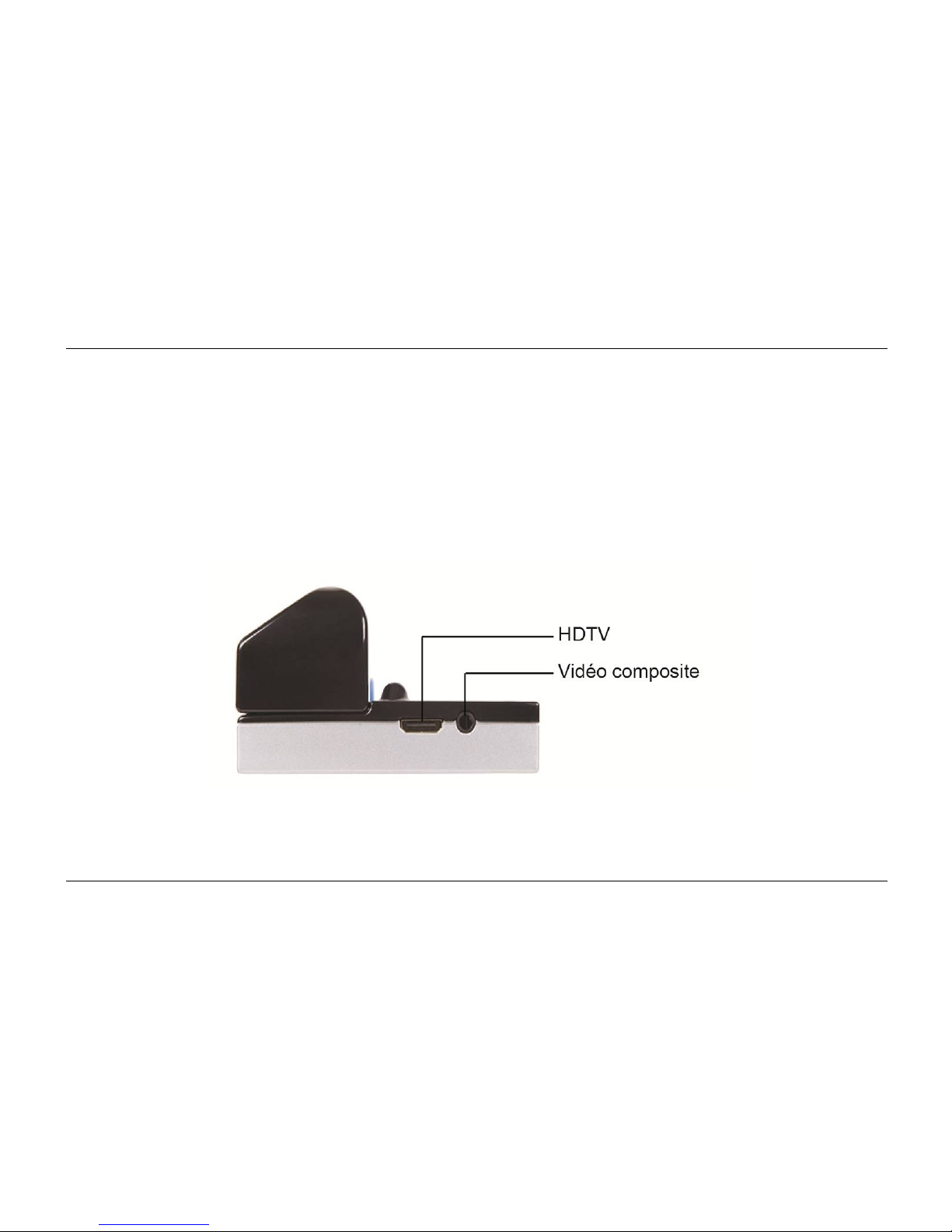
19. Sortie vidéo
Le Compact Touch HD peut reproduire l'image sur un écran externe. Pour ce faire, branchez
simplement le câble approprié sur le connecteur HDTV ou Vidéo composite.
Pour un résultat optimal, assurez-vous de raccorder le Compact Touch HD à un téléviseur relié
à la terre.
Page 87
Optelec Compact Touch HD
Français Page 85
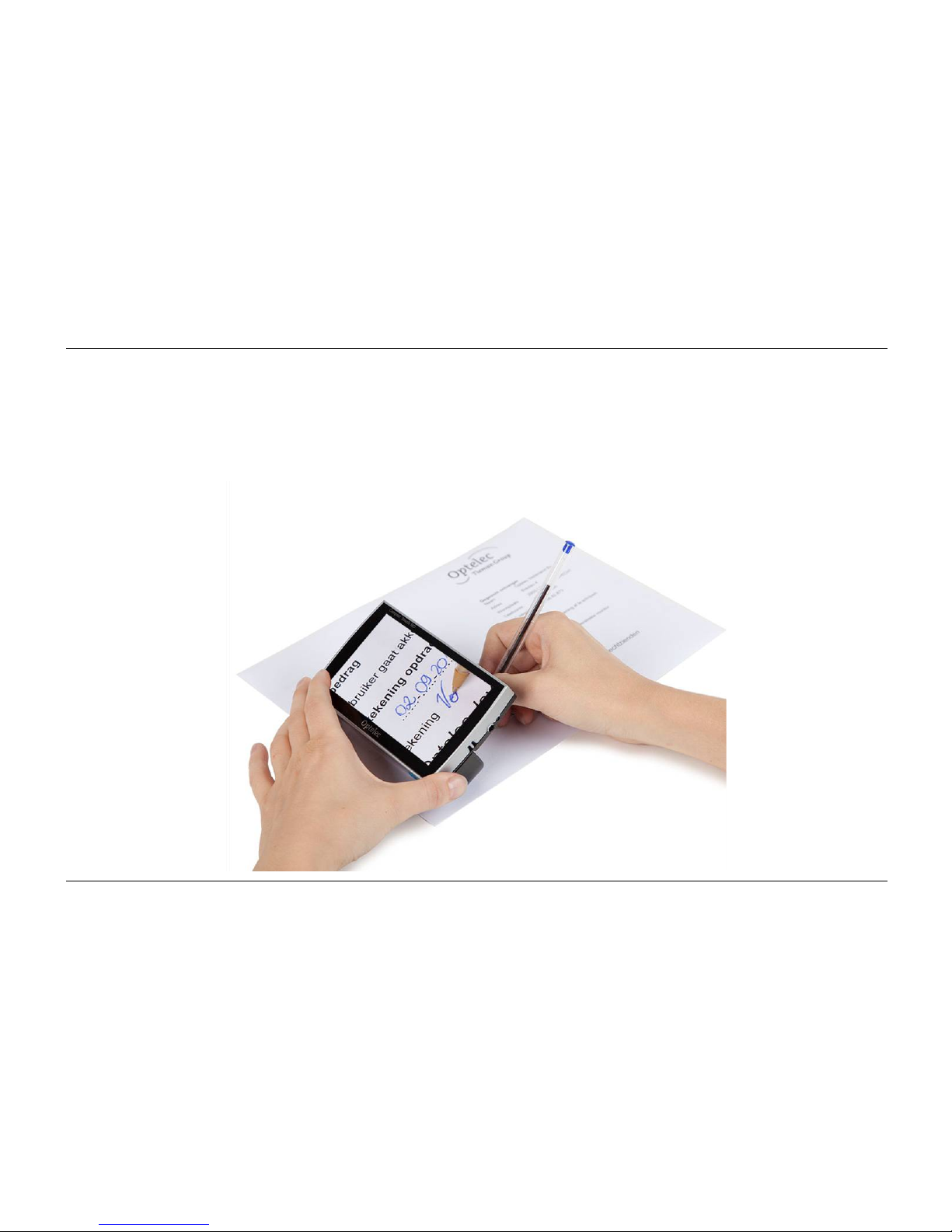
20. Écrire avec le Compact Touch HD
Repliez la poignée vers l'intérieur et posez-la sur le document à signer.
Page 88

Optelec Compact Touch HD
Français Page 86
21. Dépannage
Si le tableau ci-dessous ne vous permet pas de résoudre votre problème, veuillez prendre
contact avec votre distributeur.
Aucune image ; l'image est sombre ou floue:
Mettez le Compact Touch HD en marche.
L'image est figée, appuyez une fois brièvement sur le bouton de marche/arrêt.
Changez le mode d'affichage en mode couleur.
Impossible d'allumer le Compact Touch HD.
Appuyez sur le bouton de marche/arrêt pour allumer le Compact Touch HD.
Chargez la poignée d'alimentation.
Reconnectez ou remplacez la poignée d'alimentation.
Page 89

Optelec Compact Touch HD
Français Page 87
Le Compact Touch HD s'éteint automatiquement après quelques minutes, en émettant une
double tonalité.
Le Compact Touch HD s'éteint de lui-même si aucun mouvement n'est détecté à l'écran
pendant 3 minutes.
Le Compact Touch HD s'éteint automatiquement après quelques minutes, en émettant une
seule tonalité aiguë qui s'affaiblit.
Chargez la poignée d'alimentation.
Remplacez la poignée d'alimentation par une nouvelle poignée d'alimentation.
Page 90

Optelec Compact Touch HD
Français Page 88
22. Avertissements
Ce symbole indique que les porteurs de pacemaker doivent prendre garde à la
zone magnétique de la poignée du Compact Touch HD car elle peut interférer
avec le fonctionnement de certains pacemakers. Consultez votre médecin pour
vous informer sur les effets des aimants sur votre pacemaker.
23. Mise au rebut du Compact Touch HD ou de la batterie
Le symbole représentant une poubelle barrée signale que ce produit ne doit pas être jeté avec
les déchets ménagers. Respectez la réglementation locale en matière d'élimination des déchets
électroniques.
24. Conditions de la garantie
Cet appareil est soumis aux conditions de garantie de votre fournisseur. Pour de plus amples
informations sur ces conditions, veuillez contacter votre fournisseur.
Page 91

Optelec Compact Touch HD
Français Page 89
25. Réglementation
Les produits qui possèdent le marquage CE sont conformes à la directive CEM (2004/108/CE)
et la directive basse tension (2006/95/CE) publiées par la Commission de la Communauté
européenne.
La conformité à ces directives implique une conformité aux normes suivantes :
CEM : EN 55022 ; EN 55024
FCC : partie 15 classe B
Sécurité : EN 60950
Page 92

Optelec Compact Touch HD
Français Page 90
Annexe A: Mesures de sécurité et d’entretien
Le Compact Touch HD exige une manutention délicate. La manutention brutale
endommagera ses composantes internes.
Communiquez avec votre distributeur pour un appel de service, si cela s’avère
nécessaire.
Ne retirez aucune pièce du Compact Touch HD car cela annulera la garantie.
Ne tentez jamais de retirer la pile.
Évitez d’exposer le Compact Touch HD à la chaleur excessive ou au soleil afin de
prévenir le risque de sinistre.
Évitez d’utiliser le Compact Touch HD près de tout appareil médical protégé
inadéquatement.
Prévenez tout risque de dommages électriques en gardant le Compact Touch HD loin de
toute substance liquide et chimique.
Débranchez votre Compact Touch HD avant de le nettoyer. Nettoyez la surface
extérieure de l’appareil en utilisant un linge doux et humide. Évitez tout nettoyant et
matériau abrasif puisqu’ils causeront des dommages à votre appareil.
L’utilisation du Compact Touch HD autre que celle décrite dans ce manuel annulera la garantie.
Page 93

Optelec Compact Touch HD
Français Page 91
Annexe B: Caractéristiques
Principales caractéristiques
Dimensions 131 × 75 × 32 mm (l × h × p)
Poids 300 grammes (batterie comprise)
Écran
Diagonale TFT 5,0”
Autres caractéristiques Haute luminosité
Technologie tactile
Caméra
Grossissement minimum 2×
Grossissement maximum 20×
Mise au point 5 cm - infini
Alimentation
Batterie Interchangeable (dans la poignée d'alimentation)
Lithium-ion 4000 mAh
Chargeur 5 VCC/1,8 A
Page 94

Optelec Compact Touch HD
Français Page 92
Conditions d'utilisation
Température +5°C à +35°C / 50°F à 95°F
Humidité atmosphérique < 70 % (sans condensation)
Autonomie et durée de la charge
Autonomie Jusqu'à 3 heures
Durée de la charge Environ 5 heures
Contenu du coffret
Compact Touch HD
Poignée d'alimentation (4000 mAh)
Chargeur
Étui de transport
Feuille magnétique
Mode d'emploi
Câble HDTV
Câble SDTV
Tissu de nettoyage
Cet appareil porte les marques d'homologation CE et FCC.
Page 95
Optelec Compact Touch HD
Español Página 93
Manual del usuario
Version 1.2
© 2013 Optelec, the Netherlands
All rights reserved
Optelec
P.O. Box 399
2990 AJ Barendrecht
The Netherlands
Phone: +31 (0)88 678 34 44
E-mail: [email protected]
Internet: www.optelec.com
Page 96

Optelec Compact Touch HD
Español Página 94
Índice
1. Introducción ..................................................................................................................... 96
2. Descripción general del Compact Touch HD ................................................................ 96
3. Uso previsto ..................................................................................................................... 97
4. Seguridad y mantenimiento ............................................................................................ 98
5. Instalación del Compact Touch HD ................................................................................ 99
6. Instrucciones de carga .................................................................................................. 100
7. Mantenimiento del mango portabatería ....................................................................... 101
8. Mango abatible ............................................................................................................... 102
9. Enfocar con el Compact Touch HD .............................................................................. 102
10. Función de visión a distancia ....................................................................................... 103
11. Encender y apagar el Compact Touch HD .................................................................. 103
12. LED ................................................................................................................................. 103
13. Modos de visualización ................................................................................................. 104
14. Zoom ............................................................................................................................... 105
15. Función de imagen congelada ..................................................................................... 106
16. Líneas magnéticas ......................................................................................................... 107
17. Menú del Compact Touch HD ....................................................................................... 108
Sonido, brillo y líneas de lectura .................................................................................. 108
Icono de sonido ............................................................................................................ 109
Icono de brillo ............................................................................................................... 109
Page 97

Optelec Compact Touch HD
Español Página 95
Líneas de lectura .......................................................................................................... 110
18. Presentación del modo de visualización ..................................................................... 111
Icono de batería ........................................................................................................... 112
Icono de modo de visualización ................................................................................... 113
19. Salida de imagen ........................................................................................................... 114
20. Escribir con el Compact Touch HD .............................................................................. 115
21. Solución de problemas técnicos .................................................................................. 116
22. Advertencias .................................................................................................................. 118
23. Desechar el Compact Touch HD o la batería .............................................................. 118
24. Disposiciones de la garantía ........................................................................................ 118
25. Normativa ....................................................................................................................... 119
Apéndice A: Seguridad y cuidado ........................................................................................ 120
Apéndice B: Especificaciones .............................................................................................. 121
Optelec oficinas por todo el mundo .......................................................................................................... 153
Page 98
Optelec Compact Touch HD
Español Página 96
1. Introducción
¡Felicidades por la compra del Compact Touch HD! En este manual encontrará una descripción
detallada de todas las funciones del Compact Touch HD.
Lea atentamente este manual antes de empezar a utilizar el Compact Touch HD. Si, después
de haber leído este manual, le sigue quedando alguna duda, póngase en contacto con su
proveedor.
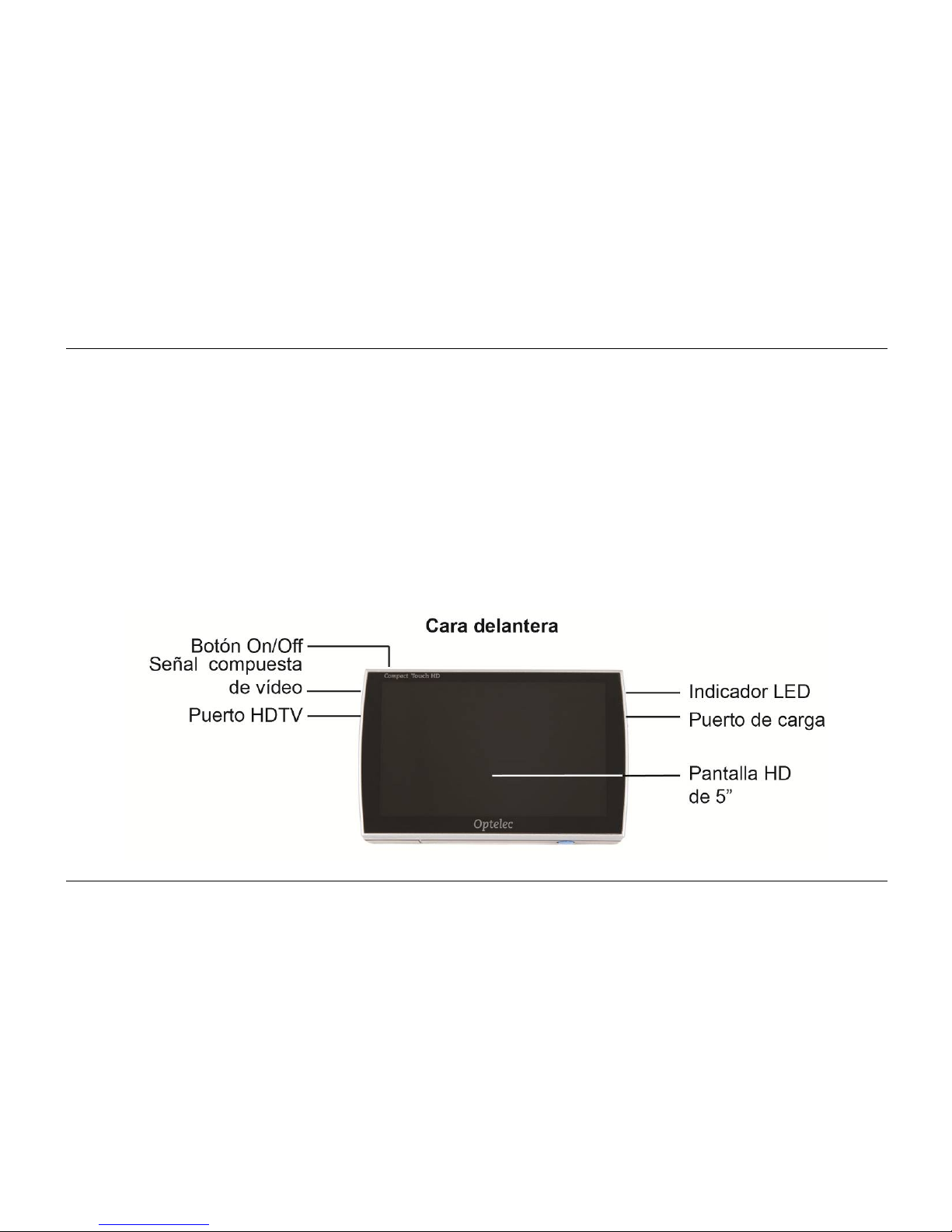
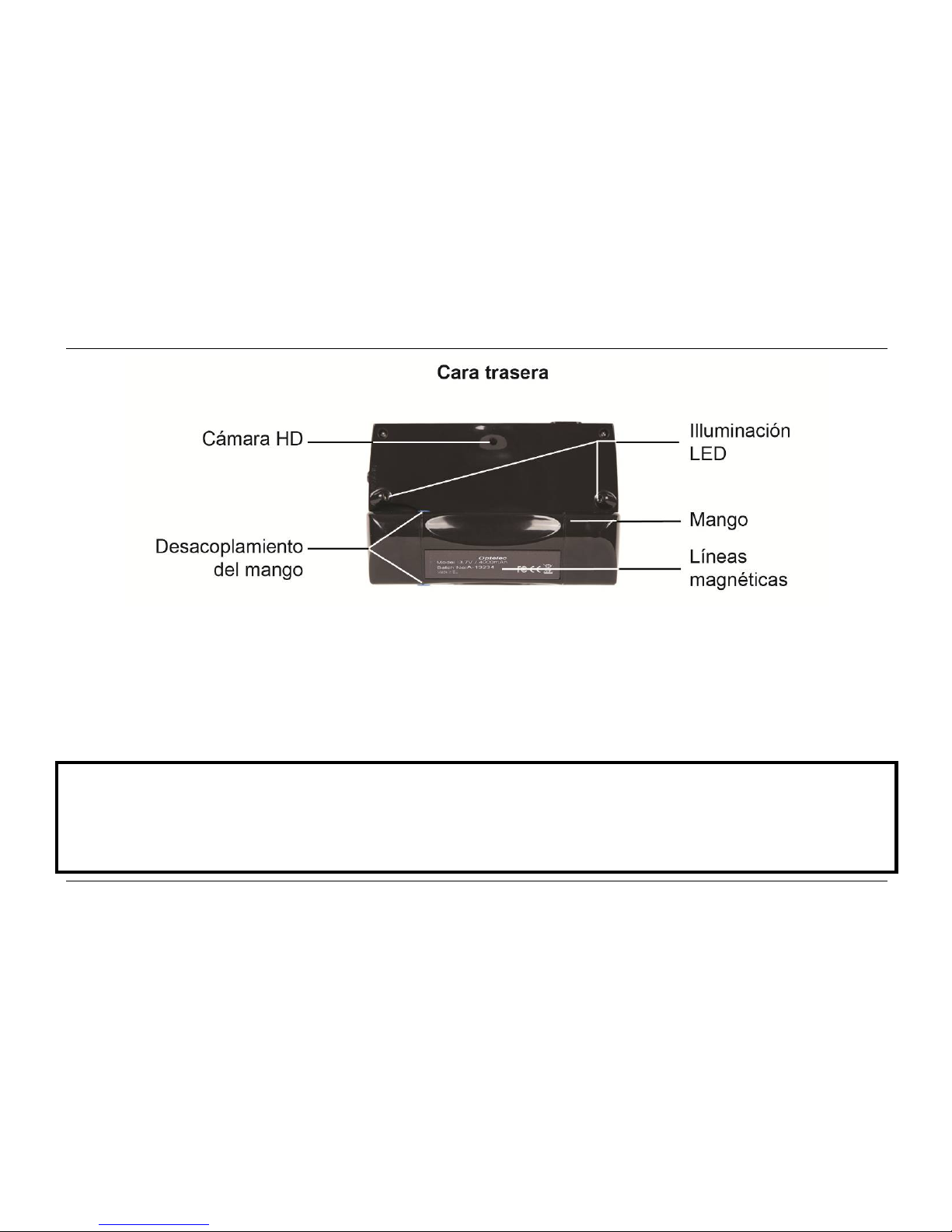
2. Descripción general del Compact Touch HD
Page 99
Optelec Compact Touch HD
Español Página 97
3. Uso previsto
Este dispositivo se utiliza exclusivamente para la visualización de imágenes ampliadas de
textos, material fotográfico y objetos. Si se utiliza el Compact Touch HD para fines distintos al
previsto, dejará de ser aplicable el reglamento CE.
Precaución: bajo ningún concepto realice actividades de mantenimiento ni reparaciones en
el dispositivo. Solicite siempre a un técnico autorizado por el fabricante la ejecución de
dichas actividades. La garantía quedará invalidada si cualquier persona que no sea un
técnico autorizado por el fabricante intenta reparar el Compact Touch HD.
Page 100

Optelec Compact Touch HD
Español Página 98
4. Seguridad y mantenimiento
Antes de su uso, asegúrese de que se cumplen las siguientes instrucciones de seguridad y
mantenimiento:
Proteja el dispositivo y las baterías de la humedad, la lluvia, la arena o las temperaturas
extremas, como las provocadas por radiadores o por la luz solar directa.
No utilice productos de limpieza que contengan alcohol, alcoholes desnaturalizados,
amoniaco o abrasivos. Estos productos pueden dañar el dispositivo o su pantalla táctil.
Utilice exclusivamente los accesorios proporcionados por el fabricante o que cuenten
con su aprobación.
No tire nunca las baterías al fuego. Las baterías y los cargadores deteriorados se
consideran residuos químicos. Por consiguiente, es preciso proceder a su desecho en el
centro de recogida de residuos o de reciclaje de su elección.
Tenga en cuenta que el uso de un protector de pantalla puede afectar al funcionamiento
de la pantalla táctil.
 Loading...