

Page 1
Page 2

Page 3

Optelec Compact 6 HD
2
Compact 6 HD
and
Compact 6 HD Speech
User Manual
Version 1.1
© 2017 Optelec, the Netherlands
All rights reserved
Optelec
P.O. Box 399
2990 AJ Barendrecht
The Netherlands
Phone: +31 (0)88 678 34 44
E-mail: [email protected]
Internet: www.optelec.com
Page 4

Optelec Compact 6 HD and Compact 6 HD Speech
3
1. INTRODUCTION ........................................................................................... 7
ABOUT THIS MANUAL ......................................................................................... 7
WHAT’S IN THE BOX? ......................................................................................... 8
2. GETTING STARTED ..................................................................................... 9
USING THE COMPACT 6 HD WITH THE READING STAND ....................................... 10
CLEANING THE CAMERA WINDOW ...................................................................... 13
BUTTONS ....................................................................................................... 14
POWER ON AND OFF ........................................................................................ 15
SLEEP AND RESUME ........................................................................................ 15
ADJUSTING THE MAGNIFICATION ........................................................................ 16
SELECTING A VIEWING MODE ............................................................................ 16
TIME AND DATE ............................................................................................... 17
THE MAGNIFIER AND OVERVIEW CAMERAS .......................................................... 18
USING THE SNAPSHOT BUTTON ......................................................................... 19
3. USING THE COMPACT 6 HD SPEECH TEXT-TO-SPEECH AND OCR .... 20
4. CHARGING THE BATTERY ....................................................................... 22
BATTERY WARNING ......................................................................................... 23
STANDBY ....................................................................................................... 23
5. THE COMPACT 6 HD MENU ...................................................................... 24
OPENING AND CLOSING THE MENU .................................................................... 24
Page 5

Optelec Compact 6 HD and Compact 6 HD Speech
4
THE MAIN MENU .............................................................................................. 25
Battery status ............................................................................................ 25
Adjusting the brightness ............................................................................ 26
Save .......................................................................................................... 26
Open ......................................................................................................... 26
Voice ......................................................................................................... 28
Voice Rate ................................................................................................. 29
SETTINGS ....................................................................................................... 30
Line on / off ............................................................................................... 31
Bluetooth: connecting a Bluetooth speaker or headphone ......................... 31
Color ......................................................................................................... 33
MORE… ........................................................................................................ 34
Reading light ............................................................................................. 35
Overview light ............................................................................................ 35
Mute .......................................................................................................... 35
Vibration .................................................................................................... 35
Camera switch........................................................................................... 35
Positioning the reading line ....................................................................... 36
Standby ..................................................................................................... 36
Button bar .................................................................................................. 36
Page 6

Optelec Compact 6 HD and Compact 6 HD Speech
5
Close stand ............................................................................................... 36
Restore defaults ........................................................................................ 37
APPENDIX A: TECHNICAL INFORMATION .................................................. 38
APPENDIX B: SAFETY .................................................................................. 40
APPENDIX C: WARRANTY CONDITIONS .................................................... 41
CONTACT ....................................................................................................... 46
Page 7

Optelec Compact 6 HD and Compact 6 HD Speech
6
WEEE Notice
The directive on Waste Electrical and Electronic Equipment (WEEE), which entered into force as European
law on February 13, 2003, resulted in a major change in the treatment of electrical equipment at end-of-life.
The purpose of this Directive is, as a first priority, the prevention of WEEE, and in addition, to promote the
reuse, recycling and other forms of recovery of such wastes so as to reduce disposal.
The WEEE logo (shown at the left) on the product or its box indicates that this product must not
be disposed of or dumped with your other household waste. You are liable to dispose of all your
electronic or electrical waste equipment by relocating over to the specified collection point for
recycling of such hazardous waste. Isolated collection and proper recovery of your electronic and
electrical waste equipment at the time of disposal will help conserve natural resources. Moreover,
proper recycling of the electronic and electrical waste equipment will ensure the safety of human health and
the environment. For more information about electronic and electrical waste equipment disposal, recovery,
and collection points, please contact your local city centre, household waste disposal service, shop from
where you purchased the equipment, or manufacturer of the equipment.
Page 8

Optelec Compact 6 HD and Compact 6 HD Speech
7
1. Introduction
Congratulations on choosing the Compact 6 HD or Compact 6 HD Speech!
Optelec’s unique pocket-sized 6-inch touch screen electronic video magnifier enables you to view
and magnify printed text and images in high resolution HD quality in full color or high contrast colors.
With its 6-inch display, two cameras, customizable touch screen interface and unique accessories,
you can customize your Compact 6 HD and tailor it to your personal needs.
If you have questions or suggestions concerning the use of this product, please contact your
distributor or Optelec’s headquarters, using the contact information on the last page of this manual.
Your feedback is greatly appreciated. We hope you enjoy working with your Compact 6 HD!
About this manual
At Optelec, we are constantly improving our products and their functionality. Therefore, it is possible
that this manual is not the latest version. Please download the most up-to-date manual on
www.optelec.com at the Support section.
This manual will familiarize you with the features and basic operation of the Compact 6 HD and
Compact 6 HD Speech. Please read this manual carefully before using your device. Unless
otherwise indicated, all references to the Compact 6 HD will also apply for the Compact 6 HD
Page 9

Optelec Compact 6 HD and Compact 6 HD Speech
8
Speech. Functionality specifically applicable for the Compact 6 HD Speech are marked with the
Speech logo.
Speech logo
What’s in the box?
The Compact 6 HD packaging contains the following:
The Compact 6 HD or Compact 6 HD Speech video magnifier and Reading Stand
A protective pouch
A wrist strap
A USB power supply with USB-C cable
4 country-specific power plugs (EU, US, UK, and AU)
A USB to 3.5mm audio plug converter
A screen cleaning cloth
This user manual
If any of these items are missing from your package, please contact your distributor.
Page 10
Optelec Compact 6 HD and Compact 6 HD Speech
9
2. Getting started
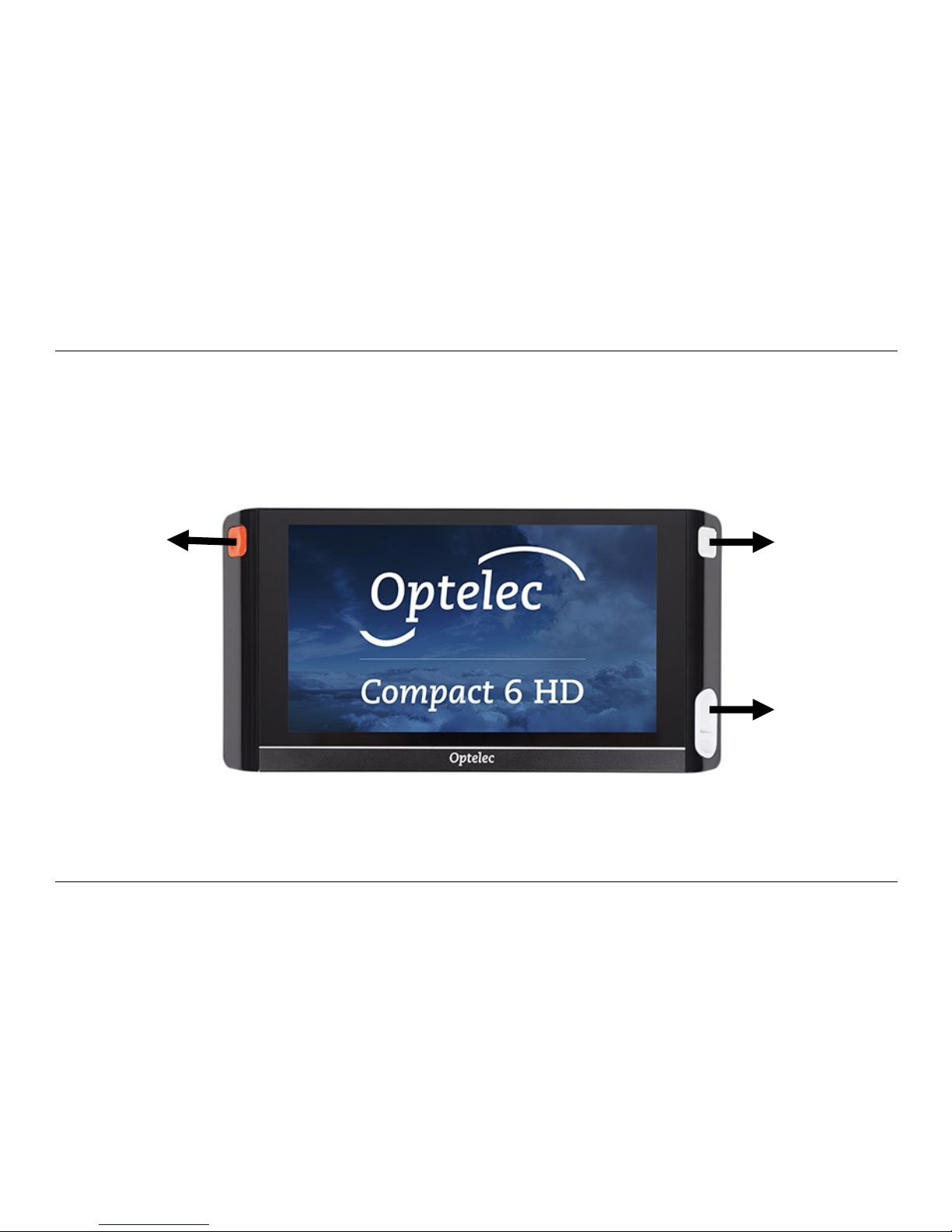
The Compact 6 HD is placed correctly in front of you when the screen is facing up, and the white
snapshot button and orange on / off button are at the top corners of the screen.
Snapshot
button
On / Off
button
USB
connector
Page 11
Optelec Compact 6 HD and Compact 6 HD Speech
10
Using the Compact 6 HD with the Reading Stand
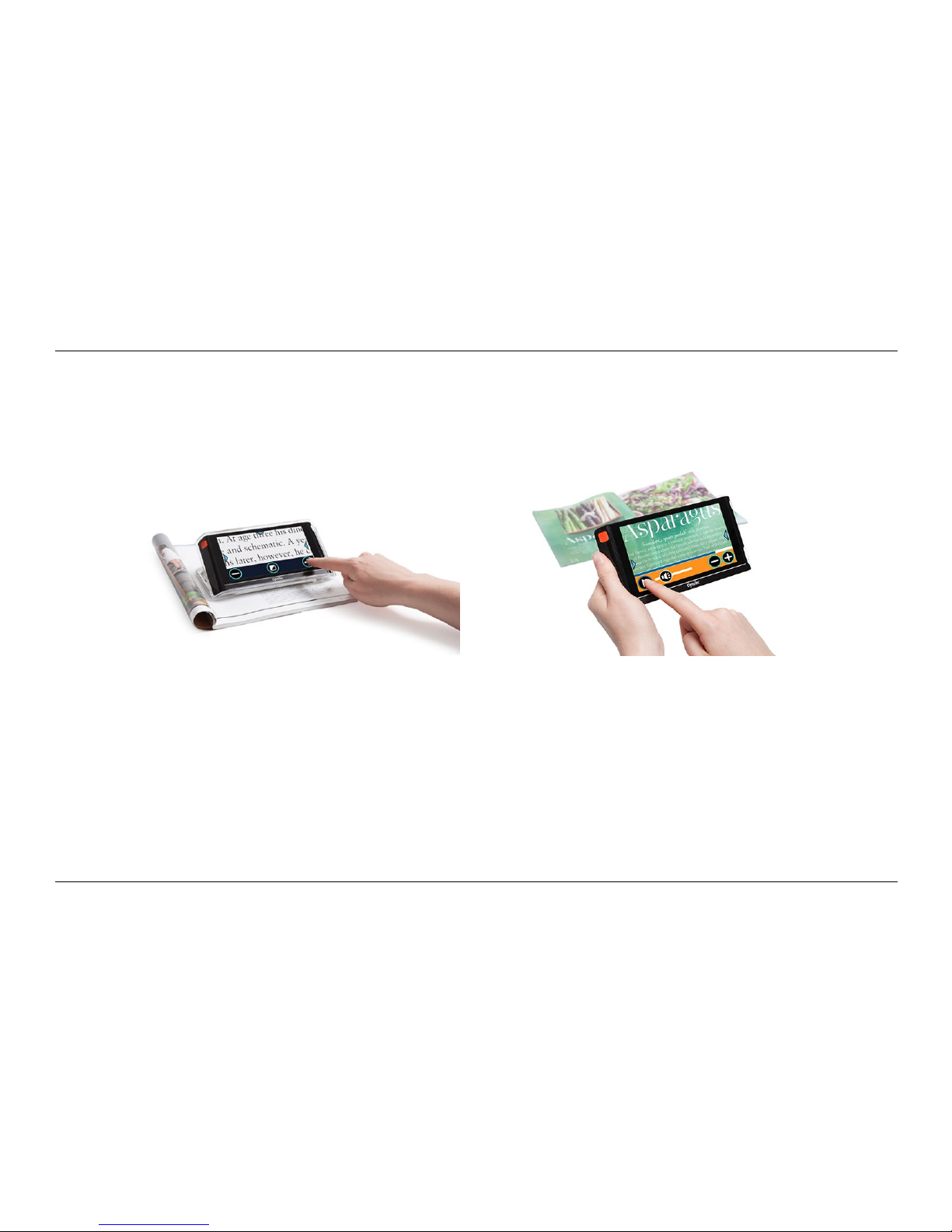
The Compact 6 HD is delivered with a separate Reading Stand. When placed in its Reading Stand,
the Compact 6 HD can be used with the Reading Stand closed or opened.
Compact 6 HD open Compact 6 HD closed
In the open position, the screen will be set at an ergonomic angle for reading, and the magnifier
camera will be activated. The open position enables you to read longer texts. The button bar will
have a dark blue background.
In the closed position, the overview camera is being used. Hold the unit in your hand and point the
camera (located at the back of the unit) to the object or text you wish to view or read. The closed
Page 12
Optelec Compact 6 HD and Compact 6 HD Speech
11
position is ideal for quickly scanning and viewing objects or documents. If the overview camera is
active, the button bar will be orange.
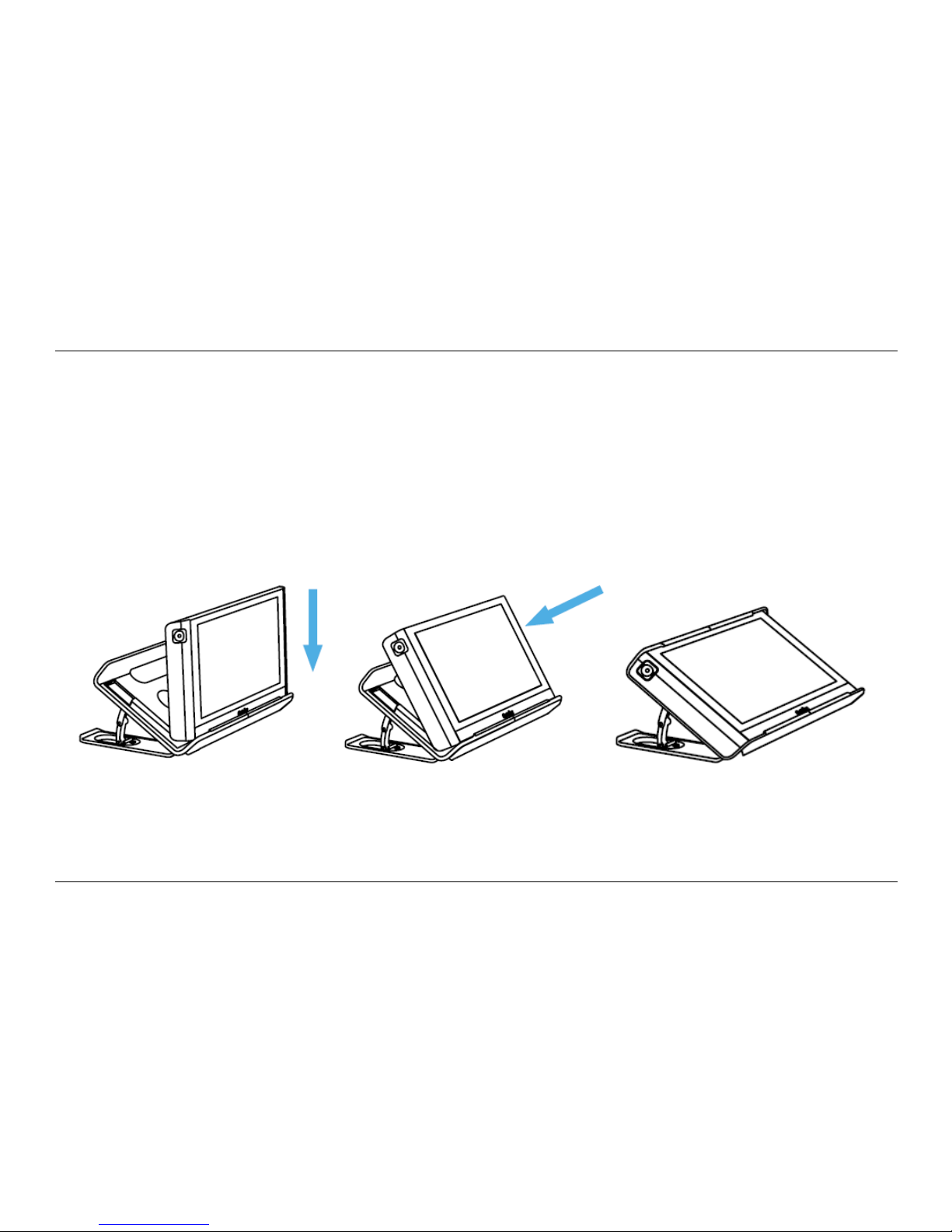
To insert the Compact 6 HD into the Reading Stand, follow these steps:
1. Insert the Compact 6 HD at the bottom of the Reading Stand.
2. Press to lock the Compact 6 HD in the Reading Stand.
3. The Compact 6 HD is now locked in the Reading Stand.
Step 1 Step 2 Step 3
Page 13
Optelec Compact 6 HD and Compact 6 HD Speech
12
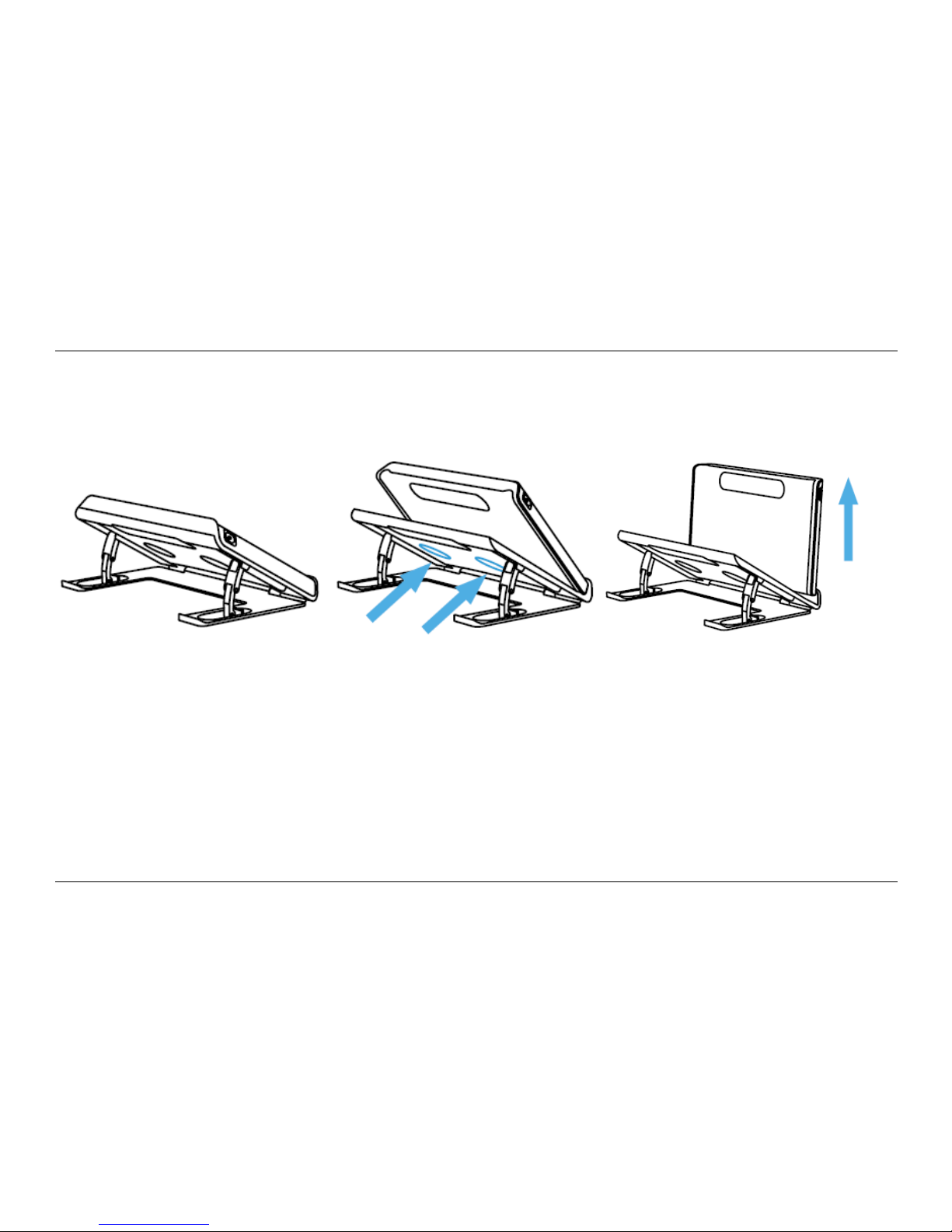
To remove the Compact 6 HD from the Reading Stand, follow these steps:
1. Open the Reading Stand.
2. Place 2 fingers in the indents at the back.
3. Gently press to remove the Compact 6 HD from the stand.
Step 1 Step 2 Step 3
To open the Reading Stand, follow these steps:
1. Place the Compact 6 HD in front of you so that the screen is facing up, and the white
snapshot button and orange on / off button are at the top of the screen.
2. Open the feet of the stand, and the Compact 6 HD will switch on.
To close the Reading Stand, follow these steps:
1. Place the Compact 6 HD in front of you so that the screen is facing up, and the white snapshot
button and orange on / off button are at the top of the screen.
2. Gently press the Compact 6 HD down to close the Reading Stand.
Page 14
Optelec Compact 6 HD and Compact 6 HD Speech
13
Cleaning the camera window
For an optimal quality image, it is recommended to ensure that the camera lens and object light
window are kept clean. A dirty camera window will result in a fuzzy image and may cause the autofocus camera to incorrectly focus. To clean the camera window, use the provided cleaning cloth or
another soft lens cleaning cloth.
Note: Do not use water or cleaning agents to clean the camera window.
Page 15
Optelec Compact 6 HD and Compact 6 HD Speech
14
Buttons
The Compact 6 HD has the following buttons:
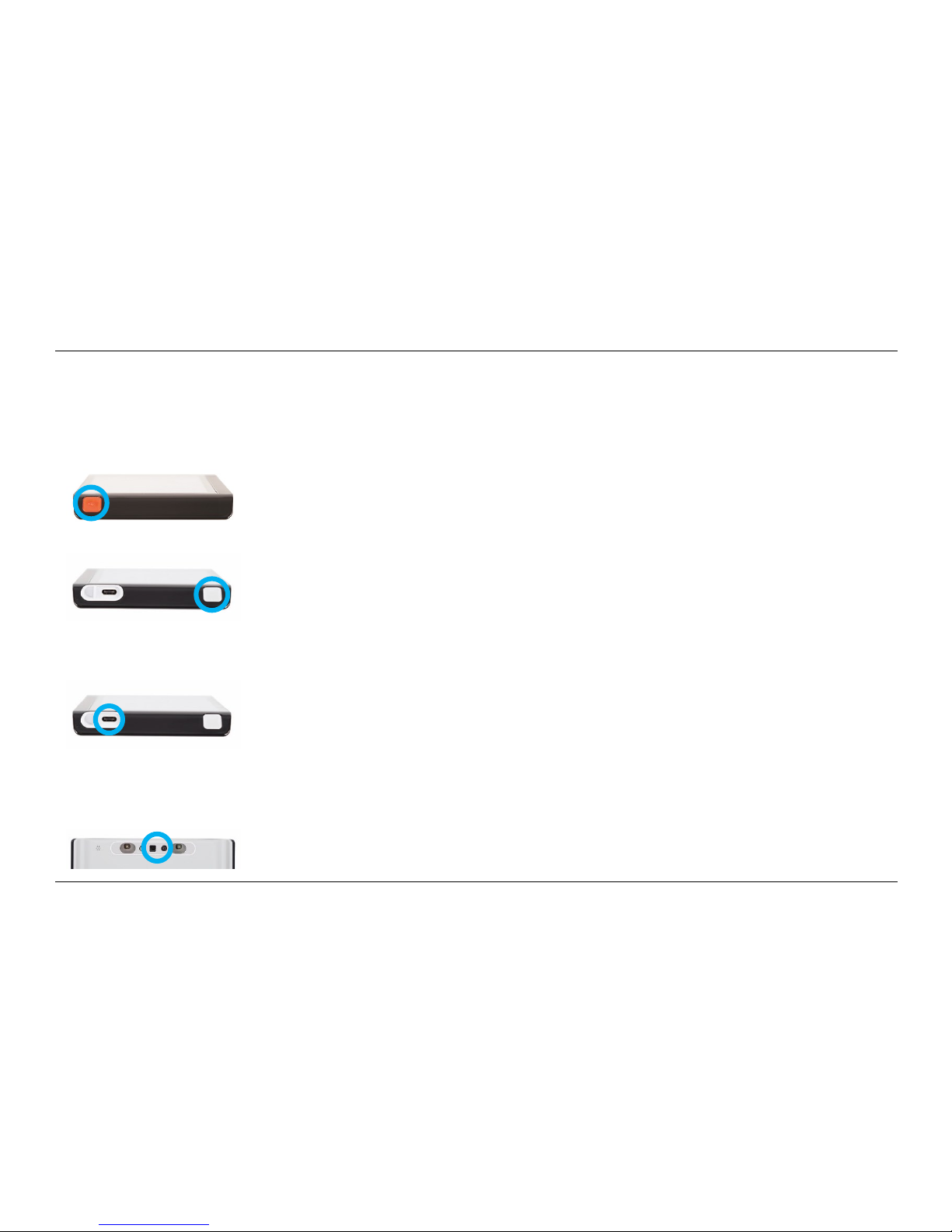
On / Off button
A short press of the orange button, located on the top left, will place
the Compact 6 HD into sleep mode or resume the unit. A 3 second
press of this button switches the unit off or back on again.
Snapshot button
The snapshot button located on the top right of the unit allows you to
take a temporary picture of a distant text or image, enabling you to
bring the image closer to your eyes. If you own a Compact 6 HD
Speech, the Compact 6 HD will extract the text from the snapshot
and read it aloud.
USB connector
The white USB connector is located on the right side at the bottom
corner of the Compact 6 HD. The supplied USB cable connects to
this USB port and power supply. Use only the power supply that
comes with the Compact 6 HD to power and charge the unit. Use the
USB to 3.5 mm audio converter cable to connect speakers or a
headset.
Cameras
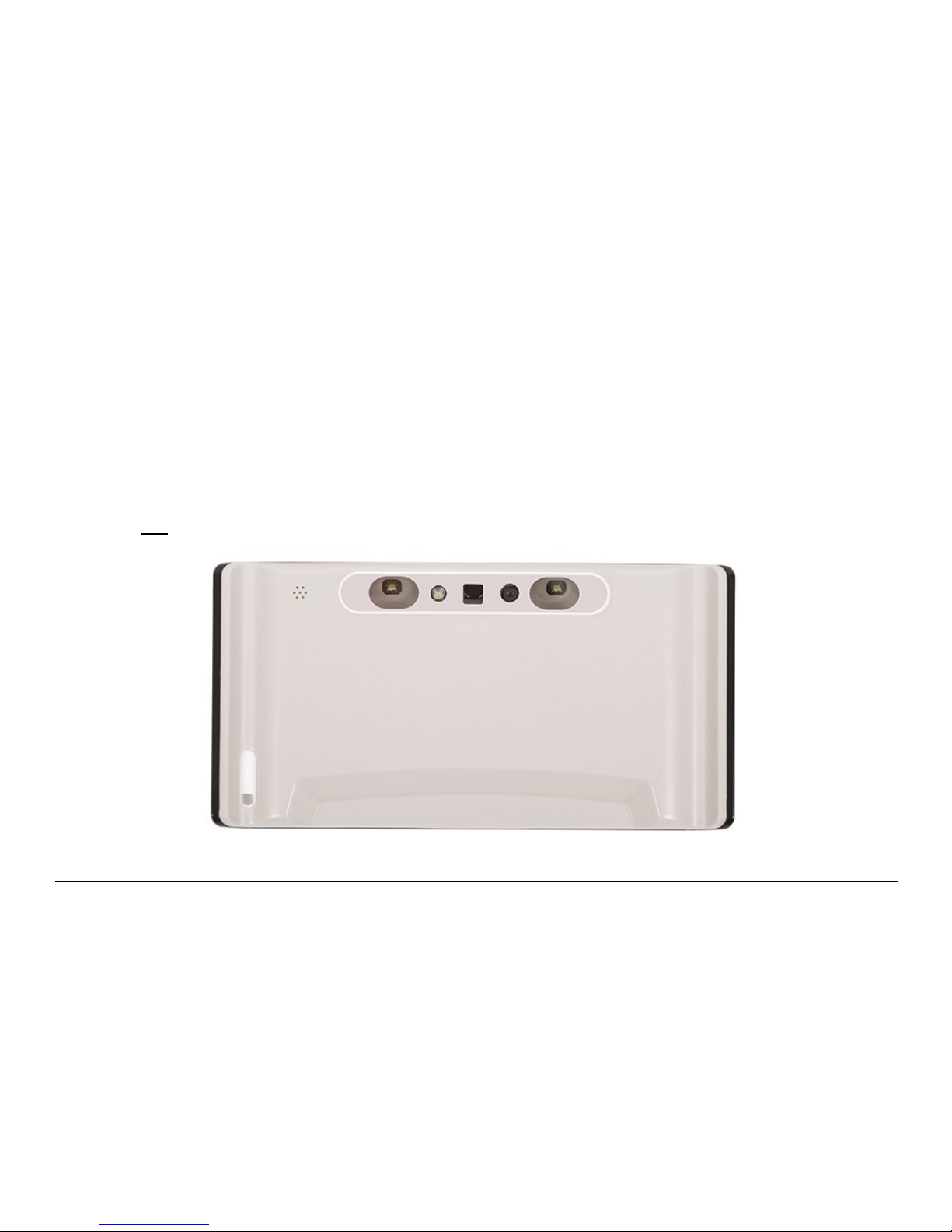
The cameras of the Compact 6 HD are located at the back of the unit.
Page 16

Optelec Compact 6 HD and Compact 6 HD Speech
15
Power on and off
To switch on the Compact 6 HD for the first time, the unit needs to be charged. Once charged, press
the orange on / off switch located on the top left corner of the screen for three seconds. To switch
off the Compact 6 HD, press the orange button for three seconds again. When switching on the
Compact 6 HD, it will take approximately 25 seconds before an image displays on screen.
Sleep and resume
When the Compact 6 HD is switched on, a short press of the orange power button will place the
unit into sleep mode. A short press of the orange power button again will resume the Compact 6
operation in the mode in which it was put to sleep. When resuming from sleep, the Compact 6 HD
will take approximately 1 second before an image displays on screen.
When the Compact 6 HD is in sleep mode, the unit can also resume by opening the Compact 6 HD
reading stand. Closing the reading stand will automatically put it back into sleep mode.
Pressing the snapshot button while the Compact 6 HD is in sleep mode will show the clock.
Page 17
Optelec Compact 6 HD and Compact 6 HD Speech
16
Adjusting the magnification
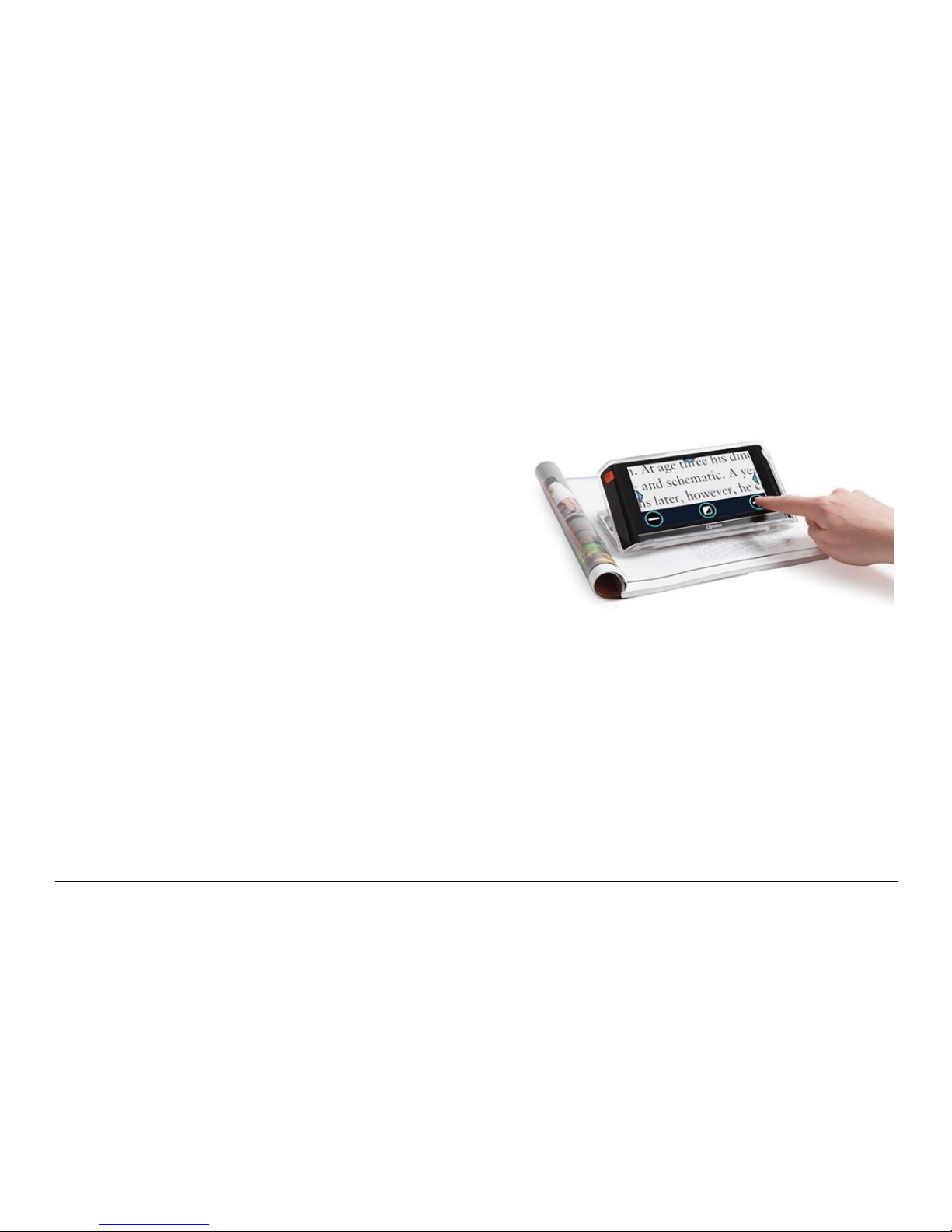
To change the magnification, simply tap the screen.
The button bar will be shown at the bottom of the
screen or at the right side of the screen, depending on
the chosen button bar position. The button bar position
can be selected in the menu. See chapter 5 for more
information on how to change the button bar position.
In the button bar tap the + button to increase or the –
button to decrease the magnification. Tap the screen
to hide the button bar. The button bar will automatically
hide when the screen is not touched for 10 seconds.
Selecting a viewing mode
Tapping the Mode button in the middle of the button bar allows you to select one of the following
viewing modes:
Photo mode: Viewing full color texts and photos
Negative mode: Reading in high contrast, white on black
Positive mode: Reading in high contrast, black on white
High contrast color combination 1
High contrast color combination 2
Note: the high contrast modes are not available in snapshots taken with the overview camera.
Page 18
Optelec Compact 6 HD and Compact 6 HD Speech
17
Time and date
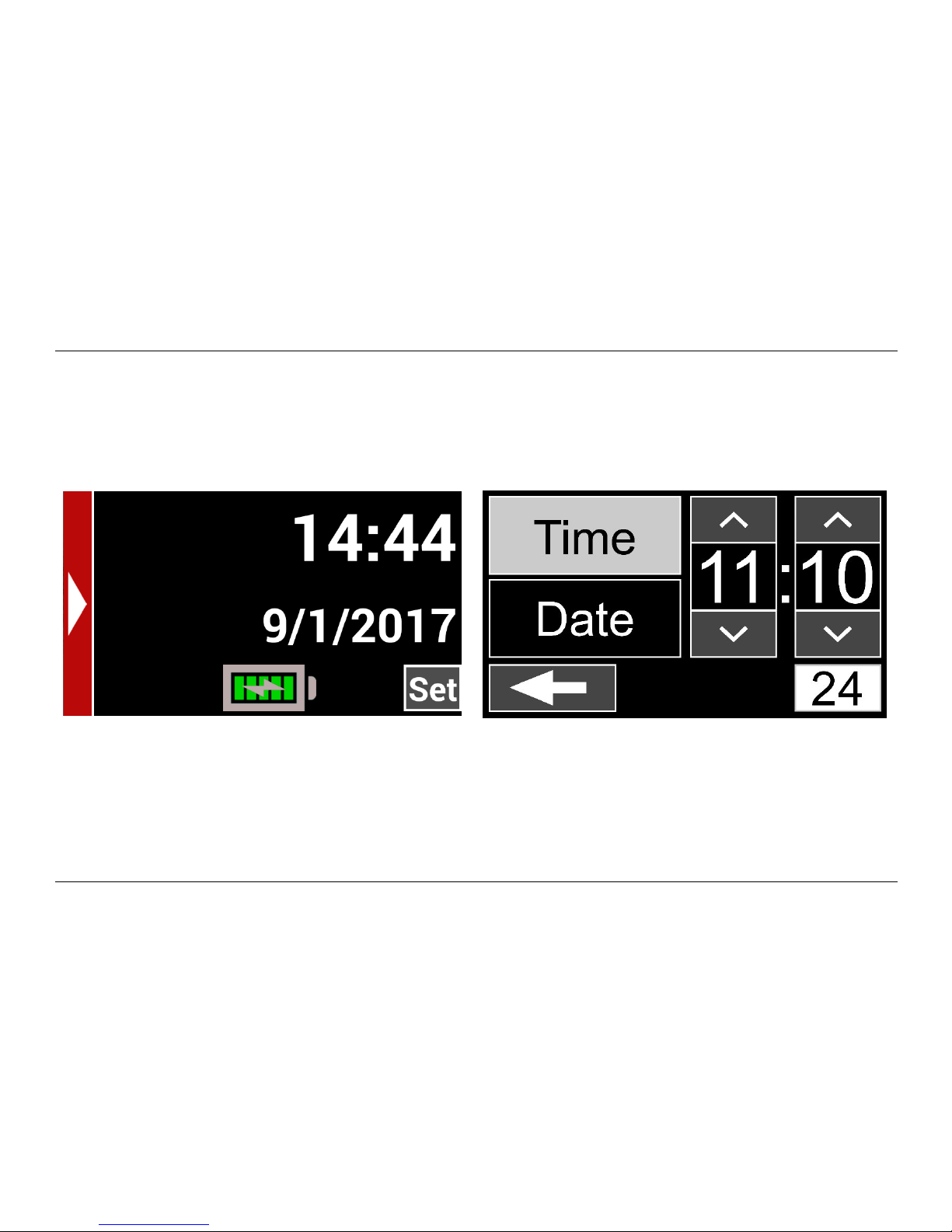
To open the clock, swipe from the right edge of the screen to the left. Alternatively, tap the screen
and tap on the arrow at the right edge of the screen. The colors of the clock will be displayed
according to the first high contrast color setting.
Clock Set the time
Tap the battery icon to view the battery status. Use the “Back arrow” to return to the Clock.
To set the time and date, tap on the Set button. To change a value, tap on the field you would like
to change and tap on the up or down symbol to change the value. Tap on the Back arrow to exit the
set time and date screen.
Page 19
Optelec Compact 6 HD and Compact 6 HD Speech
18
The magnifier and overview cameras
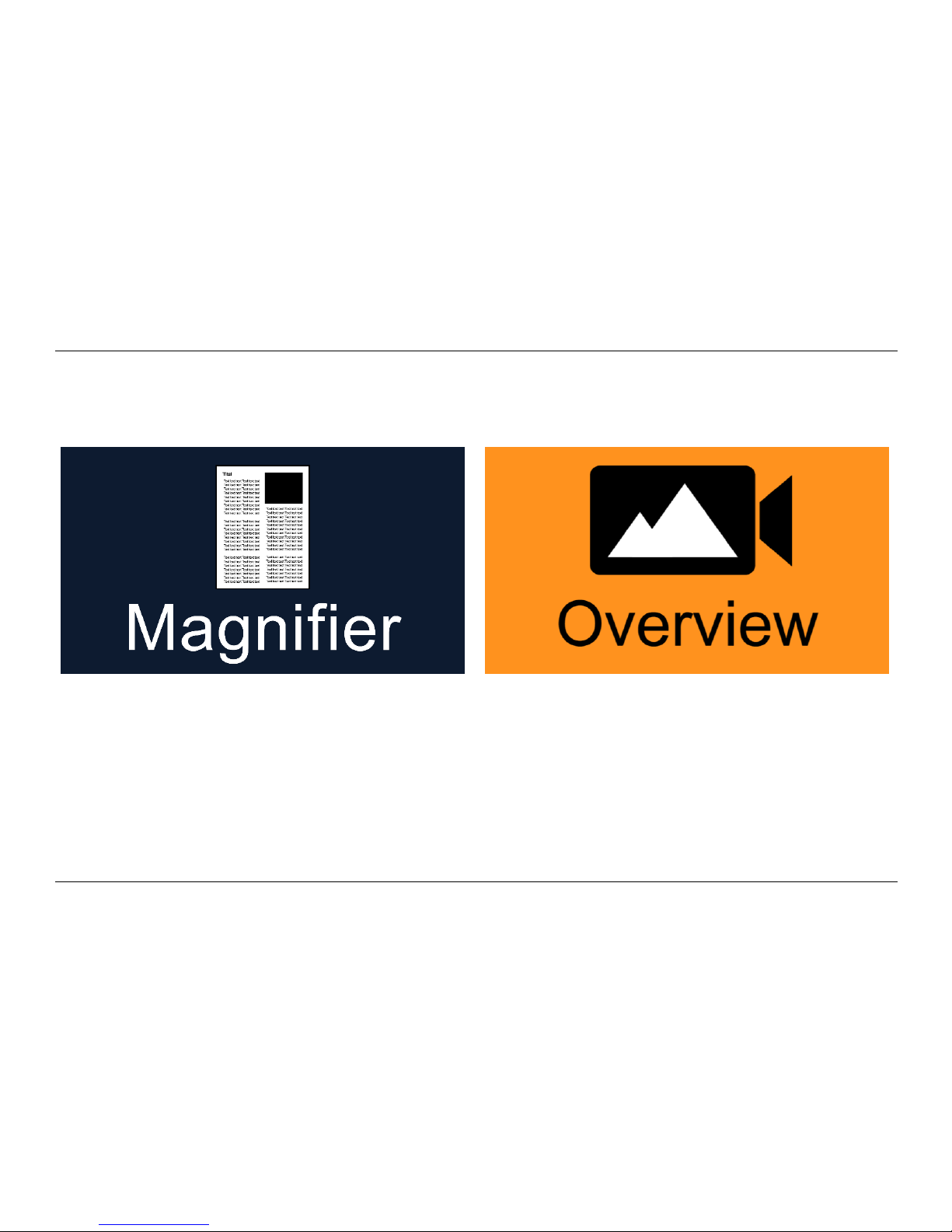
The Compact 6 HD is equipped with two cameras, a magnifier camera and an overview camera.
When the stand is being opened, The Compact 6 HD will switch on and will automatically select the
magnifier camera. When you switch on the Compact 6 HD with the stand closed, the overview
camera will be activated. The magnifier camera is optimized for reading text in the reading stand
while the overview camera is optimized to look at objects at a short distance. To switch between
the cameras, swipe down from the top edge of the screen. Alternatively, tap the screen and tap the
arrow at the top of the screen.
Page 20

Optelec Compact 6 HD and Compact 6 HD Speech
19
Using the snapshot button
The snapshot button allows you to take a temporary picture of a text or an image.
1. Hold or place the Compact 6 HD over the text or image you wish to capture.
2. Press the snapshot button located on the top right side of the unit to take the snapshot.
3. Bringing the Compact 6 HD closer to your eyes will enable you to view the object or text closely.
4. Press the snapshot button again to and return to the live video mode. It is now possible to take
a new snapshot.
To save or delete snapshots, please refer to chapter 5.
Page 21

Optelec Compact 6 HD and Compact 6 HD Speech
20
3. Using the Compact 6 HD Speech text-to-speech and
OCR
If you own a Compact 6 HD Speech, taking a snapshot activates the Speech
functionality. The Compact 6 HD Speech will extract the text from the image and
will read the text aloud.
Activating the speech
To take a snapshot and activate the Speech:
Position the text or part of the text in the camera view and press the snapshot button. For
an optimal result, make sure there is enough light in the environment, prevent shadows and
limit the text to only the part of the document you would like to read. If the text in view gets
too small, the recognition will lose accuracy and might fail.
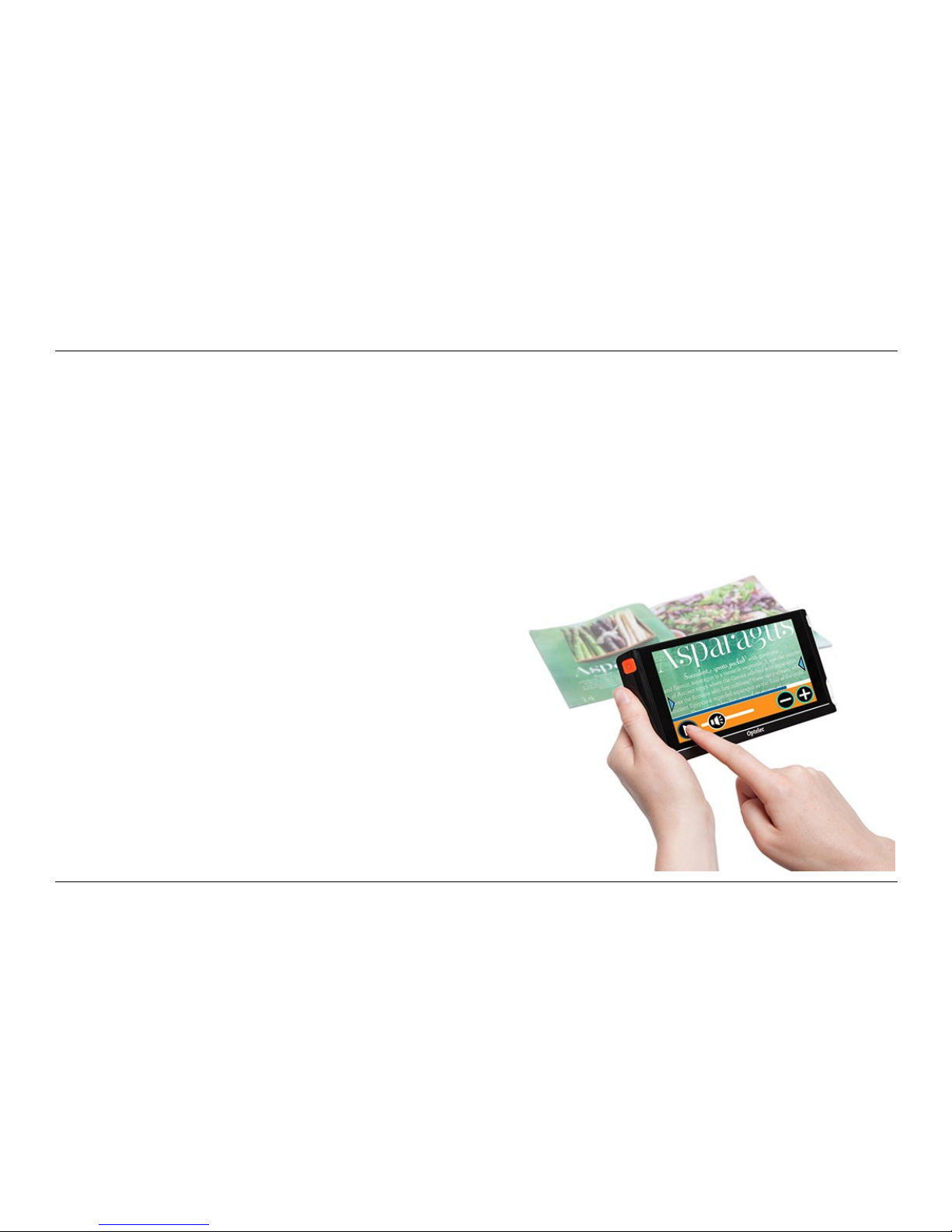
Tap the screen and tap the “Play” button in the button bar to have the Compact 6 HD
Speech read the captured text to you. In case the processing of the text is still ongoing, a
progress bar will be shown. The Compact 6 HD Speech will start reading after the
recognition process has been finished.
Use the Play/Pause button to start or stop reading
Tap and hold (long press) on the text to start reading at the word or text section you point
at
Page 22
Optelec Compact 6 HD and Compact 6 HD Speech
21
Tap the “Mode” button to display the text in high contrast colors. The text will be formatted
in a column to fit the width of the screen. In the high contrast view, pictures will not be
shown. Press the “Mode” button to switch between the various high contrast options and
full color mode. In the full color mode pictures will be shown as well as the original layout of
the text.
If no text is found, a “No text found” message will appear on pressing the ”Play” button.
To change the language and voice, please refer to chapter 5.
Adjusting the volume
You will find the “Volume” slider next to the “Play”
button. The “Volume” slider is only present in the
snapshot view.
Page 23
Optelec Compact 6 HD and Compact 6 HD Speech
22
4. Charging the battery
The Compact 6 HD is delivered with a power supply and four country-specific power plugs in EU,
US, UK, and AU types. Select the power plug that corresponds to your country and plug it into the
power supply.
To charge the Compact 6 HD, connect the supplied USB cable to the power supply and the white
USB connector located on the right side of the unit. Plug the other end of the power supply into a
power outlet.
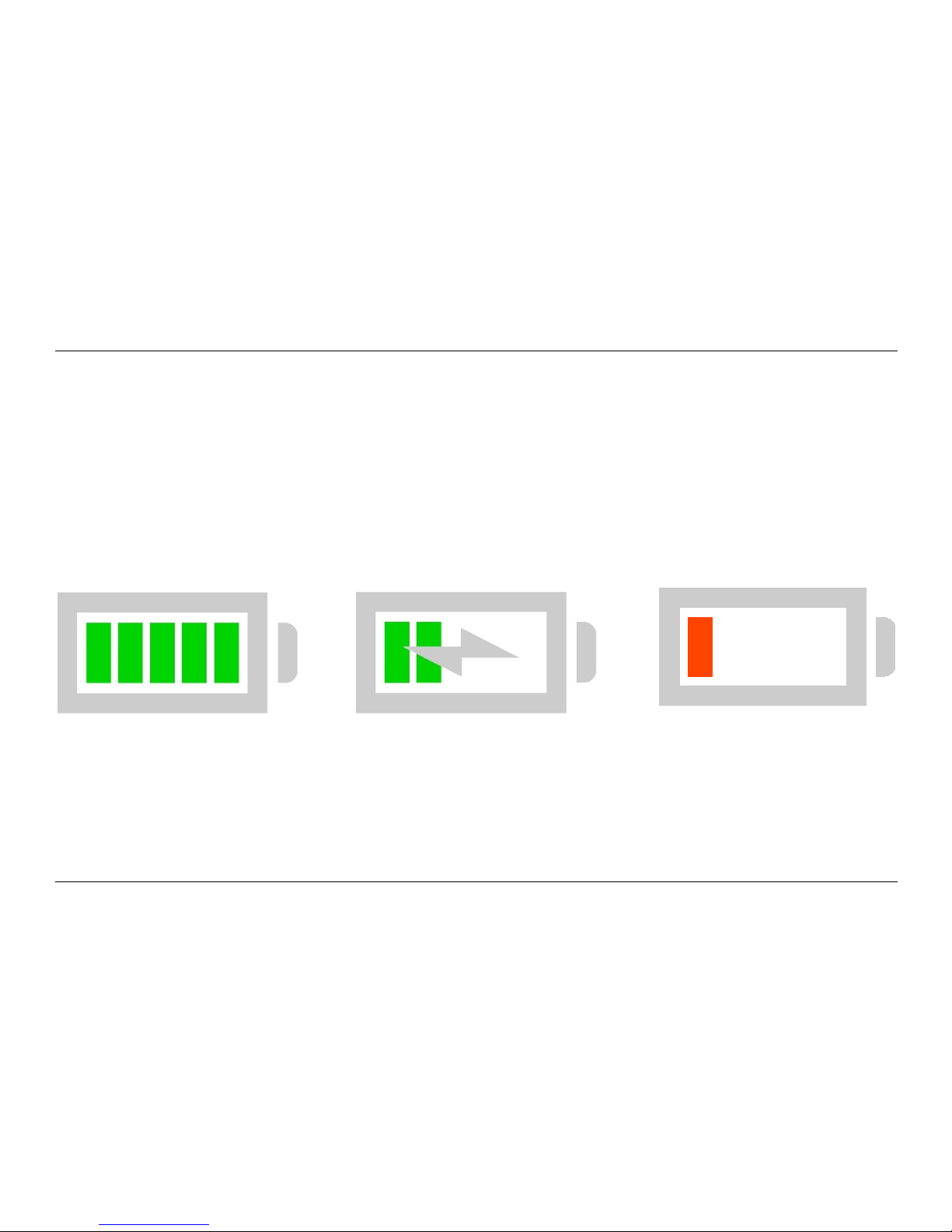
Battery full Battery charging Battery almost empty
Charging the Compact 6 HD takes approximately 2 hours. A fully charged Compact 6 HD can
operate for an average time of 3 hours, depending on the power settings. For safety reasons, please
only use the power supply and USB cable that was delivered with the Compact 6 HD to charge the
unit’s battery.
Page 24

Optelec Compact 6 HD and Compact 6 HD Speech
23
Battery warning
The Compact 6 HD will briefly show an empty battery warning icon to indicate that the battery needs
to be charged. When this occurs, make sure to charge your unit. When the battery is empty, the
unit will automatically switch off.
If the Compact 6 HD does not switch on, please make sure it is charged.
Standby
The Compact 6 HD can automatically go into standby mode if no button is pressed or no movement
is detected. Pressing the orange on / off button will switch it back on. The standby time can be
changed or disabled in the Compact 6 HD menu. Please refer to the next chapter on how to change
these settings.
Page 25
Optelec Compact 6 HD and Compact 6 HD Speech
24
5. The Compact 6 HD Menu
This chapter will familiarize you with the Compact 6 HD Menu.
Opening and closing the menu
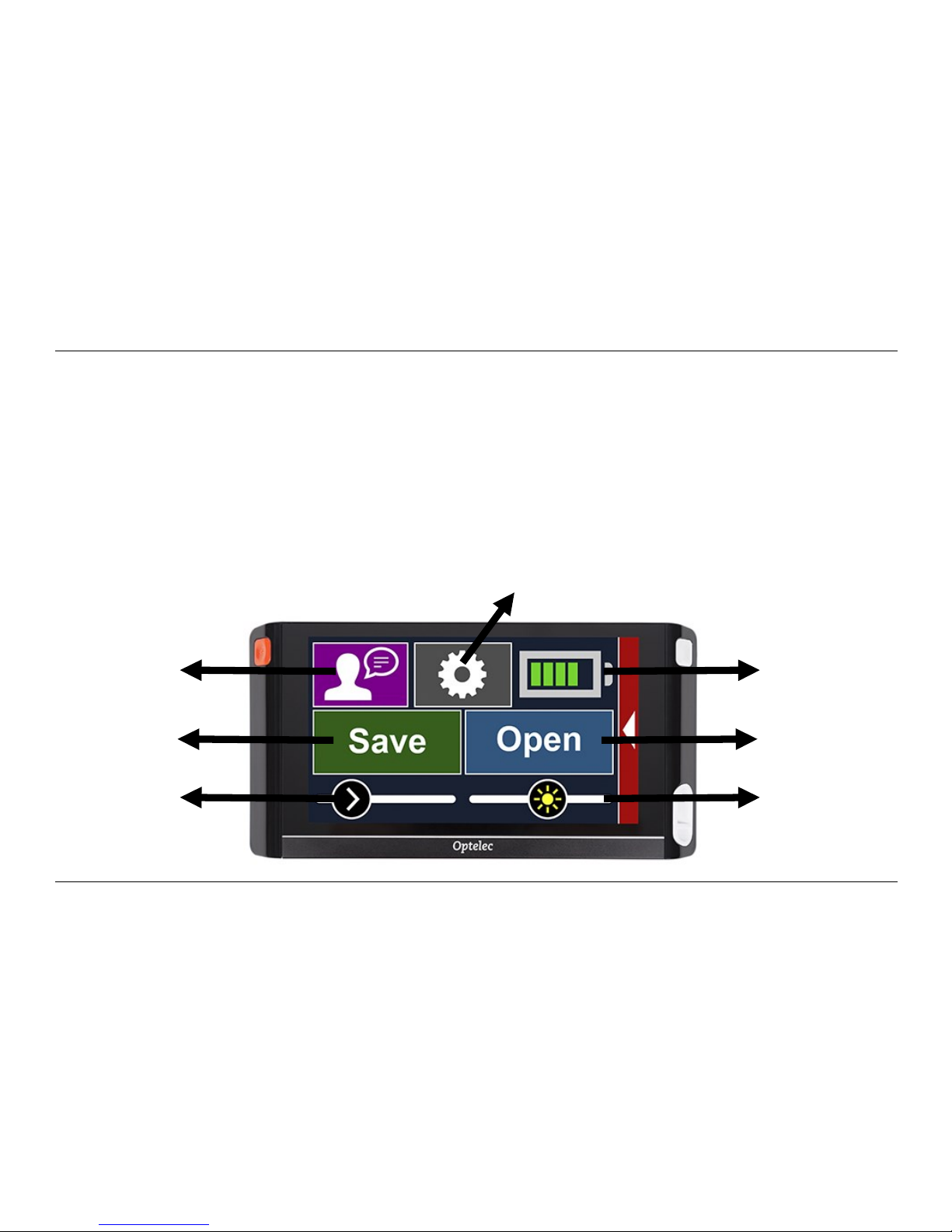
To open the menu, swipe from the left edge of the screen to the right, Alternatively, tap on the
screen and tap on the arrow icon at the left side of the screen. This will open the main menu. To
close the menu, swipe from the right edge of the screen to the left or tap on the arrow.
Open
Brightness
Slider
Battery
Status
Save
Voice Rate
Slider
Voice
Settings
Page 26

Optelec Compact 6 HD and Compact 6 HD Speech
25
The main menu
The main menu contains two rows of buttons and one or two sliders, depending on if you own a
Compact 6 HD or 6 HD Speech. To activate a button, tap the button once. To adjust the slider, tap
and hold the slider button while moving it to the right or left. Activating a button will open a new
menu screen or list. To go back to the main menu, tap on the back arrow sign.
The main menu contains the following options:
Battery status
Brightness slider
Save
Open
Voice (Compact 6 HD Speech only)
Voice Rate slider (Compact 6 HD Speech only)
Settings
Battery status
The battery status is shown in the top right corner of the screen. If you tap the battery icon, a new
screen will be opened showing a magnified battery icon and battery status, the “About” button and
the “Back arrow” to return to the main menu. The lightning symbol indicates that the battery is
charging.
Page 27

Optelec Compact 6 HD and Compact 6 HD Speech
26
About
Tap on the “About” button in the battery screen to see the application version.
Adjusting the brightness
Use the slider with the sun icon to increase or decrease the brightness of the screen.
Save
To save a snapshot, open the menu and tap the “Save” button.
Make a snapshot using the snapshot button
Open the menu
Press the save button to save the snapshot
The menu will close and the snapshot will be shown
If there is no snapshot to save, or if the snapshot has already been saved, the “Save“ button will be
hidden.
Open
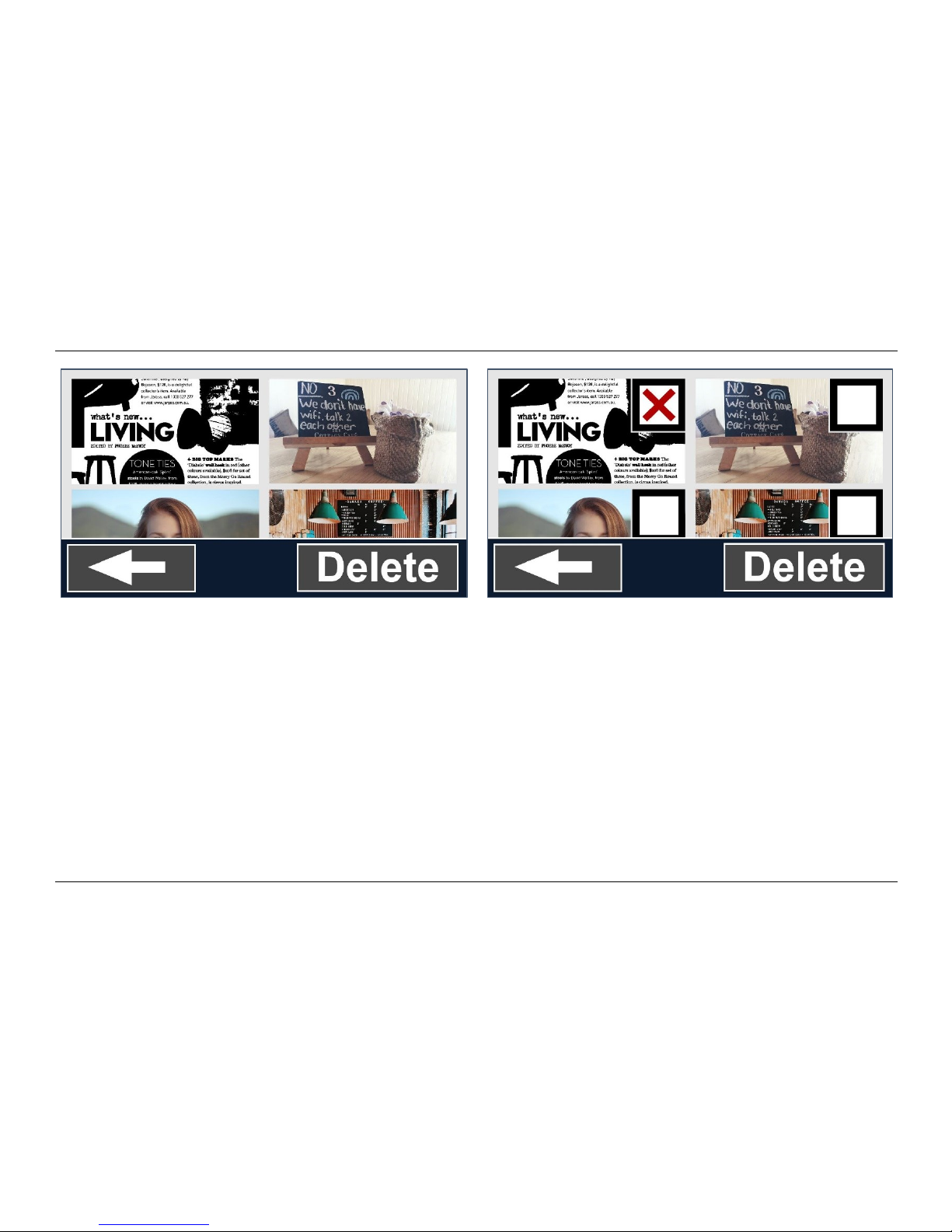
To open a snapshot, open the menu and tap on the “Open” button. A list of thumbnails of the saved
snapshots will be shown, showing the most recently saved snapshot first. If there are more
snapshots than fit on the screen, swipe up and down to scroll through the list. Tap on the snapshot
thumbnail to open it.
Page 28
Optelec Compact 6 HD and Compact 6 HD Speech
27
Open to view saved snapshots Delete snapshots
Delete
To delete a snapshot, open the menu and tap on the “Open” button. In the open screen, tap on the
“Delete” button. A list of thumbnails of the saved snapshots will be shown, showing the most recently
saved snapshot first. Each snapshot has a checkbox at the top right corner. To select a snapshot,
check the checkbox. Tap the “Delete” button to delete the selected snapshots. To delete all
snapshots, tap the “Delete” button without selecting a snapshot. You will be prompted to confirm to
delete all snapshots. To delete all snapshots, select “Yes”. To cancel deleting all snapshots, select
“No”. Both choices will return you to the list of snapshots. Tap the “Back arrow” to return to the
“Open” screen. Tap the “Back arrow” again to return to the main menu.
Page 29
Optelec Compact 6 HD and Compact 6 HD Speech
28
Voice
To select a voice, language and menu language, or to add or remove a voice or language,
open the menu and tap the “Voice” button.
Selecting a voice, language and menu language
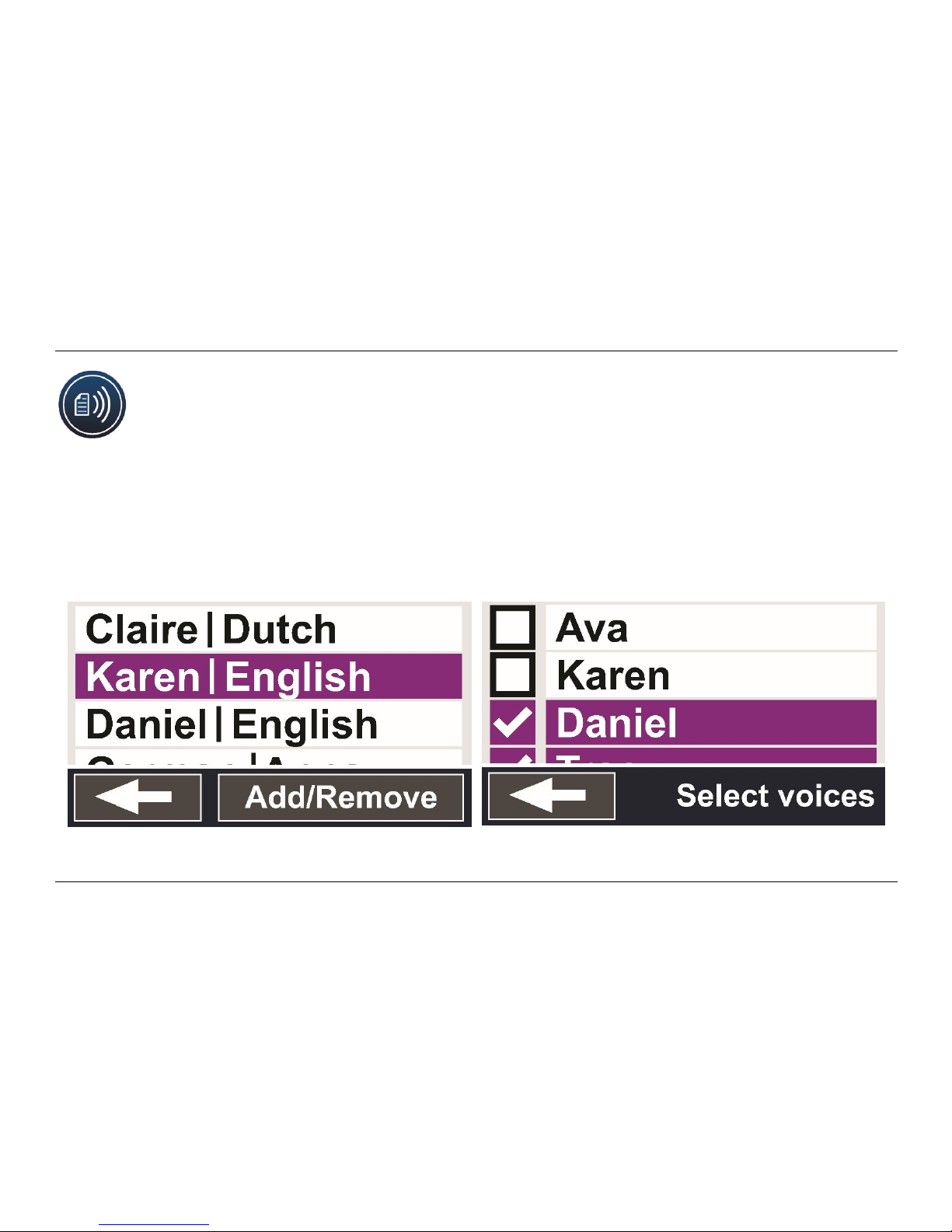
This menu item lets you select your reading voice and language. To select another reading voice,
tap the voice icon in the top left corner of the main menu to open the list with preselected voices.
Each voice represents a language. Tap on a voice to select the voice. If adjusting the reading voice
results in a change of language, the menus will automatically change to that language.
Reading voice and languages Selecting a voice
Page 30

Optelec Compact 6 HD and Compact 6 HD Speech
29
Adding or removing a voice or language
To add or remove a voice or language, tap the voice icon in the top left corner of the main menu. In
the list with preselected voices, tap on the “Add/Remove” button. To add or remove a reading voice,
select the language from the list by tapping on the language. This will display a list with available
voices for the selected language. To enable a reading voice, select it from the list by tapping on it.
A checkmark in front of the voice name will indicate if it is enabled. When the voice is enabled, it will
be available under the “Voice” button in the main menu. By deselecting a voice, the voice will be
removed from the available reading voices. The languages of which a reading voice is selected, will
appear at the top of the list with languages, and are marked with a checkmark.
Voice Rate
Use the slider with the arrow head icon to adjust the voice playback rate.
Page 31
Optelec Compact 6 HD and Compact 6 HD Speech
30
Settings
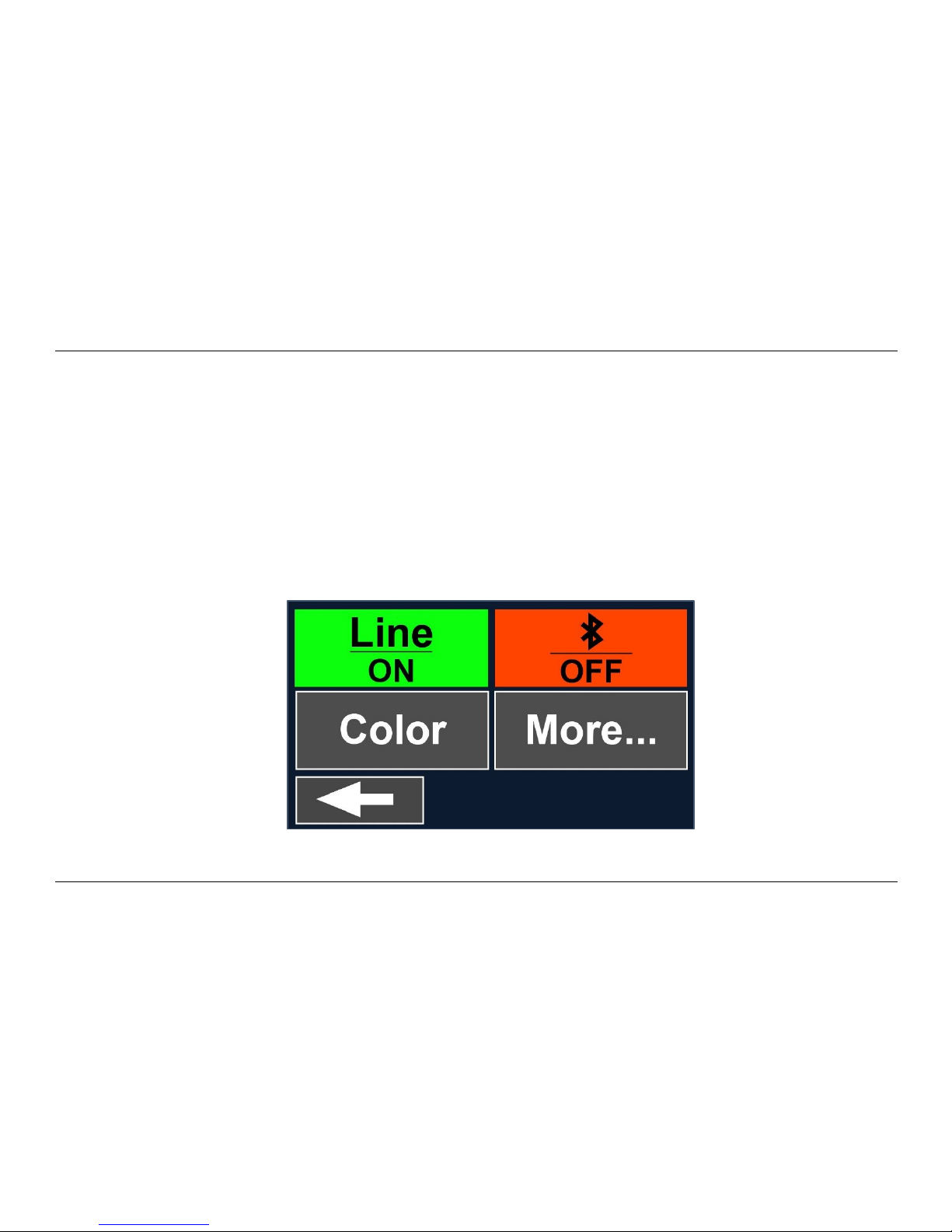
Tap on the “Settings” button to enter the Settings menu. The “Settings” button is the button with the
gear icon next to the battery icon. The Settings menu contains four buttons:
Line
Bluetooth
Color
More…
Settings menu
Page 32
Optelec Compact 6 HD and Compact 6 HD Speech
31
Line on / off
The Compact 6 HD can display a reading line to help you position the Compact 6 HD straight on
the document. To enable the reading line, tap the “Line” button. Tap this button again to hide the
reading line.
Bluetooth: connecting a Bluetooth speaker or headphone
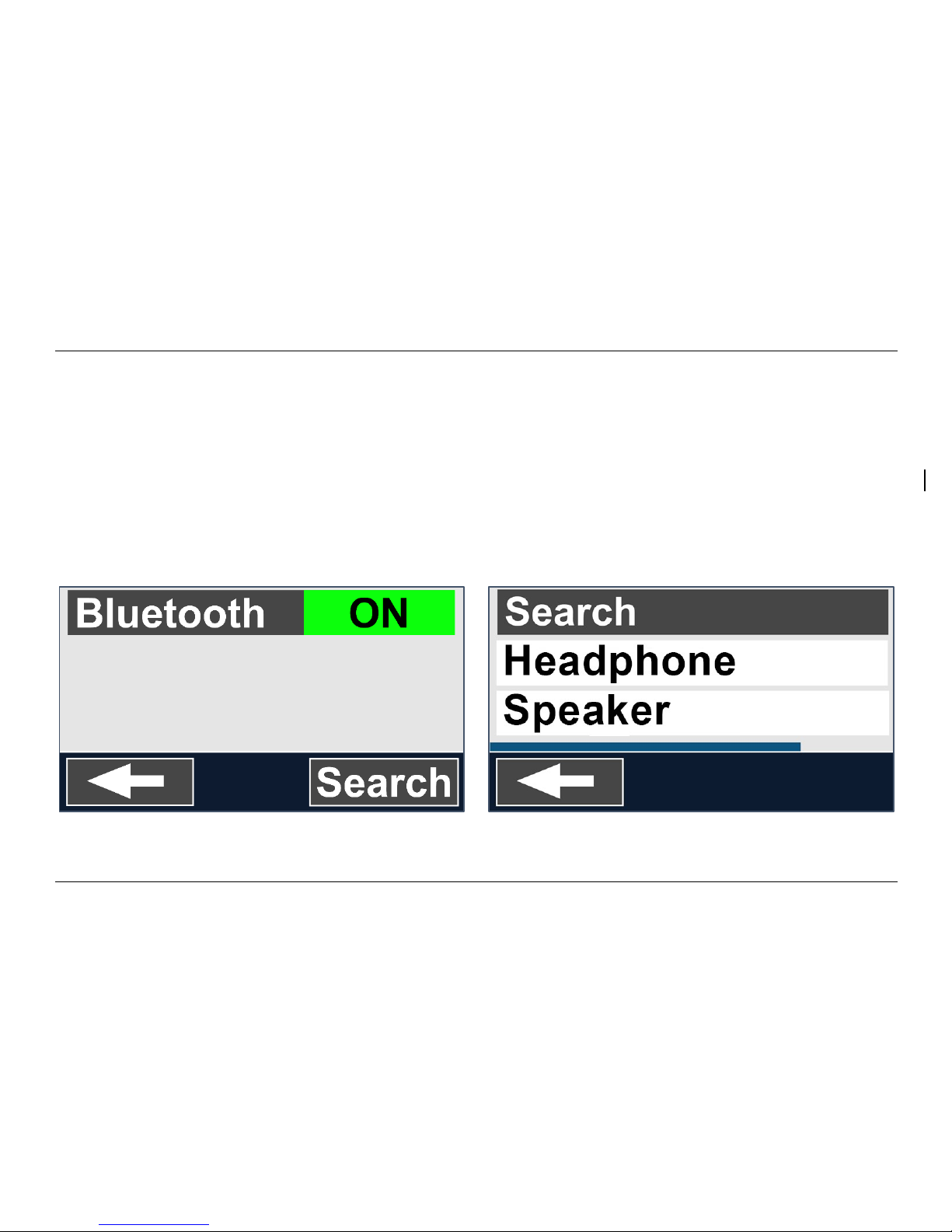
To connect a Bluetooth speaker or headphone, tap the “Bluetooth” button and switch Bluetooth on.
A list with paired devices is being displayed.
Page 33
Optelec Compact 6 HD and Compact 6 HD Speech
32
If no speaker or headphone is being paired, tap the “Search“ button to search for available devices.
Before starting the Bluetooth search, make sure the speaker or headphone is switched on and is
set to discoverable. Please refer to the speaker’s or headphone’s manual on how to switch the
device to Bluetooth discoverable mode. To pair the speaker or headphone, tap on the device name
and if needed enter the pin code. Refer to the speaker’s or headphone’s manual for the pin code of
the device.
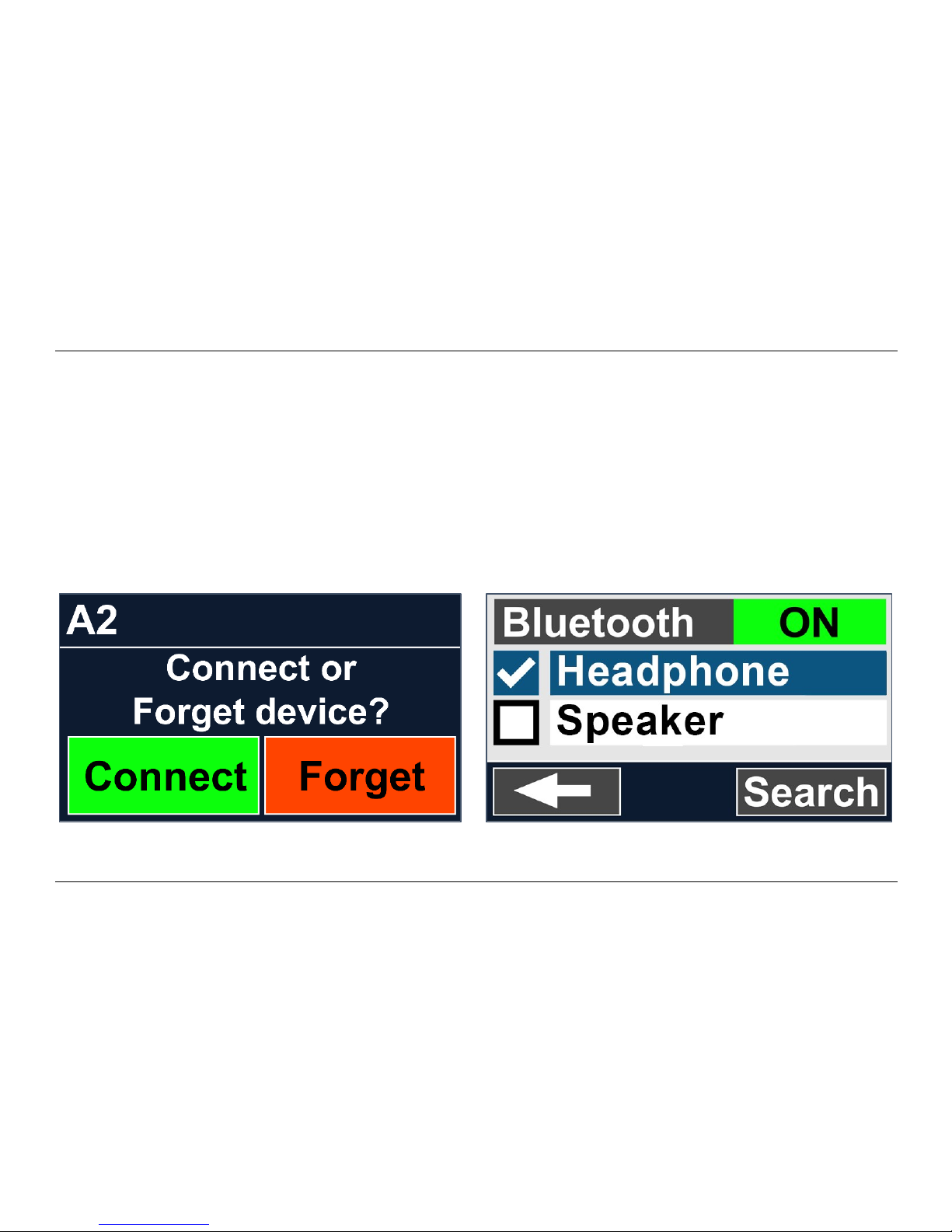
When the device is paired, to connect the speaker or headphone, tap the device. You will be asked
to connect or forget the device. Tap the “Connect” button to make the connection.
To indicate that a device is connected, the connected device will have a checkmark and will be
displayed in blue.
Page 34
Optelec Compact 6 HD and Compact 6 HD Speech
33
To unpair / forget a device, tap the “Forget” button. The device will be removed from the list with
paired devices.
Note: Only Bluetooth version 4.0 or higher headsets and speakers are supported.
Color
In the settings menu, tap the “Color” button to select the preferred high contrast colors.
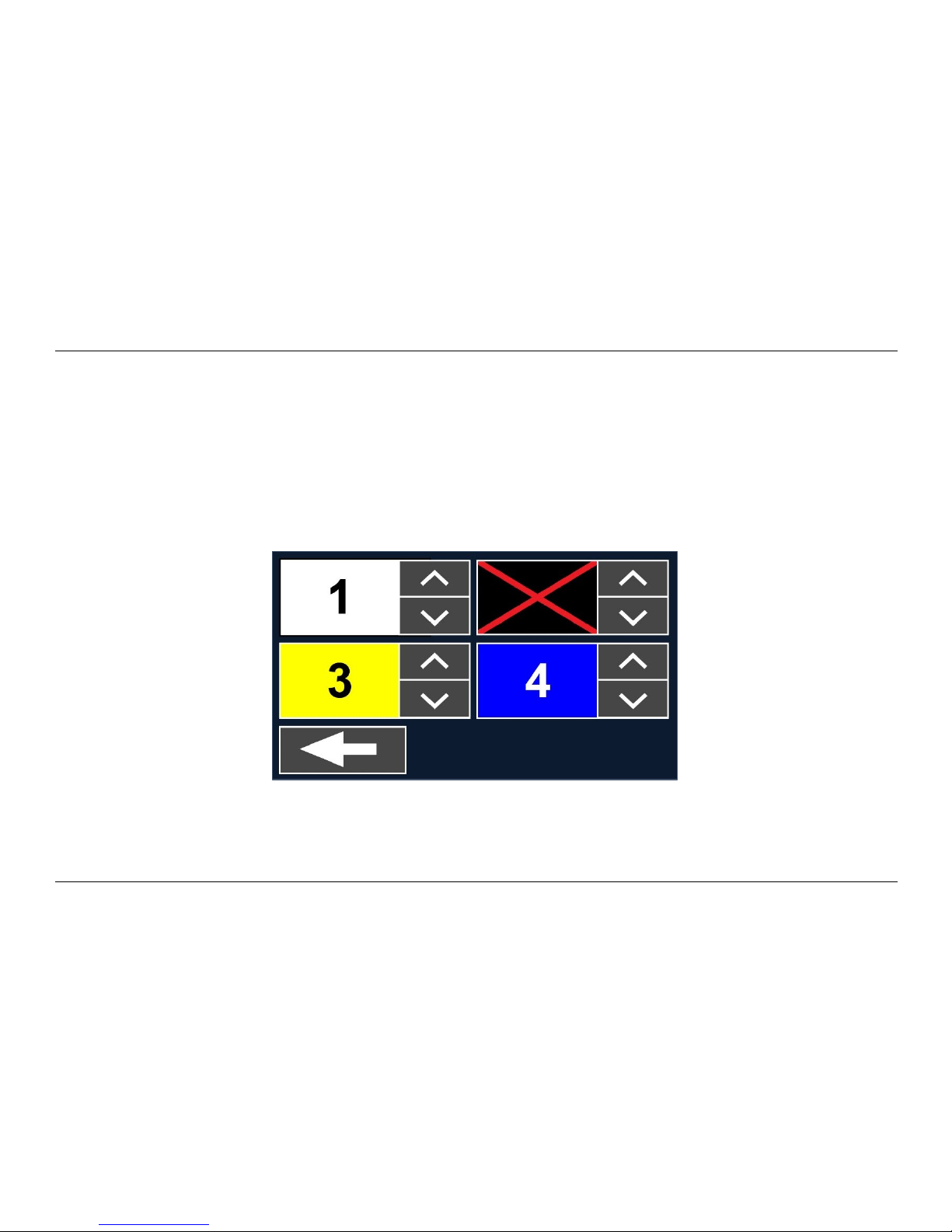
Color menu
The Compact 6 HD supports four high contrast modes. For each of these four modes, the
foreground and background colors can be selected. Three of the high contrast modes can be
disabled. One high contrast mode is required.
Page 35
Optelec Compact 6 HD and Compact 6 HD Speech
34
To change the foreground and background colors:
1. Tap on the mode number you would like to change. Each number represents a mode.
2. To select new high contrast colors for the foreground and background, tap on the up arrow head
to move up or the down arrow head to move down within the list of color combinations.
3. High contrast modes 2, 3 and 4 can be disabled by selecting the “X” symbol.
4. Tap on the “Back” button to return to the settings menu.
More…
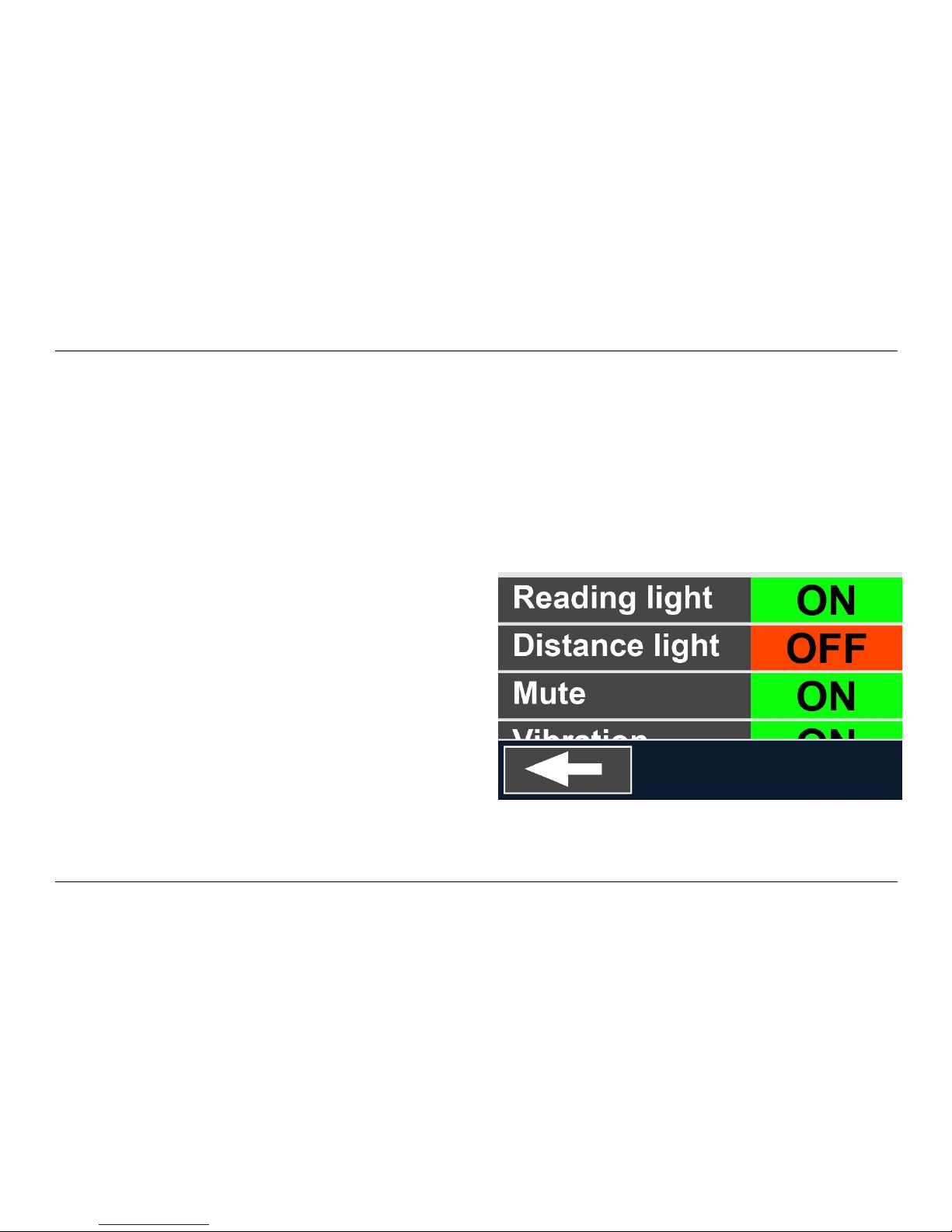
The “More…” menu contains
the following settings:
Reading light
Overview light
Mute
Vibration
Camera switch
Line position
Standby
Button bar
Close stand
Restore
More… menu
Page 36

Optelec Compact 6 HD and Compact 6 HD Speech
35
Reading light
This menu item allows you to enable or disable the lights - located to the left and right of the
magnifier camera. By default, the reading lights are enabled for an optimal image quality.
Overview light
This menu item allows you to enable or disable the light - located next to the overview camera. By
default, the overview light is disabled.
Mute
This menu item allows you to enable or mute the feedback sounds. By default, sound is enabled.
Vibration
This menu item allows you to enable or disable the vibration feedback. By default, vibration is
enabled.
Camera switch
If “Camera switch” is on, opening the stand will automatically activate the magnifier camera. If the
Compact 6 HD is switched on with the stand closed, the overview camera will be activated. To
disable the “Camera switch”, the active camera needs to be selected manually. By default, “Camera
switch” is on.
Page 37

Optelec Compact 6 HD and Compact 6 HD Speech
36
Positioning the reading line
This menu item enables you to change the reading line position to one of its six positions; horizontal
top, horizontal center, horizontal bottom, vertical left, vertical center, vertical right. By default, the
reading line is horizontally set to the centre of the screen.
Standby
The standby time sets the time after which the Compact 6 HD goes into standby mode to conserve
power. Pressing any button will take the unit out of standby mode. By default, the standby time is
set to 10 minutes after no button is pressed or no movement of the Compact 6 HD is detected.
Button bar
This menu item enables you to change the button bar position to one of its three positions, auto,
bottom or side. Depending on your preference, you could change the position of the button bar to
the bottom or side of the screen.
The default setting is “Auto”. When set to “Auto” the bar position is depending on the accessory in
use. For the Reading Stand this will mean that the bar will be positioned at the bottom of the screen.
Close stand
If the Close stand option is set to Standby, the Compact 6 HD will go to standby when closing the
stand. If the Close stand option is set to Overview and the Camera switch is set to ON, closing the
stand will automatically switch to the Overview camera.
Page 38

Optelec Compact 6 HD and Compact 6 HD Speech
37
Restore defaults
Tap this menu item if you wish to restore the default settings. You will be prompted if you are sure
to restore the defaults. To restore the defaults select “Yes”. To cancel restoring the defaults, select
“No”.
Page 39

Optelec Compact 6 HD and Compact 6 HD Speech
38
Appendix A: Technical information
Magnification <0.5 – >21 times
Viewing modes Full color photo mode
High contrast, white on black
High contrast, black on white
High contrast color combination 1
High contrast color combination 2
Focus Auto-focus
High contrast ratio 700:1
High brightness screen 350 cd/m2
Screen 5.94” TFT
Screen resolution 1280 x 720
Dimensions 183 x 95 x 14 mm / 7.2 x 3.7 x 0.55 in
Weight Compact 6 HD 270 grams / 9.5 ounces
Weight Reading Stand 110 grams / 3.0 ounces
Battery average 3 hours continuous use
average 2 hours charging time
Li-poly battery rechargeable, 3.7V 2600mAH
Power supply type Intertek, MX15Z-0502500VU
Input power rating – Adaptor 100-240V, 50-60Hz, 0.4A
Output power rating – Unit DC5V-2.5A
Page 40

Optelec Compact 6 HD and Compact 6 HD Speech
39
Operating conditions
Temperature +10°C to 35°C / 50°F to 95°F
Humidity < 70%, no condensation
Altitudes up to 3000 m (9842 feet)
Pressure 700 – 1060 hPa
Storage & transportation conditions
Temperature +10°C to 40°C / 50°F to 104°F
Humidity < 95%, no condensation
Altitudes up to 12192 m (40000 feet)
Pressure 186 – 1060 hPa
Page 41

Optelec Compact 6 HD and Compact 6 HD Speech
40
Appendix B: Safety
Intended Use:
The Compact 6 HD is designed that it can be used in a hospital environment for general purpose such
as reviewing medical records. The Compact 6 HD cannot be used for surgical procedures in combination
with life supporting systems.
Warning: Critical diagnostic decisions should not be based on images displayed by this device.
Do not expose the Compact 6 HD to excessive heat or direct sunlight to avoid the risk of fire.
Do not remove any parts of the Compact 6 HD. Contact an Optelec authorized service
organization in your area.
To avoid risk of electrical damage, keep your Compact 6 HD away from fluids and chemicals.
Handle the Compact 6 HD with care. Rough handling will damage the internal components.
Do not use the Compact 6 HD near inadequately shielded medical devices.
Do not try to open the battery compartment or try to remove the battery.
Contact your dealer to service this equipment if necessary. Do not disassemble your unit as it
will void the warranty.
Always unplug and switch off the unit before cleaning. Use a dry soft cloth to clean the exterior.
Do not use cleaning agents or abrasive materials as they will damage your unit.
Use of the Compact 6 HD other than described in this manual will exclude it from warranty conditions.
Page 42

Optelec Compact 6 HD and Compact 6 HD Speech
41
Appendix C: Warranty Conditions
Optelec warrants the Compact 6 HD, effective from the date of delivery, to be free of any defects in
material and workmanship.
The warranty is not transferable and does not apply to groups and multi-users. The Compact 6 HD
was designed for the individual purchaser to be used at home or on the go. Optelec reserves the
right to repair or replace any purchased Compact 6 HD with a similar or improved product.
In no event shall Optelec or its suppliers be held liable for any indirect or consequential damages.
The original user’s remedies are limited to replacement of the Compact 6 HD. This warranty is valid
only when serviced in the country of original purchase, and with intact seals. For additional warranty
claims or service during or after the warranty period, please contact your Optelec distributor.
Optelec is not responsible for any uses of this device other than those described in this manual. Use
of the Compact 6 HD other than described in this manual will exclude it from warranty conditions.
Grounding reliability can only be achieved when the Compact 6 HD power supply is connected to
power outlet which has an equal medical certification.
Warning – Do not modify this equipment without authorization of the manufacturer.
Page 43

Optelec Compact 6 HD and Compact 6 HD Speech
42
Warning – To avoid risk of electric shock, this equipment must only be connected to a grounded
power outlet.
Caution: The supplied adapter is part of the Compact 6 HD product.
Caution, consult ACCOMPANYING DOCUMENTS.
Follow the operating instructions or consult instructions for use.
STAND-BY.
Direct current.
Page 44

Optelec Compact 6 HD and Compact 6 HD Speech
43
RoHS Compliance
This product is in compliance with Directive 2011/65/EU of the European Parliament and of the
Council of 03 January 2013, on the restriction of the use of certain hazardous substances in
electrical and electronic equipment (RoHS) and its amendments.
European Union Notice
Products with CE marking comply with the EMC Directive (2014/30/EU), the MDD directive
(93/42/EEC) and the Low Voltage Directive (2014/35/EU) issued by the Commission of the
European Community.
Page 45
Optelec Compact 6 HD and Compact 6 HD Speech
44
WARNING: The use of accessories, transducers and cables, with the exception of transducers and
cables sold by the manufacturer of the Compact 6 HD as replacement parts for components, may
result in increased emissions or decreased immunity of the Compact 6 HD.
This device bears the CE and FCC approval mark
Federal Communications Commission (FCC) Statement:
This Equipment has been tested and found to comply with the limits for a Class B digital device,
pursuant to Part 15 of the FCC rules. These limits are designed to provide reasonable protection
against harmful interference in a residential installation. This equipment generates, uses and can
radiate radio frequency energy and, if not installed and used in accordance with the instructions,
may cause harmful interference to radio communications. However, there is no guarantee that
interference will not occur in a particular installation. If this equipment does cause harmful
interference to radio or television reception, which can be determined by turning the equipment off
and on, the user is encouraged to try to correct the interference by one or more of the following
measures:
Reorient or relocate the receiving antenna.
Increase the separation between the equipment and receiver.
Connect the equipment into an outlet on a circuit different from that to which the
receiver is connected.
Page 46

Optelec Compact 6 HD and Compact 6 HD Speech
45
Consult the dealer or an experienced radio/TV technician for help.
WARNING: You are cautioned that changes or modifications not expressly approved by the party
responsible for compliance could void your authority to operate the equipment.
This device complies with Part 15 of the FCC Rules. Operation is subject to the following two
conditions:
(1) This device may not cause harmful interference, and
(2) This device must accept any interference received; including interference that may cause
undesired operation.
WARNING: Risk of explosion if the battery is replaced by an incorrect type. Pleas e dispose of used
batteries according to the disposal and recycling regulations that are applicable in your country or
region.
Page 47

Contact – Optelec Offices Worldwide
46
Optelec Europe Optelec U.S.
Breslau 4 11800 31st Court North
2993 LT Barendrecht St. Petersburg, FL 33716
The Netherlands U.S.A.
T: +31 (0)88 678 3444 T: +1 (800) 444-4443
www.optelec.com www.optelec.com
Optelec Canada Optelec Nederland BV
1832 Marie-Victorin Breslau 4
Longueuil, QC J4G 1Y9 2993 LT Barendrecht
Canada The Netherlands
T: +1 (450) 677-1171 T: +31 (0)88 678 3555
www.optelec.com www.optelec.nl
Optelec Limited Optelec NV Optelec GmbH
Unit H1, Baron Ruzettelaan 29 Fritzlarer Strasse 25
Penfold Trading Estate, 8310 Brugge 34613 Schwalmstadt
Imperial Way, Belgium Germany
Watford WD24 4YY,
United Kingdom
T: +44 1923 23 13 13 T: +32 (0)50 35 75 55 T: +49 669 196 170
www.optelec.co.uk www.optelec.be www.optelec.de
Page 48

Contact – Optelec Offices Worldwide
47
 Loading...