

Page 1
USER MANUAL
8.5
Page 2

CONTENTS
PREFACE 3
ATTENTIONANDPRECAUTIONS 3
For your Safety 3
Security Requirements 5
Maintenance 7
SPECIFICATIONS 9
UNDERSTANDINGYOURPHONE 10
Your Phone 10
Keys and Touch Points 10
Description icons 11
Inserting and Removing the battery 12
Charging the battery 13
Power ON/OFF 14
Enter Main Menu 15
Enter Sub Menu 15
Notication Panel 15
Expanding Main Interferface 16
Add icons on the Main Interface 16
Move icons on the Main Interface 16
Delete icons on the Main Interface 16
Change Wallpapers 17
Installing APK through File Manager 17
USINGYOURPHONE 18
Main Menu and its Functions 18
INPUTTEXT 22
1
Page 3

QUICKSTARTGUIDE 22
Featured Function 22
Contacts 23
Call logs 23
Messages 23
Music 23
Recorder 23
Camera 24
Settings 24
Accessibility 24
WARRANTYMANUAL 25
2
Page 4
PREFACE
Thank you very much for choosing this product!
The policies and procedures outlined in this user
manual will be applied at the discretion of O+. O+
reserves the right to deviate from the policies,
procedures, benets, and working conditions
described in this user manual. Furthermore,
the Company reserves the right to withdraw
or change the policies, procedures, benets,
and working conditions described in this user
manual at any time, for any reason, and without
prior notice.
ATTENTIONANDPRECAUTIONS
Foryoursafety
Remember to comply with legal requirements
and local restrictions when using the phone,
for example, in aircraft, petrol stations, in
hospitals or near medical equipments. Obey
all instructions in restricted areas.
Always keep your hands free to operate
the
vehicle while driving. Your rst
consideration while driving should be
3
Page 5
road safety. Don’t use handset while
driving.
As per the law, phone should not be
used at refuelling point, near fuel,
chemicals, or blasting area.
Mobile phones can interfere with the
functioning of medical devices such
as hearing aids or pacemakers. Keep
at least 20 cm. (9 inches) between the
phone and pacemaker. When using the
mobile phone hold it to the ear which is
furthest away from the pacemaker. For
more information, consult your doctor.
All wireless phones may be susceptible
to interference, which could affect
performance. The phone may cause
interference in the vicinity of TV sets,
radios and PCs.
The main voltage (V) specied on the
power supply unit must not be exceeded.
Otherwise the charging device may be
damaged.
4
Page 6
The power supply must be plugged into
an easily accessible AC main power
socket when charging the battery. The
only way to turn off the charging device
after charging the battery is to unplug it.
Only qualied personnel may install or repair
this product.
Your device is not water-resistant. Keep it dry.
When connecting to any other product, read
its user guide for detailed safety instructions.
Do not connect incompatible products.
Use only approved enhancements and batteries.
Do not connect incompatible products.
SecurityRequirements
Before making or answering a call, you should
pay attention to the local laws about the use
of wireless mobile phones and take them into
account in practical use.
5
Page 7

Trafficsafety
Pay attention to trafc safety. Do not use your
mobile phone while driving. Park before making
or answering a call.
FlightSafety
Please turn off your GSM mobile phone before the
airplane takes off in order to protect airplane’s
communication system from interference.
Using mobile phone before the plane taking off
should get aircrew’s permission according to
safety regulations.
EnvironmentSafety
Do not use your mobile phone near precision
electronic equipment. Radio wave interference
may cause malfunctioning of such electronic
equipment and other problems.
Operating of mobile phone may interfere
with medical devices like hearing aids and
pacemakers.
Do not use your phone in a potentially dangerous
atmosphere. Please strictly observe with the
restrictions on the use of wireless devices.
6
Page 8

Maintenance
Batteryinstructions
When the phone automatically turns off or
indicates the alarm information of power
shortage, please charge the battery in time.
For the first few times, please charge the battery fully.
When not in use, please separate the battery
with power supply. Overcharging may shorten
the life cycle of the battery. If left unused, a fully
charged battery will lose its charge over time.
Do not expose your products to extreme high
or low temperatures. Extreme temperatures
reduce the capacity and lifetime of the battery.
A device with a hot or cold battery may not work
temporarily.
Caution:
Risk of explosion if battery replaced by an
incorrect type.
Dispose of used batteries according to the
instructions.
7
Page 9

Operating temperature range: -10 ºC ~ +55 ºC.
Do not use damaged battery.
Do not expose your mobile phone to direct
sunlight or in hot areas. High temperatures can
shorten the life of electronic devices.
Do not expose the battery into re or throw
it away. Return the wear-out battery to the
provider or recycle when possible. Do not
dispose as household waste.
Follow these guidelines to protect your
products:
Keep the products out of reach of small children.
Keep your product dry. Do not expose it to liquid
or moisture.
Do not short-circuit the battery, as this can
cause excessive heat as it may explode.
Do not expose your mobile phone to direct
sunlight or in hot areas. High temperatures can
shorten the life of electronic devices.
8
Page 10

Do not attempt to disassemble the mobile phone
and battery by yourself. Non-expert handling of
the devices may damage them.
Never use a damaged battery or charger. Only
use the charger indoors.
SPECIFICATIONS
Display: 4.0” WVGA 800 x 480 TFT Capacitive
Touch Screen
RAM: 512MB
Internal Storage: 4GB
Expansion Memory: up to 32GB
Built-In Wireless: 802.11b/g/n Adapter
9
Page 11
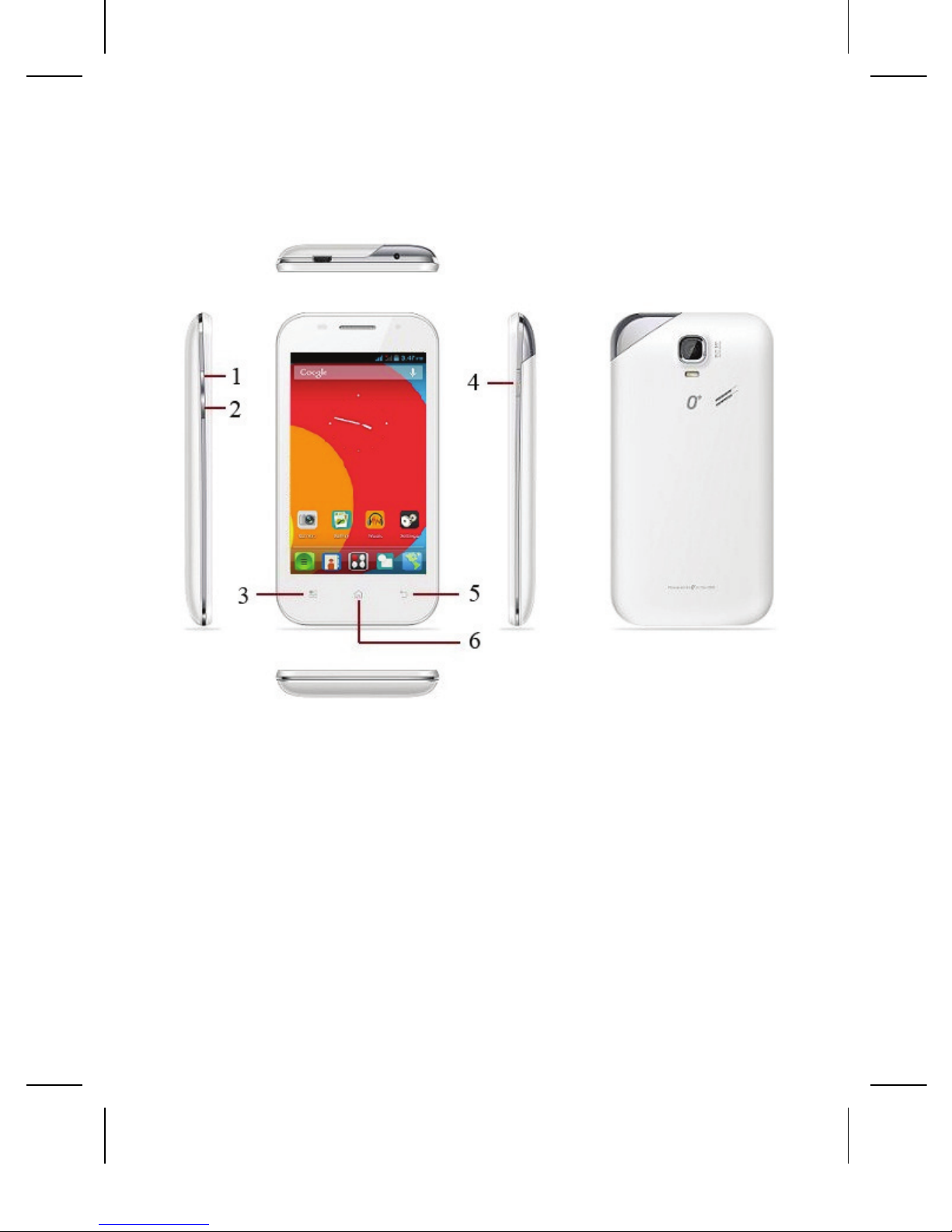
UNDERSTANDINGYOURPHONE
Yourphone
KeysandTouchPoints
1. Volume + keys: Adjust the volume of music,
call, notication, etc.
2. Volume - keys: Adjust the volume of music,
call, notication, etc.
10
Page 12
3. Menu key: In standby mode, touch the key to
set wallpaper, manage apps, access to system
settings. Touch it to view menu options.
4. Power Key: To power on/off phone, press
and hold power key for a few seconds on top
of your phone. When phone is ON, press the
power key once to activate or deactivate the
screen.
5. Back key: Touch to go back to the previous
menu.
6. Home key: Touch the key to return to the
home screen. In idle screen, touch and hold
the key to view recently accessed features.
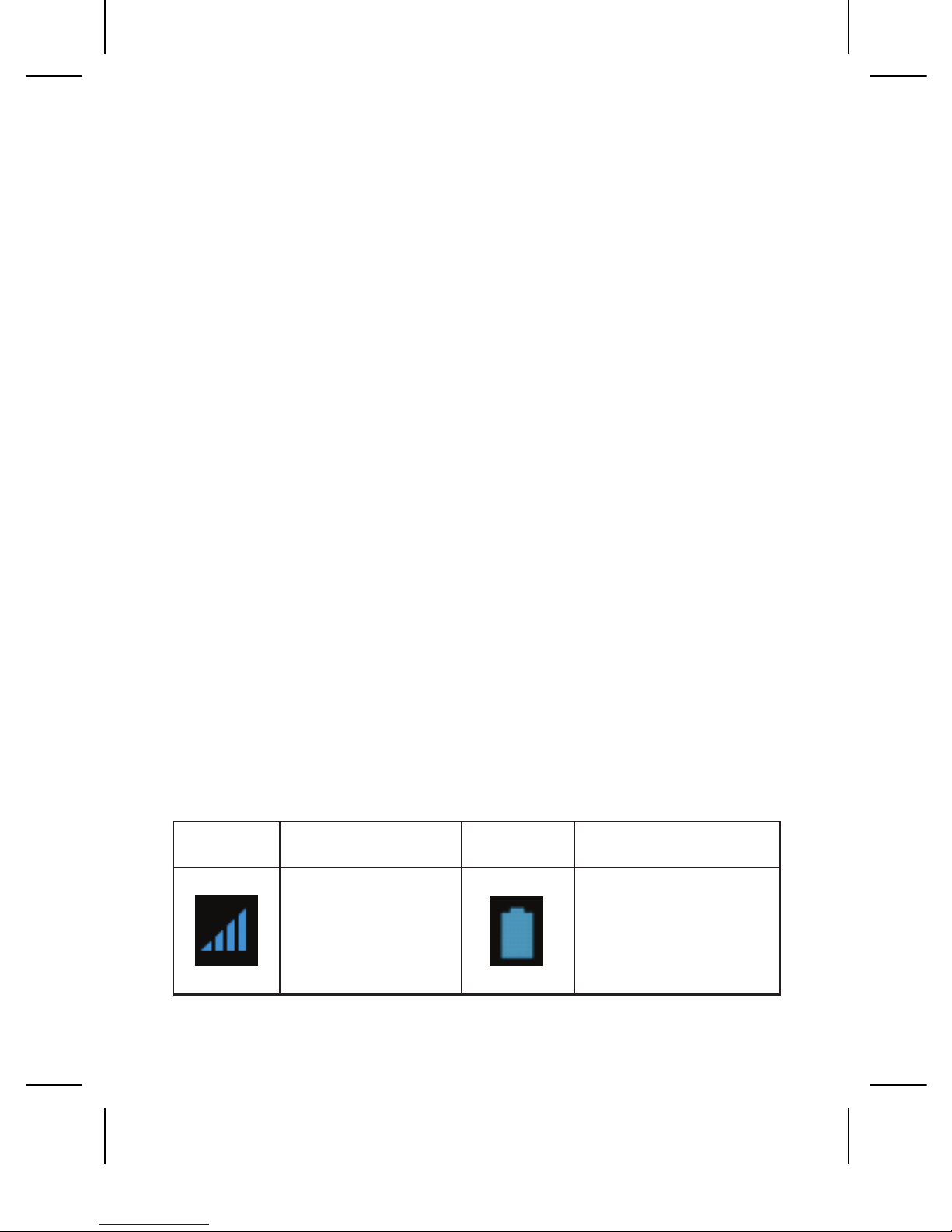
DescriptionIcons
Icons Descriptions Icons Descriptions
Shows the
phone’s
network signal
strength.
Show the phone’s
battery capacity.
11
Page 13
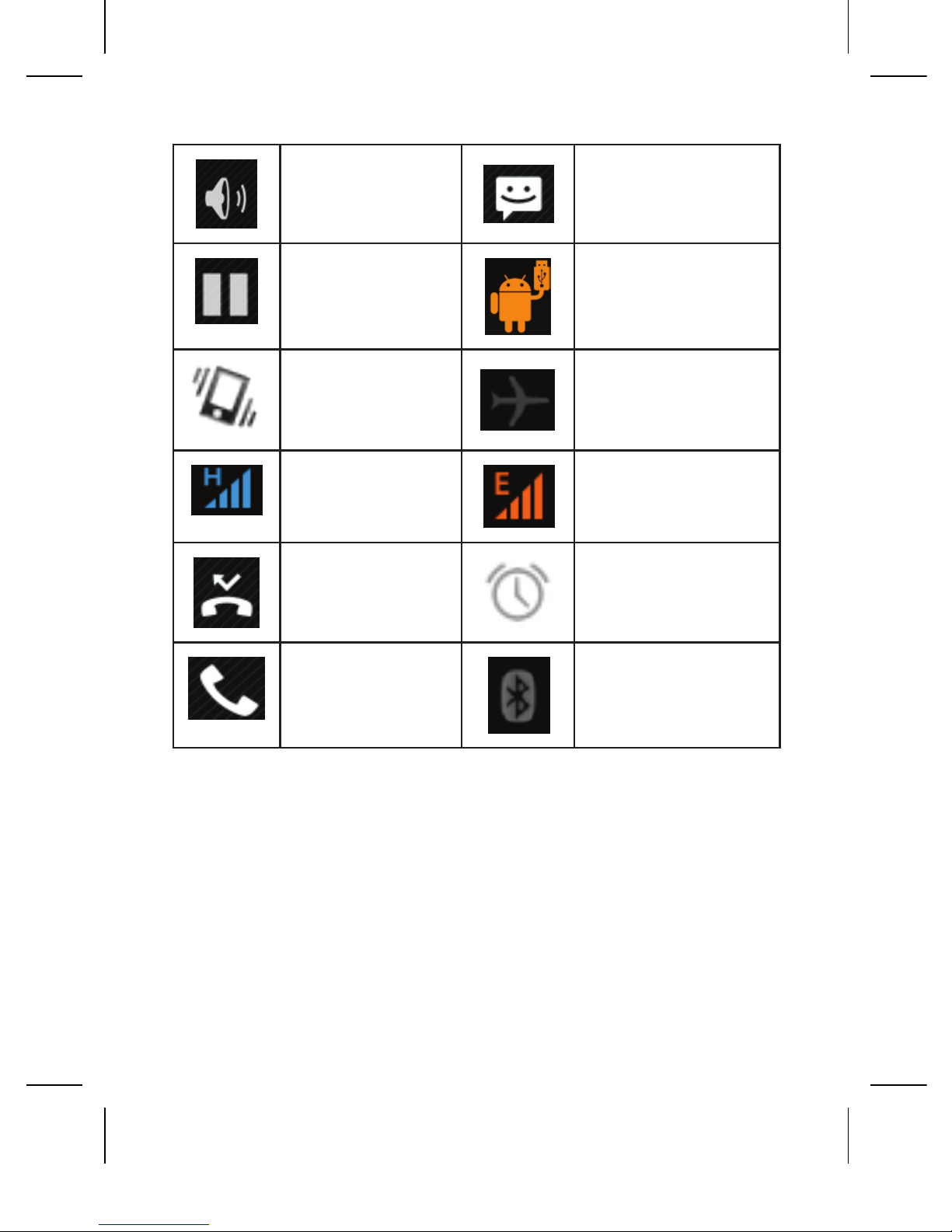
Speaker has
been activated.
You have unread
SMS.
Call on hold
USB storage
Turned on.
The ringing
type is set on
Vibration.
Flight Mode
3G network in
use.
2G network in
use.
You have
missed call.
A clock alarm is
active.
In call
Bluetooth ON
InsertingandRemovingtheBattery
Insertingthebattery
1. Open the battery cover at the back of your
phone.
12
Page 14
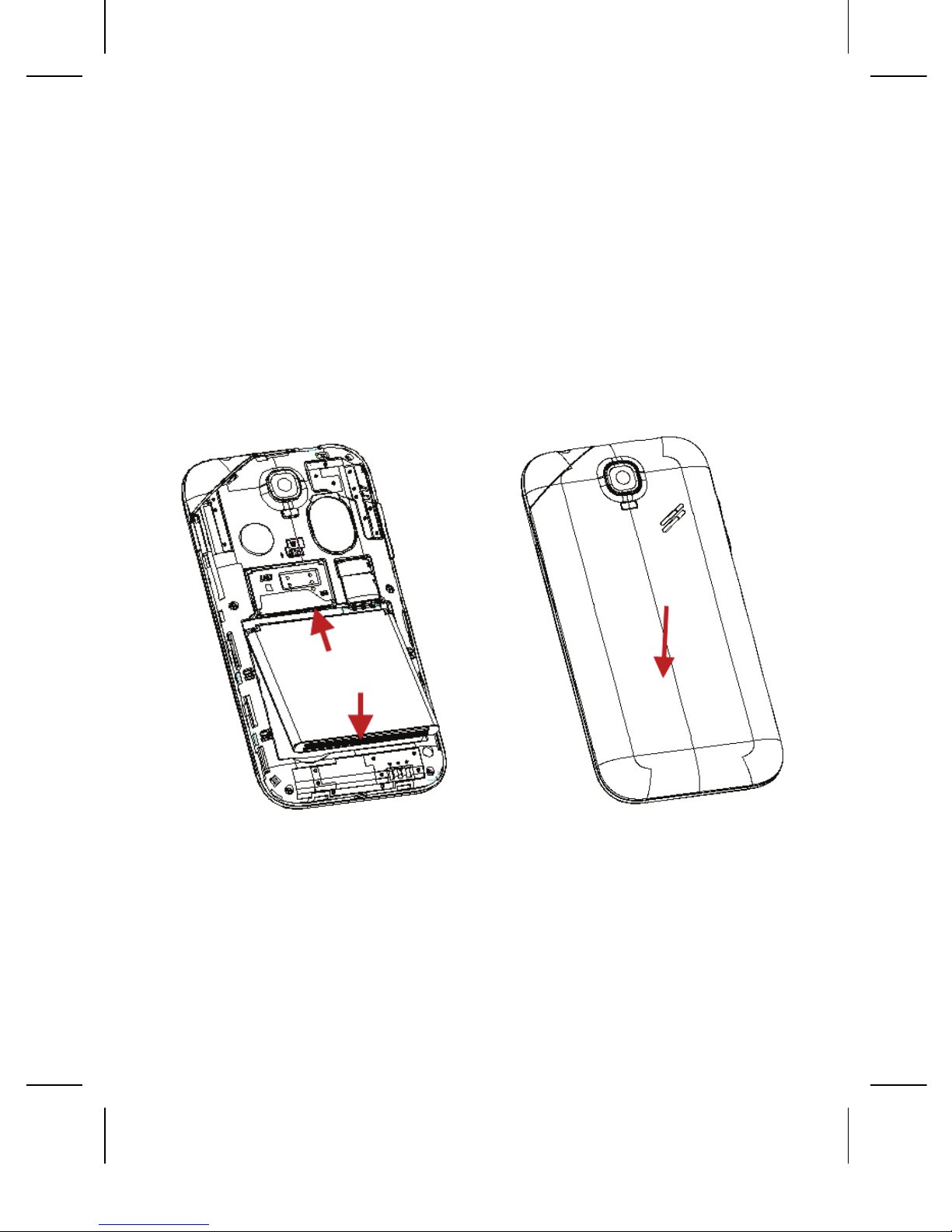
2. Align the battery’s contact points with those of
the phone and gently press the battery down
into place.
3. Replace the battery cover clicking it back into
position.
Inserting the battery Closing the Back Cover
Chargingthebattery
The rechargeable Li-ion battery that comes
with your phone is ready to be used, but is not
13
Page 15

charged. It is easy to do & can be done in 3
simple steps below:
1. Connect the charger to your phone, and plug
it into a socket.
2. The battery indicator in the corner of the
screen will scroll to show you it’s charging.
3. When fully charged, the battery indicator will
stop scrolling.
4. Disconnect the charger from your mobile, and
unplug.
PowerON/OFF
Press the power key to power-ON/OFF the
phone.
When you turn your phone on, it will
automatically check the SIM and show the
following information on screen:
• Input SIM1 PIN: If you’ve set a PIN for your
SIM1.
14
Page 16

• Input SIM2 PIN: If you’ve set a PIN for your
SIM2.
Note: The PIN is supplied with your SIM. Please
replace it with your own PIN code as soon as
possible. Enter the wrong PIN three times, and
your SIM will be locked. Then you’ll need to
contact your network service provider to ask for
a PUK code to unlock it. It is applicable for both
the SIM if you are using 2 SIM Cards.
EnterMainMenu
In idle mode, tap the Menu icon to enter the main
menu on the desktop and click the Home key to
return.
EnterSubMenu
Once at the main menu, click the icon to select
the submenu, press Back Key to return to the
previous menu, and press the Home Screen to
return to the home screen.
NotificationPanel
As a new notication appears in the notication
area, slide down in the area to view the contents
of the notication.
15
Page 17

ExpandingMainInterface
The main interface may extend and exceed the
screen width to provide more space for newly
added shortcuts and tools.
Slide your nger horizontally on the main
interface to extend to the left or right area of the
main interface.
AddiconsontheMaininterface
You can long press the icon on the main menu
until it’s enlarged and the mobile phone vibrates,
and copies the icons in the main menu to the
main interface.
MoveiconsontheMaininterface
1. Long press the icon on the main interface until
it’s enlarged and the mobile phone vibrates.
2. Drag the icon to the desired position and then
release it.
DeleteiconsontheMaininterface
1. Long press the icon on the main interface until
it’s enlarged and the mobile phone vibrates.
16
Page 18

2. Drag the icon to “Remove” to delete it.
ChangeWallpapers
1. Long press “Touch screen” to open the menu.
2. Choose from “Gallery /”Live Wallpapers”/
“Wallpapers”, and Select the wallpaper and
press “Set wallpaper” to complete.
InstallingAPKthroughFileManager
APK is a supported le format for the Android
mobile operating system.
1. Please copy the downloaded APK le into the
memory card, and then insert the memory
card into the phone.
2. In Idle mode, click Main Menu to enter the
main menu.
3. Click “File Manager” to enter the directory of
memory card.
4. Click the APK le you wish to install, and
follow the installation wizard.
17
Page 19

USINGYOURPHONE
MainmenuanditsFunctions
Select
to enter the main menu. This allows you
to view a list of features available in your phone:
1. Browser
Browse the internet.
2. Calculator
Allows you to make calculation quickly.
3. Calendar
View the calendar & add events.
4. CallLogs
List all the call logs. Including received
dialed and missed calls.
5. Camera
Allows you to take pictures anytime you
want. Your phone has a 5MP High Denition
camera with LED Flash supporting many
special features like Auto Focus, Smile Shot
& Best shot which ensures you always click
18
Page 20

good quality of pictures and stores them
under the Gallery folder. In Camera, easily
choose Camcorder icon to record Video les.
6. Clock
Allows you to set the Alarm from Clock.
7. Contacts
To create, view or edit your Contacts.
8. Downloads
List all the download les.
9. Email
Allows you set up your POP/IMAP email
accounts.
10. FileManager
You could install the les in APK format &
also view your les.
11. FlashLight
Use ash to achieve ashlight function.
12. FMRadio
This handset doesn’t have a built-in antenna.
19
Page 21

If you want to listen to the radio, please plug
in the headphone rst.
13. Gallery
Allows you to save & view photos & videos.
14. Messaging
Allow you to view messages sent & received
as a thread.
15. Music
View the list of songs available in your phone.
View the artists, albums, playlists & more.
16. Phone
Allow you to make outgoing calls.
17. PlayStore
Log in to your Gmail account to view all the
applications & download from thousands
of applications available under the Google
Market called Play Store.
Note: To use this app please connect to an
internet connection.
20
Page 22

18. Settings
Modify settings under the following:
• SIM Management
• Wi-Fi
• Bluetooth
• Data usage
• Audio proles
• Display
• Storage
• Battery
• Apps
• Location services
• Security
• Language & input
• Backup & reset
• Add account
• Date & time
• Scheduled power on/off
• Accessibility
• Developer options
• About phone
19. SIMToolkit
This service is provided by the network
operator. It provides many types of
personalized message services.
21
Page 23

20. SoundRecorder
Allows you to record sounds.
21. Videoplayer
View from list of videos.
INPUTTEXT
Intelligentkeyboard
8.52 Android automatically corrects and
suggests words as you type.
Cut,CopyandPaste
Touch and hold text content to bring up the
surveyor’s staff, then choose the icon of cut, copy,
or paste upper the right corner. It is very easy to
copy text from web pages, email, or text messages.
QUICKSTARTGUIDE
Featuredfunctions
Besides basic mobile phone functions, your
handset also has various practical and fast
featured functions. They are briey introduced
as follows:
22
Page 24

Contacts: Support of quick search for qualied
phone number records; the contact storage
volume of SIM card/USIM card depends on the
card itself; support texting through Contacts,
copying a single record to SIM card/USIM card/
handset and support copies among the handset,
SIM card and memory card; support deleting the
contact records in the SIM/USIM card and the
handset.
Calllogs: Your handset will automatically store
information related to call history for checking;
support dialling all of the phone numbers listed
in the call history; support storing the listed
phone numbers in call history; support deleting
single call record and all call records.
Messages: Supports storing of messages on
the handset; support inserting text templates
when editing a text; supports copying of phone
number in the message.
Music: Supports playing audio les, including
MP3 formats.
Recorder: Supports call recording and non-
23
Page 25

call recording. During a call, you can select the
open recorder in the option menu to record the
call conveniently. You can check the generated
recording le in the memory card.
Camera: Supports picture-taking. You can
change the camera settings to your preference.
Settings: You can change the phone settings
to your preference, including SIM card
management, wireless connection and network,
call settings, proles and so on. You can change
the functions of each item according to your own
taste, such as date & time, schedule ON/OFF
and so on.
Accessibility: You can change the behaviour of
the screen by checking the Auto-rotate screen.
You can also activate/deactivate the Air Shufe
for Music, FM radio, Camera and Image viewer.
Air Shufe is a feature that allows you to go to
Next/Previous song in Music, switch stations
on FM Radio, automatic shutter on Camera and
browse pictures in the Gallery by just waving
your hand in front of the sensor that can be
found on the upper left side of the phone.
24
Page 26

WARRANTYMANUAL
One (1) year Limited Warranty is given to the
person who purchased the product(s) and starts
on the date of Product’s original purchase.
O+ warrants that this mobile phone (“Product”) is
free from defects in material and workmanship
that result in Product failure during normal
usage, according to the following terms and
conditions:
1. The one (1) year Limited Warranty extends
only to the original purchaser of the Product
(“Consumer”) and is not transferable or
assignable to any subsequent purchaser or
end-user.
2. During the one (1) year Limited Warranty,
O+ will repair or, should O+ in its absolute
discretion deem it necessary, replacing the
Product in accordance with this Limited
Warranty. Any parts that do not function
properly for their intended use because of
product failure or malfunction during normal
usage will not be charged to the consumer. O+
25
Page 27

will also pay for the labor charges incurred
during the repairing or replacing the defective
parts.
3. O+ shall not be liable for any other losses
or damages. These remedies are the
Consumer’s exclusive remedies for breach of
warranty.
4. To claim the warranty service, consumer
must provide the dated bill of sale or dated
itemized receipt together with the warranty
card.
WarrantyPeriod:
The Product may consist of several different
parts and different parts may be covered by a
different warranty period. The different Warranty
Periods are:
1. One (1) year for the mobile device;
2. Six (6) months for battery and
3. Three (3) months for charger and headset/
earphones.
26
Page 28

Repaired part(s) will be warranted for the
remainder of the original Warranty Period.
The following are not covered under this
warranty:
a) O+ Limited Warranty does not cover user
manuals or any third party software, settings,
content, data or links, whether included/
downloaded in the Product, whether included
during installment, assembly, shipping or
at any other time in the delivery chain or
otherwise and in any way acquired by you.
b) The Product that has been damaged by
external causes such as collision with
an object, or from re, ood, sand, dirt,
windstorm, lightning, earthquake or damage
from exposure to weather conditions, acts
of nature, or battery leakage, theft, blown
fuse, or improper use of any electrical
source, or damage caused by the connection
to other products not recommended for
interconnection by O+.
c) The Product that has been subject to
27
Page 29

abnormal use, abnormal conditions, improper
storage, exposure to moisture or dampness,
unauthorized modications, unauthorized
connections, unauthorized repair, misuse,
neglect, abuse, accident, alteration, improper
installation, or other acts which are not
initiated by O+, including damage caused by
shipping. Defect caused by rough handling
(including, without limitation, defects caused
by sharp items, by bending, compressing or
dropping, etc.) and/or other acts beyond the
reasonable control of O+.
d) This Limited Warranty does not cover normal
wear and tear (including, without limitation,
wear and tear of camera lenses, batteries or
displays), defects in appearance, cosmetic,
decorative or structural (Framing/Housing)
and any non-operative parts. Transport costs,
scratches and damage to the outer surface
areas and externally exposed parts that are
due to normal customer use.
e) If any part or parts of the unit are replaced with
a part or parts not supplied or approved by O+
or the unit has been dismantled or repaired
28
Page 30

by any person other than O+ authorized
technician.
f) The defect or damage was caused by the
defective function of the cellular system or by
inadequate signal reception by the external
antenna.
g) The Product serial number plate or the
accessory data code has been erased,
removed, defaced or altered.
Consumer shall take the following step-by-step
procedure if a problem occurs during the one (1)
year Limited Warranty:
1. Consumer shall return the Product to the
Service Center along with the legible warranty
card and proof of purchase before the expiry
of the Warranty period.
2. O+ will repair or authorize the repair of the
Product under the limited warranty within
30 days after receipt of the Product by O+
or an O+ authorized service center. If O+
cannot perform repair covered under this
29
Page 31

limited warranty within 30 days, or after a
reasonable number of attempts to repair the
same defect, O+ on its absolute discretion
deem it necessary, replacing the Product in
accordance with this Limited Warranty.
3. The Consumer will be billed for any parts
or labor charges not covered by the one (1)
year Limited Warranty. The Consumer will
be responsible for any expenses related to
reinstallation of the Product.
4. If the Product is returned to O+ during the
Limited Warranty period, but the problem
with the Product is not covered under the
terms and conditions of the one (1) year
Limited Warranty, the Consumer will be
notied and given an estimate of the charges
and the Consumer must pay to have the
Product repaired. If the Product is returned to
O+ after the expiration of the limited warranty
period, O+ normal service policies shall apply
and the Consumer will be responsible for all
charges.
30
Page 32

ImportantNotes:
Please remember to make back-up copies or
keep written records of all important content
and data stored in your Product, because
content and data may be lost during repair or
replacement of the Product.
Your Product is a sophisticated electronic device.
O+ strongly encourages you to familiarize
yourself with the user manual and instructions
provided with and for the Product.
O+NoticeofLiability:
Any implied warranty of merchantability, or
tness for a particular purpose or use, shall be
limited to the duration of the foregoing limited
written warranty. Otherwise, the foregoing
limited warranty is the Consumer’s sole and
exclusive remedy and is in lieu of all other
warranties, express or implied. O+ shall not
be liable for loss of or damage to or corruption
of data, special, incidental or consequential
damages, including but not limited to, loss of
anticipated benets or prots, loss of savings
or revenue, increased costs or expenses or for
31
Page 33

any indirect loss or damage, punitive damages,
loss of the product or any associated equipment
or facilities, downtime, the claims of any third
parties, including customers, and injury to
property, resulting from the purchase or use
of the product or arising from breach of the
warranty, breach of contract, negligence, strict
tort, or any other legal or equitable theory, even
if O+ knew of the likelihood of such damages. O+
shall not be liable for delay in rendering service
under the one (1) year Limited Warranty, or loss
of use during the period that the product is being
repaired.
O+ neither assumes nor authorizes any
authorized service center or any other person
or entity to assume for any other obligation or
liability beyond that which is expressly provided
for in this limited warranty including the provider
or seller of any extended warranty or service
agreement.
This is the entire warranty between O+
and the Consumer, and supersedes all
prior and contemporaneous agreements
or understandings, oral or written, and all
32
Page 34

communications relating to the Product, and
no representation, promise or condition not
contained herein shall modify these terms.
This limited warranty allocates the risk of failure
of the Product between O+ and Consumer. The
allocation is recognized by the Consumer and is
reected in the purchase price of the Product.
All warranty information, product features and
specications are subject to change without
prior notice.
33
Page 35

Page 36

 Loading...