

Page 1
Reference 8 music player
SAFETY INSTRUCTION
To avoid personal injury or damage to equipment, please ensure that you
read this manual in its entirety before attempting to operate the
equipment. Please retain this manual for future reference.
TO PREVENT THE RISK OF ELECTRIC SHOCK, DO NOT UNDER ANY
CIRCUMSTANCES REMOVE ANY PARTS OF THE EQUIPMENT COVER.
THERE ARE NO USER SERVICEABLE PARTS INSIDE. ALL SERVICING
MUST BE CARRIED OUT BY QUALIFIED SERVICE PERSONNEL.
This icon marks a presence of un-insulated “dangerous voltage” within
the product's enclosure that may be of sufficient magnitude to constitute a risk
of electric shock to persons.
This icon marks important operating, maintenance and service
information that should be read to prevent possible personal injury
WARNINGS
Do Not Disassemble
Do not attempt to service the equipment beyond that described in this
manual. Touching the equipment’s internal parts could result in severe
personal injury. All other servicing or problems as listed below should be
referred to qualified Consonance service technicians:
• The power supply cord or plug has been damaged
• Objects have fallen or liquid has been spilled into the equipment
• The equipment does not appear to function normally or exhibits a marked
change in performance
• The equipment has been dropped or the enclosure damaged
Do not under any circumstances allow anyone to modify your Consonance
equipment without first checking with Opera Audio, your dealer, or your
distributor. Unauthorized modifications will invalidate your guarantee.
1
Page 2

Power Source
The equipment should be connected to a power supply only of the type
described in this manual or as marked on the equipment.
Grounding or Polarization
Power supply cords should be routed so that they are not likely to be
walked on or pinched by items placed upon or against them, paying
particular attention to cords and plugs, convenience receptacles, and the
point where they exit from the amplifier.
Ventilation
The equipment should be situated so that its location or position does not
interfere with its proper ventilation.
1. The equipment must not be placed on bed, sofa, or similar surfaces, that
may block the ventilation openings,
2. The equipment must not be placed in a built-in installation, such as a
bookcase or cabinet that may impede the flow of air.
3. The equipment should be situated away from heat sources such as
radiators, heat register, stoves, or other electronic appliances that produce
heat. This equipment is not intended for commercial use.
Water and Moisture
The equipment should not be used near water, e.g., near a bathtub,
washbowl, kitchen sink, laundry tub, in a wet basement, or near a
swimming pool etc. Similarly, do not placed objects filled with liquid, such
as vases on top of the equipment.
Lighting
Consonance hi-fi system can be damaged by lightning. Power amplifiers
are particularly at risk and therefore should be turned off when there is risk
of lightning strike. For complete protection all mains plugs and any aerial
cables should be disconnected when not in use.
Power Lines
In case of connecting a tuner, an outdoor antenna should be located away
from power lines. If an outside antenna is connected to the system, be sure
the antenna is grounded so as to provide some protection against voltage
surges and built up of static charges.
Cleaning
Never clean with furniture polish, benzene, or volatile liquids. Dust
periodically with a clean, soft paint brush. Fingerprints can be removed with
a moist polishing cloth.
2
Page 3

Table of Contents
Introduction……………………………………………………………………… 5
Before Use ……………………………………………………………………… 6
How to Use ……………………………………………………………………… 7
Reference8 Specification …………………………………………………… 16
Warranty ………………………………………………………………………… 17
3
Page 4

Please check the following Appendix ments are complete:
Remote control 1pcs
Power Cable 1pcs
Instructions for use 1pcs
4
Page 5
Introduction
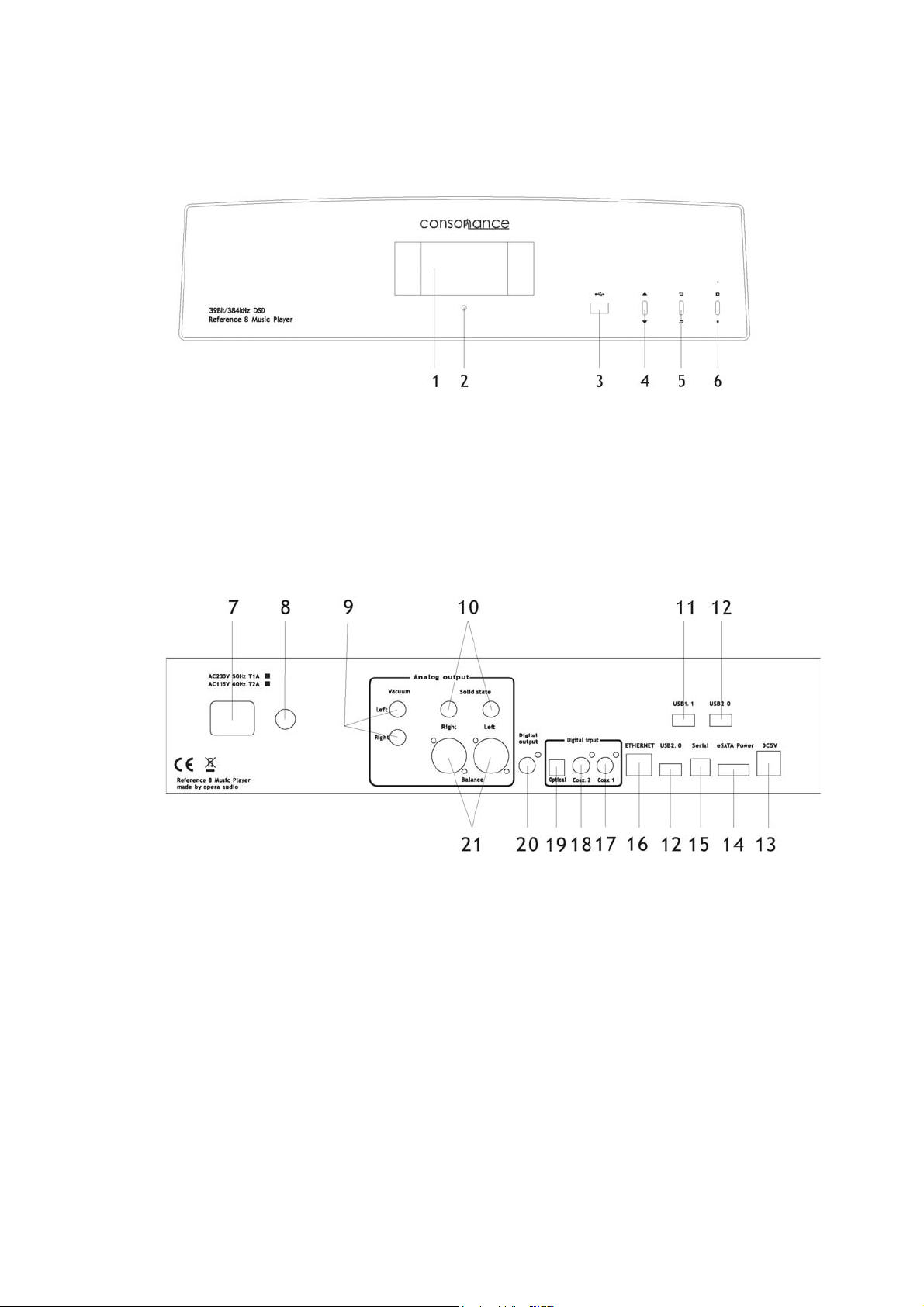
1. Display screen
2. IR sensor
3. USB2.0 jack
4. Left/Right switch
5. Enter/Back switch
6. Power switch
7. AC Power Socket
8. Fuse
9. RCA Vacuum Analog outputs
10. RCA Analog outputs
11. USB 1.1 jack for external DVD-ROM
12.USB 2.0 jack
13.USB DC5V power port
14. eSATA power port
15. Serial port for on-line Debug
16. Ethernet RJ-45 LAN interface
17. RCA Coaxial Digital intput 1
18. RCA Coaxial Digital intput 2
19. RCA Optical input
20. RCA Coaxial Digital outputs
21. RCA Analog Balance outputs
5
Page 6
Before Use
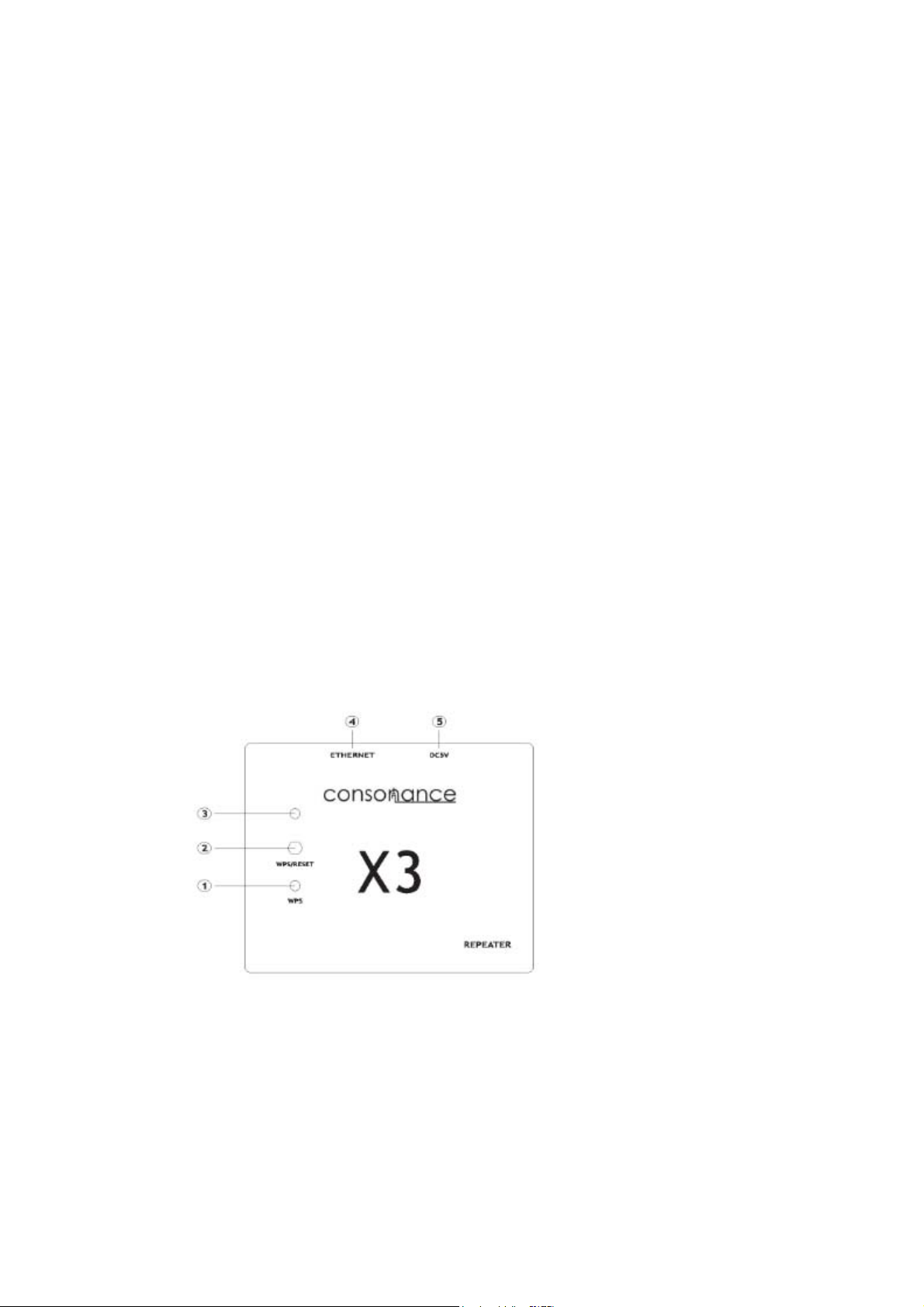
Connect the Reference 8 to WIFI router through network wire
before power on.
If the Reference 8 can not connect to WIFI router through
network wire then use the X3 repeater.
The first time to use X3 repeater connect to WIFI router by
WPS quick connection:
1. Connect the X3 to the DC5V USB power supply(Refernce
8 rear Panel No.13 port);
2. Use the network wire connect X3 and Reference 8;
3. Press the WIFI router WPS button;
4. Press the X3 repeater WPS button;
5. Wait 30sec the X3 WPS LED will be lighting, the network
is working.
When finish the first time connection. The X3 will connect
to WIFI router automatically.
1. WPS status LED
2. WPS/RESET button
3. Data status LED
4. Ethernet port
5. USB power supply
6
Page 7

H
W
T A
h
i
A
ow to
t
A
e
w
:
k
e
o
a
a
e
b
n
c
e
r
e
R
h
A
o
d
r
n
g
b
r
o
e
r
m
s
i
Use
Switc
llow
on.
about 1 m
inute. For
proper wa
m up
ait until
he DLN
PP Guid
ttp://ww
OS:
ndroid
he networ
APP is n
LINK:
.opera-c
8Pl
iMed
to th
Bub
logo tur
ecessary
nsonan
yer (We r
share fo
Referenc
leuPnP (
s green
to contro
e.com/pr
commen
iOS (for t
8)
ecomme
then
l the Refe
ducts/di
you purc
ansfering
ded)
7
you may
rence 8.
ital/Refe
hase the
music str
egin.
ence8.ht
fficial ver
am from
ion)
Phones
Page 8

D
P
W P
P
b
P
P
LNA Pl
m
T
e
a
e
t
o
o
t
a
t
e
o
o
o
e
l
s
e
K
E
o
q
s
e
e
D
d
n
t
n
e
e
o
ay Mod
ress the
DLNA Pla
e recom
or pre
ying interf
end that
ss OK on
ce.
all songs
he remot
re contro
control.
led by ph
nter the
ne or Pa
LNA mod
.
.
ress EXI
ress the
uttons on
ress
ress
on the r
and
the remo
on the fr
on the fr
mote con
on th
e control t
nt panel
nt panel
rol or pre
front pan
scan for
r press O
r press
s to
l or pres
uit the no
the a
options.
on the r
on the r
mote con
mote co
rmal mod
d
rol to cho
trol to bac
.
se.
k
8
Page 9

D
1
234
T
c
.
M
T
t
n
p
m
m
t
u
p
h
n
o
P
B
w
o
e
e
E
o
v
o
escrip
Sampli
. DLNA
. File na
. Play ti
he remo
ontrol b
ions for
g rate
laying m
e
e
e control
ttons.
playing
de
will be bl
interfac
ck in DL
NA mode
except “
xit” and
olume
During o
on t
ute
Enter to
he scree
eration,
e remote
the US
will sho
ress
to volume
storag
:
and
control. P
play fu
on the fro
ress the
nction.
nt panel
on the
r press
remote c
and
ntrol for
9
Page 10

U
P
o
r
a
m
n
n
v
t
o
e
s
o
e
o
r
i
o
e
d
m
S
e
U
u
SB sto
If it is a h
ress
n the re
age de
rd disk wi
and
ote contr
ice
h partition
on the fr
l to choos
s, there w
nt panel
the fold
ll show U
r press th
rs.
B-1 and
an
SB-2.
d b
ttons
Mea
Mea
s the curr
s the curr
Mean
ent selecti
nt selecti
the file o
on is a fol
n is a mu
folder nu
er
sic file.
ber is in
its current
selection.
10
Page 11

Press the on the front panel or OK button on the remote to play the music.
Descriptions for playing interface
1. Sampling rate
2. USB playing mode
3. Play mode
Single file repeat
Folder files repeat
No repeat
Random play
Sequence
4. File name
5. Play time
Press the Time button on the remote control to switch to the current remaining
time.
During operation, Press and on the front panel or press and
on the remote to volume control. Press the on the remote control for
Mute
11
Page 12

T
b
I
T
TPp
A ThP
u
he follo
w
s
w
o
w
e
a
o
o
o
e
n
n
O
t
o
g
c
n
h
r
t
r
d
c
t
o
a
p
n
o
a
e
o
l
R
o
g
w
utton on
nternet
o play int
here are
ing oper
the front
Radio
ernet radi
ome pre-
tion can
panel.
needs s
programm
NLY be
able Inter
ed interne
performe
et conne
t radio sta
by rem
tion.
ions alre
te contro
dy in the
or the
ef 8.
ress
lay.
fter a fe
he iRadi
ttp://ww
lease ke
pdating.
on the fr
seconds
list can b
.opera-co
p Refere
nt panel
f bufferin
updated
sonance.
ce 8 conn
r press t
time the
through fi
om to ge
ect to inte
e OK butt
internet r
mware u
firmware
enet duri
ns on the
dio selecti
grade. Pl
package.
g the radi
remote c
on will be
ase visit
list firm
ntrol to
in play.
are
12
Page 13

D
T
a
s
1
C
C
AC Mo
d
e
8
T
a
n
e
r
e
a
,
q
P
,
C
K
b
t
n
he Refer
Reference
nd 192K.
witch on th
/2 Digit
oaxial 1
e
nce 8 ca
can be us
here are th
e front pan
l Input
be used
d as DAC
ee icons in
l .
s a high
supports
this mode
uality DA
CM 44.1
choose it
.
、48K、88
y the remo
.2K、96K、
e control a
176.4K
d the
oaxial2
13
Page 14

O
u
i
h
“
e
a
ptical Inp
t
The sw
“Green
Press t
tch an
“ is locked i
e switch
d the remot
n
and the
e control k
exit “key b
y .
ck to main menu
14
Page 15

S
S
1
T
2
TC(
P
3
et Up
P
n
e
m
u
t
t
t
c
i
s
m
w
S
w
U
n
u
o
d
s
ETUP O
. Bright
here are
. Updat
he syste
opy the
ending wi
lug the U
i
t through
. Abou
Enter, to
TION: Br
ess
3 levels of
support
pdate fir
h *.pkg)
SB into U
he Fraxel
heck firm
ghtness,
adjustme
firmware
ware doc
hen using
B HOST
are versi
pdate an
t.
upgrade.
ment
a USB sti
port, choo
n.
About.
k.
e
15
Page 16

Reference8 Specification
1. 32Bit/384KHz PCM music playback
1Bit/2.82MHz DSD64 music playback
2. Internet radio.
3. Upgradeable firmware through USB memory device
4. Support play DFF/DSF/WAV/FLAC/ALAC/ACC etc, digital music format
5. 10/100Mbps LAN,RJ-45 port, support TCP/IP,UPnP, UDP, RTSP, DHCP,
PPPoE, HTTP etc, support NAS and PC sharing, support MMS,RTSP,HTTP
etc, stream media protocol
6. 2.4 inch TFT nature color full screen, support IR remote control, iphone and
Android phone/pad control
7. USB2.0 portx3 for hard disk up to 4TB, eSATA power port,USB1.1 port for
external CD-ROM
8. Analog output : 2.3RMS(RCA,XLR)
Distortion: <0.0025% (XLR output),<0.003%(RCA output),
<0.06%(Vacuum output)
SNR: >110dB(RCA,XLR)
Digital input jacks: Coaxial RCA(75 ohm)x2,Optical x1, USB port x3,
eSATA power portx1,LANx1
Digital output jack: Coaxial x1 (0.5Vpp)
Analog output jacks: Vaccum RCA x1, RCA x1 ,XLR x1
Size:13.7cm x44cm x44cm (HxWxD)
Weight: 9kg(wooden top cover) 13kg (aluminium top cover)
16
Page 17

Warranty
Opera audio guarantees each product manufactured by us to be free from
defects in materials and workmanship under normal use. Our obligation under
this warranty is limited to making good at our factory any part or parts thereof
which shall, within 1 year after delivery to the original purchaser, be returned to
us with transportation charges prepaid, and which an examination shall
disclose to have been thus defective; this warranty being expressly in lieu of all
other warranties expressed or implied and of all other obligations or liabilities
on our part. This warranty shall not apply to any Opera audio product which
shall have been repaired or altered outside of our factory in any way so as to
affect its stability, nor which has been subject to misuse, negligence or accident.
Warranties of the vacuum tubes are by the respective manufacturers, usually
90 days.
Please mail or e-mail the Registration Card to the address as follows:
The Opera Audio Co., Ltd.
No.2 JiuXianQiaoLu
ChaoYang District
Beijing, China
Tel: 86 10 59789215
Fax: 86 10 59789265
support@opera-consonance.com
www.opera-consonance.com
Registration Card
Name
Address
City
State
Zip
Email
Telephone
Model
Serial Number
Purchase Date
Dealer
17
 Loading...