

Page 1
TM
Quick Start Guide
Ooma Telo Handset
Step 1
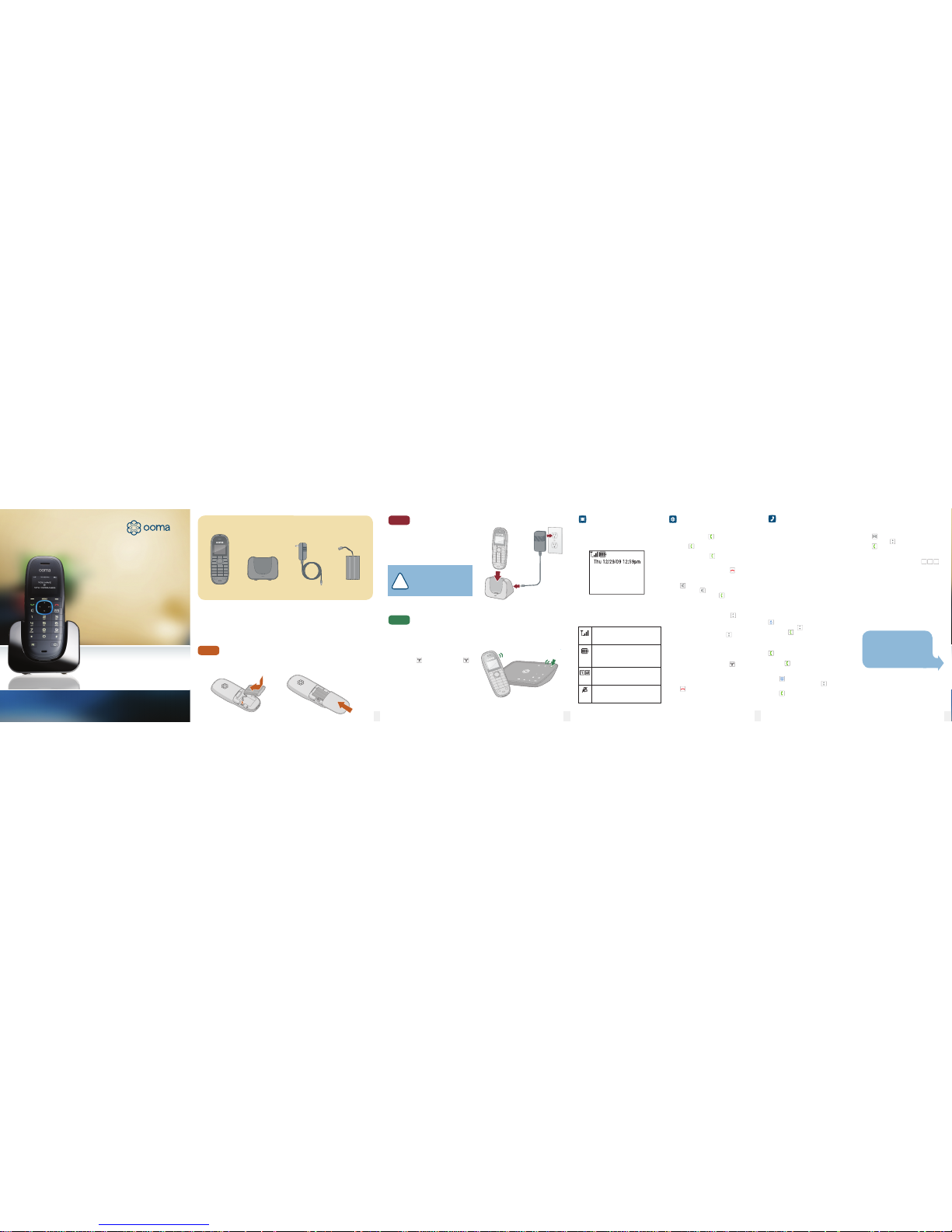
Insert Battery
Remove the battery cover located on the back of the Ooma Telo Handset by sliding it away
from the center of the device. Insert the battery plug into the connector on the handset. Replace
the battery cover by sliding it in the other direction.
Step 2
Charge the Handset
Connect the AC adapter cable to the charging
cradle and then plug the A C adapter into a
power outlet. Put the Ooma Telo Handset on the
charging cradle. When charging, you’ll see the
blue light on the front of the cradle light up.
Step 3
Register the Handset
Find the 4-digit PIN number for your Ooma
Telo by logging into:
http://my.ooma.com/pin
Bring the handset next to the Ooma Telo. Set
the Ooma Telo in registration mode by pressing
and holding the
key for 3 seconds. The
key will start ashing rapidly.
When prompted on the handset , enter the PIN
number found above and press the OK softkey. When the handset successfully registers, a
home screen will be displayed.
Each Ooma Telo supports up to four Ooma Telo
Handsets. This is in addit ion to any phones
plugged into the PHONE por t of the device.
Package Contents
AC Adapter
Cradle
Battery
Ooma Telo Handset™
!
We recommend that you charge
the handset for at least 30 minutes
before proceeding to the next step.
The handset requires 10 hours to
fully charge.
Basic Operation
Placing and receiving calls
To place a call, press and dial the phone
number. You can also dial the number rst and
then press
.
To answer a call, press
when the phone
rings.
You may end any call by pressing
.
Speakerphone
Press to start a call in speakerphone mode
or you can press
during a call to switch to
speakerphone mode. Press
to go back to
using the earpiece.
Volume adjustment
To adjust the ringer volume, press on the
navigation pad while you’re not on an active
call.
To adjust the call volume, press
while
you’re on an active call. This will adjust the
volume setting for both the earpiece and
speakerphone.
Handset paging
To locate your handset, press the key on
the Ooma Telo. If your handset is charged, it
will emit a chiming sound. The handset will
chime for 30 seconds.
Press
on the handset to stop paging.
™
700-0111-100
1 2
3
Display
Home screen
After registration, you’ll see something like the
following on the display:
Status indicators
The status indicators appear on the top row of
the display:
Handset 1
You have new VM
Signal Strength Indicator
Signal bars show the connection
strength to the Ooma Telo
Battery Indicator
Vertical bars show the battery level
charge or ash when the battery is
charging
Line Indicators
Shows which lines are currently in
use.
Ringer Off Indicator
Shows the ringer volume is turned
off.
4
Caller-ID
When an incoming call rings your handset,
you’ll see the caller-ID number associated with
the caller on your handset display (if available).
If the number is associated with a contact,
you’ll also see the name shown on the handset
display.
Note: For numbers not in your contact list,
you’ll see the caller-ID name if you have Ooma
Premier.
Contact list
You can add phone numbers to the contact
list on your Ooma Telo Handset by logging into
my.ooma.com/contacts.
To place a call using your contact list, press
on the navigation pad to view a list of your
contacts. Press to select a contact and
then press to call.
Call-waiting
Switch to a second incoming call by pressing
. The current call will automatically be
put on hold. Switch back to the rst call by
pressing again.
Call log
Press on the navigation pad to view
recently received calls. Press
to select an
entry. If the phone number is available, you can
press
to return the call.
Redial
Press to bring up a list of previously dialed
numbers. Press to select an entry and then
press to redial the number.
International calls
To place an international call, dial
0 1 1
followed by the country code and phone
number. Your prepaid balance will be
announced before the call is connected.
Note: To make international calls and access
other premium services such as 411, you must
charge-up your prepaid account at:
my.ooma.com/prepaid.
Calling Features
Read about Ooma
Premier features on
the backside
Getting Started
You’re just a few quick steps from getting up and dialing with your Ooma Telo Handset.
This handset is the perfect companion to the Ooma Telo™ — you’ll be able to access all
Ooma features and unlock new functionality! Before you begin, please make sure your
Ooma Telo is installed and operating properly.
Page 2
My handset doesn’t work
Make sure your battery is properly •
installed and is sufciently charged.
If your phone is unresponsive, try to •
unplug and re-plug the battery connector.
Your handset may be turned off. Press •
to turn it on.
My handset won’t charge
Make sure the handset is pl aced in the •
cradle securely. When charging, the light
on the front the cradle should be blue.
Remove the battery from the handset •
and re-install it, following the instructions
in Step 2.
Phone doesn’t ring when I receive a call
Your ringer may be off. To adjust the ringer •
volume, press on the navigation pad.
Check your signal quality with the•
indicator. Bring the handset closer to the
Ooma Telo and try to receive a call.
You may have • Do not Disturb turned on.
When this mode is on, the Ooma Telo
key will be yellow and all incoming calls will
go directly to voicemail without ringing your
phones. To turn off the feature, press-andhold the key for three seconds.
When I press , I don’t hear dialtone
Verify•
your Ooma Telo is powered on and
working properly. If you have a regular
phone, try plugging into the PHONE port
of the Ooma Telo and check for Ooma
dialtone.
The light on the top of my phone is
ashing
You have new voicemail. Press to listen
to your new voicemail messages.
I have difculty hearing the other person
through the handset
Try adjusting the earpiece volume b y •
pressing
on the navigation pad.
While on the phone, move closer to •
the Ooma Telo and check if the audio
improves.
Ensure the handset’s battery is fu lly •
charged.
I hear noise or static when I’m on a call
Bring the handset closer to the Ooma Telo.•
Try moving your Ooma Telo and handset •
away from devices that may generate
interference, including: computers, wireless
devices and electrical appliances (such as
microwaves).
People I call complain about poor
voice quality.
Problems with voice quality might be due •
to your our Internet connection. Please
visit
www.ooma.com/support for tips
on troubleshooting Intern et quality
issues.
Quick Reference
Limited Warranty
FCC and Safety Information
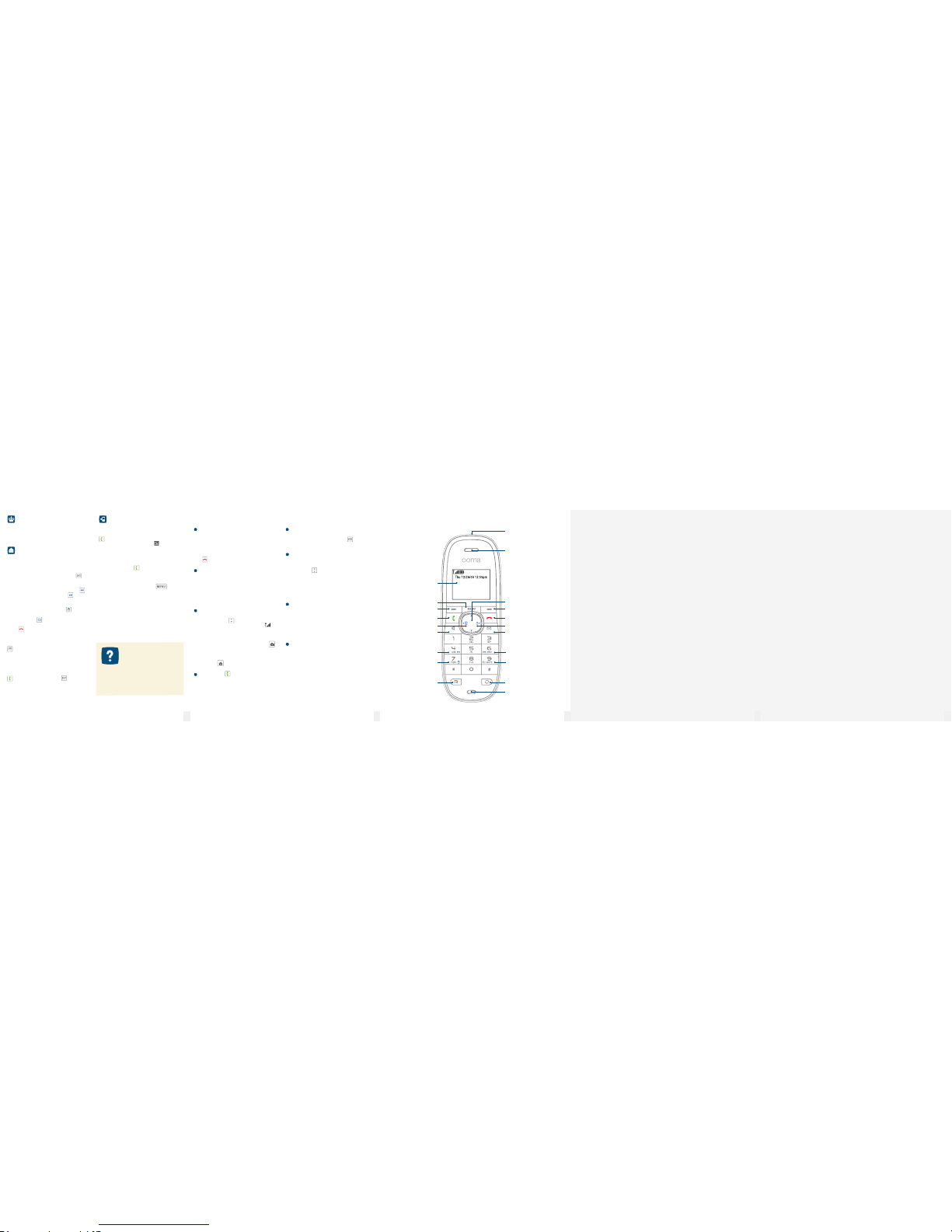
Handset 1
You have new VM
New Voice
Message Indicator
Microphone
Intercom
Earpiece
Right softkey
End call
Voicemail
Navigation pad
Display screen
Left softkey
Answer call
Speakerphone
Menu key
Redial
Voicemail Forward
Voicemail Reverse
Voicemail Trash
Voicemail Save
Troubleshooting
Premier Features
The features described in this panel are
enabled with Ooma Premier*. To learn more,
visit: www.ooma.com/premier.
Enhanced Voicemail
Voicemail Playback
When you have new voicemail, the New Voice
Message Indicator on the top of the phone will
ash. To access your voicemail, press
and
follow the prompts.
While listening to your voicemail, press
to
replay the current message. Press
to skip to
the next message.
While playing a message, press
to delete
the current message. If you want to save the
message, press
.
Press
to end voicemail playback.
Send to Voicemail
When an incoming call comes in, you can press
to send the call directly to voicemail.
Message Screening
When an incoming call goes to voicemail,
you’ll hear the caller leaving a message
through the handset speaker. You can press
to pick up the call or press to turn off
the speaker.
Enhanced Calling Features
Instant Second Line™
If someone else is on the phone, simply press
to get a fresh Ooma dialtone and make a
second call. You’ll see the line indicator
light up when you’re on the second line.
If there’s already one active call and you
receive a second call, any handsets not in
use will ring. Press to answer the second
call.
Three-way Conferencing
With calls on both lines, press and
then select the
3-way Conf option to bridge
both lines together.
Virtual Numbers and Private Voicemail
Each Ooma Telo Handset can be congured
as a personal device, allowing you to setup
a separate phone number and voicemail
account for each member of your household.
To congure this feature, login to
my.ooma.com.
* Ooma Premier is available on a trial or subscription basis.
© 2009 Ooma, Inc. Patent pending. All rights reserved. Reproduction in whole or in part without written permission is prohibited. Ooma, the Ooma logo, Ooma Telo, Ooma Telo Handset, Ooma
Premier, Instant Second Line, Broadband Answering Machine, the sound of the Ooma dialtone, and all other Ooma company, product and service names and slogans are trademarks of Ooma,
Inc. All other product, service or brand names are the property of their respective owners.
What this Warranty Covers. Ooma agrees to provide a
limited warranty to the holder of a valid proof of purchase
(“Consumer” or “you”) that the Ooma Telo Handset device
contained in this package (“Product” ) is free from material
defects in material and workmanship, subject to the
exclusions noted below. This limited warranty extends only to
the Consumer for Products purchased and used in the United
States of America.
What Ooma Will Do. During the warranty period, Ooma or
its authorized service representative will repair or replace, at
its option, without charge, a Product which is found to be
materially defective in materials or workmanship and returned
to Ooma. Ooma, at its option, may use new or refurbished
replacement parts to repair the Product, or may replace the
Product with a new or refurbished product having the same or
similar function.
How Long this Warranty Lasts. This limited warranty shall
expire one (1) year from the date of the Product purchase.
Replacement or refurbished parts and products are warranted
for the original Product warranty period. This warranty
terminates if you sell or transfer your Product.
What this Warranty Excludes. This limited warranty does
not cover: (a) the cost of shipping and handling for returned
and replacement products, or damage or loss during
shipment for warranty service; or (b) any software (which is
governed exclusively by the licensing terms of such software);
or (c) any Product that has been subjected to misuse,
accident, shipping or other physical damage, improper
installation, abnormal operation or handling that is contrary
to operation instructions, neglect, acts of god, inundation,
re, water or other liquid intrusion, or force major; or (d) any
Product that has been damaged due to repair, alteration,
or modication by anyone other than an authorized service
representative of Ooma; or (e) any Product to the extent that
the problem experienced is caused by signal conditions,
network reliability or cable or ante nna systems; or (f) any
Product whose identifying informatio n has been removed,
altered or rendered illegible; or (g) any Product purchased,
used, serviced, or shipped for repair from outside the
United States, or that is returned without a valid proof of
purchase; or (h) any indirect or consequential harm caused
as a result of any defect or failure of the Product to properly
operate, including without limitation lost data or inability to
communicate.
How to Get Warranty Service. To obtain warranty service,
call Customer Support toll-free at 1-888-711-6662 for
detailed information, including instructions on how and
where to return your Product and on any applicable costs
associated with a repair, replacement or exchange. You may
be required to provide proof of purchase before obtaining
warranty service, and it is your sole responsibility to maintain
such proof (e.g., a sales receipt). Returned products that are
determined not to be materially defective will be subject to a
handling fee. If you disagree with any of our decisions with
respect to warranty service, you have the right to contest
that decision as permitted under applicable laws and
regulations.
How State Law Applies. This limited warranty gives you
specic legal rights. You may also have other rights which
vary from state to state.
Limitation on Liability. THIS WARRANTY IS THE
COMPLETE AND EXCLUSIVE WARRANTY AGREEMENT
FOR THE PRODUCT BETWEEN YOU AND OO MA. NO
ONE IS AUTHORIZED TO MAKE MODIFICATIONS TO
THIS LIMITED WARRANTY AND YOU SHOULD NOT RELY
ON ANY SUCH MODIFICATION. OOMA RESERVES THE
RIGHT TO CHANGE ITS LIMITED WARRANTY WITHOUT
PRIOR NOTICE FOR FUTURE SALES. OOMA DISCLAIMS
ALL OTHER WARRANTIES WITH RESPECT TO ITS
PRODUCTS, WHETHER EXPRESS, IMPLIED, STATUTORY
OR OTHERWISE, INCLUDING WITHOUT LIMITATION,
COURSE OF DEALING, TRADE USAGE OR PRACTICE
OR THE WARRANTIES OF MERCHANTABILITY, FITNESS
FOR A PARTICULAR PURPOSE, TITLE, OR NONINFRINGEMENT OF THIRD PARTY RIGHTS. MOREOVER,
OOMA SHALL NOT BE LIABLE FOR INDIR ECT,
INCIDENTAL, SPECIAL, EXEMPLARY, PUNITIVE, OR
CONSEQUENTIAL DAMAGES OF ANY NATURE ARISING
OUT OF, OR IN CONNECTION WITH, THE LIMITED
WARRANTY OR THE USE OR PERFORMANCE OF
ANY PRODUCT, WHETHER BASED ON CONTRACT
OR TORT, INCLUDING NEGLIGENCE, OR ANY OTHER
LEGAL THEORY, EVEN IF WE HAVE BEEN ADVISED OF
THE POSSIBILITY OF SUCH DAMAGES. T HE TOTAL
AGGREGATE LIABILITY BY OOMA FOR DAMAGES OF
ANY NATURE, REGARDLESS OF FORM, ACTION OR
FORESEEABILITY, SHALL IN NO EVENT EXCEED THE
AMOUNT PAID BY YOU TO US FOR THE PRODUCT
UPON WHICH LIABILITY IS BASED. SOME STATES AND/
OR COUNTRIES DO NOT ALLOW LIMITATIONS ON
HOW LONG AN IMPLIED WARRANTY LASTS, AND/OR
DO NOT ALLOW THE EXCLUSION OR LIMITATION OF
INCIDENTAL OR CONSEQUENTIAL DAMAGES, SO THE
ABOVE LIMITATIONS AND/OR EXCLUSIONS MAY NOT
APPLY TO YOU. IF SUCH IS THE CASE, TO THE EXTENT
PERMITTED BY APPLICABLE LAW, OOMA LIMITS THE
DURATION OF ANY IMPLIED WARRANTIES TO THE
DURATION OF THIS EXPRESS LIMITED WARRANTY.
6
5 7
8 9
What the FCC wants you to know
This device complies with part 15 of the FCC rules. Operation
is subject to the following two cond itions: (1) This device may
not cause harmful interference, and (2) This device must accept
any interference received, including int erference that may cause
undesired operation. Privacy of communication may not be ensured
when using this device.
This equipment has been tested and found to comply with the
limits for a Class B digital device, pursuant to Part 15 of the
FCC rules. These limits are designed to provide reasonable
protection against producing harmful interference in a resident ial
installation. This equipment generates, uses, and can radiate radio
frequency energy and, if not installed and used in accordance
with the instructions, may cause harmful interference to radio
communications. However, there is no guarantee that interference
will not occur in a particular installation. If this equipment does
cause harmful interference to radio or television reception, which
can be determined by turning the equipment off and on, the user is
encouraged to try to correct the interference by one or more of the
following measures:
Reorient or relocate the receiving antenna,•
Increase the separation between the equipment and receiver,•
Connect the equipment into an outlet on a circuit different from •
that to which the receiver is connected,
Consult the dealer or an experienced radio/TV technician for •
help. Try moving your Ooma Telo and Ooma Telo Handset
away from devices that may generate interference, including:
computers, wireless devices and electrical appliances (such as
microwaves).
Changes or modications to this equipment not expressively
approved by the party responsible for compliance, or operation
of this product in any way other than as detailed to by the User
Manual could void the user’s authority to operate this equipment.
To insure the safety of many users, the FCC has established criteria
for the amount of radio frequency energy various products may
produce depending on their intended use. This product has been
tested and found to comply with the FCC’s exposure criteria.
The Ooma Telo Handset FCC model number is XFT-TELOHS101.
Safety Information
When using telephone equipment, including the Ooma Telo
Handset™, basic safety precautions should always be followed
to reduce the risk of re, electric shock, damage to equipment, loss
of property, severe injury to persons or even loss of life, including
the following:
Do not use this equipment and all related accessories near or •
under water, for example, near a bathtub, wash bowl, kitchen
sink or laundry tub, in a wet basement, near a swimming pool,
under the rain, do not plunge any parts in water or any other
liquid.
Avoid using this product during an electrical storm. There may •
be a remote risk of electric shock from lightning.
Use only the rechargeable battery pack in dicated in this •
manual and included in the original product box, if necessary
order a new replacement rechargeable battery pack from
Ooma using the original part number.
Use only the charging cradle indicated in this manual and •
included in the original product box, if necessary order a new
replacement charging cradle from Ooma using the original
part number.
Do not insert the power adapter into an extension cord, •
receptacle or outlet unless the prongs can be fully inserted,
failure to do so may cause electric shock or excessive heat
resulting in a re.
Do not overload power outlets and extensions cords, otherwise •
it can result in re or serious electrical shock.
To prevent overheating, situate all parts of the product away •
from heat sources such as radiators, heat registers, stoves, or
other xtures, appliances and products that produce heat or
any area where proper ventilation is not provided.
Unplug with caution the product from power outlets or USB •
ports if it emits smoke, an abnormal smell or makes unusual
noise. These conditions may cause re or electrical shock.
Do not disassemble the charging cradle, it contains no user-•
serviceable parts.
On the Ooma Telo Handset, the battery cover is removeable •
and the rechargeable battery pack may be replaced. Do not
disassemble any other part of the Ooma Telo Handset, it
contains no user-serviceable parts.
When replacing the rechargeable battery pack, make sure •
the power connector is inserted in the correct orientation.
Never forcefully insert the connector. Forcing the insertion of
a mis-aligned connector may break or damage the Ooma Telo
Handset.
Do not disassemble the rechargeable battery pack, it contains •
no user-serviceable parts.
Unplug the product from any power outlet or USB port before •
cleaning. Do not use liquid or aerosol cleaners, use a damp
cloth or a microber cloth for cleaning.
Do not allow anything to rest on the Ooma Telo Handset, its •
charging cradle, or power adapter.
Unplug the product from the power outlet if the cable or power •
adapter prongs are damaged or frayed, if liquid has been
spilled onto the product, if the product has been exposed to
rain, water or any other liquid, if the internal components of the
Ooma Telo Handset, charging cradle, or its power adapter are
exposed.
Do not use the Ooma Telo Handset to report a gas leak in the •
vicinity of the leak as it could ignite the gas.
The power adapter is intended to be correctly oriented in a •
vertical or oor mount position, the prongs are not designed to
hold the power adapter in place if it is plugged upside down,
for example do not use facing down power outlets on a ceiling,
under a table or in a cabinet.
The equipment and accessories must be operated only for its •
intended use and not for any other purposes.
Contact list
Call log
Need Assistance?
Check out the below resources for
troubleshooting guide or additional
help:
Frequently asked questions: www.ooma.com/faq
Online knowledgebase: www.ooma.com/support
User manuals: www.ooma.com/userguide
Community forum: forums.ooma.com
Live customer support: 1-888-711-OOMA (6662)
 Loading...