

Page 1

USER GUIDE
POE & Optical Transmission
PD series---POE splitter
Page 2
Statement
Copyright @ 2002-2013 Optical Network Video Technologies (Shenzhen) Co., Ltd
All Rights Reserved
®
!
Packing List
Please ki ndly chec k the follo wing items:
Note
If any shor tage or dam age found , please contact u s in time.
This docu ment cont ains prop rietary i nformation tha t is protec ted by copy right. No p art of this document may be
reprodu ced, tran smitted , transcribed, stored in a re trieval s ystem, or t ranslat ed into any language, in any fo rm or
by any mean s, electr onic, mec hanical , magnetic, opti cal, chem ical, man ual or othe rwise without the prior wri tten
permiss ion of Opti cal Netwo rk Video Te chnologies (Sh enzhen) C o., Ltd.
is the regi stered tr ademark o f Optical Networ k Video Tec hnologi es (Shenz hen) Co., L td. The informat ion
and produ ct specif ication s within th is document are su bject to ch ange at any t ime, with out notice and without obli gation to n otify any p erson of su ch change.
1. A PoE spli tter
2.One DC po wer cable
3.A user gu ide/cer tificat ion/warranty c ard
Page 3

Product introduction
performance characteristic
Product Feature
ONV brand PD3401 series PoE splitter is a new product d eveloped for high powe r network devices that
the total power is above IEEE802. 3AT standard.It must be used with the specialized high power Po E
powered devices and also supply 12V (default) or 24V DC power to the devices without PoE fun ction. PoE
( Power over Ethernet)is a technology, which supply DC power to the terminal equipments at the same
time that transmit data according to the IP. It can largely decrease the use of outlay power line which
reduces the cost and can ensure the stability of your network .
No te : ONV PD3401 series PoE splitter can o nly be suitab le to use in the devices linked by Ethernet cables.
Compati ble with IE EE802.3 , IEEE802.3u, IEEE802.3 ab, IEEE8 02.3af, I EEE802. 3at standard
Tra nsmit the d ata and pow er in one net work cable
Default o utput vol tage is DC1 2V, DC 24V optional
Plug and pl ay, no con figurat ion
Data tran smit rate : 10/100M bps、10/100/1000Mbps
Superb ci rcuit iso lation pr otectio n and improve the ab ility of an ti-thun der, anti- static and anti-interfe rence
Mean time b etween fa ilure:3 0000h
Tra nsmissi on channe l surge pro tection 2KV, executive standa rd: I EC610 00-4-5
Good appe arance, s mall size a nd space- save.
Page 4
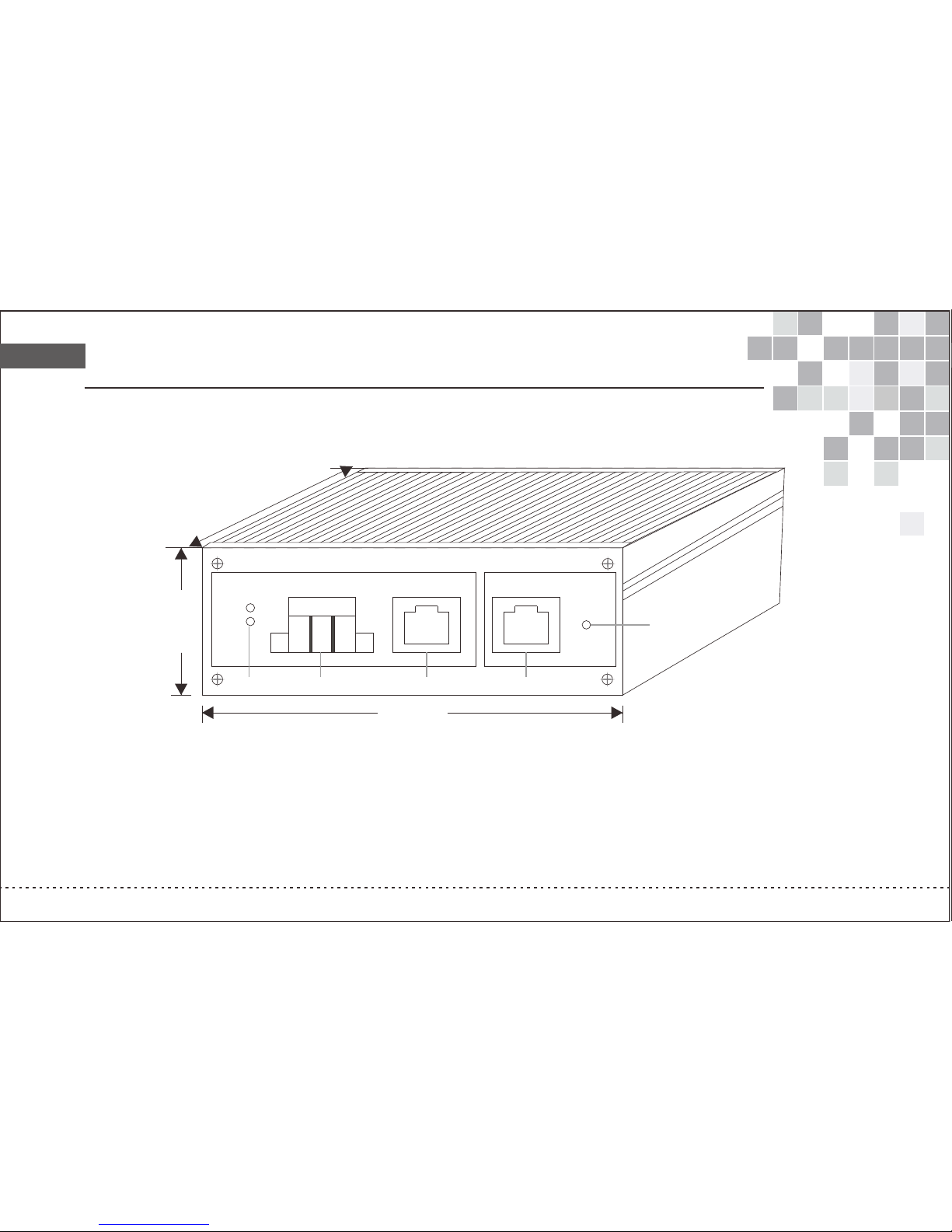
Mechanical strcuture and Port description
A.12V/24V DC O utput
B.DC Output
C.Entherne t Output Port
Status Ligh t
D.PoE Input Po rt
E.PoE Input St atus Light
ENTHER NET POE
POE RUN
-
+
100.0 0 mm
80.
0
0 mm
PE
DC
35.00 m m
24V
12V
OUT IN
A
B
C
D
E
Page 5

Product internal design description
Indicator
Status
Descripti on
DC indica tor light :
DC RUN
Green lig ht ON
PoE indic ator ligh t:
PoE RUN
Green lig ht OFF
Green lig ht ON
Green lig ht OFF
Note: Pleas e make sure that the PoE power sou rcing equip ment linked with the PoE split ter complia nce
with the I EEE8 02. 3af/I EEE802. 3at.
DC Indicato r: Shows the status of the curre nt working vo ltage and wor king state
Output volt age: Please choose the corre ct output vol tage in fear of b roking the equipment.
PoE port: The P oE port have the PoE function, i e can transmi t the data and po wer spontaneo usly if the
devices are l inked correct ly. And judge the work statu s by the front pa nel indicat or lights.
Ethernet po rt: Besides the PoE ports, the o ther ports ar e the common se lf-adjusted RJ45 ports. All
the RJ45 ports support AUTO MD I/MDIX, plu g and play.
PoE IN wire: Us e the 5 styles unshielded twis ted pair to lin k the power sup ply devices and P oE injector.
Ethernet OU T wire: Use the 5 styles unshiel ded twisted p air to link the E thernet equip ments to tran smit data.
There is a must t o equipe with hig h power injec tor or high pow er PoE switch so that to achieve t he high power o utput
DC OUT: The match ed power line lin ks to the power p ort of the Ethe rnet equipments to supply th e 12V/ 24V DC pow er.
Activat e the PoE fun ction, powered p roperly
Incorre ctly link t he PoE power supply device
The power o utput of th e DC port is normal an d shows the
current w orking vo ltage
No output o f DC port
Page 6

PoE splitter cable installation instruction
Installation guide
Please use th e assorted equi pments to ins tall
Installation
Make the spli tter and the powe r sourcing eq uipments/ PoE devices combined, then t he combinat ion can
supply power to the AP, IP ca mera, IP te lephone and t he other netw ork equipments in the situat ion of lackin g
of power line o r far away from the p ower outlet s.
Please link the PoE splitter correctly in the following steps:
1) Using the 5 st yles UTP to l ink with the power sourcing eq uipment's P oE port (like t he PoE Switch) and
the the PoE spl itter's IN port ;
2) Before con necting to devi ces, please m ake sure whet her the working voltage stat us of the PoE spl itter
accord with t he input devices
3) Using 5 styl es UTP to lin k the Ethernet OUT port of t he PoE splitter and Ethernet d evice, then t he two
devices can t ransmit the data.
4) Using the assorted power li ne to link DC OUT port of the Po E splitter an d the power por t of the Ethernet devices.
Attention:
1) The powe r rate of the Eth ernet device linked with the P oE splitter c ann't excee d the maximum rate of the PoE spli tter.
2) Please mak e sure to choose th e correct out put voltage , the unmatch ed voltage may damage the devi ce.
Confirm before installation:
1. Whether th e power rate of PoE port is suitab le with the req uisition of i nput device;
2. Whether th e PoE criterion and the power su pply mode is su itable with the powered devi ce.
3. Whether th e output rate of asserted powe r adapter is su itable with t he requisitio n of switch.
Page 7
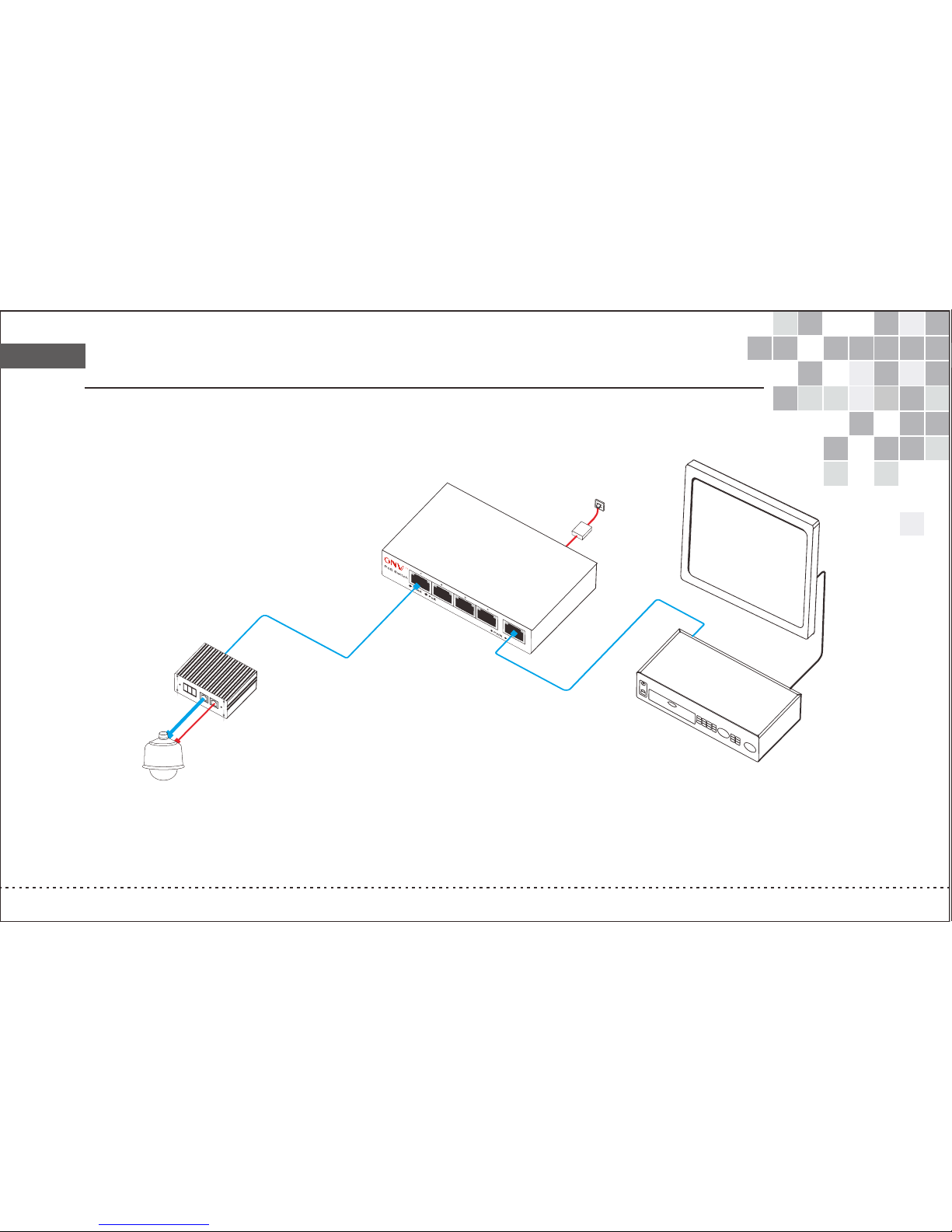
Solution diagram
A
C Ad
a
p
t
e
r
P
o
E S
w
itc
h
P
o
E 340
0
1
P
U
P
L
I
N
K
D
C
O
U
T
N
V
R
PoE S
p
l
i
tt
er
P
D 34
01
Do
m
e Ca
m
era
M
o
nit
o
r
Ca
t.5
Vid
e
o l
i
n
e
C
a
t
.5
DC
RUN
DATA
OUT
DATA
& POE
IN
POE
RUN
- PE +
6
0
W s
up
e
r h
ig
h
powe
r outpu
t
Page 8

Product model and parameter description
Fax:0 755-33376608
Mail:on [email protected]
ADD:Room 1003, Bl ock D, Tairan buil ding, Cheg ongmiao, F utian district ,Shenzhe n,China.
Fac tor y:Floor 5, A build ing, SenYuTai S &T pa rk , Longhua road, BaoAn district , Shenzhen , China.
Tel:0755- 33376606
www.onvcom.com
PD3401:PoE splitter, PD, IEEE802.3at , 12V/24V, 60W, support 10/100/1000M bps
PD3401G: Gi gabit PoE splitter, PD, IEEE8 02. 3at ,12V/ 24V, 60W, support 10/1 00/1000Mb ps
Port descri ption: PoE input: RJ45 port; E thernet and D C power outpu t: RJ45 port and DC port
Network med ium: 100BASE-TX: 3、4、5 classes U TP(≤100 meter s); 1000BAS E-TX:
5 classes or mo re UTP (≤100 me ters)
Network pro tocol: I EEE 802. 3i;I EEE 802. 3u;I EEE 8 02. 3x Fl ow Cont rol;IEEE802 .3ab;
IEEE8023a f/at DTE Powe r vi a MDI
The other har dware feature: Constant 12 V or 24V output
PoE port: PoE p ower (Power ≥90W for power supp ly port)
PoE Standar d: The maximum output power fo r PoE is 60W, can be b ackward com patible with IEEE802.3af /at
PoE transfe rring wire core: 4/5+、7/8- pai r; 1/2+、3/6- pa ir( simulta neously support)
Physical fo rmat: 80x76x2 5mm(lengt h x width x heigh t) 0. 15kg
After-sale service: 1 year w arranty, lifetime mai ntenance
Working t emperatur e: 0℃~40℃
Store tempe rature: -40℃~70℃
Working h umidity: 10 %~90%RH, no c ongealment
Store humid ity: 5%~90%RH no congealme nt
 Loading...