

Page 1

USER GUIDE
PoE & Optical Transmission
IPS31108PF Series
Page 2
Statement
Copyright @ 2002-2013 Op tical Network Video Technologies (Shenzhen) Co., L td
All Rights Reserved
®
!
Packing List
Pleas e kindly check the following it ems:
1 xPoE sw itch
1 xPowe r Kits
1x Moun ting Kits
1x User G uide/ Certificates/Warr anty Card
Note
If any sh ortage or damage found, pleas e contact us i n time.
This do cument contains proprieta ry informa tion that is protected by copyr ight. No par t of this docu ment may be
repro duced, transmitted, trans cribed, st ored in a retr ieval system, or translated i nto any lang uage, in any form or by
any mea ns, electronic, mechanica l, magneti c, optical, chemical, manua l or otherwi se without t he prior written
permi ssion of Optical Network Vide o Technolo gies (Shenzhen) Co., Ltd.
is the re gistered trademark of Optic al Network V ideo Techn ologies (Shenzhen) Co., Ltd . The inform ation
and pro duct specifications withi n this docum ent are subject to change at any ti me, withou t notice and w ithout obligatio n to notify any person of such chan ge.
Page 3

Product overview
Product Introduction
Note
Feature
!
IPS31108PF series PoE switch features with 8x PoE Ethernet ports that compatible with 10/100BaseT(X),802.3af(PoE)
and 802.3at(PoE+) + 1x Gigabit combo Ethernet port and 1x Gigabit SFP fiber port. The power supply of single PoE port can
be up to 30W. The terminal equipment such as weather-proof IP cam era , hig h per for man ce wi rel ess AP and industrial IP telephony. Highly flexible, the transfer data can be up to 120Km from SFP fi ber p ort t o con tro l cen ter ing . Cap abl e of hi gh an tielectromagnetic interference.
Suppor ts IG MP, VLAN, Q oS, R MON, band wid th manage men t and port mi rro ring func tio n. Specia lly d esigned f or ha rsh outdo or ap plicati ons .
Its 3KV ne two rk port sur ge pr otectio n can a dapt to har sh ou tdoor env iro nment and e nsu re the reli abi lity of the u nin terrupt ed Po E system.
The product ‘Switch’ mentioned in the manual, if without a special request, it is referring to industrial IPS31108PF PoE switch,
PoE switch in short in below.
Comply to IEEE 802 .3, IEE E 802 .3u,IEEE 802.3z,IE EE 80 2.3 ab, IEEE 802.3x,IEEE 802 .1D ,IE EE 802.3at,IEEE 802.3af ,IE EE 80 2.1Q
IEEE 802.1p,IE EE 80 2.1 x,I EEE 802.1W,SNMP、IGMP s tan dar ds;
10/ 100M, 10/ 100/ 1000 M sel f-s ensing RJ45 port, supp ort p owe r sup ply function;
All ports support aut o-f lip ( Auto MDI/MDIX);
Each PoE port can pr ovi de po wer u p to 15.4W (af) or 30W (at);
Supply power for powe red d evi ces compatible with IEEE8 02. 3af /at;
Support IEEE80 2.3 x ful l dup lex flow control and dup lex b ack pre ssure flow control;
8.8G backplane band wid th, 2 .75Mb forwarding memory ;
4K MAC address tab le;
Its 3KV network po rt su rge p rot ection can adapt to hars h out doo r env ironment;
Under the temperatu re of - 40 ~ 85 ˚ C , working at a full load 240 W
The 2 gigabit SFP fi ber p ort s are c apable of high bandwidth an d lon g dis tance transmission .
Page 4
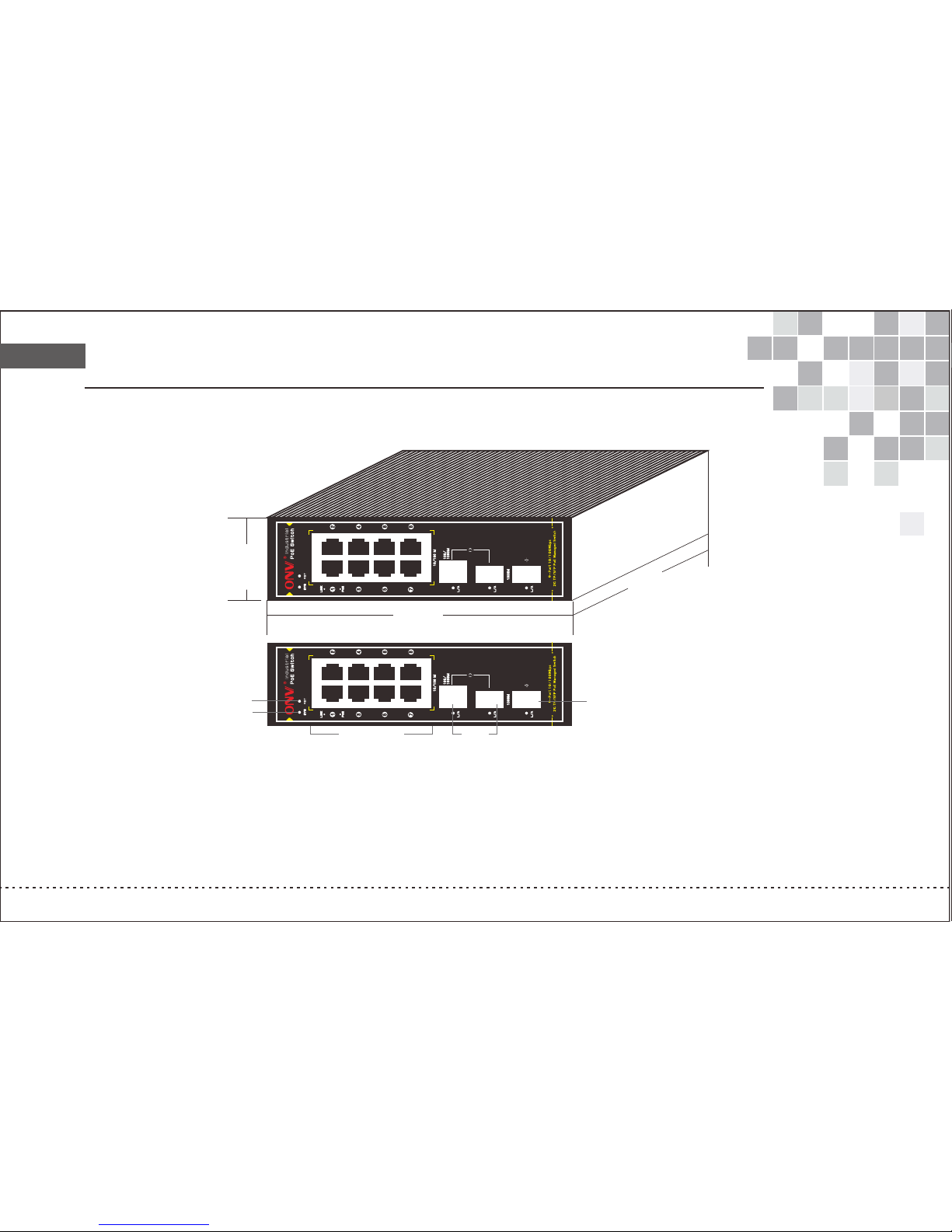
Technical Structure and Port Description
A. PoE Po wer Port
B. Up-l ink Gigabi t Optical Mu ltiplexi ng Port
C. Up-l ink Gigabi t SFP Optica l Port
D. Rese t
E. Syst em Working S tatus Ligh t
F. Link S tatus Ligh t
G. 100- 240VAC, 50 /60Hz
A.P oE Powe r Port
C.U p-lin k Gigab it
SFP O ptica l Port
E.S ystem W orkin g
Sta tus Lig ht
B.U p-lin k Gigab it Opti cal
Mul tiple xing Po rt
D.R eset
165 mm
45 mm
14
5 m
m
Page 5

:Note Please confirm that the all the PD devices are complying with IEEE802.3af/at standard.
!
output), please use AC110~245V, 50/60Hz power supply;
Power Industrial Terminals: 48 (46 ~57V)VDC, dual redundancy ( More than 50VDC recommended when used PoE+
Indicator description:
Indic ator
Statu s
Descr iption
Power I ndicator: SYS
Green L ED ON
Norma l
PoE Ind icator: PoE
100M In dicator: Link
OFF Power O FF
Green L ED ON
Conne cted PD Device, w orking pro perly
Green L ED Blink Short c ircuit or curre nt overload
OFF No Conn ected PD or Power O FF
Yello w LED Blink
Data tr ansmission pr operly
Yello w LED ON
Conne cted with 10Mbp s or 100Mbps netwo rk device
OFF
No conn ected PD
Green L ED Blink
Green L ED ON
OFF
Data tr ansmission pr operly
Conne cted with 1000M bps networ k device
No conn ected PD
Gigab it Indicator: Link
PoE Port: The PoE ports support PoE function, which can transmit data and power simultaneously if connected matching
device. The LED lights on the front panel can show working status of each port.
Ethernet Port: beside PoE port, other ports are Ethernet RJ45 port, and all RJ45 port support Auto MDIMDIX, plug and
play.The LED lights on the front panel can show working status of each port.
Page 6

!
Installation guide
Please install with the supporting devices.
Installation
Pleas e confirm th e followin g things bef ore instal lation:
1. If the P OE port meet s the power re quiremen t of the conne cting devices.
2. If the P OE standar d requirem ent and powe r supply mat ches with the power receiving device
(1/2+、3 /6-( End -sp an)/ 4/5+、7/ 8-(Mid-s pan))
3 .If the o utput powe r of the match ed power ada pter is comp atible with the specification in the label of the POE s witch
Pleas e install th e POE switch a ccording t o the follow ing steps:
1. Put th e PoE switch o n the surfac e of a large and s table tabl e.
2. Plug t he power ada pter into th e power conn ector, and t hen connec t the power outlet through the power cord.
3. Conn ect the netw ork device s to the POE swi tch port tho ugh network cable.
1.Ple ase do not put heavy products on th e POE switch , and please ensure good ventil ation envi ronment fo r the POE switch.
2.Ple ase cut off the power first befor e plugging t he power adapter.
Power
Conne ct the power cable, p lug it into po wer socket , turn on the power, then the switc h will autom atically i nitialize,
and LED l ights status will display as fo llowing:
1 Excep t the POE port lights, all the othe r lights wil l go through t he process of “on-off-on-of f”, which me ans the
estor ation is successful.
2 Power L ED remains lit.
If init ialization is inconsisten t with the abo ve, please check the power.
Note
!
Note
Page 7
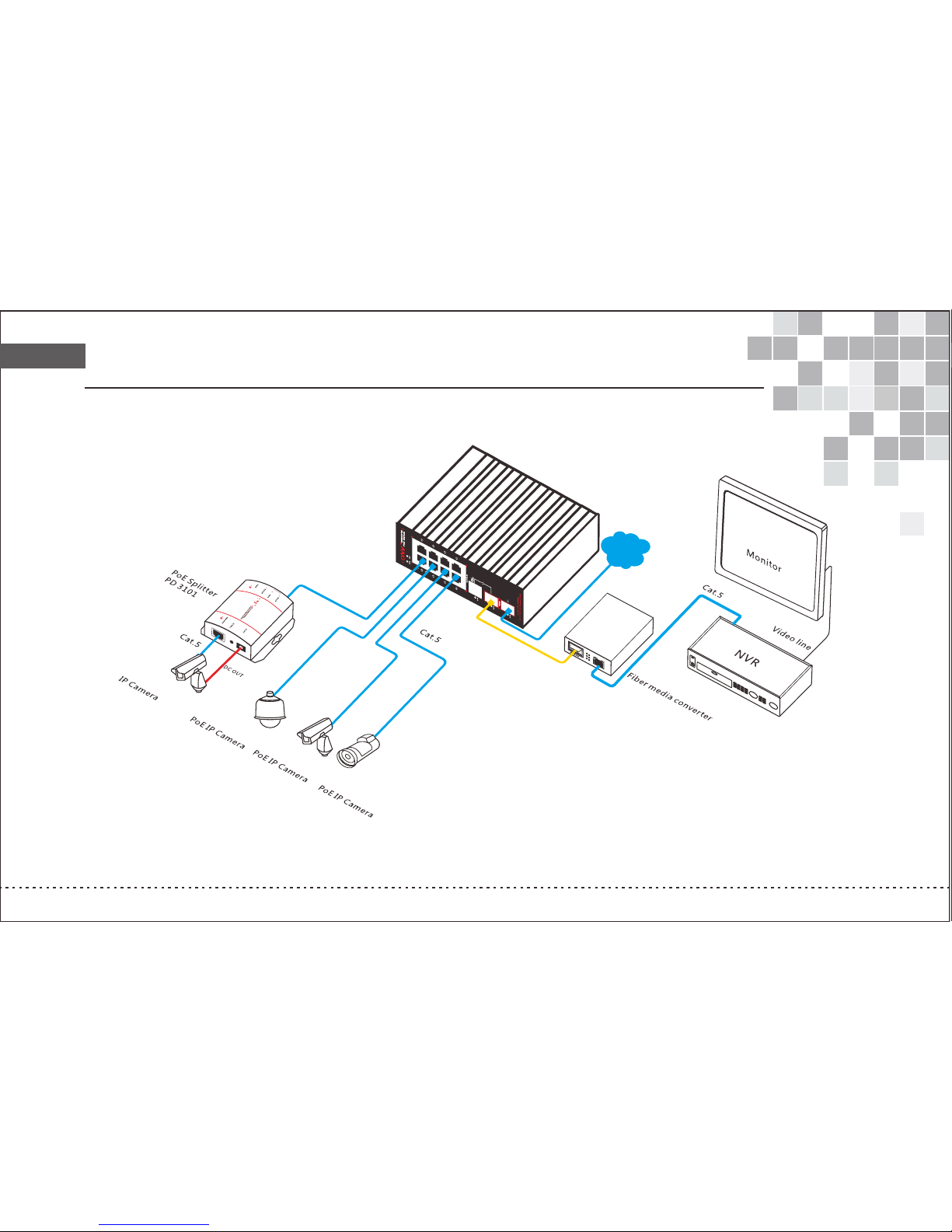
Connection Diagram
Ind
us
tri a
l
P
oE
S
wi
t
ch
IPS 31
10
8PF
Wi
de A
r
e
a Ne
t
w
o
rk
Page 8

www.onvcom.com
Tel:+86-7 55- 333 76606 Fax:+86-7 55- 333 76608 Email:onv @on v.c om.cn
Address: Ro om 10 03, B lock D , Terra buildi ng , Ch ego ngmiao, Futian di str ict , Shenzhen ,China
Factory add res s:N o 5, A building, SenY uTa i S&T p ark, Longhua road , Bao An di strict,She nzh en, C hina
Model Descriptions and Installation
IPS31108P : 8x 10/100M ports +1x 10/100/1000M optical electrical combo port + 1x 10/100/1000M SFP optical port PoE switch,
1-8 port supports PoE, IEEE 802.3af, Each port power is 15.4W, the whole power is 120W, network port transmission distance is
100m, the SFP optical module transmission distance is 20-120Km.35mm rail-mounted design.
IPS31108PFM: 8x 10/100M ports +1x 10/100/1000M optical electrical combo port +1x 10/100/1000M SFP optical port smart
managed PoE switch, support SNMP network protocols, 1-8 port supports PoE function, IEEE 802.3af, each port power is 15.4W,
the whole power is 120W, network port transmission distance is 100m, and the SFP optical module transmission distance is 20-120 Km.
35mm rail-mounted design.
IPS31108PF-at: 8x 10/100M ports +1x 10/100/1000M optical electrical combo port +1x 10/100/1000M SFP optical port PoE switch,
1-8 port supports PoE, IEEE 802.3at, Each PoE port power can be up to 25.5W,the whole power is 240W, network port transmission
distance is 100m, the SFP optical module transmission distance is 20-120Km.35mm rail-mounted design.
IPS31108PFM-at: 8x 10/100M ports +1x 10/100/1000M optical electrical combo port +1x 10/100/1000M SFP optical port smart managed
PoE switch, support SNMP network protocols, 1-8 port supports PoE, IEEE 802.3at, Each PoE port power can be up to 25.5W,the whole
power is 240W, network port transmission distance is 100m, the SFP optical module transmission distance is 20-120Km.35mm rail-
mounted design.
F
 Loading...