

Page 1
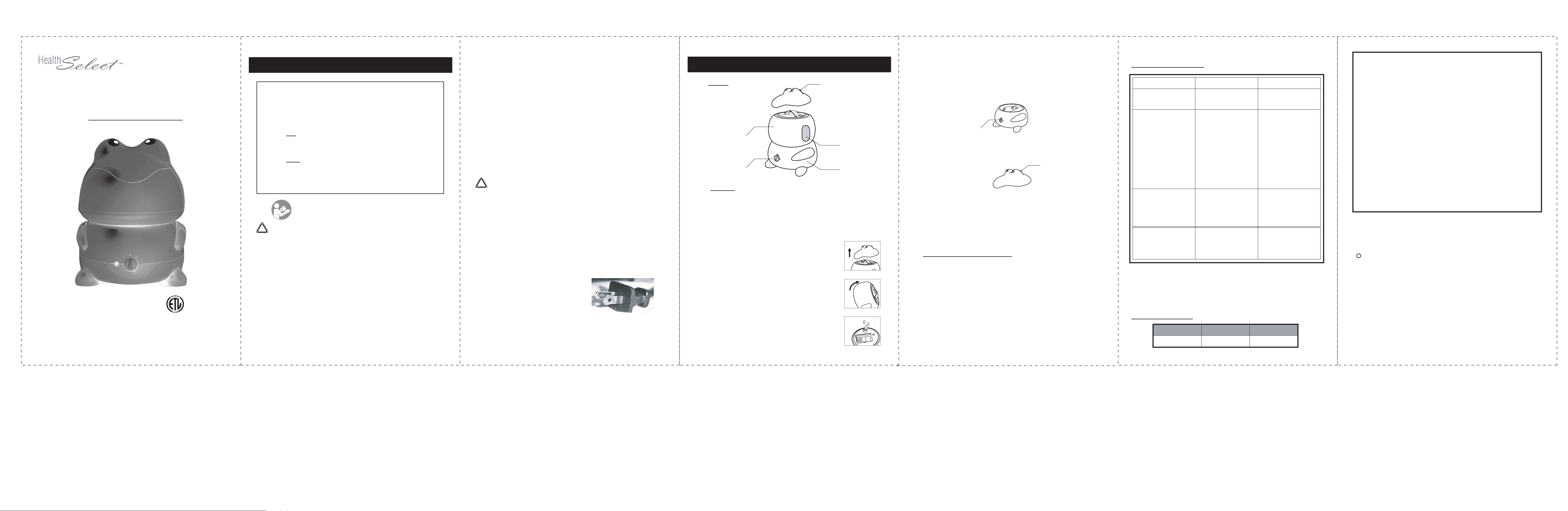
Frog-Shaped Ultrasonic Humidifier
Operating Instructions
C
- FOR HOUSEHOLD USE ONLY -
US
IMPORTANT SAFEGUARDS
Signal Word Definitions
NOTE: These are general definitions only; all may not pertain to the
actual product purchased.
DANGER – Indicates an imminently hazardous situation, which, if not
avoided, will result in death or serious injury. Usage of this signal
word is limited to the most extreme situations.
WARNING
avoided, could result in death or serious injury.
CAUTION – Indicates a potentially hazardous situation, which, if not
avoided, may result in minor/moderate injury or product/property
damage. It also alerts against unsafe practices.
!
WARNING- To reduce the risk of fire, electric shock,
or serious personal injury:
• This product is intended for non-commercial household use in humidifying the air. Do not use the product for any other purpose.
• Keep the product out of the reach of children and pets. This product is
not intended for use by children.
• Do not leave the product unattended while it is in use. Always unplug the
product from the electrical outlet when it is not in use.
• Always make sure the product is unplugged from the electrical outlet
before relocating, servicing, or cleaning it.
• Always place the product on a flat, stable, heat-resistant surface.
• Never block the air openings of the product or place it on a soft surface
(e.g., a bed, couch, or car seat) where the air openings may be blocked.
Wipe the air openings clean if they become clogged. Failure to keep the
air openings clean and free of blockage may deny the product airflow.
• Do not place or store the product where it can fall, or be pulled into a tub
or sink. If the product falls into water, immediately unplug it from the
– Indicates a potentially hazardous situation, which, if not
READ ALL INSTRUCTIONS BEFORE USE.
electrical outlet. Do not touch or reach into the water.
• Do not use attachments not recommended or sold by the product
manufacturer.
• Do not operate this product if the Power Cord is cut, damaged, or if
the wires are exposed.
• Do not immerse the Power Cord or plug in, or expose them to, water
or other liquids.
• Do not plug the product into, or unplug it from, an electrical outlet
while your hands are wet.
• To disconnect the product from an electrical outlet, pull directly on
the plug; do not pull on the Power Cord.
• Do not put any stress on the Power Cord where it connects to the
item, as the Power Cord could fray and break.
• Never operate this product if it has a damaged Power Cord or plug,
is not working properly, has been dropped, damaged, or exposed to
water or other liquids. Do not attempt to examine or repair this
product yourself. Take the product to the appliance repair shop of
your choice for inspection and repair.
!
CAUTION- To reduce the risk of personal injury or
product/property damage:
• Do not place the product in areas or on surfaces (e.g., carpets) that
may be damaged by water or moisture. The user is solely and exclusively liable for any and all damage that may occur from waterrelated mishaps that occur during use of this product.
• Do not place the product in direct sunlight.
• Use only distilled or softened water. Minerals in tap water (hard
water) may cause a “white dust” to appear on furnishings.
• Do not add medications, chemicals, ointments, oils, or any other
additives or substances to the water.
WARNING: This product is equipped
with a polarized plug (one blade is wider
than the other blade) to reduce the risk of
electrical shock. This is a safety feature.
The plug will fit into a polarized outlet only
one way. If you are unable to insert the plug
into the electrical outlet, try reversing the plug. If the plug still does not
fit, contact a qualified electrician. Never use the plug with an extension
cord unless you can fully insert the plug into the extension cord. Do not
alter the plug. Do not attempt to defeat the safety purpose of the polarized plug.
SAVE THESE INSTRUCTIONS FOR FUTURE REFERENCE
Parts
Water Tank
On/Off Switch
with Power Indicatior
To Use
1. Before using, clean the humidifier Base and the water tank with a
soft, non-abrasive, slightly damp cloth.
2. Do not place the humidifier on wooden furniture or other surfaces
that can be damaged by water. Place the unit on a flat and stable
surface. The humidifier should be approximately four inches away
from walls and on a waterproof surface.
3. Do not plug in yet. Gently remove the Lid
that contains the Variable Mist Control Knob.
4. Remove the Water Tank from the Base by the
Handle, turn the Water Tank upside down,
and twist the Tank Cap off.
5. Fill the Water Tank with distilled or purified room
temperature water. The temperature of the water
should NEVER be too hot or too cool. Replace the
Tank Cap tightly.
Variable
Mist Control Knob
Water Level
Indicator
Base
6. Turn the Water Tank right side up and return the Water Tank to the Base
of the unit. Make sure the Water Tank is securely positioned into the
Base.
7. Ensure the On/Off Switch, located in the front of the Base, is in the OFF
position. Plug the power cord into a standard 120-volt AC electrical
outlet. Rotate the On/Off Switch clockwise to ON; the Power Indicator
will illuminate to indicate the unit is ON.
On/Off Switch
with Power Indicator
8. To control the cool mist output, rotate the Variable Mist Control Knob
counterclockwise to decrease mist output. To maximize mist output,
rotate the Knob clockwise to the largest opening.
Variable
Mist control knob
9. Rotate the On/Off Switch to OFF when the desired room humidity is
achieved. Always turn the unit off when the Water Tank becomes
empty. The unit will stop creating mist when the water level in the
Base falls below the water level sensor.
10. Do not leave water stored in the product. Always unplug the unit and
drain any remaining water from the Water Tank.
Care and Maintenance
WARNING: To avoid the risk of electric shock, always ensure the
product is unplugged from the electrical outlet before assembling, disassembling, relocating, or cleaning it.
CAUTION:
• Clean the Base by wiping it with a damp cloth. To avoid product
• When the unit is completely dry, store the humidifier in a cool, dry
To avoid damage to the product, do not use abrasive cleaners
or scouring pads to clean the product parts.
damage, do not immerse the Base into water or other liquids or place
it in a dishwasher.
place.
Troubleshooting
Problems Possible Cause Solution
Power on/off knob is turned
to “ON”, and the Power
Indicator is off
Little or no mist output
Water leakage
White dust accumulation
(caused by suspension of
minerals in water and not
due to a defect in the
humidifier)
Note:
weekly or daily basis. Failure to keep unit clean from mineral deposits in
the water supply will result in poor efficiency of the unit.
Depending on constant or occasional use, clean the device on a
• Unit is not plugged in
• No power at AC outlet
• No water inside tank
• Device is not placed on
a level surface
• Mineral deposits on
the water
sensor/transducers
• Water tank is cleaned
with detergent
• No connection to
blower
• Hard water/soft water
content is too high
• Improper placement of
rubber ring on tank cap
• Loose cap
• Refilled with hot water
• Hard water used
• Plug unit in
• Check the circuits, try
a different AC outlet
• Fill the water tank
• Place unit on a level
surface
• Clean the water
sensor/transducers as
stated in instructions
• Rinse the tank with
clean water
thoroughly, and wipe
dry
• Make sure the water at
the unit base is enough
to immerse water
sensor
• Reposition the rubber
ring
• Tighten the cap again
• Refill with cool
distilled or filtered tap
water
• Switch to distilled or
filtered tap water
Specifications
Voltage Frequency Wattage
120VAC
60 Hz 35W
LIMITED WARRANTY
This item is warranted to be free from defects in materials or workmanship for a period of one year from the original date of purchase under
normal conditions of household use. Within the warranty period, we
will repair/replace the product or refund your money, at our option, at
the place of purchase upon presentation of sales receipt or other proof
of purchase. This warranty extends only to the original retail
purchaser, and excludes any damage to the product resulting from
accident or misuse. The product is not warranted when used in a
commercial or business environment.
The above warranty is complete and exclusive. The warrantor expressly
disclaims liability for any special, incidental, indirect, or consequential
damages in connection with the purchase or use of this product or costs
over the original purchase price.
Any implied warranties arising by operation of law shall be limited in
duration to the term of this warranty.
This warranty gives you specific legal rights and you may have other
rights that vary by jurisdiction. This warranty is valid only within the
United States of America (USA) and Canada.
Item #A58C0138 WIC #547126
Model #WA-85 SVC Code: 2225
c
2007 All Rights Reserved
Distributed By:
East West Distributing Co.
Deerfield, IL 60015-4616
Made in China
For product information, questions, or customer service,
call toll free 1-800-645-3867 or e-mail: [email protected]
Page:1 Page:2 Page:3 Page:4
Page:5 Page:6
Model: WA-85 Frog humidifier
Task: manual
size: 140*210 mm(1page)
File Name: AR1126-WA-85 manual
Color: Black
Scale: 100%
Date: Aug.20.2007
Page 2
WARNING: Changes or modifications to this
unit not expressly approved by the party responsible for
compliance could void the user's authority to operate the
equipment.
NOTE: This equipment has been tested and found
to comply with the limits for a Class B ISM equipment,
pursuant to Part 18 of the FCC Rules. These limits are
designed to provide reasonable protection against harmful
interference in a residential installation. This equipment
generates, uses, and can radiate radio frequency energy and,
if not installed and used in accordance with the instructions,
may cause harmful interference to radio communications.
However, there is no guarantee that interference will not
occur in a particular installation. If this equipment does
cause harmful interference to radio or television reception,
which can be determined by turning the equipment off and
on, the user is encouraged to try to correct the interference
by one or more of the following measures:
- Reorient or relocate the receiving antenna.
- Increase the separation between the equipment and
receiver.
- Connect the equipment into an outlet on a circuit
different from that to which the receiver is connected.
- Consult the dealer or an experienced radio TV techni
cian for help.
-
 Loading...