

Page 1

5 Perform Action
6 Other Features
Gecko Gripper
Quick Start Guide for Universal Robots
1 Mount Gripper
2 Connect Power and Comms
1. Select “Perform
Action” to actuate the
gripper and set
parameters.
This step must be
completed when using
I/O comms to save the
configuration to the
SD card.
Gecko Gripper Quick Start Guide for Universal Robots page 4 of 4
Gecko Gripper Quick Start Guide for Universal Robots page 1 of 4
1. Retrieve Error Logs from the
“Help” menu bar by clicking on
“Error Logs.”
2. Click “Load Logs” for full error
log information. By selecting
“Save to File,” you can save
error logs.
1. Insert the 4 Gecko pads by
aligning the tab with the
notch in the mounting plate.
2. Align two mounting holes
between the gripper and
robot. Insert the 2 mounting
screws and tighten to 8 N-m
with a 5mm hex key.
1. Plug in 10-pin power (24V via I/O
cable). If using Ethernet, connect 8-pin
cable as well. 4-pin is for optional
cleaning system.
2. If using Digital I/O communication,
wire flying leads to appropriate ports.
If using Ethernet communication, plug
in cable to appropriate port.
3. Pin 10 of the IO cable is Earth Ground –
this must be properly grounded to
ensure proper operation
Page 2
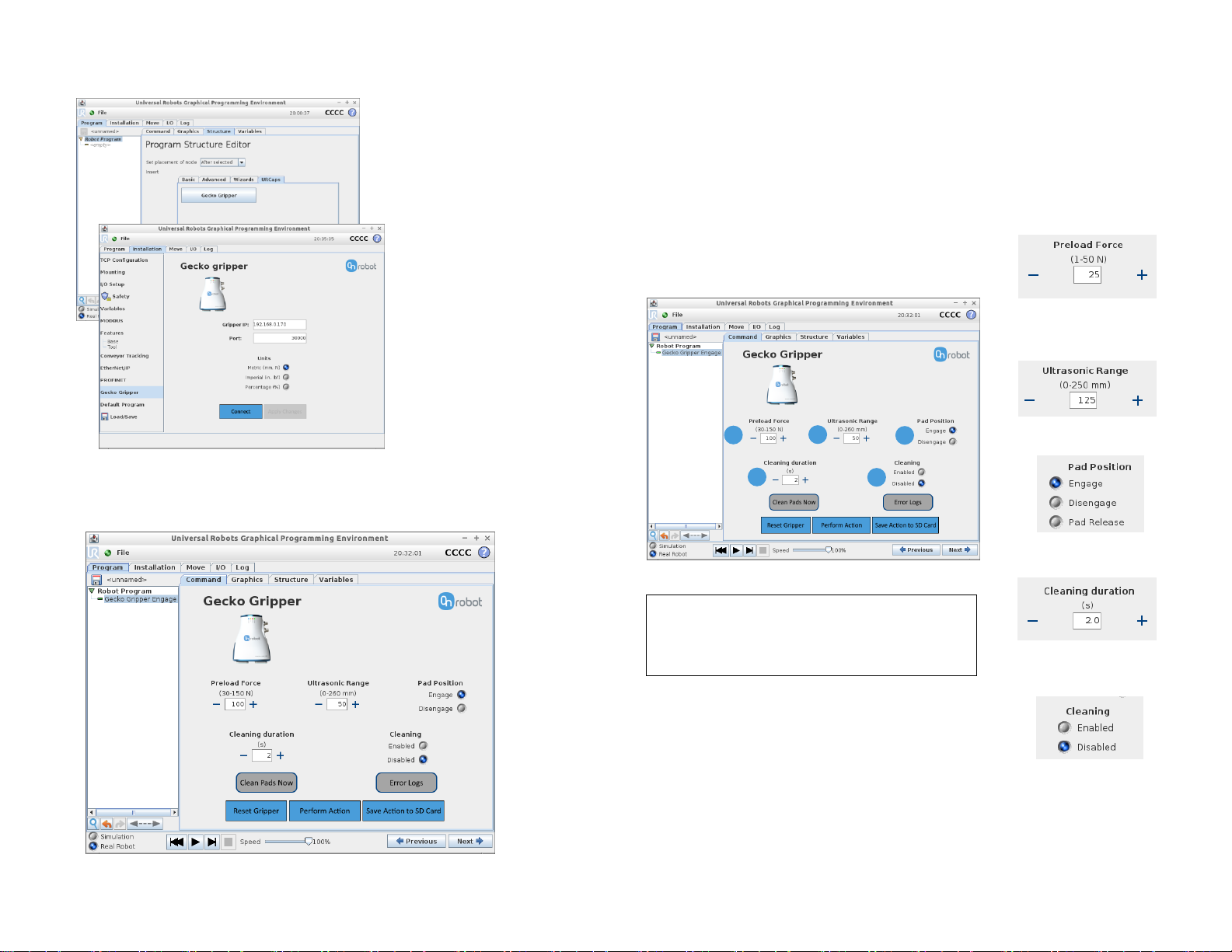
1. Set Preload Force.
2. Set Ultrasonic Range
for part sensor.
3. Select Pad Position.
4. Set Cleaning Duration
for pad cleaning.
5. Choose to Enable or
Disable Cleaning.
3 Install Software
Navigate to the “Command” tab within the main “Program” tab
within the UR GUI to display the Training Mode Screen.
4 Define Gripper State
In the Training Mode Screen, the operator specifies several
gripper parameters that collectively define a single gripper state.
1. Plug in the OnRobot USB
flash drive to the robot
and install Gecko Gripper
UR Cap. The program
node can be found in the
Program Structure
Editor.
2. Enter the Gecko
Gripper’s IP address
and port under the
“Installation” tab to
connect to the
gripper. You are now
ready to configure
the gripper.
1 2 3 4 5
Gecko Gripper Quick Start Guide for Universal Robots page 2 of 4
Gecko Gripper Quick Start Guide for Universal Robots page 3 of 4
NOTE: The ultrasonic sensor has a 500
msec response time – account for this
delay when robot programming
 Loading...