

Page 1
User Manual
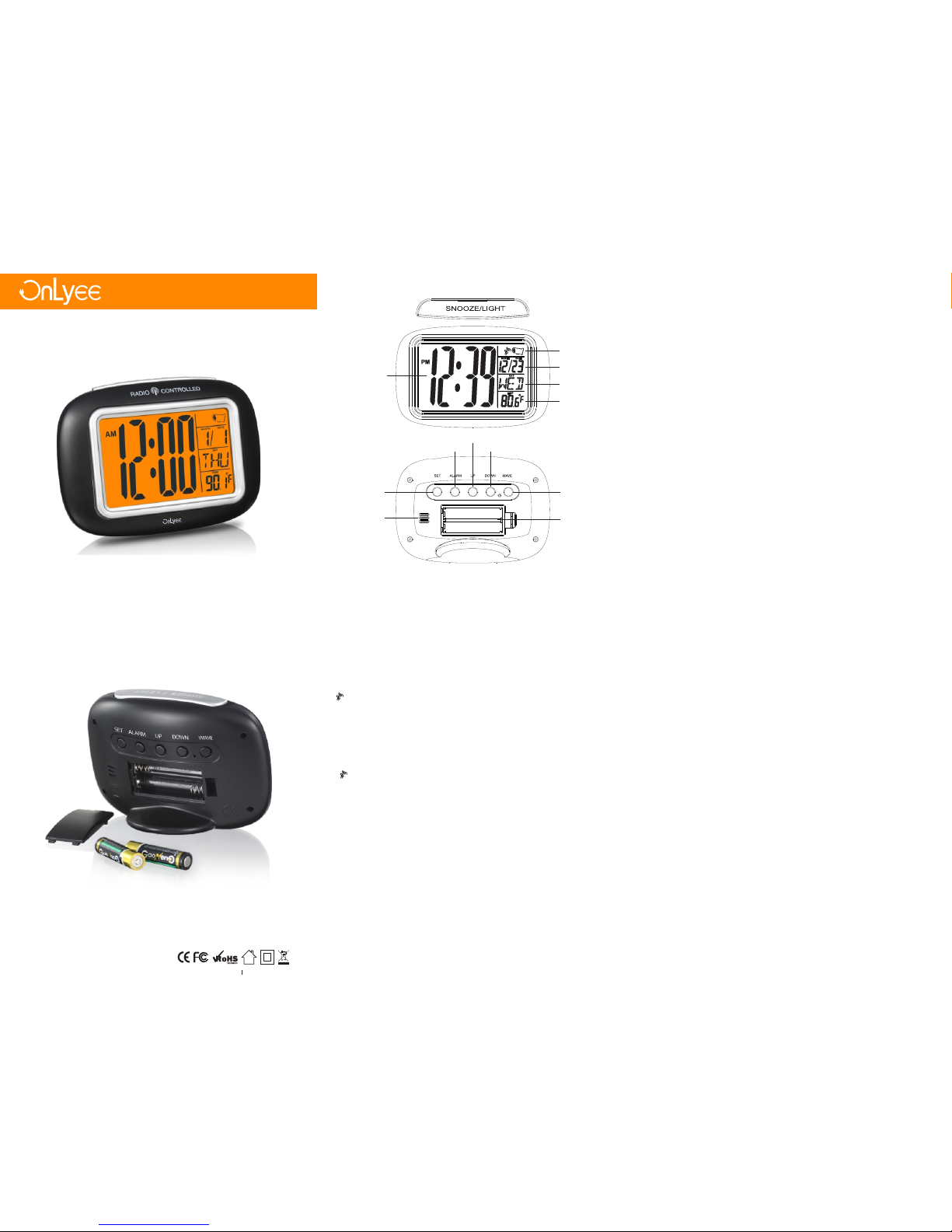
Time Z one
Cal endar
Wee k
Tempe ratur e
Time
Wave b utton
Dow n butto n
UP bu tton
Ala rm butt on
Set b utton
Spe aker
Clo ck batt ery
Comp artme nt 2 AAA
Cha pter 1
-1-
Cha pter 2 Ge t Start ed
Ope n the bat tery co mpart ment an d Inser t 2 new “AA A”bat terie s (incl uded in
the p ackag e)into th e back of c lock .o bserv e the cur rent po larit y .
-2-
Cha pter 3 Ra dio Con troll ed Cloc k
1.T he cloc k will lo ok for th e WWVB ti me sign al for 8 mi nutes w hen bat terie s
are fi rst ins talle d. Butt ons wil l not fun ction d uring t his sea rch per iod.
( flas hes on th e LCD if th e signa l is OK )
2.T he cloc k autom atica lly sea rch the t ime sig nal at 1: 00 a.m. e veryd ay to
mai ntain a ccura te timi ng. For f ailed r ecept ion in 5 mi nutes , scann ing sto ps
and r epeat s again a t 2:00 a. m. and 3: 00 a.m.
3.T he cloc k manua lly sea rch the t ime sig nal by ho lding “ WAVE” for 2 s econd s.
For f ailed r ecept ion in 5 mi nutes , scann ing sto ps.
4.P ress th e butto n “WAVE” to s top sca nning w hen rec eivin g WWVB si gnal.
5. tu rns on in dicat e signa l recei ved suc cessf ully.
6. If a fter 10 m inute s the clo ck have n ot rece ived th e WWVB si gnal ,s ignal
str ength i con wil l disap pear fr om the LC D displ ay.
IMP ORTANT: Th e clock w ill sea rch the W WVB tim e signa l when ba tteri es
are fi rst ins talle d. Butt ons wil l not fun ction d uring t his sea rch per iod.
Pre ss the WAVE b utton o nce to st op the WW VB sign al sear ch and
man ually s et the ti me and ti me zone . The clo ck will s earch f or the WW VB
tim e signa l again a fter mi dnigh t.
-3-
Cha pter 4 Ma nuall y Tim e Set ting
1. Hold p ress th e butto n”SET ” for 2 sec onds to e nter ti me set mo de, unt il
“24 HR”or ”12HR ”flash o n the dis play.
2. Pres s the but ton”U P”or “D OWN” to c hoose t he time f ormat y ou woul d
lik e.pre ss the bu tton” SET”t o submi t time fo rmat “1 2HR” or “ 24HR” y our
cho ose.
HOU R setti ng--- Numbe rs of hou r will fla sh afte r you sub mit tim e forma t,pre ss
the b utton “ UP”or “ DOWN” to set th e HOUR ti me as you d esire d.
MIN UTE set ting- --onc e finish ed sett ing HOU R time, press t he butt on “SET “ to
mai ntain t he minu te numb ers flas h on the di splay, press t he butt on “UP” or
“Do wn”to s et the MI NUTE ti me as you d esire d.
Day s ettin g---w hen com plete s ettin g MINUT E time, press t he butt on “SET ” to
mai ntain t he HOUR a nd MINU TE numb ers flas h on the di splay, and the n press
the t he butt on”UP ”and “D OWN”t o set DAY suc h as MOND AY other.
MON TH sett ing-- -when D ay sett ing is do ne,pr ess the b utton “ SET”t o maint ain
the ” MONTH “ flash on t he disp lay,an d then pr ess the b utton ”UP”a nd
“DO WN”se t MONTH .
DATE s ettin g---- when MO NTH set ting is c omple ted,p ress th e butto n”SET ”to
mai ntain t he DATE fla sh on the d ispla y,an d then pr ess the b utton ”UP”a nd
“DO WN” to se t DATE num bers.
AT last p ress th e butto n”SET ”to sub mit and e xit set ting.
TEP MPERAT URE set ting- --- Pre ss the bu tton “D OWN” to d ispla y Fahre nheit
or Ce lsius t emper ature .
-4-
Vers ion 1.0
sup port@ onlye e.com sup port@ onlye e.com
sup port@ onlye e.com sup port@ onlye e.com
OnLye e Technol ogy Mad e in Chin a
Page 2

Cha pter 5 Da ily Alar m Setti ng
1. Hold P ress th e butto n” ALARM ” b utton f or 4 seco nds unt il the HO UR
num bers fla sh on the d ispla y,pres s the but ton”U P”or“ DOWN” to set HO UR time
and p ress th e butto n “ALAR M” to sub mit.
2. MINU TE time fl ash on th e displ ay indi cate it i s avail able to p ress th e
but ton”U P” or “DO WN”to s et MINI TE time .pres s the but ton”A LARM” to subm it
and r eturn t ime dis play.
3. When a larm so unds ,p ress th e butto n”ALA RM”to s witch i t off.
4. Acti vate an d Deact ivate Ti me Alarm
– pre ss the bu tton” ALARM ” once to a ctiva te the Ala rm, the a larm Ic on will
com e out.
– Pre ss the bu tton” ALARM ” once ag ain to de activ ate the Al arm,t he alar m
Ico n will di sappe ar.
-5-
Cha pter 6 Sn ooze (S ilenc e Ala rm Tempo rar ily )
1. When a larm so unds, p ress th e butto n “SNOO ZE/LI GHT” to s ilenc e the ala rm
for 5 m inute s.
The a larm ic on Zz wil l flash.
2. In sno oze mod e, pres s any but ton to st op alar m for one d ay.
-6-
Cha pter 7 Tim e Zone
1. Ther e are fou r time zo nes (Pa cific, M ounta in, Cen tral an d Easte rn).
2.P ress th e butto n “UP”t o selec t your ti me zone .
The s elect ed time z one wil l be fille d in on the U SA map.
-7-
Cha pter 8 Ba ck ligh t
Pre ss the bu tton “S NOOZE /LIGH T “to act ivate t he back light f or 5 seco nds
whe n it is dar k to watc h time or y ou wake i n the mor ning.
-8-
Tempe ratur e Range : +14℉ to +1 22℉ (-10℃ t o 50°C)
Pow er: 2-A AA, IEC , LR3 bat terie s (incl uded)
Bat tery Li fe: Bat tery li fe is ove r 12 mont hs
Dim ensio ns: 3.7 1inch x 2 .20in ch x 2.07 inch (9 .42x 5. 58 x 5.25 cm)
Cha pter 9 Sp ecific ation s
-9-
1. Do not m ix old an d new bat terie s.
2. Do not m ix Alkal ine, St andar d, Lith ium or Re charg eable B atter ies.
3. You had be tter pu rchas e the cor rect si ze and gr ade of ba ttery m ost sui table
for i ntend ed use. 4 .Repl ace all b atter ies of a se t at the sa me time .
5. Batt ery sha ll not be e xpose d to exce ssive h eat suc h as, sun shine , heate rs,
fire o r it's li kenes s.
6. Avoid l eavin g the uni t in dire ct sunl ight or i n hot, hu mid, du sty pla ces.
7. The ca binet c an be cle aned wi th a slig htly da mp clot h under t he cond ition
tha t the bat tery co mpart ment is c losed .
Cha pter 10 C are and M ainte nance
All r ights r eserv ed. Thi s manua l may not b e repro duced i n any for m, even i n
par t, or dup licat ed or pro cesse d using e lectr onic, m echan ical or c hemic al
pro cess wi thout t he writ ten per missi on of the p ublis her. Thi s bookl et may
con tain er rors or m ispri nts. Th e infor matio n it cont ains is r egula rly che cked
and c orrec tions a re incl uded in s ubseq uent ed ition s. We dis claim a ny
res ponsi bilit y for any t echni cal err or or pri nting e rror, or t heir co nsequ ences .
All t radem arks an d paten ts are re cogni zed.
-10 -
Not e: The al arm is cr escen do soun d. The al arm wil l sound f or 2 minu tes
and t hen shu t off com plete ly.
Not e: The Ti me Zone c annot b e set whi le the cl ock is se archi ng for th e
WWV B time si gnal.
sup port@ onlye e.com sup port@ onlye e.comsup port@ onlye e.com
sup port@ onlye e.com sup port@ onlye e.com sup port@ onlye e.com
 Loading...