

Page 1
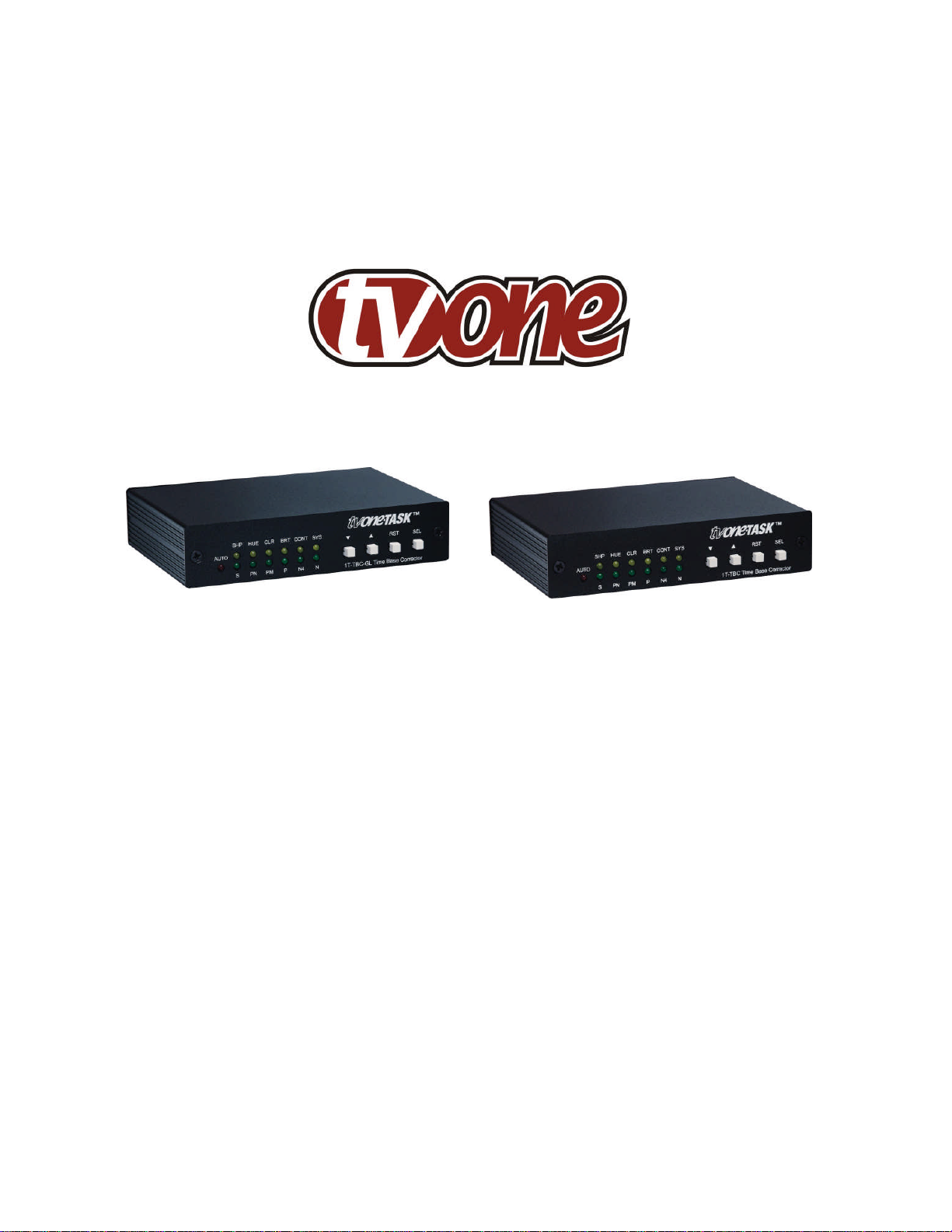
Operation Manual
1T-TBC and 1T-TBC -GL
Time Base Correctors
Page 2

Page 3

Table of Contents
1.0 Introduction 2
2.0 Specifications 3
3.0 Checking Package Contents 4
4.0 Connecting The Hardware 4
5.0 Operating The Unit 5
6.0 Troubleshooting 6
7.0 Limited Warranty 7
8.0 Regulatory Compliance 8
9.0 Contact Information 8
Page 4

1.0 INTRODUCTION
Thanks for purchasing this One-Task 1T-TBC-GL or 1T-TBC Multi-standard Time Base
Corrector from TV One. The 1T-TBC series of Time Base Correctors are designed to
correct the time base errors present on a video signal of any of the widely used world
television standard signals. Our professional video conversion products have been
serving the industry for over twenty years. TV One offers a full line of high quality
Seamless Switchers, Video Scalers, Up/Down/Cross Converters, Analog-Digital
Converters (SD/HD-SDI, HDMI, DVI), Format Converters, Standards Converters,
TBC/Frame Synchronizers, Matrix Routing Switchers, Signal Distribution Amplifiers and
Cat.5 Transmission Systems.
1.1 Liability Statement
Every effort has been made to ensure that this product is free of errors. TV One cannot
be held liable for the use of this hardware or any direct or indirect consequential
damages arising from its use. It is the responsibility of the user of the hardware to check
that it is suitable for his/her requirements and that it is installed correctly. All rights
reserved. No parts of this manual may be reproduced or transmitted by any form or
means electronic or mechanical, including photocopying, recording or by any
information storage or retrieval system without the written consent of the publisher.
TV One reserves the right to revise any of its hardware and software following its policy
to modify and/or improve its products where necessary or desirable. This statement
does not affect the legal rights of the user in any way.
All third party trademarks and copyrights are recognised. The TV One logo, TV Onetask and CORIO are the registered Trademarks of TV One. All other trademarks are the
property of their respective holders.
1.2 Features
The 1T-TBC series of Multi-Standard Time Base Correctors have many features that
enable them to perform in a superior manner. Among those features you will find:
Time Base Corrects all Input Signals
Restores Distorted or Noisy Sync Signals
Genlocks to System Reference (1T-TBC-GL)
Digital Comb Filtering for Y/C signals
Built in AGC to Ensure 1 volt P/P outputs
Full Control of Picture Elements such as Brightness and Color level
2
Page 5

2.0 SPECIFICATIONS
Inputs/Outputs
Composite Video 1x via BNC Connector
YC (S-Video) 1x via 4-PIN Mini-DIN Connector
Genlock via BNC (1T-TBC-GL Only)
Genlock Loop-thru with 75 Termination Switch
Video Specifications
Impedance 75
Television Standards NTSC, PAL-B, G, N, M, SECAM
Signal Processing 8-bit
Frequency Response Flat to more than 20MHz
Chroma to Luma Delay <=5nS
Differential Gain <=0.5 %
Differential Phase
<=0.5
Signal to Noise Ratio Better than 60db
Video Level Adjustment Luma,Chroma, Setup, Hue, Sharp
Filter Selection Adaptive Comb, Low Pass
Control Method
Display Front Panel LEDs
Front Panel Buttons Up, Down, Reset, Select
Warranty
Limited Warranty 3 Years Parts and Labor
Mechanical
Size (H-W-D) 30x133x90mm (1.2"x5.25"x3.5")
Weight (Net) 310 g (0.69 lbs)
Environmental
Operating Temperature 0° to +50° C (+32° to +122° F)
Operating Humidity 10% to 90%, Non-condensing
Storage Temperature -10° to +60° C (+14° to +140° F)
Storage Humidity 10% to 90%, Non-condensing
Power Requirement
External Power Supply 12VDC@500mA - Locking DC
Regulatory Approvals
TBC Unit FCC, CE, RoHS
Power Supplies UL, CUL, CE, PSE, GS, RoHS
Accessories Included
1x Power Adapter US, UK or Euro
1x Operations Manual
Product Item Numbers
1T-TBC Time Base Corrector
1T-TBC-GL TBC with Genlock
3
Page 6
3.0 CHECKING PACKAGE CONTENTS
Before attempting to use this unit, please check the packaging and make certain the
following items are contained in the shipping carton:
1x Time Base Corrector
1x AC to 12 VDC Power Adapter
1x Operations Manual
Note: Please retain the original packing material should the need ever arise to return
the unit. If you find any items are missing, contact your reseller or TV One immediately.
Have the Model Number, Serial Number and Invoice available for reference when you
call.
4.0 CONNECTING THE HARDWARE
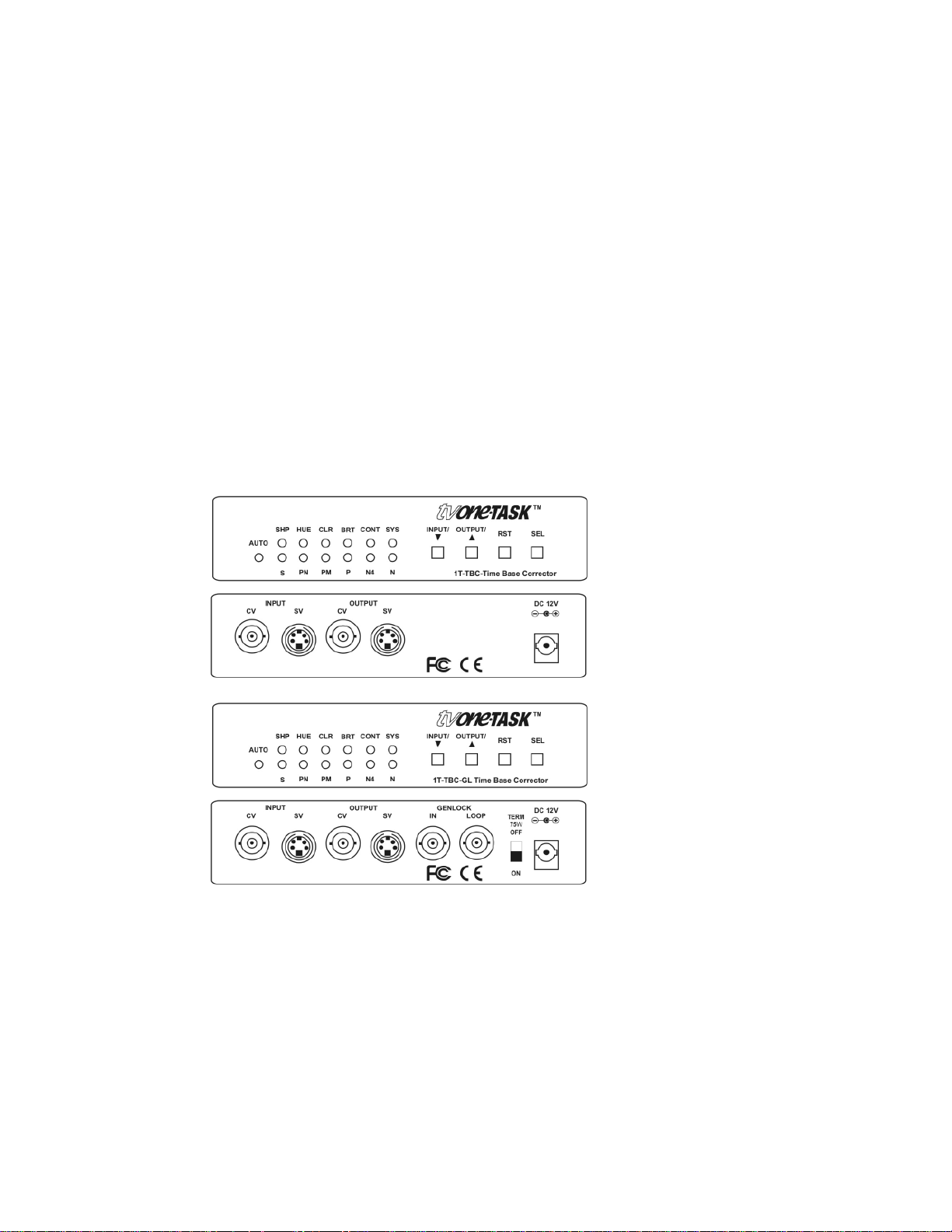
Please study the panel drawings below and become familiar with the signal input,
outputs, power requirements/inputs plus any controls present.
Connect the AC to +12 VDC adapter to an AC source and then to the DC power input
shown above. (Note that there is no power switch. The unit will begin to work as soon
as you have the AC to +12 VDC adapter plugged in and furnishing power).
Next connect an input cable and an output cable to either the Composite Video or SVideo connectors. If the unit has power applied, it should begin to function as a Time
Base Corrector.
4
Page 7
5.0 OPERATING THE UNIT
The 1T-TBC-GL and 1T-TBC Time Base Converters are identical with the exception of
a genlock provision in the 1T-TBC-GL version. (A discussion of the genlock capability is
contained in section 5.7 below).
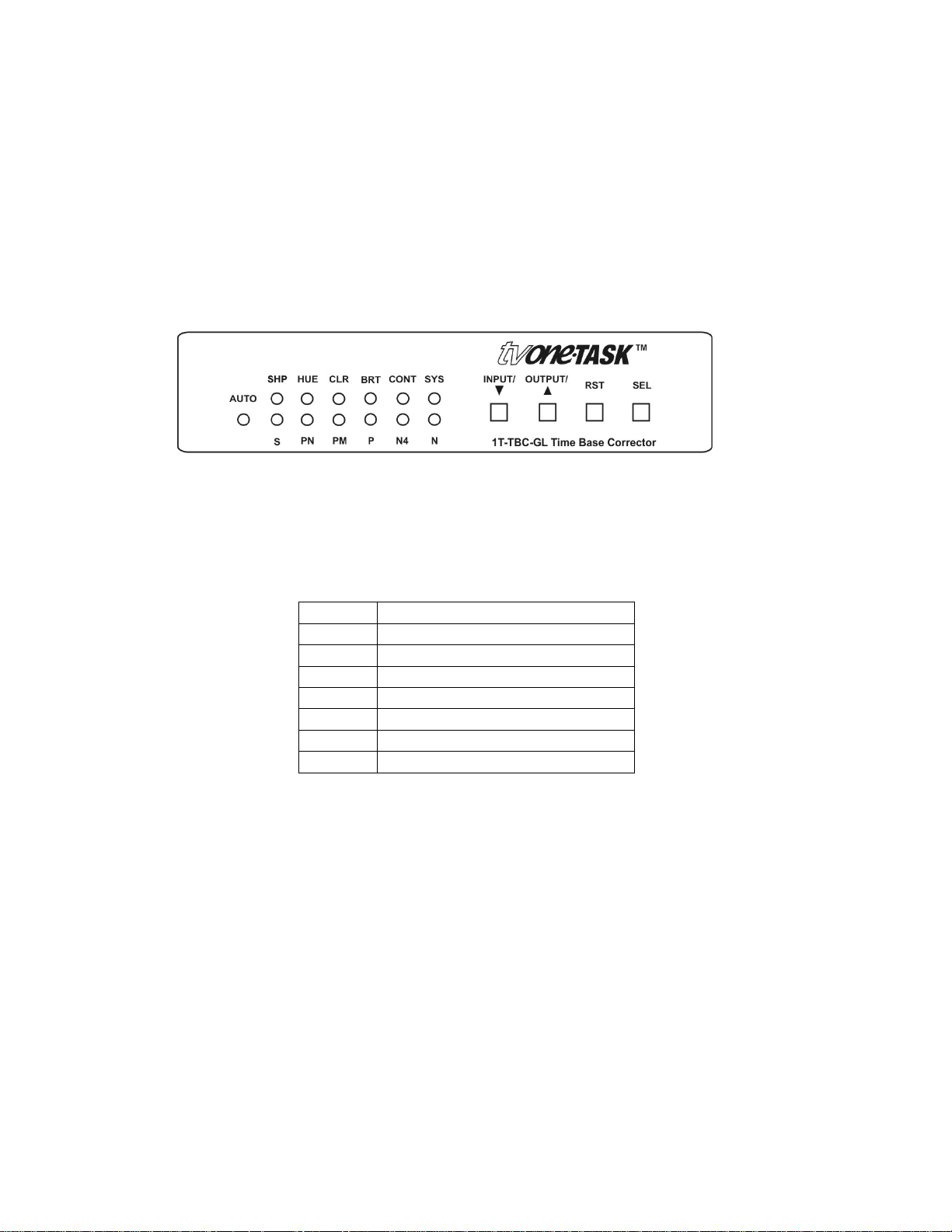
The 1T-TBC-GL and 1T-TBC are operated via selection buttons referenced to indicator
LEDs.
Please refer to the drawing below for the discussion that follows.
5.1 Initial Power Up
When power is applied to the unit, it will default to the auto detect mode and also select
the proper Television Standard. The letters on the panel above the bottom row of LEDS
will indicate the standard selected:
A Auto-Detect TV Standard
S SECAM Standard
PN PAL-N
PM PAL-M
P PAL
N4 NTSC 4.43 Mhz
N NTSC 3.58 Mhz
S Select System Mode
As an example of how the auto-detect works, if you live in the United States or Japan,
the standard will be the NTSC 3.58 and the unit will light the “A” LED plus the “N” LED.
In the United Kingdom, the standard will be PAL so the “A” LED will light as well as the
“P” LED. Finally, in France, the “A” and “S” (for SECAM) LEDs will light.
5.2 System Button Function
If you press the Select button until the System LED is illuminated on the top row, you
can gain access to the bottom row of functions. You can then either automatically or
manually select the input Television Standard you wish to use.
5
Page 8

Note: Pressing the Reset button toggles between automatic and manual selection of the
desired standard. Although you can manually select the standard, it is generally best to
allow the unit to make the standard selection.
To force a manual input selection of the desired standard, make certain the System
LED is lighted, and then press the Reset button, which places the input selection in the
Manual mode. Next, press the DOWN arrow button to step through the various
standards. Pressing the Reset button a second time reverts back to automatic selection
of the standard.
5.3 Adjustment of Signal Parameters
Another user operation is the selection of a particular picture parameter you wish to
change. For instance: If you wish to adjust the amount of color in the picture, press the
Select button until the LED below the abbreviation “CLR” is flashing. Next press the UP
and Down Arrow buttons to either increase or decrease the amount of color in the
picture. Use the same procedure for Sharpness, Tint, Brightness and Contrast: Press
the Select button until you have reached the picture variable you wish to change and
then use the arrow buttons to make the actual adjustment.
5.4 Additional Reset Button Functions
Pressing the Reset Button while you have one of the adjustment parameters selected
will cause the 1T-TBC-GL or 1T-TBC to revert to the default setting for that parameter. If
you press and hold the Reset button for more than 3 seconds, ALL adjustment
parameters will be reset to their default settings.
5.5 Using the Genlock Capability
The 1T-TBC-GL model has the ability to lock its output to a reference signal. This allows
the unit’s output to be used in a studio environment as an input to a video switcher or
special effects device requiring a timed video input source.
Additionally, the genlock capability also includes a loop through function. This allows
one genlock signal to be cascaded from one 1T-TBC-GL to another thereby providing
multiple timed video sources if needed. If you only intend to use a single 1T-TBC-GL,
set the switch on the back on the unit marked TERM 75to the ‘On’ position. This will
ensure that the impedance of the genlock source is properly terminated. Similarly, if you
cascade several 1T-TBC-GL genlock inputs using the loop through capability, also
make certain you switch the termination of the last unit to ‘On’.
6.0 TROUBLESHOOTING
Most problems with the 1T-TBC-GL and 1T-TBC units are related to misuse of the
buttons and signal adjustment controls. If you find that the picture is not acceptable,
place the unit in the automatic detection mode and then press and hold the Reset
6
Page 9

button for 3 seconds to restore factory defaults. This should clear the problem. Another
problem revolves around the cables. Inspect the cables for loose connectors or cable
damage such as crushed cables or cables with cuts or nicks. Replace any cable
exhibiting these problems. You also must use the highest quality cables if you want to
achieve the best results. Poor quality cables will cause poor quality signals.
After trying the above suggestions should the problem still persist, contact your dealer
for additional suggestions before contacting AV Toolbox. Should the dealer’s technical
personnel be unable to assist you, contact AV Toolbox via our parent company’s
support website: http://tvone.crmdesk.com. Create a technical support request on the
site and our support team will respond within a short period of time.
7.0 LIMITED WARRANTY
TV One warrants the original purchaser that the equipment it manufactures or sells will
be free from defects in materials and workmanship for a fixed term from the date of
purchase. The warranty term for specific product lines is defined below.
1. TV One branded products based on TV One’s CORIO technology are warranted for
a period of five years from the date of purchase. This includes products with the
model number prefix of C2, 1T-C2, CX, A2 or S2.
2. TV One-task branded products, other than those based on TV One’s CORIO
technology mentioned above, are warranted for a period of three years from the date
of purchase. This includes products with the model number prefix of 1T, with the
exception of 1T-C2.
3. LCD Monitors are warranted for a period of three years from the date of purchase,
with the exception of the LCD panels integrated into the monitors that are supplied
by third parties. LCD panels are limited to the term and conditions of the warranty
offered by the respective LCD panel manufacturer. Such specific LCD panel
warranties are available upon request to TV One.
Should a product, in TV One’s opinion, prove defective within this warranty period, TV
One, at its option, will repair or replace this product without charge. Any defective parts
replaced become the property of TV One. This warranty does not apply to those
products which have been damaged due to accident, unauthorized alterations, improper
repair, modifications, inadequate maintenance and care, or use in any manner for which
the product was not originally intended.
If repairs are necessary under this warranty policy, the original purchaser must obtain a
Return Authorization Number from TV One and return the product to a location
designated by TV One, freight prepaid. After repairs are complete, the product will be
returned, freight prepaid.
7
Page 10

LIMITATIONS - All products sold are "as is" and the above Limited Warranty is in lieu of
all other warranties for this product, expressed or implied, and is strictly limited to two
years from the date of purchase. TV One assumes no liability to distributors, resellers or
end-users or any third parties for any loss of use, revenue or profit.
TV One makes no other representation of warranty as to fitness for the purpose or
merchantability or otherwise in respect of any of the products sold. The liability of TV
One with respect to any defective products will be limited to the repair or replacement of
such products. In no event shall TV One be responsible or liable for any damage
arising from the use of such defective products whether such damages be direct,
indirect, consequential or otherwise, and whether such damages are incurred by the
reseller, end-user or any third party.
8.0 REGULATORY COMPLIANCE
The 1T-TBC-GL and 1T-TBC have been tested for compliance with appropriate FCC
and CE rules and regulations. The Power Adaptor/Supplies have been tested for
compliance with appropriate UL, CUL, CE, PSE, GS Rules, Regulations and/or
Guidelines. These Products and Power Adapters are RoHS Compliant.
9.0 CONTACT INFORMATION
Should you have questions or require assistance with this product in areas not covered
by this manual, please contact TV One at the appropriate location.
8
Page 11

TV One USA
2791 Circleport Drive
Erlanger, KY 41018
USA
Tel 859-282-7303
Fax 859-282-8225
[email protected]
www.tvone.com
TV One Europe
Continental Approach
Westwood Industrial Estate
Margate, Kent CT9 4JG, UK
Tel +44 (0)1843 873311
Fax +44 (0)1843 873312
[email protected]
www.tvone.eu
TV One Latin America
6991 NW 82 Avenue #8
Miami, FL 33166
USA
Tel 305-396-6275
Fax 305-418-9306
[email protected]
www.tvonela.com
TV One Asia
16F-4, NO.75, Sec. 1
Hsin Tai Wu Road, Hsichih
Taipei Hsien 22101
Taiwan R.O.C.
Tel +886 2 2698-2296
Fax +886 2 2698-2297
[email protected]
www.tvoneasia.com
End of Manual
TV One Mercosur
Av. Diaz Velez 3965 #PB
(1200) Capital Federal
Buenos Aires, Argentina
Tel +54 11 5917-2525
Fax +54 11 4032-0281
[email protected]
www.tvonela.com
TV One China
Rm. 1007, Golden Peach Bldg.
No. 1900 Shangcheng Road
Pudong, Shanghai
China 200120
Tel +86 21 5830-2960
Fax +86 21 5851-7949
Email: [email protected]
www.tvonechina.com
9
 Loading...