

Page 1

USER‘S MANUAL
EHY-2000plus
OncoTherm Kft.
Both the hardware and software are
specially developed for the OncoTherm
systems.
Copyrights belong to OncoTherm Kft.
All rights reserved.
This book is sold subject to the condition that it
shall not by any way of trade or otherwise, be
lent, re-sold, hired out or otherwise circulated
without the OncoTherm prior consent in any
form of binding or cover other than that in
which it is purchased and without a similar
condition including this condition being
imposed on the subsequent purchase.
Page 2

plus
UM - EHY2000plus-R24
1
User’s Manual
EHY-2000plus
Oncotherm Kft.
Date: 2018.07.27.
Version: 24
Page 3

plus
UM - EHY2000plus-R24
2
Contents
CONTENTS ..................................................................................................................................................................... 2
INTRODUCTION ............................................................................................................................................................ 4
HOW TO USE THIS MANUAL............................................................................................................................................ 4
CONTACTS .................................................................................................................................................................... 5
SAFETY WARNING ........................................................................................................................................................ 6
SYMBOLS AND THEIR DEFINITIONS ........................................................................................................................... 7
INSTALLATION ........................................................................................................................................................... 8
GENERAL ..................................................................................................................................................................... 8
ELECTRICAL CONNECTION ............................................................................................................................................ 8
INSTALLATION NOTICES ............................................................................................................................................... 10
SAFETY ........................................................................................................................................................................ 11
RESIDENT RISKS:........................................................................................................................................................... 12
GENERAL DESCRIPTION ............................................................................................................................................ 13
INTENDED USE ............................................................................................................................................................. 13
TARGET GROUP .......................................................................................................................................................... 13
SIDE EFFECTS ............................................................................................................................................................... 14
AVAILABLE APPLICATORS ............................................................................................................................................ 14
CONTRA INDICATION ................................................................................................................................................. 15
IMPORTANT MEDICAL NOTICES .............................................................................................................................. 16
DEVICE CONTROL ...................................................................................................................................................... 21
Display-EHY-2000plus ...................................................................................................................................... 21
Control panel of waterbed .......................................................................................................................... 27
Tuning ................................................................................................................................................................. 28
Starting the device ......................................................................................................................................... 30
Doing a treatment .......................................................................................................................................... 32
Switch off the device ..................................................................................................................................... 34
Time-meters ....................................................................................................................................................... 35
Warning and error messages ................................................................................................ ....................... 35
THE USAGE OF THE WEB-BOX .................................................................................................................................. 38
PURPOSE .................................................................................................................................................................... 38
SYSTEM STRUCTURE...................................................................................................................................................... 38
USAGE ....................................................................................................................................................................... 39
STARTING THE WEB ..................................................................................................................................................... 39
LOGGING IN AND THE MAIN MENU ............................................................................................................................. 39
TREATMENT MENU ....................................................................................................................................................... 42
TREATMENT VIEW ........................................................................................................................................................ 46
PATIENT MANAGEMENT MENU ..................................................................................................................................... 46
IMPORTANT NOTICES ................................................................................................................................................... 52
IMPORTANT NOTES FOR THE USE OF THE SOFTWARE ...................................................................................................... 52
SUPPORTED BROWSERS ............................................................................................................................................... 52
REQUESTED TECHNICAL BACKGROUND ....................................................................................................................... 53
Client browser .................................................................................................................................................. 53
Network .............................................................................................................................................................. 53
Page 4

plus
UM - EHY2000plus-R24
3
Alternative configuration ................................................................ ................................ .............................. 53
TECHNICAL DESCRIPTION ........................................................................................................................................ 54
THE MAIN RF-UNIT ....................................................................................................................................................... 54
TECHNICAL DATA ....................................................................................................................................................... 54
TECHNICAL DATA OF THE WATERBED ........................................................................................................................... 55
CLEANING ................................................................................................................................................................. 56
SERVICING/MAINTENANCE ........................................................................................................................................ 57
DISPOSAL ................................ ................................................................................................ ................................... 57
ACCESSORIES ............................................................................................................................................................. 58
APPENDIX 1 – GUARANTEE ...................................................................................................................................... 60
APPENDIX 2 – DECLARATION OF CONFORMITY SAMPLE ................................................................................. 61
APPENDIX 3 – TABLE OF PROPOSED ELECTRODES .............................................................................................. 62
APPENDIX 4 – REFILLING OF THE BOLUS ELECTRODE ......................................................................................... 63
APPENDIX 5 - ELECTROMAGNETIC COMPATIBILITY INFORMATION .............................................................. 69
APPENDIX 6 - TREATMENT IN 9 STEPS .................................................................................................................... 77
APPENDIX 7 - PATIENT CONSENT ........................................................................................................................... 78
APPENDIX 8 - BRAIN TREATMENT ........................................................................................................................... 79
APPENDIX 9 - ROLLICEL DATASHEET ...................................................................................................................... 81
APPENDIX 10 - MEMORY FOAM PILLOW .............................................................................................................. 82
Page 5
plus
UM - EHY2000plus-R24
4
Introduction
Congratulation on your excellent choice!
You are the owner of a high-tech medical product, developed and produced by
Oncotherm Kft.
on the basis of the latest bio-engineering and medical knowledge.
The design and production of EHY-2000plus is controlled by the rigorous EU standards, certified for
ISO 13485 certified also by the German TÜV SÜD Product Service GmbH (Munich). The product is
completely manufactured in the European Union.
How to use this manual
The user’s manual of EHY-2000plus explains the proper use and maintenance of
the device. We recommend you to follow the content order first time you study
the manual. After you are familiar with the safe operation of the EHY-2000plus,
you can continue with the technical and theoretical background. On the base
of this knowledge, you can learn the treatment process with EHY-2000plus. The
device control part should be used as a guideline for treatments. We
recommend to keep this manual close at hand since you may need to refer to it
in the future.
You can find the latest valid version of the User’s Manual on our website
(www.oncotherm.org/for Specialists (please login)/User’s Manuals).
Page 6
plus
UM - EHY2000plus-R24
5
Contacts
Please do not hesitate to contact us if you have any questions:
Questions in connection with production and management:
Oncotherm Group
Dr. Olivér Szász
CEO Hungary/Germany
Belgische Allee 9, D-53842 Troisdorf, Germany
Phone: +49-2241-319-920
Fax: +49-2241-319-9211
Email: [email protected]
and
Gyár utca 2., H-2040 Budaörs, Hungary
Phone: +36-23-555-510
Fax: +36-23-555-515
E-mail: [email protected]
Questions about research and development:
Prof. Dr. András Szász
Chief Scientific Officer
E-mail: [email protected]
Your local distributor:
Page 7

plus
UM - EHY2000plus-R24
6
Safety Warning
Please read these installation- and operating-instructions carefully before using your
device. These instructions contain important notes regarding safe installation, use
and maintenance of your appliance.
Please keep these instructions in a safe place you can always access and, if you sell
the appliance, hand them over to the new owner.
The manufacturer cannot accept liability if these instructions are not adhered to.
A technical training is required to operate the equipment! For this procedure,
please ask the manufacturer or the distributor.
To reduce the risk of fire or electric shock, do not expose this appliance to rain or
moisture. Due to dangerous high voltage, do not open the cabinet. For technical
support please contact the qualified personnel of Oncotherm.
Page 8

plus
UM - EHY2000plus-R24
7
Symbols and their definitions
Please note the symbols below for correct usage of the equipment:
This symbol is intended to inform the user about the ground independent (body
floating) construction. Do not rearrange the professional installation.
This symbol is intended to alert the user to the presence of important operation
and maintenance instructions in the literature accompanying this product.
This symbol warns the user to read the relevant part in the User’s manual.
This symbol informs the user that the device is intended to emit non-ionizing
radiation.
This symbol indicates that the waste of electrical and electronic equipment
must not be disposed as unsorted municipal waste but has to be collected
separately. Please contact the authorized representative of Oncotherm Group
for information concerning the decommissioning of your equipment.
CLASS I
Conductive-enclosed CLASS I EQUIPMENT:
EQUIPMENT having a durable and substantially continuous ENCLOSURE of
conductive material which envelops all conductive parts with the exception of
small parts, such as nameplates, screws and rivets, which are isolated from LIVE
parts by insulation at least equivalent to REINFORCED INSULATION. The
ENCLOSURE of insulation-enclosed CLASS II EQUIPMENT may form a part or the
whole of the SUPPLEMENTARY INSULATION.
Page 9

plus
UM - EHY2000plus-R24
8
Installation
General
The device must be installed by a qualified technician/engineer on behalf of the
Oncotherm Group in compliance with the instructions provided. The
manufacturer declines all responsibility for improper installation which may harm
people and damage property.
When the packing is removed, check that the appliance is not damaged. If you
have any doubts, do not use the appliance, but call for a qualified technician.
The packaging items (plastic bags, foamed polystyrene, nails, etc.) are potential
sources of danger. Never leave them within the reach of children.
This device shall be used for the purpose it was expressly designed for. Any other
use is considered improper and consequently dangerous. The manufacturer
declines all responsibility for damage resulting from improper and irresponsible
use.
Electrical connection
1. Connect the equipment to 230/110V A/C socket with ground only.
Ensure that the socket is properly installed.
2. Observe that a min. 16 Ampere fuse protects the socket.
3. Make sure that the device uses the single-phase independently from
other appliances. Use an independent phase for the device and others
for the other applied electric appliances (for example: air-conditioning,
diagnostics systems, computers, sterilization equipment, etc.) in the
room.
(Our service team controls these conditions, and we will be taken into
consideration during installation to satisfy these requests.)
Page 10

plus
UM - EHY2000plus-R24
9
Pre-installation notices
1. Put the device into a quiet, independent room, devoted only to the
Oncotherm device and treatment procedure.
2. The room must have normal conditions (e.g. temperature humidity,
pollution, etc.) at all times.
• temperature range: 15 – 23 °C
• humidity range: 20 – 60 %
• No aggressive pollution (e.g. chemicals, fibers, dust, smoke,
etc.) is allowed in the room where the device is installed
3. Let the room have enough natural and/or artificial light for the proper
handling of the treatment.
4. Do not install the device on textile carpet. Avoid using the equipment
on soft surfaces.
5. Do not use the equipment where it may be exposed to vibrations.
6. Avoid using the equipment near appliances generating strong electro-
magnetic fields (e.g. motors, transformers, etc.).
7. There has to be a safe place for treatment accessories in the room.
8. On delivery, observe the device carefully and wait for the authorized
Service for the installation.
9. If your device looks damaged, do not use it. In case of any questions
ask the Oncotherm service team for advice.
10. To move the device into another room and/or into any other place
from the place where it was installed originally please ask for the
assistance of the Oncotherm service. The unauthorized relocation is
strictly prohibited in order to avoid the mains and grounding
discrepancies and the possible electric shock.
11. Avoid using your equipment immediately after sudden changes of the
outside temperature, due to the moisture damage in the electronics.
12. Ensure that no objects fall or no fluid passes through the ventilation
openings. If liquid is spilt into the equipment, disconnect it from the
mains and consult a qualified service technician.
13. Dangerous voltage inside. Do not open the cabinet. There are no user
serviceable parts inside. Only qualified service personnel should carry
out repairs.
Page 11

plus
UM - EHY2000plus-R24
10
Installation notices
1. This unit should be kept away from heat registers, radiators, stoves or
other appliances that produce heat. Windy places or the vicinity of
windows should also be avoided.
2. For the best performance and safety, please place this unit in the
middle of the room. Make it possible for the operator to access the
device from any direction. Any walls and/or grounded surface have to
be minimum 1.5 meter away from the treatment bed, so that the
patient cannot reach any surfaces independent from the device, which
could cause an electric shock for them.
3. The EHY unit must be located in a suitable place, where the emergency
switches of the device are accessible for everybody in case of a
dangerous situation. This emergency switch cuts off the mains voltage of
EHY device itself, but this button does not affect the waterbed and the
PC.
4. Good air circulation around the device is essential to prevent internal
overheat of the electronic parts.
5. Choose a dust-free, well-ventilated position. Do the everyday cleaning
by washing up the floor, as it is usual in medical institutions.
6. Take care of the intactness of cables and water pipes. Do not break
them, or obstruct the free flow of the cooling water.
7. Electrical safety of the appliance is only guaranteed if the grounding
system of the building is in accordance with the local electricity board
regulations. The OncoTherm service team controls it at the regular
services. The proper electric conditions are the liability of the customer.
8. Only authorized service personnel should carry out repairs and any
other work on the device. The approval must be in written form from the
Oncotherm Group. The relocation and/or using mains-socket other than
the originally installed, must be done only by the Oncotherm or its
authorized service-representative. Only the qualified and authorised
Oncotherm personnel should service the unit when it does not operate
normally or shows marked change in its performance.
9. Devices, which are to be discarded, must be made unusable. Pull out
the plug and remove the cable.
Page 12

plus
UM - EHY2000plus-R24
11
Safety
1. The device is only suitable for normal treatment use and for the
purposes and intended uses stated in the operating instructions.
2. Do not use any extension- and radio-frequency-cables, only those
which are provided by the authorized service and/or by the
Oncotherm.
3. Before starting any cleaning work on the device it must be
disconnected from the electric supply by removing the plug from the
socket. Do not pull the cable!
4. The mains lead of the unit should be unplugged when the unit is not in
use.
5. Do not plug in or unplug the mains lead with wet hands.
6. Do not use the device when you are barefoot.
7. Make sure that objects do not fall and liquids are not spilled into the
interior of the device through openings.
8. Do not allow children to operate and/or control the equipment.
9. Do not allow people who are not experienced nor trained in operating
the equipment to use it without supervision.
10. Never leave the device exposed to environmental effects (rain, sun
etc.).
11. Every six months the service team has to check the device according to
the ‘regular safety testing instruction’.
12. Never use the waterbed without the mattress. Touching the heating
surface directly can cause burn!
13. Never use the mattress without water (only distilled water can be used.)
as the patient can compress it and can touch heating surface almost
directly! (Check of filling up: Push the middle of one half of the mattress
with one hand till reaching bottom. Then push the middle of the other
half with the other hand - minimum ½ meter from the first point. It should
not reach the bottom.)
14. Water leakage is shown on display (sensed electronically in wastewater
tank). In case of water-loss failure, treatment should be stopped
immediately and the service team should be called for help. If water
flows quickly, treatment must be stopped, switch off the bed and pull
out the mains plug.
Page 13

plus
UM - EHY2000plus-R24
12
15. In case of noticing water in the plastic tray or on the surface of the
mattress, please check the water level in mattress and presence of
possible mechanical damage. Do not use damaged mattress in order
to avoid an electric shock.
16. The patient’s surface must not be damp. After cleaning the surface the
user has to wait until it is dry.
17. Using EHY-2000plus without a heated waterbed may decrease the
temperature of the body of the patient. In case of everyday use, keep
the bed switched on permanently. (Heating up the water from room
temperature to treating temperature level requires about 12 -16 hours.)
18. Check the temperature settings before each treatment!
Recommended temperature setting is 30-32°C, because the treatment
itself also heats and the patient will have sweaty skin which is not
suitable for correct EHY-2000plus treatment.
19. Check the alarm system daily during continuous use. Switch the device
off for a short time. When you switch on the waterbed, a self-test is
implemented, and a warning is shown until the user sets the desired
temperature again.
20. Do not use other surgical or endocardial devices while the patient is on
the waterbed.
Resident risks:
The user has to follow the instructions mentioned above, otherwise burning or
overheating of the tissue can occur.
Page 14
plus
UM - EHY2000plus-R24
13
General description
Intended use
The EHY-2000plus device is intended for the adjuvant treatment of deepseated primer and metastasized solid malignant tumors in combination regimen
with chemotherapy and/or radiation therapy. The performance of the EHY2000plus device is supported with clinical evidences in the following indications:
▪ Glioblastoma,
▪ Esophageal cancer,
▪ Gastric cancer,
▪ Liver cancer,
▪ Cancer of kidney and renal pelvis,
▪ Cervical cancer,
▪ Pancreatic cancer,
▪ Breast cancer,
▪ Lung cancer.
The performance of the EHY-2000plus device is also supported with clinical
experience in the following indications:
▪ Bladder cancer,
▪ Prostate cancer,
▪ Colorectal cancer,
The collection of additional clinical data to establish clinical evidence
concerning the performance of the EHY-2000plus device in the latter indications
is in progress.
Target group
Patients who suffer from solid malignant tumors with age over 6 years.
Page 15

plus
UM - EHY2000plus-R24
14
Side effects
Short-term and long-term unwanted side-effects may be associated with the
use of the EHY-2000plus device:
Short-term side-effects:
Moderate pain during the procedure,
Skin effects, typically the local skin hyperemia in the area of exposure,
Fatigue, short-term asthenia,
Headache (mainly in brain applications),
Short-term euphoria,
Subfebrile temperature for several days after treatment.
Long-term side-effects:
Burns of the skin;
Burns of subcutaneous tissue,
Subcutaneous fat-burn,
Subcutaneous fatty fibrosis.
The occurrence of side effects is rare, they are transient and do not require
interruption or termination of treatment. In some cases, symptomatic therapy
is necessary.
Available applicators
• Waterbed electrode (permanent part of the device)
• Bolus electrode, standard (20 cm diameter)
• Bolus electrode, small (10 cm diameter)
• Bolus electrode, large (30 cm diameter)
Page 16

plus
UM - EHY2000plus-R24
15
Contra indication
• Cannot be used when the patient is under deep-sedation or anesthesia
(missing thermal sensitivity). Application of analgesics in the treated
area is prohibited.
• Cannot be used when the patient is unconscious.
• Cannot be used when the patient is not able to communicate with the
physician.
• Do not use the electrodes in the vicinity of the patient’s
metallic/prosthesis (bone-replacement, joint support, etc.). The distance
between the implanted metal and the circumflex of the upper
electrode shall be more than the radius of the electrode.
• Do not use the electrodes in the vicinity of the patient’s silicone
prosthesis (breast implant.). The distance between the implanted
prosthesis and the circumflex of the upper electrode shall be more than
the radius of the electrode.
• Before the treatment all metallic pieces (necklaces, rings, jewels,
watches, pipes, coins, phones, hairpins, pens, etc.) have to be left far
away from the treatment bed. Do not treat patients who have
earphones, hearing-aid, music devices (Walkman, walk-watch, etc.)
and or/any wire-connected instruments.
• Cannot be used for treating patients who have pacemaker or any
other type of electrical implants (e.g. implanted. deep brain stimulator
(DBS), implanted hearing-aids, implanted erectile function stimulator,
etc.).
• Must not be used in case of tendency to hemorrhage, including
menstruation or open wound (e.g. newly operated patients).
• Do not apply on person with organ-transplants.
Page 17

plus
UM - EHY2000plus-R24
16
Important medical notices
Please remember:
1. The user of this device has to be a physician and/or a trained clinical
staff under the physician’s control.
2. The treatment has to be permanently monitored by the staff.
3. The treatment needs extra care, when the patient has reduced thermal
sensitivity on the treated area.
4. Check the position of the electrode to keep it as parallel to the bed
surface as possible (try to avoid the electrode being placed on an
inclined angle). The applicator (electrode) has a flexible water-bolus to
enable the best interface with the patient. Please note that positioning
of the electrode is to be carefully controlled because some
temperature increase can occur at the skin’s surface. This will not be a
sudden effect and is can be controlled with patient feedback during
the treatment. In addition, users are advised to place medical hygienic
paper (see detailed description in Accessories and Appendix 9 for
datasheet) between the electrode and the patient to avoid direct skin
contact. Also, when positioning the electrode, avoid direct patient
contact with the black plastic border of the electrode during the
treatment to eliminate the risk of burning.
5. Do not use the equipment improperly: it can be dangerous. Always
check the user’s manual.
6. The EHY device should not operated by staff during pregnancy and also
not advised to treat pregnant patients. It can cause abortion.
7. It is suggested to remove extra fluid (e.g. ascites, pleural liquid, etc.)
from the treated area before the treatment. Furthermore, it is suggested
to empty the urinary bladder, stomach, rectum before treatments in the
area.
8. Extra care is necessary when patient has surgery clips in the treated
volume.
9. Extra care is necessary when the patient has a diathesis of convulsion
(epileptic).
10. Attention is necessary when the patient is allergic to the electric field or
electromagnetic effects.
Page 18

plus
UM - EHY2000plus-R24
17
11. Special care is necessary concerning the patient’s hair in the treated
area if the patient has hair (e.g. pubic hair or at head-hair or hair on
breast (for men)), because the burning and the mistreating is very likely.
Please shave the treated area before treatment if necessary, or at least
please make very tight control of the treatment, using small power for a
longer time. If you are not able to shave the treated area, please put
ultrasound/ECG gel on the hair for better contact. Please ask the
patient about their cavities (bladder, stomach, pleural cavity, etc.)
sensing. Stop the treatment immediately if anything unusual happens
near the cavities, and continue it only when the hair is removed.
12. Check the patient and ask about their feelings frequently.
13. Check the water-cooling of the electrode before positioning it.
14. At rearranging and/or positioning the applicator, please pause/stop the
treatment.
15. In case of any necessary medical aid (injection, infusion, etc.) please
pause/stop the treatment.
16. Stop the treatment immediately if anything unusual happens (eg.
eritema, burning, etc.) and ask help of a trained doctor if it is needed.
17. Be careful with temperature measurements and other controlling units.
Any metallic part could be an antenna. Using any non-Oncotherm
product to control is prohibited. Do not use any system-independent
electric device during the treatment. It can cause electric shock due to
the broken safety isolation.
18. Credit-cards and/or any other magnetically sensitive products
(diskettes, tapes, etc.) are recommended not to be kept near the
treatment. No guarantee of not losing the information from the datacarriers.
19. Do not treat near the eyes of the patient. The direct RF-radiation can
cause temporary or permanent blindness. The treatment of the head
requires special training at one of the OncoTherm reference clinics. For
brain treatment, please follow the protocol detailed in Appendix 8 of
the User’s manual.
20. Do not clean the electrodes while the equipment is on! Do not use such
wet textile-tissue that could release water which might penetrate into
any part of the equipment!
Page 19

plus
UM - EHY2000plus-R24
18
21. The optimal placement of the applicators is parallel to each other. Such
an arrangement gives the most effective heating power. Note that in
many cases only a small power is required for the treatment (for
example when treating a brain tumour) which can be regulated by the
output power control or by placing the electrodes in a non-parallel
arrangement. The patient must be between the electrode and counter
electrode placed into the waterbed.
22. Do not wrap the electrode into any textile material for the treatment.
Reduce the thickness of any textile material to minimum between the
electrode and the patient’s skin. Textile quality has an effect on the
tuning frequency which can lead to system error in tuning under the
given circumstances. Ideally, isolate the patient’s skin from the
electrode surface using medical hygienic paper (see detailed
description in Accessories and Appendix 9 for datasheet) – or other
medical hygienic paper with CE mark, between the bare skin and the
electrodes. Any other material can have an impact on the device
tuning.
23. During treatment, relaxing (so called 'alpha') music is suggested for
psychological reasons (faster recovery is possible).
23. This kind of radio-frequency treatment has an effect on the
surroundings. This is why it is important to pay attention to setting up the
treatment system and the furnishing of the treatment room - in which
treatments will take place. Do not install the machine in the vicinity of
any sensitive equipment (ECG, EEG, intensive-care control-monitor,
ultra-sound, video-rectoscopy and/or other sensitive imaging systems,
etc.) without shielding. Shielding is also required to protect the EHY2000plus in the vicinity of large electro-magnetic sources and/or highpower machines (power transformer, X-ray units, NMR, CT, etc. It should
be noted that microwaves could influence the Oncotherm device in
the treatment room and vice-versa. Make sure that these machines are
well shielded.
24. It is optimal if the device is separated from the control-computer. The
central computer should be placed outside the treatment room. An
observation room has to be arranged from where the personnel can
control the patient's treatment.
25. The personnel, responsible for the treatment/equipment, should check
the cables before each treatment. At any doubt about the intact
isolation, stop the treatment and call for an immediate service checkup.
26. Clean the electrodes before each treatment. Follow the procedure
written in the “disinfecting the accessories” part of this user’s manual.
Alcohol (or its substitute) has to be used for disinfecting.
Page 20

plus
UM - EHY2000plus-R24
19
27. Before the treatment any sharp objects (knives, scissors, needles, pens
pencils, glasses etc.) have to be left far away from the waterbed.
28. Using waterbed mattress without checking its sufficient amount of water
can be dangerous, the patient could be burnt.
29. The water in the mattress must be heated up before the treatment. You
can find its detailed description in the ‘Preparation before treatment’
section of this user’s manual.
30. Accessory equipment connected to the analogue and digital
interfaces must be certified according to the respective IEC standards
(e.g. IEC 60950 for data processing equipment and IEC 60601-1 for
medical equipment). Furthermore, all configurations shall comply with
the system standard IEC 60601-1-1. Everybody who connects additional
equipment to the signal input part or signal output part configures a
medical system, and is therefore responsible that the system complies
with the requirements of the system standard IEC 60601-1-1. If in doubt,
consult the technical service department or your local representative.
31. Oncothermia does not substitute the conventional therapies only
supports those.
Resident risks:
The user has to follow the instructions mentioned above otherwise burning or
overheating of the tissue can occur.
The temperature calculation (displayed temperature) is only a calculation. Note,
Bear in mind that the temperature of some points of the heated local area can be
considerably higher than the average. This effect is called “hot spots” in the
literature. This inaccuracy can cause overheating of the tissue.
The calculation however is based on the so-called “equivalent temperature”
idea. This means that Electro-Hyperthermia heats up the tissue by a dynamic,
gradient method. The calculated temperature - has the same distortion ability of
the cells as the static overheating. This temperature (due to the dynamical
effects) in reality could be lower than the statically measurable one. Tolerated
accuracy of forwarded and reflected power (±30%) is checked at the start but is
not checked continuously during the treatment. This can cause overheating of
the tissue.
Page 21

plus
UM - EHY2000plus-R24
20
Written consent for the treatment
According to medical regulation in some countries, a written consent has to be
signed by the patient before the start of the first treatment. This consent has to
contain the following points:
a. Clear capacity (or ability) to make the decision.
b. The medical provider must disclose information on the treatment,
test, or procedure in questions, including the expected benefits
and risks, and the likelihood (or probability) that the benefits and
risks will occur.
c. The patient must comprehend the relevant information.
d. The patient must voluntarily grant consent, without coercion or
duress.
Doctors must give information to the patients about a particular treatment or test
so that the patient can decide whether or not they wish to undergo the
treatment or the test. This process of understanding the risks and benefits of
treatment is known as informed consent. It is based on the moral and legal
premise of patient autonomy: Patients have the right to make decisions about
their own health and medical conditions.
• The patient must give their voluntary, informed consent for the
treatment and for most medical tests and procedures. The legal term for
failing to obtain informed consent before performing a test or
procedure on a patient is called battery (a form of assault).
• For many types of interactions (for example, a physical exam with your
doctor), the implied consent is assumed.
• For more invasive tests or for those tests or treatments with significant
risks or alternatives, you will be asked to give explicit (written) consent.
• Under certain circumstances, there are exceptions to the informed
consent rule. The most common exceptions are these:
I. An emergency in which medical care is needed
immediately to prevent serious or irreversible harm.
II. Legal incompetence in which someone is unable to
give permission (or to refuse permission) for testing or treatment.
For clear orientation the FDA (USA) and MHRA (UK) guidelines for written consent
are attached in Appendix 7.
Page 22
plus
UM - EHY2000plus-R24
21
Device control
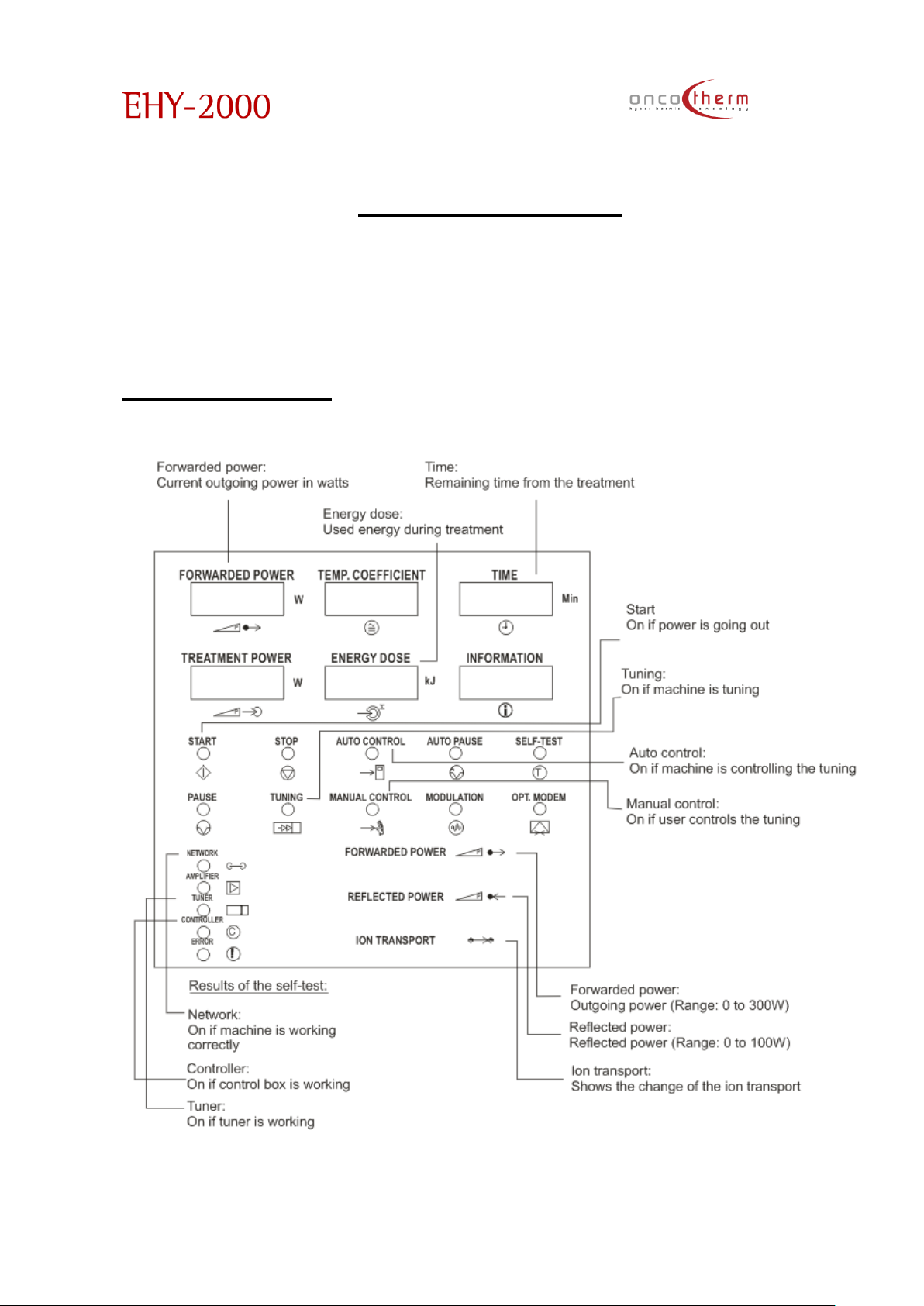
The Oncotherm EHY-2000plus is devoted to the high level requirements of modern
medical practice. The equipment is isolated from the common power-network for
safety purposes and supported by a specially developed software.
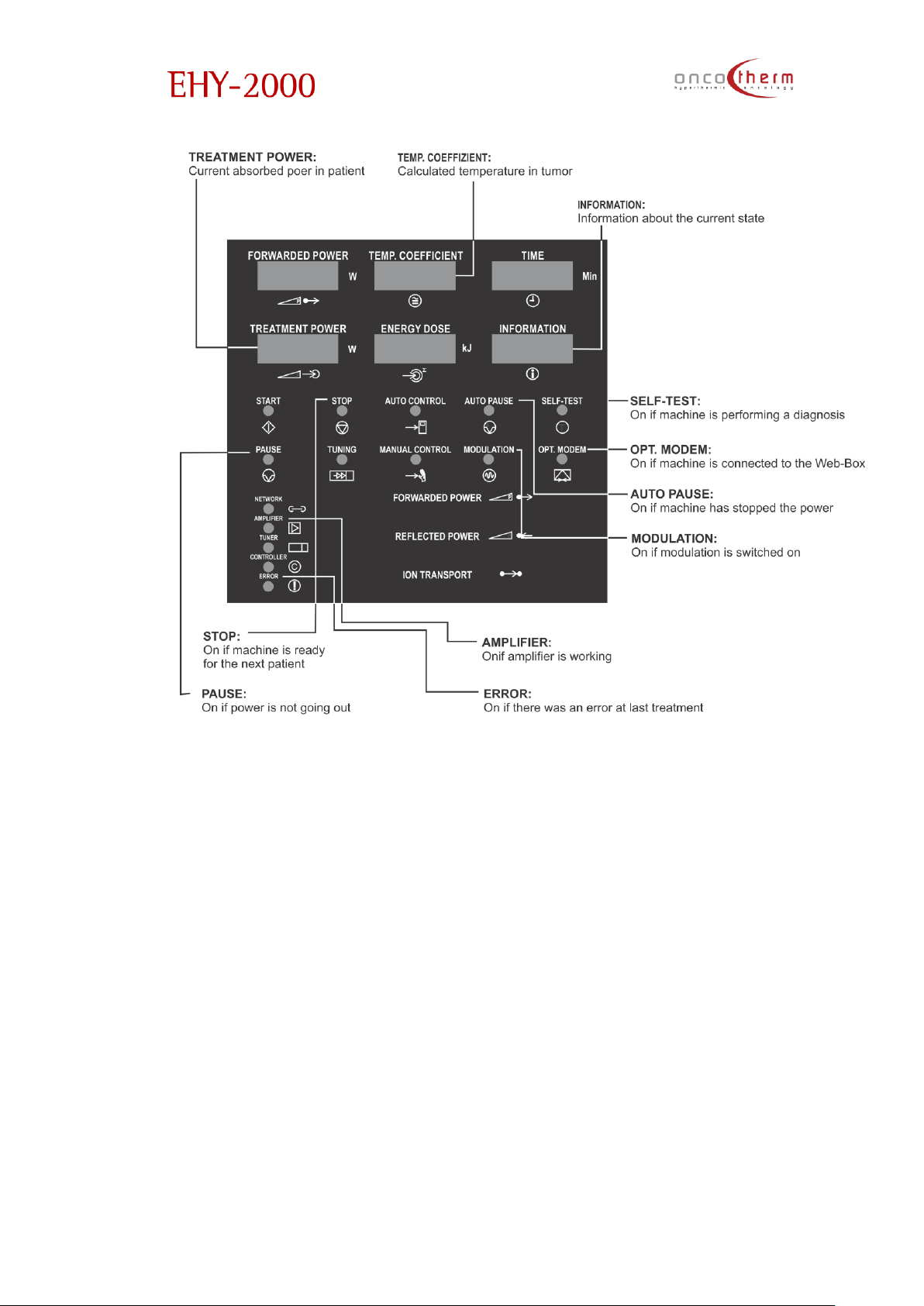
Display-EHY-2000plus
Page 23
plus
UM - EHY2000plus-R24
22
The “temperature coefficient” s equivalent with the static temperature, which does the same distortion which
is the actual distortion rate in the tissue. In this meaning the temperature coefficient is the parameterization of the
actual distortion rate in the tumor.
Page 24
plus
UM - EHY2000plus-R24
23
Page 25
plus
UM - EHY2000plus-R24
24
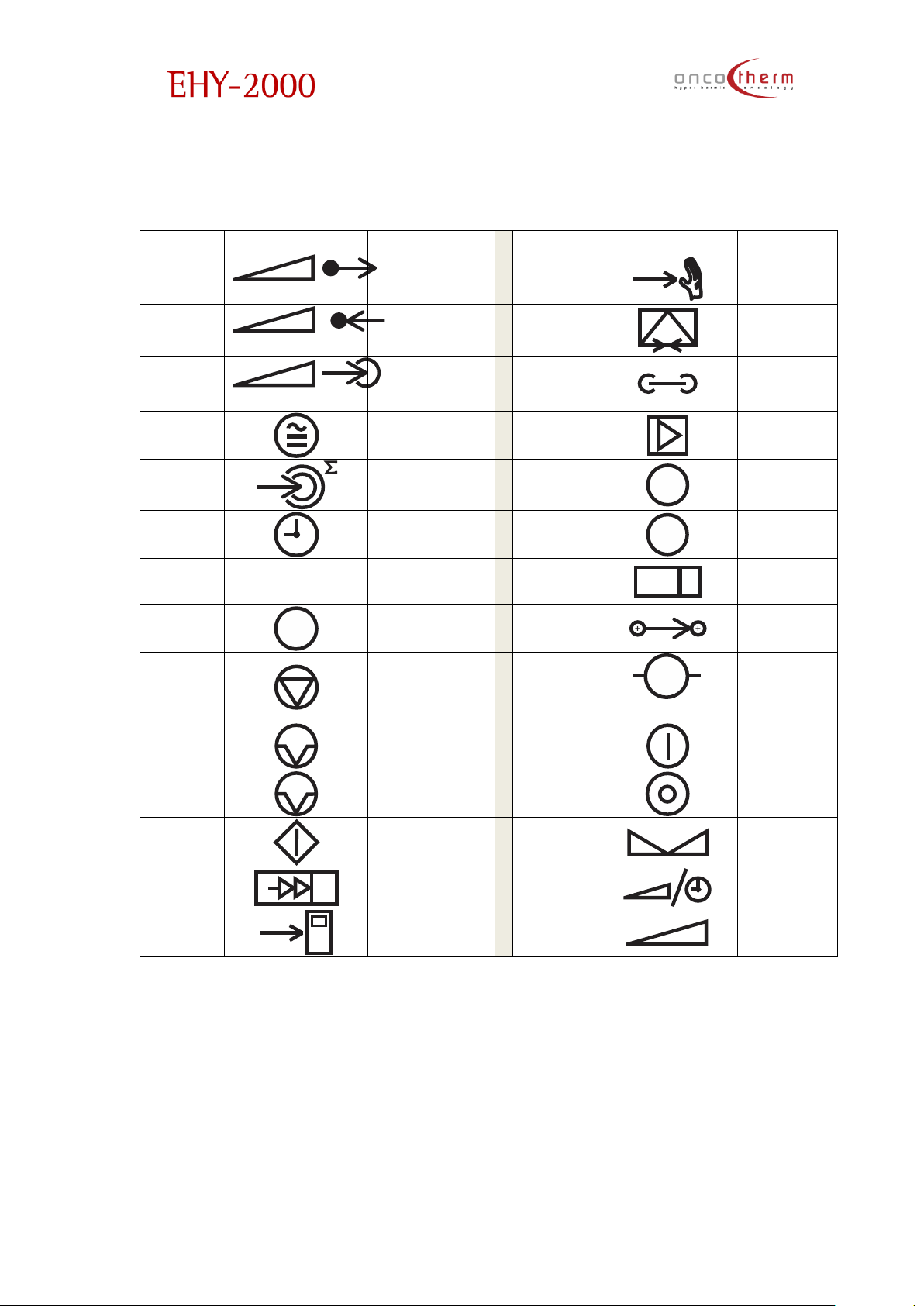
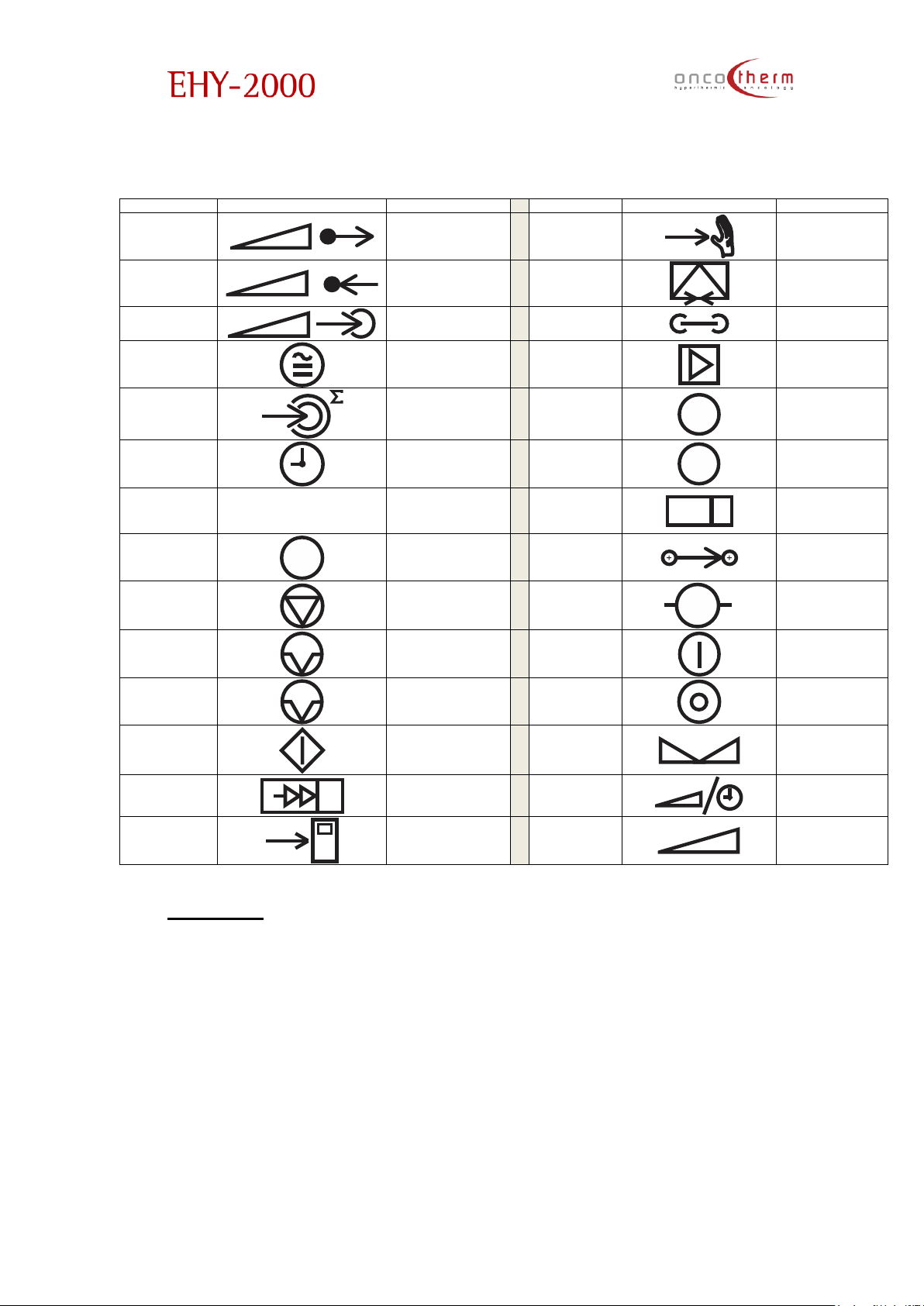
The actual denotations are:
German:
English German
English
German
Forwarded
Power
P
Leistungsabgabe
Manual
Control
Manual mode
Reflected
Power
P
Leistungsreflexion
Opt.
Modem
Opt. Modem
Treatment
Power
P
Leistungaufnahme
Network
Netz
Temp.
Coefficient
Temp. Koeffizient
Amplifier
Verstärker
Energy
dose
Energiemenge
Controller
C
Controller
Time Zeit
Error
!
Fehler
Information
Information
Tuner
Tuner
Self-test
T
Test
Iontransport
Ionen
transport
Stop Stop
Tuner
➔
M
Tuner
Pause Pause
Mains Netz
Auto Pause
A
Pause
Mains Off
Netz aus
Start Start
Set
S
Einstellung
Tuning Tuning
Select
Time/Power
P
Zeit/Leistung
Wahl
Auto
Control
Auto mode
Power
P
Leistung
Page 26
plus
UM - EHY2000plus-R24
25
Hungarian:
English
Hungarian
English
Hungarian
Forwarded
Power
P
Kiadott teljesítmény
Manual
Control
Kézi vezérlés
Reflected
Power
P
Visszavert
teljesítmény
Opt. Modem
Optikai Modem
Treatment
Power
P
Kezelési
teljesítmény
Network
Belső hálózat
Temp.
Coefficient
ECM hőmérséklet
Amplifier
Erősítő
Energy dose
Energia mennyiség
Controller
C
Vezérlő
Time Idő
Error
!
Hiba
Information
Információ
Tuner
Kézi hangolás
Self-test
T
Belső teszt
Iontransport
Ion transzportáció
Stop Leállítás
Tuner Motor
➔
M
Hangoló motor
Pause Szünet
Mains On
Hálózat be
Auto Pause
A
Automatikus szünet
Mains Off
Hálózat ki
Start Índítás
Set
S
Beállítás
Tuning
Automatikus
hangolás
Select
Time/Power
P
Idő/teljesítmény
választás
Auto Control
Automatikus
vezérlés
Power
P
Teljesítmény
Keyboard
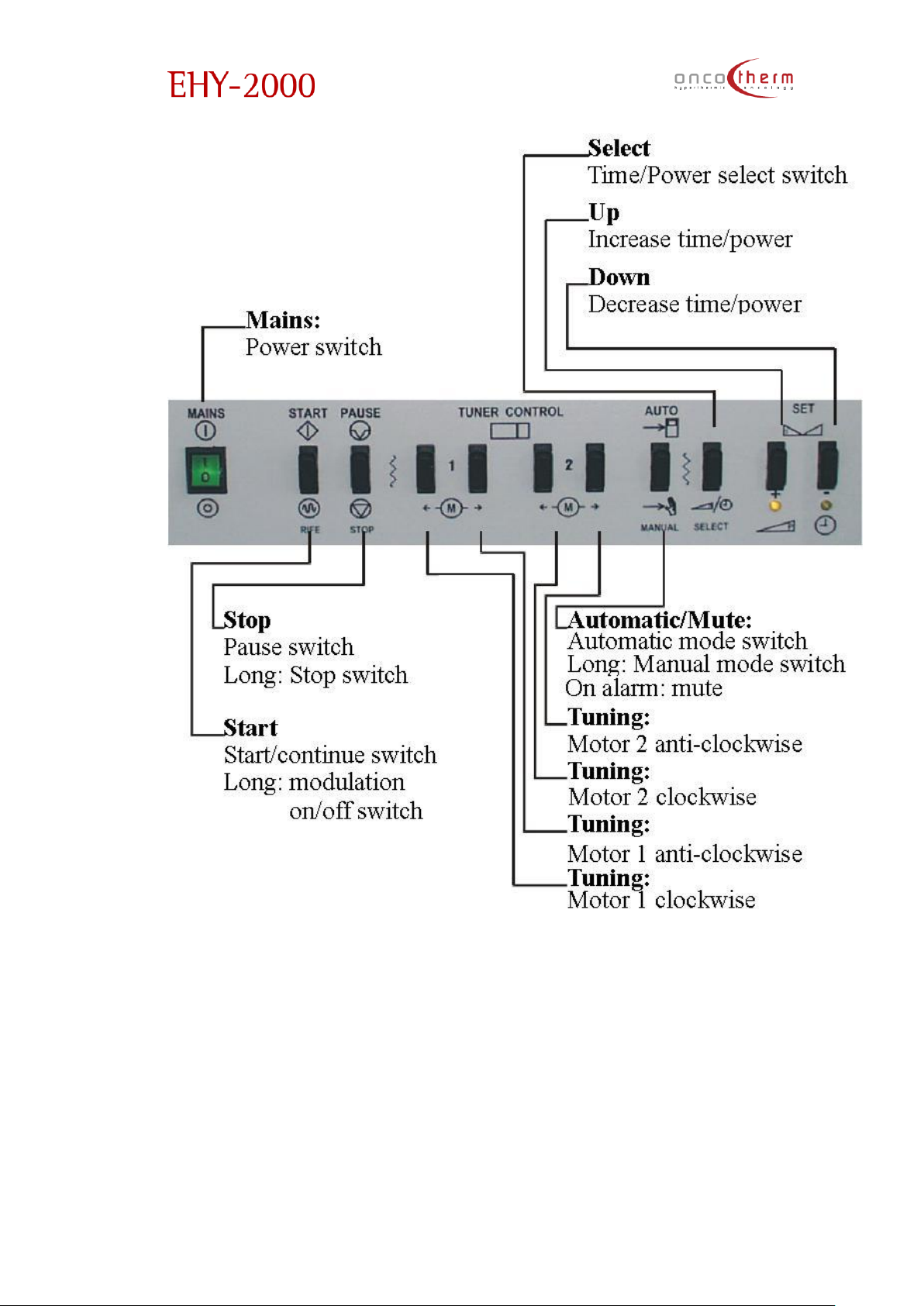
Some keys may have many functions depending on the actual mode of the
device.
Power: Here you can switch on and off the device. If the device is switched
on the switch should lighten up. Note: if an emergency button is pressed –
that is indicated by a red light on the front panel – then the device cannot
be switched on.
Start/ReTune: The treatment can be started by pressing this button. By doing
it, the treatment starts and an automatic tuning also starts to set the correct
Page 27

plus
UM - EHY2000plus-R24
26
parameters for the treatment. Pressing this button during the treatment will
start the retuning algorithm, to find a new tuner position.
Pressing the Start-button for a longer time changes the Modulation-mode.
(If it was off, then it will turn on, and if it was on, it will turn off.) Modulation
does not have any effect on temperature.
Stop: With this button you can pause or stop the treatment. If you only
pause the treatment, you can continue it later at where you left it, no
parameters will be changed. But if you stop it, then all the parameters will
be reset to their default value. The actual information will be stored only on
the computer (if any).
Press for a longer period to stop the RF power (treatment).
Pause: Press only for a short time to pause the treatment. RF power is
stopped.
Motor 1 clockwise: Rotate the first tuning motor clockwise. You should use
this only if you are an advanced user.
Motor 1 anticlockwise: Rotate the first tuning motor anticlockwise. You
should use this only if you are an advanced user.
Motor 2 clockwise: Rotate the second tuning motor clockwise. You should
use this only if you are an advanced user.
Motor 2 anticlockwise: Rotate the second tuning motor anticlockwise. You
should use this only if you are an advanced user.
Automatic/Manual selection
Automatic: Press for a short period of time to set automatic mode. In
automatic mode all limits are checked, and power is managed by the
attached computer. In automatic mode you can press this button shortly
when you reach 46°C-47°C on the E.C.M temperature and the alarm sound
will disappear. You can continue the treatment carefully.
• Manual: Press it for a long period of time to set manual mode. In manual
mode a lot of things are not controlled by the microcontroller.
Mute: Mute the device with this button if there is an alarm for high temperature
and temperature display flashes.
Power / Time selection: To select the function of the up/down buttons. This will
change from time to power or from power to time settings. The actual Mode is
indicated by a yellow Light at the Up/Down- Buttons
Up (+): You can change the actual time limit or power setting upward with this
button. The one you change depends on the power/time selection button.
Down (-): You can change the current time limit or power setting downward
with this button. The one you change depends on the power/time selection
button.
Page 28
plus
UM - EHY2000plus-R24
27
Display-WEY-2000plus waterbed
Control panel of waterbed
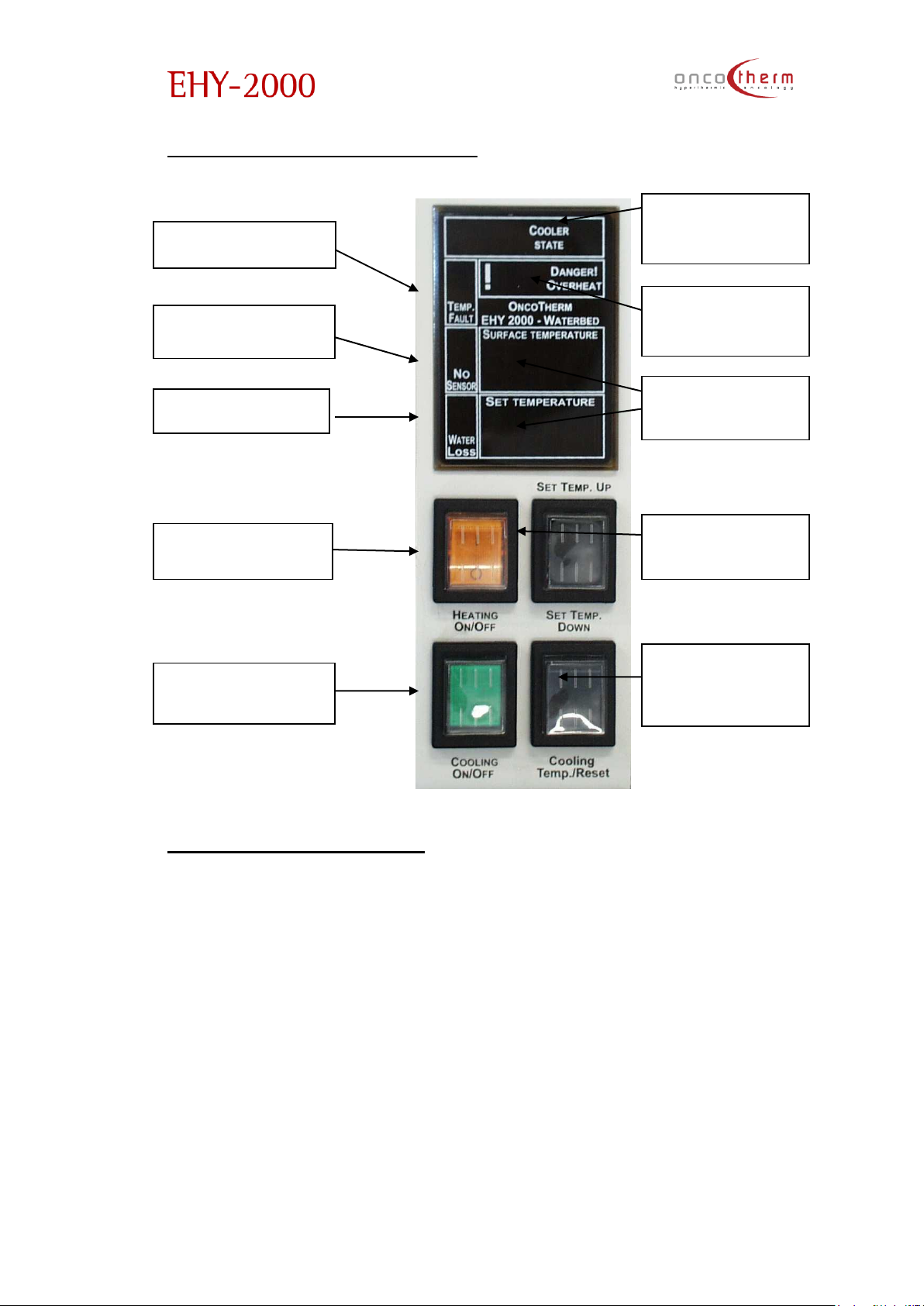
“Temp. fault” lamp: 1 yellow lamp shows if the temperature is not correct. It
alerts the user if the surface temperature differs with more than +/-1 ºC from
the setting in stabilized state.
“No sensor” lamp: 1 yellow lamp alerts the user if one or more sensors do not
function correctly. It can occur if the mattress is pulled out of its place.
“Water loss” lamp: It lights up if water flows into the wastewater tank (approx. 3
liters) from mattress. This tank is at the foot-end of the waterbed. The tank’s
capacity is 20 liters. If flowing is not stopped, water will appear around the
mattress. With wet mattress the treatment cannot be continued. It can be
dangerous for the patient. (Danger of burn)
“Heating power On/Off” button: To turn off and on waterbed heating. The
lamp is yellow when the operating power is on.
Temp fault lamp
No sensor lamp
Heating power
On/Off
Cooling power
lamp
Temperature
displays
Water loss lamp
Danger!
Overheat lamp
Cooling
temp/Sound
reset
Set temp
Up/Down
Cooler status
display
Page 29

plus
UM - EHY2000plus-R24
28
“Cooling power” lamp: It lights up when the EHY power is on and cooling unit is
working.
“Cooler state” display: It warns the user if there is a problem with the cooling
unit. If the display does not show any code (--), there is no error.
“Danger! Overheat!”: 1 red lamp alerts the user if the mattress temperature is
over 38 °C.
“Temperature displays”: 3 digits for actual surface temperature + 3 digits for set
temperature (xx.xºC)
“Set temp.” “Up” and “Down”: One push of a button changes temperature
with only an unnoticeable fraction of a degree, so push the button longer to
see the change on the display. You can also use this button for “sound reset”
after switching on the device.
“Cooling temp./ Sound reset” button: By pressing this button the display shows
the actual temperature of the cooling water. In case of error, this button clears
sound warning for maximum 8 minutes if the error is simple one. In case of
serious errors, when treatment could be dangerous, the sound cannot be
muted.
Tuning
The EHY-2000plus has a special radio frequency generator, which must be
carefully tuned to the patient. If it is not done, the energy released from the
device (in the form of radio frequency) will not heat the patient, but will be lost
in the air, cables, and in the internal electronic parts. The tuning is the most
important way of the personalization of the device and guarantees the best
achievable effect for the patient.
A good tuning means that the outgoing power from the device is mostly
absorbed by the patient and not reflected. In case of proper tuning the
patient becomes a part of the resonant electronic circuit. (Reflected power is
minimal and useful power is near the forwarded power.)
If the machine is not able to get into a correct position, up to a specified time,
then it will restart the tuning from a given position. This is done three times. If
during this procedure the proper tuning cannot be established, the device
stops and resets the parameters. In this case please try to change the position
of the electrode and then restart the tuning again.
Page 30

plus
UM - EHY2000plus-R24
29
Preparation before treatment
The treatment starts with the preparation of the patient for the actual
treatment through medicine and psychological attention. After the treatment
immunology support is suggested.
The most optimal electrode has to be chosen for the treatment. For the
suggested electrodes see Appendix 3. For smaller solid tumors, a small
applicator is suggested. Note that a small electrode with the same output
power has proportionally larger electric field surface. Do not forget about the
disinfecting the electrode before every treatment. For disinfection see
instructions in the technical description part.
The electrodes have to be positioned on the tumor area with the best
overlapping.
The waterbed offers comfortable feeling only if its temperature suits the
patient’s sensitivity. For this reason the water is preheated. It needs a few hours
to warm up such an amount of water, so switch on the heating minimum 12
hours before starting the treatment, but it is better to keep the heating
continuously on. To comply with the room temperature better, the heating
levels can be set to adjust the comfort. The required temperature of the
surface of the waterbed is adjustable with the buttons placed on the display
from the Menu. Follow the instructions displayed in the appropriate menu
point. The actual setting is displayed continuously.
Between treatments - for a few hours – do not switch off the waterbed
heating. For a longer period – 10…30 hours – set a low temperature, but do not
switch it off. If the equipment is not in use for a longer time period – e.g. to
store – do switch off the heating.
Please check before every treatment:
• water in bed: by pushing the mattress, it must be filled correctly
• vapor/water wet surfaces: sides and bottom of the mattress must
be dry (some moisture is possible)
• water in the cooling system: as well as with the other bed, the
electrode’s cooling water tube must be filled with water.
After half a year of use the water should be changed in the bed. If water-loss is
observable, call the service.
Page 31
plus
UM - EHY2000plus-R24
30
Device use
Starting the device
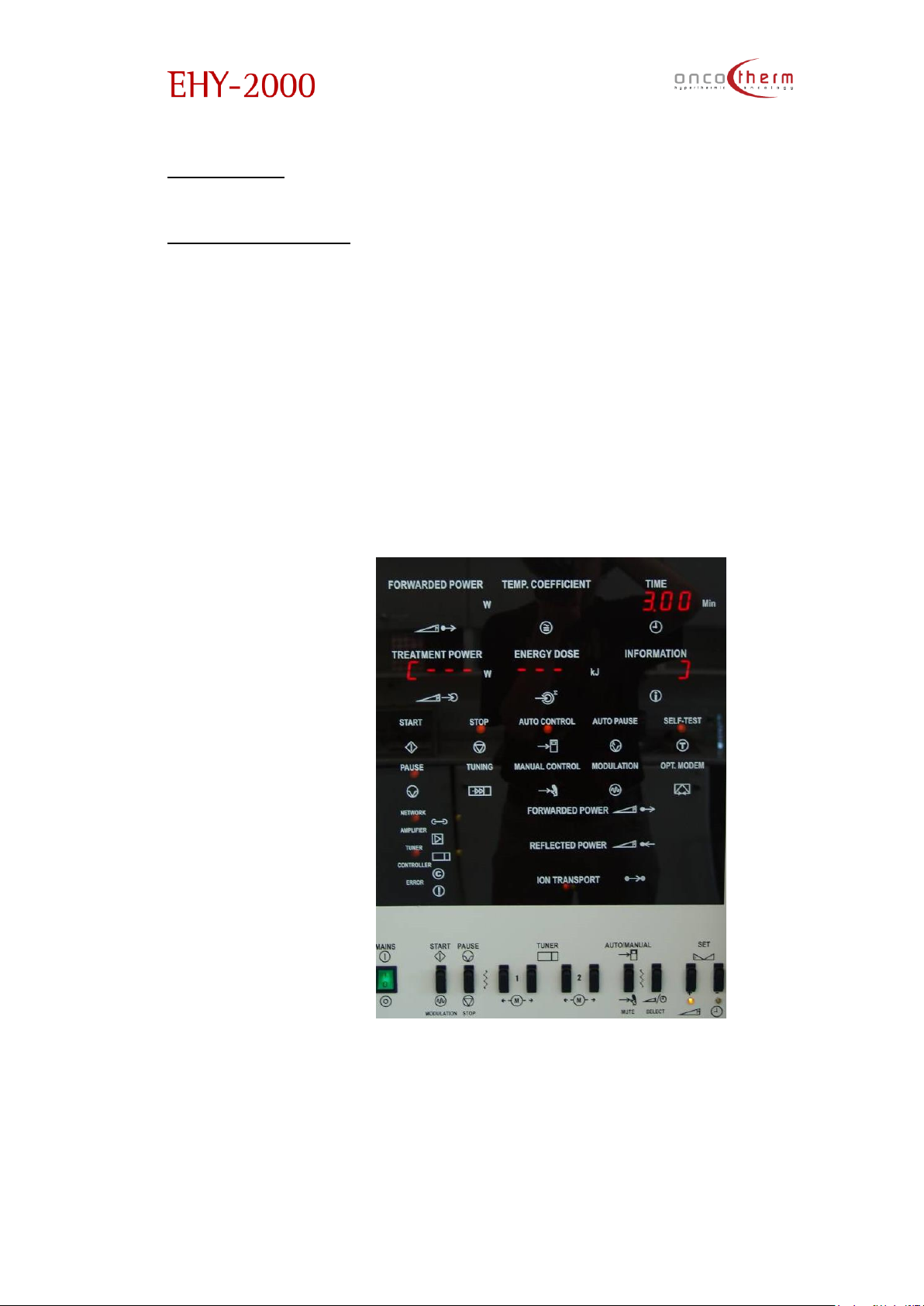
Switch on the device (power switch). If the Emergency Stop was pressed
before, you have to free the emergency stop button first from its fixed position
by pulling it out entirely, because as long as it is fixed you are not able to turn
the power on. The emergency blocking status is indicated by a light in the
center of the front of the device. Emergency blocking status is also indicated
with an alarm signal.
After switching the power on, the machine will start a self-test procedure
and to positionauto-matching to the calibrated start (reference) position.
During the self-test a line can be seen on the displayindicating the progress of
the self-test.
During the self-test procedure the emergency buzzers will give sound
signals (all the three main units must give the signal) for testing purposes. If you
cannot hear these testing sound signals, please report it to the OncoTherm
service team.
Page 32
plus
UM - EHY2000plus-R24
31
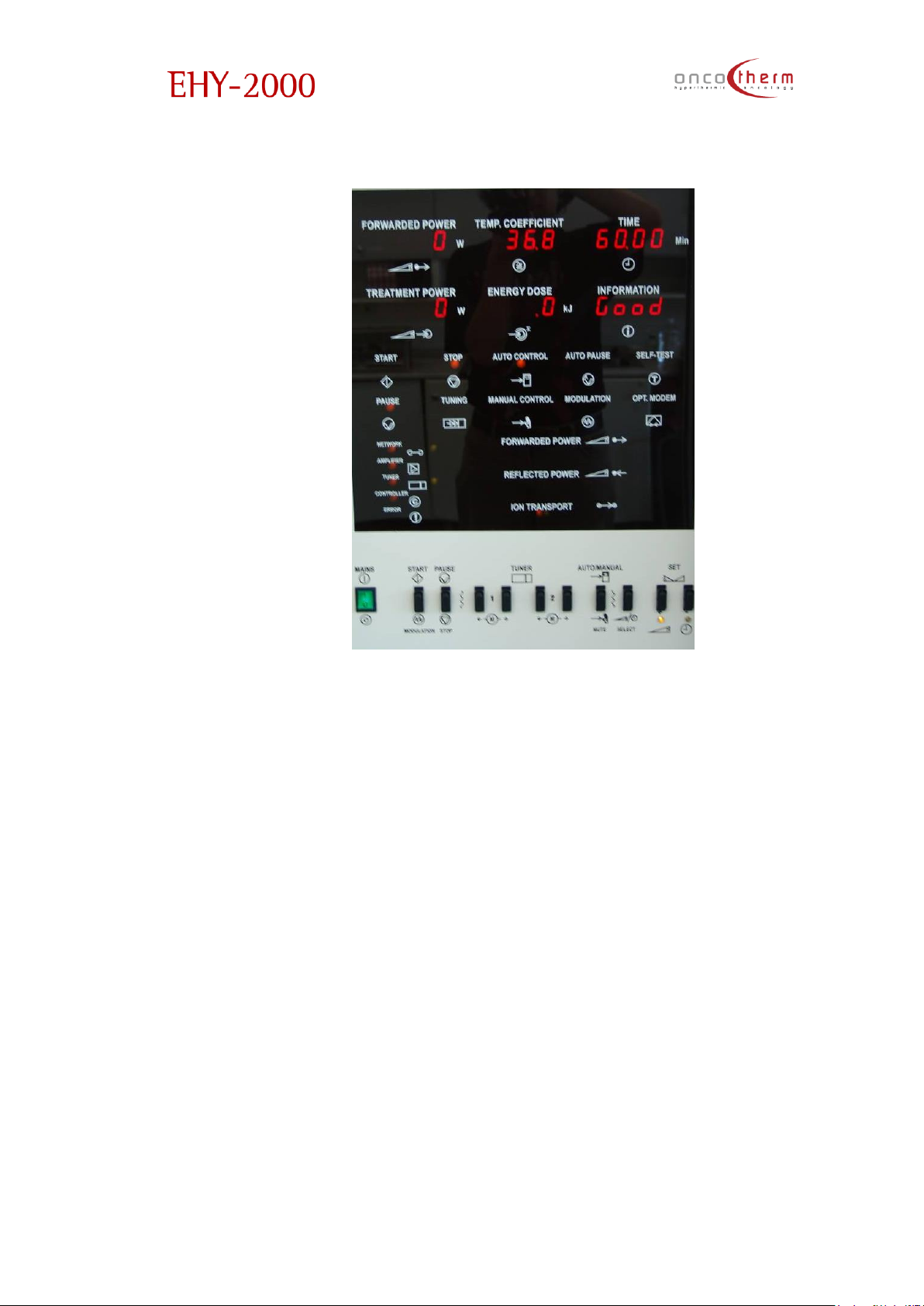
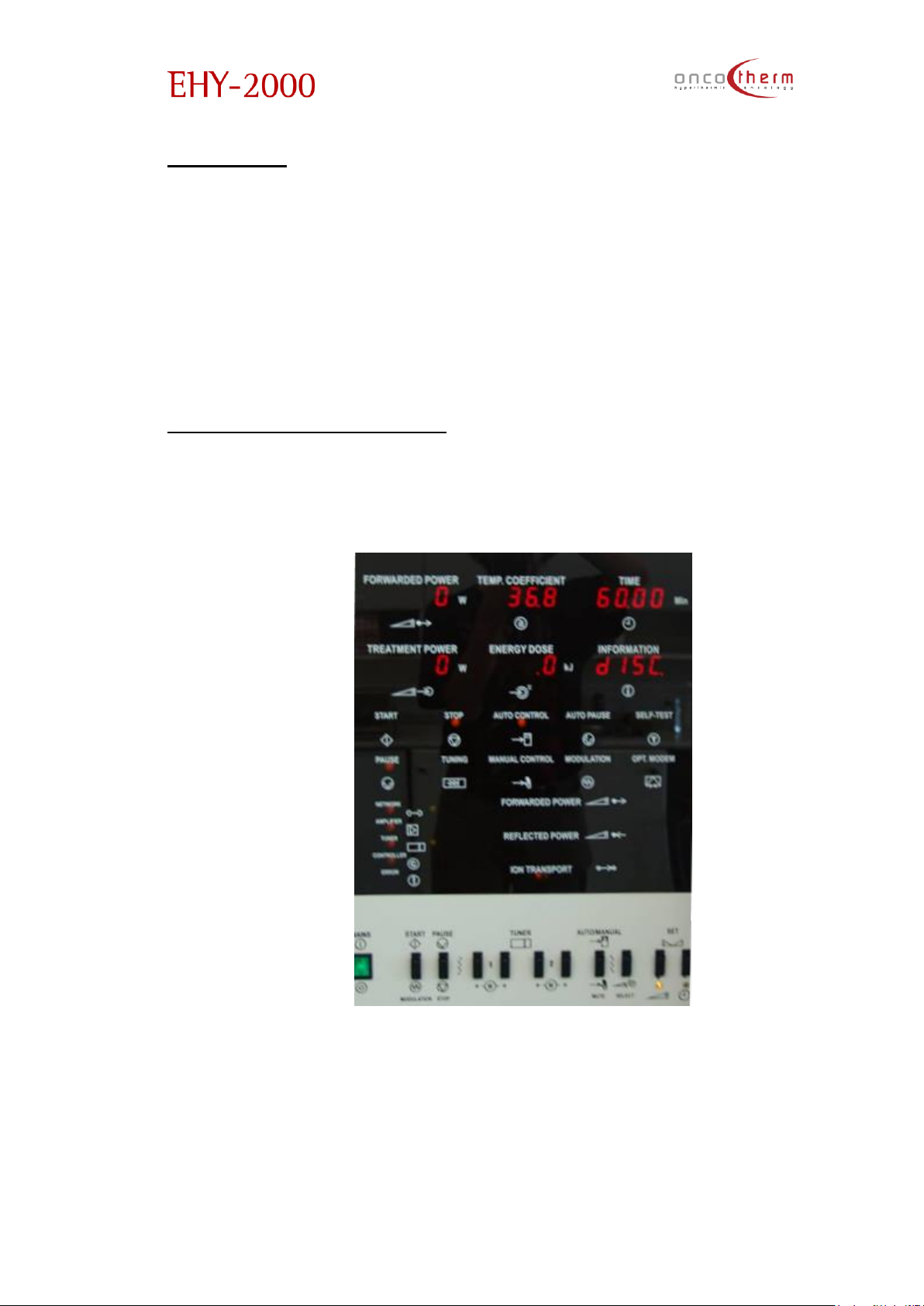
After the self-test procedure you will get the “GOOD”- message in the
info window.
Now the device is ready for use. (Remark: The waterbed for proper treatment
must be on heated state.)
Page 33
plus
UM - EHY2000plus-R24
32
Doing a treatment
• The patient lies down in the bed in a comfortable position. Note that the
patient has to keep this position during the whole treatment process, so
please take care of the proper arrangement. Place the applicator on
them on the area intended to be treated.
Important: Please remove all the metallic things from the treated patient.
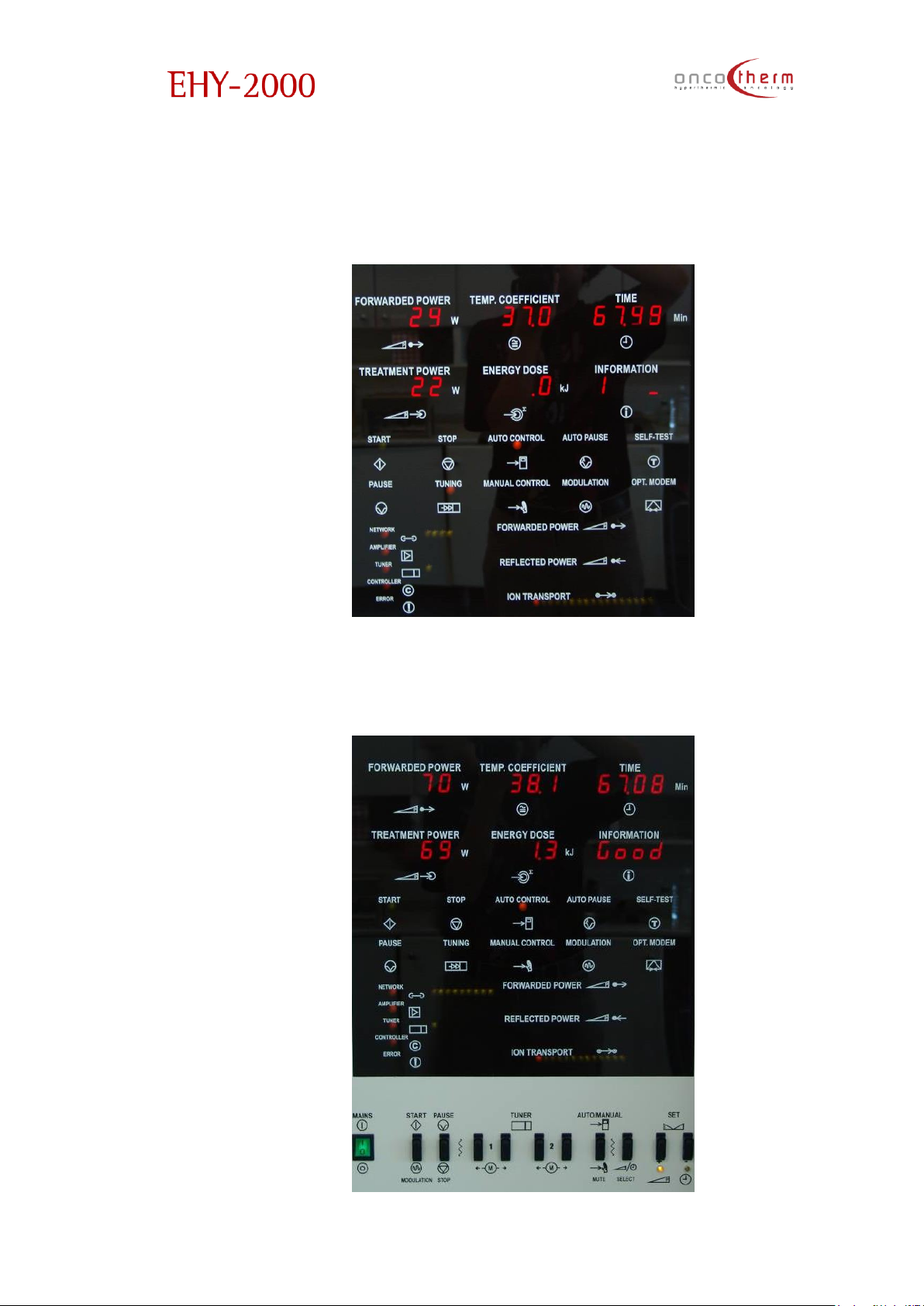
• You have to set the desired treatment parameters, such as treatment
time, treatment power and modulation. This can be adjusted by the
attached computer, or by the switches on the device. The adjusted
parameter can be chosen by the Select button and can be set by the
Up and Down buttons. The set time is indicated continuously, but the set
power is indicated during the setting process, normally the actual
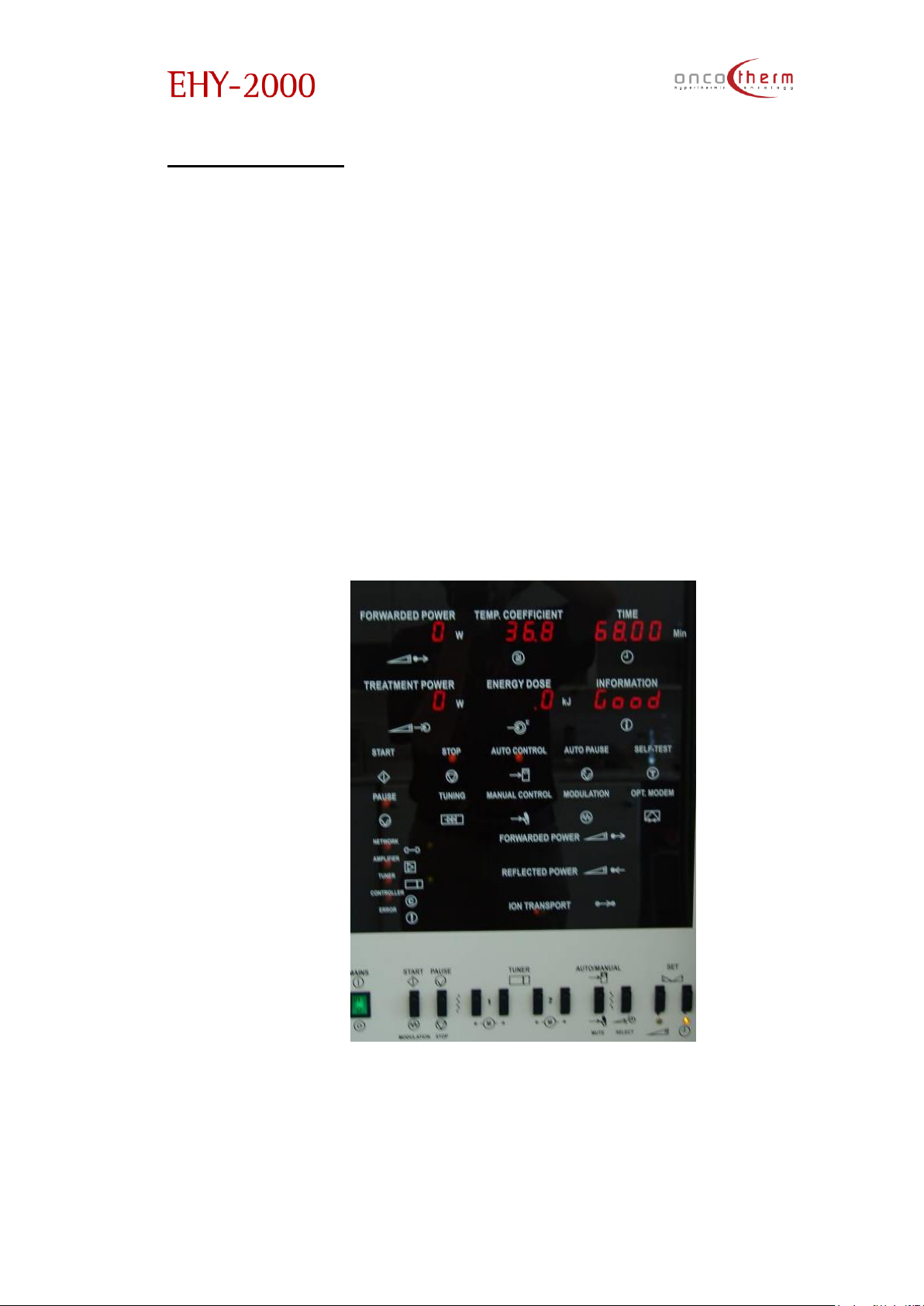
outgoing power is indicated. The following picture is taken during the
treatment time setting. Note the LED under the Up/Down buttons, which
indicates the currently adjusted parameter.
Page 34
plus
UM - EHY2000plus-R24
33
• To start the RF power output (treatment), just press the START button.
After the start the device tunes to the patient at a low power level. The
tuning motor movements are indicated on the display in the Information
point.
If the tuning is successful, the device increases the power to the set level. The
successful tuning is indicated by the small (few watts) difference between the
forwarded and treatment power.
Page 35

plus
UM - EHY2000plus-R24
34
If the tuning is not successful within 90 seconds, the device will indicate it with a
sound signal and the “Error” LED will be blinking until the tuning is not
successful. In this case the electrode should be re-positioned to reach a better
electrical contact with the patient.
• To pause the treatment for any reason (for example: to give an
injection) press the STOP button for a short period of time. Then you can
continue the treatment by pressing the START button again.
• If you have finished the treatment, stop the device by pressing the STOP
button for a longer period of time.
Note: Some patients may need some relaxation after the treatment.
Switch off the device
Before you switch off the device it is suggested to finish the treatment
completely (stop it and do not pause it). After the complete stop, please wait
a few minutes before the complete shut - down to make it possible for the
internal cooling to cool down the important electronic parts in order to make
their lifetime longer.
After this, switch off the device by the mains switch.
Page 36
plus
UM - EHY2000plus-R24
35
Time-meters
On the front of the device a counter shows the overall running time. This
information is for service purposes.
On the front of the device another counter shows the summarized
treatment time. This is for controlling of the active time of the device.
Treatment cannot be provided (device is blocked automatically) in
case of any manipulation or damage of the time-meters.
Warning and error messages
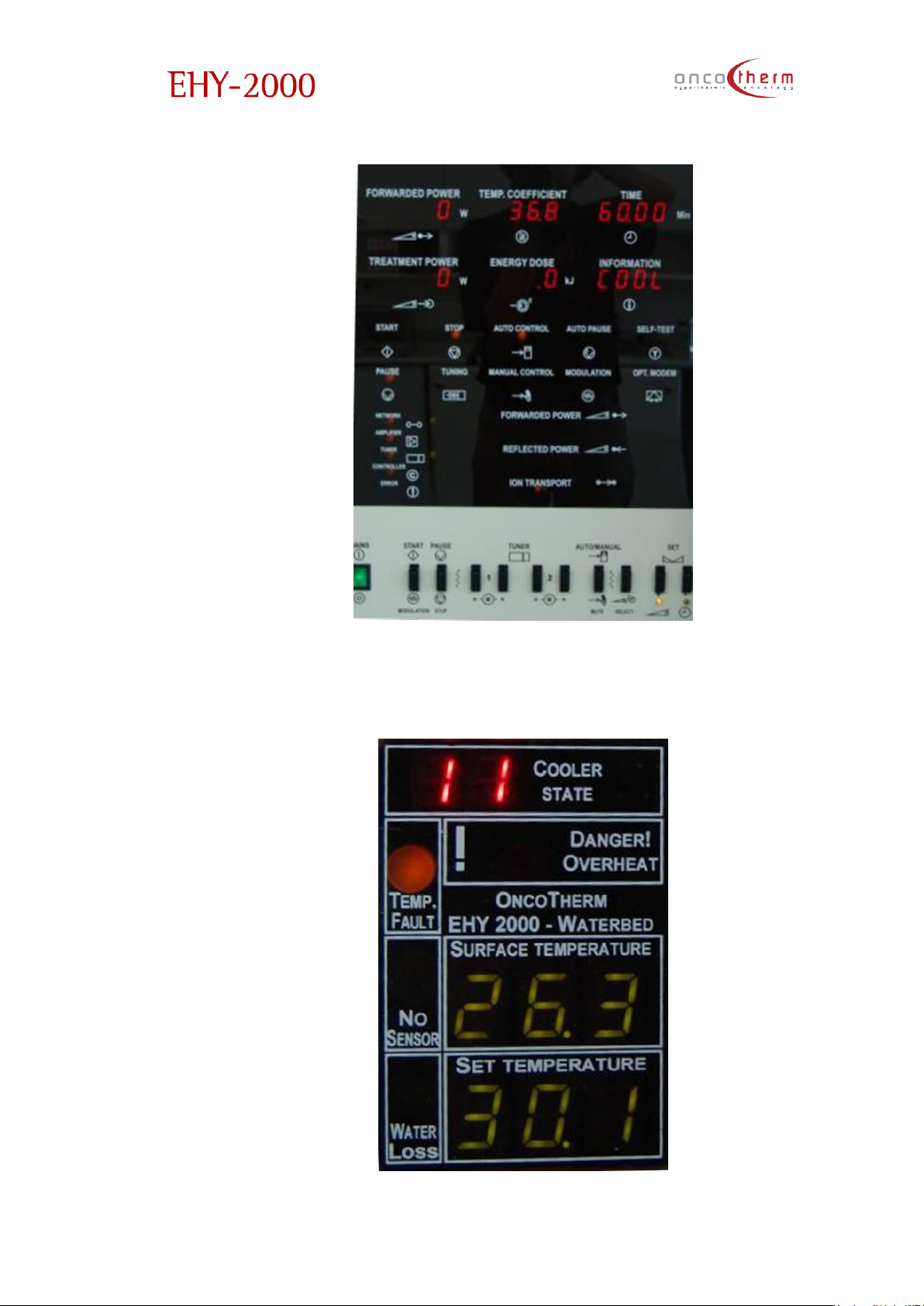
The treatment cannot be started when an electrode is not connected, the
device indicates the lack of electrode by continuous sound alarm and “Disc”
text on the display
Note: the electrode must be connected continuously during the self-test
procedure. Do not disconnect the electrode during the self-test, because it will
cause an error of the self-test.
If the electrode cooling system has an error, the device indicates it by “COOL”
text on the display.
Page 37
plus
UM - EHY2000plus-R24
36
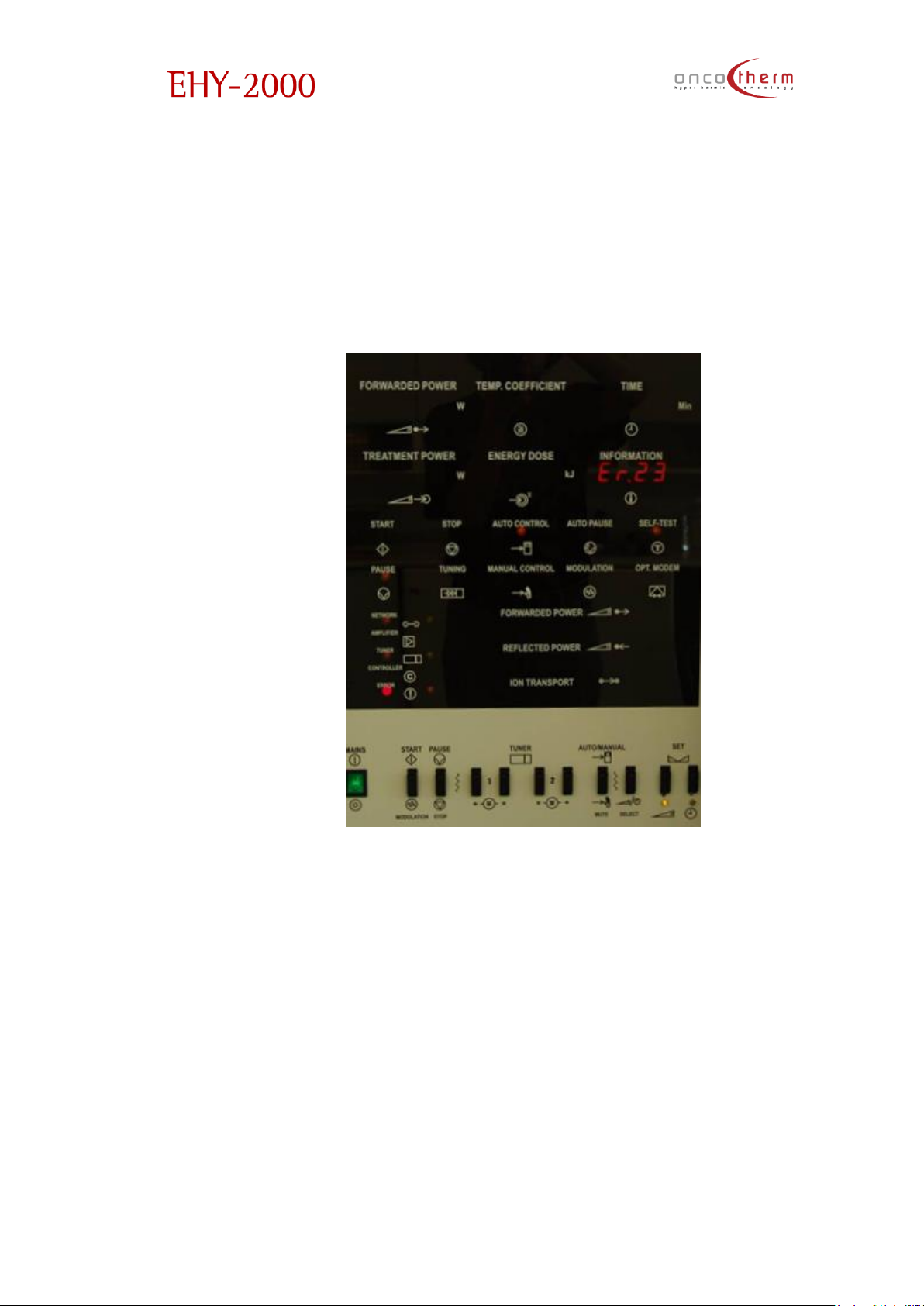
The error codes indicating the error exactly can be seen on the waterbed
display at the “Cooler state” point. Please forward these error codes to
Oncotherm to ease the maintenance of the device.
Page 38
plus
UM - EHY2000plus-R24
37
Note: most of the cooler errors are not critical, that is why the cooling errors do
not block the treatment, but then the treatment needs extra care because of
the lack of the electrode cooling, and the treatment power should be
reduced, especially with the 10 cm electrode.
If the device finds an error during the self-test, it indicates that by continuous
alarm signal and an error code will appear on the display.
These errors are critical and the device cannot be used in these cases. If the
error remains after a restart, call the Oncotherm service and report the error
code to ease the repair of the device.
Page 39
plus
UM - EHY2000plus-R24
38
The Usage of the Web-box
Purpose
The purpose of the Web-box is to have a “database management” in any
hospital owned system. Due to the fact that every hospital has its own
management system, our system has to support all (or most) of them. This
facility has been achieved through the conventional web protocol (HTTP)
because nowadays this protocol is supported by every computer and
operating system.
This way the physician and the hospital’s administration staff have the
possibility to control, check and download information from the EHY-2000plus.
System structure
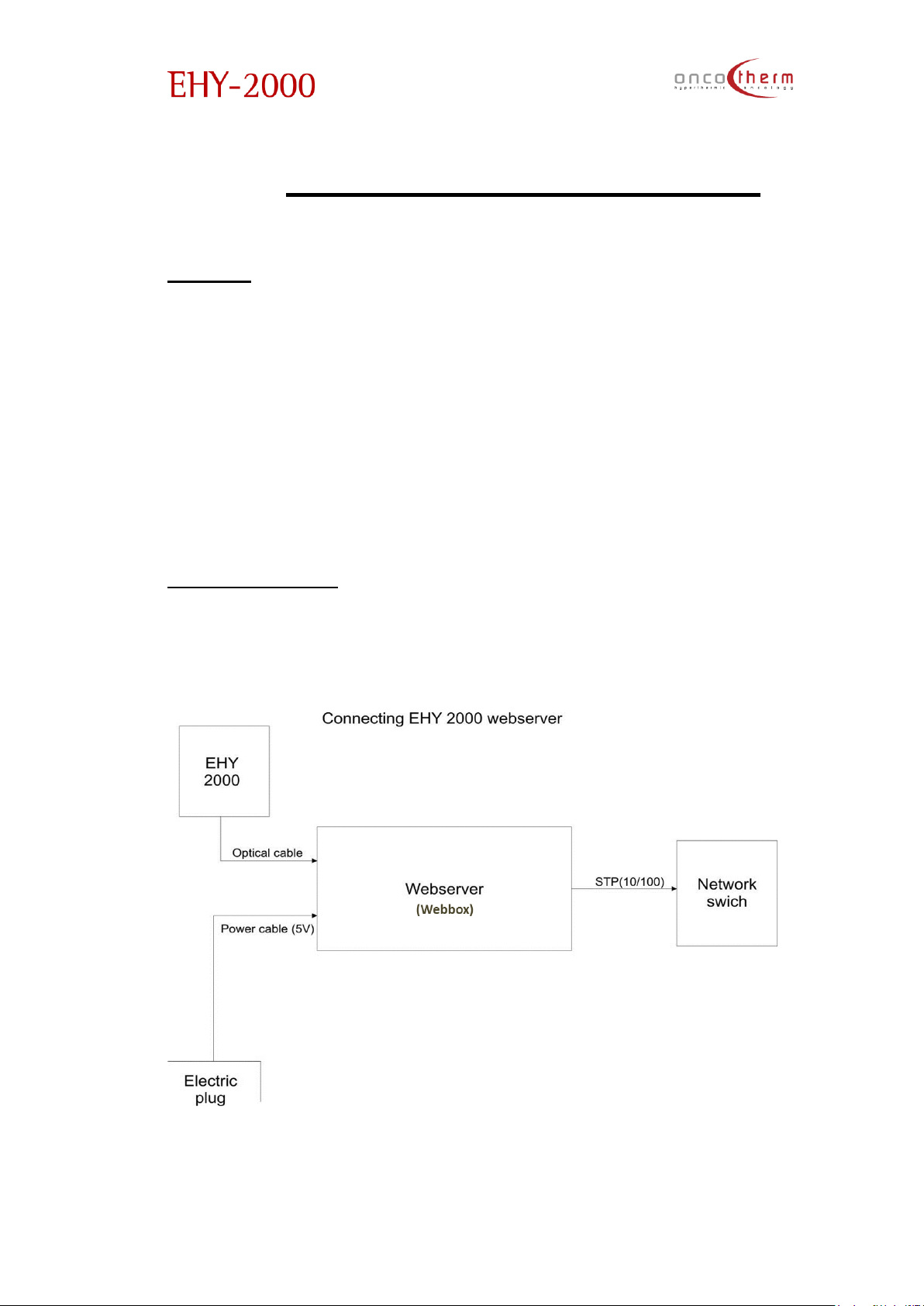
The installation structure of the Web-box for the EHY-2000plus can be
represented as shown below:
The Web-box should be placed outside of the patient environment.
Page 40

plus
UM - EHY2000plus-R24
39
Usage
The Web-box is really easy to use. It looks like a common page on the internet.
Write the number of the web server (by default it is 10.0.0.235) into the address
bar and you are led to the opening page of the web server.
In case your system has a DNS server internally, you can add the IP address to
your system and it is possible to refer to the device as a name and not as an IP.
In the following there are some examples how to achieve different major tasks.
Later on you will find the description of the different web pages.
Starting the Web
1. Start your web browser (for example click on the Microsoft Internet
Explorer icon, Mozilla Firefox, Google Chrome, …) to enter the web
viewing.
2. Type in the IP address of the EHY-2000plus device (by default it is
10.0.0.235) or select the shortcut function to the device if it has
already been inserted by our service technician.
3. The EHY-2000plus device opening page should come up in your
browser in a few seconds.
Logging in and the Main menu
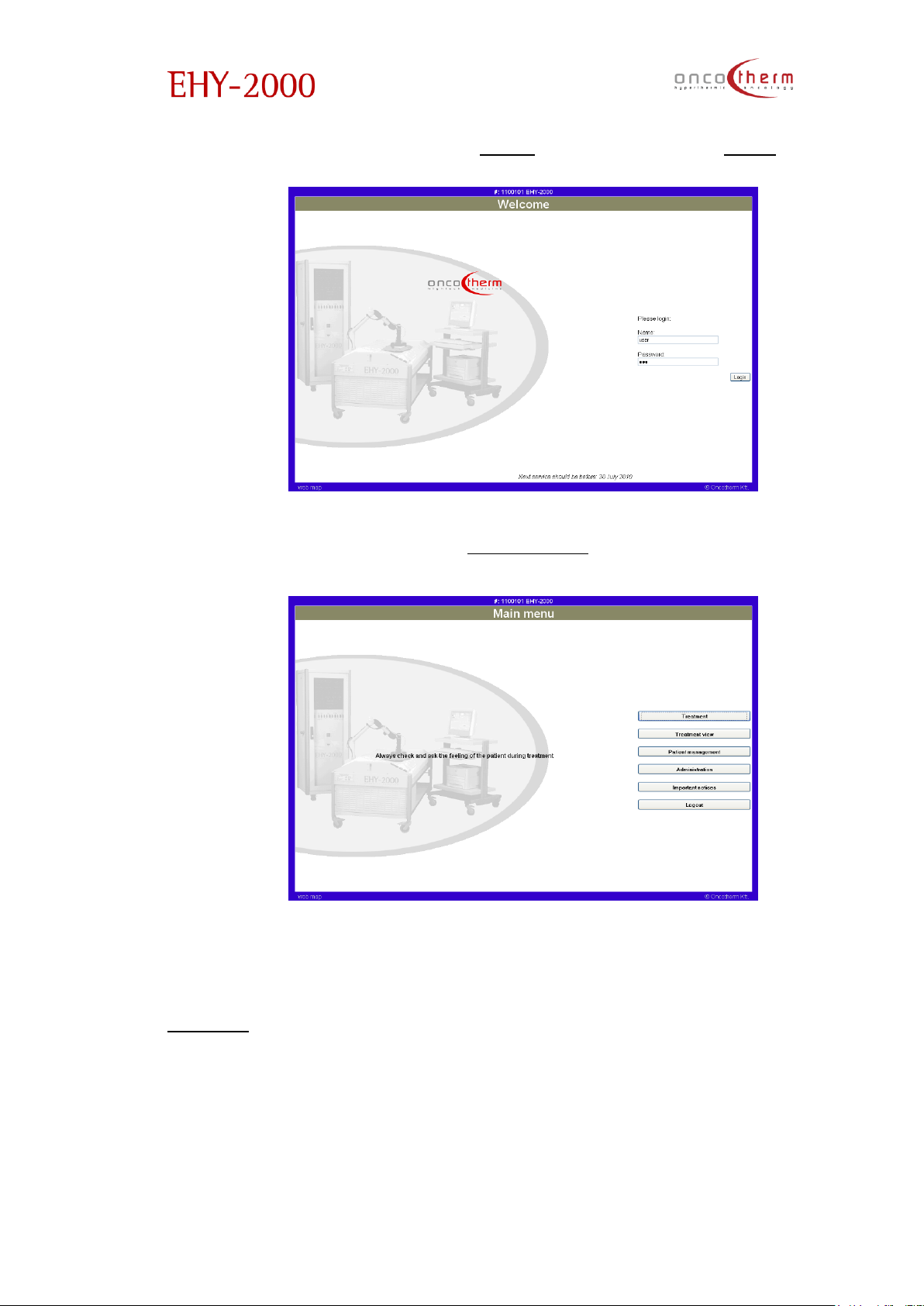
1. Click on “Login” (or on the Oncotherm logo) on the opening page.
2. Type in your name and password in.
3. In case your name and password are correct and the computer is
certified by the web server, you will be allowed to enter the main menu.
4. Note: Every device has its own frame color and serial number. Please
always check that you control the device you want to select!
Page 41
plus
UM - EHY2000plus-R24
40
5. By default your user name is “User” and the password is “EHY”.
After logging in you will enter the “Main menu”.
In the menu you can choose from the different tasks which are possible to
manage or to see. This menu includes e.g. test results, treatment control,
patient management and important medical notes. By clicking on the
“Logout” button you can end the use of the software.
Page 42
plus
UM - EHY2000plus-R24
41
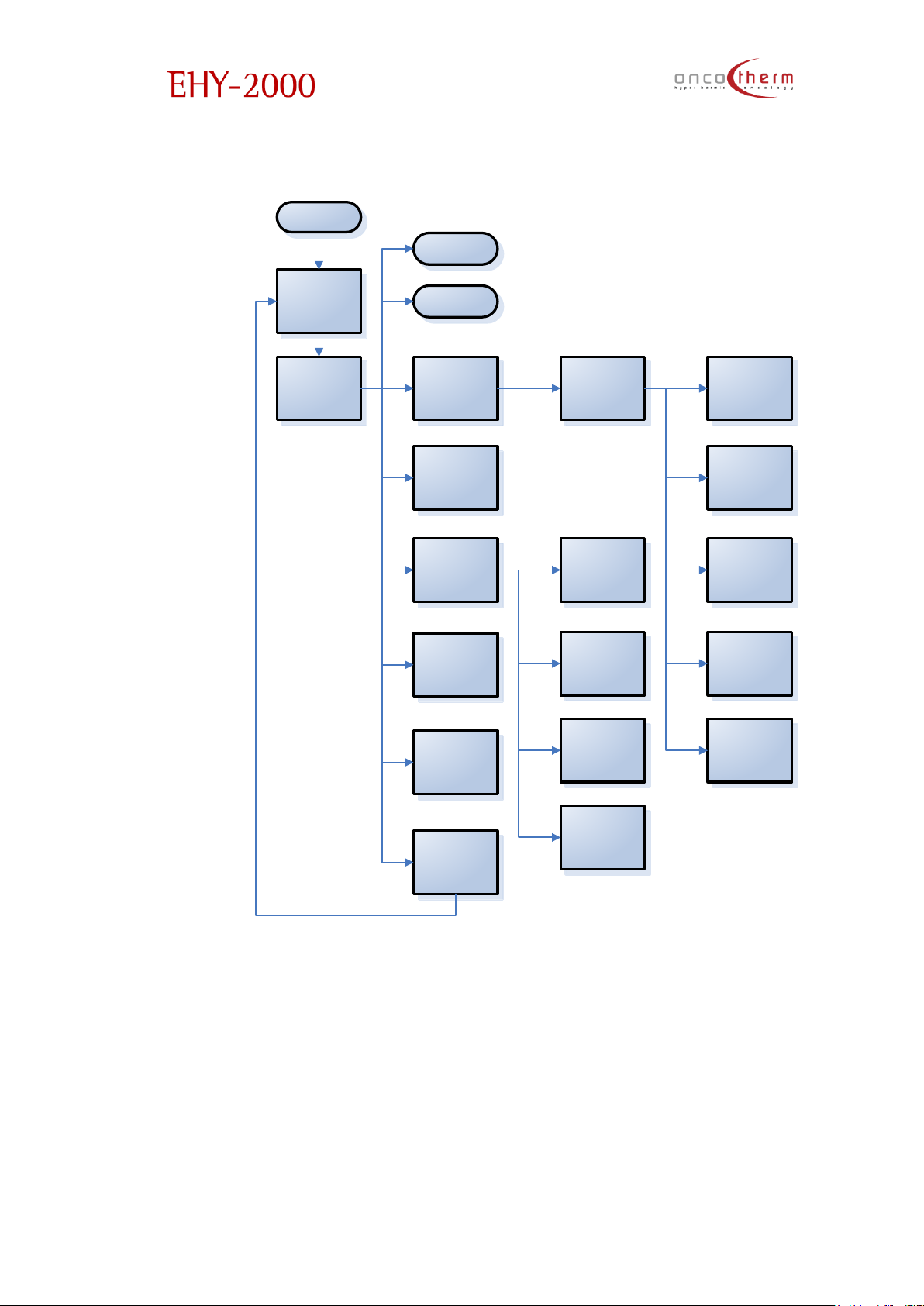
On the following diagram you can see the structure of the program.
Login
Start
Main menu Treatment
Treatment view
Patient
management
Administration
Important notices
Logout
Set time
Set power
Change patient
Select patient for
treatment
Retune
Set modulation
Add patient
View patient log
Edit patient record
(Un)active patients
Oncotherm.org
Webmap
Page 43
plus
UM - EHY2000plus-R24
42
Treatment menu
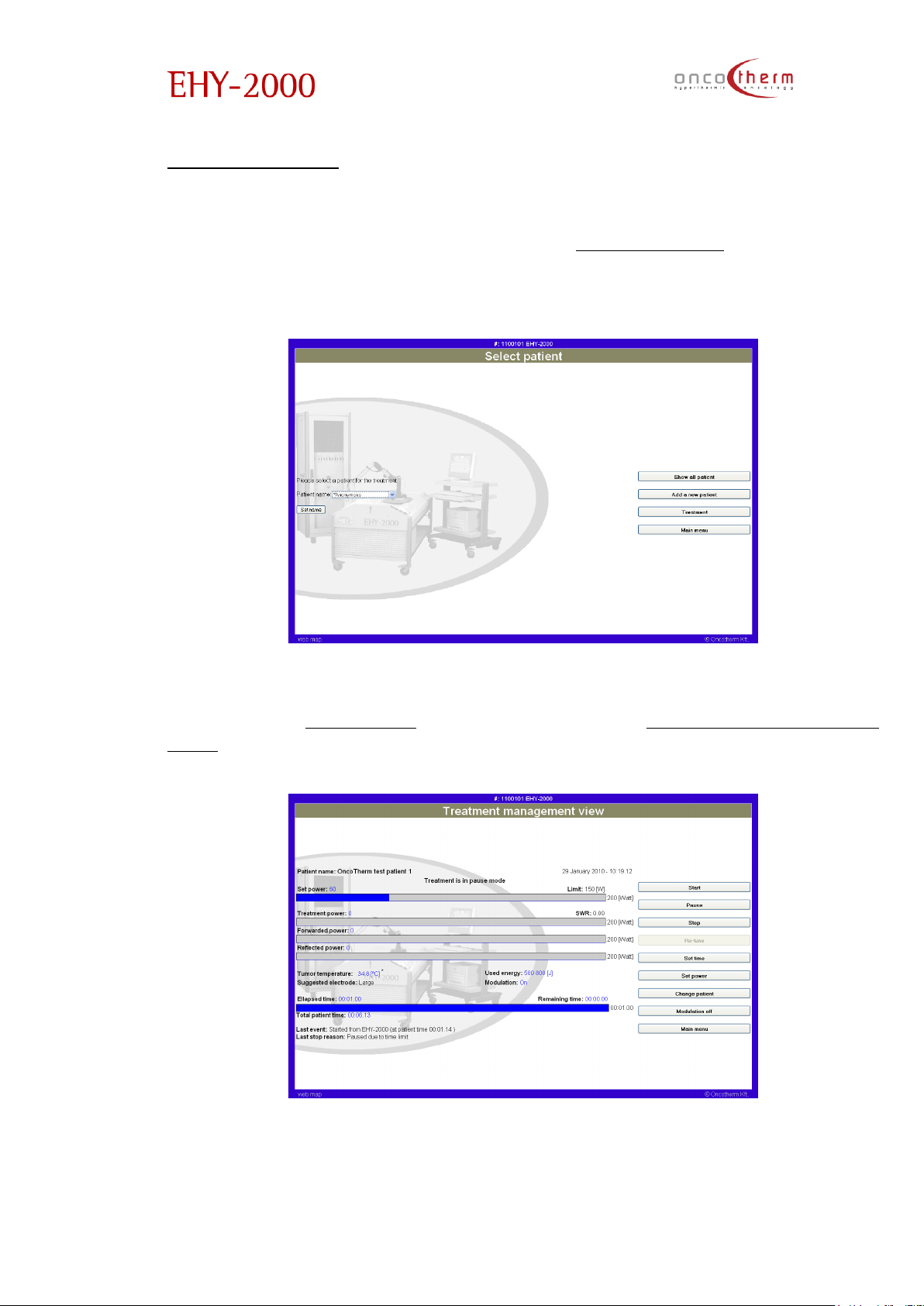
The main function of the Treatment menu is the control of the device. Entering
the treatment menu you will get onto the „Select patient” page. Here the
patient’s name can be set from the predefined list on this screen or add a new
patient (this option leads you to the Patient management menu).
By clicking on the “Set Name” button you can select the patient and by
clicking on the “Treatment” button you will enter the “Treatment management
view” screen.
Page 44
plus
UM - EHY2000plus-R24
43
You can set the parameters of the treatment:
• treatment time by the „Set time” option
• treatment power by the „Set power” option
• turn on or off the modulation of the power by the „Modulation
on/Modulation off” button (the text of the button depends on the
current setting)
These parameters are changeable during the treatment too.
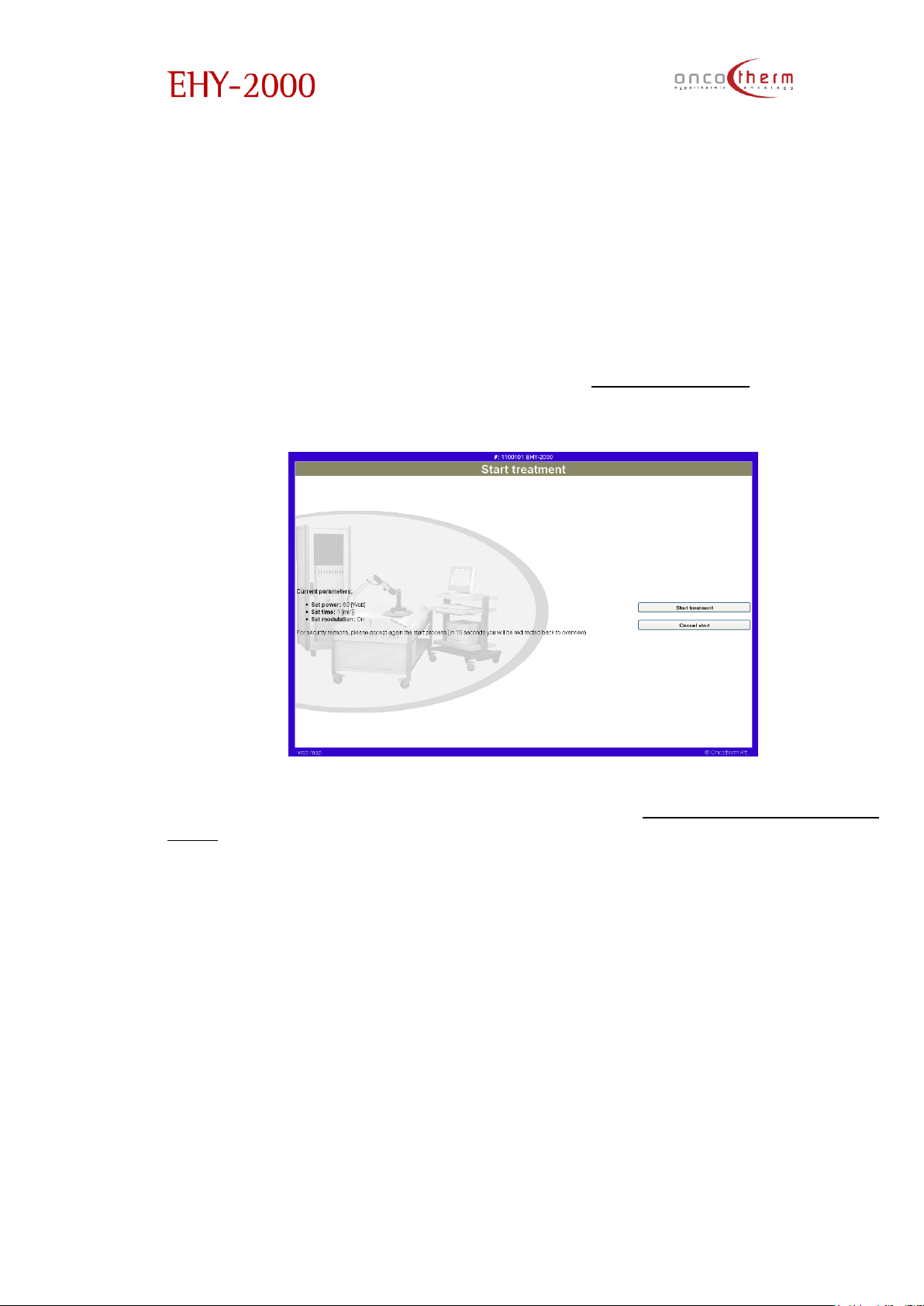
By clicking on the „Start” button you can start the treatment, but you have to
reconfirm it on the automatically appearing „Start treatment” page, where
you can check the set treatment parameters.
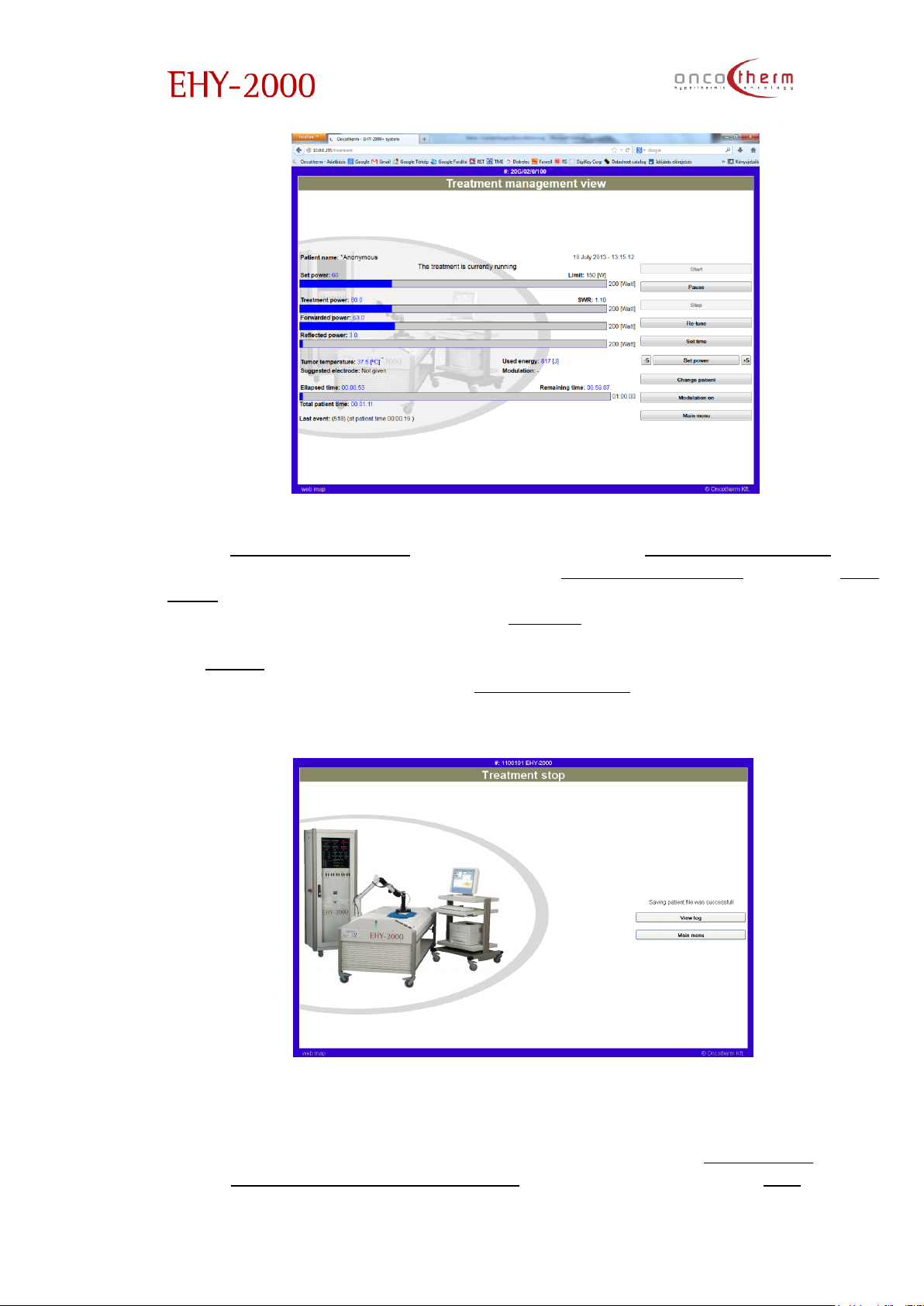
After the reconfirmation you will get back to the „Treatment management
view” screen (see previous page), where you can check the parameters of
the treatment:
• Set power
• Treatment power
• Forwarded power
• Reflected power
• Elapsed time
Page 45
plus
UM - EHY2000plus-R24
44
If the „Treatment power” is much less than the „Forwarded power” (the
Reflected power is more than 25% of the „Forwarded power”), use the „Re-
tune” button to tune the device to the patient. If the re-tuning is not successful,
please pause the treatment by the „Pause” button, and check the correct
placement of the bolus electrode. You can continue the paused treatment by
the „Start” button. To abort the running treatment you can use the „Stop”
button. On the appearing of the „Treatment stop” screen you can choose to
view the logged data of the treatment or get back to the Main menu.
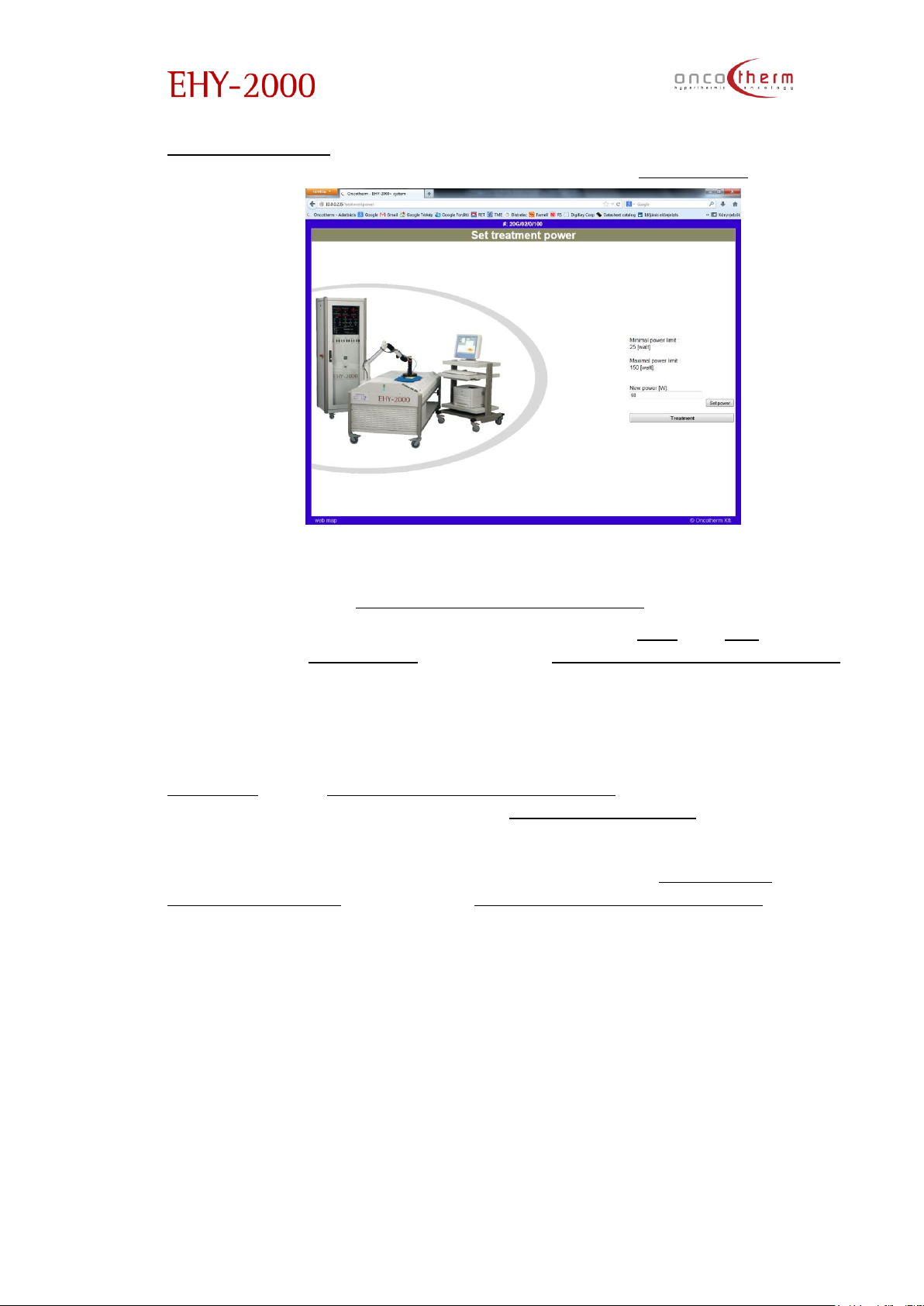
During the treatment the treatment parameters can also be modified. To
change the treatment power there are two possibilities. To change the
treatment power to a certain value you should click on the “Set power” button
on the “Treatment management view” screen. On the appearing “Set
Page 46
plus
UM - EHY2000plus-R24
45
treatment power” page you should type the requested power value into the
edit box and confirm the change by clicking on the “Set power” button.
If you do not type in a new value, after 30 seconds the software will step back
automatically to the “Treatment management view” screen.
The treatment power can also be modified with the “+5” and “-5” buttons on
the sides of the “Set power” button on the “Treatment management view”
screen. By clicking on these buttons the power can be increased or
decreased with 5 W without the need of confirmation.
The treatment time can be modified similarly to the power by clicking on the
“Set time” on the “Treatment management view” screen. Confirmation of the
new treatment time is needed on the “Set treatment time” page.
Modulation can be switched on/off by clicking on the “Modulation
on/Modulation off” button on the “Treatment management view” screen (the
text of the button changes by the switching).
All treatment parameters can be changed in the running and paused state of
the treatment too.
Page 47
plus
UM - EHY2000plus-R24
46
Treatment view
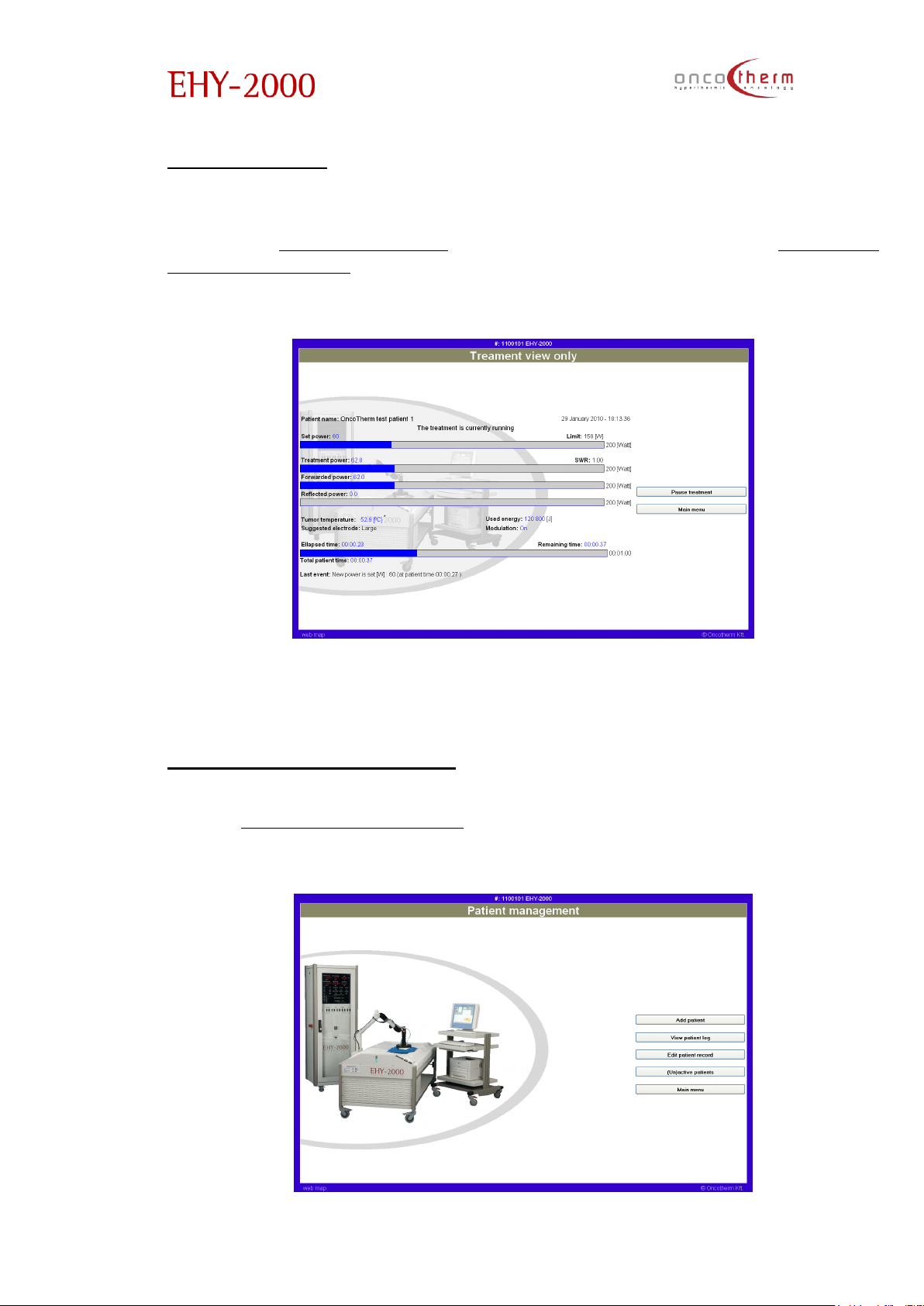
The second option, which you can choose in the main menu, is the treatment
view. The „Treatment view” screen is very similar to the „Treatment
management view”, because you can monitor the same parameters, but the
difference is that you cannot modify the treatment parameters.
This function is useful if there is a central station – beside the physicians’ control
– where all devices can be monitored.
Patient management menu
In the “Patient management” menu all patient relevant tasks can be
performed, like adding new patients, viewing treatment data, etc.
Page 48
plus
UM - EHY2000plus-R24
47
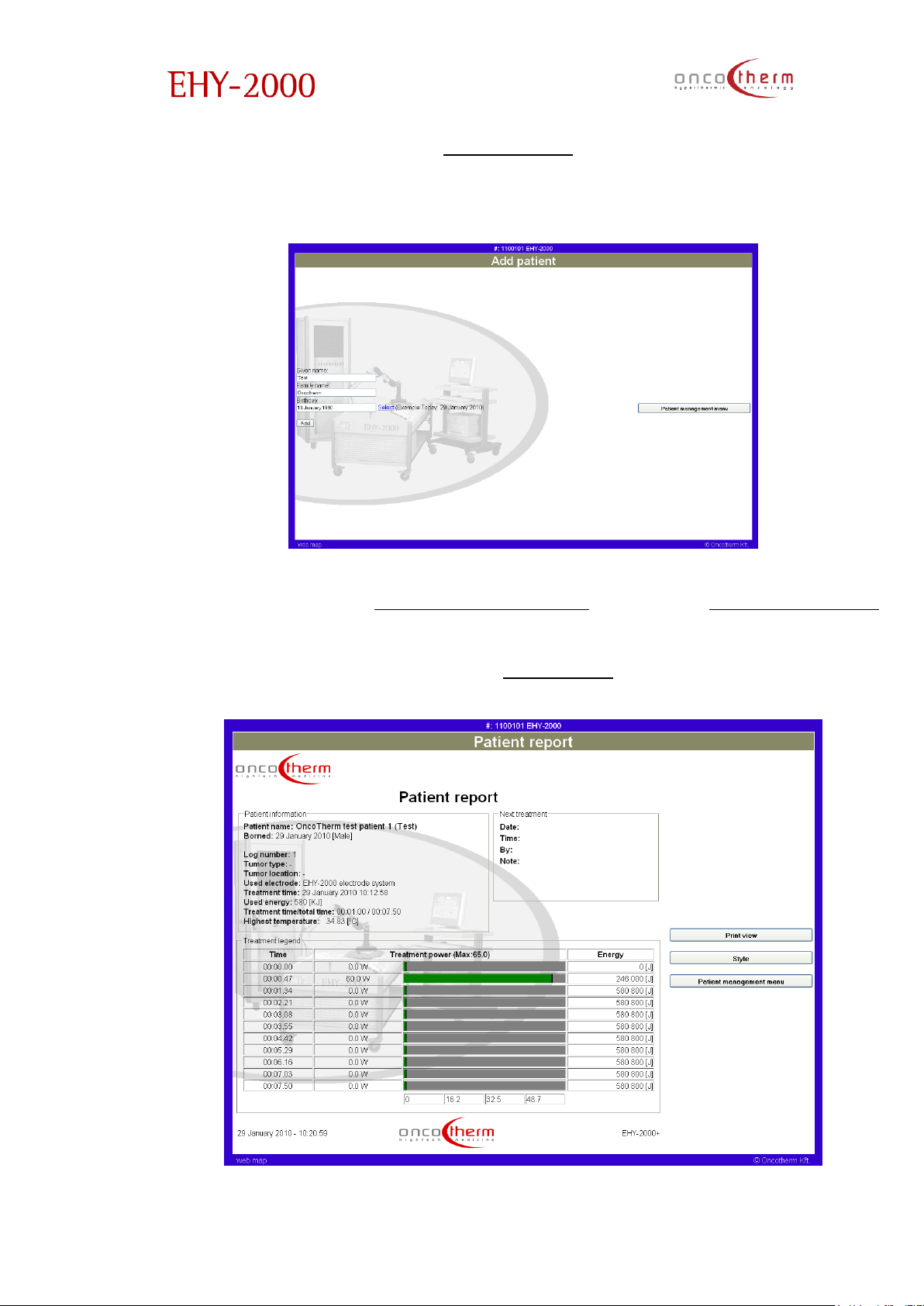
The first option in the menu is “Add patient”. On this page you can add new
patients to the patient list by typing in the patient’s name and their date of
birth.
The next option in the “Patient management” menu is the “View patient log”
page. On this page the data of the treatments can be seen and printed. The
page is preceded by another one, where you have to choose the patient
whose data you want see (like in the “Treatment” menu)
Page 49
plus
UM - EHY2000plus-R24
48
The table shows the major parameters of one treatment of the patient chosen
on the previous page. The major parameters are:
• Patient’s name
• Treatment date
• Used energy
• Power graph
• Temperature graph
• Event list
You can check the patient’s next, previous, first or last treatment by clicking on
the appropriate link. By clicking on the print button, you receive a printable
version.
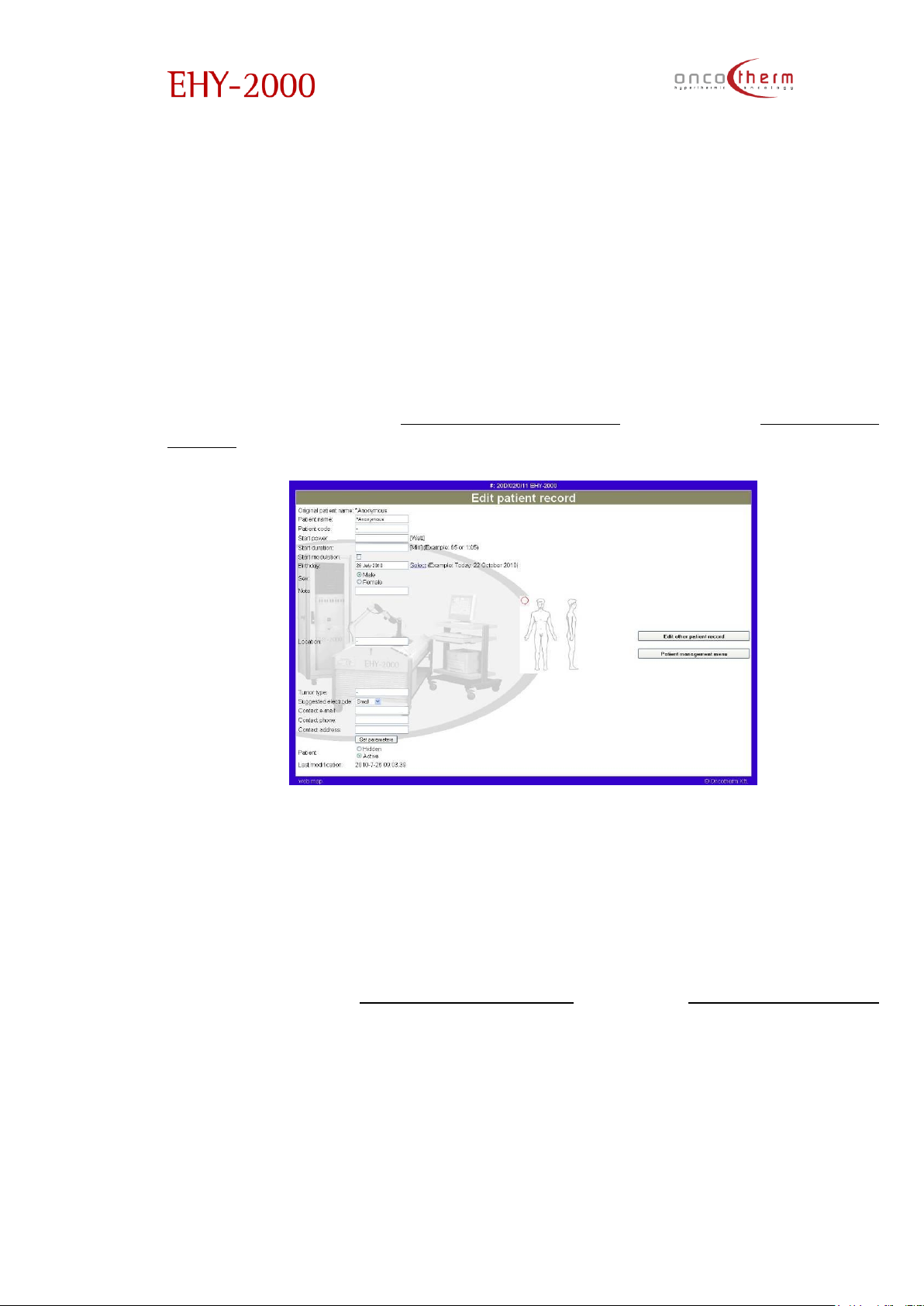
The third option in the “Patient management” menu is the “Edit patient
record” page. The page is followed by another page where you can choose
the patient, whose data you want to modify.
On this page you can modify the patient’s name, set default treatment
parameters for the chosen patient and add notes. In the picture in the middle
of the page you can mark the location of the tumor, which is useful for the
electrode placement. In the bottom of the page you can hide the not used
patients (these patients will not be shown on the patient list).
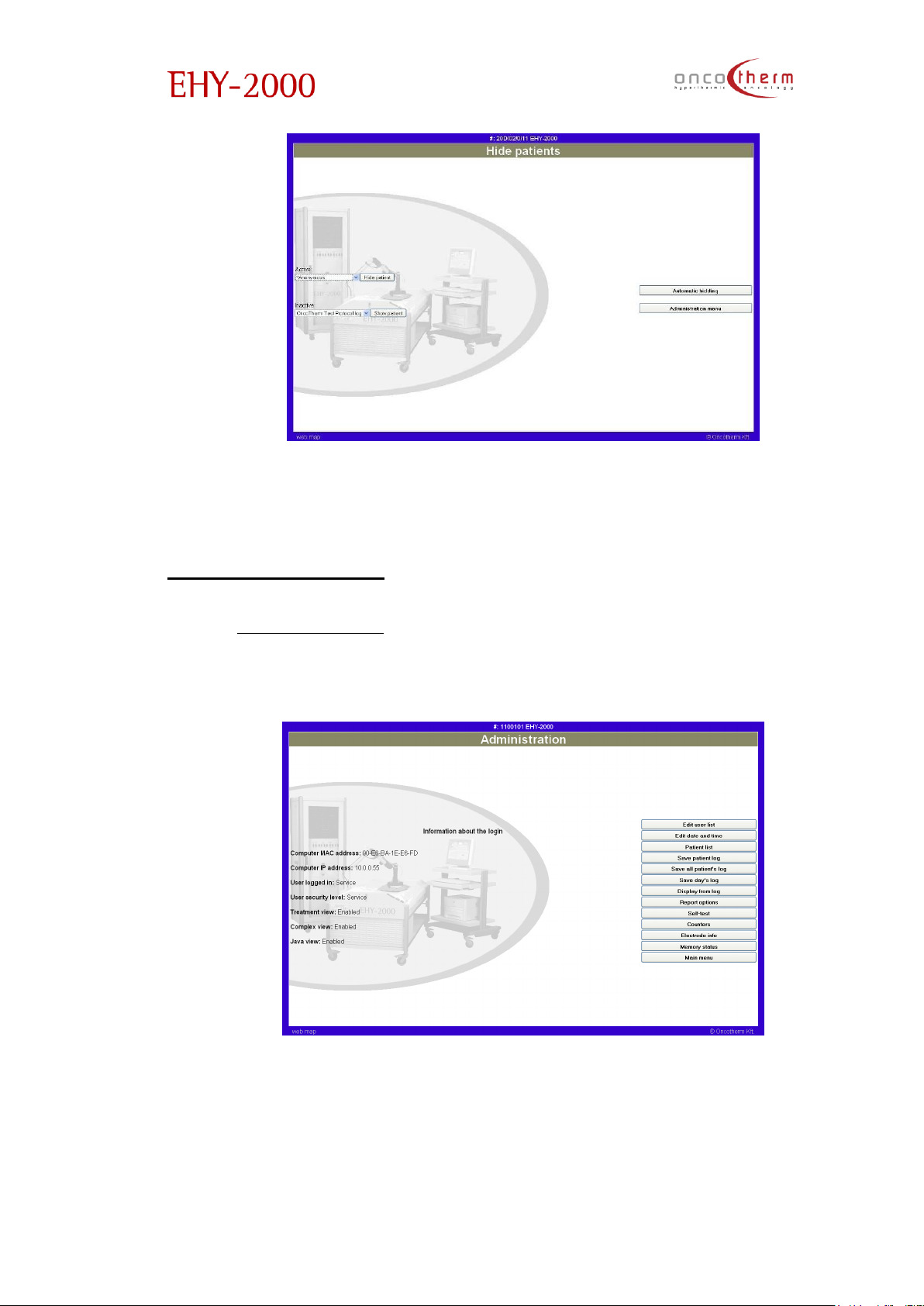
The last option in the “Patient management” menu is the “(Un)active patients”
page.
Page 50
plus
UM - EHY2000plus-R24
49
Here you can inactivate the not treated patients (like on the page mentioned
before). You can reactivate the hidden patients as well.
Administration menu
In the “Administration” menu you can find various support functions like
treatment log saving and recovering, user list editing and time and date
setting.
Page 51
plus
UM - EHY2000plus-R24
50
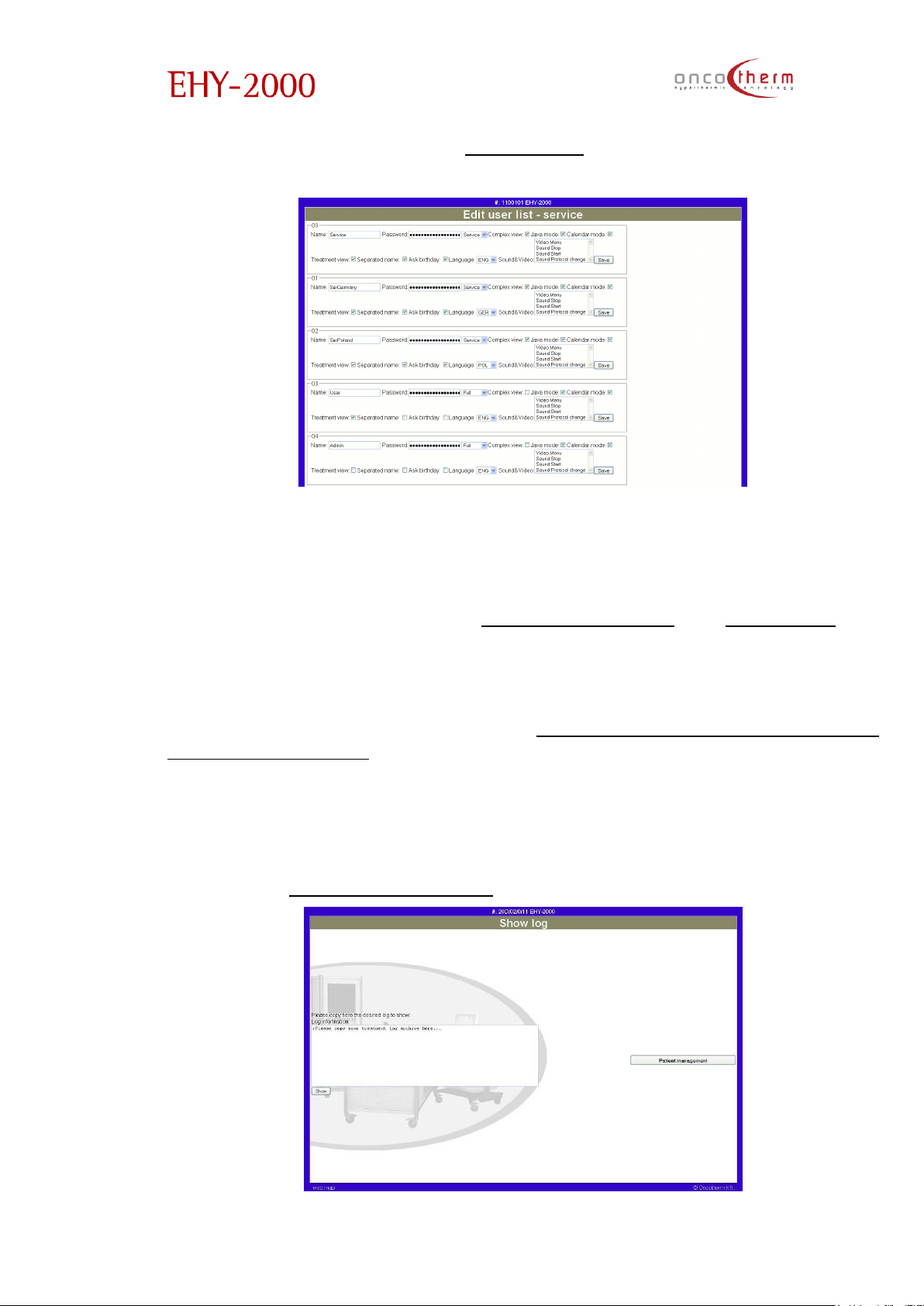
The first option in the menu is the “Edit user list” option.
The new and old users can be managed. This is required for logging in into the
system. In case you edit your own login name and password, note that you
can still log out.
The next options in the menu are “Edit date and time” and “Patient list”. The
time and date can easily be set by synchronizing the time and date of the
device with the help of the internet.
With the next three options in the menu (“Save patient log”, “Save all patient’s
log”, “Save day’s log”) the patient logs can be exported from the device in a
text form. If the first of the three options is used, you have to choose the
patient, whose data you want to export. The exported data will appear in a
new window (or tab) of the browser, from where you can save it in a text form.
The generated data text is coded, so it cannot be viewed separately from the
device. To recover data from the saved coded text, use the Display from log
option of the “Administration menu”.
Page 52
plus
UM - EHY2000plus-R24
51
To recover the patient logs from the saved data, please copy the saved
coded text into the dialog box and then press the “Show” button.
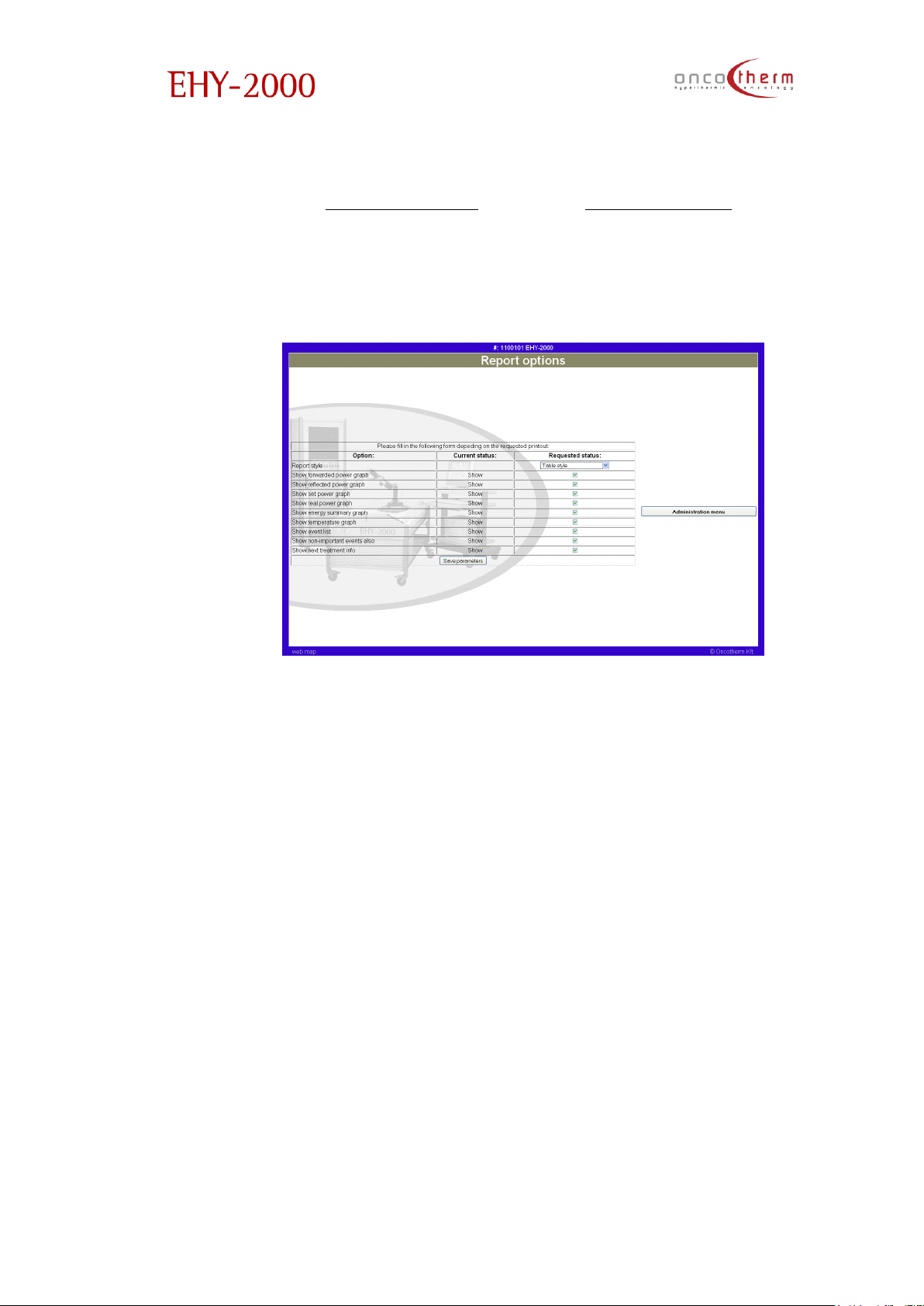
By choosing the “Report options” link in the “Administration” menu you can
select what kind of data will be printed in the Patient report. The first column
shows the options, the second: if it is on/off, the third one: checkout box. After
all needed options are selected, the settings must be accepted with the Save
settings button.
Page 53

plus
UM - EHY2000plus-R24
52
Important notices
Choosing the “Important notices” link in the “Main menu” you can read the
most important notices and warnings about the use of the device.
Important notes for the use of the software
The following notes should be taken into consideration and followed when
using the web box.
• The treatment manager view can be used only on a computer from
where the patient is within sight.
• The patient should be monitored continuously not only through the web
server but in the room as well.
• All warnings mentioned in the EHY-2000plus user’s manual have to be
considered
• The logged computers must be certified and linked on to the web server
by a service technician.
• The treatment view shows the actual time on every new loaded page. It
should be checked every time the page is really newly loaded or comes
from the cache.
• The device is matched with a colour (and a serial number). In case of
every control the web page colour and the serial number written in the
border should be checked if the right device is controlled.
• After entering power or time, please check in the treatment window, if
the parameter is really set and if is the parameter which is required.
• The RF radiation emitted by the device may jam the WLAN connections,
that is why it is prohibited to use WLAN to connect the device with the
controlling computer!
Supported browsers
The used protocol is the primary HTTP protocol with cookies. This means that
any nowadays used common browser should be able to view the pages
supported by the web processor. The suggested browser is Mozilla Firefox. If
Internet Explorer is used, security level of the browser should be set to medium
or low.
The following browsers have been tested with the web box:
1. Mozilla Firefox 5.0
2. Microsoft Internet Explorer 7.0
Page 54

plus
UM - EHY2000plus-R24
53
Requested technical background
Client browser
Any kind of computer and browser are suitable and support the HTTP protocol.
Our web box does not require any java or flash support but it requires a cookie
support.
Your computer also has to be identified by the web server to have a
connection allowance with the critical sites. This configuration can be set by
our service technician.
Please note that depending on your browser, the look of the screens may
differ from each other. (Please check the supported browsers list.)
Network
You are requested to have a UTP network connection to your own network
system. It can be 10 or 100 Mb, half or full duplex connection. It is also
requested to have your network protected against unwanted intruders. (To
have a correct firewall configured.)
Please note that the communication from/to the web processor is not secured.
It means that a prepared hacker can read all communication if your network
is not protected properly.
Alternative configuration
It is possible to have a sub local network configuration which enables it to
connect one (and only one) computer to the web server. In this case a direct
contact will be accomplished between the two systems.
Due to this configuration, no external intrusion is possible and the computer
cannot connect to the internet either.
Page 55
plus
UM - EHY2000plus-R24
54
Technical description
The main RF-unit
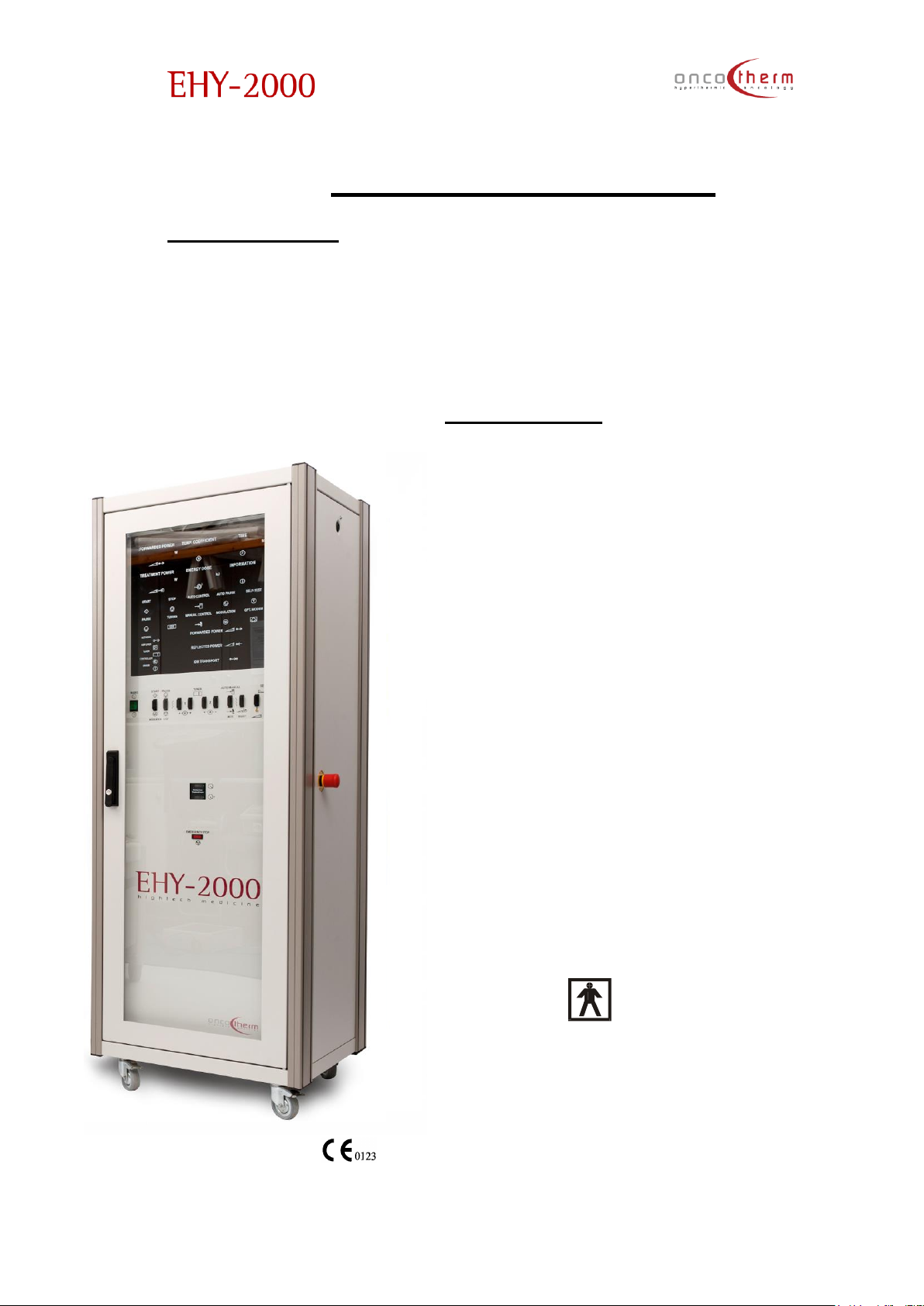
The unit's output power is stable, highly precise and well integrated, containing
the following parameters:
The equipment is a high-tech, high-quality unit, having the latest available
techniques inside. The device is shown in the figure.
Technical data
Line voltage: AC 230/110 V 50-60Hz
Power input: ≈1600VA/7A
Output RF Voltage (50 Ω) range: 0-130V
Output power by RF generator: max
250W
Output useful power: max 150W
default - 60W
Nominal load is 50 Ω.
Tuning: The auto-matching unit (auto-tuner) always
tunes for a calibrated value, a standard 50Ω (fits the
impedance), so that the delivered output power is
calibrated.
Output carrier frequency: 13.56MHz
(quartz stabilised)
Output modulating frequency: 0-5 kHz,
(experimentally optimised)
Weight (including cables): 175 kg
Height: 1720mm
Electrical safety classification:
Class I, Type BF (according to IEC 60601-1)
Page 56
plus
UM - EHY2000plus-R24
55
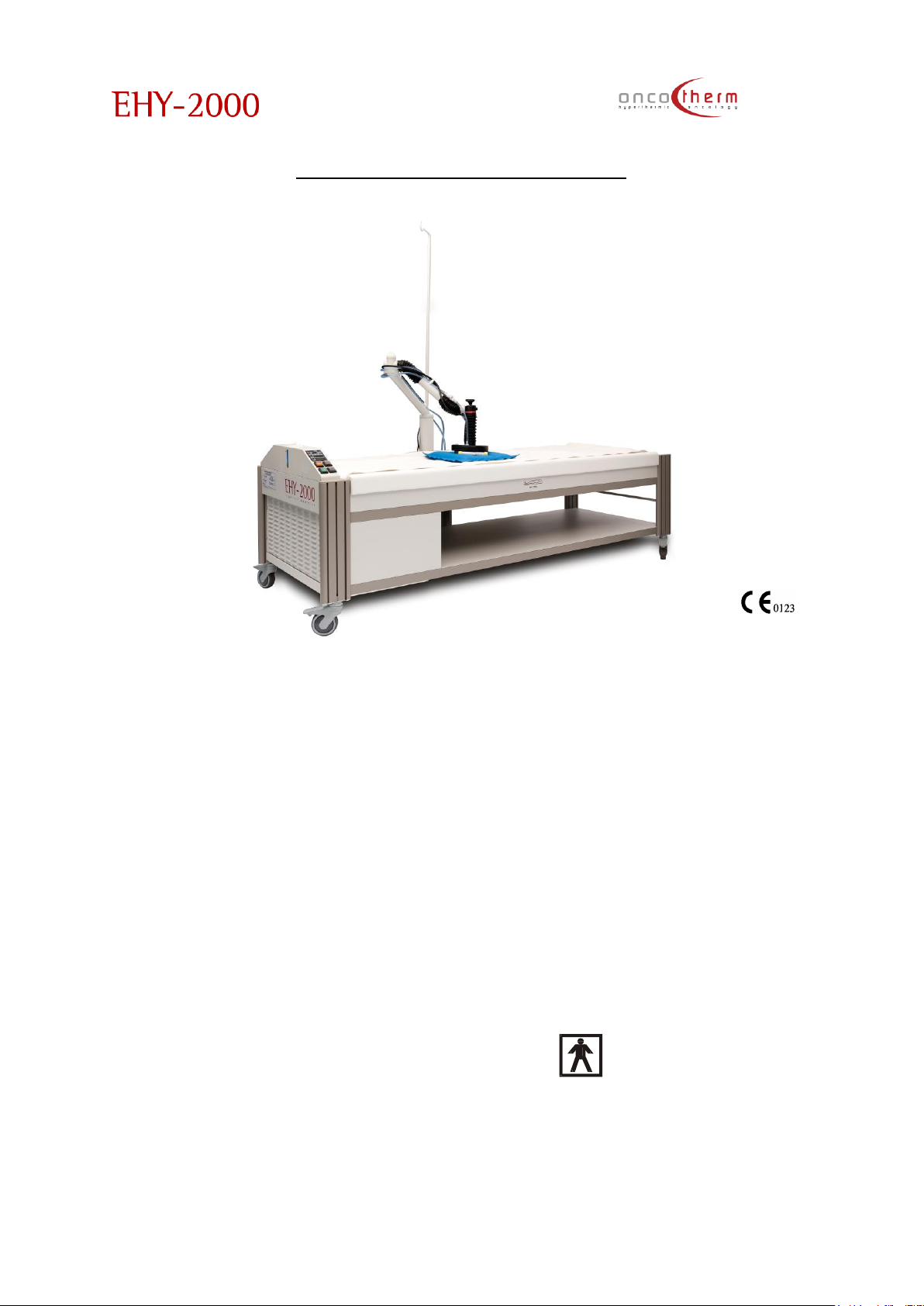
Technical data of the waterbed
(WEY: 6DDFFEE)
Line voltage goes through the high frequency control unit
Surface temperature: 25 … 38ºC, adjustable (step 0.1ºC)
Display: Surface temperature, res. 0.1ºC
Set temperature, res. 0.1ºC
4 lamps and 2 buzzers for errors
Warming-up time (24 > 37ºC): approx. 16 hours*
Size: 2100x830x700 mm
Total weight (filled with water): 300kg
Quantity of water: ≈100 l distilled water
Max. weight of the patient 150 kg
Electrical safety classification: Class I., Type BF (according to IEC
60601-1)
*Bed without any covering at 24ºC environment - recommended: 24 hours.
Page 57
plus
UM - EHY2000plus-R24
56
Transportation and storage:
The Oncotherm service is responsible for transportation and storage.
The following storage conditions are valid for transportation- and storage time
for 15 weeks:
Temperature: +5°C……+55°C filled with water
-5°C……+55°C without water!!!
Relative humidity: 10%………75%
Air pressure: 500hPa…..1060hPa
The values of the operating conditions are valid:
Temperature: +15°C……+23°C filled with water
Relative humidity: 20%………60%
Air pressure: 700hPa…..1060hPa
Storage: only in closed rooms.
After transportation the EHY, WEY and Webbox unit must be installed by the
Oncotherm service.
Cleaning
Maintenance of external surfaces:
1. Turn off the power before cleaning the unit.
2. For cleaning use a soft and dry cloth.
3. If the surfaces are extremely dirty, use a soft cloth, dipped into soap
and water solution or a weak detergent solution.
4. Wring the cloth well before wiping the unit.
5. Wipe once again with a soft dry cloth.
6. Never use alcohol, paint thinner, benzene or a chemically treated
cloth to clean this unit. Such chemicals may damage the surface of
your unit.
Page 58
plus
UM - EHY2000plus-R24
57
Disinfecting the accessories
Electrode: It is very important to disinfect the electrode before each
treatment. Suggested solution is Isopropanol 70% (V/V) Please use it
according to the user instructions on the bottle. Once a week the electrode
has to be cleaned by a soap-solution. Use only damp textile. If the textile is
too wet, the liquid can penetrate into any part of the equipment. Use
medical hygenic paper (see detailed description in Accessories and
Appendix 9 for datasheet) – or any other medical hygenic paper with CE
mark - between the bare skin and the electrodes, to fix the electrode. No
other material is allowed to be used!
Treatment bed: Concerning the EHY-bed a cleaning procedure must be
done regularly by the user, according to the normal hospital disinfecting
rules. The mattress of the bed must be cleaned with a disinfecting solution.
Suggested solution is Incidin plus (Henkel–Ecolab) according to user
instructions on the bottle.
Further recommendations:
Use a special liquid provided by the manufacturer to avoid algae formation
in the electrodes. Please check the instructions in the User manual in the
Treatment part, APPENDIX 3. (Bolus electrode refilling)
This special liquid is added to the water of the waterbed the water of the
waterbed mattress during the installation and on the regular half year
services by the Oncotherm service technicians.
Servicing/Maintenance
The user is required to have the unit serviced once every half year under
normal operating conditions. Only authorized Oncotherm service technicians
can do this work. The user must obtain certification concerning to the nature
and extent of the work with information on any alteration made to the
nominal data or operating range. This certification must also show the date
and the name of the firm and a signature.
Disposal
If it is requested, the manufacturer arranges the disposal of the device. In
case of disposal, the manufacturer is responsible for organizing the
transportation of the unit (with accessories). Price of transportation and
packaging will be given to you by our office.
Page 59
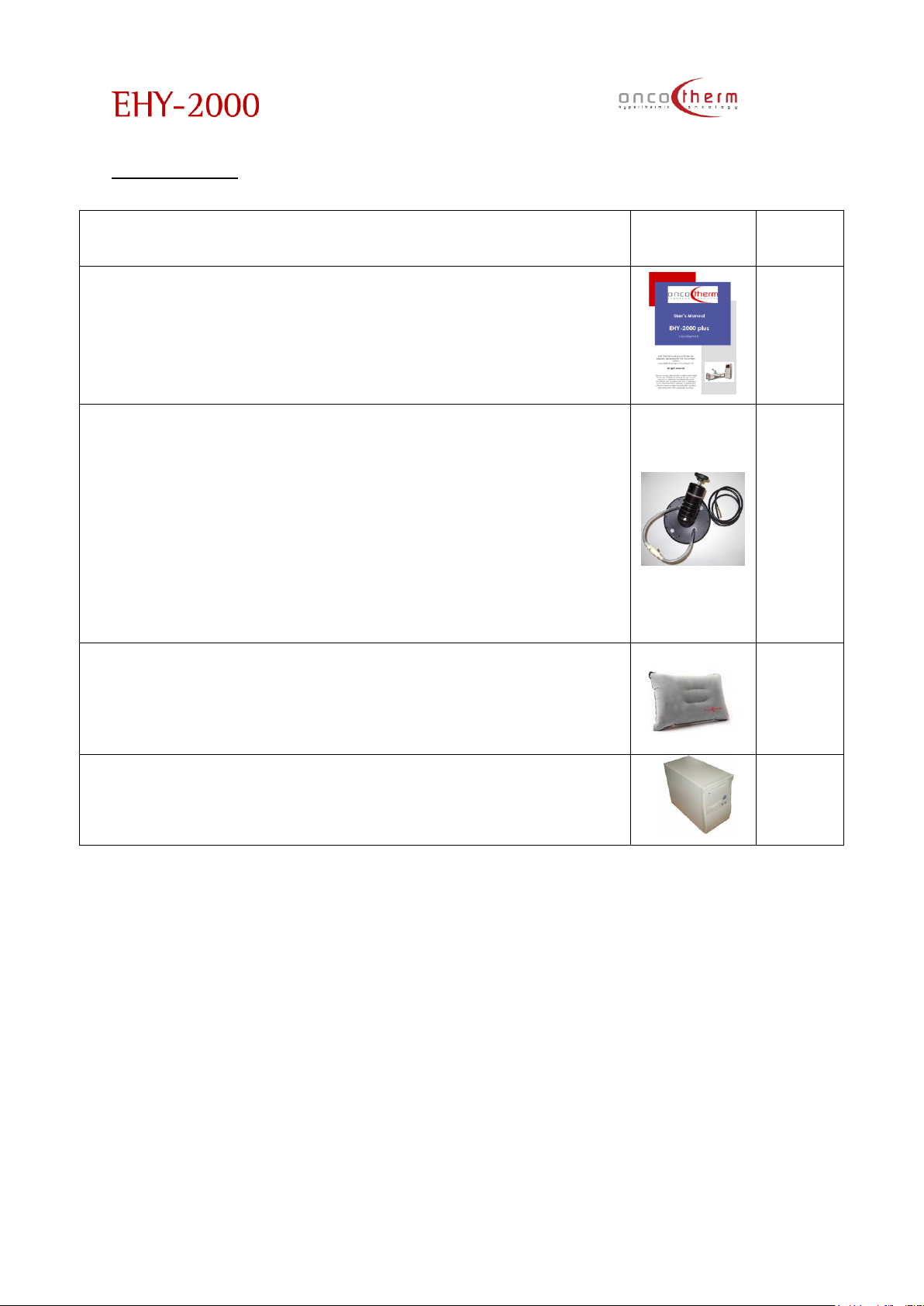
plus
UM - EHY2000plus-R24
58
Accessories
Accessories
Photo
Order
number
1. User’s manual
---
2. Water-cooled bolus asymmetric electrode standard (20 cm) /
6/01/200CO/DD-EE
Water-cooled bolus asymmetric electrode large (30 cm)
(option) / 6/01/300CO/DD-EE
Water-cooled bolus asymmetric electrode small (10 cm)
(option)/ 6/01/AABH/DD-EE
3. All: elastosil rubber membrane, flexible holder, plastic
1028
1026
1027
4. Test patient. Devoted for testing of the device and for the
exercise of the usage of the device. Can be used for head
support at head treatment.
1039
5. Controlling computer (optional)
1004
Page 60
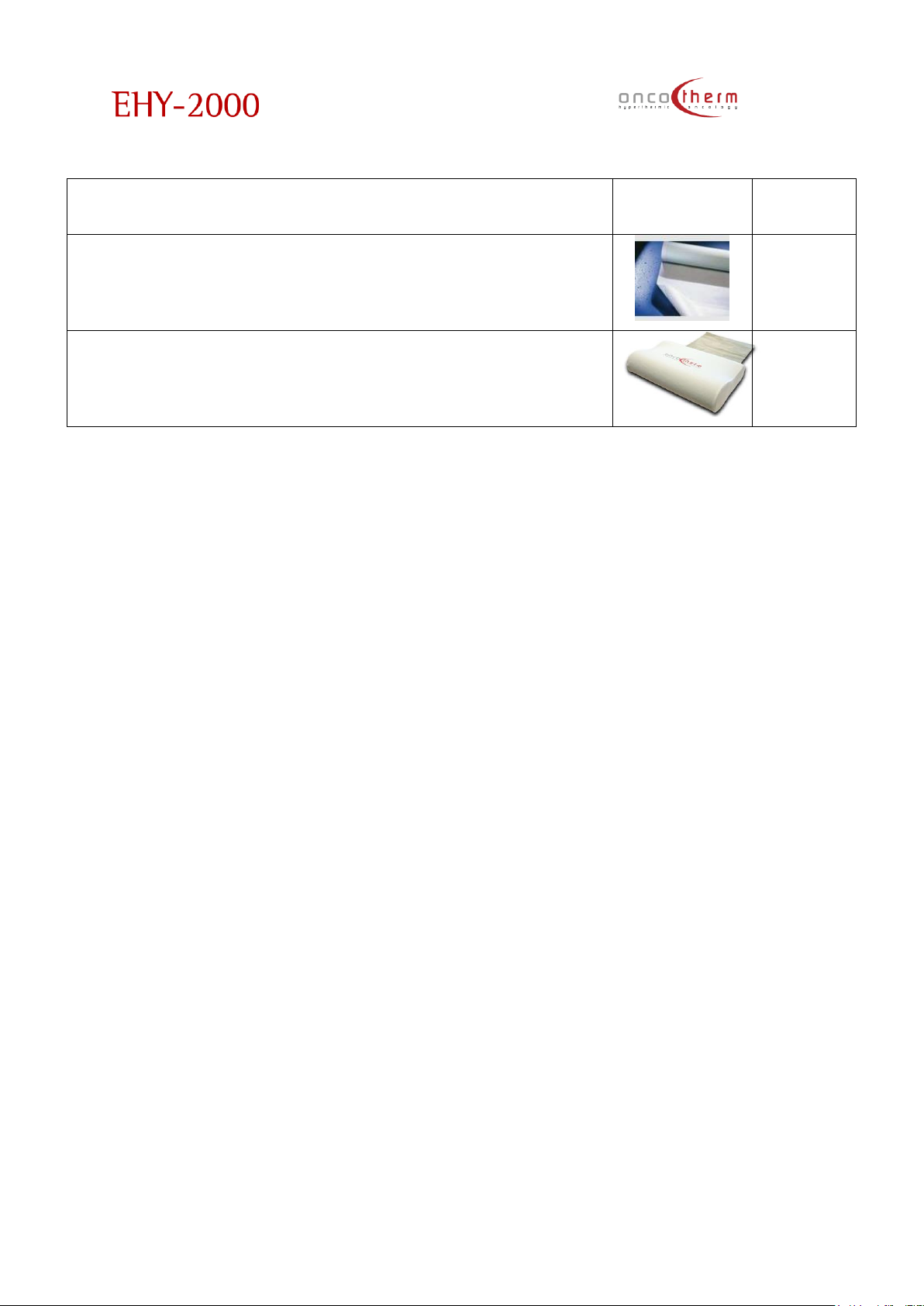
plus
UM - EHY2000plus-R24
59
Other accessories
Photo
Order
number
ROLLICELL hygienic paper (optional)
type: ‘3759-50; w:59cm, l:50m
(see datasheet in Appendix 9)
1140
Memory foam pillow with metal coated material and
cover (optional)
11563
WARNING! To use any accessory ACCESSORIES other than those specified, may result
in increased EMISSION or decreased IMMUNITY of the EHY-2000plus device, therefore
it is strictly forbidden.
Page 61

plus
UM - EHY2000plus-R24
60
Appendix 1 – Guarantee
The manufacturer guarantees the service for the whole instrument (hardware
and software). The guarantee is free of charge for the first two years. After
two years, service can be guaranteed in the form of a stand-by agreement.
The total upgrading of the system, to keep pace with new developments
and knowledge in this field can be included in the stand-by service
agreement.
The guarantee covers both spare parts and labour. Service under guarantee
is only provided upon presentation of reasonable evidence (e.g. completed
guarantee card or purchase receipt) that the date of claim is within the
guarantee period.
The guarantee is not valid if the defect is due to accidental damage, misuse
or neglect and in case of alterations or repairs carried out by unauthorised
persons.
Any change in the hardware and/or software without written permission of the
manufacturer is strictly prohibited.
The service (during and after the guarantee period) is available in all
countries where the product is officially distributed. For further information,
please contact your local distributor.
Any suggestions and/or requests for further development of the system are
highly appreciated and very welcomed.
Quality references:
EHY-2000plus are marked, TÜV Product Service (Munich) has given the
EC Certificate. The device is constructed and produced to satisfy the IEC
60601-1 standard and the 93/42/EEC MDD (Medical Device Directive).
The equipment has passed an EMC (Electro-Magnetic Compatibility) check
(CSA Group Bayern GmbH) according to IEC 60601-1-2 standard
requirements.
The rights to this system are the sole property of the manufacturers. Patent is
pending.
Not-permitted-change in installed hardware and/or software makes the
certificates invalid!
Page 62
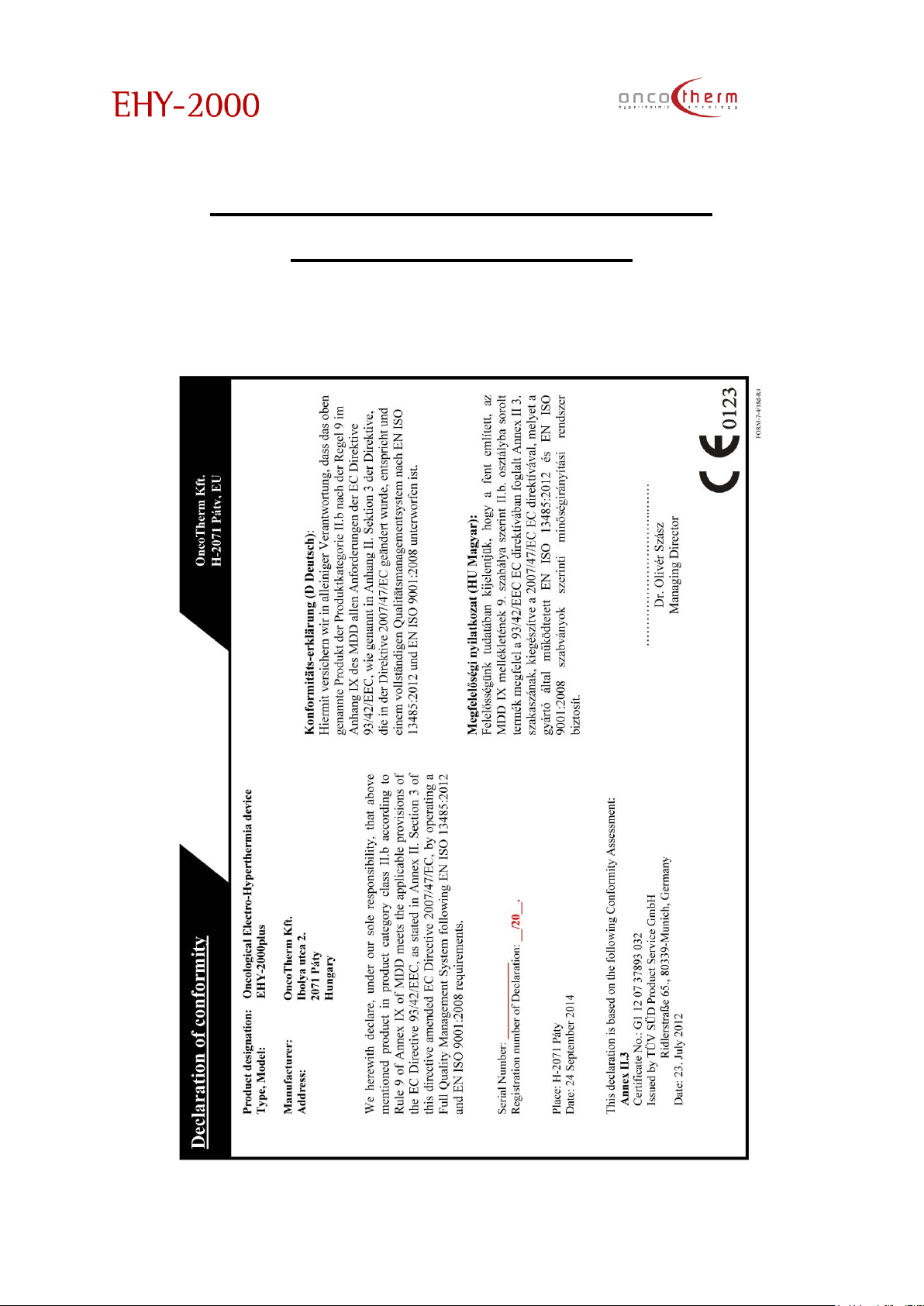
plus
UM - EHY2000plus-R24
61
Appendix 2 – Declaration of
Conformity sample
Page 63
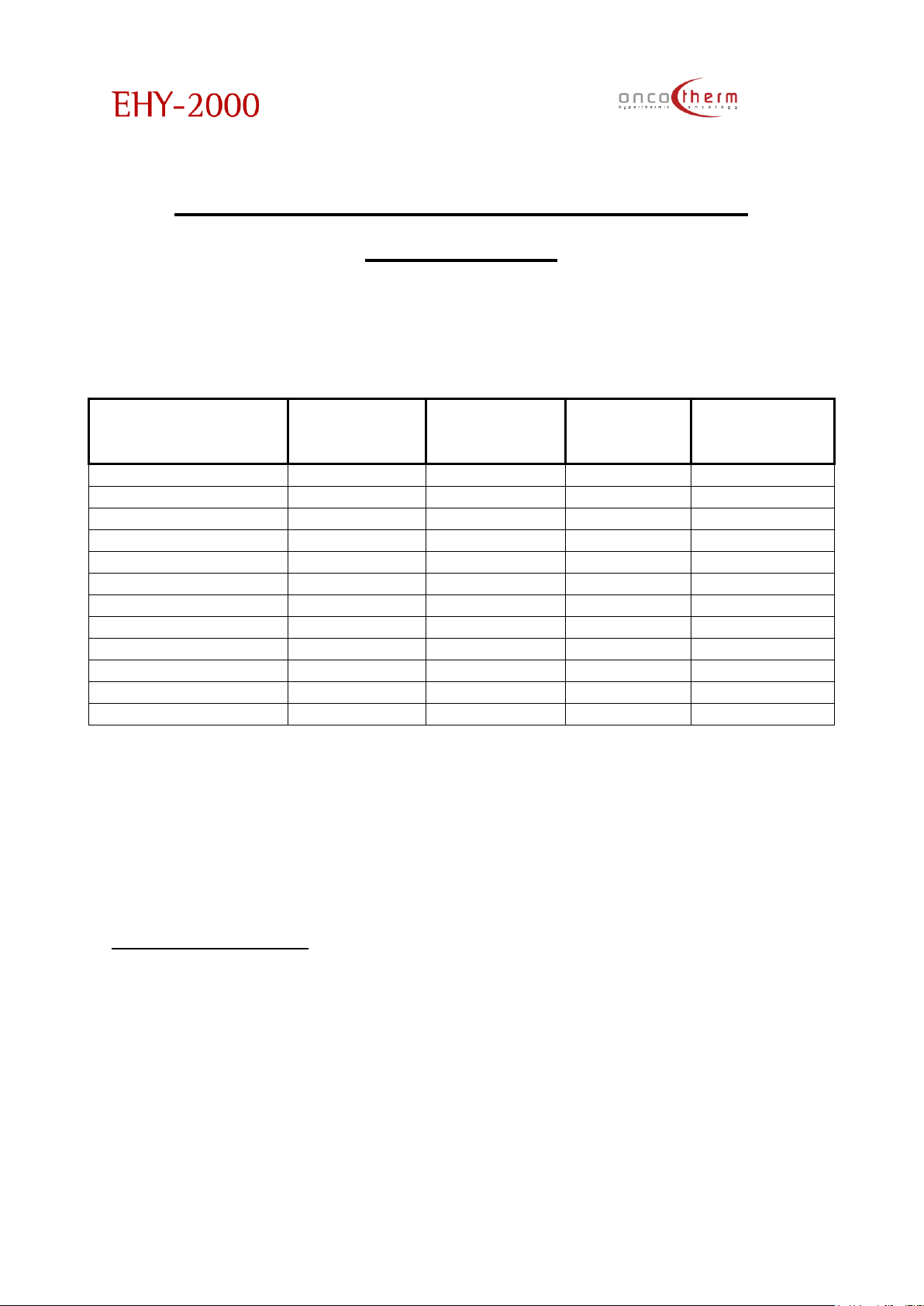
plus
UM - EHY2000plus-R24
62
Appendix 3 – Table of proposed
electrodes
Operator’s table:
Lungs
large
0
90
140-150
Kidney
standard
0
60
100-120
Liver
large
0
90
120-140
Stomach
standard
0
60
120
Pancreas
large
0
90
100-120
Lymphatic nodes
standard
0
60
80-100
Superficial
small
0
60
80
Colorectal region
standard
0
90
100-120
Breast
standard
0
60
60-80
Prostate***
standard
0
60
60-80
Esophagus
large
0
90
100-120
Brain
small
0
60
60-80
* Please carefully monitor the patient, and do not exceed their personal
tolerance. The patient must not feel any burning or too much hotness.
** Always be sure that the electrode bolus is pressed firmly against the patient
on the largest available surface to ensure tuning.
*** Take extra care on the testes.
**** Electrodes could be variable, depending on the area of the actual
tumor.
Electrode dimensions:
Small: Ø10cm
Standard: Ø20cm
Large: Ø30cm
Page 64
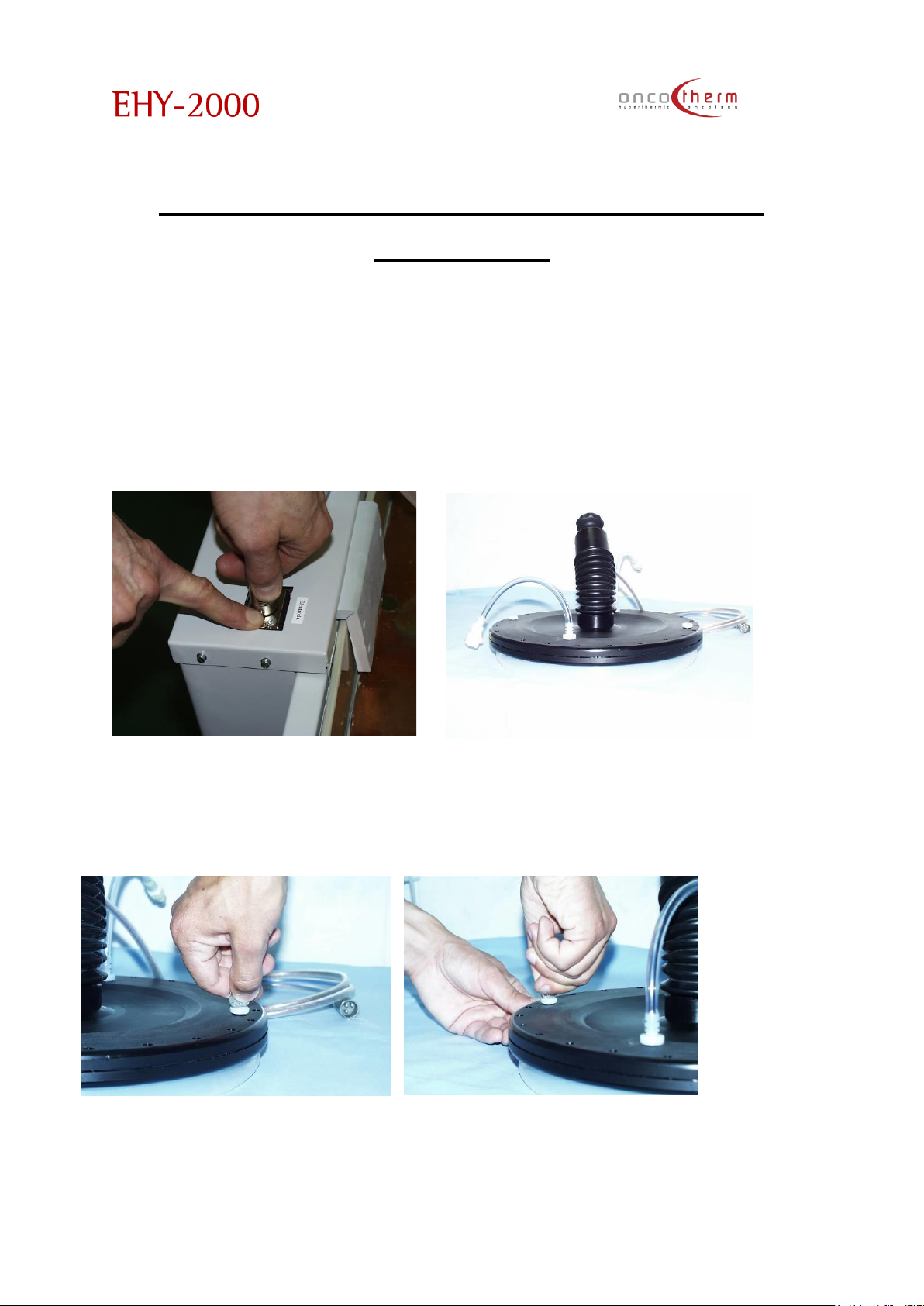
plus
UM - EHY2000plus-R24
63
Appendix 4 – Refilling of the bolus
electrode
1. Please, unplug the cooling water quick connectors and the electric cable
connector. The fixing safety button of the power plug has to be pressed
down before pulling it out and be kept pressed throughout the procedure.
Loosen the electrode fixing bolt, screw and pull it out of the electrodeholder arm. Please place the electrode on a clean surface without sharp
edges.
2. Take off both the packing nuts (the method is done by an appropriate coin
as shown in the picture below).
Page 65
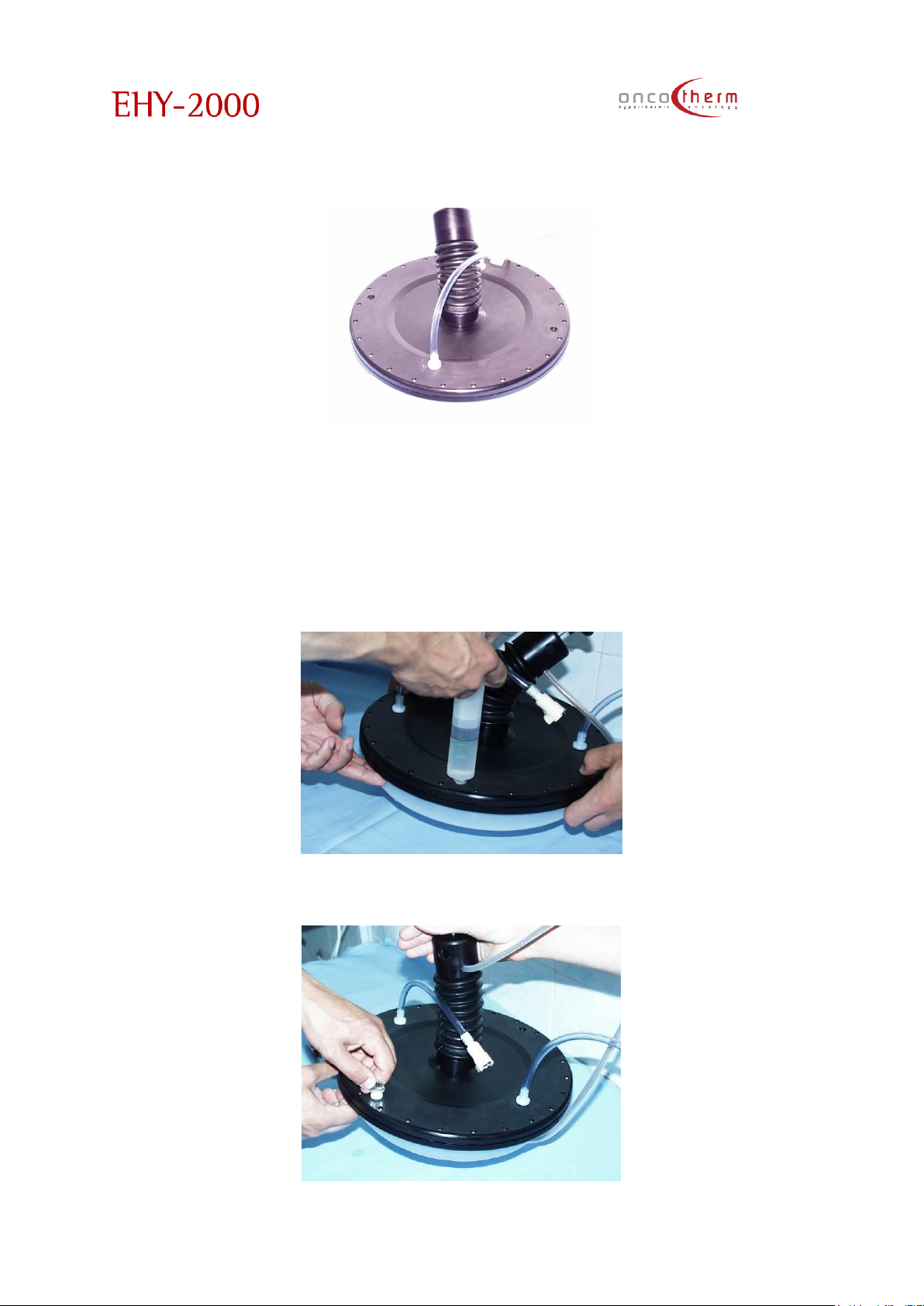
plus
UM - EHY2000plus-R24
64
Before the opening of the filling hole, put a tray or absorbing textile below the
electrode to avoid the water overflow.
3. Lift up the electrode to such a height that the bolus does not touch the
mounting surface. First of all, fill up the electrode with a special liquid
provided by Oncotherm to avoid algae formation. Use the small bottle with
the label: “Algae control” After this you can fill up the electrode with
distilled water in this position. Use a medical syringe for the filling. Ask for
help for the process because the action needs more than two hands. (See
the picture.)
4. Close one of the filling holes with a screw.
Page 66
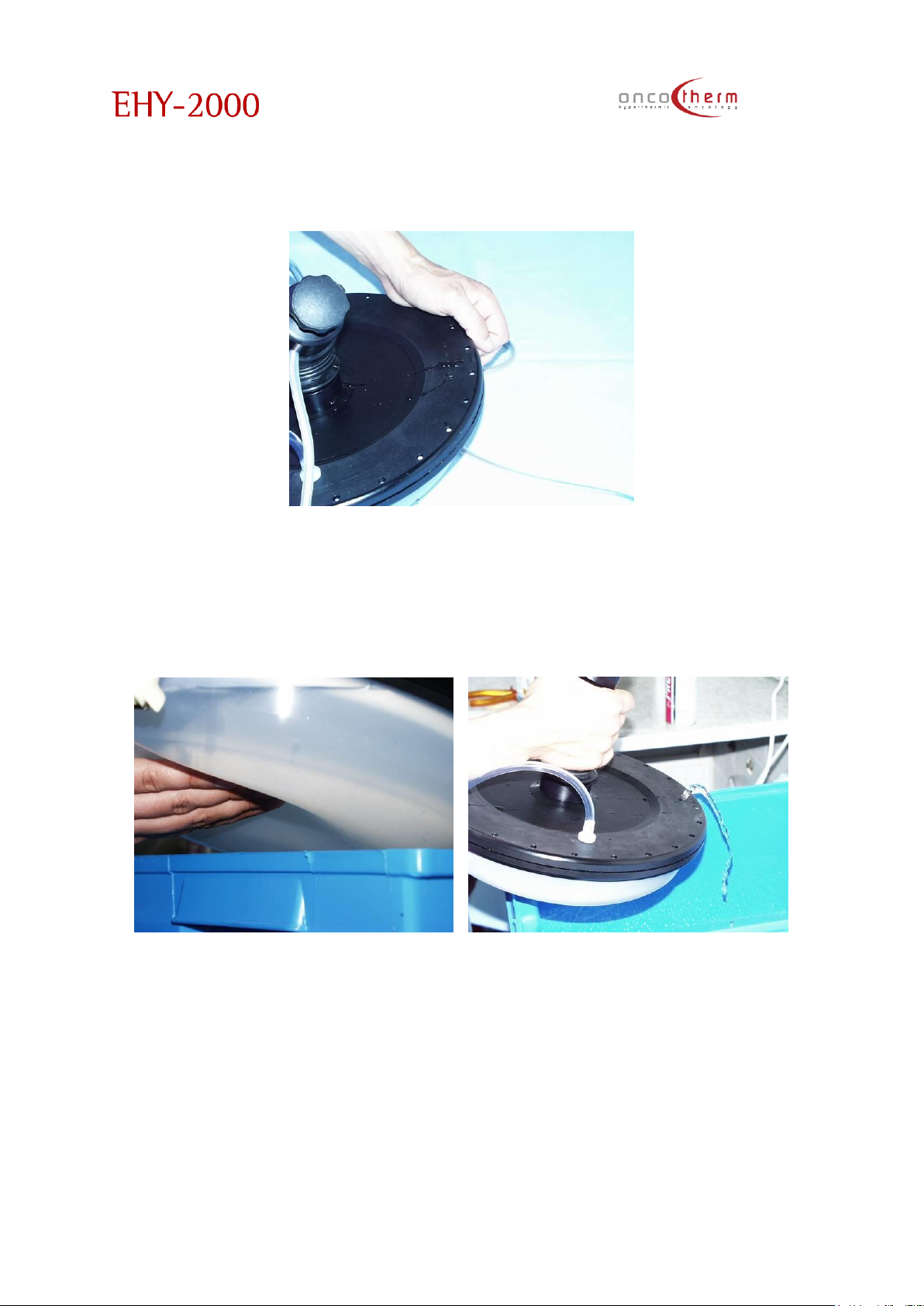
plus
UM - EHY2000plus-R24
65
5. Tilt the electrode in a small angle so that the open filling up hole must be
higher than the closed one. Please press the bolus up until water appears
on the open filling up hole. With this process you de-aerated the bolus.
6. Put the electrode in a horizontal position. Ask for help to hold the electrode.
Push the bolus up with one of the tip of your fingertips you reach the
electrode’s metallic plate. The excess water is taken off from the bolus with
the shown procedure.
Page 67
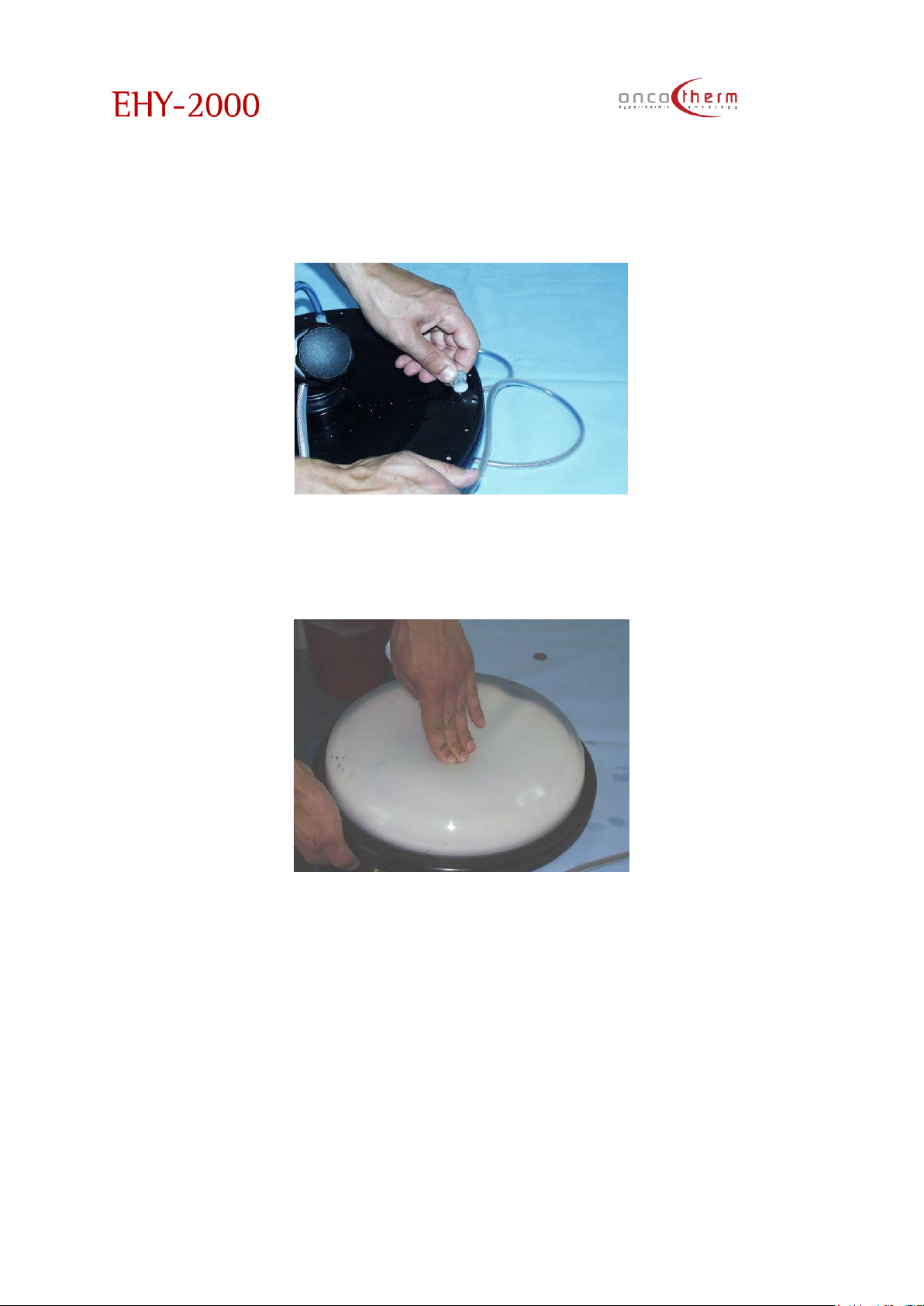
plus
UM - EHY2000plus-R24
66
Take care that during this process, air must not get into the bolus. Take care
that you can continuously see the water in the filling hole. Now, in this position
screw in the packing nut.
7. Turn up the electrode and check the appropriate volume of the water
in the bolus and that it is de-aerated once more.
Page 68
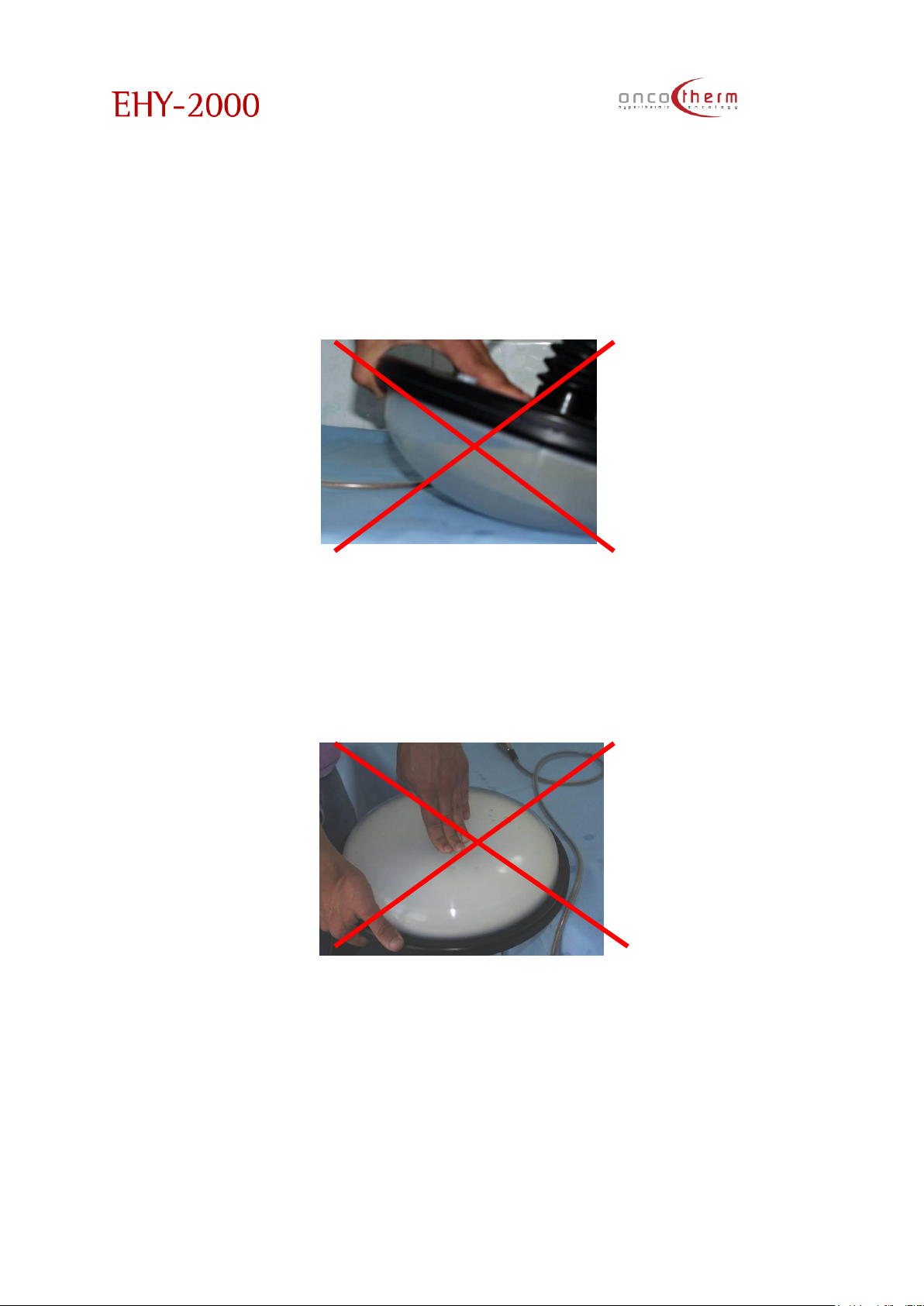
plus
UM - EHY2000plus-R24
67
Attention! In the next pictures we are showing some examples of non-proper
filling up of the electrodes and we are also showing how to avoid the
mistakes.
Air must not remain in the electrode because this blocks or misleads the
tuning and the auto matching procedure and so suppresses the efficacy of
the treatment. To correct this mistake, go back to point 5.
.
By pushing the bolus with your fingertips you cannot reach the metallic plate
of the electrode: the electrode is overfilled. In this case the electrode cannot
fit well on the patient’s treated region, the tuning accuracy decreases.
Reduce the amount of water in the bolus! To correct this mistake, go back to
point 6.
Page 69
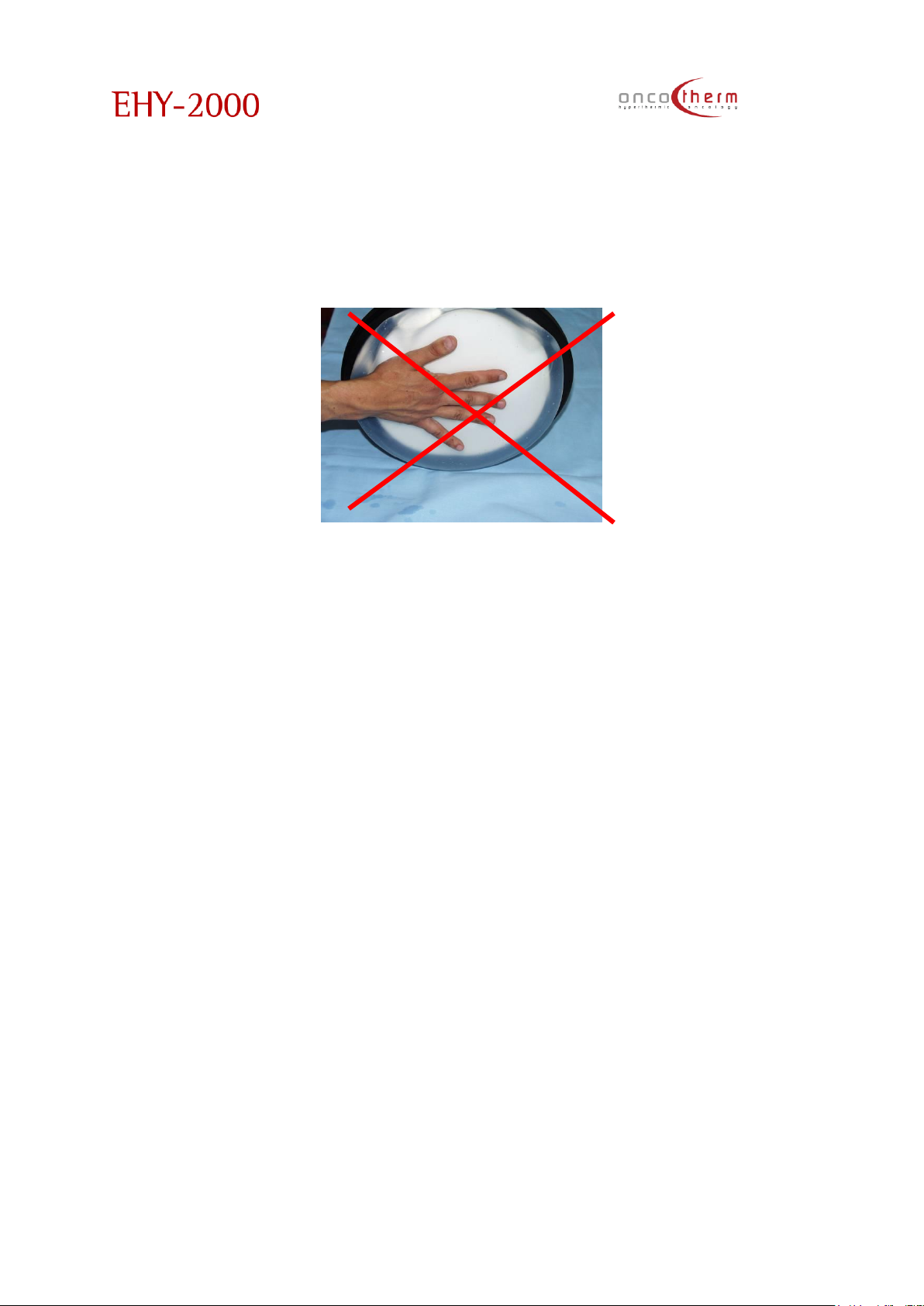
plus
UM - EHY2000plus-R24
68
By pushing the bolus with the entire palm you can reach the metallic
electrode plate: not enough water in the electrode. In this case, during
the treatment the RF radiator electrode will be too close to the patient
and could cause burn. Please fill more water into the electrode. To correct
this mistake, go back to point 3.
Page 70
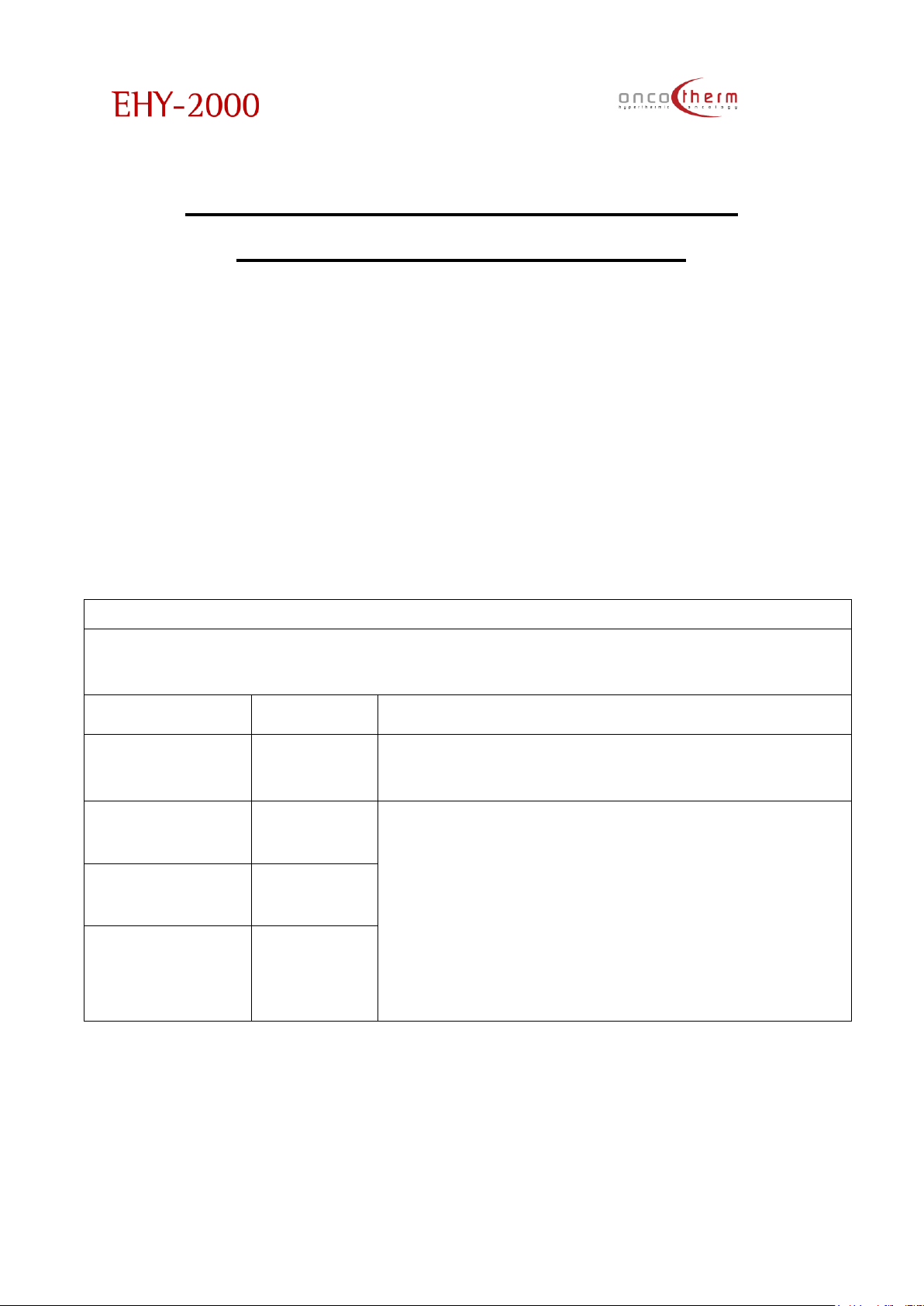
plus
UM - EHY2000plus-R24
69
Appendix 5 - Electromagnetic
compatibility information
According to IEC60601-1-2:2001 standard requirements
EHY-2000plus
EHY-2000plus device needs special precautions regarding EMC and needs to
be installed and put into service according to the EMC information provided
below.
Portable and mobile RF communications equipment can affect EHY-2000plus
device.
Table 201 – Guidance and manufacturer´s declaration – electromagnetic
emission– for all EQUIPMENT and SYSTEMS (see 6.8.3.201 a) 3))
Guidance and manufacturer’s declaration-electromagnetic emissions (T.201)
The EHY-2000plus device is intended for use in the electromagnetic environment specified below.
The customer or the user of the EHY-2000plus should assure that it is used in such environment.
Emission test
Compliance
Electromagnetic environment-guidance
RF emissions
CISPR 11
Group 2
The EHY-2000plus must emit electromagnetic energy in order
to perform its intended function. Nearby electronic
equipment may be affected.
RF emissions
CISPR 11
Class B
The EHY-2000plus is suitable for use in all establishments,
including domestic establishments, and those directly
connected to the public low-voltage power supply network
that supplies buildings used for domestic purposes.
Harmonic emissions
IEC 61000-3-2
Class A
Voltage
fluctuations/ flicker
emissions
IEC 61000-3-3
Complies
Page 71
plus
UM - EHY2000plus-R24
70
Table 202- Guidance and manufacturer’s declaration-electromagnetic
immunity-for all EQUIPMENT and SYSTEMS (see 6.8.3.201 a) 6))
Guidance and manufacturer’s declaration-electromagnetic immunity (T.202)
The EHY-2000plus is intended for use in the electromagnetic environment specified below. The
customer or the user of the EHY-2000plus should assure that it is used in such environment.
Immunity test
IEC 60601 test
level
Compliance level
Electromagnetic environment -
guidance
Electrostatic
discharge (ESD)
IEC 61000-4-2
±6kV contact
±8kV air
±6kV contact
±8kV air
Floors should be wood, concrete or
ceramic tile. If floors are covered
with synthetic material, the relative
humidity should be at least 30%.
Electrical fast
transient/burst
IEC 61000-4-4
±2kV for power
supply lines
±1kV for input/
output lines
±2kV for power
supply lines
±1kV for input/
output lines
Mains power quality should be that
of a typical commercial or hospital
environment.
Surge
IEC 61000-4-5
±1kV differential
mode
±2kV common
mode
±1kV differential
mode
±2kV common
mode
Mains power quality should be that
of a typical commercial or hospital
environment.
Voltage dips, short
interruptions and
voltage variations on
power supply input
lines
IEC 61000-4-11
<5% UT
(>95% dip in UT)
for 0,5 cycle
40% UT
(60% dip in UT) for
5 cycles
70% UT
(30% dip in UT) for
25 cycles
<5% UT
(>95% dip in UT)
for 5s
<5% UT
(>95% dip in UT)
for 0,5 cycle
40% UT
(60% dip in UT) for
5 cycles
70% UT
(30% dip in UT) for
25 cycles
<5% UT
(>95% dip in UT)
for 5s
Mains power quality should be that
of a typical commercial or hospital
environment. If the user of EHY2000plus requires continued
operation during power mains
interruptions, it is recommended that
the EHY-2000plus be powered from
an uninterruptible power supply or a
battery.
Power frequency
(50/60Hz) magnetic
field
IEC 61000-4-8
3A/m
3A/m
Power frequency magnetic fields
should be at levels characteristic of
a typical location in a typical
commercial or hospital environment.
NOTE UT is the a.c. mains voltage prior to application of the test level.
Page 72
plus
UM - EHY2000plus-R24
71
Table 204 – Guidance and manufacturer´s declaration – electromagnetic
immunity – for EQUIPMENT and SYSTEM that are not LIFE-SUPPORTING (see
6.8.3.201 b))
Guidance and manufacturer’s declaration-electromagnetic immunity (T.204)
The EHY-2000plus device is intended for use in the electromagnetic environment specified below. The
customer or the user of the EHY-2000plus should assure that it is used in such environment.
Immunity
test
IEC 60601 test level
Compliance
level
Electromagnetic environment - guidance
Conducted
RF
IEC 61000-46
Radiated RF
IEC 61000-43
3Vrms
150kHz to 80MHz
3V/m
80MHz to 2.5GHz
3Vrms
3V/m
Portable and mobile RF communications
equipment should be used no closer to any
part of the EHY-2000plus, including cables, than
the recommended separation distance
calculated from the equation applicable to the
frequency of the transmitter.
Recommended separation distance
d=1,2√P
d=1,2√P 80MHz to 800MHz
d=2,3√P 800MHz to 2,5GHz
where P is the maximum output power rating of
the transmitter in watts(W) according to the
transmitter manufacturer and d is the
recommended separation distance in meters
(m).
Field strengths from fixed RF transmitters, as
determined by an electromagnetic site survey,
a should be less than the compliance level in
each frequency range.b
Interference may occur in the vicinity of
equipment marked with the following
symbol:
NOTE 1 At 80 MHz and 800 MHz, the higher frequency range applies.
NOTE 2 These guidelines may not apply in all situations. Electromagnetic is affected by absorption
and reflection from structures, objects and people.
a Field strengths from fixed transmitters, such as base stations for radio (cellular/cordless)
telephones and land mobile radios, amateur radio, AM and FM radio broadcast and TV broadcast
cannot be predicted theoretically with accuracy. To assess the electromagnetic environment due to
fixed RF transmitters, an electromagnetic site survey should be considered. If the measured field
strength in the location in which the EHY-2000plus is used exceeds the applicable RF compliance level
above, the EHY-2000plus should be observed to verify normal operation. If abnormal performance is
observed, additional measures may be necessary, such as reorienting or relocating the EHY-2000plus
device.
b Over the frequency range 150 kHz to 80 MHz, field strengths should be less than 3 V/m.
Page 73
plus
UM - EHY2000plus-R24
72
Table 206 – Recommended separation distances between portable and
mobile
RF communications equipment and the EQUIPMENT or SYSTEM -
for EQUIPMENT and SYSTEMS that are not LIFE-SUPPORTING (see 6.8.3.201 b))
Recommended separation distances between
portable and mobile RF communications equipment and the EHY-2000plus (T.206)
The EHY-2000plus device is intended for use in the electromagnetic environment in which radiated
RF disturbances are controlled. The customer or the user of the EHY-2000plus can help to prevent
electromagnetic interference by maintaining a minimum distance between portable and mobile
RF communications equipment (transmitters) and the EHY-2000plus device as recommended
below, according to the maximum output power of the communications equipment.
Rated maximum output
power of transmitter
W
Separation distance according to frequency of transmitter
m
150KHz to 80MHz
d=1,2√P
80MHz to 800MHz
d=1,2√P
800MHz to 2,5GHz
d=2,3√P
0,01
0,12
0,12
0,23
0,1
0,38
0,38
0,73
1
1,2
1,2
2,3
10
3,8
3,8
7,3
100
12
12
23
For transmitters rated at a maximum output power not listed above the recommended separation
distance d in meters (m) can be estimated using the equation applicable to the frequency of the
transmitter, where P is the maximum output power rating of the transmitter in watts (W) according to
the transmitter manufacturer.
NOTE 1 At 80 MHz and 800MHz, the separation distance for the higher frequency range applies.
NOTE 2 These guidelines may not apply in all situations. Electromagnetic propagation is affected by
absorption and reflection from structures, objects and people.
Page 74
plus
UM - EHY2000plus-R24
73
WEY-2000plus
Table 201 – Guidance and manufacturer´s declaration – electromagnetic
emission– for all EQUIPMENT AND SYSTEMS (see 6.8.3.201 a) 3))
Guidance and manufacturer’s declaration-electromagnetic emissions (T.201)
The WEY-2000plus device is intended for use in the electromagnetic environment specified below.
The customer or the user of the WEY-2000plus should assure that it is used in such environment.
Emission test
Compliance
Electromagnetic environment-guidance
RF emissions CISPR 11
Group 1
The WEY-2000plus uses RF energy only for its internal
function. Therefore, its RF emissions are very low and are
not likely to cause any interference in nearby electronic
equipment.
RF emissions CISPR 11
Class B
The WEY-2000plus is suitable for use in all establishments,
including domestic establishments, and those directly
connected to the public low-voltage power supply
network that supplies buildings used for domestic
purposes.
Harmonic emissions
IEC 61000-3-2
Class A
Voltage fluctuations/
flicker emissions
IEC 61000-3-3
Complies
Page 75
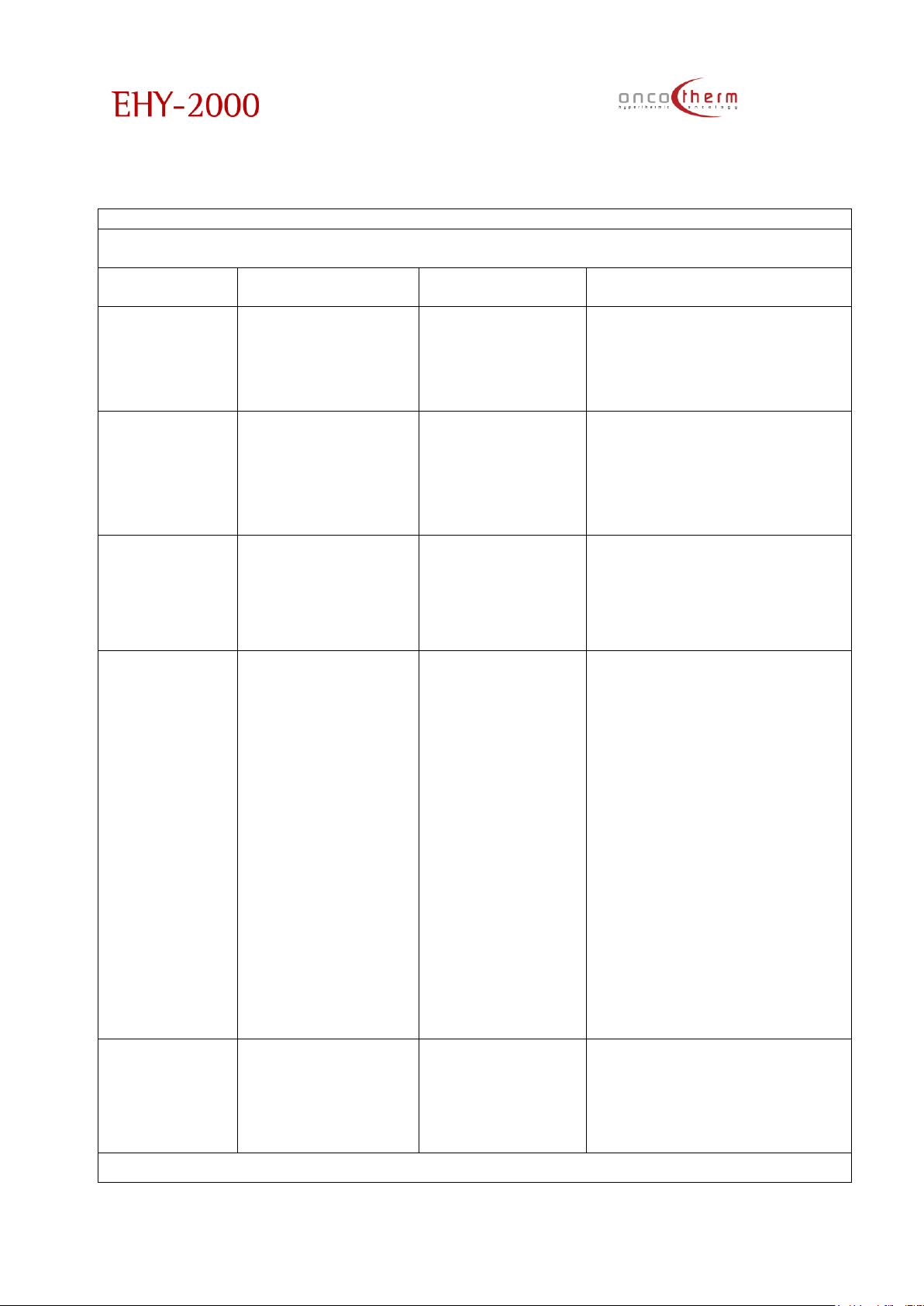
plus
UM - EHY2000plus-R24
74
Table 202- Guidance and manufacturer’s declaration-electromagnetic
immunity-for all EQUIPMENT and SYSTEMS (see 6.8.3.201 a) 6))
Guidance and manufacturer’s declaration-electromagnetic immunity (T.202)
The WEY-2000plus device is intended for use in the electromagnetic environment specified below.
The customer or the user of the WEY-2000plus should assure that it is used in such an environment.
Immunity test
IEC 60601 test level
Compliance level
Electromagnetic environment -
guidance
Electrostatic
discharge (ESD)
IEC 61000-4-2
±6kV contact
±8kV air
±6kV contact
±8kV air
Floors should be wood, concrete
or ceramic tile. If floors are
covered with synthetic material,
the relative humidity should be
at least 30%.
Electrical fast
transient/burst
IEC 61000-4-4
±2kV for power
supply lines
±1kV for input/ output
lines
±2kV for power
supply lines
±1kV for input/
output lines
Mains power quality should be
that of a typical commercial or
hospital environment.
Surge
IEC 61000-4-5
±1kV differential
mode
±2kV common mode
±1kV differential
mode
±2kV common
mode
Mains power quality should be
that of a typical commercial or
hospital environment.
Voltage dips,
short
interruptions
and voltage
variations on
power supply
input lines
IEC 61000-4-11
<5% UT
(>95% dip in UT) for
0,5 cycle
40% UT
(60% dip in UT) for 5
cycles
70% UT
(30% dip in UT) for 25
cycles
<5% UT
(>95% dip in UT) for 5s
<5% UT
(>95% dip in UT) for
0,5 cycle
40% UT
(60% dip in UT) for 5
cycles
70% UT
(30% dip in UT) for
25 cycles
<5% UT
(>95% dip in UT) for
5s
Mains power quality should be
that of a typical commercial or
hospital environment. If the user
of WEY-2000plus requires
continued operation during
power mains interruptions, it is
recommended that the WEY2000plus be powered from an
uninterruptible power supply or a
battery.
Power
frequency
(50/60Hz)
magnetic field
IEC 61000-4-8
3A/m
3A/m
Power frequency magnetic
fields should be at levels
characteristic of a typical
location in a typical commercial
or hospital environment.
NOTE UT is the a.c. mains voltage prior to application of the test level.
Page 76
plus
UM - EHY2000plus-R24
75
Table 204 – Guidance and manufacturer´s declaration – electromagnetic
immunity– for EQUIPMENT and SYSTEM that are not LIFE-SUPPORTING(see 6.8.3.201
b))
Guidance and manufacturer’s declaration-electromagnetic immunity (T.204)
The WEY-2000plus device is intended for use in the electromagnetic environment specified below.
The customer or the user of the WEY-2000plus should assure that it is used in such environment.
Immunity test
IEC 60601 test
level
Compliance
level
Electromagnetic environment - guidance
Conducted RF
IEC 61000-4-6
Radiated RF
IEC 61000-4-3
3Vrms
150kHz to
80MHz
3V/m
80MHz to
2.5GHz
3Vrms
3V/m
Portable and mobile RF communications
equipment should be used no closer to any
part of the WEY-2000plus, including cables,
than the recommended separation distance
calculated from the equation applicable to the
frequency of the transmitter.
Recommended separation distance
d=1,2√P
d=1,2√P 80MHz to 800MHz
d=2,3√P 800MHz to 2,5GHz
where P is the maximum output power rating of
the transmitter in watts(W) according to the
transmitter manufacturer and d is the
recommended separation distance in meters
(m).
Field strengths from fixed RF transmitters, as
determined by an electromagnetic site survey,
a should be less than the compliance level in
each frequency range.b
Interference may occur in the vicinity of
equipment marked with the following
symbol:
NOTE 1 At 80 MHz and 800 MHz, the higher frequency range applies.
NOTE 2 These guidelines may not apply in all situations. Electromagnetic is affected by absorption
and reflection from structures, objects and people.
a Field strengths from fixed transmitters, such as base stations for radio (cellular/cordless)
telephones and land mobile radios, amateur radio, AM and FM radio broadcast and TV broadcast
cannot be predicted theoretically with accuracy. To assess the electromagnetic environment due
to fixed RF transmitters, an electromagnetic site survey should be considered. If the measured field
strength in the location in which the WEY-2000plus is used exceeds the applicable RF compliance
level above, the WEY2000plus should be observed to verify normal operation. If abnormal
performance is observed, additional measures may be necessary, such as reorienting or relocating
the WEY-2000plus.
b Over the frequency range 150 kHz to 80 MHz, field strengths should be less than 3 V/m.
Page 77
plus
UM - EHY2000plus-R24
76
Table 206 – Recommended separation distances between portable and
mobile
RF communications equipment and the EQUIPMENT or SYSTEM -
for EQUIPMENT and SYSTEMS that are not LIFE-SUPPORTING (see 6.8.3.201 b))
Recommended separation distances between
portable and mobile RF communications equipment and the EHY-2000plus (T.206)
The WEY-2000plus device is intended for use in the electromagnetic environment in which radiated
RF disturbances are controlled. The customer or the user of the WEY-2000plus can help to prevent
electromagnetic interference by maintaining a minimum distance between portable and mobile
RF communications equipment (transmitters) and the WEY-2000plus device as recommended
below, according to the maximum output power of the communications equipment.
Rated maximum output
power of transmitter
W
Separation distance according to frequency of transmitter
m
150KHz to 80MHz
d=1,2√P
150KHz to 80MHz
d=1,2√P
0,01
0,12
0,12
0,23
0,1
0,38
0,38
0,73 1 1,2
1,2
2,3
10
3,8
3,8
7,3
100
12
12
23
For transmitters rated at a maximum output power not listed above the recommended separation
distance d in meters (m) can be estimated using the equation applicable to the frequency of the
transmitter, where P is the maximum output power rating of the transmitter in watts (W) according to
the transmitter manufacturer.
NOTE 1 At 80 MHz and 800MHz, the separation distance for the higher frequency range applies.
NOTE 2 These guidelines may not apply in all situations. Electromagnetic propagation is affected by
absorption and reflection from structures, objects and people.
Page 78
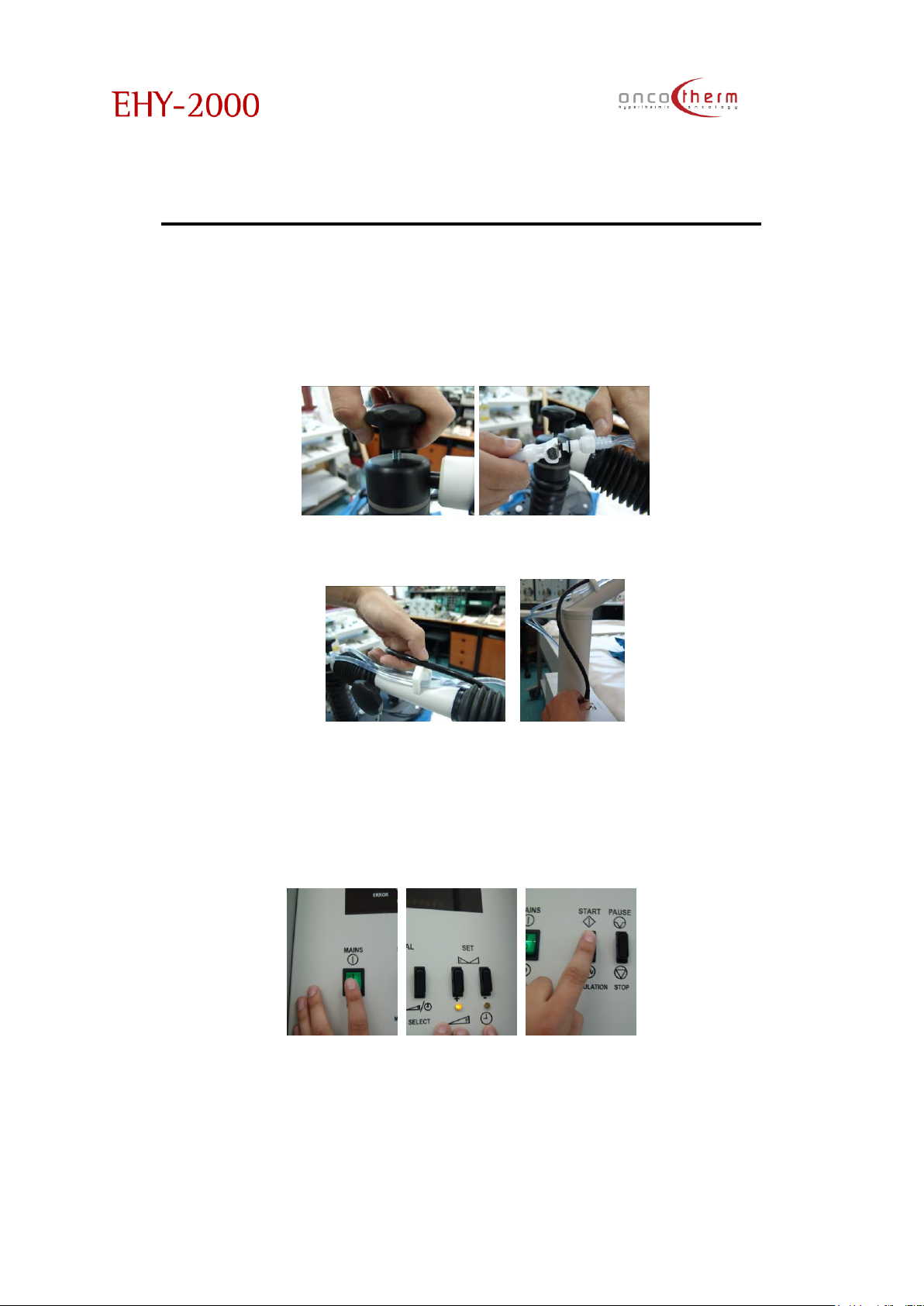
plus
UM - EHY2000plus-R24
77
Appendix 6 - Treatment in 9 steps
The following points contain the steps of a typical treatment. It is suggested to
keep a copy of this page near the device.
1. Choose the proper electrode and disinfect it.
2. Fix the electrode on the holding arm and connect the water tubes.
3. Connect the electrode cable to the device and fix the cable on the
holding arm on every possible point.
4. Let the self-test run. The self-test takes about 2 minutes.
5. Switch on the device by the Main switch on the front of the device
6. Lay the patient on the waterbed and place the electrode as horizontal as
possible on the patient on the identified treatment area.
7. Set the treatment parameters by the Select, Up and Down buttons
8. Start the treatment with the Start button
9. Let the treatment run until the set time runs out. The device signs the end
of the treatment by a sound signal. After pushing the Stop button the
device makes a self-test automatically, after that you can begin the next
treatment.
Page 79

plus
UM - EHY2000plus-R24
78
Appendix 7 - Patient Consent
ONCOTHERMIA SHOULD NOT BE USED BY PATIENTS UNTIL THERE HAS BEEN A COMPLETE DISCUSSION
OF THE RISKS AND WRITTEN INFORMED CONSENT HAS BEEN OBTAINED.
IMPORTANT INFORMATION AND WARNING
PATIENT’S CONSENT
My,_____________________________, treatment with ONCOTHERMIA has been personally described
to me by Dr. _____________________________________.
The following points of information, among others, have been specifically discussed and made
clear and I have had the opportunity to ask any questions concerning this information:
1. I, ____________________________(patient's name) understand that ONCOTHERMIA is used to
treat certain types of tumors (malignant and benign) and my physician has told me that I
am this type of patient.
Initials: ________________________
2. I understand that there is a risk of surface or adipose erythematic reaction, sometimes
burn-injury, by using ONCOTHERMIA.
Initials:________________________
3. I understand that there are no laboratory tests that will predict the success of the
treatment
Initials:________________________
4. I understand that I must immediately report any unusual
symptoms to Dr. _________________________________ and be especially aware of persistent
nausea, fatigue, lethargy, decreased appetite, itchiness, pain, etc.
Initials:________________________
I now authorize Dr. ________________________ to start my treatment with ONCOTHERMIA; OR, if
my treatment has already begun with ONCOTHERMIA, to continue the treatment.
Patient's Name: ________________________________________________
Address: ________________________________________________
________________________________________________
Telephone: ________________________________________________
PHYSICIAN STATEMENT: I have fully explained to the patient, ______________________________, the
nature and purpose of the treatment with ONCOTHERMIA and the potential risks associated with
that treatment. I have asked the patient if he/she has any questions regarding this treatment or
the risks and have answered those questions to the best of my ability. I also acknowledge that I
have read and understand the prescribing information listed above.
____________________________________________________________________________________________
Physician Date
NOTE TO PHYSICIAN: It is strongly recommended that you retain a signed copy of the informed
consent with the patient's medical records.
SUPPLY OF PATIENT CONSENT FORMS: A supply of "Patient's Consent" forms as printed above, is
available, free of charge from Oncotherm GmbH, Belgische Allee 9, D-53842, Troisdorf , Germany
([email protected]) Phone: +49-2241-319-920
Page 80
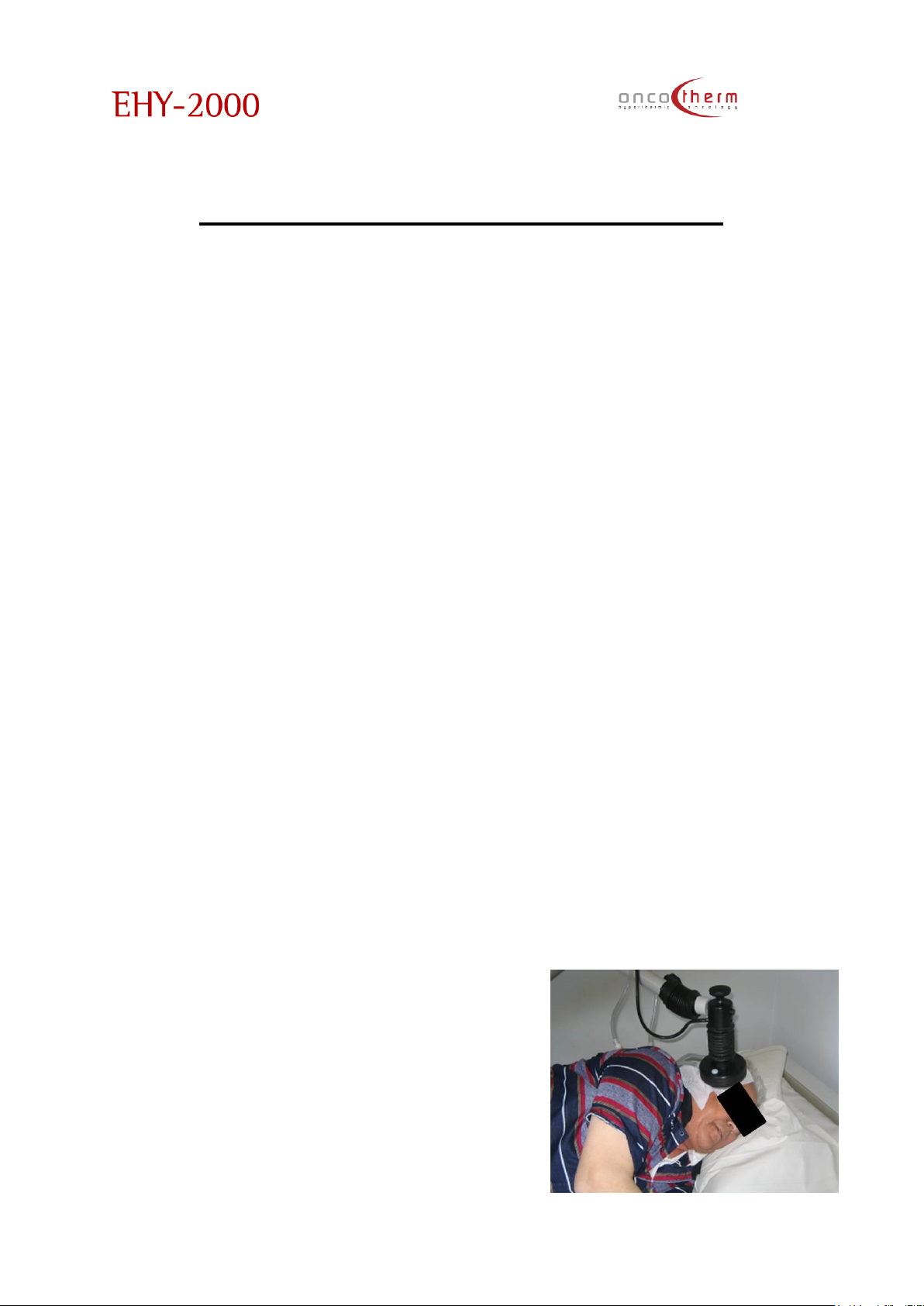
plus
UM - EHY2000plus-R24
79
Appendix 8 - Brain Treatment
The brain treatment needs extra care (at least half year
experience of use and a special training at Oncotherm
training clinics are also required).
The main points are:
1. Please use the small or the medium size electrode. At the beginning (if
you have enough place to position it) please use the medium size,
because its energy density is smaller. The high energy density from small
electrode needs more expertise.
2. Put a thin paper towel (Use medical hygienic paper (see detailed
description in Accessories and Appendix 9 for datasheet) – or any
other medical hygienic paper with CE mark - between the bare skin
and the electrodes. Any other material is not allowed to use!) under
the electrode to avoid free-sweating. When free-sweat appears,
please wipe it off to avoid the short circuit of the RF current through the
liquid.
3. Please start with 30-40 W for 30 min without modulation!
4. Increase the power at the second treatment from 40 W to 60 W for40
min gradually
5. From the third treatment you may switch on the modulation too and
treat the patient in the regime from 40 W to 80 W gradually for 60 min
6. Always control the patient (headache, dizziness, epilepsy, etc.) and ask
before the treatment how they were after the last time. In case of
adverse effects, do not increase the dose, till the adverse effects
continue.
7. Please carefully place the electrode: the electrode frame (black
plastic) must not touch the patient’s skin, the electrode must be as far
as possible from the eye.
8. The patient must lay on the water-bed. When placing any normal
pillow under their head, the air in the
pillow will prevent the RF-current to flow,
and all the current will flow through the
neck and shoulder to the waterbed. It
could be OK sometimes (depending on
the place of the tumor) but sometimes it
could be problematic. When you need
more positioning, put a water-filled
pillow (may be a beach pillow filled with
distilled water) under the patient’s head
Page 81

plus
UM - EHY2000plus-R24
80
to be sure where the RF- current flows.
9. The patient must be in a relaxed position. Please fix their position with
pillows or blankets at the waist or chest, and somehow fix the body so
that the patient does not have to keep their body by force.
10. You need very high care during/throughout the whole treatment
process. Concentrate- on the patient’s complaints and ask their
subjective feelings regularly, make regulations, adjustment their needs.
11. Please give some edema-reducing product (usually glycerol-
derivatives, Manitol, etc) when the patient makes complaints about
the perifocal edema.
12. Please make the protocol for two-three times a week, skip at least one
day between the treatments
13. Please remove all the metals- (ear-rings, necklaces, piercings, etc.)
14. Do not allow to use phones, ear-phones, etc.
15. Do not allow the patient to touch anything outside the bed during the
treatment.
16. Sometimes the metallic implants in the oral cavity (mainly amalgam
fillings) could be slightly painful. In this case adjust the electrode until
the feeling is over.
17. Please document everything carefully, because the brain tumor could
produce unexpected reactions, which has not got any connection to
oncothermia, so you have to be well prepared for any cases.
18. In case of metastatic brain tumor, please treat the primary tumor as
well (if it is not operated out completely), avoid any further
dissemination supporting the metastasis.
19. Always position the black RF cable behind the patient, and it must be
far away from the eyes. (Being exposed to electro smog for a long time
could cause eye problems).
Page 82
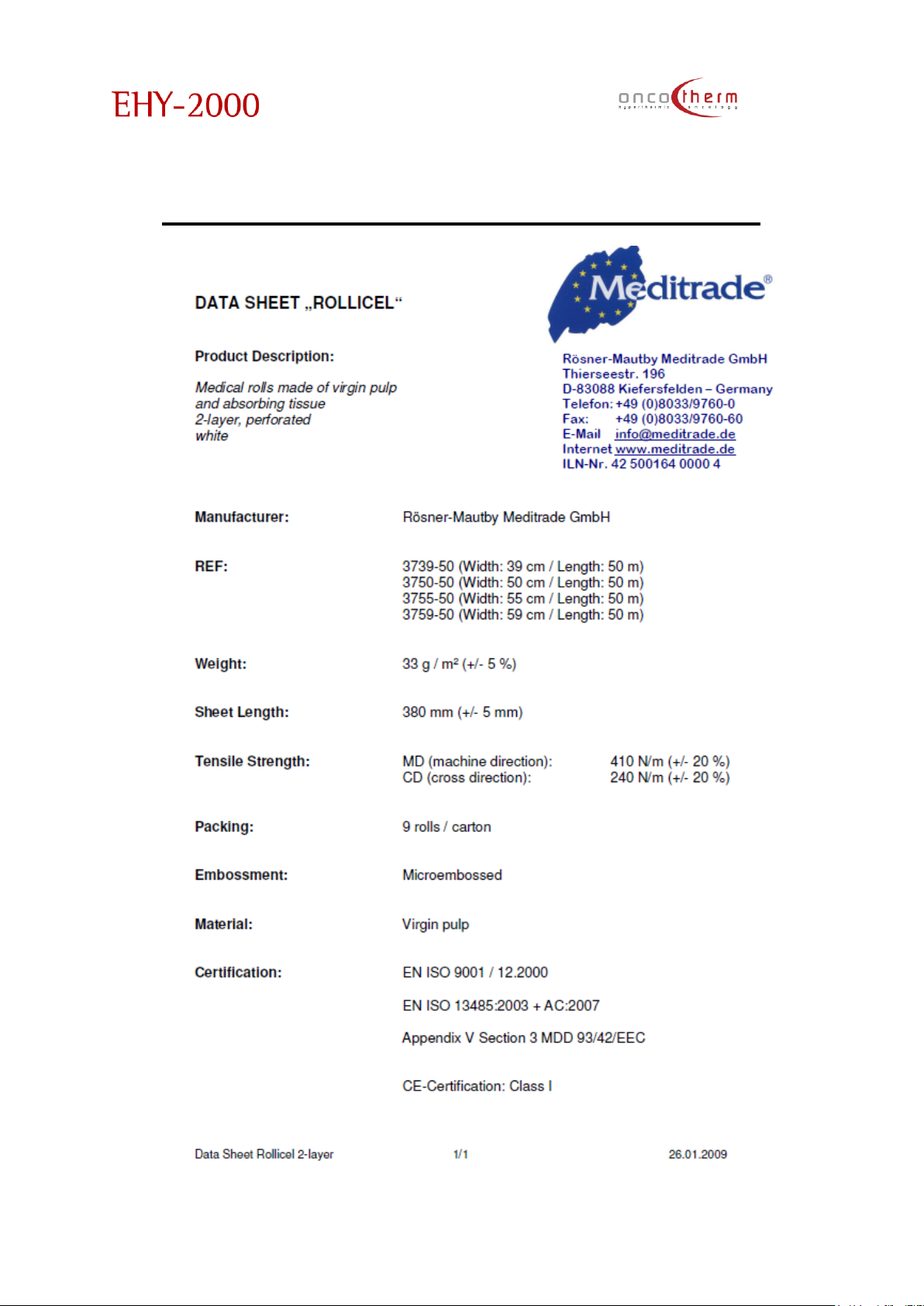
plus
UM - EHY2000plus-R24
81
Appendix 9 - ROLLICEL datasheet
Page 83
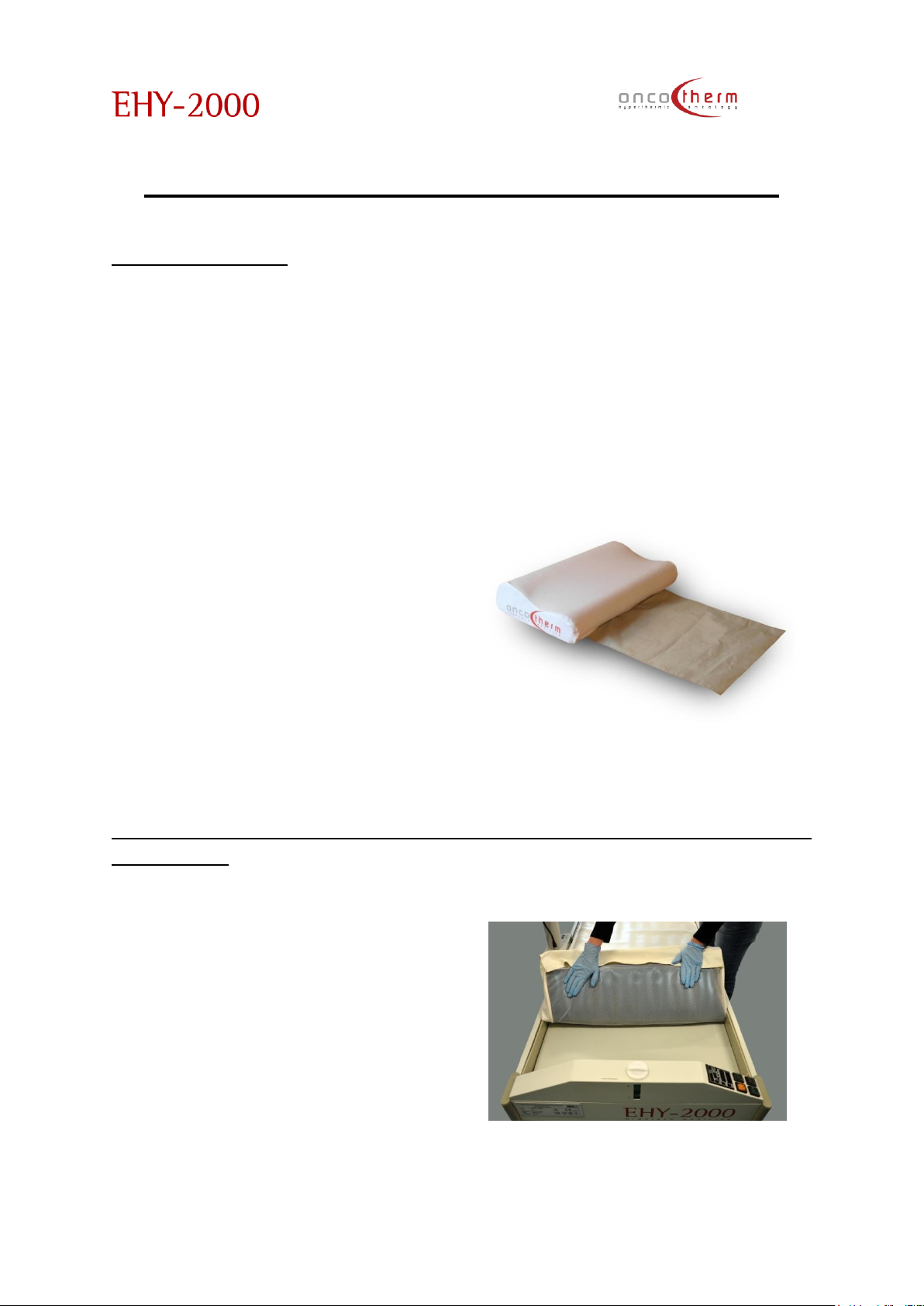
plus
UM - EHY2000plus-R24
82
Appendix 10 - Memory foam pillow
Product information
The memory foam pillow can be
used as a complementary
accessory to treat the head with
the EHY-2000, the EHY-2000plus, the
EHY-2010 and the EHY-3010ML
devices. This instruction is only valid
together with the user’s manual of
the treating device.
The memory pillow can mould the
shape of the patient's head and
neck and so longer treatments
would cause less discomfort to the
patient.
The pillow is coated with a special
metal fabric which carries well the
high frequency current, and in
addition it has a special fabric
outlet, which has direct connection
with the lower electrode so that
during the treatment the pillow is
used as the lower electrode. This
way the treated area (the patient’s
head) will be exactly between the
two electrodes and it increases the
efficacy of the treatment.
Additionally, the pillow’s cover can
be changed and cleaned to
preserve its hygiene.
Using memory foam pillow cushion with EHY-2000, EHY-2000plusand EHY-2010
type devices
1. Fold up the waterbed
mattress together with the
cover.
Page 84
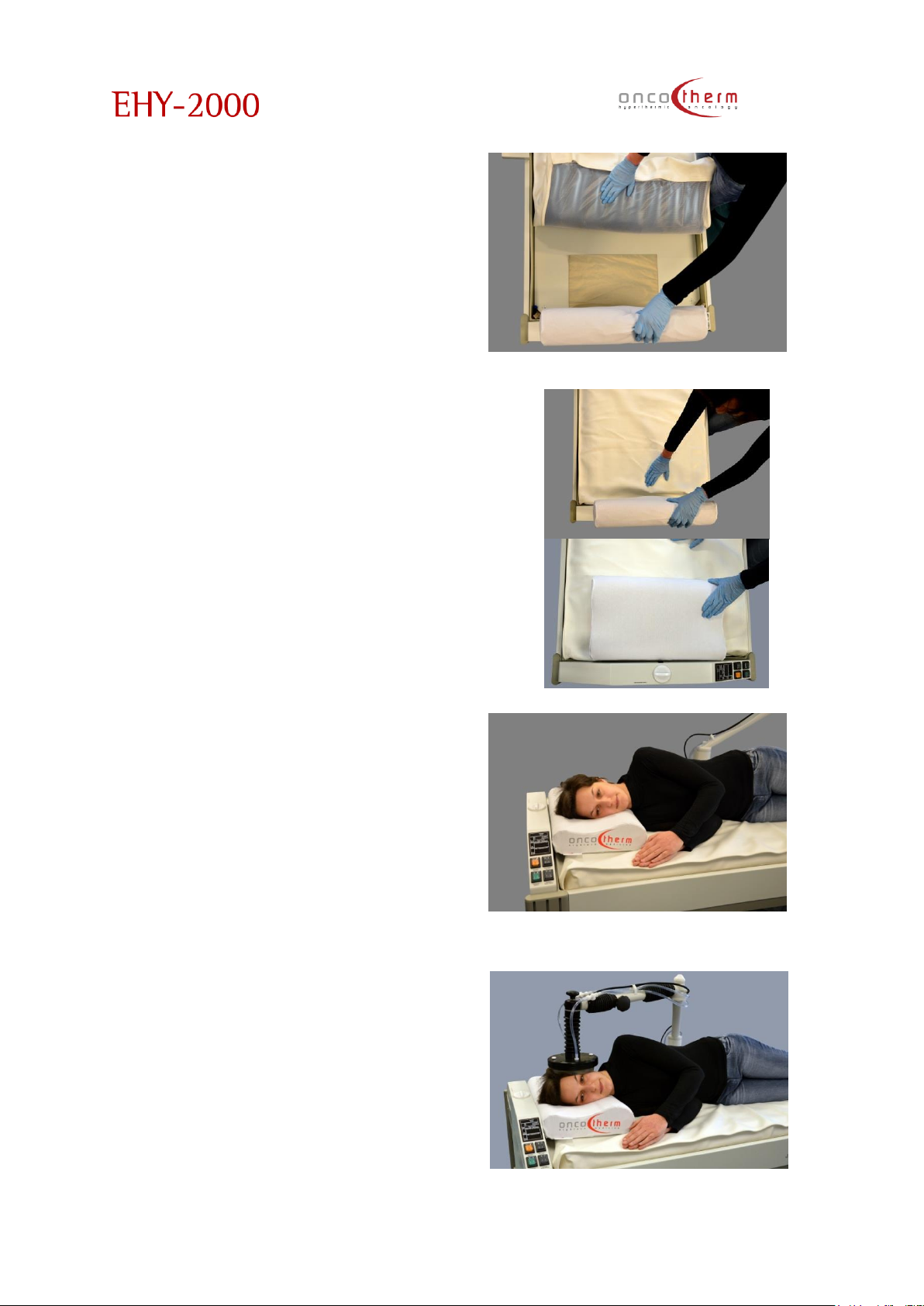
plus
UM - EHY2000plus-R24
83
2. Place the outlet of the
memory pillow right on the
heating panel.
3. Fold back the waterbed
mattress and the cover, and
in the meantime place the
pillow in its right
position.
4. Lay the patient in the desired
position.
5. Place the electrode on the
treated area.
Page 85

plus
UM - EHY2000plus-R24
84
Cleaning of the memory foam pillow cover
The cover of the pillow can be cleaned. However, when it is removed, or pulled
up again, use gloves because of the special metal fabric of the pillow. The metal
fabric cannot be washed.
Page 86

Oncotherm Group
UM-EHY-2000plus-E-R24
OncoTherm GmbH
Belgische Allee 9
D-53842 Troisdorf
Tel.: 0049 2241 31992 0
OncoTherm Kft.
Gyár u. 2
HU-2040 Budaörs
Tel.: 0036 23 5555 10
www.oncotherm.com
UM-EHY-2000plus-R23
 Loading...