

Page 1
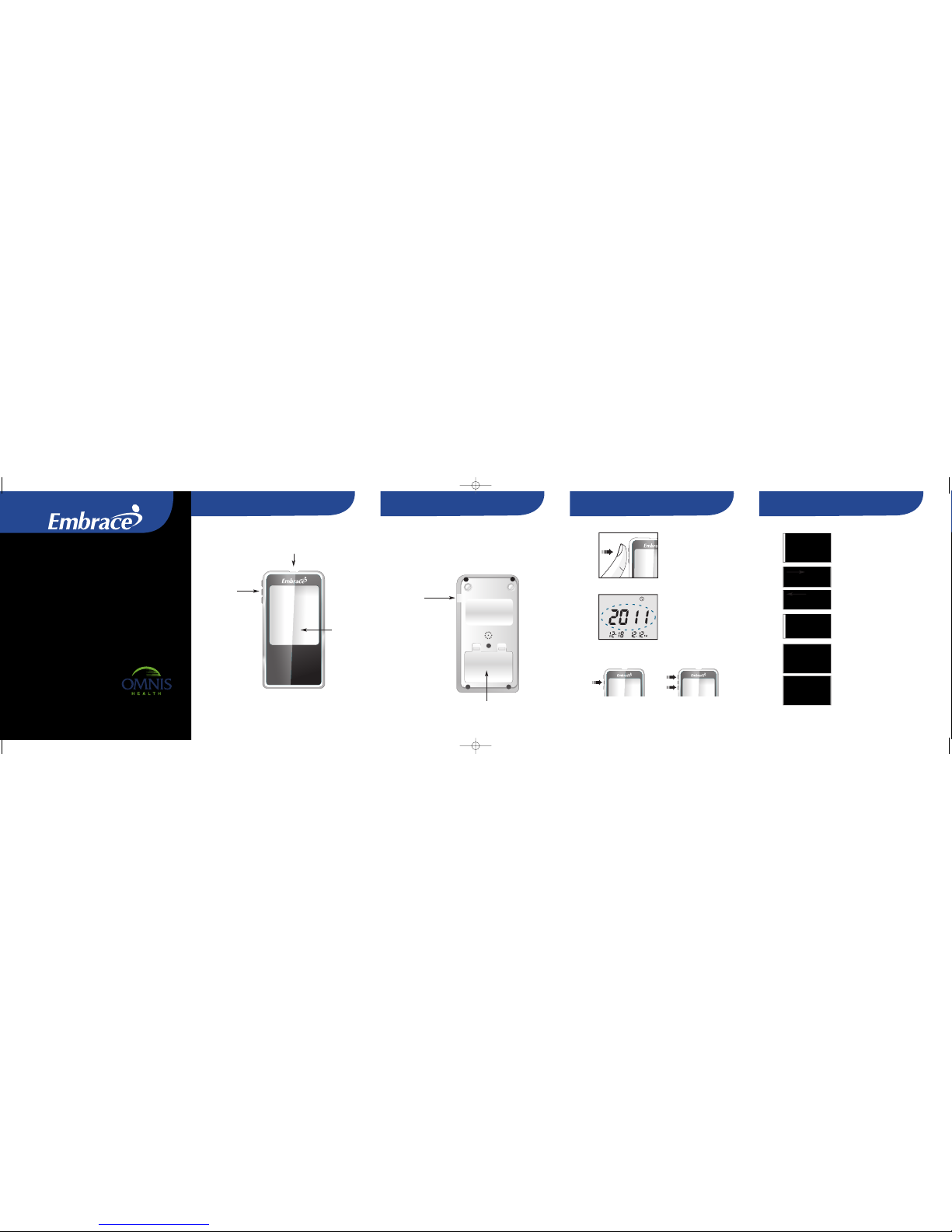
Understanding Your New Meter Understanding Your New Meter Setting Date and Time Preparing your lancing device
No Code Meter Quick Reference Guide
1. Press and hold the middle
button to turn on the meter.
2. Current year will flash,
adjust to the correct year
by pressing the center
button to confirm your
choice.
3. Current year will flash,
adjust to the correct year
by pressing up or down
with the arrow buttons,
press the center button
in to confirm your choice.
Enter Button
Up and Down Buttons
1. Twistoff the lancing device
cap and insert an unused lancet.
2. Twistthe protective cover off
from the lancet.
3. Place the lancing device cap
back onto the lancing device and
adjust the puncturesetting
(1 is lightest and 5 is deepest).
4. Pull back on the lancing
device.
5. Press the button to lance.
Test Strip Port
Insert test strip to turn
on the Meter.
Meter Display
Shows your blood
glucose test results,
memory values,
averages, language
selection, data
port connection,
and alarm times.
Meter Buttons
Press and hold the
middle button on the
side of the meter.
Press middle button
to select different
meter options. Press
and hold middle
button to turn on or
off the meter.
Press middle button
to enter control mode
with test strip inserted,
or enter set up mode
when not testing.
Battery Compartment
Holds two AAA batteries
Data Port
Connect an
Omnis Health
data cable here
to send data
into a PC*
*purchased separately
Back of the EmbraceNo Code Meter
Front of the EmbraceNo Code Meter
Note:Pleasereferto theEmbraceNoCode instructionmanualfor more
completeand detailedinstructionsand importantsafetywarnings.
Note:Please readthrough
yourMeter UserManual
beforeusing thisguide.
EmbraceLancing Deviceincluded in StarterKit option (seepage 4 inUser Manual).
embraceNOCODE_QRG-2.qxd 2012/2/4 11:22 AM Page 1
Page 2
3
4
5
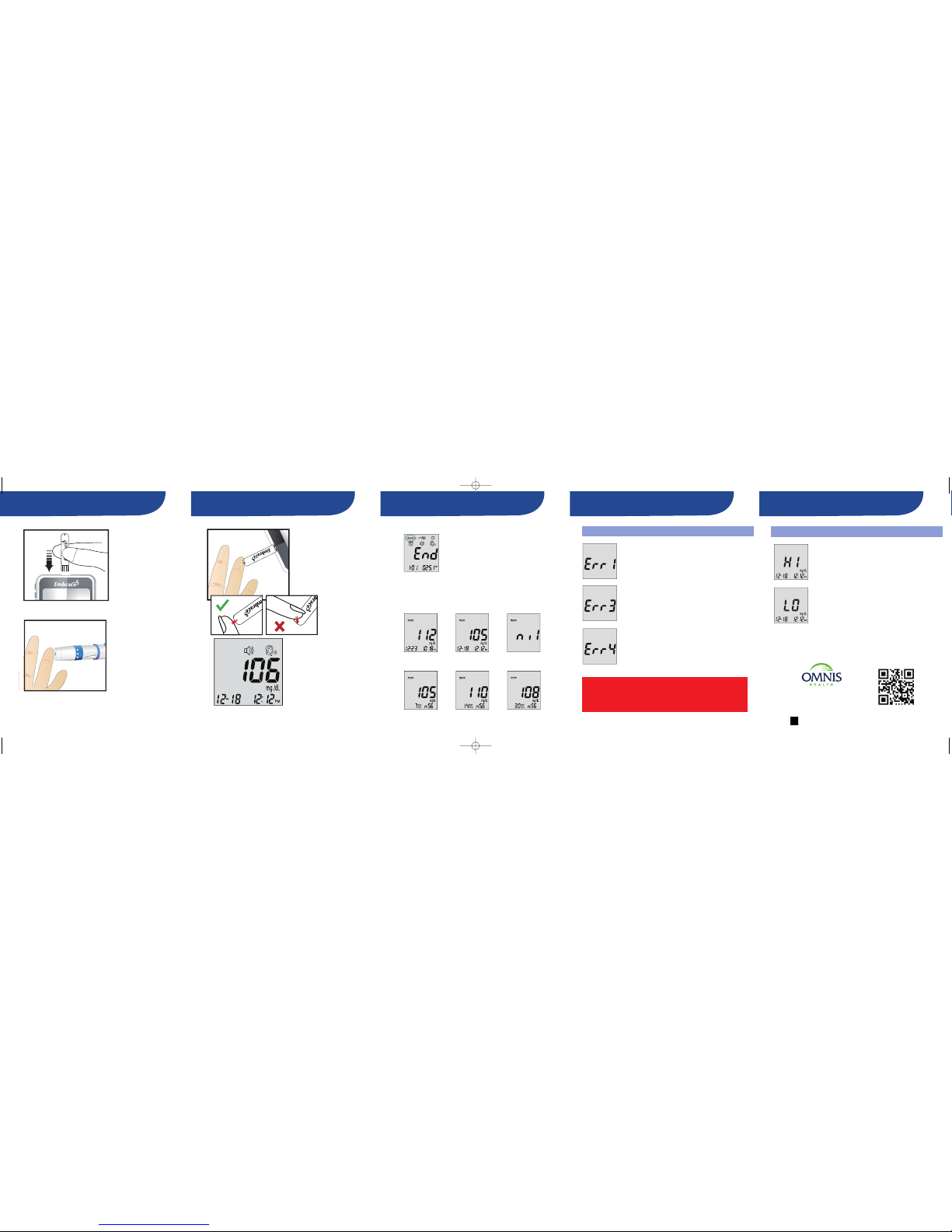
Testing Your Blood Glucose Testing Your Blood Glucose Recalling Memory Problem Solving Problem Solving
Message Description and Remedy
1. Insert the test
strip to turn on
the Meter.
2. Wait for the
blood drop
symbol to
appear on
the LCD.
3. Lance your
finger.
4. Bring your lanced
fingerclose to the tip
of the teststrip as
shown.Blood will be
pulledin when contact
with thetip of the test
stripis made.
5. Your blood
glucose result
will show up in
6 seconds.
1. Turn on the Meter by pressing and
holding the center button in
2. Press the center button in again to enter
function mode
3. Press the center button again when ‘mem’
icon flashes to enter memory recall
Press the top button to see stored results from the most
recent to oldest. Your Meter can hold up to 300 dates and
time stamped results. Control solution results will be
flagged by ‘ctl’ icon at the lower left hand corner. When
the Meter memory is empty, the screen will show ‘nil.’
Scroll down to see the average of the results. The averages
are 7, 14, and 30 days.
Electronic malfunction.
Take the batteries out and insert them into
the Meter again and turn on. If the message
is still there, contact 1-877-979-5454.
Used test strip.
Insert a new unused test strip and test again.
Not enough blood inthe test strip.
Insert a new test strip and test again. Make
sure the blood fills the confirmation window
completely.
Message Description and Remedy
Test result is higher than600 mg/dL.
Use a new test strip and test again. If the
result is still the same, call your physician or
healthcare professional immediately.
LO Test result is lowerthen 20 mg/dL.
Use a new test strip and test again. If the
result is still the same, call your physician or
healthcare professional immediately.
Note:Pleasereferto theEmbraceNoCode instructionmanualfor more
completeand detailedinstructionsand importantsafetywarnings.
CAUTION:IF YOU SEE “HI” OR “LO” DISPLAYED, YOURBLOOD
GLUCOSELEVEL MAY BE ABOVE 600MG/DL OR BELOW 20 MG/DL,
REPEATTESTING. IF YOU STILLRECEIVE THE SAME RESULT,CALL
YOUR PHYSICIANOR HEALTHCAREPROFESSIONAL IMMEDIATELY.
Note:Pleasereferto theEmbraceNoCode instructionmanualfor more
completeand detailedinstructionsand importantsafety warnings.
PN65015010109 REV.1/12
Manufactured for:
6045East ShelbyDrive
Suite1
Memphis,Tennessee38141
1-877-979-5454
www.embracemeter.com
facebook.com/embracemeter
embraceNOCODE_QRG-2.qxd 2012/2/4 11:22 AM Page 6
 Loading...