

Page 1
Instruction Sheet
Premier Informatics Work Station #291455
1) To begin installation of your desk open the door using the default
combination: push buttons 2 and 4 simultaneously followed by button 3,
then turn the knob clockwise. Incorrect keystrokes can be cleared by the
knob counter clockwise. Directions for setting a new combination are
on the reverse.
2) Use the keyhole slots in the rear and appropriate hardware
to fasten the cabinet securely to wall studs.
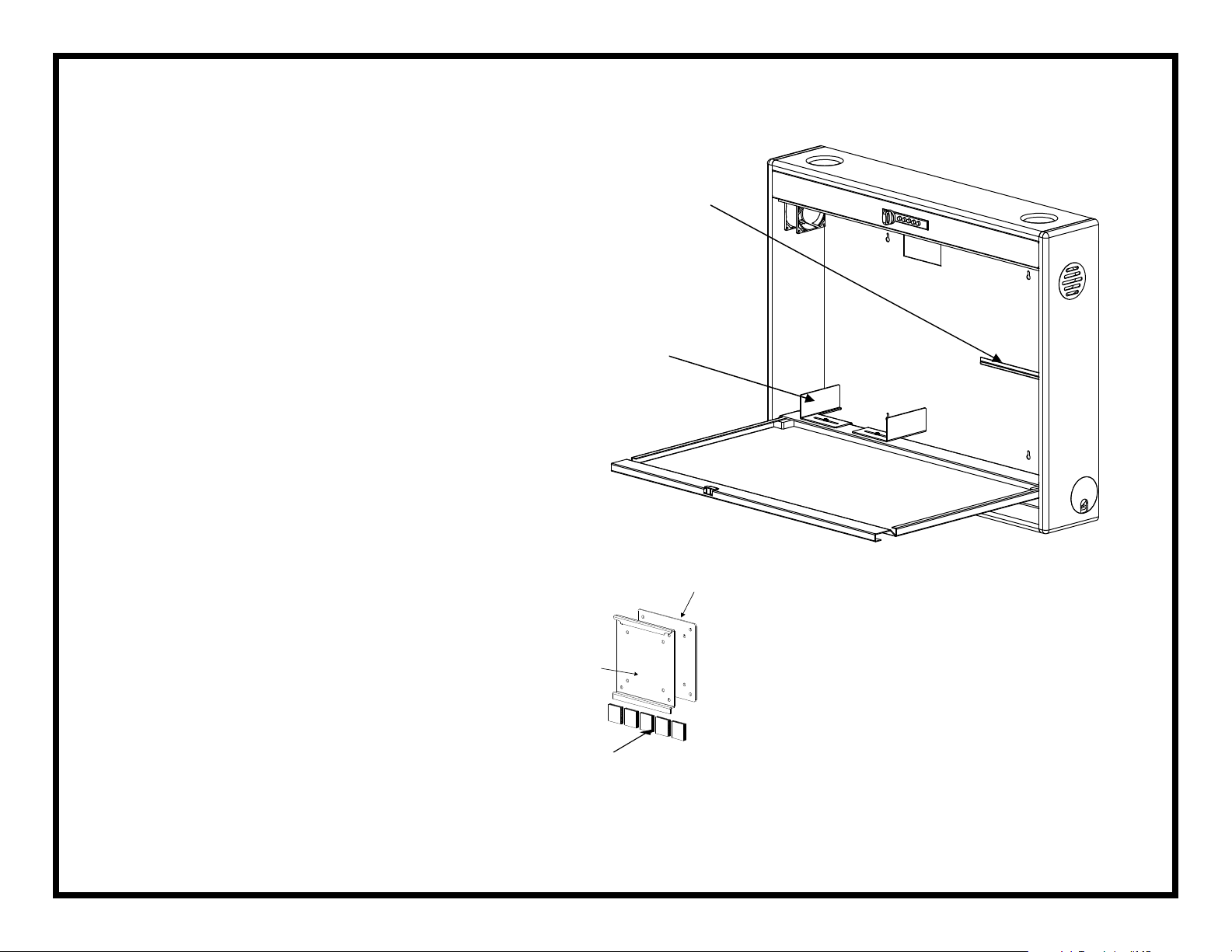
3) Position your CPU on the riser brackets with the connectors facing
downward. Adjust the riser brackets if necessary to prevent any interference
with CPU cables. Remove the adhesive backing from both sides of one of
the dual lock strips and use the strip to secure the CPU to the rear wall.
4) Remove the adhesive backing from the other four loose strips
and use them to fasten the keyboard to the door.
Monitor Mounting Ledge
CPU Riser Brackets
Adapter Plate
0311.AS.OMNI
5) Use the screws provided with your monitor to attach it to the mounting
plate with the mounting foot facing downward. Remove the adhesive backing
from the Dual Lock, set the plate’s foot into the mounting ledge and press the
monitor into position against the rear wall.
Your desk is now fully assembled and ready for use.
Monitor Plate
Dual Lock
Monitor Plate, Adapter Plate
& Dual Lock Fasteners
 Loading...