

Page 1

ACCESS CONTROL SYSTEMS
SERIES OM100, OM300 & OM500
Standard Features
Code capacity
•
Code lengths
•
Seven code levels
•
and Service (temporary code)
Autocode
•
feature allows hundreds of codes to be added instantly.
®
OMNILOCK
(Firmware Version 3.xx)
Quick Reference Guide
of 100, 300 or 500 users, depending on the System selected
from 4 to 9 digits
: Master, Submaster, Manager, Supervisor, General User, Audit
Up to four user groups
•
Audit report
•
Four Access Levels
•
access by group
Time Schedule
•
Holiday List
•
• Variable
Anti-tamper
•
Automatic daylight savings
•
Battery status
•
Mechanical key bypass
•
that lists all entries, attempts and other System activity by date and time
allows unattended setting of the access level
with capacity of 32 holidays
Open Delay
lockout that inhibits unauthorized “guessing”
indications
of variable size
(unlocked, code required, lockout and shutdown). Includes
before the lockset re-locks
clock adjustments
always available
Overview
The OMNILOCK Access Control System (the System) is a self contained, electronically controlled,
battery powered, single door access control device. A keyless system, it has an 11-key pad on
which access codes are entered. A control module containing the System electronics,
batteries, and keypad, is coupled to a heavy-duty lockset. A patented low-power motorized
locking mechanism in the lockset allows for years of reliable operation on a single set of
batteries.
To gain entry through a door secured with the Lock, a user enters an individual code at the
keypad. If both the access level and the code are valid (i.e., the code entered exists in an
authorized section of the Lock's code list) the outside handle will unlock for a predetermined
time, then re-lock when released. The door can always be opened from the inside, regardless
of the locked status of the outside handle.
Page 2

OM100, OM300 & OM500 – QUICK REFERENCE GUIDE
The System maintains an audit log of all System activity for later retrieval by an administrator.
The audit log stores the user ID, and the date and time of each event. It even records
unauthorized attempts to open the Lock!
The System has a programmable time schedule and holiday list that allows it to automatically
change access levels at predetermined times of the day. It can even be programmed to
automatically unlock and remain unlocked during times when access control is not required.
The System is programmed at the door. A user must have either a Master code or one of eight
Submaster codes to program the System. In addition, any User code can be assigned the
Manager privilege to change the access level. Two lights on the Keyboard provide information
such as lock/unlock condition, battery level, programming results, etc.
Programming Modes
The System has two programming modes, Menu mode and Command mode.
Menu Mode
The Menu mode requires use of the WP4000 Wireless Printer. The Printer is used
for collecting the various reports maintained by the System, including the Audit Log.
The System also sends prompts to the user via the Printer to simplify the
programming task.
The Printer is held above the Keyboard and communicates with the System via
infrared light. No wires or connectors are required!
Command Mode
After the System is initially programmed, the Command mode allows programming
a limited set of features without the use of the Printer.
Verify Operation
Before starting to program, verify proper operation of the System in accordance with the
Installation Instruction that came with the product.
Registration
Complete and mail the Product Registration Form or register on-line through our web site:
HTTP://WWW.OMNILOCK.COM.
User Guide
If you do not already have a copy of the User Guide, a copy may be ordered by calling
Customer Service at 619-628-1000 or it may be downloaded from our web site:
http://www.omnilock.com/files/OM135man.PDF
Page 2 of 6
Page 3

OM100, OM300 & OM500 – QUICK REFERENCE GUIDE
Customer Service / Technical Support
If you wish to return material for credit, contact the dealer from whom you purchased the
product, otherwise, our Customer Support staff is available Monday through Friday 7:00 AM to
5:00 PM, Pacific time. Contact Customer Service concerning product pricing, availability and
order status. Contact Technical Support concerning technical problems and repairs. They can
be reached by
• calling our corporate telephone number: (619) 628-1000
• Fax: (619) 628-1001*
• through our web site: http://www.omnilock.com*
• or E-mail: [email protected]*
*Every effort will be made to respond by the next business day.
Warranty Service
OSI Security Devices will service any product we sell when you return it to the factory
complete, free and clear of all liens and encumbrances. You
must
prepay transportation and
accompany the product by a Return Material Authorization Number (see below). For warranty
service on products that have not been registered with our Customer Service Department,
include your sales receipt or other documentary proof of when you bought your OMNILOCK
product. If the product requires warranty related service, we will repair or replace it and return it
to you, shipping prepaid.
Important!
If we find no faults with the product sent to us for warranty service, we reserve the
right to charge a diagnostic fee and handling fee. Also, we will charge for repairing
all damage not covered by the Limited Warranty.
Out-of-Warranty Service
We handle out-of-warranty repairs or replacement similar to the manner for warranty service.
In this case, there will be a charge for parts, labor and return shipping costs.
Return Material Authorization
Before you return any product to OSI Security Devices
for any reason
, you must first
get a Return Material Authorization (RMA) number.
To get an RMA number, call Technical Support and describe the problem. If we
determine your System needs to be returned to us for repair, we will give you an RMA
number.
Please
mark this number
clearly
on the outside of your shipping package. You
can also help by marking the RMA number on a tag and attaching it to the System.
BE SURE TO INCLUDE THE KEY FOR THE LOCK OR ADDITIONAL CHARGES
MAY BE APPLIED FOR LOCKSMITH SERVICES.
Page 3 of 6
Page 4

OM100, OM300 & OM500 – QUICK REFERENCE GUIDE
To program the System in the
Command Mode
:
1. Enter Master or Submaster Code
(Press and Release CL Key to Extend Time-out to 1 Minute)
2. Enter Command from Below (Where Indicated with CL, Press and Hold CL
Key Until Lights Flash Result)
3. Repeat Step 2 as Required or Enter 000 when done
- Single Red Light Indicates Invalid or Unrecognized Command Sequence -
Function Command Sequence Lights Command Result
Add or Change
Code
ID + PIN + CL G
R-R
Code added
Code already in use
Hold Code 86 + ID + CL R-R-R Code placed on hold
Restore Code 87 + ID + CL G
G-G
R-R
Supervisor
Privileges
Manager
88 + ID + CL G-G
R
89 + ID + CL G-G-G R Assigned
Privileges
ID Status Inquiry ID + CL G
G-G
G-G-G
G-R
G-G-R
G-G-G-R
R-R-R
Set Access
Level
90 + Level + CL
(Level = 1-Unlocked,
2-Code Required, 3Lockout or 4-Shutdown)
To set Level 1 to unlock
G
G-G
G-G-G
G-G-G-G
R-R
G----G
Code restored
Supervisor restored
Code already in use
Assigned
Invalid ID
Invalid ID
User code in use
Active Supervisor code
Active Manager code
User code on hold
Supervisor code on hold
Manager code on hold
Code ID unassigned
Unlocked level set
Code Required set
Lockout set
Shutdown set
Invalid access level
Unlocked after f irs t valid code
with first code, continue to
hold the CL key until a
second green flash
appears, (about. 1.5
seconds).
Enable User
Groups
Disable User
Groups
Service Code
Time Limit
91 + Groups + CL G
G-G
R-R
92 + Groups + CL G
R-R
94 + HH + MM + CL G
R-R
Groups enabled
Groups enabled & unsupervised
Invalid group number
Groups disabled
Invalid group number
Time limit set
Invalid time limit
Menus 99 N/A * Requires printer
Code ID Number Ranges:
001 - 100; 300 or 500 General User / Extended User Codes
501 Master Code
502 - 509 Submaster Codes
510 Service Code
511 Audit Code
Page 4 of 6
Page 5
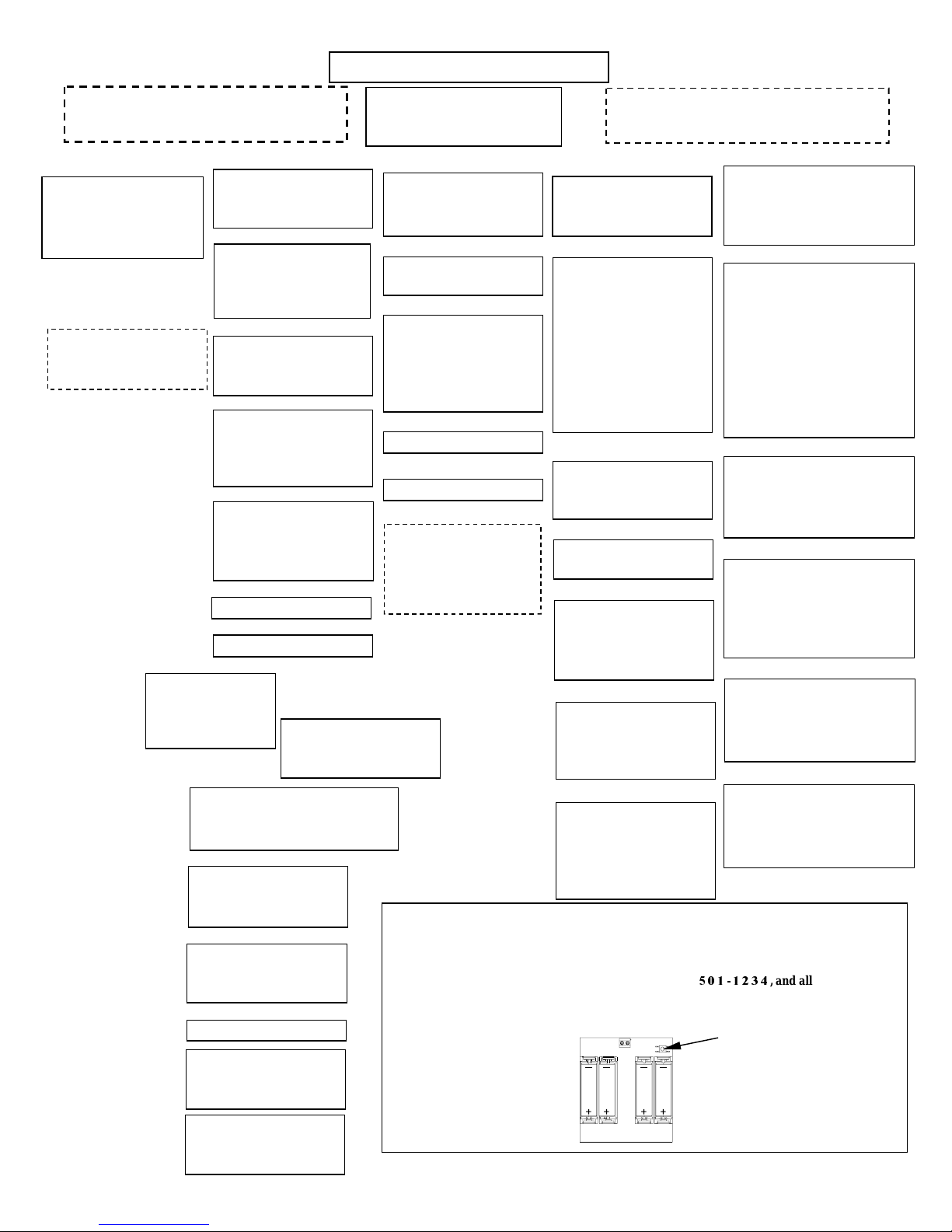
OM100, OM300 & OM500 – QUICK REFERENCE GUIDE
py
y
g
(
(
p
)
This chart is for general reference only.
Specific features may vary with software
1-Audit
Audit Log
Location #123456 BAT:3
Mon 00/00/01 08:00am
1
-More 2-Reprint CL-Done
NOTE:
(1-4)Autocode only
works when it has been Setup
in the lock
6-Groups
Starting ID (###)?
Ending ID (###)?
Select User Groups
(1-4, 5-All, CL-Done)
1
-Users 2-Service 3-Audit
4
-Submasters 5-Master
1-Add 2-Remove 3-Verify
4-Hold 5-Restore 6-Groups
7-Extend
1-Add
(1-4) Autocode 5-Manual
Starting ID (###)?
Ending ID (###)?
2-Remove
Starting ID (###)?
Ending ID (###)?
Remove Users ###-###?
1-Yes 2-No
3-Verify
Print Pins? 1-Yes 2-No
Print Groups? 1-Yes 2-No
Starting ID (###)?
Ending ID (###)?
4-Hold
Hold ID (###)?
5-Restore
Restore ID (###)?
2-Service
1-Add 2-Remove 3-Verify
4-Hold 5-Restore 6-Time Limit (00:00)
510: # digit Pin?
3-Audit
1-Add 2-Remove 3-Verify
4-Hold 5-Restore
511: # digit Pin?
4-Submaster
1-Add 2-Remove 3-Verify
4-Hold 5-Restore
Submaster ID (###)?
5-Master
New Code Length (4-9)?
Warning- New Code Length!
All Codes Will Be Erased
Continue? 1-Yes 2-No
2-Codes
Codes Menu
1-Users
User Codes Menu
7-Extend
Extended User Type?
1-Supervisor 2-Manager
Extend User ID(###)?
ENTER MASTER CODE, WAIT FOR 3 GREEN
FLASHES THEN ENTER "99"
Main Menu
1-Audit 2-Codes 3-Access
4-Schedule 5-Setup 0-End
3-Access
Access Level Menu
1
-Unlock 2-Code 3-Lock
4
-Shutdown
1-Unlock
Unlock With First Code?
-
2-Code
Select Groups To Enable
(1-4, 5-All, CL-Done)
Group # Supervised?
1-Yes 2-No
Access: C/R++++
3-Lock
Access: Lockout
4-Shutdown
Access: Shutdown
NOTE:
(Code Required for four(4)
groups; Where + = enabled,
- = disabled, and
s = su
-
Access: C/R++++
ervised
1
-Add 2-Remove 3-Verify
4
-Co
1-Add
Schedule(Mon-1..Day-9)?
Add Mon Time (24 HR)?
1-Unlock 2-Code 3-Lock
Access Level?
Unlock With First Code?
1-Yes 2-No
Select Groups To Enable
(1-4, 5-All, CL-Done)
Group #1 Supervised?
2-Remove
Remove (dd) Time (24 HR)?
Remove Mon 08:00am?
1-Yes 2-No
3-Verify
In Use: #
Schedule
4-Copy
Copy From:
Schedule (Mon-1 ..Da y-9)?
Copy(dd) To:
Schedule (Mon-1 ..Da y-9)?
5-Clear
Select Schedule To Clear
(Mon-1. .Day-9, 0 -All)?
Clear All Schedules?
1-Yes 2-No
6-Holiday
1-Add 2-Remove 3-Verify
4-Clear Holiday list (00:00)
Month (mm)?
Day (dd)?
Schedule
To Reset The Lock To The Default Master Code:
Press and hold the Reset Button until the light flashes green on the keyboard. The system will
perform a self-test and then flash green five(5) times. Any red flashes indicate an electronics or
drive problem.
The Master Code is now set back to the factory default of
has been erased.
To log on and begin programming, enter Master Code and use Command # 99.
This chart is intended for use
with OMNILOCK printer WP4000.
4-Schedule
Schedule Menu
5-CLR 6-Holida
Mon-1..Day-9)?
Mon-1..Day-9)?
1
-Status Report 2-Clock
3
-Defaults 4-Autocodes
5
- Run Dia
1-Status
Location #123456 BAT:3
Mon 00/00/01 08:00am
Access: C/R++++
Open Delay Seconds: 02
Daylight: Northern
Service Code Time: 00:00
Battery Usage: 000
2-Clock
Month (mm)?
Day (dd)?
Year (yy)?
Time: (24 HR)?
3-Defaults
1- Open delay Seconds: 02
2- Daylight: Northern
3- Group Boundaries
4- Location: 123456
4-Autocodes
1- 000000 2- 000000
3- 000000 4- 000000
6 Digit Autocode? (enter 6 digits)
5-Run Diagnostics
-- Diagnostics Report --
OMNILOCK 500 vX.XX
(c) OSI SECURITY DE VICES
LOCATION #000000 BAT:3
Reset Button
5-Setup
Setup Menu
nostics
Status Report
Defaults Menu
Facility Autocodes
,and all programming
Enter New Master Pin
Reenter Code To Confirm
Master Code Set
Page 5 of 6
Page 6

OM100, OM300 & OM500 – QUICK REFERENCE GUIDE
g
Limited Warranty
OSI Security Devices (“ OSI”) warrants the products manufactured by it (the "Product") to be free of
defects in material and workmanship for a period of ONE YEAR (the "Warranty Period") from the date
of original purchase. Only units specified as weatherized are warranted for outside use. If ownership of
the Product is transferred, the warranty is automatically transferred to the new owner and remains in
effect for the balance of the Warranty Period. During the Warranty Period OSI shall, at its option, either
repair or replace, free of charge, any Product or part thereof found, upon OSI's inspection, to be
defective. OSI is not responsible for warranty service should the Product fail to be properly maintained
or fail to function properly as a result of accident, misuse, abuse, vandalism, disassembly, modification,
improper installation, corrosion, ordinary wear and tear, neglect or damage caused by natural disasters
such as, but not limited to, fire, flood, earthquake, and lightning. Batteries (and damage caused by the
batteries) are not covered by this warranty. Consult with the battery manufacturer about battery and
battery leakage warranties.
Postage, insurance, and/ or shipping costs incurred in presenting the Product for warranty service are
your responsibility. If claimed defect cannot be identified or reproduced in service, you may be held
responsible for costs incurred. Products are sold on the basis of specifications applicable at the time of
manufacture. OSI shall have no obligation to modify or update the Product once sold.
THE WARRANTY AND REMEDY PROVIDED ABOVE ARE EXCLUSIVE AND IN LIEU OF ALL OTHER EXPRESSED
WARRANTIES AND, UNLESS STATED HEREIN, ANY STATEMENTS OR REPRESENTATIONS MADE BY ANY OTHER
PERSON OR FIRM ARE VOID. THE DURATION OF ANY IMPLIED WARRANTIES OF MERCHANTABILITY OR
FITNESS FOR A PARTICULAR PURPOSE ON THE PRODUCT SHALL BE LIMITED TO THE DURATION OF THE
EXPRESSED WARRANTY SET FORTH ABOVE. EXCEPT AS PROVIDED IN THIS WRITTEN WARRANTY, NEITHER
OSI SECURITY DEVICES NOR ITS AFFILIATES SHALL BE LIABLE FOR ANY LOSS, INCONVENIENCE, OR DAMAGE,
INCLUDING DIRECT, SPECIAL, INCIDENTAL OR CONSEQUENTIAL DAMAGES RESULTING FROM THE USE OR
INABILITY TO USE THE PRODUCT, WHETHER RESULTING FROM BREACH OF WARRANTY OR ANY OTHER
LEGAL THEORY, AND ALL OTHER IMPLIED AND EXPRESS WARRANTIES, INCLUDING THE WARRANTIES OF
MERCHANTABILITY AND AGAINST INFRINGEMENT, ARE EXPRESSLY DISCLAIMED.
Some states do not allow limitations on how long an implied warranty lasts and some states do not allow
the exclusion or limitation of incidental or consequential damages, so the above limitations and exclusions
may not apply to you.
This warranty gives you specific rights and you may also have other rights, which vary from state to
state, province to province, or country to country.
Warning
: When properly installed and maintained, the Product may reduce risk of property loss due to
burglary, robbery, or otherwise, but is not insurance or a guarantee that these events will not occur. OSI
makes no representation that the Product may not be compromised or circumvented; nor that the Product
will prevent any personal injury or property loss.
NOTE:
It is the responsibility of the distributor or installing dealer to educate the end user in
programming the OMNILOCK Access Control System and in regard to use of the system.
OSI Security Devices and its sales representatives are not responsible for programming. If required
to do so, a fee will be incurred by the end user.
INSTALLATION INSTRUCTIONS AND USER GUIDES ARE TO BE KEPT BY THE END USER FOR
MAINTENANCE OF THE SYSTEM.
SECURITY
DEVICES
1580 Jayken Way
Chula Vista, California 91911-4644
Phone (619) 628-1000 Fax (619) 628-1001
Website:
E-mail:
www.omnilock.com
Copyright ©2001 OSI Security Devices Inc. All Rights Reserved.
OMNILOCK is a re
istered Trademark of OSI Security Devices Inc.
Page 6 of 6
A11629B
 Loading...