

Page 1
Quick Start Setup Guide
SW Version 3.19.39
For part numbers: 2001-00420-000, 2001-00495-000
Omnia.9sg
Stereo Generator with Psychoacoustically-Controlled
Distortion Masking Clipper
ATTENTION!
This quick start guide is intended to aid with basic deployment of the Omnia.9sg.
For further support and/or questions please contact [email protected]
1490-00124-002 --- QUICK START GUIDE: OMNIA.9 SG
Page 2

We know you’re eager to get your new gear up and running. But rst, The Telos Alliance strongly
suggests you use an Uninterruptible Power Supply (UPS), with power line ltering, to prevent damage
in case of electrical storms or power surges. Your Product Warranty (found in the User Manual) does
not cover lightning damage!
Information about lightning protection can be found at:
http://blogs.telosalliance.com/tech/surge-suppression-pointers
IMPORTANT SAFETY INFORMATION
ABOUT YOUR NEW PRODUCT
Page 3

Telos Alliance Limited Warranty
Telos Alliance Radio Division has an industry-leading ve-year warranty. As a company, we are
commited to our products and the pursuit of providing better quality to our customers.
Find the Warranty online at www.telosalliance.com/warranty.
Page 4
| 1
We’ve prepared this preliminary Quick Start Setup Guide to get you and your new Omnia.9sg up and
running as quickly as possible.
It is deliberately brief and does not provide a full explanation of all available controls and settings, so
we strongly recommend reading the complete user manual when time allows, available at
https://www.telosalliance.com/Omnia/Omnia9sg
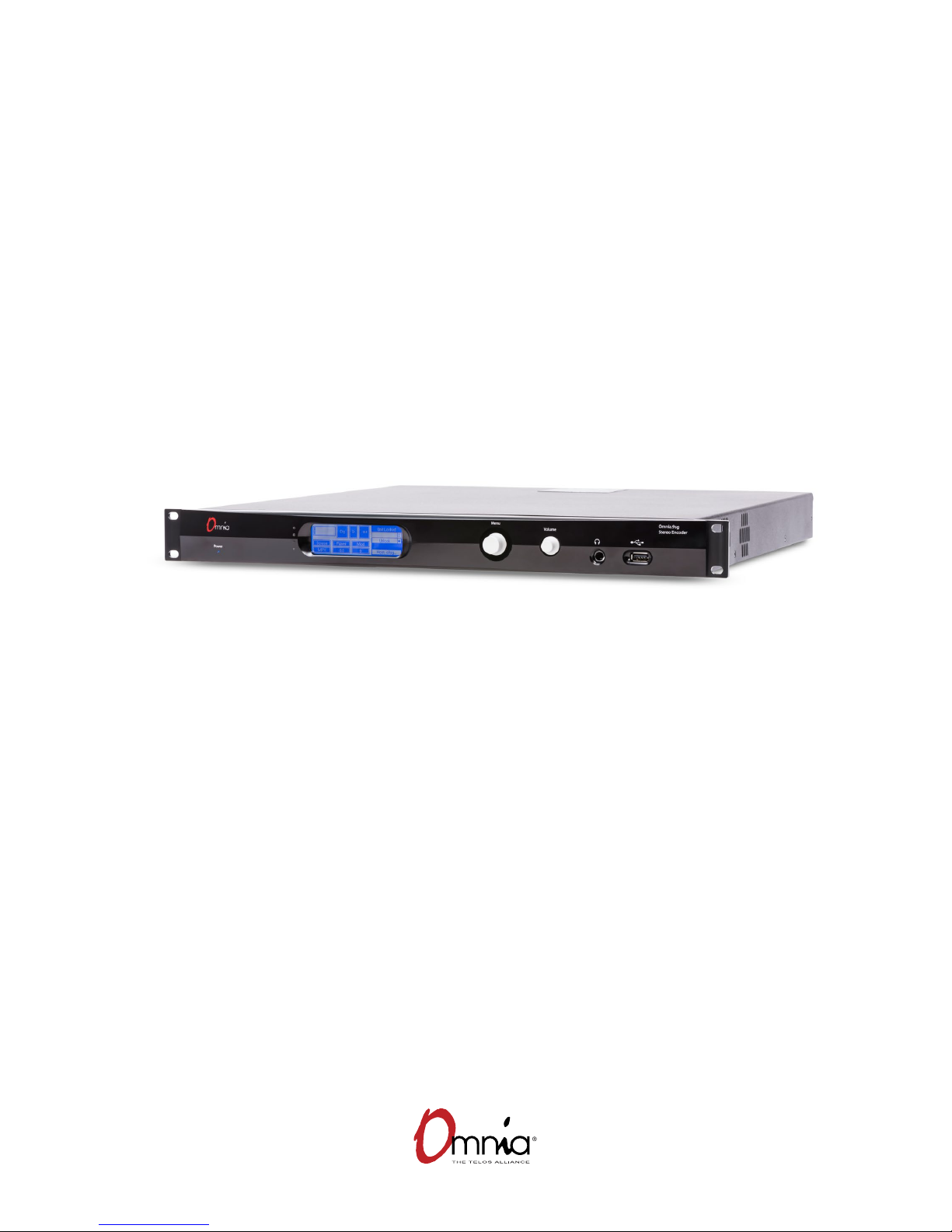
Omnia.9sg is a slim 1RU design so it doesn’t take up much vertical rack space, but it is deep.
Accordingly, you may wish to enlist the help of an assistant when racking it up and ensure there’s
nothing to obstruct it toward the back of the rack.
The unit is fan cooled but leaving an empty rack space directly above and below it is still good
practice for both Omnia.9sg and the equipment directly above and below it. Air is drawn in via an
intake near the front right side of the unit (looking at the front panel) and exhausted near the front
left side, so ensure there are no obstructions around these areas that would impede air flow.
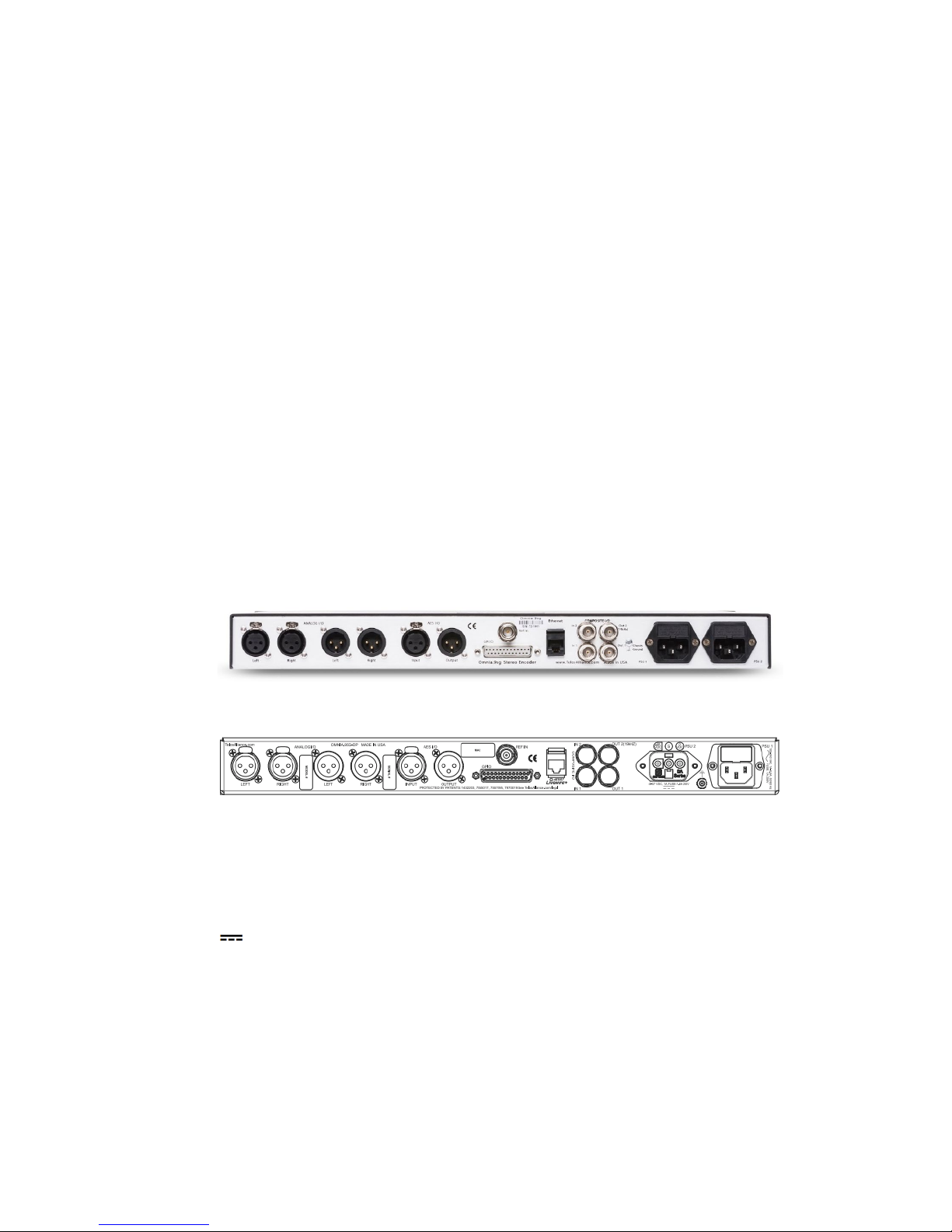
Omnia.9sg, standard Dual AC unit
Omnia.9sg-DP, AC+48VDC powered unit
Physical Installation
Connect power to both of the internal power supplies. There is no power switch. For customers using
the AC-DC dual supply, ensure power voltage is within the specified range of 40-57 VDC, 1A. (The
symbol, if used, indicates a direct current supply). The DC supply must have external current
control limiting the total power available to 240VA or less. An external 4A fuse is required on the DC
supply.
It is always possible for a power supply to fail; having redundant supplies helps protect you in the
unlikely event that one of the internal supplies fails. In reality, external power source failure is far
more likely. Best engineering practice is that each supply should be fed from a different source. At
minimum we recommend that each source should be fed through a good quality UPS with adequate
surge protection. In an ideal world, each source would be fed from a completely different isolated
circuit for maximum redundancy.
Next, connect the audio inputs as appropriate for your installation. Omnia.9sg accepts balanced
professional line-level analog audio via its Left and Right Analog Inputs and AES/EBU digital audio on
standard XLR connectors via its AES inputs. Audio can also be provided via Livewire.
1
Quick Start Setup Guide
Page 5
2 | OMNIA.9sg QUICK START SETUP GUIDE
Two composite (MPX) inputs are also provided and can accept a full MPX signal from the composite
output of another processor.
In the event of a power or system failure, Omnia.9sg provides a hard relay bypass. When the bypass
relay is engaged, MPX Input 1 is directly connected to MPX Output 1 while MPX Input 2 is directly
connected to MPX Output 2. This feature makes it is possible to take the composite output of a hot
backup processor or stereo generator and feed it into the MPX input so that it passes through the
corresponding MPX Output in the unlikely event of power or system failure .
The main AES XLR input can accept audio with or without a clock reference of between 32kHz and
96kHz. If necessary, the built-in sample rate converter (SRC) on this input will up- or down-convert to
the fixed system standard of 48kHz.
A dedicated external reference input is provided on the rear panel via a BNC connector should it be
necessary to sync to a clock that is not present on the incoming AES audio signal, but this must be a
48kHz signal as no SRC is present on the BNC input. An adapter (Pin 2 hot, Pin 3 shield) may be used
for short cable runs without concern. For longer runs, a transformer may be used.
Front Panel Control, Menu Navigation, and Password
Using the Rotary Encoder
Much like our Omnia.7 processor, Omnia.9sg uses a “joystick” type of rotary encoder for menu
navigation and control adjustment on the front panel.
n “Rocking” the control left, right, up or down facilitates navigation through the various menus.
In lower level menus, a Right command is a backspace, while a Left command is Enter or
proceed.
n Turning the knob clockwise or counterclockwise scrolls through tables and adjusts individual
controls. Turn the knob to rapidly navigate through the alpha-numeric selector page.
n Push the rotary control in to press “Enter”. This “Enter” action usually has the same function as
rocking the control to the right.
Unlocking the Unit
For newcomers, navigating using the Rotary Encoder can take some getting used to. Getting past
the password lock provides a first step to becoming familiar with navigation tools. This step-by-step
guide will help give you an orientation.
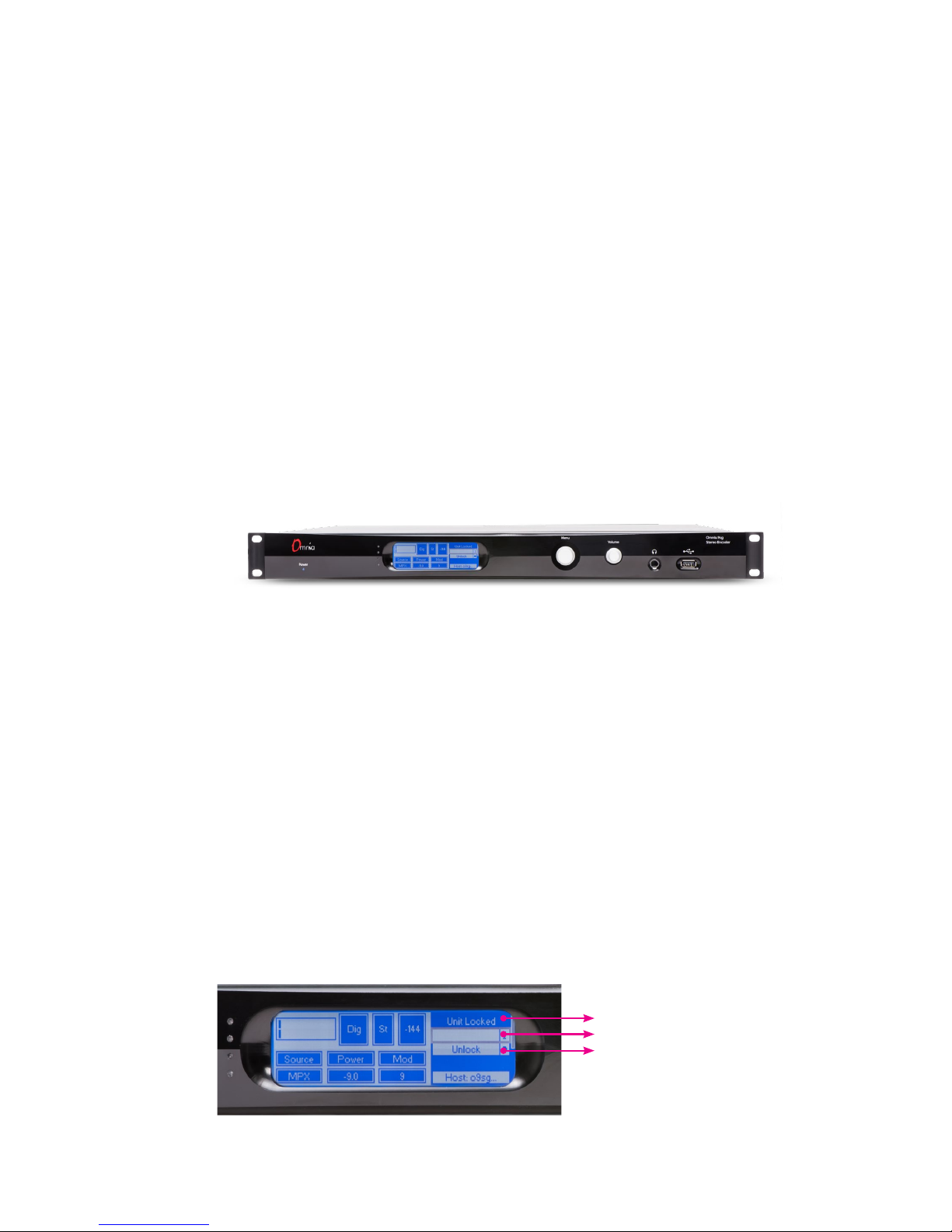
LOCK STATUS
PASSWORD ENTRY BOX
UNLOCK CONTROL
Page 6
OMNIA.9sg QUICK START SETUP GUIDE | 3
n Rock the rotary encoder up/down control so you highlight (draw the grey outline) around the
Password entry box.
n Press Enter to proceed to the Alpha-numeric selection page.
n Turn the knob to select letters and numbers, then press Enter to “type” characters. The factory
default password is “1234”. When you are finished entering your password, scroll to “OK” and
press Enter. This will return you to the screen above, and you’ll see hidden characters <….> in
the Password entry box.
n Rock the control down to highlight the Unlock control, then press Enter. If your password was
valid, this will take you to the 9sg System Menu.
Once you are in the System menu, use the same controls to navigate through choices, and familiarize
yourself with the menu structure. In many cases, you may simply want to proceed to the System/
System Cong/IP Cong menu to set network addresses, then use NfRemote for the rest of your
setup. Note that the unit will always lock itself when the display times out and goes dark. The length
of time before this happens is adjustable in the System > System Cong > Power menu. The default
timeout is the maximum 24-hour duration.
While front panel navigation is always an option, primary setup and configuration is much more
easily accomplished via the free NfRemote software application available from the Omnia.9sg
product page on the TelosAlliance.com website. All screenshots and visual references within
this document are taken directly from the NfRemote interface. NfRemote allows you to quickly
navigate all the layers of 9sg software, and provides a richer, more complete display of controls. We
recommend you use NfRenote as your primary interface with the unit.
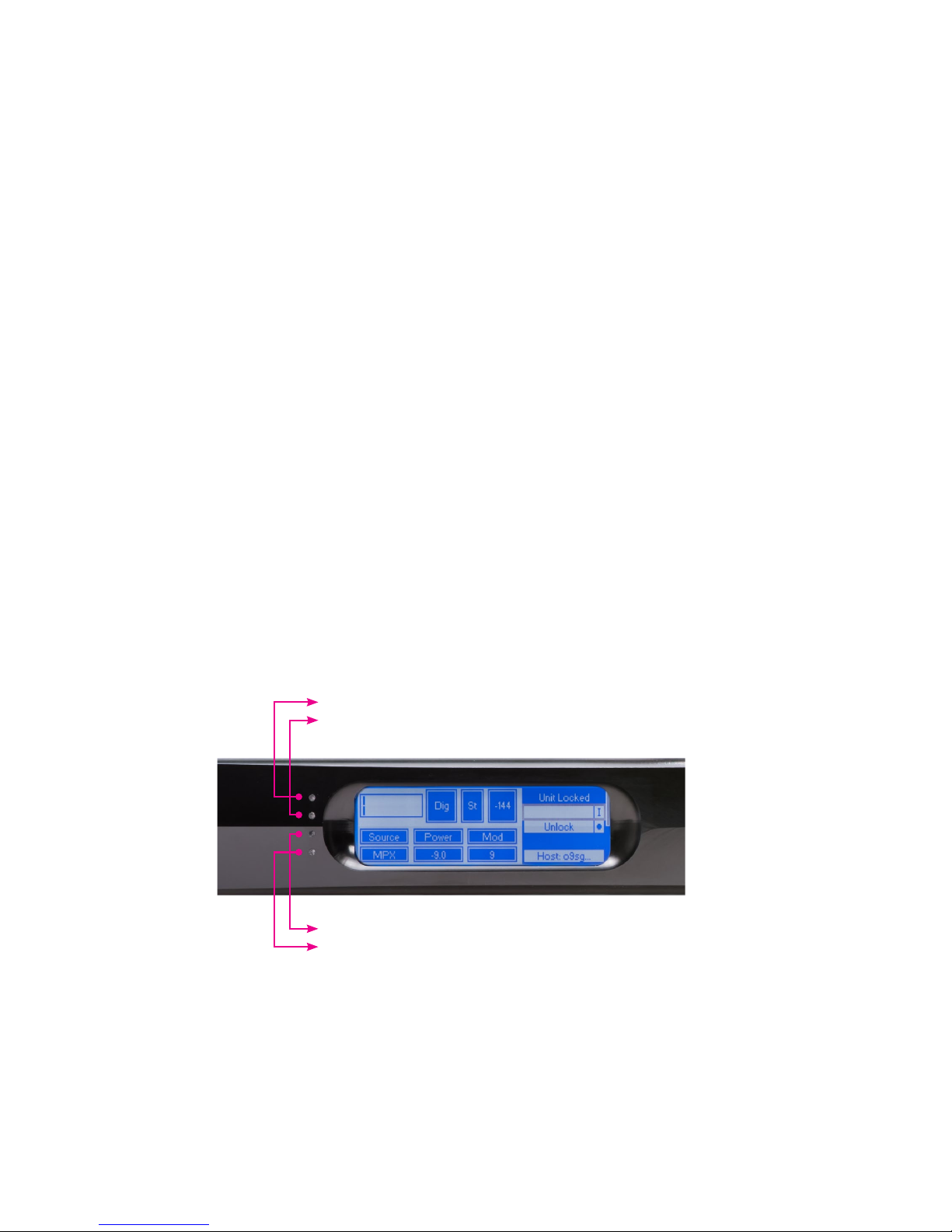
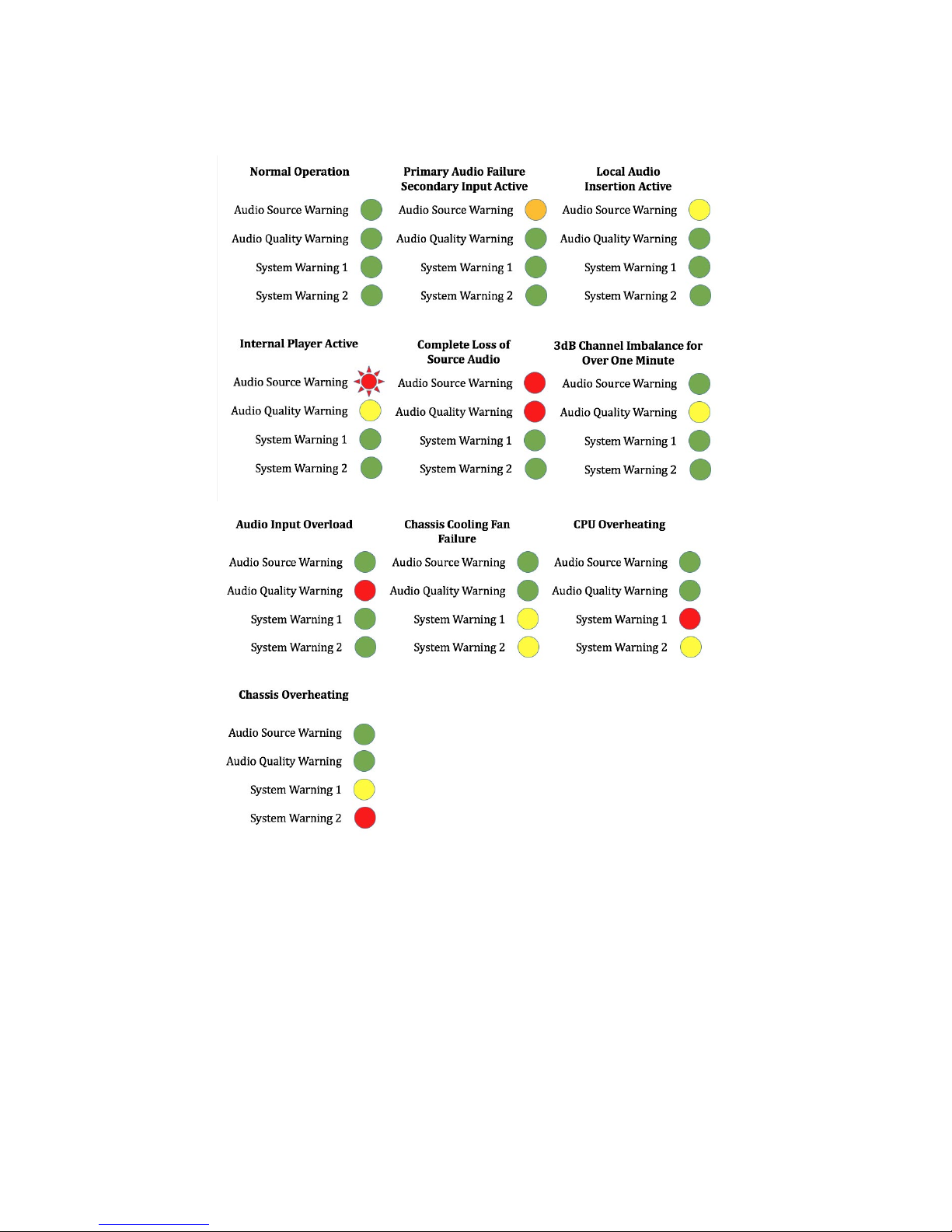
Front Panel LEDs
The front panel features four LEDs that serve as status indicators for various audio and hardware
conditions.
AUDIO SOURCE WARNING
SYSTEM WARNING 1
AUDIO QUALITY WARNING
SYSTEM WARNING 2
The top two LEDs denote audio conditions and alarms, the “Audio Source Warning” and “Audio
Quality Warning” indicators. The bottom two are system status and alert indicators , “System
Warning 1” and “System Warning 2”.
In normal operation, all indicators will show green. The meanings of various colors and combinations
are explained below in an easy-to-follow diagram.
Page 7
4 | OMNIA.9sg QUICK START SETUP GUIDE
Configuring Network Settings and Installing NfRemote
Connect Omnia.9sg to your local network via the rear panel Ethernet connection. The unit is set
up to receive an IP address via DHCP by default. Navigate to System > System Conguration > IP
Conguration from the Main Menu and verify that an IP address has been assigned. This may take
a minute or two depending upon your network. Note that the DHCP display will not show an IP
address when unplugged from the network. Also note that for security purpose, the 9sg does not
respond to Ping commands.
A static IP address can also be assigned by navigating to System > System Conguration > IP
Conguration > Use DHCP and click the joystick right to un-check it. Then navigate down and clickright on the IP: box, enter the desired IP address and click-right on OK when done. Similarly, enter
the Subnet Mask and other network parameters (if required). Finally, navigate to Apply and then
click-down all the way past the warning text and you’ll see ”Are you sure?”, highlight the Yes box and
click-right.
Page 8
OMNIA.9sg QUICK START SETUP GUIDE | 5
The NfRemote application may be downloaded from the Telos website at: https://www.telosalliance.
com/Omnia/Omnia9sg
Copy the NfRemote application to a Windows laptop, desktop, or tablet. Double-click to begin the
installation and follow the on-screen directions to complete it.
When the NfRemote connection screen appears, enter the IP address and password of your
Omnia.9sg. You may also fill in a “friendly” name in the Comment field to help identify the unit.
Be sure to click on the dropdown menu to the far right of the connection window and choose the
correct input method (local mouse, remote desktop/VM, touch screen, etc.)
You may click on the “Add” button to add this unit to a quick recall list in the bottom of the window
or simply click “Connect”.
Once the connection is complete, the main Home screen will appear. Clicking the left mouse button
highlights displays, menu items and controls. Clicking and holding the left mouse button while
dragging adjusts sliding controls.
Conguring I/O Sources and Settings
Omnia.9sg makes the perfect “split chassis” solution for customers who want the benefits of having
their main processor at the studio without sacrificing the advantages of having the composite
generator at the transmitter.
Accordingly, its default settings presume that the “FM Pre-final L/R” output insert point found on
Omnia.9 and Omnia.7 or the “PP” patch point output of the Omnia.11 (running version 3.0 software
or higher) will be used to feed Omnia.9sg.
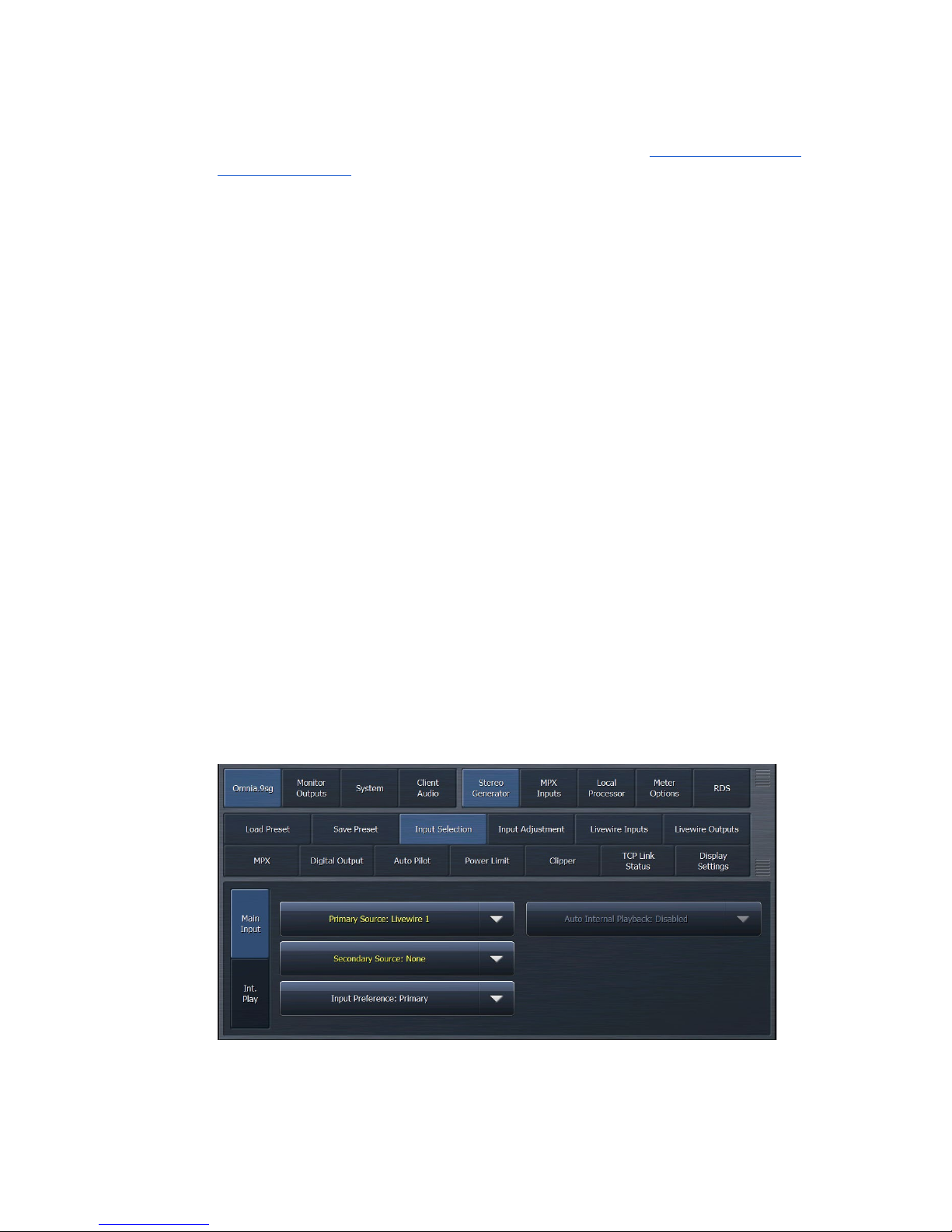
Select the Input Audio Source
Navigate to the Omnia.9sg > Stereo Generator > Input Selection menu and select the proper
source (analog, AES digital, or Livewire) for the primary and/or backup inputs. Only the primary input
is required. If a backup source is provided, it can be used as a failover source in the event of a loss of
audio on the primary input.
Page 9
6 | OMNIA.9sg QUICK START SETUP GUIDE
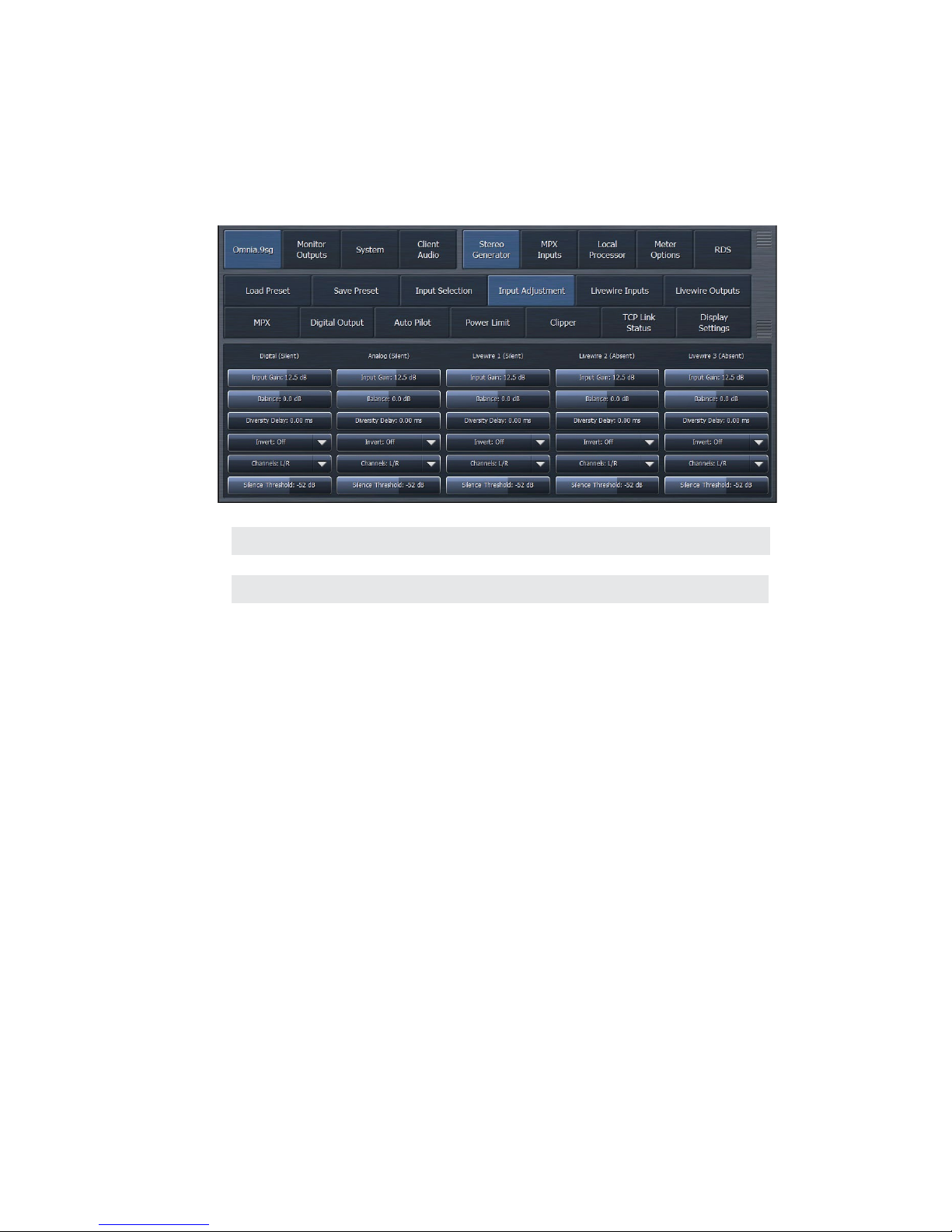
Adjust the Input Gain
From the Omnia.9sg > Stereo Generator > Input Adjustment menu, set the “Input Gain” control as
appropriate for your input source and processing needs.
NOTE:
The “Input Gain” control on Omnia.9sg adjusts the input drive level to the clipper and
therefore replaces the more traditional and familiar “Clipper Drive” control found on a
traditional FM processor. Accordingly, increasing this control increases clipper drive.
By default, this control is set to +12.5dB as it is presumed Omnia.9sg will normally be fed from an
Omnia.9 using the “FM Pre-final L/R” patchpoint output which has been attenuated by the same
amount to provide adequate headroom.
When set at the default level, this will exactly emulate the sound and behavior of a standalone
Omnia.9 using its composite outputs. Accordingly, any adjustments to the Omnia.9’s “Final Clip Drive”
control will yield identical results.
This setting also holds true if you are feeding Omnia.9sg from another processor with a similar “postlimiter, pre-clipper, pre-emphasis” patchpoint, providing it applies the same pre-attenuation.
If you are feeding the 9sg with a processor that does not have such a patchpoint, the best
performance will be realized by using its HD output. The limiter drive on the processor feeding 9sg
should be turned down well below where it would typically be run, since the final clipper in 9sg will
do the “heavy lifting” , and take into account the pre-emphasis curve.
Finally, it is also possible to use a “flat” (non-pre-emphasized) FM output to feed Omnia.9sg or
even a de-emphasized FM output (with the final clipper drive of the processor turned all the way
down) but this approach would have a negative impact on overall audio quality due to the 15 kHz
low pass filtering typically present in most processors. The 16.5 kHz low-pass filter of 9sg will allow
significantly more high end through the system if it is fed directly without additional prior filtering.
Page 10
OMNIA.9sg QUICK START SETUP GUIDE | 7
Congure and Adjust the Output
Connect the audio outputs as appropriate for your installation.
Two composite outputs are provided to feed a main/backup composite STL or transmitter.```
Omnia.9sg also supports balanced professional line-level analog audio via its Left and Right Analog
Outputs and AES/EBU digital output on standard XLR connectors via the AES output. The AES
outputs can also be used to provide an Omnia Direct™ (composite over AES) signal.
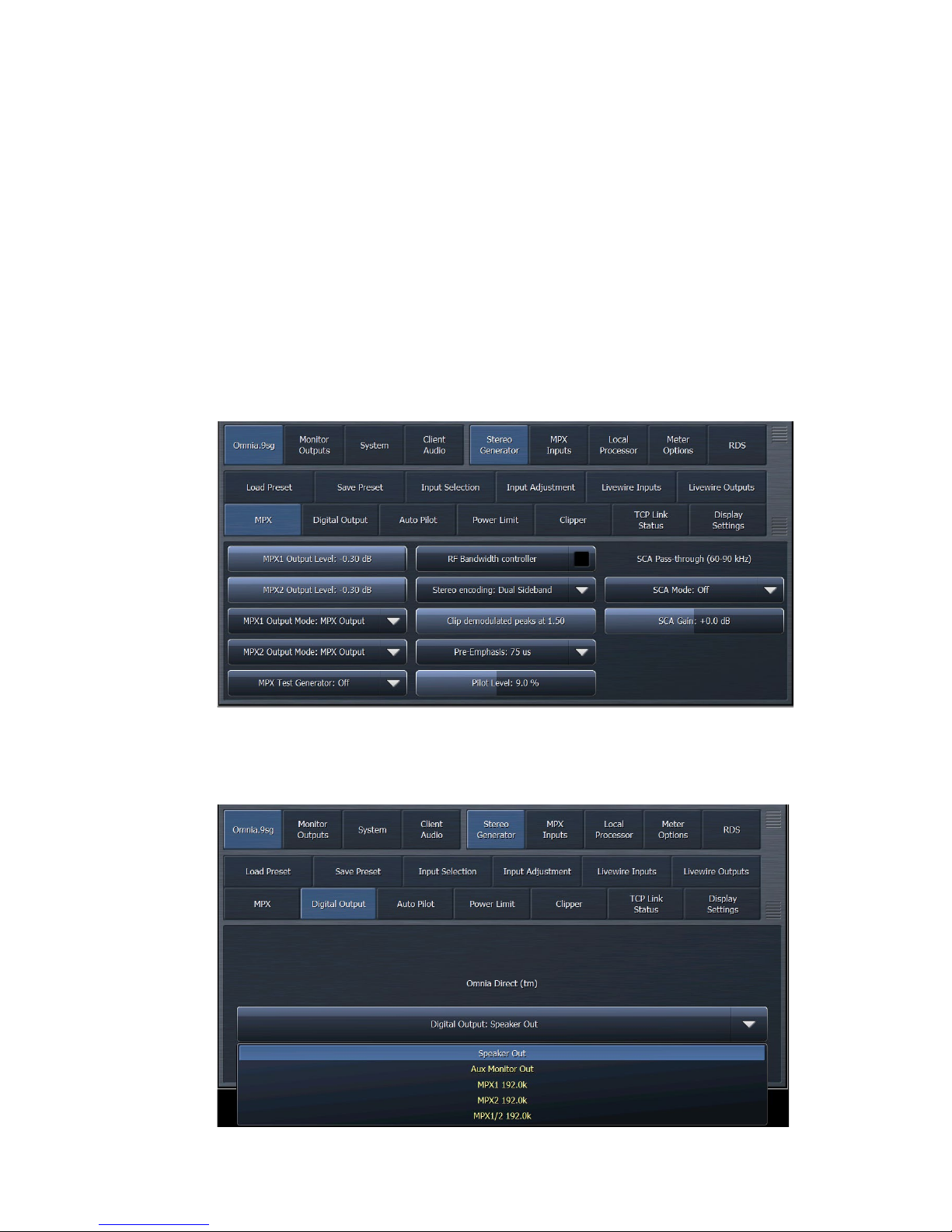
Adjusting the Composite Output
To adjust the levels of each of the composite outputs, navigate to the Omnia.9sg > Stereo Generator
> MPX menu and adjust the corresponding “MPX Output Level” sliders until the desired modulation
is indicated on a dedicated, calibrated modulation monitor. The “Pilot Level” and “Pre-emphasis”
controls are also found here. Details of other controls are explained in the full manual.
Using the Omnia Direct™ Output
If the AES outputs will be used to feed an Omnia Direct signal, navigate to the Omnia.9sg > Stereo
Generator > Digital Output menu and choose the appropriate source to feed the digital output.
Page 11
8 | OMNIA.9sg QUICK START SETUP GUIDE
Adjusting FM Diversity Delay
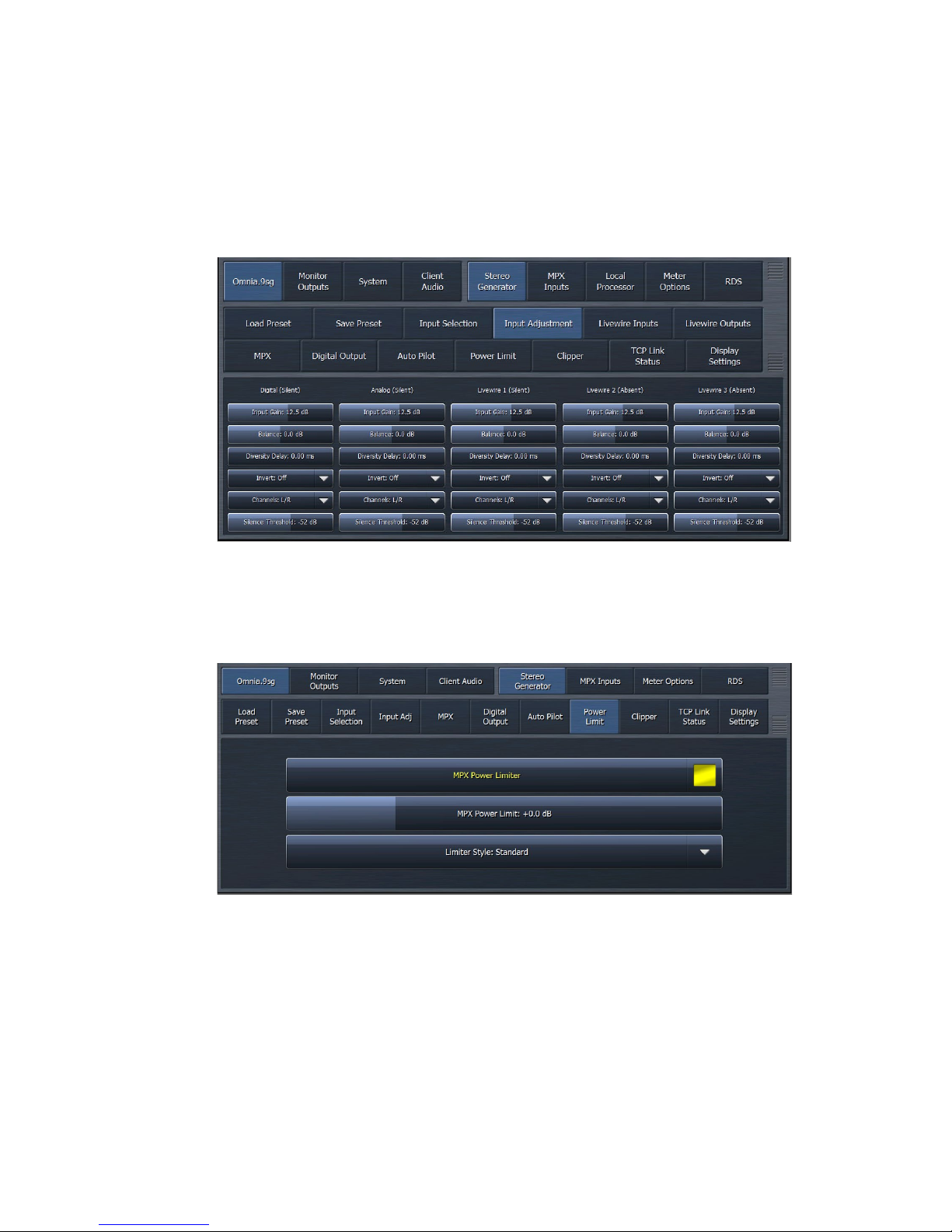
If the output of Omnia.9sg needs to be delayed to match an HD signal, the adjustment can be made
in the Omnia.9sg > Stereo Generator > Input Adjust menu. Separate adjustments are provided
for the digital and analog inputs. Double-clicking on the “Diversity Delay” slider will provide coarse,
medium, and fine adjustment sliders to make adjustment easier.
Using ITU-R BS.412 (MPX Power Limiting)
Omnia.9sg supports ITU-R BS.412, a regulatory mandate in some countries which requires that
average MPX power be limited to a particular standard and measured with a rolling 60-second
integration time.
If Omnia.9sg is used in conjunction with Omnia.7 or Omnia.9, the BS.412-specific presets in those
processors should be used.
Any adjustments to the MPX power limiter should be made in the Omnia.9sg via the controls in the
Omnia.9sg > Stereo Generator > MPX Power Limit menu. Please note that it may be necessary to
set the “MPX Power Limit” slider to very different levels than the settings in the processor’s preset to
achieve the same power output level.
For further details, download the full manual from https://www.telosalliance.com/Omnia/Omnia9sg
Page 12

The Telos Alliance • 1241 Superior Ave. • Cleveland, Ohio 44114 USA • +1.216.241.7225 • TelosAlliance.com
© 2018 TLS Corp., All Rights Reserved. O18/4/15018
 Loading...