

Page 1
Omicron Bluetooth Speaker Manual
Page1
Getting started
Parts
The Bluetooth speaker contains:
Speaker
A/C adapter
Remote control
Use A/C Power Adapter
To use the speakers with A/C power adapter,
connect the power adapter to a wall outlet,
and connect adapter cable to the speaker.
Install AAA batteries
To install batteries, ensure that the speakers
are off, and open the cover of the battery
compartment by pushing the battery cover
button to the right. After the battery cover is
released, place four AAA batteries into the
compartment, and push the cover until it
snaps into place. If the speakers are not used
for a long period, remove the batteries to
prevent plastic cover damage from battery
leakage.
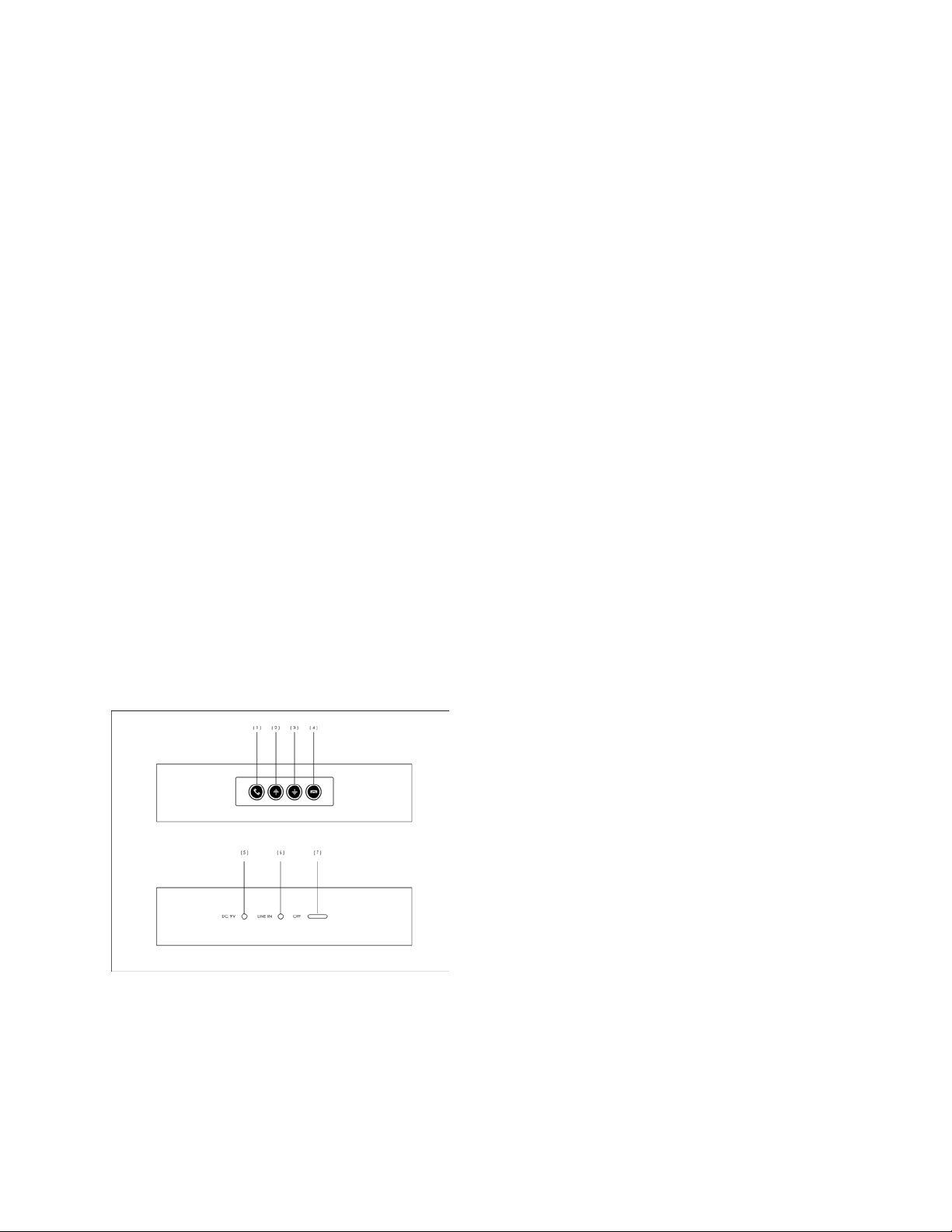
Figure 1
Pick up key (1), Volume up key (2) Volume
down key (3), Drop call key (4), Power
On/Off key (5), Line In port (6), D/C power
port (7)
Switch the speakers on or off
To switch on, push the power button to right
and blue light is displayed.
To switch off, push power button to off and
blue light disappears.
Connect the speaker with Bluetooth
Pairing
1. Power up Tubus Bluetooth speaker.
2. Press and hold the pickup key (1) on the
top of speaker for 3 seconds until the LED
blue lights start flashing.
3. Activate the Bluetooth feature on
iPhone/iPad/iTouch or other smart phone or
music device, and set it to search for
Bluetooth devices.
4. Select device ID “Omicron”.
5. Enter the Bluetooth code “0000” to
complete pair. iPhone/iPad/iTouch do not
need to enter any code.
6. After pairing completed, blue lights stop
flashing.
7. ID “Omicron” appears on
iPhone/iPad/iTouch or other smart phone
Bluetooth device menu.
Pairing is needed only first time.
Function Control
Volume up
Press volume up key (2)
Volume down
Press volume down key (3).
Answer a call
When call coming, press pickup key (1)
shortly.
End a call
Press drop key (4) shortly.
Reject a call
Press drop key (4) shortly.
1
Page 2
Omicron Bluetooth Speaker Manual
Page2
Mute
When being on the phone, press pickup key
(1) and hold 3 seconds to enable mute. Press
pickup key (1) and hold 3 seconds again to
disable mute.
Connect using a cable
You can connect the speakers to a device
with a 3.5 mm audio cable. To connect the
speakers to a device that has a 3.5-mm audio
connector, plug the cable into the audio
input on the speakers and the audio
connector on the device.
Most MP3 players like iPhone, iPad, iPod
have a 3.5mm audio port.
Cell phone Function
The speaker can be used as a cell phone if
connected to a cell phone with Bluetooth.
After cell phone connecting to speaker with
Bluetooth, use your cell phone in the normal
way.
Answer a call
When call coming, press pickup key (1)
shortly.
End a call
Press drop key (4) shortly.
Reject a call
Press drop key (4) shortly
Switch the speaker to cell phone
After answer a call from speaker, press drop
call key (4) and hold for 3 seconds.
Switch the call back to the speaker
Press drop call key (4) and hold 3 seconds.
Mute
Press pickup key (1) and hold 3 seconds.
Press pickup key (1) and hold 3 seconds
again back to normal.
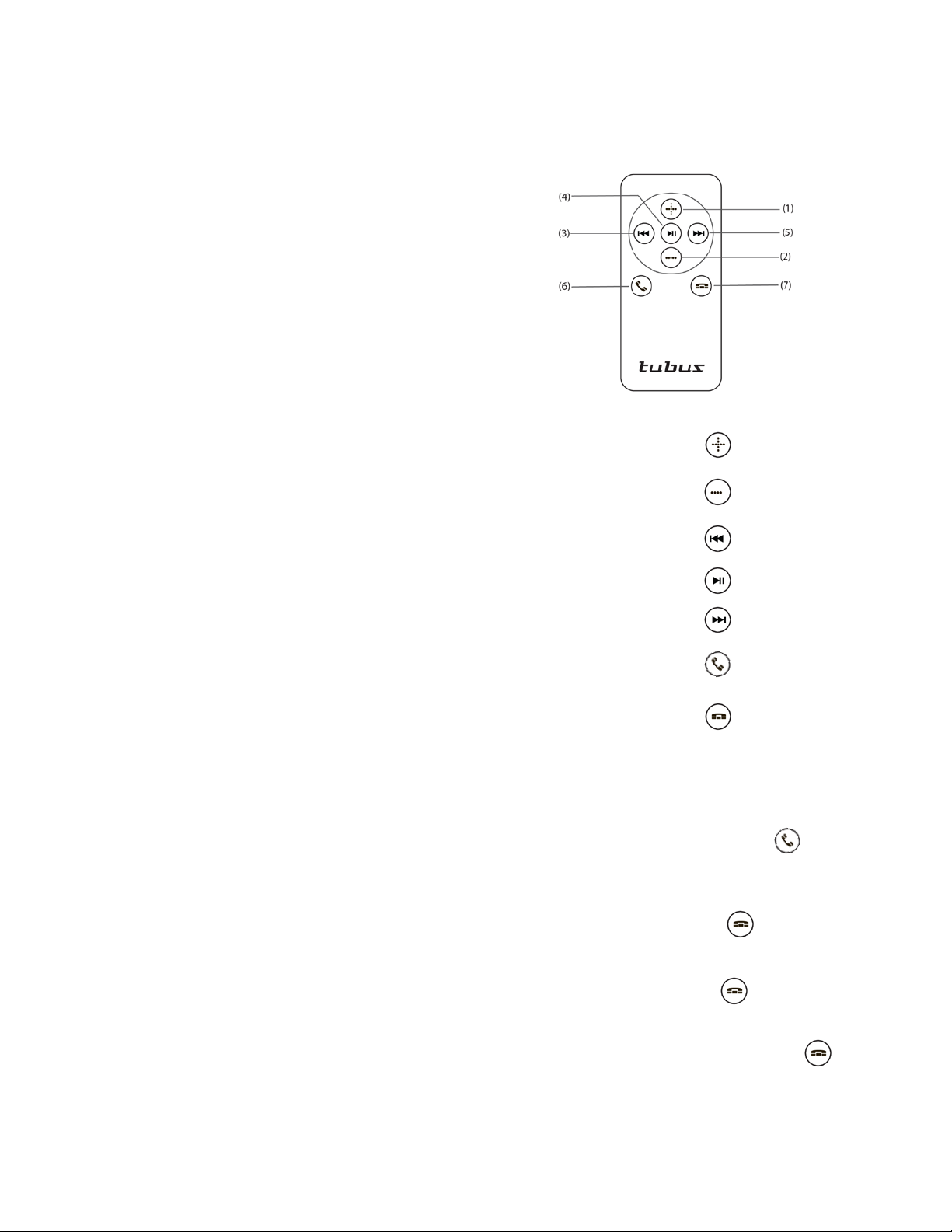
Remote Control Key:
Figure 2
Volume up Key: (1)
Volume down Key: (2)
Rewind Key: (3)
Play/Pause Key: (4)
Forward Key: (5)
Pickup Key: (6)
Drop Call Key: (7)
Remote control Function:
Answer a call
Call coming, press pickup key (6)
shortly.
End a call
Press drop key (7) shortly.
Reject a call
Press drop key (7) shortly.
Switch the speaker to cell phone
Press drop call key (7) and hold for 3
seconds.
2
Page 3

Omicron Bluetooth Speaker Manual
Page3
Switch the call back to the
speaker
Press drop call key (7) 3 seconds.
Mute
Press pickup key (6) and hold 3 seconds.
Press pickup key (6) and hold 3 seconds
again back to normal.
Play/Pause
Press play/pause key (4).
Forward/Rewind
Press forward (3). /Rewind key (5)
Volume up
Press volume up key (1).
Volume down
Press volume down key (2).
LED indicator:
Power on: LED (dim blue)
Connect to phone: LED (clear blue)
Paring: LED flash form dim to clear.
Paring complete: LED stops flashing.
Call coming: LED flash.
Care and maintenance
• Keep the speaker dry. Humidity or liquid
will damage electronic circuits.
• Do not use or store the speaker in dusty or
unclean areas. Impurities harm electronic
components or cause short circuits.
• Do not store the device in high temperature.
High temperature can shorten the life of
electronic parts, and melt certain plastics.
• Handling speaker carefully. Dropping,
knocking, or shaking the speaker can cause
circuit boards defective.
DECLARATION OF CONFORMITY
Products or company names mentioned
herein may be trademarks or trade-names of
their respective owners.
Bluetooth is a registered trademark of
Bluetooth SIG, Inc.
iPhone, iPad, and iTouch are registered
trademark of Apple Inc.
Omicron operates a policy of ongoing
development. Omicron reserves the right to
make changes and improvements to any of
the products described in this document
without prior notice.
Under no circumstances shall Omicron be
responsible for any loss of data or income or
any special, incidental, consequential or
indirect damages howsoever caused.
The contents of this document are provided
"as is". Except as requi red b y appl icable l aw,
no warranties of any kind, either express or
implied, including, but not limited to, the
implied warranties of merchantability and
fitness for a particular purpose, are made in
relation to the accuracy, reliability or
contents of this document. Omicron
reserves the right to revise this document or
withdraw it at any time without prior notice.
The availability of particular products may
vary by region. Please check with the
Omicron dealer nearest to you.
Unauthorized changes or modifications to
this device may void the user's authority to
operate the equipment.
3
Page 4

FCC ID: Y65G-VIB2
FCC Statement:
This device complies with Part 15 of the FCC Rules. Operation is subject
to the following two conditions: (1) this device may not cause harmful
interference, and (2) this device must accept any interference received,
including interference that may cause undesired operation.
WARNING:
Changes or modifications to this unit not expressly approved by the party
responsible for compliance could void the user’s authority to operate the
equipments.
 Loading...