

Page 1

User Guide
Page 2

Matters need attention
Please comply with local rules when you driving and using earphone
Please put all the equipment and accessories in a position where the children can’t get it ,
swallowed parts may cause choking and serious consequences
Please do not put the equipment in hottest or coldest place( Below zero degree,
Above 45 degree),that will cause deformation of equipment, reduce equipment charging capacity,
shorten service life
Please do not wet equipment and operating it with a wet hand, Liquid can cause
equipment damage, Equipment damage caused by water does not make the warranty scope
High volume listening for a long time that can damage your hearing, please use the minimum
volume when you talking or listening to music
How to use the earphone
1.Power ON and Pairing: Keep press MFB button for 1 second is Power ON with ,The
Earphone into for matching and the red and blue lihgts flashing altenately,then earphone can be
connected with Bluetooth device, If the connective time over 3minute ,The earphone should be
automatically Power off with non pairing.
2.Power Off : Keep press MFB for 3 seconds, the indicator into Red light for 1 second and
with “Di” sound voice then power off .
3.Pairing: Please open the “Bluetooth “of mobile phone ,Searching Earphone bluetooth name and
connect it , When the bluetooth connected successful ly ,The blue light flashing slowly and with “Di”
sound voice.
4.Answer the call: ( When the earphone Non dormant or not charging mode) , Press the
MFB to answer when the phone call ,( When the earphone in charging port) ,please pick it
to answer.
5.Hang - Up: Press FMB to Hang up,and with “Di” sound voice.
6.Redail last call: When Bluetooth earphone connected with mobile phone ,Double press
the FMB that will redail last call .
7. Reject phone call: Keep press “Answer/Hang up” button for about 2 seconds to reject
phone call and with “Di “ sound voice
8.Cancel the calling: Short press MFB and with “DI” sound voice to cancel calling.
Page 3

9.Low battery remind: When low battery ,The earphone will remind you to charge it with
“Di” sound voice
10.Power Off by Low battery: When battery voltage lower than 3.0V,the earphone will
power off automatically.
11.Automatic connection:The earphone can connect with the mobile phone automatically
which has connected before with prompt voice “Bluetooth is connected”.
When the earphone apart from mobile over signal range ,the bluetooth is
disconnected.and can be reconnected automatically in 3 minutes when wireless range less than10
meters.
12.Pause answer: Double press MFB to pause the answering , Double press MFB again
to recover phone call.
13. Music Play/Pause: Short press MFB is play or pause music .
14.When you answering A phone call and the new phone call B coming, short press MFB
to Hang up A and Answering B, Double press MFB to pause the A and answering B, and
double press MFB again to switch A B line,Short press MFB to Hang up the present phone
call and recover the pausing call.
Restore factory settings
If the Earphone has connected with lot of mobile phone or Bluetooth device, it hard to
connecting the device which has connected before, you can put earphone back in the
charging bass of charger,and long press the MFB about 5 seconds and blue light flashing
twice, reconnect the pairing.
When the Bluetooth earphone in charging bass
1. Power ON automatically: when BT earphone in charging bass, it can be charged
automatically after auto start,and earphone indicator shows red light
2. BT Connected automatically: When the earphone in charging, picking it from charing
bass, the bluetooth will be ON and connecting last BT device automatically
3.Intelligent Answer: Pick earphone for answering the call.
4.Intelligent Hang up: Put earphone back charing bass for Hang up.
5.Smart Power off mode:If you don’t need earphone that non paring device, it should be power off
automaticlly after 3seconds。(You need the searching and pairing BT device by yourself for first time)
The earphone can be switched on and off follow with car be started or
locked
Page 4
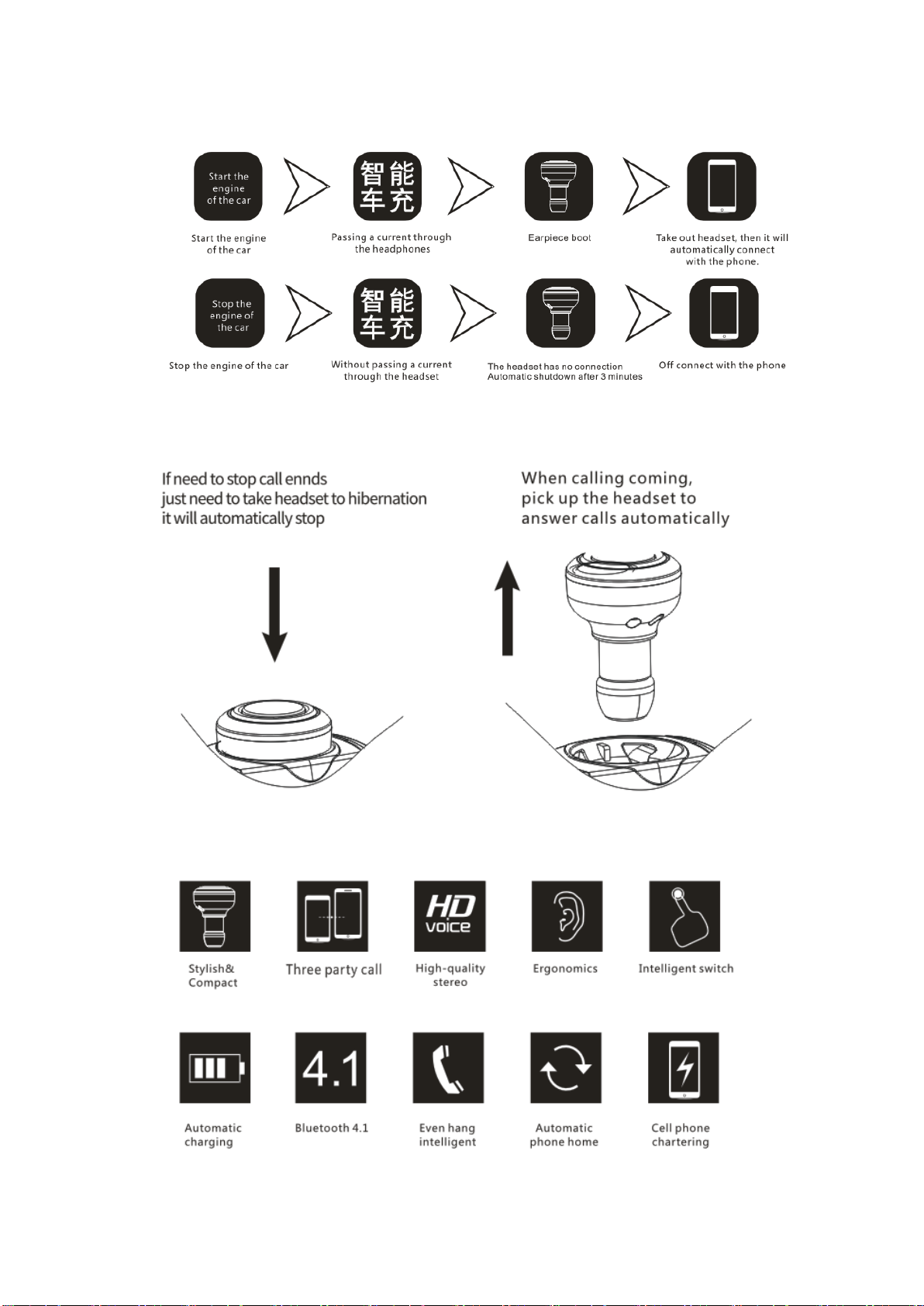
Smart Answer/Hang up
Page 5

Bluetooth Vision: V4.1
Guarantee Card
PO Number
Date:
Name
sex
Age
Address
Tel Code
place of purchase
Unit price
Order
Number
Product name
Product
model
Dealer signature
Customer
signature
With this card warranty
Please note that the reservation
Support protocol: headset hands-free Bluetooth audio transmission
Wireless range: 10 meters straight line
Level: Class 2
Working Frequency :2.402~2.48GHz
Charge Voltage: DC 5V
Charging time: About 1 hr
specification
1. Dual USB port
2. Total output : 5V -3A
3. Total input: DC12V-24V
Intelligent circuit design protects against short circuiting, over-heating, over-currents, and
over-charging. Charging stops when battery is full.
Special explanation: The Hands free function only supply for Apple IOS8.4 and above Android4.0
bluetooth device.
Page 6

The warranty
1. If the goods with performance failures occur or broken package ,we can change it into same
good item within 3 month , but not including artificial damage.
2. One year Guarantee ,not including accessories.
3. The warranty service will only be effective under exactly use.
4. The warranty is not include all the artificial damage, open machine, stripping, improper use that
caused product broken. Please provide this guarantee card when you need repair or replace the good, if
without this card ,the warranty should be failure.
NOTE: This equipment has been tested and found to comply with the limits for a Class B
digital device, pursuant to part 15 of the FCC Rules. These limits are designed to provide
reasonable protection against harmful interference in a residential installation. This
equipment generates uses and can radiate radio frequency energy and, if not installed
and used in accordance with the instructions, may cause harmful interference to radio
communications. However, there is no guarantee that interference will not occur in a
particular installation. If this equipment does cause harmful interference to radio or
television reception, which can be determined by turning the equipment off and on, the
user is encouraged to try to correct the interference by one or more of the following
measures:
- Reorient or relocate the receiving antenna.
- Increase the separation between the equipment and receiver.
-Connect the equipment into an outlet on a circuit different from that to which the receiver
is connected.
-Consult the dealer or an experienced radio/TV technician for help
Changes or modifications not expressly approved by the party responsible for compliance
could void the user's authority to operate the equipment. This device complies with Part
15 of the FCC Rules. Operation is subject to the following two conditions:
(1) this device may not cause harmful interference, and
(2) this device must accept any interference received, including interference that may
cause undesired operation.
 Loading...