

Page 1

User's Guide
http://www.omega.com
e-mail: info@omega.com
PCI-DAS1200
Page 2

Table of Contents
1.0 INTRODUCTION
2.0 INSTALLATION
2.1 WINDOWS .......................................................
2.2 DOS .............................................................
3.0 HARDWARE CONNECTIONS
3.1 CONNECTOR PIN DIAGRAM .......................................
3.2 CONNECTING SIGNALS TO THE PCI-DAS1200 .......................
4.0 ANALOG CONNECTIONS
4.1 ANALOG INPUTS ..................................................
4.2 WIRING CONFIGURATIONS ......................................
................................................
..................................................
...................................
........................................
1
3
3
32.1.1 Install the InstaCALTM software ...................................
32.1.2 Launching InstaCALTM ..........................................
42.1.3 Using InstaCalTM ...............................................
42.1.4 Testing the Installation ...........................................
5
52.2.1 Install the InstaCalTM software ....................................
52.2.2 Launching InstaCALTM ..........................................
52.2.3 Using InstaCalTM ...............................................
62.2.4 TESTING THE INSTALLATION ...................................
6
7
7
8
8
84.1.1 Single-Ended and Differential Inputs ................................
104.1.2 System Grounds and Isolation .....................................
12
134.2.2 Common Ground / Differential Inputs ...............................
144.2.3 Common Mode Voltage < +/-10V / Single-Ended Inputs .............
144.2.4 Common Mode Voltage < +/-10V / Differential Inputs .............
154.2.6 Isolated Grounds / Single-Ended Inputs .............................
154.2.7 Isolated Grounds / Differential Inputs ...............................
5.0 PROGRAMMING & APPLICATIONS
5.1 PROGRAMMING LANGUAGES ....................................
5.2 PACKAGED APPLICATIONS PROGRAMS ..........................
6.0 SELF-CALIBRATION OF THE PCI-DAS1200
6.1 CALIBRATION CONFIGURATION .................................
7.0 PCI-DAS1200 REGISTER DESCRIPTION
7.1 REGISTER OVERVIEW ...........................................
7.2 BADR0 ..........................................................
7.3 BADR1 ..........................................................
...........................
...................
.......................
16
16
16
17
17
19
19
19
19
197.3.1 INTERRUPT / ADC FIFO REGISTER ..............................
217.3.2 ADC CHANNEL MUX AND CONTROL REGISTER ...................
237.3.3 TRIGGER CONTROL/STATUS REGISTER ..........................
Page 3

Table of Contents
7.3.5 DAC CONTROL/STATUS REGISTER (Does not apply to
PCI-DAS1200/JR) ..................................................
7.4 BADR2 ..........................................................
7.5 BADR3 ..........................................................
7.6 BADR4 ..........................................................
257.3.4 CALIBRATION REGISTER ......................................
26
27
277.4.1 ADC DATA REGISTER ..........................................
277.4.2 ADC FIFO CLEAR REGISTER ....................................
28
287.5.1 ADC PACER CLOCK DATA AND CONTROL REGISTERS .............
297.5.2 DIGITAL I/O DATA AND CONTROL REGISTERS ...................
33
337.6.1 DAC0 DATA REGISTER .........................................
337.6.2 DAC1 DATA REGISTER .........................................
8.0 ELECTRICAL SPECIFICATIONS
ANALOG INPUT SECTION ............................................
ANALOG OUTPUT: ..................................................
PARALLEL DIGITAL INPUT / OUTPUT ................................
COUNTER SECTION .................................................
OTHER SPECIFICATIONS: ...........................................
...............................
34
34
35
35
36
37
Page 4
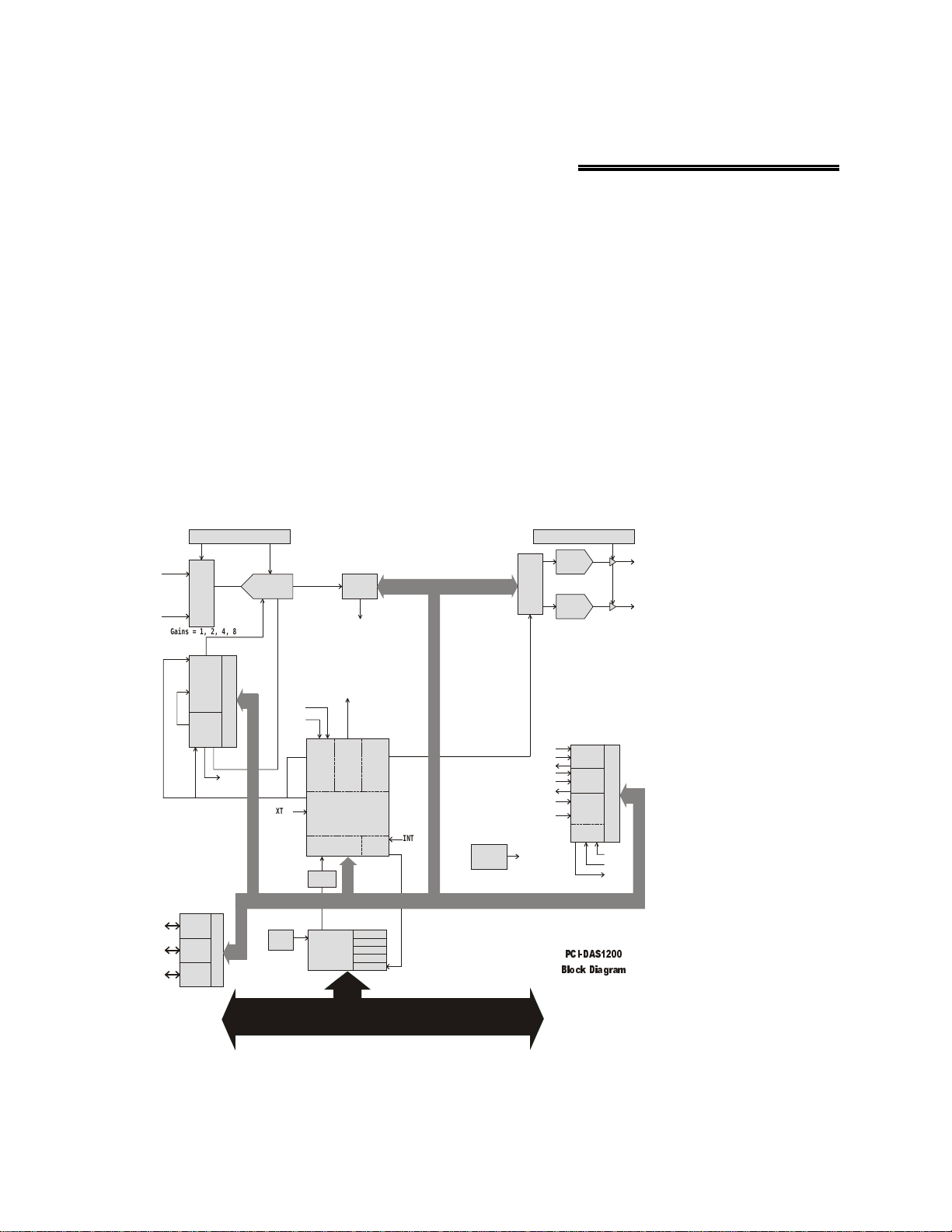
1.0 INTRODUCTION
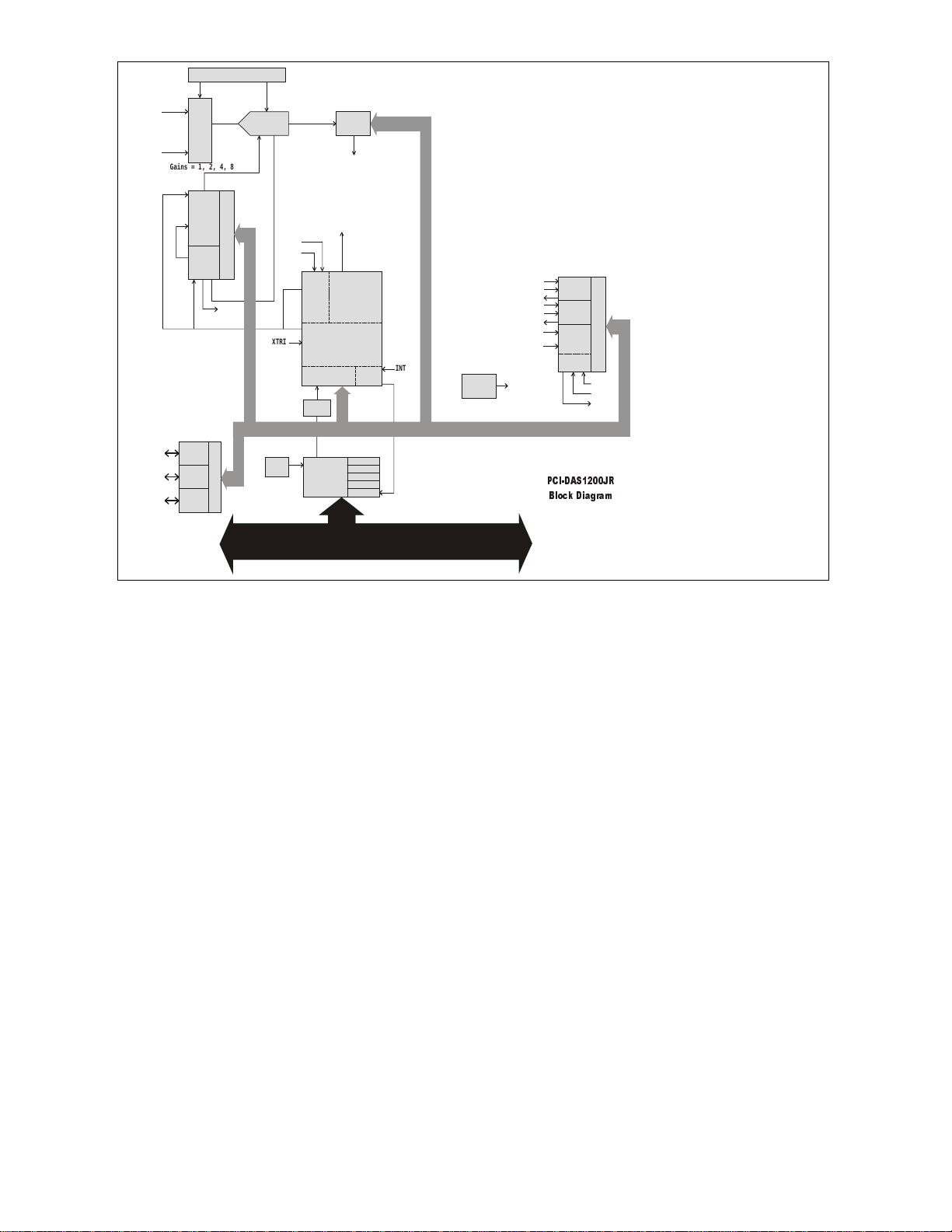
The PCI-DAS1200 and PCI-DAS1200/JR are multifunction measurement and control boards designed to operate in
computers with PCI bus accessory slots. The difference between the boards is that the analog ouput functions are not
supported by the /JR board. The architecture of the boards is loosely based on the original CIO-DAS16; the standard
of ISA bus data acquisition. M uch has changed though, and all of it due to improvements in technolo gy. Surface
mount packaging technology and custom ASICS allow a far greater range of control over programmable options,
such as calibration, triggering, synchronization, and data transfer.
Even the connector has changed. New, denser connectors allow up to 100 signal lines where 37 was once the
standard.
The PCI-DAS1200 and PCI-DAS1200/JR are completely plug-and-play. There are no switches or jumpers on the
board. All board addresses are set by your computer’s plug-and-play software.
These products are supported by our Universal Library programming library. As an owner, you are entitled to the
latest revision of the manual and software. Just cal l with your current revision numbers handy, and request an update
be sent to you.
Gain and Offset Autocal
12-Bit, 10uS
DAC0
DAC
Data
Control
12-Bit, 10uS
DAC1
VDAC 0
VDAC 1
Burst/Scan
Analog In
16 CH S.E.
8 CH DIFF.
Gain and Offset Autocal
Mux
&
Gain
Gains = 1, 2, 4, 8
12-Bit, 33 0KHz
Start EOC
1024 x 12
FIFO
INT
PA (7:0)
PB (7:0)
PC (7:0)
ADC
Pacer
CTR 2
CTR 1
Sample
Counter
CTR0
Digital I/O
Port A
Port B
Port C
INT
Control
Control
8
Scan
ADC
Pacer
Burst
Control
Logic
Trigger
Control
Decode/Status
Bus
Timing
PCI
CONTROLLER
Burst/Scan
CONTROLLER
&
Interrup t
EXT PCR
XTRIG
Boot
EEPROM
10 MHz
PCI BUS (5 V, 3 2 -BIT, 33 MH Z )
FPGA
DAC
Control
Int
Ctl
BADR1
BADR2
BADR3
BADR4
CLK2
CTR2
GATE2
OUT2
CLK1
CTR1
GATE1
OUT1
ADC
INT
XTRIG
INT
Time Base
10MHz
Index
Counter
User
CTR 0
Control
GATE
CLK
OUT
LOCAL BU S
3&,'$6
%ORFN 'LDJUDP
1
Page 5
Gain and Offset Autocal
Burst/Scan
Analog In
16 CH S.E.
8 CH DIFF.
PA (7:0)
PB (7:0)
PC (7:0)
Mux
&
Gain
Gains = 1, 2, 4, 8
ADC
Pacer
CTR 2
CTR 1
Control
Sample
Counter
CTR0
INT
Digital I/O
Port A
Port B
Control
Port C
12-Bit, 330KHz
Start EOC
8
Boot
EEPROM
1024 x 12
FIFO
ADC
Pacer
Control
Trigger
Control
Decode/Status
Bus
Timing
PCI
CONTROLLER
Burst/Scan
CONTROLLER
Scan
&
Burst
Logic
BADR1
BADR2
BADR3
BADR4
Interrupt
EXT PCR
10 MHz
XTRIG
PC I BU S (5 V, 32-BIT, 33MH Z )
INT
FPGA
Int
Ctl
INT
Time Base
LOCAL B US
GATE2
GATE1
XTRIG
10MHz
CLK2
OUT2
CLK1
OUT1
INT
Index
Counter
CTR 0
3&,'$6-5
%ORFN'LDJUDP
CTR2
CTR1
ADC
User
Control
GATE
CLK
OUT
2
Page 6

2.0 INSTALLATION
The PCI-DAS1200 and PCI-DAS1200/JR boards are easy to use. This quick start procedure will help you setup,
install, and test your board quickly and easily. We assume you already know how to open the PC and install expansion boards. If you are unfamiliar or uncomfortable with board installation, please refer to your computer’s
documentation.
2.1 WINDOWS 95, 98 & NT
PCI products are completely plug and play. Simply follow the steps shown below to install your PCI hardware.
1.
Turn your computer off, unplug it, open it up, and insert the PCI board into any available PCI slot.
2.
Close your computer up, plug it back in, and turn it on.
3.
Windows 95, 98 will automatically detect the board as it starts up. If the board 's installation file is already
on the system, it will load without user interaction. If the installation file is not detected, you will be
prompted to insert the disk containing it. The required file is on the InstaCal disk or CD you received with
your board. The appropriate file will then be automatically loaded , and the PCI board will appear in the
Device Manager under DAS Components.
2.1.1 Install the InstaCAL™ software
InstaCal is a powerful installation, calibration, and self-test program included with all boards. It is
very important that you load and run InstaCal prior to trying to use your board. To install InstaCal, insert the Insta-
Cal disk or CD into an appropriate disk drive in your computer. From the main
left of your screen) select
For example if the InstaCal floppy disk is in your “a” drive, from the RUN screen enter
Alternatively, from the RUN screen, select browse, select the drive where the InstaCal disk or CD resides, then
select
setup.exe
sure the InstaCal floppy disk or CD is in its drive and press
The install wizard will now launch, and you will then be prompted for additional information. Follow the instructions and, if possible, accept the defaults. If this is your first installation, we urge you to accept the defaults. It will
be easier for us to assist you in the unlikely event of trouble during your system setup and operation.
The installation routines will create all required folders/directories and unpack the various pieces of compressed
software. The default location is on your main hard drive in a directory or folder named C:\CB\).
If you have purchased the Universal Library programmers library (highly recommended with the PCI-DAS1602
series), the installation program will install all the software required to run the PCI board as well as the Universal
Library.
and click OK. The
. At this point type the drive letter where the InstaCal disk resides followed by
un
R
Add/Remove Programs
utility found in the Control Panel can also be used. Be
Install…
.
menu (located on the lower
Start
a:\setup
. (omit the period.)
:\setup
2.1.2 Launching InstaCal
Prior to starting InstaCal, reboot your computer so the various changes made to your startup files are active.
.
Use the InstaCal shortcut if you opted to install it.
From Win95, use "Start: Run", type
Alternatively, you may use Windows Explorer to find inscal.exe. It should be on your main hard drive in a directory
called C:\CB. (if C:\ is your main hard drive). To launch InstaCal, simply double-click on the file
32 at the prompt, and click OK.
inscal
inscal .exe
.
3
Page 7

2.1.3 Using InstaCal
InstaCal is the Installation, Calibration and Test software supplied with all I/O boards.
If InstaCal finds that a new PCI board has been installed and is not in the configuration file (cb.cfg) a dialog will
appear listing any PCI boards that InstaCal has detected in the system. Each board in the list may
be checked or unchecked. Those boards in the list that are checked will be added to the configuration file and appear
in the InstaCal’s board list view.
InstaCal help is available by pressing the F1 function key. Most of InstaCal is intuitively obvious, and for that
reason there is no user's manual for InstaCal.
The base address and IRQ are allocated by the PC’s PCI plug & play software, and may not be modified through
InstaCal. If you have installed ISA bus boards in the past, you are familiar with the need to select a base address and
interrupt level. On PCI systems this is not of concern to you. The operating system and installation software
automatically selects the base address and IRQ, and ensures that it does not conflict with other installed boards.
Additional board options that are automatically set, may be configured by selecting the Board Configuration menu in
InstaCal This option will display the available board configuration parameters as well as the address and IRQ
already assigned to the board. All board information is stored in the configuration file CB.CFG. This file is accessed
by the Universal Library for programmers. Note also that the Universal Library is the I/O board interface for
packaged applications such as Labtech Notebook and HP-VEE, therefore the InstaCal settings must be made in order
for these and other applications to run.
The board's base address is also stored in the system software. Once InstaCal installation software is run, other
programming methods such as direct IN and OUT statements can write and read the PCI board registers by reference
to the base address and the offset from base address corresponding to the chart of registers located elsewhere in this
manual.
But a word of warning is in order here. Direct writes to the addresses simply by reference to the base address of the
PCI board I/O registers is not advised. Since the addresses assigned by the PCI plug & play software are not under
your control, there is no way to guarantee that your program will run in any other computer. Not only that, when you
install new systems or components in your computer, previous base address assignments may be changed, and any
particular board may be moved. It is best to use a library such as Universal Library or a program such as HP-VEE to
make measurements with your PCI board.
2.1.4 Testing the Installation
After you have run the install program and set your base address with InstaCal, it is time to test the installation. The
following section describes the InstaCal procedure to test that your board is properly installed.
With InstaCal running, choose the TEST item on the main menu.
a.
Select the board you just installed from InstaCal’s board list view.
b.
Select the option Test/Analog to perform a board loop back test. This test will exercise the various functions
of the board by simply connecting one of the board’s output signals to one of the board’s input channels.
c.
Select an input channel and signal source to test.
d.
Complete the connections shown in the dialog box and verify that the indicated waveform is displayed in
the plot window.
e.
The “I/O Test Menu” lists the option “Plot”, select it and make the connections as shown to test your card.
4
Page 8

2.2 DOS AND/OR WINDOWS 3.X
Most users are now installing b oards on systems with Windows 95 or higher o perating systems. However, if you
wish to install your PCI boar d in a machine running Wind ows 3.1 and/o r DOS your BIOS will automa tically detect
the board on boot-up. In this case please proceed to the following section titled “InstaCAL”
Note: InstaCal and Universal Library support for the PCI-DAS1200/JR is not currently available in DOS or
Windows 3.x. If you are going to be using the /JR board with DOS or Windows 3.1, call Technical Support for
assistance.
2.2.1 Install the InstaCal software
Insta
Cal installs the same way for Windows 3.x as it does for Windows 95. (i.e., setup.exe). See paragraph 2.1.1. If
you are running DOS, call Technical suppport for special sequences.
2.2.2 Launching InstaCal
Prior to starting
Insta
Cal, reboot your computer so the various changes made to your startup files are active.
From the DOS prompt you may start
From Windows 3.x, use the file ma nager to find
called C:\CB. (if C:\ is your main hard drive). To launch
(You may also launch
Insta
Cal via the FILE menu, select
Insta
CAL by simply typing:
instacal.exe
RUN
instacal
. It should be on your main hard drive in a directory
Insta
CAL, simply double click on the file
, type
and hitting enter.
instacal
and click on OK.)
Instacal.exe
2.2.3 Using InstaCal
Insta
Cal is the Installation, Calibration and Test software supplied with all I/O boards. If you have
yes
Insta
.
Cal displays is:
Insta
Cal will do the rest of
a PCI board installed in a PCI slot in your computer, the first message
INSTACAL: PCI Card Detection
Card PCI-DAS1200 found in slot # N
Do you wish to add this board to the configuration file?
A dialog box “Add PCI Card?” also appears. You should choose
Two additional dialog boxes will open. One shows the boards currently installed in your configuration file, the
second allows you to choose a board number to assign to the PCI board. If this is your first installation simply hit
enter to accept the default of BOARD 0.
If you have other boards alr eady installed, choose a board number not curr ently in use.
the initial installation of your PCI board selecting addresses and other system resource settings which are not your
choice to select. In PCI systems, these settings are assigned by the plug & play system software.
.
Insta
Cal help is available by pressing the F1 function key. Most of
there is no user's manual for
The base address is allocated by the PCI plug & play procedure and may not be modified. If you have installed ISA
bus boards in the past you are familiar with the need to select a base address and interrupt level. On PCI systems this
is not of concern to you. It is not up to you to select a base address and ensure that it does not conflict with an
installed port. In PCI systems, the operating software and installation software do the selection and checking for
you.
The program
information is stored in the configuration file CB.CFG. This file is accessed by the Universal Library for programmers. Note also that the Universal Library is the I/O board interface for packaged applications such as Labtech
Notebook and HP-VEE, therefore the
Insta
Cal selects and sets the base address from the range of available addresses. The address and other
Insta
Cal.
Insta
Cal settings must be made in order for these and other applications to run.
Insta
Cal is intuitively obvious and for that reason
5
Page 9

The board's base address is also stored in the system software. Once InstaCal installation software is run, other
programming methods such as direct IN and OUT statements can write and read the PCI board registers by reference
to the base address and the offset from base address corresponding to the chart of registers located elsewhere in this
manual.
But a word of warning is in order here. Direct writes to the addresses simply by reference to the base address of the
PCI board I/O registers is not advised. Since the addresses assigned by the PCI plug & play software are not under
your control, there is no way to guarantee that your program will run in any other computer. Not only that, if you
install another PCI board in your computer after the orginal PCI board’s addresses have been assigned, those
addresses may be moved by the plug & play software when the second board is installed. It is best to use a library
such as Universal Library or a program such as HP-VEE to make measurements with your PCI board.
2.2.4 TESTING THE INSTALLATION
After you have run the install program and set your base address with InstaCal, it is time to test the installation. The
following section describes the InstaCal procedure to test that your board is properly installed.
With InstaCal running, choose the TEST item on the main menu.
a.
Select the board you just installed
b.
If the choice “Internal Test” is available, then select Internal Test. If not, proceed to e. below.
c.
The internal control registers of the board will then be tested. If this test is successful, your board is
installed correctly.
d.
If the Internal Test is completed successfully, you may want to check that the I/O pins are working
correctly. To check this select External Test and follow the instruction provided. This will require you to
use the shorting wires supplied with the board to connect inputs to outputs for I/O testing.
e.
The “I/O Test Menu” lists the option “Plot”, select it and make the connections as shown to test your card.
6
Page 10
3.0 HARDWARE CONNECTIONS
3.1 CONNECTOR PIN DIAGRAM
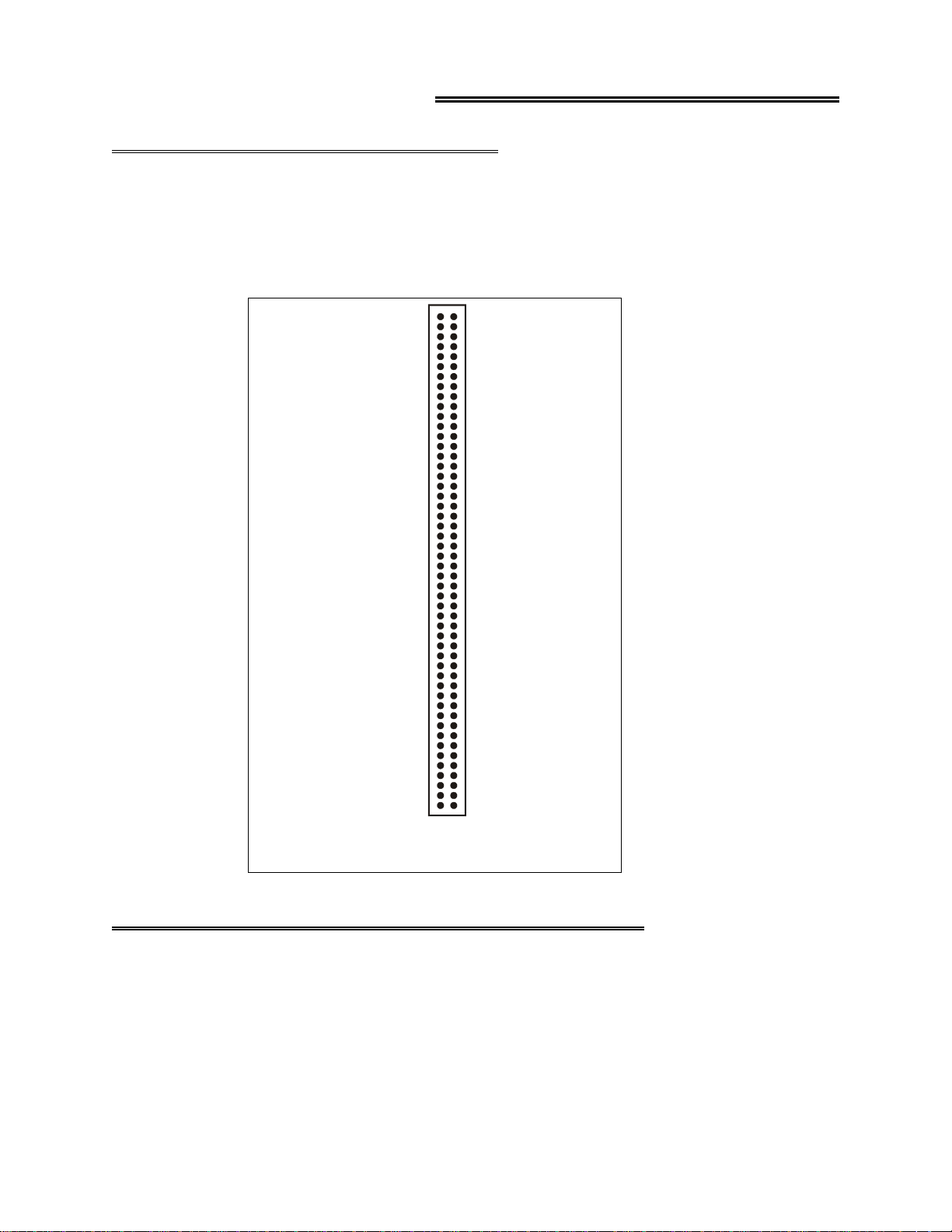
The PCI-DAS1200 and PCI-DAS1200/JR employ a 100-pin I/O connector. Please make accurate notes and pay
careful attention to wire connections. In a large system, a misplaced wire may create hours of work ‘fixing’
problems that do not exist. Note that pins 35, 36, 37, and 38 are for analog outputs and are therefore NC (no connection) on the PCI-DAS1200/JR board. (Pin 77 is also NC on the /JR board).
Analog Ground 1
Analog Input Ch 0 H igh 2
Analog Input Ch 0 Low / 8 High 3
Analog Input Ch 1 H igh
Analog Input Ch 1 Low / 9 High
Analog Input Ch 2 H igh
Analog Input Ch 2 Low / 10 High
Analog Input Ch 3 H igh
Analog Input Ch 3 Low / 11 High
Analog Input Ch 4 High
Analog Input Ch 4 Low / 12 High
Analog Input Ch 5 High
Analog Input Ch 5 Low / 13 High
Analog Input Ch 6High
Analog Input Ch 6 Low / 14 High
Analog Input Ch 7 High
Analog Input Ch 7 Low / 15 High
Analog Ground 18
A/D External Pacer 42
A/D External Trigger 45
NC 19
NC
NC
NC
NC
NC
NC
NC
NC
NC
NC
NC
NC
NC
NC
NC
D/A GND 0 35
D/A OUT 0 36
D/A GND 1 37
D/A OUT 1 38
CLK 4 39
GATE 4 40
OUT 4 41
NC 43
NC 44
NC
NC
PC +5V 48
NC 49
PC Ground 50
10
11
12
13
14
15
16
17
20
21
22
23
24
25
26
27
28
29
30
31
32
33
34
46
47
4
5
6
7
8
9
51 Digital A0
D igita l A1
52
D igita l A2
53
D igita l A3
54
D igita l A4
55
D igita l A5
56
D igita l A6
57
D igita l A7
58
D igita l B0
59
D igita l B1
60
D igita l B2
61
D igita l B3
62
D igita l B4
63
D igita l B5
64
D igita l B6
65
D igita l B7
66
D igita l C0
67
D igita l C1
68
D igita l C2
69
D igita l C3
70
D igita l C4
71
D igita l C5
72
D igita l C6
73
D igita l C7
74
75 NC
N C
76
10 M H z O U T
77
N C
78
N C
79
CL K 6
80
GAT E 6
81
OUT 6
82
N C
83
N C
84
CL K 5
85
GAT E 5
86
OUT 5
87
N C
88
P C Gr o u nd
89
90 PC +12V
91 PC G round
92 PC -12V
N C
93
N C
94
95 A/D Internal Pacer Output
N C
96
N C
97
N C
98
99 NC
100 PC Ground
PCI-DAS1200 Connector Diagram
3.2 CONNECTING SIGNALS TO THE PCI-DAS1200
The 100-pin connector provides a far greater signal density than the traditional 37-pin D type connector. In
exchange for that density comes a far more complex cable and mating connector. The C100-FF-2 cable is a pair of
50-pin ribbon cables. At one end they are joined together with a 100-pin connector. From the 100-pin connector
designed to mate with the PCI-DAS1200 connector, the two 50-pin ribbon cables diverge and are terminated at the
other end with standard 50-pin header connectors. A CIO-MINI50 screw terminal board (or CIO-MINI50/DST with
detachable screw terminals) is the ideal way to terminate real-world signals and route them into the PCI-DAS1200.
7
Page 11
4.0 ANALOG CONNECTIONS
4.1 ANALOG INPUTS
Analog signal connection is one of the most challenging aspects of applying a data acquisition board. If you are an
Analog Electrical Engineer, this section is not for you, but if you are like most PC data acquisition users, the best
way to connect your ana log inputs may no t be obvio us. Though c omplete cove rage of this topic is well beyond the
scope of this manual, the following section provides some explanations and helpful hints regarding these analog
input connections. This section is designed to help you achieve the optimum performance from your PCI-DAS1200
series board.
Prior to jumping into actual connection schemes, you should have at least a basic understanding of
single-ended/differential inputs and system grounding/isolation. If you are already comfortable with these concepts,
you may wish to skip to the next section (on wiring configurations).
4.1.1 Single-Ended and Differential Inputs
The PCI-DAS1200 provides either 8 differential or 16 single-ended input channels. The concepts of single-ended
and differential inputs are discussed in the following section.
Single-Ended Inputs
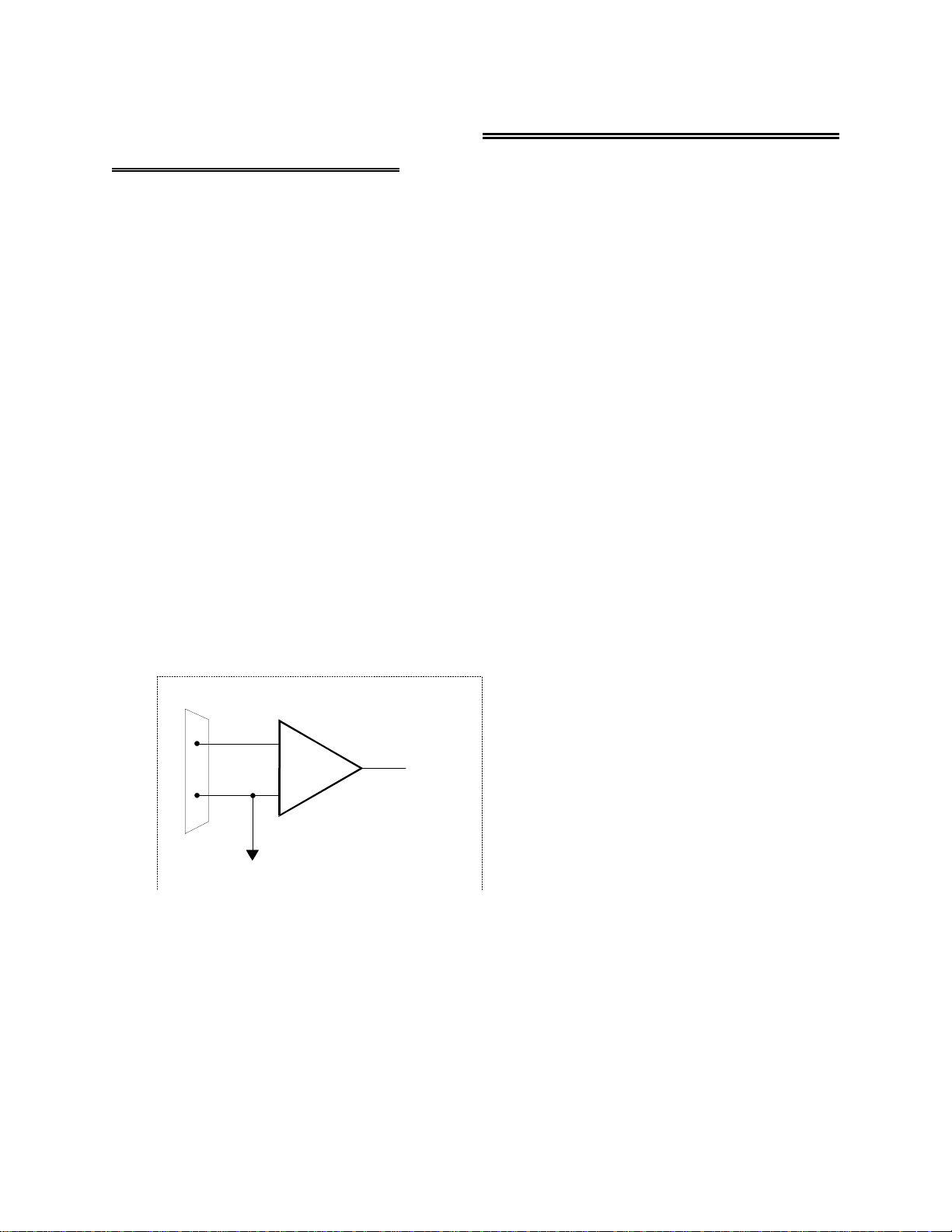
A single-ended input measures the voltage between the input signal and ground. In this case, in single-ended mode
the PCI-DAS1200 measures the voltage between the input channel and low level ground (LLGND). The singleended input configuration requires only one physical connection (wire) per channel and allows the PCI-DAS1200 to
monitor more channels than the (2-wire) differential configuration using the same connector and onboard
multiplexor. However, because the PCI-DAS1200 is measuring the input voltage relative to its own low level
ground, single-ended inputs are more susceptible to both EMI (electromagnetic interference) and any ground noise at
the signal source. The following diagrams show the single-ended input configuration.
CH IN
LL GND
I/O
Connector
+
Inp u t
Amp
To A/D
-
Single-Ended Input
8
Page 12
~
g
g
g
g
g
g
y
g
g
g
g
Vs
Vs + V
CH IN
2 - Vg1
LL GND
+
Input
Amp
To A /D
-
1
Any volta
1 and g2 shows up as an error signal
at the input amplifier
e differential between grounds
2
Single-ended input with Comm on M ode Voltage
Differential Inputs
Differential inputs measure the voltage between two distinct input signals. Within a certain range (referred to as the
common mode range), the measurement is almost independent of signal source to PCI-DAS1200 ground variations.
A differential input is also much more immune to EMI than a single-ended one. Most EMI noise induced in one lead
is also induced in the other, the input measures only the difference between the two leads, and the EMI common to
both is ignored. This effect is a major reason for twisted pair wire because the twisting ensures that both wires are
subject to virtually identical external influence. The diagram below shows a typical differential input configuration.
CH High
CH Low
+
-
Inp ut
Amp
To A/ D
LL GN D
I/O
Connector
Vs
~
Vcm = V
12
Common Mode Volta
b
differential input configuration. However,
no te th a t V cm + V s mu s t rema in w ithin
the amplifier’s com mon mode ran
Differential Input
Vs
Vcm
2 - Vg1
e (Vcm) is ignored
e of ±10V
CH High
CH Low
LL GND
+
Inp u t
Amp
-
Differential
Inp ut
To A/ D
9
Page 13

Before moving on to the discussion of grounding and isolation, it is important to explain the concepts of common
mode, and common mode range (CM Range). Common mode voltage is depicted in the diagram above as Vcm.
Though differe ntial inputs measure the voltage b etween two signals, without (almost) respe ct to the either signal’s
voltages relative to ground, there is a limit to how far away from ground either signal can go. Though the
PCI-DAS1200 has differential inputs, it will not measure the difference between 100V and 101V as 1 Volt (in fact
the 100V would destroy the board!). This limitation or common mode range is depicted graphically in the following
diagram. The PCI-DAS1200 common mode range is +/- 10 Volts. Even in differential mode, no input signal can be
measured if it is more than 10V from the board’s low level ground (LLGND).
+13V
+12V
+11V
+10V
+9V
+8V
+7V
+6V
+5V
+4V
+3V
+2V
+1V
-1V
-2V
-3V
-4V
-5V
-6V
-7V
-8V
-9V
-10V
W ith V cm= + 5 V DC ,
+Vs must be less than +5V, or the common mode range will b e ex cee d e d (> + 1 0 V)
Gray area represents common m ode range
Both V+ and V- must alw ays remain within
the co mmo n m o d e ra nge relative to LL G nd
Vcm
4.1.2 System Grounds and Isolation
There are three scenarios possible when connecting your signal source to your PCI-DAS1200 board.
1. The PCI-DAS1200 and the signal source may have the same (or common)
ground. This signal source may be connected directly to the PCI-DAS1200.
2. The PCI-DAS1200 and the signal source may have an offset voltage
between their grounds (ac and/or dc). This offset is commonly
referred to as common mode voltage. Depending on the magnitude of
this voltage, it may or may not be possible to connect the PCI-DAS1200
directly to your signal source. We will discuss this topic further in a later
section.
3. The PCI-DAS1200 and the signal source may already have isolated
grounds. This signal source may be connected directly to the
PCI-DAS1200.
Which system do you have?
Try the following experiment. Using a battery powered voltmeter*, measure the voltage (difference) between the
ground signal at your signal source and at your PC. Place one voltmeter probe on the PC ground and the other on the
signal source ground. Measure both the ac and dc Voltages.
*If you do not have access to a voltmeter, skip this experiment and take a look a the following three sections. You may be able to
identify your system type from the descriptions provided.
10
Page 14

If both ac a nd dc readi ngs are 0.00 volts, you may have a system with co mmon grounds. H owever, since volt meters
will average out high frequency signals, there is no guarantee. Please refer to the section below titled Common
Grounds.
If you measure reasonably stable ac and dc voltages, your system has an offset voltage between the grounds
category. This offset is referred to as a Common Mode Voltage. Please to read the following warning carefully, then
proceed to the section describing Common Mode systems.
WARNING
If either the ac or dc voltage is greater than 10 volts, do not connect the PCI-DAS1200 to this
signal source. You are beyond the board’s usable common mode range and will need to either
adjust your grounding system or add special isolation signal conditioning to take useful
measurements. A ground offset voltage of more than 30 volts will likely damage the
PCI-DAS1200 board and possibly your computer. Note that an offset voltage much greater than
30 volts will not only damage your electronics, but it may also be hazardous to you.
This is such an important point, that we will state it again. If the voltage between the ground of
your signal source and your PC is greater than 10 volts, your board will not take useful
measurements. If this voltage is greater than 30 volts, it will likely cause damage, and may
represent a serious shock hazard ! In this case you will need to either reco nfig ure yo ur system to
reduce the ground differentials, or purchase and install special electrical isolation signal
conditioning.
If you cannot obtain a reasonably stable dc voltage measurement between the grounds, or the voltage drifts around
considerably, the two grounds are most likely isolated. The easiest way to check for isolation is to change your
voltmeter to it’s ohm scale and measure the resistance between the two grounds. It is recommended that you turn
both systems off prior to taking this resistance measurement. If the measured resistance is more than 100 Kohm, it’s
a fairly safe bet that your system has electrically isolated grounds.
Systems with Common Grounds
In the simplest (but perhaps least likely) case, your signal source will have the same ground as the PCI-DAS1200.
This would typically occur when providing power or excitation to your signal source directly from the
PCI-DAS1200. There may be other common ground configurations, but it is important to note that any voltage
between the PCI-DAS1200 ground and your signal ground is a potential error voltage if you set up your system
based on a common ground assumption.
As a safe rule of thumb, if your signal source or sensor is not connected directly to an LLGND pin on your
PCI-DAS1200, it’s best to assume that you do not have a common ground even if your voltmeter measured 0.0
Volts. Configure your system as if there is ground offset voltage between the source and the PCI-DAS1200. This is
especially true if you are using high gains, since ground potentials in the sub millivolt range will be large enough to
cause A/D errors, yet will not likely be measured by your handheld voltmeter.
Systems with Common Mode (ground offset) Voltages
The most frequently encountered grounding scenario involves grounds that are somehow connected, but have ac
and/or dc offset voltages between the PCI-DAS1200 and signal source grounds. This offset voltage my be ac, dc, or
both and may be caused by a wide array of phenomena including EMI pickup, resistive voltage drops in ground
wiring and connections, etc. Ground offset voltage is a more appropriate term to describe this type of system, but
since our goal is to keep things simple, and help you make appropriate connections, we’ll stick with our somewhat
loose usage of the phrase Common Mode.
11
Page 15

Small Common Mode Voltages
If the voltage between the signal source ground and PCI-DAS1200 ground is small, the combination of the ground
voltage and input signal will not exceed the PCI-DAS1200’s +/-10V common mode range, (i.e., the voltage between
grounds, added to the maximum input voltage, stays within +/-10V), This input is compatible with the
PCI-DAS1200 and the system may be connected without additional signal conditioning. Fortunately, most systems
will fall in this category and have a small voltage differential between grounds.
Large Common Mode Voltages
If the ground differential is large enough, t he PCI-DAS1200’s +/- 10V common mode range will be exceeded (i.e.
the voltage between PCI-DAS1200 and signal source grounds, added to the maximum input voltage you’re trying to
measure exceeds +/-10V). In this case the PCI-DAS1200 cannot be directly connected to the signal source. You will
need to change your system grounding configuration or add isolation signal conditioning. (Please look at our
ISO-RACK and ISO-5B-series products to add electrical isolation, or give our technical support group a call to
discuss other options.)
NOTE
Relying on the earth prong of a 120 Vac for signal ground connections is not advised.. Different
ground plugs may have large and potentially even dangerous voltage differentials. Remember that
the ground pins on 120 Vac outlets on different sides of the room may only be connected in the
basement. This leaves the possibility that the “ground” pins may have a significant voltage differential (especially if the two 120 Vac outlets happen to be on different phases!)
PCI-DAS1200 and signal source already have isolated grounds
Some signal sources will already be electrically isolated from the PCI-DAS1200. The diagram below shows a typical
isolated ground system. These signal sources are often battery powered, or are fairly expensive pieces of equipment
(since isolation is not an inexpensive proposition), isolated ground systems provide excellent performance, but
require some extra effort during connections to ensure optimum performance is obtained. Please refer to the following sections for further details.
4.2 WIRING CONFIGURATIONS
Combining all the grounding and input type possibilities provides us with the following potential connection configurations. The combinations along with our recommendations on usage are shown in the chart below.
Ground Category Input Configuration
Our view
RecommendedSingle-Ended InputsCommon Ground
AcceptableDifferential InputsCommon Ground
Common Mode
Voltage < +/-10V
Common Mode
Voltage < +/-10V
Common Mode
Voltage > +/- 10V
Common Mode
Voltage > +/-10V
Already Isolated
Grounds
Single-Ended Inputs
Differential Inputs
Not RecommendedSingle-Ended Inputs
RecommendedDifferential Inputs
Unacceptable without
adding Isolation
Unacceptable without
adding Isolation
AcceptableSingle-ended InputsAlready Isolated Grounds
RecommendedDifferential Inputs
12
Page 16

The following sections depict recommended input wiring schemes for each of the 8 possible input
configuration/grounding combinations.
4.2.1 Common Ground / Single-Ended Inputs
Single-ended i s the recommended configuration for common ground c onnections. H owever, if some of your inputs
are common ground and some are not, we recommend you use the differential mode. There is no performance
penalty (other than loss of channels) for using a differential input to measure a common ground signal source.
However, the reverse is not true. The diagram below shows a recommended connection diagram for a common
ground / single-ended input system
Signal
So u rc e with
C ommon Gnd
Optional wire
since signal source
and A/D board share
comm on g round
CH IN
LL GND
I/O
Connector
+
-
Input
Amp
To A /D
A/D Board
Signal source and A/D board
sharing comm on ground connected
to sin gle - e nde d in put.
4.2.2 Common Ground / Differential Inputs
The use of differential inputs to monitor a signal source with a common ground is an acceptable configuration,
though it requir es more wiring and offer s fewer channels than selec ting a single-ended co nfiguration. The diagram
below shows the recommended connections in this configuration.
Signal
So u rce with
Co mm o n Gn d
Optional wire
since signal source
and A/D board share
common ground
Required connection
of LL GND to CH Low
CH High
CH Low
LL GND
I/O
Connector
+
Input
Amp
-
A/D Board
To A/D
Signal source and A /D board
sharing com m on ground connected
to d iffere n tial in pu t.
13
Page 17

4.2.3 Common Mode Voltage < +/-10V / Single-Ended Inputs
g
g
This is not a recommended configuration. In fact, the phrase “common mode” has no meaning in a single-ended
system, and this case would be better described as a system with offset grounds. Anyway, you are welcome to try this
configuration, no system damage should occur, and, depending on the overall accuracy you require, you may receive
acceptable results.
4.2.4 Common Mode Voltage < +/-10V / Differential Inputs
Systems with varying ground potentials should always be monitored in the differential mode. Use care to ensure that
the sum of the input signal and the ground differential (referred to as the common mode voltage) does not exceed the
common mode range of the A/D board (+/-10 V on the PCI-DAS1200). The diagram below shows recommended
connections in this configuration.
Signal Source
with Commo n
M od e Volta g e
The voltage differential
between these grounds,
added to the maximum
input signal m ust stay
w ith in + /- 1 0 V
GND
CH High
CH Low
LL GND
I/O
Conn ec tor
+
Inp u t
Amp
-
A/D Board
To A /D
Signal source and A/D board
with comm on mode volta
e
connected to a differential input.
4.2.5 Common Mode Voltage > +/-10V
The PCI-DAS1200 will not directly monitor signals with common mode voltages greater than +/-10V. You will need
to either alter the system ground configuration to reduce the overall common mode voltage, or add isolated signal
conditioning between the source and your board.
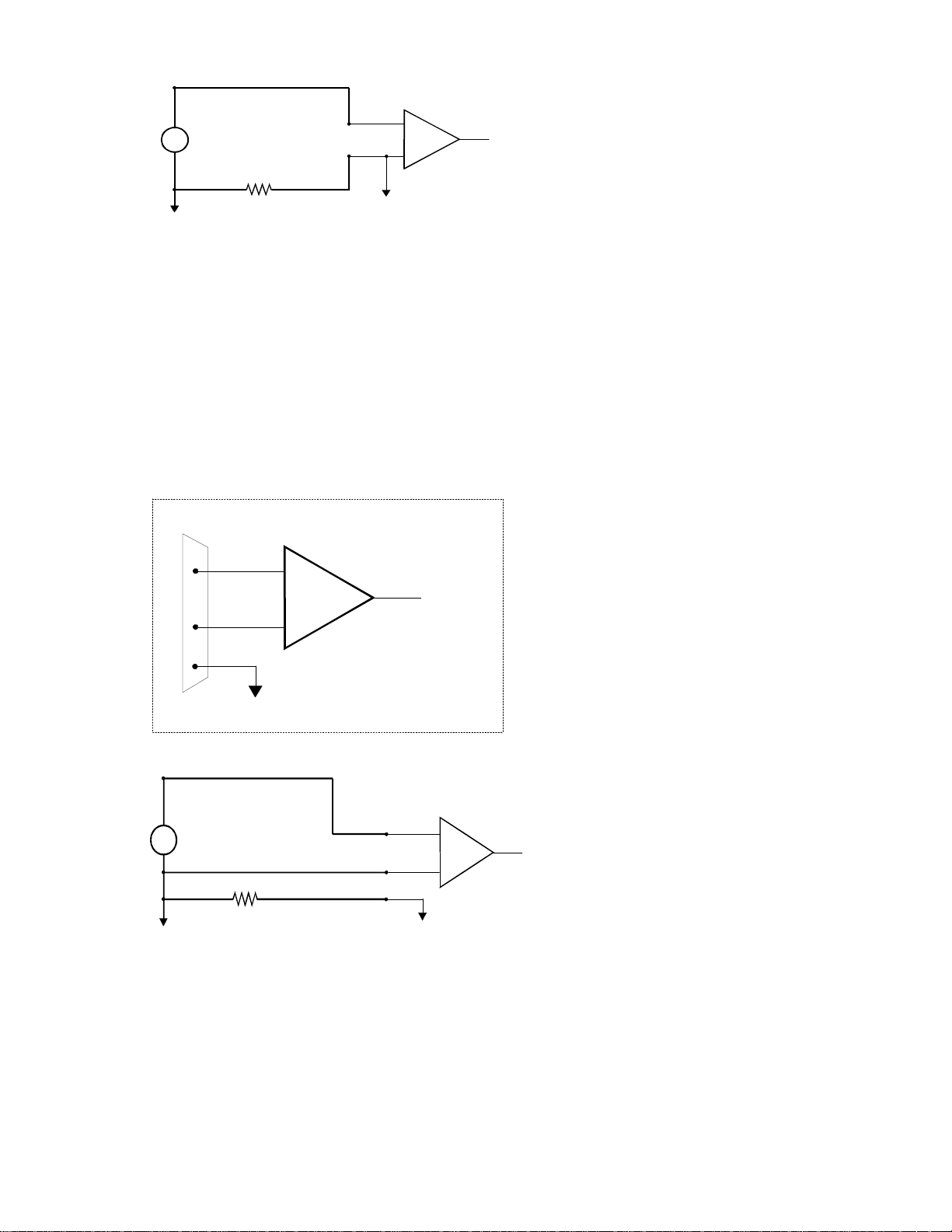
Isolation
Barrier
arge comm on
L
mode voltage
between signal
source & A/D boa rd
When the voltage difference
between signal source and
A/D board ground is large
enough so the A/D board’s
common mode range is
exceeded, isolated signal
conditioning must be added.
System with a Large Comm on Mode Voltage,
GND
Connected to a Sin
CH IN
LL GND
I/O
Connector
le-Ended Input
+
Inpu t
Amp
-
A/D Board
To A / D
14
Page 18

on
g
y
m
arge com
L
mode voltage
betwee n signal
s o urce & A /D bo ard
GND
Isolation
Barrier
10 K
CH High
CH Low
LL GN D
+
Inpu t
Amp
To A /D
-
When the voltage difference
between signal source and
A/D board ground is large
enough so the A/D board’s
common mode range is
exceeded, isolated signal
conditioning must be add ed.
10K is a recommended value. You may short LL GND to CH Low
ins tead, bu t th is w ill r e d uc e y ou r s ys te m ’s n o i s e im m u n ity.
I/O
Connector
A/D Board
System with a Large Com m on M ode Voltage,
Connected to a Differential Input
4.2.6 Isolated Grounds / Single-Ended Inputs
Single-ended inputs can be used to monitor iso lat ed inputs, tho ugh the use of the diffe re ntial mode will increa se your
system’s noise immunity. The diagram below shows the recommended connections in this configuration.
Iso late d
s ign a l
so u r ce
CH IN
LL GND
I/O
Connector
+
-
Inpu t
Amp
To A /D
A/D Board
Isolated Signal Source
Connected to a Sin
le-Ended Input
4.2.7 Isolated Grounds / Differential Inputs
Optimum performance with isolated signal sources is ensured with the use of the differential input setting. The
diagram below shows the recommend connections in this configuration.
Signal Source
a n d A/D Bo a rd
Alre a dy Is o la t ed.
These grounds are
electrically isolated.
GND
10 K
10K is a recomm ended value. You m ay sh o rt L L G ND to C H L o w
instead, but this will red uc e
CH High
CH Low
LL GND
I/O
Conn ec tor
our system’s noise imm u nity.
+
Inp u t
Amp
-
A/D Board
To A/ D
Already isolated signal source
and A/D board connected to
a differential input.
15
Page 19

5.0 Programming & Applications
Your PCI-DAS1200 is supported by the powerful Universal Library. We strongly recommend that you take
advantage of the Universal Library as your so ftware interface. The complexi ty of the registers req uired for au tomatic calib ration
combined with the Windows 9X and NT’s dynamic allocation of addresses and internal resources makes the PCI-DAS1200
series very challenging to program via direct register I/O operations. Direct I/O programming should typically be attempted only
by very experienced programmers.
Although the PCI-DAS1200 is part of the larger DAS family, there is no correspondence between register locations of the
PCI-DAS1200 and boards in the CIO-DAS16 family. Software written at the register level for the other DAS boards will not
work with the PCI-DAS1200.
5.1 PROGRAMMING LANGUAGES
The Universal Library provides complete access to the PCI-DAS1200 functions from a range of
programming languages; bot h DOS and Windows. If you are planning to write pr ograms, or would like t o run the
example programs for Visual Basic or any other language, please turn now to the Universal Library manual.
The optional VIX Components package may greatly simplify your programming effort. VIX Components is a set of
programming tools based o n a DLL interface to Windows languages. A set of VBX, OCX, or ActiveX interfaces
allows point and click construction of graphical displays, analysis and control structures. Please see the catalog for a
complete description of the package.
5.2 PACKAGED APPLICATIONS PROGRAMS
Many packaged application programs, such as DAS Wizard and HP-VEE now have drivers for the PCI-DAS1200.
If the package you own does not appear to have drivers for the PCI-DAS1200 please fax or e-mail the package name
and the revision number from the install disks. We will research the package for you and advise how to obtain
PCI-DAS1200 drivers.
Some application drivers are included with the Universal Library package, but not with the Application package. If
you have purchased an application package directly from the software vendor, you may need to purchase our Universal Library and drivers. Please contact us for more information on this topic.
16
Page 20

6.0 Self-Calibration of the PCI-DAS1200
The PCI-DAS1200 is shipped fully-calibrated from the factory with cal coefficients stored in nvRAM. When using
Universal Library at run time, these calibration factors are loaded into system memory and are automatically
retrieved each time a different DAC/ADC range is specified. The user has the option to recalibrate with respect to
the factory-measured voltage standards at any time by simply selecting the "Calibrate" option in InstaCal. Full
calibration typically requires less than two minutes and requires no user intervention.
6.1 CALIBRATION CONFIGURATION
The PCI-DAS1200 provides self-calibration of the analog source and measurment systems thereby eliminating the
need for external equipment and user adjustments. All adjustments are made via 8-bit calibration DACs or 7-bit
digital potentiometers referenced to an on-board factory calibrated standard. Calibration factors are stored on the
serial nvRAM..
A variety of methods are used to calibrate the different elements on the board. The analog front-end has several
knobs to turn. Offset calibration is performed in the instrumentation amplifier gain stage. Front-end gain adjustment
is performed via a variable attenuator/gain stage.
The analog output circuits are calibrated for both gain and offset. Offset adjustments for the analog output are made
in the output buffer section. The tuning range of this adjustment allows for max DAC and output buffer offsets.
Gain calibration of the analog outputs are performed via DAC reference adjustments.
Figure 1 below is a block diagram of the analog front-end calibration system:
Cal
Ref
8
Trim Dac
(Coarse)
Trim Dac
(Fine)
PGA
Offset Adj
Offset
Variable Gain
Digital Offset Pot
Figure 1
ADC
7
17
Page 21

The calibration scheme for the Analog Out (not applicable on the PCI-DAS1200/JR) section is shown in Figure 2
12
below. This circuit is duplicated for both DAC0 and DAC1
Trim D ac
(co arse)
Trim D ac
(fine)
Gain Adj.
DAC
Ref
Trim D ac
Analog Out
Offset Adj.
Figure 2
18
Page 22

7.0 PCI-DAS1200 Register Description
7.1 REGISTER OVERVIEW
PCI-DAS1200 operation registers are mapped into I/O address space. Unlike ISA bus designs, this board has
several
base addresses, each corresponding to a reserved block of addresses in I/O space. As we mention in our
programming chapter, we highly recommend customers use the Universal Library package. Direct register level
programming should be attempted only by extremely experienced register level programmers.
Of six Base Address Regions (BADR) available in the PCI 2.1 specification, five are implemented in this design and
are summarized as follows:
OperationsFunctionI/O Region
32-Bit DWORDPCI Controller Operation RegistersBADR0
16-Bit WORDGeneral Control/Status RegistersBADR1
16-Bit WORDADC Data, FIFO Clear RegistersBADR2
8-Bit BYTEPacer, Counter/Timer and DIO RegistersBADR3
16-Bit WORDDAC Data Registers (not applicable for (JR)BADR4
BADRn will likely be different on different machines. Assigned by the PCI BIOS, these Base Address values cannot
be guaranteed to be the same even on subsequent power-on cycles of the same machine. All software must interrogate BADR0 at run-time with a READ_CONFIGURATION_WORD instruction to determine the BADRn values.
Please see the
"1997 AMCC S5933 PCI Controller Data Book”
for more information.
7.2 BADR0
BADR0 is reserved for the AMCC S5933 PCI Controller operations. There is no reason to access this region of I/O
space for most PCI-DAS1200 users. The installation procedures and Universal Library access all required information in this area. Unless you are writing direct register level software for the PCI-DAS1200, you will not need to be
concerned with BADR0 address.
7.3 BADR1
The I/O region defined by BADR1 contains 5 control and status registers for ADC, DAC, interrupt and Autocal
operations. This region supports 16-bit WORD operations.
7.3.1 INTERRUPT / ADC FIFO REGISTER
BADR1+ 0: Interrupt Control, ADC status. A read/write register.
WRITE
-
0123456789101112131415
-
INT0INT1INTE-EOAIE-EOACLINTCL-----ADFLCL
19
Page 23

Write operations to this register allow the user to select interrupt sources, enable interrupts, and clear interrupts as
well as ADC FIFO flags. The following is a description of the Interrupt/ADC FIFO Register:
INT[1:0]
INTE
EOAIE
EOACL
INTCL
General Interrupt Source selection bits.
SourceINT0 INT1
Not Defined 00
End of Channel Scan10
AD FIFO Half Full01
AD FIFO Not Empty11
Enables interrupt source selected via the INT[1:0] bits.
1 = Selected interrupt Enabled
0 = Selected interrupt Disabled
Enables End-of-Acquisition interrupt. Used during FIFO'd ADC operations to indicate that the
desired sample size has been gathered.
1= Enable EOA interrupt
0 = Disable EOA interrupt
A write-clear to reset EOA interrupt status.
1 = Clear EOA interrupt.
0 = No effect.
A write-clear to reset INT[1:0] selected interrupt status.
1 = Clear INT[1:0] interrupt
0 = No effect.
ADFLCL
READ
Read operations to this register allow the user to check status of the selected interrupts and ADC FIFO flags. The
following is a description of Interrupt / ADC FIFO Register Read bits:
EOAI
INT
A write-clear to reset latched ADC FIFO Full status.
1 = Clear ADC FIFO Full latch.
0 = No Effect.
NOTE: It is not necessary to reset any write-clear bits after they are set.
0123456789101112131415
------EOAIINT-EOBIADHFIADNEIADNELADFUL--
Status bit of ADC FIFO End-of-Acquisition interrupt
1 = Indicates an EOA interrupt has been latched.
0 = Indicates an EOA interrupt has not occurred.
Status bit of General interrupt selected via INT[1:0] bits. This bit indicates that any one of
these interrupts has occurred.
1 = Indicates a General interrupt has been latched.
0 = Indicates a General interrupt has not occurred.
20
Page 24

EOBI
Status bit ADC End-of-Burst interrupt. Only valid for ADC Burst Mode enabled.
1 = Indicates an EOB interrupt has been latched.
0 = Indicates an EOB interrupt has not occurred.
ADHFI
with more than 255 samples.
ADNEI
ADNE
LADFUL
Status bit of ADC FIFO Half-Full interrupt. Used during REP INSW operations.
1 = Indicates an ADC Half-Full interrupt has been latched. FIFO has been filled
0 = Indicates an ADC Half-Full interrupt has not occurred. FIFO has not yet
exceeded 1/2 of its total capacity.
Status bit of ADC FIFO Not-Empty interrupt. Used to indicate ADC conversion
complete in single conversion applications.
1 = Indicates an ADC FIFO Not-Empty interrupt has been latched and that
one data word may be read from the FIFO.
0 = Indicates an ADC FIFO Not-Empty interrupt has not occurred. FIFO has
been cleared, read until empty or ADC conversion still in progress.
Real-time status bit of ADC FIFO Not-Empty status signal.
1 = Indicates ADC FIFO has at least one word to be read.
0 = Indicates ADC FIFO is empty.
Status bit of ADC FIFO FULL status. This bit is latched.
1 = Indicates the ADC FIFO has exceeded full state. Data may have been lost.
0 = Indicates non-overflow condition of ADC FIFO.
7.3.2 ADC CHANNEL MUX AND CONTROL REGISTER
BADR1 + 2
This register sets channel mux HI/LO limits, ADC gain, offset and pacer source.
A Read/Write register.
WRITE
0123456789101112131415
CHL1CHL2CHL4CHL8CHH1CHH2CHH4CHH8GS0GS1SEDIFFUNIBIPADPS0ADPS1--
CHL8-CHL1,
When these bits are written, the analog input multiplexors are set to the channel specified by CHL8-CHL1. After
each conversion, the input multiplexors increment to the next channel, reloading to the "CHL" start channel after
the "CHH" stop channel is reached. LO and HI channels are the decode of the 4-bit binary patterns.
GS[1:0]
These bits determine the ADC range as indicated below.
CHH8-CHH1
RangeGS0GS1
10V00
5V10
2.5V01
1.25V11
SEDIFF
Selects measurement configuration for the Analog Front-End.
1 = Analog Front-End in Single-Ended Mode. This mode supports
21
Page 25

up to 16 channels.
0 = Analog Front-End in Differential Mode. This mode supports
up to 8 channels.
UNIBIP
Selects offset configuration for the Analog Front-End.
ADPS[1:0]
1 = Analog Front-End Unipolar for selected range
0 = Analog Front-End Bipolar for selected range.
The following table summarizes all possible Offset/Range configurations
Input GainInput RangeGS0GS1UNIBIP
000
100
010
110
001
101
011
111
These bits select the ADC Pacer Source. Maximum Internal/External Pacer
frequency is 330 kHz.
±
10 V
± 5 V
±
2.5 V
±
1.25V
0-10V
0-5V
0-2.5V
0-1.25V
Measurement
Resolution
:
4.88 mV1
2.44 mV2
1.22 mV4
610 µV8
2.44 mV1
1.22 mV2
610 µV4
305 µV8
READ
EOC
Pacer SourceADPS0ADPS1
SW Convert00
82C54 Counter/Timer10
External Falling01
External Rising11
Note: For ADPS[1:0] = 00 case, SW conversions are initiated
via a word write to BADR2 + 0. Data is ‘don't care.’
Real-time, non-latched status of ADC End-of-Conversion signal.
1 = ADC DONE
0 = ADC BUSY
0123456789101112131415
--------------EOC-
7.3.3 TRIGGER CONTROL/STATUS REGISTER
22
Page 26

BADR1 + 4
This register provides control bits for all ADC trigger modes. A Read/Write register.
WRITE
0123456789101112131415
TS0TS1--TGENBURSTEPRTRGXTRCL---ARMFFM0C0SRC--
TS[1:0]
TGEN
BURSTE
These bits select one-of-two possible ADC Trigger Sources:
SourceTS0TS1
Disabled00
SW Trigger10
External (Digital)01
Not Defined11
Note
: TS[1:0] should be set to 0 while setting up Pacer source and count values.
This bit is used to enable External Trigger function
1 = External rising-edge Digital Trigger enabled.
0 = External Digital Trigger has no effect.
Note that the external trigger requires proper setting of the
bits. Once these bits are set, the next rising edge will start a Paced ADC conversion.
Subsequent triggers will have no effect until external trigger flop is cleared (
This bit enables 330 kHz ADC Burst mode. Start/Stop channels are selected via
the CHLx, CHHx bits in ADC CTRL/STAT register at BADR1 + 2.
1 = Burst Mode enabled
0 = Burst Mode disabled
TS[1:0]
and
TGEN
XTRCL
).
PRTRG
XTRCL
This bit enables ADC Pre-trigger Mode. This bit works with the ARM and FFM0
bits when using Pre-trigger mode.
1 = Enable Pre-trigger Mode
0 = Disable Pre-trigger Mode
A write-clear to reset the
1 = Clear
0 = No Effect.
XTRIG
XTRIG
status.
flip-flop.
23
Page 27

ARM,
FFM0
These bits work in conjunction with
Direct register level programming is beyond the scope of this manual, and should be attempted
only by extremely experienced register level programmers. Call Technical Support for further
information.
The table below provides a summary of bit settings and operation.
PRTRG
during FIFO'd ADC operations.
C0SRC
FFM0PRTRG
00
remaining count <1024
------------------------
Via SW immediately
10
01
11
This bit allows the user to select the clock source for user Counter 0.
Via SW immediately
remaining count <1024
------------------------
Via SW immediately
Via SW immediately
1 = Internal 10MHz oscillator
0 = External clock source input via CTR0CLK pin on 100p connector.
is set...
Via SW when
1/2 FIFO < # Samples < 1 FIFO
Via SW when
1/2 FIFO < # Samples < 1 FIFO
FIFO ModeARM
# Samples >1 FIFO
Normal Mode
----------------------------------
Normal Mode
# Samples <1/2 FIFO
Normal Mode
# Samples >1 FIFO
Pre-Trigger Mode
----------------------------------
Pre-Trigger Mode
# Samples <1/2 FIFO,
Pre-Trigger Mode
Sample CTR
Starts on...
ADHF
ADC Pacer
ADHF
XTRIG
READ
XTRIG
1 = External Trigger flip-flop has been set. This bit is write-cleared.
0 = External Trigger flip-flop reset. No trigger has been received.
INDX_GT
1 = Pre-trigger index counter has completed its count.
0 = Pre-trigger index counter has not been gated on or has not yet completed its
count
0123456789101112131415
-------XTRIG----INDX_GT---
.
24
Page 28

7.3.4 CALIBRATION REGISTER
As mentioned before, direct register level programming should be attempted only by extremely experienced register
level programmers. This is true for register-level calibration. If you’re not sure, don’t attempt it. Call Technical
Support for more information.
BADR1 + 6
This register controls all autocal operations. This is a Write-only register.
WRITE
0123456789101112131415
SEL8800SEL7376-CSRC0CSRC1CSRC2CALENSDI
--------
SEL8800
SEL7376
CSRC[2:0]
This bit enables the 8-bit trim DACs for the following circuits:
Cal Function DAC Channel
0
1
2
3
4
5
6
7
This bit latches the 7-bit serial data stream into the AD7376 digital potentiometer
(10KOhm). The AD7376 is used for analog front-end gain calibration.
These bits select the different calibration sources available to the ADC front end.
DAC0
DAC0
DAC0
DAC1
DAC1
DAC1
Coarse Offset
ADC
Fine Offset
ADC
Fine Gain
Coarse Gain
Offset
Offset
Fine Gain
Coarse Gain
25
Cal SourceCSRC0CSRC1CSRC2
AGND000
7.0V100
3.5V010
1.75V110
0.875V001
8.6mV101
VDAC0011
VDAC1111
Page 29

CALEN
This bit is used to enable Cal Mode.
1 = Selected Cal Source,
0 = Analog Channel 0 functions as normal input.
CSRC[2:0]
, is fed into Analog Channel 0.
SDI
Serial Data In. This bit is used to set serial address/data stream for the
DAC8800 TrimDac and 7376 digital potentiometer. Used in conjunction
with
SEL8800
and
SEL7376
bits.
7.3.5 DAC CONTROL/STATUS REGISTER (Does not apply to PCI-DAS1200/JR)
BADR1 + 8
This register selects the DAC gain/range and update modes. This is a Write-only register.
WRITE
DACEN
This bit enables the Analog Out features of the board.
1 = DAC0/1 enabled.
0 = DAC0/1 disabled.
The power-on state of this bit is 0.
0123456789101112131415
DACEN-----MODEDAC0R0DAC0R1DAC1R0DAC1R1----
-
MODE
DACnR[1:0]
This bit determines the analog output mode of operation.
1 = Both DAC0 and DAC1 updated with data written to DAC0 data register.
0 = DACn updated with data written to DACn data register.
The power-on state of this bit is 0.
These bits select the independent gains/ranges for either DAC0 or DAC1.
n=0 for DAC0 and n=1 for DAC1.
LSB SizeRangeDACnR0DACnR1
2.44mVBipolar 5V00
4.88mVBipolar 10V10
610uVUnipolar 5V01
1.22mVUnipolar 10V11
26
Page 30

7.4 BADR2
The I/O Region defined by BADR2 contains the ADC Data register and the ADC FIFO clear
register.
7.4.1 ADC DATA REGISTER
BADR2 + 0
ADC Data register.
WRITE
Writing to this register is only valid for SW initiated conversions. The ADC Pacer source must
be set to 00 via the ADPS[1:0] bits. A null write to BADR2 + 0 will begin a single conversion.
Conversion status may be determined in two ways. The
until true or
and the data word is present in the FIFO.
READ
ADNEI
(the AD FIFO not-empty interrupt) may be used to signal that the ADC conversion is complete
MSB LSB
bit in BADR1 + 0 may be polled
EOC
0123456789101112131415
AD0AD1AD2AD3AD4AD5AD6AD7AD8AD9AD10AD110000
AD[11:0]
Bipolar Mode
Unipolar
Mode
This register contains the current ADC data word. Data format is dependent upon
offset mode:
Offset Binary Coding
:
000 h = -FS
7FFh = Mid-scale
FFFh = +FS - 1LSB
Straight Binary Coding
:
000 h = -FS (0V)
7FFh = Mid-scale (+FS/2)
FFFh = +FS - 1LSB
(0V)
7.4.2 ADC FIFO CLEAR REGISTER
BADR2 + 2
ADC FIFO Clear register. A Write-only register. A write to this address location clears
the ADC FIFO. Data is don't care. The ADC FIFO should be cleared before all new
ADC operations.
27
Page 31

7.5 BADR3
The I/O Region defined by BADR3 contains data and control registers for the ADC Pacer, Pre/Post-Trigger Counters, User Counters and Digital I/O bytes. The PCI-DAS1200 has two 8254 counter/timer devices. These are
referred to as 8254A and 8254B and are assigned as
shown below:
FunctionCounter #Device
ADC Post-Trigger Sample Counter08254A
ADC Pacer Lower Divider18254A
ADC Pacer Upper Divider28254A
08254B
All reads/writes to BADR3 are byte operations.
User Counter #3 & ADC Pre-Trigger Index
Counter
User Counter #418254B
User Counter #528254B
7.5.1 ADC PACER CLOCK DATA AND CONTROL REGISTERS
8254A COUNTER 0 DATA -
ADC POST TRIGGER CONVERSION COUNTER
BADR3 + 0
READ/WRITE
01324567
D0D1D2D3D4D5D6D7
Counter 0 is used to stop the acquisition when the desired number of samples have been gathered. I t essentially is
gated on when a 'residual' number of conversions remain. The main counting of samples is done by the Interrupt
Service Routine, which will increment each time by 'packets' equal to 1/2 FIFO. Generally the value loaded into
Counter 0 is N mod 1024, where N is the total count, or the post trigger count, since Total count is not known when
pre-trigger is active. Counter 0 will be enabled by use of the
interrupt is processed. Counter 0 is to operated in Mode 0.
8254A COUNTER 1 DATA
- ADC PACER DIVIDER LOWER
ARM
bit (BADR1 + 4) when the next-to-last 1/2-full
BADR3 + 1
READ/WRITE
01324567
D0D1D2D3D4D5D6D7
28
Page 32

8254A COUNTER 2 DATA - ADC PACER DIVIDER UPPER
BASE + 2
READ/WRITE
01324567
D0D1D2D3D4D5D6D7
Counter 1 provides the lower 16 bits of the 32-bit pacer clock divider. Its output is fed to the clock input of Counter
2 which provides the upper 16-bits of the pacer clock divider. The clock input to Counter 1 is a precision 10MHz
oscillator source.
Counter 2 output is called the 'Internal Pacer' and can be selected by software to the be the ADC Pacer source.
Counters 1 & 2 should be configured to operate in 8254 Mode 2.
ADC 8254 CONTROL REGISTER
BADR3 + 3
WRITE ONLY
01324567
D0D1D2D3D4D5D6D7
The control register is used to set the operating Modes of 8254 Counters 0,1 & 2. A counter is configured by writing
the correct Mode information to the Control Register followed by count written to the specific Counter Register.
The Counters on the 8254 are 16-bit devices. Since the interface to the 8254 is only 8-bits wide, Count data is
written to the Counter Register as two successive bytes. First the low byte is written, then the high byte. The Control
Register is 8-bits wide. Further information can be obtained on the 8254 data sheet, available from Intel or Harris.
7.5.2 DIGITAL I/O DATA AND CONTROL REGISTERS
The 24 DIO lines on the PCI-DAS1200 are grouped as three byte-wide I/O ports. Port assignment and functionality
is identical to that of the industry standard 8255 Peripheral Interface. Please see the Intel or Harris data sheets for
more information.
DIO PORT A DATA
BADR3 + 4
PORT A may be configured as an 8-bit I/O channel.
READ/WRITE
01324567
D0D1D2D3D4D5D6D7
29
Page 33

DIO PORT B DATA
BADR3 + 5
PORT B may be configured as an 8-bit I/O channel. Its functionality is identical to that of PORT A.
READ/WRITE
01324567
D0D1D2D3D4D5D6D7
DIO PORT C DATA
BADR3 + 6
PORT C may be configured as an 8-bit port of either input or output, or it may be split into two independent 4-bit
ports of input or output. When split into two 4-bit I/O ports,
make up the lower nibble,
write to Port C is a byte operation. Unwanted information must be ANDed out during reads
and writes must be ORd with current value of the other 4-bit port.
READ/WRITE
comprise the upper nibble. Although it may be split, every
D[7:4]
D[3:0]
01324567
D0D1D2D3D4D5D6D7
DIO CONTROL REGISTER
BADR3 + 7
The DIO Control register is used configure Ports A,B and C as inputs or outputs. Operation is identical to that of the
8255 in Mode 0.
WRITE
01324567
D0D1D2D3D4D5D6D7
The following table summarizes the possible I/O Port configurations for the PCI-DAS1200
DIO operatin in MODE 0:
30
Page 34

PORT AD0D1D3D4
UPPER
PORT BPORT C
PORT C
LOWER
OUTOUTOUTOUT0000
INOUTOUTOUT1000
OUTINOUTOUT0100
ININOUTOUT1100
OUTOUTINOUT 0010
INOUTINOUT1010
OUTININOUT0110
INININOUT1110
OUTOUTOUTIN0001
INOUTOUTIN1001
OUTINOUTIN0101
ININOUTIN1101
OUTOUTININ0011
INOUTININ1011
OUTINININ0111
ININININ1111
7.5.3 INDEX and USER COUNTER DATA AND CONTROL REGISTERS
8254B COUNTER 0 DATA
—ADC PRE-TRIGGER INDEX COUNTER (or USER
COUNTER #4)
BADR3 + 8
READ/WRITE
01324567
D0D1D2D3D4D5D6D7
Counter 0 of the 8254B device is a shared resource on the PCI-DAS1200. When not in ADC pre-trigger mode, the
clock, gate and output lines of Counter 0 are available to the user at the 100-pin connector as User Counter 4. The
Counter 0 clock source is SW selectable via the
When in ADC Pre-trigger mode, this counter is used as the ADC Pre-Trigger index counter. This counter serves to
mark the boundary between pre- and post-trigger samples when the ADC is operating in Pre-Trigger Mode. The
External ADC Trigger flip flop gates Counter 0 on; the ADC FIFO Half-Full signal gates it off. Knowing the desired
number of post-trigger samples, software can then calculate how may 1/2 FIFO data packets need to be collected and
what corresponding residual sample count needs to be written to BADR3 + 0.
C0SRC
bit in BADR1+4.
31
Page 35

8254B COUNTER 1 DATA - USER COUNTER #5
BADR3 + 9
READ/WRITE
01324567
D0D1D2D3D4D5D6D7
The clock, gate and output lines of Counter 1 are available to the user at the 100-pin connector as User Counter 5.
The Counter 1 clock source is always external and must be provided by the user. The buffered version of the inter-
nal 10-MHz clock available at the user connector may be used as the clock source
.
8254B COUNTER 2 DATA - USER COUNTER #6
BADR3 + Ah
READ/WRITE
01324567
D0D1D2D3D4D5D6D7
The clock, gate and output lines of Counter 2 are available to the user at the 100-pin connector as User Counter 6.
The Counter 2 clock source is always external and must be provided by the user. The buffered version of the inter-
nal 10-MHz clock available at the user connector may be used as the clock source
.
8254B CONTROL REGISTER
BADR3 + Bh
WRITE ONLY
01324567
D0D1D2D3D4D5D6D7
The control register is used to set the operating Modes of 8254B Counters 0,1 & 2. A counter is configured by
writing the correct Mode information to the Control Register, then the proper count data must be written to the
specific Counter Register.
The Counters on the 8254 are 16-bit devices. Since the interface to the 8254 is only 8-bits wide, Count data is
written to the Counter Register as two successive bytes. First the low byte is written, then the high byte. The Control
Register is 8-bits wide. Further information can be obtained on the 8254 data sheet, available from Intel or Harris.
32
Page 36

7.6 BADR4
(Does not apply to PCI-DAS1200/JR)
The I/O Region defined by BADR4 contains the DAC0 and DAC1 data registers.
7.6.1 DAC0 DATA REGISTER
BADR4 + 0
WRITE
0123456789101112131415
----
MSB LSB
Writing to this register will initiate data conversion on DAC0. If the
is set, writes to this register will provide a simultaneous update of both DAC0 and DAC1 with the data written to this
register.
Bipolar Mode
Unipolar
The data format is dependent upon the offset mode described below:
: Offset Binary Coding
000 h = -FS
Mode
7FFh = Mid-scale
FFFh = +FS - 1LSB
Straight Binary Coding
:
000 h = -FS (0V)
7FFh = Mid-scale (+FS/2)
FFFh = +FS - 1LSB
(0V)
MODE
bit in BADR1+8
DAC0(0)DAC0(1)DAC0(2)DAC0(3)DAC0(4)DAC0(5)DAC0(6)DAC0(7)DAC0(8)DAC0(9)DAC0(10)DAC0(11)
7.6.2 DAC1 DATA REGISTER
(Does not apply to PCI-DAS1200/JR)
BADR4 + 2
WRITE
0123456789101112131415
----
MSB LSB
Writing to this register will initiate data conversion on DAC1. If the
is set, writes to this register will have no effect
MODE
bit in BADR1+8
DAC1(0)DAC1(1)DAC1(2)DAC1(3)DAC1(4)DAC1(5)DAC1(6)DAC1(7)DAC1(8)DAC1(9)DAC1(10)DAC1(11)
.
33
Page 37

8.0 Electrical Specifications
(Typical specifications for 25 Deg C unless otherwise specified.)
ANALOG INPUT SECTION
Resolution 12 bits
Programmable ranges ±10 V, ±5 V, ±2.5 V, ±1.25 V, 0 to 10 V, 0 - 5 V, 0 to 2.5 V, 0 to
1.25V
A/D pacing Programmable: internal counter or external source (A/D External
Pacer) or software polled
Burstmode Software selectable option, rate = 3 µs
A/D Trigger sources External digital (A/D External Trigger)
A/D Triggering Modes
Digital: Software enabled, rising edge, hardware trigger
Pre-trigger: Unlimited pre- and post-trigger samples. Total # of samples must
be > 512.
Data transfer From 1024 sample FIFO via REPINSW, interrupt or software
polled
Polarity Unipolar/Bipolar, software selectable
Number of channels 8 differential or 16 single-ended, software selectable
A/D conversion time 3 µs
Throughput 330 kHz min
Relative Accuracy ±1.5 LSB
Differential Linearity error ±0.75 LSB
Integral Linearity error ±0.5 LSB typ, ±1.5 LSB max
Gain Error (relative to calibration reference) ± 0.02% of reading max
No missing codes guaranteed 12 bits
Gain drift (A/D specs) ±6 ppm/°C
Zero drift (A/D specs) ±1 ppm/°C
Common Mode Range ±10 V
CMRR @ 60 Hz 70 dB
Input leakage current 200 nA
Input impedance 10 megohms min
Absolute maximum input voltage ±35 V
34
Page 38

ANALOG OUTPUT:
(Does not apply to PCI-DAS1200/JR)
Resolution 12 bits
Number of channels 2
Output Ranges ±10 V, ±5 V, 0 to 5 V, 0 to 10 V. Each channel independently
programmable.
D/A pacing Software
Data transfer Programmed I/O.
Offset error ±600 µV max, all ranges (calibrated)
Gain error ±0.02% FSR max (calibrated)
Differential nonlinearity ±1 LSB max
Integral nonlinearity ±1 LSB max
Monotonicity 12 bits
D/A Gain drift ±2 ppm/°C max
D/A Bipolar offset drift ±5 ppm/°C max
D/A Unipolar offset drift ±5 ppm/°C max
Throughput PC dependent
Settling time (to .01% of 10V step) 4 µs typ
Slew Rate 7 V/µs
Current Drive ±5 mA min
Output short-circuit duration 25 mA indefinite
Output Coupling dc
Amp Output Impedance 0.1 ohms max
Miscellaneous Power up and reset, all DACs cleared to 0 volts, ±200 mV
PARALLEL DIGITAL INPUT / OUTPUT
Digital Type 82C55A
Configuration 2 banks of 8, 2 banks of 4, programmable by bank as input or
output
Number of channels 24 I/O
Output High 3.0 volts @ -2.5mA min
Output Low 0.4 volts @ 2.5 mA max
Input High 2.0 volts min, Vcc+0.5 volts absolute max
Input Low 0.8 volts max, GND-0.5 volts absolute min
Power-up / reset state Input mode (high impedance)
Interrupts INTA# - mapped to IRQn via PCI BIOS at boot-time
Interrupt enable Programmable
Interrupt sources Residual counter, End-of-channel-scan, AD-FIFO-not-empty,
AD-FIFO-half-full
35
Page 39

COUNTER SECTION
Counter type 82C54
Configuration Two 82C54 devices. 3 down counters per 82C54, 16 bits each
82C54A:
Counter 0 - ADC residual sample counter.
Source: ADC Clock.
Gate: Internal programmable source.
Output: End-of-Acquisition interrupt.
Counter 1 - ADC Pacer Lower Divider
Source: 10 MHz oscillator
Gate: Tied to Counter 2 gate, programmable source.
Output: Chained to Counter 2 Clock.
Counter 2 - ADC Pacer Upper Divider
Source: Counter 1 Output.
Gate: Tied to Counter 1 gate, programmable source.
Output: ADC Pacer clock (if software selected), available at user
connector.
82C54B:
Counter 0 - Pretrigger Mode
Source: ADC Clock.
Gate: External trigger
Output: End-of-Acquisition interrupt.
Counter 0 - User Counter 4 (when in non-Pretrigger Mode)
Source: User input at 100-pin connector (CLK4) or internal
10 MHz (software selectable)
Gate: User input at 100-pin connector (GATE4).
Output: Available at 100-pin connector (OUT4).
Counter 1 - User Counter 5
Source: User input at 100-pin connector (CLK5).
Gate: User input at 100-pin connector (GATE5).
Output: Available at 100-pin connector (OUT5).
Counter 2 - User Counter 6
Source: User input at 100-pin connector (CLK6).
Gate: User input at 100-pin connector (GATE6).
Output: Available at 100-pin connector (OUT6).
Clock input frequency 10 MHz max
High pulse width (clock input) 30 ns min
Low pulse width (clock input) 50 ns min
Gate width high 50 ns min
Gate width low 50 ns min
Input low voltage 0.8 V max
Input high voltage 2.0 V min
Output low voltage 0.4 V max
Output high voltage 3.0 V min
36
Page 40

OTHER SPECIFICATIONS:
Power consumption
Icc: Operating (A/D converting to FIFO) 0.8 A typical, 1.0 A max
Environmental
Operating temperature range 0 to 70 °C
Storage temperature range -40 to 100 °C
Humidity 0 to 90% noncondensing
37
Page 41

— FOR YOUR NOTES —
38
Page 42

EC Declaration of Conformity
PCI-DAS1200
PCI-DAS1200/JR
to which this declaration relates, meets the essential requirements, is in conformity with, and CE marking has been
applied according to the relevant EC Directives listed below using the relevant section of the following EC standards
and other normative documents:
EU EMC Directive 89/336/EEC
EU 55022 Class B
technology equipment.
EN 50082-1
IEC 801-2
IEC 801-3
IEC 801-4
Carl Haapaoja, Director of Quality Assurance
: EC generic immunity requirements.
: Electrostatic discharge requirements for industrial process measurement and control equipment.
: Radiated electromagnetic field requirements for industrial process measurements and control equipment.
: Electrically fast transients for industrial process measurement and control equipment.
: Limits and methods of measurements of radio interference characteristics of information
High speed analog I/O board for the PCI bus
High speed analog input board for the PCI bus
DescriptionPart Number
: Essential requirements relating to electromagnetic compatibility.
39
Page 43

 Loading...