

Page 1
Series RSME/RSMC BACnet/Modbus®
Operating Instructions
Communication Overview
The Series RSME/RSMC supports BACnet MS/TP and Modbus RTU over 2-wire
RS485. Selection of protocol and configuration of serial parameters is performed via the
Network menu (CONFIGURATION<NETWORK)
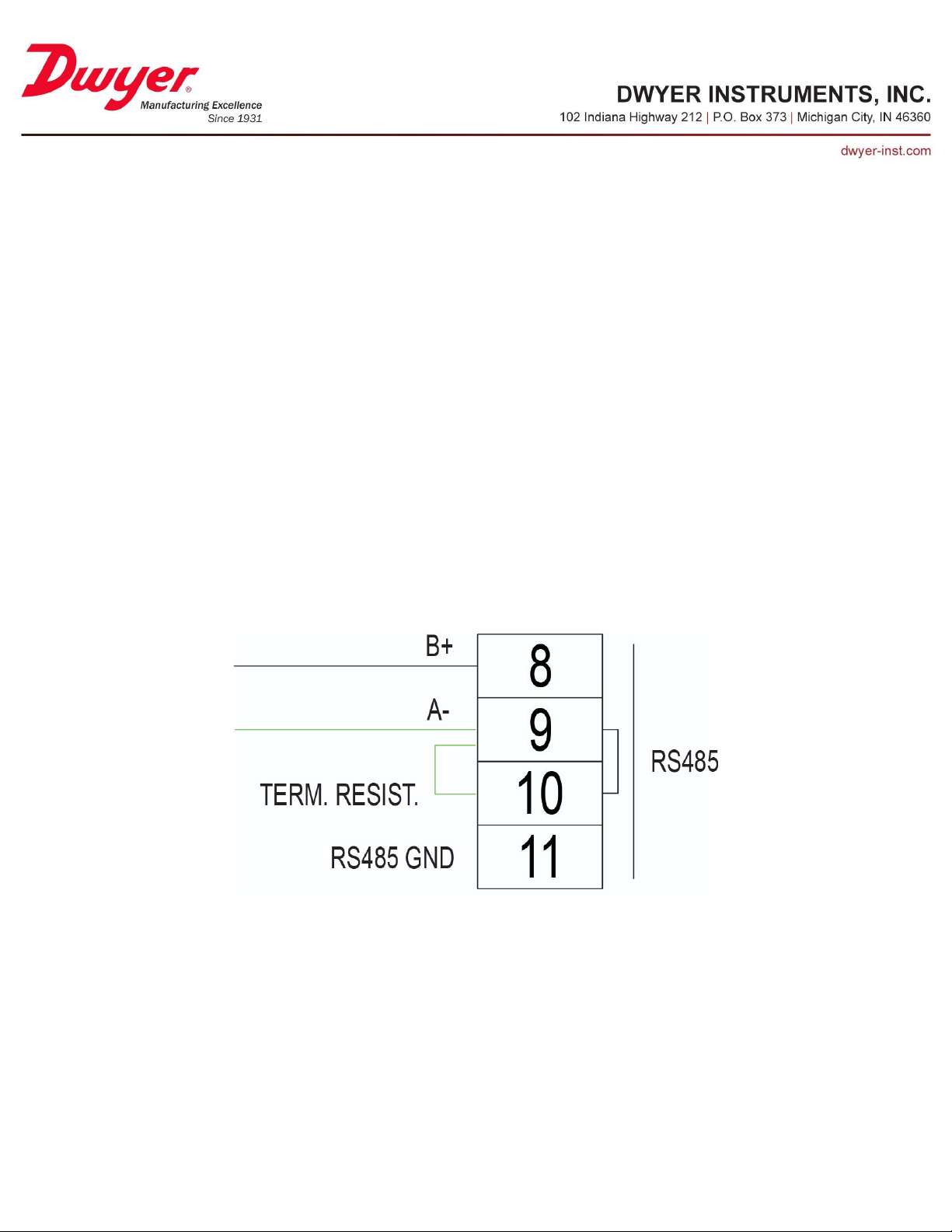
Network Termination Jumper
The Series RSME/RSMC contains an optional internal 120 ohm termination resistor. In
order to enable this resistor, a jumper wire must be connected between terminals 9 and
10.
Page 2

BACnet Services
Device Communication Control Service (DM-DCC-B)
This device supports the Device Communication Control Service BIBB. The optional
time duration in minutes is also supported. This device is configured with a password that
must be provided to successfully execute this command. The password is “Dwyer”.
Reinitialize Device Service (DM-RD-B)
This device supports the Reinitialize Device Service BIBB. The supported device states
are COLDSTART and WARMSTART. All other states return error. This device is
configured with a password that must be provided to successfully execute this command.
The password is “Dwyer”.
SubscribeCOV Service (DS-COV-B)
This device supports the SubscribeCOV Service BIBB to allow easy monitoring of input
data.
● Up to seven (7) concurrent subscriptions
● Confirmed and Unconfirmed COV Notifications
● Fixed lifetime value up to 86400 seconds (24 hours).
● Indefinite lifetime supported.
TimeSynchronization Service (DM-TS-B)
This device supports the time synchronization service for easy time management and
update. In order to utilize the time synchronization, it must be enabled in the “Date and
time” menu under “Maintenance”. Make sure the slider toggle next to “Get from
BACnet” is in the ON position.
Page 3
BACnet Object Overview
Object Type
Object Identifier
Object Name
Device
607127
“RSME”
Analog Input
AI1
“Pressure”
AI2
“UI1 Value”
AI3
“UI2 Value”
Analog Value
AV1
“Pressure High Alarm Limit”
AV2
“Pressure High Alarm Warning”
AV3
“Pressure Low Alarm Limit”
AV4
“Pressure Low Alarm Warning”
AV5
“Pressure Alarm Deadband”
AV6
“UI1 Max Signal”
AV7
“UI1 Min Signal”
AV8
“UI1 Max Scale Value”
AV9
“UI1 Min Scale Value”
AV10
“UI1 High Alarm Limit”
AV11
“UI1 High Alarm Warning”
AV12
“UI1 Low Alarm Limit”
AV13
“UI1 Low Alarm Warning”
AV14
“UI1 Alarm Deadband”
AV15
“UI2 Max Signal”
AV16
“UI2 Min Signal”
AV17
“UI2 Max Scale Value”
Table 1: Supported BACnet Objects
Page 4
Object Type
Object Identifier
Object Name
Analog Value
AV18
“U12 Min Scale Value”
AV19
“UI2 High Alarm Limit”
AV20
“UI2 High Alarm Warning”
AV21
“UI2 Low Alarm Limit”
AV22
“UI2 Low Alarm Warning”
AV23
“UI2 Alarm Deadband”
AV24
“Duct Area”
AV25
“Room Volume”
AV26
“ES1 Value”
AV27
“ES1 High Alarm Limit”
AV28
“ES1 High Alarm Warning”
AV29
“ES1 Low Alarm Limit”
AV30
“ES1 Low Alarm Warning”
AV31
“ES1 Alarm Deadband”
AV32
“ES2 Value”
AV33
“ES2 High Alarm Limit”
AV34
“ES2 High Alarm Warning”
AV35
“ES2 Low Alarm Limit”
AV36
“ES2 Low Alarm Warning”
AV37
“ES2 Alarm Deadband”
AV38
“ES3 Value”
AV39
“ES3 High Alarm Limit”
AV40
“ES3 High Alarm Warning”
AV41
“ES3 Low Limit”
Page 5
Object Type
Object Identifier
Object Name
Analog Value
AV42
“ES3 Low Alarm Warning”
AV43
“ES3 Alarm Deadband”
Binary Value
BV1
“Pressure Enable”
BV2
“Pressure High Alarm Enable”
BV3
“Pressure Low Alarm Enable”
BV4
“UI1 Enable”
BV5
“UI1 High Alarm Enable”
BV6
“UI1 Low Alarm Enable”
BV7
“UI2 Enable”
BV8
“UI2 High Alarm Enable”
BV9
“UI2 Low Alarm Enable”
BV10
“Binary Input Enable”
BV11
“Binary Input Alarm Enable”
BV12
“Digital UI1 Enable”
BV13
“Digital UI1 Alarm Enable”
BV14
“Digital UI2 Enable”
BV15
“Digital UI2 Alarm Enable”
BV16
“Relay Status”
BV17
“Password Security Enable”
BV18
“Alarm Latch Enable”
BV19
“Alarm Buzzer Enable”
BV20
“Alarm Mute Button Enable”
BV21
“Mute Alarms”
BV22
“Reset Alarms”
Page 6
Object Type
Object Identifier
Object Name
Binary Value
BV23
“ES1 Enable”
BV24
“ES1 High Alarm Enable”
BV25
“ES1 Low Alarm Enable”
BV26
“ES2 Enable”
BV27
“ES2 High Alarm Enable”
BV28
“ES2 Low Alarm Enable”
BV29
“ES3 Enable”
BV30
“ES3 High Alarm Enable”
BV31
“ES3 Low Alarm Enable”
BV32
“ED1 Enable”
BV33
“ED1 Alarm Enable”
BV34
“ED2 Enable”
BV35
“ED2 Alarm Enable”
BV36
“ED3 Enable”
BV37
“ED3 Alarm Enable”
Multi-State Value
MSV1
“Pressure Unit”
MSV2
“Pressure Display Format”
MSV3
“Pressure Alarm Status”
MSV4
“UI1 Signal Type”
MSV5
“UI1 Media Type”
MSV6
“UI1 Unit”
MSV7
“UI1 Display Format”
MSV8
“UI1 Alarm Status”
MSV9
“UI2 Signal Type”
Page 7
Object Type
Object Identifier
Object Name
Multi-State Value
MSV10
“UI2 Media Type”
MSV11
“UI2 Unit”
MSV12
“UI2 Display Format”
MSV13
“UI2 Alarm Status”
MSV14
“Binary Input Usage”
MSV15
“Binary Input Polarity”
MSV16
“Binary Input Alarm Enable”
MSV17
“Digital UI1 Usage”
MSV18
“Digital UI1 Polarity”
MSV19
“Digital UI1 Status”
MSV20
“Digital UI2 Usage”
MSV21
“Digital UI2 Polarity”
MSV22
“Digital UI2 Status”
MSV23
“Relay Operation”
MSV24
“Relay Source”
MSV25
“Analog Output Type”
MSV26
“Analog Output Source”
MSV27
“Display Mode”
MSV28
“Room 1 Sensor 1 Select Analog”
MSV29
“Room 1 Sensor 2 Select Analog”
MSV30
“Room 1 Sensor 3 Select Analog”
MSV31
“Room 2 Sensor 1 Select Analog”
MSV32
“Room 3 Sensor 1 Select Analog”
MSV33
“Room 1 Select Digital”
Page 8
Object Type
Object Identifier
Object Name
Multi-State Value
MSV34
“Room 2 Select Digital”
MSV35
“Room 3 Select Digital”
MSV36
“Room 1 Mode”
MSV37
“Room 2 Mode”
MSV38
“Room 3 Mode”
MSV39
“Language”
MSV40
“ES1 Object Type”
MSV41
“ES1 Media Type”
MSV42
“ES1 Unit”
MSV43
“ES1 Display Format”
MSV44
“ES1 Alarm Status”
MSV45
“ES2 Object Type”
MSV46
“ES2 Media Type”
MSV47
“ES2 Unit”
MSV48
“ES2 Display Format”
MSV49
“ES2 Alarm Status”
MSV50
“ES3 Object Type”
MSV51
“ES3 Media Type”
MSV52
“ES3 Unit”
MSV53
“ES3 Display Format”
MSV54
“ES3 Alarm Status”
MSV55
“ED1 Object Type”
MSV56
“ED1 Usage”
MSV57
“ED1 Polarity”
Page 9
Object Type
Object Identifier
Object Name
Multi-State Value
MSV58
“ED1 Status”
MSV59
“ED2 Object Type”
MSV60
“ED2 Usage”
MSV61
“ED2 Polarity”
MSV62
“ED2 Status”
MSV63
“ED3 Object Type”
MSV64
“ED3 Usage”
MSV65
“ED3 Polarity”
MSV66
“ED3 Status”
Positive Integer Value
PIV1
“Pressure Alarm Delay”
PIV2
“Pressure Alarm To Normal Delay”
PIV3
“UI1 Alarm Delay”
PIV4
“UI1 Alarm To Normal Delay”
PIV5
“UI2 Alarm Delay”
PIV6
“UI2 Alarm To Normal Delay”
PIV7
“Binary Input Alarm Delay”
PIV8
“Digital UI1 Alarm Delay”
PIV9
“Digital UI2 Alarm Delay”
PIV10
“Alarm Buzzer Volume”
PIV11
“Alarm Mute Timeout”
PIV12
“ES1 Device Instance”
PIV13
“ES1 Object Instance”
PIV14
“ES1 Alarm Delay”
PIV15
“ES1 Alarm To Normal Delay”
Page 10
Object Type
Object Identifier
Object Name
Positive Integer Value
PIV16
“ES2 Device Instance”
PIV17
“ES2 Object Instance”
PIV18
“ES2 Alarm Delay”
PIV19
“ES2 Alarm To Normal Delay”
PIV20
“ES3 Device Instance”
PIV21
“ES3 Object Instance”
PIV22
“ES3 Alarm Delay
PIV23
“ES3 Alarm To Normal Delay”
PIV24
“ED1 Device Instance”
PIV25
“ED1 Object Instance”
PIV26
“ED1 Alarm Delay”
PIV27
“ED2 Device Instance”
PIV28
“ED2 Object Instance”
PIV29
“ED2 Alarm Delay”
PIV30
“ED3 Device Instance”
PIV31
“ED3 Object Instance”
PIV32
“ED3 Alarm Delay”
Character String Value
CSV1
“Pressure Display Name”
CSV2
“UI1 Display Name”
CSV3
“UI2 Display Name”
CSV4
“Room 1 Name”
CSV5
“Room 2 Name”
CSV6
“Room 3 Name”
CSV7
“Operator Password”
Page 11
Object Type
Object Identifier
Object Name
Character String Value
CSV8
“Administrator Password”
CSV9
“ES1 Display Name”
CSV10
“ES2 Display Name”
CSV11
“ED2 Display Name”
Page 12
BACnet Objects:
Property
Default Value
Property Data Type
Access
Object Identifier
607127
BACnetObjectIdentifier
Read/Write
Object Name
“RSME”
CharacterString(32)
Read/Write
Object Type
DEVICE(8)
BACnetObjectType
Read
System Status
Operational(0)
BACnetDevice Status
Read
Vendor Name
“Dwyer Instruments, Inc.”
CharacterString
Read
Vendor Identifier
607
Unsigned
Read
Model Name
“RSME-?-???-??”
CharacterString
Read
Firmware Revision
“1.2”
CharacterString
Read
Application Software Version
“1.0.10R”
CharacterString
Read
Location
“”
CharacterString(32)
Read/Write
Description
“”
CharacterString(32)
Read/Write
Protocol Version
1
Unsigned
Read
Protocol Revision
16
Unsigned
Read
Protocol Services Supported
See PICS
BACnetServicesSupported
Read
Protocol Object Types Supported
See Table 1
BACnetObjectTypesSupported
Read
Object List
See Table 1
BACnetArray
Read
Active COV Subscriptions
List of BACnetCOVSubscription
Read
Maximum APDU Length Accepted
480
Unsigned
Read
Segmentation Supported
NO_SEGMENTATION(3)
BACnetSegmentation
Read
Local Time
Time
Read
Local Date
Date
Read
APDU Timeout
0
Unsigned
Read/Write
Number of APDU Retries
0
Unsigned
Read/Write
Max Master
127
Unsigned
Read/Write
Device Object
Page 13
Max Info Frames
1
Unsigned
Read/Write
Device Address Binding
Empty
BACnetAddressBinding
Read
Database Revision
0
Unsigned
Read
Property List
BACnetARRAY[n] of
BACnetPropertyIdentifier
Read
Serial Number
“xxxxxx”
CharacterString
Read
APDU Timeout values are rounded to the nearest second (1000ms). Values less than
Property
Default Value
Property Data Type
Access
Object Identifier
BV1
BACnetObjectIdentifier
Read
Object Name
“Pressure Enable”
CharacterString
Read
Object Type
Binary Value(5)
BACnetObjectType
Read
Present Value
Active (1)
BACnetBinaryPV
Read/Write
Status Flags
{0,0,0,0}
BACnetStatusFlags
Read
Event State
NORMAL(0)
BACnetEventState
Read
Reliability
NO_FAULT_DETECTED(0)
BACnetReliability
Read
Out Of Service
FALSE(0)
Boolean
Read/Write
Property List
BACnetARRAY[N] of
BACnetPropertyIdentifier
Read
500 will be rounded to 0 and Number of APDU Retries will be set to 0.
Due to the large number of objects in the BACnet database and lack of segmentation
support, the entire Object List property cannot be read with a single ReadProperty
request.
Internal Pressure (“Built in DP”) Objects
Binary Value 1 - Pressure Enable
This object determines if the internal pressure sensor is monitored.
Page 14
Analog Input 1 - Pressure
Property
Default Value
Property Data Type
Access
Object Identifier
AI1
BACnetObjectIdentifier
Read
Object Name
“Pressure”
CharacterString
Read
Object Type
Analog Input(0)
BACnetObjectType
Read
Present Value
Current reading
Real
Read
Status Flags
{0,0,0,0}
BACnetStatusFlags
Read
Event State
NORMAL(0)
BACnetEventState
Read
Reliability
NO_FAULT_DETECTED(0)
BACnetReliability
Read
Out Of Service
FALSE(0)
Boolean
Read/Write
Units
inches-of-water(58)
BACnetEngineeringUnits
Read
COV Increment
1
Read
Read/Write
Property List
BACnetARRAY[N] of
BACnetPropertyIdentifier
Read
Default Value
Minimum Value
Maximum Value
1.0
0.001
10000.0
This object provides the pressure measurement from the internal pressure sensor (“Built
in DP”).
This object supports Change Of Value (COV) subscription with a COV Increment
according to the table below. Note that the COV value is unit-less and may need to be
modified if the unit of measurement is changed.
Page 15
Multi-State Value 1 - Pressure Unit
Property
Default Value
Property Data Type
Access
Object Identifier
MSV1
BACnetObjectIdentifier
Read
Object Name
“Pressure Unit”
CharacterString
Read
Object Type
Multi-State Value(19)
BACnetObjectType
Read
Present Value
5
Unsigned
Read/Write
Status Flags
{0,0,0,0}
BACnetStatusFlags
Read
Event State
NORMAL(0)
BACnetEventState
Read
Reliability
NO_FAULT_DETECTED(0)
BACnetReliability
Read
Out Of Service
FALSE(0)
Boolean
Read/Write
Number Of States
5
Unsigned
Read
State Text
{“Pa”, ”kPa”, “cmWC”,
“mmWC”, “inWC”}
BACnetARRAY[N] of
CharacterString
Read
Property List
BACnetARRAY[N] of
BACnetPropertyIdentifier
Read
This object controls the unit of pressure used by all objects in the Internal Pressure group.
The selected pressure unit will also be used to display pressure on the LCD.
Page 16
Multi-State Value 2 - Pressure Display Format
Property
Default Value
Property Data Type
Access
Object Identifier
MSV2
BACnetObjectIdentifier
Read
Object Name
“Pressure Display Format”
CharacterString
Read
Object Type
Multi-State Value(19)
BACnetObjectType
Read
Present Value
4
Unsigned
Read/Write
Status Flags
{0,0,0,0}
BACnetStatusFlags
Read
Event State
NORMAL(0)
BACnetEventState
Read
Reliability
NO_FAULT_DETECTED(0)
BACnetReliability
Read
Out Of Service
FALSE(0)
Boolean
Read/Write
Number Of States
4
Unsigned
Read
State Text
{“0”, ”0.0”, “0.00”, “0.000”}
BACnetARRAY[N] of
CharacterString
Read
Property List
BACnetARRAY[N] of
BACnetPropertyIdentifier
Read
This object controls how the value of the internal pressure sensor is displayed on the
LCD.
Page 17
Character String Value 1 - Pressure Display Name
Property
Default Value
Property Data Type
Access
Object Identifier
CSV1
BACnetObjectIdentifier
Read
Object Name
“Pressure Display Name”
CharacterString
Read
Object Type
Character String Value(40)
BACnetObjectType
Read
Present Value
“Pressure”
CharacterString(32)
Read/Write
Status Flags
{0,0,0,0}
BACnetStatusFlags
Read
Event State
NORMAL(0)
BACnetEventState
Read
Reliability
NO_FAULT_DETECTED(0)
BACnetReliability
Read
Property List
BACnetARRAY[N] of
BACnetPropertyIdentifier
Read
Property
Default Value
Property Data Type
Access
Object Identifier
BV2
BACnetObjectIdentifier
Read
Object Name
“Pressure High Alarm Enable”
CharacterString
Read
Object Type
Binary Value(5)
BACnetObjectType
Read
Present Value
Inactive (0)
BACnetBinaryPV
Read/Write
Status Flags
{0,0,0,0}
BACnetStatusFlags
Read
Event State
NORMAL(0)
BACnetEventState
Read
Reliability
NO_FAULT_DETECTED(0)
BACnetReliability
Read
Out Of Service
FALSE(0)
Boolean
Read/Write
Property List
BACnetARRAY[N] of BACnetPropertyIdentifier
Read
This object sets the label of the internal pressure measurement displayed on the LCD.
Note that while the maximum length is 32 characters, some character may not be visible
depending on the size of the measurement tile.
Binary Value 2 - Pressure High Alarm Enable
This object controls whether or not the “Pressure High Alarm Limit” and “Pressure High
Alarm Warning” values produce a change in the “Pressure Alarm Status” value.
Page 18
Analog Value 1 - Pressure High Alarm Limit
Property
Default Value
Property Data Type
Access
Object Identifier
AV1
BACnetObjectIdentifier
Read
Object Name
“Pressure High Alarm Limit”
CharacterString
Read
Object Type
Analog Value(2)
BACnetObjectType
Read
Present Value
0
Real
Read/Write
Status Flags
{0,0,0,0}
BACnetStatusFlags
Read
Event State
NORMAL(0)
BACnetEventState
Read
Reliability
NO_FAULT_DETECTED(0)
BACnetReliability
Read
Out Of Service
FALSE(0)
Boolean
Read/Write
Units
inches-of-water(58)
BACnetEngineeringUnits
Read
Property List
BACnetARRAY[N] of
BACnetPropertyIdentifier
Read
Default Value
Minimum Value
Maximum Value
0.0
“Pressure Low Alarm Limit”
10000.0
If “Pressure High Alarm Enable” is Active and the pressure exceeds the value specified,
the internal pressure measurement will enter alarm status. See table below for accepted
input range.
Page 19
Analog Value 2 - Pressure High Alarm Warning
Property
Default Value
Property Data Type
Access
Object Identifier
AV2
BACnetObjectIdentifier
Read
Object Name
“Pressure High Alarm Warning”
CharacterString
Read
Object Type
Analog Value(2)
BACnetObjectType
Read
Present Value
0
Real
Read/Write
Status Flags
{0,0,0,0}
BACnetStatusFlags
Read
Event State
NORMAL(0)
BACnetEventState
Read
Reliability
NO_FAULT_DETECTED(0)
BACnetReliability
Read
Out Of Service
FALSE(0)
Boolean
Read/Write
Units
inches-of-water(58)
BACnetEngineeringUnits
Read
Property List
BACnetARRAY[N] of
BACnetPropertyIdentifier
Read
Default Value
Minimum Value
Maximum Value
0.0
“Pressure Low Alarm Warning”
10000.0
If “Pressure High Alarm Enable” is Active and the pressure exceeds the value specified,
the internal pressure measurement will enter warning status. See table below for
accepted input range.
Page 20
Binary Value 3 - Pressure Low Alarm Enable
Property
Default Value
Property Data Type
Access
Object Identifier
BV3
BACnetObjectIdentifier
Read
Object Name
“Pressure Low Alarm Enable”
CharacterString
Read
Object Type
Binary Value(5)
BACnetObjectType
Read
Present Value
Inactive (0)
BACnetBinaryPV
Read/Write
Status Flags
{0,0,0,0}
BACnetStatusFlags
Read
Event State
NORMAL(0)
BACnetEventState
Read
Reliability
NO_FAULT_DETECTED(0)
BACnetReliability
Read
Out Of Service
FALSE(0)
Boolean
Read/Write
Property List
BACnetARRAY[N] of BACnetPropertyIdentifier
Read
This object controls whether or not the “Pressure Low Alarm Limit” and “Pressure Low
Alarm Warning” values produce a change in the “Pressure Alarm Status” value.
Page 21
Analog Value 3 - Pressure Low Alarm Limit
Property
Default Value
Property Data Type
Access
Object Identifier
AV3
BACnetObjectIdentifier
Read
Object Name
“Pressure Low Alarm Limit”
CharacterString
Read
Object Type
Analog Value(2)
BACnetObjectType
Read
Present Value
0
Real
Read/Write
Status Flags
{0,0,0,0}
BACnetStatusFlags
Read
Event State
NORMAL(0)
BACnetEventState
Read
Reliability
NO_FAULT_DETECTED(0)
BACnetReliability
Read
Out Of Service
FALSE(0)
Boolean
Read/Write
Units
inches-of-water(58)
BACnetEngineeringUnits
Read
Property List
BACnetARRAY[N] of
BACnetPropertyIdentifier
Read
Default Value
Minimum Value
Maximum Value
0.0
-10000.0
“Pressure High Alarm Limit”
If “Pressure Low Alarm Enable” is Active and the pressure falls below the value
specified, the internal pressure measurement will enter alarm status. See table below for
accepted input range.
Page 22
Analog Value 4 - Pressure Low Alarm Warning
Property
Default Value
Property Data Type
Access
Object Identifier
AV4
BACnetObjectIdentifier
Read
Object Name
“Pressure Low Alarm Warning”
CharacterString
Read
Object Type
Analog Value(2)
BACnetObjectType
Read
Present Value
0
Real
Read/Write
Status Flags
{0,0,0,0}
BACnetStatusFlags
Read
Event State
NORMAL(0)
BACnetEventState
Read
Reliability
NO_FAULT_DETECTED(0)
BACnetReliability
Read
Out Of Service
FALSE(0)
Boolean
Read/Write
Units
inches-of-water(58)
BACnetEngineeringUnits
Read
Property List
BACnetARRAY[N] of
BACnetPropertyIdentifier
Read
Default Value
Minimum Value
Maximum Value
0.0
-10000.0
“Pressure High Alarm Warning”
If “Pressure Low Alarm Enable” is Active and the pressure falls below the value
specified, the internal pressure measurement will enter alarm status. See table below for
accepted input range.
Page 23
Multi-State Value 3 - Pressure Alarm Status
Property
Default Value
Property Data Type
Access
Object Identifier
MSV3
BACnetObjectIdentifier
Read
Object Name
“Pressure Alarm Status”
CharacterString
Read
Object Type
Multi-State Value(19)
BACnetObjectType
Read
Present Value
1
Unsigned
Read
Status Flags
{0,0,0,0}
BACnetStatusFlags
Read
Event State
NORMAL(0)
BACnetEventState
Read
Reliability
NO_FAULT_DETECTED(0)
BACnetReliability
Read
Out Of Service
FALSE(0)
Boolean
Read/Write
Number Of States
3
Unsigned
Read
State Text
{“OK”, ”Warning”, “Alarm”}
BACnetARRAY[N] of CharacterString
Read
Property List
BACnetARRAY[N] of BACnetPropertyIdentifier
Read
This object indicates the alarm status associated with the internal pressure measurement.
This object supports COV subscription.
Page 24
Positive Integer Value 1 - Pressure Alarm Delay
Property
Default Value
Property Data Type
Access
Object Identifier
PIV1
BACnetObjectIdentifier
Read
Object Name
“Pressure Alarm Delay”
CharacterString
Read
Object Type
Positive Integer Value (48)
BACnetObjectType
Read
Present Value
0
Unsigned
Read/Write
Status Flags
{0,0,0,0}
BACnetStatusFlags
Read
Event State
NORMAL(0)
BACnetEventState
Read
Reliability
NO_FAULT_DETECTED(0)
BACnetReliability
Read
Out Of Service
FALSE(0)
Boolean
Read/Write
Units
seconds(73)
BACnetEngineeringUnits
Read
Property List
BACnetARRAY[N] of
BACnetPropertyIdentifier
Read
Default Value
Minimum Value
Maximum Value
0 s
0 s
5000 s
This object provides the ability to specify a delay (in seconds) between the pressure going
outside the limits and the alarm status changing to “Alarm”. This allows short violations
of the configured limits to be ignored if necessary to prevent spurious alarm events. See
table below for accepted input range.
Page 25
Positive Integer Value 2 - Pressure Alarm To Normal Delay
Property
Default Value
Property Data Type
Access
Object Identifier
PIV2
BACnetObjectIdentifier
Read
Object Name
“Pressure Alarm To Normal Delay”
CharacterString
Read
Object Type
Positive Integer Value (48)
BACnetObjectType
Read
Present Value
0
Unsigned
Read/Write
Status Flags
{0,0,0,0}
BACnetStatusFlags
Read
Event State
NORMAL(0)
BACnetEventState
Read
Reliability
NO_FAULT_DETECTED(0)
BACnetReliability
Read
Out Of Service
FALSE(0)
Boolean
Read/Write
Units
seconds(73)
BACnetEngineeringUnits
Read
Property List
BACnetARRAY[N] of BACnetPropertyIdentifier
Read
Default Value
Minimum Value
Maximum Value
0 s
0 s
5000 s
This object provides the ability to specify a delay (in seconds) between the pressure
returning to within the limits and the alarm status changing from “Alarm”. This can be
used to verify the pressure is with the limit and stable. See table below for accepted input
range.
Page 26
Analog Value 5 - Pressure Alarm Deadband
Property
Default Value
Property Data Type
Access
Object Identifier
AV5
BACnetObjectIdentifier
Read
Object Name
“Pressure Alarm Deadband”
CharacterString
Read
Object Type
Analog Value(2)
BACnetObjectType
Read
Present Value
0
Real
Read/Write
Status Flags
{0,0,0,0}
BACnetStatusFlags
Read
Event State
NORMAL(0)
BACnetEventState
Read
Reliability
NO_FAULT_DETECTED(0)
BACnetReliability
Read
Out Of Service
FALSE(0)
Boolean
Read/Write
Units
inches-of-water(58)
BACnetEngineeringUnits
Read
Property List
BACnetARRAY[N] of
BACnetPropertyIdentifier
Read
Default Value
Minimum Value
Maximum Value
0.0
0.0
1000.0
This value puts a band around the limit values to prevent rapidly transiting in and out of
alarm state. Setting this to a non-zero value is recommended whenever the pressure
alarm is selected as the relay source. See table below for accepted input range.
Page 27
User Input (UI1, UI2) Objects
Property
Default Value
Property Data Type
Access
Object Identifier
BV4, BV7
BACnetObjectIdentifier
Read
Object Name
“UIx Enable”
CharacterString
Read
Object Type
Binary Value(5)
BACnetObjectType
Read
Present Value
Active (1)
BACnetBinaryPV
Read/Write
Status Flags
{0,0,0,0}
BACnetStatusFlags
Read
Event State
NORMAL(0)
BACnetEventState
Read
Reliability
NO_FAULT_DETECTED(0)
BACnetReliability
Read
Out Of Service
FALSE(0)
Boolean
Read/Write
Property List
BACnetARRAY[N] of
BACnetPropertyIdentifier
Read
Binary Value 4/7 - UIx Enable
This object determines if the analog input, UIx, is monitored.
Page 28
Multi-State Value 4/9 - UIx Signal Type
Property
Default Value
Property Data Type
Access
Object Identifier
MSV4, MSV9
BACnetObjectIdentifier
Read
Object Name
“UIx Signal Type”
CharacterString
Read
Object Type
Multi-State Value(19)
BACnetObjectType
Read
Present Value
4(UI1), 2(UI2)
Unsigned
Read
Status Flags
{0,0,0,0}
BACnetStatusFlags
Read
Event State
NORMAL(0)
BACnetEventState
Read
Reliability
NO_FAULT_DETECTED(0)
BACnetReliability
Read
Out Of Service
FALSE(0)
Boolean
Read/Write
Number Of States
4
Unsigned
Read
State Text
{“Digital”, ”4-20mA”, “0-5V”,
“0-10V”}
BACnetARRAY[N] of CharacterString
Read
Property List
BACnetARRAY[N] of BACnetPropertyIdentifier
Read
This object selects the type of analog input signal connected to the UIx terminals.
Page 29
Analog Value 6/15 - UIx Max Signal
Property
Default Value
Property Data Type
Access
Object Identifier
AV6, AV15
BACnetObjectIdentifier
Read
Object Name
“UIx Max Signal”
CharacterString
Read
Object Type
Analog Value(2)
BACnetObjectType
Read
Present Value
10(UI1), 20(UI2)
Real
Read/Write
Status Flags
{0,0,0,0}
BACnetStatusFlags
Read
Event State
NORMAL(0)
BACnetEventState
Read
Reliability
NO_FAULT_DETECTED(0)
BACnetReliability
Read
Out Of Service
FALSE(0)
Boolean
Read/Write
Units
volts(5,UI1), milliamps(2,UI2)
BACnetEngineeringUnits
Read
Property List
BACnetARRAY[N] of
BACnetPropertyIdentifier
Read
Default Value
Minimum Value
Maximum Value
5, 10 or 20
UIx Min Signal
20
This value sets the maximum analog input level for the user input. The unit of this value
changes based on the Signal Type selected. See table below for accepted input range.
Page 30
Analog Value 7/16 - UIx Min Signal
Property
Default Value
Property Data Type
Access
Object Identifier
AV7, AV16
BACnetObjectIdentifier
Read
Object Name
“UIx Min Signal”
CharacterString
Read
Object Type
Analog Value(2)
BACnetObjectType
Read
Present Value
0(UI1), 4(UI2)
Real
Read/Write
Status Flags
{0,0,0,0}
BACnetStatusFlags
Read
Event State
NORMAL(0)
BACnetEventState
Read
Reliability
NO_FAULT_DETECTED(0)
BACnetReliability
Read
Out Of Service
FALSE(0)
Boolean
Read/Write
Units
volts(5,UI1), milliamps(2,UI2)
BACnetEngineeringUnits
Read
Property List
BACnetARRAY[N] of
BACnetPropertyIdentifier
Read
Default Value
Minimum Value
Maximum Value
0 or 40UIx Max Signal
This value sets the minimum analog input level for the user input. The unit of this value
changes based on the Signal Type selected. See table below for accepted input range.
Page 31
Multi-State Value 5/10 - UIx Media Type
Property
Default Value
Property Data Type
Access
Object Identifier
MSV5, MSV10
BACnetObjectIdentifier
Read
Object Name
“UIx Media Type”
CharacterString
Read
Object Type
Multi-State Value(19)
BACnetObjectType
Read
Present Value
1
Unsigned
Read
Status Flags
{0,0,0,0}
BACnetStatusFlags
Read
Event State
NORMAL(0)
BACnetEventState
Read
Reliability
NO_FAULT_DETECTED(0)
BACnetReliability
Read
Out Of Service
FALSE(0)
Boolean
Read/Write
Number Of States
4
Unsigned
Read
State Text
{“Temperature”, “Relative
Humidity”, “Pressure”, “Flow”}
BACnetARRAY[N] of CharacterString
Read
Property List
BACnetARRAY[N] of BACnetPropertyIdentifier
Read
This object selects the type of measurement represented by the analog input signal
connected to the UIx terminals. This selection determines what units are available for the
UIx Value. In order to compute Air Changes per Hour (ACH), the remote sensor must
measure velocity or volume flow. This value should be set to 4 (“Flow”) and the values
of “Duct Area” (if velocity sensor) and “Room Volume” must be set.
Page 32
Analog Value 8/17 - UIx Max Scale Value
Property
Default Value
Property Data Type
Access
Object Identifier
AV8, AV17
BACnetObjectIdentifier
Read
Object Name
“UIx Max Scale Value”
CharacterString
Read
Object Type
Analog Value(2)
BACnetObjectType
Read
Present Value
100
Real
Read/Write
Status Flags
{0,0,0,0}
BACnetStatusFlags
Read
Event State
NORMAL(0)
BACnetEventState
Read
Reliability
NO_FAULT_DETECTED(0)
BACnetReliability
Read
Out Of Service
FALSE(0)
Boolean
Read/Write
Units
varies
BACnetEngineeringUnits
Read
Property List
BACnetARRAY[N] of
BACnetPropertyIdentifier
Read
Default Value
Minimum Value
Maximum Value
100
UIx Min Scale Value
10000
This value sets the maximum sensor value represented by the UIx Max Signal for this
user input. The unit of this value changes based on UIx Media Type and UIx Unit. See
table below for accepted input range.
Page 33
Analog Value 9/18 - UIx Min Scale Value
Property
Default Value
Property Data Type
Access
Object Identifier
AV9, AV18
BACnetObjectIdentifier
Read
Object Name
“UIx Min Scale Value”
CharacterString
Read
Object Type
Analog Value(2)
BACnetObjectType
Read
Present Value
0
Real
Read/Write
Status Flags
{0,0,0,0}
BACnetStatusFlags
Read
Event State
NORMAL(0)
BACnetEventState
Read
Reliability
NO_FAULT_DETECTED(0)
BACnetReliability
Read
Out Of Service
FALSE(0)
Boolean
Read/Write
Units
varies
BACnetEngineeringUnits
Read
Property List
BACnetARRAY[N] of
BACnetPropertyIdentifier
Read
Default Value
Minimum Value
Maximum Value
0
-10000
UIx Max Scale Value
This value sets the minimum sensor value represented by the UIx Min Signal for this user
input. The unit of this value changes based on UIx Media Type and UIx Unit. See table
below for accepted input range.
Page 34
Analog Input 2/3 - UIx Value
Property
Default Value
Property Data Type
Access
Object Identifier
AI2, AI3
BACnetObjectIdentifier
Read
Object Name
“UIx Value”
CharacterString
Read
Object Type
Analog Input(0)
BACnetObjectType
Read
Present Value
Current reading
Real
Read
Status Flags
{0,0,0,0}
BACnetStatusFlags
Read
Event State
NORMAL(0)
BACnetEventState
Read
Reliability
NO_FAULT_DETECTED(0)
BACnetReliability
Read
Out Of Service
FALSE(0)
Boolean
Read/Write
Units
Degrees Fahrenheit(64)
BACnetEngineeringUnits
Read
COV Increment
1
Read
Read/Write
Property List
BACnetARRAY[N] of
BACnetPropertyIdentifier
Read
Default Value
Minimum Value
Maximum Value
1.0
0.001
10000.0
This value represents the converted and scaled analog input signal connected to the UIx
terminals. The unit of this value depends on the values of UIx Media Type and UIx Unit.
This object supports Change Of Value (COV) subscription with a COV Increment
according to the table below. Note that the COV value is unit-less and may need to be
modified if the unit of measurement is changed.
Page 35
Multi-State Value 6/11 - UIx Unit
Property
Default Value
Property Data Type
Access
Object Identifier
MSV6, MSV11
BACnetObjectIdentifier
Read
Object Name
“UIx Unit”
CharacterString
Read
Object Type
Multi-State Value(19)
BACnetObjectType
Read
Present Value
2
Unsigned
Read
Status Flags
{0,0,0,0}
BACnetStatusFlags
Read
Event State
NORMAL(0)
BACnetEventState
Read
Reliability
NO_FAULT_DETECTED(0)
BACnetReliability
Read
Out Of Service
FALSE(0)
Boolean
Read/Write
Number Of States
2
Unsigned
Read
State Text
{“degrees C”, “degrees F”}
BACnetARRAY[N] of CharacterString
Read
Property List
BACnetARRAY[N] of BACnetPropertyIdentifier
Read
UIx Media Type
Available Units
“Temperature”
“degrees C”
“degrees F”
“Relative Humidity”
“% Relative Humidity”
“Pressure”
“Pa”
“kPa”
“cmWC”
“mmWC”
“inWC”
“Flow”
“Air Changes Per Hour”
This value selects the unit used by the other objects associated with this user input and
the unit used to display this value on the LCD. The units available change based on the
value of UIx Media Type. See table below for possible options.
Page 36
Multi-State Value 7/12 - UIx Display Format
Property
Default Value
Property Data Type
Access
Object Identifier
MSV7, MSV12
BACnetObjectIdentifier
Read
Object Name
“UIx Display Format”
CharacterString
Read
Object Type
Multi-State Value(19)
BACnetObjectType
Read
Present Value
1
Unsigned
Read/Write
Status Flags
{0,0,0,0}
BACnetStatusFlags
Read
Event State
NORMAL(0)
BACnetEventState
Read
Reliability
NO_FAULT_DETECTED(0)
BACnetReliability
Read
Out Of Service
FALSE(0)
Boolean
Read/Write
Number Of States
4
Unsigned
Read
State Text
{“0”, ”0.0”, “0.00”, “0.000”}
BACnetARRAY[N] of
CharacterString
Read
Property List
BACnetARRAY[N] of
BACnetPropertyIdentifier
Read
Property
Default Value
Property Data Type
Access
Object Identifier
CSV2, CSV3
BACnetObjectIdentifier
Read
Object Name
“UIx Display Name”
CharacterString
Read
Object Type
Character String Value(40)
BACnetObjectType
Read
Present Value
“Temperature”
CharacterString(32)
Read/Write
Status Flags
{0,0,0,0}
BACnetStatusFlags
Read
Event State
NORMAL(0)
BACnetEventState
Read
Reliability
NO_FAULT_DETECTED(0)
BACnetReliability
Read
Property List
BACnetARRAY[N] of
BACnetPropertyIdentifier
Read
This object controls how the value of UIx Value is displayed on the LCD.
Character String Value 2/3 - UIx Display Name
This object sets the label of the UIx measurement displayed on the LCD. Note that while
the maximum length is 32 characters, some character may not be visible depending on
the size of the measurement tile.
Page 37
Binary Value 5/8 - UIx High Alarm Enable
Property
Default Value
Property Data Type
Access
Object Identifier
BV5, BV8
BACnetObjectIdentifier
Read
Object Name
“UIx High Alarm Enable”
CharacterString
Read
Object Type
Binary Value(5)
BACnetObjectType
Read
Present Value
Inactive (0)
BACnetBinaryPV
Read/Write
Status Flags
{0,0,0,0}
BACnetStatusFlags
Read
Event State
NORMAL(0)
BACnetEventState
Read
Reliability
NO_FAULT_DETECTED(0)
BACnetReliability
Read
Out Of Service
FALSE(0)
Boolean
Read/Write
Property List
BACnetARRAY[N] of BACnetPropertyIdentifier
Read
This object controls whether or not the “UIx High Alarm Limit” and “UIx High Alarm
Warning” values produce a change in the “UIx Alarm Status” value.
Page 38
Analog Value 10/19 - UIx High Alarm Limit
Property
Default Value
Property Data Type
Access
Object Identifier
AV10, AV19
BACnetObjectIdentifier
Read
Object Name
“UIx High Alarm Limit”
CharacterString
Read
Object Type
Analog Value(2)
BACnetObjectType
Read
Present Value
0
Real
Read/Write
Status Flags
{0,0,0,0}
BACnetStatusFlags
Read
Event State
NORMAL(0)
BACnetEventState
Read
Reliability
NO_FAULT_DETECTED(0)
BACnetReliability
Read
Out Of Service
FALSE(0)
Boolean
Read/Write
Units
Degrees Fahrenheit(64)
BACnetEngineeringUnits
Read
Property List
BACnetARRAY[N] of
BACnetPropertyIdentifier
Read
Default Value
Minimum Value
Maximum Value
0.0
“UIx Low Alarm Limit”
10000.0
If “UIx High Alarm Enable” is Active and the UIx Value exceeds the value specified, the
UIx measurement will enter alarm status. See table below for accepted input range.
Page 39
Analog Value 11/20 - UIx High Alarm Warning
Property
Default Value
Property Data Type
Access
Object Identifier
AV11, AV20
BACnetObjectIdentifier
Read
Object Name
“UIx High Alarm Warning”
CharacterString
Read
Object Type
Analog Value(2)
BACnetObjectType
Read
Present Value
0
Real
Read/Write
Status Flags
{0,0,0,0}
BACnetStatusFlags
Read
Event State
NORMAL(0)
BACnetEventState
Read
Reliability
NO_FAULT_DETECTED(0)
BACnetReliability
Read
Out Of Service
FALSE(0)
Boolean
Read/Write
Units
Degrees Fahrenheit(64)
BACnetEngineeringUnits
Read
Property List
BACnetARRAY[N] of
BACnetPropertyIdentifier
Read
Default Value
Minimum Value
Maximum Value
0.0
“UIx Low Alarm Warning”
10000.0
If “UIx High Alarm Enable” is Active and the UIx Value exceeds the value specified, the
UIx measurement will enter warning status. See table below for accepted input range.
Page 40
Binary Value 6/9 - UIx Low Alarm Enable
Property
Default Value
Property Data Type
Access
Object Identifier
BV6, BV9
BACnetObjectIdentifier
Read
Object Name
“UIx Low Alarm Enable”
CharacterString
Read
Object Type
Binary Value(5)
BACnetObjectType
Read
Present Value
Inactive (0)
BACnetBinaryPV
Read/Write
Status Flags
{0,0,0,0}
BACnetStatusFlags
Read
Event State
NORMAL(0)
BACnetEventState
Read
Reliability
NO_FAULT_DETECTED(0)
BACnetReliability
Read
Out Of Service
FALSE(0)
Boolean
Read/Write
Property List
BACnetARRAY[N] of BACnetPropertyIdentifier
Read
This object controls whether or not the “UIx Low Alarm Limit” and “UIx Low Alarm
Warning” values produce a change in the “UIx Alarm Status” value.
Page 41
Analog Value 12/21 - UIx Low Alarm Limit
Property
Default Value
Property Data Type
Access
Object Identifier
AV12, AV21
BACnetObjectIdentifier
Read
Object Name
“UIx Low Alarm Limit”
CharacterString
Read
Object Type
Analog Value(2)
BACnetObjectType
Read
Present Value
0
Real
Read/Write
Status Flags
{0,0,0,0}
BACnetStatusFlags
Read
Event State
NORMAL(0)
BACnetEventState
Read
Reliability
NO_FAULT_DETECTED(0)
BACnetReliability
Read
Out Of Service
FALSE(0)
Boolean
Read/Write
Units
Degrees Fahrenheit(64)
BACnetEngineeringUnits
Read
Property List
BACnetARRAY[N] of
BACnetPropertyIdentifier
Read
Default Value
Minimum Value
Maximum Value
0.0
-10000.0
“UIx High Alarm Limit”
If “UIx Low Alarm Enable” is Active and UIx Value falls below the value specified, the
UIx measurement will enter alarm status. See table below for accepted input range.
Page 42
Analog Value 13/22 - UIx Low Alarm Warning
Property
Default Value
Property Data Type
Access
Object Identifier
AV13, AV22
BACnetObjectIdentifier
Read
Object Name
“UIx Low Alarm Warning”
CharacterString
Read
Object Type
Analog Value(2)
BACnetObjectType
Read
Present Value
0
Real
Read/Write
Status Flags
{0,0,0,0}
BACnetStatusFlags
Read
Event State
NORMAL(0)
BACnetEventState
Read
Reliability
NO_FAULT_DETECTED(0)
BACnetReliability
Read
Out Of Service
FALSE(0)
Boolean
Read/Write
Units
Degrees Fahrenheit(64)
BACnetEngineeringUnits
Read
Property List
BACnetARRAY[N] of
BACnetPropertyIdentifier
Read
Default Value
Minimum Value
Maximum Value
0.0
-10000.0
“UIx High Alarm Warning”
If “UIx Low Alarm Enable” is Active and UIx Value falls below the value specified, the
UIx measurement will enter warning status. See table below for accepted input range.
Page 43
Multi-State Value 8/13 - UIx Alarm Status
Property
Default Value
Property Data Type
Access
Object Identifier
MSV8, MSV13
BACnetObjectIdentifier
Read
Object Name
“UIx Alarm Status”
CharacterString
Read
Object Type
Multi-State Value(19)
BACnetObjectType
Read
Present Value
1
Unsigned
Read
Status Flags
{0,0,0,0}
BACnetStatusFlags
Read
Event State
NORMAL(0)
BACnetEventState
Read
Reliability
NO_FAULT_DETECTED(0)
BACnetReliability
Read
Out Of Service
FALSE(0)
Boolean
Read/Write
Number Of States
3
Unsigned
Read
State Text
{“OK”, ”Warning”, “Alarm”}
BACnetARRAY[N] of CharacterString
Read
Property List
BACnetARRAY[N] of BACnetPropertyIdentifier
Read
This object indicates the alarm status associated with the UIx measurement. This object
supports COV subscription.
Page 44
Positive Integer Value 3/5 - UIx Alarm Delay
Property
Default Value
Property Data Type
Access
Object Identifier
PIV3, PIV5
BACnetObjectIdentifier
Read
Object Name
“UIx Alarm Delay”
CharacterString
Read
Object Type
Positive Integer Value (48)
BACnetObjectType
Read
Present Value
0
Unsigned
Read/Write
Status Flags
{0,0,0,0}
BACnetStatusFlags
Read
Event State
NORMAL(0)
BACnetEventState
Read
Reliability
NO_FAULT_DETECTED(0)
BACnetReliability
Read
Out Of Service
FALSE(0)
Boolean
Read/Write
Units
seconds(73)
BACnetEngineeringUnits
Read
Property List
BACnetARRAY[N] of
BACnetPropertyIdentifier
Read
Default Value
Minimum Value
Maximum Value
0 s
0 s
5000 s
This object provides the ability to specify a delay (in seconds) between the UIx Value
going outside the limits and the alarm status changing to “Alarm”. This allows short
violations of the configured limits to be ignored if necessary to prevent spurious alarm
events. See table below for accepted input range.
Page 45
Positive Integer Value 4/6 - UIx Alarm To Normal Delay
Property
Default Value
Property Data Type
Access
Object Identifier
PIV4, PIV6
BACnetObjectIdentifier
Read
Object Name
“UIx Alarm To Normal Delay”
CharacterString
Read
Object Type
Positive Integer Value (48)
BACnetObjectType
Read
Present Value
0
Unsigned
Read/Write
Status Flags
{0,0,0,0}
BACnetStatusFlags
Read
Event State
NORMAL(0)
BACnetEventState
Read
Reliability
NO_FAULT_DETECTED(0)
BACnetReliability
Read
Out Of Service
FALSE(0)
Boolean
Read/Write
Units
seconds(73)
BACnetEngineeringUnits
Read
Property List
BACnetARRAY[N] of BACnetPropertyIdentifier
Read
Default Value
Minimum Value
Maximum Value
0 s
0 s
5000 s
This object provides the ability to specify a delay (in seconds) between the UIx Value
returning to within the limits and the alarm status changing from “Alarm”. This can be
used to verify the measured value is within the limit and stable. See table below for
accepted input range.
Page 46
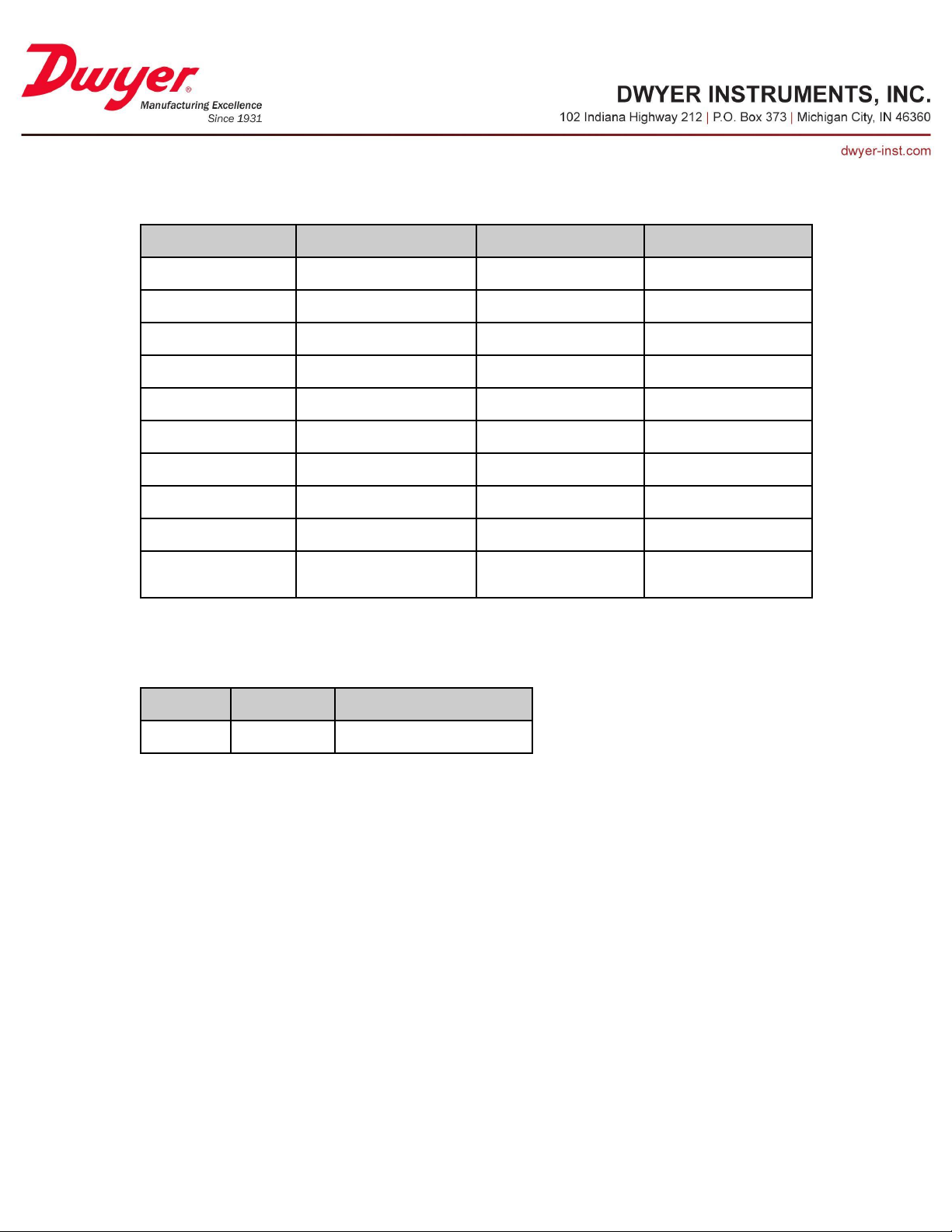
Analog Value 14/23 - UIx Alarm Deadband
Property
Default Value
Property Data Type
Access
Object Identifier
AV14, AV23
BACnetObjectIdentifier
Read
Object Name
“UIx Alarm Deadband”
CharacterString
Read
Object Type
Analog Value(2)
BACnetObjectType
Read
Present Value
0
Real
Read/Write
Status Flags
{0,0,0,0}
BACnetStatusFlags
Read
Event State
NORMAL(0)
BACnetEventState
Read
Reliability
NO_FAULT_DETECTED(0)
BACnetReliability
Read
Out Of Service
FALSE(0)
Boolean
Read/Write
Units
Degrees Fahrenheit(64)
BACnetEngineeringUnits
Read
Property List
BACnetARRAY[N] of
BACnetPropertyIdentifier
Read
Default Value
Minimum Value
Maximum Value
0.0
0.0
1000.0
This value puts a band around the limit values to prevent rapidly transiting in and out of
alarm state. Setting this to a non-zero value is recommended whenever the UIx alarm is
selected as the relay source. See table below for accepted input range.
Page 47
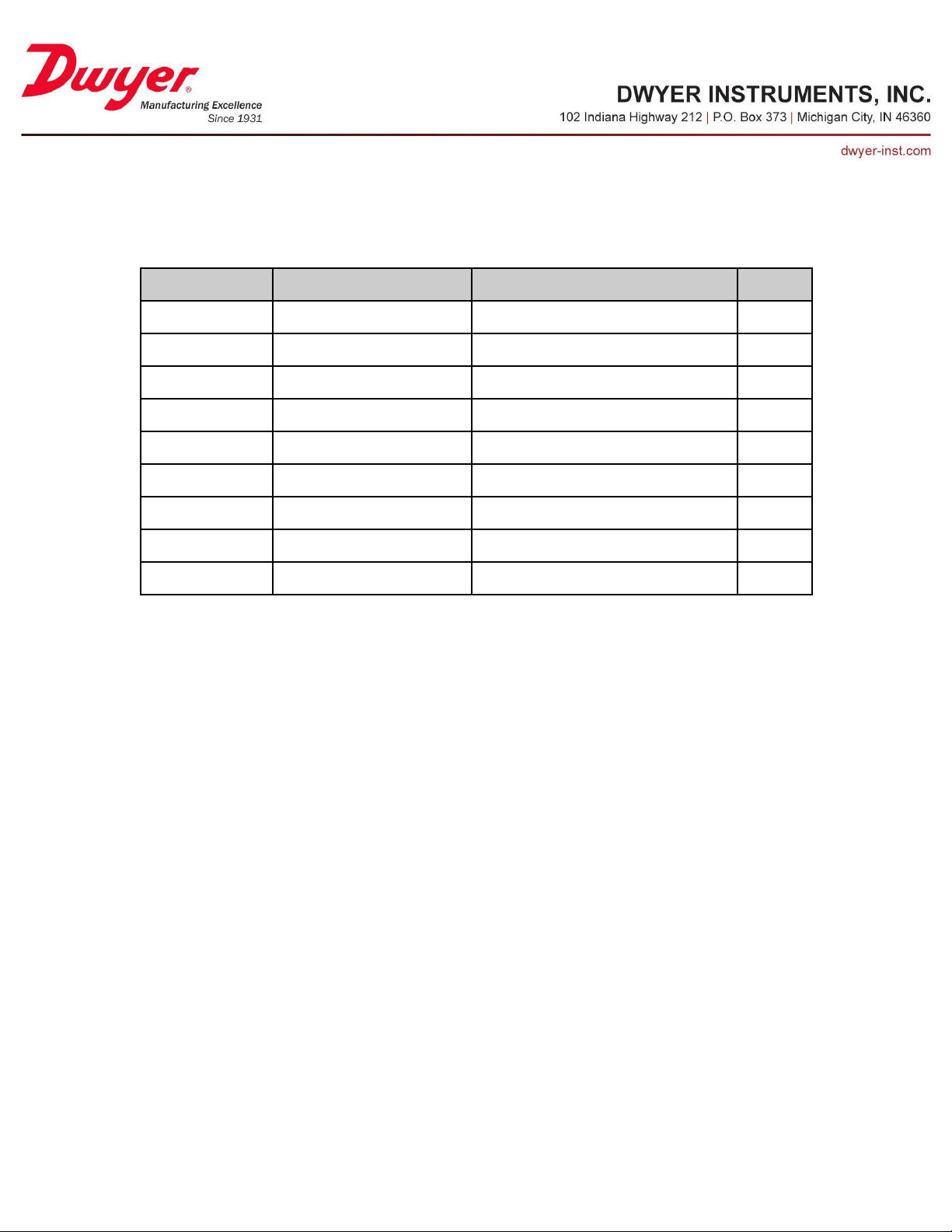
Digital Input Objects
Property
Default Value
Property Data Type
Access
Object Identifier
BV10
BACnetObjectIdentifier
Read
Object Name
“Binary Input Enable”
CharacterString
Read
Object Type
Binary Value(5)
BACnetObjectType
Read
Present Value
Active (1)
BACnetBinaryPV
Read/Write
Status Flags
{0,0,0,0}
BACnetStatusFlags
Read
Event State
NORMAL(0)
BACnetEventState
Read
Reliability
NO_FAULT_DETECTED(0)
BACnetReliability
Read
Out Of Service
FALSE(0)
Boolean
Read/Write
Property List
BACnetARRAY[N] of BACnetPropertyIdentifier
Read
Binary Value 10 - Binary Input Enable
This value determines if the signal on the Digital Input terminal will be monitored.
Page 48
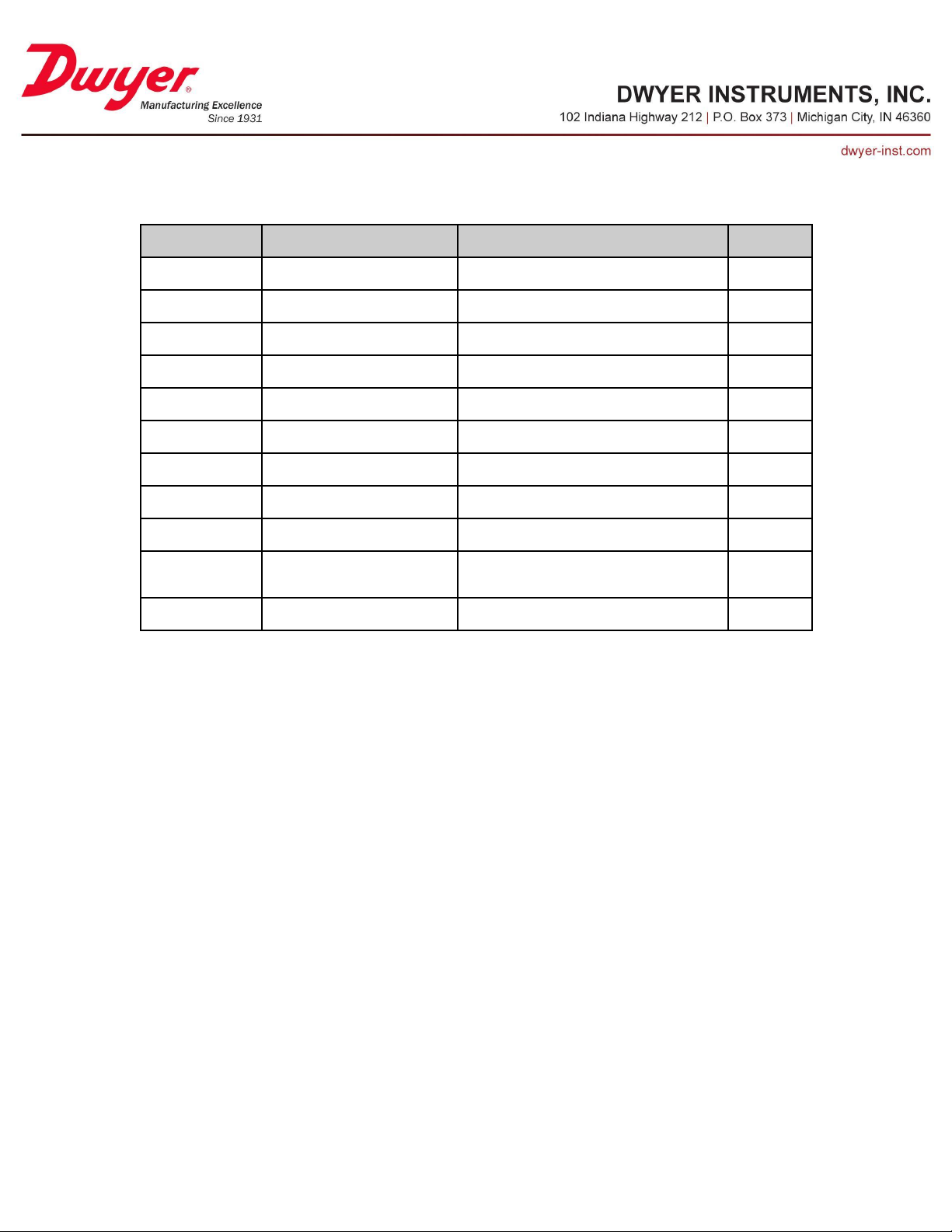
Multi-State Value 14 - Binary Input Usage
Property
Default Value
Property Data Type
Access
Object Identifier
MSV14
BACnetObjectIdentifier
Read
Object Name
“Binary Input Usage”
CharacterString
Read
Object Type
Multi-State Value(19)
BACnetObjectType
Read
Present Value
2
Unsigned
Read/Write
Status Flags
{0,0,0,0}
BACnetStatusFlags
Read
Event State
NORMAL(0)
BACnetEventState
Read
Reliability
NO_FAULT_DETECTED(0)
BACnetReliability
Read
Out Of Service
FALSE(0)
Boolean
Read/Write
Number Of States
2
Unsigned
Read
State Text
{“Remote Switch”,
“Door Contact”}
BACnetARRAY[N] of CharacterString
Read
Property List
BACnetARRAY[N] of BACnetPropertyIdentifier
Read
This setting determines how the digital input is represented on the LCD and what action
takes place as a result of changes in the input.
Page 49
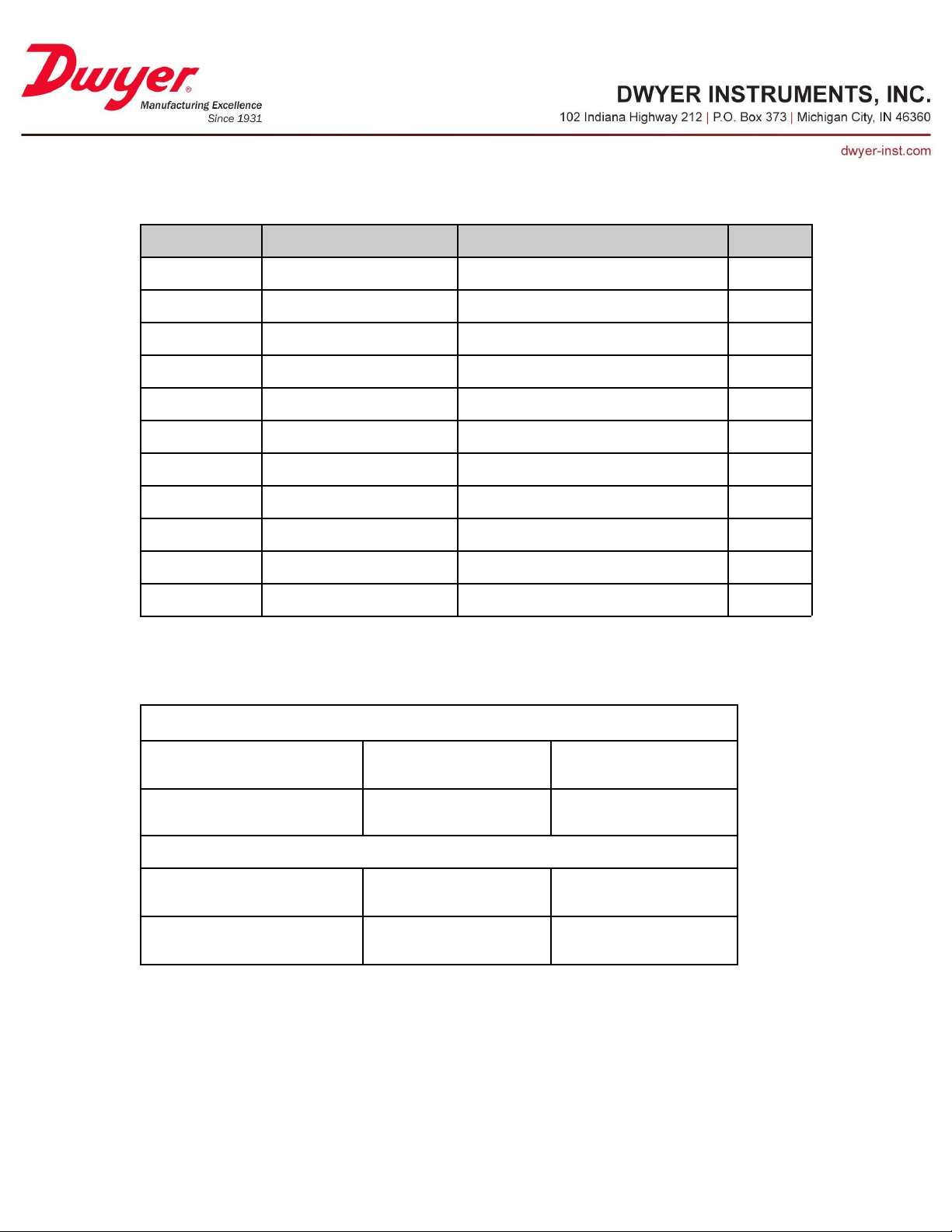
Multi-State Value 15 - Binary Input Polarity
Property
Default Value
Property Data Type
Access
Object Identifier
MSV14
BACnetObjectIdentifier
Read
Object Name
“Binary Input Polarity”
CharacterString
Read
Object Type
Multi-State Value(19)
BACnetObjectType
Read
Present Value
1
Unsigned
Read/Write
Status Flags
{0,0,0,0}
BACnetStatusFlags
Read
Event State
NORMAL(0)
BACnetEventState
Read
Reliability
NO_FAULT_DETECTED(0)
BACnetReliability
Read
Out Of Service
FALSE(0)
Boolean
Read/Write
Number Of States
2
Unsigned
Read
State Text
{“Reverse”, “Direct”}
BACnetARRAY[N] of CharacterString
Read
Property List
BACnetARRAY[N] of BACnetPropertyIdentifier
Read
Binary Input Usage = “Remote Switch”(1)
Binary Input Polarity = “Occupied”(1)
External Switch Closed → Binary
Input Status = “Occupied”
External Switch Open → Binary
Input Status = “Unoccupied”
Binary Input Polarity = “Unoccupied”(2)
External Switch Closed → Binary
Input Status = “Unoccupied”
External Switch Open → Binary
Input Status = “Occupied”
Binary Input Usage = “Door Contact”(2)
Binary Input Polarity = “Reverse”(1)
Door Contact Closed → Binary
Input Status = “Door Open”
Door Contact Open → Binary
Input Status = “Door Closed”
Binary Input Polarity = “Direct”(2)
Door Contact Closed → Binary
Input Status = “Door Closed”
Door Contact Open → Binary
Input Status = “Door Open”
This setting determines what happens when the digital input is logic HIGH and LOW.
See table below for details.
Page 50
Multi-State Value 16 - Binary Input Status
Property
Default Value
Property Data Type
Access
Object Identifier
MSV16
BACnetObjectIdentifier
Read
Object Name
“Binary Input Status”
CharacterString
Read
Object Type
Multi-State Value(19)
BACnetObjectType
Read
Present Value
Current Value
Unsigned
Read
Status Flags
{0,0,0,0}
BACnetStatusFlags
Read
Event State
NORMAL(0)
BACnetEventState
Read
Reliability
NO_FAULT_DETECTED(0)
BACnetReliability
Read
Out Of Service
FALSE(0)
Boolean
Read/Write
Number Of States
2
Unsigned
Read
State Text
{“Door Open”, “Door Closed”}
BACnetARRAY[N] of CharacterString
Read
Property List
BACnetARRAY[N] of BACnetPropertyIdentifier
Read
Property
Default Value
Property Data Type
Access
Object Identifier
BV11
BACnetObjectIdentifier
Read
Object Name
“Binary Alarm Enable”
CharacterString
Read
Object Type
Binary Value(5)
BACnetObjectType
Read
Present Value
Inactive (0)
BACnetBinaryPV
Read/Write
Status Flags
{0,0,0,0}
BACnetStatusFlags
Read
Event State
NORMAL(0)
BACnetEventState
Read
Reliability
NO_FAULT_DETECTED(0)
BACnetReliability
Read
Out Of Service
FALSE(0)
Boolean
Read/Write
Property List
BACnetARRAY[N] of BACnetPropertyIdentifier
Read
This value indicates the current status of the digital input. This object supports COV
subscription.
Binary Value 11 - Binary Alarm Enable
This value determines whether or not an alarm is triggered when the door is open. This
setting has no effect if Binary Input Usage is “Remote Switch”.
Page 51
Positive Integer Value 7 - Binary Input Alarm Delay
Property
Default Value
Property Data Type
Access
Object Identifier
PIV7
BACnetObjectIdentifier
Read
Object Name
“Binary Input Alarm Delay”
CharacterString
Read
Object Type
Positive Integer Value (48)
BACnetObjectType
Read
Present Value
0
Unsigned
Read/Write
Status Flags
{0,0,0,0}
BACnetStatusFlags
Read
Event State
NORMAL(0)
BACnetEventState
Read
Reliability
NO_FAULT_DETECTED(0)
BACnetReliability
Read
Out Of Service
FALSE(0)
Boolean
Read/Write
Units
seconds(73)
BACnetEngineeringUnits
Read
Property List
BACnetARRAY[N] of BACnetPropertyIdentifier
Read
Default Value
Minimum Value
Maximum Value
0 s
0 s
5000 s
This object provides the ability to specify a delay (in seconds) between the external
digital input value changing to door open state and Binary Input Status value indicating
“Door Open”. This allows a door to be opened for a short duration or to prevent spurious
events. See table below for accepted input range.
Page 52
Digital User Input Objects (UI1, UI2)
Property
Default Value
Property Data Type
Access
Object Identifier
BV12, BV14
BACnetObjectIdentifier
Read
Object Name
“Digital UIx Enable”
CharacterString
Read
Object Type
Binary Value(5)
BACnetObjectType
Read
Present Value
Inactive (0)
BACnetBinaryPV
Read/Write
Status Flags
{0,0,0,0}
BACnetStatusFlags
Read
Event State
NORMAL(0)
BACnetEventState
Read
Reliability
NO_FAULT_DETECTED(0)
BACnetReliability
Read
Out Of Service
FALSE(0)
Boolean
Read/Write
Property List
BACnetARRAY[N] of BACnetPropertyIdentifier
Read
Binary Value 12/14 - Digital UIx Enable
This value determines if the signal on the UIx terminal will be monitored and considered
a digital value. Note that in order to use the UIx terminal as a digital input, the
corresponding UIx Enable value must be set to Inactive(0) and the UIx Signal Type must
be set to “Digital”(1).
Page 53
Multi-State Value 17/20 - Digital UIx Usage
Property
Default Value
Property Data Type
Access
Object Identifier
MSV17, MSV20
BACnetObjectIdentifier
Read
Object Name
“Digital UIx Usage”
CharacterString
Read
Object Type
Multi-State Value(19)
BACnetObjectType
Read
Present Value
2
Unsigned
Read/Write
Status Flags
{0,0,0,0}
BACnetStatusFlags
Read
Event State
NORMAL(0)
BACnetEventState
Read
Reliability
NO_FAULT_DETECTED(0)
BACnetReliability
Read
Out Of Service
FALSE(0)
Boolean
Read/Write
Number Of States
2
Unsigned
Read
State Text
{“Remote Switch”,
“Door Contact”}
BACnetARRAY[N] of CharacterString
Read
Property List
BACnetARRAY[N] of BACnetPropertyIdentifier
Read
This setting determines how the digital UIx input is represented on the LCD and what
action takes place as a result of changes in the input.
Page 54
Multi-State Value 18/21 - Digital UIx Polarity
Property
Default Value
Property Data Type
Access
Object Identifier
MSV18, MSV21
BACnetObjectIdentifier
Read
Object Name
“Digital UIx Polarity”
CharacterString
Read
Object Type
Multi-State Value(19)
BACnetObjectType
Read
Present Value
1
Unsigned
Read/Write
Status Flags
{0,0,0,0}
BACnetStatusFlags
Read
Event State
NORMAL(0)
BACnetEventState
Read
Reliability
NO_FAULT_DETECTED(0)
BACnetReliability
Read
Out Of Service
FALSE(0)
Boolean
Read/Write
Number Of States
2
Unsigned
Read
State Text
{“Reverse”, “Direct”}
BACnetARRAY[N] of CharacterString
Read
Property List
BACnetARRAY[N] of BACnetPropertyIdentifier
Read
Digital UIx Usage = “Remote Switch”(1)
Digital UIx Polarity = “Occupied”(1)
External Switch Closed → Digital
UIx Status = “Occupied”
External Switch Open → Digital
UIx Status = “Unoccupied”
Digital UIx Polarity = “Unoccupied”(2)
External Switch Closed → Digital
UIx Status = “Unoccupied”
External Switch Open → Digital
UIx Status = “Occupied”
Digital UIx Usage = “Door Contact”(2)
Digital UIx Polarity = “Reverse”(1)
Door Contact Closed → Digital
UIx Status = “Door Open”
Door Contact Open → Digital
UIx Status = “Door Closed”
Digital UIx Polarity = “Direct”(2)
Door Contact Closed → Digital
UIx Status = “Door Closed”
Door Contact Open → Digital
UIx Status = “Door Open”
This setting determines what happens when the UIx input is logic HIGH and LOW. See
table below for details.
Page 55
Multi-State Value 19/22 - Digital UIx Status
Property
Default Value
Property Data Type
Access
Object Identifier
MSV19, MSV22
BACnetObjectIdentifier
Read
Object Name
“Digital UIx Status”
CharacterString
Read
Object Type
Multi-State Value(19)
BACnetObjectType
Read
Present Value
Current Value
Unsigned
Read
Status Flags
{0,0,0,0}
BACnetStatusFlags
Read
Event State
NORMAL(0)
BACnetEventState
Read
Reliability
NO_FAULT_DETECTED(0)
BACnetReliability
Read
Out Of Service
FALSE(0)
Boolean
Read/Write
Number Of States
2
Unsigned
Read
State Text
{“Door Open”, “Door Closed”}
BACnetARRAY[N] of CharacterString
Read
Property List
BACnetARRAY[N] of BACnetPropertyIdentifier
Read
Property
Default Value
Property Data Type
Access
Object Identifier
BV13, BV15
BACnetObjectIdentifier
Read
Object Name
“Digital UIx Alarm Enable”
CharacterString
Read
Object Type
Binary Value(5)
BACnetObjectType
Read
Present Value
Inactive (0)
BACnetBinaryPV
Read/Write
Status Flags
{0,0,0,0}
BACnetStatusFlags
Read
Event State
NORMAL(0)
BACnetEventState
Read
Reliability
NO_FAULT_DETECTED(0)
BACnetReliability
Read
Out Of Service
FALSE(0)
Boolean
Read/Write
Property List
BACnetARRAY[N] of BACnetPropertyIdentifier
Read
This value indicates the current status of the digital UIx input. These objects support
COV subscription.
Binary Value 13/15 - Digital UIx Alarm Enable
This value determines whether or not an alarm is triggered when the door is open. This
setting has no effect if Digital UIx Usage is “Remote Switch”.
Page 56
Positive Integer Value 8/9 - Digital UIx Alarm Delay
Property
Default Value
Property Data Type
Access
Object Identifier
PIV8, PIV9
BACnetObjectIdentifier
Read
Object Name
“Digital UIx Alarm Delay”
CharacterString
Read
Object Type
Positive Integer Value (48)
BACnetObjectType
Read
Present Value
0
Unsigned
Read/Write
Status Flags
{0,0,0,0}
BACnetStatusFlags
Read
Event State
NORMAL(0)
BACnetEventState
Read
Reliability
NO_FAULT_DETECTED(0)
BACnetReliability
Read
Out Of Service
FALSE(0)
Boolean
Read/Write
Units
seconds(73)
BACnetEngineeringUnits
Read
Property List
BACnetARRAY[N] of BACnetPropertyIdentifier
Read
Default Value
Minimum Value
Maximum Value
0 s
0 s
5000 s
This object provides the ability to specify a delay (in seconds) between the external
digital input value changing to door open state and Digital UIx Status value indicating
“Door Open”. This allows a door to be opened for a short duration or to prevent spurious
events. See table below for accepted input range.
Page 57
Air Change Per Hour Objects
Property
Default Value
Property Data Type
Access
Object Identifier
AV24
BACnetObjectIdentifier
Read
Object Name
“Duct Area”
CharacterString
Read
Object Type
Analog Value(2)
BACnetObjectType
Read
Present Value
1
Real
Read/Write
Status Flags
{0,0,0,0}
BACnetStatusFlags
Read
Event State
NORMAL(0)
BACnetEventState
Read
Reliability
NO_FAULT_DETECTED(0)
BACnetReliability
Read
Out Of Service
FALSE(0)
Boolean
Read/Write
Units
square-feet(1)
BACnetEngineeringUnits
Read/Write
Property List
BACnetARRAY[N] of
BACnetPropertyIdentifier
Read
Default Value
Minimum Value
Maximum Value
1.0
0.08
25.0
Analog Value 24 - Duct Area
This value sets the area of the supply duct in order to compute the volumetric flow. This
value is only required when a Media Type of “Flow” is selected and the unit is a velocity.
See table below for accepted input range.
Page 58
Analog Value 25 - Room Volume
Property
Default Value
Property Data Type
Access
Object Identifier
AV25
BACnetObjectIdentifier
Read
Object Name
“Room Volume”
CharacterString
Read
Object Type
Analog Value(2)
BACnetObjectType
Read
Present Value
1000
Real
Read/Write
Status Flags
{0,0,0,0}
BACnetStatusFlags
Read
Event State
NORMAL(0)
BACnetEventState
Read
Reliability
NO_FAULT_DETECTED(0)
BACnetReliability
Read
Out Of Service
FALSE(0)
Boolean
Read/Write
Units
cubic-feet(79)
BACnetEngineeringUnits
Read/Write
Property List
BACnetARRAY[N] of
BACnetPropertyIdentifier
Read
Default Value
Minimum Value
Maximum Value
1000.0
32.0
1000000.0
This value sets the volume of the room being monitored. This value is required when a
Media Type of “Flow” is selected in order to compute Air Changes per Hour. See table
below for accepted input range.
Page 59
Relay Objects
Property
Default Value
Property Data Type
Access
Object Identifier
MSV23
BACnetObjectIdentifier
Read
Object Name
“Relay Operation”
CharacterString
Read
Object Type
Multi-State Value(19)
BACnetObjectType
Read
Present Value
2
Unsigned
Read/Write
Status Flags
{0,0,0,0}
BACnetStatusFlags
Read
Event State
NORMAL(0)
BACnetEventState
Read
Reliability
NO_FAULT_DETECTED(0)
BACnetReliability
Read
Out Of Service
FALSE(0)
Boolean
Read/Write
Number Of States
2
Unsigned
Read
State Text
{“Normally Closed”,
“Normally Open”}
BACnetARRAY[N] of CharacterString
Read
Property List
BACnetARRAY[N] of BACnetPropertyIdentifier
Read
Multi-State Value 23 - Relay Operation
This setting controls the behavior of the normally open (NO) relay terminal when the
Relay Status object is Inactive.
Page 60
Multi-State Value 24 - Relay Source
Property
Default Value
Property Data Type
Access
Object Identifier
MSV24
BACnetObjectIdentifier
Read
Object Name
“Relay Source”
CharacterString
Read
Object Type
Multi-State Value(19)
BACnetObjectType
Read
Present Value
4
Unsigned
Read/Write
Status Flags
{0,0,0,0}
BACnetStatusFlags
Read
Event State
NORMAL(0)
BACnetEventState
Read
Reliability
NO_FAULT_DETECTED(0)
BACnetReliability
Read
Out Of Service
FALSE(0)
Boolean
Read/Write
Number Of States
11
Unsigned
Read
State Text
{“Disabled”, “Master Alarm”, “Door
Alarm”, “Pressure Alarm”, “Analog Alarm”,
“Room 1 Alarm”, “Room 2 Alarm”, “Room
3 Alarm”, “Room 1 Door Alarm”, “Room 2
Door Alarm”, “Room 3 Door Alarm”}
BACnetARRAY[N] of CharacterString
Read
Property List
BACnetARRAY[N] of
BACnetPropertyIdentifier
Read
Relay Source
Description
“Disabled”(1)
Relay disabled
“Master Alarm”(2)
Any active alarm will trigger relay active state
“Door Alarm”(3)
Any door alarm will trigger relay active state
“Pressure Alarm”(4)
The internal pressure sensor alarm state will trigger relay active state
“Analog Alarm”(5)
Either UI1 or UI2 alarm state will trigger relay active state
“Room X Alarm”(6,7,8)
Any alarm associated with Room X will trigger relay active state
“Room X Door Alarm”(9,10,11)
The door alarm associated with Room X will trigger relay active state
This setting determines which input(s) will change the Relay Status to Active. See table
below for a description of each option.
Page 61
Binary Value 16 - Relay Status
Property
Default Value
Property Data Type
Access
Object Identifier
BV16
BACnetObjectIdentifier
Read
Object Name
“Relay Status”
CharacterString
Read
Object Type
Binary Value(5)
BACnetObjectType
Read
Present Value
Inactive (0)
BACnetBinaryPV
Read
Status Flags
{0,0,0,0}
BACnetStatusFlags
Read
Event State
NORMAL(0)
BACnetEventState
Read
Reliability
NO_FAULT_DETECTED(0)
BACnetReliability
Read
Out Of Service
FALSE(0)
Boolean
Read/Write
Property List
BACnetARRAY[N] of BACnetPropertyIdentifier
Read
This value indicates whether or not the relay is “Active” according to the value of Relay
Operation. This object supported COV subscription.
Page 62
Analog Output Objects
Property
Default Value
Property Data Type
Access
Object Identifier
MSV25
BACnetObjectIdentifier
Read
Object Name
“Analog Output Type”
CharacterString
Read
Object Type
Multi-State Value(19)
BACnetObjectType
Read
Present Value
2
Unsigned
Read/Write
Status Flags
{0,0,0,0}
BACnetStatusFlags
Read
Event State
NORMAL(0)
BACnetEventState
Read
Reliability
NO_FAULT_DETECTED(0)
BACnetReliability
Read
Out Of Service
FALSE(0)
Boolean
Read/Write
Number Of States
2
Unsigned
Read
State Text
{“0-10V”, “4-20mA”}
BACnetARRAY[N] of CharacterString
Read
Property List
BACnetARRAY[N] of BACnetPropertyIdentifier
Read
Multi-State Value 25 - Analog Output Type
This value selects the type of analog signal output on the OUTPUT+ and OUTPUT GND
terminals.
Page 63
Multi-State Value 26 - Analog Output Source
Property
Default Value
Property Data Type
Access
Object Identifier
MSV26
BACnetObjectIdentifier
Read
Object Name
“Analog Output Source”
CharacterString
Read
Object Type
Multi-State Value(19)
BACnetObjectType
Read
Present Value
1
Unsigned
Read/Write
Status Flags
{0,0,0,0}
BACnetStatusFlags
Read
Event State
NORMAL(0)
BACnetEventState
Read
Reliability
NO_FAULT_DETECTED(0)
BACnetReliability
Read
Out Of Service
FALSE(0)
Boolean
Read/Write
Number Of States
3
Unsigned
Read
State Text
{“Built-in DP”, “User I1”,
“User I2”}
BACnetARRAY[N] of CharacterString
Read
Property List
BACnetARRAY[N] of BACnetPropertyIdentifier
Read
This value selects the source of the analog output signal. Selecting “User I1” or “User
I2” allows an analog signal from a remote sensor to be retransmitted and potentially
converted from voltage to current or current to voltage.
Page 64
Display Configuration Objects
Property
Default Value
Property Data Type
Access
Object Identifier
MSV27
BACnetObjectIdentifier
Read
Object Name
“Display Mode”
CharacterString
Read
Object Type
Multi-State Value(19)
BACnetObjectType
Read
Present Value
3
Unsigned
Read/Write
Status Flags
{0,0,0,0}
BACnetStatusFlags
Read
Event State
NORMAL(0)
BACnetEventState
Read
Reliability
NO_FAULT_DETECTED(0)
BACnetReliability
Read
Out Of Service
FALSE(0)
Boolean
Read/Write
Number Of States
5
Unsigned
Read
State Text
{“1 Room 1 Sensor”, “1 Room 2
Sensors”, “1 Room 3 Sensors”, “2
Rooms 2 Sensors”, “3 Rooms 3
Sensors”}
BACnetARRAY[N] of CharacterString
Read
Property List
BACnetARRAY[N] of BACnetPropertyIdentifier
Read
Multi-State Value 27 - Display Mode
The Series RSME/RSMC can display up to 3 sensor readings. This setting determines
how those sensors will be distributed and displayed.
Page 65
Multi-State Value 28/29/30/31/32 - Room X Sensor Y Select Analog
Property
Default Value
Property Data Type
Access
Object Identifier
MSV28, MSV29, MSV30, MSV31,
MSV32
BACnetObjectIdentifier
Read
Object Name
“Room X Sensor Y Select Analog”
CharacterString
Read
Object Type
Multi-State Value(19)
BACnetObjectType
Read
Present Value
1, 2, 3, 2, 3
Unsigned
Read/Write
Status Flags
{0,0,0,0}
BACnetStatusFlags
Read
Event State
NORMAL(0)
BACnetEventState
Read
Reliability
NO_FAULT_DETECTED(0)
BACnetReliability
Read
Out Of Service
FALSE(0)
Boolean
Read/Write
Number Of States
7
Unsigned
Read
State Text
{“Built-in DP”, “User I1”, “User
I2”, “ES1”, “ES2”, “ES3”,
“None”}
BACnetARRAY[N] of CharacterString
Read
Property List
BACnetARRAY[N] of BACnetPropertyIdentifier
Read
These settings provide a mapping between the available sensor inputs and the room they
are associated with. Note that options “ESx” refer to remote BACnet devices and will be
discussed later.
Page 66
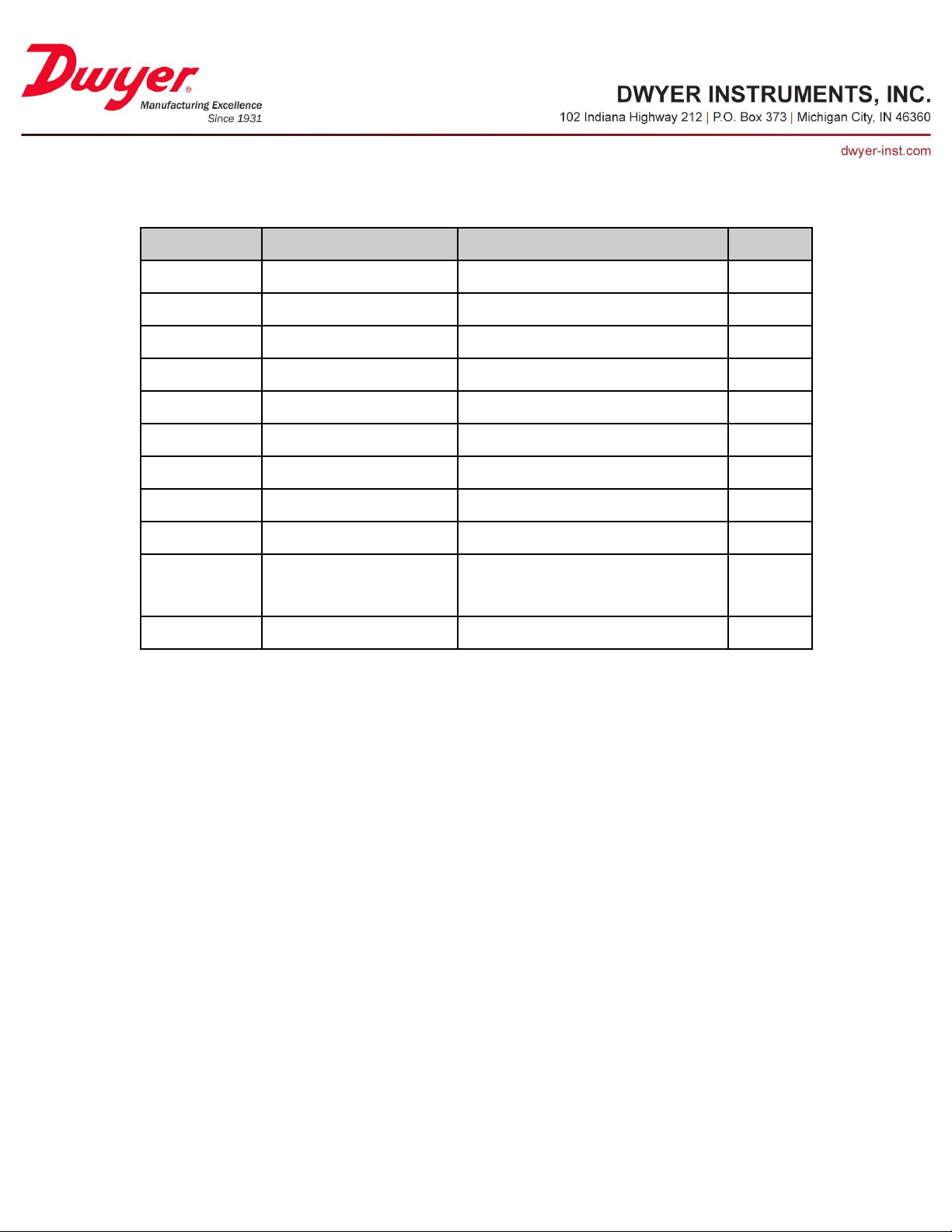
Multi-State Value 33/34/35 - Room X Sensor Select Digital
Property
Default Value
Property Data Type
Access
Object Identifier
MSV33, MSV34, MSV35
BACnetObjectIdentifier
Read
Object Name
“Room X Sensor Select Digital”
CharacterString
Read
Object Type
Multi-State Value(19)
BACnetObjectType
Read
Present Value
4, 1, 1
Unsigned
Read/Write
Status Flags
{0,0,0,0}
BACnetStatusFlags
Read
Event State
NORMAL(0)
BACnetEventState
Read
Reliability
NO_FAULT_DETECTED(0)
BACnetReliability
Read
Out Of Service
FALSE(0)
Boolean
Read/Write
Number Of States
7
Unsigned
Read
State Text
{“None”, “User I1”, “User I2”,
“Digital I1”, “ED1”, “ED2”,
“ED3”}
BACnetARRAY[N] of CharacterString
Read
Property List
BACnetARRAY[N] of BACnetPropertyIdentifier
Read
These settings provide a mapping between the available digital inputs and the room they
are associated with. Note that options “EDx” refer to remote BACnet devices and will be
discussed later.
Page 67
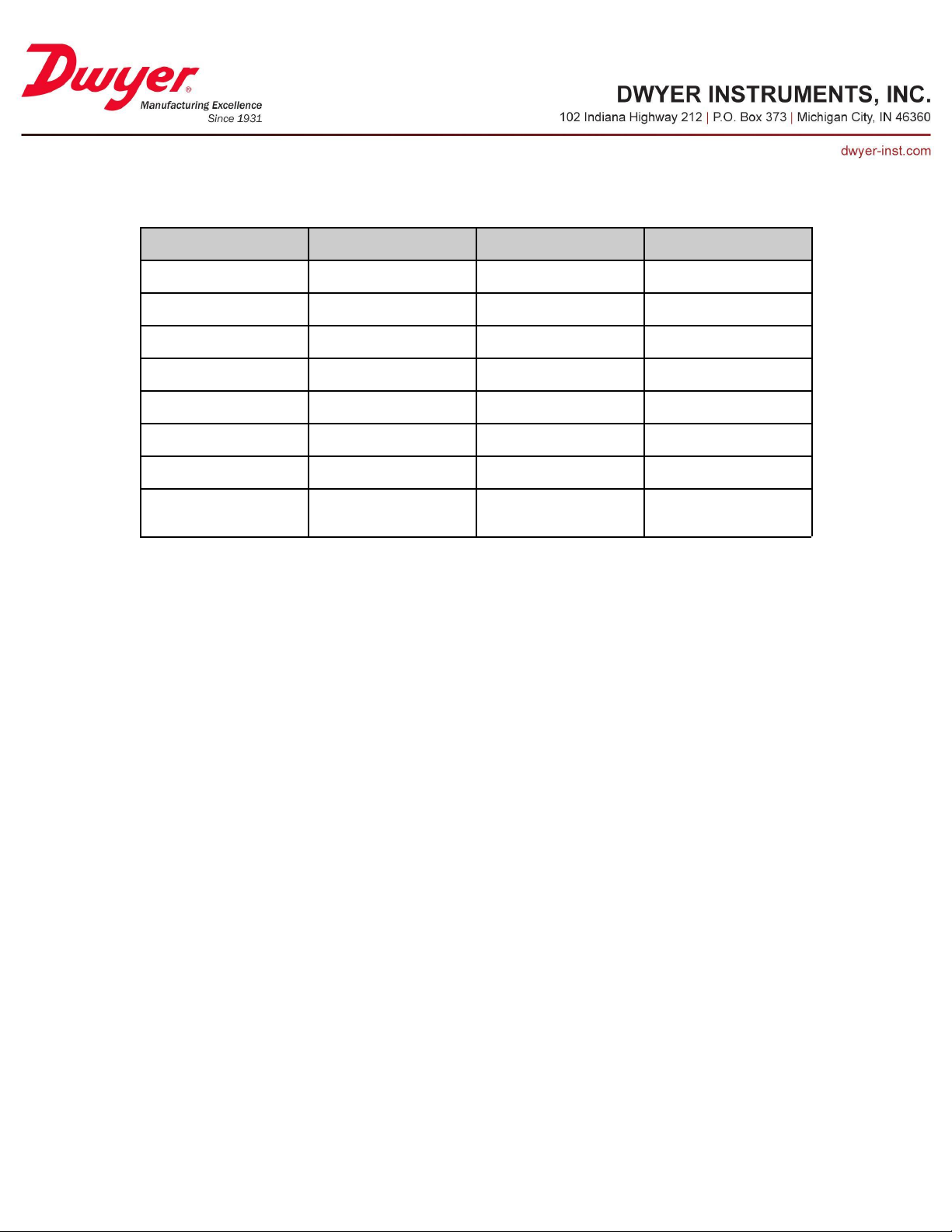
Character String Value 4/5/6 - Room X Name
Property
Default Value
Property Data Type
Access
Object Identifier
CSV4, CSV5, CSV6
BACnetObjectIdentifier
Read
Object Name
“Room X Name”
CharacterString
Read
Object Type
Character String Value(40)
BACnetObjectType
Read
Present Value
“Room X”
CharacterString(32)
Read/Write
Status Flags
{0,0,0,0}
BACnetStatusFlags
Read
Event State
NORMAL(0)
BACnetEventState
Read
Reliability
NO_FAULT_DETECTED(0)
BACnetReliability
Read
Property List
BACnetARRAY[N] of
BACnetPropertyIdentifier
Read
This object sets the label of the room displayed on the LCD. Note that while the
maximum length is 32 characters, some characters may not be visible due to space
constraints on the display.
Page 68
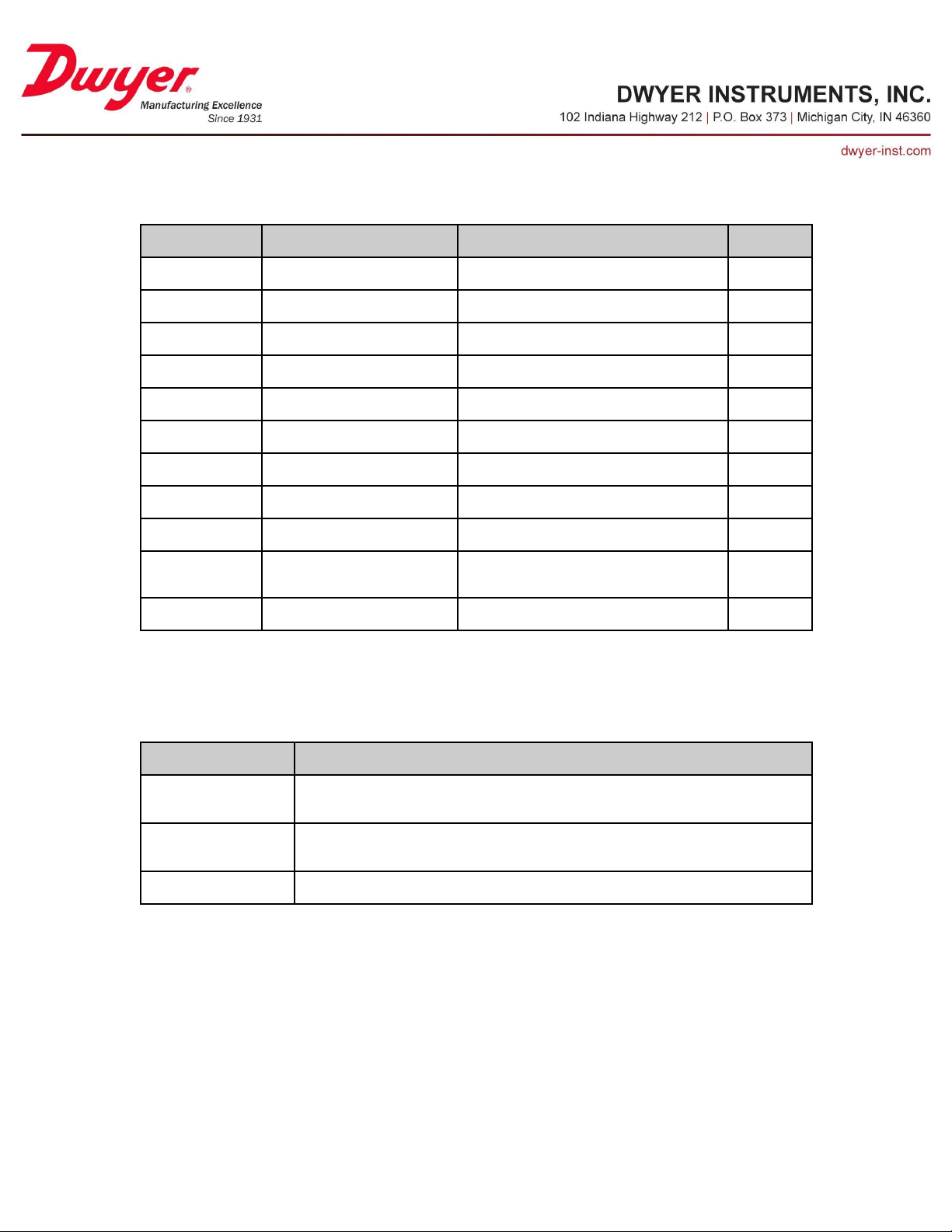
Multi-State Value 36/37/38 - Room X Mode
Property
Default Value
Property Data Type
Access
Object Identifier
MSV36, MSV37, MSV38
BACnetObjectIdentifier
Read
Object Name
“Room X Sensor Select Digital”
CharacterString
Read
Object Type
Multi-State Value(19)
BACnetObjectType
Read
Present Value
1
Unsigned
Read/Write
Status Flags
{0,0,0,0}
BACnetStatusFlags
Read
Event State
NORMAL(0)
BACnetEventState
Read
Reliability
NO_FAULT_DETECTED(0)
BACnetReliability
Read
Out Of Service
FALSE(0)
Boolean
Read/Write
Number Of States
3
Unsigned
Read
State Text
{“Occupied”, “Unoccupied”,
“Cleaning”}
BACnetARRAY[N] of CharacterString
Read
Property List
BACnetARRAY[N] of BACnetPropertyIdentifier
Read
Option
Effect
“Occupied”(1)
Normal operation; the background of the measurement tile(s) change color based on alarm settings
and alarm output is generated when necessary.
“Unoccupied”(2)
The background of the measurement tile(s) change color based on alarm settings, but no alarm
output is generated.
“Clearning”(3)
Measurement tile(s) in the associated room are blue, no alarm output is generated.
These settings determine whether or not a given room will produce an alarm output. See
table below for a description of each option.
Page 69
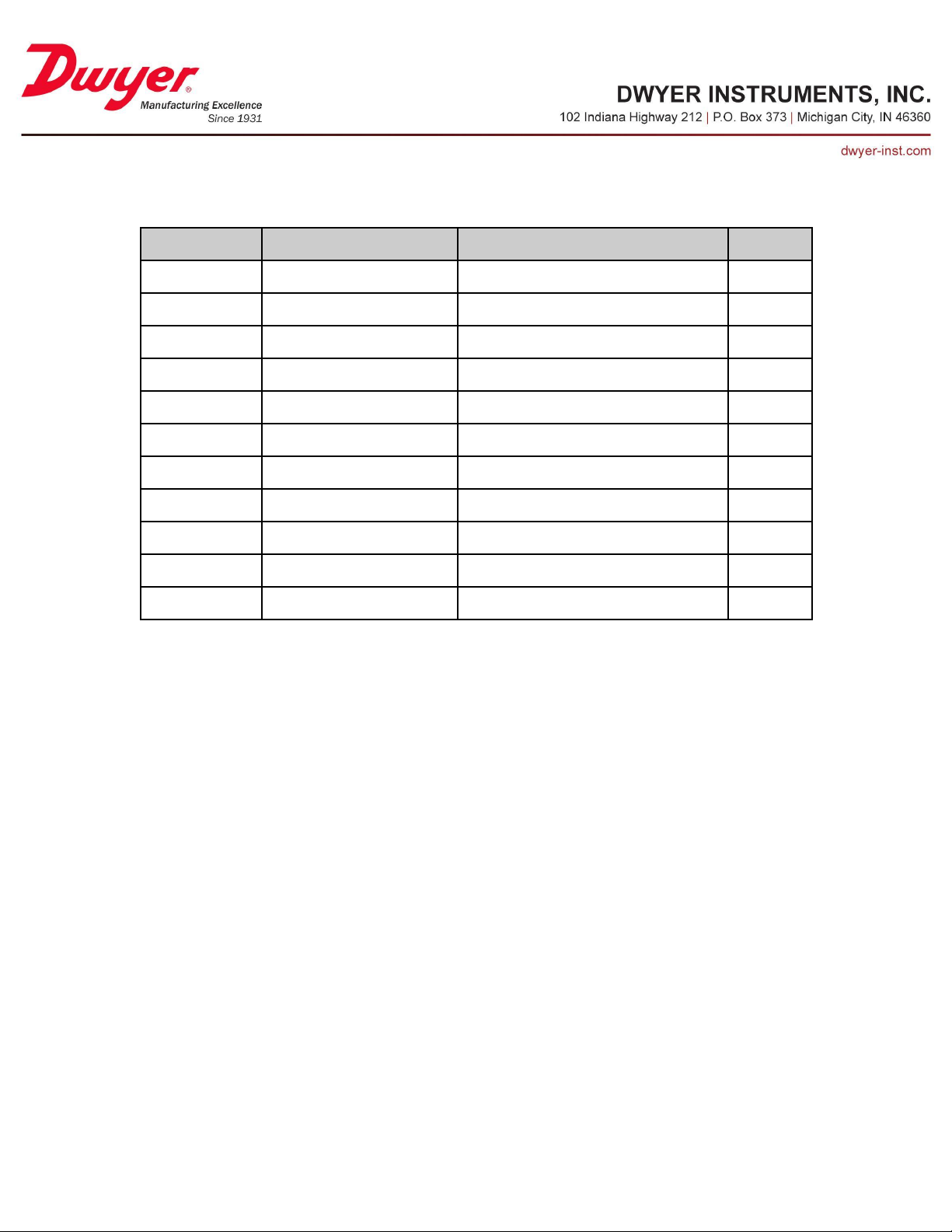
Multi-State Value 39 - Language
Property
Default Value
Property Data Type
Access
Object Identifier
MSV39
BACnetObjectIdentifier
Read
Object Name
“Language”
CharacterString
Read
Object Type
Multi-State Value(19)
BACnetObjectType
Read
Present Value
1
Unsigned
Read/Write
Status Flags
{0,0,0,0}
BACnetStatusFlags
Read
Event State
NORMAL(0)
BACnetEventState
Read
Reliability
NO_FAULT_DETECTED(0)
BACnetReliability
Read
Out Of Service
FALSE(0)
Boolean
Read/Write
Number Of States
2
Unsigned
Read
State Text
{“English”, “Espanol”}
BACnetARRAY[N] of CharacterString
Read
Property List
BACnetARRAY[N] of BACnetPropertyIdentifier
Read
This value selects the language used on the LCD.
Page 70
Security Objects
Property
Default Value
Property Data Type
Access
Object Identifier
BV17
BACnetObjectIdentifier
Read
Object Name
“Password Security Enable”
CharacterString
Read
Object Type
Binary Value(5)
BACnetObjectType
Read
Present Value
Inactive (0)
BACnetBinaryPV
Read/Write
Status Flags
{0,0,0,0}
BACnetStatusFlags
Read
Event State
NORMAL(0)
BACnetEventState
Read
Reliability
NO_FAULT_DETECTED(0)
BACnetReliability
Read
Out Of Service
FALSE(0)
Boolean
Read/Write
Property List
BACnetARRAY[N] of BACnetPropertyIdentifier
Read
Property
Default Value
Property Data Type
Access
Object Identifier
CSV7
BACnetObjectIdentifier
Read
Object Name
“Operator Password”
CharacterString
Read
Object Type
Character String Value(40)
BACnetObjectType
Read
Present Value
“1234”
CharacterString(8)
Read/Write
Status Flags
{0,0,0,0}
BACnetStatusFlags
Read
Event State
NORMAL(0)
BACnetEventState
Read
Reliability
NO_FAULT_DETECTED(0)
BACnetReliability
Read
Property List
BACnetARRAY[N] of
BACnetPropertyIdentifier
Read
Binary Value 17 - Password Security Enable
This settings determines if a passcode is required to enter the setup menu.
Character String Value 7 - Operator Password
This object sets the pin code required by an operator to enter anytime the setup menu is
entered. The string is required to be numeric only, an error will be returned if
non-numeric characters are present.
Page 71
Character String Value 8 - Administrator Password
Property
Default Value
Property Data Type
Access
Object Identifier
CSV8
BACnetObjectIdentifier
Read
Object Name
“Administrator Password”
CharacterString
Read
Object Type
Character String Value(40)
BACnetObjectType
Read
Present Value
“1234”
CharacterString(8)
Read/Write
Status Flags
{0,0,0,0}
BACnetStatusFlags
Read
Event State
NORMAL(0)
BACnetEventState
Read
Reliability
NO_FAULT_DETECTED(0)
BACnetReliability
Read
Property List
BACnetARRAY[N] of
BACnetPropertyIdentifier
Read
Property
Default Value
Property Data Type
Access
Object Identifier
BV18
BACnetObjectIdentifier
Read
Object Name
“Alarm Latch Enable”
CharacterString
Read
Object Type
Binary Value(5)
BACnetObjectType
Read
Present Value
Inactive (0)
BACnetBinaryPV
Read/Write
Status Flags
{0,0,0,0}
BACnetStatusFlags
Read
Event State
NORMAL(0)
BACnetEventState
Read
Reliability
NO_FAULT_DETECTED(0)
BACnetReliability
Read
Out Of Service
FALSE(0)
Boolean
Read/Write
Property List
BACnetARRAY[N] of BACnetPropertyIdentifier
Read
This object sets the pin code required by an administrator to enter anytime the setup
menu is entered. The string is required to be numeric only, an error will be returned if
non-numeric characters are present.
Alarm Objects
Binary Value 18 - Alarm Latch Enable
This setting, when active, requires alarms to be manually reset. This may be useful if an
alarm condition requires other actions within the room. The alarm can be manually reset
via the LCD or object Reset Alarms (BV21)
Page 72
Binary Value 19 - Alarm Buzzer Enable
Property
Default Value
Property Data Type
Access
Object Identifier
BV19
BACnetObjectIdentifier
Read
Object Name
“Alarm Buzzer Enable”
CharacterString
Read
Object Type
Binary Value(5)
BACnetObjectType
Read
Present Value
Inactive (0)
BACnetBinaryPV
Read/Write
Status Flags
{0,0,0,0}
BACnetStatusFlags
Read
Event State
NORMAL(0)
BACnetEventState
Read
Reliability
NO_FAULT_DETECTED(0)
BACnetReliability
Read
Out Of Service
FALSE(0)
Boolean
Read/Write
Property List
BACnetARRAY[N] of BACnetPropertyIdentifier
Read
This setting enables or disables the internal audible buzzer. If enabled, an active alarm
will cause the buzzer to sound.
Page 73
Positive Integer Value 10 - Alarm Buzzer Volume
Property
Default Value
Property Data Type
Access
Object Identifier
PIV10
BACnetObjectIdentifier
Read
Object Name
“Alarm Buzzer Volume”
CharacterString
Read
Object Type
Positive Integer Value (48)
BACnetObjectType
Read
Present Value
100
Unsigned
Read/Write
Status Flags
{0,0,0,0}
BACnetStatusFlags
Read
Event State
NORMAL(0)
BACnetEventState
Read
Reliability
NO_FAULT_DETECTED(0)
BACnetReliability
Read
Out Of Service
FALSE(0)
Boolean
Read/Write
Units
no-units(95)
BACnetEngineeringUnits
Read
Property List
BACnetARRAY[N] of BACnetPropertyIdentifier
Read
Default Value
Minimum Value
Maximum Value
100
0
255
This object allows the volume of the internal buzzer to be adjusted. See table below for
accepted input range.
Page 74
Binary Value 20 - Alarm Mute Button Enable
Property
Default Value
Property Data Type
Access
Object Identifier
BV20
BACnetObjectIdentifier
Read
Object Name
“Alarm Mute Button Enable”
CharacterString
Read
Object Type
Binary Value(5)
BACnetObjectType
Read
Present Value
Inactive (0)
BACnetBinaryPV
Read/Write
Status Flags
{0,0,0,0}
BACnetStatusFlags
Read
Event State
NORMAL(0)
BACnetEventState
Read
Reliability
NO_FAULT_DETECTED(0)
BACnetReliability
Read
Out Of Service
FALSE(0)
Boolean
Read/Write
Property List
BACnetARRAY[N] of BACnetPropertyIdentifier
Read
This setting, when active, shows an additional button on the LCD to allow an operator to
mute/silence an active alarm.
Page 75
Positive Integer Value 11 - Alarm Mute Timeout
Property
Default Value
Property Data Type
Access
Object Identifier
PIV11
BACnetObjectIdentifier
Read
Object Name
“Alarm Mute Timeout”
CharacterString
Read
Object Type
Positive Integer Value (48)
BACnetObjectType
Read
Present Value
0
Unsigned
Read/Write
Status Flags
{0,0,0,0}
BACnetStatusFlags
Read
Event State
NORMAL(0)
BACnetEventState
Read
Reliability
NO_FAULT_DETECTED(0)
BACnetReliability
Read
Out Of Service
FALSE(0)
Boolean
Read/Write
Units
seconds(73)
BACnetEngineeringUnits
Read
Property List
BACnetARRAY[N] of BACnetPropertyIdentifier
Read
Default Value
Minimum Value
Maximum Value
0
0
5000
This object sets the duration of the alarm mute. After the specified time, if the alarm is
still active, the buzzer will sound again. See table below for accepted input range.
Page 76
Binary Value 21 - Mute Alarms
Property
Default Value
Property Data Type
Access
Object Identifier
BV21
BACnetObjectIdentifier
Read
Object Name
“Mute Alarms”
CharacterString
Read
Object Type
Binary Value(5)
BACnetObjectType
Read
Present Value
Inactive (0)
BACnetBinaryPV
Read/Write
Status Flags
{0,0,0,0}
BACnetStatusFlags
Read
Event State
NORMAL(0)
BACnetEventState
Read
Reliability
NO_FAULT_DETECTED(0)
BACnetReliability
Read
Out Of Service
FALSE(0)
Boolean
Read/Write
Property List
BACnetARRAY[N] of BACnetPropertyIdentifier
Read
Property
Default Value
Property Data Type
Access
Object Identifier
BV22
BACnetObjectIdentifier
Read
Object Name
“Reset Alarms”
CharacterString
Read
Object Type
Binary Value(5)
BACnetObjectType
Read
Present Value
Inactive (0)
BACnetBinaryPV
Read/Write
Status Flags
{0,0,0,0}
BACnetStatusFlags
Read
Event State
NORMAL(0)
BACnetEventState
Read
Reliability
NO_FAULT_DETECTED(0)
BACnetReliability
Read
Out Of Service
FALSE(0)
Boolean
Read/Write
Property List
BACnetARRAY[N] of BACnetPropertyIdentifier
Read
This object, when set Active(1), will mute internal buzzer for a period of Alarm Mute
Timeout seconds. Writing Inactive(0) to this object has no effect.
Binary Value 22 - Reset Alarms
This object, when set Active(1), will reset any latched alarms. Writing Inactive(0) to this
object has no effect.
Page 77
External BACnet Sensor (ES1, ES2, ES3) Objects
Property
Default Value
Property Data Type
Access
Object Identifier
BV23, BV26, BV29
BACnetObjectIdentifier
Read
Object Name
“ESx Enable”
CharacterString
Read
Object Type
Binary Value(5)
BACnetObjectType
Read
Present Value
Inactive (0)
BACnetBinaryPV
Read/Write
Status Flags
{0,0,0,0}
BACnetStatusFlags
Read
Event State
NORMAL(0)
BACnetEventState
Read
Reliability
NO_FAULT_DETECTED(0)
BACnetReliability
Read
Out Of Service
FALSE(0)
Boolean
Read/Write
Property List
BACnetARRAY[N] of
BACnetPropertyIdentifier
Read
Binary Value 23/26/29 - ESx Enable
This object determines if this external BACnet sensor, ESx, is monitored. This value
should remain “Inactive” until all related settings have been set correctly. The BACnet
sensors are referred to as “BACnet A1”, “BACnet A2”, and “BACnet A3” on the LCD.
Page 78
Positive Integer Value 12/16/20 - ESx Device Instance
Property
Default Value
Property Data Type
Access
Object Identifier
PIV12, PIV16, PIV20
BACnetObjectIdentifier
Read
Object Name
“ESx Device Instance”
CharacterString
Read
Object Type
Positive Integer Value (48)
BACnetObjectType
Read
Present Value
4194303
Unsigned
Read/Write
Status Flags
{0,0,0,0}
BACnetStatusFlags
Read
Event State
NORMAL(0)
BACnetEventState
Read
Reliability
NO_FAULT_DETECTED(0)
BACnetReliability
Read
Out Of Service
FALSE(0)
Boolean
Read/Write
Units
no-units(95)
BACnetEngineeringUnits
Read
Property List
BACnetARRAY[N] of BACnetPropertyIdentifier
Read
Default Value
Minimum Value
Maximum Value
419430304194303
This object sets the BACnet device object instance of the external device being
monitored. The remote device must be able to respond to a directed WhoIs request. See
table below for accepted input range.
Page 79
Positive Integer Value 13/17/21 - ESx Object Instance
Property
Default Value
Property Data Type
Access
Object Identifier
PIV13, PIV17, PIV21
BACnetObjectIdentifier
Read
Object Name
“ESx Object Instance”
CharacterString
Read
Object Type
Positive Integer Value (48)
BACnetObjectType
Read
Present Value
4194303
Unsigned
Read/Write
Status Flags
{0,0,0,0}
BACnetStatusFlags
Read
Event State
NORMAL(0)
BACnetEventState
Read
Reliability
NO_FAULT_DETECTED(0)
BACnetReliability
Read
Out Of Service
FALSE(0)
Boolean
Read/Write
Units
no-units(95)
BACnetEngineeringUnits
Read
Property List
BACnetARRAY[N] of BACnetPropertyIdentifier
Read
Default Value
Minimum Value
Maximum Value
419430304194303
This object sets the BACnet instance of the object to be monitored on the external device.
See table below for accepted input range.
Page 80
Multi-State Value 40/45/50 - ESx Object Type
Property
Default Value
Property Data Type
Access
Object Identifier
MSV40, MSV45, MSV50
BACnetObjectIdentifier
Read
Object Name
“ESx Object Type”
CharacterString
Read
Object Type
Multi-State Value(19)
BACnetObjectType
Read
Present Value
1
Unsigned
Read/Write
Status Flags
{0,0,0,0}
BACnetStatusFlags
Read
Event State
NORMAL(0)
BACnetEventState
Read
Reliability
NO_FAULT_DETECTED(0)
BACnetReliability
Read
Out Of Service
FALSE(0)
Boolean
Read/Write
Number Of States
2
Unsigned
Read
State Text
{“Analog Input”, “Analog Value”}
BACnetARRAY[N] of CharacterString
Read
Property List
BACnetARRAY[N] of BACnetPropertyIdentifier
Read
This value selects the BACnet object type that will be monitored on the external device.
This value together with the object instance forms the BACnet object ID that will be
requested from the external device.
Page 81
Multi-State Value 41/46/51 - ESx Media Type
Property
Default Value
Property Data Type
Access
Object Identifier
MSV41, MSV46, MSV51
BACnetObjectIdentifier
Read
Object Name
“ESx Media Type”
CharacterString
Read
Object Type
Multi-State Value(19)
BACnetObjectType
Read
Present Value
1
Unsigned
Read
Status Flags
{0,0,0,0}
BACnetStatusFlags
Read
Event State
NORMAL(0)
BACnetEventState
Read
Reliability
NO_FAULT_DETECTED(0)
BACnetReliability
Read
Out Of Service
FALSE(0)
Boolean
Read/Write
Number Of States
4
Unsigned
Read
State Text
{“Temperature”, “Relative
Humidity”, “Pressure”, “Flow”}
BACnetARRAY[N] of CharacterString
Read
Property List
BACnetARRAY[N] of BACnetPropertyIdentifier
Read
This object selects the type of measurement represented by the external BACnet sensor.
This selection determines what units are available for the ESx Value. In order to compute
Air Changes per Hour (ACH), the external sensor must measure velocity or volume flow.
This value should be set to 4 (“Flow”) and the values of “Duct Area” (if velocity sensor)
and “Room Volume” must be set.
Page 82
Multi-State Value 42/47/52 - ESx Unit
Property
Default Value
Property Data Type
Access
Object Identifier
MSV42, MSV47, MSV52
BACnetObjectIdentifier
Read
Object Name
“ESx Unit”
CharacterString
Read
Object Type
Multi-State Value(19)
BACnetObjectType
Read
Present Value
2
Unsigned
Read
Status Flags
{0,0,0,0}
BACnetStatusFlags
Read
Event State
NORMAL(0)
BACnetEventState
Read
Reliability
NO_FAULT_DETECTED(0)
BACnetReliability
Read
Out Of Service
FALSE(0)
Boolean
Read/Write
Number Of States
2
Unsigned
Read
State Text
{“degrees C”, “degrees F”}
BACnetARRAY[N] of CharacterString
Read
Property List
BACnetARRAY[N] of BACnetPropertyIdentifier
Read
ESx Media Type
Available Units
“Temperature”
“degrees C”
“degrees F”
“Relative Humidity”
“% Relative Humidity”
“Pressure”
“Pa”
“kPa”
“cmWC”
“mmWC”
“inWC”
“Flow”
“Air Changes Per Hour”
ESx Media Type
Compatible External Units
“Temperature”
degrees C
degrees F
degrees Kelvin
“Relative Humidity”
“% Relative Humidity
“Pressure”
Pascals
Kilopascals
inWC
PSI
mmWC
cmWC
cmHg
“Flow”
ft3/min
ft/min
m3/hr
m/s
This value selects the unit used by the other objects associated with this external BACnet
sensor and the unit used to display this value on the LCD. The units available change
based on the value of ESx Media Type. See table below for possible options.
Note that the unit of measure on the external BACnet sensor does not have to match the ESx Unit
value. See below for supported external units.
Page 83
Multi-State Value 43/48/53 - ESx Display Format
Property
Default Value
Property Data Type
Access
Object Identifier
MSV43, MSV48, MSV53
BACnetObjectIdentifier
Read
Object Name
“ESx Display Format”
CharacterString
Read
Object Type
Multi-State Value(19)
BACnetObjectType
Read
Present Value
1
Unsigned
Read/Write
Status Flags
{0,0,0,0}
BACnetStatusFlags
Read
Event State
NORMAL(0)
BACnetEventState
Read
Reliability
NO_FAULT_DETECTED(0)
BACnetReliability
Read
Out Of Service
FALSE(0)
Boolean
Read/Write
Number Of States
4
Unsigned
Read
State Text
{“0”, ”0.0”, “0.00”, “0.000”}
BACnetARRAY[N] of
CharacterString
Read
Property List
BACnetARRAY[N] of
BACnetPropertyIdentifier
Read
Property
Default Value
Property Data Type
Access
Object Identifier
CSV9, CSV10, CSV11
BACnetObjectIdentifier
Read
Object Name
“ESx Display Name”
CharacterString
Read
Object Type
Character String Value(40)
BACnetObjectType
Read
Present Value
“Temperature”
CharacterString(32)
Read/Write
Status Flags
{0,0,0,0}
BACnetStatusFlags
Read
Event State
NORMAL(0)
BACnetEventState
Read
Reliability
NO_FAULT_DETECTED(0)
BACnetReliability
Read
Property List
BACnetARRAY[N] of
BACnetPropertyIdentifier
Read
This object controls how the value of ESx Value is displayed on the LCD.
Character String Value 9/10/11 - ESx Display Name
This object sets the label of the ESx measurement displayed on the LCD. Note that while
the maximum length is 32 characters, some character may not be visible depending on
the size of the measurement tile.
Page 84
Analog Value 26/32/38 - ESx Value
Property
Default Value
Property Data Type
Access
Object Identifier
AV26, AV32, AV38
BACnetObjectIdentifier
Read
Object Name
“ESx Value”
CharacterString
Read
Object Type
Analog Value(2)
BACnetObjectType
Read
Present Value
Current reading
Real
Read
Status Flags
{0,0,0,0}
BACnetStatusFlags
Read
Event State
NORMAL(0)
BACnetEventState
Read
Reliability
NO_FAULT_DETECTED(0)
BACnetReliability
Read
Out Of Service
FALSE(0)
Boolean
Read/Write
Units
Degrees Fahrenheit(64)
BACnetEngineeringUnits
Read
COV Increment
1
Read
Read/Write
Property List
BACnetARRAY[N] of
BACnetPropertyIdentifier
Read
Default Value
Minimum Value
Maximum Value
1.0
0.001
10000.0
This value represents the value read from the external BACnet sensor. The unit of this
value depends on the values of ESx Media Type and ESx Unit.
This object supports Change Of Value (COV) subscription with a COV Increment
according to the table below. Note that the COV value is unit-less and may need to be
modified if the unit of measurement is changed.
Page 85
Binary Value 24/27/30 - ESx High Alarm Enable
Property
Default Value
Property Data Type
Access
Object Identifier
BV24, BV27, BV30
BACnetObjectIdentifier
Read
Object Name
“ESx High Alarm Enable”
CharacterString
Read
Object Type
Binary Value(5)
BACnetObjectType
Read
Present Value
Inactive (0)
BACnetBinaryPV
Read/Write
Status Flags
{0,0,0,0}
BACnetStatusFlags
Read
Event State
NORMAL(0)
BACnetEventState
Read
Reliability
NO_FAULT_DETECTED(0)
BACnetReliability
Read
Out Of Service
FALSE(0)
Boolean
Read/Write
Property List
BACnetARRAY[N] of BACnetPropertyIdentifier
Read
This object controls whether or not the “ESx High Alarm Limit” and “ESx High Alarm
Warning” values produce a change in the “ESx Alarm Status” value.
Page 86
Analog Value 27/33/39 - ESx High Alarm Limit
Property
Default Value
Property Data Type
Access
Object Identifier
AV27, AV33, AV39
BACnetObjectIdentifier
Read
Object Name
“ESx High Alarm Limit”
CharacterString
Read
Object Type
Analog Value(2)
BACnetObjectType
Read
Present Value
0
Real
Read/Write
Status Flags
{0,0,0,0}
BACnetStatusFlags
Read
Event State
NORMAL(0)
BACnetEventState
Read
Reliability
NO_FAULT_DETECTED(0)
BACnetReliability
Read
Out Of Service
FALSE(0)
Boolean
Read/Write
Units
Degrees Fahrenheit(64)
BACnetEngineeringUnits
Read
Property List
BACnetARRAY[N] of
BACnetPropertyIdentifier
Read
Default Value
Minimum Value
Maximum Value
0.0
“ESx Low Alarm Limit”
10000.0
If “ESx High Alarm Enable” is Active and the ESx Value exceeds the value specified, the
ESx measurement will enter alarm status. See table below for accepted input range.
Page 87
Analog Value 28/34/40 - ESx High Alarm Warning
Property
Default Value
Property Data Type
Access
Object Identifier
AV28, AV34, AV40
BACnetObjectIdentifier
Read
Object Name
“ESx High Alarm Warning”
CharacterString
Read
Object Type
Analog Value(2)
BACnetObjectType
Read
Present Value
0
Real
Read/Write
Status Flags
{0,0,0,0}
BACnetStatusFlags
Read
Event State
NORMAL(0)
BACnetEventState
Read
Reliability
NO_FAULT_DETECTED(0)
BACnetReliability
Read
Out Of Service
FALSE(0)
Boolean
Read/Write
Units
Degrees Fahrenheit(64)
BACnetEngineeringUnits
Read
Property List
BACnetARRAY[N] of
BACnetPropertyIdentifier
Read
Default Value
Minimum Value
Maximum Value
0.0
“ESx Low Alarm Warning”
10000.0
If “ESx High Alarm Enable” is Active and the ESx Value exceeds the value specified, the
ESx measurement will enter warning status. See table below for accepted input range.
Page 88
Binary Value 25/28/31 - ESx Low Alarm Enable
Property
Default Value
Property Data Type
Access
Object Identifier
BV25, BV28, BV31
BACnetObjectIdentifier
Read
Object Name
“ESx Low Alarm Enable”
CharacterString
Read
Object Type
Binary Value(5)
BACnetObjectType
Read
Present Value
Inactive (0)
BACnetBinaryPV
Read/Write
Status Flags
{0,0,0,0}
BACnetStatusFlags
Read
Event State
NORMAL(0)
BACnetEventState
Read
Reliability
NO_FAULT_DETECTED(0)
BACnetReliability
Read
Out Of Service
FALSE(0)
Boolean
Read/Write
Property List
BACnetARRAY[N] of BACnetPropertyIdentifier
Read
This object controls whether or not the “ESx Low Alarm Limit” and “ESx Low Alarm
Warning” values produce a change in the “ESx Alarm Status” value.
Page 89
Analog Value 29/35/41 - ESx Low Alarm Limit
Property
Default Value
Property Data Type
Access
Object Identifier
AV29, AV35, AV41
BACnetObjectIdentifier
Read
Object Name
“ESx Low Alarm Limit”
CharacterString
Read
Object Type
Analog Value(2)
BACnetObjectType
Read
Present Value
0
Real
Read/Write
Status Flags
{0,0,0,0}
BACnetStatusFlags
Read
Event State
NORMAL(0)
BACnetEventState
Read
Reliability
NO_FAULT_DETECTED(0)
BACnetReliability
Read
Out Of Service
FALSE(0)
Boolean
Read/Write
Units
Degrees Fahrenheit(64)
BACnetEngineeringUnits
Read
Property List
BACnetARRAY[N] of
BACnetPropertyIdentifier
Read
Default Value
Minimum Value
Maximum Value
0.0
-10000.0
“ESx High Alarm Limit”
If “ESx Low Alarm Enable” is Active and ESx Value falls below the value specified, the
ESx measurement will enter alarm status. See table below for accepted input range.
Page 90
Analog Value 30/36/42 - ESx Low Alarm Warning
Property
Default Value
Property Data Type
Access
Object Identifier
AV30, AV36, AV42
BACnetObjectIdentifier
Read
Object Name
“ESx Low Alarm Warning”
CharacterString
Read
Object Type
Analog Value(2)
BACnetObjectType
Read
Present Value
0
Real
Read/Write
Status Flags
{0,0,0,0}
BACnetStatusFlags
Read
Event State
NORMAL(0)
BACnetEventState
Read
Reliability
NO_FAULT_DETECTED(0)
BACnetReliability
Read
Out Of Service
FALSE(0)
Boolean
Read/Write
Units
Degrees Fahrenheit(64)
BACnetEngineeringUnits
Read
Property List
BACnetARRAY[N] of
BACnetPropertyIdentifier
Read
Default Value
Minimum Value
Maximum Value
0.0
-10000.0
“ESx High Alarm Warning”
If “ESx Low Alarm Enable” is Active and ESx Value falls below the value specified, the
ESx measurement will enter warning status. See table below for accepted input range.
Page 91
Multi-State Value 44/49/54 - ESx Alarm Status
Property
Default Value
Property Data Type
Access
Object Identifier
MSV44, MSV49, MSV54
BACnetObjectIdentifier
Read
Object Name
“ESx Alarm Status”
CharacterString
Read
Object Type
Multi-State Value(19)
BACnetObjectType
Read
Present Value
1
Unsigned
Read
Status Flags
{0,0,0,0}
BACnetStatusFlags
Read
Event State
NORMAL(0)
BACnetEventState
Read
Reliability
NO_FAULT_DETECTED(0)
BACnetReliability
Read
Out Of Service
FALSE(0)
Boolean
Read/Write
Number Of States
3
Unsigned
Read
State Text
{“OK”, ”Warning”, “Alarm”}
BACnetARRAY[N] of CharacterString
Read
Property List
BACnetARRAY[N] of BACnetPropertyIdentifier
Read
This object indicates the alarm status associated with the ESx measurement. This object
supports COV subscription.
Page 92
Positive Integer Value 14/18/22 - ESx Alarm Delay
Property
Default Value
Property Data Type
Access
Object Identifier
PIV314, PIV18, PIV22
BACnetObjectIdentifier
Read
Object Name
“ESx Alarm Delay”
CharacterString
Read
Object Type
Positive Integer Value (48)
BACnetObjectType
Read
Present Value
0
Unsigned
Read/Write
Status Flags
{0,0,0,0}
BACnetStatusFlags
Read
Event State
NORMAL(0)
BACnetEventState
Read
Reliability
NO_FAULT_DETECTED(0)
BACnetReliability
Read
Out Of Service
FALSE(0)
Boolean
Read/Write
Units
seconds(73)
BACnetEngineeringUnits
Read
Property List
BACnetARRAY[N] of
BACnetPropertyIdentifier
Read
Default Value
Minimum Value
Maximum Value
0 s
0 s
5000 s
This object provides the ability to specify a delay (in seconds) between the ESx Value
going outside the limits and the alarm status changing to “Alarm”. This allows short
violations of the configured limits to be ignored if necessary to prevent spurious alarm
events. See table below for accepted input range.
Page 93
Positive Integer Value 15/19/23 - ESx Alarm To Normal Delay
Property
Default Value
Property Data Type
Access
Object Identifier
PIV15, PIV19, PIV23
BACnetObjectIdentifier
Read
Object Name
“ESx Alarm To Normal Delay”
CharacterString
Read
Object Type
Positive Integer Value (48)
BACnetObjectType
Read
Present Value
0
Unsigned
Read/Write
Status Flags
{0,0,0,0}
BACnetStatusFlags
Read
Event State
NORMAL(0)
BACnetEventState
Read
Reliability
NO_FAULT_DETECTED(0)
BACnetReliability
Read
Out Of Service
FALSE(0)
Boolean
Read/Write
Units
seconds(73)
BACnetEngineeringUnits
Read
Property List
BACnetARRAY[N] of BACnetPropertyIdentifier
Read
Default Value
Minimum Value
Maximum Value
0 s
0 s
5000 s
This object provides the ability to specify a delay (in seconds) between the ESx Value
returning to within the limits and the alarm status changing from “Alarm”. This can be
used to verify the measured value is within the limit and stable. See table below for
accepted input range.
Page 94
Analog Value 31/37/43 - ESx Alarm Deadband
Property
Default Value
Property Data Type
Access
Object Identifier
AV31, AV37, AV43
BACnetObjectIdentifier
Read
Object Name
“ESx Alarm Deadband”
CharacterString
Read
Object Type
Analog Value(2)
BACnetObjectType
Read
Present Value
0
Real
Read/Write
Status Flags
{0,0,0,0}
BACnetStatusFlags
Read
Event State
NORMAL(0)
BACnetEventState
Read
Reliability
NO_FAULT_DETECTED(0)
BACnetReliability
Read
Out Of Service
FALSE(0)
Boolean
Read/Write
Units
Degrees Fahrenheit(64)
BACnetEngineeringUnits
Read
Property List
BACnetARRAY[N] of
BACnetPropertyIdentifier
Read
Default Value
Minimum Value
Maximum Value
0.0
0.0
1000.0
This value puts a band around the limit values to prevent rapidly transiting in and out of
alarm state. Setting this to a non-zero value is recommended whenever the ESx alarm is
selected as the relay source. See table below for accepted input range.
Page 95
External BACnet Digital (ED1, ED2, ED3) Objects
Property
Default Value
Property Data Type
Access
Object Identifier
BV32, BV34, BV36
BACnetObjectIdentifier
Read
Object Name
“EDx Enable”
CharacterString
Read
Object Type
Binary Value(5)
BACnetObjectType
Read
Present Value
Inactive (0)
BACnetBinaryPV
Read/Write
Status Flags
{0,0,0,0}
BACnetStatusFlags
Read
Event State
NORMAL(0)
BACnetEventState
Read
Reliability
NO_FAULT_DETECTED(0)
BACnetReliability
Read
Out Of Service
FALSE(0)
Boolean
Read/Write
Property List
BACnetARRAY[N] of
BACnetPropertyIdentifier
Read
Binary Value 32/34/36 - EDx Enable
This object determines if this external BACnet digital input, EDx, is monitored. This
value should remain “Inactive” until all related settings have been set correctly. The
BACnet digital inputs are referred to as “BACnet D1”, “BACnet D2”, and “BACnet D3”
on the LCD.
Page 96
Positive Integer Value 24/27/30 - EDx Device Instance
Property
Default Value
Property Data Type
Access
Object Identifier
PIV24, PIV27, PIV30
BACnetObjectIdentifier
Read
Object Name
“EDx Device Instance”
CharacterString
Read
Object Type
Positive Integer Value (48)
BACnetObjectType
Read
Present Value
4194303
Unsigned
Read/Write
Status Flags
{0,0,0,0}
BACnetStatusFlags
Read
Event State
NORMAL(0)
BACnetEventState
Read
Reliability
NO_FAULT_DETECTED(0)
BACnetReliability
Read
Out Of Service
FALSE(0)
Boolean
Read/Write
Units
no-units(95)
BACnetEngineeringUnits
Read
Property List
BACnetARRAY[N] of BACnetPropertyIdentifier
Read
Default Value
Minimum Value
Maximum Value
419430304194303
This object sets the BACnet device object instance of the external device being
monitored. The remote device must be able to respond to a directed WhoIs request. See
table below for accepted input range.
Page 97
Positive Integer Value 25/28/31 - EDx Object Instance
Property
Default Value
Property Data Type
Access
Object Identifier
PIV25, PIV28, PIV31
BACnetObjectIdentifier
Read
Object Name
“EDx Object Instance”
CharacterString
Read
Object Type
Positive Integer Value (48)
BACnetObjectType
Read
Present Value
4194303
Unsigned
Read/Write
Status Flags
{0,0,0,0}
BACnetStatusFlags
Read
Event State
NORMAL(0)
BACnetEventState
Read
Reliability
NO_FAULT_DETECTED(0)
BACnetReliability
Read
Out Of Service
FALSE(0)
Boolean
Read/Write
Units
no-units(95)
BACnetEngineeringUnits
Read
Property List
BACnetARRAY[N] of BACnetPropertyIdentifier
Read
Default Value
Minimum Value
Maximum Value
419430304194303
This object sets the BACnet instance of the object to be monitored on the external device.
See table below for accepted input range.
Page 98
Multi-State Value 55/59/63 - EDx Object Type
Property
Default Value
Property Data Type
Access
Object Identifier
MSV55, MSV59, MSV63
BACnetObjectIdentifier
Read
Object Name
“EDx Object Type”
CharacterString
Read
Object Type
Multi-State Value(19)
BACnetObjectType
Read
Present Value
2
Unsigned
Read/Write
Status Flags
{0,0,0,0}
BACnetStatusFlags
Read
Event State
NORMAL(0)
BACnetEventState
Read
Reliability
NO_FAULT_DETECTED(0)
BACnetReliability
Read
Out Of Service
FALSE(0)
Boolean
Read/Write
Number Of States
2
Unsigned
Read
State Text
{“Binary Input”, “Binary Value”}
BACnetARRAY[N] of CharacterString
Read
Property List
BACnetARRAY[N] of BACnetPropertyIdentifier
Read
This value selects the BACnet object type that will be monitored on the external device.
This value together with the object instance forms the BACnet object ID that will be
requested from the external device.
Page 99
Multi-State Value 56/60/64 - EDx Usage
Property
Default Value
Property Data Type
Access
Object Identifier
MSV56, MSV60, MSV64
BACnetObjectIdentifier
Read
Object Name
“EDx Usage”
CharacterString
Read
Object Type
Multi-State Value(19)
BACnetObjectType
Read
Present Value
2
Unsigned
Read/Write
Status Flags
{0,0,0,0}
BACnetStatusFlags
Read
Event State
NORMAL(0)
BACnetEventState
Read
Reliability
NO_FAULT_DETECTED(0)
BACnetReliability
Read
Out Of Service
FALSE(0)
Boolean
Read/Write
Number Of States
2
Unsigned
Read
State Text
{“Remote Switch”,
“Door Contact”}
BACnetARRAY[N] of CharacterString
Read
Property List
BACnetARRAY[N] of BACnetPropertyIdentifier
Read
This setting determines how this external BACnet digital input is represented on the LCD
and what action takes place as a result of changes in the value.
Page 100
Multi-State Value 57/61/65 - EDx Polarity
Property
Default Value
Property Data Type
Access
Object Identifier
MSV57, MSV61, MSV65
BACnetObjectIdentifier
Read
Object Name
“EDx Polarity”
CharacterString
Read
Object Type
Multi-State Value(19)
BACnetObjectType
Read
Present Value
1
Unsigned
Read/Write
Status Flags
{0,0,0,0}
BACnetStatusFlags
Read
Event State
NORMAL(0)
BACnetEventState
Read
Reliability
NO_FAULT_DETECTED(0)
BACnetReliability
Read
Out Of Service
FALSE(0)
Boolean
Read/Write
Number Of States
2
Unsigned
Read
State Text
{“Reverse”, “Direct”}
BACnetARRAY[N] of CharacterString
Read
Property List
BACnetARRAY[N] of BACnetPropertyIdentifier
Read
EDx Usage = “Remote Switch”(1)
EDx Polarity = “Occupied”(1)
BACnet value Active(1) → EDx
Status = “Occupied”
BACnet value Inactive(0) →
EDx Status = “Unoccupied”
EDx Polarity = “Unoccupied”(2)
BACnet value Active(1) → EDx
Status = “Unoccupied”
BACnet value Inactive(0) →
EDx Status = “Occupied”
EDx Usage = “Door Contact”(2)
EDx Polarity = “Reverse”(1)
BACnet value Active(1) → EDx
Status = “Door Open”
BACnet value Inactive(0) →
EDx Status = “Door Closed”
EDx Polarity = “Direct”(2)
BACnet value Active(1) → EDx
Status = “Door Closed”
BACnet value Inactive(0) →
EDx Status = “Door Open”
This setting determines what happens when the external BACnet value is ACTIVE(1)
and Inactive(0). See table below for details.
 Loading...