

Page 1
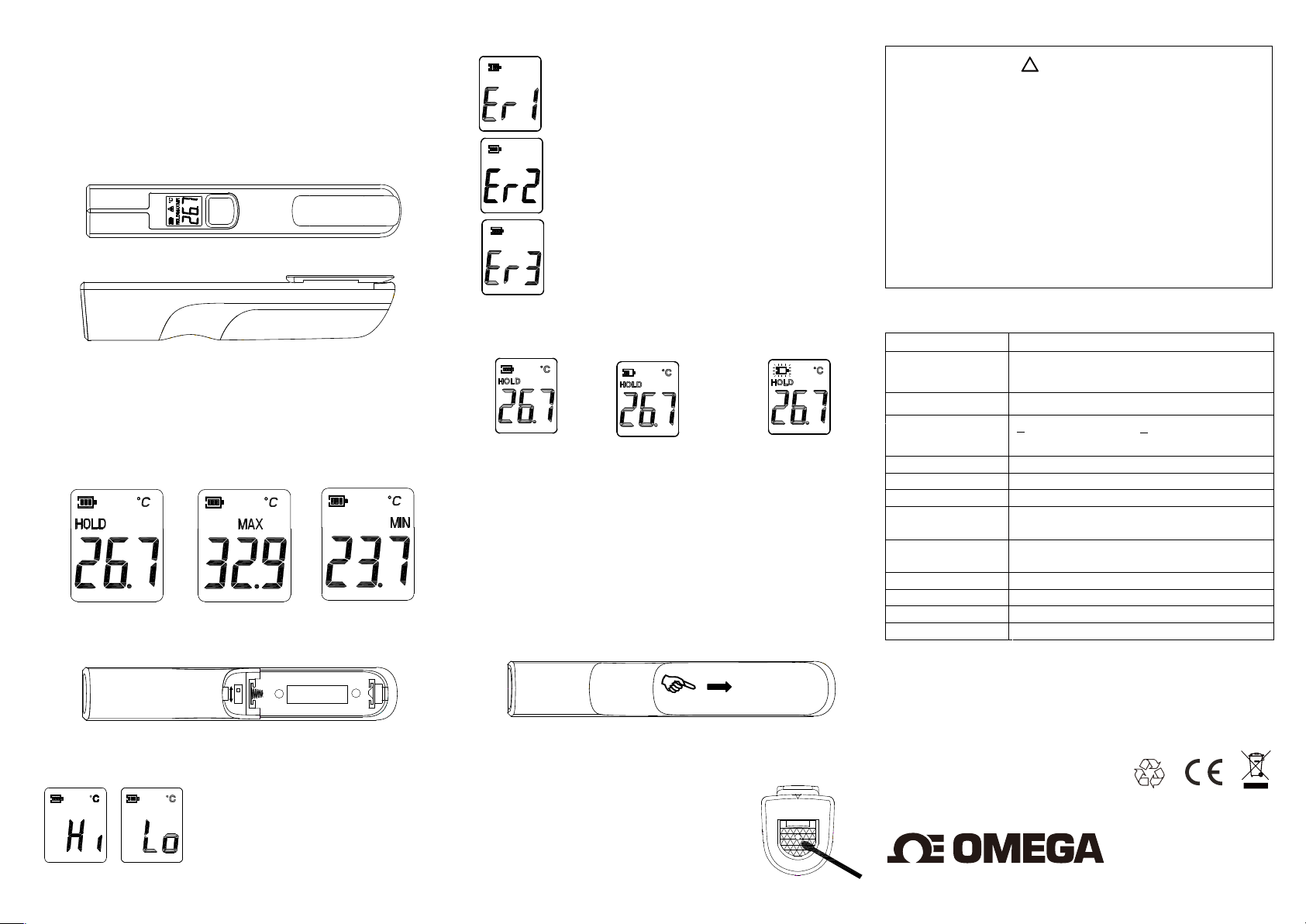
OS-PEN9 Infrared Thermometer
Operating Instructions
Congratulations on your selection of the OS-PEN9 thermometer.
The OS-PEN9 thermometer is a non-contact infrared thermometer
circular laser.
with
Top view
Side view
Operation:
1. Press ‘Meas.’ Button, directly to power OS-PEN9 on and
start measurement.
2. Release finger to hold the last reading and see the last
Maximum and Minimum readings every 2 seconds in turn.
Hold Maximum Minimum
o
o
F Measurement Unit Conversion
C /
Take off battery cover and use a pen to shift the scale switch
o
C
o
F
LCD Error Messages:
OS-PEN9 incorporates visual diagnostic messages as follows:
‘Hi’ or ’Lo’ is displayed when the
temperature being measured is
outside of the range of the
‘Hi’ when higher than
o
(932 )
F
o
-33
C (-27
SIZE AA or EQUIV
I
and ‘Lo’ when lower than
o
F).
+
instrument
o
+500
C
,
‘Er1’ is displayed when the ambient temperature of
the OS-PEN9 exceeds
o
(122
In both cases you should allow plenty of
F).
time (minimum 30 minutes
temperature 0 to
stabilize to the working/room
+40
o
C (32 to 104
o
‘Er2’ is displayed when the OS-PEN9
rapid changes in the ambient temperature.
to
For all other error messages it is necessary to reset
F).
o
o
–10
C (14
F)
or
) for the OS-PEN9 to
is exposed
+50
o
the OS-PEN9. To reset the OS-PEN9, turn the
instrument off, remove th
e battery and wait for a
minimum of one minute, reinsert the battery and
turn on the unit.
Battery:
OS-PEN9 incorporates visual low battery indication as
The
‘Battery OK’:
measurements
are possible.
Battery Replacement:
‘Battery Low’: battery
needs to be replaced,
measurements are possible.
follows:
‘Battery is depleted’:
measurements are
not possible.
When the ‘Low Battery’ icon indicates the battery is low, the
battery should be replaced immediately with a AA battery,
The battery is located under the battery cover at the rear of
the OS-PEN9.
.Slide the battery cover off.
.Remove the old battery and replace with a new AA battery.
Storage & Cleaning:
Always keep the reflecting mirrors and lens clean.
If mirrors and lens appear dirty, use a damp
cotton swab to wipe clean. Make sure lens
on the OS-PEN9 is completely dry before
using.
do NOT submerge in water.
The
OS-PEN9
in not waterproof –
Warning:
C
. The Temp function is not intended for taking measurements
that require a Life & Death decision or Safety related
applications.
. The temperature reading of OS-PEN9 indicates only the
surface temperature, and not the actual temperature of an
object.
. Keep the unit dry and away from any liquids and direct
sunlight or a very hot object. (to prevent heat damage to unit,
do not leave in the sun or next to very hot objects).
. Always make sure the probe lens is clean without any damage.
. Dispose of used battery promptly and keep away from
children.
﹗
Specification:
o
Range -33 to +500
Resolution
-9.9 to 99.9 C /
C(-27 to +932 o F)
o
F: 0.1 C /
Above 200 C or below-10 C /
Response Time
Infrared Accuracy +
Field of View (D:S)
Emissivity
Battery Life 30 hours continuous use
Operation temp.
and humidity
Storage temp.
and humidity
Battery AA
Display LCD
Dimensions 150l(L) x 25(W) x 27(H) mm
Weight
Guarantee:
1 second
2.0% of reading or +
greater
9:1 optics ratio
0.95 fixed
o
0 to 50
10 to 40 oC ; < 65 RH%
C; < 90RH%
74grams including battery
2.0
o
The OS-PEN9 is guaranteed for a period of one year from the
of purchase against mechanical and electrical
date
manufacturing
inside the
person voids
unauthorized
defects. There are no user serviceable parts
instrument. Any attempt to repair unit by an
the warranty.
®
Made in China
ooo
F
o
F : 1 C / F
C which one is
oo
oo
 Loading...