

Page 1
OS306-Series
OS306-Series QUICK Start Guide
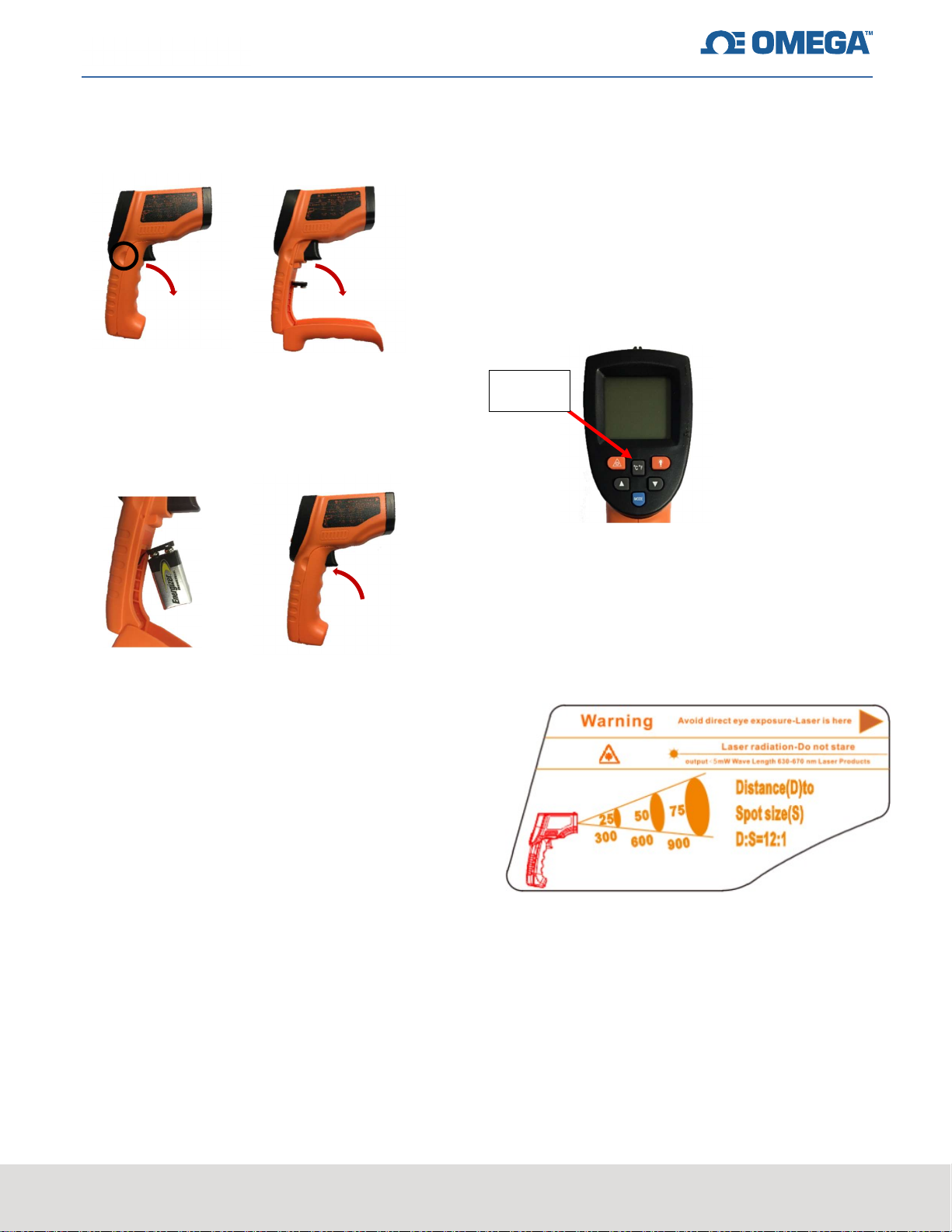
Battery Installation
Switch between Celsius and Fahrenheit
The default setting for the temperature unit is in
Celsius. Please follow the below steps to change
the temperature units to Fahrenheit.
Press the “°C °F” Button
You should now see the temperature
displayed in ⁰F (Fahrenheit)
1. Locate the notches on the side of the unit’s handle
and pull the front of the handle forwards as shown
above.
2. Attach a 9V battery (provided) to the black
connector inside. The battery should snap into
place. Swing the front of the handle back upwards
to close the unit.
How to turn on the unit
Press the trigger of device to power on
Press °C °F
button
Field of View
This unit has a distance ratio of 12:1
When measuring a surface 300 mm away, a
25 mm area will be measured.
Quick Measurement
Point thermometer at a target surface
Pull and hold the trigger to begin scanning
Release the trigger to stop scanning
The data will be held for 30 seconds then
the unit will power off
Contact Information
If you need technical support, please call 1-888826-6342.
CONFIDENTIAL
omega.com
 Loading...