

Page 1

www.omega.com
e-mail: [email protected]
User’s Guide
OME-PIO-D144/D96/D56/D48/D24
PCI-Bus Digital I/O
Boards
Software Manual
Shop online at
Page 2

Servicing North America:
USA: One Omega Drive, P.O. Box 4047
ISO 9001 Certified Stamford CT 06907-0047
TEL: (203) 359-1660 FAX: (203) 359-7700
e-mail: [email protected]
Canada: 976 Bergar
Laval (Quebec) H7L 5A1, Canada
TEL: (514) 856-6928 FAX: (514) 856-6886
e-mail: [email protected]
For immediate technical or application assistance:
USA and Canada: Sales Service: 1-800-826-6342 / 1-800-TC-OMEGA
®
Customer Service: 1-800-622-2378 / 1-800-622-BEST
®
Engineering Service: 1-800-872-9436 / 1-800-USA-WHEN
®
TELEX: 996404 EASYLINK: 62968934 CABLE: OMEGA
Mexico: En Espan˜ ol: (001) 203-359-7803 e-mail: [email protected]
FAX: (001) 203-359-7807 [email protected]
Servicing Europe:
Benelux: Postbus 8034, 1180 LA Amstelveen, The Netherlands
TEL: +31 (0)20 3472121 FAX: +31 (0)20 6434643
Toll Free in Benelux: 0800 0993344
e-mail: [email protected]
Czech Republic: Frystatska 184, 733 01 Karviná, Czech Republic
France: 11, rue Jacques Cartier, 78280 Guyancourt, France
TEL: +33 (0)1 61 37 29 00 FAX: +33 (0)1 30 57 54 27
Toll Free in France: 0800 466 342
e-mail: [email protected]
Germany/Austria: Daimlerstrasse 26, D-75392 Deckenpfronn, Germany
TEL: +49 (0)7056 9398-0 FAX: +49 (0)7056 9398-29
Toll Free in Germany: 0800 639 7678
e-mail: [email protected]
United Kingdom: One Omega Drive, River Bend Technology Centre
ISO 9002 Certified Northbank, Irlam, Manchester
M44 5BD United Kingdom
TEL: +44 (0)161 777 6611 FAX: +44 (0)161 777 6622
Toll Free in United Kingdom: 0800-488-488
e-mail: [email protected]
OMEGAnet®Online Service Internet e-mail
www.omega.com [email protected]
It is the policy of OMEGA to comply with all worldwide safety and EMC/EMI regulations that
apply. OMEGA is constantly pursuing certification of its products to the European New Approach
Directives. OMEGA will add the CE mark to every appropriate device upon certification.
The information contained in this document is believed to be correct, but OMEGA Engineering, Inc. accepts
no liability for any errors it contains, and reserves the right to alter specifications without notice.
WARNING: These products are not designed for use in, and should not be used for, patient-connected applications.
Page 3

OME-PIO-DIO Software Manual [Win 95/98, NT and 2000]
OME-PIO-DIO
Software Manual
[For Windows 95/98, NT and 2000]
Table of Contents
1. REFERENCE................................................................................................................................ 3
1.1 USER'S MANUAL ...............................................................................................................3
1.2 ERROR CODE......................................................................................................................4
2. DECLARATION FILES .............................................................................................................. 5
2.1 PIODIO.H .............................................................................................................................6
2.2 PIOD48U.CPP ..................................................................................................................... 11
2.3 PIODIO.BAS....................................................................................................................... 13
2.4 PIOD48U.BAS..................................................................................................................... 18
2.5 PIODIO.PAS....................................................................................................................... 20
2.6 PIOD48U.PAS..................................................................................................................... 28
3. FUNCTION DESCRIPTIONS .................................................................................................. 31
3.1 FUNCTIONS OF TEST ................................................................................................... 32
3.1.1 PIODIO_GetDllVersion ........................................................................................32
3.1.2 PIODIO_ShortSub................................................................................................. 33
3.1.3 PIODIO_FloatSub .................................................................................................33
3.2
FUNCTIONS OF I/O........................................................................................................... 35
3.2.1 PIODIO_OutputByte ............................................................................................. 35
3.2.2 PIODIO_InputByte................................................................................................ 35
3.2.3 PIODIO_OutputWord............................................................................................ 37
3.2.4 PIODIO_InputWord ..............................................................................................37
Date Mar-28-2001 Ver 1.40.00 Page 1
Page 4

OME-PIO-DIO Software Manual [Win 95/98, NT and 2000]
3.3 FUNCTIONS OF DRIVER................................................................................................. 39
3.3.1 PIODIO_GetDriverVersion ................................................................................... 39
3.3.2 PIODIO_DriverInit................................................................................................ 39
3.3.3 PIODIO_DriverClose ............................................................................................41
3.3.4 PIODIO_GetConfigAddressSpace.........................................................................41
3.4 INTERRUPT FUNCTION .................................................................................................. 43
3.4.1 PIODIO_IntResetCount......................................................................................... 43
3.4.2 PIODIO_IntGetCount............................................................................................ 43
3.4.3 PIODIO_IntInstall .................................................................................................45
3.4.4 PIODIO_IntRemove .............................................................................................. 46
3.4.5 Architecture of Interrupt mode .............................................................................. 47
3.5
OME-PIO-D48 INTERRUPT .............................................................................................50
3.5.1 PIOD48_IntInstall.................................................................................................. 50
3.5.2 PIOD48_IntRemove ..............................................................................................52
3.5.3 PIOD48_IntGetCount ............................................................................................ 52
3.5.4 PIOD48_IntGetActiveFlag .................................................................................... 53
3.6
OME-PIO-D48 COUNTER.................................................................................................54
3.6.1 PIOD48_SetCounter .............................................................................................. 54
3.6.2 PIOD48_ReadCounter ........................................................................................... 54
3.6.3 PIOD48_SetCounterA ........................................................................................... 56
3.6.4 PIOD48_ReadCounterA ........................................................................................ 56
3.7
OME-PIO-D64 COUNTER.................................................................................................58
3.7.1 PIOD64_SetCounter .............................................................................................. 58
3.7.2 PIOD64_ReadCounter ........................................................................................... 58
3.7.3 PIOD64_SetCounterA ........................................................................................... 60
3.7.4 PIOD64_ReadCounterA ........................................................................................ 60
3.8
OME-PIO-D48 FREQUENCY ...........................................................................................62
3.8.1 PIOD48_Freq......................................................................................................... 62
3.8.2 PIOD48_FreqA...................................................................................................... 62
PROGRAM ARCHITECTURE................................................................................................ 64
4.
Date Mar-28-2001 Ver 1.40.00 Page 2
Page 5

OME-PIO-DIO Software Manual [Win 95/98, NT and 2000]
1. Reference
1.1 USER'S MANUAL
Please refer to the following user manuals:
• PnPInstall.pdf:
Describes how to install the PnP (Plug and Play) driver for PCI card
under Windows 95/98/2000.
• SoftInst.pdf:
Describes how to install the software package under Windows
95/98/NT/2000.
• CallDll.pdf:
Describes how to call the DLL functions with VC++5, VB5, Delphi3
and Borland C++ Builder 3.
• ResCheck.pdf:
Describes how to check the resources I/O Port address, IRQ number
and DMA number for add-on cards under Windows 95/98/NT/2000.
• OME-PIO-D144.pdf:
OME-PIO-D144 Hardware manual.
• OME-PIO-D48.pdf:
OME-PIO-D48 Hardware manual.
• OME-PIO-D56.pdf:
OME-PIO-D56/OME-PIO-D24 Hardware manual.
• OME-PIO-D96.pdf:
OME-PIO-D96 Hardware manual.
Date Mar-28-2001 Ver 1.40.00 Page 3
Page 6
OME-PIO-DIO Software Manual [Win 95/98, NT and 2000]
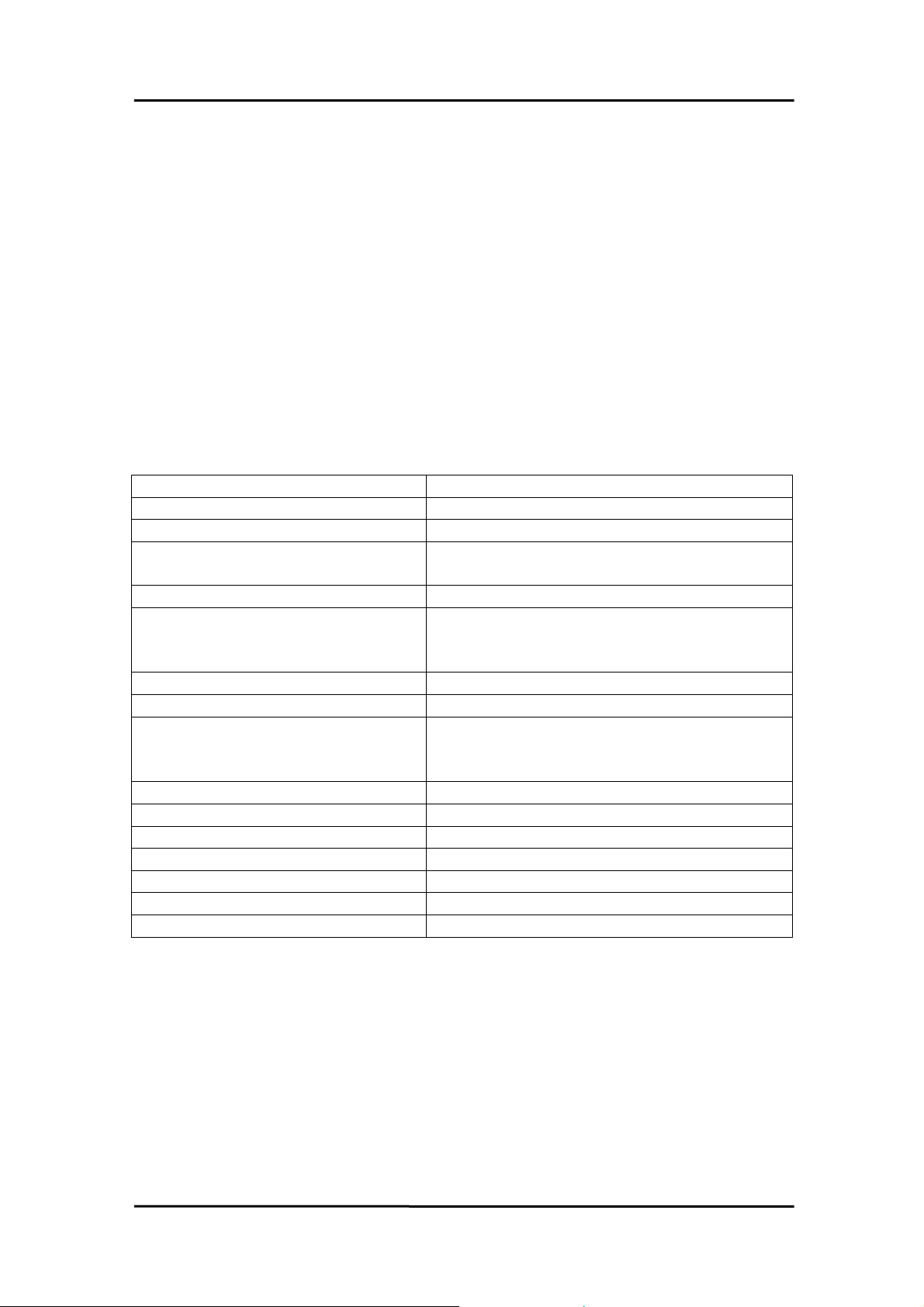
1.2 ERROR CODE
For the most errors, it is recommended to check:
1. Does the device driver installs successful?
2. Does the card have plugged?
3. Does the card conflicts with other device?
4. Close other applications to free the system resources.
5. Try to use another slot to plug the card.
6. Restart your system to try again.
Error Code Error Description
PIODIO_NoError OK
PIODIO_DriverOpenError Device driver can't be opened.
PIODIO_DriverNoOpen Users have to call the PIODIO_DriverInit()
function firstly.
PIODIO_GetDriverVersionError Can not communicate with device driver.
PIODIO_InstallIrqError Can't communicate with device driver or
the system has no enough system
resources for interrupt services.
PIODIO_ClearIntCountError Can not communicate with device driver.
PIODIO_GetIntCountError Can not communicate with device driver.
PIODIO_RemoveIrqError Can not communicate with device driver
or the interrupt service routine not
installed!
PIODIO_FindBoardError Check your card.
PIODIO_ExceedBoardNumber The Max. boards is: 8
PIODIO_ResetError Can not communicate with device driver.
PIODIO_IrqMaskError Irq-Mask is 1, 2, 4, 8 or 1 to 0xF.
PIODIO_ActiveModeError Active-Mode is 1,2 or 1 to 3.
PIODIO_GetActiveFlagError Can not communicate with device driver.
PIODIO_ActiveFlagEndOfQueue The flag queue is empty.
Date Mar-28-2001 Ver 1.40.00 Page 4
Page 7

OME-PIO-DIO Software Manual [Win 95/98, NT and 2000]
2. Declaration Files
|--\Driver Å some device driver
|--\BCB3 Å for Borland C++ Builder 3
| |--\PIODIO.H Å Header file
| |--\PIOD48u.CPP Å Subroutine for OME-PIO-D48
| +--\PIODIO.LIB Å Linkage library for BCB3 only
|
|--\Delphi3 Å for Delphi 3
| |--\PIOD48u.PAS Å Subroutine for OME-PIO-D48
| +--\PIODIO.PAS Å Declaration file
|
|--\VB5 Å for Visual Basic 5
| |--\PIOD48u.BAS Å Subroutine for OME-PIO-D48
| +--\PIODIO.BAS Å Declaration file
|
+--\VC5 Å for Visual C++ 5
|--\PIODIO.H Å Header file
+--\PIODIO.LIB Å Linkage library for VC5 only
Date Mar-28-2001 Ver 1.40.00 Page 5
Page 8

OME-PIO-DIO Software Manual [Win 95/98, NT and 2000]
2.1 PIODIO.H
#ifdef __cplusplus
#define EXPORTS extern "C" __declspec (dllimport)
#else
#define EXPORTS
#endif
// return code
#define PIODIO_NoError 0
#define PIODIO_DriverOpenError 1
#define PIODIO_DriverNoOpen 2
#define PIODIO_GetDriverVersionError 3
#define PIODIO_InstallIrqError 4
#define PIODIO_ClearIntCountError 5
#define PIODIO_GetIntCountError 6
#define PIODIO_RegisterApcError 7
#define PIODIO_RemoveIrqError 8
#define PIODIO_FindBoardError 9
#define PIODIO_ExceedBoardNumber 10
#define PIODIO_ResetError 11
#define PIODIO_IrqMaskError 12
#define PIODIO_ActiveModeError 13
#define PIODIO_GetActiveFlagError 14
#define PIODIO_ActiveFlagEndOfQueue 15
// define the interrupt signal source
#define PIOD144_P2C0 0 // pin29 of CN1(37 pin D-type, pin1 to pin37)
#define PIOD144_P2C1 1 // pin28 of CN1(37 pin D-type, pin1 to pin37)
#define PIOD144_P2C2 2 // pin27 of CN1(37 pin D-type, pin1 to pin37)
#define PIOD144_P2C3 3 // pin26 of CN1(37 pin D-type, pin1 to pin37)
// Interrupt Channel for OME-PIO-D48
#define PIOD48_INTCH0 1 // INT_CHAN_0
#define PIOD48_INTCH1 2 // INT_CHAN_1
#define PIOD48_INTCH2 4 // INT_CHAN_2
Date Mar-28-2001 Ver 1.40.00 Page 6
Page 9

OME-PIO-DIO Software Manual [Win 95/98, NT and 2000]
#define PIOD48_INTCH3 8 // INT_CHAN_3
// Interrupt ActiveMode for PIOD48_XXX functions
#define PIOD48_ActiveLow 1 // Active When Low
#define PIOD48_ActiveHigh 2 // Active When High
// to trigger a interrupt when high -> low
#define PIODIO_ActiveLow 0
// to trigger a interrupt when low -> high
#define PIODIO_ActiveHigh 1
Date Mar-28-2001 Ver 1.40.00 Page 7
Page 10

OME-PIO-DIO Software Manual [Win 95/98, NT and 2000]
// ID
#define PIO_D144 0x800100 // 144 * D/I/O
#define PIO_D96 0x800110 // 96 * D/I/O
#define PIO_D64 0x800120 // 64 * D/I/O
#define PIO_D56 0x800140 // D24 + 16I + 16O
#define PIO_D48 0x800130 // 48 * D/I/O
#define PIO_D24 0x800140 // 24 * D/I/O
// Test functions
EXPORTS float CALLBACK PIODIO_FloatSub(float fA, float fB);
EXPORTS short CALLBACK PIODIO_ShortSub(short nA, short nB);
EXPORTS WORD CALLBACK PIODIO_GetDllVersion(void);
// Driver functions
EXPORTS WORD CALLBACK PIODIO_DriverInit(void);
EXPORTS void CALLBACK PIODIO_DriverClose(void);
EXPORTS WORD CALLBACK PIODIO_SearchCard
(WORD *wBoards, DWORD dwPIOCardID);
EXPORTS WORD CALLBACK PIODIO_GetDriverVersion
(WORD *wDriverVersion);
EXPORTS WORD CALLBACK PIODIO_GetConfigAddressSpace
(WORD wBoardNo, DWORD *wAddrBase, WORD *wIrqNo,
WORD *wSubVendor, WORD *wSubDevice, WORD *wSubAux,
WORD *wSlotBus, WORD *wSlotDevice);
EXPORTS WORD CALLBACK PIODIO_ActiveBoard( WORD wBoardNo );
EXPORTS WORD CALLBACK PIODIO_WhichBoardActive(void);
// DIO functions
EXPORTS void CALLBACK PIODIO_OutputWord
(DWORD wPortAddress, DWORD wOutData);
EXPORTS void CALLBACK PIODIO_OutputByte
(DWORD wPortAddr, WORD bOutputValue);
EXPORTS DWORD CALLBACK PIODIO_InputWord
(DWORD wPortAddress);
EXPORTS WORD CALLBACK PIODIO_InputByte(DWORD wPortAddr);
// Interrupt functions
Date Mar-28-2001 Ver 1.40.00 Page 8
Page 11

OME-PIO-DIO Software Manual [Win 95/98, NT and 2000]
EXPORTS WORD CALLBACK PIODIO_IntInstall(WORD wBoardNo,
HANDLE *hEvent, WORD wInterruptSource, WORD wActiveMode);
EXPORTS WORD CALLBACK PIODIO_IntRemove(void);
EXPORTS WORD CALLBACK PIODIO_IntResetCount(void);
EXPORTS WORD CALLBACK PIODIO_IntGetCount(DWORD *dwIntCount);
Date Mar-28-2001 Ver 1.40.00 Page 9
Page 12

OME-PIO-DIO Software Manual [Win 95/98, NT and 2000]
// PIOD48 Counter functions
EXPORTS void CALLBACK PIOD48_SetCounter
(DWORD dwBase, WORD wCounterNo, WORD bCounterMode,
DWORD wCounterValue);
EXPORTS DWORD CALLBACK PIOD48_ReadCounter
(DWORD dwBase, WORD wCounterNo, WORD bCounterMode);
EXPORTS void CALLBACK PIOD48_SetCounterA
(WORD wCounterNo, WORD bCounterMode, DWORD wCounterValue);
EXPORTS DWORD CALLBACK PIOD48_ReadCounterA(WORD
wCounterNo, WORD bCounterMode);
// PIOD48 Interrupt functions
EXPORTS WORD CALLBACK PIOD48_IntInstall
(WORD wBoardNo, HANDLE *hEvent, WORD wIrqMask, WORD
wActiveMode);
EXPORTS WORD CALLBACK PIOD48_IntRemove();
EXPORTS WORD CALLBACK PIOD48_IntGetActiveFlag
(WORD *bActiveHighFlag, WORD *bActiveLowFlag);
EXPORTS WORD CALLBACK PIOD48_IntGetCount(DWORD *dwIntCount);
// PIOD64 Counter functions
EXPORTS void CALLBACK PIOD64_SetCounter
(DWORD dwBase, WORD wCounterNo, WORD bCounterMode,
DWORD wCounterValue);
EXPORTS DWORD CALLBACK PIOD64_ReadCounter
(DWORD dwBase, WORD wCounterNo, WORD bCounterMode);
EXPORTS void CALLBACK PIOD64_SetCounterA
(WORD wCounterNo, WORD bCounterMode, DWORD wCounterValue);
EXPORTS DWORD CALLBACK PIOD64_ReadCounterA(WORD
wCounterNo, WORD bCounterMode);
// PIOD48 Frequency Measurement functions
EXPORTS DWORD CALLBACK PIOD48_Freq(DWORD dwBase);
EXPORTS DWORD CALLBACK PIOD48_FreqA();
Date Mar-28-2001 Ver 1.40.00 Page 10
Page 13

OME-PIO-DIO Software Manual [Win 95/98, NT and 2000]
2.2 PIOD48u.CPP
// ******************************************************************
// Initialize the INT2(COut0) Interrupt to High
// this will uses the Counter0 to trigger the interrupt.
//
// wAddrBase : The base address of OME-PIO-D48,
// please refer to function 'PIODIO_GetConfigAddressSpace()'.
// wClockIntConfig : The "Clock/Int Control Register" configuration code,
// refer to section "Read/Write Clock/Int Control Register"
// in the hardware's manaul.
// wCounter0Config : The configuration code of Counter0
// wCounter0Value : 0 to &hFFFF, the value is used to set the Counter0
// Only the low WORD (16-bits) is valid.
// ******************************************************************
void PIOD48u_INT2InitialHigh(DWORD wAddrBase, WORD wClockIntConfig,
WORD wCounter0Config, DWORD wCounter0Value)
{
PIODIO_OutputByte(wAddrBase+0xf0, wClockIntConfig);
//--- program the trigger freq as P2C0 div wCounter0Value -- //--- For example: if freq of P2C0 is 100Hz, then the -- //--- Freq for COut0 as P2C0/wCounter0Value -- wCounter0Config = (WORD)( (wCounter0Config >> 1) & 0x07 ); // counter
mode ?
PIOD48_SetCounter(wAddrBase, 0, wCounter0Config, wCounter0Value); //
Counter 0
}
Date Mar-28-2001 Ver 1.40.00 Page 11
Page 14

OME-PIO-DIO Software Manual [Win 95/98, NT and 2000]
// ******************************************************************
// Initialize the INT3(COut2) Interrupt to High,
// this will uses the Counter1 and Counter2 to trigger the interrupt.
//
// wAddrBase : The base address of OME-PIO-D48,
// please refer to function 'PIODIO_GetConfigAddressSpace()'.
// wClockIntConfig : The "Clock/Int Control Register" configuration code,
// refer to section "Read/Write Clock/Int Control Register"
// in the hardware's manaul.
// wCounter1Config : The configuration code of Counter1
// wCounter1Value : 0 to &hFFFF, the value is used to set the Counter1
// Only the low WORD (16-bits) is valid.
// wCounter2Config : The configuration code of Counter2
// wCounter2Value : 0 to &hFFFF, the value is used to set the Counter2
// Only the low WORD (16-bits) is valid.
// ******************************************************************
void PIOD48u_INT3InitialHigh(DWORD wAddrBase, WORD wClockIntConfig,
WORD wCounter1Config, DWORD wCounter1Value,
WORD wCounter2Config, DWORD wCounter2Value )
{
PIODIO_OutputByte(wAddrBase+0xf0, wClockIntConfig);
// Cout2 as ?hz/( wCounter1Value * wCounter2Value)
wCounter1Config =(WORD)( (wCounter1Config >> 1) & 0x07 ); // counter
mode
wCounter2Config =(WORD)( (wCounter2Config >> 1) & 0x07 ); // counter
mode
PIOD48_SetCounter(wAddrBase, 1, wCounter1Config, wCounter1Value); //
Counter 1
PIOD48_SetCounter(wAddrBase, 2, wCounter2Config, wCounter2Value); //
Counter 2
// wait for Cout2 to high
for( ; ; )
{
if( (PIODIO_InputByte(wAddrBase+0x07)&0x08) != 0 )
break;
}
}
Date Mar-28-2001 Ver 1.40.00 Page 12
Page 15

OME-PIO-DIO Software Manual [Win 95/98, NT and 2000]
2.3 PIODIO.BAS
Attribute VB_Name = "PIODIO"
Global Const PIODIO_NoError = 0
Global Const PIODIO_DriverOpenError = 1
Global Const PIODIO_DriverNoOpen = 2
Global Const PIODIO_GetDriverVersionError = 3
Global Const PIODIO_InstallIrqError = 4
Global Const PIODIO_ClearIntCountError = 5
Global Const PIODIO_GetIntCountError = 6
Global Const PIODIO_RegisterApcError = 7
Global Const PIODIO_RemoveIrqError = 8
Global Const PIODIO_FindBoardError = 9
Global Const PIODIO_ExceedBoardNumber = 10
Global Const PIODIO_ResetError = 11
Global Const PIODIO_IrqMaskError = 12
Global Const PIODIO_ActiveModeError = 13
Global Const PIODIO_GetActiveFlagError = 14
Global Const PIODIO_ActiveFlagEndOfQueue = 15
' define the interrupt signal source
Global Const PIOD144_P2C0 = 0 ' pin29 of CN1(37 pin D-type, pin1 to pin37)
Global Const PIOD144_P2C1 = 1 ' pin28 of CN1(37 pin D-type, pin1 to pin37)
Global Const PIOD144_P2C2 = 2 ' pin27 of CN1(37 pin D-type, pin1 to pin37)
Global Const PIOD144_P2C3 = 3 ' pin26 of CN1(37 pin D-type, pin1 to pin37)
' Interrupt Channel for OME-PIO-D48
Global Const PIOD48_INTCH0 = 1 ' INT_CHAN_0
Global Const PIOD48_INTCH1 = 2 ' INT_CHAN_1
Global Const PIOD48_INTCH2 = 4 ' INT_CHAN_2
Global Const PIOD48_INTCH3 = 8 ' INT_CHAN_3
' Interrupt ActiveMode for PIOD48_XXX functions
Global Const PIOD48_ActiveLow = 1 ' Active When Low
Global Const PIOD48_ActiveHigh = 2 ' Active When High
Date Mar-28-2001 Ver 1.40.00 Page 13
Page 16

OME-PIO-DIO Software Manual [Win 95/98, NT and 2000]
' to trigger a interrupt when high -> low
Global Const PIODIO_ActiveLow = 0
' to trigger a interrupt when low -> high
Global Const PIODIO_ActiveHigh = 1
Date Mar-28-2001 Ver 1.40.00 Page 14
Page 17

OME-PIO-DIO Software Manual [Win 95/98, NT and 2000]
' ID
Global Const PIO_D144 = &H800100 ' 144 * D/I/O
Global Const PIO_D96 = &H800110 ' 96 * D/I/O
Global Const PIO_D64 = &H800120 ' 64 * D/I/O
Global Const PIO_D56 = &H800140 ' D24 + 16I + 16O
Global Const PIO_D48 = &H800130 ' 48 * D/I/O
Global Const PIO_D24 = &H800140 ' 24 * D/I/O
' The Test functions
Declare Function PIODIO_ShortSub Lib "PIODIO.dll" (ByVal a As Integer,
ByVal b As Integer) As Integer
Declare Function PIODIO_FloatSub Lib "PIODIO.dll" (ByVal a As Single,
ByVal b As Single) As Single
Declare Function PIODIO_GetDllVersion Lib "PIODIO.dll" () As Integer
' The Driver functions
Declare Function PIODIO_DriverInit Lib "PIODIO.dll" () As Integer
Declare Sub PIODIO_DriverClose Lib "PIODIO.dll" ()
Declare Function PIODIO_SearchCard Lib "PIODIO.dll" (wBoards As Integer,
ByVal dwPIOPISOCardID As Long) As Integer
Declare Function PIODIO_GetDriverVersion Lib "PIODIO.dll" (wDriverVersion
As Integer) As Integer
Declare Function PIODIO_GetConfigAddressSpace Lib "PIODIO.dll" ( _
ByVal wBoardNo As Integer, wAddrBase As Long, wIrqNo As Integer, _
wSubVendor As Integer, wSubDevice As Integer, wSubAux As Integer, _
wSlotBus As Integer, wSlotDevice As Integer) As Integer
Declare Function PIODIO_ActiveBoard Lib "PIODIO.dll" (ByVal wBoardNo As
Integer) As Integer
Declare Function PIODIO_WhichBoardActive Lib "PIODIO.dll" () As Integer
' DIO functions
Declare Sub PIODIO_OutputByte Lib "PIODIO.dll" (ByVal address As Long,
ByVal dataout As Integer)
Declare Sub PIODIO_OutputWord Lib "PIODIO.dll" (ByVal address As Long,
Date Mar-28-2001 Ver 1.40.00 Page 15
Page 18

OME-PIO-DIO Software Manual [Win 95/98, NT and 2000]
ByVal dataout As Long)
Declare Function PIODIO_InputByte Lib "PIODIO.dll" (ByVal address As Long)
As Integer
Declare Function PIODIO_InputWord Lib "PIODIO.dll" (ByVal address As
Long) As Long
' Interrupt functions
Declare Function PIODIO_IntInstall Lib "PIODIO.dll" (ByVal wBoard As Integer,
hEvent As Long, _
ByVal wInterruptSource As Integer, ByVal wActiveMode As Integer) As
Integer
Declare Function PIODIO_IntRemove Lib "PIODIO.dll" () As Integer
Declare Function PIODIO_IntGetCount Lib "PIODIO.dll" (dwIntCount As Long)
As Integer
Declare Function PIODIO_IntResetCount Lib "PIODIO.dll" () As Integer
' PIOD48 Counter functions
Declare Sub PIOD48_SetCounter Lib "PIODIO.dll" _
(ByVal dwBase As Long, ByVal wCounterNo As Integer, _
ByVal bCounterMode As Integer, ByVal wCounterValue As Long)
Declare Function PIOD48_ReadCounter Lib "PIODIO.dll" _
(ByVal dwBase As Long, ByVal wCounterNo As Integer, _
ByVal bCounterMode As Integer) As Long
Declare Sub PIOD48_SetCounterA Lib "PIODIO.dll" _
(ByVal wCounterNo As Integer, ByVal bCounterMode As Integer, _
ByVal wCounterValue As Long)
Declare Function PIOD48_ReadCounterA Lib "PIODIO.dll" _
(ByVal wCounterNo As Integer, ByVal bCounterMode As Integer) As
Long
' PIOD48 Interrupt functions
Declare Function PIOD48_IntInstall Lib "PIODIO.dll" _
(ByVal wBoardNo As Integer, hEvent As Long, _
ByVal wIrqMask As Integer, ByVal wActiveMode As Integer) As Integer
Declare Function PIOD48_IntRemove Lib "PIODIO.dll" () As Integer
Declare Function PIOD48_IntGetActiveFlag Lib "PIODIO.dll" _
(bActiveHighFlag As Integer, bActiveLowFlag As Integer) As Integer
Declare Function PIOD48_IntGetCount Lib "PIODIO.dll" _
Date Mar-28-2001 Ver 1.40.00 Page 16
Page 19

OME-PIO-DIO Software Manual [Win 95/98, NT and 2000]
(dwIntCount As Long) As Integer
' PIOD64 Counter functions
Declare Sub PIOD64_SetCounter Lib "PIODIO.dll" _
(ByVal dwBase As Long, ByVal wCounterNo As Integer, _
ByVal bCounterMode As Integer, ByVal wCounterValue As Long)
Declare Function PIOD64_ReadCounter Lib "PIODIO.dll" _
(ByVal dwBase As Long, ByVal wCounterNo As Integer, _
ByVal bCounterMode As Integer) As Long
Declare Sub PIOD64_SetCounterA Lib "PIODIO.dll" _
(ByVal wCounterNo As Integer, ByVal bCounterMode As Integer, _
ByVal wCounterValue As Long)
Declare Function PIOD64_ReadCounterA Lib "PIODIO.dll" _
(ByVal wCounterNo As Integer, ByVal bCounterMode As Integer) As
Long
' PIOD48 Frequency Measurement Functons
Declare Function PIOD48_Freq Lib "PIODIO.dll" _
(ByVal dwBase As Long) As Long
Declare Function PIOD48_FreqA Lib "PIODIO.dll" () As Long
Date Mar-28-2001 Ver 1.40.00 Page 17
Page 20

OME-PIO-DIO Software Manual [Win 95/98, NT and 2000]
2.4 PIOD48u.BAS
Attribute VB_Name = "PIOD48u"
Option Explicit
'// ******************************************************************
'// Initialize the INT2(COut0) Interrupt to High
'// this will uses the Counter0 to trigger the interrupt.
'//
'// wAddrBase : The base address of OME-PIO-D48,
'// please refer to function 'PIODIO_GetConfigAddressSpace()'.
'// wClockIntConfig : The "Clock/Int Control Register" configuration code,
'// refer to section "Read/Write Clock/Int Control Register"
'// in the hardware's manaul.
'// wCounter0Config : The configuration code of Counter0
'// wCounter0Value : 0 to &hFFFF, the value is used to set the Counter0
'// Only the low WORD (16-bits) is valid.
'// ******************************************************************
Sub PIOD48u_INT2InitialHigh(ByVal wAddrBase As Long, ByVal
wClockIntConfig As Integer, _
ByVal wCounter0Config As Integer, ByVal wCounter0Value As Long)
PIODIO_OutputByte (wAddrBase + &HF0), wClockIntConfig
'//--- program the trigger freq as P2C0 div wCounter0Value -- '//--- For example: if freq of P2C0 is 100Hz, then the -- '//--- Freq for COut0 as P2C0/wCounter0Value -- wCounter0Config = (wCounter0Config \ 2) And &H7 ' Counter mode
PIOD48_SetCounter wAddrBase, 0, wCounter0Config, wCounter0Value
'Counter 0
End Sub
Date Mar-28-2001 Ver 1.40.00 Page 18
Page 21

OME-PIO-DIO Software Manual [Win 95/98, NT and 2000]
'// ******************************************************************
'// Initialize the INT3(COut2) Interrupt to High,
'// this will uses the Counter1 and Counter2 to trigger the interrupt.
'//
'// wAddrBase : The base address of OME-PIO-D48,
'// please refer to function 'PIODIO_GetConfigAddressSpace()'.
'// wClockIntConfig : The "Clock/Int Control Register" configuration code,
'// refer to section "Read/Write Clock/Int Control Register"
'// in the hardware's manaul.
'// wCounter1Config : The configuration code of Counter1
'// wCounter1Value : 0 to &hFFFF, the value is used to set the Counter1
'// Only the low WORD (16-bits) is valid.
'// wCounter2Config : The configuration code of Counter2
'// wCounter2Value : 0 to &hFFFF, the value is used to set the Counter2
'// Only the low WORD (16-bits) is valid.
'// ******************************************************************
Sub PIOD48u_INT3InitialHigh(ByVal wAddrBase As Long, ByVal
wClockIntConfig As Integer, _
ByVal wCounter1Config As Integer, ByVal wCounter1Value As Long, _
ByVal wCounter2Config As Integer, ByVal wCounter2Value As Long)
PIODIO_OutputByte (wAddrBase + &HF0), wClockIntConfig
'// Cout2 as ?hz/( wCounter1Value * wCounter2Value)
wCounter1Config = (wCounter1Config \ 2) And &H7 ' Counter mode
wCounter2Config = (wCounter2Config \ 2) And &H7 ' Counter mode
PIOD48_SetCounter wAddrBase, 1, wCounter1Config, wCounter1Value
'Counter 1
PIOD48_SetCounter wAddrBase, 2, wCounter2Config, wCounter2Value
'Counter 2
'// wait for Cout2 to high
While (True)
If ((PIODIO_InputByte(wAddrBase + &H7) And &H8) <> 0) Then
Exit Sub
End If
Wend
End Sub
Date Mar-28-2001 Ver 1.40.00 Page 19
Page 22

OME-PIO-DIO Software Manual [Win 95/98, NT and 2000]
2.5 PIODIO.PAS
unit PIODIO; { PIODIO.dll interface unit }
interface
const
PIODIO_NoError =0;
PIODIO_DriverOpenError =1;
PIODIO_DriverNoOpen =2;
PIODIO_GetDriverVersionError =3;
PIODIO_InstallIrqError =4;
PIODIO_ClearIntCountError =5;
PIODIO_GetIntCountError =6;
PIODIO_RegisterApcError =7;
PIODIO_RemoveIrqError =8;
PIODIO_FindBoardError =9;
PIODIO_ExceedBoardNumber =10;
PIODIO_ResetError =11;
PIODIO_IrqMaskError =12;
PIODIO_ActiveModeError =13;
PIODIO_GetActiveFlagError =14;
PIODIO_ActiveFlagEndOfQueue =15;
// define the interrupt signal source
PIOD144_P2C0 =0; // pin29 of CN1(37 pin D-type, pin1 to pin37)
PIOD144_P2C1 =1; // pin28 of CN1(37 pin D-type, pin1 to pin37)
PIOD144_P2C2 =2; // pin27 of CN1(37 pin D-type, pin1 to pin37)
PIOD144_P2C3 =3; // pin26 of CN1(37 pin D-type, pin1 to pin37)
// Interrupt Channel for OME-PIO-D48
PIOD48_INTCH0 =1; // INT_CHAN_0
PIOD48_INTCH1 =2; // INT_CHAN_1
PIOD48_INTCH2 =4; // INT_CHAN_2
PIOD48_INTCH3 =8; // INT_CHAN_3
Date Mar-28-2001 Ver 1.40.00 Page 20
Page 23

OME-PIO-DIO Software Manual [Win 95/98, NT and 2000]
// Interrupt ActiveMode for PIOD48_XXX functions
PIOD48_ActiveLow =1; // Active When Low
PIOD48_ActiveHigh =2; // Active When High
// to trigger a interrupt when high -> low
PIODIO_ActiveLow =0;
// to trigger a interrupt when low -> high
PIODIO_ActiveHigh =1;
Date Mar-28-2001 Ver 1.40.00 Page 21
Page 24

OME-PIO-DIO Software Manual [Win 95/98, NT and 2000]
// ID
PIO_D144 = $800100; // 144 * D/I/O
PIO_D96 = $800110; // 96 * D/I/O
PIO_D64 = $800120; // 64 * D/I/O
PIO_D56 = $800140; // D24 + 16I + 16O
PIO_D48 = $800130; // 48 * D/I/O
PIO_D24 = $800140; // 24 * D/I/O
// Test functions
function PIODIO_ShortSub(nA : smallint; nB : smallint) : smallint; StdCall;
function PIODIO_FloatSub(fA : single; fB : single) : single; StdCall;
function PIODIO_GetDllVersion : word; StdCall;
// Driver functions
function PIODIO_DriverInit : word; StdCall;
procedure PIODIO_DriverClose ; StdCall;
function PIODIO_SearchCard(var wBoards:WORD;
dwPIOPISOCardID:LongInt):WORD; StdCall;
function PIODIO_GetDriverVersion(var wDriverVer: word) : word; StdCall;
function PIODIO_GetConfigAddressSpace(wBoardNo:word;
var wAddrBase:LongInt; var wIrqNo:word;
var wSubVerdor:word; var wSubDevice:word; var wSubAux:word;
var wSlotBus:word; var wSlotDevice:word ): word; StdCall;
function PIODIO_ActiveBoard(wBoardNo:Word) : WORD; StdCall;
function PIODIO_WhichBoardActive : WORD; StdCall;
// DIO functions
procedure PIODIO_OutputByte(wPortAddr : LongInt; bOutputVal : Word);
StdCall;
procedure PIODIO_OutputWord(wPortAddr : LongInt; wOutputVal : LongInt);
StdCall;
function PIODIO_InputByte(wPortAddr : LongInt ) : word; StdCall;
function PIODIO_InputWord(wPortAddr : LongInt ) : LongInt; StdCall;
// Interrupt functions
function PIODIO_IntInstall(wBoard:Word; var hEvent:LongInt;
Date Mar-28-2001 Ver 1.40.00 Page 22
Page 25

OME-PIO-DIO Software Manual [Win 95/98, NT and 2000]
wInterruptSource:Word; wActiveMode:Word):Word; StdCall;
function PIODIO_IntRemove : WORD; StdCall;
function PIODIO_IntGetCount(var dwIntCount:LongInt) : WORD; StdCall;
function PIODIO_IntResetCount : WORD; StdCall;
Date Mar-28-2001 Ver 1.40.00 Page 23
Page 26

OME-PIO-DIO Software Manual [Win 95/98, NT and 2000]
// PIOD48 Counter functions
procedure PIOD48_SetCounter( dwBase:LongInt; wCounterNo:WORD;
bCounterMode:WORD; wCounterValue:LongInt); StdCall;
function PIOD48_ReadCounter( dwBase:LongInt; wCounterNo:WORD;
bCounterMode:WORD):LongInt; StdCall;
procedure PIOD48_SetCounterA(wCounterNo:WORD;
bCounterMode:WORD; wCounterValue:LongInt); StdCall;
function PIOD48_ReadCounterA(wCounterNo:WORD;
bCounterMode:WORD):LongInt; StdCall;
// PIOD48 Interrupt functions
function PIOD48_IntInstall( wBoardNo:WORD; var hEvent:LongInt;
wIrqMask:WORD;
wActiveMode:WORD) : WORD; StdCall;
function PIOD48_IntRemove : WORD; StdCall;
function PIOD48_IntGetActiveFlag( var bActiveHighFlag:WORD; var
bActiveLowFlag:WORD) : WORD; StdCall;
function PIOD48_IntGetCount( var dwIntCount:LongInt) : WORD; StdCall;
// PIOD64 Counter functions
procedure PIOD64_SetCounter( dwBase:LongInt; wCounterNo:WORD;
bCounterMode:WORD; wCounterValue:LongInt); StdCall;
function PIOD64_ReadCounter( dwBase:LongInt; wCounterNo:WORD;
bCounterMode:WORD):LongInt; StdCall;
procedure PIOD64_SetCounterA(wCounterNo:WORD;
bCounterMode:WORD; wCounterValue:LongInt); StdCall;
function PIOD64_ReadCounterA(wCounterNo:WORD;
bCounterMode:WORD):LongInt; StdCall;
// PIOD48 Frequency Measurement functions
function PIOD48_Freq(dwBase:LongInt):LongInt; StdCall;
function PIOD48_FreqA:LongInt; StdCall;
implementation
// Test functions
Date Mar-28-2001 Ver 1.40.00 Page 24
Page 27

OME-PIO-DIO Software Manual [Win 95/98, NT and 2000]
function PIODIO_ShortSub; external 'PIODIO.DLL' name
'PIODIO_ShortSub';
function PIODIO_FloatSub; external 'PIODIO.DLL' name
'PIODIO_FloatSub';
function PIODIO_GetDllVersion; external 'PIODIO.DLL' name
'PIODIO_GetDllVersion';
Date Mar-28-2001 Ver 1.40.00 Page 25
Page 28

OME-PIO-DIO Software Manual [Win 95/98, NT and 2000]
// Driver functions
function PIODIO_DriverInit; external 'PIODIO.DLL' name
'PIODIO_DriverInit';
procedure PIODIO_DriverClose; external 'PIODIO.DLL' name
'PIODIO_DriverClose';
function PIODIO_SearchCard; external 'PIODIO.DLL' name
'PIODIO_SearchCard';
function PIODIO_GetDriverVersion; external 'PIODIO.DLL' name
'PIODIO_GetDriverVersion';
function PIODIO_GetConfigAddressSpace; external 'PIODIO.DLL' name
'PIODIO_GetConfigAddressSpace';
function PIODIO_ActiveBoard; external 'PIODIO.DLL' name
'PIODIO_ActiveBoard';
function PIODIO_WhichBoardActive; external 'PIODIO.DLL' name
'PIODIO_WhichBoardActive';
// DIO functions
procedure PIODIO_OutputByte; external 'PIODIO.DLL' name
'PIODIO_OutputByte';
procedure PIODIO_OutputWord; external 'PIODIO.DLL' name
'PIODIO_OutputWord';
function PIODIO_InputByte; external 'PIODIO.DLL' name
'PIODIO_InputByte';
function PIODIO_InputWord; external 'PIODIO.DLL' name
'PIODIO_InputWord';
// Interrupt functions
function PIODIO_IntInstall; external 'PIODIO.DLL' name
'PIODIO_IntInstall';
function PIODIO_IntRemove; external 'PIODIO.DLL' name
'PIODIO_IntRemove';
function PIODIO_IntGetCount; external 'PIODIO.DLL' name
'PIODIO_IntGetCount';
function PIODIO_IntResetCount; external 'PIODIO.DLL' name
'PIODIO_IntResetCount';
Date Mar-28-2001 Ver 1.40.00 Page 26
Page 29

OME-PIO-DIO Software Manual [Win 95/98, NT and 2000]
// PIOD48 Counter functions
procedure PIOD48_SetCounter; external 'PIODIO.DLL' name
'PIOD48_SetCounter';
function PIOD48_ReadCounter; external 'PIODIO.DLL' name
'PIOD48_ReadCounter';
procedure PIOD48_SetCounterA; external 'PIODIO.DLL' name
'PIOD48_SetCounterA';
function PIOD48_ReadCounterA; external 'PIODIO.DLL' name
'PIOD48_ReadCounterA';
// PIOD48 Interrupt functions
function PIOD48_IntInstall; external 'PIODIO.DLL' name
'PIOD48_IntInstall';
function PIOD48_IntRemove; external 'PIODIO.DLL' name
'PIOD48_IntRemove';
function PIOD48_IntGetActiveFlag; external 'PIODIO.DLL' name
'PIOD48_IntGetActiveFlag';
function PIOD48_IntGetCount; external 'PIODIO.DLL' name
'PIOD48_IntGetCount';
// PIOD64 Counter functions
procedure PIOD64_SetCounter; external 'PIODIO.DLL' name
'PIOD64_SetCounter';
function PIOD64_ReadCounter; external 'PIODIO.DLL' name
'PIOD64_ReadCounter';
procedure PIOD64_SetCounterA; external 'PIODIO.DLL' name
'PIOD64_SetCounterA';
function PIOD64_ReadCounterA; external 'PIODIO.DLL' name
'PIOD64_ReadCounterA';
// PIOD48 Frequency Measurement functions
function PIOD48_Freq; external 'PIODIO.DLL' name
'PIOD48_Freq';
function PIOD48_FreqA; external 'PIODIO.DLL' name
'PIOD48_FreqA';
end.
Date Mar-28-2001 Ver 1.40.00 Page 27
Page 30

OME-PIO-DIO Software Manual [Win 95/98, NT and 2000]
2.6 PIOD48u.PAS
unit PIOD48u;
interface
procedure PIOD48u_INT2InitialHigh(wAddrBase:LongInt;
wClockIntConfig:WORD;
wCounter0Config:WORD; wCounter0Value:LongInt);
procedure PIOD48u_INT3InitialHigh(wAddrBase:LongInt;
wClockIntConfig:WORD;
wCounter1Config:WORD; wCounter1Value:LongInt;
wCounter2Config:WORD; wCounter2Value:LongInt);
implementation
uses PIODIO;
// ******************************************************************
// Initialize the INT2(COut0) Interrupt to High
// this will uses the Counter0 to trigger the interrupt.
//
// wAddrBase : The base address of OME-PIO-D48,
// please refer to function 'PIODIO_GetConfigAddressSpace()'.
// wClockIntConfig : The "Clock/Int Control Register" configuration code,
// refer to section "Read/Write Clock/Int Control Register"
// in the hardware's manaul.
// wCounter0Config : The configuration code of Counter0
// wCounter0Value : 0 to &hFFFF, the value is used to set the Counter0
// Only the low WORD (16-bits) is valid.
// ******************************************************************
procedure PIOD48u_INT2InitialHigh(wAddrBase:LongInt;
wClockIntConfig:WORD;
wCounter0Config:WORD; wCounter0Value:LongInt);
Date Mar-28-2001 Ver 1.40.00 Page 28
Page 31

OME-PIO-DIO Software Manual [Win 95/98, NT and 2000]
begin
PIODIO_OutputByte(wAddrBase+$f0, wClockIntConfig);
//--- program the trigger freq as P2C0 div wCounter0Value -- //--- For example: if freq of P2C0 is 100Hz, then the -- //--- Freq for COut0 as P2C0/wCounter0Value -- wCounter0Config := ( wCounter0Config shr 1 ) and $7; // Counter mode
PIOD48_SetCounter(wAddrBase, 0, wCounter0Config, wCounter0Value); //
Counter 0
end;
// ******************************************************************
// Initialize the INT3(COut2) Interrupt to High,
// this will uses the Counter1 and Counter2 to trigger the interrupt.
//
// wAddrBase : The base address of OME-PIO-D48,
// please refer to function 'PIODIO_GetConfigAddressSpace()'.
// wClockIntConfig : The "Clock/Int Control Register" configuration code,
// refer to section "Read/Write Clock/Int Control Register"
// in the hardware's manaul.
// wCounter1Config : The configuration code of Counter1
// wCounter1Value : 0 to &hFFFF, the value is used to set the Counter1
// Only the low WORD (16-bits) is valid.
// wCounter2Config : The configuration code of Counter2
// wCounter2Value : 0 to &hFFFF, the value is used to set the Counter2
// Only the low WORD (16-bits) is valid.
// ******************************************************************
procedure PIOD48u_INT3InitialHigh(wAddrBase:LongInt;
wClockIntConfig:WORD;
wCounter1Config:WORD; wCounter1Value:LongInt;
wCounter2Config:WORD; wCounter2Value:LongInt);
begin
PIODIO_OutputByte(wAddrBase+$f0, BYTE(wClockIntConfig) );
// Cout2 as ?hz/( wCounter1Value * wCounter2Value)
wCounter1Config := ( wCounter1Config shr 1 ) and $7; // Counter mode
Date Mar-28-2001 Ver 1.40.00 Page 29
Page 32

OME-PIO-DIO Software Manual [Win 95/98, NT and 2000]
wCounter2Config := ( wCounter2Config shr 1 ) and $7; // Counter mode
PIOD48_SetCounter(wAddrBase, 1, wCounter1Config, wCounter1Value); //
Counter 1
PIOD48_SetCounter(wAddrBase, 2, wCounter2Config, wCounter2Value); //
Counter 2
// wait for Cout2 to high
while ( true ) do
begin
if( (PIODIO_InputByte(wAddrBase+$07) and $08) <> 0 ) then
exit;
end;
end;
end.
Date Mar-28-2001 Ver 1.40.00 Page 30
Page 33
OME-PIO-DIO Software Manual [Win 95/98, NT and 2000]
3. Function Descriptions
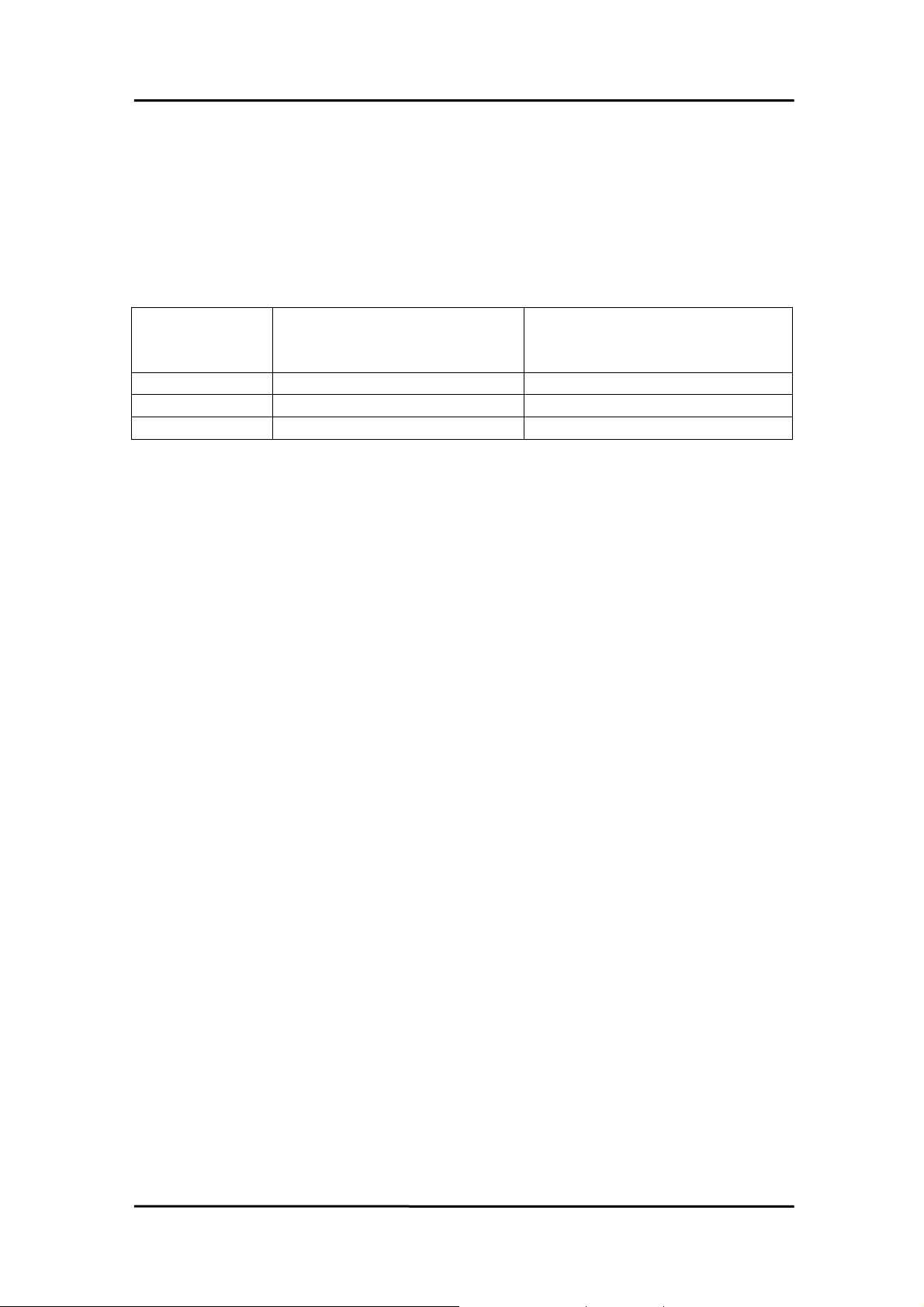
In this chapter, we use some keywords to indicate the attribute of Parameters.
Keyword Parameter set by user
before calling this function ?
[Input] Yes No
[Output] No Yes
[Input, Output] Yes Yes
Note: All of the parameters need to be allocated spaces by the user.
Get the data/value
from this parameter
after calling this function ?
Date Mar-28-2001 Ver 1.40.00 Page 31
Page 34

OME-PIO-DIO Software Manual [Win 95/98, NT and 2000]
3.1 FUNCTIONS OF TEST
3.1.1 PIODIO_GetDllVersion
•
Description:
To get the version number of PIODIO.DLL
•
Syntax:
WORD PIODIO_GetDllVersion(Void)
•
Parameter:
None
•
Return:
200(hex) for version 2.00
Date Mar-28-2001 Ver 1.40.00 Page 32
Page 35

OME-PIO-DIO Software Manual [Win 95/98, NT and 2000]
3.1.2 PIODIO_ShortSub
•
Description:
To perform the subtraction as nA - nB in short data type. This
function is provided for testing DLL linkage purpose.
•
Syntax:
short PIODIO_ShortSub(short nA, short nB)
•
Parameter:
nA :[Input] 2 bytes short data type value
nB :[Input] 2 bytes short data type value
•
Return:
The value of nA - nB
3.1.3 PIODIO_FloatSub
•
Description:
To perform the subtraction as fA - fB in float data type. This function
is provided for testing DLL linkage purpose.
•
Syntax:
•
Parameter:
float PIODIO_FloatSub(float fA, float fB)
Date Mar-28-2001 Ver 1.40.00 Page 33
Page 36

OME-PIO-DIO Software Manual [Win 95/98, NT and 2000]
fA : [Input] 4 bytes floating point value
fB : [Input] 4 bytes floating point value
• Return:
The value of fA - fB
Date Mar-28-2001 Ver 1.40.00 Page 34
Page 37

OME-PIO-DIO Software Manual [Win 95/98, NT and 2000]
3.2 FUNCTIONS OF I/O
3.2.1 PIODIO_OutputByte
•
Description :
This subroutine will send the 8 bits data to the desired I/O port.
•
Syntax :
void PIODIO_OutputByte(DWORD wPortAddr, WORD bOutputVal);
•
Parameter :
wPortAddr : [Input] I/O port addresses, please refer to function
PIODIO_GetConfigAddressSpace.
Only the low WORD is valid.
bOutputVal : [Input] 8 bit data send to I/O port.
Only the low BYTE is valid.
•
Return:
None
3.2.2 PIODIO_InputByte
•
Description :
This subroutine will read the 8-bit data from the desired I/O port.
•
Syntax :
Date Mar-28-2001 Ver 1.40.00 Page 35
Page 38

OME-PIO-DIO Software Manual [Win 95/98, NT and 2000]
WORD PIODIO_InputByte(DWORD wPortAddr);
•
Parameter :
wPortAddr : [Input] I/O port addresses, please refer to
function
PIODIO_GetConfigAddressSpace().
Only the low WORD is valid.
•
Return:
16-bit data with the leading 8 bits are all 0.
(Only the low BYTE is valid.)
Date Mar-28-2001 Ver 1.40.00 Page 36
Page 39

OME-PIO-DIO Software Manual [Win 95/98, NT and 2000]
3.2.3 PIODIO_OutputWord
•
Description :
This subroutine will send the 16-bit data to the desired I/O port.
•
Syntax :
void PIODIO_OutputWord(DWORD wPortAddr, DWORD wOutputVal);
•
Parameter :
wPortAddr : [Input] I/O port addresses, please refer to function
PIODIO_GetConfigAddressSpace().
Only the low WORD is valid.
wOutputVal : [Input] 16-bit data send to I/O port.
Only the low WORD is valid.
•
Return:
None
3.2.4 PIODIO_InputWord
•
Description :
This subroutine will read the 16-bit data from the desired I/O port.
•
Syntax :
DWORD PIODIO_InputWord(DWORD wPortAddr);
•
Parameter :
Date Mar-28-2001 Ver 1.40.00 Page 37
Page 40

OME-PIO-DIO Software Manual [Win 95/98, NT and 2000]
wPortAddr : [Input] I/O port addresses, please refer to
function
PIODIO_GetConfigAddressSpace().
Only the low WORD is valid.
• Return:
16-bit data. Only the low WORD is valid.
Date Mar-28-2001 Ver 1.40.00 Page 38
Page 41

OME-PIO-DIO Software Manual [Win 95/98, NT and 2000]
3.3 FUNCTIONS OF DRIVER
3.3.1 PIODIO_GetDriverVersion
•
Description :
This subroutine will read the version number of PIODIO driver.
•
Syntax :
WORD PIODIO_GetDriverVersion(WORD *wDriverVersion);
•
Parameter :
wDriverVersion : [Output] address of wDriverVersion
•
Return:
Please refer to "Section 1.2 Error Code".
3.3.2 PIODIO_DriverInit
•
Description :
This subroutine will open the PIODIO driver and allocate the resource
for the device. This function must be called once before calling other PIODIO
functions.
•
Syntax :
WORD PIODIO_DriverInit();
Date Mar-28-2001 Ver 1.40.00 Page 39
Page 42

OME-PIO-DIO Software Manual [Win 95/98, NT and 2000]
•
Parameter :
None
•
Return:
Please refer to "Section 1.2 Error Code".
Date Mar-28-2001 Ver 1.40.00 Page 40
Page 43

OME-PIO-DIO Software Manual [Win 95/98, NT and 2000]
3.3.3 PIODIO_DriverClose
•
Description :
This subroutine will close the PIODIO Driver and release the resource
from the device. This function must be called once before exit the
user's application.
•
Syntax :
void PIODIO_DriverClose();
•
Parameter :
None
•
Return:
None
3.3.4 PIODIO_GetConfigAddressSpace
z Description :
Get the I/O address of PIODIO board n.
z Syntax :
WORD PIODIO_GetConfigAddressSpace
( WORD wBoardNo, DWORD *wAddrBase, WORD *wIrqNo,
WORD *wSubVendor, WORD *wSubDevice, WORD *wSubAux,
WORD *wSlotBus, WORD *wSlotDevice);
z Parameter :
wBoardNo : [Input] PIODIO board number
wAddrBase : [Output] The base address of PIODIO board.
Date Mar-28-2001 Ver 1.40.00 Page 41
Page 44

OME-PIO-DIO Software Manual [Win 95/98, NT and 2000]
Only the low WORD is valid.
wIrqNo : [Output] The IRQ number that the PIODIO board using.
wSubVendor : [Output] Sub Vendor ID.
wSubDevice : [Output] Sub Device ID.
wSubAux : [Output] Sub Aux ID.
wSlotBus : [Output] Slot Bus number.
wSlotDevice : [Output] Slot Device ID.
z Return:
Please refer to "Section 1.2 Error Code".
Date Mar-28-2001 Ver 1.40.00 Page 42
Page 45

OME-PIO-DIO Software Manual [Win 95/98, NT and 2000]
3.4 INTERRUPT FUNCTION
3.4.1 PIODIO_IntResetCount
• Description:
This function will clear the counter value on the device driver for the
interrupt.
• Syntax:
WORD PIODIO_IntResetCount(void);
• Parameter:
None
• Return:
Please refer to "Section 1.2 Error Code".
3.4.2 PIODIO_IntGetCount
• Description:
This subroutine will read the dwIntCount defined in device driver.
• Syntax :
WORD PIODIO_IntGetCount(DWORD *dwIntCount);
• Parameter:
dwIntCount : [Output] Address of dwIntCount, which will stores the
Date Mar-28-2001 Ver 1.40.00 Page 43
Page 46

OME-PIO-DIO Software Manual [Win 95/98, NT and 2000]
counter value of interrupt.
• Return:
Please refer to "Section 1.2 Error Code".
Date Mar-28-2001 Ver 1.40.00 Page 44
Page 47
OME-PIO-DIO Software Manual [Win 95/98, NT and 2000]
3.4.3 PIODIO_IntInstall
• Description:
This subroutine will install the IRQ service routine.
• Syntax:
WORD PIODIO_IntInstall(WORD wBoardNo, HANDLE *hEvent,
WORD wInterruptSource, WORD wActiveMode);
• Parameter:
wBoardNo : [Input] Which board to be used.
hEvent : [Input] Address of a Event handle. The user's program
must call the Windows API function "CreateEvent()"
to create the event-object.
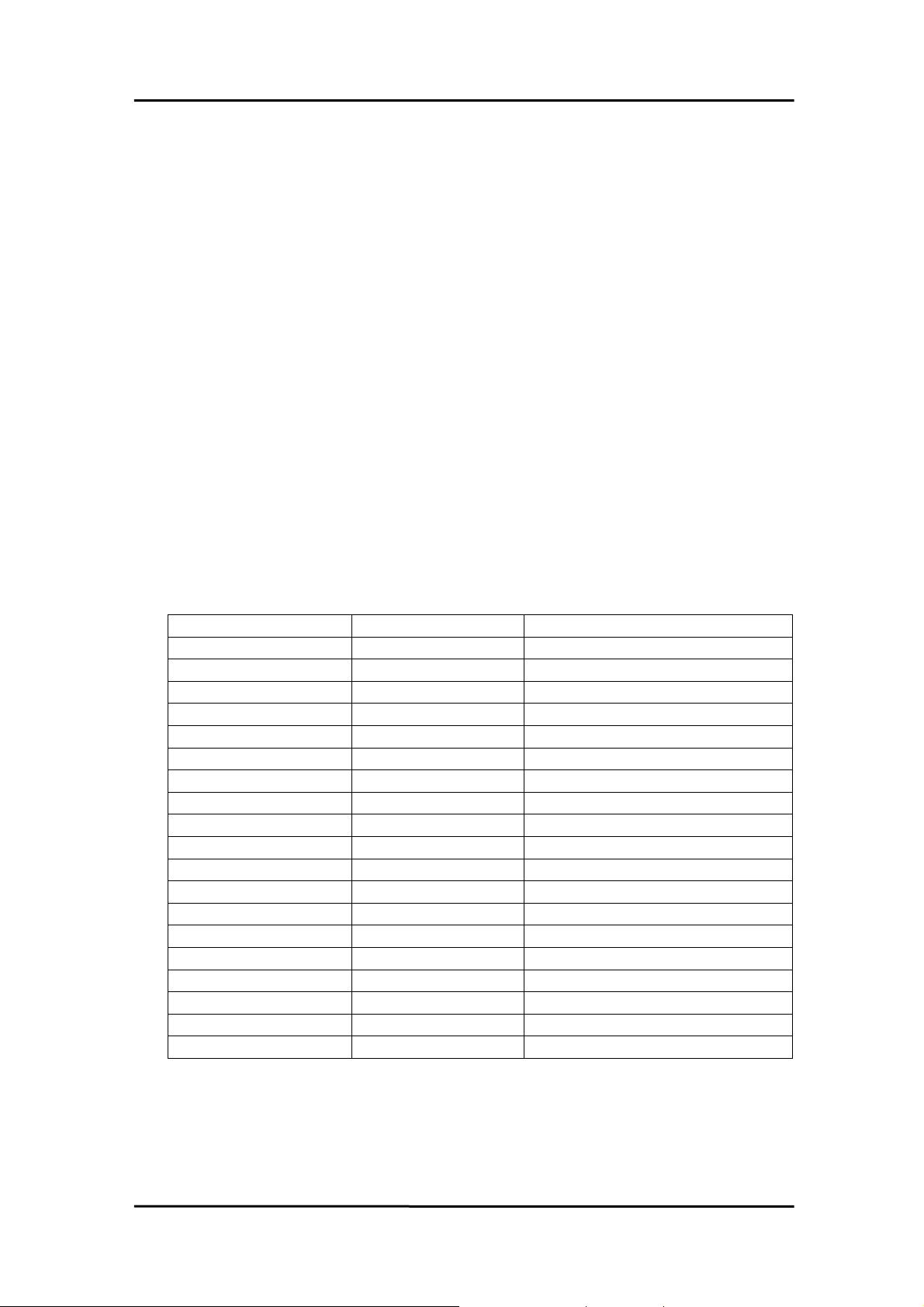
wInterruptSource : [Input] What the Interrupt-Source to be used ? Please
refer to hardware's manual for the detail information.
Card No. wInterruptSource Description
OME-PIO-D48 0 PC3/PC7 from Port-2
1 PC3/PC7 from Port-5
2 Cout0
3 Cout2
OME-PIO-D56/24 0 PC0
1 PC1
2 PC2
3 PC3
OME-PIO-D64 0 EXTIRQ
1 EVTIRQ
2 TMRIRQ
OME-PIO-D96 0 P2C0
1 P5C0
2 P8C0
3 P11C0
OME-PIO-D144 0 P2C0
1 P2C1
2 P2C2
3 P2C3
wActiveMode : [Input] When to trigger the interrupt ?
This can be PIODIO_ActiveHigh or PIODIO_ActiveLow.
• Return: Please refer to "Section 1.2 Error Code".
Date Mar-28-2001 Ver 1.40.00 Page 45
Page 48

OME-PIO-DIO Software Manual [Win 95/98, NT and 2000]
3.4.4 PIODIO_IntRemove
• Description:
This subroutine will remove the IRQ service routine.
• Syntax:
WORD PIODIO_IntRemove( void );
• Parameter:
None
• Return:
Please refer to "Section 1.2 Error Code".
Date Mar-28-2001 Ver 1.40.00 Page 46
Page 49
OME-PIO-DIO Software Manual [Win 95/98, NT and 2000]
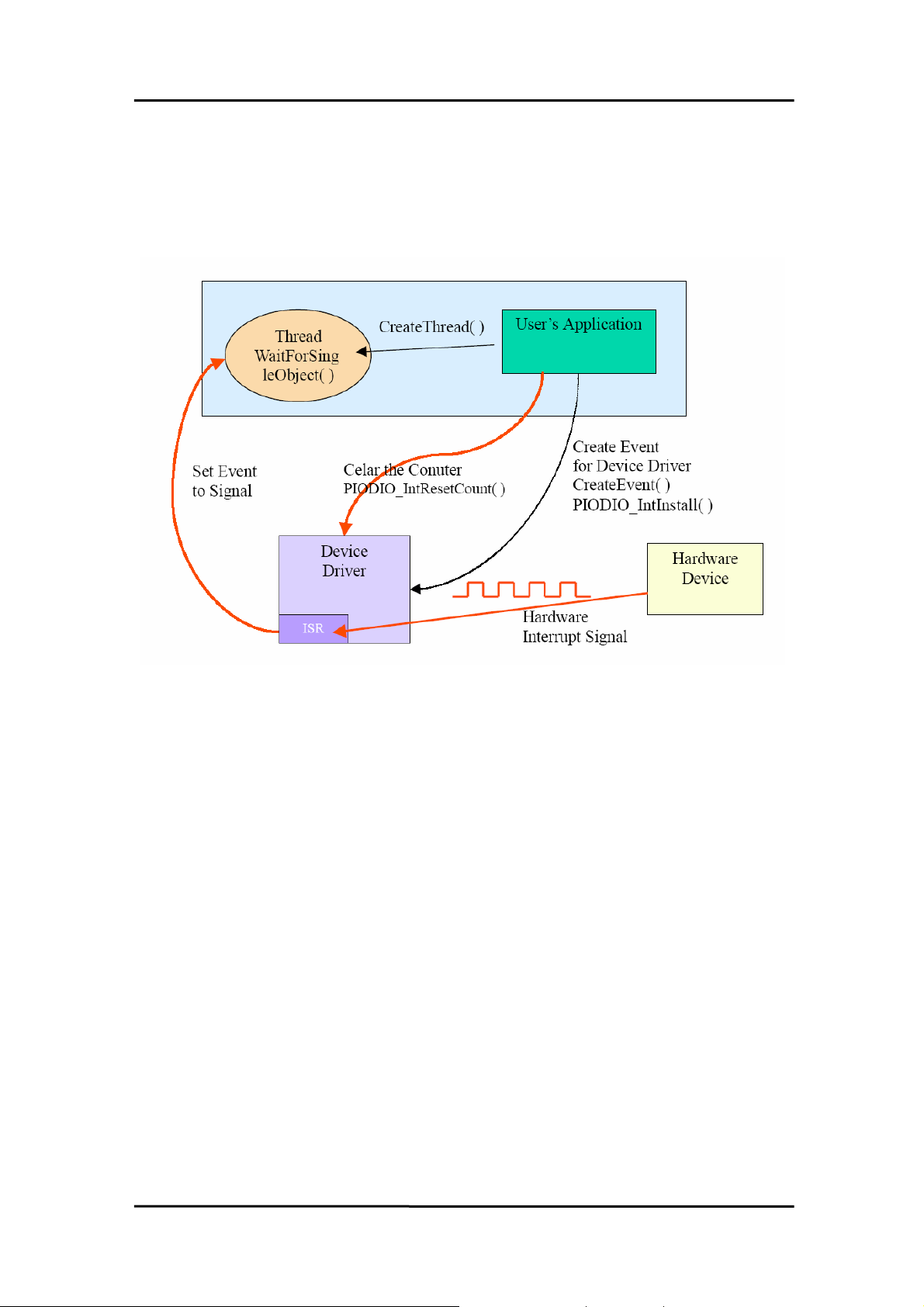
3.4.5 Architecture of Interrupt mode
Please refer to the following Windows API functions:
The following portion description of these functions was copied from
MSDN. For the detailed and completely information, please refer to MSDN.
CreateEvent( )
The CreateEvent function creates or opens a named or unnamed
event object.
HANDLE CreateEvent(
// pointer to security attributes
LPSECURITY_ATTRIBUTES lpEventAttributes,
BOOL bManualReset, // flag for manual-reset event
BOOL bInitialState, // flag for initial state
LPCTSTR lpName // pointer to event-object name
);
Date Mar-28-2001 Ver 1.40.00 Page 47
Page 50

OME-PIO-DIO Software Manual [Win 95/98, NT and 2000]
CreateThread( )
The CreateThread function creates a thread to execute within the
virtual address space of the calling process.
To create a thread that runs in the virtual address space of another
process, use the CreateRemoteThread function.
HANDLE CreateThread(
// pointer to security attributes
LPSECURITY_ATTRIBUTES lpThreadAttributes,
DWORD dwStackSize, // initial thread stack size
// pointer to thread function
LPTHREAD_START_ROUTINE lpStartAddress,
LPVOID lpParameter, // argument for new thread
DWORD dwCreationFlags, // creation flags
LPDWORD lpThreadId // pointer to receive thread ID
);
WaitForSingleObject( )
The WaitForSingleObject function returns when one of the following
occurs:
• The specified object is in the signaled state.
• The time-out interval elapses.
To enter an alertable wait state, use the WaitForSingleObjectEx
function. To wait for multiple objects, use the WaitForMultipleObjects.
Date Mar-28-2001 Ver 1.40.00 Page 48
Page 51

OME-PIO-DIO Software Manual [Win 95/98, NT and 2000]
DWORD WaitForSingleObject(
HANDLE hHandle, // handle to object to wait for
DWORD dwMilliseconds // time-out interval in
milliseconds
);
Date Mar-28-2001 Ver 1.40.00 Page 49
Page 52

OME-PIO-DIO Software Manual [Win 95/98, NT and 2000]
3.5 OME-PIO-D48 INTERRUPT
The following PIOD48_XXX series functions are designed for OME-PIO-
D48 cards only. They can't be used with other cards.
The most different between the OME-PIO-DIO and OME-PIO-D48
interrupt functions is the OME-PIO-DIO supports only one interrupt-source at
a time and the OME-PIO-D48 supports 4 interrupt sources simultaneously.
3.5.1 PIOD48_IntInstall
• Description:
This subroutine will install the IRQ service routine. This function
supports multiple interrupt-source and the Active-Mode can setting to
"Active-Low only", "Active-High only" and "Active-Low or Active-High".
• Syntax:
WORD PIOD48_IntInstall(WORD wBoardNo, HANDLE *hEvent,
WORD wIrqMask, WORD wActiveMode);
• Parameter:
wBoardNo : [Input] Which board to be used.
hEvent : [Input] Address of a Event handle. The user's program
must call the Windows API function "CreateEvent()"
to create the event-object.
wIrqMask : [Input] What the Interrupt-Source to be used ? Please
refer to hardware's manual for the detail information.
wIrqMask Description
1 INT_CHAN_0: PC3/PC7 from Port-2
2 INT_CHAN_1: PC3/PC7 from Port-5
4 INT_CHAN_2: Cout0
8 INT_CHAN_3: Cout2
This function supports 4 interrupt-source at a time, thus
users can use multiple interrupt-source like 1 + 2 + 8.
wActiveMode : [Input] When the ISR will service the interrupt ?
Date Mar-28-2001 Ver 1.40.00 Page 50
Page 53
OME-PIO-DIO Software Manual [Win 95/98, NT and 2000]
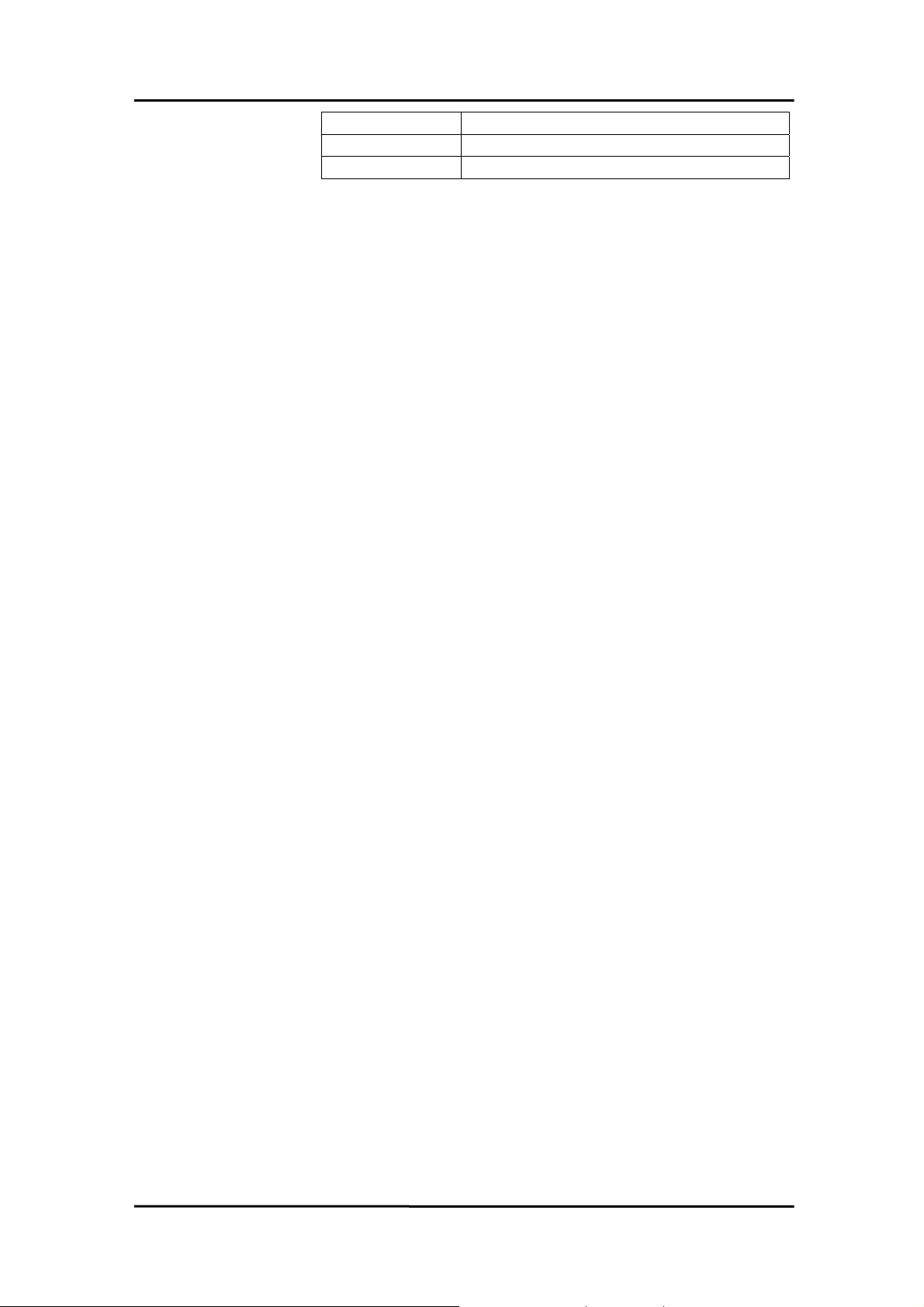
wActiveMode Description
1 PIOD48_ActiveLow
2 PIOD48_ActiveHigh
This can be 1, 2 or 1 + 2.
• Return:
Please refer to "Section 1.2 Error Code".
Date Mar-28-2001 Ver 1.40.00 Page 51
Page 54

OME-PIO-DIO Software Manual [Win 95/98, NT and 2000]
3.5.2 PIOD48_IntRemove
• Description:
This subroutine will remove the IRQ service routine.
• Syntax:
WORD PIOD48_IntRemove( void );
• Parameter:
None
• Return:
Please refer to "Section 1.2 Error Code".
3.5.3 PIOD48_IntGetCount
• Description:
This subroutine will read the Interrupt-Counter value in the device
driver. The Interrupt-Counter will be incremented (in the ISR) when the
interrupt is triggered. When the interrupt setting to Active-High only or
Active-Low only, some of the interrupt signal will be ignored and the
Interrupt-Counter will not incremented.
• Syntax :
WORD PIOD48_IntGetCount(DWORD *dwIntCount);
• Parameter:
dwIntCount : [Output] Address of dwIntCount, which will stores the
counter value of interrupt.
• Return: Please refer to "Section 1.2 Error Code".
Date Mar-28-2001 Ver 1.40.00 Page 52
Page 55

OME-PIO-DIO Software Manual [Win 95/98, NT and 2000]
3.5.4 PIOD48_IntGetActiveFlag
• Description:
This subroutine will read the Active-High and Active-Low flag from the
device's queue (First-in-First-out, Buffer Size: 2000 flags for High/Low).
The Active-Flag is used to records the Active-State of interrupt-source
when the interrupt occurred. The Active-High-Flag records which interruptsource change to High-State and the Active-Low-Flag records which
interrupt-source change to Low-State. Users can uses these flags to
indicate which interrupt-source has changed.
If the Active-Mode setting to Active-Low(/Active-High) only and the
flag for the Active-Low(/Active-High) is equal to zero, then the ISR will not
service the interrupt, and the interrupt-counter will not increased, and the
Active-Flag for High and Low will not be recorded.
If users are not calling this function to retrieve the flags from device's
queue, the queue will stop records the flags (lost data) while the buffer is
full. But the interrupt-counter will still count while the ISR services the
interrupt.
• Syntax :
WORD PIOD48_IntGetActiveFlag
(WORD *bActiveHighFlag, WORD *bActiveLowFlag);
• Parameter:
bActiveHighFlag : [Output] Returns the flag that indicates which
interrupt-source change to High-State.
bActiveLowFlag : [Output] Returns the flag that indicates which
interrupt-source change to Low-State.
• Return:
Please refer to "Section 1.2 Error Code".
Date Mar-28-2001 Ver 1.40.00 Page 53
Page 56

OME-PIO-DIO Software Manual [Win 95/98, NT and 2000]
3.6 OME-PIO-D48 COUNTER
The following PIOD48_XXX series function is designed for OME-PIO-D48
cards only.
3.6.1 PIOD48_SetCounter
•
Description :
This subroutine is used to setting the 8254 counter's mode and value.
•
Syntax :
void PIOD48_SetCounter(DWORD dwBase, WORD wCounterNo,
WORD bCounterMode, DWORD wCounterValue);
•
Parameter :
dwBase : [Input] I/O port addresses, please refer to function
PIODIO_GetConfigAddressSpace.
Only the low WORD is valid.
wCounterNo : [Input] The 8254 Counter-Number: 0 to 2.
wCounterMode : [Input] The 8254 Counter-Mode: 0 to 5.
Please refer to the hardware manual for details.
wCounterValue : [Input] The 16 bits value for the counter to counting.
Only the lower WORD is valid.
•
Return:
None
3.6.2 PIOD48_ReadCounter
•
Description :
This subroutine is used to reading the 8254 counter's value.
•
Syntax :
Date Mar-28-2001 Ver 1.40.00 Page 54
Page 57

OME-PIO-DIO Software Manual [Win 95/98, NT and 2000]
DWORD PIOD48_ReadCounter
(DWORD dwBase, WORD wCounterNo, WORD bCounterMode);
•
Parameter :
dwBase : [Input] I/O port addresses, please refer to function
PIODIO_GetConfigAddressSpace.
Only the low WORD is valid.
wCounterNo : [Input] The 8254 Counter-Number: 0 to 2.
wCounterMode : [Input] The 8254 Counter-Mode: 0 to 5.
Please refer to the hardware manual for details.
•
Return:
Returns the 16-bit counter's value. (Only the lower WORD is valid.)
Date Mar-28-2001 Ver 1.40.00 Page 55
Page 58

OME-PIO-DIO Software Manual [Win 95/98, NT and 2000]
3.6.3 PIOD48_SetCounterA
•
Description :
This subroutine is used to setting the 8254 counter's mode and value.
Users have to calling the PIODIO_ActiveBoard() function before
calling this function.
•
Syntax :
void PIOD48_SetCounterA(WORD wCounterNo,
WORD bCounterMode, DWORD wCounterValue);
•
Parameter :
wCounterNo : [Input] The 8254 Counter-Number: 0 to 2.
wCounterMode : [Input] The 8254 Counter-Mode: 0 to 5.
Please refer to the hardware manual for details.
wCounterValue : [Input] The 16 bits value for the counter to counting.
Only the lower WORD is valid.
•
Return:
None
3.6.4 PIOD48_ReadCounterA
•
Description :
This subroutine is used to reading the 8254 counter's value.
Users have to calling the PIODIO_ActiveBoard() function before
calling this function.
•
Syntax :
DWORD PIOD48_ReadCounterA
(WORD wCounterNo, WORD bCounterMode);
•
Parameter :
Date Mar-28-2001 Ver 1.40.00 Page 56
Page 59

OME-PIO-DIO Software Manual [Win 95/98, NT and 2000]
wCounterNo : [Input] The 8254 Counter-Number: 0 to 2.
wCounterMode : [Input] The 8254 Counter-Mode: 0 to 5.
Please refer to the hardware manual for details.
• Return:
Returns the 16 bits counter's value. (Only the lower WORD is valid.)
Date Mar-28-2001 Ver 1.40.00 Page 57
Page 60

OME-PIO-DIO Software Manual [Win 95/98, NT and 2000]
3.7 OME-PIO-D64 COUNTER
The following PIOD64_XXX series function is designed for OME-PIO-D64
card only.
3.7.1 PIOD64_SetCounter
•
Description :
This subroutine is used to setting the 8254 counter's mode and value.
•
Syntax :
void PIOD64_SetCounter(DWORD dwBase, WORD wCounterNo,
WORD bCounterMode, DWORD wCounterValue);
•
Parameter :
dwBase : [Input] I/O port addresses, please refer to function
PIODIO_GetConfigAddressSpace.
Only the low WORD is valid.
wCounterNo : [Input] The 8254 Counter-Number: 0 to 5.
(0 to 2: Chip-0, 3 to 5: Chip-1)
wCounterMode : [Input] The 8254 Counter-Mode: 0 to 5.
Please refer to the hardware manual for details.
wCounterValue : [Input] The 16 bits value for the counter to counting.
Only the lower WORD is valid.
•
Return:
None
3.7.2 PIOD64_ReadCounter
•
Description :
This subroutine is used to reading the 8254 counter's value.
•
Syntax :
Date Mar-28-2001 Ver 1.40.00 Page 58
Page 61

OME-PIO-DIO Software Manual [Win 95/98, NT and 2000]
DWORD PIOD64_ReadCounter
(DWORD dwBase, WORD wCounterNo, WORD bCounterMode);
•
Parameter :
dwBase : [Input] I/O port addresses, please refer to function
PIODIO_GetConfigAddressSpace.
Only the low WORD is valid.
wCounterNo : [Input] The 8254 Counter-Number: 0 to 5.
(0 to 2: Chip-0, 3 to 5: Chip-1)
wCounterMode : [Input] The 8254 Counter-Mode: 0 to 5.
Please refer to the hardware manual for details.
•
Return:
Returns the 16-bit counter's value. (Only the lower WORD is valid.)
Date Mar-28-2001 Ver 1.40.00 Page 59
Page 62

OME-PIO-DIO Software Manual [Win 95/98, NT and 2000]
3.7.3 PIOD64_SetCounterA
•
Description :
This subroutine is used to setting the 8254 counter's mode and value.
Users have to calling the PIODIO_ActiveBoard() function before
calling this function.
•
Syntax :
void PIOD64_SetCounterA(WORD wCounterNo,
WORD bCounterMode, DWORD wCounterValue);
•
Parameter :
wCounterNo : [Input] The 8254 Counter-Number: 0 to 5.
(0 to 2: Chip-0, 3 to 5: Chip-1)
wCounterMode : [Input] The 8254 Counter-Mode: 0 to 5.
Please refer to the hardware manual for details.
wCounterValue : [Input] The 16 bits value for the counter to counting.
Only the lower WORD is valid.
•
Return:
None
3.7.4 PIOD64_ReadCounterA
•
Description :
This subroutine is used to reading the 8254 counter's value.
Users have to calling the PIODIO_ActiveBoard() function before
calling this function.
•
Syntax :
DWORD PIOD64_ReadCounterA
(WORD wCounterNo, WORD bCounterMode);
Date Mar-28-2001 Ver 1.40.00 Page 60
Page 63

OME-PIO-DIO Software Manual [Win 95/98, NT and 2000]
•
Parameter :
wCounterNo : [Input] The 8254 Counter-Number: 0 to 5.
(0 to 2: Chip-0, 3 to 5: Chip-1)
wCounterMode : [Input] The 8254 Counter-Mode: 0 to 5.
Please refer to the hardware manual for details.
•
Return:
Returns the 16-bit counter's value. (Only the lower WORD is valid.)
Date Mar-28-2001 Ver 1.40.00 Page 61
Page 64

OME-PIO-DIO Software Manual [Win 95/98, NT and 2000]
3.8 OME-PIO-D48 FREQUENCY
The following PIOD48_XXX series functions are designed for OME-PIO-D48
card only.
3.8.1 PIOD48_Freq
•
Description :
This subroutine is used to measure the signal frequency. Users have
to connect the signal(+) with CN1.Pin29, and connect the signal(-) with
CN1.Pin19.
It will uses the Counter-0 and Counter-1 to measure the frequency,
thus users shouldn't use Counter-0 and Counter-1 for other purposes.
•
Syntax :
DWORD PIOD48_Freq(DWORD dwBase);
•
Parameter :
dwBase : [Input] I/O port addresses, please refer to function
PIODIO_GetConfigAddressSpace.
Only the low WORD is valid.
•
Return:
Returns the frequency value. (Only the low WORD is valid.)
3.8.2 PIOD48_FreqA
•
Description :
Please refer to the description of "PIOD48_Freq()" function.
Date Mar-28-2001 Ver 1.40.00 Page 62
Page 65

OME-PIO-DIO Software Manual [Win 95/98, NT and 2000]
Users have to call the "PIODIO_ActiveBoard()" function before calling
this function.
•
Syntax :
DWORD PIOD48_FreqA();
•
Parameter :
None
•
Return:
Returns the frequency value. (Only the low WORD is valid.)
Date Mar-28-2001 Ver 1.40.00 Page 63
Page 66
OME-PIO-DIO Software Manual [Win 95/98, NT and 2000]
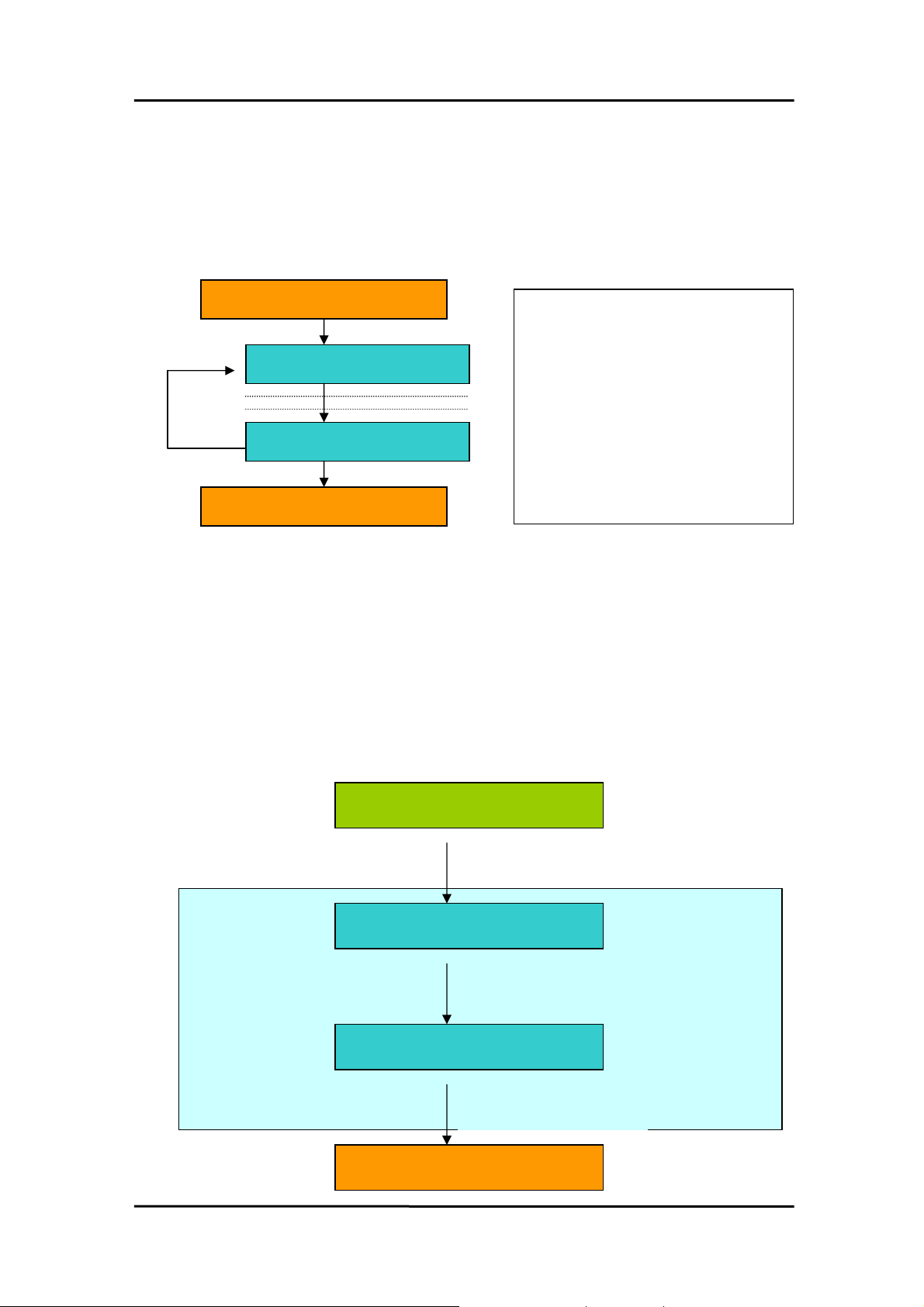
4. Program Architecture
Initialize the Device-Driver
Access/Control the Device
Access/Control the Device
Close the Device-Driver
PIODIO_DriverInit()
Enable All DI/DO
….
PIODIO_InputByte( … )
……..
……..
PIODIO_OutputByte(…)
…..
Development
Toolkit
User's Application
Function Call into DLLs
DLLs
Services Call into Kernel-Mode
.VXDs, .SYSs (Device Driver)
Device Control
Hardware Devices
Date Mar-28-2001 Ver 1.40.00 Page 64
Page 67

WARRANTY/DISCLAIMER
OMEGA ENGINEERING, INC. warrants this unit to be free of defects in materials and workmanship for a
period of 13 months from date of purchase. OMEGA’s WARRANTY adds an additional one (1) month
grace period to the normal one (1) year product warranty to cover handling and shipping time. This
ensures that OMEGA’s customers receive maximum coverage on each product.
If the unit malfunctions, it must be returned to the factory for evaluation. OMEGA’s Customer Service
Department will issue an Authorized Return (AR) number immediately upon phone or written request.
Upon examination by OMEGA, if the unit is found to be defective, it will be repaired or replaced at no
charge. OMEGA’s WARRANTY does not apply to defects resulting from any action of the purchaser,
including but not limited to mishandling, improper interfacing, operation outside of design limits,
improper repair, or unauthorized modification. This WARRANTY is VOID if the unit shows evidence of
having been tampered with or shows evidence of having been damaged as a result of excessive corrosion;
or current, heat, moisture or vibration; improper specification; misapplication; misuse or other operating
conditions outside of OMEGA’s control. Components which wear are not warranted, including but not
limited to contact points, fuses, and triacs.
OMEGA is pleased to offer suggestions on the use of its various products. However,
OMEGA neither assumes responsibility for any omissions or errors nor assumes liability for any
damages that result from the use of its products in accordance with information provided by
OMEGA, either verbal or written. OMEGA warrants only that the parts manufactured by it will be
as specified and free of defects. OMEGA MAKES NO OTHER WARRANTIES OR
REPRESENTATIONS OF ANY KIND WHATSOEVER, EXPRESS OR IMPLIED, EXCEPT THAT OF TITLE,
AND ALL IMPLIED WARRANTIES INCLUDING ANY WARRANTY OF MERCHANTABILITY AND
FITNESS FOR A PARTICULAR PURPOSE ARE HEREBY DISCLAIMED. LIMITATION OF
LIABILITY: The remedies of purchaser set forth herein are exclusive, and the total liability of
OMEGA with respect to this order, whether based on contract, warranty, negligence,
indemnification, strict liability or otherwise, shall not exceed the purchase price of the
component upon which liability is based. In no event shall OMEGA be liable for
consequential, incidental or special damages.
CONDITIONS: Equipment sold by OMEGA is not intended to be used, nor shall it be used: (1) as a “Basic
Component” under 10 CFR 21 (NRC), used in or with any nuclear installation or activity; or (2) in medical
applications or used on humans. Should any Product(s) be used in or with any nuclear installation or
activity, medical application, used on humans, or misused in any way, OMEGA assumes no responsibility
as set forth in our basic WARRANTY/ DISCLAIMER language, and, additionally, purchaser will indemnify
OMEGA and hold OMEGA harmless from any liability or damage whatsoever arising out of the use of the
Product(s) in such a manner.
RETURN REQUESTS/INQUIRIES
Direct all warranty and repair requests/inquiries to the OMEGA Customer Service Department. BEFORE
RETURNING ANY PRODUCT(S) TO OMEGA, PURCHASER MUST OBTAIN AN AUTHORIZED RETURN
(AR) NUMBER FROM OMEGA’S CUSTOMER SERVICE DEPARTMENT (IN ORDER TO AVOID
PROCESSING DELAYS). The assigned AR number should then be marked on the outside of the return
package and on any correspondence.
The purchaser is responsible for shipping charges, freight, insurance and proper packaging to prevent
breakage in transit.
FOR W
ARRANTY
RETURNS, please have the
following information available BEFORE
contacting OMEGA:
1. Purchase Order number under which the product
was PURCHASED,
2. Model and serial number of the product under
warranty, and
3. Repair instructions and/or specific problems
relative to the product.
FOR NON-W
ARRANTY
REPAIRS,
consult OMEGA
for current repair charges. Have the following
information available BEFORE contacting OMEGA:
1. Purchase Order number to cover the COST
of the repair,
2. Model and serial number of the product, and
3. Repair instructions and/or specific problems
relative to the product.
OMEGA’s policy is to make running changes, not model changes, whenever an improvement is possible. This affords
our customers the latest in technology and engineering.
OMEGA is a registered trademark of OMEGA ENGINEERING, INC.
© Copyright 2002 OMEGA ENGINEERING, INC. All rights reserved. This document may not be copied, photocopied,
reproduced, translated, or reduced to any electronic medium or machine-readable form, in whole or in part, without the
prior written consent of OMEGA ENGINEERING, INC.
Page 68

M4036/0104
Where Do I Find Everything I Need for
Process Measurement and Control?
OMEGA…Of Course!
Shop online at www.omega.com
TEMPERATURE
Thermocouple, RTD & Thermistor Probes, Connectors, Panels & Assemblies
Wire: Thermocouple, RTD & Thermistor
Calibrators & Ice Point References
Recorders, Controllers & Process Monitors
Infrared Pyrometers
PRESSURE, STRAIN AND FORCE
Transducers & Strain Gages
Load Cells & Pressure Gages
Displacement Transducers
Instrumentation & Accessories
FLOW/LEVEL
Rotameters, Gas Mass Flowmeters & Flow Computers
Air Velocity Indicators
Turbine/Paddlewheel Systems
Totalizers & Batch Controllers
pH/CONDUCTIVITY
pH Electrodes, Testers & Accessories
Benchtop/Laboratory Meters
Controllers, Calibrators, Simulators & Pumps
Industrial pH & Conductivity Equipment
DATA ACQUISITION
Data Acquisition & Engineering Software
Communications-Based Acquisition Systems
Plug-in Cards for Apple, IBM & Compatibles
Datalogging Systems
Recorders, Printers & Plotters
HEATERS
Heating Cable
Cartridge & Strip Heaters
Immersion & Band Heaters
Flexible Heaters
Laboratory Heaters
ENVIRONMENTAL
MONITORING AND CONTROL
Metering & Control Instrumentation
Refractometers
Pumps & Tubing
Air, Soil & Water Monitors
Industrial Water & Wastewater Treatment
pH, Conductivity & Dissolved Oxygen Instruments
 Loading...