

Page 1

Instruction Sheet
OM-EL-USB-5
Counter, Event and State USB Data Logger
Page 2
Page 3
OM-EL-USB-5
ORDERING INFORMATION
Counter, Event and State
USB Data Logger
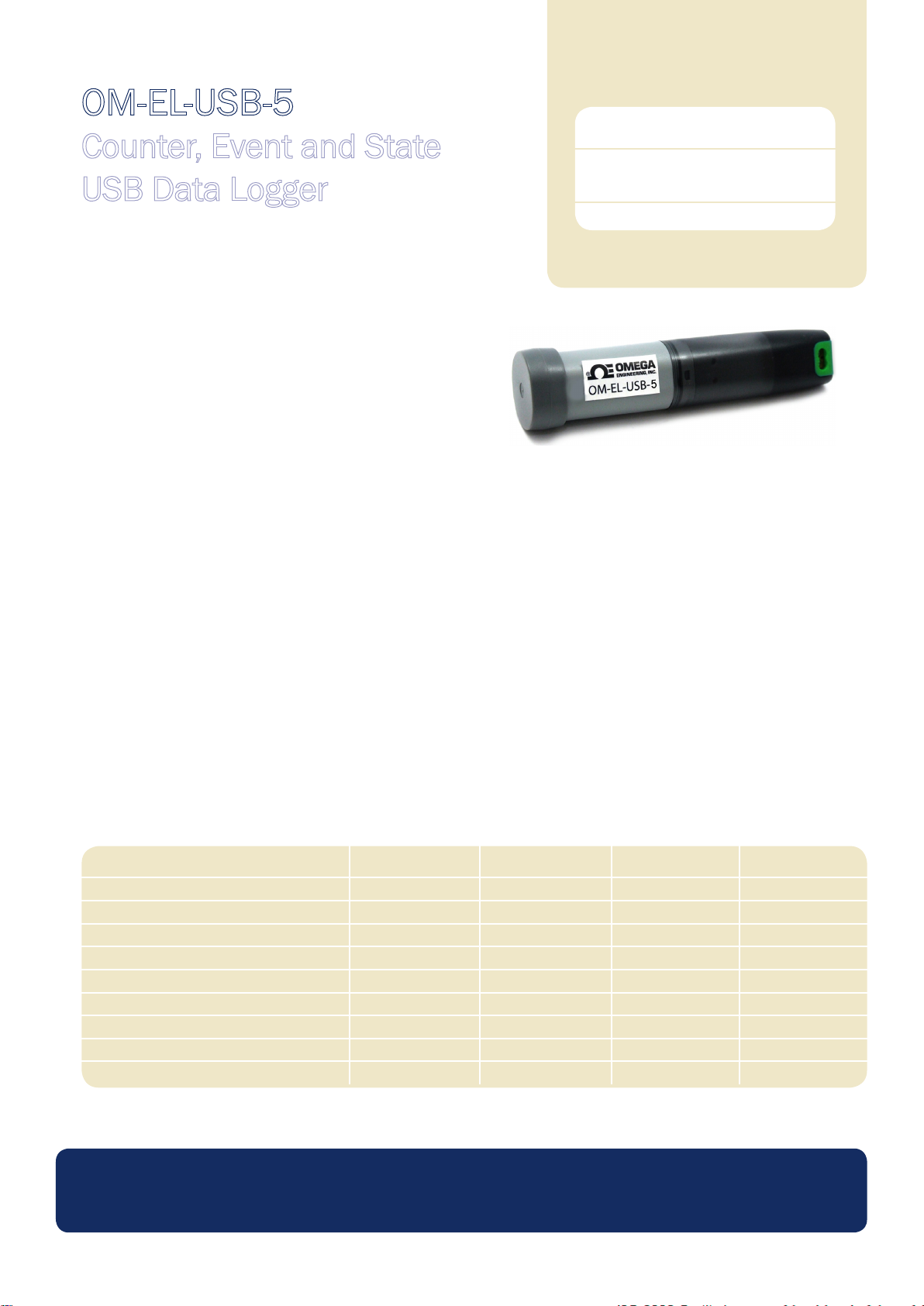
FEATURES
• Functions as an event logger, state change logger and event counter
• Logging rate of up to four times per second for events, two times per
second for state changes and 100 times per second when counting
• Stores up to 32,510 readings in event mode
• Stores up to 32,510 readings in state change mode
• Stores up to 32,510 timed intervals in event counter mode
• Accepts input voltages of up to 24V
• Volt free contacts option (normally open contact only)
• Rising and falling edge triggering
• LED ash on event / state change
• Connection via two screw terminals
• USB Interface for set-up and data download
• Supplied with replaceable internal lithium battery, Windows
control software and measurement leads
This standalone data logger can record events (detecting an input and storing the time and date), record state changes (similar to an ‘event’
but also recording when the input reverts back to normal) and count events (count the number of events that happen during a timed interval).
Up to 32,510 events or state changes can be recorded and up to 32,510 timed intervals in event counter mode (with 65,536 events in each
interval).
Standard Data Logger
(Data Logger, Software on
CD, Battery)
Replacement Battery
OM-EL-USB-5
OM-EL-BATT
Events and state changes can be triggered by either a rising edge (a voltage going from low to high) or falling edge (a voltage going from high
to low). It is also possible to use volt free contacts. Instead of measuring an external voltage, the data logger applies a voltage across the
screw terminals and detects when the input closes (i.e. a relay or microswitch).
Fast logging rates allow event capturing at speeds of up to two times per second and state changes at speeds of up to four times per second.
Event counting can operate at speeds of up to 100 times per second (when the LEDs are turned off). The user can easily set up the logger,
and download the stored data by plugging the data logger into a PC’s USB port and running the purpose designed software under Windows
2000, XP, Vista & 7. Data can then be graphed, printed and exported to other applications.
The data logger is supplied complete with software, measurement leads terminated with crocodile clips and a long-life lithium battery which
allows logging for up to 1 year. Functionality of the unit is indicated by ashing red and green LEDs, with an option to ash the red LED every
time an event occurs.
Specications Minimum Typical Maximum Unit
Time between events 200 Milliseconds
Time between state changes 500 Milliseconds
Time between event counts 10* Milliseconds
Input voltage ** 3 28 V d.c.
‘Volt free contacts’ voltage *** 2.75 3.6 V
‘Volt free contacts’ current 35 μA
Timing accuracy † ±3 Seconds per 24 hours
Operating temperature range -35 (-31) +80 (176) ºC (ºF)
1/2AA 3.6V Lithium Battery Life
* 10 milliseconds can only be achieved with the LEDs disabled. If the LEDs are enabled, the time between the event counts is reduced to 50 milliseconds
** see ‘Voltage input range’ section for details † Per day at 20ºC
*** Voltage will decrease as battery is discharged ‡ Assuming 1 event every 5 mins at 20ºC in Voltage input mode
‡ 1 Years
www.omega.com
Specications liable to change without prior warning Issue 2 Applies to OM-EL-USB-5 Page 1 of 4
Page 4
OM-EL-USB-5
Counter, Event and State USB Data Logger
WINDOWS CONTROL SOFTWARE
Omega’s EasyLog USB control software is supplied free of charge with each data logger. Easy to install and use, the control software runs
under Windows 2000, XP, Vista & 7. The software is used to set-up the data logger as well as download, graph and export data to Excel.
The software allows the following parameters to be
congured:
• Logger name
• Record events, record state changes or count
events
• Triggering on rising of falling edges (see ‘Edge
Triggering’ section)
• Voltage or Volt free contact triggering
• Flash LED on event/state change
• Voltage range
• Time period for event counting (i.e count the
number of events every 10s). Maximum number
of events per time period is limited to 65,000.
The latest version of the control software may be downloaded free of charge from www.omega.com
LED FLASHING MODES
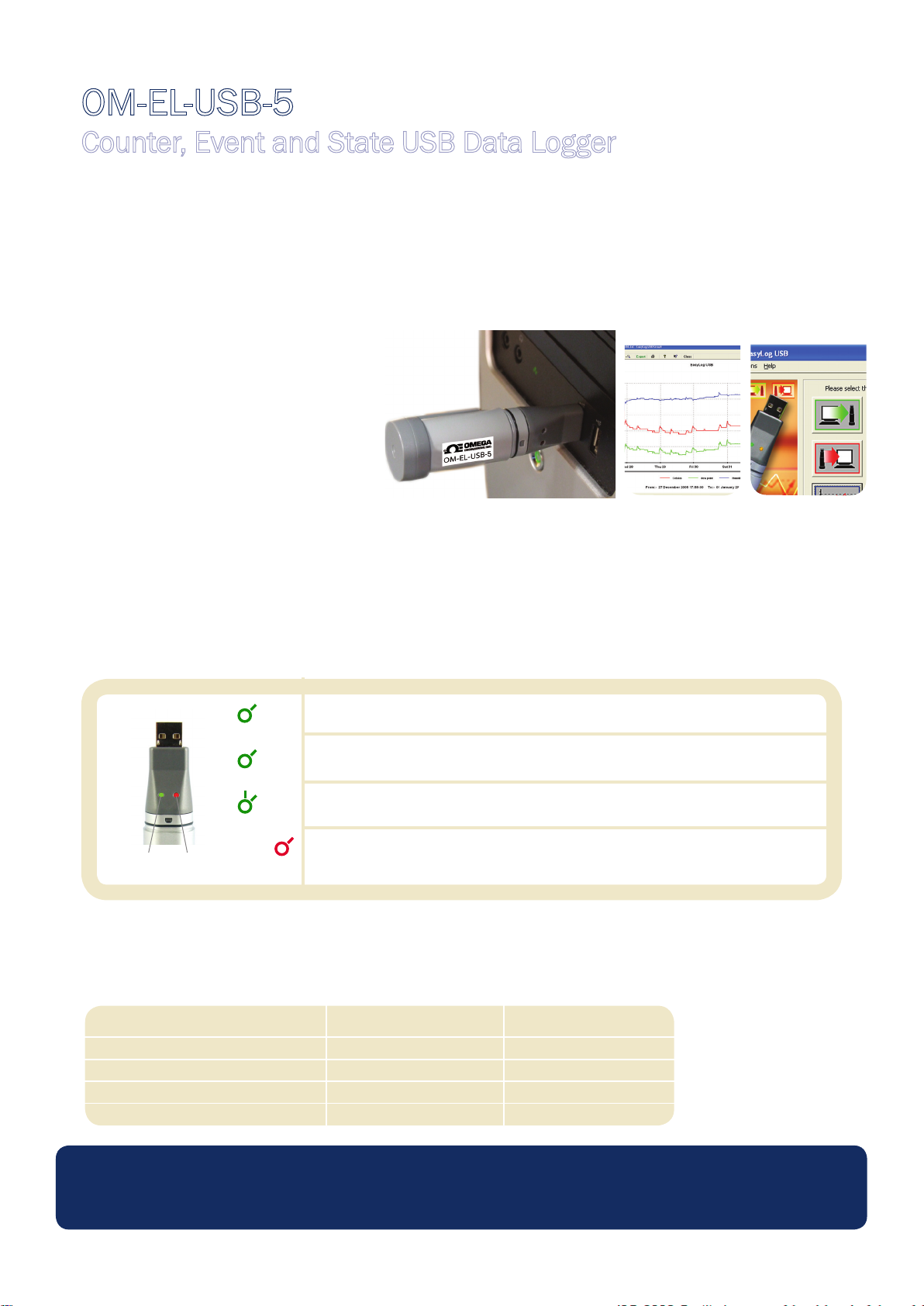
OM-EL-USB-5 features a red and a green LED to indicate the status of the data logger.
Green LED Red LED
Green single ash (10 seconds)
Normal logging
Green single ash (20 seconds)
Low battery
Green double ash (20 seconds)
Data logger memory full
Red single ash
Event / State change / Count recorded
VOLTAGE INPUT RANGE
The logger features a selectable voltage input range, which allows the logger to operate with a wide variety of system. Each input range
has a different high and low ‘trigger voltage’ (i.e the voltage at which the logger considers a signal to be high or low).
Voltage range Low trigger voltage High trigger voltage
0 - 3V 0.8V 2V
0 - 5V 1.3V 3.4V
0 - 12V 3.2V 8V
0 - 24V 6.4V 16V
www.omega.com
Specications liable to change without prior warning Issue 2 Applies to OM-EL-USB-5 Page 2 of 4
Page 5
OM-EL-USB-5
Time
High
Low
Minimum time
between events
Event happens too soon,
and is therefore not recorded
Counter, Event and State USB Data Logger
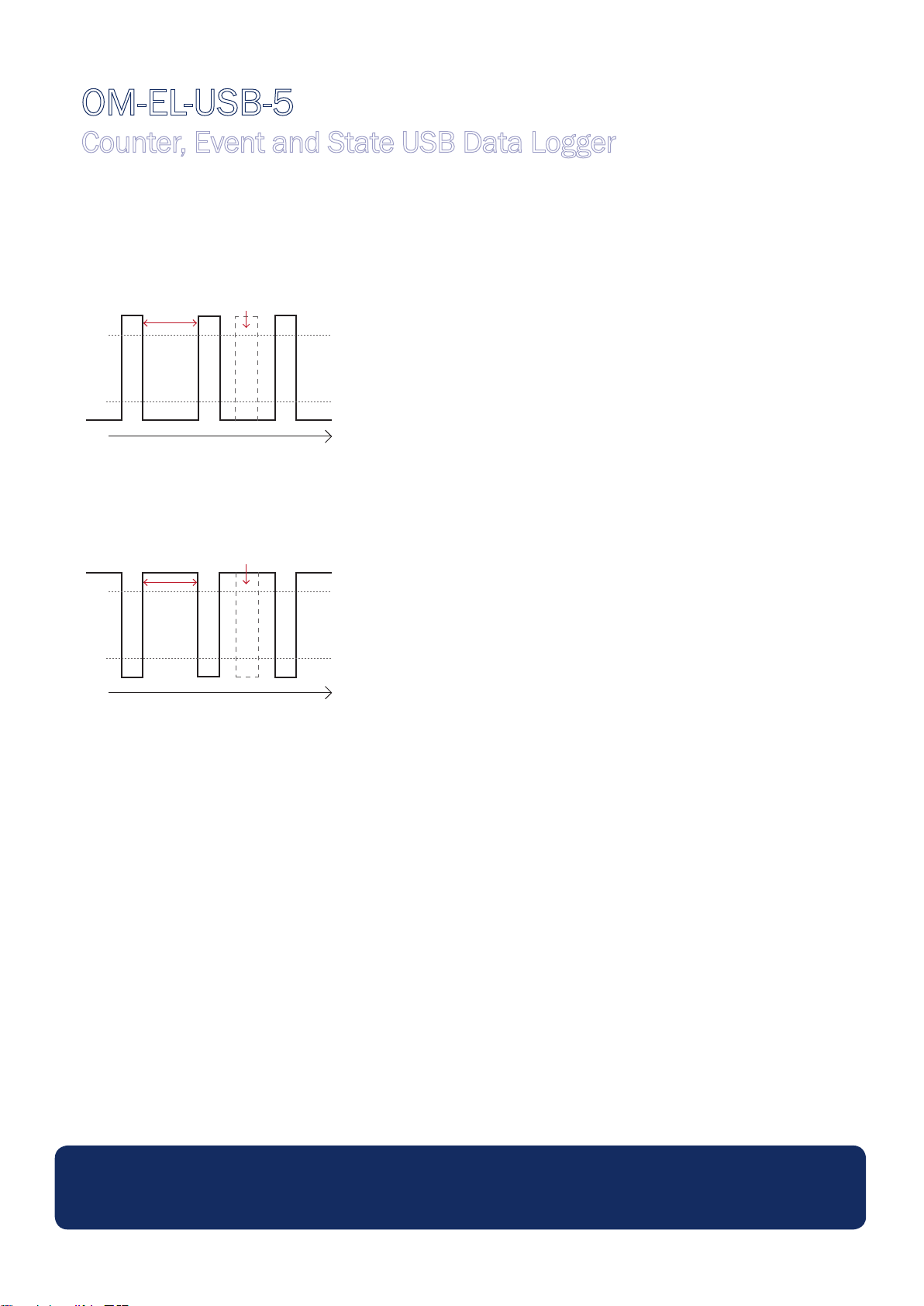
EDGE TRIGGERING
If the user selects ‘rising edge’ triggering, then an event is recorded at the point a signal goes from low to high. This is the default
setting.
High
Low
Time
Minimum time
between events
Event happens too soon,
and is therefore not recorded
If the user selects ‘falling edge’ triggering, then an event is recorded at the point a signal goes from high to low.
High
Low
Time
Minimum time
between events
Event happens too soon,
and is therefore not recorded
BATTERY REPLACEMENT
We recommend that you replace the battery every 12 months, or prior to logging critical data.
The OM-EL-USB-5 does not lose its stored readings when the battery is discharged or when the battery is replaced; however, the data
logging process will be stopped and cannot be re-started until the battery has been replaced and the logged data has been downloaded
to PC.
Only use OM-EL-BATT lithum batteries. Check with your supplier that the battery you are ordering is ‘press t’ and is not tted with solder
tags. Before replacing the battery, remove the OM-EL-USB-5 from the PC.
Note:
Leaving the OM-EL-USB-5 plugged into the USB port for longer than necessary will cause some of the battery capacity to be lost.
WARNING
Handle lithium batteries carefully, observe warnings on battery casing. Dispose of in accordance with local regulations.
www.omega.com
Specications liable to change without prior warning Issue 2 Applies to OM-EL-USB-5 Page 3 of 4
Page 6
OM-EL-USB-5
Counter, Event and State USB Data Logger
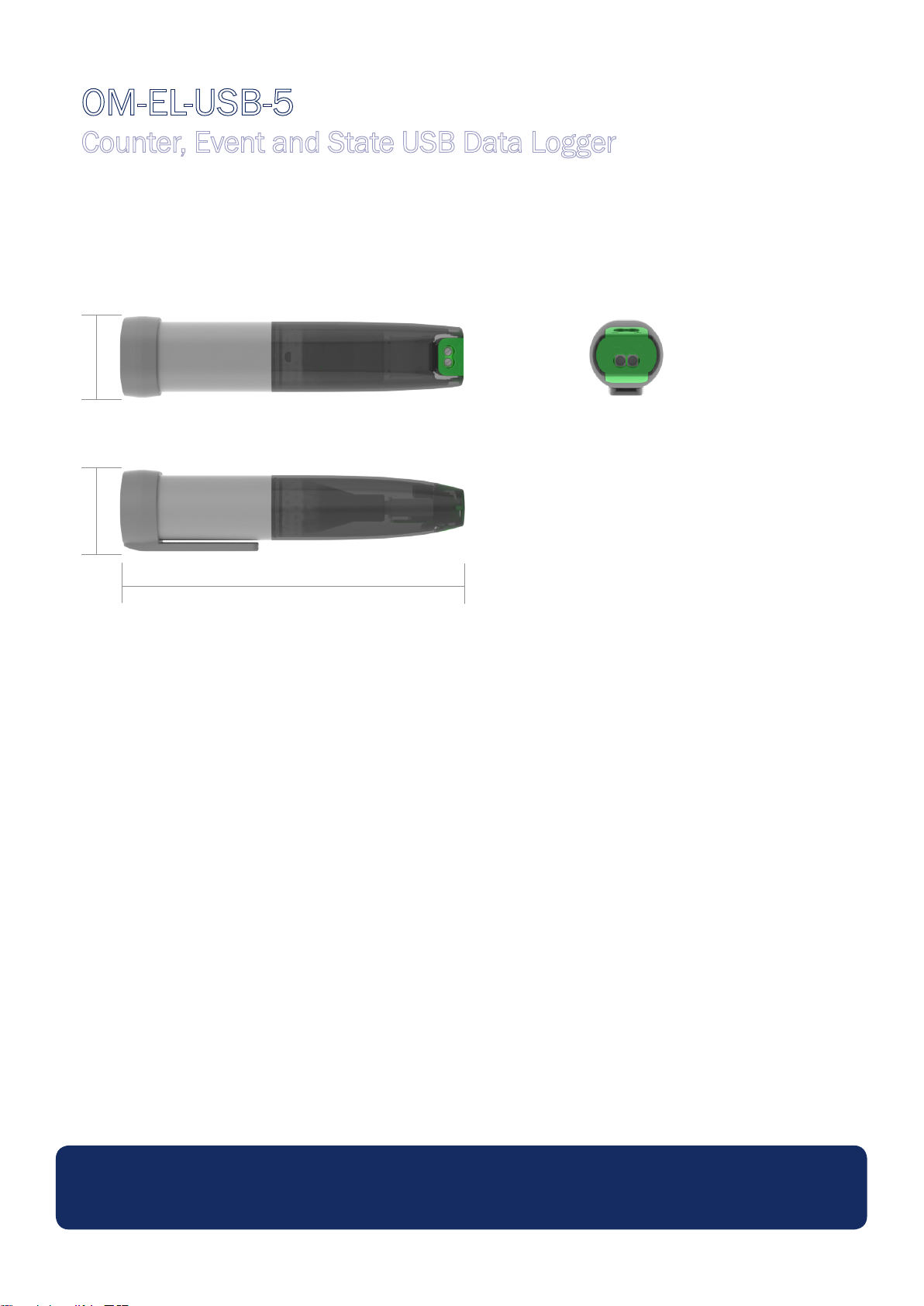
DIMENSIONS
All dimensions in mm (inches)
26.8 (1.05) 26.8 (1.05)
98.0 (3.86)
www.omega.com
Specications liable to change without prior warning Issue 2 Applies to OM-EL-USB-5 Page 4 of 4
Page 7
Page 8
M5006/0111
 Loading...