

Page 1
www.omega.com
e-mail: [email protected]
User’s Guide
OME-PCI-1202/1602/1800/1802 BOARDS
DOS Software User’s Manual
Shop online at
Page 2
Servicing North America:
USA: One Omega Drive, P.O. Box 4047
ISO 9001 Certified Stamford CT 06907-0047
TEL: (203) 359-1660 FAX: (203) 359-7700
e-mail: [email protected]
Canada: 976 Bergar
Laval (Quebec) H7L 5A1, Canada
TEL: (514) 856-6928 FAX: (514) 856-6886
e-mail: [email protected]
For immediate technical or application assistance:
USA and Canada: Sales Service: 1-800-826-6342 / 1-800-TC-OMEGA
®
Customer Service: 1-800-622-2378 / 1-800-622-BEST
®
Engineering Service: 1-800-872-9436 / 1-800-USA-WHEN
®
TELEX: 996404 EASYLINK: 62968934 CABLE: OMEGA
Mexico: En Espan˜ ol: (001) 203-359-7803 e-mail: [email protected]
FAX: (001) 203-359-7807 [email protected]
Servicing Europe:
Benelux: Postbus 8034, 1180 LA Amstelveen, The Netherlands
TEL: +31 (0)20 3472121 FAX: +31 (0)20 6434643
Toll Free in Benelux: 0800 0993344
e-mail: [email protected]
Czech Republic: Frystatska 184, 733 01 Karviná, Czech Republic
France: 11, rue Jacques Cartier, 78280 Guyancourt, France
TEL: +33 (0)1 61 37 29 00 FAX: +33 (0)1 30 57 54 27
Toll Free in France: 0800 466 342
e-mail: [email protected]
Germany/Austria: Daimlerstrasse 26, D-75392 Deckenpfronn, Germany
TEL: +49 (0)7056 9398-0 FAX: +49 (0)7056 9398-29
Toll Free in Germany: 0800 639 7678
e-mail: [email protected]
United Kingdom: One Omega Drive, River Bend Technology Centre
ISO 9002 Certified Northbank, Irlam, Manchester
M44 5BD United Kingdom
TEL: +44 (0)161 777 6611 FAX: +44 (0)161 777 6622
Toll Free in United Kingdom: 0800-488-488
e-mail: [email protected]
OMEGAnet®Online Service Internet e-mail
www.omega.com [email protected]
It is the policy of OMEGA to comply with all worldwide safety and EMC/EMI regulations that
apply. OMEGA is constantly pursuing certification of its products to the European New Approach
Directives. OMEGA will add the CE mark to every appropriate device upon certification.
The information contained in this document is believed to be correct, but OMEGA Engineering, Inc. accepts
no liability for any errors it contains, and reserves the right to alter specifications without notice.
WARNING: These products are not designed for use in, and should not be used for, patient-connected applications.
Page 3

Table of Contents
1 INTRODUCTION .............................................................................................................................................. 3
1.1 SOFTWARE INSTALLATION ........................................................................................................................... 5
1.2 COMPILE & LINK USING MSC ...................................................................................................................... 8
1.3 COMPILE & LINK USING TC.......................................................................................................................... 9
1.4 COMPILE & LINK USING BC .......................................................................................................................10
2 C LANGUAGE LIBRARY.............................................................................................................................. 11
2.1 THE CONFIGURATION CODE TABLE ...........................................................................................................14
2.2 OME-PCI-1202/1602/1800/1802 HEADER FILE ..................................................................................... 16
2.3 THE TESTING FUNCTIONS .......................................................................................................................... 25
2.4 THE M_FUNCTIONS ................................................................................................................................... 27
2.5 THE DIO FUNCTIONS ................................................................................................................................. 33
2.6 THE DA FUNCTIONS .................................................................................................................................. 34
2.7 THE AD FIXED-MODE FUNCTIONS .............................................................................................................35
2.8 THE MAGICSCAN FUNCTIONS .................................................................................................................... 40
2.9 THE PLUG & PLAY FUNCTIONS .................................................................................................................. 45
2.10 THE CONTINUOUS CAPTURE FUNCTIONS ................................................................................................... 50
2.11 THE OTHER FUNCTIONS............................................................................................................................. 52
3 DEMO PROGRAMS ....................................................................................................................................... 54
Version: 3.1 Date: 1999/8 Page 2
Page 4

OME-PCI-1202/1602/1800/1802 Software User’s Manual for DOS
1 . Introduction
OME-PCI-1202/1602/1800/1802 DOS driver is a collection of library for
The
DOS application. This library can be called by TC 2.x, BC 3.x and MSC 5.x. This library can
perform a variety of data acquisition operations as follows:
z Get software version
z Initialization
z Digital Input/Output
z A/D conversion
z D/A conversion
z Demo
The driver source is given in the companion floppy disk. There are 19 demo programs
given in the companion CD-ROM or floppy disk. The user can print out theses files for reference.
The hardware I/O control register & its function are given in the “OME-PCI-1202/1602/
1800/1802 Hardware User’s Manual”. The user should refer to “OME-PCI-1202/1602/1800/1802
Hardware User’s Manual” for more information.
Version 3.1 Date: 1999/08 Page 3
Page 5
OME-PCI-1202/1602/1800/1802 Software User’s Manual for DOS
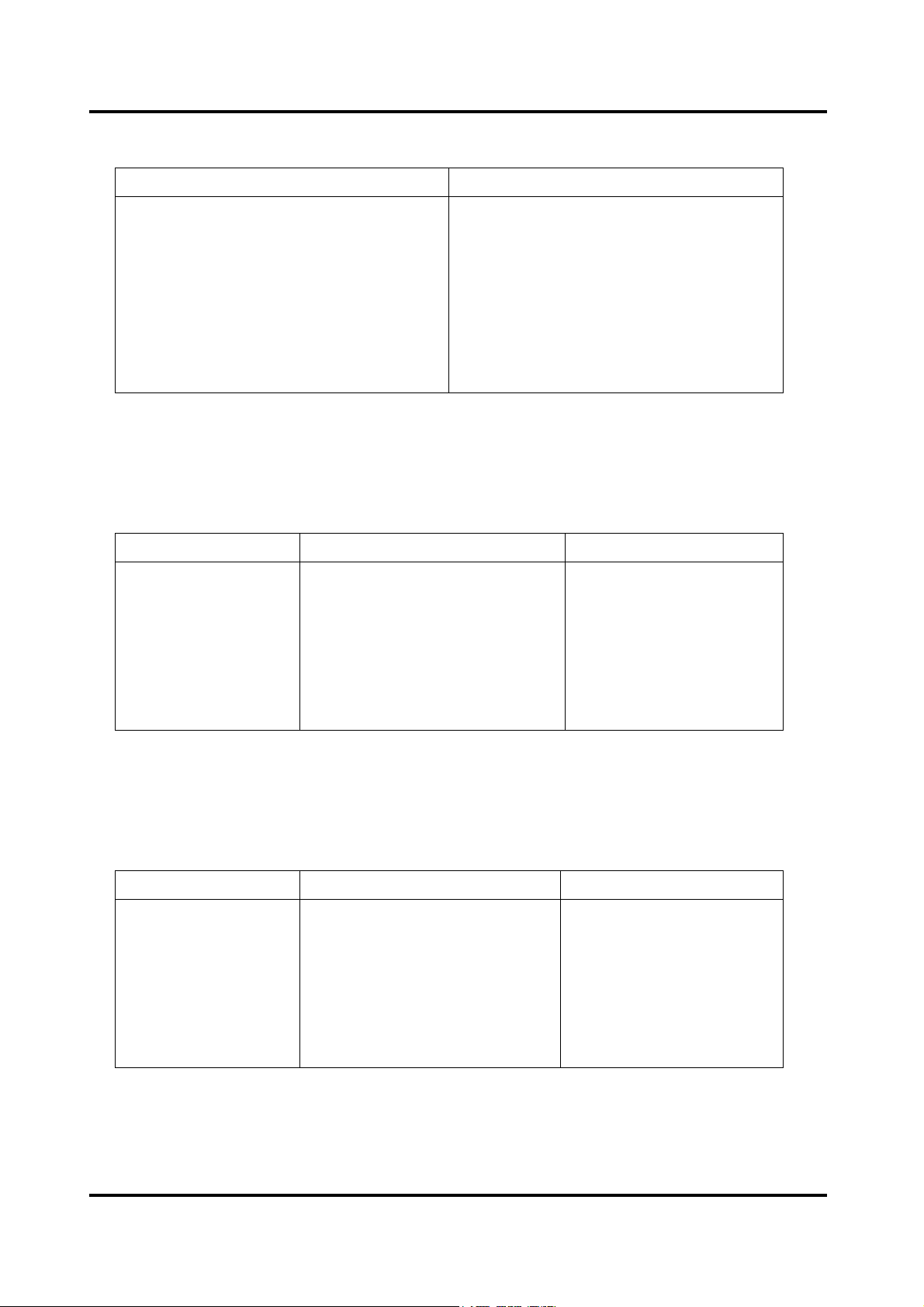
• 12-bit DAC Resolution for
OME-PCI-1202
MSB LSB
1000 0000 0001
0111 1111 1111
0000 0000 0000
(H/L)/1602/1602F/1800(H/L)/1802(H/L)
Data Input Analog Output
1111 1111 1111
1000 0000 0000
+Vref (2047/2048)
+Vref (1/2048)
0 Vlots
-Vref (1/2048)
-Vref (2048/2048)
Bipolar Output Code.
Vref is +5V or +10V selected by J1.
• 12-bit ADC Resolution for OME-PCI-1202(H/L)/1800(H/L)/1802(H/L)
Analog Input Digital Output Binary Code Hex Code
MSB LSB
+9.99512V
0V
-4.88m V
-10V
0111 1111 1111
0000 0000 0000
1111 1111 1111
1000 0000 0000
7FF
000
FFF
800
Input Voltages and Output Codes.
• 16-bit ADC Resolution for OME-PCI-1602/1602F Card
Analog Input Digital Output Binary Code Hex Code
+9.999695V
0V
-305uv
-10V
MSB LSB
0111 1111 1111 1111
0000 0000 0000 0000
1111 1111 1111 1111
1000 0000 0000 0000
7FFF
0000
FFFF
8000
Input Voltages and Output Codes.
Page 4 Version : 3.1 Date:1999/08
Page 6

OME-PCI-1202/1602/1800/1802 Software User’s Manual for DOS
1.1 Software Installation
It is recommended to install the OME-PCI-1202/1602/1800/1802 DOS driver to your hard
disk and backup the companion CD ROM. The contents of OME-PCI-1202/1602/1800/1802 DOS
CD ROM are given as follows:
Refer to CD ROM readme.txt file.
1.1.1 Software content for OME-PCI-1202(H/L)
…\1202\TC>................................................For Turbo C 2.0 or later user
…\1202\BC>................................................For Borland C++ 3.0 later user
…\1202\MSC>.............................................For Microsoft C 5.1 later user
…1202\TC\DRIVER>P1202DR.H..............Header file
…\1202\TC\DRIVER>P1202TCL.C...........Driver source
…\1202\TC\DRIVER>IOPORT.C..............32-bit I/O port driver source
…\1202\TC\LIB>P1202.H...........................Header file
…\1202\TC\LIB>P1202TCL.LIB................Large model library
…\1202\TC\LIB>P1202TCH.LIB...............Huge model library
…\1202\TC\LIB>IOPORTL.LIB................Large model library
…\1202\TC\LIB>IOPORTH.LIB................Huge model library
…\1202\TC\DEMO>P1202TCL.LIB..........Large model library
…\1202\TC\DEMO>IOPORTL.LIB...........Large model library
…\1202\TC\DEMO>P1202.H.....................Header file
…\1202\TC\DEMO>DEMO1.C..................demo1 program source
…\1202\TC\DEMO>DEMO1.PRJ..............demo1 project file
…\1202\TC\DEMO>DEMO1.EXE.............demo1 execution
…\1202\TC\DEMO>DEMO2.C .................demo2 program source
:
:
Version 3.1 Date: 1999/08 Page 5
Page 7

OME-PCI-1202/1602/1800/1802 Software User’s Manual for DOS
:
…\1202\TC\DEMO>DEMO19.C.....................demo19 program source
…\1202\TC\DEMO>DEMO19.PRJ.................demo19 project file
…\1202\TC\DEMO>DEMO19.EXE................demo19 execution file
1.1.2 Software content for OME-PCI-1602/1602F
…\1602\TC>.............................................For Turbo C 2.0 or later user
…\1602\BC>.............................................For Borland C++ 3.0 later user
…\1602\MSC>..........................................For Microsoft C 5.1 later user
...\1602\TC\DRIVER>P1602DR.H...........Header file
…\1602\TC\DRIVER>P160XTCL.C.......Driver source
…\1602\TC\DRIVER>IOPORT.C...........32-bit I/O port driver source
…\1602\TC\LIB>P1602.H.......................Header file
…\1602\TC\LIB>P1602TCL.LIB............Large model library
…\1602\TC\LIB>P1602TCH.LIB............Huge model library
…\1602\TC\LIB>IOPORTL.LIB.............Large model library
…\1602\TC\LIB>IOPORTH.LIB.............Huge model library
…\1602\TC\DEMO>P1602TCL.LIB.......Large model library
…\1602\TC\DEMO>IOPORTL.LIB........Large model library
…\1602\TC\DEMO>P1602.H..................Header file
…\1602\TC\DEMO>DEMO1.C...............demo1 program source
…\1602\TC\DEMO>DEMO1.PRJ...........demo1 project file
…\1602\TC\DEMO>DEMO1.EXE..........demo1 execution file
:
:
:
…\1602\TC\DEMO>DEMO19.C.............demo1 program source
…\1602\TC\DEMO>DEMO19.PRJ.........demo1 project file
…\1602\TC\DEMO>DEMO19.EXE........demo1 execution file
Page 6 Version : 3.1 Date:1999/08
Page 8

OME-PCI-1202/1602/1800/1802 Software User’s Manual for DOS
1.1.3 Software content for OME-PCI-1800(H/L)/1802(H/L)
…\180X\TC>...................................................For Turbo C 2.0 or later user
…\180X\BC>...................................................For Borland C++ 3.0 later user
…\180X\MSC>................................................For Microsoft C 5.1 later user
…\180X\TC\DRIVER>P180XDR.H...............Header file
…\180X\TC\DRIVER>P180XTCL.C.............Driver source
…\180X\TC\DRIVER>IOPORT.C.................32-bit I/O port driver source
…\180X\TC\LIB>P180X.H............................Header file
…\180X\TC\LIB>P180XTCL.LIB.................Large model library
…\180X\TC\LIB>P180XTCH.LIB................Huge model library
…\180X\TC\LIB>IOPORTL.LIB..................Large model library
…\180X\TC\LIB>IOPORTH.LIB..................Huge model library
…\180X\TC\DEMO>P180XTCL.LIB...........Large model library
…\180X\TC\DEMO>IOPORTL.LIB.............Large model library
…\180X\TC\DEMO>P180X.H......................Header file
…\180X\TC\DEMO>DEMO1.C...................demo1 program file
…\180X\TC\DEMO>DEMO1.PRJ...............demo1 project file
…\180X\TC\DEMO>DEMO1.EXE..............demo1 execution file
…\180X\TC\DEMO>DEMO2.C...................demo 2 program file
:
:
:
…\180X \TC\DEMO>DEMO19.C................demo19 program source
…\180X\TC\DEMO>DEMO19.PRJ.............demo19 project file
…\180X\TC\DEMO>DEMO19.EXE............demo19 execution file
Version 3.1 Date: 1999/08 Page 7
Page 9

OME-PCI-1202/1602/1800/1802 Software User’s Manual for DOS
1.2 Compile & link using MSC
z The including file is P1602.H
z There are two OME-PCI-1602/1602F library files: P1602MCH.LIB & P1602MCL.LIB
z There are two 32-bit I/O library files: IOPORTH.LIB & IOPORTL.LIB
z Support MSC 5.1 & later compiler
z LARGE model compiler & link command: CL /AL demo?.c P1602MCL.LIB IOPORTL.lib
z HUGE model compiler & link command: CL /AH demo?.c P1602MCH.LIB IOPORTH.LIB
Note: The steps are the same for OME-PCI-1202(H/L)/1800(H/L)/1802(H/L) card.
z
Page 8 Version : 3.1 Date:1999/08
Page 10

OME-PCI-1202/1602/1800/1802 Software User’s Manual for DOS
1.3 Compile & link using TC
z The including file is P1602.H
z There are two OME-PCI-1602/1602F library files: P1602TCH.LIB & P1602TCL.LIB
z There are two 32-bit I/O library files: IOPORTH.LIB & IOPORTL.LIB
z Support TC 2.x compiler
z Use the text editor to create a large model project file as follows:
DEMO?.C
P1602TCH.lib
IOPORTH.lib
z Or use the text editor to create a huge model project file as follows:
DEMO?.C
P1602TCL.lib
IOPORTL.lib
z Use TC integrated environment to select the correct project file
z Use TC integrated environment to select the correct compiler model
z Press F9 to compile & link
z Note: The steps are the same for OME-PCI-1202(H/L)/1800(H/L)/1802(H/L)
card.
Version 3.1 Date: 1999/08 Page 9
Page 11

OME-PCI-1202/1602/1800/1802 Software User’s Manual for DOS
1.4 Compile & link using BC
z The including file is P1602.H
z There are two OME-PCI-1602/1602F library files: P1602BCH.LIB & P1602BCL.LIB
z There are two 32-bit I/O library files: IOPORTH.LIB & IOPORTL.LIB
z Support BC 3.x compiler
z Use BC integrated environment to create a large model project file as follows :
DEMO?.C
P1602BCL.LIB
IOPORTL.LIB
z Or use BC integrated environment to create a huge model project file as follows :
DEMO?.C
P1602BCH.LIB
IOPORTH.LIB
z Use BC integrated environment to select the correct compiler model
z Press F9 to compile & link
z
Note: The steps are the same for OME-PCI-1202(H/L)/1800(H/L)/1202(H/L)
card.
Page 10 Version : 3.1 Date:1999/08
Page 12
OME-PCI-1202/1602/1800/1802 Software User’s Manual for DOS
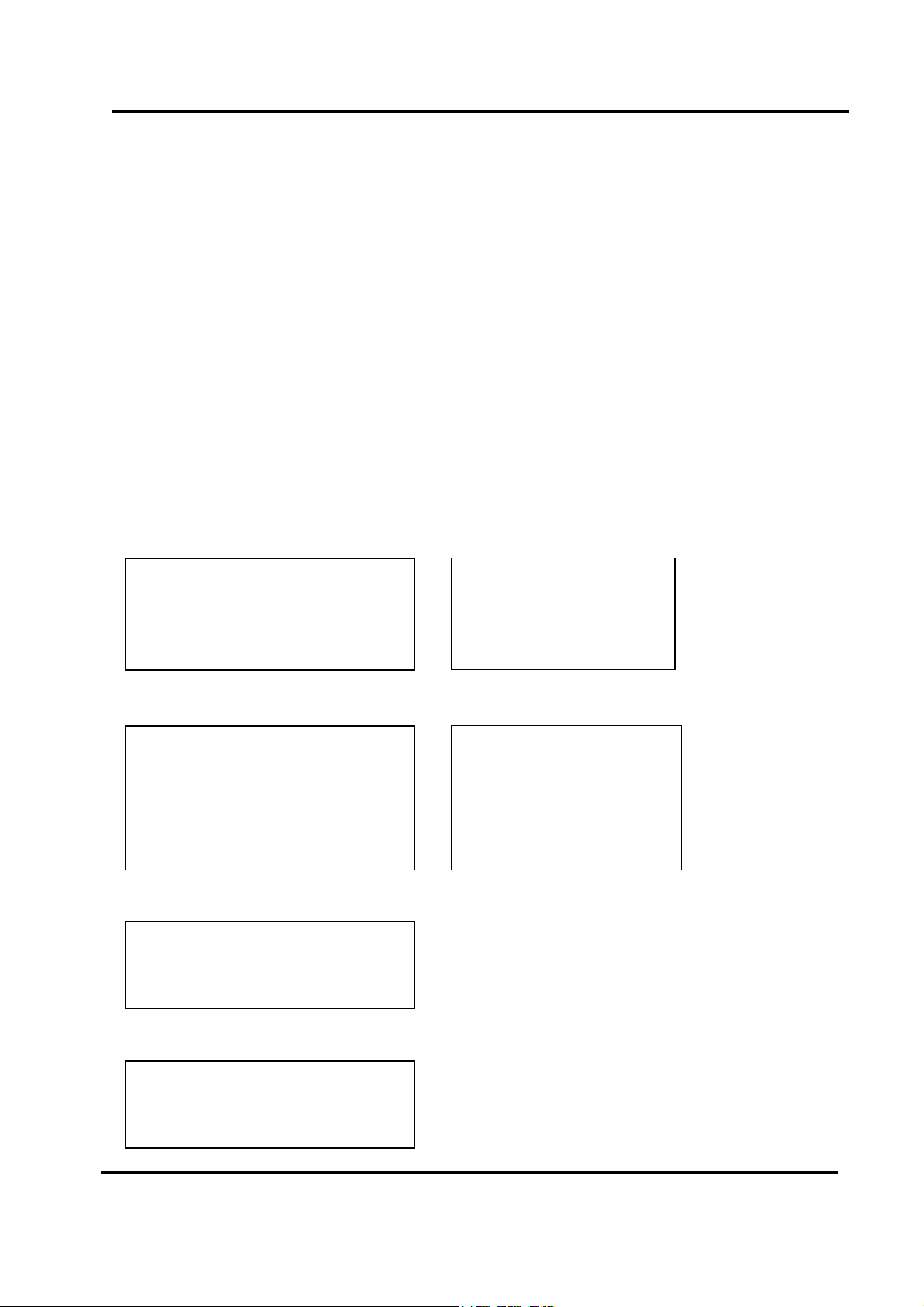
2 . C Language Library
The libraries are divided into several groups as follows:
z The test functions
z The M_Functions function
z The D/I/O functions
z The D/A function
z The A/D fixed-mode functions
z The A/D MagicScan mode functions
z The A/D continuous capture functions
z The Plug & Play functions
z The other functions
• For OME-PCI-1202
The functions of fixed-channel mode are given as follows :
1. P1202_SetChannelConfig
2. P1202_AdPoling
3. P1202_AdsPolling
4. P1202_AdsPacer
The functions of MagicScan mode are given as follows:
1. P1202_ClearScan
2. P1202_StartScan
3. P1202_AddToScan
4. P1202_SaveScan
5. P1202_ReadMagicScanResult
The functions of M_Functions are given as follows:
1. P1202_M_FUN_1
2. P1202_M_FUN_2
(H/L) Card
Data in float format
Data in 12 bits HEX format
3. P1202_M_FUN_3
The functions of continuous capture are given as follows:
1. P1202_Card0_StartScan
2. P1202_Card0_ReadData
3. P1202_Card0_Stop
Version 3.1 Date: 1999/08 Page 11
Page 13
OME-PCI-1202/1602/1800/1802 Software User’s Manual for DOS
• For OME-PCI-1602/1602F Card
The functions of fixed-channel mode are given as follows:
5. P1602_SetChannelConfig
6. P1602_AdPoling
7. P1602_AdsPolling
8. P1602_AdsPacer
The functions of MagicScan mode are given as follows:
6. P1602_ClearScan
7. P1602_StartScan
8. P1602_AddToScan
9. P1602_SaveScan
10. P1602_ReadMagicScanResult
The functions of M_Functions are given as follows:
4. P1602_M_FUN_1
5. P1602_M_FUN_2
6. P1602_M_FUN_3
Data in float format
Data in 16 bits HEX format
The functions of continuous capture are given as follows:
4. P1602_Card0_StartScan
5. P1602_Card0_ReadData
6. P1602_Card0_Stop
Page 12 Version : 3.1 Date:1999/08
Page 14
OME-PCI-1202/1602/1800/1802 Software User’s Manual for DOS
• For OME-PCI-1800(H/L)/1802(H/L) Card
The functions of fixed-channel mode are given as follows:
9. P180X_SetChannelConfig
Data in float format
10. P180X_AdPoling
11. P180X_AdsPolling
12. P180X_AdsPacer
The functions of MagicScan mode are given as follows:
11. P180X_ClearScan
Data in 12 bits HEX format
12. P180X_StartScan
13. P180X_AddToScan
14. P180X_SaveScan
15. P180X_ReadMagicScanResult
The functions of M_Functions are given as follows:
7. P180X_M_FUN_1
8. P180X_M_FUN_2
9. P180X_M_FUN_3
The functions of continuous capture are given as follows:
7. P180X_Card0_StartScan
8. P180X_Card0_ReadData
9. P180X_Card0_Stop
Version 3.1 Date: 1999/08 Page 13
Page 15
OME-PCI-1202/1602/1800/1802 Software User’s Manual for DOS
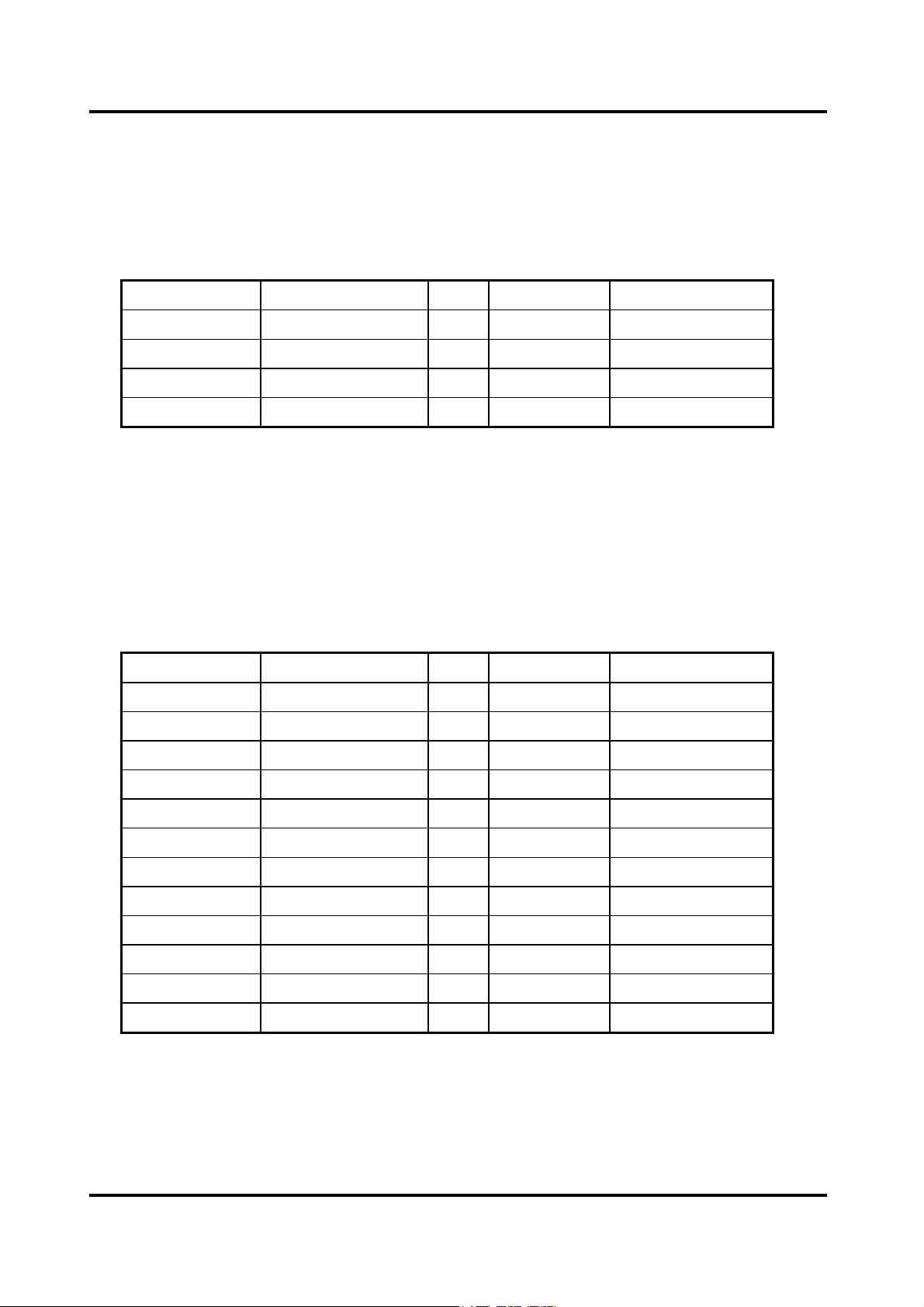
2.1 The Configuration Code Table
2.1.1 OME-PCI-1602/1602F Configuration Code Table
Bipolar/Unipolar Input Signal Range Gain Settling Time Configuration Code
Bipolar +/- 10V 1 3 us 0
Bipolar +/- 5.0V 2 3 us 1
Bipolar +/- 2.5V 4 3 us 2
Bipolar +/- 1.25V 8 3 us 3
2.1.2 OME-PCI-1202L/1800L/1802L Configuration Code Table
Bipolar/Unipolar Input Signal Range Gain Settling Time Configuration Code
Bipolar +/- 5V 1 3 us 0x00
Bipolar +/- 2.5V 2 3 us 0x01
Bipolar +/- 1.25V 4 3 us 0x02
Bipolar +/- 0.625V 8 3 us 0x03
Bipolar +/- 10V 0.5 3 us 0x04
Bipolar +/- 5V 1 3 us 0x05
Bipolar +/- 2.5V 2 3 us 0x06
Bipolar +/- 1.25V 4 3 us 0x07
Unipolar 0V ~ 10V 1 3 us 0x08
Unipolar 0V ~ 5V 2 3 us 0x09
Unipolar 0V ~ 2.5V 4 3 us 0x0A
Unipolar 0V ~ 1.25V 8 3 us 0x0B
Page 14 Version : 3.1 Date:1999/08
Page 16
OME-PCI-1202/1602/1800/1802 Software User’s Manual for DOS
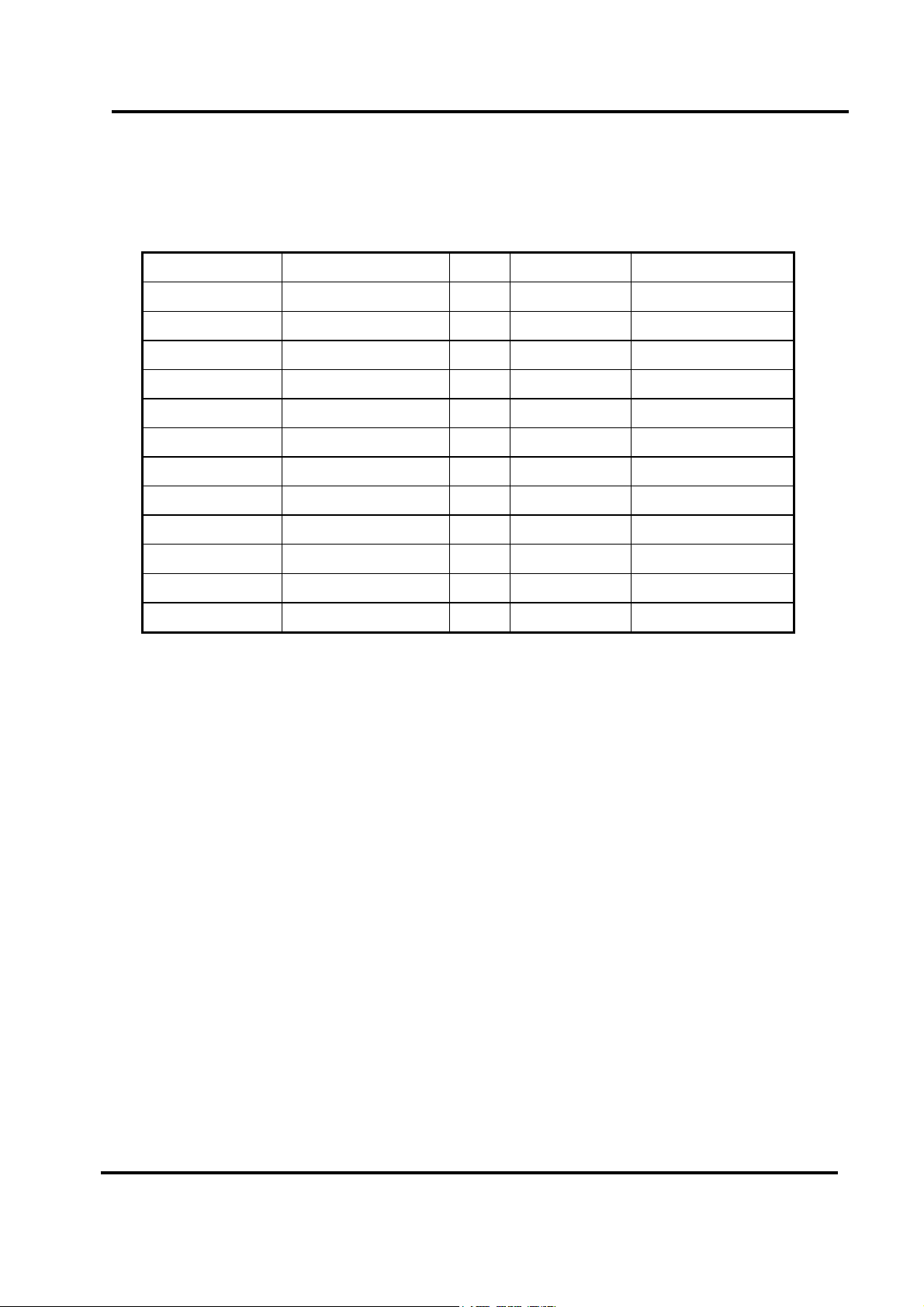
2.1.3 OME-PCI-1202H/1800H/1802H Configuration Code Table
Bipolar/Unipolar Input Signal Range Gain Settling Time Configuration Code
Bipolar +/- 5V 1 23 us 0x10
Bipolar +/- 0.5V 10 28 us 0x11
Bipolar +/- 0.05V 100 140 us 0x12
Bipolar +/- 0.005V 1000 1300 us 0x13
Bipolar +/- 10V 0.5 23 us 0x14
Bipolar +/- 1V 5 28 us 0x15
Bipolar +/- 0.1V 50 140 us 0x16
Bipolar +/- 0.01V 500 1300 us 0x17
Unipolar 0V ~ 10V 1 23 us 0x18
Unipolar 0V ~ 1V 10 28 us 0x19
Unipolar 0V ~ 0.1V 100 140 us 0x1A
Unipolar 0V ~ 0.01V 1000 1300 us 0x1B
Version 3.1 Date: 1999/08 Page 15
Page 17

OME-PCI-1202/1602/1800/1802 Software User’s Manual for DOS
2.2 OME-PCI-1202/1602/1800/1802
Header File
2.2.1 P1202.H for OME-PCI-1202(H/L) Card
#include <stdio.h>
#include <stdlib.h>
#include <dos.h>
#include <conio.h>
#include <math.h>
#include <graphics.h>
#define WORD unsigned int
#define DWORD unsigned long
#define UCHAR unsigned char
#define NoError 0
#define DriverHandleError 1
#define DriverCallError 2
#define AdControllerError 3
#define M_FunExecError 4
#define ConfigCodeError 5
#define FrequencyComputeError 6
#define HighAlarm 7
#define LowAlarm 8
#define AdPollingTimeOut 9
#define AlarmTypeError 10
#define FindBoardError 11
#define AdChannelError 12
#define DaChannelError 13
#define InvalidateDelay 14
#define DelayTimeOut 15
#define InvalidateData 16
#define FifoOverflow 17
#define TimeOut 18
#define ExceedBoardNumber 19
#define NotFoundBoard 20
Page 16 Version : 3.1 Date:1999/08
Page 18

OME-PCI-1202/1602/1800/1802 Software User’s Manual for DOS
#define OpenError 21
#define MAX_BOARD_NUMBER 16
float P1202_FloatSub2(float fA, float fB);
short P1202_ShortSub2(short nA, short nB);
WORD P1202_DriverInit(WORD *wBoards);
WORD P1202_DriverClose(void);
WORD P1202_GetDriverVersion(WORD *wDriverVersion);
WORD P1202_GetConfigAddressSpace(WORD wBoardNo, WORD *wAddrTimer, WORD
*wAddrCtrl, WORD *wAddrDio, WORD *wAddrAdda);
WORD P1202_DelayUs(WORD wDelayUs);
WORD P1202_ActiveBoard( WORD wBoardNo );
WORD P1202_WhichBoardActive(void);
WORD P1202_Di(WORD *wDi);
WORD P1202_Do(WORD wDo);
WORD P1202_Da(WORD wDaChannel, WORD wDaVal);
WORD P1202_SetChannelConfig(WORD wAdChannel, WORD wConfig);
WORD P1202_AdPolling(float *fAdVal);
WORD P1202_AdsPolling(float fAdVal[], WORD wNum);
WORD P1202_AdsPacer(float fAdVal[], WORD wNum, WORD wSample);
WORD P1202_M_FUN_1(WORD wDaFrequency, WORD wDaWave, float dfDaAmplitude, WORD
wAdClock, WORD wAdNumber, WORD wAdConfig, float fAdBuf[], float fLowAlarm, float
fHighAlarm);
WORD P1202_M_FUN_2(WORD wDaNumber, WORD wDaWave, WORD wDaBuf[], WORD
wAdClock, WORD wAdNumber, WORD wAdConfig, WORD wAdBuf[]);
WORD P1202_M_FUN_3(WORD wDaFrequency, WORD wDaWave, float fDaAmplitude, WORD
wAdClock, WORD wAdNumber, WORD wChannelStatus[], WORD wAdConfig[], float fAdBuf[],
float fLowAlarm, float fHighAlarm);
Version 3.1 Date: 1999/08 Page 17
Page 19

OME-PCI-1202/1602/1800/1802 Software User’s Manual for DOS
WORD P1202_Card0_StartScan(WORD wSampleRate, WORD wChannelStatus[], WORD
wChannelConfig[], WORD wCount);
WORD P1202_Card0_ReadData(void);
void P1202_Card0_Stop(void);
WORD P1202_ClearScan(void);
WORD P1202_StartScan(WORD wSampleRate, WORD wNum);
WORD P1202_AddToScan(WORD wAdChannel, WORD wAdConfig, WORD wAverage, WORD
wLowAlarm, WORD wHighAlarm, WORD wAlarmType);
WORD P1202_SaveScan(WORD wAdChannel, WORD wBuf[]);
WORD P1202_ReadMagicScanResult(DWORD *dwHiAlarm, DWORD dwLoAlarm);
/***
wBuf0[] -> the scaned data is stored as
1,0,1,0,1,0,1,0… order
wBuf1[] -> the scaned data is stored as
0,0,0,0,.....,0,1,1,1,1,.....,1 order
^^^^^^^^^^^^^^^ ^^^^^^^^^^^^^^^
|<-DATACOUNT->| |<-DATACOUNT->|
ch:0 data ch:1 data
***/
extern WORD wBuf0[],wBuf1[];
Page 18 Version : 3.1 Date:1999/08
Page 20

OME-PCI-1202/1602/1800/1802 Software User’s Manual for DOS
2.2.2 P1602.H for OME-PCI-1602/1602F Card
#include <stdio.h>
#include <stdlib.h>
#include <dos.h>
#include <conio.h>
#include <math.h>
#include <graphics.h>
#define WORD unsigned int
#define DWORD unsigned long
#define UCHAR unsigned char
#define NoError 0
#define DriverHandleError 1
#define DriverCallError 2
#define AdControllerError 3
#define M_FunExecError 4
#define ConfigCodeError 5
#define FrequencyComputeError 6
#define HighAlarm 7
#define LowAlarm 8
#define AdPollingTimeOut 9
#define AlarmTypeError 10
#define FindBoardError 11
#define AdChannelError 12
#define DaChannelError 13
#define InvalidateDelay 14
#define DelayTimeOut 15
#define InvalidateData 16
#define FifoOverflow 17
#define TimeOut 18
#define ExceedBoardNumber 19
#define NotFoundBoard 20
#define OpenError 21
Version 3.1 Date: 1999/08 Page 19
Page 21

OME-PCI-1202/1602/1800/1802 Software User’s Manual for DOS
#define MAX_BOARD_NUMBER 16
float P1602_FloatSub2(float fA, float fB);
short P1602_ShortSub2(short nA, short nB);
WORD P1602_DriverInit(WORD *wBoards);
WORD P1602_DriverClose(void);
WORD P1602_GetDriverVersion(WORD *wDriverVersion);
WORD P1602_GetConfigAddressSpace(WORD wBoardNo, WORD *wAddrTimer,
WORD *wAddrCtrl, WORD *wAddrDio, WORD *wAddrAdda);
WORD P1602_DelayUs(WORD wDelayUs);
WORD P1602_ActiveBoard( WORD wBoardNo );
WORD P1602_WhichBoardActive(void);
WORD P1602_Di(WORD *wDi);
WORD P1602_Do(WORD wDo);
WORD P1602_Da(WORD wDaChannel, WORD wDaVal);
WORD P1602_SetChannelConfig(WORD wAdChannel, WORD wConfig);
WORD P1602_AdPolling(float *fAdVal);
WORD P1602_AdsPolling(float fAdVal[], WORD wNum);
WORD P1602_AdsPacer(float fAdVal[], WORD wNum, WORD wSample);
WORD P1602_M_FUN_1(WORD wDaFrequency, WORD wDaWave, float dfDaAmplitude,
WORD wAdClock, WORD wAdNumber, WORD wAdConfig, float fAdBuf[], float
fLowAlarm, float fHighAlarm);
WORD P1602_M_FUN_2(WORD wDaNumber, WORD wDaWave, WORD wDaBuf[],
WORD wAdClock, WORD wAdNumber, WORD wAdConfig, WORD wAdBuf[]);
WORD P1602_M_FUN_3(WORD wDaFrequency, WORD wDaWave, float fDaAmplitude,
WORD wAdClock, WORD wAdNumber, WORD wChannelStatus[],
WORD wAdConfig[], float fAdBuf[], float fLowAlarm, float fHighAlarm);
Page 20 Version : 3.1 Date:1999/08
Page 22

OME-PCI-1202/1602/1800/1802 Software User’s Manual for DOS
WORD P1602_Card0_StartScan(WORD wSampleRate, WORD wChannelStatus[],
WORD wChannelConfig[], WORD wCount);
WORD P1602_Card0_ReadData(void);
void P1602_Card0_Stop(void);
WORD P1602_ClearScan(void);
WORD P1602_StartScan(WORD wSampleRate, WORD wNum);
WORD P1602_AddToScan(WORD wAdChannel, WORD wAdConfig, WORD wAverage,
WORD wLowAlarm, WORD wHighAlarm, WORD wAlarmType);
WORD P1602_SaveScan(WORD wAdChannel, WORD wBuf[]);
WORD P1602_ReadMagicScanResult(DWORD *dwHiAlarm, DWORD dwLoAlarm);
/***
wBuf0[] -> the scaned data is stored as
1,0,1,0,1,0,1,0… order
wBuf1[] -> the scaned data is stored as
0,0,0,0,.....,0,1,1,1,1,.....,1 order
^^^^^^^^^^^^^^^ ^^^^^^^^^^^^^^^
|<-DATACOUNT->| |<-DATACOUNT->|
ch:0 data ch:1 data
***/
extern WORD wBuf0[],wBuf1[];
Version 3.1 Date: 1999/08 Page 21
Page 23

OME-PCI-1202/1602/1800/1802 Software User’s Manual for DOS
2.2.3 P180X.H for OME-PCI-1800(H/L)/1802(H/L) Card
#include <stdio.h>
#include <stdlib.h>
#include <dos.h>
#include <conio.h>
#include <math.h>
#include <graphics.h>
#define WORD unsigned int
#define DWORD unsigned long
#define UCHAR unsigned char
#define NoError 0
#define DriverHandleError 1
#define DriverCallError 2
#define AdControllerError 3
#define M_FunExecError 4
#define ConfigCodeError 5
#define FrequencyComputeError 6
#define HighAlarm 7
#define LowAlarm 8
#define AdPollingTimeOut 9
#define AlarmTypeError 10
#define FindBoardError 11
#define AdChannelError 12
#define DaChannelError 13
#define InvalidateDelay 14
#define DelayTimeOut 15
#define InvalidateData 16
#define FifoOverflow 17
#define TimeOut 18
#define ExceedBoardNumber 19
#define NotFoundBoard 20
#define OpenError 21
#define MAX_BOARD_NUMBER 16
Page 22 Version : 3.1 Date:1999/08
Page 24

OME-PCI-1202/1602/1800/1802 Software User’s Manual for DOS
float P180X_FloatSub2(float fA, float fB);
short P180X_ShortSub2(short nA, short nB);
WORD P180X_DriverInit(WORD *wBoards);
WORD P180X_DriverClose(void);
WORD P180X_GetDriverVersion(WORD *wDriverVersion);
WORD P180X_GetConfigAddressSpace(WORD wBoardNo, WORD *wAddrTimer, WORD
*wAddrCtrl, WORD *wAddrDio, WORD *wAddrAdda);
WORD P180X_DelayUs(WORD wDelayUs);
WORD P180X_ActiveBoard( WORD wBoardNo );
WORD P180X_WhichBoardActive(void);
WORD P180X_Di(WORD *wDi);
WORD P180X_Do(WORD wDo);
WORD P180X_Da(WORD wDaChannel, WORD wDaVal);
WORD P180X_SetChannelConfig(WORD wAdChannel, WORD wConfig);
WORD P180X_AdPolling(float *fAdVal);
WORD P180X_AdsPolling(float fAdVal[], WORD wNum);
WORD P180X_AdsPacer(float fAdVal[], WORD wNum, WORD wSample);
WORD P180X_M_FUN_1(WORD wDaFrequency, WORD wDaWave, float dfDaAmplitude, WORD
wAdClock, WORD wAdNumber, WORD wAdConfig, float fAdBuf[], float fLowAlarm, float
fHighAlarm);
WORD P180X_M_FUN_2(WORD wDaNumber, WORD wDaWave, WORD wDaBuf[], WORD
wAdClock, WORD wAdNumber, WORD wAdConfig, WORD wAdBuf[]);
WORD P180X_M_FUN_3(WORD wDaFrequency, WORD wDaWave, float fDaAmplitude, WORD
wAdClock, WORD wAdNumber, WORD wChannelStatus[], WORD wAdConfig[], float fAdBuf[],
float fLowAlarm, float fHighAlarm);
WORD P180X_Card0_StartScan(WORD wSampleRate, WORD wChannelStatus[],
Version 3.1 Date: 1999/08 Page 23
Page 25

OME-PCI-1202/1602/1800/1802 Software User’s Manual for DOS
WORD wChannelConfig[], WORD wCount);
WORD P180X_Card0_ReadData(void);
void P1802_Card0_Stop(void);
WORD P180X_ClearScan(void);
WORD P180X_StartScan(WORD wSampleRate, WORD wNum);
WORD P180X_AddToScan(WORD wAdChannel, WORD wAdConfig, WORD wAverage,
WORD wLowAlarm, WORD wHighAlarm, WORD wAlarmType);
WORD P180X_SaveScan(WORD wAdChannel, WORD wBuf[]);
WORD P180X_ReadMagicScanResult(DWORD *dwHiAlarm, DWORD dwLoAlarm);
/***
wBuf0[] -> the scaned data is stored as
1,0,1,0,1,0,1,0… order
wBuf1[] -> the scaned data is stored as
0,0,0,0,.....,0,1,1,1,1,.....,1 order
^^^^^^^^^^^^^^^ ^^^^^^^^^^^^^^^
|<-DATACOUNT->| |<-DATACOUNT->|
ch:0 data ch:1 data
***/
extern WORD wBuf0[],wBuf1[];
Page 24 Version : 3.1 Date:1999/08
Page 26

OME-PCI-1202/1602/1800/1802 Software User’s Manual for DOS
2.3 The Testing Functions
2.3.1 P1202_FloatSub2
P1602_FloatSub2
P180X_FloatSub2
z Description:
Compute C=A-B in float format, float=4 bytes floating point number. This function is
provided to test library linkage.
If this subroutine return the correct
value, the other subroutine will work properly also.
z Syntax:
float P1202_FloatSub2(float fA, float fB); for OME-PCI-1202(H/L) Card.
float P1602_FloatSub2(float fA, float fB); for OME-PCI-1602/1602F Card.
float P180X_FloatSub2(float fA, float fB); for OME-PCI-1800(H/L)/1802(H/L) Card.
z Input Parameter :
fA : 4 bytes floating point value
fB : 4 bytes floating point value
z Return Value : return=fA-fB
Demo Program : DEMO1.C
z
2.3.2 P1202_ShortSub2
P1602_ShortSub2
P180X_ShortSub2
z Description :
Compute C=A-B in SHORT format, SHORT=16 bits signed number. This function is
provided to test library linkage.
value, the other subroutine will work properly also.
If this subroutine return the correct
Version 3.1 Date: 1999/08 Page 25
Page 27

OME-PCI-1202/1602/1800/1802 Software User’s Manual for DOS
z Syntax :
short P1202_ShortSub2(Short nA, Short nB); for OME-PCI-1202(H/L) Card.
short P1602_ShortSub2(Short nA, Short nB); for OME-PCI-1602/1602F Card.
short P180X_ShortSub2(Short nA, Short nB); for OME-PCI-1800(H/L)/1802H(H/L) Card.
z Input Parameter :
nA : 16 bits value
nB : 16 bits value
z Return Value : return=nA-Nb
z Demo Program : DEMO1.C
2.3.3 P1602_GetDriverVersion
P180X_GetDriverVersion
P1602_GetDriverVersion
z Description :
This subroutine will read the software version number.
z Syntax :
WORD P1202_GetDriverVersion(WORD *wDriverVersion);
for OME-PCI-1202
WORD P1602_GetDriverVersion(WORK *wDriverVersion);
for OME-PCI-1602/1602F Card.
WORD P180X_GetDriverVersion(WORD *wDriverVersion);
for OME-PCI-1800(H/L)/1802(H/L) Card.
z Input Parameter : *wDriverVersion : address of wDriverVersion
wDriverVersion=0x200 Æ Version 2.0
z Return Value :
NoError : OK.
(H/L) Card.
z Demo Program : DEMO1.C
Page 26 Version : 3.1 Date:1999/08
Page 28

OME-PCI-1202/1602/1800/1802 Software User’s Manual for DOS
2.4 The M_Functions
2.4.1 P1602_M_FUN_1
P1602_M_FUN_1
P180X_M_FUN_1
z Description :
The P1602_M_FUN_1 will compute the wave form image automatically.
(Refer to “PCI-1202/1602/1800/1802 Hardware Manual” chapter-5 for details)
(input=AD channel_0, output=DA channel_0). This function will refer to the
current active OME-PCI-1602/1602F board. Use the P1602_ActiveBoard(….) to select
the active board.
z Syntax :
WORD P1202_M_FUN_1(WORD wDaFrequency, WORD wDaWave,
float fDaAmplitude, WORD wAdClock, WORD wAdNumber,
WORD wAdConfig, float fAdBuf[], float fLowAlarm, float fHighAlarm);
for OME-PCI-1202
WORD P1602_M_FUN_1(WORD wDaFrequency, WORD wDaWave,
float fDaAmplitude, WORD wAdClock, WORD wAdNumber,
WORD wAdConfig, float fAdBuf[], float fLowAlarm, float fHighAlarm);
for OME-PCI-1602/1602F Card.
WORD P180X_M_FUN_1(WORD wDaFrequency, WORD wDaWave,
float fDaAmplitude, WORD wAdClock, WORD wAdNumber,
WORD wAdConfig, float fAdBuf[], float fLowAlarm, float fHighAlarm);
for OME-PCI-1800(H/L)/1802(H/L) Card.
(H/L) Card.
Version 3.1 Date: 1999/08 Page 27
Page 29

OME-PCI-1202/1602/1800/1802 Software User’s Manual for DOS
z Input Parameter :
wDaFrequency : DA output frequency = 1.8M/wDaFrequency (pentium 120)
wDaWave : Number of DA wave form to be output
fDaAmplitude : Amplitude of DA output. NOTE : the hardware J1 must select +/-10V
wAdClock : AD sampling clock = 8000000/wAdClock samples/sec
wAdNumber: Number of AD data to be read.
wAdConfig : A/D input range configuration code.
fAdBuf[] : the starting address of fAdBuf which store the A/D data.
fLowAlarm : low alarm limit. if fAdBuf[?]< fLowAlarm Æ LowAlarm.
fHighAlarm : high alarm limit. if fAdBuf[?]>fHighAlarm Æ HighAlarm.
z Return Value :
0 : OK.
ExceedBoardNumber: invalidate board number.
FindBoardError: no OME-PCI-1202(H/L)/1602/1602F/1800(H/L)/1802(H/L) board
AdControllerError : embedded controller handshake error .
ConfigCodeError : wAdConfig configuration code error.
HighAlarm : fAdBuf[?]>fHighAlarm.
LowAlarm : fAdBuf[?]< fLowAlarm.
z Demo Program : DEMO5.C
Page 28 Version : 3.1 Date:1999/08
Page 30

OME-PCI-1202/1602/1800/1802 Software User’s Manual for DOS
2.4.2 P1202_M_FUN_2
P1602_M_FUN_2
P180X_M_FUN_2
z Description :
The P1602_M_FUN_2 will
(Refer to “PCI-1202/1602/1800/1802 Hardware Manual” chapter-5 for details)
(input=AD channel_0,output=DA channel_0) This function will refer to the current
active OME-PCI-1602/1602F board. Use the P1602_ActiveBoard( … ) to select the active
board.
z Syntax :
WORD P1202_M_FUN_2(WORD wDaFrequency, WORD wDaWave,
WORD wDaBuf[], WORD wAdClock, WORD wAdNumber
WORD wAdConfig, WORD wAdBuf[]);
for OME-PCI-1202(H/L) Card.
WORD P1602_M_FUN_2(WORD wDaFrequency, WORD wDaWave,
WORD wDaBuf[], WORD wAdClock, WORD wAdNumber
WORD wAdConfig, WORD wAdBuf[]);
for OME-PCI-1602/1602F Card.
WORD P180X_M_FUN_2(WORD wDaFrequency, WORD wDaWave,
not compute the wave form image automatically.
WORD wDaBuf[], WORD wAdClock, WORD wAdNumber
WORD wAdConfig, WORD wAdBuf[]);
for OME-PCI-1800(H/L)/1802(H/L) Card.
z Input Parameter :
wDaFrequency : DA output frequency = 1.8M/wDaFrequency(pentium 120)
wDaWave : Number of DA wave form to be output.
wDaBuf[] : The array store the D/A wave form image.
wAdClock : AD sampling clock = 8000000/wAdClock samples/sec.
wAdNumber: Number of AD data to be read.
wAdConfig : A/D input range configuration code.
wAdBuf[] : the starting address of fAdBuf which store the A/D data.
Version 3.1 Date: 1999/08 Page 29
Page 31
OME-PCI-1202/1602/1800/1802 Software User’s Manual for DOS
Return Value :
z
0 : OK.
ExceedBoardNumber: invalidate board number.
FindBoardError: no OME-PCI-1202(H/L)/1602/1602F/1800(H/L)/1802(H/L) board
AdControllererror: embedded controller handshake error .
z Demo Program : DEMO7.C
The DA output wave form generator is a machine dependent function
The DA output frequency = 1.8M/wDaFrequency is machine dependent.
The testing results are given as follows:
DA output frequency = 1.8M/wDaFrequency for pentium 120
DA output frequency = 2.0M/wDaFrequency for pentium 133
The user must test this value before using M_FUN_1
and M_FUN_2.
Page 30 Version : 3.1 Date:1999/08
Page 32

OME-PCI-1202/1602/1800/1802 Software User’s Manual for DOS
2.4.3 P1202_M_FUN_3
P1602_M_FUN_3
P180X_M_FUN_3
z Description :
The P1602_M_FUN_3 will compute the wave form image automatically. (Refer to “PCI-
1202/1602/1800/1802 Hardware Manual” chapter-5 for details) (input=programable
channels,output=DA channel_0) This function will refer to the current active OME-PCI-
1602/1602F board. Use the P1602_ActiveBoard( … ) to select the active board.
Syntax :
z
WORD P1602_M_FUN_3( WORD wDaFrequency, WORD wDaWave,
float fDaAmplitude, WORD wAdClock, WORD wAdNumber,
WORD wChannelStatus[], WORD wAdConfig[], float fAdBuf[],
float fLowAlarm, float fHighAlarm)
for OME-PCI-1202(H/L) Card.
WORD P1602_M_FUN_3( WORD wDaFrequency, WORD wDaWave,
float fDaAmplitude, WORD wAdClock, WORD wAdNumber,
WORD wChannelStatus[], WORD wAdConfig[], float fAdBuf[],
float fLowAlarm, float fHighAlarm)
for OME-PCI-1602/1602F Card
WORD P1602_M_FUN_3( WORD wDaFrequency, WORD wDaWave,
float fDaAmplitude, WORD wAdClock, WORD wAdNumber,
WORD wChannelStatus[], WORD wAdConfig[], float fAdBuf[],
float fLowAlarm, float fHighAlarm)
for OME-PCI-1800(H/L)/1802(H/L) Card
Version 3.1 Date: 1999/08 Page 31
Page 33
OME-PCI-1202/1602/1800/1802 Software User’s Manual for DOS
z Input Parameter :
wDaFrequency : DA output frequency = 1.8M/wDaFrequency (pentium 120)
wDaWave : Number of DA wave form to be output
fDaAmplitude : Amplitude of DA output. NOTE : the hardware J1 must select +/-10V
wAdClock : AD sampling clock = 8000000/wAdClock samples/sec
wAdNumber: Number of AD data to be read
wAdChannel[]: status (1=scan, 0=no scan) code of all 32 channels
wAdConfig[]: configuration code of all 32 channels
fAdBuf[] : the starting address of fAdBuf which store the A/D data
fLowAlarm : low alarm limit. if fAdBuf[?]< fLowAlarm Æ LowAlarm
fHighAlarm : high alarm limit. if fAdBuf[?]>fHighAlarm Æ HighAlarm
z Return Value :
0 : OK
ExceedBoardNumber: invalidate board number
FindBoardError: no OME-PCI-1202(H/L)/1602/1602F/1800(H/L)/1802(H/L) board
AdControllerError : embedded controller handshake error
HighAlarm : fAdBuf[?]>fHighAlarm
LowAlarm : fAdBuf[?]< fLowAlarm
z Demo Program : DEMO9.C
DA output frequency = 1.8M/wDaFrequency for pentium 120
DA output frequency = 2.0M/wDaFrequency for pentium 133
The user must test this value before using M_FUN_1
and M_FUN_2.
Page 32 Version : 3.1 Date:1999/08
Page 34

OME-PCI-1202/1602/1800/1802 Software User’s Manual for DOS
2.5 The DIO Functions
2.5.1 P1202_Di / P1602_Di / P180X_Di
z Description :
This function will read the 16 bits D/I data from the current active board. Use
P1602_ActiveBoard(…) to select the active board.
z Syntax :
WORD P1202_Di(WORD *wDi); for OME-PCI-1202(H/L) Card
WORD P1602_Di(WORD *wDi); for OME-PCI-1602/1602F Card
WORD P180X_Di(WORD *wDi); for OME-PCI-1800(H/L)/1802(H/L) Card
z
Input Parameter :
*wDi : address of wDi which store the 16 bits D/I data
z Return Value :
NoError : OK
ExceedBoardNumber: invalidate board number
FindBoardError : cannot find the OME-PCI-1202(H/L)/1602/1602F/1800(H/L)/1802(H/L)
board
z Demo Program : DEMO1.C
2.5.2 P1202_Do / P1602_Do / P180X_Do
z Description : This function will send the 16 bits D/O data to the current active board. Use
P1602_ActiveBoard(…) to select the active boards.
z Syntax : WORD P1602_Do(WORD wDo);
z Input Parameter :
wDo : the 16 bits data sent to DO port
z Return Value :
NoError : OK
ExceedBoardNumber: invalidate board number
FindBoardError : cannot find the OME-PCI-1202(H/L)/1602/1602F/1800(H/L)/1802(H/L)
board
z Demo Program : DEMO1.C
Version 3.1 Date: 1999/08 Page 33
Page 35

OME-PCI-1202/1602/1800/1802 Software User’s Manual for DOS
2.6 The DA Functions
2.6.1 P1202_Da / P1602_Da / P180X_Da
z Description :
This function will send the 12 bits D/A data to the current active board. Use
P1602_ActiveBoard(…) to select the active boards.
z Syntax :
WORD P1202_Da(WORD wChannel, WORD wDaVal);
for OME-PCI-1202(H/L) Card
WORD P1602_Da(WORD wChannel, WORD wDaVal);
for OME-PCI-1602/1602F Card
WORD P180X_Da(WORD wChannel, WORD wDaVal);
for OME-PCI-1800(H/L)/1802(H/L) Card
z Input Parameter :
wChannel : 0 for channel_0 DA, 1 for channel_1 DA
wDaVal : 12 bits data sent to DA port. 0=minimum and 4095=maximum. The DA
output can be +/- 5V or +/- 10V setting by hardware JP1. The software
can’t detect the state of JP1. So 4095 maybe +5V or +10V (depend on
JP1).
Return Value :
z
NoError : OK
ExceedBoardNumber: invalidate board number
FindBoardError : cannot find the OME-PCI-1202
board
DaChannelError : channel number must be 0 or 1
z Demo Program : DEMO1.C
Page 34 Version : 3.1 Date:1999/08
(H/L)/1602/1602F/1800(H/L)/1802(H/L)
Page 36

OME-PCI-1202/1602/1800/1802 Software User’s Manual for DOS
2.7 The AD Fixed-mode Functions
2.7.1 P1202_SetChannelConfig
P1602_SetChannelConfig
P180X_SetChannelConfig
z Description :
This subroutine will set the AD channel & its configuration code. This subroutine will set
the active AD channel for P1602_AdPolling, P1602_AdsPolling and P1602_AdsPacer.
This function will refer to the current active OME-PCI-1602/1602F board.
Use the P1602_ActiveBoard(….) to select the active board.
z Syntax :
WORD P1202_SetChannelConfig(WORD wChannel, WORD wConfig);
for OME-PCI-1202
WORD P1602_SetChannelConfig(WORD wChannel, WORD wConfig);
for OME-PCI-1602/1602F Card, Maximum 32 Channels.
WORD P180X_SetChannelConfig(WORD wChannel, WORD wConfig);
(H/L) Card, Maximun 16 Channels.
for OME-PCI-1800(H/L)/1802(H/L) Card.
Maximum 16 Channels for OME-PCI-1800(H/L) Card.
Maximum 32 Channels for OME-PCI-1802(H/L) Card.
z Input Parameter :
wChannel : AD channel number
wConfig : Configuration code. Refer to “PCI-1202/1602/1800/1802 Hardware Manual” for
details.
z Return Value :
NoError : OK
ExceedBoardNumber: invalidate board number
FindBoardError : cannot find the OME-PCI-1202(H/L)/1602/1602F/1800(H/L)/1802(H/L)
board
AdControllerError : MagicScan controller hardware handshake error
Version 3.1 Date: 1999/08 Page 35
Page 37

OME-PCI-1202/1602/1800/1802 Software User’s Manual for DOS
z Demo Program : DEMO1.C
2.7.2 P1202_AdPolling
P1602_AdPolling
P180X_AdPolling
z Description :
This subroutine will perform one AD conversion by polling. The
P1602_SetChannelConfig subroutine can be used to change channel or configuration
code and the P1602_AdPolling will refer to that condition in later operation. This
function will refer to the current active OME-PCI-1602/1602F board. Use the
P1602_ActiveBoard(….) to select the active board.
z Syntax :
WORD P1202_AdPolling(float *fAdVal); for OME-PCI-1202(H/L) Card
WORD P1602_AdPolling(float *fAdVal); for OME-PCI-1602/1602F Card
WORD P180X_AdPolling(float *fAdVal); for OME-PCI-1800(H/L)/1802(H/L) Card
z Input Parameter :
*fAdVal : address of fAdVal which store the AD data, this data is automatically
computed based on the setting of P1602_SetChannelConfig.
z Return Value :
NoError : OK
ExceedBoardNumber: invalidate board number
FindBoardError : cannot find the OME-PCI-1202(H/L)/1602/1602F/1800(H/L)/1802(H/L)
board
AdPollingTimeOut : hardware timeout error
z Demo Program : DEMO1.C
Page 36 Version : 3.1 Date:1999/08
Page 38

OME-PCI-1202/1602/1800/1802 Software User’s Manual for DOS
2.7.3 P1202_AdsPolling
P1602_AdsPolling
P180X_AdsPolling
z Description :
This subroutine will perform multiple AD conversions by polling.
The P1602_SetChannelConfig subroutine can be used to change channel or
configuration code and the P1602_AdsPolling will refer to that condition in later
operation. This function will refer to the current active OME-PCI-1602/1602F board. Use the
P1602_ActiveBoard(….) to select the active board.
z Syntax :
WORD P1202_AdsPolling(float fAdVal[], WORD wNum);
for OME-PCI-1202
WORD P1602_AdsPolling(float fAdVal[], WORD wNum);
for OME-PCI-1602/1602F Card
WORD P180X_AdsPolling(float fAdVal[], WORD wNum);
for OME-PCI-1800(H/L)/1802(H/L) Card
z Input Parameter :
fAdVal[]: starting address of AD data buffer, these data will be automatically
computed based on the setting of P1602_SetChannelConfig.
wNum: number of AD conversions will be performed.
(H/L) Card
z Return Value :
NoError: OK
ExceedBoardNumber: invalidate board number
FindBoardError: cannot find the OME-PCI-1202
(H/L)/1602/1602F/1800(H/L)/1802(H/L) board
AdPollingTimeOut: hardware timeout error
Demo Program : DEMO1.C
z
Version 3.1 Date: 1999/08 Page 37
Page 39

OME-PCI-1202/1602/1800/1802 Software User’s Manual for DOS
2.7.4 P1202_AdsPacer
P1602_AdsPacer
P180X_AdsPacer
z Description :
This subroutine will perform multiple AD conversions by pacer trigger. The
P1602_SetChannelConfig subroutine can be used to change channel or configuration
code and the P1602_AdsPacer will refer to that condition in later operation. The
hardware pacer will generate trigger signal to AD converter periodically. So these AD
data can be used to reconstruct the wave form of analog input. The P1602_AdsPolling is
controlled by software polling , so the AD conversion operation will be interrupted by
system OS. It is recommended to use P1602_AdsPacer if the input
wave form reconstruction is needed.
OME-PCI-1602/1602F board. Use the P1602_ActiveBoard(….) to select the active board.
z
Syntax :
This function will refer to the current active
WORD P1202_AdsPacer(float fAdVal[], WORD wNum, WORD wSample);
for OME-PCI-1202
WORD P1602_AdsPacer(float fAdVal[], WORD wNum, WORD wSample);
for OME-PCI-1602F Card
WORD P180X_AdsPacer(float fAdVal[], WORD wNum, WORD wSample);
for OME-PCI-1800
z
Input Parameter :
fAdVal[] : starting address of AD data buffer, these data will be automatically
computed based on the setting of P1602_SetChannelConfig.
wNum : number of AD conversions will be performed.
(H/L) Card
(H/L)/1802(H/L) Card
wSample : AD sampling rate = 8M/wSample
Page 38 Version : 3.1 Date:1999/08
Page 40
OME-PCI-1202/1602/1800/1802 Software User’s Manual for DOS
For OME-PCI-1202 Card
wSample=73 Æ Sampling rate=8M/73=110K Æ Maximum for OME-PCI-1202 Card
wSample=80 Æ Sampling rate=8M/80=100K
For OME-PCI-1602F/1602 Card
wSample=40 Æ Sampling rate=8M/40=200K Æ Maximum for OME-PCI-1602F Card
wSample=80 Æ Sampling rate=8M/80=100K Æ Maximum for OME-PCI-1602 Card
For OME-PCI-1800/1802 Card
wSample=24 Æ Sampling rate=8M/24=333K Æ Maximum
wSample=80 Æ Sampling rate=8M/80=100K
z Return Value :
NoError : OK
ExceedBoardNumber: invalidate board number
FindBoardError : cannot find the OME-PCI-1202(H/L)/1602/1602F/1800(H/L)/1802(H/L)
board
AdPollingTimeOut : hardware timeout error
z Demo Program : DEMO1.C
P1602_SetChannelConfig
P1602_AdPolling
P1602_AdsPollng
P1602_AdsPacer
Fix channel AD conversion mode
Version 3.1 Date: 1999/08 Page 39
Page 41

OME-PCI-1202/1602/1800/1802 Software User’s Manual for DOS
2.8 The MagicScan Functions
2.8.1 P1202_ClearScan
P1602_ClearScan
P180X_ClearScan
z Description :
This subroutine will initialize the MagicScan controller to the Initial state. This
function will refer to the current active OME-PCI-1602/1602F board. Use the
P1602_ActiveBoard(….) to select the active board.
z Syntax : WORD P1202_ClearScan(); for OME-PCI-1202(H/L) Card
WORD P1602_ClearScan(); for OME-PCI-1602/1602F Card
WORD P180X_ClearScan(); for OME-PCI-1800(H/L)/1802(H/L) Card
z Input Parameter : void
z Return Value :
NoError : OK
ExceedBoardNumber: invalidate board number
FindBoardError : cannot find the OME-PCI-1202(H/L)/1602/1602F/1800(H/L)/1802(H/L)
board
z Demo Program : DEMO11.C
Page 40 Version : 3.1 Date:1999/08
Page 42
OME-PCI-1202/1602/1800/1802 Software User’s Manual for DOS
2.8.2 P1602_StartScan
P1602_StartScan
P1602_StartScan
z Description :
This subroutine will start the MagicScan operation. This function will refer to the current
active OME-PCI-1602/1602F board. Use the P1602_ActiveBoard(….) to select the active
board.
Syntax :
z
WORD P1202_StartScan(WORD wSampleRate, WORD wNum);
for OME-PCI-1202(H/L) Card
WORD P1602_StartScan(WORD wSampleRate, WORD wNum);
for OME-PCI-1602/1602F Card
WORD P180X_StartScan(WORD wSampleRate, WORD wNum);
for OME-PCI-1800(H/L)/1802(H/L) Card
z Input Parameter :
wSampleRate : AD sampling rate = 8M/wSampleRate
For OME-PCI-1202 Card
wSampleRate=73 Æ Sampling rate=8M/73=110K Æ Maximum
wSampleRate=80 Æ Sampling rate=8M/80=100K
For OME-PCI-1602F/1602 Card
wSampleRate=40 Æ Sampling rate=8M/40=200K Æ Maximum for OME-PCI-1602FCard
wSampleRate=80 Æ Sampling rate=8M/80=100K Æ Maximum for OME-PCI-1602 Card
For OME-PCI-1800/1802 Card
wSampleRate=24 Æ Sampling rate=8M/24=333K Æ Maximum
wSampleRate=80 Æ Sampling rate=8M/80=100K
wNum : Number of MagicScan cycle to perform
z Return Value :
NoError : OK
ExceedBoardNumber: invalidate board number
FindBoardError : cannot find the OME-PCI-1202(H/L)/1602/1602F/1800(H/L)/1802(H/L)
board
AdControllerError : MagicScan controller hardware handshake error
z Demo Program : DEMO11.C
Version 3.1 Date: 1999/08 Page 41
Page 43
OME-PCI-1202/1602/1800/1802 Software User’s Manual for DOS
2.8.3 P1202_ReadMagicScanResult
P1602_ReadMagicScanResult
P180X_ReadMagicScanResult
z Description :
This subroutine will read the alarm result of the MagicScan operation. This function will
refer to the current active OME-PCI-1602/1602F board. Use the P1602_ActiveBoard(….) to
select the active board.
Syntax :
z
void P1202_ReadMagicScanResult(DWORD *dwHighAlarm, DWORD dwLowAlarm);
for OME-PCI-1202
void P1602_ReadMagicScanResult(DWORD *dwHighAlarm, DWORD *dwLowAlarm);
for OME-PCI-1602/602F Card
void P180X_ReadMagicScanResult(DWORD *dwHighAlarm, DWORD *dwLowAlarm);
for OME-PCI-1800(H/L)/1802(H/L) Card
z Input Parameter :
*dwLowAlarm: address of dwLowAlarm which store the MagicScan alarm status
(bit_0 Æ channel_0, bit_31 Æ channel_31, 0=no alarm, 1=low alarm)
*dwHighAlarm: address of dwHighAlarm which store the MagicScan alarm tatus
(bit_0 Æ channel_0, bit_31 Æ channel_31, 0=no alarm, 1=high alarm)
z Return Value : void
z Demo Program : DEMO11.C
dwLowAlarm Æ 32 bits corresponding to 32 channels
Æ 0 = no low alarm
Æ 1 = is low alarm
dwLowAlarm=0 Æ all channels OK, no low alarm
dwLowAlarm=1 Æ channel_0 is low alarm, others are OK
(H/L) Card
dwLowAlarm=3 Æ channel_0 and channel_1 are low alarm, others are OK
dwHighAlarm Æ 32 bits corresponding to 32 channels
Æ 0 = no high alarm
Æ 1 = is high alarm
dwHighAlarm=0 Æ all channels OK, no high alarm
dwHighAlarm=1 Æ channel_0 is high alarm, others are OK
dwHighAlarm=3 Æ channel_0 and channel_1 are high alarm, others are OK
Page 42 Version : 3.1 Date:1999/08
Page 44

OME-PCI-1202/1602/1800/1802 Software User’s Manual for DOS
2.8.4 P1202_AddToScan
P1602_AddToScan
P180X_AddToScan
z Description :
This subroutine will add one channel to the MagicScan circular queue. This function
will refer to the current active OME-PCI-1602/1602F board.Use the P1602_ActiveBoard(…)
to select the active board.
Syntax :
z
void P1202_AddToScan( WORD wAdChannel, WORD wConfig, WORD wAverage,
WORD wLowAlarm, WORD wHighAlarm, WORD wAlarmType);
for OME-PCI-1202
void P1602_AddToScan( WORD wAdChannel, WORD wConfig, WORD wAverage,
WORD wLowAlarm, WORD wHighAlarm, WORD wAlarmType);
for OME-PCI-1602/1602F Card
void P180X_AddToScan( WORD wAdChannel, WORD wConfig, WORD wAverage,
WORD wLowAlarm, WORD wHighAlarm, WORD wAlarmType);
for OME-PCI-1800(H/L)/1802(H/L) Card
z Input Parameter :
wAdChannel : AD channel number
wConfig : the configuration code
wAverage : the factor of digital average filter
wLowAlarm : 16 bits low alarm data
wHighAlarm : 16 bits high alarm data
wAlarmType : 0=no alarm, 1=high alarm, 2=low alarm, 3=in-alarm, 4=out-alarm
z Return Value : void
(H/L) Card
NoError : Ok
ExceedBoardNumber: invalidate board number
FindBoardError : cannot find the OME-PCI-1202(H/L)/1602/1602F/1800(H/L)/1802(H/L)
board
AdChannelError : invalidate AD channel
AlarmTypeError : only 0/1/2/3/4 are validate
AdControllerError : MagicScan controller hardware handshake error
Demo Program : DEMO11.C
z
Version 3.1 Date: 1999/08 Page 43
Page 45

OME-PCI-1202/1602/1800/1802 Software User’s Manual for DOS
2.8.5 P1202_SaveScan
P1602_SaveScan
P180X_SaveScan
z Description :
This subroutine will specify the starting address of AD data buffer for MagicScan. This
function will refer to the current active OME-PCI-1602/1602F board. Use the
P1602_ActiveBoard(…) to select the active board.
Syntax :
z
void P1202_SaveScan(WORD wAdChannel, WORD wBuf[]);
for OME-PCI-1202
void P1602_SaveScan(WORD wAdChannel, WORD wBuf[]);
for OME-PCI-1602/1602F Card
void P180X_SaveScan(WORD wAdChannel, WORD wBuf[]);
for OME-PCI-1800(H/L)/1802(H/L) Card
z Input Parameter :
(H/L) Card
wAdChannel : Scan number in the scan queue.
(Note: not the A/D channel number.)
wBuf : starting address of AD data buffer for channel specified in wAdChannel
Return Value :
z
NoError : Ok
ExceedBoardNumber: invalidate board number
FindBoardError : cannot find the OME-PCI-1202
board
(H/L)/1602/1602F/1800(H/L)/1802(H/L)
AdChannelError : invalidate AD channel
z Demo Program :.DEMO11.C
Page 44 Version : 3.1 Date:1999/08
Page 46

OME-PCI-1202/1602/1800/1802 Software User’s Manual for DOS
2.9 The Plug & Play Functions
2.9.1 P1202_DriverInit
P1602_DriverInit
P180X_DriverInit
z Description :
This function will detect all the OME-PCI-1602/1602F boards installed in the system.
This function must be called once before the other functions are called.
z Syntax :
WORD P1202_DriverInit(WORD *wTotalBoard); for OME-PCI-1202(H/L) Card
WORD P1602_DriverInit(WORD *wTotalBoard); for OME-PCI-1602/1602F Card
WORD P180X_DriverInit(WORD *wTotalBoard); for OME-PCI-1800(H/L)/1802(H/L) Card
z Input Parameter :
*wTotalBoard: address of wTotalBoard
wTotalBoard=1 Æ one OME-PCI-1602/1602F card in the system
wTotalBoard=n Æ n*PCI-1602/1602F cards in the system
z Return Value :
NoError : OK
NoFoundBoard: detect no OME-PCI-1202(H/L)/1602/1602F/1800(H/L)/1802(H/L) Card
z Demo Program : All DEMO programs
Version 3.1 Date: 1999/08 Page 45
Page 47

OME-PCI-1202/1602/1800/1802 Software User’s Manual for DOS
2.9.2 P1202_DriverClose
P1602_DriverClose
P180X_DriverClose
z Description :
Return all resources to system. This function must be called once before
program is terminated.
Syntax :
z
WORD P1202_DriverClose( void ); for OME-PCI-1202(H/L) Card
WORD P1602_DriverClose( void ); for OME-PCI-1602/1602F Card
WORD P180X_DriverClose( void ); for OME-PCI-1800(H/L)/1802(H/L) Card
z Input Parameter : void
z Return Value : NoError
z Demo Program : All DEMO programs
Page 46 Version : 3.1 Date:1999/08
Page 48

OME-PCI-1202/1602/1800/1802 Software User’s Manual for DOS
2.9.3 P1202_GetConfigAddressSpace
P1602_GetConfigAddressSpace
P180X_GetConfigAddressSpace
z Description :
Get the I/O address of OME-PCI-1602/1602F board n. This function is for debug. It is
not necessary to call this function.
z Syntax :
WORD P1202_GetConfigAddressSpace( WORD wBoardNo, WORD
*wAddrTimer,WORD *wAddrCtrl, WORD *wAddrDio, WORD *wAddrAdda );
for OME-PCI-1202
WORD P1602_GetConfigAddressSpace( WORD wBoardNo, WORD
*wAddrTimer,WORD *wAddrCtrl, WORD *wAddrDio, WORD *wAddrAdda );
for OME-PCI-1602/1602
WORD P180X_GetConfigAddressSpace( WORD wBoardNo, WORD
*wAddrTimer,WORD *wAddrCtrl, WORD *wAddrDio, WORD *wAddrAdda );
for OME-PCI-1800(H/L)/1802(H/L) Card
z Input Parameter :
wBoardNo: OME-PCI-1602/1602F board number
wAddrTimer, wAddrCtrl, wAddrDio, wAddrAdda: refer to
“PCI-1202/1602/1800/1802 Hardware manual” Chapter-3 for details.
(H/L) Card
F Card
z Return Value :
NoError : OK
FindBoardError: handshake check error
ExceedBoardError: wBoardNo is invalidate
z Demo Program : ALL DEMO programs
Version 3.1 Date: 1999/08 Page 47
Page 49

OME-PCI-1202/1602/1800/1802 Software User’s Manual for DOS
2.9.4 P1202_WhichBoardActive
P1602_WhichBoardActive
P180X_WhichBoardActive
z Description:
Return the board number of the active board.
z Syntax:
WORD P1202_WhichBoardActive(void); for OME-PCI-1202(H/L) Card
WORD P1602_WhichBoardActive(void); for OME-PCI-1602/1602F Card
WORD P180X_WhichBoardActive(void); for OME-PCI-1800(H/L)/1802(H/L) Card
z Input Parameter: void
z Return Value: board number of the active board.
z Demo Program: DEMO1.C
Page 48 Version : 3.1 Date:1999/08
Page 50

OME-PCI-1202/1602/1800/1802 Software User’s Manual for DOS
2.9.5 P1602_ActiveBoard
P1602_ActiveBoard
P180X_ActiveBoard
z Description:
This function will active one of the OME-PCI-1602/1602F boards installed in the system. This
function must call once before the D/I/O, A/D, D/A functions are called.
z Syntax:
WORD P1202_ActiveBoard(WORD wBoardNo); for OME-PCI-1202(H/L) Card
WORD P1602_ActiveBoard(WORD wBoardNo); for OME-PCI-1602/1602F Card
WORD P180X_ActiveBoard(WORD wBoardNo); for OME-PCI-1800(H/L)/1802(H/L) Card
z Input Parameter:
wBoardNo: board number
z Return Value :
NoError : OK
ExceedBoardError: wBoardNo is invalidate
z Demo Program : All DEMO program.
The P1602_ActiveBoard(…) will take effect on all functions except the following:
1. P1602_FloatSub2
2. P1602_ShortSub2
3. P1602_GetDriverVersion
4. P1602_DriveInit
5. P1602_DriveClose
6. P1602_GetConfigAddressSpace
7. P1602_Card0_StartScan
8. P1602_Card0_ReadData
9. P1602_Card0_Stop
Version 3.1 Date: 1999/08 Page 49
Page 51
OME-PCI-1202/1602/1800/1802 Software User’s Manual for DOS
2.10 The Continuous Capture Functions
2.10.1 P1202_Card0_StartScan
P1602_Card0_StartScan
P180X_Card0_StartScan
z Description:
This subroutine will start the continuous capture function. Refer to “PCI-
1202/1602/1800/1802 Hardware User Manual chapter-6 for details”
Syntax : WORD P1602_Card0_StartScan(WORD wSampleRate, WORD
z
wChannelStatus[], WORD wChanelConfig[], WORD wCount);
z
Input Parameter :
wSampleRate : AD sampling rate = 8M/wSampleRate:
For OME-PCI-1202 Card:
wSampleRate=73 Æ Sampling rate=8M/73=110KÆMaximum
wSampleRate=80 Æ Sampling rate=8M/80=100K
For OME-PCI-1602F/1602 Card:
wSampleRate=40 ÆSampling rate=8M/40=200KÆMaximum for OME-PCI-1602F Card
wSampleRate=80 ÆSampling rate=8M/80=100KÆMaximum for OME-PCI-1602 Card
For OME-PCI-1800/1802 Card:
wSampleRate=24 ÆSampling rate=8M/24=333KÆMaximum
wSampleRate=80 ÆSampling rate=8M/80=100K
wChannelStatus[]: (0=no scan, 1=scan) for each channel
wChannelConfig[]: configuration code for each channel
wCount: number of A/D data for each scan channel
z
Return Value :
NoError : OK
FindBoardError : cannot find the OME-PCI-1202(H/L)/1602/1602F/1800(H/L)/1802(H/L)
board
AdControllerError : MagicScan controller hardware handshake error
z Demo Program : DEMO13.C
Page 50 Version : 3.1 Date:1999/08
Page 52

OME-PCI-1202/1602/1800/1802 Software User’s Manual for DOS
2.10.2 P1202_Card0_ReadData
P1602_Card0_ReadData
P180X_Card0_ReadData
z Description :
This subroutine will read the data of continuous capture function.
z Syntax :
WORD P1202_Card0_ReadData(void); for OME-PCI-1202(H/L) Card
WORD P1602_Card0_ReadData(void); for OME-PCI-1602/1602F Card
WORD P180X_Card0_ReadData(void); for OME-PCI-1800(H/L)/1802(H/L) Card
z Input Parameter :void
z Return Value :
NoError: data is ready
TimeOut: data not ready
FifoOverflow: FIFO overflow
z Demo Program : DEMO13.C
2.10.3 P1202_Card0_Stop
P1602_Card0_Stop
P180X_Card0_Stop
z
Description :
This subroutine will stop the continuous capture function.
Syntax :
z
void P1202_Card0_Stop(void); for OME-PCI-1202
(H/L) Card
void P1602_Card0_Stop(void); for OME-PCI-1602/1602F Card
void P180X_Card0_Stop(void); for OME-PCI-1800(H/L)/1802(H/L) Card
Input Parameter : void
z
z
Return Value : void
Demo Program : DEMO13.C
z
Version 3.1 Date: 1999/08 Page 51
Page 53

OME-PCI-1202/1602/1800/1802 Software User’s Manual for DOS
2.11 The Other Functions
2.11.1 P1202_DelayUs
P1602_DelayUs
P180X_DelayUs
z Description :
This is a
settling time or used as a general purposed machine independent timer.
This function will refer to the current active OME-PCI-1602/1602F board. Use the
1602_ActiveBoard(….) to select the active board.
z Syntax :
machine independent timer. This function can be used to delay the
void P1202_DelayUs(WORD wDelayUs); for OME-PCI-1202(H/L) Card
void P1602_DelayUs(WORD wDelayUs ); for OME-PCI-1602/1602F Card
void P180X_DelayUs(WORD wDelayUs); for OME-PCI-1800(H/L)/1802(H/L) Card
z Input Parameter :
wDelayUs : number of us to delay, 8191 Max
wDelayUs=1 Æ delay 1 us
wDelayUs=1000 Æ delay 1000 us = 1 ms
wDelayUs=8191 Æ delay 8191 us = 8.191 ms (maximum delay)
wDelayUs=8192 Æ invalidate delay (will return error)
z Return Value :
NoError : OK
ExceedBoardNumber: invalidate board number
FindBoardError :cannot find the OME-PCI-1202(H/L)/1602/1602F/1800(H/L)/1802(H/L) board
InvalidateDelay : wDelayUs > 8191
Demo Program : DEMO1.C
z
Page 52 Version : 3.1 Date:1999/08
Page 54
OME-PCI-1202/1602/1800/1802 Software User’s Manual for DOS
z Long Time Delay :
WORD DelayMs(WORD dwDelayMs) // maximum delay=4294967.295 sec
{
WORD dwDelay,dwRetVal
dwRetVal=0;
for ( dwDelay=0; dwDelay<dwDelayMs; dwDelay++ )
dwRetVal += P1602_DelayUs( 1000 );
return( dwRetVal );
}
Version 3.1 Date: 1999/08 Page 53
Page 55

OME-PCI-1202/1602/1800/1802 Software User’s Manual for DOS
3 Demo Programs
There are about 19 demo program given as follows:
z demo1: one board, D/I/O test, D/A test, A/D polling & pacer trigger test, general test
z demo2: two board, same as demo1
z demo3: one board, perform 32 channels of A/D conversion by software trigger(polling)
z demo4: two board, same as demo3
z demo5: one board, M_function_1 demo
z demo6: two board, same as demo5
z demo7: one board, M_function_2 demo
z demo8: two board, same as demo7
z demo9: one board, M_function_3 demo
z demo10: two board, same as demo9
z demo11: one board, MagicScan demo
z demo12: two board, same as demo11
z demo13: one board, continuous capture demo
z demo14: two board, continuous capture demo (Windows 95/98/NT only)
z demo15: all installed board, D/I/O test for board number identification
z demo16: one board, performance evaluation demo
z demo17: one board, MagicScan demo, scan sequence: 4Æ3Æ5
z demo18: one board, MagicScan demo, scan 32 channel, show channel
0/1/15/16/17
z demo19: one board, A/D calibration.
Refer to the CD ROM for details.
Page 54 Version : 3.1 Date:1999/08
Page 56

WARRANTY/DISCLAIMER
OMEGA ENGINEERING, INC. warrants this unit to be free of defects in materials and workmanship for a
period of 13 months from date of purchase. OMEGA’s WARRANTY adds an additional one (1) month
grace period to the normal one (1) year product warranty to cover handling and shipping time. This
ensures that OMEGA’s customers receive maximum coverage on each product.
If the unit malfunctions, it must be returned to the factory for evaluation. OMEGA’s Customer Service
Department will issue an Authorized Return (AR) number immediately upon phone or written request.
Upon examination by OMEGA, if the unit is found to be defective, it will be repaired or replaced at no
charge. OMEGA’s WARRANTY does not apply to defects resulting from any action of the purchaser,
including but not limited to mishandling, improper interfacing, operation outside of design limits,
improper repair, or unauthorized modification. This WARRANTY is VOID if the unit shows evidence of
having been tampered with or shows evidence of having been damaged as a result of excessive corrosion;
or current, heat, moisture or vibration; improper specification; misapplication; misuse or other operating
conditions outside of OMEGA’s control. Components which wear are not warranted, including but not
limited to contact points, fuses, and triacs.
OMEGA is pleased to offer suggestions on the use of its various products. However,
OMEGA neither assumes responsibility for any omissions or errors nor assumes liability for any
damages that result from the use of its products in accordance with information provided by
OMEGA, either verbal or written. OMEGA warrants only that the parts manufactured by it will be
as specified and free of defects. OMEGA MAKES NO OTHER WARRANTIES OR
REPRESENTATIONS OF ANY KIND WHATSOEVER, EXPRESS OR IMPLIED, EXCEPT THAT OF TITLE,
AND ALL IMPLIED WARRANTIES INCLUDING ANY WARRANTY OF MERCHANTABILITY AND
FITNESS FOR A PARTICULAR PURPOSE ARE HEREBY DISCLAIMED. LIMITATION OF
LIABILITY: The remedies of purchaser set forth herein are exclusive, and the total liability of
OMEGA with respect to this order, whether based on contract, warranty, negligence,
indemnification, strict liability or otherwise, shall not exceed the purchase price of the
component upon which liability is based. In no event shall OMEGA be liable for
consequential, incidental or special damages.
CONDITIONS: Equipment sold by OMEGA is not intended to be used, nor shall it be used: (1) as a “Basic
Component” under 10 CFR 21 (NRC), used in or with any nuclear installation or activity; or (2) in medical
applications or used on humans. Should any Product(s) be used in or with any nuclear installation or
activity, medical application, used on humans, or misused in any way, OMEGA assumes no responsibility
as set forth in our basic WARRANTY/ DISCLAIMER language, and, additionally, purchaser will indemnify
OMEGA and hold OMEGA harmless from any liability or damage whatsoever arising out of the use of the
Product(s) in such a manner.
RETURN REQUESTS/INQUIRIES
Direct all warranty and repair requests/inquiries to the OMEGA Customer Service Department. BEFORE
RETURNING ANY PRODUCT(S) TO OMEGA, PURCHASER MUST OBTAIN AN AUTHORIZED RETURN
(AR) NUMBER FROM OMEGA’S CUSTOMER SERVICE DEPARTMENT (IN ORDER TO AVOID
PROCESSING DELAYS). The assigned AR number should then be marked on the outside of the return
package and on any correspondence.
The purchaser is responsible for shipping charges, freight, insurance and proper packaging to prevent
breakage in transit.
FOR W
ARRANTY
RETURNS, please have the
following information available BEFORE
contacting OMEGA:
1. Purchase Order number under which the product
was PURCHASED,
2. Model and serial number of the product under
warranty, and
3. Repair instructions and/or specific problems
relative to the product.
FOR NON-W
ARRANTY
REPAIRS,
consult OMEGA
for current repair charges. Have the following
information available BEFORE contacting OMEGA:
1. Purchase Order number to cover the COST
of the repair,
2. Model and serial number of the product, and
3. Repair instructions and/or specific problems
relative to the product.
OMEGA’s policy is to make running changes, not model changes, whenever an improvement is possible. This affords
our customers the latest in technology and engineering.
OMEGA is a registered trademark of OMEGA ENGINEERING, INC.
© Copyright 2002 OMEGA ENGINEERING, INC. All rights reserved. This document may not be copied, photocopied,
reproduced, translated, or reduced to any electronic medium or machine-readable form, in whole or in part, without the
prior written consent of OMEGA ENGINEERING, INC.
Page 57

M4018/1103
Where Do I Find Everything I Need for
Process Measurement and Control?
OMEGA…Of Course!
Shop online at www.omega.com
TEMPERATURE
Thermocouple, RTD & Thermistor Probes, Connectors, Panels & Assemblies
Wire: Thermocouple, RTD & Thermistor
Calibrators & Ice Point References
Recorders, Controllers & Process Monitors
Infrared Pyrometers
PRESSURE, STRAIN AND FORCE
Transducers & Strain Gages
Load Cells & Pressure Gages
Displacement Transducers
Instrumentation & Accessories
FLOW/LEVEL
Rotameters, Gas Mass Flowmeters & Flow Computers
Air Velocity Indicators
Turbine/Paddlewheel Systems
Totalizers & Batch Controllers
pH/CONDUCTIVITY
pH Electrodes, Testers & Accessories
Benchtop/Laboratory Meters
Controllers, Calibrators, Simulators & Pumps
Industrial pH & Conductivity Equipment
DATA ACQUISITION
Data Acquisition & Engineering Software
Communications-Based Acquisition Systems
Plug-in Cards for Apple, IBM & Compatibles
Datalogging Systems
Recorders, Printers & Plotters
HEATERS
Heating Cable
Cartridge & Strip Heaters
Immersion & Band Heaters
Flexible Heaters
Laboratory Heaters
ENVIRONMENTAL
MONITORING AND CONTROL
Metering & Control Instrumentation
Refractometers
Pumps & Tubing
Air, Soil & Water Monitors
Industrial Water & Wastewater Treatment
pH, Conductivity & Dissolved Oxygen Instruments
 Loading...