

Page 1
Secure Software
For Use with OM-CP Series Data Loggers
OM-CP-SVP-SYSTEM
U Install, Validate and Operate
One Software Program
Universally
U Compatible with Most OM-CP
Series Data Loggers
U Time and Cost Saving Validation
Package–Stands up to
Interrogation from Auditors
U Automatic Data Security
and Audit Trail
U Sophisticated User
Maintenance
U Traceability with Customizable
Electronic Signatures and
Audit Trails
U Aids in Compliance with
FDA 21 CFR Part 11/820
and GxP Guidelines
Applications
U Pharmaceutical
U Medical
U Hospitals
U FDA Regulated Organizations
U Temperature Mapping
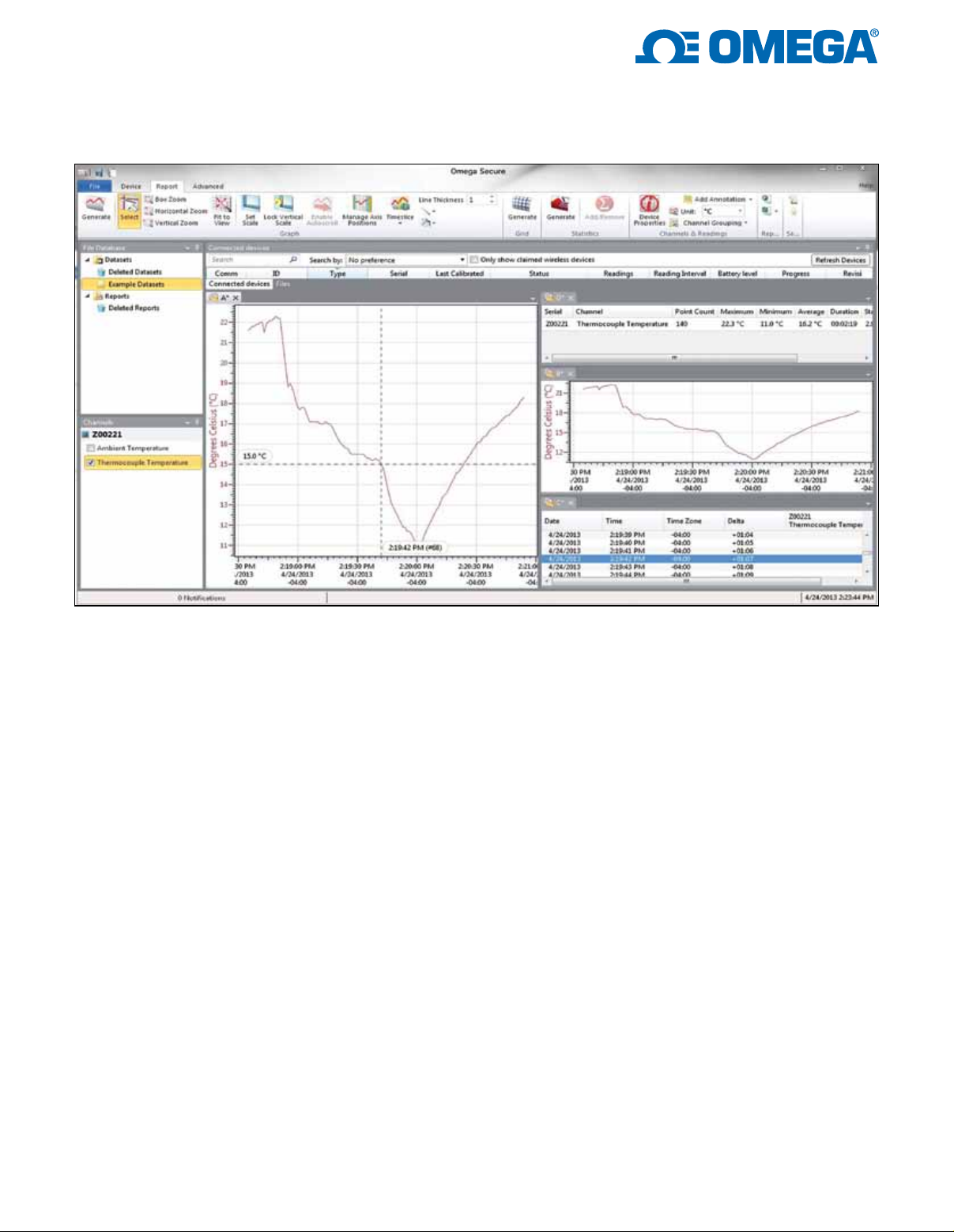
The OM-CP-SVP-SYSTEM
Secure Software aids customers in
compliance with 21 CFR Part
11 requirements. The software
ensures standards in which electronic
files are considered equivalent to
paper records, saving time and
effort. OM-CP-SVP-SYSTEM
Secure Software contains criteria
such as electronic signatures,
access codes, secure data files,
and an audit trail which meet the
requirements of 21 CFR Part 11 and
help provide data integrity. IQ/OQ/PQ
(Installation Qualification/Operational
Qualification/Performance
Qualification) protocols are included
with the purchase of the
OM-CP-SVP-SYSTEM Secure
Software to validate that the software
has been installed and is operating
correctly. The layout of the secure
software is similar to the OM-CP
Series Data Logger Standard
Software, allowing users to easily
learn the additional features.
The Windows
package allows the user to
effortlessly collect, display and
analyze data. A variety of powerful
tools provide the ability to examine,
export, and print professional looking
data with just a click of the mouse.
®
based software
Logger Auto-Detection—
Saves Time, Secures Data
The software automatically detects
loggers as soon as they are plugged
into the computer. With minimal
user involvement, drivers are then
installed, data is downloaded, and
a graph of the data is rendered on
screen.
Linked Data—
Saves Time and Effort
Graphs and data grids can now be
linked, allowing the user to quickly
and easily modify multiple views of
the same information. Make a change
to the data grid and the information
on the linked graph synchronizes
immediately and automatically!
Multiple Data Sets—
Makes Mapping a Breeze
Mapping data has never been so
easy—or fast! Now data from multiple
loggers can be easily combined in a
single data grid by simply dragging
and dropping data sets, creating a
side by side comparison of data for
each logger.
Software Overview—
Security Settings
On the following pages are an
overview of the important 21 CFR
Part 11 compliance features in the
OM-CP-SVP-SYSTEM Secure
Software. Each feature is important in
securing data and ensuring tampered
data is recognized by the
OM-CP-SVP-SYSTEM Secure
Software.
1
Page 2
Administrator
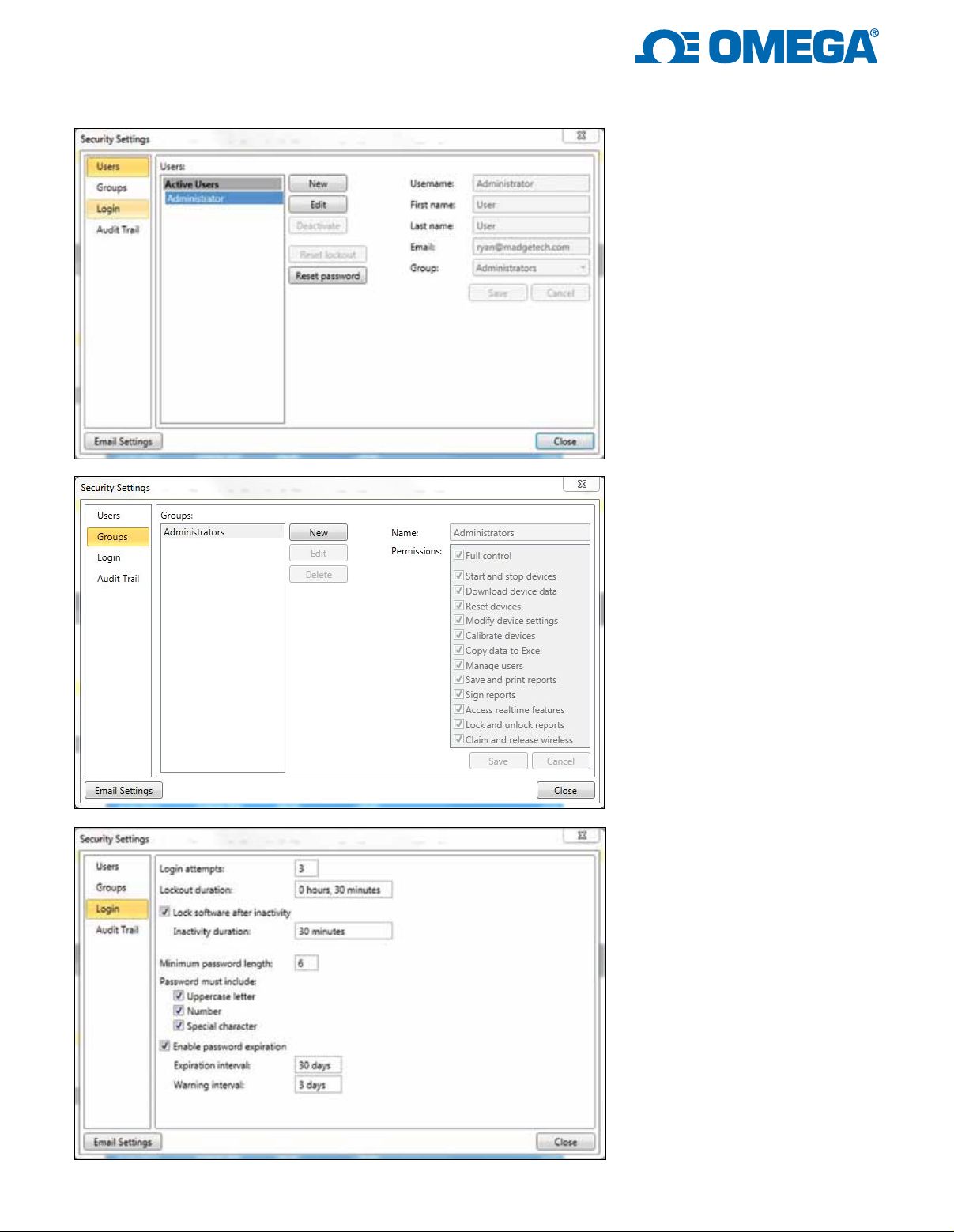
and User Settings
Users can be given two levels of
access, either administrator or user.
Administrators have access to all the
security settings, while users only
have access to communicate with the
data loggers and analyze data.
Groups
Users and Administrators can be
assigned to Groups and can be
easily maintained using a variety
of permissions.
Login
Login attempts and lockout
duration can be assigned within
the Login tab. There are numerous
password and account settings
for the administrator to set such
as the complexity of the password
and status of each user account.
The user management tab is only
available to administrative users.
2
Page 3
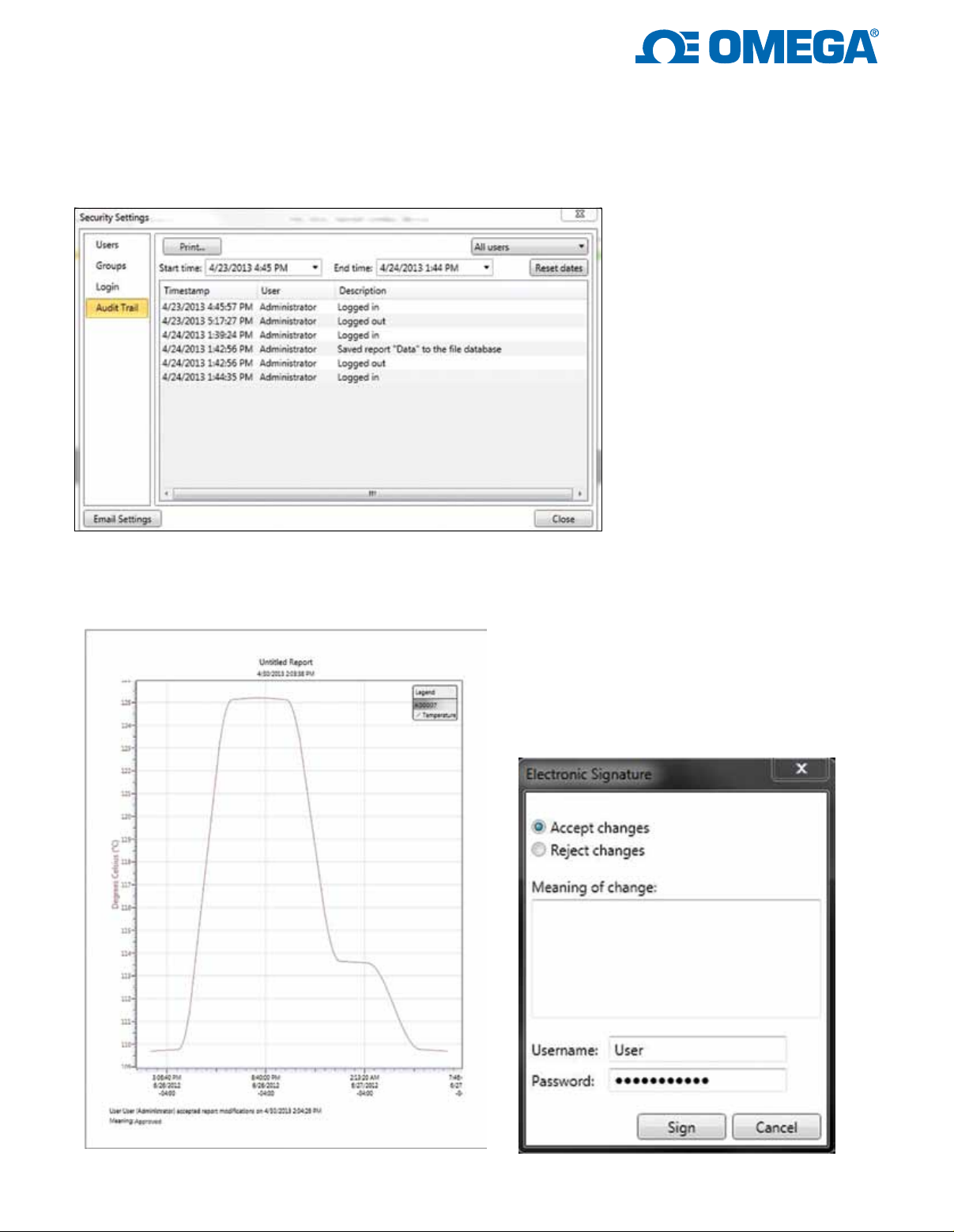
Audit Trail
An Audit Trail is kept automatically
with information such as who has
logged in and out, what files were
downloaded, saved, printed etc. Each
record is date and time stamped and
includes the user information.
Electronic Signature
By clicking the Electronic Signature button, users
and administrators can add electronic signatures
The electronic signature contains the printed
name of the signer, date and time of the signing
and the meaning of the signing.
3
Page 4

21 CFR PART 11 Requirement Checklist
21 CFR Part 11
Requirement
The system must be capable
of being validated.
It must be possible to discern
invalid or altered records.
The system must be capable
of producing accurate and
complete copies of electronic
records on paper.
The system must be capable
of producing accurate and
complete copies of records
in electronic form for
inspection, review and
copying by the FDA.
Records must be readily
retrievable throughout their
retention period.
System access must
be limited to authorized
individuals.
The system must be capable
of producing a secure,
computer-generated, timestamped audit trail that
records the date and time of
operator entries and actions
that create, modify or delete
electronic records.
Upon making a change to
an electronic record, original
information is still available.
Electronic records audit trails
are retrievable throughout the
record’s retention period.
Does
OM-CP-SVP-SYSTEM
Secure
Software Comply?
Ye s No
Ye s Ye s
Ye s Ye s
Ye s Ye s
Ye s Ye s
Ye s No
Ye s Ye s
Ye s Ye s
Ye s Ye s
No Additional
Action Required
to Comply?
Comments
The customer must execute the IQ/OQ/PQ to
validate that the software is installed correctly
and that it operates properly.
The file format used in the Secure software is
proprietary and cannot be opened in any other
piece of software. Only .MTFFS files are able
to be saved and/or opened by the
OM-CP-SVP-SYSTEM Secure software.
The OM-CP-SVP-SYSTEM Secure software
allows the graph and all data records to be
printed on paper. In addition, device status, data
file statistics, audit trails and other pertinent
information may be printed.
All data files may be transferred by e-mail
or other means to other users of
OM-CP-SVP-SYSTEM Secure software, or
printed to a secure document in another format
such as PDF.
All data downloaded from a device are
automatically saved to an internal secure
database, these data cannot be altered, but is
always available for the user to generate a visual
representation of the data in grid, graph, and
statistic format.
The OM-CP-SVP-SYSTEM Secure software
ensures that only users with a valid User ID and
password can gain access to the software. Enduser SOPs should be developed and maintained
to ensure that users do not share their unique
user ID and or password.
The OM-CP-SVP-SYSTEM Secure software
maintains an audit trail file on any salient
operation performed on the system. The audit
trail is secure and encrypted and contains all
operations performed by date, time and operator.
Changes cannot be made to raw data datasets;
however, reports generated by the user may be
changed as desired.
All audit trails are saved as a part of the record
and cannot be deleted or modified in any way.
4
Page 5

21 CFR PART 11 Requirement Checklist
Does
21 CFR Part 11
Requirement
The audit trail is available for review
and reproduction by the FDA.
When any sequence of system
steps is important, that sequence
must be enforced by the system.
The system should ensure that only
authorized individuals can use it,
electronically sign records, access
the operation or computer system
input or output device, alter a
record, or perform other operations.
The system should be able to
check the validity of the source
of any data or instructions if it is
a requirement of the system that
input data or instructions can only
come from certain input devices.
(Note: This applies where data or instructions can come from more than one device, and therefore the system must verify the
integrity of its source, such as a network of weigh scales, or remote, radio controlled terminals.)
A documented training, including
on the job training for system users,
developers, IT support staff should
be available.
A written policy that makes
individuals fully responsible
for actions initiated under their
electronic signatures should be in
place.
The distribution of, access to, and
use of systems operation and
maintenance documentation should
be controlled.
A formal change control procedure
for system documentation that
maintains a time sequenced audit
trail of changes should be in place.
OM-CP-SVP-SYSTEM
Secure
Software Comply?
Ye s Ye s
No No
Ye s No
Ye s Ye s
Ye s No
No No
Ye s No
Ye s Ye s
No Additional
Action Required
to Comply?
Comments
The OM-CP-SVP-SYSTEM Secure software
allows the Audit Trail to be printed or
transferred electronically for review and
reproduction by the FDA.
The OM-CP-SVP-SYSTEM Secure software
does not require any specific sequence of
steps or order of operation. The customer is
responsible for defining, writing and enforcing
any SOPs that require a sequence of steps.
OM-CP-SVP-SYSTEM Secure software
requires unique User IDs and passwords to
login to the system. Different features are
available to different users depending on their
level of access. These levels may be defined
and created by the user. Defined SOPs
should be implemented so the PC requires an
authorized login and directs that users cannot
share their unique user IDs and or passwords.
OM-CP-SVP-SYSTEM Secure software will
only accept input and communicate with
OM-CP Series data loggers using proprietary
communication protocol.
Each OM-CP Series data logger is uniquely
identified by an electronic serial number.
Users may provide their own training
through testing and the support of
OM-CP-SVP-SYSTEM Secure software
documentation package.
It is the responsibility of the customer to
provide a written policy that informs individual
users that they are responsible for all actions
taken while under their login.
The customer is responsible for obeying the
licensing terms and distribution of the
software and documentation that supports
OM-CP-SVP-SYSTEM Secure software.
The OM-CP-SVP-SYSTEM Secure software
operations document is revision controlled.
5
Page 6

Signed Electronic Records
21 CFR Part 11
Requirement
Signed electronic records should
contain the following related
information:
• Printed name of the signer
• Date and time of signing
• Meaning of the signing
The above information should be
shown on displayed and printed
copies of the electronic record.
Signatures should be linked to
their respective electronic records
to ensure that they cannot be cut,
copied, or otherwise transferred
by ordinary means for the
purpose of falsification.
Does
OM-CP-SVP-SYSTEM
Secure
Software Comply?
Ye s No
Ye s Ye s
Ye s Ye s
No Additional
Action
Required
to Comply?
Comments
This name of the signer, the date and time of
signing and the meaning of the signing are
contained in all electronically signed records
and all printed material. The customer is
required to define the meaning of signing
the document.
All the above information is displayed and
printed on all copies of records.
Signatures are linked to the original record and
cannot be cut, copied, or transferred.
Electronic Signatures (General)
21 CFR Part 11
Requirement
Electronic signatures must
be unique to each authorized
individual.
The reuse or reassignment of
electronic signatures should be
discouraged.
The identity of the individual
should be verified before an
electronic signature is allocated.
OM-CP-SVP-SYSTEM
Software Comply?
Does
Secure
Ye s Ye s
Ye s No
Ye s No
No Additional
Required
to Comply?
Action
Comments
The OM-CP-SVP-SYSTEM Secure software
will not allow the user to duplicate electronic
signatures. It is recommended that SOPs
include a statement clearly defining that only
one person is linked to each user ID. The
administrator must define the unique user IDs,
the user must define their own unique password.
The end user SOPs should state that user IDs
are not to be re-used or reassigned to anyone
else. User IDs should be inactivated and a new
ID created.
The end user SOP should state that the
identity of the individual is verified before an
ID is assigned. Once a new user is created, an
email will be sent to the administrator and user
verifying his/her own unique login password.
Once verified the OM-CP-SVP-SYSTEM Secure
software will identify the individual in the future
via the user ID and password. The user will be
required to enter their username and password.
6
Page 7
Electronic Signatures (Non-Biometrics)
Does
21 CFR Part 11
Requirement
Signatures must be made up of
at least two components such
as an identification code and
password, or an identification
card and password.
The users password must be
executed at each signing when
several signings are made
during a continuous session.
If signings are not done in
a continuous session, both
components of the electronic
signature should be executed
with each signing.
Non-biometric signatures should
only used by their genuine
owners.
Attempts to falsify an electronic
signature must require the
collaboration of at least two
individuals.
OM-CP-SVP-SYSTEM
Secure
Software Comply?
Ye s Yes
Ye s Yes
Ye s Yes
Ye s No
Ye s No
No Additional
Action
Required
to Comply?
Comments
To electronically sign a record, the username
and password need to be entered.
OM-CP-SVP-SYSTEM Secure software
requires the password to be executed at each
signing.
To electronically sign a record, the username
and password need to entered at each signing.
Users should put in place SOPs requiring that
combination of user IDs and password only be
made known to the genuine owner.
Users should put in place SOPs that forbid
users from disclosing their unique user ID and
password.
7
Page 8

Controls for Identification
Codes and Passwords
21 CFR Part 11
Requirement
Controls to maintain the
uniqueness of each combined
identification code and password,
such that no individual can
have the same combination of
identification code and password,
are in place.
Procedures must be in place
to ensure the validity of
identification codes and that they
are periodically checked.
Passwords should periodically
expire and need to be revised.
Procedure for recalling
identification codes and
passwords if a person leaves
or is transferred should be
developed.
A procedure for electronically
disabling an identification code
or password if it is potentially
compromised or lost should be
in place.
A procedure for detecting
attempts at unauthorized use
and for informing security should
be in place.
A procedure for reporting
repeated or serious attempts
at unauthorized use to
management should be in place.
Does
OM-CP-SVP-SYSTEM
Secure
Software Comply?
Ye s Ye s
Ye s No
Ye s No
Ye s No
Ye s No
Ye s No
Ye s No
No Additional
Action
Required
to Comply?
Comments
OM-CP-SVP-SYSTEM Secure software will not
allow duplicate user IDs.
The end user's SOP should state that the
System Administrator is to periodically maintain
active accounts and disable inactive accounts.
OM-CP-SVP-SYSTEM Secure software allows
the administrator to set accounts to expire
automatically.
OM-CP-SVP-SYSTEM Secure software allows
the administrator to give the user options to
make user passwords expire as well as set
warnings to notify the user in advance as to
when the password is scheduled to be reset.
The customer SOP should determine how often
and/or when passwords expire.
Passwords cannot be recalled; the administrator
can reset the password. The SOP should state that
the administrator can only reset a password if the
password is lost or stolen, or the user leaves or is
transferred.
The OM-CP-SVP-SYSTEM secure software
will allow user accounts to be temporarily or
permanently disabled. The customer's SOPs
will designate an administrator to have this
responsibility. Only administrators can change
user account settings.
The OM-CP-SVP-SYSTEM Secure software
will detect attempts at unauthorized use. All
attempts are recorded and marked clearly in the
audit trail. SOPs should be implemented so that
a designated user is responsible for reviewing
the audit trail for any suspicious activity.
The OM-CP-SVP-SYSTEM Secure software will
detect attempts at unauthorized use. All serious or
repeated attempts are emailed to the designated
administrator(s). SOPs should be implemented so
that a designated user is responsible for reviewing
the audit trail for any suspicious activity.
To Order
Model No. Description
OM-CP-SVP-SYSTEM
Ordering Example: OM-CP-SVP-SYSTEM FDA 21 CFR Part 11 compliant IQ/OQ/PQ secure software validation workbook and software package
(unlimited users, license per computer).
8
FDA 21 CFR Part 11 compliant IQ/OQ/PQ secure software validation workbook and software
package (unlimited users, license per computer). Compatible with Windows XP/Vista/7/8 (32-bit and
64-bit). Supports all OM-CP Series Data Loggers except OM-CP-SVR101.
 Loading...