

Page 1

OM-CP-RFC1000
Wireless Transciever
Page 2

OM-CP-RFC1000
Product Notes
The OM-CP-RFC1000 is a high powered transciever designed to provide network connectivity between
wireless data loggers and the base station computer. This design includes an external antenna, allowing
flexibility with mounting positions in both orientation and proximity to metal walls.
The OM-CP-RFC1000 may be used as a repeated or plugged directly into the PC.
Transmission Distance
The OM-CP-RFC1000 transmits to other OM-CP-RFC1000s up to 4000 feet maximum typical outdoors/line of sight, 1000 feet maximum typical indoors/urban. The OM-CP-RFC1000 transmits to data
loggers up to 2000 feet maximum typical outdoors/line of sight, 500 feet maximum typical indoors/
urban. The OM-CP-RFC1000 can connect to a maximum of 64 data loggers.
The OM-CP-RFC1000 transmits on a frequency of 2.405GHz - 2.475 GHz.
Operating Environment
The OM-CP-RFC1000 is rated for use in an environment with temperatures from -20°C to 85°C and a
humidity range of 0% to 95% RH non-condensing.The OM-CP-RFC1000 is rated IP40 and is protected
against solids that are greater than 1mm in size. This device is not water resistant.
LEDs
The red LED indicates that the device has power. The green LED will blink when communicating with
other devices.
Installing the Software
Insert the Software Flash Drive into a USB port on the PC. If the autorun does not appear, locate the
drive on the computer and double click on Autorun.exe. Follow the prompts on the screen to install the
Omega Data Logger Software.
Channel Programming for the OM-CP-RFC1000
The OM-CP-RFC1000 transmits data on the 2.5GHz band, channel 11. Each Wireless Data Logger and
OM-CP-RFC1000 has a set of dip switches with which the channel may be programmed.
For proper communication, all data loggers or OM-CP-RFC1000s on the same network are required to
use the same channel. If they are not on the same channel, the devices will not communicate with one
another.
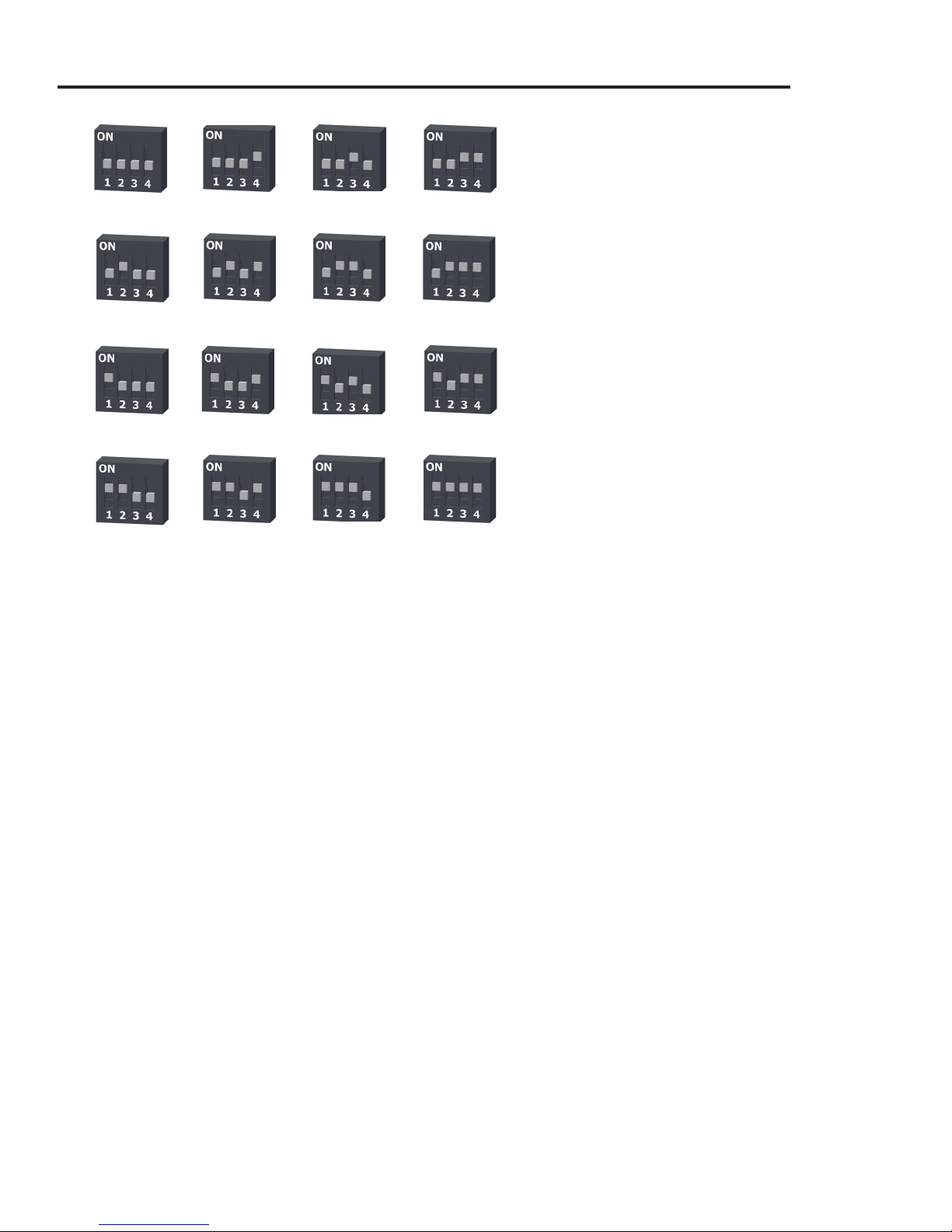
OM-CP-RFC1000: To program the channel on an RFC1000, first unplug the RFC1000. Use a Phillips head screwdriver to unscrew the enclosure. The dip switches are located on the front of the PCB
circuit board. Change the dip switches to match the photo. Reconnect the RFC1000.
See examples on next page.
Page 3
Quick Start Manual
Channel 11 Channel 12 Channel 13 Channel 14
The default wireless channel for Omega
wireless devices is channel 11. Different
wireless channels may be used to create
multiple networks in one area, or to avoid
wireless interference from other devices.
The images below show the orientations
avaliable of the switches for each channel.
Channel 26 (all switches in the up position)
is not supported.
Channel 15 Channel 16 Channel 17 Channel 18
Channel 19 Channel 20 Channel 21 Channel 22
Channel 23 Channel 24 Channel 25 Channel 26
(not supported)
See examples to the left.
Deploying and Activating Devices
Step 1: Plug the OM-CP-RFC1000 into the USB port on the base station computer.
(Additional OM-CP-RFC1000s can be used as repeaters to transmit over greater distances)
Step 2: If using multiple OM-CP-RFC1000s plug each one into a wall outlet in the desired locations.
(If transmitting over a distance greater than 1000 feet indoors or 4000 feet outdoors or there are walls/
obstacles/corners that need to be maneuvered around, set up additional OM-CP-RFC1000s as needed.)
If not using multiple OM-CP-RFC1000s, go to step 3.
Step 3: Verify that the data loggers are in wireless transmission mode by confirming the wireless ON /
OFF switch is in the ‘1’ position on each data logger. (See Channel Programming steps above)
Step 4: On the PC, launch the Omega Data Logging software. All active data loggers will be listed in the
software showing that the device(s) are recognized.
Step 5: To activate your data loggers, click on one to highlight, then right click to select the desired
Start method. Do this for each logger in your list that you wish to activate.
Page 4
OM-CP-RFC1000
Mounting Instructions
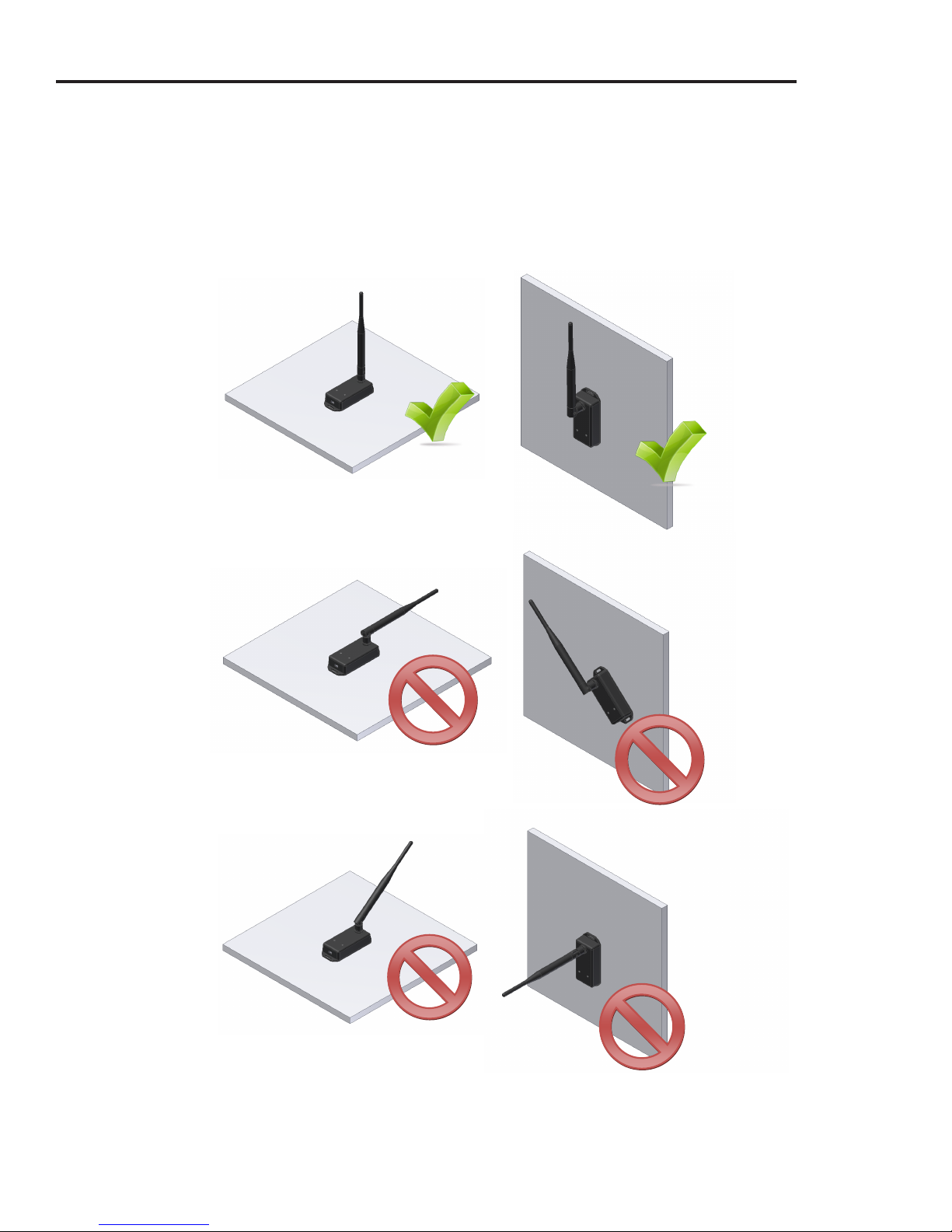
For best wireless performance, both the OM-CP-RFC1000 and the Omega data loggers should be
mounted in the same orientation. This usually means that the external antenna should be pointing
straight up. The antenna can pivot to accommodate either a wall mount or a desk mount.
Page 5
Description OM-CP-RFC1000
Transmission Distance
(to other OM-CP-RFC1000s)
Transmission Distance
(to Data Loggers)
Maximum Connected
Data Loggers
4000’ max. outdoor - line of sight unobstructed
1000’ max. indoors - typical urban environment
2000’ max. outdoor - line of sight unobstructed
500’ max. indoors - typical urban
64
LED Indicators Red & Green
Frequency
Ingress Protection
2.405GHz - 2.475GHz
IP40
Interface Type USB (to PC) / Wirelesss (to Data Logger)
Operating Environment –20°C to +85°C (-4°F to 185°F),
0%RH to 95%RH (non-condensing)
Material
Dimensions
Approvals
ABS Plastic (body), PVC Plastic (antenna)
Enclosure: 3.8” x 1.6” x 0.8” / Antenna: 7.2”
FCC ID:OA3MRF24J40MC, IC#: 7693A-24J40MC
o “This device complies with Part 15 of the FCC Rules. Operation is subject to the following two conditions: (1) this device
may not cause harmful interference, and (2) this device must accept any interference received, including interference that
may cause undesired operation.”
o “To satisfy FCC RF Exposure requirements for mobile and base station transmission devices, a separation distance of 20
cm or more should be maintained between the antenna of this device and persons during operation. To ensure compliance,
operation at closer than this distance is not recommended. The antenna(s) used for this transmitter must not be co-located
or operating in conjunction with any other antenna or transmitter.”
o “This device complies with Industry Canada license-exempt RSS standard(s). Operation is subject to the following two
conditions: (1) this device may not cause interference, and (2) this device must accept any interference, including interference
that may cause undesired operation of the device.
Le présent appareil est conforme aux CNR d’Industrie Canada applicables aux appareils radio exempts de licence.
L’exploitation est autorisée aux deux conditions suivantes: (1) l’appareil ne doit pas produire de brouillage, et (2) l’utilisateur
de l’appareil doit accepter tout brouillage radioélectrique subi, même si le brouillage est susceptible d’en compromettre le
fonctionnement.”
o “Under Industry Canada regulations, this radio transmitter may only operate using an antenna of a type and maximum
(or lesser) gain approved for the transmitter by Industry Canada. To reduce potential radio interference to other users, the
antenna type and its gain should be so chosen that the equivalent isotropically radiated power (e.i.r.p.) is not more than that
necessary for successful communication.
Conformément à la réglementation d’Industrie Canada, le présent émetteur radio peut fonctionner avec une antenne
d’un type et d’un gain maximal (ou inférieur) approuvé pour l’émetteur par Industrie Canada. Dans le but de réduire les
risques de brouillage radioélectrique à l’intention des autres utilisateurs, il faut choisir le type d’antenne et son gain de
sorte que la puissance isotrope rayonnée équivalente (p.i.r.e.) ne dépasse pas l’intensité nécessaire à l’établissement d’une
communication satisfaisante.”
Page 6

OMEGAnet
Servicing North America:
U.S.A.:
Omega Engineering, Inc., One Omega Drive, P.O. Box 4047
Stamford, CT 06907-0047
Toll-Free: 1-800-826-6342 Tel: (203) 359-1660
FAX: (203) 359-7700 e-mail: [email protected]
Canada:
976 Bergar
Laval (Quebec), H7L 5A1 Canada
Toll-Free: 1-800-826-6342 TEL: (514) 856-6928
FAX: (514) 856-6886 e-mail: [email protected]
For immediate technical or application assistance:
U.S.A. and
Canada: Customer Service: 1-800-622-2378/1-800-622-BEST
Mexico/
Latin America
It is the policy of OMEGA Engineering, Inc. to comply with all worldwide safety and EMC/EMI regulations that apply. OMEGA is constantly pursuing
certification of its products to the European New Approach Directives. OMEGA will add the CE mark to every appropriate device upon certification.
The information contained in this document is believed to be correct, but OMEGA accepts no liability for any errors it contains, and reserves the
right to alter specifications without notice.
WARNING: These products are not designed for use in, and should not be used for, human applications.
Sales Service: 1-800-826-6342/1-800-TC-OMEGA
Engineering Service: 1-800-872-9436/1-800-USA-WHEN
En Español: 001 (203) 359-7803 FAX: 001 (203) 359-7807
®
Online Service Internet e-mail
omega.com [email protected]
Servicing Europe:
Benelux:
Toll-Free: 0800 099 3344 TEL: +31 20 347 21 21
FAX: +31 20 643 46 43 e-mail: [email protected]
Czech
Republic:
Toll-Free: 0800-1-66342 TEL: +420-59-6311899
FAX: +420-59-6311114 e-mail: [email protected]
France: Managed by the United Kingdom Office
Toll-Free: 0800 466 342 TEL: +33 (0) 161 37 29 00
FAX: +33 (0) 130 57 54 27 e-mail: [email protected]
®
®
Germany/
Austria
®
FAX: +49 (0) 7056 9398-29 e-mail: [email protected]
United
Kingdom: One Omega Drive, River Bend Technology Centre, Northbank
ISO 9001
FAX: +44 (0) 161 777-6622 e-mail: [email protected]
Managed by the United Kingdom Office
Frystatska 184
733 01 Karviná, Czech Republic
Daimlerstrasse 26, D-75392 Deckenpfronn, Germany
Toll-Free: 0800 6397678 TEL: +49 (0) 7056 9398-0
OMEGA Engineering Ltd.
Irlam, Manchester M44 5BD United Kingdom
Toll-Free: 0800-488-488 TEL: +44 (0) 161 777-6611
WARRANTY/DISCLAIMER
OMEGA ENGINEERING, INC. warrants this unit to be free of defects in materials and workmanship for a period of 61 months from
date of purchase. OMEGA’s WARRANTY adds an additional one (1) month grace period to the normal five (5) year product
warranty to cover handling and shipping time. This ensures that OMEGA’s customers receive maximum coverage on each
product.
If the unit malfunctions, it must be returned to the factory for evaluation. OMEGA’sCustomer Service Department will issue an
Authorized Return (AR) number immediately upon phone or written request. Upon examination by OMEGA, if the unit is found to be
defective, it will be repaired or replaced at no charge. OMEGA’sWARRANTY does not apply to defects resulting from any action of the
purchaser, including but not limited to mishandling, improper interfacing, operation outside of design limits, improper repair, or
unauthorized modification. This WARRANTY is VOID if the unit shows evidence of having been tampered with or shows evidence of
having been damaged as a result of excessive corrosion; or current, heat, moisture or vibration; improper specification;
misapplication; misuse or other operating conditions outside of OMEGA’scontrol. Components in which wear is not warranted,
include but are not limited to contact points, fuses, and triacs.
OMEGA is pleased to offer suggestions on the use of its various products. However, OMEGA neither assumes responsibility
for any omissions or errors nor assumes liability for any damages that result from the use of its products in accordance with
information provided by OMEGA, either verbal or written. OMEGA warrants only that the parts manufactured by the
company will be as specified and free of defects. OMEGA MAKES NO OTHER WARRANTIES OR REPRESENTATIONS OF ANY
KIND WHATSOEVER, EXPRESSED OR IMPLIED, EXCEPT THAT OF TITLE, AND ALL IMPLIED WARRANTIES INCLUDING ANY
WARRANTY OF MERCHANTABILITY AND FITNESS FOR A PARTICULAR PURPOSE ARE HEREBY DISCLAIMED. LIMITATION
OF LIABILITY: The remedies of purchaser set forth herein are exclusive, and the total liability of OMEGA with respect to this
order, whether based on contract, warranty, negligence, indemnification, strict liability or otherwise, shall not exceed the
purchase price of the component upon which liability is based. In no event shall OMEGA be liable for consequential,
incidental or special damages.
CONDITIONS: Equipment sold by OMEGAis not intended to be used, nor shall it be used: (1) as a “Basic
21 (NRC), used in or with any nuclear installation or activity; or (2) in medical applications or used on humans. Should any Product(s)
be used in or with any nuclear installation or activity, medical application, used on humans, or misused in any way, OMEGAassumes
no responsibility as set forth in our basic WARRANTY/ DISCLAIMER language, and, additionally, purchaser will indemnify OMEGAand
hold OMEGAharmless from any liability or damage whatsoever arising out of the use of the Product(s) in such a manner.
Component” under 10 CFR
Direct all warranty and repair requests/inquiries to the OMEGA Customer Service Department. BEFORE RETURNING ANY
PRODUCT(S) TO OMEGA, PURCHASER MUST OBTAIN AN AUTHORIZED RETURN (AR) NUMBER FROM OMEGA’S CUSTOMER
SERVICE DEPARTMENT (IN ORDER TO AVOID PROCESSING DELAYS). The assigned AR number should then be marked on the
outside of the return package and on any correspondence.
The purchaser is responsible for shipping charges, freight, insurance and proper packaging to prevent breakage in transit.
FOR WARRANTY
RETURNS, please have the following informa-
tion available BEFORE contacting OMEGA:
1. Purchase Order number under which the product was
PURCHASED,
2. Model and serial number of the product under warranty, and
3. Repair instructions and/or specific problems relative to the
product.
OMEGA’s policy is to make running changes, not model changes, whenever an improvement is possible. This affords our customers the latest in
technology and engineering.
OMEGA is a registered trademark of OMEGA ENGINEERING, INC.
© Copyright 2011 OMEGA ENGINEERING, INC. All rights reserved. This document may not be copied, photocopied, reproduced, translated, or
reduced to any electronic medium or machine-readable form, in whole or in part, without the prior written consent of OMEGA ENGINEERING, INC.
RETURN REQUESTS /INQUIRIES
FOR NON-WARRANTY REPAIRS,
rent repair charges. Have the following information available BEFORE contacting OMEGA:
1. Purchase Order number to cover the COST of the repair,
2. Model and serial number of the product, and
3. Repair instructions and/or specific problems relative to
the product.
consult OMEGA for cur-
MQS-5035/1011
MQS-5066/0613
 Loading...