

Page 1
Extended Warranty
Program
SM
User’s
Guide
Shop online
omega.co
m
at
®
e-mail: [email protected]
For
latest
www.omegamanual.info
product
manuals:
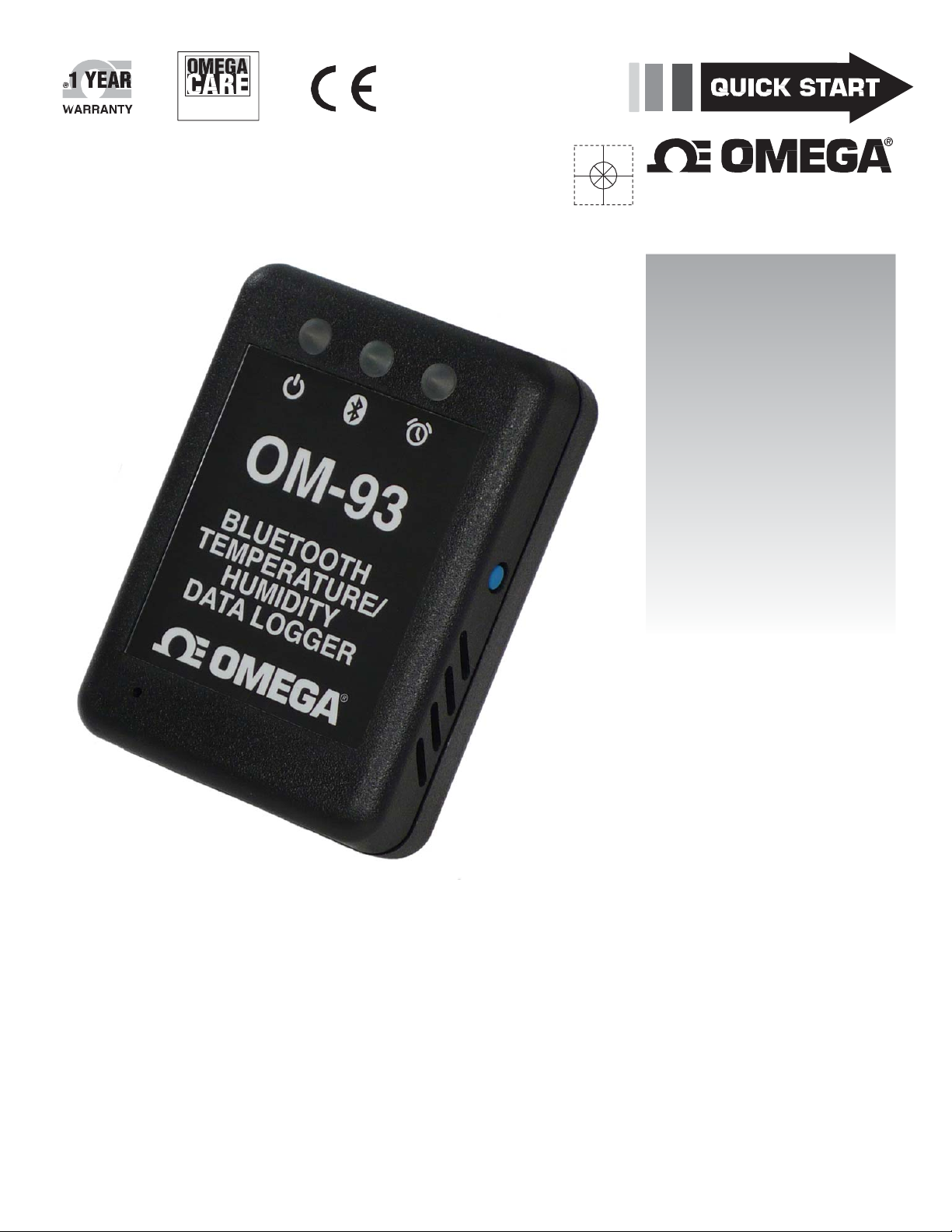
OM-93
®
OMEGA® Bluetooth
Temperature / Humidity
Wireless
Data
Logger
MQS5543/0216
Page 2

Servicing North America:
U.S.A.: OmegaEngineering,Inc.,OneOmegaDrive,P.O.Box4047
Stamford,CT06907‐0047USA
Toll‐Free:1‐800‐826‐6342(USA&Canadaonly)
CustomerService:1‐800‐622‐2378(USA&Canadaonly)
EngineeringService:1‐800‐872‐9436(USA&Canadaonly)
Tel:(203)359‐1660Fax:(203)359
e‐mail:[email protected]
‐7700
For Other Locations Visit omega.com/worldwide
The Bluetooth® word mark and logos are registered trademarks owned by
Bluetooth SIG, Inc. and any use of such marks by Omega Engineering, Inc.
is under license. Other trademarks and trade names are those of their
respective owners.
iPhone®, iPad®, and iPad-mini® are trademarks of Apple, Inc. registered in
the U.S. and other countries.
Windows® is a registered trademark of Microsoft Corporation in the United
States and other countries.
Page 3
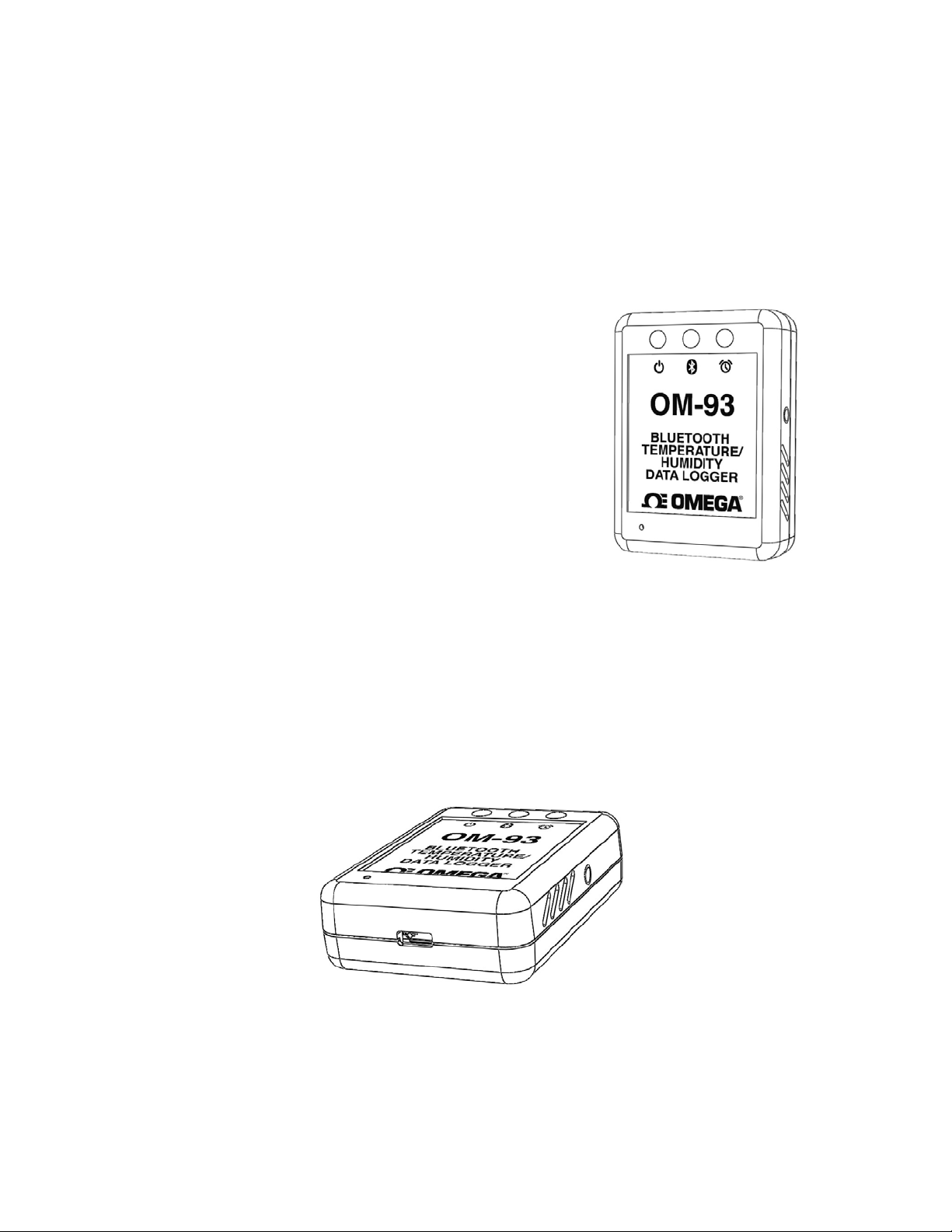
OM‐93
OMEGA®Bluetooth®Temperature/
HumidityDataLogger
QuickReferenceGuide
(ModelOM‐93)
Description
TheOM‐93loggerisaportablewirelessdataloggerfrom
Omega.ItcanbeconnectedeitherviaaUSBcabletoa
Windows®PCapplicationorusingBluetooth®wireless
technologytoyouriPhone®,iPad®oriPadmini®mobile
devices.ThismakesitpossibletomakeuseoftheOM‐93
loggerinsituationswhereitissimplynotconvenienttomakea
cableconnectiontoaPC.BothWindows®PCandiPhone®
mobiledeviceapplicationsofferasimplemeansofconfiguring
thelogger,dataextractionanddataviewingfeatures.
ThisQuickReferenceGuidegetsyoustartedwiththelogger
with
themostbasicfunctionstohaveyouupandrunningwith
yourloggerinamatterofminutes.
OM‐93BatteryCharging
YourOmegaOM‐93loggerincludesaLithiumPolymer(LiPo)rechargeablebattery.TheBattery
automaticallychargesbyconnectiontoanyUSBsourcesuchasaPCorMac.Chargingofthebatterymaybe
necessaryonfirstreceivingyourOM‐93logger.Theloggerischargedwhentherightmost"AlarmLED"
frombeingilluminatedredcontinuouslytogreencontinuously.Thiscantakeupto2hoursforacompletely
dischargedbattery.
ItisalsopossibletochargeusingaUSBmainscharger.UseofaUSBmainschargerispermittedwhenOM‐
93isloggingmeaningthatthelogger
alwayshasbatterylifeandwillnotneedrecharging.
goes
Revision 1.0.3 1/8
Page 4
USBOperation
TheOM‐93loggercanbeconfigured,datadownloadedandfurtheranalysedbyconnectiontoaPCusinga
USBcableandtheOM‐90SeriesDataLoggerSoftware.TheloggercansimilarlybeconfiguredbytheiPhone
applicationandthisisdescribedlaterinthisQuickReferenceGuide.
Installationof
theOM‐90SeriesDataLoggerSoftwareisverysimple.TheOM‐93needsnospecialdrivers
sinceitisaUSBHIDdeviceandsuchdevicescanmakeuseofthestandarddriversthatcomewith
Windows.SimplyruntheapplicationfromtheincludedCDorobtainfromthe
Omegawebsite:
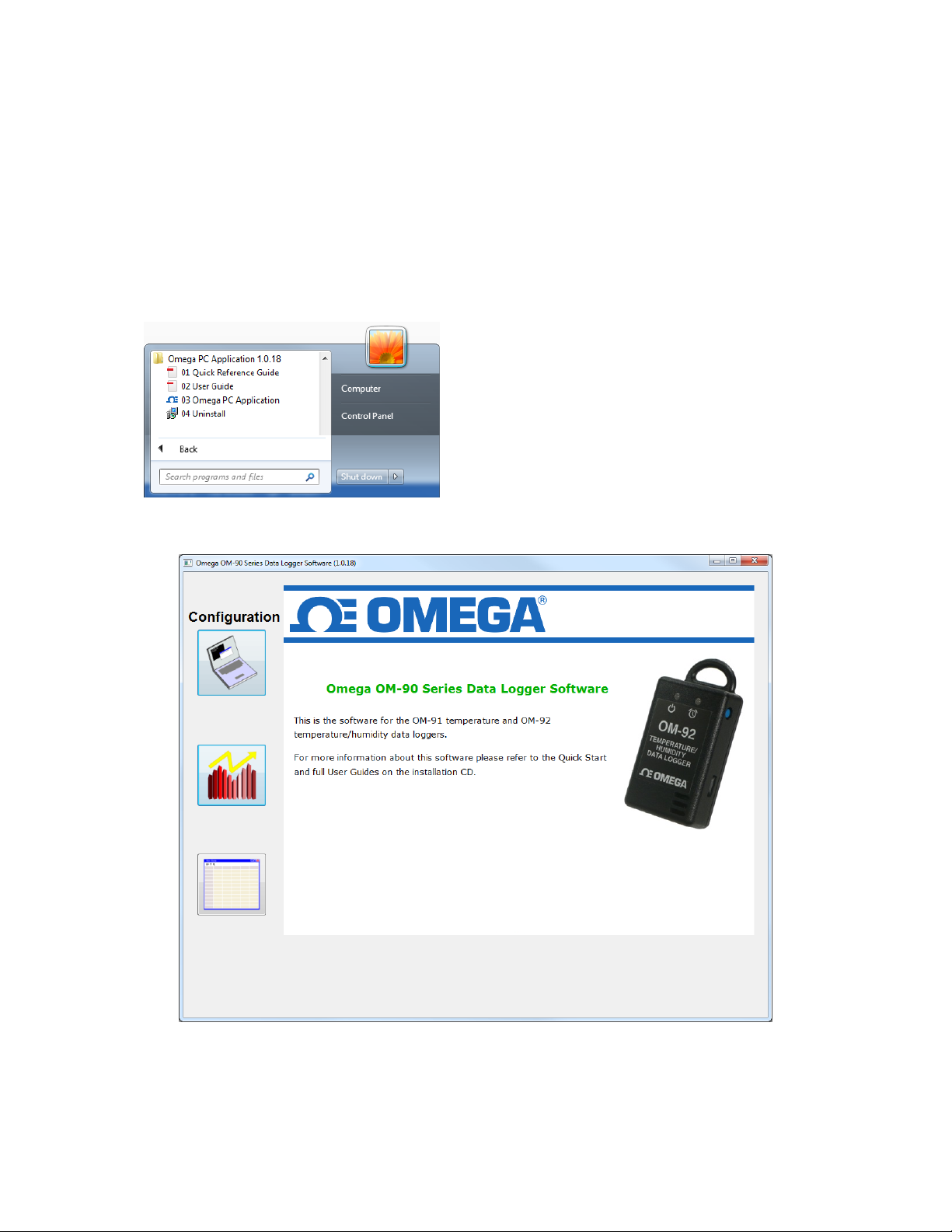
IntheWindowsStartMenulaunchtheOM‐90SeriesDataLoggerSoftware.
ThefrontpageoftheGUIisanoverviewofthelogger.PresstheConfigurationbuttontogettothenext
page.
Revision 1.0.3 2/8
Page 5
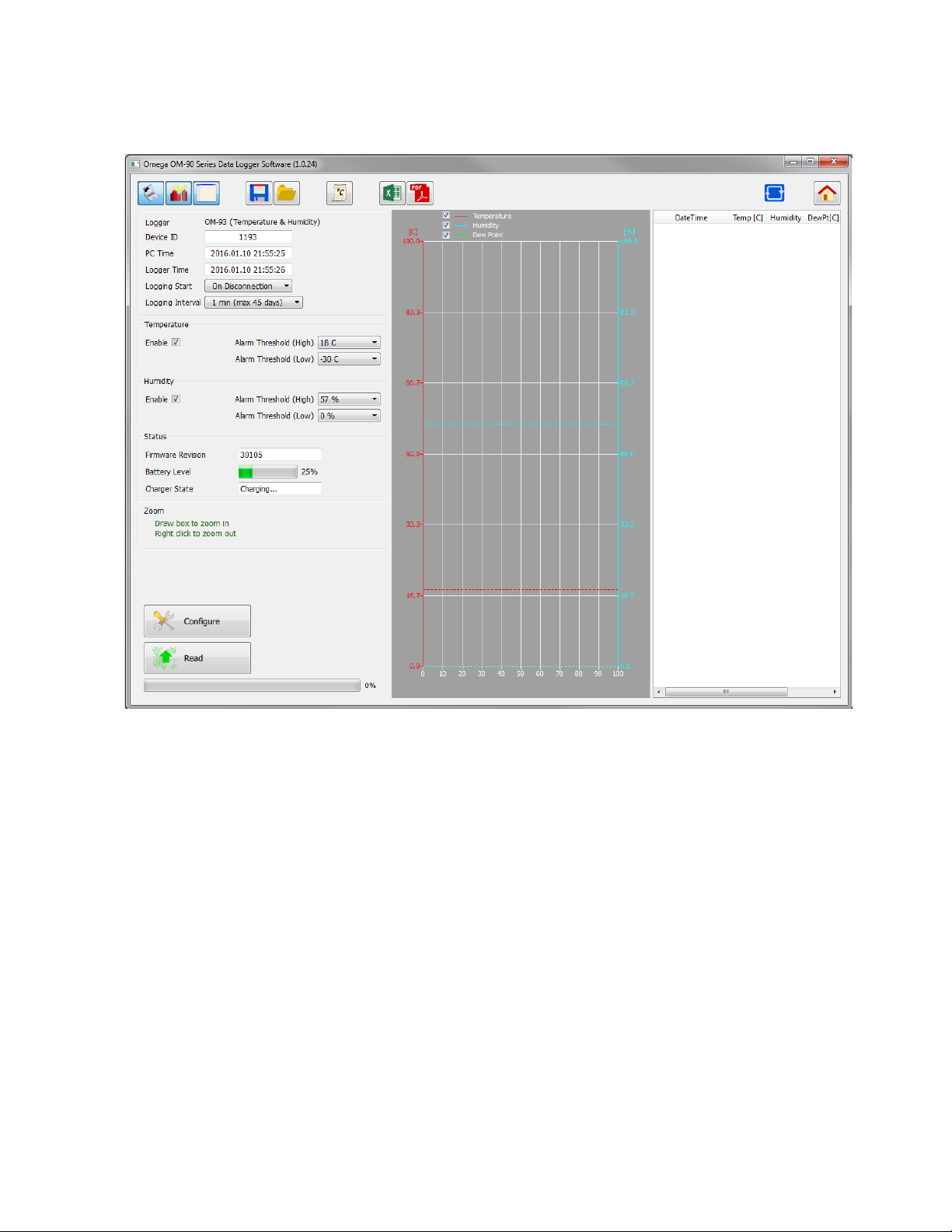
Connecttheloggerandyouwillseetheconnectedindicationchangestoblue.
Connection
Indication
Configure Button
Nextfillouttheconfigurationsettings.Forexample:‐
o
CoroF
loggingstartto"OnDisconnection"
loggingintervaltosay10seconds
temperaturealarmenabledandthresholdsset
humidityalarmsenabledandthresholdsset
Pressthe“ConfigureButton”sothatthesettingsareupdatedinyourlogger.Pleasewaituntilthesoftware
hasfinishedupdatingthe
logger.
Disconnectthelogger.Youshouldseethatloggingwillstartautomaticallyindicatedbya1secondgreen
light.Thegreenlightwillthenflashevery6secondstoindicatethattheunitislogging.Theredlightwill
flashalsointhecasethatthetemperatureorhumiditygoesoutside
oftheallowedlimitsandtriggersthe
alarms.
Iftheloggerbecomesfullthenalllightswillstopflashing.
Revision 1.0.3 3/8
Page 6
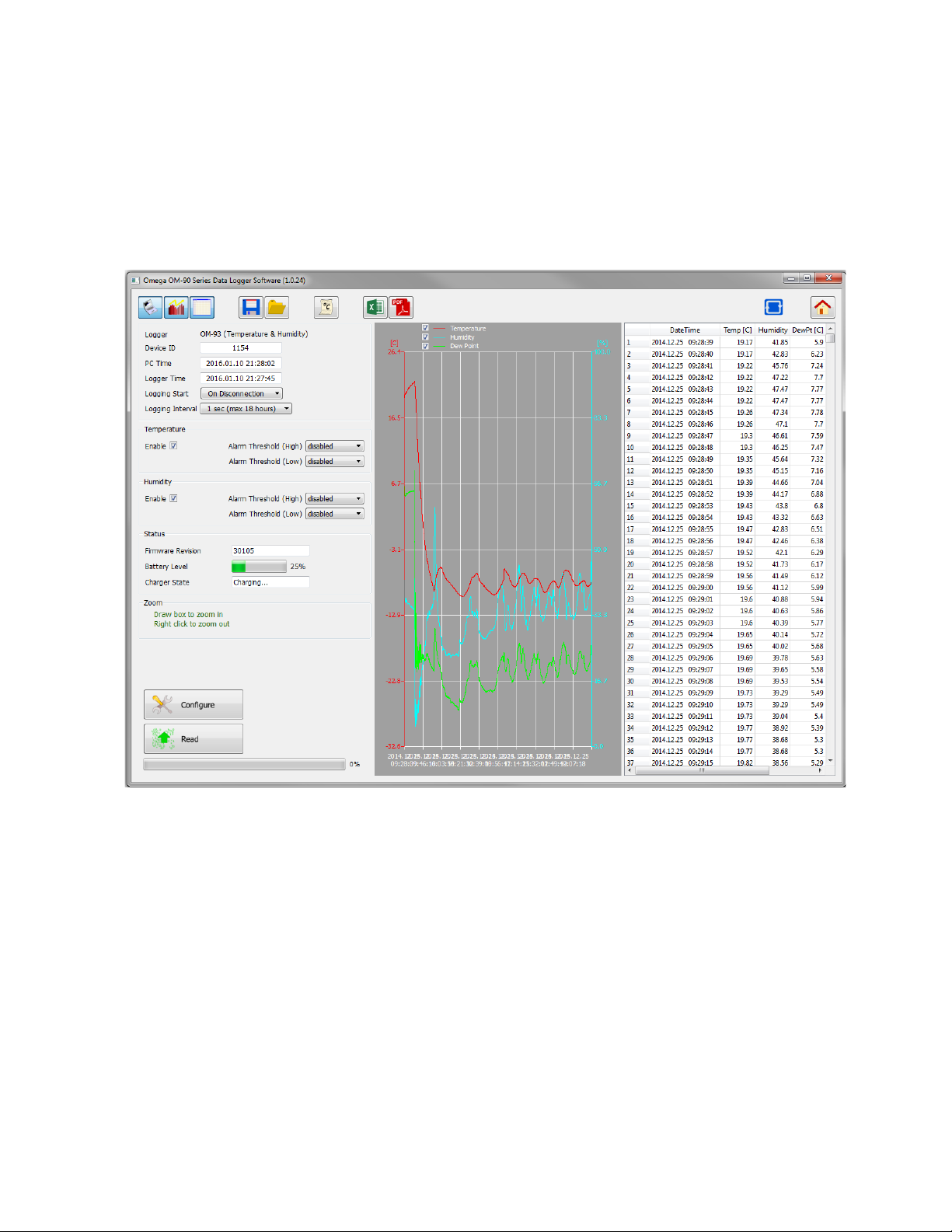
WhenyouhavecollecteddatawithyourOM‐93loggeronecanreconnecttothePCApplicationtoretrieve
thedata.ConnectyourOM‐93loggerusingtheUSBcable.Theloggerredlightwillilluminatefor1second
indicatingloggingisstopping.
StartthePCapplicationandnavigatetothe
Configurationpage.
Press"ReadLoggerConfiguration/Data"toretrievetheconfigurationanddatafromtheconnectedlogger.
Waituntilallinformationisretrievedfromthelogger.
Read Logger
Thegraphandspreadsheetwillbefilledwiththeloggeddata.
Zoominginandoutofthegraphscanbeachievedbythefollowingcontrols:
• toZoomIn‐dragtheleftmousebutton
• toZoomOut‐clicktherightmousebutton
• whenzoomedinyoucan
movearoundusingthekey‐boardarrowsorthemousescrollwheel
Towritedataandconfigurationtofile,pressthesaveicon.
Revision 1.0.3 4/8
Page 7
iPhoneOperation
TheOM‐93loggercanbeconfigured,datacanbedownloadedand
furtheranalyzedthroughwirelessconnectionfromaniPhone,iPad
oriPad‐mini®usingtheOM‐93iPhoneapplication.
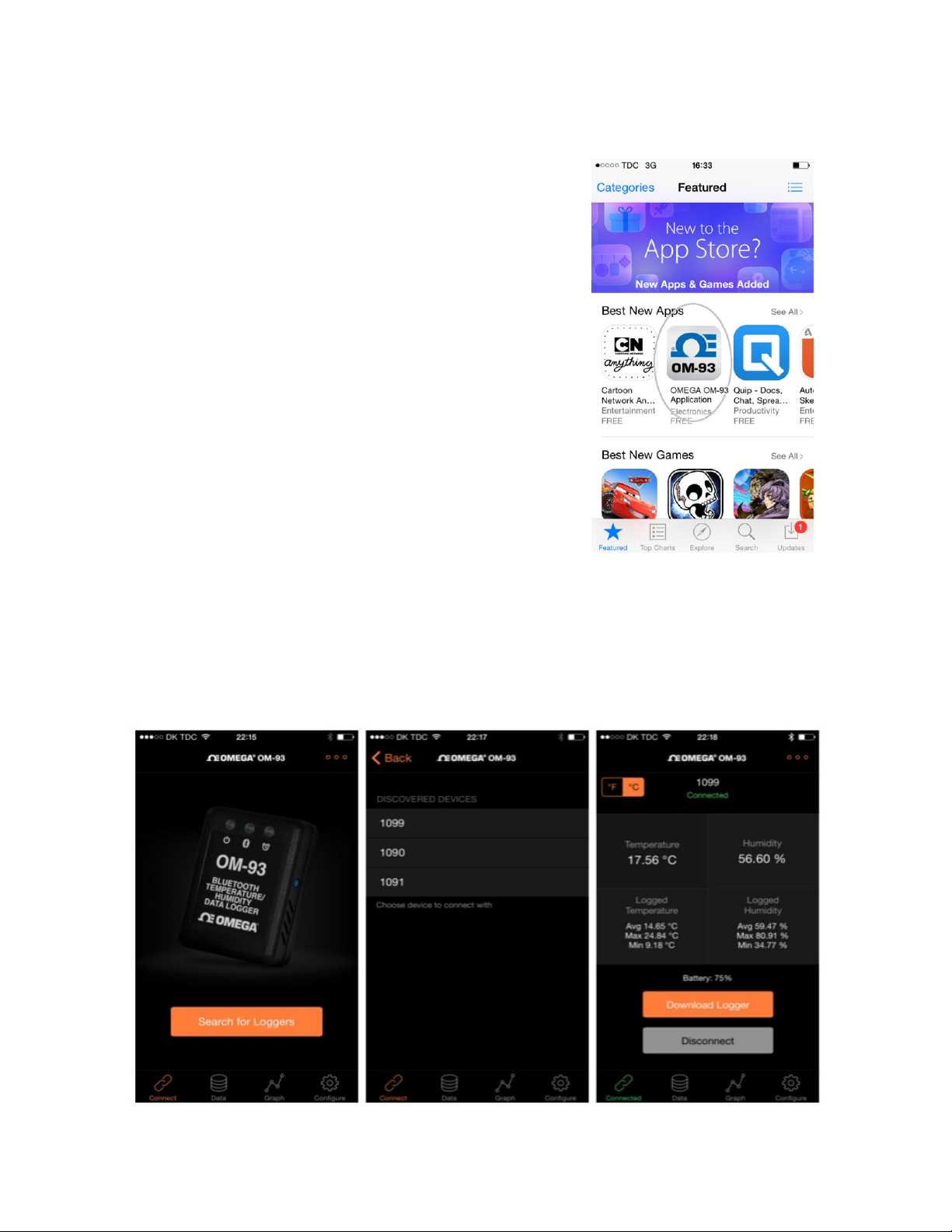
TheOM‐93iPhoneApplicationisafreeiPhone appfoundon
Apple'sAppStore.SearchforOmegaEngineeringOM‐93
Downloadandinstalltheapplication.
TheOM‐93iPhoneapplicationrequiresthattheBluetooth®isenabledforthemobiledevice.Ifthe
applicationisstartedandthisisnotthecasethenitwillfirstasktobeenabled.OncetheOM‐93application
isstartedthenthere
isanoptionofscanningforallOM‐93loggers.Aftersearchingtheapplicationwill
providealistofallOM‐93devicesthatcanbeconnectedfromyourmobiledevice.Selectoneofthese.
App.
Uponsuccessfulconnectionthelogger’sBluetooth®ConnectedLEDturnsblue.Ontheapplicationthe
connectedicon
turnsgreen.Also,theapplicationstartsshowinginrealtimethetemperatureandhumidity
fromthelogger.
Revision 1.0.3 5/8
Page 8
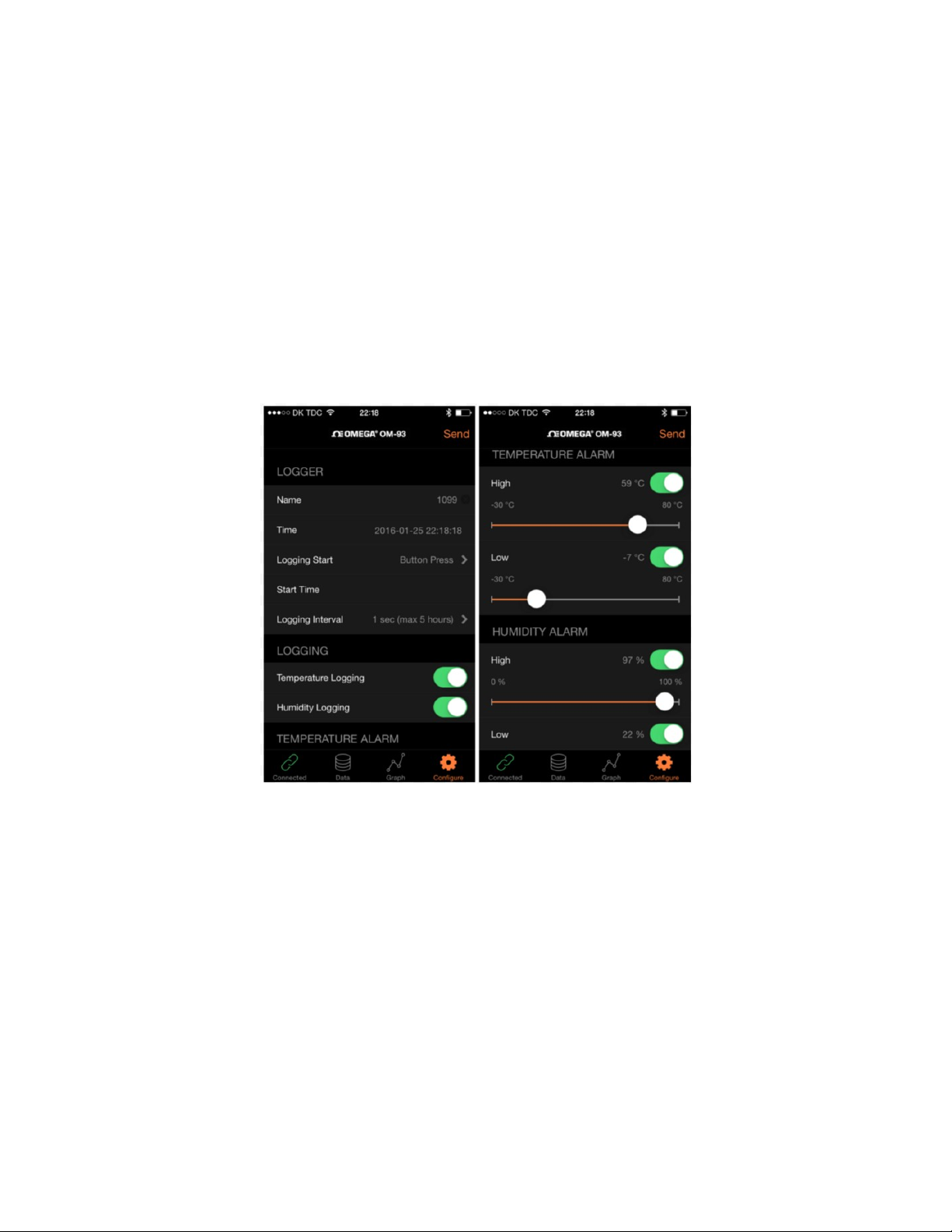
Toconfigurealoggertogototheconfigurescreen.Filloutalldesiredsettingsincluding:
thenameofthelogger
theloggingstartmode
o ondisconnection
o bybuttonpress
o atspecifiedstarttime
thelogginginterval
enabling/disablingoftemperaturelogging
enabling/disablingof
humiditylogging
temperatureunits(FahrenheitorCelsius)
temperaturealarmslevels(upperandlower)
humidityalarmslevels(upperandlower)
OnceallconfigurationisasrequiredthenpressSendtodownloadallsettingstothelogger.
Afterconnectingtoaloggerthathascollecteddatafordownload,selectDownloadLoggerfromthe
connectedscreen.TheapplicationthenmovestotheDatascreenandalldataappearsasalistofsample
pointscollected.Oncedataisreadintotheapplicationitispossibletoviewthedatagraphicallyfromthe
Graphscreen.
Revision 1.0.3 6/8
Page 9
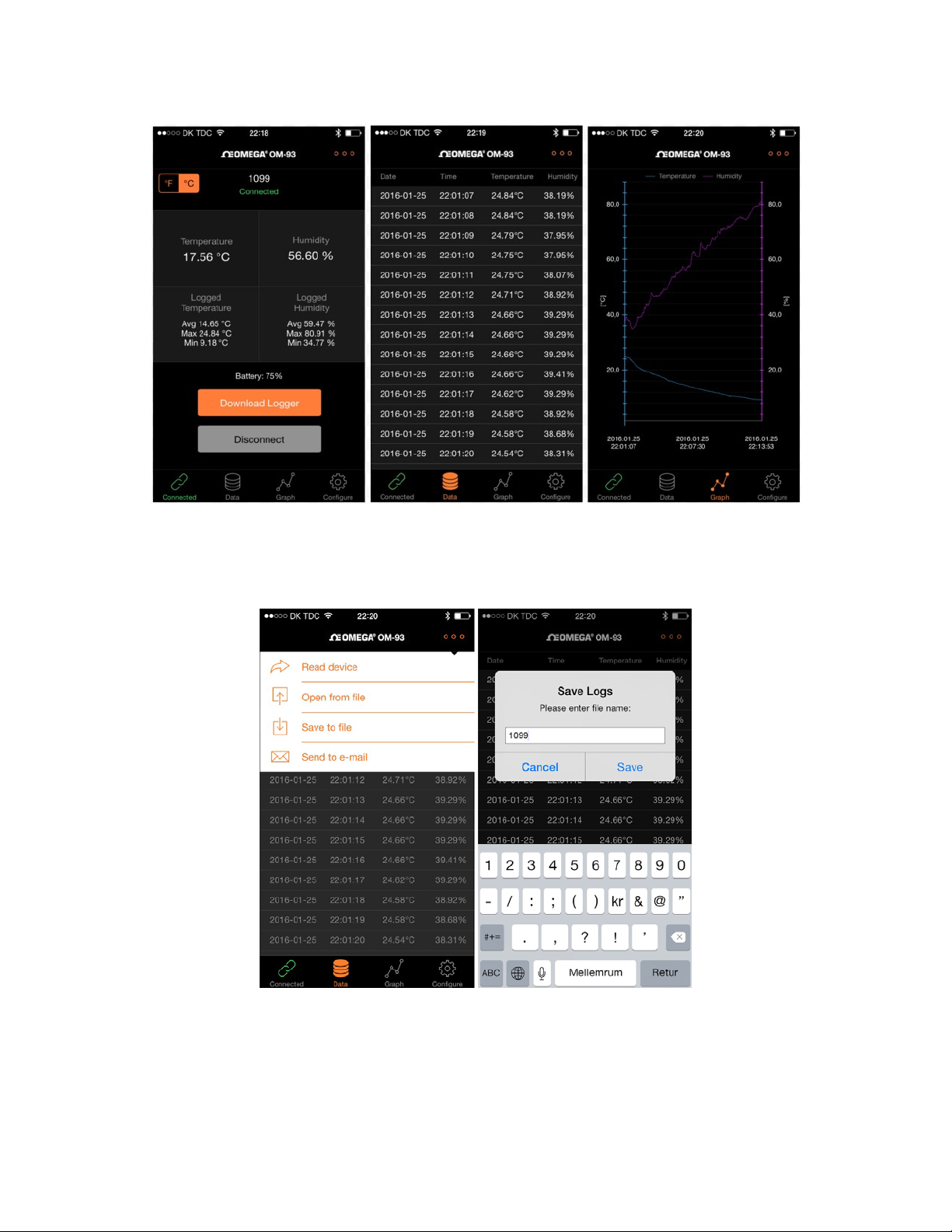
DatacanbesavedtotheiPhonefromtheDatascreen.Datacanbereadbackintotheapplicationatsome
laterpointintime.DatacanalsobeforwardedasanemailintheformofaCommaSeparatedDatafile
(CSV).
Todisconnectfromtheloggereither
selectDisconnectontheConnectedscreenorjustclosethe
application.TheBlueLEDwillturnoffindicatingtheloggerisdisconnected.Havingtheapplicationsentto
thebackgroundisalsosufficienttoclosetheconnectiontothelogger.
Revision 1.0.3 7/8
Page 10

MoreAdvancedTopics
ThisdocumenthasshownthemostbasicwaytoconfiguretheOM‐93loggerinorderforyoutogetstarted
veryquickly.
Thereareotherloggerstartmodessuchasbuttonpress,startatadefinedtimeandrealtimelogging.Itis
alsopossibletoopenMicrosoft®Excel®directly
exhaustivedescriptionofallfeaturesoftheloggerthenpleaseconsultthefullOM‐93UserGuideincluded
ontheCD.
fromtheGUIandwriteoutPDFreports .Foramore
ProductSupport
FortechnicalsupportquestionspleasecontactOmegaat:
1‐800‐USA‐WHEN(1‐800‐872‐9436)
Revision 1.0.3 8/8
Page 11

WARRANTY/DISCLAIMER
OMEGA ENGINEERING, INC. warrants this unit to be free of defects in materials and
period of 13 months from date of purchase. O M EG A ’s WA RRA NT Y adds an
grace period to the normal one (1) year
ensures that OMEGA’s customers receive
If the unit
Department will issue an
Upon
charge. OME GA ’ s WARRANTY does not apply to defects res ul ti ng from any action of the
including but not limited to
improper
having been tampered with or shows evidence of having been damaged as a result of excessive
or current, heat, moisture or vibration; improper
conditions outside of OMEG A ’s control. Components in which wear is not warranted, include but are
limited
OMEGA is pl eas ed to of f e r
OMEGA neither
any damages that result from the use of its
by
OMEGA,
company
REPRESENTATIONS
TITLE, AND ALL IMPLIED
AND FITNESS FOR A
LIABILITY:
OMEGA
indemnification,
component
consequential, incidental
CONDITIONS:
Component”
applications
activity, medical
as set forth in our basic WARRANTY/DISCLAIMER language, and,
OMEGA and hold OMEGA harmless from any
Product(s) in such a
malfunctions,
examination
repair, or
to contact points, fuses, and
assumes
either verb al o r
will be as
The
remedies
with
respect
upon
Equipment
under 10
or used on humans. Should any Product(s) be used in or with any nuclear
application,
it must be returned to the factory for
Authorized
by O ME G A, if the unit is found to be defective, it will be repaired or replaced at
mishandling,
unauthorized modification.
responsibility
written. OMEGA warrants
specified
OF ANY KIND
WARRANTIES INCLUDING
PARTICULAR
of
purchaser
to this order,
strict
manner.
liability
which liability
or special
sold by OMEGA is not intended to be used, nor shall it be used: (1) as a
CFR
21 (NRC), used in or with any nuclear
used on hum ans, or misused in any way, OM E GA assumes no
triacs.
suggestions
and free of
product warranty
maximum
Return (AR) number
improper
for any omissions or errors nor assumes
defects. OMEGA MAKES
WHATSOEVER, EXPRESSED
PURPOSE ARE HEREBY
set
whether
or
otherwise,
is based. In no event shall OMEGA be liable
damages.
liability
coverage on each
interfacing,
This WARRANTY is VOID if the uni t shows evidence
specification; misapplication;
on the use of its various
products
forth
herein are
based on
shall not exceed the purchase price of
or damage whatsoever arising out of the use of
to cover handling and shipping time.
evaluation.
immediately
in
accordance
only that the parts
ANY
WARRANTY
exclusive,
installation
additionally,
workmanship
additional
product.
upon ph one or
operation outside of design
OR
DISCLAIMED. LIMITATION OF
contract, warranty, negligence,
OMEGA’s Customer
misuse or other
products.
with
information
manufactured
NO OTHER
IMPLIED,
OF
MERCHANTABILITY
and the
or activity; or (2) in
purchaser will
one (1)
Service
written
WARRANTIES
EXCEPT THAT
total liability of
request.
purchaser,
corrosion;
operating
However,
liability for
provided
medical
installation
responsibility
indemnify
for a
month
This
no
limits,
of
not
by
the
OR
OF
the
for
“Basic
or
the
RETURN
Direct all warra nty and repair requests/inquiries to the OMEGA Customer Service
BEFORE RETURNING ANY PRODUCT(S) TO OMEGA, PURCHASER MUST OBTAIN AN AUTHORIZED
RETURN (AR) NUMBER FROM OMEGA’S CUSTOMER
PROCESSING
package and on any
The purchaser is responsible for shipping charges, freight, insurance and proper packaging to
breakage in
FOR WARRANTY
following information
OMEGA:
1. Purchase Order number under which the
was PURCHASED,
2. Model and serial number of the product
warranty,
3. Repair
relative to the
OMEGA’s policy is to make running c hanges, not model changes, whenever an
our customers the latest in
OMEGA is a registered trademark of OMEGA ENGINEERING, INC.
© Copyright 2016 OMEGA ENGINEERING, INC. All rights reserved. This document may not be copied,
reproduced, translated, or reduced to any electronic medium or ma chine-r ead abl e form, in whole or in part,
prior written consent of OMEGA ENGINEERING, INC.
DELAYS). The assigned AR number should then be marked on the outside of the
correspondence.
transit.
and
instructions
RETURNS, please have
available
and/or specific
product.
technology
BEFORE
and
REQUESTS/INQUIRIES
the
contacting
product
under
problems
engineering.
SERVICE
FOR
NON-WARRANTY
OMEGA for current repair charges. Have
the
following information
contacting
1. Purchase Order number to cover the COST
of the
2. Model and serial number of the product,
3. Repair
relative to the
DEPARTMENT (IN ORDER TO AVOID
OMEGA:
repair,
instructions
REPAIRS,
and/or specific
product.
improvement
Department.
consult
available BEFORE
is possible. This
problems
photocopied,
without
return
prevent
and
affords
the
Page 12

Where
Do
I
Find
Everything I
Need
for
Process Measurement
OM
EGA…Of
Shop online
and Control
Course!
at
omega.co
?
SM
m
TEMPERATURE
Thermocouple,
Wire:
Thermocouple,
Calibrators
Recorders,Controllers&Process
Infrared
PRESSURE, STRAIN AND
Transducers
Load Cells &
Displacement
Instrumentation&Accessories
RTD &
&Ice Point
Pyrometers
&Str ain
Pressure
Transducers
ThermistorProbes, Connectors, Panels&Assemblies
RTD&
Thermistor
References
Monitors
FORCE
Gages
Gages
FLOW/LEVEL
Rotameters, GasMassFlowmeters
AirVelocity
Turbine/Paddlewheel
Totalizers&Batch
Indicators
Controllers
Systems
&Flow
Computers
pH/CONDUCTIVITY
pHElectrodes,Testers&Accessories
Benchtop/Laboratory
Controllers,Calibrators,Simulators&Pumps
Industrial pH&
DATA
ACQUISITION
DataAcquisition&Engineering
Communications‐Based Acquisition
Plug‐inCards for Apple, IBM&
DataLogging
Recorders,Printers&Plotters
Systems
Meters
Conductivity
Equipment
Software
Systems
Compatibles
HEATERS
Heating
Cartridge
Immersion
Flexible
Laboratory
Cable
&Str ip
&Band
Heaters
Heaters
Heaters
Heaters
ENVIRONMENTAL
MONITORING AND
Metering
Refractometers
Pumps&
Air,Soil &Water
Industrial Water&
pH,Conductivity&DissolvedOxygen
&Control
Tubing
CONTROL
Instrumentation
Monitors
Wastewater
Treatment
Instruments
MQS5543/0216
 Loading...