

Page 1
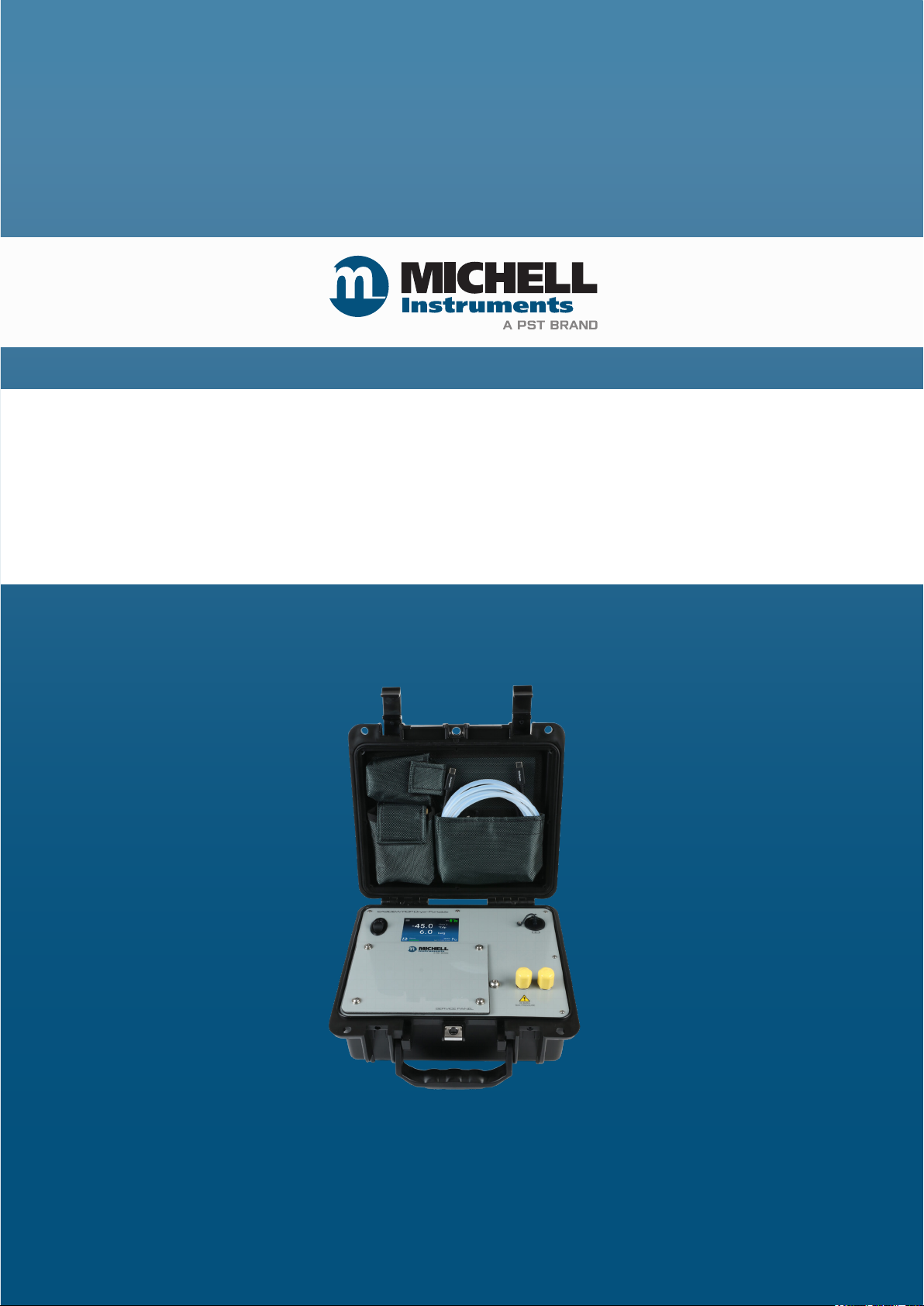
Easidew PDP
Dryer Portable Hygrometer
User Manual
99001 Issue 1.2
October 2024
Page 2
Please ll out the form(s) below for each instrument that has been purchased.
Use this information when contacting Michell Instruments for service purposes.
Product Name
Order Code
Serial Number
Invoice Date
Installation Location
Tag Number
Product Name
Order Code
Serial Number
Invoice Date
Installation Location
Tag Number
Product Name
Order Code
Serial Number
Invoice Date
Installation Location
Tag Number
Page 3
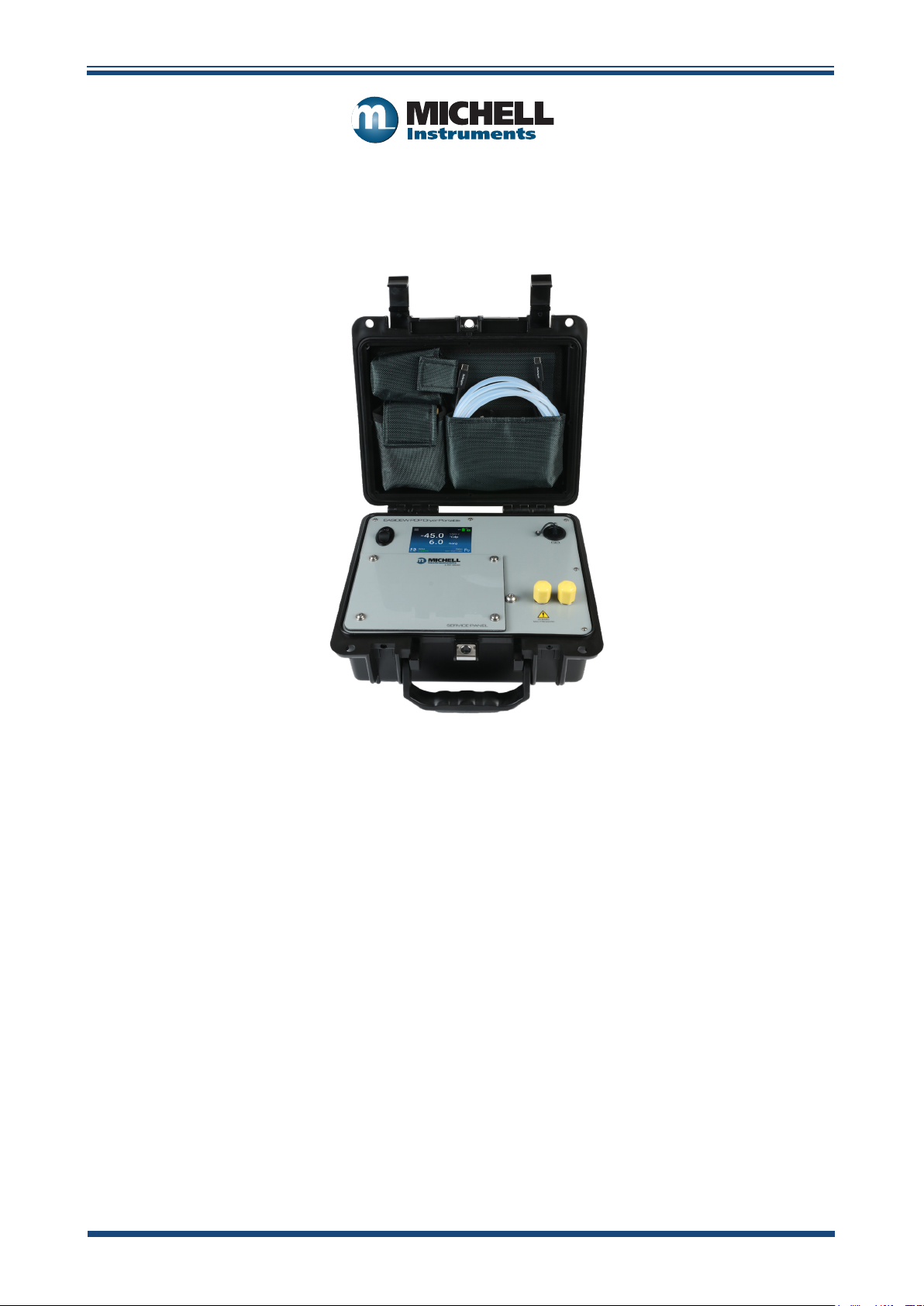
Easidew PDP Dryer Portable Hygrometer
For Michell Instruments' contact information please go to
www.ProcessSensing.com
© 2024 Michell Instruments
This document is the property of Michell Instruments Ltd and may not be copied or
otherwise reproduced, communicated in any way to third parties, nor stored in any Data
Processing System without the express written authorization of Michell Instruments Ltd.
Page 4

Easidew PDP Dryer Portable User Manual
Contents
Safety ...............................................................................................................................vii
Electrical Safety .........................................................................................................vii
Pressure Safety ...........................................................................................................vii
Toxic Materials ............................................................................................................vii
Repair and Maintenance .............................................................................................. vii
Calibration .................................................................................................................. vii
Safety Conformity .......................................................................................................vii
Abbreviations .................................................................................................................... viii
Warnings .......................................................................................................................... viii
1 INTRODUCTION ................................................................................................1
1.1 User Controls and Case Lid Layout ....................................................................... 2
1.2 Main Screen ....................................................................................................... 3
1.3 Service Panel ..................................................................................................... 4
1.4 Pressurized (PDP) Gas Portable Measurement System ........................................... 5
2 INSTALLATION ..................................................................................................6
2.1 Safety ................................................................................................................ 6
2.2 Unpacking the Instrument ................................................................................... 6
2.3 Easidew PDP Portable Accessories ....................................................................... 6
2.4 Operational Requirements ................................................................................... 7
2.4.1 Environmental Requirements – Easidew PDP Portable ...................................... 7
2.4.2 Battery Charger Electrical Requirements ......................................................... 7
2.5 Gas Connections ................................................................................................. 7
2.5.1 Inlet and Outlet Fittings ................................................................................. 8
2.6 Internal Battery Management .............................................................................. 9
2.6.1 Battery Charging ........................................................................................... 9
2.6.2 Battery Safety ............................................................................................... 9
3 OPERATION ....................................................................................................10
3.1 Preparation for Operation .................................................................................. 10
3.2 User Controls ................................................................................................... 10
3.2.1 Main Screen ................................................................................................ 10
3.2.2 Dew-Point and Pressure Chart Plotting .......................................................... 11
3.2.3 Dew-Point, Pressure, Temperature and Time & Date Logging Setup Screen ..... 11
3.2.4 Dew-Point, Pressure, Temperature and Time & Date Logging Interval ............. 12
3.2.5 Start Data Logging Setup Screen .................................................................. 12
3.2.6 Accessing the Advanced Menu Functions ...................................................... 13
3.2.7 Security Code Protection for Advanced Menu................................................. 13
3.2.8 Advanced Menu Setup Screen ...................................................................... 14
3.2.9 Parameter Scaling ....................................................................................... 14
3.2.10 Display Brightness and Power Save .............................................................. 15
3.2.11 Dew-Point and Pressure Chart Plotting Set Up ............................................... 15
3.2.12 Battery Health Diagnostics ........................................................................... 16
3.2.13 Date/Time Screen ....................................................................................... 16
3.2.14 Unit Firmware and Sensor Diagnostics .......................................................... 17
3.3 Data Logging Download ................................................................................... 17
4 GOOD MEASUREMENT PRACTICE .....................................................................18
iv 99001 Issue 1.2 October 2024
Page 5

Easidew PDP Dryer Portable User Manual
5 MAINTENANCE ................................................................................................22
5.1 Inlet Filter Maintenance and Replacement ......................................................... 22
5.2 Moisture Sensor Maintenance and Replacement .................................................. 23
5.3 Integral Battery Replacement ........................................................................... 23
5.4 SD Card Replacement ...................................................................................... 23
6 SHIPPING .......................................................................................................24
Appendices
Appendix A Technical Specications ..............................................................................28
A.1 Dimensions ................................................................................. 29
Appendix B Quality, Recycling, Compliance & Warranty Information ................................31
Appendix C Return Document & Decontamination Declaration ........................................ 33
Figures
Figure 1 Easidew PDP Dryer Portable Hygrometer ......................................................1
Figure 2 User Controls and Case Lid Layout ...............................................................2
Figure 3 Main Operating Screen ................................................................................3
Figure 4 Service Panel Removed ...............................................................................4
Figure 5 System Schematic and System Design Mechanics .........................................5
Figure 6 Adaptor Fitting ...........................................................................................8
Figure 7 3A Fast-Charger Curve ................................................................................9
Figure 8 Main Screen .............................................................................................10
Figure 9 Dew-Point and Pressure Chart Plotting .......................................................11
Figure 10 Dew-Point, Pressure, Temperature, Time & Date Logging Setup Screen ........11
Figure 11 Data Log Interval Selection Screen ............................................................12
Figure 12 Start Data Logging Screen ........................................................................12
Figure 13 Advanced Menu Access Screen ..................................................................13
Figure 14 Security Code Screen ................................................................................13
Figure 15 Advanced Menu Setup Screen ...................................................................14
Figure 16 Parameter Scaling Screen ..........................................................................14
Figure 17 Display Screen .........................................................................................15
Figure 18 Chart Setup Screen ...................................................................................15
Figure 19 Battery Health and Diagnostics Screens .....................................................16
Figure 20 Date/Time Screen .....................................................................................16
Figure 21 Unit Firmware and Sensor Diagnostics .......................................................17
Figure 22 Material Permeability Comparison ..............................................................18
Figure 23 Service Panel Removed .............................................................................22
Michell Instruments v
Page 6

Easidew PDP Dryer Portable User Manual
This page has been left blank intentionally.
vi 99001 Issue 1.2 October 2024
Page 7

Easidew PDP Dryer Portable User Manual
!
!
!
Safety
The manufacturer has designed this equipment to be safe when operated using the procedures
detailed in this manual. The user must not use this equipment for any other purpose than that
stated. Do not apply values greater than the maximum value stated.
This manual contains operating and safety instructions, which must be followed to ensure the safe
operation and to maintain the equipment in a safe condition. The safety instructions are either
warnings or cautions issued to protect the user and the equipment from injury or damage. Use
competent personnel using good engineering practice for all procedures in this manual.
Electrical Safety
The instrument is designed to be completely safe when used with options and accessories supplied by
the manufacturer for use with the instrument. The instrument is powered by an internally mounted
rechargeable battery. The input power supply voltage limits for the battery charger supplied with the
instrument are 90...264 V AC, 50/60 Hz.
Pressure Safety
DO NOT permit pressures greater than the safe working pressure to be applied to the instrument.
The specied safe working pressure (SWP) for this instrument is 20 barg (290 psig).
Toxic Materials
The use of hazardous materials in the construction of this instrument has been minimized. During
normal operation it is not possible for the user to come into contact with any hazardous substance
which might be employed in the construction of the instrument. Care should, however, be exercised
during maintenance and the disposal of certain parts.
Repair and Maintenance
The instrument must be maintained either by the manufacturer or an accredited service agent. Refer
to www.ProcessSensing.com for the contact details for Michell Instruments’ oces worldwide.
Calibration
The recommended calibration interval for the Easidew PDP Portable is 12 months. The instrument
should be returned to the manufacturer, Michell Instruments Ltd, or one of their accredited service
agents for re-calibration. Alternatively, there is the option to purchase calibrated service exchange
dew-point sensors, which replace the original sensors within the unit.
Safety Conformity
This product meets the essential protection requirements of the relevant EU and UK directives.
Further details of applied standards may be found in Appendix B.
Michell Instruments vii
Page 8

Abbreviations
The following abbreviations are used in this manual:
AC alternating current
atm pressure unit (atmosphere)
barg pressure unit (=100 kP or 0.987 atm) gauge
°C degrees Celsius
°F degrees Fahrenheit
DC direct current
Hz Hertz
kg kilogram(s)
lb pound
Nl/min liters per minute
m meter(s)
mA milliampere
max maximum
min minute(s)
mm millimeter(s)
MPa megapascal
ppmV parts per million (by volume)
ppmW parts per million (by weight)
psig pounds per square inch
SWP safe working pressure
V volts
Easidew PDP Dryer Portable User Manual
Warnings
The following general warning listed below is applicable to this instrument. It is repeated
in the text in the appropriate locations.
Where this hazard warning symbol appears in the following
sections it is used to indicate areas where potentially hazardous
operations need to be carried out.
viii 99001 Issue 1.2 October 2024
Page 9
Easidew PDP Dryer Portable User Manual
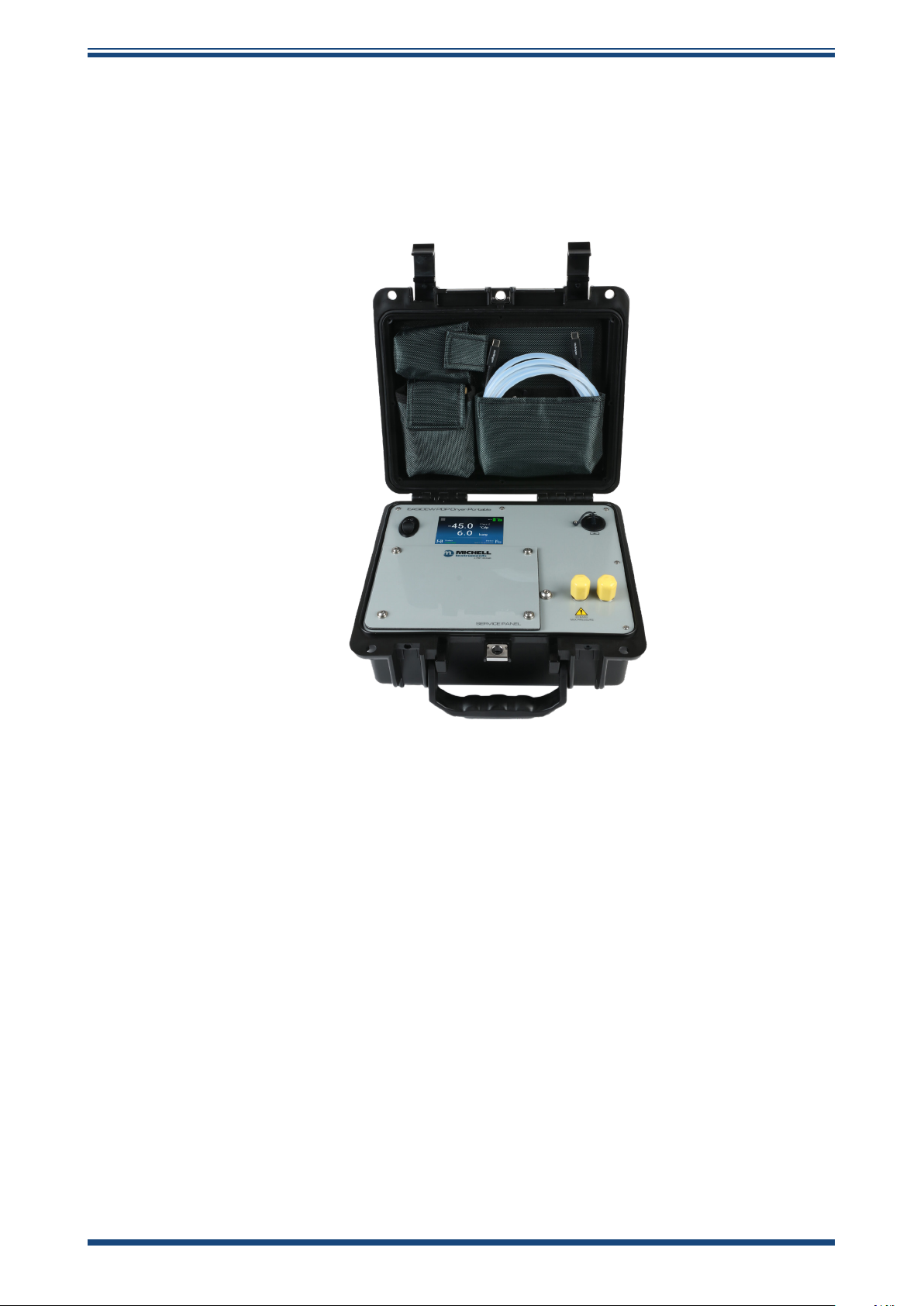
1 INTRODUCTION
Moisture spot checking at the pressurized outlet of a gas dryer is crucial for ensuring
the quality of compressed gas. The Easidew PDP Dryer Portable hygrometer monitors
and logs key parameters like dew point, pressure and temperature in real time. It is
compliant with ISO 8573-1 and eectively controls moisture contamination.
INTRODUCTION
Figure 1
Easidew PDP Dryer Portable Hygrometer
Michell Instruments 1
Page 10
INTRODUCTION
Easidew PDP Dryer Portable User Manual
1.1 User Controls and Case Lid Layout
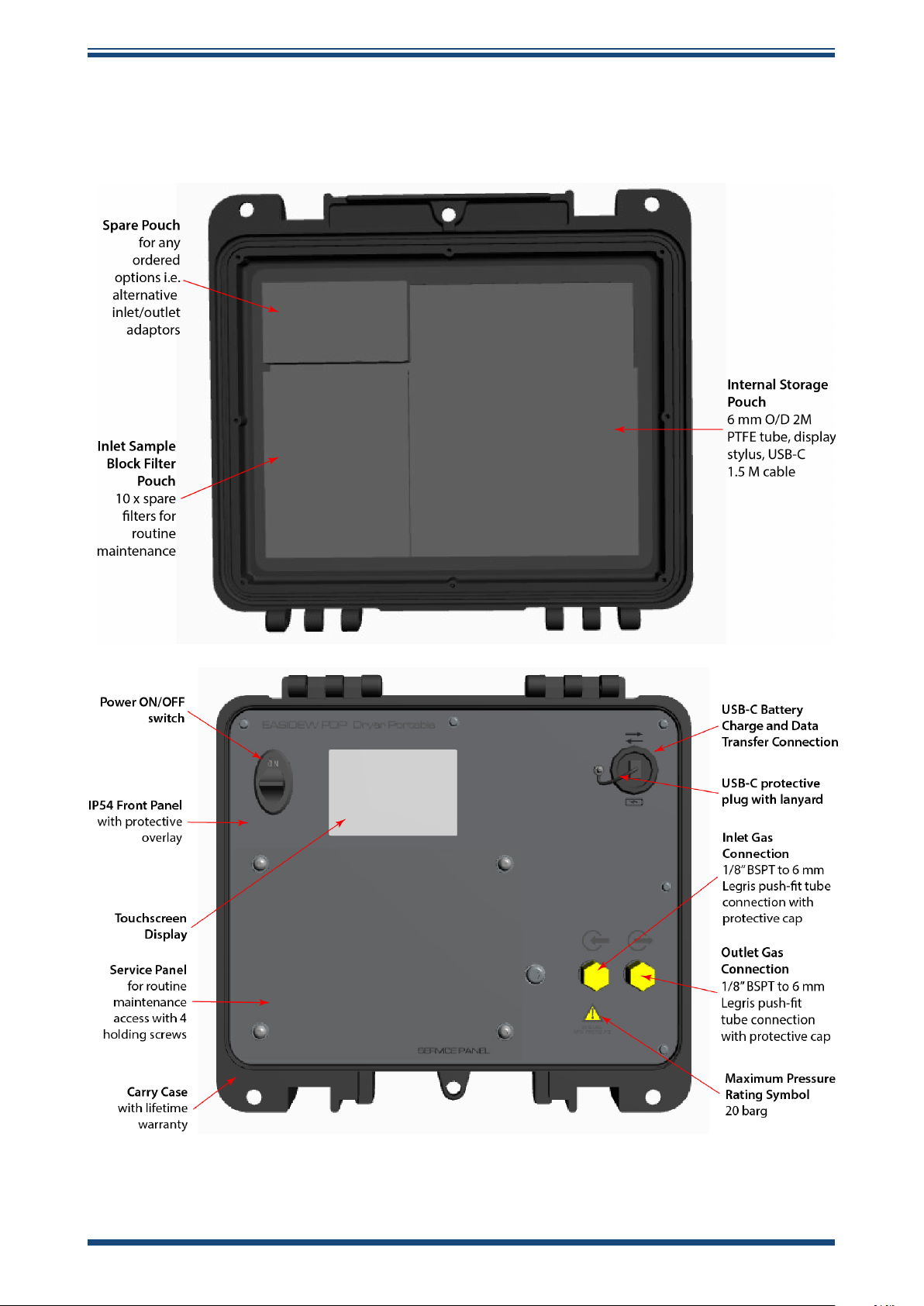
The user controls and indicators associated with the Easidew PDP Portable are located
on the front panel of the instrument and are explained below.
Figure 2
User Controls and Case Lid Layout
2 99001 Issue 1.2 October 2024
Page 11
Easidew PDP Dryer Portable User Manual
1.2 Main Screen
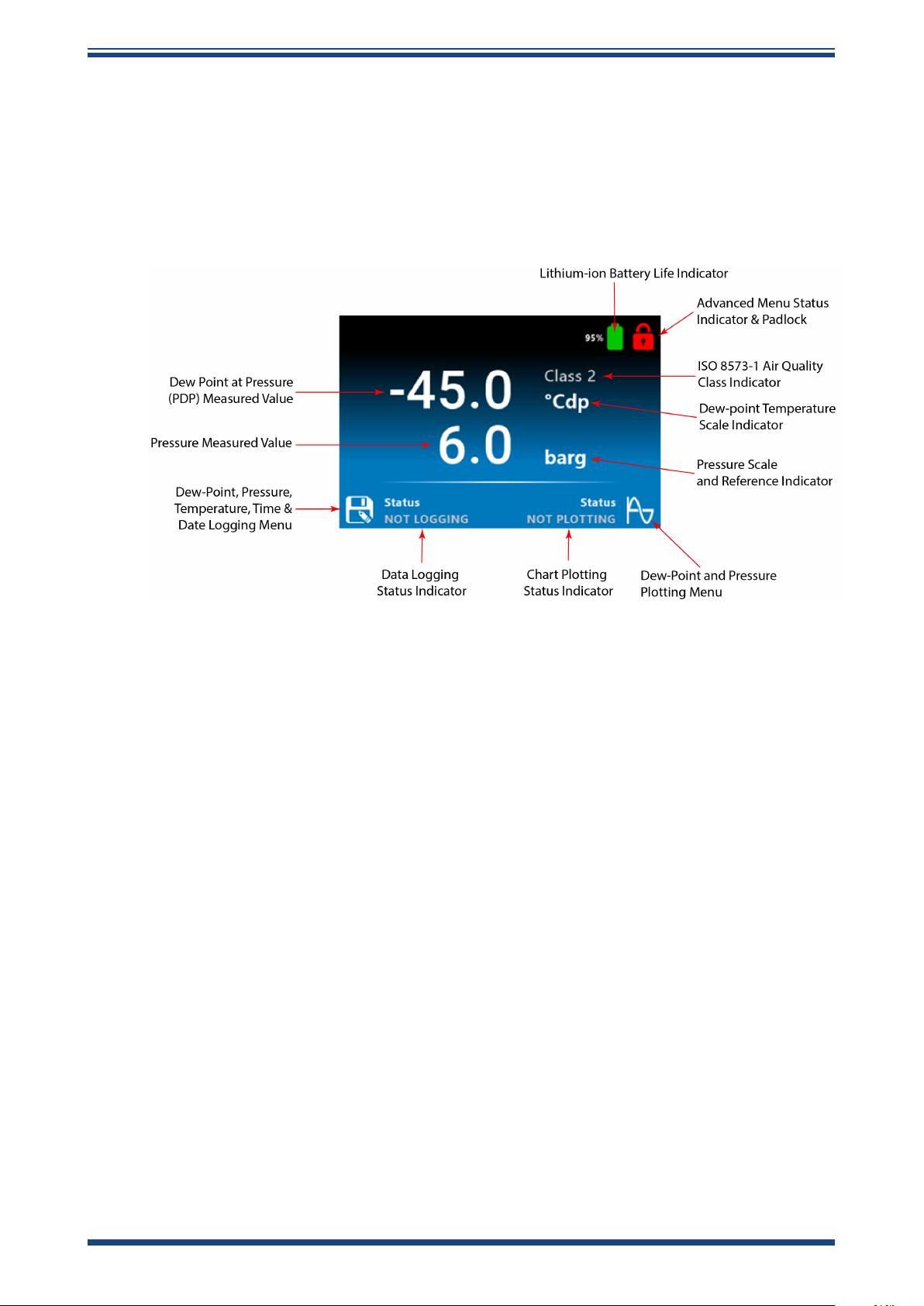
The HMI interface on the Easidew PDP Portable is simple and intuitive. Below is the
main operating screen, which is used once the dryer test is set up and underway.
A stylus pen is provided in the right-hand pouch in the case lid, to make touchscreen
operation easy. The touchscreen is designed to work even when the operator is wearing
plastic gloves.
INTRODUCTION
Figure 3
Main Operating Screen
Michell Instruments 3
Page 12
INTRODUCTION
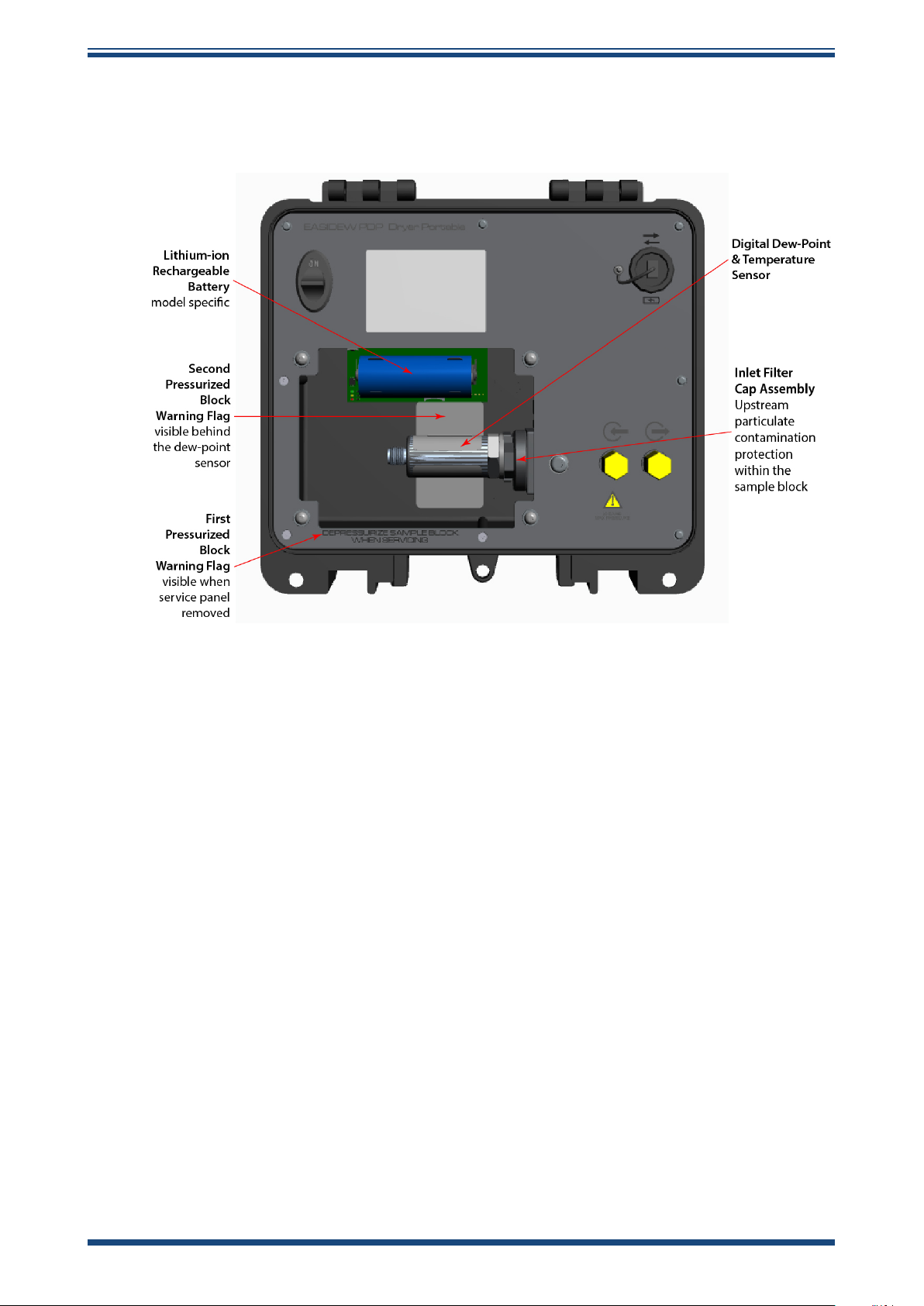
1.3 Service Panel
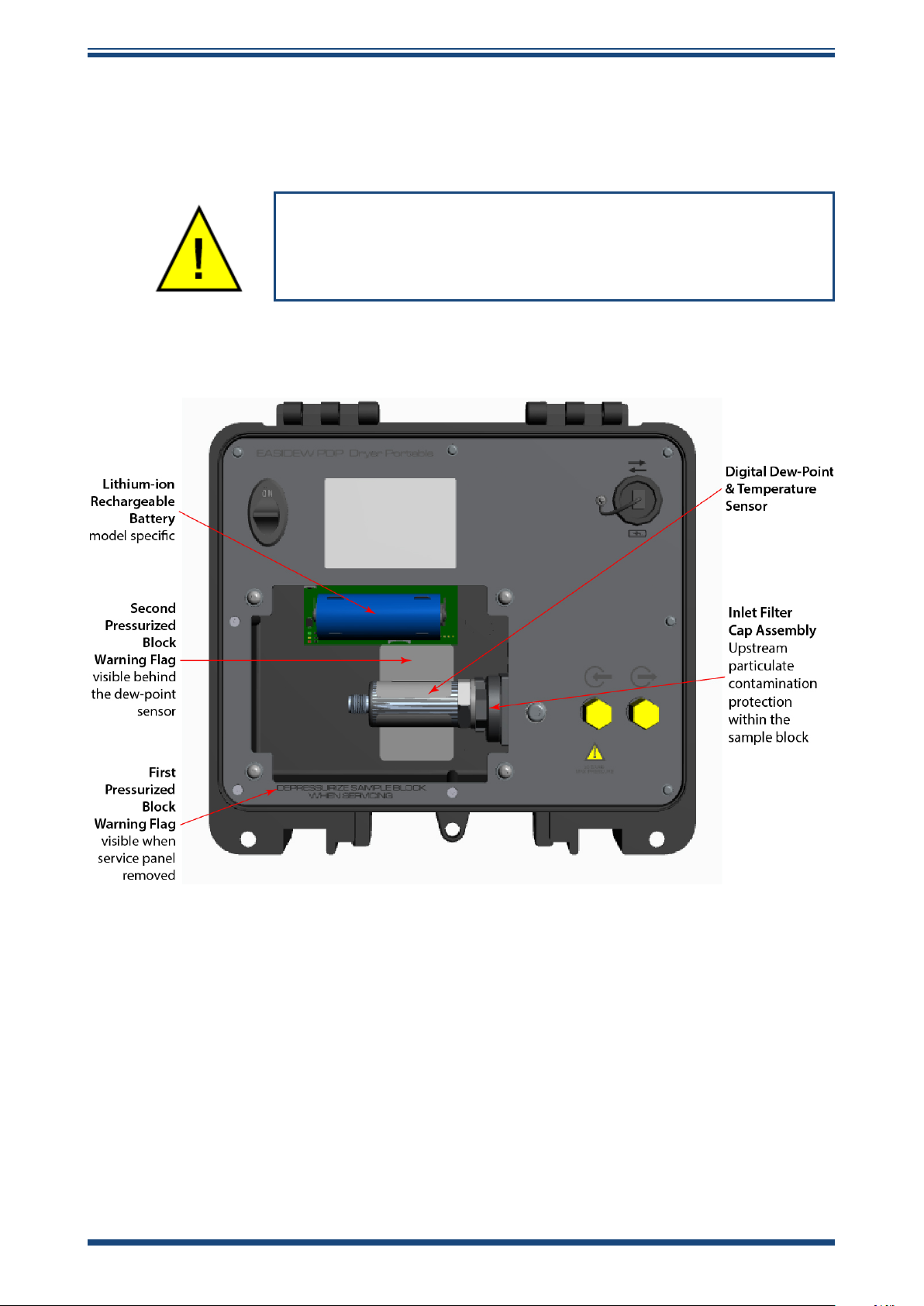
Routine inlet lter maintenance, lithium-ion battery replacement and dew-point sensor
replacement are all undertaken after removing the service panel.
Easidew PDP Dryer Portable User Manual
Before the service panel is removed, the portable must be
deactivated and depressurized. The unit pressure rating is
20 barg and operator safety is paramount.
This unit has three pressure warning labels on the front panel and within the service
panel compartment, to ensure the operator services the unit in a safe manner.
Figure 4
Service Panel Removed
4 99001 Issue 1.2 October 2024
Page 13
Easidew PDP Dryer Portable User Manual
1.4 Pressurized (PDP) Gas Portable Measurement System
All compressed gas dryers that require a moisture spot check work at the gas line
pressure. If the dryer has optional dew-point control for improved system eciency, the
installed dew-point sensor on the dryer outlet measures and controls the dryer outlet
moisture at line pressure.
Within the compressed gas sector, this is expressed as Pressure Dew Point (PDP) control.
To ensure that an accurate moisture spot check is achieved, the Easidew PDP Dryer
Portable replicates the measurement of dew point at line pressure. All compressed gas
dryers specify a minimum achievable moisture dryness in Pressure Dew Point (PDP): for
example, ISO 7573-1 Class 2, -40 °C PDP.
This means the moisture drying mechanism (dryer), the dryer control moisture sensor
(if tted) and the spot-checking moisture sensor within the portable are all used in
pressurized state. This is key to obtaining an accurate, repeatable, high-quality moisture
system check.
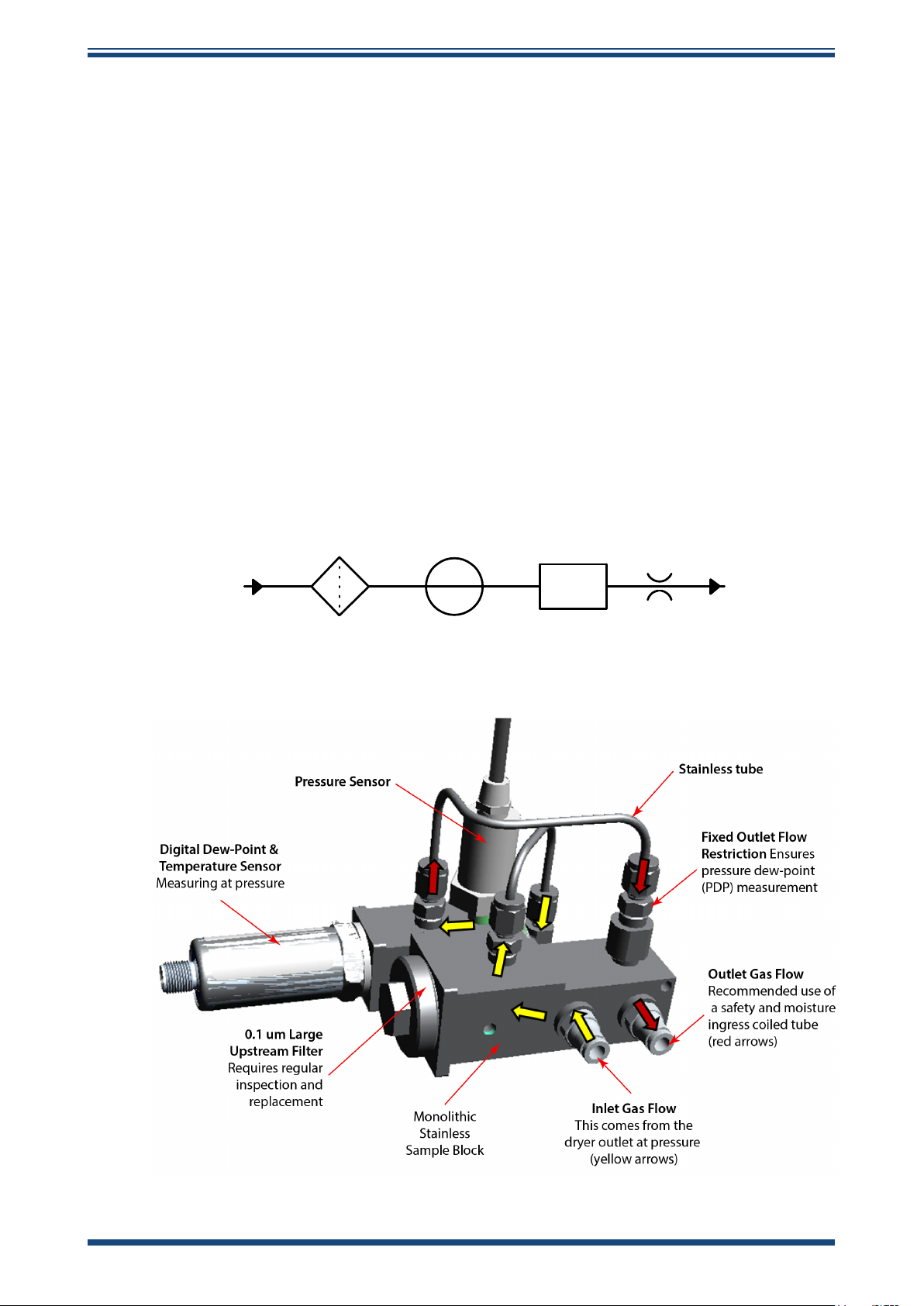
This is achieved through the use of a sample block containing a dew-point sensor and
pressure sensor monitoring at line pressure.
INTRODUCTION
This unit is NOT designed to measure at atmospheric (ATM) pressure.
ENTRY
PARTICULATE
FILTER
PT
PRESSURE
TRANSDUTOR
DP & TT
DEWPOINT
&
TEMPERATURE
TRANSDUCER
FIXED
ORFICE
OUTLET
Figure 5
System Schematic and System Design Mechanics
Michell Instruments 5
Page 14

INSTALLATION
Easidew PDP Dryer Portable User Manual
2 INSTALLATION
2.1 Safety
It is essential that the installation of the electrical and gas
!
2.2 Unpacking the Instrument
The Easidew PDP Portable is packed into a standard box. Unpack the unit and accessories
carefully and save all the packing materials for the purpose of returning the instrument
for re-calibration or any warranty claims.
2.3 Easidew PDP Portable Accessories
supplies to this instrument are undertaken by qualied
personnel.
The accessories for the Easidew PDP Portable are listed below. Items 1 to 6 are supplied
as standard and items 7 to 13 are optional.
Please check that all the standard components are present after unpacking. Report any
shortages immediately.
1. Dew-Point Sensor
2. Calibration certicate
3. 2-meter 6-mm O.D. PTFE tube
4. 1.5-meter USB-C to USB-C battery charger and data transfer cable
5. Touchscreen stylus pen
6. 10 o spare inlet sample block lters
7. 3A fast charge with 4 global universal power connection adaptors and
USB-C 1.5 meter cable (optional)
8. 6-mm Swagelok to 1/8” BSPT Adaptor x2” (optional)
9. 1/4” Swagelok to 1/8” BSPT Adaptor x2” (optional)
10. Legris Quick-Connect for 6-mm PTFE tubing to 1/8” BSPT Adaptor
(optional)
11. Easidew M12 Service Exchange Sensor with 5/8” UNF -100...+20 °C DP
HDPE guard (optional)
12. SF82 M12 Service Exchange Sensor with 5/8” UNF -100...+20 °C DP
HMWPE guard (optional)
13. Outlet-Coiled Stainless Pigtail (rated up to 20 barg) (optional)
14. Commercial 3A fast charge with four global universal power connection
adaptors and USB-C 1.5-meter cable (optional)
6 99001 Issue 1.2 October 2024
Page 15

Easidew PDP Dryer Portable User Manual
2.4 Operational Requirements
Operational requirements are as follows:
Moisture sensor ow rate: Recommended: 1...5 Nl/min
Maximum: 15 Nl/min
Pressure range: Up to 20 barg (290 psig)
2.4.1 Environmental Requirements – Easidew PDP Portable
Operating temperature range: -20...+50 °C (-4...+122 °F)
Storage temperature range: -40...+50 °C (-40...122 °F)
2.4.2 Battery Charger Electrical Requirements
The unit is designed to work with any commercially available generic battery charge
system with a USB-C connector. To ensure the battery is charged quickly and eciently,
it is recommended that the battery charger used has a 3A fast-charge capability. We
provide a suitable 3A USB-C fast battery charger as an optional accessory.
INSTALLATION
2.5 Gas Connections
!
Sample gas connections are made via the inlet gas connection and outlet gas connection
ports located on the right-hand side of the portable front panel as shown in
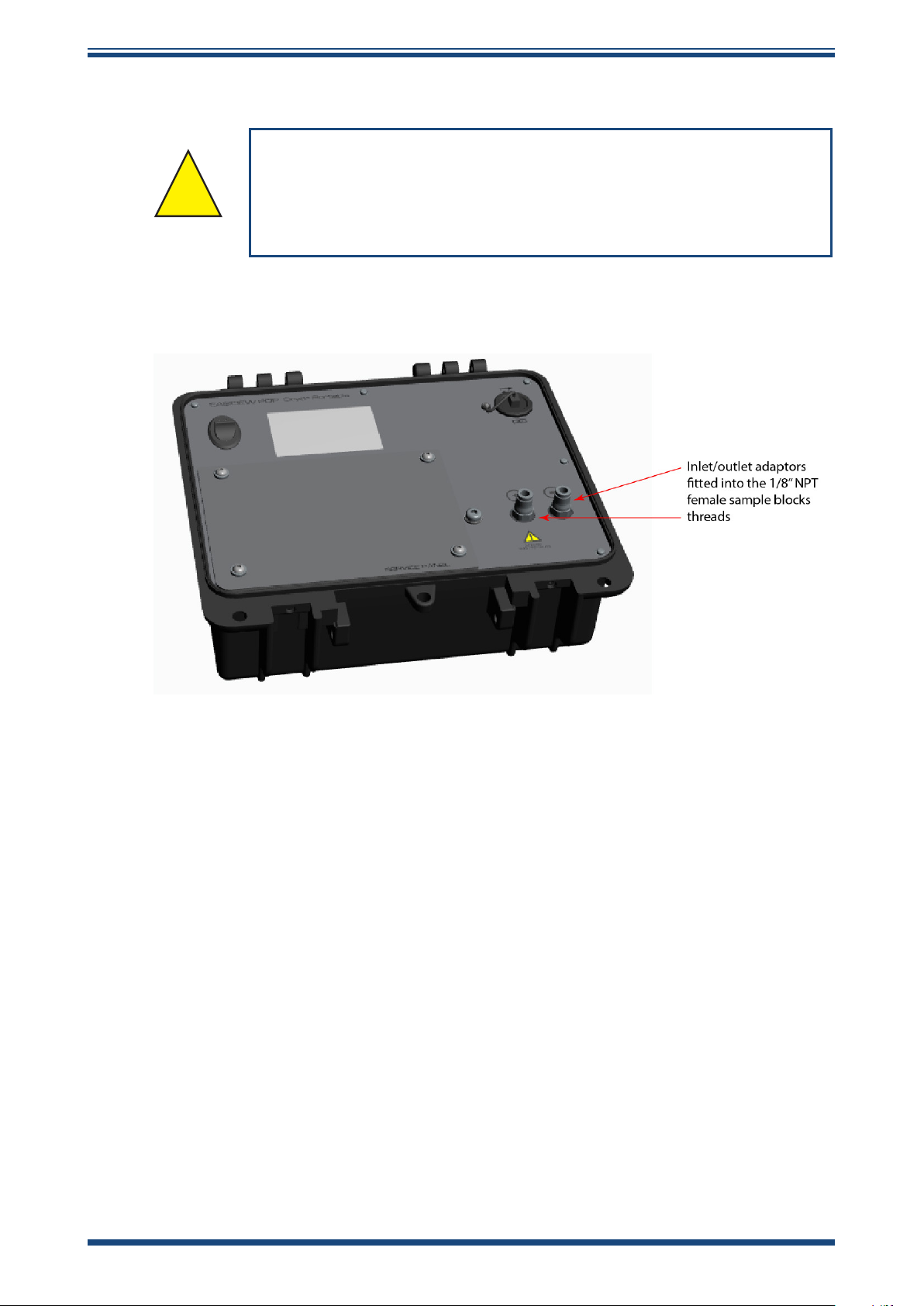
The portable is supplied with 1/8” NPT female threads on the inlet and outlet gas
connections to allow the user to connect inlet/outlet ttings of their choice.
maximum pressure which will be applied, otherwise physical
POSSIBLE INJURY! The tubing, valves and other apparatus
attached to this instrument must be adequate for the
injury to the operator or bystander is possible.
Figure 2
.
Michell Instruments 7
Page 16
INSTALLATION
2.5.1 Inlet and Outlet Fittings
HIGH PRESSURE! High pressure gases are potentially hazardous.
Energy stored in these gases can be released suddenly and with
!
Before making a measurement, the gas ttings should be attached to the instrument
as shown below
extreme force. High pressure systems should be assembled and
operated only by personnel who have been trained in proper
.
Easidew PDP Dryer Portable User Manual
safety practices.
Figure 6
Adaptor Fitting
8 99001 Issue 1.2 October 2024
Page 17
Easidew PDP Dryer Portable User Manual
!
!
2.6 Internal Battery Management
A replacement battery must be of the same make and model to
ensure compatibility and safety.
Replace only with Ansmann Li-Ion 26650 Protected Type-C
battery, otherwise SAFETY and compatibility will be aected.
To avoid damaging the instrument, do not reverse the polarity.
2.6.1 Battery Charging
The internal lithium-ion battery should be fully charged before use. It is acceptable
to use any commercially available battery charger with a USB-C connector, but it is
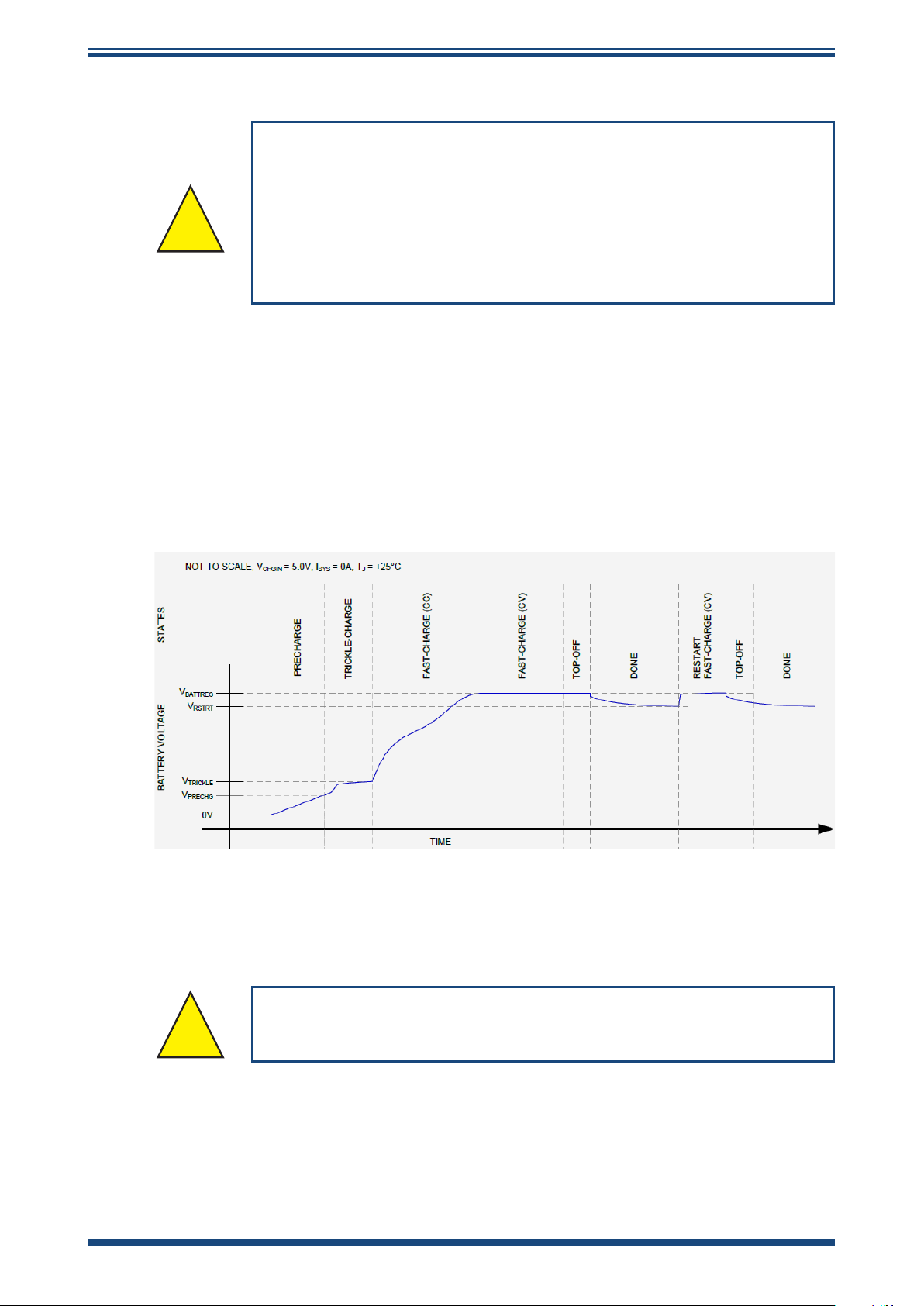
recommendable to use a 3A battery charger for fast, ecient charging. Figure 7, below,
conrms the charge curve of the system, assuming a 3A charger is used.
INSTALLATION
NOTE: With a fast charger (at least 3A), it takes <2 hours to reach 80 % and
<3.5 hours to reach 100 % charge.
2.6.2 Battery Safety
Figure 7
3A Fast-Charger Curve
All international regulations regarding the transportation
of lithium-ion batteries must be adhered to.
The lithium-ion battery, tted and electrically connected within the portable, incorporates
a smart battery charging/safety protection system and is suitable for carriage in all
forms of transportation.
Michell Instruments 9
Page 18
OPERATION
3 OPERATION
High pressure gases are potentially hazardous. Energy stored in
these gases can be released suddenly and with extreme force.
High pressure systems should be assembled and operated only
by people who have been trained in proper safety practices.
!
POSSIBLE INJURY! The tubing, valves and other apparatus
attached to this instrument must be adequate for the maximum
pressure which will be applied, otherwise physical injury to the
3.1 Preparation for Operation
Easidew PDP Dryer Portable User Manual
operator or bystander is possible.
Before operation, it is recommended that the user becomes familiar with Section 1 of
this manual, which describes the equipment controls and indicators, and the elements
of the display.
It is recommended that the battery is charged before conducting any tests.
3.2 User Controls
3.2.1 Main Screen
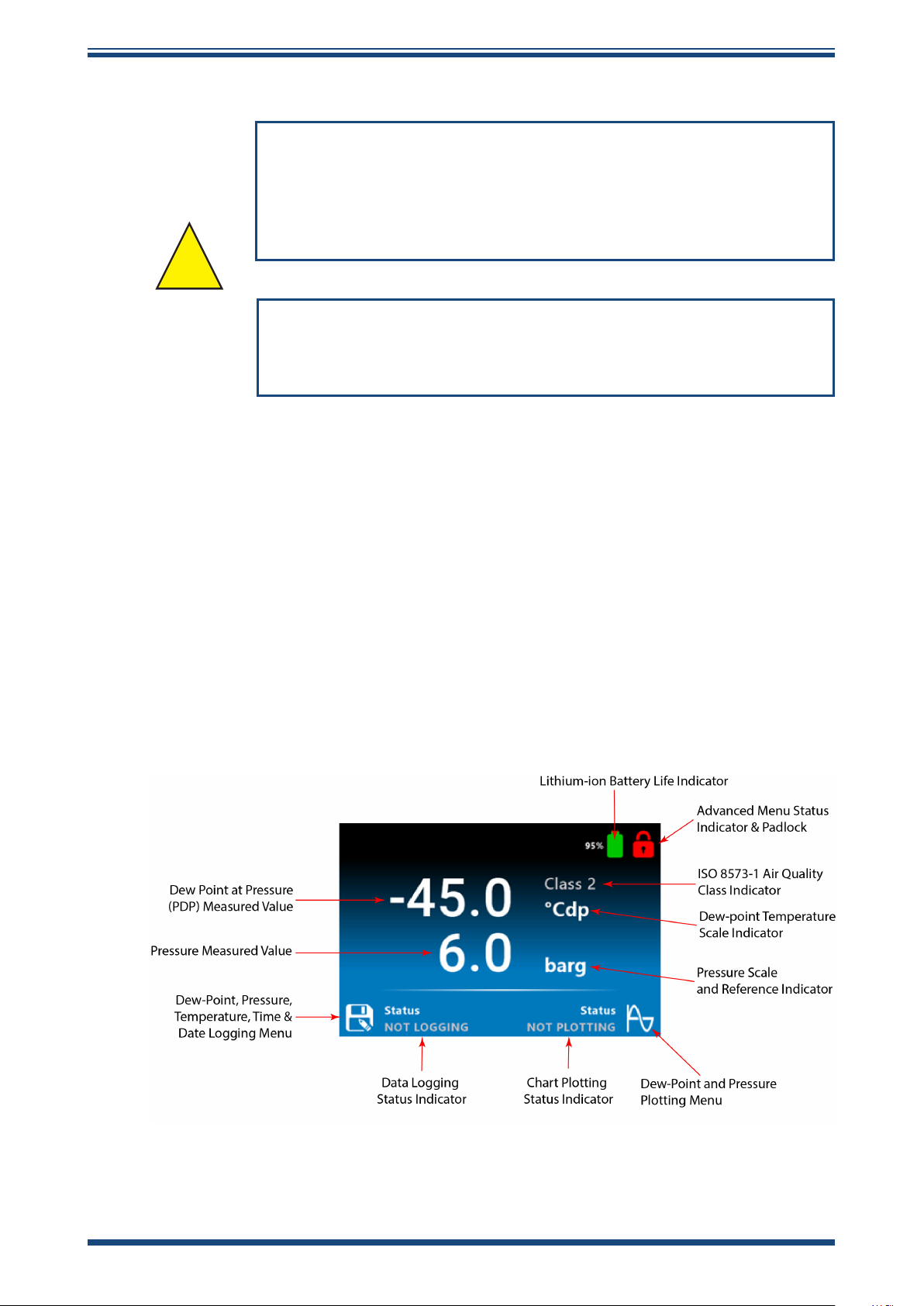
The HMI interface on the Easidew PDP Portable is simple and intuitive. The main
operating screen is shown below.
Figure 8
10 99001 Issue 1.2 October 2024
Main Screen
Page 19
Easidew PDP Dryer Portable User Manual
3.2.2 Dew-Point and Pressure Chart Plotting
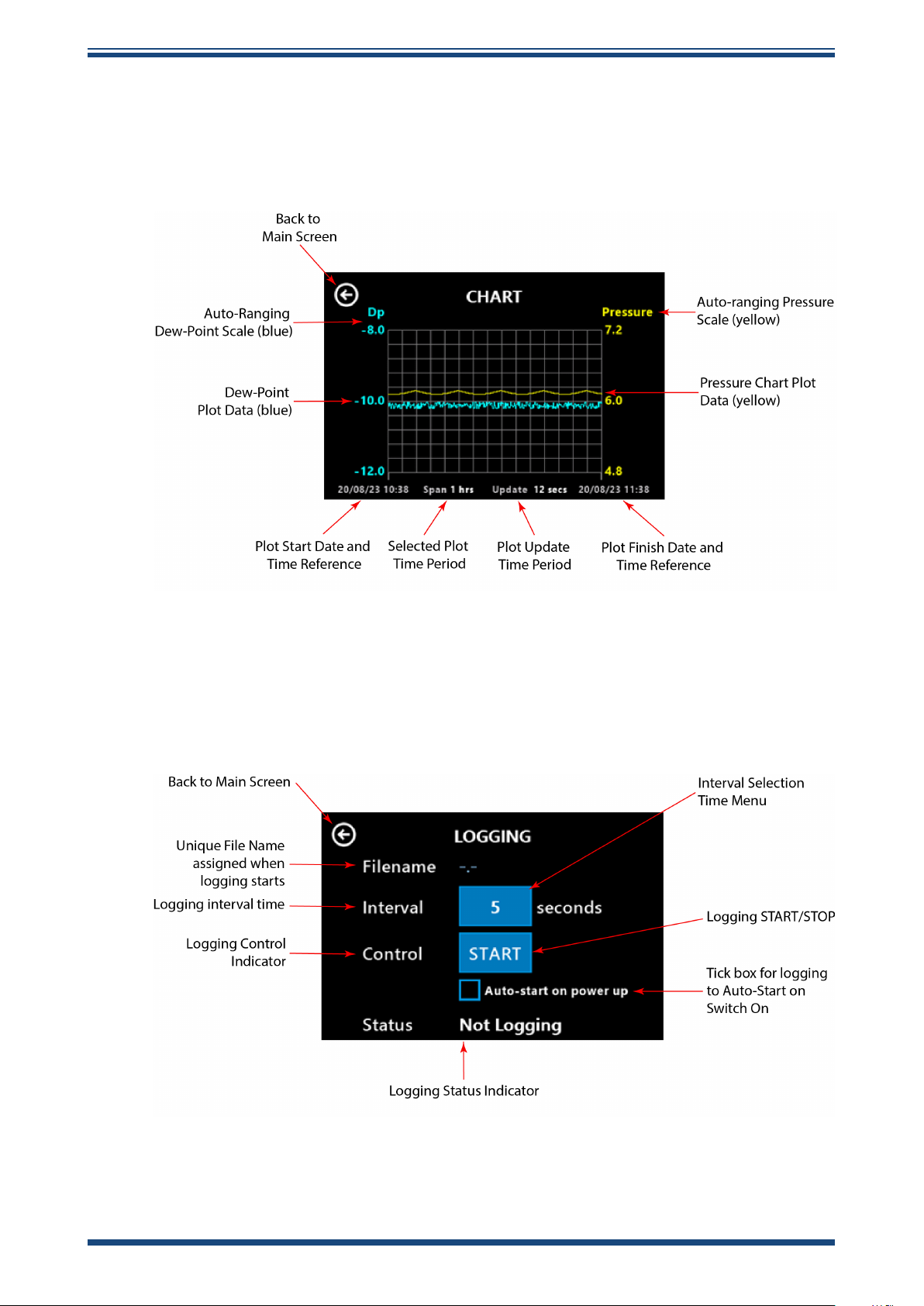
When the graph/plot icon is pressed manually or auto-activated, the portable will chart
Dew Point and Presssure against Time; this is displayed in a graph (see below). The
graphing function is set up in the advanced menu shown in Section 3.2.11.
OPERATION
Figure 9
3.2.3 Dew-Point, Pressure, Temperature and Time & Date Logging Setup Screen
When the data log icon is pressed manually or auto-activated, the portable will data log
Dew Point, Pressure, Temperature and Time & Date on the internal SD card.
Dew-Point and Pressure Chart Plotting
Figure 10
Dew-Point, Pressure, Temperature, Time & Date Logging Setup Screen
Michell Instruments 11
Page 20
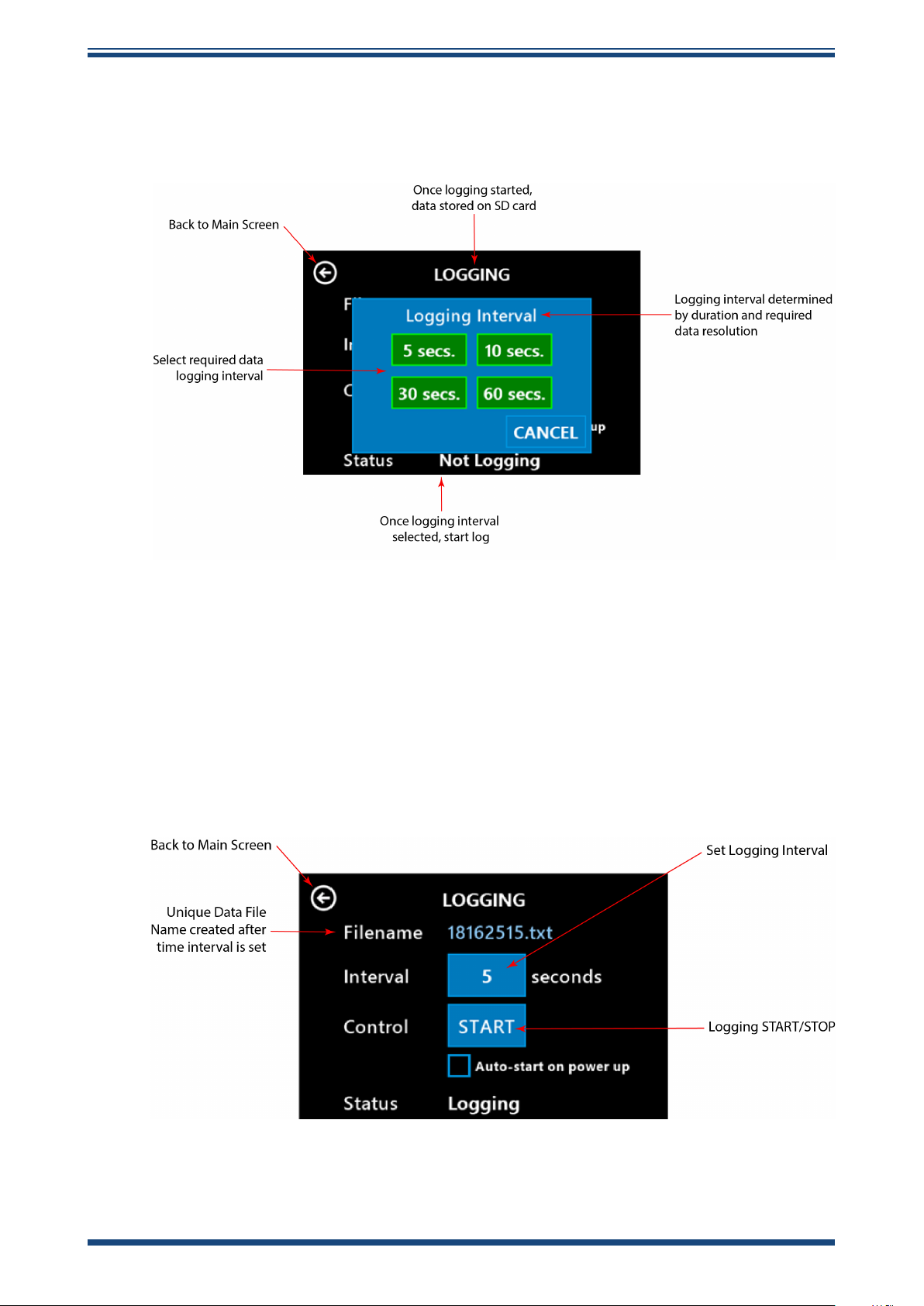
OPERATION
3.2.4 Dew-Point, Pressure, Temperature and Time & Date Logging Interval
The data log interval is selected before logging from a preset selection table, as shown
below.
Easidew PDP Dryer Portable User Manual
Figure 11
3.2.5 Start Data Logging Setup Screen
After the data log interval is selected, the screen shown below conrms the unique .txt
le name where the data is stored. To enable data logging, press the Control START
icon.
If you require the portable to automatically start data logging on power up, select the
‘Auto-start on power up’ box.
Data Log Interval Selection Screen
Figure 12
Start Data Logging Screen
12 99001 Issue 1.2 October 2024
Page 21
Easidew PDP Dryer Portable User Manual
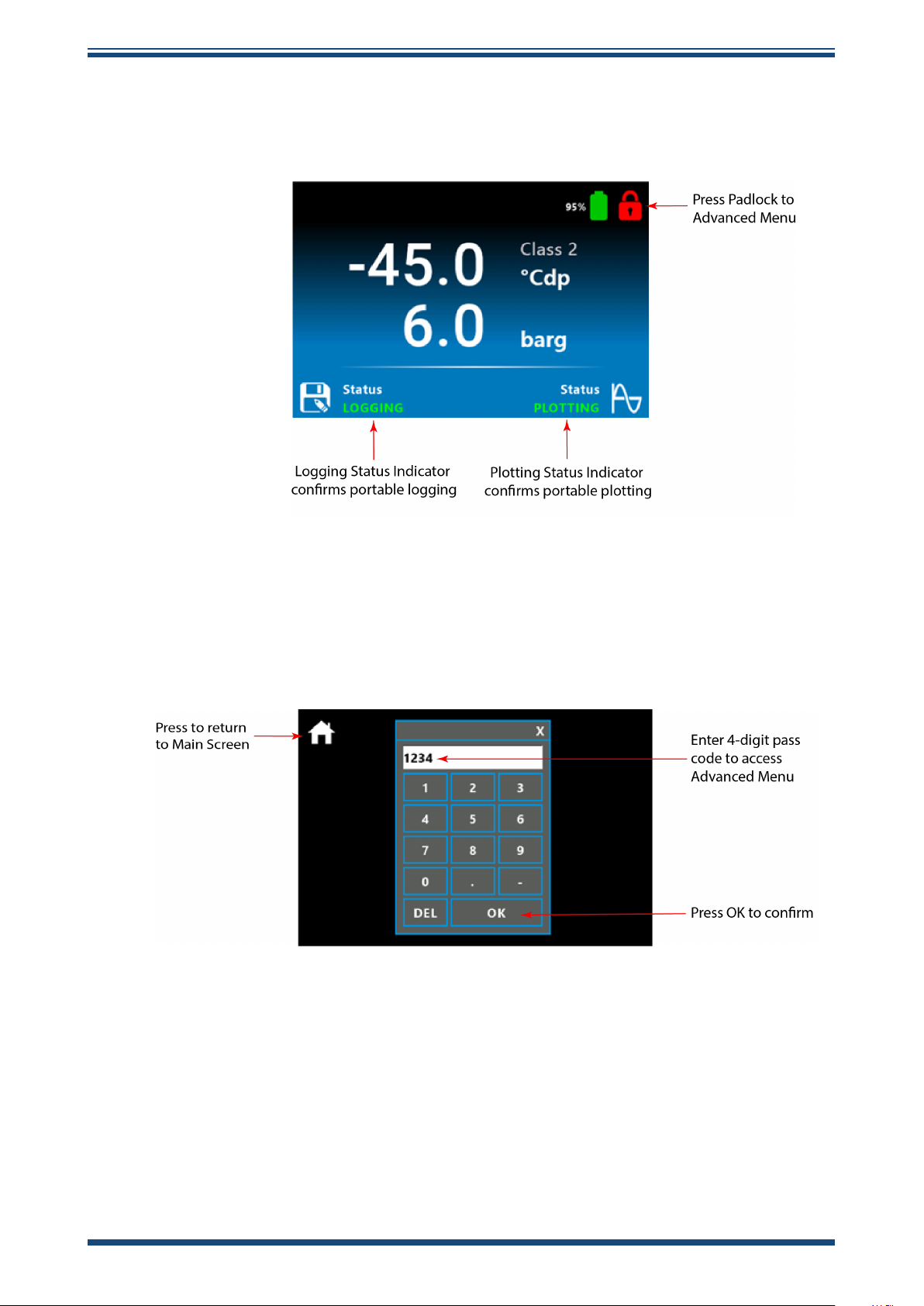
3.2.6 Accessing the Advanced Menu Functions
The advanced functionality and graphing function setup is accessed in the Advanced
menu, which is reached by selecting the red padlock.
OPERATION
Figure 13
3.2.7 Security Code Protection for Advanced Menu
To access the advanced menu, enter the security code 5618.
Figure 14
Advanced Menu Access Screen
Security Code Screen
Michell Instruments 13
Page 22
OPERATION
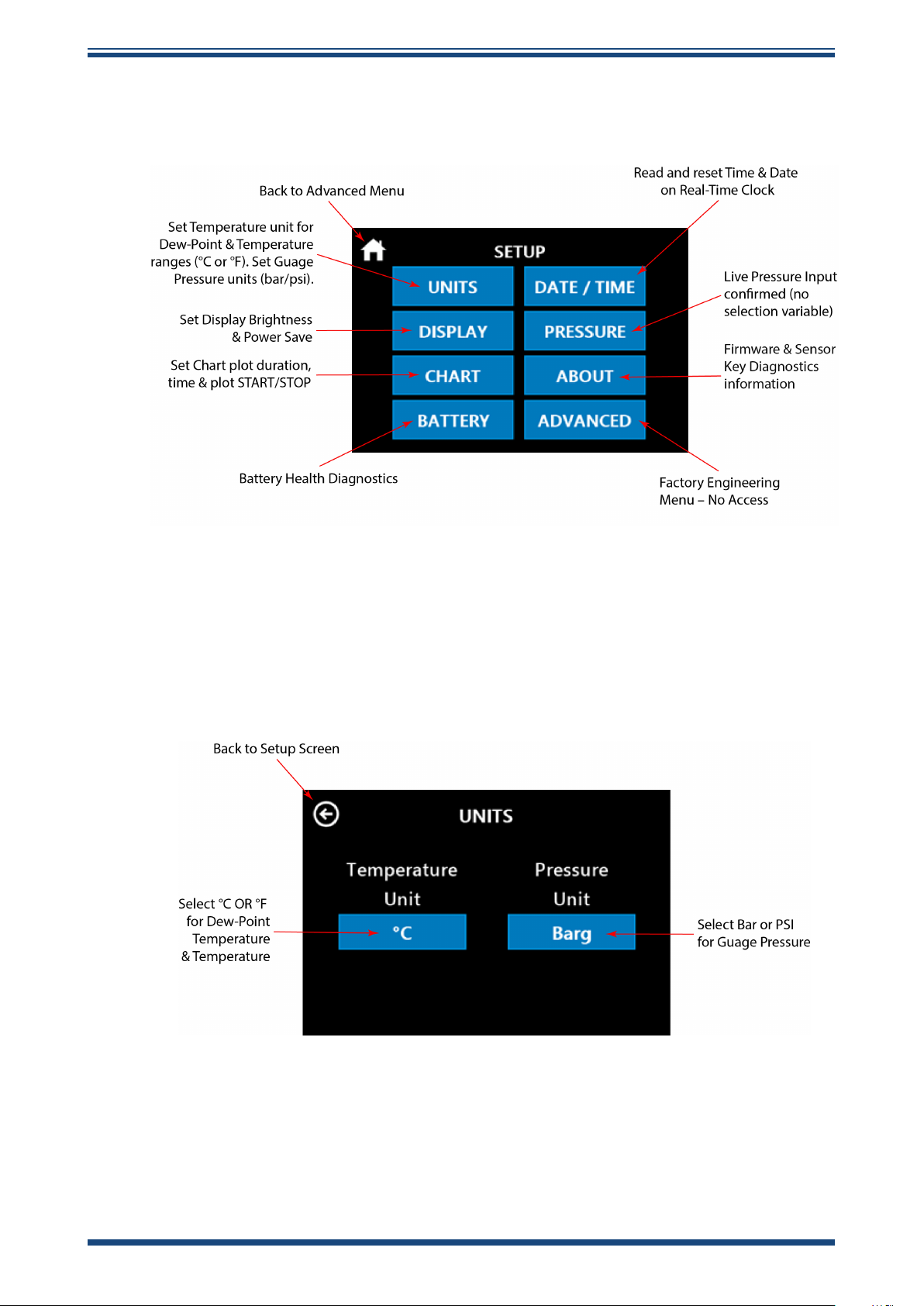
3.2.8 Advanced Menu Setup Screen
Once the security code has been entered, you will have access to the advanced menu.
Easidew PDP Dryer Portable User Manual
3.2.9 Parameter Scaling
The portable provides two Temperature and two Pressure scales. On the Parameter
Scaling screen shown below, press the appropriate blue button to select the required
scale.
Figure 15
Advanced Menu Setup Screen
Figure 16
Parameter Scaling Screen
14 99001 Issue 1.2 October 2024
Page 23
Easidew PDP Dryer Portable User Manual
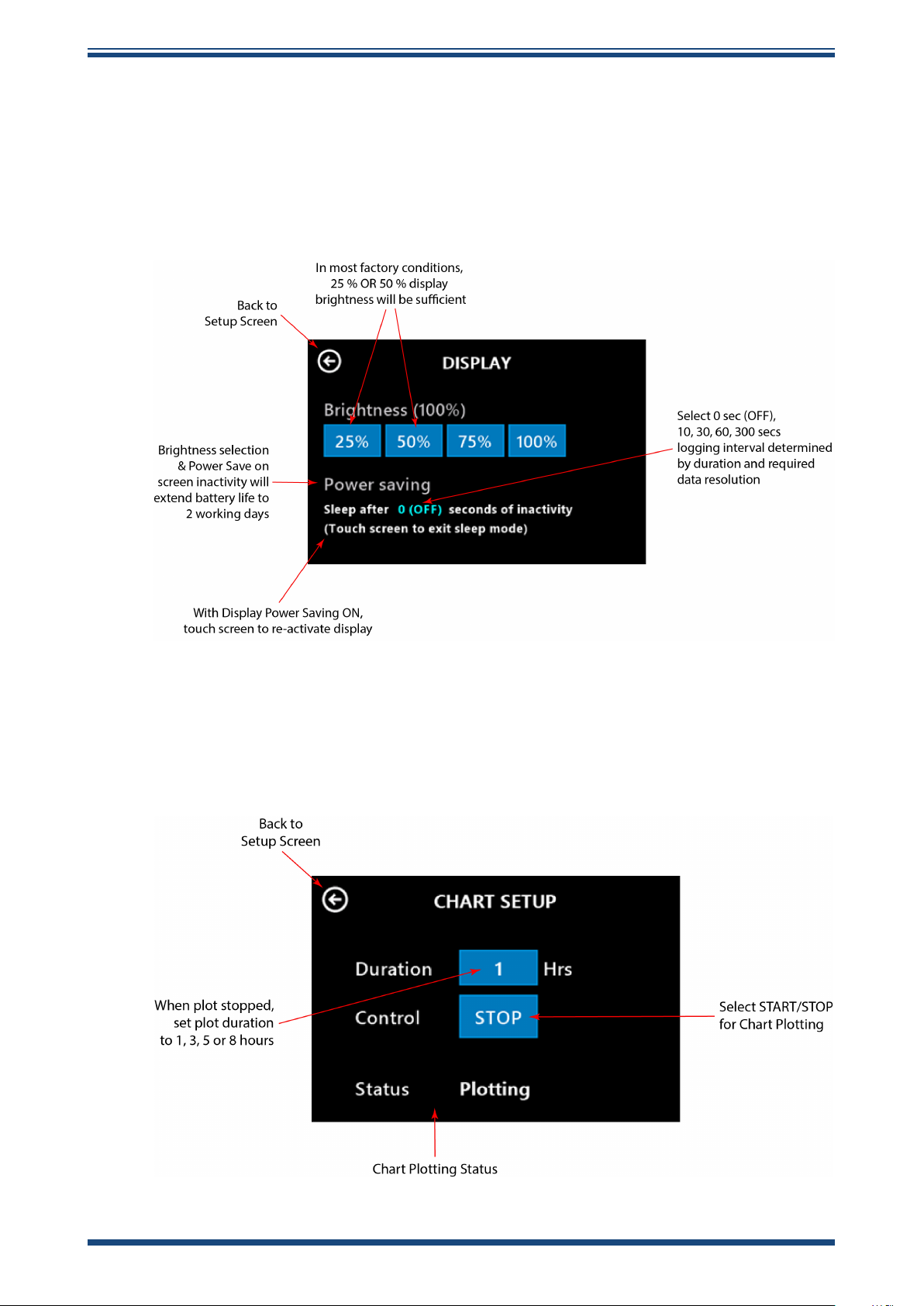
3.2.10 Display Brightness and Power Save
The display consumes approximately 70 % of the power drain on the rechargeable
battery. Careful selection of both the display brightness and display power saving will
ensure the portable battery acheives the stated life of two working days. Once the unit
is installed and logging on the outlet of the dryer, the display does not need to be set
in continuous operation and will go into power saving mode (showing a blank screen),
only being reactivated if the screen is touched.
OPERATION
Figure 17
3.2.11 Dew-Point and Pressure Chart Plotting Set Up
On the screen below, the duration of the chart plotting/graphing function is dened.
Use the Control button to START or STOP the chart plotting.
Display Screen
Figure 18
Chart Setup Screen
Michell Instruments 15
Page 24
OPERATION
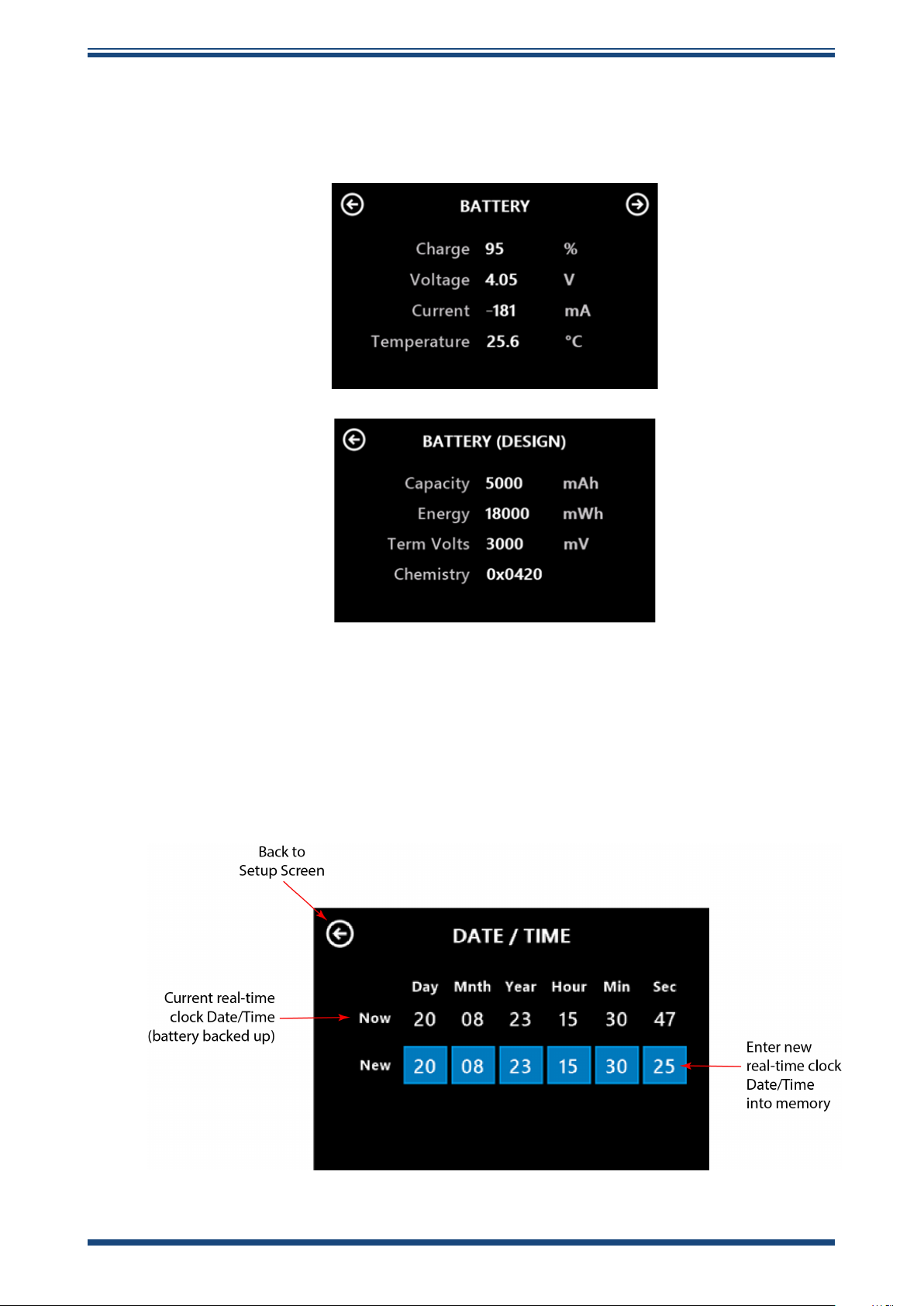
3.2.12 Battery Health Diagnostics
The two screens below provide visual conrmation of the state of the internal
rechargeable battery.
Easidew PDP Dryer Portable User Manual
3.2.13 Date/Time Screen
The screen below allows the user to change the reference date and time set within
the portable. This is needed if the unit is used in dierent time zones and allows for
readjustment of the internal clock.
Figure 19
Battery Health and Diagnostics Screens
Figure 20
Date/Time Screen
16 99001 Issue 1.2 October 2024
Page 25
Easidew PDP Dryer Portable User Manual
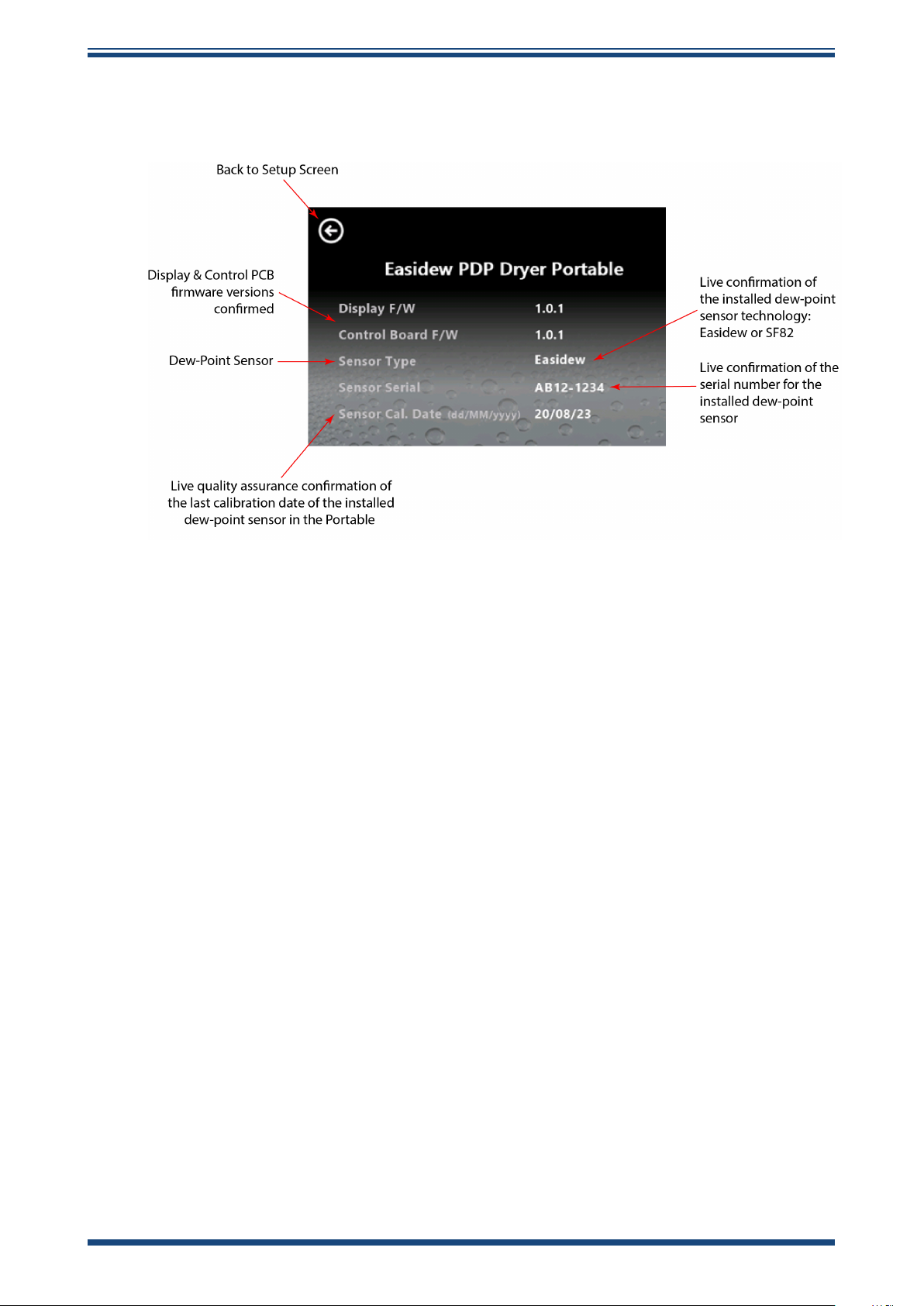
3.2.14 Unit Firmware and Sensor Diagnostics
This screen conrms the rmware revision used within the portable.
OPERATION
Figure 21
3.3 Data Logging Download
The Easidew PDP Dryer Portable hygrometer monitors and logs key parameters like
dew point, pressure and temperature in real time. The data is stored internally on the
integral SD memory card.
Downloading this data is simple and requires no special application software. The
process is explained below:
1. When a data logging operation is started, the portable assigns a unique
le name to that data le in .txt le format.
2. When the USB-C cable is connected from the portable to any computer,
the portable behaves like a normal external memory drive when connected
to a laptop or PC.
3. To view the data les stored within the portable during dryer spot checking,
open Windows Explorer on a laptop or PC and click on the external drive
representing the portable.
Unit Firmware and Sensor Diagnostics
4. Download the .txt data les directly to your computer and rename the
les as required.
5. The .txt spot-checking data les can be imported into a spreadsheet
software program and will be fully formatted into headed data columns
for ongoing analysis by the user.
6. It is recommend that, after the data les are downloaded from the
portable, good le management is followed and the transferred data les
left on the SD memory card are deleted.
Michell Instruments 17
Page 26
Easidew PDP Dryer Portable User Manual
- 20
4 GOOD MEASUREMENT PRACTICE
Ensuring reliable and accurate moisture measurements requires the correct sampling
techniques, and a basic understanding of how water vapor behaves. This section aims
to explain the common mistakes and how to avoid them.
Sampling Materials – Permeation and Diusion
All materials are permeable to water vapor since water molecules are extremely small
compared to the structure of solids, even including the crystalline structure of metals.
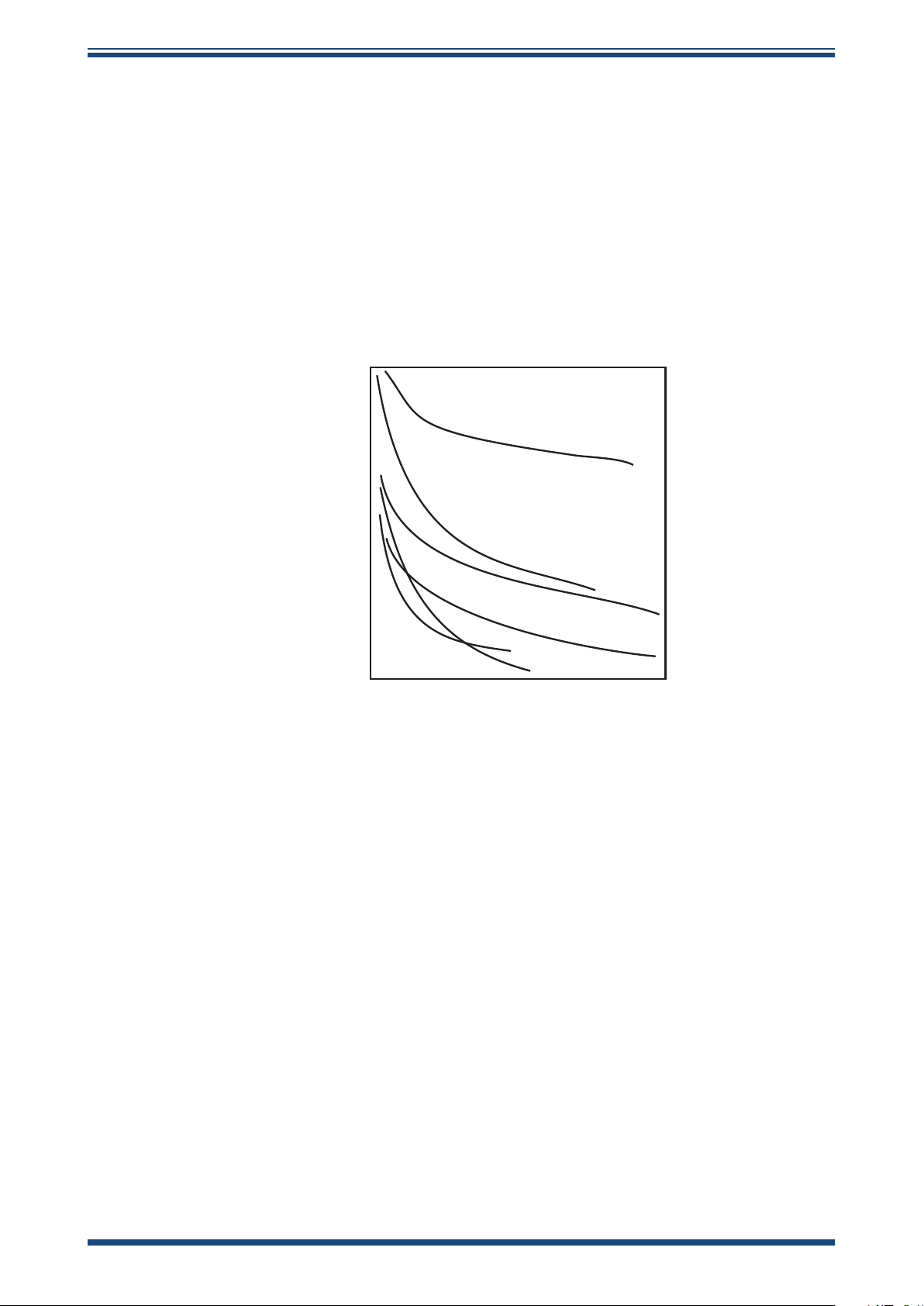
The graph above demonstrates this eect by showing the increase in dew point
temperature seen when passing very dry gas through tubing of dierent materials,
where the exterior of the tubing is in the ambient environment.
- 30
- 40
- 50
Dew point (ºC)
- 60
- 70
Figure 22
nickel
stainless steel
1 2 3 4 5
Time (hours)
Material Permeability Comparison
nylon
copper
polyethylene
PTFE
What this demonstrates is the dramatic eect that dierent tubing materials have on
the humidity levels of a gas passed through them. Many materials contain moisture
as part of their structure and when these are used as tubing for a dry gas the gas
will absorb some of the moisture. Always avoid using organic materials (e.g. rubber),
materials containing salts and anything which has small pores which can easily trap
moisture (e.g. nylon).
As well as trapping moisture, porous sampling materials will also allow moisture vapor
to ingress into the sample line from outside. This eect is called diusion and occurs
when the partial water vapor pressure exerted on the outside of a sample tube is
higher than on the inside. Remember that water molecules are very small so in this
case the term ‘porous’ applies to materials that would be considered impermeable in
an everyday sense – such as polyethylene or PTFE. Stainless steel and other metals
can be considered as practically impermeable and it is surface nish of pipework that
becomes the dominant factor. Electropolished stainless steel gives the best results over
the shortest time period.
Take into consideration the gas you are measuring, and then choose materials appropriate
to the results you need. The eects of diusion or moisture trapped in materials are
more signicant when measuring very dry gases than when measuring a sample with a
high level of humidity.
18 99001 Issue 1.2 October 2024
Page 27
Easidew PDP Dryer Portable User Manual
Temperature and Pressure eects
As the temperature or pressure of the environment uctuates, water molecules are
adsorbed and desorbed from the internal surfaces of the sample tubing, causing small
uctuations in the measured dew point.
Adsorption
solid to the surface of a material, creating a lm. The rate of adsorption is increased at
higher pressures and lower temperatures.
Desorption
constant environmental conditions, an adsorbed substance will remain on a surface
almost indenitely. However, as the temperature rises, so does the likelihood of
desorption occurring.
Ensuring the temperature of the sampling components is kept at consistent levels is
important to prevent temperature uctuation (i.e. through diurnal changes) continually
varying the rates of adsorption and desorption. This eect will manifest through a
measured value which increases during the day (as desorption peaks), then decreasing
at night as more moisture is adsorbed into the sampling equipment.
is the adhesion of atoms, ions, or molecules from a gas, liquid, or dissolved
is the release of a substance from or through the surface of a material. In
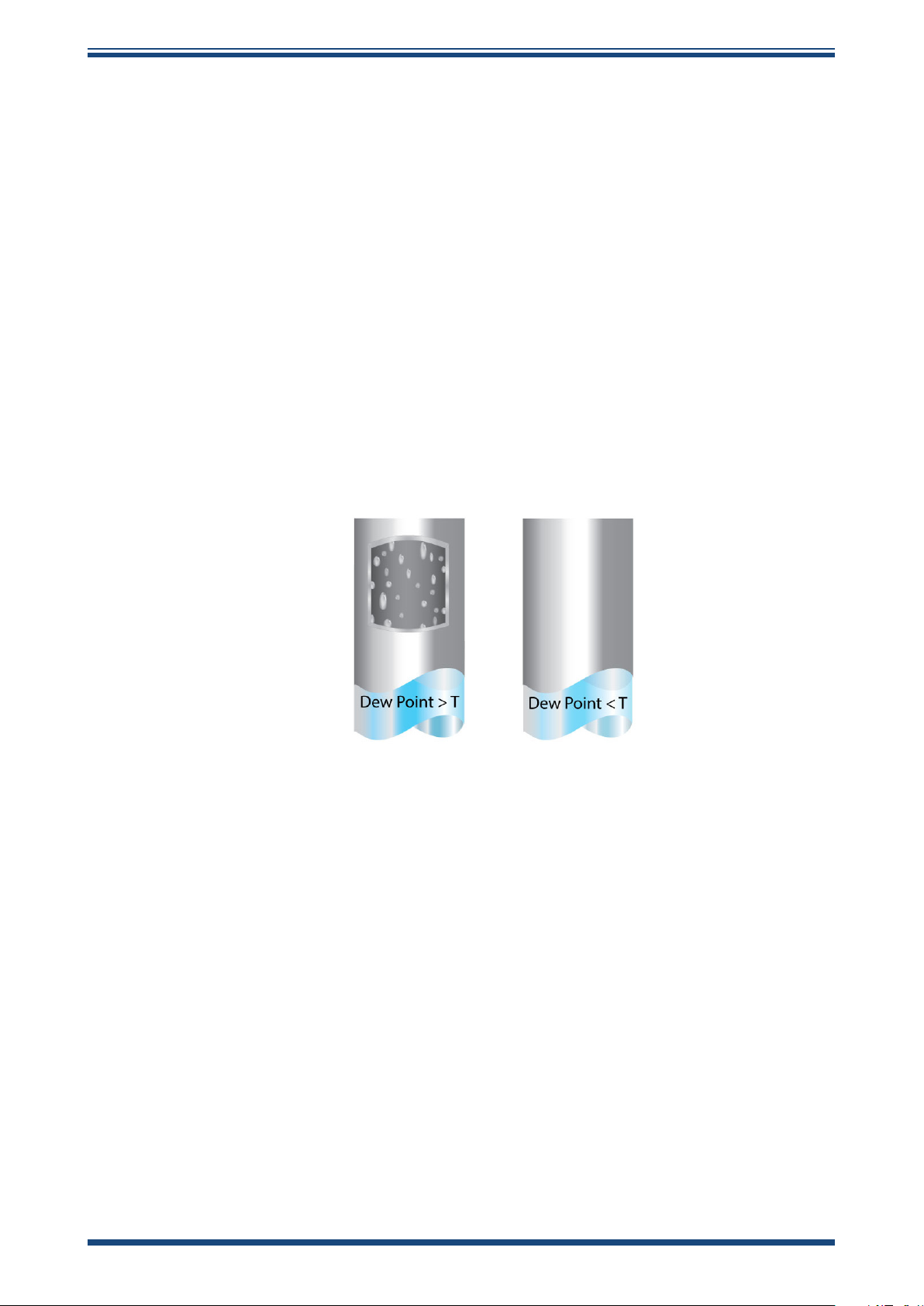
If temperatures drop below the sample dew point, water may condense in sample
tubing and aect the accuracy of measurements.
Maintaining the temperature of the sample system tubing above the dew point of the
sample is vital to prevent condensation. Any condensation invalidates the sampling
process as it reduces the water vapor content of the gas being measured. Condensed
liquid can also alter the humidity elsewhere by dripping or running to other locations
where it may re-evaporate.
Although ambient pressure does not change drastically in a single location, the gas
sample pressure does need to be kept constant to avoid inconsistencies introduced
by adsorption or desorption. The integrity of all connections is also an important
consideration, especially when sampling low dew points at an elevated pressure. If
a small leak occurs in a high-pressure line, gas will leak out; however, vortices at the
leak point and a negative vapor pressure dierential will also allow water vapor to
contaminate the ow.
Theoretically ow rate has no direct eect on the measured moisture content, but
in practice it can have unanticipated eects on response speed and accuracy. An
inadequate ow rate may:
Michell Instruments 19
Page 28

Easidew PDP Dryer Portable User Manual
• Accentuate adsorption and desorption eects on the gas passing through
the sampling system.
• Allow pockets of wet gas to remain undisturbed in a complex sampling
system, which will then gradually be released into the sample ow.
• Increase the chance of contamination from back diusion. Ambient air
that is wetter than the sample can ow from the exhaust back into the
system. A longer exhaust tube can help alleviate this problem.
• Slow the response of the sensor to changes in moisture content.
An excessively high ow rate can:
• Introduce back pressure, causing slower response times and unpredictable
changes in dew point
• Result in a reduction in depression capabilities in chilled mirror instruments
by having a cooling eect on the mirror. This is most apparent with gases
that have a high thermal conductivity such as hydrogen and helium.
System design for fastest response times
The more complicated the sample system, the more areas there are for trapped moisture
to hide. The key pitfalls to look out for here are the length of the sample tubing and
dead volumes.
The sample point should always be as close as possible to the critical measurement
point to obtain a truly representative measurement. The length of the sample line to the
sensor or instrument should be as short as possible. Interconnection points and valves
trap moisture, so using the simplest sampling arrangement possible will reduce the time
it takes for the sample system to dry out when purged with dry gas.
Over a long tubing run, water will inevitably migrate into any line, and the eects of
adsorption and desorption will become more apparent.
Dead volumes (areas which are not in a direct ow path) in sample lines, hold onto
water molecules which are slowly released into the passing gas. This results in increased
purge and response times, and wetter than expected readings. Hygroscopic materials
in lters, valves (e.g. rubber from pressure regulators) or any other parts of the system
can also trap moisture.
Plan your sampling system to ensure that the sample tap point and the measurement
point are as close as possible to avoid long runs of tubing and dead volumes.
Filtration
All trace moisture measurement instruments and sensors are by their nature sensitive
devices. Many processes contain dust, dirt or liquid droplets. Particulate lters are used
for removing dirt, rust, scale and any other solids that may be in a sample stream.
For protection against liquids, a coalescing or membrane lter should be used. The
membrane provides protection from liquid droplets and can even stop ow to the
analyser completely when a large slug of liquid is encountered, saving the sensor from
potentially irreparable damage.
20 99001 Issue 1.2 October 2024
Page 29

Easidew PDP Dryer Portable User Manual
Flow Rates
Theoretically ow rate has no direct eect on the measured moisture content, but in
practice it can have unanticipated eects on response speed and accuracy. The optimal
ow rate varies depending on the measurement technology, and can always be found
in the instrument or sensor manual.
An inadequate ow rate can:
• Accentuate adsorption and desorption eects on the gas passing
through the sampling system.
• Allow pockets of wet gas to remain undisturbed in a complex sampling
system, which will then gradually be released into the sample ow.
• Increase the chance of contamination from back diusion: ambient air
that is wetter than the sample can ow from the exhaust back into the
system. A longer exhaust (sometimes called a pigtail) can also help
alleviate this problem.
• Slow the response of the sensor to changes in moisture content.
An excessively high ow rate can:
• Introduce back pressure, causing slower response times and
unpredictable eects on equipment such as humidity generators.
• Result in a reduction in heating capabilities of the sensor tile during the
initialization period. This is most apparent with gases that have a high
thermal conductivity such as hydrogen and helium.
POSSIBLE INJURY! The tubing, valves and other apparatus
attached to this instrument must be adequate for the maximum
!
!
pressure which will be applied, otherwise physical injury to the
operator or bystander is possible.
Before disconnecting the Easidew PDP Dryer Portable from the
gas line, it is essential to vent the system to atmospheric pressure,
otherwise severe injury could result.
Michell Instruments 21
Page 30
MAINTENANCE
5 MAINTENANCE
All eld maintenance outlined in this section is undertaken by removing the service
panel to access the replaceable parts. See gure below.
Easidew PDP Dryer Portable User Manual
Figure 23
Service Panel Removed
5.1 Inlet Filter Maintenance and Replacement
In any gas treatment system, good upstream ltration from the measurement sensors is
recommended. However, if any contamination enters the portable, there is a large inlet
particulate lter upstream of the pressure, temperature and dew-point sensors. It is vital
for this inlet lter to be checked regularly for signs of particulate contamination.
10 replacement lters are supplied in the bottom left-hand pocket in the case lid. The
process for changing these is as follows:
1. Ensure the portable is switched o and depressurized.
2. Using a standard 2.5-mm Allen key, remove the four Allen bolts and lift
the service panel away. Keep the bolts safe and clean.
3. Using a suitable spanner on the hex face of the lter cap, unscrew the
assembly.
4. Inspect the lter for contamination and, if detected, change the lter.
5. Ensure the O-Ring seal on the surface of the sample block is retained.
6. Screw the lter cap assembly into the sample block by hand.
7. Using the spanner, tighten to a recommended torque of 0.4 Nm.
8. Ret the service panel.
9. It is recommendable to switch on the portable, to check it is operating
correctly.
22 99001 Issue 1.2 October 2024
Page 31

Easidew PDP Dryer Portable User Manual
5.2 Moisture Sensor Maintenance and Replacement
To change the dew-point sensor, follow the steps below:
1. Ensure the portable is switched o and depressurized.
2. Disconnect the M12 electrical cable connector at the back of the dew-
point sensor.
3. Using a suitable spanner on the hex face of the dew-point sensor, unscrew
the sensor and remove.
4. Take the replacement service exchange dew-point sensor and, ensuring
the newly supplied bonded seal is used, screw the dew-point sensor back
into the sample block by hand.
5. Using the spanner, fully tighten to a torque setting of 30.5 Nm (22.5 ft-lbs).
6. Reconnect the M12 electrical cable connector onto the sensor.
7. Ret the service panel.
MAINTENANCE
8. It is recommended to switch on the portable, to check it is operating
correctly following the sensor upgrade.
9. Under the terms of the sensor exchange programme, the sensor that has
been removed should be correctly packaged, documented and returned
to your local Michell subsiduary or distributor for return to our factory.
5.3 Integral Battery Replacement
The rechargeble battery should not need to be replaced regularly. If replacement is
required, the new battery must be of the same make and model to ensure compatibility
and safety.
Replacing the battery is simple:
1. Ensure the portable is switched o and depressurized.
2. Undo the velcro strap holding the battery in its holder.
3. Using your ngers, or a very low force non-metallic lever, uncouple the
old battery from its holder.
4. Insert the new battery, making sure it is tted with the correct polarity.
5. Ret the velcro strap, ensuring the battery is held in place.
5.4 SD Card Replacement
It is very unlikely the SD memory card will ever need to be replaced; however, if a
replacement is required, the process is as follows:
1. Ensure the portable is switched o and depressurized.
2. Carefully push the SD card back into its holder, withdraw and replace with
the new SD card.
Michell Instruments 23
Page 32

SHIPPING
!
6 SHIPPING
For shipping purposes, the instrument should be packed in its original carton, which will
provide the recommended degree of protection during transit.
To prepare the instrument for shipping, proceed as follows:
1. Switch the instrument o and remove any connections to the Gas In and
Gas Out ports and any external sensors connected to it.
2. If tted, remove the instrument from its carrying case.
3. Pack the instrument in its original carton (1) as shown below.
NOTE: It is not necessary to return any accessories unless they
require repair/replacement. Any returned accessories can be
packed in the box (3).
4. Create a packing list detailing all equipment contained in the box, place it
inside the box and seal the box.
Easidew PDP Dryer Portable User Manual
Before disconnecting the Easidew PDP Dryer Portable from
the gas line, it is essential to vent the system to atmospheric
pressure, otherwise severe injury could result.
24 99001 Issue 1.2 October 2024
Page 33

Easidew PDP Dryer Portable User Manual
APPENDIX A
Appendix A
Technical Specications
Michell Instruments 25
Page 34

APPENDIX A
Easidew PDP Dryer Portable User Manual
Appendix A Technical Specications
Product EA-PDP-B1 EA-PDP-B2
Performance Specications
Measurement Technology
Dew-Point Sensor Model Easidew EA2-TX-M12 SF82-TX-M12
ISO 8573-1 Moisture Air Quality
Class Compliant
Moisture Measurement Range -100...+20 °C (-148...+68 °F) dew point -60...+60 °C (-76...+140 °F) dew point
Accuracy ±2 °C (±3.6 °F) dew point*
Moisture Response Time
Moisture Repeatability 0.5 °C (0.9 °F) dew point
Moisture Calibration Traceable 13-point calibration certicate Traceable 9-point calibration certicate **
Moisture Scales Dew point and ppm
Process Pressure Measurement Internal pressure sensor
Pressure Range Up to 20 barg (290 psig)
Data Logging Parameters Dew point, pressure, temperature, time, date
Electrical Specications
Integral Battery Type Rechargeable lithium-ion
Integral Battery Charge
Connection
Battery Charge Cable 1.5 meter USB-C to USB-C
Battery Charger (optional) Commercial 3A fast charge with 4 global universal power connection adaptors and USB-C 1.5 meter cable
Battery Operating Life Up to 2 working days when used in power save mode
Safety Standard EN 61010-1:2010+A1:2019
Operating Specications
Operating Temperature Range -20 °C...+50 °C (-4...122 °F)
Storage Temperature Range -40...+50 °C (-40...122 °F)
Compensated Moisture Sensor
Temperature Range
Moisture Sensor Flow Rate Recommended: 1...5 Nl/min | Maximum: 15 Nl/min
Mechanical Specications
Ingress Protection IP65 Carry Case closed | IP54 Carry Case open
Carry Case
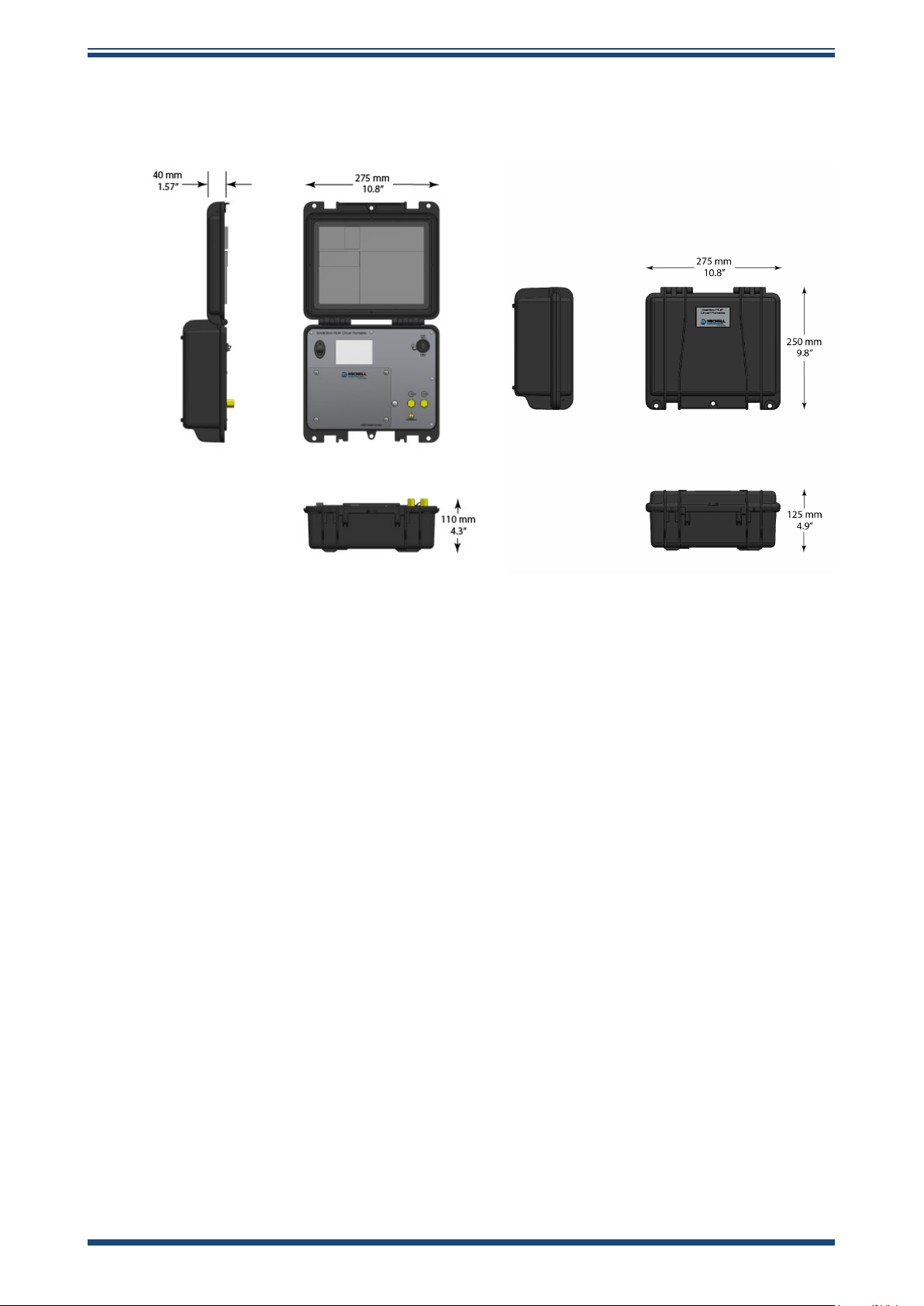
Carry Case Dimensions (Closed) 275 mm x 125 mm x 250 mm (10.8”x 4.9” x 9.8”)
Weight 3.6 kg (7.9 lb)
Integral Sample Block
Gas Wetted Materials 304 stainless sample block, 316 stainless tube
Inlet Filtration on Sample Block Removes 99.5 % of particles ≥0.1 μm supplied with cartridge installed. 10 x spare cartridges provided.
Inlet Filter (Moisture Sensor
Protection)
Inlet/Outlet Gas Connections
Outlet Pigtail Pipe Assembly
(optional)
Service Panel Access to dew-point sensor, SD Card, sample block lter, lithium-ion battery
Display/Data Logging & Graphing Specications
Display Type LCD 3.5” touchscreen graphics; 640 x 480 pixel with screen stylus
Data Transfer Connection USB-C to Laptop or PC
Data Transfer File Type TXT data le
Integral SD Card Memory 2 GB
Graphing Function Plots dew point and pressure response over time
NOTES * Over Compensated Temperature Range
** Calibrated in 10 °C (18 °F) DP steps, -60...+20 °C (-76...+68 °F) DP
Michell ceramic metal-oxide moisture sensor Michell advanced thick-lm fast-response dew-point
Class 1 to Class 4 Class 2 to Class 4
5 mins to T95 (dry to wet) -70...+10 °C
(-94...+50 °F) dew point
USB-C
-20 °C...+50 °C (-4...122 °F)
Lifetime warranty, injection moulded polypropylene with internal storage for sample tube, lters,
USB charging cable, display stylus
Stainless-steel, fully self-contained sample system with pressure sensor, xed orice ports for ow control and
built-in ltration using a standard drop-in cartridge
HDPE <10 µm HMWPE <10 µm
1/8” BSPT to 6 mm Legris push-t pneumatic ttings and 2 m PTFE 6 mm tube
Optional: 1/8” BSPT to 6 mm Swagelok tting, 1/8” BSPT to ¼” Swagelok tting
Coiled stainless tube for pressure safety and Class 1 -70 °C (-94 °F) dew-point moisture ingress protection
3 mins to T95 (dry to wet) -40...+10 °C
V
sensor
(-40...+50 °F) dew point
26 99001 Issue 1.2 October 2024
Page 35
Easidew PDP Dryer Portable User Manual
A.1 Dimensions
APPENDIX A
Case Open (approx.)
Case Closed
Michell Instruments 27
Page 36

APPENDIX B
Easidew PDP Dryer Portable User Manual
Appendix B
Quality, Recycling
& Warranty
Information
28 99001 Issue 1.2 October 2024
Page 37

Easidew PDP Dryer Portable User Manual
APPENDIX B
Appendix B Quality, Recycling, Compliance & Warranty Information
Michell Instruments is dedicated to complying to all relevant legislation and directives. Full
information can be found on our website at:
www.ProcessSensing.com/en-us/compliance/
This page contains information on the following directives:
• Anti-Facilitation of Tax Evasion Policy
• ATEX Directive
• Calibration Facilities
• Conict Minerals
• FCC Statement
• Manufacturing Quality
• Modern Slavery Statement
• Pressure Equipment Directive
• REACH
• RoHS
• WEEE
• Recycling Policy
• Warranty and Returns
This information is also available in PDF format.
Michell Instruments 29
Page 38

APPENDIX C
Easidew PDP Dryer Portable User Manual
Appendix C
Return Document &
Decontamination Declaration
30 99001 Issue 1.2 October 2024
Page 39
Easidew PDP Dryer Portable User Manual
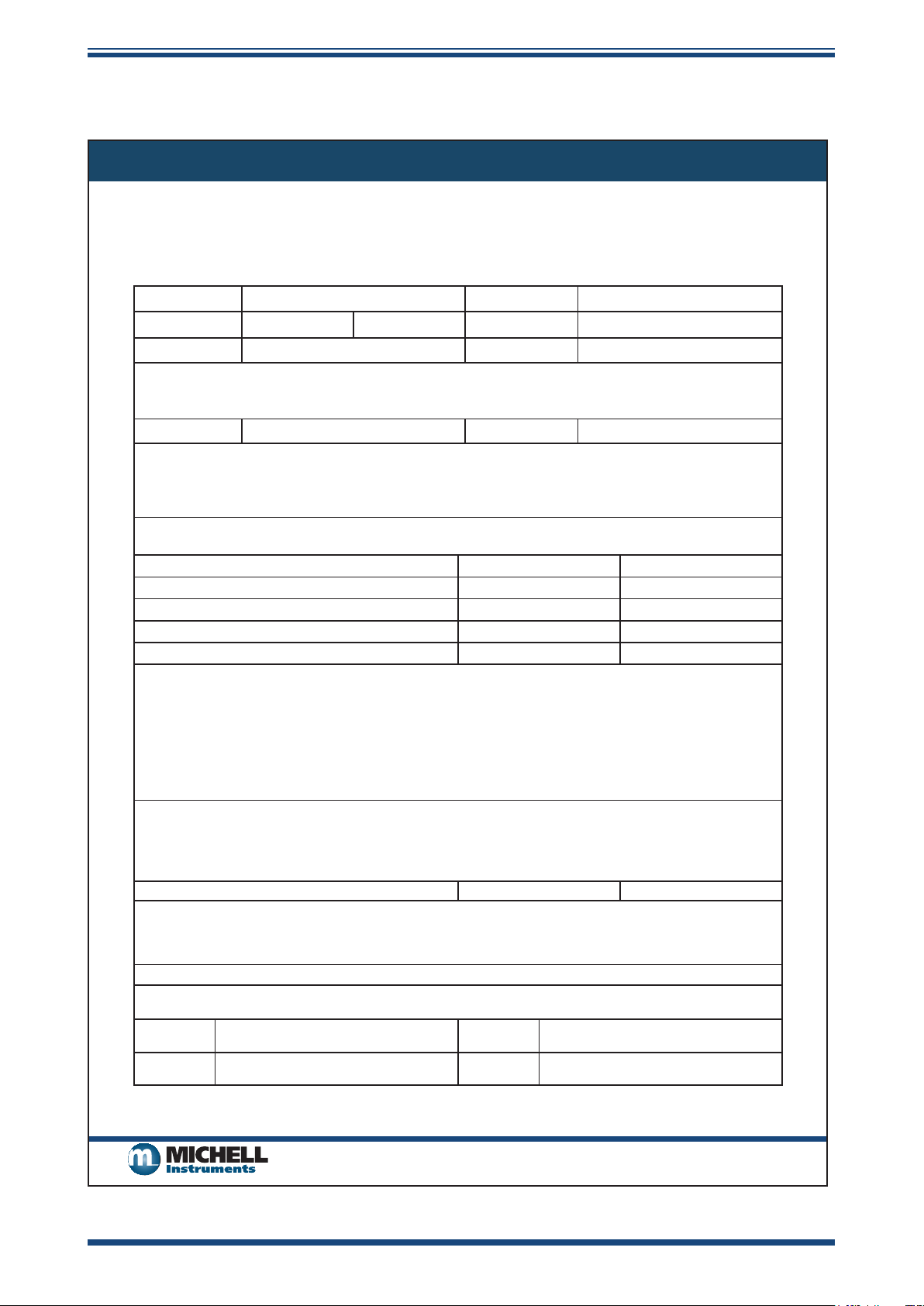
Appendix C Return Document & Decontamination Declaration
Decontamination Certicate
IMPORTANT NOTE: Please complete this form prior to this instrument, or any components, leaving your
site and being returned to us, or, where applicable, prior to any work being carried out by a Michell
engineer at your site.
Instrument Serial Number
Warranty Repair? YES NO Original PO #
Company Name Contact Name
Address
Telephone # E-mail address
Reason for Return /Description of Fault:
APPENDIX C
Has this equipment been exposed (internally or externally) to any of the following?
Please circle (YES/NO) as applicable and provide details below
Biohazards YES NO
Biological agents YES NO
Hazardous chemicals YES NO
Radioactive substances YES NO
Other hazards YES NO
Please provide details of any hazardous materials used with this equipment as indicated above (use continuation sheet
if necessary)
Your method of cleaning/decontamination
Has the equipment been cleaned and decontaminated? YES NOT NECESSARY
Michell Instruments will not accept instruments that have been exposed to toxins, radio-activity or bio-hazardous
materials. For most applications involving solvents, acidic, basic, ammable or toxic gases a simple purge with dry
gas (dew point <-30°C) over 24 hours should be sufcient to decontaminate the unit prior to return.
Work will not be carried out on any unit that does not have a completed decontamination declaration.
Decontamination Declaration
I declare that the information above is true and complete to the best of my knowledge, and it is safe for Michell
personnel to service or repair the returned instrument.
Name (Print) Position
Signature Date
F0121, Issue 2, December 2011
Michell Instruments 31
Page 40

www.ProcessSensing.com
 Loading...