

Page 1
5
Troubleshoong
How can I reset the IF-002 to its factory default sengs?
Note:
81
How can I reset the IF-002 to its factory default sengs?
Step 1:
Step 2:
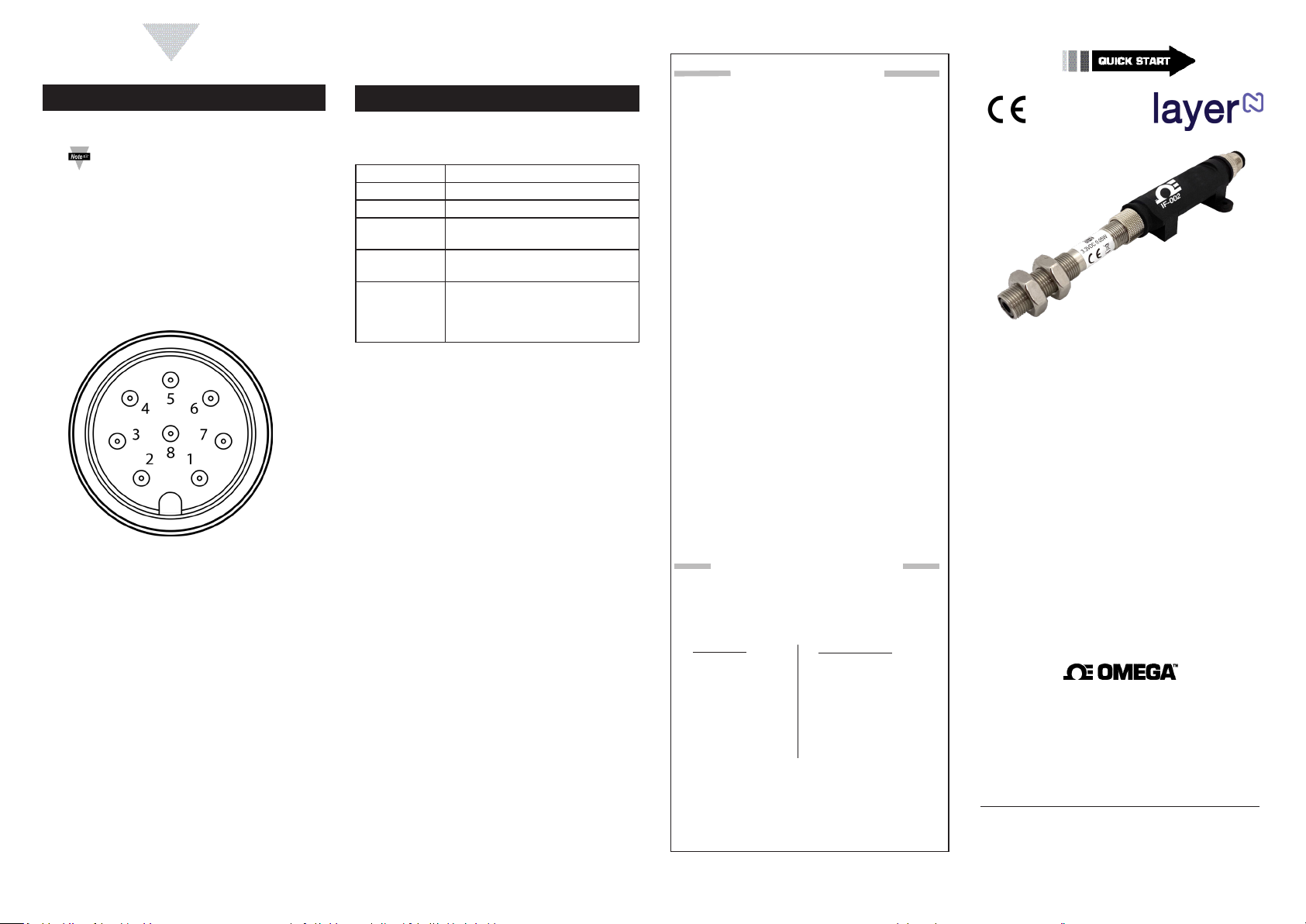
Step 3: Short pins 3 and 4 on the 8-pin connector on the
Step 4:
Step 5:
Step 6:
What sengs should my IF-002 be set to for a rmware
update?
LED Status Signals
Color Status
OFF
YELLOW
RED - 1 second
RED - 1/4
GREEN
A message to the device was not
remains on solid while power is
OMEGA ENGINEERING, INC. warrants this unit to be free of defects
WARRANTY/DISCLAIMER
in materials and workmanship for a period of 13 months from
date of purchase. OMEGA’s WARRANTY adds an additional one (1)
month grace period to the normal one (1) year product warranty
to cover handling and shipping time. This ensures that OMEGA’s
customers receive maximum coverage on each product.
If the unit malfunctions, it must be returned to the factory for evaluation. OMEGA’s Customer Service Department will issue an Authorized
Return (AR) number immediately upon phone or written request.
Upon examination by OMEGA, if the unit is found to be defective,
it will be repaired or replaced at no charge. OMEGA’s WARRANTY
does not apply to defects resulting from any action of the purchaser,
including but not limited to mishandling, improper interfacing, operation outside of design limits, improper repair, or unauthorized modification. This WARRANTY is VOID if the unit shows evidence of having
been tampered with or shows evidence of having been damaged as a
result of excessive corrosion; or current, heat, moisture or vibration;
improper specification; misapplication; misuse or other operating
conditions outside of OMEGA’s control. Components in which wear
is not warranted, include but are not limited to contact points, fuses,
and triacs.
OMEGA is pleased to offer suggestions on the use of its various products. However, OMEGA neither assumes responsibility for any omissions or errors nor assumes liability for any
damages that result from the use if its products in accordance
with information provided by OMEGA, either verbal or written. OMEGA warrants only that the parts manufactured by
the company will be as specified and free of defects. OMEGA
MAKES NO OTHER WARRANTIES OR REPRESENTATIONS OF
ANY KIND WHATSOEVER, EXPRESSED OR IMPLIED, EXCEPT
THAT OF TITLE, AND ALL IMPLIED WARRANTIES INCLUDING
ANY WARRANTY OF MERCHANTABILITY AND FITNESS
FOR A PARTICULAR PURPOSE ARE HEREBY DISCLAIMED.
LIMITATION OF LIABILITY: The remedies of purchaser set
forth herein are exclusive, and the total liability of OMEGA
with respect to this order, whether based on contract, warranty, negligence, indemnification, strict liability or otherwise,
shall not exceed the purchase price of the component upon
which liability is based. In no event shall OMEGA be liable for
consequential, incidental or special damages.
CONDITIONS: Equipment sold by OMEGA is not intended to be used,
nor shall it be used: (1) as a “Basic Component” under 10 CFR 21 (NRC),
used in or with any nuclear installation or activity; or (2) in medical applications or used on humans. Should any Product(s) be used in or with
any nuclear installation or activity, medical application, used on humans,
or misused in any way, OMEGA assumes no responsibility as set forth
in our basic WARRANTY/DISCLAIMER language, and, additionally,
purchaser will indemnify OMEGA and hold OMEGA harmless from any
liability or damage whatsoever arising out of the use of the Product(s)
in such a manner.
RETURN REQUESTS/INQUIRIES
Direct all warranty and repair requests/inquiries to the OMEGA
Customer Service Department. BEFORE RETURNING ANY
PRODUCT(S) TO OMEGA, PURCHASER MUST OBTAIN AN
AUTHORIZED RETURN (AR) NUMBER FROM OMEGA’S CUSTOMER
SERVICE DEPARTMENT (IN ORDER TO AVOID PROCESSING
DELAYS). The assigned AR number should then be marked on the
outside of the return package and on any correspondence.
FOR WARRANTY RETURNS,
please have the following
information available BEFORE
contacting OMEGA:
1. Purchase Order number
under which the product
was PURCHASED,
2. Model and serial number of the
product under warranty, and
3. Repair instructions and/or
specific problems relative
to the product.
OMEGA’s policy is to make running changes, not model changes,
whenever an improvement is possible. This affords our customers
the latest in technology and engineering.
OMEGA is a trademark of OMEGA ENGINEERING, INC.
© Copyright 2019 OMEGA ENGINEERING, INC. All rights reserved.
This document may not be copied, photocopied, reproduced,
translated, or reduced to any electronic medium or machine-readable
form, in whole or in part, without the prior written consent of OMEGA
ENGINEERING, INC.
MQS5815/0320
FOR NON-WARRANTY REPAIRS,
consult OMEGA for current repair
charges. Have the following
information available BEFORE
contacting OMEGA:
1. Purchase Order number to cover
the COST of the repair or
calibration,
2. Model and serial number of the
product, and
3. Repair instructions and/or specific
problems relative to the product.
Probe not included
IF-002
Layer N RS485 Smart Interface
omega.com [email protected]
U.S.A. Omega Engineering, Inc.
Headquarters: 800 Connecticut Ave. Suite 5N01, Norwalk, CT 06854
Toll-Free: 1-800-826-6342 (USA & Canada only)
Customer Service: 1-800-622-2378 (USA & Canada only)
Engineering Service: 1-800-872-9436 (USA & Canada only)
Tel: (203) 359-1660 Fax: (203) 359-7700
e-mail: [email protected]
For Other Locations Visit omega.com/worldwide
The information contained in this document is believed to be correct, but
OMEGA accepts no liability for any errors it contains, and reserves the right to
alter specifications without notice.
Servicing North America:
Page 2
START HERE
2
3
4
Introducon
Materials
Included with your IF-002
• Quick Start Guide
Addional Materials Needed
Oponal Materials
• A Serial Terminal Emulator or SYNC for serial port
Specicaons
RS485 Serial Port
Baudrate:
Parity:
Data Bits:
Stop Bits:
Protocol:
INPUT POWER
Voltage: 5 VDC - 36 V
OUTPUT TO SMART PROBE
ENVIRONMENTAL
Operang Temperature:
Rating:67 when mated
MECHANICAL
Dimensions:
GENERAL
Agency Approvals:
Compability:
DC
Connecng your IF-002
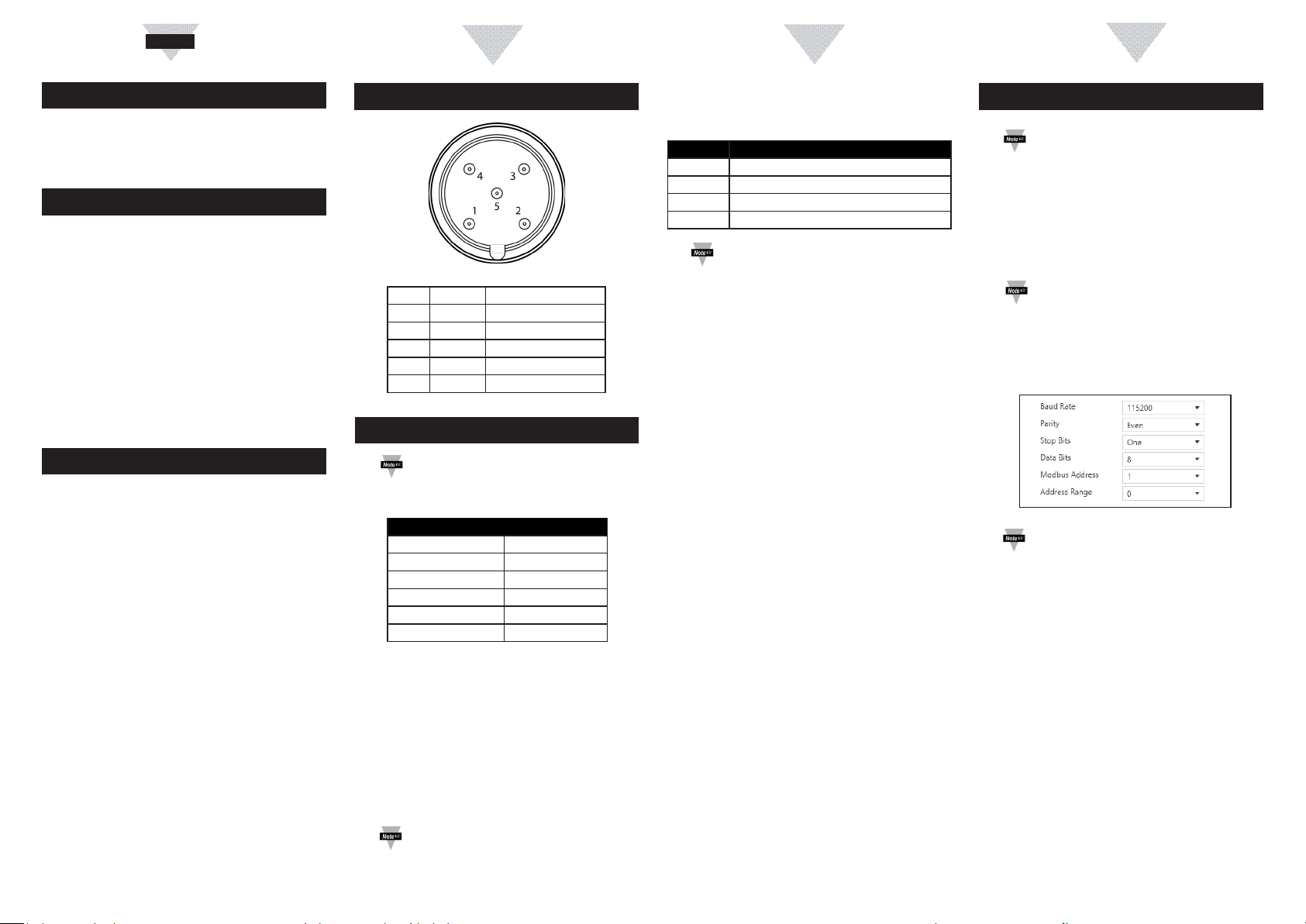
M12 5-Pin Connector
Name Funcon
Pin 1 VDD 5-36 VDC
Pin 2 A’ RS485 Data +
Pin 3 GND Ground
Pin 4 RS485 Data -
Pin 5 Shield Ground
Serial Terminal Conguraon
Note:
SYNC Conguraon
Default Serial Conguraon
1
Address Range
Even
1
8
O(M(
O M = 5
Note:
81
Serial Conguraon Opons
B(audrate)
P(arity)
D(atabits)
S(top)
Note:
S BPDS
S B = 115200, P = Even, D = 8, S = 1
S R
SYNC Conguraon
Note:
Step 1:
Step 2:
Step 3:
Note:
Step 4: Click Set Serial Port
Step 5:
Save
Important:
 Loading...