

Page 1
"Protect Yourself And Your Investment"
OWNER'S MANUAL
Freedom 200+2
COPYRIGHT: OMEGA RESEARCH & DEVELOPMENT 2000
Table Of Contents
The Remote Transmitter ............................................................................................................ 3
The Valet Switch ........................................................................................................................ 3
The Red LED Status Light ......................................................................................................... 4
Transmitter Operations .............................................................................................................. 4
Active Arming The Security System Using The Transmitter .................................................... 5
Passively Arming The Security System With Last Door Arming..............................................6
Security System Armed And Activated .................................................................................. 7-8
Disarming The Security System ................................................................................................. 9
Automatic Rearming ..............................................................................................................9-10
Remote Panic ............................................................................................................................ 10
The Valet Switch And Valet Modes.................................................................................... 10-11
Easy Valet................................................................................................................................. 11
Valet Override - Disarming The Security System Without The Transmitter........................... 11
Red LED Status Light - Security System Status .................................................................12-13
Shock Detection And Prewarn Circuit ..................................................................................... 14
Trunk Release And 3rd Channel Output.................................................................................. 14
Programmable Anti-Carjacking Protection ..........................................................................15-16
Programmable Features........................................................................................................ 17-21
Programming Transmitters ..................................................................................................22-23
Multiple Vehicle Operation......................................................................................................23
Limited Lifetime Warranty ........................................................................................ Back Cover
Introduction
Congratulations on your purchase of this vehicle security system. In learning to operate
your security system, please become familiar with the following three principal components:
the Remote Transmitter, the Red LED Status Light, and the Valet Switch.
The Remote Transmitter: Each security system comes with two pre-learned
transmitters, but can learn up to 4 different transmitters. The transmitter has three buttons:
one large button and two smaller buttons. This system is pre-programmed, through a builtin learning routine, to have the transmitter buttons work in the following configuration:
The large button is used to arm, disarm and panic the security system.
The small center button pressed for 2 seconds operates the trunk release feature.
The small lower button pressed for 2 seconds activates the 3rd Channel output or engages
the Anti-Carjacking feature, provided that it is programmed to operate.
The Valet Switch: This switch is used to prevent automatic system functions, such
as Last Door Arming or Automatic Rearming, by placing the system into Valet Mode. The
Valet Switch is also used, in conjunction with the ignition key, to disarm the security system
in the event the transmitter becomes inoperable. This switch is also used in the procedure
for programming features and transmitters.
Page - 3
The Red LED Status Light: Informs you of the different conditions the system can
be in and also serves as a visual deterrent to break-ins and theft. Please spend time reviewing
this guide and to become familiar with your vehicle security system.
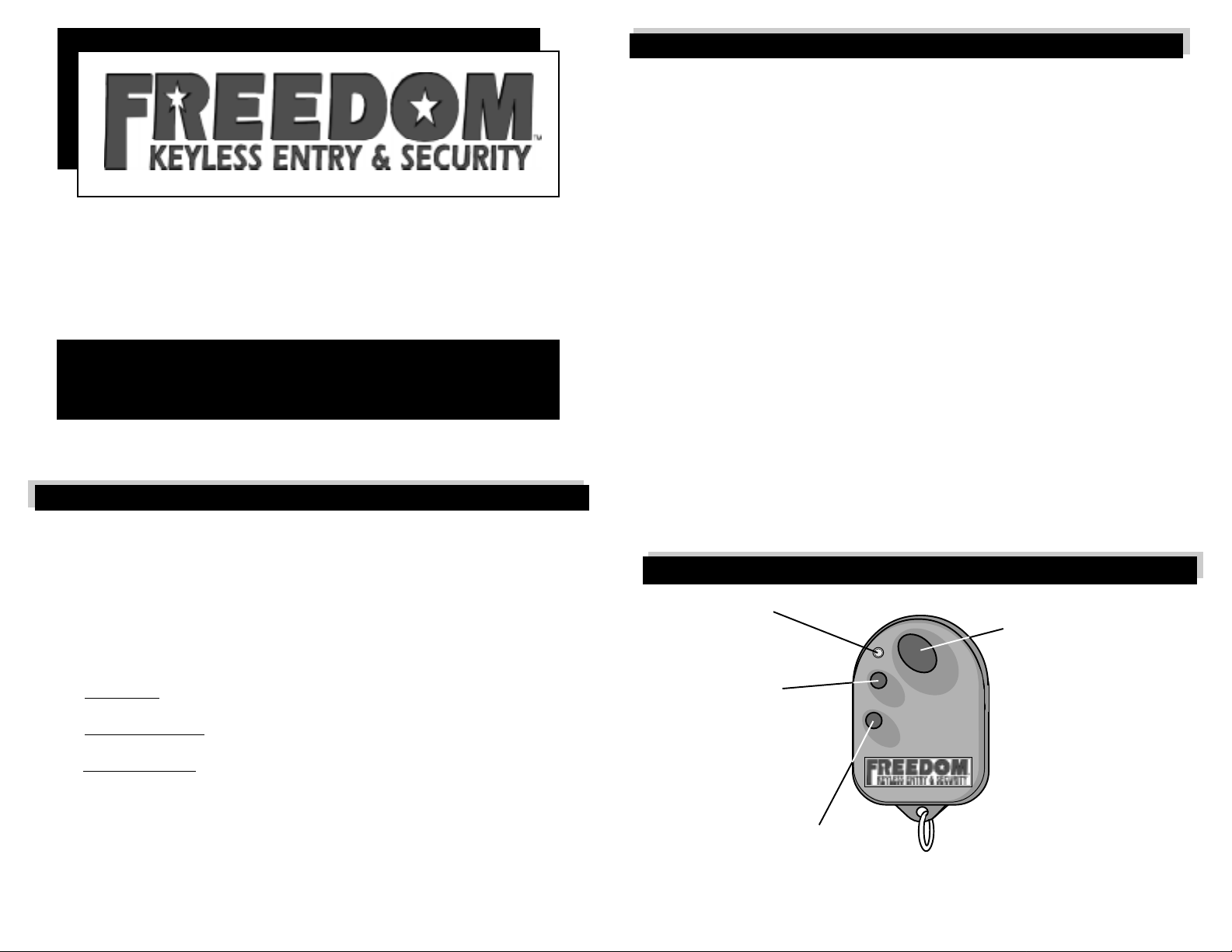
Transmitter Operations
LED Light-
Illuminates when the
Transmitter is operating.
Small Center
Transmitter Button-
Pressing and holding this
button for 3 seconds can be
used to remotely open the
trunk (optional parts may be
needed).
Small Lower
Transmitter Button-
Pressing this button for 3 seconds will
engage the 3rd Channel Output or the programmable AntiCarjacking feature. Please see the sections describing these features.
Page - 4
Large Transmitter Button-
Pressing and releasing this
button will arm and disarm the
alarm, which optionally locks
and unlocks the doors. Pressing and holding this button
for 3 seconds will "Panic" the
alarm- sounding the siren,
flashing the exterior lights.
Page 2

Arming Your Security System
"Arming" your security system, which is to place it into a state whereby an intrusion
attempt will activate it, may be done by two methods. First, the transmitter may be used to
"actively" arm the system, provided the ignition switch is "off" and the system is not in Valet
Mode. Second, an automatic method of "passively" arming the security system is Last Door
Arming. This method may be selectively programmed to operate or not operate, and if it is
utilized, it will not affect the operation of Active Arming via the transmitter.
Actively Arming The Security System Using The Transmitter: The
security system can always be armed with the transmitter, provided the ignition switch is “off”
and the system is not in the Valet Mode. To arm the system, after you exit the vehicle and close
all doors, simply press the large transmitter button once. The siren will chirp once, the parking
lights will flash once, and the LED Status Light will begin flashing, confirming that the system
is arming. Provided the optional doorlock interface was installed, the doors will also lock upon
arming, and the starter interrupt circuit will prevent any attempt to start the vehicle. Three
seconds after the siren chirp the system becomes fully armed, and will activate if an intrusion
attempt is detected.
When active arming, if protected zone is in a violated state, the system will still arm, but
protection for that circuit will be bypassed. Should the affected circuit be returned to its normal
state, protection is restored. When a circuit is in a bypassed state, all other operating circuits
will be protected normally.
Page - 5
Passively Arming The Security System With Last Door Arming: The
security system will arm itself automatically when the vehicle's last door is closed. The moment
the last door closes the system begins a countdown, as indicated by a fast-flashing LED
Status
Light. Thirty seconds after the last door was closed, the siren will chirp once, and the LED
Status Light will change to flashing slowly. When this occurs the alarm is armed, the starter
interrupt output becomes active, and the doors will lock if the door lock interface is installed
and the "Doors Lock With Last Door Arming and Automatic Rearming" feature is turned on.
If a point of entry is reopened before the single chirp indicating arming, the Last Door
Arming will be suspended; when the point of entry is reclosed, the 30 second countdown will
start again. The "Last Door Arming" feature offers a high level of security, since you do not
have to remember to arm the alarm system every time you exit your vehicle. In addition, Last
Door arming may entitle you to an insurance discount. As “Last Door Arming” is a
programmable feature, if its operation is not desired it may be turned off.
-To prevent the security system from Last Door Arming while vehicle is being refueled
or at other times automatic arming is not desired, you should put the system in Valet
Mode or you may keep your door open. Leaving the ignition switch "on" is not
recommended.
-You can still arm the alarm instantly from the transmitter anytime during the 30 second
Last Door Arming countdown.
Page - 6
Security System Armed And Activated
While the security system is in an armed state, the LED Status Light will be flashing. In
this mode, any detected entry or triggered sensor will instantly activate the system. When
activated, the following actions occur:
- The electronic siren will start sounding, changing its sound every 5 seconds to
attract more attention to the vehicle.
- The exterior lights will flash during the activation period.
The siren will sound and the lights will flash for 30 seconds, at which time the system will
automatically reset, unless you disarm the system with the transmitter or Valet Switch and
ignition key. The 30 second activation period is programmable; if desired, the activated period
may be changed to be 60 seconds.
If all protected entries are secure at the end of the activated cycle, the system will stop
and rearm automatically to detect, and respond to, another entry attempt. However, if there
is a protected entry still open, or a sensor still in a violated state at the end of the activation
period, the system will respond one of two ways. If the door circuit is violated, and remains
so, the system will reactivate for up to three more cycles before it rearms and bypasses the
door circuit. Should any of the other protected zones be in a violated state at the end of the
activated cycle, the system will rearm with that zone bypassed. In either case, should the
Page - 7
Continued next page
bypassed zone be secured, protection will be reinstated for that circuit. If the system does
rearm with a bypassed zone, all other secure zones are still fully protected.
After the security system has been activated, the audible disarm confirmation will no
longer be 2 chirps; instead, the system will respond by producing 4 siren chirps. In addition,
the LED Status Light will change to flashing one to four times between pauses, instead of
flashing fast to indicate Automatic Rearming, or being off if Automatic Rearming is turned
off. This flash sequence indicates which protected zone triggered the system.
- 1 flash, pause, repeat = system was activated by current sensing.
- 2 flashes, pause, repeat = system was activated from the hood or trunk circuit.
- 3 flashes and pause = system was activated from the door circuit.
- 4 flashes and pause = system was activated from the auxiliary input.
The LED Status Light will flash this violation code while the system is activated. Upon
disarming, this code will again flash for 90 seconds, or until the ignition switch is turned "on".
The system can retain up to four violation codes in its memory. If multiple zones were violated,
the system’s memory circuit will hold the violation codes in order of occurrence, with a
maximum of four violation codes being held.
Page - 8
Page 3

Disarming Your Security System
While the security system is in the armed condition, pressing the large transmitter button
once will instantly disarm the system and unlock the doors (if connected). Disarming is
confirmed by the siren chirping twice and the parking lights flashing twice. Upon disarming,
your system is also capable of illuminating the interior lights for a safe approach and entry.
If connected, the interior lights will stay on for 30 seconds after disarming, or turn off instantly
if the ignition is turned "on" before that time expires.
However, if the security system was activated and reset while you are away, the disarm
confirmation will change to 4 siren chirps and 2 parking light flashes. The alarm will have this
response upon every disarming, after the activation, until the ignition switch is turned "on",
which will clear the violation from the system’s memory.
Automatic Rearming: On occasion people have unknowingly disarmed their
security system by mishandling the transmitter or by accidentally transmitting from a purse
or pocket. To prevent accidental disarming, this system has an Automatic Rearming feature.
The system will automatically rearm itself 90 seconds after disarming, unless the ignition
switch is turned "on". If the "Doors Lock With Automatic Rearming" Programmable Feature
is utilized, the doors will also lock when the system automatically rearms. Automatic Rearming
is indicated by a fast flashing LED Status Light. Once the ignition switch is turned "on", the
system will stay in the disarmed condition until you are ready to arm the system again from
the transmitter or from the Last Door Arming Feature (which is
Page - 9
Automatic Rearming continued next page
explained on page 6). Opening a door will also cancel Automatic Rearming, although the
countdown will resume when the door is shut if Last Door Arming is on. In this case, while
the door is open, the LED Status Light will not be flashing until the door is shut, upon which
time it will resume flashing fast. Regardless of either condition, if the ignition is turned "on",
all automatic arming functions will cease.
Remote Panic
In a threatening situation, the transmitter may be used to fully activate the system,
sounding the siren, flashing the parking lights and relocking the doors (if configured with a
doorlock interface). Remote Panic can be activated by pressing and holding the transmitter's
large button for three seconds. The system will automatically reset after 60 seconds, or the
transmitter's large button may be pressed and released again to deactivate the Remote Panic
feature. Even if the ignition is on, Remote Panic can still be used, and the transmitter can be
used to stop Remote Panic, but the automatic reset changes to 5 1/2 minutes.
The Valet Switch And Valet Modes
The Valet Switch may be used to keep the security system from actively or passively
arming, by placing the system into Valet Mode. This is useful during extended stopovers at
service stations, for maintenance, valet parking, car washing, etc. There are two forms of
Page - 10
Valet Mode. The first is Easy ValetTM, whereby a disarmed system may be placed into Valet
Mode without the ignition key, and the second form is Valet Override, which will disarm an
armed or activated system and requires the use of the ignition key.
Easy ValetTM: This unique feature can be activated anytime the alarm is in the disarmed
condition. Easy ValetTM is unique because other security systems require the ignition switch
to be "on", but with this system, the ignition can be either "on" or "off". To achieve the Valet
Mode, whenever the security system is disarmed , simply depress the Valet Switch for two
seconds; when the LED Status Light illuminates, release the Valet Switch.
The system will remain in Valet Mode condition regardless of the ignition being "on" or "off".
While in the Valet Mode, the transmitters can still operate the Panic feature, the power
doorlocks (if connected), optional trunk release and 3rd channel output. Easy ValetTM Mode
prevents active arming (via transmitter) or passive arming (via Last Door Arming or Automatic
Rearming) of the system.
Valet Override - Disarming Your Security System Without The
Transmitter: In the event the transmitter is lost, damaged, or its batteries become
exhausted, the Valet Switch and your ignition key may be used to disarm the system:
Step 1: With the system in the armed condition, enter via the driver's door (be aware that the
alarm will activate when the door is opened).
Step 2: Using your key, turn "on" the ignition.
Step 3: Within 5 seconds, press the Valet Switch and the alarm will disarm instantly.
Page - 11
Valet Override continued next page
Should you wish to prevent the security system from becoming armed again, simply place
it into full Valet Mode, as described on the previous page. The Valet Switch is also used in
the programming operations for transmitters and changing programmable features. Both of
these procedures are explained in later sections of this booklet.
The Red LED Status Light
The LED Status Light is used as a visual indicator of the differing states that the security
system can be in at any given time. Additionally, it is also used as part of the Automatic
Transmitter Verification and the Zone Violation operations. The Red LED Status Light is
normally positioned in a location that is easily observed by the driver, and these are the
possible conditions reflected by the LED Status Light:
Security System Status: The primary function of the Red LED Status Light is indicate
the following normal operating parameters of the security system:
1) Off = System is disarmed and not performing any automatic functions.
2) On Constant = System is in the Valet Mode.
3) Flashing Slow = System is fully Armed.
4) Flashing Fast = The 30 second Last Door Arming or the 90 second Automatic
Rearming features are in progress.
Page - 12
Page 4

Automatic Transmitter VerificationTM: Every time that the ignition is turned
"on", the LED Status Light will flash to indicate the number of transmitters programmed to
operate the security system. For example: two flashes and a pause indicates that only two
transmitters are coded to operate the system. The ATV display operates for 10 seconds every
time the ignition switch is turned "on".
5) 1 flash and pause = 1 transmitter is stored in the system's memory.
6) 2 flashes and pause= 2 transmitters are stored in the system's memory.
7) 3 flashes and pause= 3 transmitters are stored in the system's memory.
8) 4 flashes and pause= 4 transmitters are stored in the system's memory.
Zone Violation: If the system has been activated, upon disarming the Red LED Status
Light will flash and pause the following sequences to indicate which protected circuit caused
the activation. This is seen while the system is activated and after disarming. The flash/pause
sequence continues for 90 seconds, or until the ignition switch is turned "on". Four different
Zone Violation codes can be stored by the system.
9) 1 flash and pause = System was activated by current sensing.
10) 2 flashes and pause = System was activated by the sensor, or it prewarned.
11) 3 flashes and pause = System was activated from the hood or trunk circuit.
12) 4 flashes and pause = System was activated from the door circuit.
Page - 13
Shock Detection And Prewarn Circuit
To increase its effectiveness, the Freedom 200+2 security system includes a dual-zone
shock sensor which will activate the system if a shock or impact to the vehicle is detected.
Your system is equipped with a Prewarning feature- a minor impact will cause the security
system to respond by chirping the siren one long and two short chirps, and flashing the
parking lights once. Should the vehicle experience a major impact, the sensor will fully activate
the security system.
Trunk Release And 3rd Channel Output
The Freedom 200+2 has two additional outputs for enhanced flexibility and convenience.
The first of these outputs is commonly used for trunk or rear hatch release; therefore it is
referred to as the “trunk release output”. This output is activated by pressing and holding
the transmitter's small center button for three seconds. If the system is armed, this operation
will automatically disarm the system and unlock the doors, although this is programmable.
The 3rd Channel output is commonly used to activate optional equipment such as remote
car starter units or window control units. This feature is especially enhanced for remote
starting: the when 3rd Channel is utilized, system will partially disarm, ignoring all trigger
circuits except the doors. If the door trigger circuit is violated when the system is in this state,
the remote starter will be turned off, stopping the engine, and system will rearm fully and
activate.
Page - 14
Programmable Anti-Carjacking Protection
Your system has three forms of programmable Anti-Carjacking protection. As sent from
the factory, all three of the Anti-Carjacking features are turned off; to use them, the desired
Anti-Carjacking features must be turned on. To turn these features on, see pages 20-21.
Regardless of which method is used, activation of the Anti-Carjacking operation is
indicated by one parking light flash. Once the Anti-Carjacking process has begun, the user
can cancel it by pressing the Valet Switch once within the next 63 seconds. If not cancelled,
55 seconds after the parking light flash the siren will begin to chirp. The siren will chirp for
8 seconds to alert the user that the system is about to enter into the full Anti-Carjacking
condition.
If the Anti-Carjacking process is not cancelled before the 63 second countdown expires,
the system will start sounding the siren and flashing the parking lights. Once this occurs,
pressing the valet will not stop the Anti-Carjacking operation, and 30 seconds later the
stater interrupt will engage. Anti-Carjacking can only be started while the ignition switch is
on, and once started it will continue even if the ignition is turned off.
Once the Anti-Carjacking feature has started, as indicated by the single parking light
flash, the system will not respond to the transmitters and once fully engaged, the system
will not reset automatically . Once fully engaged, Anti-Carjacking can only be stopped by:
Step 1: Turn the vehicles’ s ignition “of f”.
Step 2: Turn the vehicle’ s ignition “on”.
Step 3: Within 5 seconds, press the Valet Switch.
Page - 15
Anti-Carjacking continued next page
The three forms Anti-Carjacking protection are:
#
1: Activating Anti-Carjacking using the transmitter while the ignition is “on”:
If programmable feature #13 is turned on, the Anti-Carjacking operation may be activated by
pressing and holding the transmitter’s large upper and small center buttons for 4 seconds any
time the ignition is “on”. When Anti-Carjacking is activated, the parking lights will flash once,
and 55 seconds later the siren begins chirping.
#
2: Activating Anti-Carjacking by opening a door while the ignition is “on”:
If programmable feature #14 is turned on, the Anti-Carjacking operation will be activated if one
of the vehicle’s doors is opened and closed while the ignition is “on”. The parking lights will
flash once when the door is closed, and 55 seconds later the siren begins chirping.
#
3: Activating Anti Car-Jacking every time the ignition is turned “on”:
If programmable feature #15 is turned on, the Anti-Carjacking operation will be activated every
time the vehicle’s ignition is turned “on”. The parking lights will flash once 13 seconds after
turning the ignition “on”, and 55 seconds later the siren will start chirping.
With any of the three methods, when the siren starts chirping it will chirp for 8 seconds,
during which time the Anti-Carjacking operation may be cancelled by pressing the Valet
Switch. Once fully activated, it can only be stopped by using the override procedure explained
on the previous page. The Valet Switch may also be pressed to cancel Anti-Carjacking at any
time between the single parking light flash and full activation.
Page - 16
Page 5

Programmable Features
Your Freedom 200+2 security system has 16 Programmable Features, which offer the
ability to customize your system to better fit your personal needs. The Programmable Features
may easily be changed through the Features Programming Mode, which is explained on page
20-21. This section describes each of the Programmable Features, or references the page in
this manual where the feature is explained, and programming.
1) Current Sensing: (Default ON) When this Feature is on, the system will activate while
armed if a current draw is detected in the vehicle's electrical system. As an example, if a vehicle
door is opened the system will detect the current draw made by the dome light illuminating.
2) 3 Minutes / 3 Second Current Sensing Delay: (Default 3 Minutes) This Feature sets
the time delay before the Current Sensing Feature will operate after arming the security system.
Vehicles having delay dome lights or electric cooling fans may require the longer setting.
When programming, press the transmitter's large upper button to set this feature for 3 seconds
or press the small button for 3 seconds setting.
3) Last Door Arming: (Default ON) If this Feature is turned on, the system will
automatically arm itself after you exit the vehicle. This feature is fully explained in detail on
page 6.
4) Doors Lock With Last Door Arming: (Default OFF) If this feature is turned on, and
the previously explained Last Door Arming Feature is on, the doors will also lock when the
security system becomes armed 30 seconds after shutting the last door.
5) Automatic Rearming: (Default ON) This feature prevents accidental disarming, and
is explained on pages 9 and 10.
6) Doors Lock With Automatic Rearming: (Default OFF) If this and the previous
features are turned on, the doors will lock when the security system automatically rearms itself.
7) Steady Siren Or Pulsed Horn Audible Output: (Default Steady Siren) Instead of the
included electronic siren, if preferred the vehicle's existing horn may be used for the security
system's audible responses. The companion Installation Manual explains how to configure
the system to sound the vehicle’s horn. When programming, press the transmitter's large
upper button for the Steady Siren setting or press the small center button for the Pulsed Horn
setting.
8) Doors Lock / Unlock With Ignition On / Off : (Default ON) This feature has the system
automatically lock the doors 5 seconds after the ignition switch is turned "on", and unlock
the doors instantly when the ignition switch is turned "off".
Page - 17
9) 30 or 60 Second Activation Duration: (Default 30 Seconds) This feature sets the
length of time that the siren sounds and the parking lights flash when the security system
is activated. When programming, press the small center transmitter button to select the 60
second activation period or press the transmitter's large upper button to select the 30 second
duration time.
10) Double Unlock Pulse: (Default OFF) Some newer vehicles have power doorlocking
systems which require a double pulse output to unlock the doors. This feature accommodates
these systems, and is included for the benefit of the installer, who can determine if it is
necessary for the Double Unlock Pulse feature to be utilized.
11) Open Door Arming Alert: (Default OFF) This feature ensures that the vehicle’s
doors are secured when the system is armed. Should a door be open when the system is armed
via the transmitter, this feature changes the audible confirmation from one siren chirp to three
siren chirps.
12) Trunk Release Disarms System: (Default ON) This feature, explained on page 14,
adds the convenience of automatically disarming the security system when remote trunk
release is operated. If this Feature is turned off, the system has the enhanced operation for
remote starting. The enhanced operation is the same as the 3rd Channel’s, which is also
explained on page 14.
Page - 19
Page - 18
13) Transmitter Activated Anti-Carjacking: (Default OFF).
14) Door-Activated Anti-Carjack Protection: (Default OFF).
15) Ignition-Activated Anti-Carjack Protection: (Default OFF).
Anti-Carjacking protection operation and all three methods of activating it are explained
in full detail on pages 15 and 16.
16) Confirmation Chirps: (Default ON) This feature configures the system to arm and
disarm with or without audible confirmation siren chirps.
To change any of the Programmable Features in Features Programming Mode:
Step #1: Turn "off" the ignition; within 10 seconds press the Valet Switch 5 times. The siren
will sound a long and short siren chip indicating Features Programming Mode.
Step #2: Within 10 seconds select the desired feature by pressing the Valet Switch the
number of times as the feature number. The siren will chirp the same number of times
to confirm which feature is selected.
Step #3: Within 10 seconds press either the transmitter’s large upper button to turn the
feature on (response is one siren chirp), or the small center button to turn the feature
off (response is two siren chirps). Select and program each desired feature.
Page - 20
Page 6

To exit Feature Programming Mode, allow 10 seconds to expire without programming
activity, or turn on the ignition switch. A long siren chirp indicates the system exiting Feature
Programming Mode.
The Programmable Features, and their factory-set default setting, are:
Feature #1: Current Sensing: Default ON.
Feature #2: 3 Minute or 3 Second Current Sensing Delay: Default 3 Minute.
Feature #3: Last Door Arming: Default ON.
Feature #4: Doors Lock With Last Door Arming: Default OFF.
Feature #5: Automatic Rearming: Default ON.
Feature #6: Doors Lock with Automatic Rearming: Default OFF.
Feature #7: Steady Siren or Pulsed Horn Output: Default Steady Siren.
Feature #8: Doors Lock and Unlock With Ignition On and Off: Default ON.
Feature #9: 30 or 60 Second Activation Duration: Default 30 Seconds.
Feature #10: Double Unlock Pulse: Default OFF.
Feature #11: Open Door Arming Alert: Default OFF.
Feature #12: Trunk Release Disarms System: Default ON.
Feature #13: Transmitter Activated Anti-Carjacking Protection: Default OFF.
Feature #14: Door Activated Anti-Carjacking Protection: Default OFF.
Feature #15: Ignition Activated Anti-Carjacking Protection: Default OFF.
Feature #16: Confirmation Chirps: Default ON.
Programming Transmitters
Up to 4 different transmitters may be programmed to operate your security system. When
a new transmitter is programmed into the system, all previous transmitters will be deleted. If
a third or fourth transmitter is desired, all of the transmitters must be programmed at the same
time into system. To program transmitters to operate your system, follow this procedure:
Step #1: Turn "on" the ignition; within 10 seconds press the Valet Switch 5 times. The siren
will sound a long siren chip indicating Transmitter Programming Mode.
Step #2: To program the first transmitter, within 10 seconds press the large upper
transmitter button until the siren sounds one short chirp. Repeat this step for each
transmitter which is to operate the system.
The system will exit Transmitter Programming Mode if 10 seconds pass without receiving
a new transmission, or immediately upon turning the ignition switch “off” or upon the entry
of a fourth transmitter. Exit from Transmitter Programming Mode is indicated by a long siren
chirp.
In the above Step #2, pressing the transmitter’s large upper button assigns that button
to arm, disarm and panic the system. The other two button’s functions are automatically
assigned per the operations as described in this manual. However, other button or buttons
Page - 21
may be pressed at Step #2, changing the transmitter button operations. This allows one
transmitter to operate Freedom 200+2 systems in multiple vehicles.
Multiple Vehicle Operation: As mentioned, the security system can be programmed to
arm and disarm from other button or button combinations. These alternatives for arm/disarm/
panic are the small center button, the combination of pressing both large upper and small
center buttons at the same time. Thus, up to three different systems may be operated from
one transmitter. Alternative button operation assignment is easily done in the Transmitter
Programming Mode- at Step #2 on the previous page, instead of pressing the large upper
button, either press the small center button or the large upper and small center button
combination.
Small Center Button
Programmed
Trunk Release
Large Upper & Small Center
Buttons
Programmed
Arm, Disarm
& "Panic"
Arm, Disarm
& "Panic"
3rd Channel
Trunk Release
3rd Channel
Page - 23
Page - 22
L I M I T E D L I F E T I M E W A R R A N T Y
Products manufactured and sold by OMEGA RESEARCH & DEVELOPMENT, INC. (the
Company), are warranted to be free from defects in materials and workmanship under normal use. If
a product sold by the Company proves to be defective, the Company will repair or replace it free of
charge within the first year and thereafter all parts to be repaired will be free with only a nominal charge
for Omega Research and Development, Inc.'s labor and return shipping, to the original owner during
the lifetime of the car in which it was originally installed.
All products for warranty repair must be sent postage prepaid to Omega Research & Development,
Inc., P.O. Box 508, Douglasville, Georgia 30133, with bill of sale or other dated proof of purchase.
This warranty is nontransferable and does not apply to any product damaged by accident, physical or
electrical misuse or abuse, improper installation, alteration, any use contrary to its intended function,
unauthorized service, fire, flood, lightning, or other acts of God.
This warranty limits the Company's liability to the repair or replacement of the product. The
Company shall not be responsible for removal and/or reinstallation charges, damage to or theft of the
vehicle or its contents, or any incidental or consequential damages caused by any failure or alleged failure
of the product to function properly. Under No Circumstances Should This Warranty, Or The Product
Covered By It, Be Construed As A Guarantee Or Insurance Policy Against Loss. The Company neither
assumes nor authorizes any person or organization to make any Warranties or assume any liability in
connection with the sale, installation, or use of this product.
This device complies with FCC Rules part 15. Operation is subject to the following two conditions,
(1) This device may not cause harmful interference and, (2) This device must accept any interference
that may be received, including interference that may cause undesired operation.
The manufacturer is not responsible for any radio or TV interference caused by unauthorized
modifications to this equipment. Such modifications could void the user's authority to operate the
equipment.
6/00 MO_FREEDOM-200+2 REV1
 Loading...